














10 Best Macintosh Project Management Software

Prathyusha
Freelance Content Creator
Nov 4, 2026
Prathyusha
Nov 4, 2026

16 min read
Add to preferred sources


Mac users have long valued design, speed, and efficiency, and they expect the same from their project management tools. The best Macintosh project management software helps teams streamline workflows, track deadlines, automate approvals, and keep everyone aligned from anywhere. Whether you're managing design sprints, marketing campaigns, or client projects, modern PM software for Mac can help you plan, execute, and deliver seamlessly.
In this article, we explore the 10 best project management applications for macOS, highlighting their core features, pricing, and use cases, and explaining why Lark stands out as the most unified all-in-one solution for Mac teams. Here is the list of tools:
- Lark: All-in-one project & workflow suite for Mac
- Asana: Robust task & workflow automation on Mac
- Trello: Simple visual Kanban for macOS
- Monday.com: Custom workflows & boards on Mac
- ClickUp: Flexible project views & productivity tools
- Wrike: Enterprise-grade project tracking for Mac
- Smartsheet: Spreadsheet-like project management app
- Basecamp: Team communication meets project planning
- Notion: All-purpose workspace that handles projects
- Microsoft Project: Traditional PM for Mac users

Why Macintosh project management software matters
Macintosh project management software plays a crucial role in helping teams organize, execute, and deliver projects efficiently. It boosts productivity and streamlines collaboration by centralizing communication, documentation, and task tracking in one platform. Teams can plan projects, assign responsibilities, monitor progress, and adapt to changes without switching between multiple tools.
For remote and hybrid teams, these solutions enable real-time communication, ensuring that every update, message, and decision is accessible to all members across time zones. Moreover, Mac-compatible PM tools are known for their cost-effectiveness and scalability, allowing both startups and enterprises to expand operations smoothly.
Types of project management approaches on Mac
Different teams follow different methodologies depending on their project goals, structure, and workflow style. Macintosh project management software supports a variety of approaches from flexible Agile sprints to structured Waterfall models, ensuring teams can plan, execute, and adapt their projects effectively. Here's how each approach fits within Mac-based project environments and how Lark enables them seamlessly.
- Agile & Scrum: Agile focuses on adaptability, collaboration, and continuous improvement through short, iterative cycles. Sprint boards, backlog tracking, and timeline views help teams visualize progress, manage priorities, and quickly respond to change while maintaining consistent delivery.
- Kanban: Kanban emphasizes continuous delivery and visual task flow. Tasks move across stages such as "To Do," "In Progress," and "Done," giving teams a clear overview of workload and bottlenecks. This approach improves transparency, efficiency, and accountability across every project.
- Waterfalls: Waterfall suits projects that follow structured, sequential phases—such as planning, design, implementation, testing, and delivery. Each stage must be completed before moving to the next, making it ideal for projects with fixed scopes and timelines that require detailed upfront planning.
Comparison table: Best Macintosh project management software:
10 project management applications for Mac
1. Lark: All-in-one project & workflow suite for Mac
Lark is a unified workspace that combines communication, documentation, task management, scheduling, and a no-code workflow tooling into a single platform, which is why it often ranks highly in lists of project management tools for teams that prefer one environment rather than many separate apps. On macOS, teams use Lark's desktop app or browser client to run everything from kickoffs to delivery without losing context between conversations, documents, and action items.
Key features:
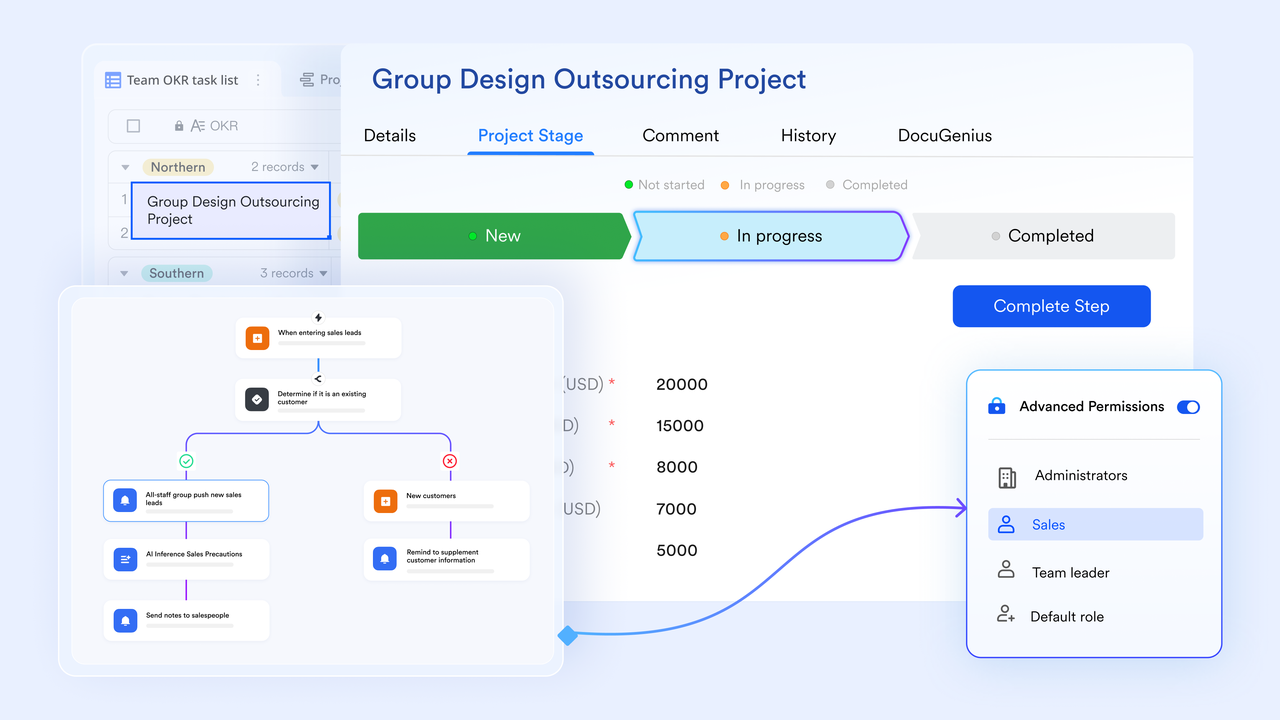
- Lark Base for project data model, views, and automated workflow: At the center of Lark's project capabilities is Lark Base, a no-code database where you model projects, client records, deliverables, and dependencies. Base lets you view the same dataset as lists, Kanban boards, timelines (Gantt), or calendars, so PMs and contributors can switch perspective without rebuilding data. Base also supports rules and automations in the platform's automated workflow engine, so common steps (status changes, reviewer assignment, notifications, dependent task creation) run automatically when triggers occur. Example: when a deliverable's status flips to "Ready for review," Base can assign reviewers, post a message to the project channel, and create a follow-up task for QA all without manual handoffs.
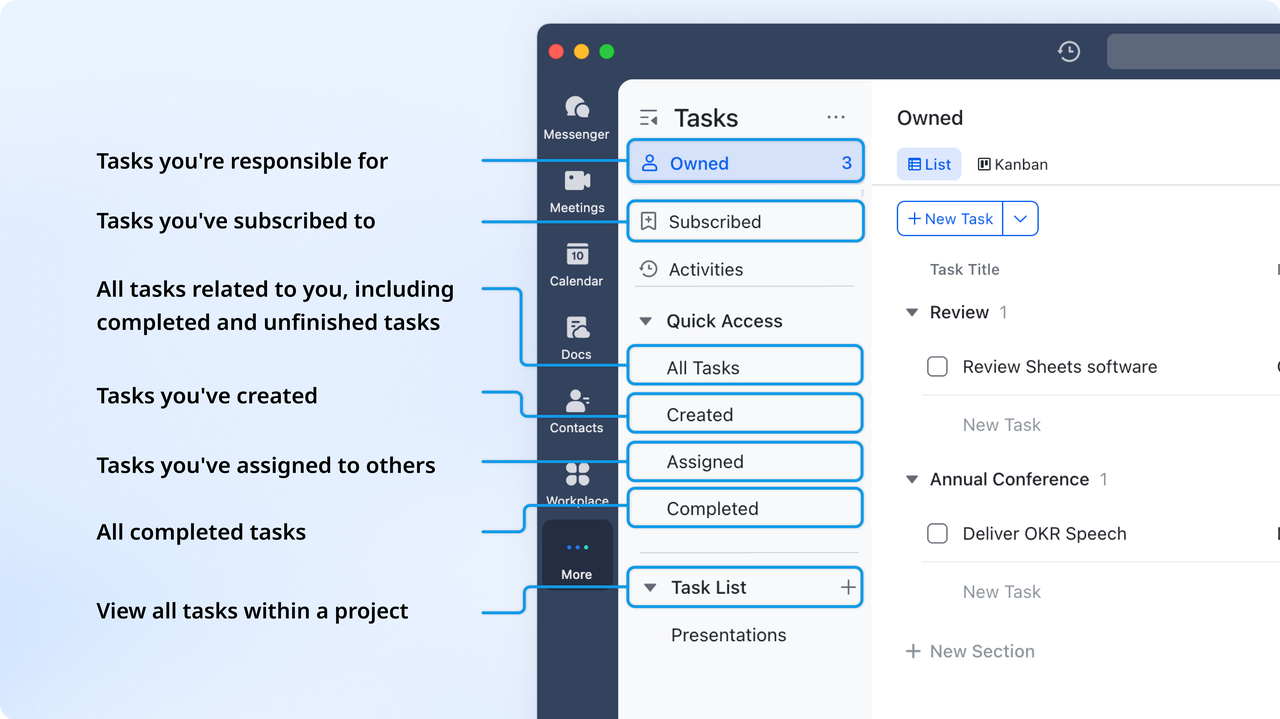
- Lark Tasks for day-to-day assignment and follow up: Lark Tasks is where individual contributors see their to-dos: create tasks from scratch or convert chat messages and doc comments into tasks with owners, due dates, priorities, and attachments. Tasks support checklists, comments, and reminders so execution stays visible. Example: after a client meeting, the lead converts action items from the chat into tasks assigned to analysts; assignees get notifications and calendar entries so nothing slips.
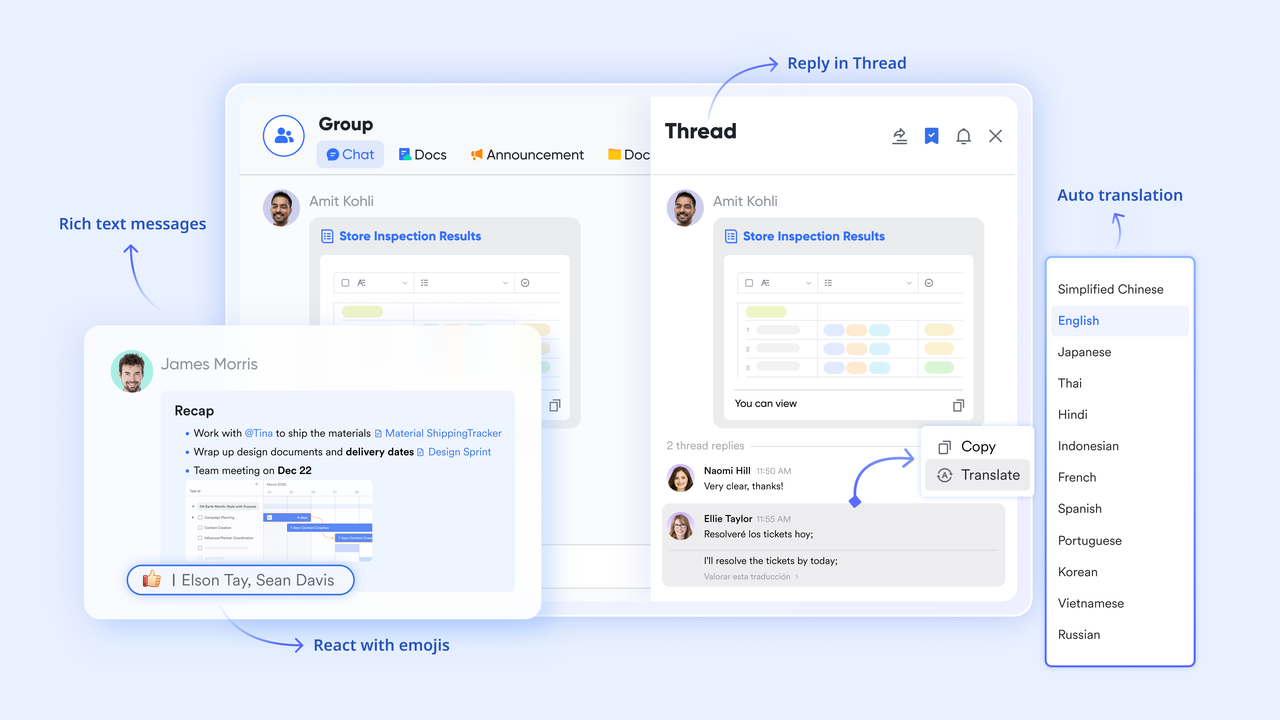
- Lark Messenger for keeping context next to conversation: Lark Messenger keeps team discussion, decisions, and documents close to the work itself—all members can freely share and edit the files. Threads, file previews, and message-to-task conversion mean you can capture commitments immediately and retain the conversational context. Example: a quick message—"Please update section 3 by EOD"—becomes a Tasks item that links back to the message and the relevant Doc.
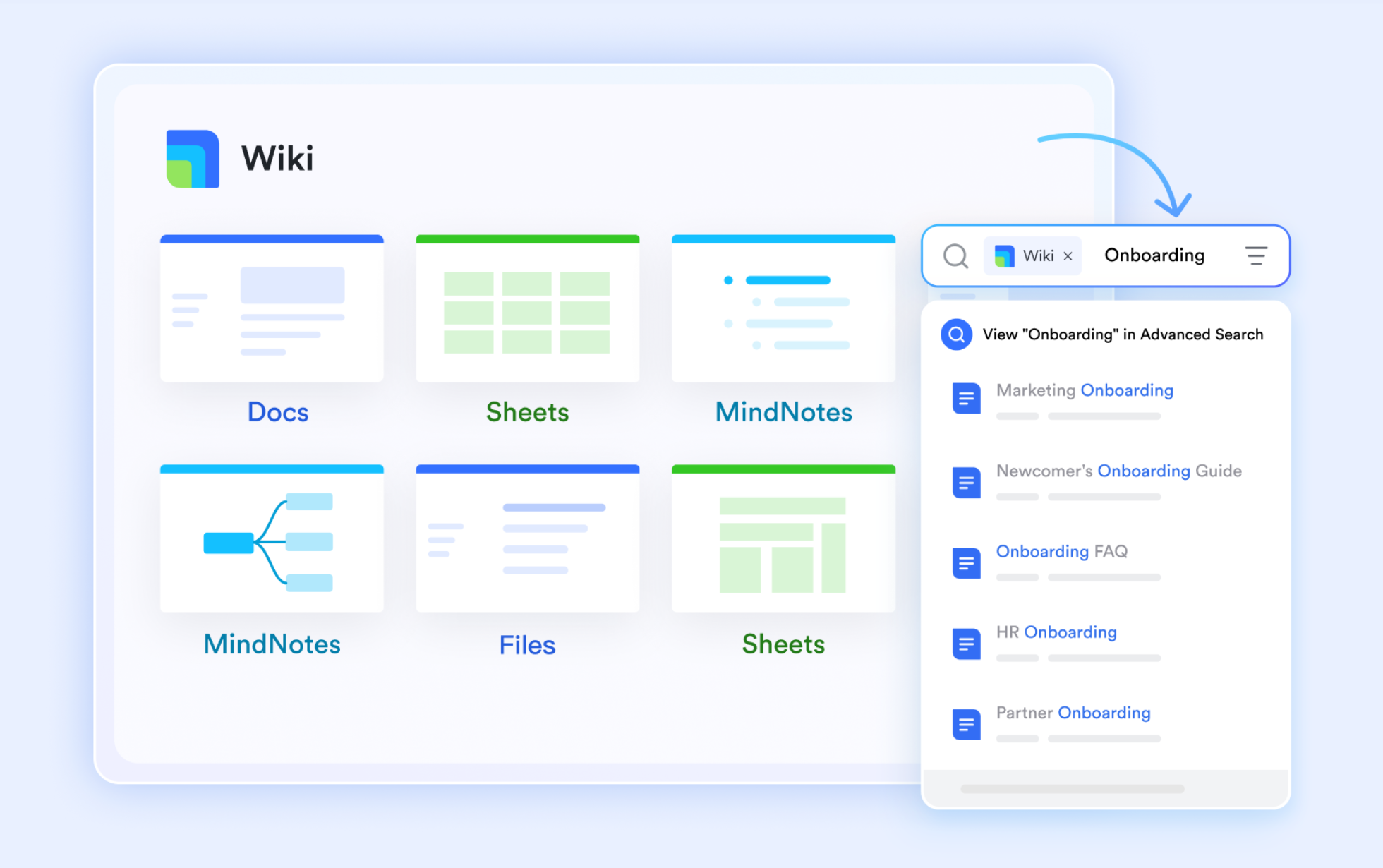
- Lark Docs & Lark Wiki for collaborative deliverables and knowledge: Lark Docs enables real-time co-authoring, inline comments, and version history for proposals, reports, and specs; comments can become tasks and documents can be linked to Base records. Lark Wiki houses playbooks, SOPs, and onboarding content so teams maintain a searchable institutional memory. Example: a proposal is drafted in Docs, reviewers leave inline comments that spawn Tasks, and the final playbook is saved to Wiki for reference.
- Lark Calendar & Meetings for schedule, review, and execute: Lark Calendar shows deadlines and shared events across projects; tasks with due dates surface on personal and project calendars. Lark Meetings (with Magic Share and post-meeting summaries) turns meetings into working sessions and produces meeting notes that link back to Docs and Base records.

- Lark Sheets for lightweight analytics and financial tracking: Lark Sheets offers spreadsheet capabilities for billing, utilisation, and simple forecasting. You can sync data from Lark Base into Lark Sheets for live updates, enabling analysis without manual exports. You can also manually refresh data anytime by clicking the More actions icon next to the table name and selecting Sync Data.
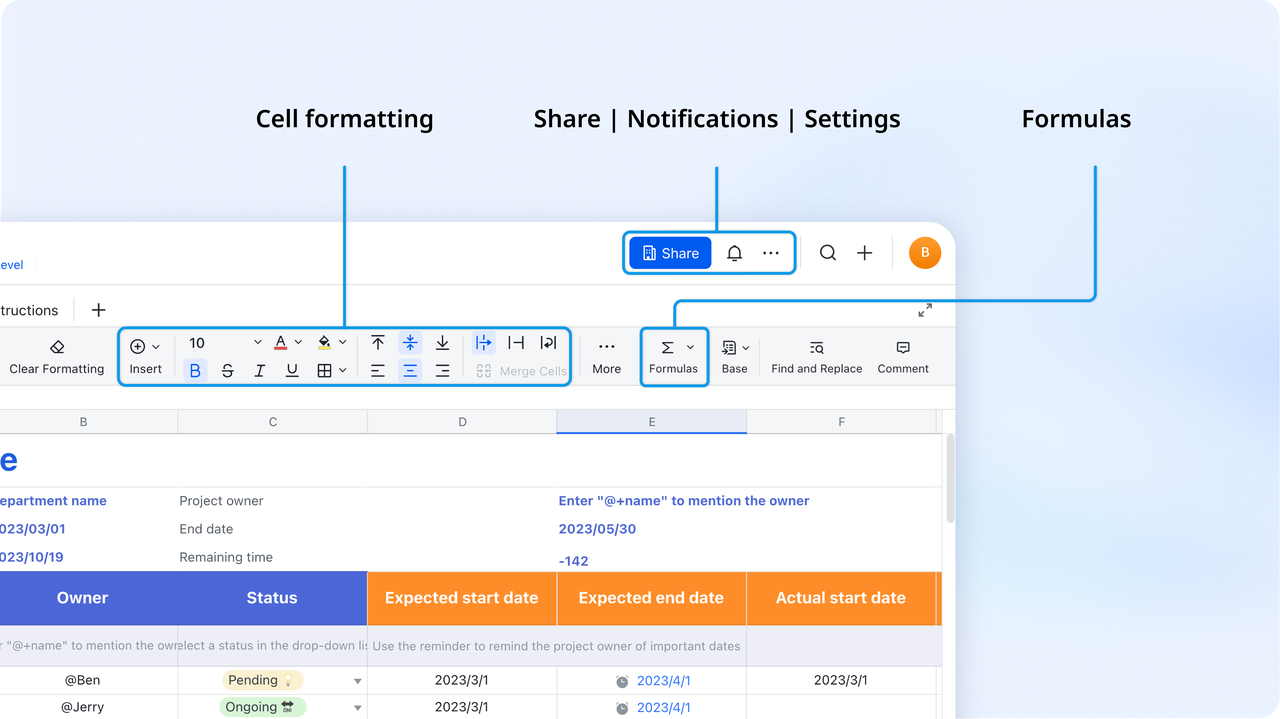
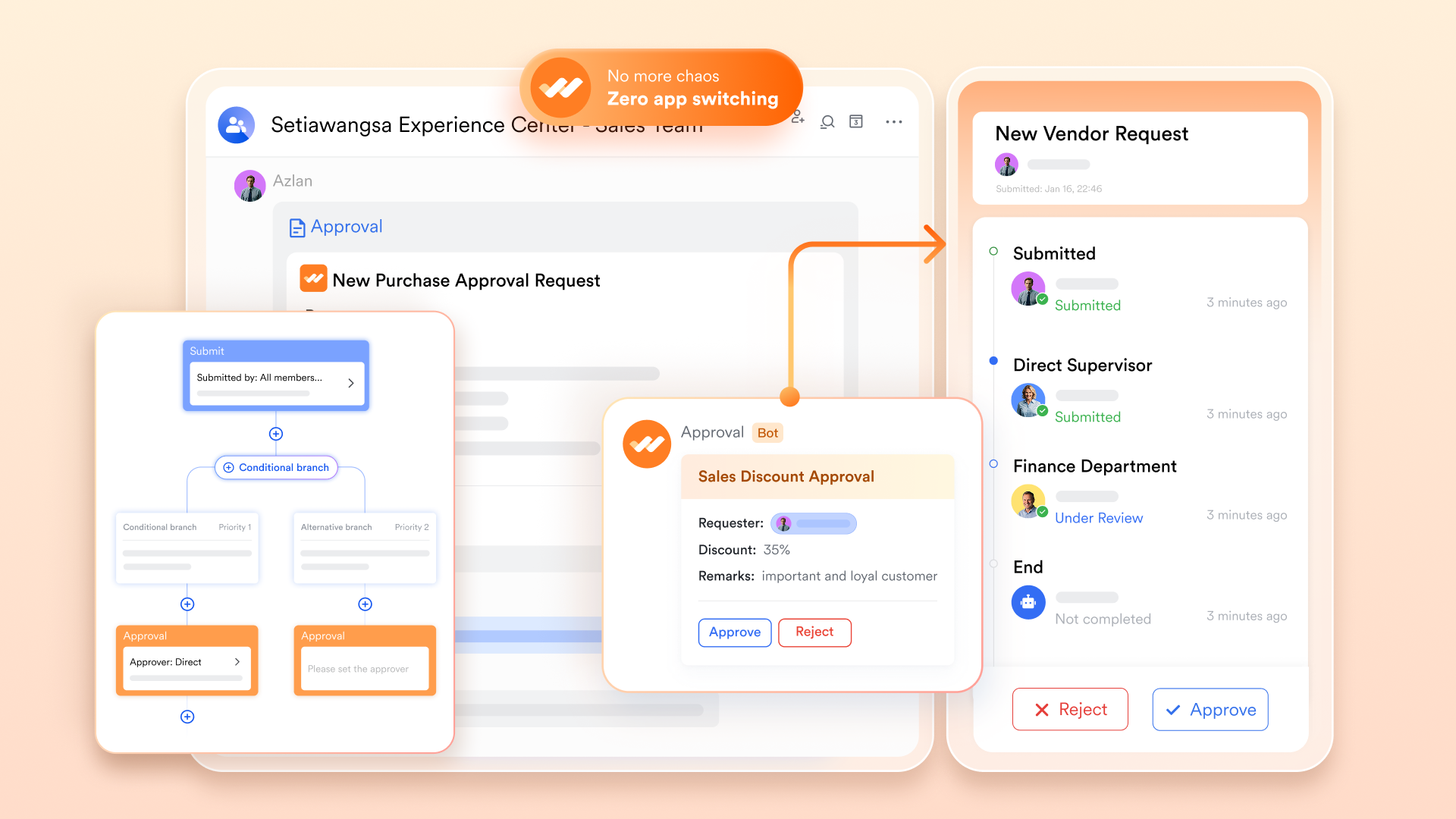
- Lark Approval for controlled sign-offs and audit trails: Use Lark Approval to manage sign-offs (contracts, scope changes, invoices). Approval flows can be multi-stage and conditional; when an approval completes, Lark Base records and related tasks update automatically to reflect the decision, preserving a clear audit trail.
- Security, compliance, and admin controls: Lark provides role-based permissions, centralized admin controls, and enterprise security options for larger teams. For Mac users in regulated industries, document access, approval logs, and communication records are kept auditable and manageable from the same workspace.
Why Lark works for Mac teams
- Unified context: Chat, docs, tasks, and project data live together so Mac users stop switching between many single-purpose apps.
- Flexible views: Visualize projects as lists, boards, timelines, or calendars depending on stakeholder needs.
- Automation first: Automated workflow rules in Base reduce manual handoffs and speed delivery.
- Cross-functional workflows: PMs, designers, analysts, and client teams can operate from the same datasets and documents.
- Cross-platform access: Native-like desktop experience for Mac plus web and mobile clients for mixed OS teams.
- Starter plan: Free forever plan that includes 11 powerful tools for up to 20 users. It also comes with 100GB of storage, 1000 automation runs, AI translations, and more.
- Pro plan: $12/user/month (billed annually) for up to 500 users. It includes everything in Starter plus group calling for up to 500 attendees, 15TB of storage, 50,000 automation runs, and more.
- Enterprise plan: Contact sales for custom pricing. Supports unlimited users and includes even more automation runs and advanced security, compliance, and management features.
2. Asana: Robust task & workflow automation on Mac
Asana is one of the most recognized project management apps for Mac, offering structured workflows and automation tools that help teams stay organized. Its intuitive design makes it easy to assign tasks, manage dependencies, and visualize timelines. With powerful reporting and integrations, Asana ensures clarity from kickoff to completion across teams.
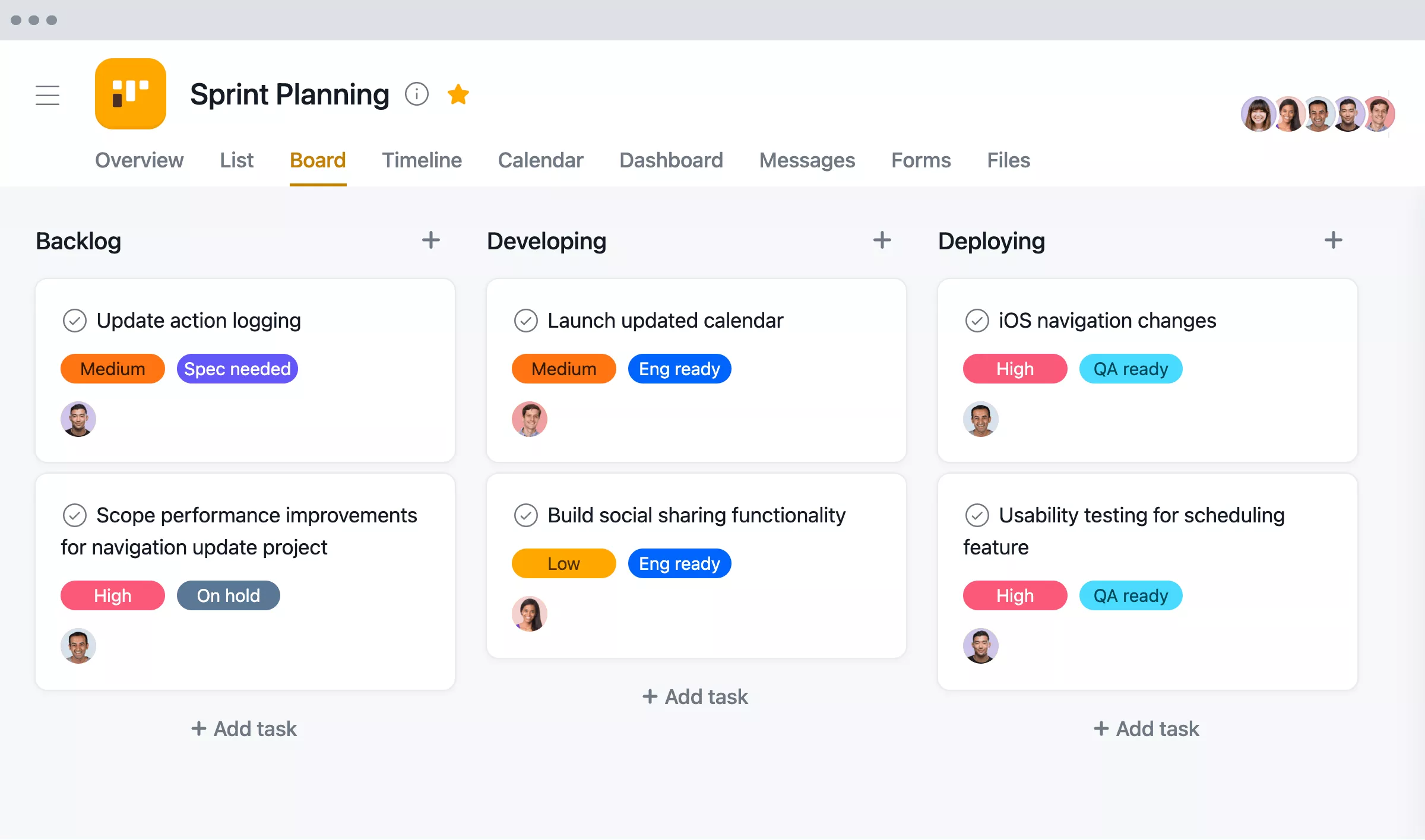
Image source: asana.com
Key features:
- Visual project views (List, Board, and Timeline)
- Task dependencies and due-date tracking
- Custom rules for workflow automation
- Reporting dashboards and workload balance
- Integrations with Slack, Zoom, and Google Workspace
Best for: Teams that need structured workflows, visibility, and automation for large or multi-step projects.
Pricing:
- Free basic plan
- Premium: $10.99/user/month
- Business: $24.99/user/month
3. Trello: Simple visual Kanban for macOS
Trello offers a straightforward, card-based Kanban experience ideal for smaller teams and individuals who prefer visual organization. Its simplicity, combined with automation and integrations, makes it one of the easiest tools for Mac users to start managing projects. With real-time updates and cross-device syncing, Trello keeps collaboration lightweight yet effective.
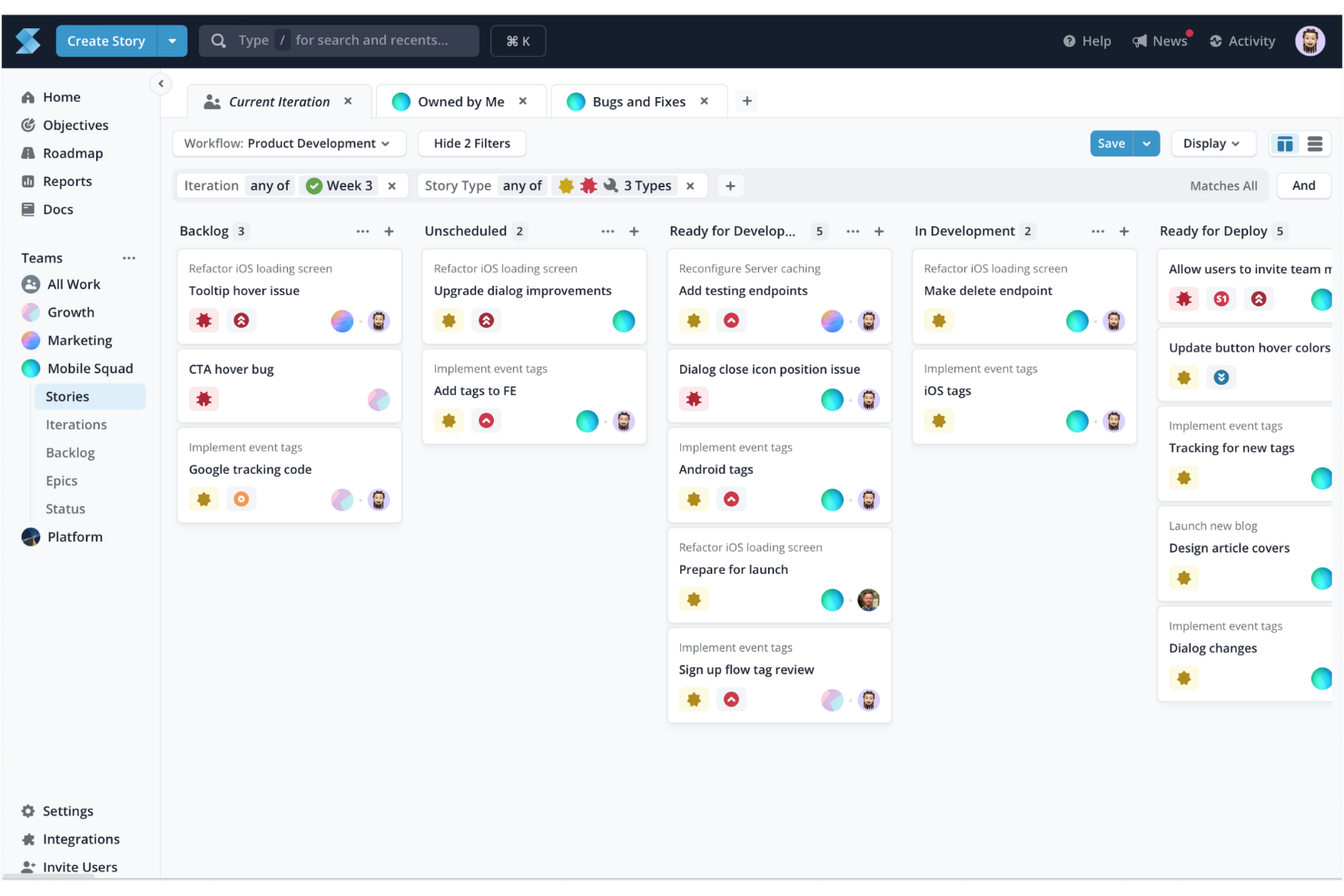
Image source: trello.com
Key features:
- Drag-and-drop Kanban boards for easy task tracking
- Custom labels, checklists, and due dates
- Power-Ups for advanced automation and tracking
- Butler automation for repetitive actions
- Syncs across Mac, web, and mobile apps
Best for: Freelancers, startups, and teams managing small-scale or visual workflows.
Pricing:
- Free basic plan
- Standard: $5/user/month
- Premium: $10/user/month
4. Monday.com: Custom workflows & boards on Mac
Monday.com is a highly customizable Mac project management tool that lets users design unique workflows, visualize data, and track performance effortlessly. Its colorful interface and flexible templates make it perfect for teams that want both control and creativity. From sales pipelines to marketing campaigns, Monday.com scales with any business need.
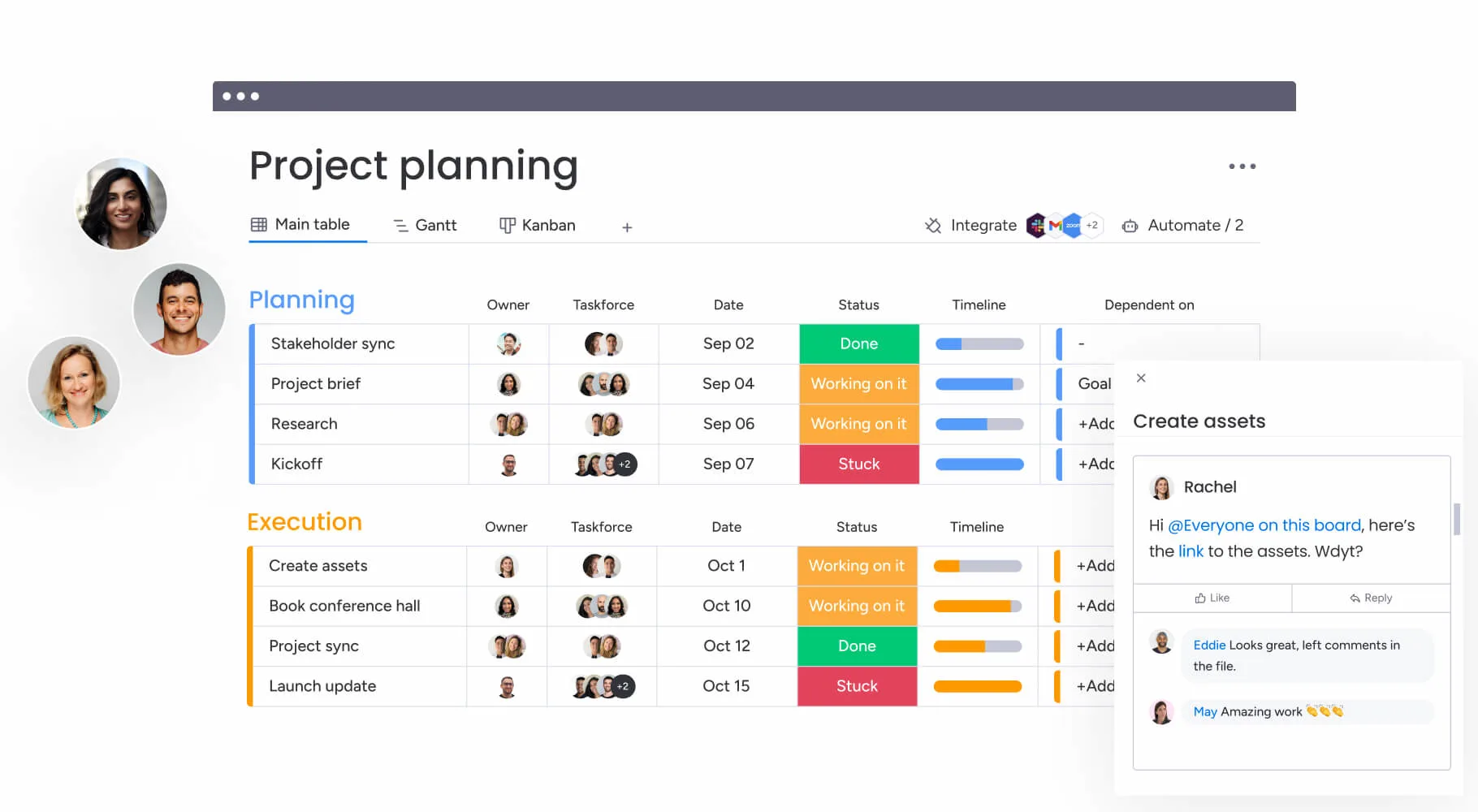
Image source: monday.com
Key features:
- 200+ ready-to-use workflow templates
- Multiple views including Timeline, Gantt, and Kanban
- Time tracking and automation triggers
- Dashboard reports for high-level insights
- Integrations with Google Calendar, Slack, and Zoom
Best for: Creative, marketing, and sales teams that prefer visual dashboards and customizable workflows.
Pricing:
- Free for up to 2 users
- Basic: $8/user/month
- Pro: $16/user/month
5. ClickUp: Flexible project views & productivity tools
ClickUp offers Mac users a truly all-in-one workspace that combines project tracking, documentation, goal setting, and automation. Its highly flexible structure allows teams to view projects in multiple formats and adjust workflows easily. Whether you're managing a design sprint or strategic roadmap, ClickUp adapts to your working style.
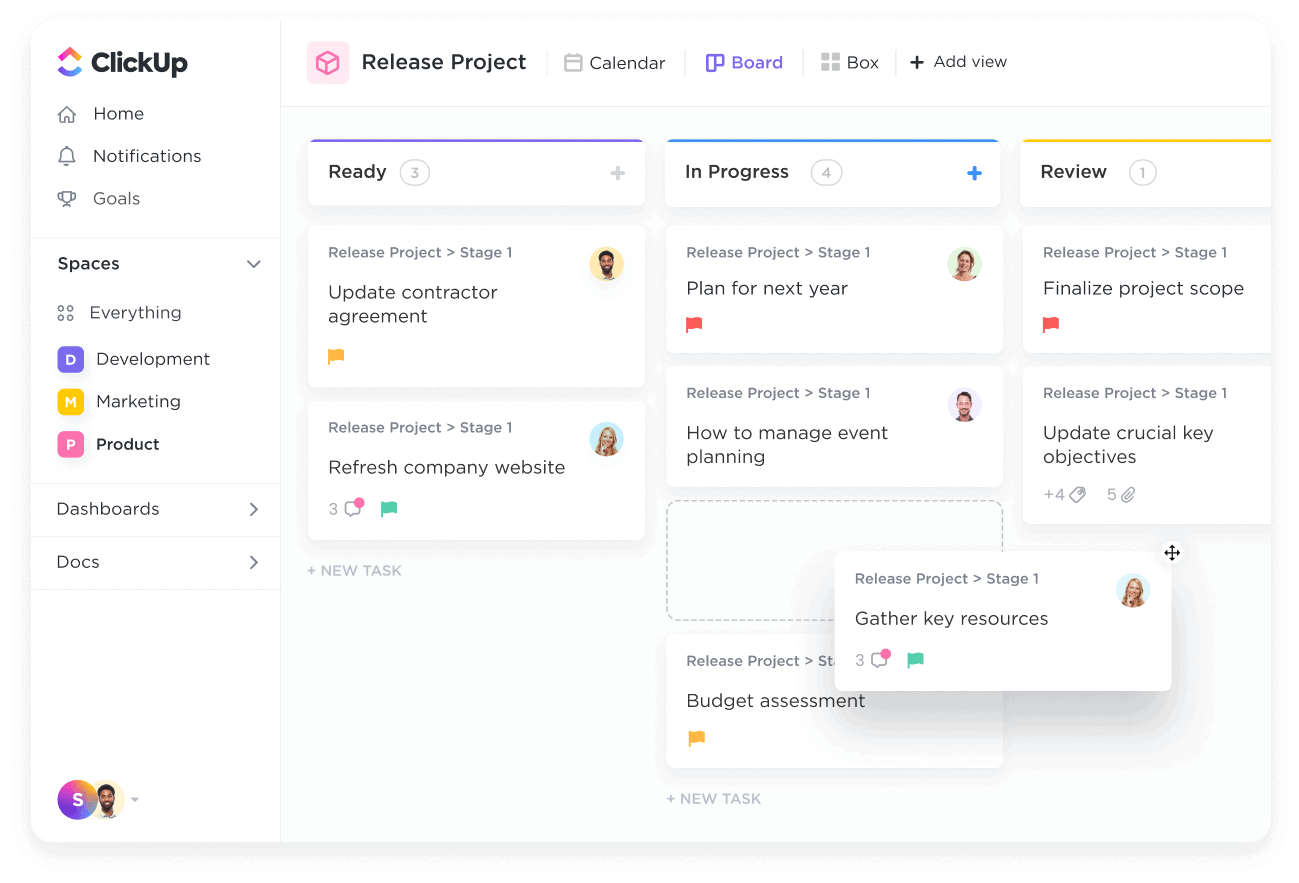
Image source: clickup.com
Key features:
- List, Board, Gantt, and Mind Map views
- Built-in time tracking and goal management
- Recurring task automation
- ClickUp Docs and Whiteboards for collaboration
- AI-powered summaries and task suggestions
Best for: Remote and hybrid teams seeking a highly customizable, productivity-driven workspace.
Pricing:
- Free forever plan
- Unlimited: $7/user/month
- Business: $12/user/month
6. Wrike: Enterprise-grade project tracking for Mac
Wrike is a powerful macOS project management software built for enterprises that need detailed control, visibility, and scalability. It helps large teams manage workloads, dependencies, and cross-department collaboration. With powerful dashboards and automation, Wrike provides real-time insights for complex projects.
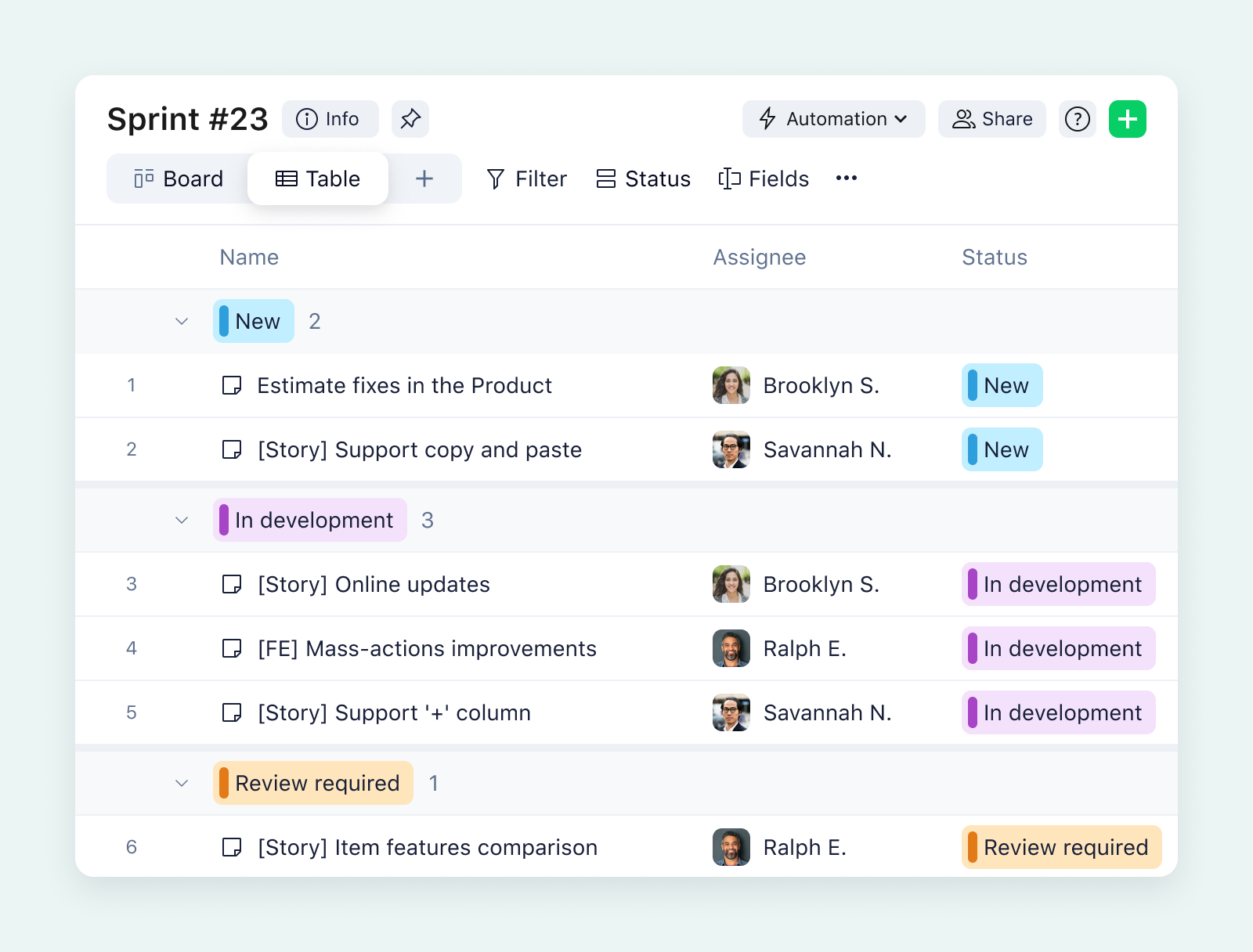
Image source: wrike.com
Key features:
- Real-time performance dashboards
- Custom workflows and automation triggers
- Resource allocation and capacity tracking
- Advanced analytics and Gantt charts
- Integration with Salesforce, Adobe, and Microsoft 365
Best for: Enterprises, agencies, and large teams needing deep visibility and robust reporting.
Pricing:
- Free for small teams
- Team: $9.80/user/month
- Business: $24.80/user/month
7. Smartsheet: Spreadsheet-like project management app
Smartsheet combines the familiarity of Excel with advanced project tracking features, offering a data-driven approach for Mac users. It's perfect for teams that like spreadsheets but need automation, collaboration, and reporting capabilities. Smartsheet supports multiple project views, making it a powerful tool for data-focused project managers.
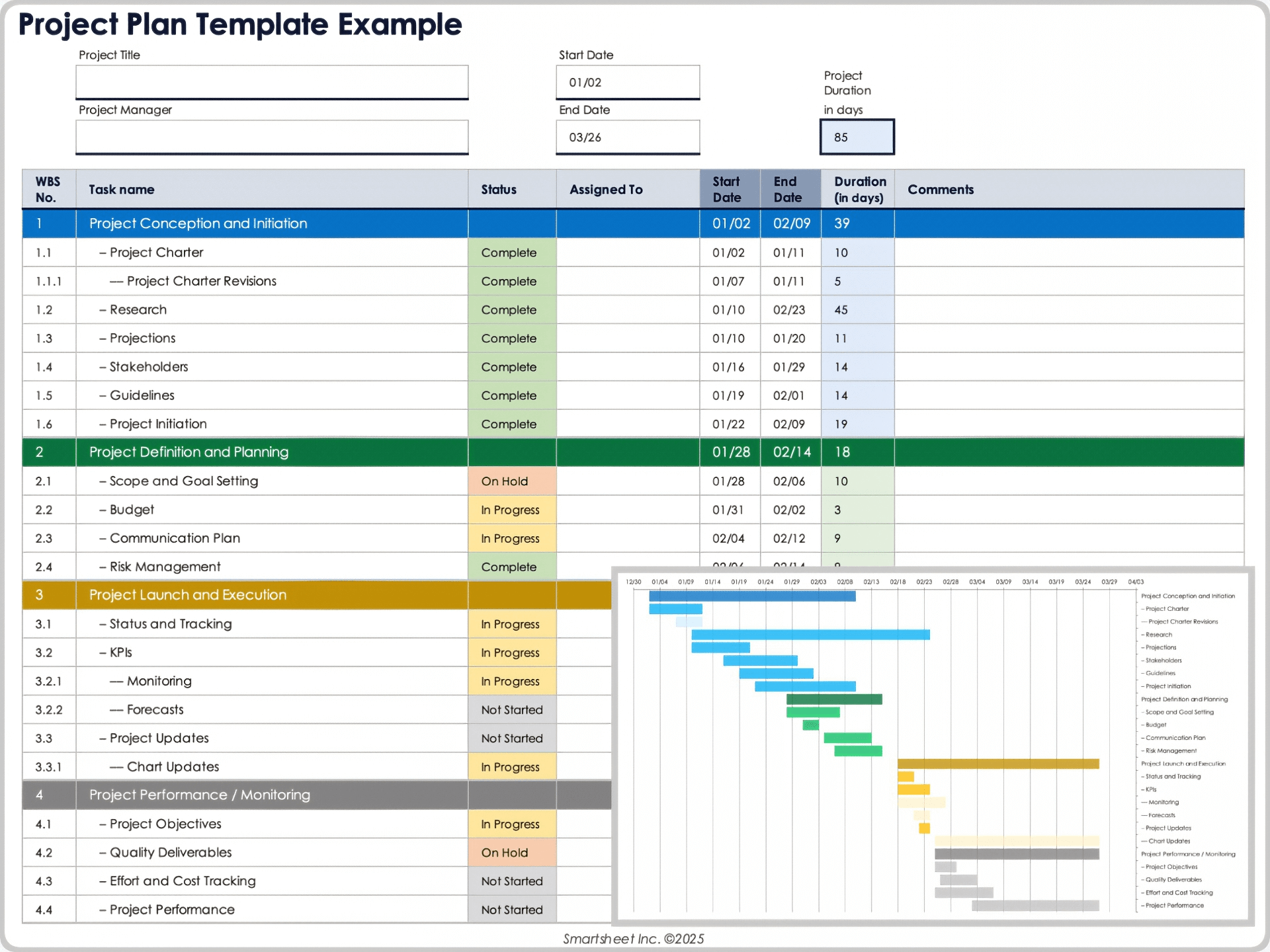
Image source: smartsheet.com
Key features:
- Grid, Gantt, and Calendar views
- Workflow automation and alerts
- Resource and budget tracking
- Formula-based calculations and dependencies
- Detailed cross-project reporting
Best for: Teams transitioning from spreadsheets to modern, automated project management tools.
Pricing:
- Pro: $7/user/month
- Business: $25/user/month
8. Basecamp: Team communication meets project planning
Basecamp simplifies project management for Mac users by combining communication, scheduling, and task tracking in one intuitive platform. It replaces scattered tools like Slack, email, and to-do lists with a single organized space. Its emphasis on communication makes it ideal for teams that prefer minimal complexity.
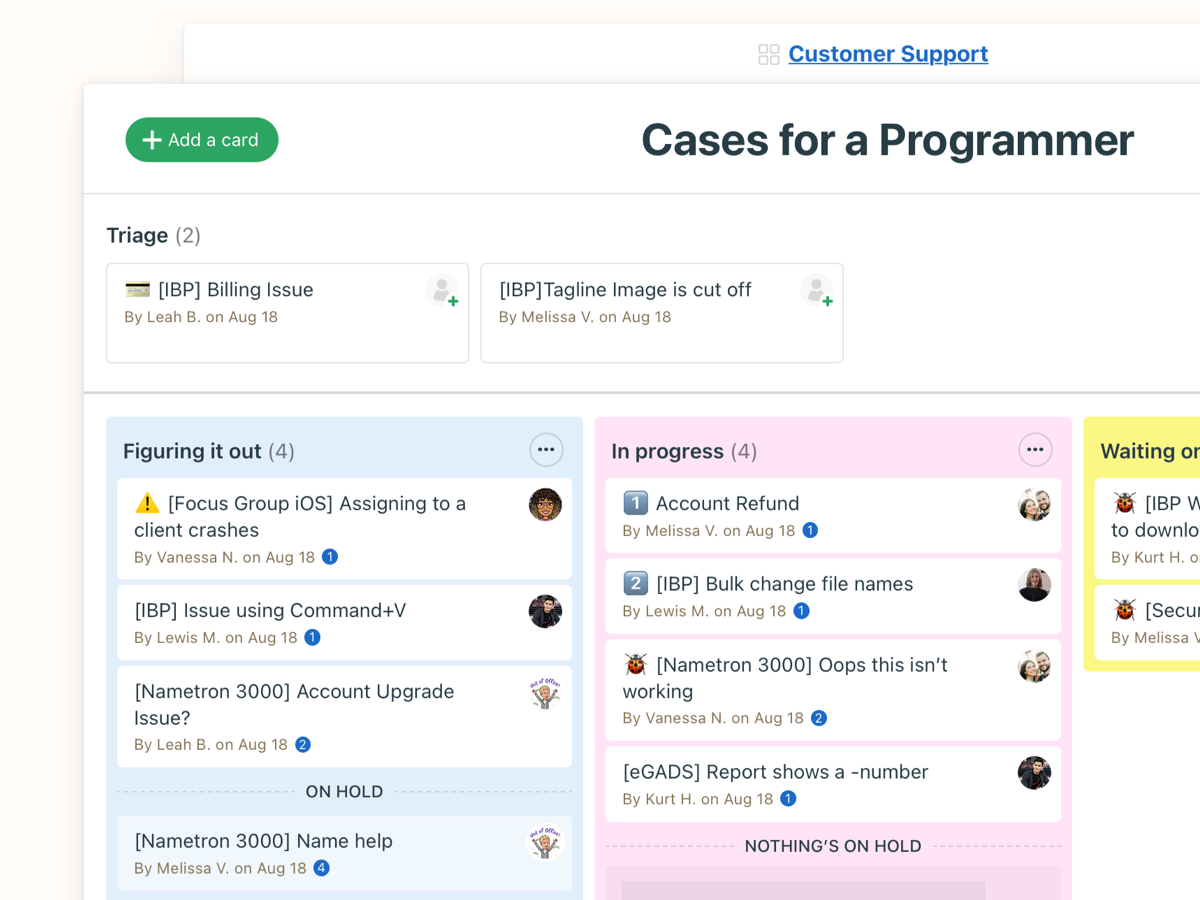
Image source: basecamp.com
Key features:
- Message boards and team discussions
- To-do lists and project check-ins
- Group chat (Campfire) and scheduling tools
- File sharing and centralized document storage
- Hill Charts to visualize project progress
Best for: Creative teams, agencies, and SMBs looking for a simple, communication-first PM tool.
Pricing:
- $15/user/month
- Unlimited: $349/month (flat rate for all users)
9. Notion: All-purpose workspace that handles projects
Notion serves as a flexible digital workspace where Mac users can manage tasks, take notes, create databases, and organize documentation. It's ideal for teams that prefer a balance between structure and creativity. With modular building blocks, Notion lets you design your perfect project system from scratch.
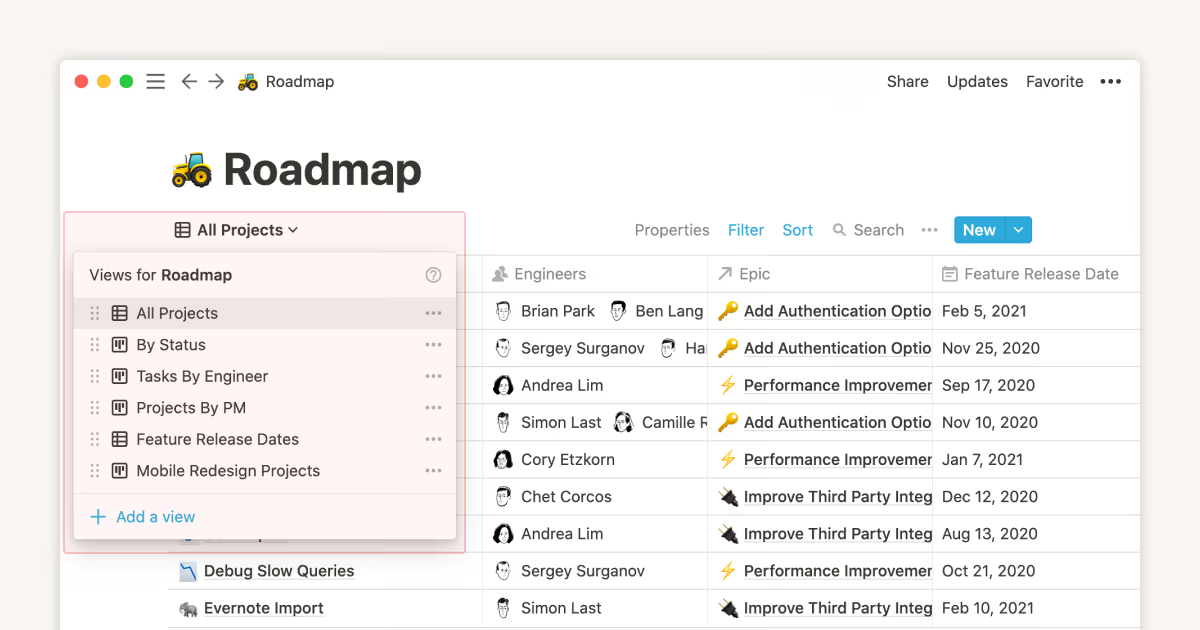
Image source: notion.com
Key features:
- Custom templates for project and sprint tracking
- Table, Timeline, and Kanban views
- Real-time collaboration with comments and mentions
- Integration with Slack, Figma, and GitHub
- Rich embeds for files, videos, and dashboards
Best for: Teams and freelancers who prefer highly customizable workspaces for managing varied workflows.
Pricing:
- Free personal plan
- Plus: $8/user/month
- Business: $15/user/month
10. Microsoft Project: Traditional PM for Mac users
Microsoft Project remains a go-to solution for structured, enterprise-level project management. Although designed for Windows, it's accessible via browser or virtualisation on Mac. Ideal for seasoned project managers, it offers in-depth scheduling, budgeting, and reporting tools for large, traditional workflows.
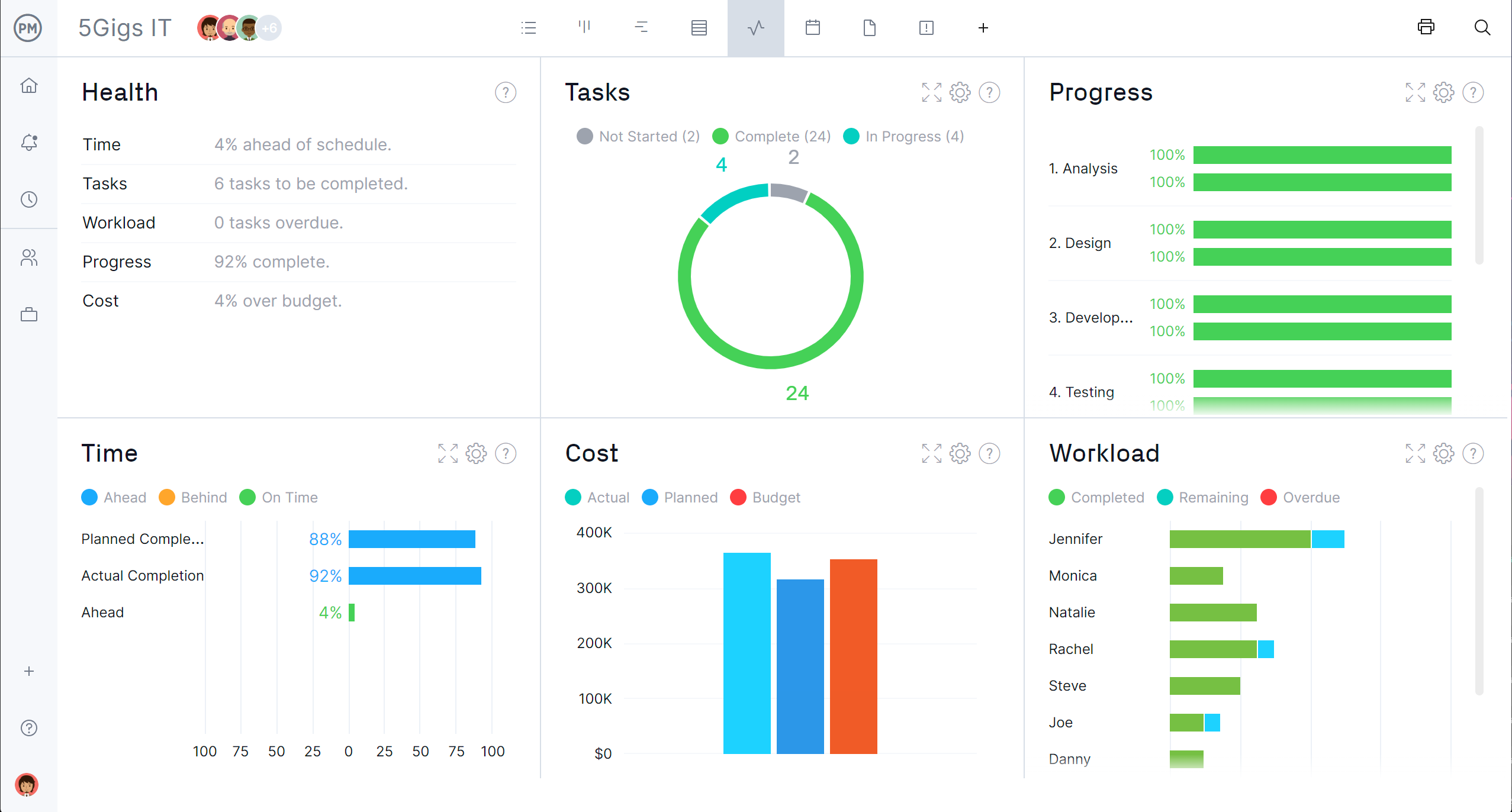
Image source: projectmanager.com
Key features:
- Gantt chart planning and critical path tracking
- Resource allocation and budgeting
- Real-time reporting and forecasting
- Portfolio management and project grouping
- Integration with Microsoft Teams and Power BI
Best for: Large enterprises and certified project managers following traditional frameworks.
Pricing:
- Cloud-based access: $10/user/month
- Professional (desktop + cloud): Custom Microsoft 365 plans
Common mistakes in project management & Lark's solutions
Even experienced teams encounter roadblocks that slow progress and reduce efficiency. From juggling multiple tools to missing key updates, these mistakes can derail even well-planned projects. Here's a look at the most common challenges and how Lark helps Mac users overcome them effortlessly.
- Using too many disconnected apps: Teams often waste precious time switching between chat apps, task managers, document editors, and calendars. Lark eliminates this friction by unifying chat, tasks, docs, and workflows into a single, seamless platform—letting teams focus on work instead of toggling between tools.
- Losing files in email chains: Important documents frequently get buried in long email threads, making retrieval frustrating and slow. With Lark Docs and Lark Wiki, all files and information are centralized, fully searchable, and instantly accessible, ensuring teams always have the right resources at their fingertips.
- Delayed approvals: Waiting for approvals can stall projects and create bottlenecks. Lark's real-time feedback system and Approval automation streamline sign-offs, helping teams make faster decisions and keep workflows moving smoothly.
- Missed deadlines: Without clear visibility into tasks, deadlines often slip unnoticed. Lark Base provides automated reminders, real-time task updates, and visual tracking with Kanban and Gantt views, so teams stay on schedule and consistently meet project milestones.
- Fragmented team communication: Disjointed messages across multiple channels lead to misunderstandings and lost context. Lark Messenger connects conversations directly to tasks and boards, keeping discussions relevant, traceable, and actionable.
- Difficulty tracking progress: Teams struggle to see who's overloaded or which tasks are at risk. Lark Dashboards offer real-time insights into workload, progress, and sprint performance, empowering managers to balance tasks and resolve issues before they impact delivery.
- Knowledge loss over time: Without a central repository, lessons learned from past projects get lost. Lark Wiki captures best practices, playbooks, and retrospectives, preserving institutional knowledge and continuously improving team performance.
Conclusion
Mac users need robust project management software that matches the performance, design, and efficiency of macOS. The best Macintosh project management software streamlines communication, automates workflows, and keeps every project on track—from planning to delivery. With hybrid and remote work on the rise, teams require tools that provide seamless collaboration, visibility, and accountability.
Lark stands out as the ultimate project management app for Mac, combining chat, docs, tasks, calendar, and workflow automation in one unified platform. It eliminates the need for multiple apps and ensures projects run smoothly from start to finish. By combining communication, documentation, and task tracking, Lark helps Mac users manage projects smarter, boosting productivity and simplifying collaboration—making it the best all-in-one solution for modern teams using macOS.
FAQs
What is the best Macintosh project management software?
The best Macintosh project management software depends on team size and workflow complexity. However, Lark offers the most comprehensive all-in-one workspace that combines chat, tasks, docs, meetings, and automation for seamless project execution. Try Lark to experience unified collaboration on Mac.
How does macOS project management software improve productivity?
macOS project management apps centralize workflows, automate tasks, and enable real-time updates. Lark enhances productivity further by collaborating communication, task tracking, and document sharing into one smooth environment.
Which PM software for Mac is best for remote teams?
For remote teams, cross-platform support and real-time collaboration are crucial. Lark excels here, offering chat, video meetings, shared docs, and task tracking in one cloud-based platform accessible from any Mac or mobile device.
What's the advantage of using project tracking software on Mac?
Mac-based PM software delivers optimized performance, security, and design consistency. With Lark Base, users gain live updates, automated workflows, and customizable project views tailored to macOS users.
Can Lark be considered the best project planning software for Mac?
Absolutely. Lark unifies every aspect of project planning—from ideation to delivery, making it the ultimate project planning software for Mac users who want power, automation, and simplicity in one app.
Related reading
Table of contents
Start using Lark today

Manage all your work in one place
Boost team efficiency by 10x
Save up to 70% on software costs
Table of contents
Start using Lark today
Manage all your work in one place
Boost team efficiency by 10x
Save up to 70% on software costs
Keep reading








2026 Lark Technologies Pte. Ltd.
Headquartered in Singapore with offices worldwide.






Explore: