














A Complete Monday.com Review—Features, Pricing, and Best Alternative

Ryan Tanner
Product Marketing Specialist
Sep 18, 2026
Ryan Tanner
Sep 18, 2026

20 min read


In this monday review, we take a closer look at Monday.com, a leading platform for project management and team collaboration. From customizable boards and workflow automations to its CRM features and pricing options, this guide explores how the tool supports modern work management.
We'll also touch on how Lark, a unified workspace for chat, docs, meetings, and projects, compares as a more streamlined alternative. Whether you're managing marketing tasks or large-scale operations, this guide will help you decide if Monday.com still meets your needs—or if it's time to explore newer, more connected solutions.

What is Monday.com?
Monday.com is a cloud-based work management platform that helps teams organize projects, track progress, and collaborate more effectively. Designed for flexibility, it lets users plan work using customizable boards, task lists, and visual views such as Kanban, timeline, and Gantt charts. Teams can assign responsibilities, set priorities, and automate routine tasks to keep projects moving smoothly.
Beyond project tracking, Monday.com also supports functions like CRM software, marketing operations, and HR workflows—allowing organizations to manage different processes in one shared system. Its intuitive interface makes it easy to adapt for any team size or industry.
While Monday.com offers strong customization and visibility, it often requires separate tools for communication and documentation. That's why many modern teams explore unified platforms like Lark, which bring chat, meetings, docs, and workflow management together in one connected workspace for a more seamless way to collaborate.
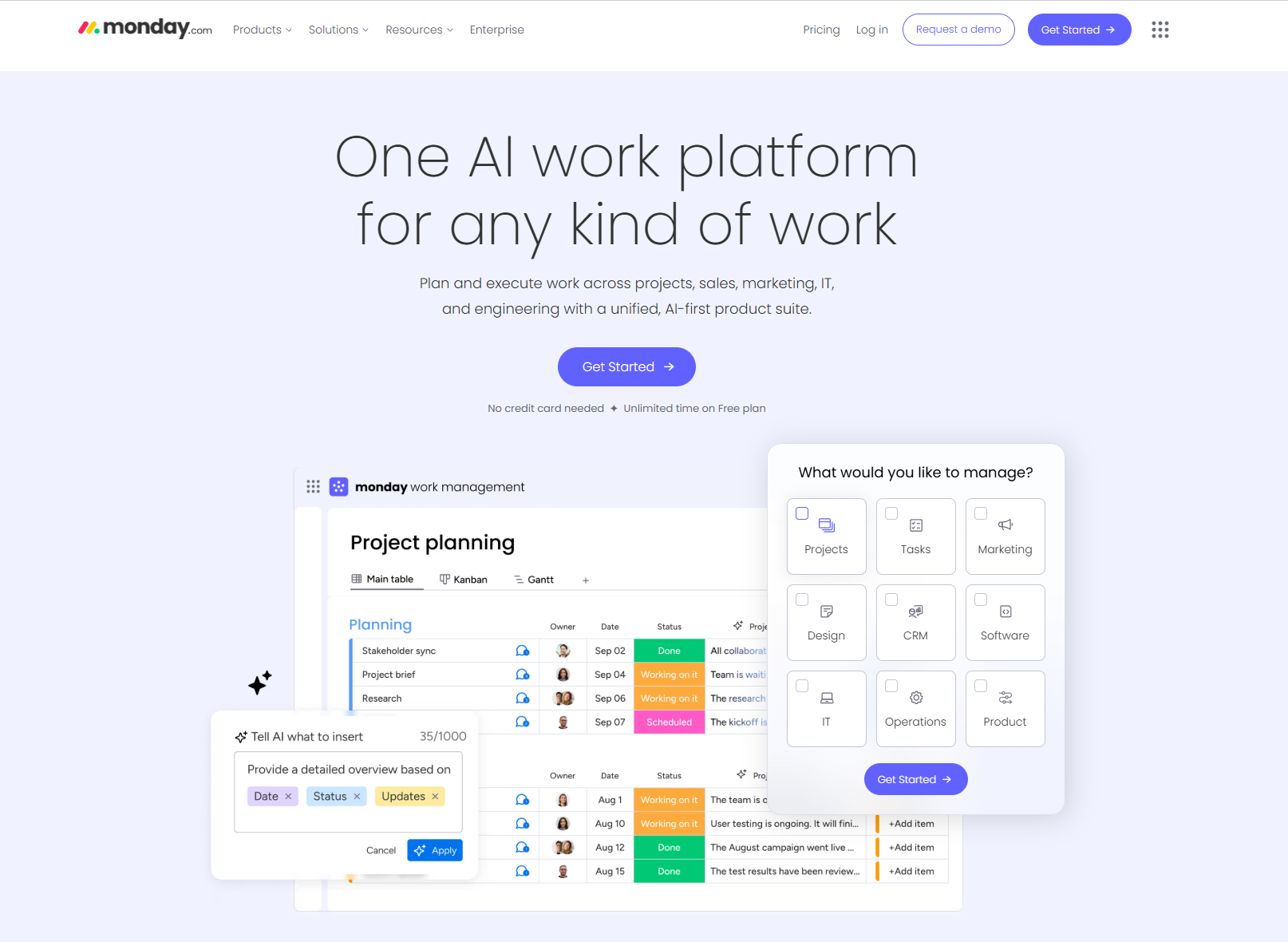
Image source: monday.com
Monday key features
In this monday.com review, it's clear that the platform's strength lies in its flexibility and ease of visualization. From project tracking to CRM management and team collaboration, Monday.com brings a range of features that help businesses organize work, automate processes, and maintain visibility across teams.
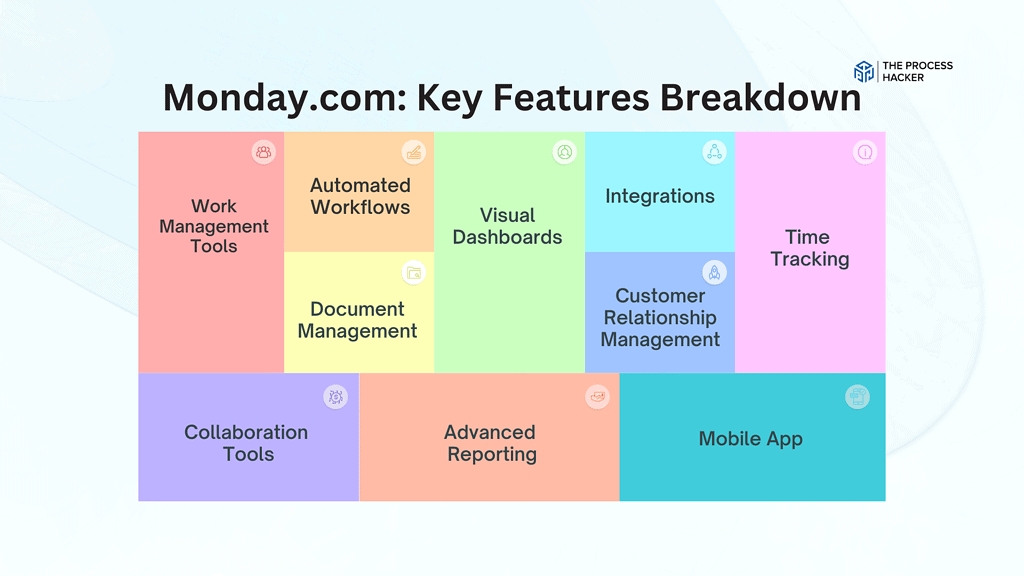
Image source: monday.com
- Project management tools: Monday.com offers powerful project management tools such as task boards, timelines, dashboards, and dependency tracking. Teams can create boards for projects, visualize progress with Gantt or Kanban views, and use color-coded statuses to track completion. Real-time dashboards summarize workload, helping managers balance tasks and improve team efficiency.
- CRM functions: With its built-in CRM features, Monday.com enables sales teams to track deals, manage leads, and automate customer workflows. Users can visualize sales pipelines, assign ownership, and generate performance reports. While it's not as advanced as a dedicated CRM, it works well for small to medium teams managing sales alongside operations.
- Integrations: Monday.com integrates with popular tools like Slack, Google Workspace, Microsoft Teams, and Zoom to centralize work communication. These integrations make it easier to connect data and notifications across different apps. However, managing multiple integrations can add setup complexity and extra subscription costs over time.
For more Google Workspace's information, you can refer to Google Workspace Pricing and Google Workspace alternatives.
- Collaboration tools: Team collaboration happens through comments, tagging, file sharing, and notifications on every task board. Members can mention colleagues, attach documents, and keep all updates in one place for better context. Still, since there's no built-in chat or video feature, users often rely on external tools for real-time discussions.
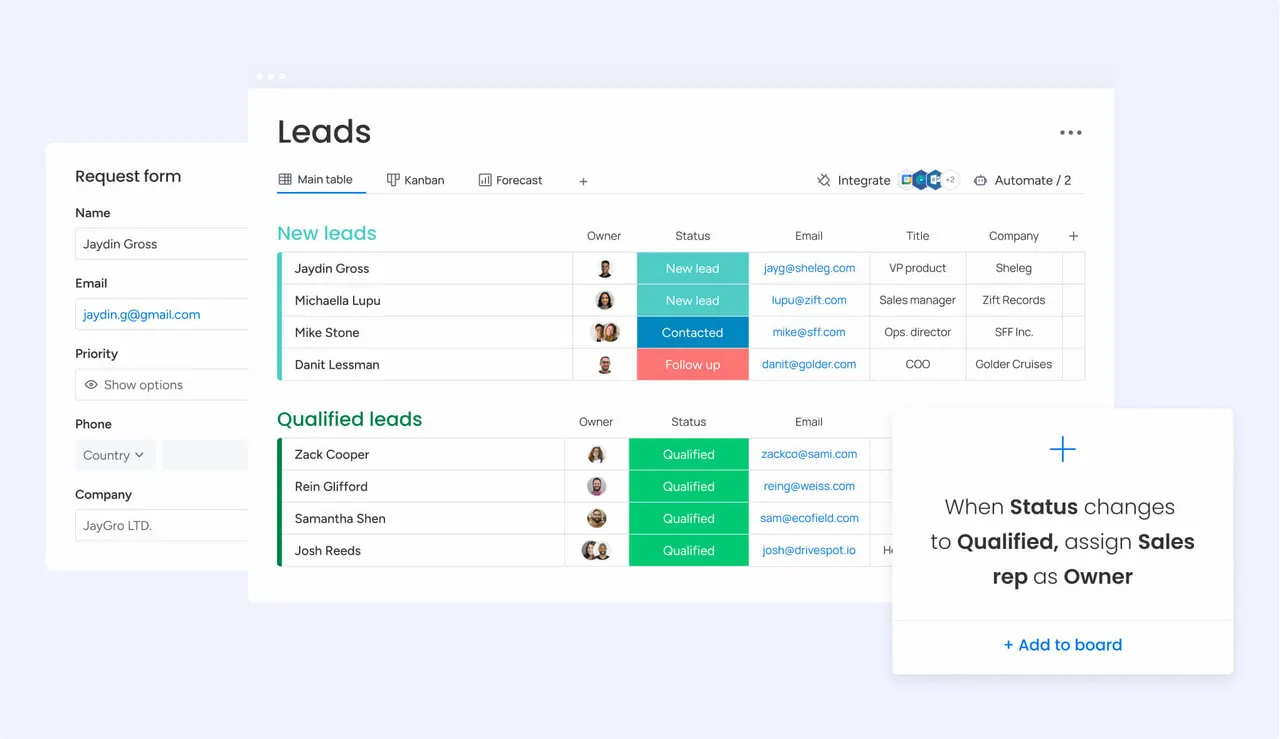
- Automation and AI: Monday.com simplifies repetitive processes using automation and emerging AI tools. Teams can set up workflow triggers—for example, auto-assigning tasks or updating statuses when deadlines change. AI suggestions assist in writing updates or summarizing progress, reducing manual effort, and keeping projects running smoothly.
Monday CRM capabilities
In this guide, it's clear that the platform isn't just for project management—it's also positioning itself as a light CRM solution for teams that want simplicity and visibility in one workspace. Let's explore how its CRM features perform across sales management, automation, and scalability.
Overview of its CRM modules for managing deals, leads, and automation
Monday.com's CRM modules let users track leads, deals, and pipelines directly on customizable boards. Sales teams can visualize every stage of the buyer journey and automate updates, reminders, and follow-ups. Workflow automation reduces manual entry, helping reps focus more on selling and less on admin tasks.
Suitability for small-to-medium sales teams
Monday CRM is best suited for small to mid-sized teams that need straightforward deal tracking without the complexity of enterprise CRMs. It's easy to set up, visually intuitive, and flexible enough for different sales cycles. However, large teams needing advanced analytics or forecasting may find it limited.
Comparison to dedicated CRM platforms
While Monday CRM covers essentials like pipeline management and contact tracking, it lacks deep sales forecasting, territory management, and AI-driven insights found in tools like HubSpot or Salesforce. It shines in ease of use but falls short in advanced CRM depth and reporting capabilities.
When to use Monday CRM vs. standalone CRMs
Use Monday CRM if you want to manage both projects and client relationships within a single workspace. It's ideal for teams balancing operations, marketing, and sales in one platform. However, if your primary focus is scaling sales with robust analytics, automation, and customer segmentation, a dedicated CRM platform is the better choice.
Monday for project management
In this review, one of the platform's strongest capabilities is its project management flexibility. Teams across industries rely on Monday.com to visualize timelines, manage workloads, and maintain accountability throughout every stage of execution.
How teams use it for project tracking, timelines, and task dependencies
Monday.com helps teams plan, track, and deliver projects through visual boards, Gantt charts, and timeline views. Users can set task dependencies, assign owners, and monitor progress in real time. Managers get clear visibility into workloads, ensuring deadlines are met and bottlenecks are identified early.
Popular use cases: marketing campaigns, software development, operations
From marketing teams tracking campaign performance to product teams managing sprints, Monday.com adapts to nearly any workflow. Operations teams use it for inventory, logistics, or HR tracking. Its customizable boards and templates make it easy to tailor processes without coding or external tools.
Common user feedback: flexibility vs. complexity
User reviews often highlight Monday.com's versatility and visual design as standout features. However, some note that the platform can become complex as projects scale, requiring additional training or paid features. The tradeoff between customization and simplicity is one of Monday.com's most discussed aspects among users.
Monday pricing and plans
Value vs. pricing comparison with other platforms
While Monday.com delivers many features across its tiers, the value depends on your team size and needs. For small teams, the Free or Basic plan may suffice, but key features like automations, integrations, and advanced views are locked into the Standard and Pro tiers—meaning cost jumps significantly. Some users feel the Basic tier lacks sufficient functionality for the price. Larger teams or companies needing enterprise controls may find the Enterprise plan's price justified by its depth, but smaller organizations may get better value with alternative platforms or more inclusive bundles.
Cost-effectiveness and scalability for growing teams
As teams grow, you'll likely need to move from Free → Basic → Standard → Pro (and possibly Enterprise). Each step adds features but also costs per seat. The per-seat pricing model means that as you add users, the total cost increases linearly, and the value depends on whether you actually leverage advanced features like automations and integrations. For teams with limited workflows, paying for high tiers may not be cost-effective. Conversely, for teams, scaling operations, automations, workload tracking, and advanced dashboards can make Pro or Enterprise worthwhile—provided you anticipate growth and complexity.
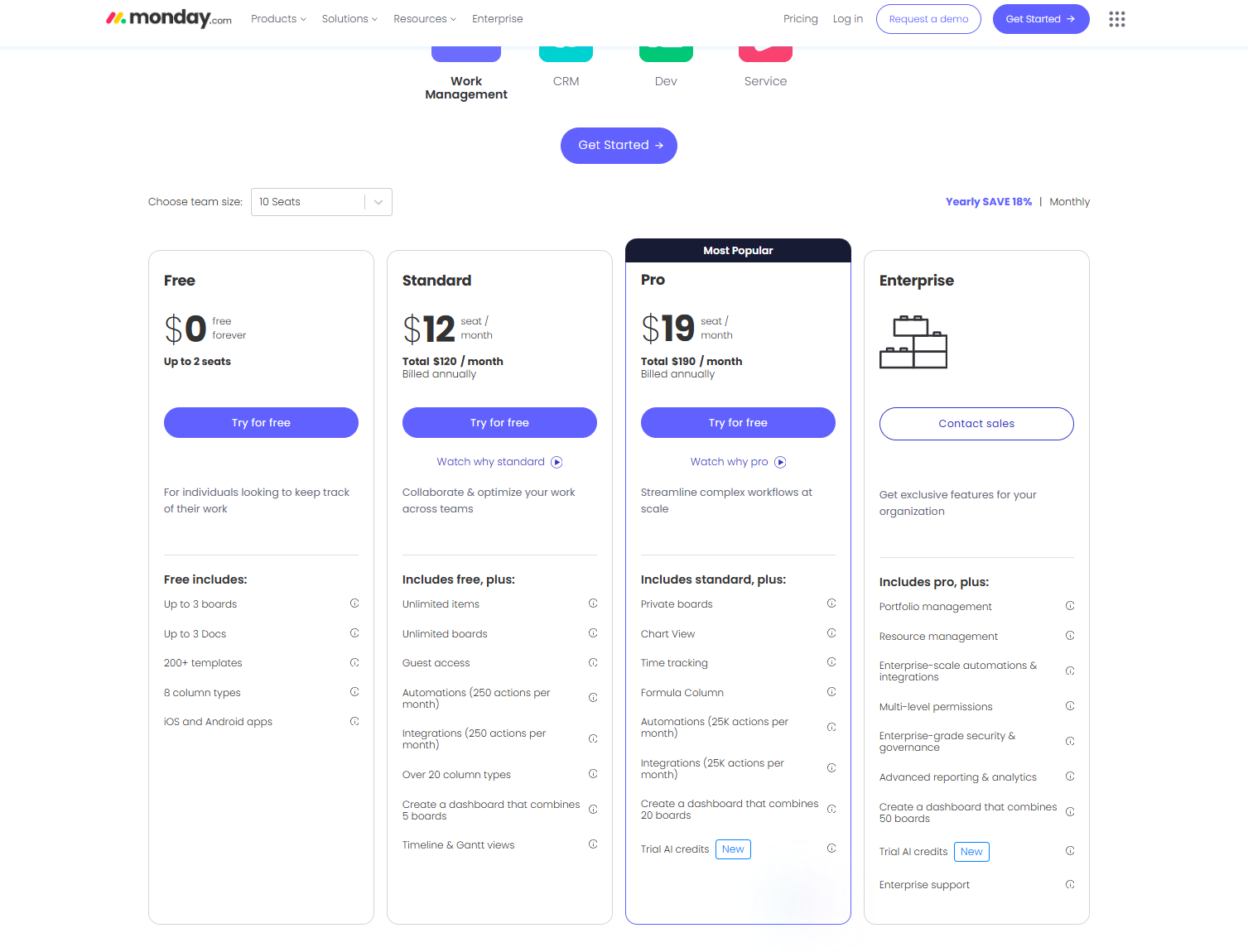
Image source: monday.com
Pros and cons of using Monday
In this Monday.com overview, understanding the platform's strengths and limitations helps teams decide if it's the right fit for their workflow. While its design and flexibility make it a favorite among project managers, certain trade-offs can impact cost and usability as teams scale.
Pros
- Modern, visual interface: Monday.com offers a clean, colorful, and intuitive dashboard that makes managing projects feel simple and engaging. Its drag-and-drop boards and customizable layouts help teams visualize progress at a glance. Even new users can quickly grasp how tasks move across stages.
- Highly customizable workflows: From marketing pipelines to software sprints, teams can tailor workflows to match their exact needs. Custom columns, automation rules, and templates make it easy to build unique processes. This flexibility allows different departments to work within the same system seamlessly.
- Rich integration ecosystem: The platform connects with popular tools like Slack, Google Workspace, Zoom, and Microsoft Teams. These integrations help sync data and notifications across platforms, reducing manual updates. It's ideal for teams that already use multiple SaaS tools and want centralized visibility.
- Suitable for many industries: Whether it's creative agencies, construction teams, or HR departments, Monday.com adapts to a wide range of use cases. Its ready-to-use templates and flexible boards support both project-based and operational workflows. That versatility makes it a go-to tool for cross-functional teams.
Cons
- Cost scales quickly with team size: While Monday.com's pricing starts affordably, it increases with each additional seat and feature tier. Teams often find themselves upgrading sooner than expected to access core tools like automations and dashboards. This can make it expensive for growing organizations.
- It can be overwhelming for beginners: The platform's vast customization options and views can initially feel complex. New users may need onboarding time to understand boards, columns, and automations. Without proper setup, the experience can feel cluttered rather than efficient.
- Limited built-in communication tools: Monday.com focuses on task collaboration but lacks integrated chat or video features. Teams must rely on external apps for real-time communication, which fragments discussions. This adds extra steps for teams seeking all-in-one coordination.
- Requires multiple add-ons for full functionality: To access advanced analytics, CRM, or time tracking, users often need to enable paid add-ons or integrations. While this modular design keeps the core clean, it can drive up costs and complexity over time. Smaller teams may find it challenging to justify these extras.
Monday.com is great for managing projects visually, but as teams grow, costs can add up, and communication often gets scattered across different tools. That's where Lark makes things easier. It brings chat, meetings, and project tracking together in one place, so teams don't have to jump between apps. Let's dive into Lark now and explore what makes it stand out.
Alternative: Lark as a modern alternative to Monday
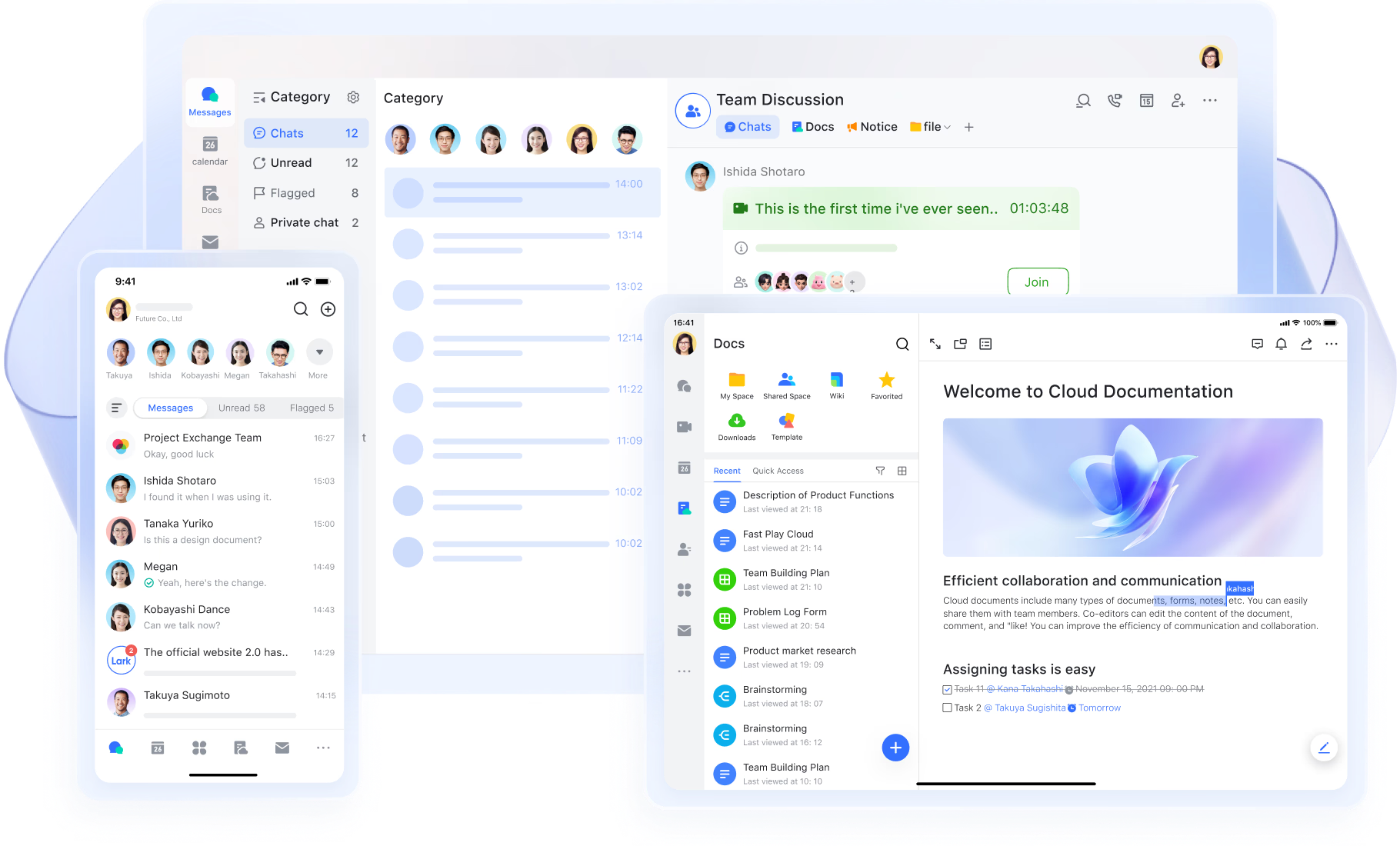
Lark delivers everything teams expect from Monday.com—visual project boards, task ownership, and progress tracking—but also brings communication, documentation, meetings, approvals, and workflow automation into the same workspace. This means teams stay aligned without juggling disconnected tools.
- Lark Base: Flexible workflows with automation built in
- Lark Base supports multiple workflow styles, including Kanban, Gantt, timeline, and grid views, so teams can plan and execute work in whichever structure fits their operations. Managers view timelines and dependencies while contributors focus on task flow. Automated workflow ensures that when a task moves to a new stage, owners are notified, due dates are adjusted, and follow-up actions are triggered automatically. For complex projects, linked data keeps information synchronized across boards—updates a feature, and every related task reflects the change instantly.
- Why it matters: Teams stay proactive, tasks never go stale, and progress remains transparent.
- Lark Messenger: Real-time chat directly connected to tasks
- Instead of switching between multiple apps for conversation and execution, Lark Messenger make conversations happen right alongside the work itself. You can share documents, set collaboration permissions, and get notifications from comments and likes. Messages support mentions, emojis, images, and attachments, making communication clear and interactive. All chat history is stored securely in the cloud, synchronized across devices, and easily reviewable—so new team members can catch up quickly and discussions remain fully traceable.
- Why it matters: Fewer delays caused by lost context or scattered communication.
- Lark Docs and Lark Wiki: PRDs, briefs, and SOPs are always current
- Product briefs, sprint plans, checklists, and requirements live in Lark Docs, where teams co-edit in real time. When information becomes a stable reference, it moves to Wiki, keeping essential knowledge organized and discoverable. Version history and permissions guarantee accuracy and controlled access.
- Why it matters: Decisions and documentation always match the current state of work.
- Lark Meetings and Calendar: Alignment built into the workflow
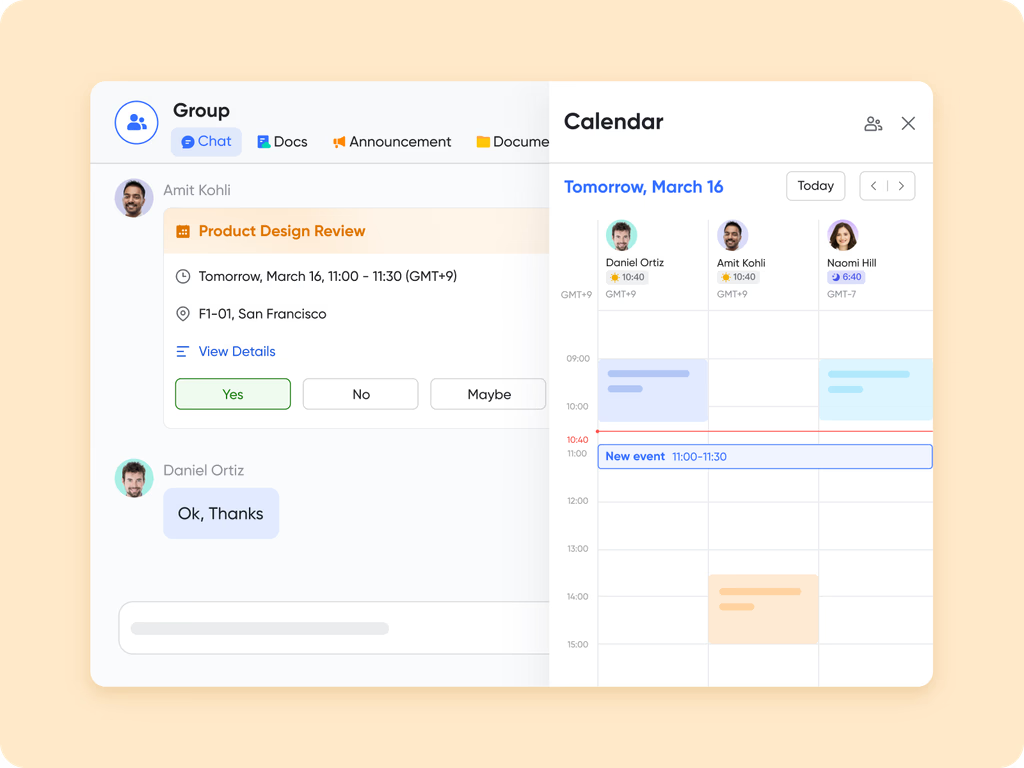
- During meetings via Lark Meetings, teams can open their Base's Kanban board or dashboards directly inside the call to review progress without screen switching. Standups, retrospectives, and planning ceremonies are scheduled and visible in Lark Calendar, helping distributed teams stay punctual and aligned. Lark AI Meeting notes can be captured in Docs and linked directly to tasks.
- Why it matters: Meetings turn into action instead of becoming administrative overhead.
- Lark Approval: Smart routing for structured decisions
- Via Lark Approval, approval requests—like project approvals or reimbursements—can be synced from Lark Approval to Base, enabling easy progress tracking and data analysis. Updates to approvals are automatically reflected in Base every hour, or you can choose to sync manually. All approval statuses, including unfinished, withdrawn, or resubmitted requests, are captured in Base. Additionally, Base maintains a full edit history of tables and individual records for up to 180 days, ensuring that all approvals are fully auditable for future oversight.
- Why it matters: Work moves faster while maintaining governance and accountability.
- Starter plan: Free forever plan that includes 11 powerful tools for up to 20 users. It also comes with 100GB of storage, 1000 automation runs, AI translations, and more.
- Basic plan: $6/user/month (billed annually) for up to 500 users. It includes everything in Starter plus group calling for up to 500 attendees, 10TB of storage, 10,000 automation runs, and more.
- Pro plan: $12/user/month (billed annually) for up to 500 users. It includes everything in Starter plus group calling for up to 500 attendees, 15TB of storage, 50,000 automation runs, and more.
- Enterprise plan: Contact sales for custom pricing. Supports unlimited users and includes even more automation runs and advanced security, compliance, and management features.
Lark vs. Monday: Which is the better choice for modern teams?
In this updated Monday.com review, we break down the latest pricing tiers and what each offers in 2025. From the free plan to Enterprise, Monday.com provides flexible options for individuals and growing teams. This guide helps you understand costs, inclusions, and which plan delivers the best value for your business needs.
User reviews and ratings
No Monday.com review is complete without exploring what real users and experts are saying. Based on trusted review sites such as PCMag, Forbes Advisor, CRM.org, and Tech.co, Monday.com generally receives high marks for design and flexibility—but also faces consistent criticism in a few key areas.
Summary of feedback from trusted review sites
Across major platforms, Monday.com averages between 4.4 and 4.7 stars out of 5. PCMag praises its visual project tracking and automation builder, while Forbes Advisor highlights its versatility for hybrid teams. CRM.org and Tech.co commend its scalability but caution about rising costs as users and automations grow.
Common positive and negative themes
Positive themes include Monday.com's modern UI, customizable workflows, and wide integration range. Users appreciate how quickly they can adapt boards to any process. On the downside, many mention steep pricing, occasional lag on large boards, and limited communication tools, especially compared to all-in-one work platforms like Lark.
User sentiment on support, onboarding, and feature depth
Customer feedback on support and onboarding is mixed. Some users find tutorials and templates helpful, while others say setup can feel overwhelming without prior experience. Feature depth scores high for project management and automation, but lower for CRM and collaboration functions, indicating that Monday.com excels at organization yet lacks unified communication and documentation.
Conclusion
As this monday.com review shows, the platform remains a strong choice for teams that value visual project tracking, automation, and flexible workflows. However, its cost and reliance on external communication tools can make collaboration feel fragmented. Ultimately, the best choice depends on your team's workflow and growth needs. If you're looking for a more unified solution, Lark offers chat, docs, meetings, and task management in one connected workspace—helping teams communicate, plan, and execute seamlessly without switching between multiple apps.
FAQs
What is Monday.com used for?
Monday.com is a work operating system that helps teams manage projects, track progress, and automate workflows. It's used for task management, CRM, marketing planning, and operations tracking. As highlighted in this monday.com review, the platform offers visual boards, timelines, and dashboards that make collaboration easier across different departments and industries.
How does Monday.com compare to Lark?
While Monday.com focuses on project and workflow tracking, Lark combines chat, docs, meetings, and task management in one connected platform. Monday.com requires third-party tools for communication, whereas Lark eliminates app switching. In short, Monday.com is strong for structured task boards, while Lark is better for unified collaboration and real-time teamwork across global teams.
Is Monday.com free?
Yes, Monday.com offers a free plan for up to two users with limited boards and features. It's suitable for freelancers or small teams testing the platform. However, as teams grow, paid tiers like Basic, Standard, and Pro are needed for automations, integrations, and dashboards—which can quickly increase costs depending on usage and team size.
Is Lark suitable for large teams?
Absolutely. Lark is built for scalability, supporting thousands of users under one workspace. Large organizations benefit from centralized chat, cloud storage, automation, and secure access controls. Unlike many platforms that separate communication and project tools, Lark unifies everything—making it easier for distributed teams to stay aligned and productive across departments and time zones.
What are the best alternatives to Monday.com?
Aside from Monday.com, popular alternatives include Lark, ClickUp, Asana, and Notion. Each offers unique advantages—Lark for unified collaboration, ClickUp for customization, Asana for team planning, and Notion for documentation. This monday.com review highlights that the right choice depends on your team's size, workflow needs, and preference for all-in-one versus specialized tools.
Related reading
Table of contents
Start using Lark today

Manage all your work in one place
Boost team efficiency by 10x
Save up to 70% on software costs
Table of contents
Start using Lark today
Manage all your work in one place
Boost team efficiency by 10x
Save up to 70% on software costs
Keep reading



Lark recognized in 2023 Gartner® Collaborative Content Workspaces and Meeting Solutions reports
Lark, the global superapp for productivity, is delighted to announce it receives recognition in the Gartner's 2023 Innovation Insight for Collaborative Content Workspaces and Market Guide for Meeting Solutions.





2026 Lark Technologies Pte. Ltd.
Headquartered in Singapore with offices worldwide.






Explore: