














Monday vs Notion: Full Feature, Pricing & Collaboration Comparison

Ryan Tanner
Product Marketing Specialist
Sep 18, 2026
Ryan Tanner
Sep 18, 2026

15 min read


Choosing between Monday vs Notion goes beyond comparing features; it's about how your team works. Monday.com brings structure, visibility, and automation to project tracking, while Notion offers flexibility and creativity for documentation and collaboration. Yet, many teams today want both organized workflows and adaptable workspaces that support real-time teamwork. In this guide, we'll explore how Monday and Notion differ across features, pricing, and collaboration.

Overview: Monday vs Notion at a glance
When comparing Monday vs Notion, it's clear that both tools excel in different ways. Monday.com shines in visual project management and automation, while Notion thrives in documentation and flexible knowledge sharing. This quick overview highlights how their core strengths, pricing, and collaboration styles differ , helping you decide which fits your team's workflow best.
Information source: Official vendor sites
Update time: 2025-11-17
Note: Pricing and plan details reflect publicly available data as of the update date and may vary based on region, billing cycle, and number of agents.
What is Monday.com?
Monday.com is a visual project management platform designed for teams that need structure, progress visibility, and automation. It uses customizable boards to track tasks, timelines, and resources across projects. Each board is made of "items" and "columns," allowing teams to assign owners, set due dates, and automate repetitive updates.
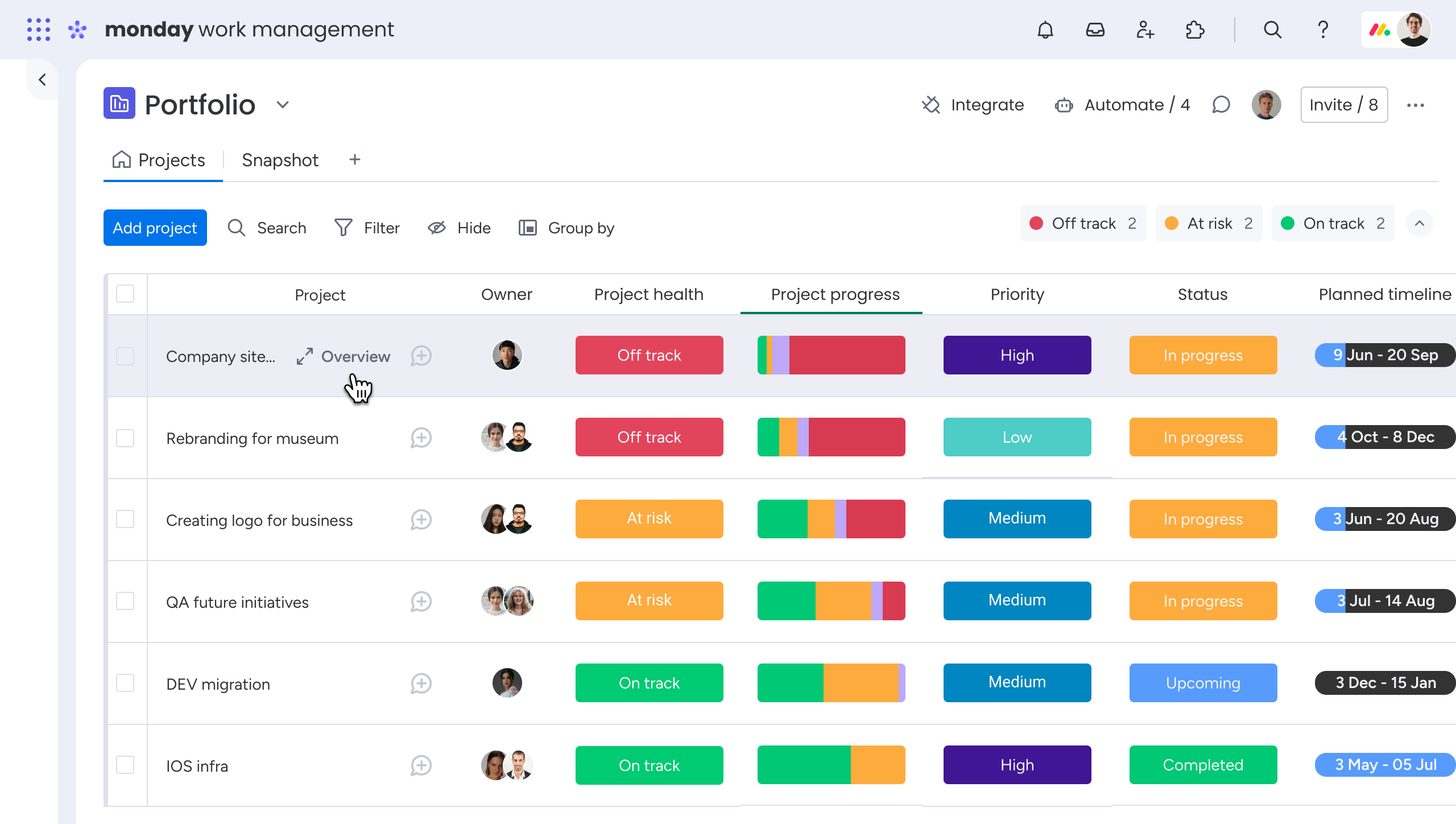
Image source: monday.com
What is Notion?
Notion is a modular workspace that blends documents, databases, and wikis into a single platform. It's known for its flexibility; users can build anything from simple to-do lists to company-wide knowledge hubs using customizable pages and blocks.
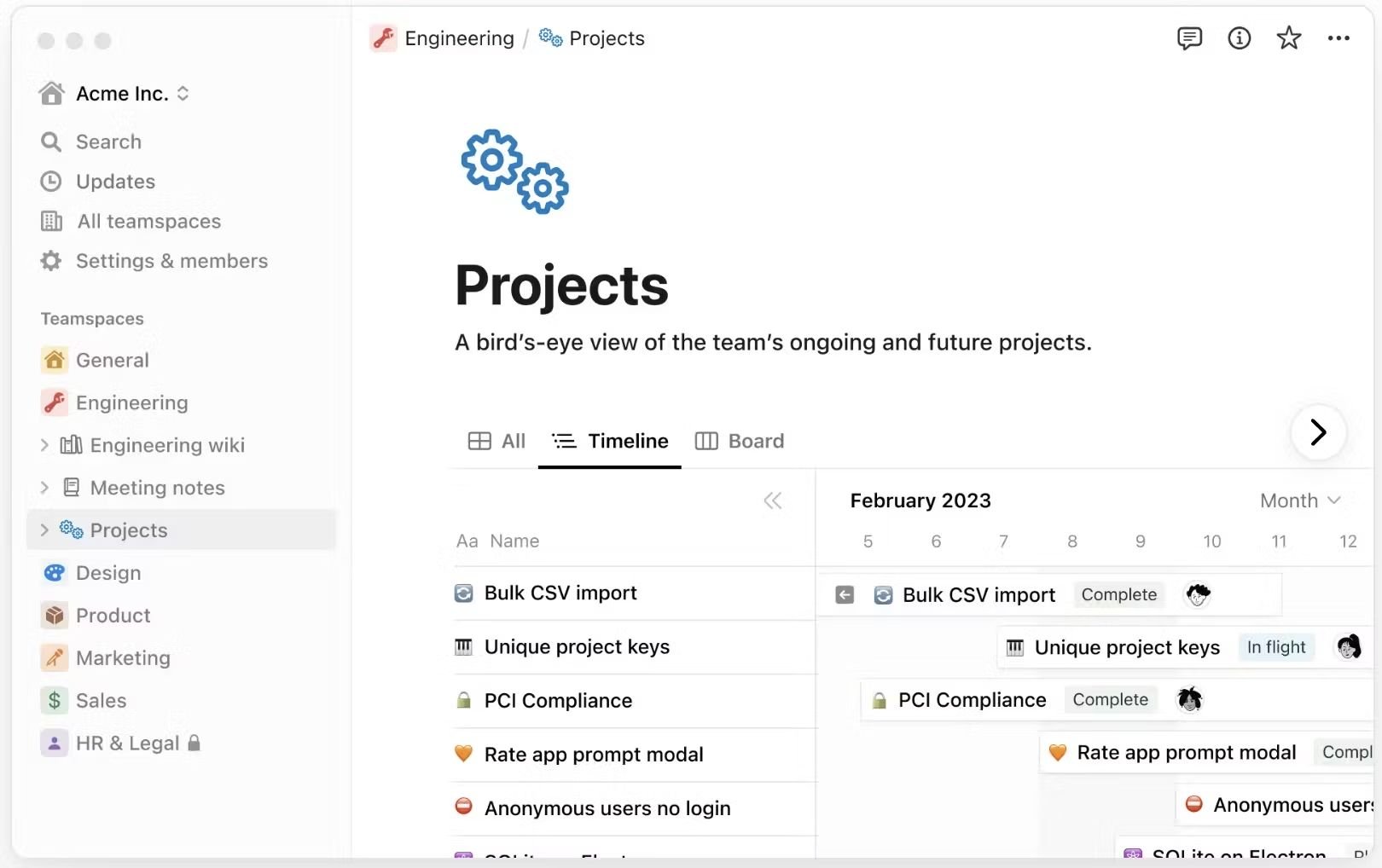
Image source: notion.com
Monday vs Notion feature comparison
When choosing between Monday and Notion, the decision often depends on whether your team values structured project tracking or flexible documentation workflows. Below is a detailed look at how each tool performs across the most important feature categories, from interface and collaboration to automation and knowledge sharing.
Interface and ease of use
Monday.com: Monday delivers a polished, visual interface designed for quick adoption. Teams can start managing projects instantly with pre-built templates, color-coded boards, and drag-and-drop task management. Every workflow is defined upfront, ideal for operations, marketing, or project delivery teams that thrive on structure.
Notion: Notion takes a flexible, creative approach to design. Users build their workspace from scratch using blocks, tables, and nested pages, allowing complete control over layout and data structure. However, setup requires more time and understanding of Notion's relational database logic.
Which stands out: Monday wins for teams that prioritize speed and simplicity, while Notion appeals to power users who enjoy customizing their workspace to fit unique workflows.
Collaboration and communication
Monday.com: Collaboration happens directly inside task boards through @mentions, comments, and file attachments. Each update stays tied to a task, ensuring conversations remain contextual. However, real-time messaging still depends on external tools like Slack or Microsoft Teams.
Notion: Notion promotes asynchronous collaboration through shared pages, inline comments, and co-editing. Teams can brainstorm, plan, and write together in real time, but it lacks native chat or meeting tools for live discussions.
Which stands out: For structured team updates, Monday provides better contextual visibility. For flexible, content-based collaboration, Notion offers richer editing and co-authoring experiences.
Workflow management and automation
Monday.com: Automation is a core strength. The platform supports no-code workflows such as auto-assigning tasks, sending notifications, or moving items when statuses change. Visual triggers make it easy to set up recurring sequences and streamline repetitive actions without technical setup.
Notion: Automation remains limited to manual updates and linked databases. While it excels at visualizing workflows through tables or Kanban boards, it lacks advanced automation. Users often rely on third-party tools like Zapier to connect actions across pages.
Which stands out: Monday dominates in automation, helping teams save time and maintain consistency. Notion's power lies in flexibility, not automated processes.
Documentation and knowledge sharing
Monday.com: Monday includes note fields, updates, and file attachments within each task. While sufficient for project-related context, it lacks a native documentation system. Many teams pair it with tools like Google Docs or Confluence for long-form knowledge management.
Notion: Documentation is Notion's strongest feature. With rich-text editing, embeds, and database-linked content, teams can build detailed wikis, process libraries, and SOPs that grow with the organization. Everything from project notes to onboarding materials can live in one connected workspace.
Which stands out: Notion clearly wins here; it's the go-to choice for teams that rely heavily on writing, documentation, or collaborative planning.
Customization and scalability
Monday.com: Offers pre-set workflows with limited design flexibility. As teams scale, managing complex automations and additional boards can increase costs. However, it provides reliability and structure suitable for enterprise-grade coordination.
Notion: Extremely customizable. Users can design everything, from CRM dashboards to editorial calendars, but scaling large, complex databases can impact speed and organization over time.
Which stands out: Monday scales more predictably in structured environments, while Notion remains better suited to small-to-mid teams seeking creative freedom.
Pricing flexibility: Monday vs Notion
Pricing source: Monday.com & Notion.so (Updated: November 2025)
Monday.com
- Free: $0/user/month. Includes up to 2 users, 3 boards, basic columns, templates, and mobile access.
- Standard: $12/user/month (billed annually). Includes everything in Basic, plus Timeline, Gantt, Calendar views, guest access, and 250 automation & integration actions/month.
- Pro: $19/user/month (billed annually). Includes everything in Standard, plus private boards, time tracking, formula columns, and up to 25,000 automation & integration actions/month.
- Enterprise: Custom (contact sales). Includes enterprise-grade security, advanced reporting, multi-level permissions, and premium support.
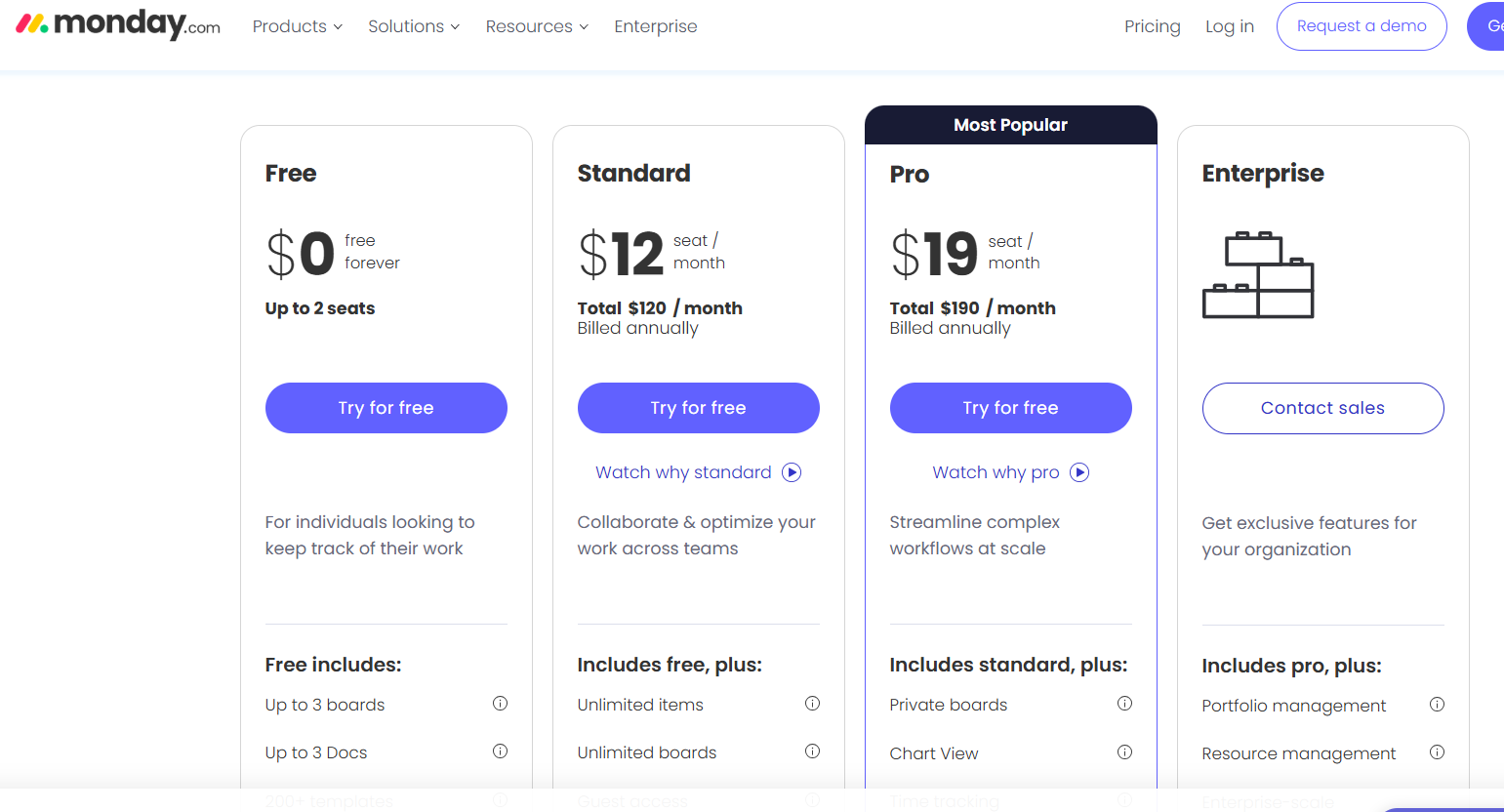
Image source: monday.com
Notion
- Free: $0/user/month. It includes unlimited pages and blocks, collaborative workspaces, basic databases, basic version history, and mobile access.
- Plus: $10/user/month (billed annually) or $12 monthly. It includes unlimited file uploads, 30-day version history, advanced permissions, more database features, and better sharing controls.
- Business: $20/user/month (billed annually) or $20 monthly. It includes everything in Plus, plus SAML SSO, advanced workspace controls, user provisioning, private team spaces, and enhanced automation limits.
- Enterprise: Custom (contact sales). It includes advanced security & compliance, audit logs, dedicated success manager, data residency, guaranteed uptime, and enterprise-level controls.
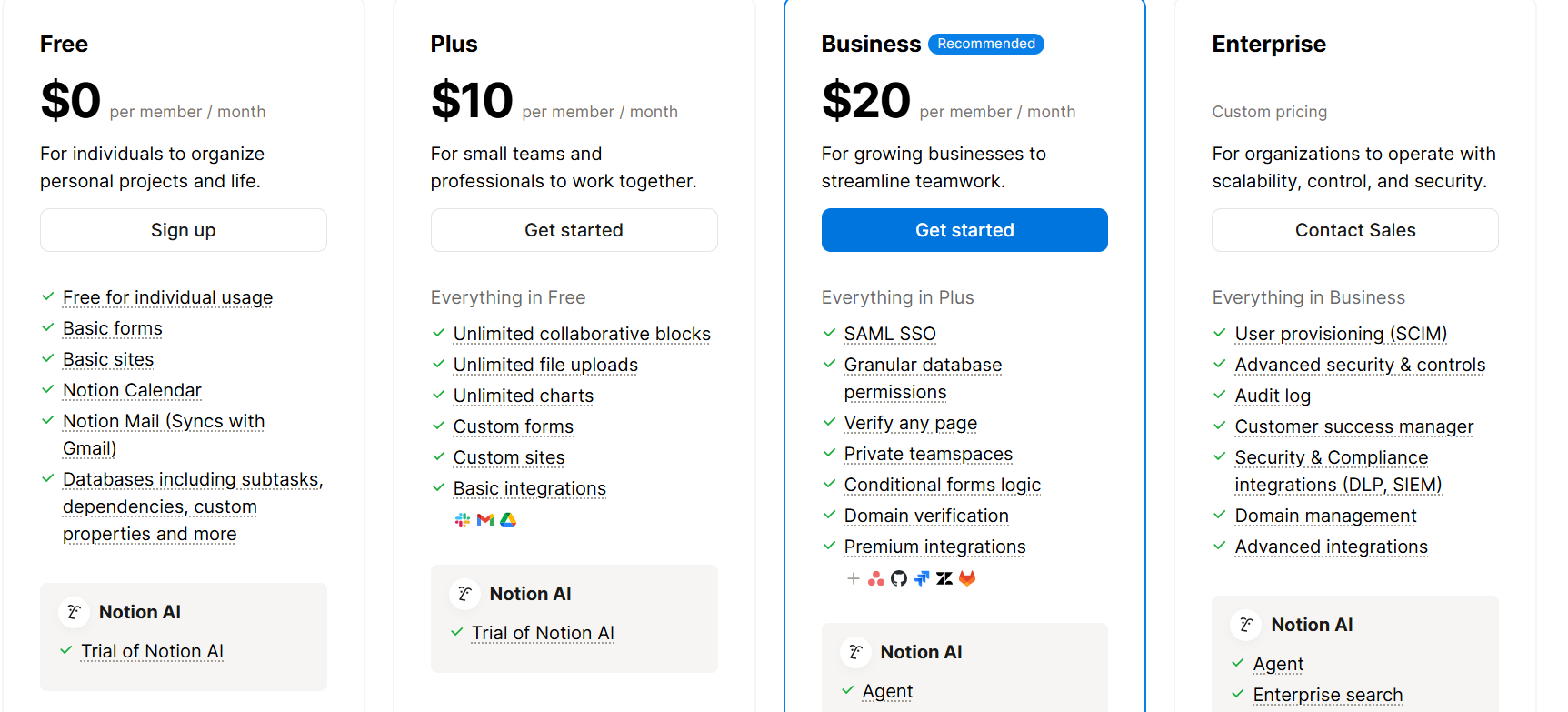
Image source: notion.com
Which stands out: Notion is generally more affordable for content-centric teams, while Monday offers better value for larger organizations managing structured projects.
While both Monday.com and Notion bring unique strengths to project management and collaboration, many teams find themselves caught between structure and flexibility. Monday offers a clear, visual workflow for tracking progress but lacks depth in documentation and real-time communication. Notion, on the other hand, excels at organizing knowledge and building custom workspaces but struggles with automation and large-scale coordination.
For organizations seeking a solution that bridges these two worlds, combining structured task management, real-time collaboration, and automated workflows, Lark presents a powerful alternative. It unites the key advantages of both Monday and Notion into a single, connected workspace built for modern, fast-moving teams.
Meet Lark: Where teamwork, data, and automation come together
While Monday and Notion each excel in specific areas, most teams still juggle between tools for chat, tasks, and docs. Lark brings everything together in one connected workspace, where communication, data, and automation flow seamlessly. From project tracking to real-time collaboration, every action stays in sync. It's how modern teams work faster, smarter, and more aligned.
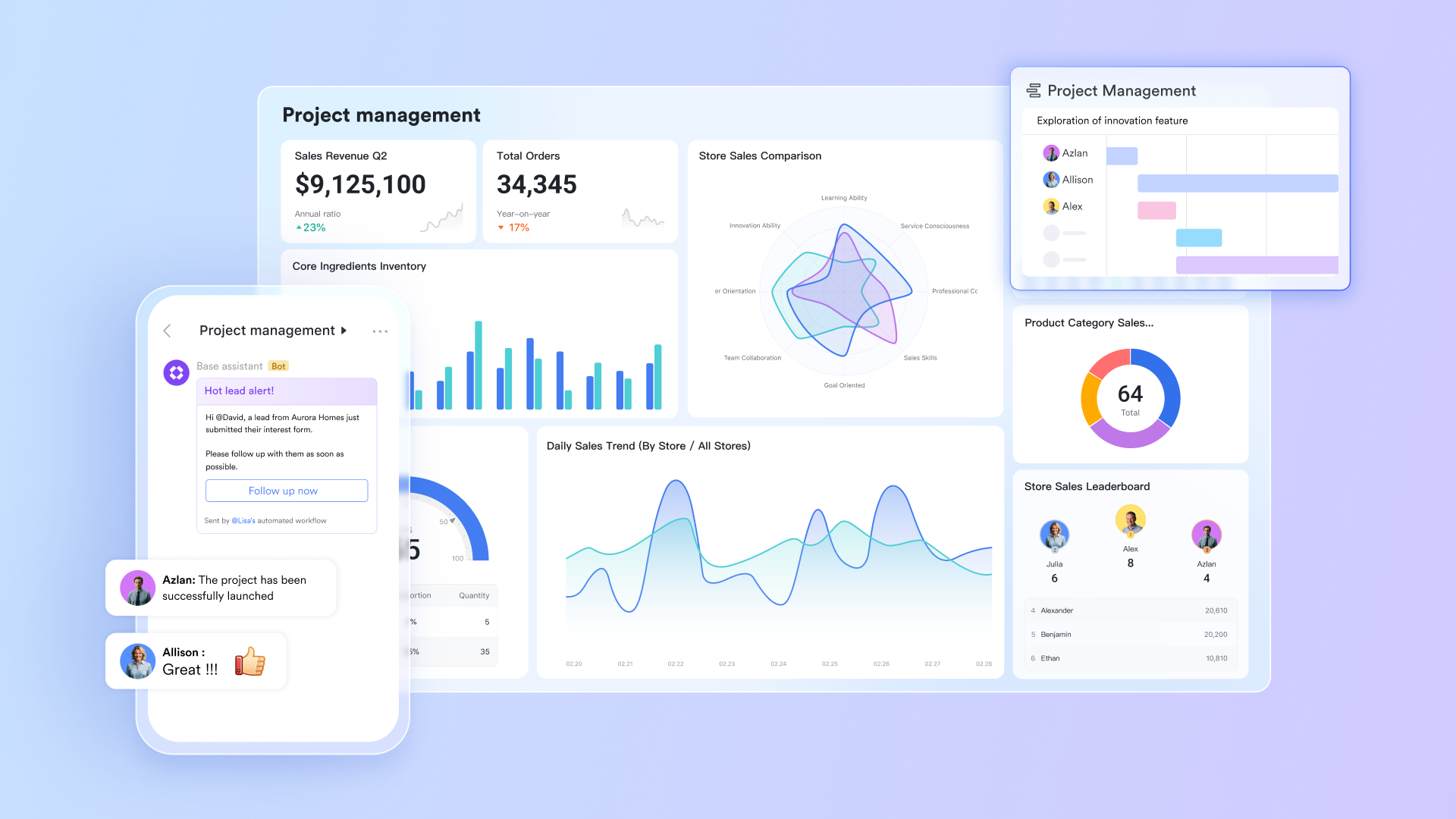
Structured & centralised project management hub
Lark Base serves as a central hub for managing projects and processes by combining multiple tables, Kanban boards, and Gantt timelines into a structured workspace. Teams can organize work across different tables to separate tasks, deliverables, owners, and phases, then switch to Kanban for a stage-by-stage view of progress or Gantt for a timeline view that highlights dependencies and scheduling risks. Two-way links ensure that updates in one table appear instantly in related tables, keeping information consistent across the project. With advanced filtering and grouping options, users can quickly surface the most important tasks or records, even in large, multi-team initiatives.
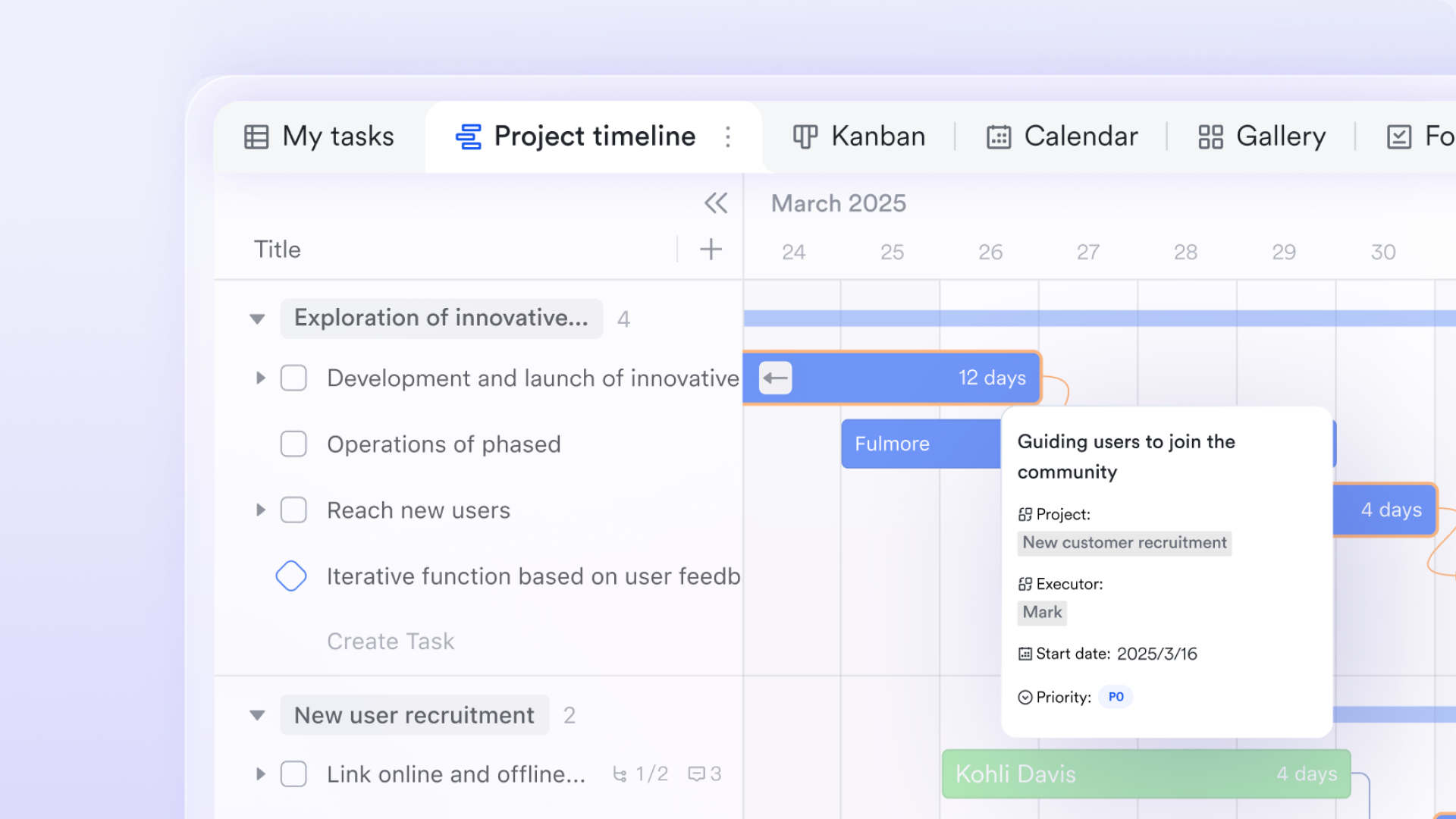
Automated workflows that streamline execution
Workflows in Base help teams automate routine steps and maintain accuracy with minimal manual intervention. Using logic-driven actions, items move through multi-step sequences automatically as their data changes. Teams can configure triggers to assign tasks, send notifications, update status fields, or move project items to the next stage. This reduces repetitive work, ensures consistency across all projects, and supports scalable, rules-driven processes that adapt to growing operational needs.
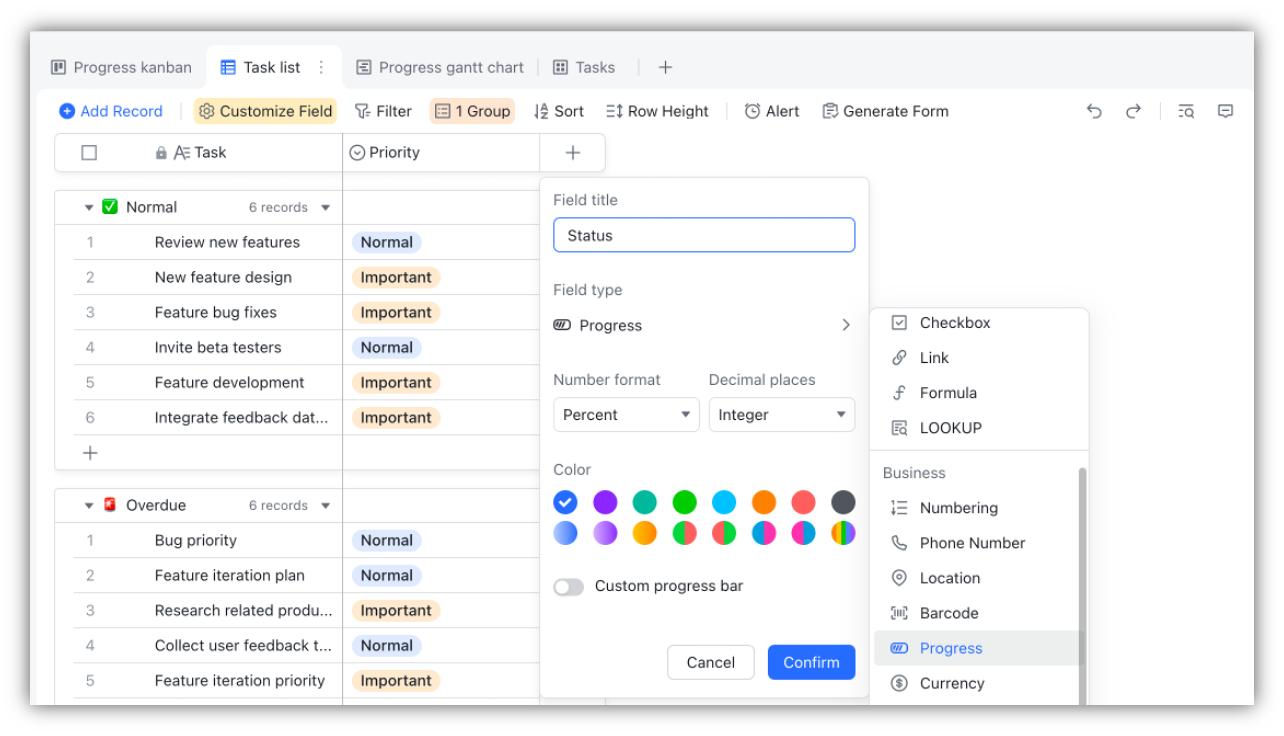
Collaborative Docs for content-rich teamwork
Lark Docs offers a shared, flexible space for creating content-rich documents suited for planning, reporting, and collaboration. Users can include text, images, videos, sheets, bases, and mindnotes within the same document. Features such as find and replace, structured formatting options, and strong editing controls make Docs suitable for proposals, briefs, SOPs, and reports. By embedding Base tables or tasks directly inside Docs, all related information stays connected and continuously updated, improving clarity and alignment across teams.
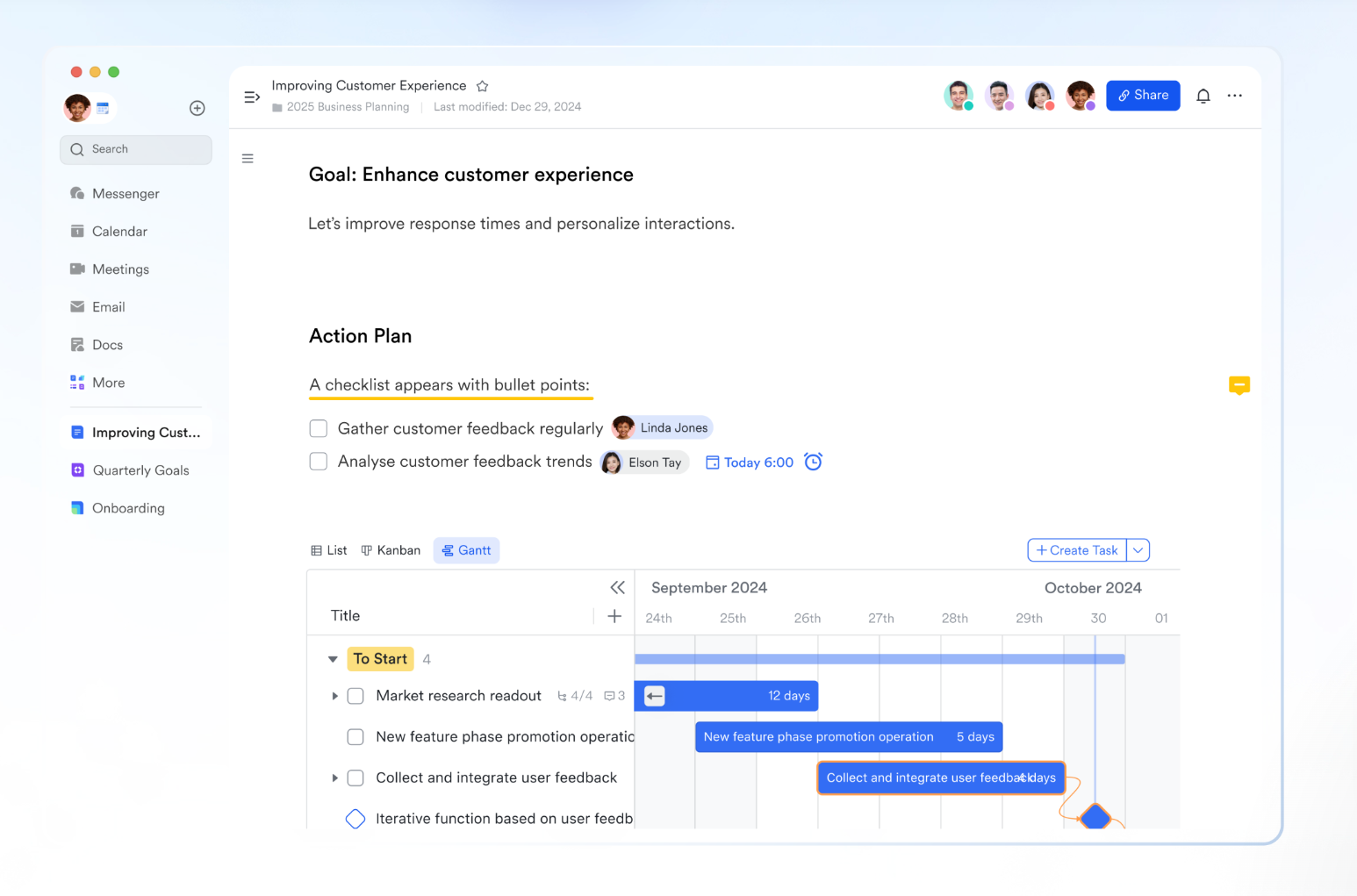
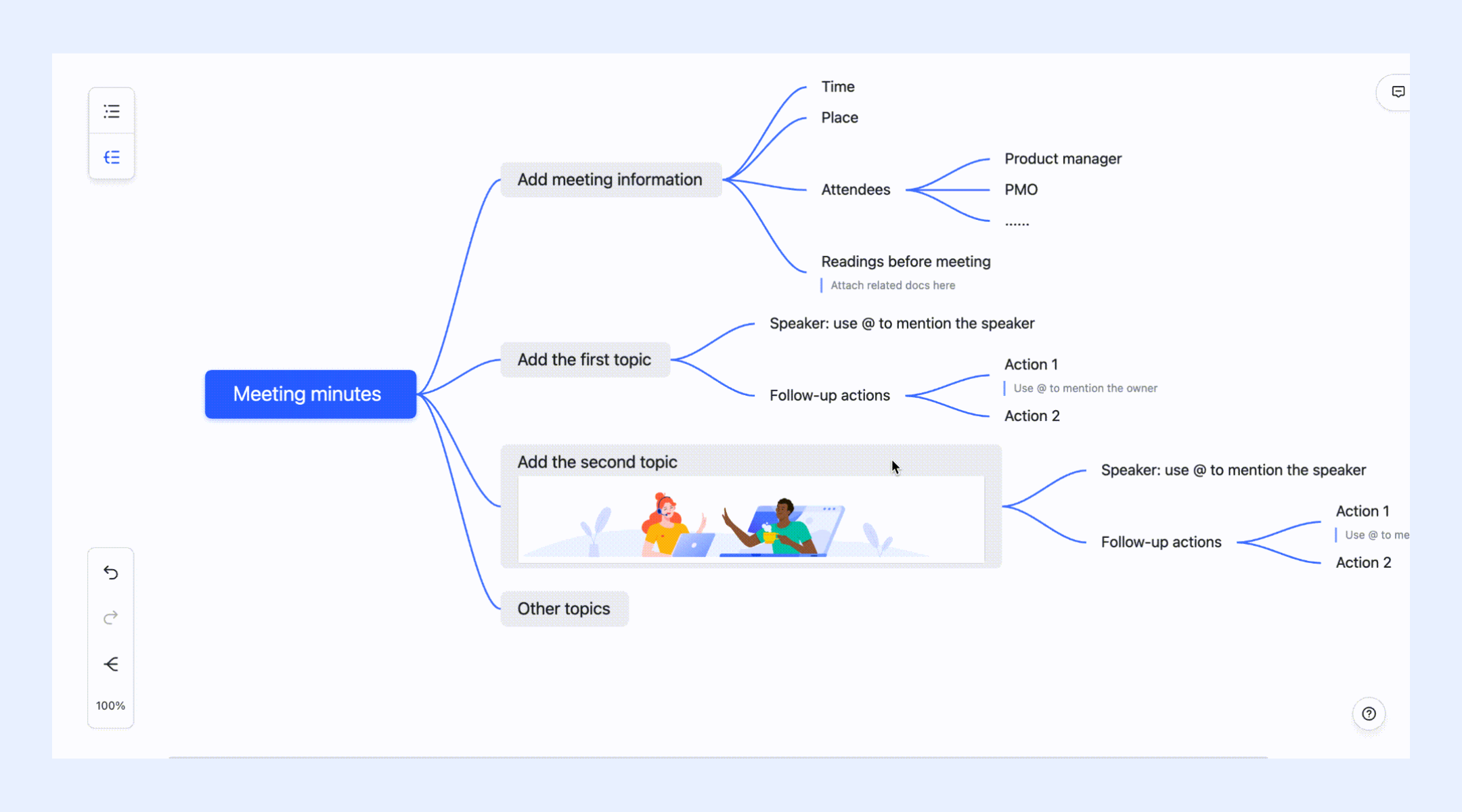
Visual ideation with MindNotes
MindNotes offers a visual approach to brainstorming ideas, outlining project concepts, and mapping relationships between topics. The mind map format helps users capture ideas quickly and organize them into branches that represent different themes or directions. Once ideas take shape, teams can convert MindNotes into Docs or link them directly to items in Base to transition from brainstorming to structured planning or execution.
- Starter plan: Free forever plan that includes 11 powerful tools for up to 20 users. It also comes with 100GB of storage, 1000 automation runs, AI translations, and more.
- Pro plan: $12/user/month (billed annually) for up to 500 users. It includes everything in Starter plus group calling for up to 500 attendees, 15TB of storage, 50,000 automation runs, and more.
- Enterprise plan: Contact sales for custom pricing. Supports unlimited users and includes even more automation runs and advanced security, compliance, and management features.
Choosing the right platform for your team's workflow
After comparing Monday and Notion, it's clear that both tools serve different working styles. Monday.com fits structured, task-driven teams that rely on defined workflows and reporting. Notion, in contrast, empowers creativity, knowledge organization, and cross-functional flexibility.
However, the right choice depends on how your team works day-to-day:
- If your workflow demands visual tracking, recurring automation, and accountability, Monday may fit better.
- If your focus is flexible documentation, team knowledge bases, and creative process mapping, Notion stands out.
- But if your team needs both real-time collaboration, automated workflows, and connected data in one place, Lark is the smarter long-term investment. It balances the structure of Monday with the creativity of Notion, without the complexity or cost of using multiple tools together.
Conclusion
In the Monday vs Notion debate, the right choice depends on how your team works. Monday.com offers structure, automation, and clear project visibility, while Notion delivers creative freedom and flexible documentation. Yet, most modern teams need a balance, a unified space where planning, communication, and execution happen together. That's where Lark stands out. With powerful databases, built-in chat, automation, and analytics, Lark brings the best of both worlds into one connected workspace, helping teams move faster, stay aligned, and scale smarter.
FAQs
How does Notion compare with Airtable and Monday in terms of features?
When comparing Notion vs Airtable vs Monday, Airtable leans toward database-driven workflows, Monday focuses on visual project tracking, and Notion provides unmatched flexibility for documentation and customization. Lark outperforms all three by combining these capabilities, offering structured data management, real-time chat, and collaborative documentation on a single platform.
Is Notion better than Trello or Monday for project tracking?
In Notion vs Trello vs Monday, Trello remains simplest for Kanban boards, Monday excels in automation and tracking progress, while Notion supports flexible project planning with detailed pages. Lark bridges them by offering task views like Kanban, Gantt, and List, with automation and integrated communication built in.
What's the difference between Notion, Asana, and Monday for team collaboration?
Looking at Notion vs Asana vs Monday, Asana is strong in task tracking and team goals, Monday in workflow visibility, and Notion in shared knowledge and notes. Lark combines these strengths by unifying communication, documentation, and task ownership within one workspace.
Which tool, Asana, Monday, or Notion, is best for hybrid teams?
For Asana vs Monday vs Notion, hybrid teams often find Lark more efficient because it includes built-in messaging, video meetings, Docs, and shared tasks. Unlike the other three, it keeps discussions, updates, and documents connected, reducing tool-switching fatigue.
Can I use Lark as an alternative to Notion and Monday for collaboration?
Yes. Lark serves as an all-in-one workspace that merges the project tracking power of Monday with the collaborative flexibility of Notion. Teams can manage projects in Lark Base, co-edit Docs, chat in real time, and automate workflows, without juggling separate tools.
Related reading
Table of contents
Start using Lark today

Manage all your work in one place
Boost team efficiency by 10x
Save up to 70% on software costs
Table of contents
Start using Lark today
Manage all your work in one place
Boost team efficiency by 10x
Save up to 70% on software costs
Keep reading



Lark recognized in 2023 Gartner® Collaborative Content Workspaces and Meeting Solutions reports
Lark, the global superapp for productivity, is delighted to announce it receives recognition in the Gartner's 2023 Innovation Insight for Collaborative Content Workspaces and Market Guide for Meeting Solutions.





2026 Lark Technologies Pte. Ltd.
Headquartered in Singapore with offices worldwide.






Explore: