Obsidian pricing often looks straightforward at first glance, especially for individuals drawn to its local-first design and free core app. For personal note-taking, research, and writing, this model feels both accessible and flexible. However, as usage expands into syncing across devices, publishing content, or sharing knowledge with others, Obsidian pricing becomes more layered. Costs are no longer just about subscriptions, but about the time and effort needed to maintain workflows. At this stage, many teams begin to compare Obsidian with more collaborative platforms like Lark, which approach pricing around shared workspaces and built-in teamwork rather than add-on features.
Explore a workspace built for shared knowledge and teamwork
What is Obsidian?
Obsidian is a note-taking application designed around the idea of connected thinking. Instead of storing notes in isolated folders or proprietary databases, Obsidian saves everything as plain Markdown files on your local device. This gives users full ownership of their data and allows notes to remain accessible even without an internet connection.
Obsidian is often used for personal , research, writing, and long-term thinking. Its strength lies in how it links ideas together rather than how it manages tasks or collaboration. Understanding this foundation is essential when evaluating Obsidian pricing free plan vs paid and deciding whether its paid add-ons match your real needs.
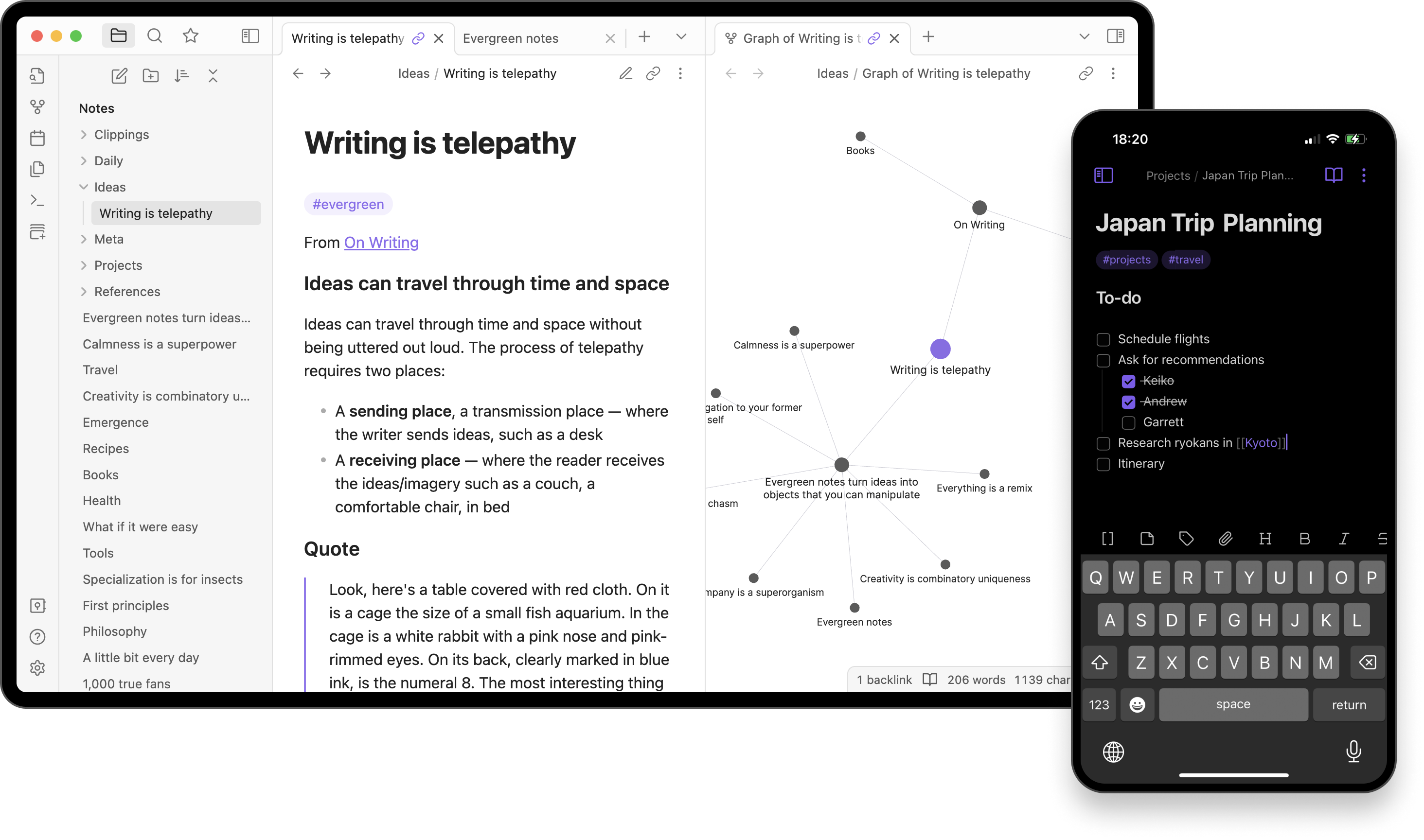 Image source: obsidian.com
 Obsidian core feature explained at a glance
Before evaluating Obsidian pricing plans, it helps to understand what Obsidian offers out of the box. Most of its core capabilities are available at no cost, which is why Obsidian pricing free personal use remains one of its strongest selling points. These features focus on knowledge capture, linking, and exploration rather than execution or coordination.
Obsidian plan explained: How much does Obsidian cost exactly
The overall structure of Obsidian's plans is modular rather than bundled. The core application is free to use, while Sync and Publish are offered as optional subscriptions. This approach keeps entry costs low and makes it easy to get started. Obsidian app pricing becomes more complex over time as additional features are layered in. Understanding Obsidian pricing plans early helps avoid unexpected tradeoffs as needs grow.
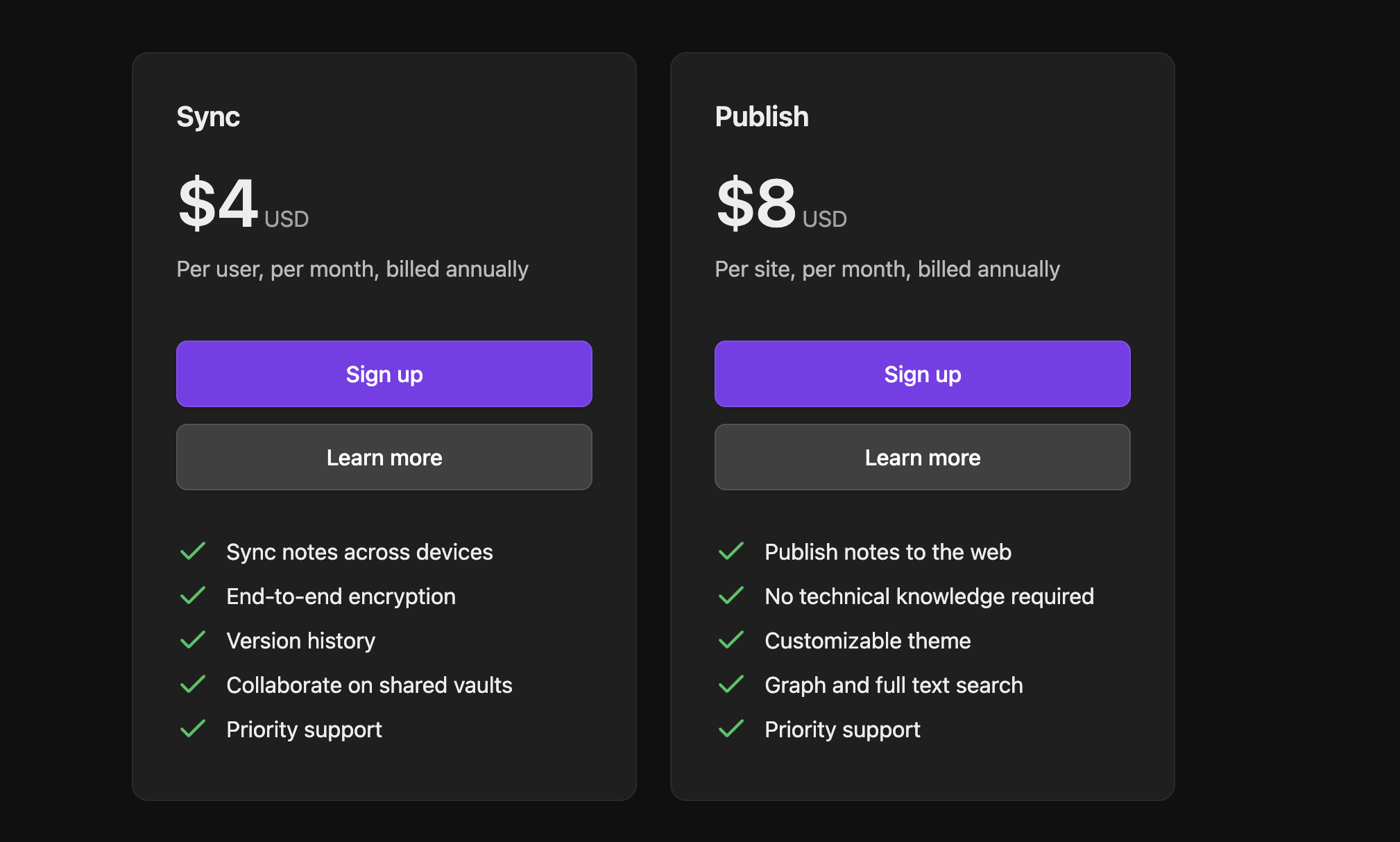
Information source: Obsidian.com
Update time: 2025-12-19
Note: Pricing and plan details reflect publicly available data as of the update date and may vary based on region, billing cycle, and number of agents.
Obsidian Sync pricing and what you're paying for
According to Obsidian sync pricing official details, Obsidian Sync is priced at $4 USD per user, per month, billed annually. This plan is designed to extend Obsidian's local-first note system across multiple devices while maintaining a strong focus on privacy and control.
With Sync, your notes are automatically kept up to date across desktop and mobile devices, eliminating the need to rely on third-party . Obsidian emphasizes end-to-end encryption, meaning only you can access your data even Obsidian itself cannot read your notes. Version history is included, allowing you to restore previous versions of notes if something is accidentally changed or deleted.
Sync also supports shared vaults, making it possible for small groups to collaborate on the same set of notes. However, collaboration remains asynchronous and file-based rather than real-time. Priority support is included, but there are no built-in workflows, approvals, or . In practice, you pay primarily for secure syncing and data continuity, not for advanced collaboration or execution features.
Obsidian Publish pricing for public and shared notes
Obsidian Publish is priced at $8 USD per site, per month, billed annually. This plan is aimed at users who want to turn their Obsidian notes into publicly accessible websites without managing hosting, servers, or technical setup.
Publish allows you to publish notes directly to the web, making it suitable for personal blogs, documentation sites, or public knowledge bases. It includes a customizable theme, built-in graph view, and full-text search, helping readers navigate content easily. No technical knowledge is required, publishing is handled entirely within Obsidian's interface.
That said, Publish is focused on one-way sharing, not collaboration. Readers cannot edit content, leave structured feedback, or participate in workflows. Each published site is billed separately, which can increase costs if you manage multiple knowledge hubs. Priority support is included, but Publish does not add team permissions, review flows, or layers. You're paying for convenience and presentation, rather than shared work or ongoing content operations.
Optional licenses that support Obsidian's independent development
Obsidian offers optional licenses for users and organizations that want to financially support the product's continued development. These licenses are not required to use Obsidian and do not unlock core productivity features like syncing, publishing, or collaboration. Instead, they function as a way to contribute to the sustainability of the project while receiving limited, non-essential perks.
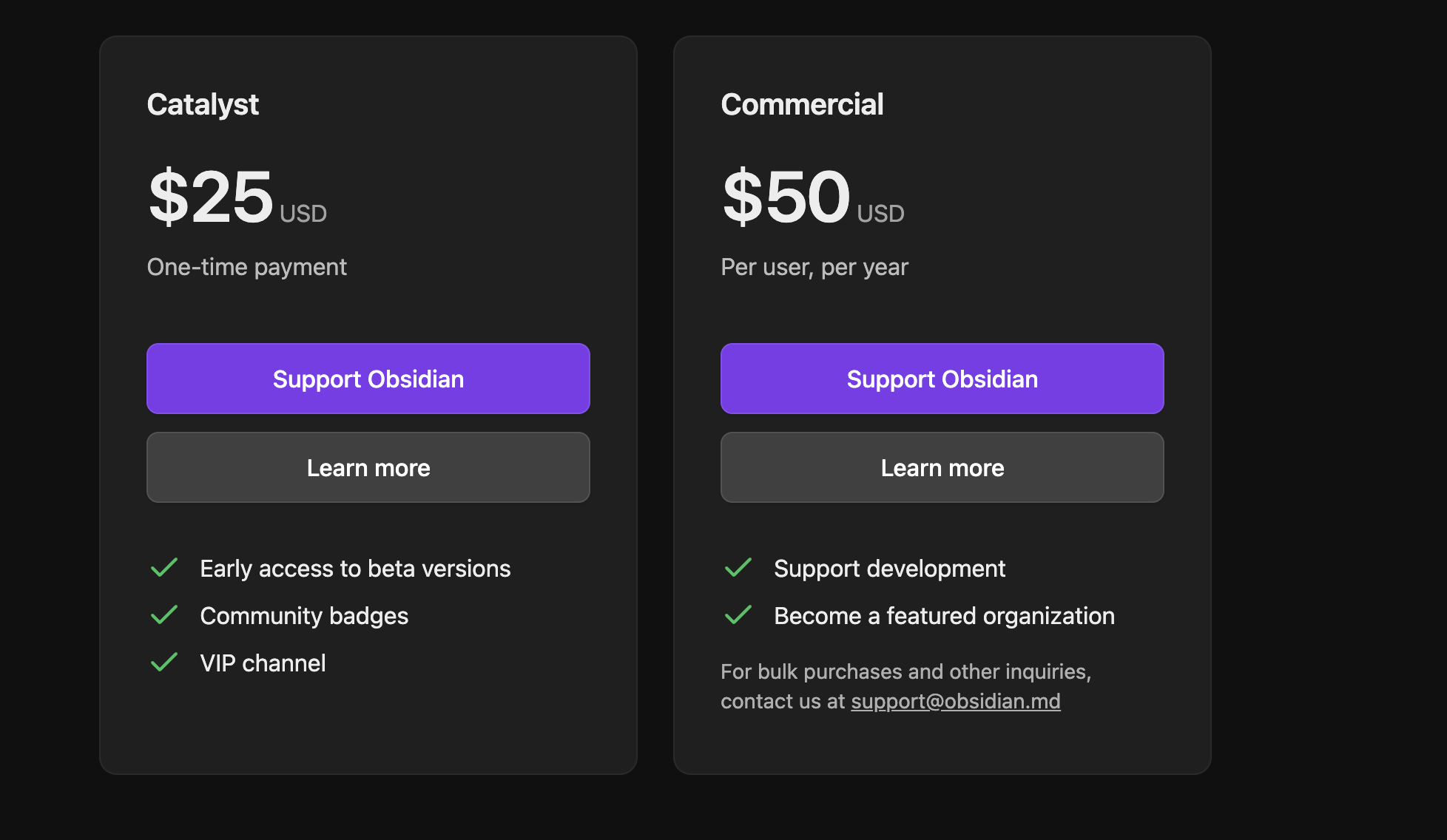
Information source: obsidian.com
Update time: 2025-12-19
Note: Pricing and plan details reflect publicly available data as of the update date and may vary based on region, billing cycle, and number of agents.
The Catalyst license is a one-time payment aimed at individual supporters. It provides early access to beta builds, community recognition through badges, and entry to a VIP community channel. It's designed for power users and enthusiasts who want to follow Obsidian's development closely, rather than teams looking for workflow or collaboration enhancements.
The Commercial license applies to companies using Obsidian in a business environment. Priced per user per year, it serves as a usage license rather than a feature upgrade. It helps fund development and allows organizations to be listed as supporters, but it does not add admin controls, shared workspaces, or team management capabilities.
Overall, these optional licenses highlight Obsidian's independent, community-funded model. While they support long-term product development, teams evaluating Obsidian should be aware that essential team functionality such as real-time collaboration, centralized workspaces, and , requires additional tools beyond these licenses.
The hidden costs behind "free" Obsidian setups
Obsidian's free model works well for individuals starting with personal notes, but limitations become clearer over time. As note volumes increase and workflows expand, users begin to invest more effort just to maintain stability. These costs are often indirect, showing up as time loss rather than subscription fees. For teams, these hidden tradeoffs can significantly reduce overall value. This is where Obsidian pricing free version vs paid version starts to feel less straightforward.
- Time spent managing plugins and conflicts: Plugins are central to extending Obsidian's functionality, but they require ongoing maintenance. Updates can introduce conflicts or break existing workflows. Users often spend time troubleshooting instead of focusing on actual work. As plugin stacks grow, stability becomes harder to maintain.
- No or permissions: Obsidian does not offer native roles, access controls, or approval systems. Sharing notes depends on manual coordination and trust. This makes it difficult to manage sensitive information. Teams lack clear ownership and change visibility.
- Knowledge silos as teams grow: Vault-based organization separates information into isolated spaces. As teams expand, content becomes scattered across multiple vaults. Finding the latest or correct information takes longer. Shared understanding weakens over time.
Real-world Obsidian use cases
Obsidian performs best when used in clearly defined personal or low-collaboration scenarios. Its pricing structure aligns well with that prioritize thinking and writing. When usage shifts toward shared documentation or operational work, the cost fit changes. Evaluating real-world use cases helps clarify where Obsidian delivers lasting value and where it struggles.
- Students and individual researchers: Students benefit from local-first notes and free access. Research materials stay organized within a single vault. Costs remain minimal even over long periods. Obsidian pricing free personal use fits this group well.
- Writers and personal knowledge builders: Writers use Obsidian to draft, connect ideas, and manage long-term projects. Markdown portability supports flexible publishing. Sync adds convenience without complexity. Overall costs stay predictable.
- Why operations, product, and cross-team orgs struggle: These teams rely on shared visibility and coordination. Obsidian lacks and execution tools. Notes remain informational rather than actionable. Additional tools become necessary.
When Obsidian stops being cost-effective
Obsidian's pricing feels efficient at a small scale, but the equation changes as teams grow. Costs increase not only through subscriptions but also through fragmented workflows. Productivity losses become more visible over time. This is often the point where teams reassess Obsidian pricing plans.
- Total cost vs value for multi-user teams: Sync pricing increases with every additional user, and Publish pricing scales with each site. What starts as a modest expense can grow quickly across teams. The functional value gained does not always increase at the same pace. This gap becomes more noticeable as collaboration requirements expand.
- Productivity loss from tool fragmentation: Teams often use separate tools for chat, , and planning alongside Obsidian. Notes remain disconnected from execution systems. Switching between tools slows work and increases the risk of missed context. Over time, coordination becomes harder to maintain.
- Documentation without execution: Obsidian is strong at capturing ideas and information, but it does not drive action on its own. Tasks, decisions, and follow-ups live elsewhere. Ownership and accountability become unclear. This limits Obsidian's effectiveness for operational and .
Why are people leaving Obsidian?
As collaboration requirements increase, teams often outgrow Obsidian's personal-first design. The need shifts from storing ideas to coordinating action. This is where limitations around Obsidian pricing free vs paid become more apparent. Teams begin exploring platforms built for shared work.
- Need for live collaboration, not static notes: Teams need real-time editing and discussion. File-based syncing feels slow and disconnected. Decisions require shared visibility. Static notes create delays.
- Documentation tied to tasks and decisions: Modern teams expect documentation to connect directly to execution. Notes should link to owners, deadlines, and outcomes. Obsidian does not provide this natively. Extra tools are required.
- Visibility across departments: Leaders need shared dashboards and centralized knowledge. Vault-based separation limits oversight. becomes harder. Organizational clarity suffers.
As teams move from personal knowledge management to shared execution, the gaps in Obsidian become harder to ignore. The challenge is no longer capturing ideas, but turning them into coordinated action across people and departments. This shift naturally leads teams to consider platforms designed around collaboration, structured knowledge, and workflows. This is where solutions like Lark begin to enter the conversation.
Move from static notes to coordinated team execution
Meet Lark: Manage collaboration, knowledge, and note-taking across teams
approaches knowledge and collaboration from a team-first perspective rather than a personal note-taking model. While Obsidian excels at capturing and connecting individual ideas, Lark focuses on helping groups create, share, and act on information together in real time. It combines documentation, communication, structured data, and , reducing the need for multiple disconnected tools. For teams that have outgrown static notes and plugin-based workflows, Lark offers a more scalable way to manage knowledge alongside everyday work.
Live collaboration instead of single-user editing
Obsidian is primarily optimized for solo workflows, with collaboration limited to shared vaults through paid sync and manual coordination. supports real-time multi-user editing with live cursors, comments, mentions, and task assignments directly inside documents. Teams can brainstorm, review, and finalize content together without version conflicts. This makes Lark far more effective for collaborative documentation, meeting notes, and project specs than Obsidian's file-centric approach.
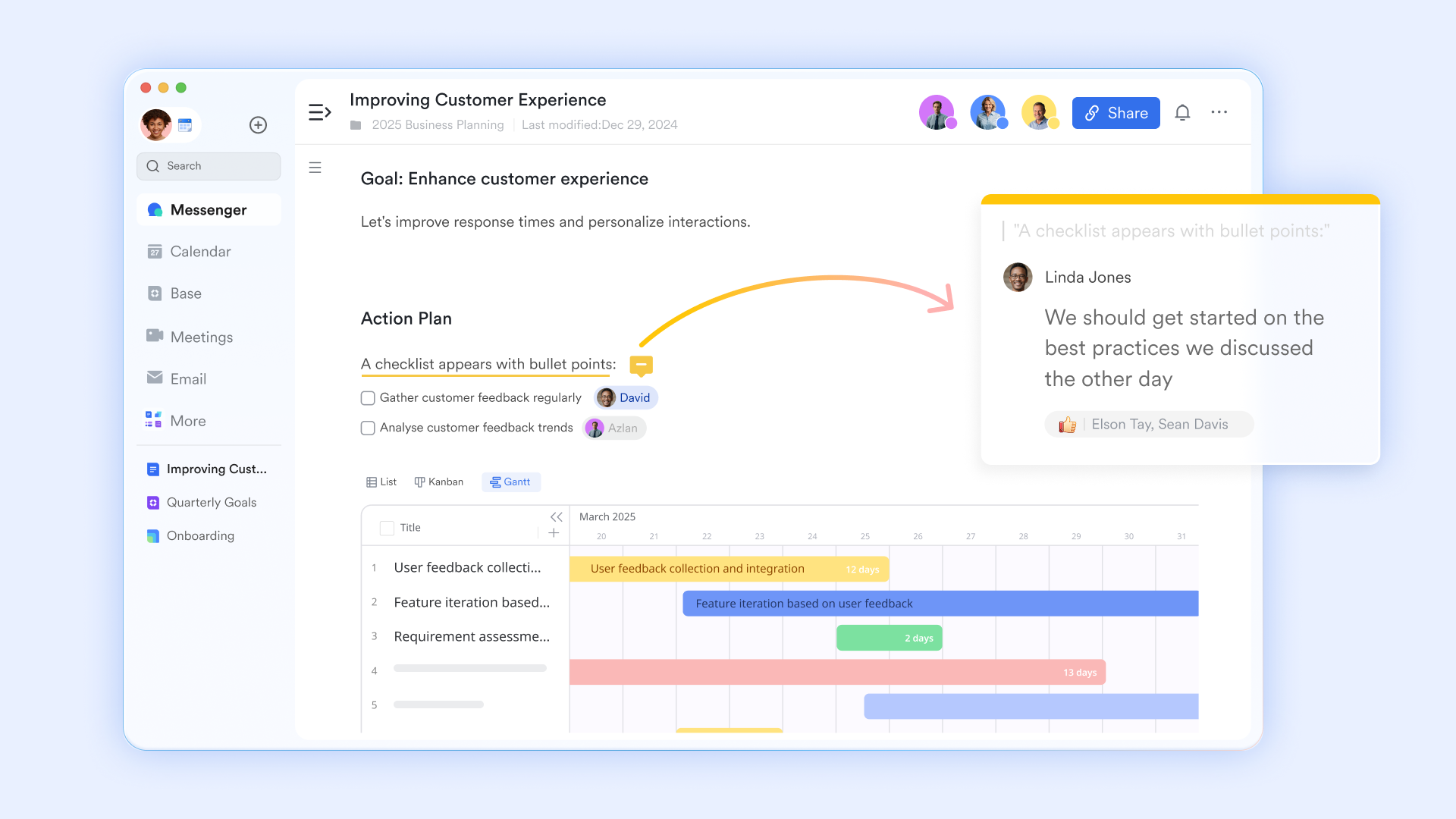
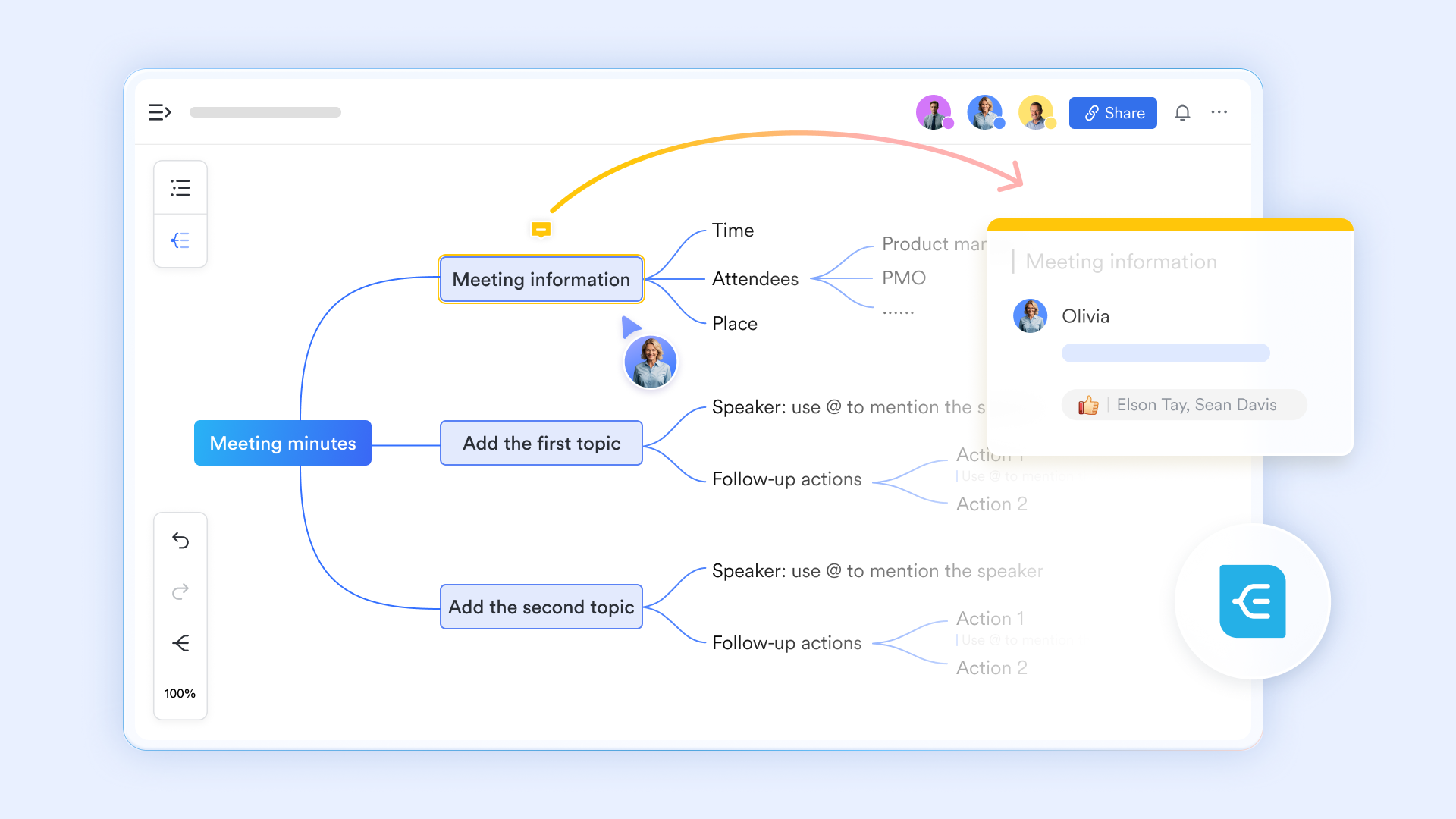
A streamlined, hybrid note-taking method
Unlike Obsidian's focus on non-linear personal knowledge through complex backlinking, offers a hybrid note-taking experience: it allows users to switch instantly between a visual and a structured outline. It features unique collaborative tools like "node-drilling" to focus on sub-topics and the ability to mark nodes as "done" with strikethroughs, which Obsidian's more static local files lack. Furthermore, it supports rich media integration, allowing you to add resizable images and detailed text descriptions to individual nodes, all while maintaining real-time comments for team feedback. With drag-and-drop edits and quick thought import, it helps turn "rough drafting" complex thoughts into shared, real-time workflows.
Structured knowledge bases instead of isolated vaults
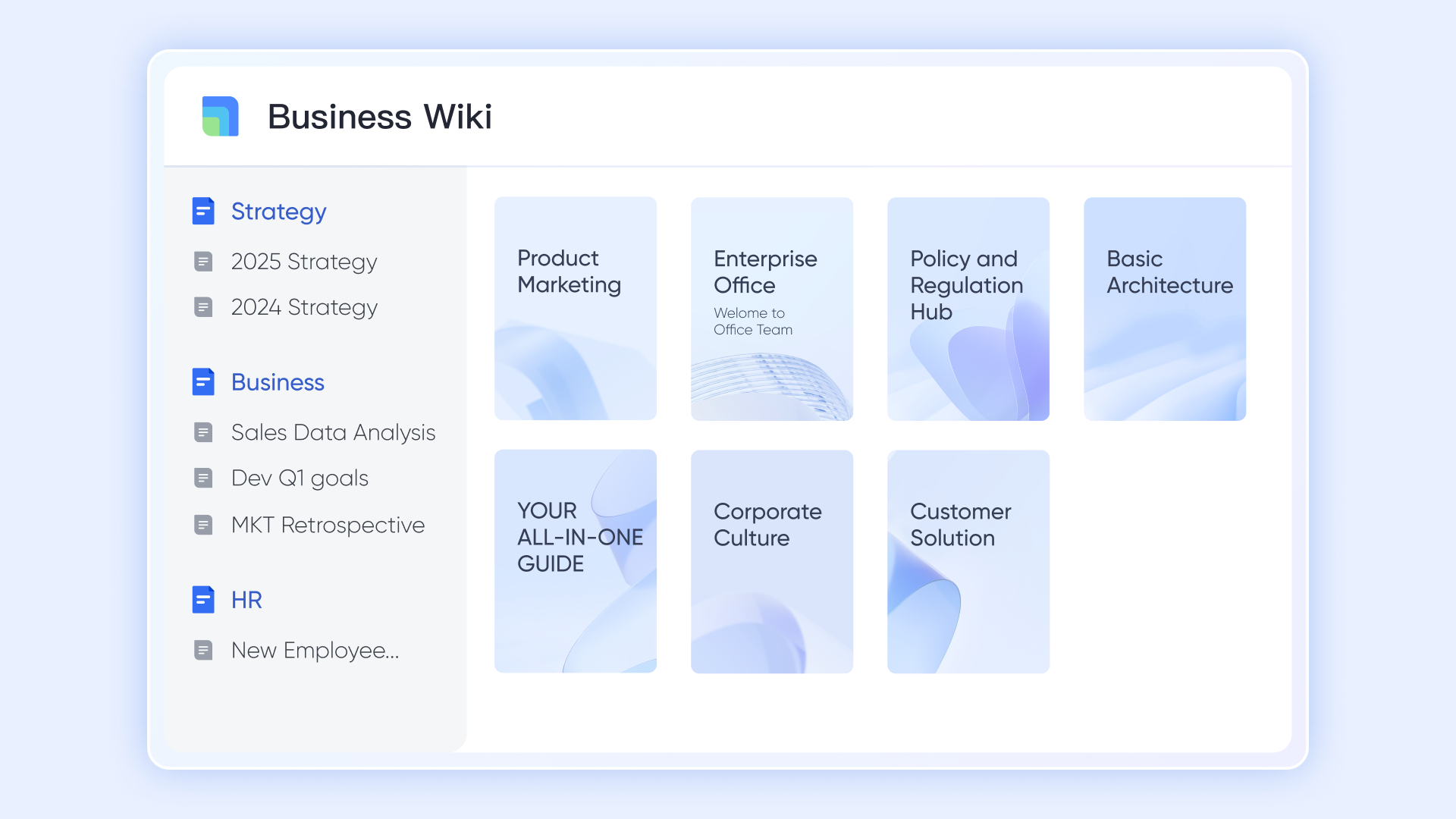
Obsidian organizes information through individual vaults that work well for personal knowledge but become fragmented as teams grow. provides a structured, organization-wide where pages are grouped into spaces, categories, and hierarchies. Permissions can be set at space or page level, ensuring the right people have access to the right information. Unlike Obsidian's vault-based isolation, Lark enables shared, continuously updated knowledge that scales across departments without duplication or manual syncing.
Connected data systems beyond just note linking
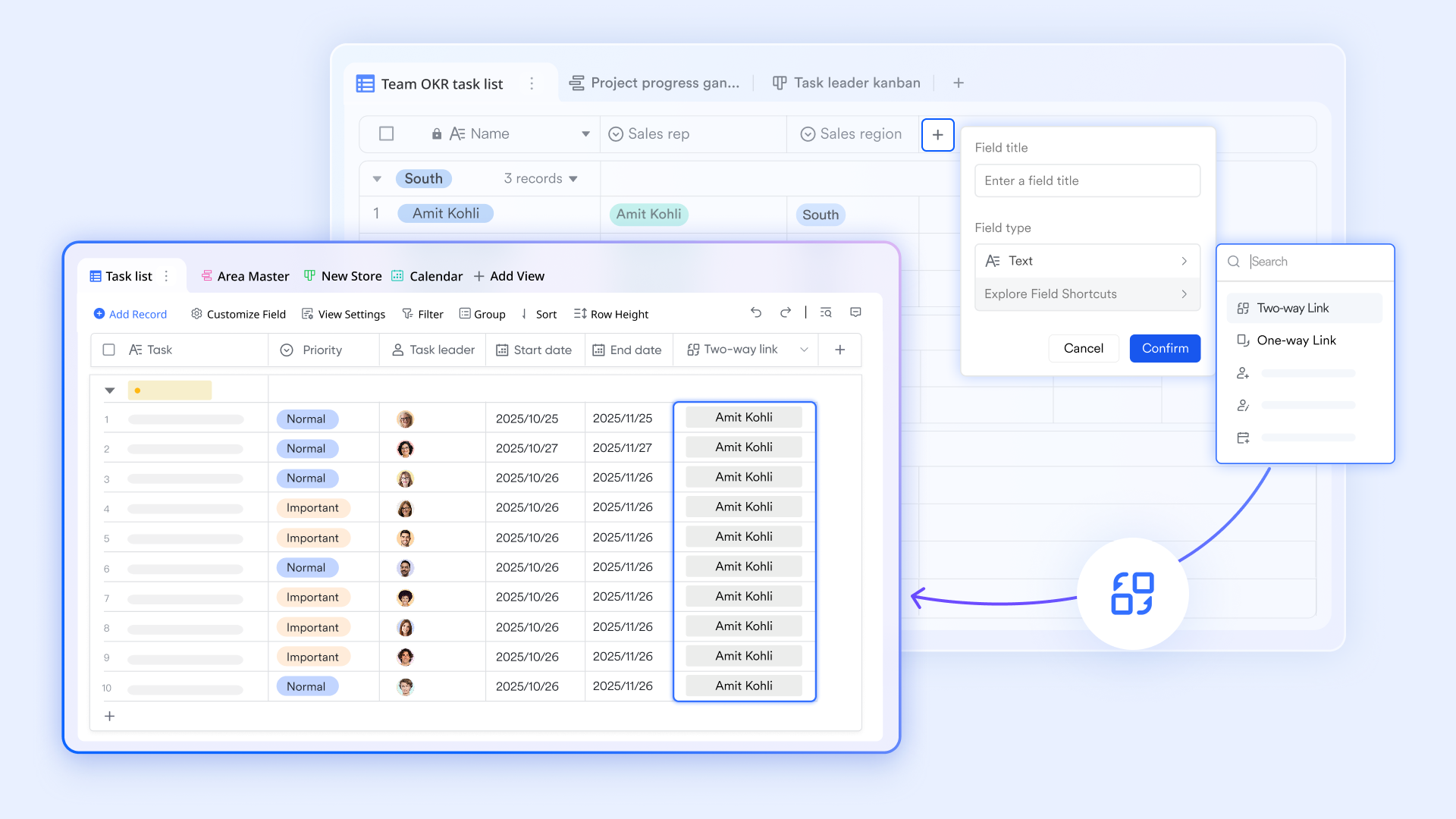
Obsidian Bases is a core plugin designed for personal knowledge management (PKM), and Obsidian's bi-directional links help connect ideas conceptually, but they remain static references between text files. goes further by turning information into structured, relational data. Records can be linked across tables using one-way or two-way link fields, lookup fields, and formulas. Changes update instantly across views and related records. Also, it offers granular permissions to hide specific columns and includes advanced business dashboards with Gantt charts and pivot tables. For data import, it supports AI field shortcuts and public-facing forms drive real-time data collection for entire organizations. This allows teams to manage projects, clients, issues, or inventories, as living systems, something Obsidian's base, is not designed to handle at scale.
Automation that moves work forward
Obsidian relies heavily on plugins and manual workflows to manage tasks or processes. Lark includes built-in automation through base workflows and rules that react to real events such as status changes, form submissions, or deadlines. These workflows can send messages, create tasks, update records, or notify stakeholders automatically. This reduces manual coordination and makes Lark suitable for operational use cases where Obsidian remains largely informational. 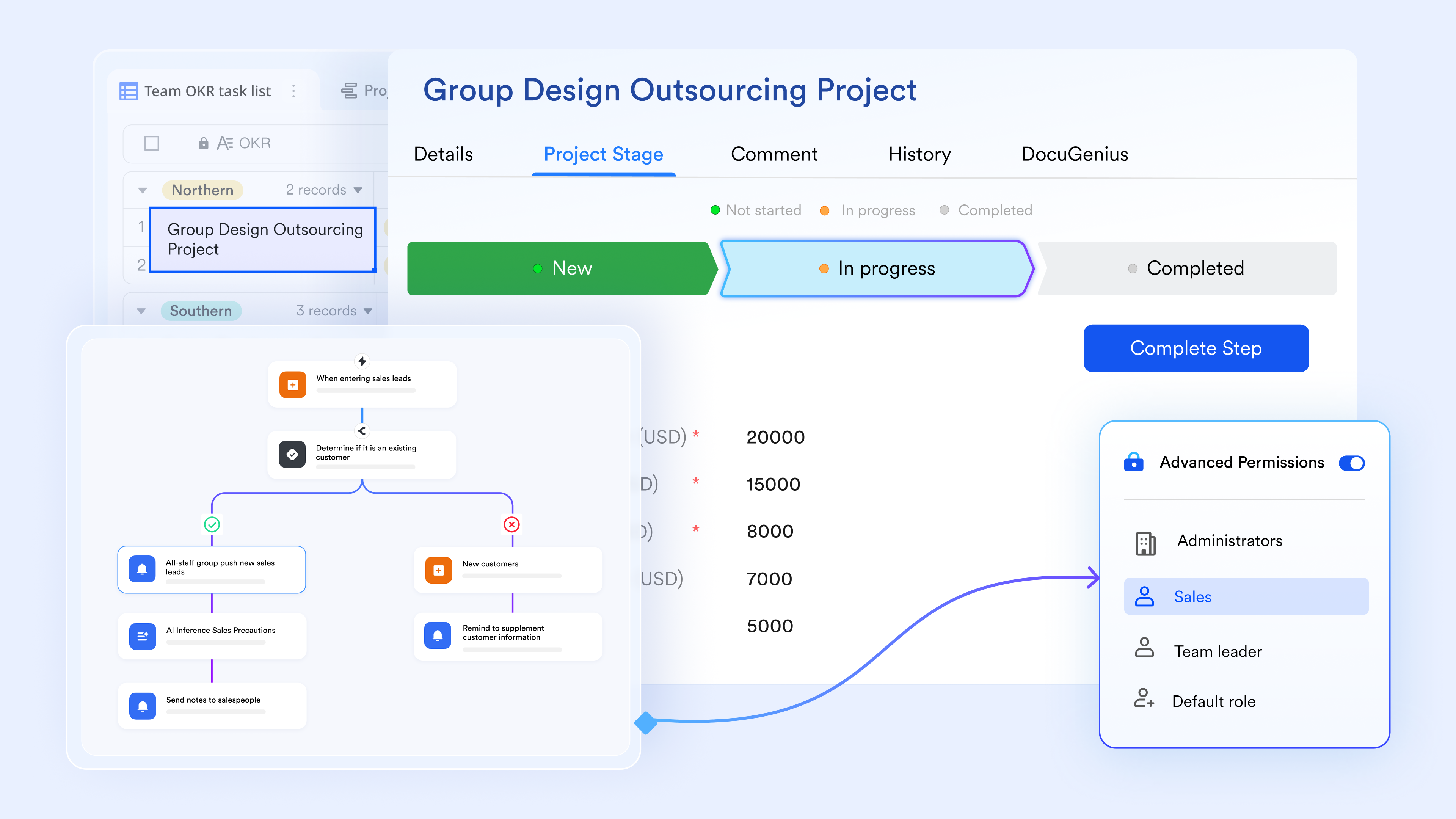
Communication and execution in the same workspace
Obsidian focuses on knowledge capture, but conversations and decisions usually happen elsewhere. keeps communication directly connected to , Lark Base records, Lark Tasks, and events. Messages can be turned into tasks, documents can be discussed in context, and decisions stay visible alongside the work they affect. This tight connection between communication and execution helps teams move faster and avoid the context loss common when using Obsidian alongside separate chat tools. 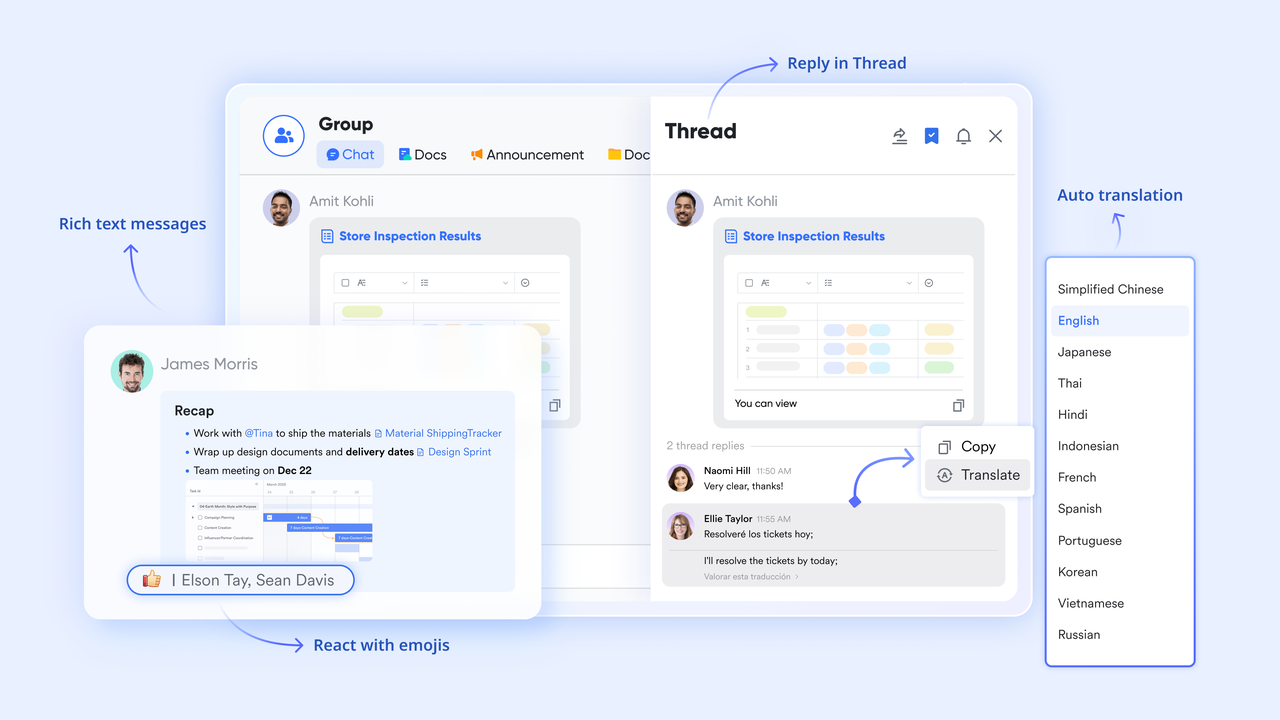
:
- Starter plan: Free forever plan that includes 11 powerful tools for up to 20 users. It also comes with 100GB of storage, 1000 automation runs, AI translations, and more.
- Basic plan: $6/user/month (billed annually) for up to 500 users. It includes everything in Starter plus group calling for up to 500 attendees, 5TB of storage, 1000 automation runs, and more. For more details, please .
- Pro plan: $12/user/month (billed annually) for up to 500 users. It includes everything in Basic plus group calling for up to 500 attendees, 15TB of storage, 50,000 automation runs, and more.
- Enterprise plan: for custom pricing. Supports unlimited users and includes even more automation runs and advanced security, compliance, and management features.
For small teams with simple communication needs

18 months message history
1000 Base automation runs/month
2000 rows per table in Base
Most POPULAR
For companies with comprehensive collaboration and management needs
Unlimited message history
500-participant video meetings
50k Base automation runs/month
20k rows per table in Base
For large companies with advanced security and organizational management needs
Get a personalized demo and pricing
Unlimited message history
500-participant video meetings
15 TB storage + 30 GB storage/user
500k Base automation runs/month
50k Base automation runs/month
Most POPULAR
For companies with comprehensive collaboration and management needs
Unlimited message history
500-participant video meetings
50k Base automation runs/month
20k rows per table in Base
Obsidian vs Lark: pricing and value comparison
Comparing Obsidian pricing plans with Lark highlights the difference between personal tools and team platforms.
When to choose which tool
Choosing between Obsidian and Lark depends largely on whether your work is individual or collaborative. Both tools are strong in their own contexts, but they are designed for very different usage patterns. Clarifying your priorities around ownership, collaboration, and execution helps make the decision clearer.
Choose Obsidian if:
- You want local-first, personal note-taking with full ownership of your files: Obsidian stores notes directly on your device as Markdown files, giving you complete control over your data. You are not dependent on cloud availability or vendor infrastructure. This setup is ideal if privacy, offline access, and long-term file ownership are top priorities.
- You prefer plaintext Markdown workflows and linking text with backlinks and graph views: Obsidian is well-suited for users who enjoy writing in Markdown and exploring ideas through links. Backlinks and graph views help surface relationships between notes over time. This approach works best for thinking, learning, and long-form research rather than managing work execution.
- Your primary use case is personal knowledge management, writing, or research rather than : Obsidian excels when one person owns and maintains the knowledge base. It supports deep focus and long-term idea development. Collaboration, if needed, remains secondary and limited.
- You don't need built-in team communication, , or workflows: Obsidian does not include native chat, task assignment, or automation. If your workflow already relies on separate tools or does not require coordinated action, this limitation is unlikely to be a blocker.
Choose Lark if:
- Your team needs shared workspaces rather than isolated vaults: Lark is designed around shared spaces where knowledge is accessible to the right people by default. Content stays centralized instead of being split across individual vaults. This makes onboarding, alignment, and updates easier as teams grow.
- Collaboration must be real-time and connected to execution (chat linked to tasks and docs): Lark supports live editing, comments, mentions, and discussions directly inside documents and records. Conversations stay tied to the work itself. This reduces context switching and speeds up decision-making.
- You want automation, dashboards, and workflows built into the core platform: Lark includes that reacts to changes in data or status. Dashboards provide visibility across projects and teams. These capabilities help turn documentation into ongoing operational systems rather than static reference material.
- You're looking to replace multiple disconnected tools (notes, chat, tasks, calendar) with a unified workspace: Lark combines communication, documentation, task management, and scheduling in one environment. This reduces tool sprawl and simplifies daily work. Teams spend less time managing tools and more time executing together.
Try Lark to support collaboration beyond personal notes
Conclusion
Obsidian pricing remains one of the most accessible models for , especially with its generous free core and optional upgrades like Sync and Publish. For personal use, writing, and research, the balance between cost and control is hard to beat. However, as needs expand into collaboration, governance, and execution, the limitations become clearer. Paid add-ons increase costs without fundamentally changing Obsidian's single-user orientation.
represents a different philosophy. Its pricing reflects a complete workspace where documentation, communication, automation, and structured data live together. For growing teams, this bundled value often outweighs the appeal of modular pricing. Choosing between Obsidian and Lark ultimately depends on whether your work stops at thinking and writing or extends into coordinated action across people and systems.
FAQs
Is Obsidian 100% free?
Yes, the core Obsidian application is 100% free for personal, commercial, and non-profit use with no limits on notes or features. You only pay if you choose to use their official cloud services for syncing across devices or publishing notes to the web. Since Obsidian stores files locally on your computer as simple Markdown text, many users avoid all costs by using free syncing alternatives like iCloud, Google Drive, or GitHub.
Why is Obsidian so expensive?
Obsidian itself is not expensive—the core app is free for almost everyone, including for-profit companies as of early 2025. The "high cost" people often refer to is for the optional add-on services like Obsidian Sync ($8–$10/month) and Obsidian Publish ($8–$10/month per site). These are priced higher than some competitors because Obsidian is a small, independent team that avoids venture capital; they prioritize sustainable growth and high-security, end-to-end encrypted infrastructure over a "growth-at-all-costs" model.
Is Obsidian one-time purchase?
Obsidian itself is free to download and use, and there is no required one-time purchase for the core app. Optional services like Sync and Publish are subscription-based and billed separately. Additional licenses such as Catalyst or Commercial are meant to support development rather than unlock features. As needs move beyond personal use, teams often compare this model with platforms like Lark, where collaboration features are included upfront rather than added later.
Does Obsidian Sync replace tools like Google Drive or iCloud?
Obsidian Sync is designed specifically for syncing Obsidian notes across devices. It does not function as a general-purpose file storage or sharing solution like or iCloud. Files outside Obsidian remain unmanaged, and collaboration is limited. Teams that want broader file sharing and connected workspaces often look toward tools like Lark that combine syncing with communication and shared access.
Want to learn more about Google Workplace, you can refer to and .
Is Obsidian secure enough for company knowledge bases?
Obsidian is secure for individual use, especially with its local-first design and end-to-end encryption through Sync. However, it lacks enterprise features such as role-based access, audit trails, and centralized admin controls. This makes governance difficult at scale. Platforms like Lark address these gaps by combining security with permissioned, shared knowledge spaces.
How does Obsidian compare to all-in-one workspaces for long-term documentation?
Obsidian is excellent for long-term personal documentation and idea development. All-in-one workspaces focus more on shared knowledge tied to action, communication, and. As documentation becomes a team asset rather than an individual one, platforms like Lark often provide stronger long-term value by keeping knowledge connected to daily work.
Related reading






























