








Top 13 Payroll System Software for Accurate Payroll Processing

Ryan Tanner

Product Marketing Specialist

Sep 3, 2026

Ryan Tanner

Product Marketing Specialist

Sep 3, 2026

Try Lark for free
11 min read
Managing payroll accurately is essential for organizations that must handle salaries, tax deductions, employee benefits, and compliance requirements. As companies expand, payroll processes become more complex due to distributed teams, regulatory obligations, and multiple compensation structures. A reliable payroll system software helps organizations manage payroll workflows efficiently while ensuring accurate salary calculations. Modern businesses often adopt a payroll software system to automate payroll processing, generate payslips, and manage compliance reporting. These platforms reduce administrative workloads for HR teams and improve transparency in payroll operations. Some modern collaboration platforms, such as Lark, also show how payroll workflows can integrate with task management, approvals, and team coordination systems.

Key takeaways: Top 5 software used as payroll systems

Businesses use payroll system software to automate salary processing, manage tax deductions, and ensure payroll accuracy. The following platforms help organizations streamline payroll operations efficiently.
1. Lark: A collaborative payroll system software platform that supports payroll workflows, approvals, and team coordination.
2. Gusto: A payroll software system designed for small businesses to automate payroll processing and benefits management.
3. ADP Workforce Now: An enterprise payroll management system software platform for large organizations managing complex payroll operations.
4. Paychex: A payroll management system software solution that helps growing companies manage payroll processing and HR services.
5. QuickBooks Payroll: An accounting-integrated software payroll system that connects payroll processing with financial management tools.

Overview: Best 5 software for payroll management

Organizations evaluating the right software often compare tools based on automation capabilities, compliance features, and integration options. Some platforms focus on payroll processing, while others combine payroll with HR management tools. The following comparison highlights several widely used payroll software solutions.
Tool
Best for
Core capabilities
Pricing (USD/annual)
Lark
Workflow-based payroll coordination
Collaboration and automation
Free (up to 20 users); paid from $6/user/month
Gusto
Small business payroll
Payroll and benefits
Paid from $49/month
ADP Workforce Now
Enterprise payroll operations
HR and payroll management
Custom pricing
Paychex
Mid-sized companies
Payroll and HR services
Custom quote
QuickBooks Payroll
Accounting-driven payroll
Payroll and tax automation
Paid from $44/month
Information source: Official vendor sites
Update time: 2026-03-15
Note: Pricing and plan details reflect publicly available data as of the update date and may vary based on region, billing cycle, and number of agents.

Simplify payroll operations with Lark today

What is payroll management system software?

Payroll management system software is a digital platform designed to automate payroll processing, employee salary calculations, and tax compliance reporting. These systems help organizations manage employee payroll data, generate payslips, and track payroll expenses across departments.
Many companies adopt payroll software systems to reduce manual payroll calculations and administrative work. These systems allow HR teams to maintain payroll records while ensuring compliance with tax regulations and labor laws. A software payroll system also improves transparency in payroll processing by generating detailed payroll reports. As payroll complexity increases, organizations often adopt integrated solutions that connect payroll processing with HR workflows, attendance tracking, and financial reporting.

13 Best payroll system software tools you should explore

Payroll management is a critical function for businesses of all sizes, requiring accuracy, compliance, and timely processing. The right payroll system software helps automate calculations, manage employee data, and ensure regulatory requirements are met. Below are 13 payroll system tools that support efficient payroll operations and workforce management.

1. Lark: Unified collaboration platform with automated payroll workflows

Lark provides a unified collaboration platform that can support payroll workflows, employee time tracking, and payroll approvals. Unlike traditional payroll system software, Lark integrates databases, workflow automation, and collaboration tools into one single environment. This enables HR and finance teams to coordinate payroll data while maintaining operational transparency.
Lark: Unified collaboration platform
Key features:
Geofenced time-tracking
Lark Base centralizes the payroll lifecycle by replacing fragmented spreadsheets with a "source of truth" built on multi-dimensional fields and views. You can use specialized field types, such as "ID" for employees and "Attachments" for pay slips, to ensure data integrity. By toggling between a Grid view for bulk data entry and a Gallery view for individual employee profiles, your team gains a clear, organized perspective on compensation.
Geofenced time-tracking in Lark Base
Variable pay calculations
To handle complex payroll logic, Lark Base Formulas can be used to automate calculations for overtime, commissions, and pro-rated salaries. For instance, you can create a formula that cross-references "hours worked" against "hourly rate" while automatically applying regional tax brackets. This ensures that every line item on a payslip is mathematically verified and reduces the risk of human error in high-volume payroll cycles.
Lark Base Formulas automate
Shift & roster visibility
The Lark Calendar acts as the blueprint for your payroll. By scheduling shifts on a shared calendar, you create an expected "work plan." Lark then compares the actual check-in/check-out data against the Lark Calendar schedule to identify discrepancies like late arrivals, early departures, or unapproved absences. This comparison allows for automatic "deduction logic" in your payroll calculations, ensuring staff are paid accurately based on their assigned roster.
Shift & roster visibility with Lark Calendar
Multi-stage payroll validation
Lark Approval ensures that payroll disbursements follow strict governance protocols. Once the payroll for the month is generated in Lark Base, it can be pushed through a customized Lark Approval workflow. This can require digital sign-offs from the HR Manager for data accuracy, the department head for commission validation, and the CFO for final fund release. Every step is timestamped and archived, providing a clear audit trail for financial compliance.
Lark Approval workflow
Pros:
  • Lark Base allows HR teams to build flexible payroll databases, automate salary calculations, and manage payroll data within structured workflow tables.
  • Lark Base Forms capture timestamps and location data, helping teams maintain accurate attendance records for payroll processing.
  • Lark Approval enables multi-step payroll validation workflows to ensure salary data is reviewed and approved before payment.
  • Lark Messenger, Calendar, and Docs allow HR, finance, and managers to coordinate payroll tasks and resolve payroll queries in one workspace.
Cons:
  • Initial configuration may require guidance from the Lark Help Center when setting up payroll workflows and automation rules.
  • Starter plan: Free forever plan that includes 11 powerful tools for up to 20 users. It also comes with 100GB of storage, 1000 automation runs, AI translations, and more.
  • Basic plan: $6/user/month (billed annually) for up to 500 users. It includes everything in Starter plus group calling for up to 500 attendees, 5TB of storage, 1000 automation runs, and more. For more details, please contact sales.
  • Pro plan: $12/user/month (billed annually) for up to 500 users. It includes everything in Basic plus group calling for up to 500 attendees, 15TB of storage, 50,000 automation runs, and more.
  • Enterprise plan: Contact sales for custom pricing. Supports unlimited users and includes even more automation runs and advanced security, compliance, and management features.
Starter
Pro
Enterprise

Starter

For small teams with simple communication needs

$0

/ user / month

Try for free

No credit card needed

20 users max
18 months message history
1-on-1 video meetings
100 GB storage
Lark Docs & Mail
1000 Base automation runs/month
2000 rows per table in Base

Pro

For companies with comprehensive collaboration and management needs

$12

/ user / month

Billed annually

500 users max
Unlimited message history
500-participant video meetings
15 TB storage
Lark Docs & Mail
50k Base automation runs/month
20k rows per table in Base

Enterprise

For large companies with advanced security and organizational management needs

Get a personalized demo and pricing

Unlimited users
Unlimited message history
500-participant video meetings
15 TB storage + 30 GB storage/user
Lark Docs & Mail
500k Base automation runs/month
50k Base automation runs/month
Single sign-on (SSO)

Pro

For companies with comprehensive collaboration and management needs

$12

/ user / month

Billed annually

500 users max
Unlimited message history
500-participant video meetings
15 TB storage
Lark Docs & Mail
50k Base automation runs/month
20k rows per table in Base

2. Gusto: Payroll system software for small businesses

Gusto is a widely used payroll software system designed for startups and small businesses that need simple payroll automation. The platform helps organizations process employee salaries, manage benefits, and automate tax filings. Many small companies adopt Gusto because it simplifies payroll operations without requiring complex HR infrastructure. Its user-friendly interface and automation tools make it a practical payroll management system software solution.
Gusto: Payroll system software for small businesses
Image source: gusto.com
Key features:
  • Automated payroll processing calculates wages, taxes, and deductions.
  • Employee benefits management supports health insurance and retirement plans.
  • Tax filing automation helps businesses stay compliant with payroll regulations.
  • Employee self-service portals allow staff to access payslips and payroll records.
Pros:
  • Simple interface suitable for small business payroll management.
  • Automated tax filing reduces compliance workload.
  • Integrated benefits administration improves HR coordination.
  • Strong onboarding tools for new employees.
Cons:
  • Limited customization for complex payroll structures.
  • Pricing may increase as employee count grows.
  • International payroll capabilities are limited.
Pricing:
  • Simple plan: $49/month
  • Plus plan: $80/month
  • Premium plan: $180/month

3. ADP Workforce Now: Enterprise payroll management platform

ADP Workforce Now is a comprehensive payroll management system software platform designed for mid-sized and enterprise organizations. The platform provides payroll processing, HR management, and compliance tools within one system. Many enterprises rely on ADP to manage complex payroll structures across large workforces. Its automation and reporting tools help companies maintain payroll accuracy and regulatory compliance.
ADP Workforce Now is a payroll management system software platform
Image source: adp.com
Key features:
  • Automated payroll processing supports complex salary structures and deductions.
  • Tax compliance tools manage payroll tax calculations and reporting.
  • Employee data management tracks workforce records and payroll history.
  • Advanced reporting dashboards provide payroll and HR analytics.
Pros:
  • Strong enterprise payroll processing capabilities.
  • Advanced compliance tools for tax and labor regulations.
  • Scalable platform suitable for large organizations.
  • Comprehensive reporting features for payroll analysis.
Cons:
  • Implementation may require onboarding and configuration.
  • Pricing can be higher compared with small business payroll tools.
  • Interface complexity may require training.
Pricing:
  • Custom pricing

4. Paychex: Payroll management system software for growing companies

Paychex provides payroll management system software designed for small and mid-sized companies that need scalable payroll solutions. The platform supports payroll processing, HR management, and compliance reporting. Many organizations adopt Paychex to streamline payroll operations and automate employee salary processing. Its payroll automation features help reduce administrative workload for HR teams.
Flexible automated online payroll for small and mid-sized companies
Image source: paychex.com
Key features:
  • Automated payroll processing supports salary calculations and tax deductions.
  • HR management tools track employee data and workforce records.
  • Compliance reporting ensures payroll processes follow regulatory requirements.
  • Employee self-service portals allow staff to access payroll documents.
Pros:
  • Comprehensive payroll automation features.
  • Strong HR and payroll integration capabilities.
  • Scalable platform suitable for growing organizations.
  • Reliable compliance reporting tools.
Cons:
  • Pricing transparency can be limited.
  • Some features require higher-tier plans.
  • Implementation may require configuration.
Pricing:
  • Custom quote

5. QuickBooks Payroll: Accounting-integrated payroll software

QuickBooks Payroll is a software payroll system that integrates payroll processing with accounting workflows. The platform is widely used by small businesses that already rely on QuickBooks for financial management. It automates payroll calculations, tax filings, and reporting within the accounting environment. This integration helps organizations manage payroll expenses alongside financial records.
QuickBooks Payroll is a software payroll system
Image source: quickbooks.intuit.com
Key features:
  • Payroll automation calculates employee wages, taxes, and deductions.
  • Accounting integration syncs payroll data with financial records.
  • Automated tax filing ensures compliance with payroll tax regulations.
  • Employee portals provide access to payslips and payroll documents.
Pros:
  • Strong integration with the QuickBooks accounting platform.
  • Automated payroll calculations reduce manual work.
  • Tax filing automation simplifies compliance.
  • Suitable for small businesses already using QuickBooks.
Cons:
  • Limited HR management capabilities.
  • Payroll features depend on the QuickBooks ecosystem.
  • Some advanced features require premium plans.
Pricing:
  • Payroll core and simple start: $44/month
  • Payroll core and essentials: $62.50/month
  • Payroll premium plus: $101.50/month

6. Superworks: All-in-One Payroll Software for Growing Businesses
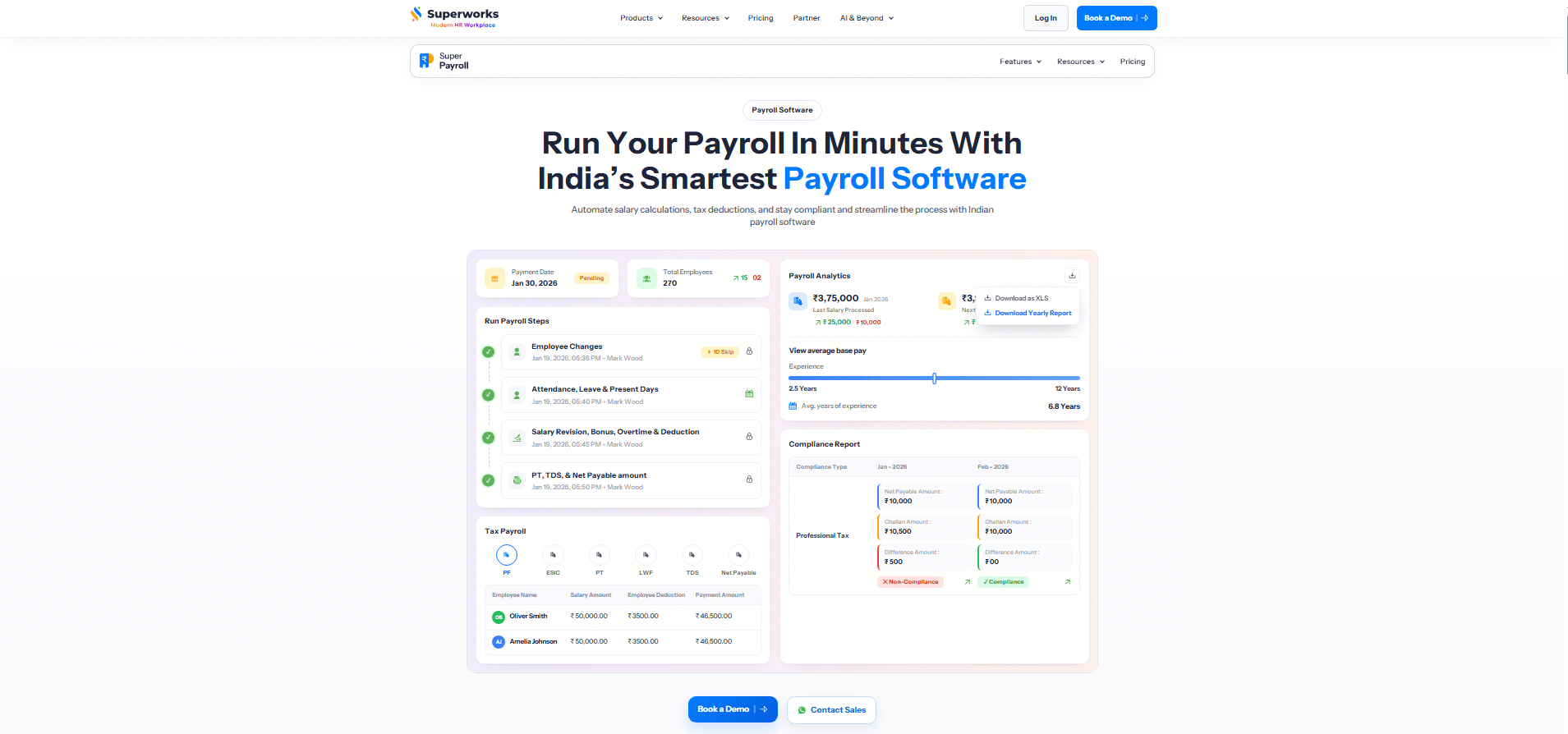
Superworks is a cloud-based payroll software designed for startups, SMEs, and growing enterprises looking to automate payroll while staying compliant with labor laws. The platform combines payroll, attendance, leave management, HRMS, and employee self-service into a single solution, helping businesses reduce manual work and improve payroll accuracy.
Image source: superworks.com
Key features:
  • Automated payroll processing with salary calculations
  • Statutory compliance including PF, ESI, PT, TDS, and LWF
  • Attendance and leave integration
  • Salary structure and reimbursement management
  • Payslip generation and employee self-service portal
  • Loan and advance management
  • Payroll reports and analytics
  • Multi-location payroll support
Pros:
  • Complete HRMS and payroll solution in one platform
  • Automates payroll calculations and statutory compliance
  • Easy-to-use employee self-service portal
  • Attendance and leave sync with payroll
  • Suitable for startups, SMEs, and enterprises
Cons:
  • Advanced modules may require initial setup
  • Pricing varies based on business requirements
Pricing:
  • Startup - ₹80
  • Professional - ₹100
  • Premium - ₹135

Automate your complex payroll calculation with Lark

7. Rippling: Workforce and payroll management platform

Rippling is a modern payroll software system that combines workforce management, HR operations, and payroll automation in one platform. Organizations use Rippling to manage employee records, process payroll, and automate HR workflows. The platform integrates payroll with IT and HR systems, allowing companies to manage employee data across departments.
Rippling is a modern payroll software system
Image source: rippling.com
Key features:
  • Automated payroll processing supports salary calculations and tax deductions.
  • Employee data management centralizes workforce records.
  • HR workflow automation improves employee onboarding and payroll coordination.
  • Integration tools connect payroll with HR and finance systems.
Pros:
  • Unified HR and payroll management platform.
  • Strong automation features for workforce operations.
  • The integration ecosystem supports many enterprise tools.
  • Scalable system suitable for growing organizations.
Cons:
  • Implementation may require configuration.
  • Pricing transparency can be limited.
  • Advanced features may require additional modules.
Pricing:
  • Custom quote

8. Deel: Global payroll management system software

Deel is a global payroll management system designed to help organizations pay international employees and contractors. The platform supports payroll processing across multiple countries while managing tax compliance and labor regulations. Many remote companies adopt Deel because it simplifies international payroll and contractor payments.
Deel is a global payroll management system
Image source: deel.com
Key features:
  • Global payroll processing supports payments across multiple countries.
  • Compliance tools manage international tax regulations.
  • Contractor management tools track freelance payments and contracts.
  • Automated invoicing and payment processing streamline payroll operations.
Pros:
  • Strong international payroll management capabilities.
  • Simplifies compliance for global workforces.
  • Contractor management features support remote teams.
  • Automated payments reduce administrative workload.
Cons:
  • Pricing may be higher for large teams.
  • Limited features for domestic payroll compared with local providers.
  • Some integrations may require configuration.
Pricing:
  • Managed payroll global plan: $29/employee/month
  • US plan: $24/employee/month

9. Papaya Global: Global workforce payroll automation platform

Papaya Global provides a payroll management system software designed for organizations managing global workforces. The platform automates payroll calculations, compliance reporting, and cross-border payments. Many multinational companies adopt Papaya Global to manage payroll across multiple jurisdictions.
Papaya Global provides payroll management system software
Image source: papayaglobal.com
Key features:
  • Global payroll automation processes salaries across multiple countries.
  • Compliance tools track international payroll regulations.
  • Workforce analytics dashboards provide payroll insights.
  • Payment processing tools support global salary distribution.
Pros:
  • Strong global payroll compliance capabilities.
  • Automated payroll calculations for multinational workforces.
  • Centralized payroll data improves visibility.
  • Scalable platform suitable for global enterprises.
Cons:
  • Implementation may require onboarding support.
  • Pricing may be high for small businesses.
  • Advanced features require enterprise plans.
Pricing:
  • Employer of record: starting from $499/employee/month
  • Contractor of record: starting from $295/contractor/month
  • Manage and pay your contractors: starting from $5/contractor/month
  • Simplify payroll & payments worldwide: starting from $29/employee/month
  • Payments OS: starting from $3.5/transaction

10. BambooHR: HR platform with payroll capabilities

BambooHR is primarily an HR platform but also includes payroll processing capabilities. The system helps organizations manage employee records, payroll data, and HR workflows within one environment. Many growing companies adopt BambooHR because it connects HR management with payroll automation.
BambooHR is primarily an HR platform
Image source: bamboohr.com
Key features:
  • Payroll automation calculates employee salaries and deductions.
  • Employee database management tracks workforce records.
  • Performance management tools integrate HR and payroll data.
  • Reporting dashboards provide HR and payroll insights.
Pros:
  • Unified HR and payroll platform.
  • User-friendly interface simplifies HR operations.
  • Strong employee management tools.
  • Integration capabilities support HR workflows.
Cons:
  • Payroll features may be limited in some regions.
  • Pricing information is not publicly available.
  • Advanced HR features require premium plans.
Pricing:
  • Core plan: $10/employee/month
  • Pro plan: $17/employee/month
  • Elite plan: $25/employee/month

11. Zoho Payroll: Payroll management software for small businesses

Zoho Payroll is a payroll software system designed for small businesses and startups. It automates salary processing, tax deductions, and compliance reporting. The platform integrates with other Zoho applications, allowing organizations to manage payroll alongside accounting and HR operations.
Zoho Payroll is a payroll software system
Image source: zoho.com
Key features:
  • Automated payroll calculations process salaries and deductions.
  • Tax compliance tools help businesses manage regulatory reporting.
  • Employee self-service portals provide payroll access.
  • Integration with the Zoho ecosystem supports business operations.
Pros:
  • Affordable payroll software for small businesses.
  • Strong integration with Zoho business tools.
  • Automated compliance reporting features.
  • Easy payroll setup for startups.
Cons:
  • Limited advanced payroll customization.
  • International payroll support may be limited.
  • Best suited for organizations already using Zoho tools.
Pricing:
  • Standard plan: $10/organization/month
  • Professional plan: $15/organization/month
  • Premium plan: $20/organization/month

12. OnPay: Simple payroll software for small teams

OnPay is a payroll management system software solution designed for small businesses that want simple payroll automation. The platform processes employee salaries, tax filings, and payroll reports within one system. Many companies adopt OnPay because it provides transparent pricing and straightforward payroll workflows.
OnPay is a payroll management system software
Image source: onpay.com
Key features:
  • Automated payroll processing calculates wages and deductions.
  • Tax filing tools manage federal and state payroll taxes.
  • Employee self-service portals provide payroll access.
  • Payroll reporting tools generate financial summaries.
Pros:
  • Transparent pricing model for small businesses.
  • Easy payroll setup and configuration.
  • Strong tax compliance features.
  • Reliable customer support.
Cons:
  • Limited HR management features.
  • Advanced payroll customization options are limited.
  • International payroll capabilities are minimal.
Pricing:
  • Base plan: $49/month

13. Patriot Payroll: Affordable payroll software for small companies

Patriot Payroll is an affordable software payroll system designed for small companies and startups. The platform focuses on simplifying payroll processing through automated salary calculations and tax filing features. Many small organizations choose Patriot Payroll because it offers cost-effective payroll management tools.
Patriot Payroll is an affordable software payroll system
Image source: patriotsoftware.com
Key features:
  • Automated payroll processing calculates employee wages and deductions.
  • Tax filing tools help businesses manage payroll compliance.
  • Employee portals allow staff to access payroll records.
  • Payroll reporting dashboards provide financial insights.
Pros:
  • Affordable payroll solution for small businesses.
  • Simple interface for payroll processing.
  • Reliable tax filing features.
  • Easy implementation without complex setup.
Cons:
  • Limited advanced payroll automation features.
  • HR management capabilities are minimal.
  • Best suited for small organizations.
Pricing:
  • Accounting basic: $10/month
  • Accounting premium: $15/month
  • Basic payroll: $8.50/month
  • Full service payroll: $18.50/month

How to choose the right payroll system software

Selecting the right payroll management system software requires evaluating payroll complexity, workforce size, and compliance requirements. Organizations should assess several key factors before implementing a payroll system.
  • Evaluate payroll complexity and employee size: Companies with larger workforces often require advanced payroll automation features. Payroll system software should support multiple salary structures, tax rules, and employee compensation models. Organizations should also ensure the platform can scale workforce growth.
  • Assess compliance and tax reporting capabilities: Payroll compliance is critical for businesses operating in regulated environments. Payroll software system tools should automatically calculate taxes and generate compliance reports. This ensures organizations remain compliant with local tax laws.
  • Identify automation features for payroll processing: Automation features help organizations streamline payroll tasks such as salary calculations and approvals. A software payroll system with workflow automation reduces HR administrative workload. Automated payroll processing also improves payroll accuracy.
  • Consider integration with HR and accounting systems: Payroll platforms should integrate with HR tools, attendance systems, and accounting software. Integration ensures payroll data remains consistent across organizational systems. This improves operational efficiency and financial reporting accuracy. Pro tip: While an integrated system handles your full-time staff, you may occasionally need to provide immediate documentation for independent contractors or one-off bonuses. Using a reliable paystub generator allows you to create professional, accurate earnings statements in minutes, ensuring every worker has the documentation they need without disrupting your main payroll cycle.

Conclusion

Payroll processing plays a vital role in maintaining employee trust and organizational compliance. As small businesses expand, payroll calculations, tax reporting, and compensation structures become more complex. Payroll system software helps organizations automate these processes while ensuring accuracy and transparency.
Modern payroll management system software platforms reduce administrative workloads for HR teams by automating payroll calculations, generating reports, and maintaining compliance records. These platforms also integrate payroll workflows with HR and finance operations. As organizations continue to adopt digital tools, payroll systems are evolving beyond simple salary processing platforms. Collaborative workspaces such as Lark demonstrate how payroll workflows can integrate approvals, documentation, and team coordination within a unified environment. By selecting the right payroll software system, organizations can improve payroll accuracy, ensure regulatory compliance, and streamline workforce operations.

Bring structure into payroll operations with Lark

FAQs

Which software is mostly used for payroll?

Many organizations use payroll management system software such as Gusto, ADP Workforce Now, and Paychex to manage payroll operations. These platforms automate salary calculations and tax compliance. Businesses choose payroll tools based on workforce size and payroll complexity. Some teams also explore workflow platforms like Lark to coordinate payroll approvals and HR processes.

What payroll software is best?

The best payroll software system depends on business size and operational requirements. Small businesses often choose tools like Gusto or Zoho Payroll, while enterprises may adopt ADP or Paychex. Payroll platforms with automation and compliance features are generally preferred. Some organizations integrate payroll processes with collaboration platforms such as Lark to streamline HR workflows.

Is Excel payroll free?

Excel payroll templates are free and commonly used by small businesses. However, manual payroll spreadsheets can lead to errors and compliance issues as payroll complexity increases. Payroll system software automates calculations and improves payroll accuracy. Some organizations also connect payroll workflows with tools like Lark to improve approval and coordination processes.

What are the four types of payroll systems?

The four common payroll systems include manual payroll systems, outsourced payroll services, in-house payroll software systems, and integrated HR payroll platforms. Each approach offers different levels of automation and control. Many businesses now adopt digital payroll management system software to improve efficiency. Some teams also coordinate payroll tasks through collaborative tools like Lark.

Related reading

Ryan Tanner

Product Marketing Specialist

Ryan is a Product Marketing Specialist. Having helped over 150 project managers overcome challenges, Ryan delivers actionable strategies and forward-thinking insights to elevate your team's performance by leveraging innovative methods for revolutionary project execution.

Keep reading







