














Top 13 Payroll System Software for Accurate Payroll Processing

Ryan Tanner
Product Marketing Specialist
Sep 18, 2026
Ryan Tanner
Sep 18, 2026


Key takeaways: Top 5 software used as payroll systems
Overview: Best 5 software for payroll management

What is payroll management system software?
13 Best payroll system software tools you should explore
1. Lark: Unified collaboration platform with automated payroll workflows
- Lark Base allows HR teams to build flexible payroll databases, automate salary calculations, and manage payroll data within structured workflow tables.
- Lark Base Forms capture timestamps and location data, helping teams maintain accurate attendance records for payroll processing.
- Lark Approval enables multi-step payroll validation workflows to ensure salary data is reviewed and approved before payment.
- Lark Messenger, Calendar, and Docs allow HR, finance, and managers to coordinate payroll tasks and resolve payroll queries in one workspace.
- Initial configuration may require guidance from the Lark Help Center when setting up payroll workflows and automation rules.
- Starter plan: Free forever plan that includes 11 powerful tools for up to 20 users. It also comes with 100GB of storage, 1000 automation runs, AI translations, and more.
- Basic plan: $6/user/month (billed annually) for up to 500 users. It includes everything in Starter plus group calling for up to 500 attendees, 5TB of storage, 1000 automation runs, and more. For more details, please contact sales.
- Pro plan: $12/user/month (billed annually) for up to 500 users. It includes everything in Basic plus group calling for up to 500 attendees, 15TB of storage, 50,000 automation runs, and more.
- Enterprise plan: Contact sales for custom pricing. Supports unlimited users and includes even more automation runs and advanced security, compliance, and management features.
Starter
For small teams with simple communication needs
$0
/ user / month

Pro
For companies with comprehensive collaboration and management needs
$12
/ user / month
Enterprise
For large companies with advanced security and organizational management needs
Get a personalized demo and pricing
Pro
For companies with comprehensive collaboration and management needs
$12
/ user / month
2. Gusto: Payroll system software for small businesses
- Automated payroll processing calculates wages, taxes, and deductions.
- Employee benefits management supports health insurance and retirement plans.
- Tax filing automation helps businesses stay compliant with payroll regulations.
- Employee self-service portals allow staff to access payslips and payroll records.
- Simple interface suitable for small business payroll management.
- Automated tax filing reduces compliance workload.
- Integrated benefits administration improves HR coordination.
- Strong onboarding tools for new employees.
- Limited customization for complex payroll structures.
- Pricing may increase as employee count grows.
- International payroll capabilities are limited.
- Simple plan: $49/month
- Plus plan: $80/month
- Premium plan: $180/month
3. ADP Workforce Now: Enterprise payroll management platform
- Automated payroll processing supports complex salary structures and deductions.
- Tax compliance tools manage payroll tax calculations and reporting.
- Employee data management tracks workforce records and payroll history.
- Advanced reporting dashboards provide payroll and HR analytics.
- Strong enterprise payroll processing capabilities.
- Advanced compliance tools for tax and labor regulations.
- Scalable platform suitable for large organizations.
- Comprehensive reporting features for payroll analysis.
- Implementation may require onboarding and configuration.
- Pricing can be higher compared with small business payroll tools.
- Interface complexity may require training.
- Custom pricing
4. Paychex: Payroll management system software for growing companies
- Automated payroll processing supports salary calculations and tax deductions.
- HR management tools track employee data and workforce records.
- Compliance reporting ensures payroll processes follow regulatory requirements.
- Employee self-service portals allow staff to access payroll documents.
- Comprehensive payroll automation features.
- Strong HR and payroll integration capabilities.
- Scalable platform suitable for growing organizations.
- Reliable compliance reporting tools.
- Pricing transparency can be limited.
- Some features require higher-tier plans.
- Implementation may require configuration.
- Custom quote
5. QuickBooks Payroll: Accounting-integrated payroll software
- Payroll automation calculates employee wages, taxes, and deductions.
- Accounting integration syncs payroll data with financial records.
- Automated tax filing ensures compliance with payroll tax regulations.
- Employee portals provide access to payslips and payroll documents.
- Strong integration with the QuickBooks accounting platform.
- Automated payroll calculations reduce manual work.
- Tax filing automation simplifies compliance.
- Suitable for small businesses already using QuickBooks.
- Limited HR management capabilities.
- Payroll features depend on the QuickBooks ecosystem.
- Some advanced features require premium plans.
- Payroll core and simple start: $44/month
- Payroll core and essentials: $62.50/month
- Payroll premium plus: $101.50/month
6. Superworks: All-in-One Payroll Software for Growing Businesses
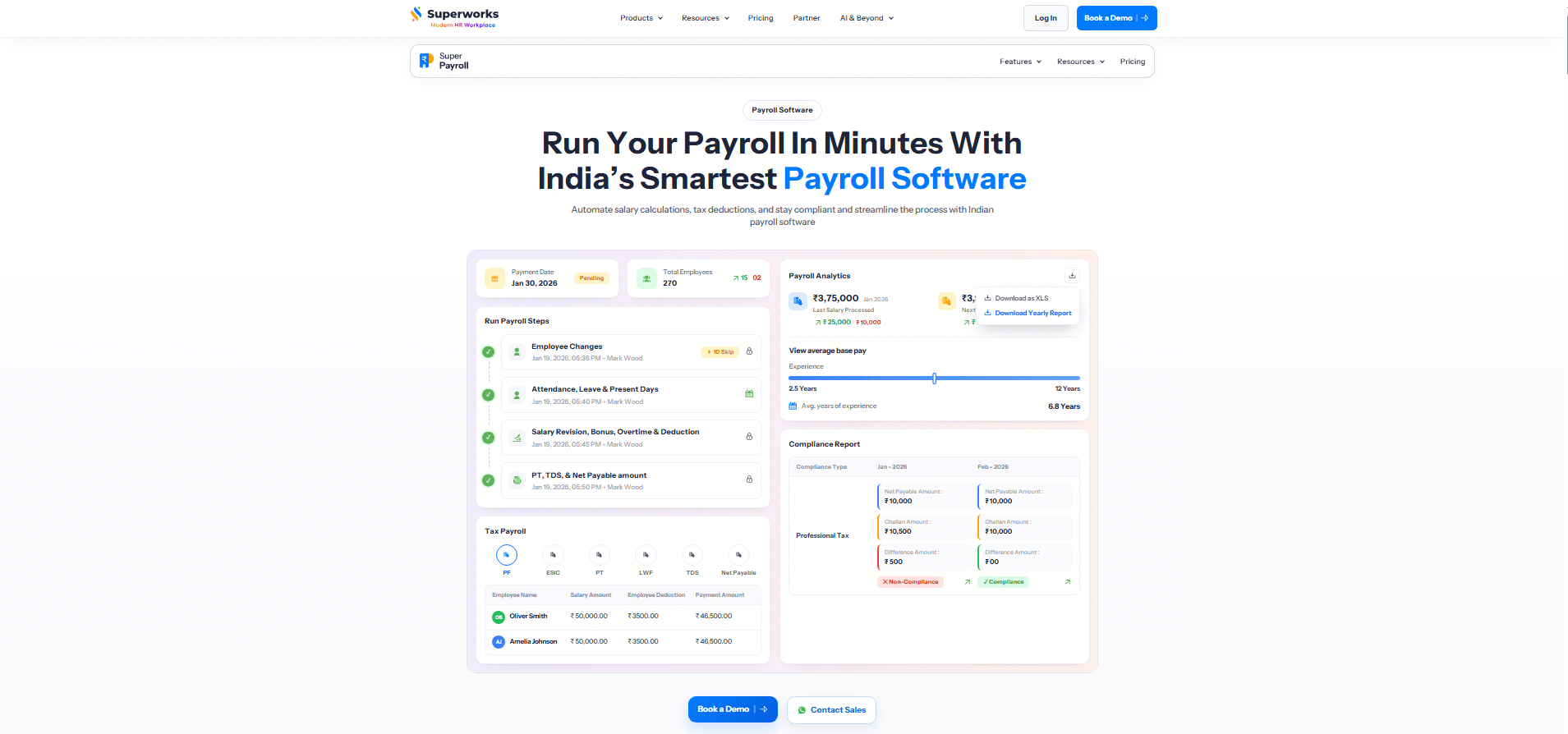
- Automated payroll processing with salary calculations
- Statutory compliance including PF, ESI, PT, TDS, and LWF
- Attendance and leave integration
- Salary structure and reimbursement management
- Payslip generation and employee self-service portal
- Loan and advance management
- Payroll reports and analytics
- Multi-location payroll support
- Complete HRMS and payroll solution in one platform
- Automates payroll calculations and statutory compliance
- Easy-to-use employee self-service portal
- Attendance and leave sync with payroll
- Suitable for startups, SMEs, and enterprises
- Advanced modules may require initial setup
- Pricing varies based on business requirements
- Startup - ₹80
- Professional - ₹100
- Premium - ₹135
7. Rippling: Workforce and payroll management platform
- Automated payroll processing supports salary calculations and tax deductions.
- Employee data management centralizes workforce records.
- HR workflow automation improves employee onboarding and payroll coordination.
- Integration tools connect payroll with HR and finance systems.
- Unified HR and payroll management platform.
- Strong automation features for workforce operations.
- The integration ecosystem supports many enterprise tools.
- Scalable system suitable for growing organizations.
- Implementation may require configuration.
- Pricing transparency can be limited.
- Advanced features may require additional modules.
- Custom quote
8. Deel: Global payroll management system software
- Global payroll processing supports payments across multiple countries.
- Compliance tools manage international tax regulations.
- Contractor management tools track freelance payments and contracts.
- Automated invoicing and payment processing streamline payroll operations.
- Strong international payroll management capabilities.
- Simplifies compliance for global workforces.
- Contractor management features support remote teams.
- Automated payments reduce administrative workload.
- Pricing may be higher for large teams.
- Limited features for domestic payroll compared with local providers.
- Some integrations may require configuration.
- Managed payroll global plan: $29/employee/month
- US plan: $24/employee/month
9. Papaya Global: Global workforce payroll automation platform
- Global payroll automation processes salaries across multiple countries.
- Compliance tools track international payroll regulations.
- Workforce analytics dashboards provide payroll insights.
- Payment processing tools support global salary distribution.
- Strong global payroll compliance capabilities.
- Automated payroll calculations for multinational workforces.
- Centralized payroll data improves visibility.
- Scalable platform suitable for global enterprises.
- Implementation may require onboarding support.
- Pricing may be high for small businesses.
- Advanced features require enterprise plans.
- Employer of record: starting from $499/employee/month
- Contractor of record: starting from $295/contractor/month
- Manage and pay your contractors: starting from $5/contractor/month
- Simplify payroll & payments worldwide: starting from $29/employee/month
- Payments OS: starting from $3.5/transaction
10. BambooHR: HR platform with payroll capabilities
- Payroll automation calculates employee salaries and deductions.
- Employee database management tracks workforce records.
- Performance management tools integrate HR and payroll data.
- Reporting dashboards provide HR and payroll insights.
- Unified HR and payroll platform.
- User-friendly interface simplifies HR operations.
- Strong employee management tools.
- Integration capabilities support HR workflows.
- Payroll features may be limited in some regions.
- Pricing information is not publicly available.
- Advanced HR features require premium plans.
- Core plan: $10/employee/month
- Pro plan: $17/employee/month
- Elite plan: $25/employee/month
11. Zoho Payroll: Payroll management software for small businesses
- Automated payroll calculations process salaries and deductions.
- Tax compliance tools help businesses manage regulatory reporting.
- Employee self-service portals provide payroll access.
- Integration with the Zoho ecosystem supports business operations.
- Affordable payroll software for small businesses.
- Strong integration with Zoho business tools.
- Automated compliance reporting features.
- Easy payroll setup for startups.
- Limited advanced payroll customization.
- International payroll support may be limited.
- Best suited for organizations already using Zoho tools.
- Standard plan: $10/organization/month
- Professional plan: $15/organization/month
- Premium plan: $20/organization/month
12. OnPay: Simple payroll software for small teams
- Automated payroll processing calculates wages and deductions.
- Tax filing tools manage federal and state payroll taxes.
- Employee self-service portals provide payroll access.
- Payroll reporting tools generate financial summaries.
- Transparent pricing model for small businesses.
- Easy payroll setup and configuration.
- Strong tax compliance features.
- Reliable customer support.
- Limited HR management features.
- Advanced payroll customization options are limited.
- International payroll capabilities are minimal.
- Base plan: $49/month
13. Patriot Payroll: Affordable payroll software for small companies
- Automated payroll processing calculates employee wages and deductions.
- Tax filing tools help businesses manage payroll compliance.
- Employee portals allow staff to access payroll records.
- Payroll reporting dashboards provide financial insights.
- Affordable payroll solution for small businesses.
- Simple interface for payroll processing.
- Reliable tax filing features.
- Easy implementation without complex setup.
- Limited advanced payroll automation features.
- HR management capabilities are minimal.
- Best suited for small organizations.
- Accounting basic: $10/month
- Accounting premium: $15/month
- Basic payroll: $8.50/month
- Full service payroll: $18.50/month
How to choose the right payroll system software
- Evaluate payroll complexity and employee size: Companies with larger workforces often require advanced payroll automation features. Payroll system software should support multiple salary structures, tax rules, and employee compensation models. Organizations should also ensure the platform can scale workforce growth.
- Assess compliance and tax reporting capabilities: Payroll compliance is critical for businesses operating in regulated environments. Payroll software system tools should automatically calculate taxes and generate compliance reports. This ensures organizations remain compliant with local tax laws.
- Identify automation features for payroll processing: Automation features help organizations streamline payroll tasks such as salary calculations and approvals. A software payroll system with workflow automation reduces HR administrative workload. Automated payroll processing also improves payroll accuracy.
- Consider integration with HR and accounting systems: Payroll platforms should integrate with HR tools, attendance systems, and accounting software. Integration ensures payroll data remains consistent across organizational systems. This improves operational efficiency and financial reporting accuracy. Pro tip: While an integrated system handles your full-time staff, you may occasionally need to provide immediate documentation for independent contractors or one-off bonuses. Using a reliable paystub generator allows you to create professional, accurate earnings statements in minutes, ensuring every worker has the documentation they need without disrupting your main payroll cycle.
Conclusion
FAQs
Which software is mostly used for payroll?
What payroll software is best?
Is Excel payroll free?
What are the four types of payroll systems?
Related reading

Start using Lark today

Manage all your work in one place
Boost team efficiency by 10x
Save up to 70% on software costs
Start using Lark today
Manage all your work in one place
Boost team efficiency by 10x
Save up to 70% on software costs
Keep reading








2026 Lark Technologies Pte. Ltd.
Headquartered in Singapore with offices worldwide.





