














Project Management Automation: Benefits, Use Cases & Guide

Ryan Tanner
Product Marketing Specialist
Sep 18, 2026
Ryan Tanner
Sep 18, 2026

18 min read


Project management automation is transforming how modern teams plan, execute, and deliver work. Instead of relying on manual updates, repeated follow-ups, and scattered tools, automated workflows help teams operate with greater accuracy, speed, and consistency. With AI-powered suggestions, rule-based actions, and automated routing, projects move smoothly from one phase to the next, reducing busywork and improving outcomes.
In this guide, we break down the benefits, maturity stages, real examples, and best practices for automation in project management. You'll also see how Lark, a unified workspace designed for automation, helps teams build smarter, scalable project systems with minimal manual effort.

What is project management automation?
Project management automation is the use of digital workflows, rule-based actions, and AI-driven logic to reduce manual work throughout a project's lifecycle. Instead of relying on constant check-ins, updates, or data entry, automated systems handle repetitive steps so teams can focus on higher-value tasks. Modern automation in project management includes automated task routing, conditional logic, scheduled reminders, cross-department workflows, and AI-generated summaries. It ensures that tasks move seamlessly from one phase to another, improving predictability and reducing bottlenecks.
As more organizations adopt AI and automation in project management, teams gain real-time visibility, fewer delays, and more accurate reporting. From small teams to professional services automation project management environments, automation supports scalable, consistent delivery. It's also essential for industries like engineering, operations, and industrial automation project management, where structured processes must run reliably at scale. Ultimately, project management automation helps teams streamline execution, enhance collaboration, and operate with greater efficiency.
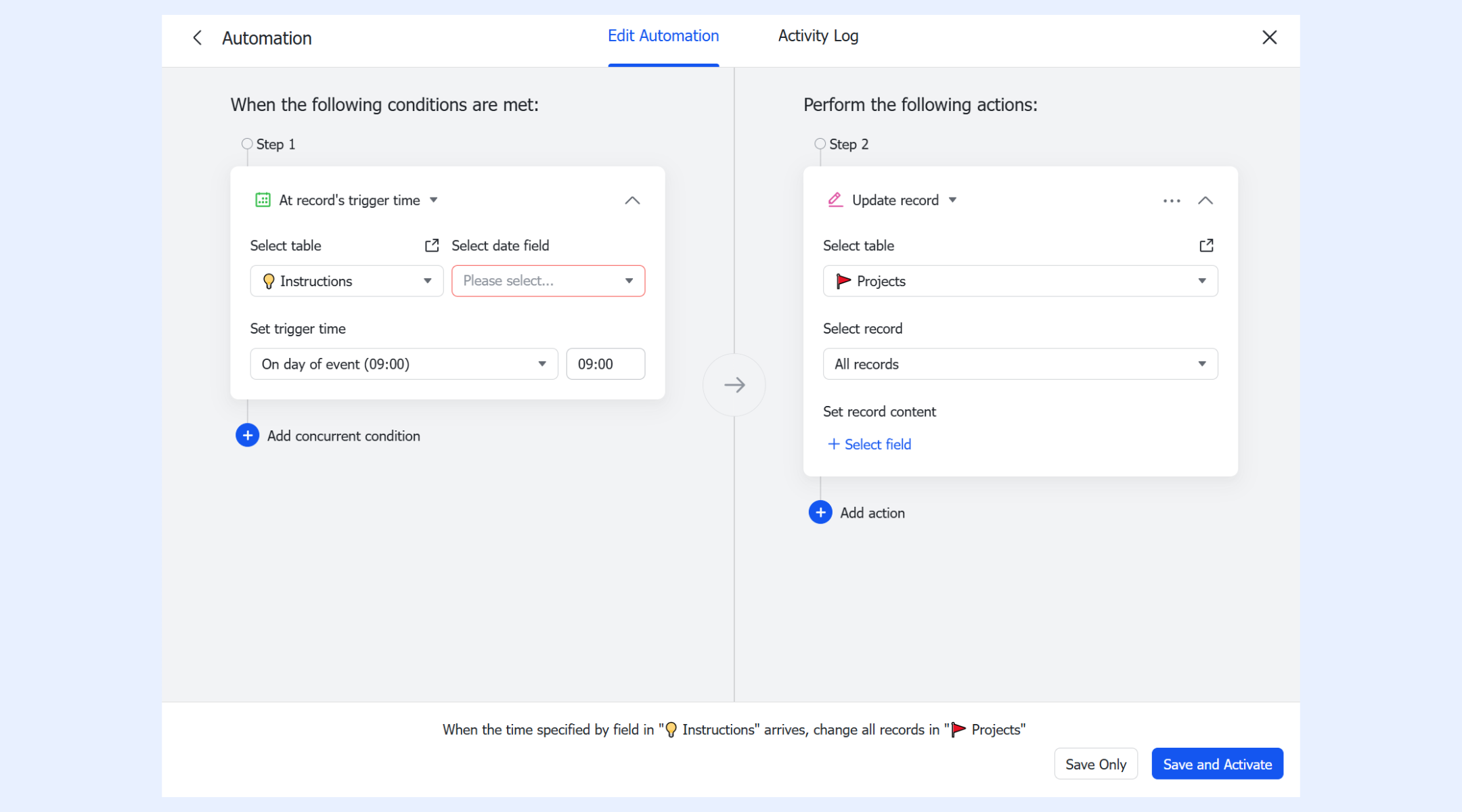
The automation maturity model for project teams
As organizations adopt project management automation, they typically progress through predictable maturity stages. Each level reflects how deeply automation in project management is embedded into daily workflows and decision-making.
Level 1: Manual coordination
Teams rely heavily on human follow-ups, messages, spreadsheets, and meetings. Project updates are inconsistent, and delays often come from miscommunication. This stage consumes time because workflows depend entirely on individuals rather than automated systems.
Level 2: Basic task automation
Simple tasks start running automatically, such as reminders, notifications, or one-step actions. These early automation project management efforts reduce repetitive work and help teams stay on track. It marks the shift from manual effort to predictable, rules-driven updates.
Level 3: Cross-team workflow automation
Automations now support multi-step processes involving multiple departments. Tasks route automatically between teams, improving visibility and accountability. This level helps eliminate bottlenecks and supports scalable delivery across larger or fast-growing organizations.
Level 4: AI-enhanced project decision support
AI begins assisting with summaries, risk detection, and workload insights. Teams gain faster, more accurate decision-making based on real-time project data. This stage blends AI and automation in project management to improve planning and reduce delays.
Level 5: Fully automated project operating system
At this stage, workflows run end-to-end with minimal manual intervention. AI-powered recommendations, automated routing, and real-time updates create a self-sustaining project environment. Teams operate with maximum efficiency, supported by a complete automation framework across all operations.
Key components of project management automation
Effective project management automation relies on several core components that streamline workflows, reduce manual work, and improve team efficiency. Each element ensures projects move smoothly and consistently across teams, departments, and tools.
- Automated task routing: Tasks are automatically assigned to the right team member based on priority, role, or project stage. This prevents delays caused by manual handoffs and ensures accountability. Teams can focus on execution instead of tracking assignments.
- Rule-based triggers: Workflows can start automatically when certain conditions are met, such as a new project record, approaching a deadline, or a status change. Rule-based triggers ensure actions happen in real time without human intervention. This is central to efficient automation project management.
- Conditional logic: Conditional rules allow workflows to follow different paths depending on project data or task attributes. This makes automation flexible, enabling teams to handle complex scenarios. Each branch can execute a specific set of actions before merging back into the main flow.
- Status + timeline updates: Project fields, timelines, and statuses can update automatically as tasks progress. Teams always see real-time information without manually editing spreadsheets or dashboards. This improves predictability and reduces miscommunication.
- Auto-notifications & scheduled reminders: Team members receive timely notifications for deadlines, overdue items, or approvals. Scheduled reminders help maintain accountability across projects. Automated alerts reduce follow-ups and ensure critical tasks are never missed.
- Document workflows: Automation manages document submissions, approvals, and version tracking. Teams spend less time emailing or sharing files manually. Workflows keep all documentation organized, traceable, and aligned with project progress.
- Cross-department handoff automation: Items automatically move between departments or roles based on rules. This reduces bottlenecks and miscommunication in multi-team projects. Handoffs happen seamlessly, ensuring smooth collaboration.
- AI-powered suggestions & summarization: AI analyzes project data to generate insights, summaries, or recommendations. Teams receive actionable information without spending hours reviewing updates. AI-powered features accelerate decision-making and enhance workflow clarity.
Real examples of project management automation
Project management automation can be applied across industries to improve efficiency, reduce manual work, and enhance cross-team collaboration. Here are detailed examples of how teams use automation to streamline their workflows.
For operations
Operations teams often handle repetitive approval requests and resource allocation tasks. Automation can route procurement or resource requests to the right approvers instantly, reducing delays. With automated approvals, teams ensure compliance, faster processing, and consistent execution across projects.
For IT and engineering
Technical teams benefit from automations that keep sprints, bugs, and deployments organized. Lark can auto-create sprints, route bugs to the correct team members, and send deployment updates to stakeholders. This ensures smooth execution, improves visibility, and reduces the administrative burden on developers and project managers.
For marketing
Marketing workflows often involve multiple reviews, approvals, and campaign tracking. Automation can create content review chains, route drafts to the right approvers, and generate campaign performance summaries automatically. Teams save time, reduce errors, and maintain consistent quality in content production.
For sales & customer teams
Sales and customer delivery teams can automate project creation as soon as a deal closes. Tasks like onboarding, follow-ups, and client communications can be generated automatically. This ensures smooth handoffs, reduces missed actions, and accelerates delivery for professional services automation project management.
For industrial and manufacturing
Industrial and manufacturing teams rely on strict schedules and quality processes. Automation can generate maintenance schedules, route safety check workflows, and handle quality control (QC) approvals. This reduces downtime, ensures compliance, and maintains high standards across production lines.
For professional services teams
Professional services teams can automate kickoff workflows, time logging reminders, and invoicing triggers. Projects start with predefined steps, employees are reminded of their log hours, and invoices are generated automatically. This improves project predictability, ensures timely billing, and enhances client satisfaction.
Challenges teams face when automating projects
Even with project management automation, teams encounter hurdles that can reduce efficiency and slow adoption. Understanding these challenges helps organizations implement automation more effectively and avoid common pitfalls.
- Overcomplicating workflows: Creating workflows with too many steps, triggers, or conditions can make automation hard to maintain. Complex processes often confuse teams and slow down adoption. Simplicity ensures automation in project management remains effective and easy to follow.
- Lack of documentation: Without clear documentation, teams struggle to understand how automated processes function. This leads to errors, delays, and inconsistent use of automation tools. Documenting workflows supports smoother adoption and easier troubleshooting.
- Poor adoption of automated processes: Even well-designed automations fail if teams don't use them. Resistance or lack of training can lead to manual work persisting. Ensuring alignment between workflows and team habits improves engagement and results.
- Data inconsistency across tools: Inaccurate or duplicated information can break automated workflows. Teams relying on multiple sources may face conflicts in project data. Consistent, centralized data is essential for successful automation project management.
- Insufficient visibility into workflow logic: When teams can't see the rules or conditions behind automated workflows, it becomes difficult to adjust or troubleshoot them. Transparency allows for optimization and prevents bottlenecks. Clear workflow logic ensures predictable outcomes.
- Choosing tools without unified collaboration features: Automation works best when teams can communicate, share documents, and track progress in one system. Disconnected tools create silos and reduce the impact of automation. Unified collaboration features ensure automation delivers consistent value across teams.
Reliable tool: Lark unified project management hub with smart automation
Lark is a unified workspace that brings tasks, communication, data, and automation into a single platform. It empowers teams to implement project management automation without switching between multiple tools. With AI-powered actions, rule-based triggers, and automated workflows, Lark streamlines project execution and reporting. Teams can collaborate efficiently, reduce manual work, and scale operations with confidence.
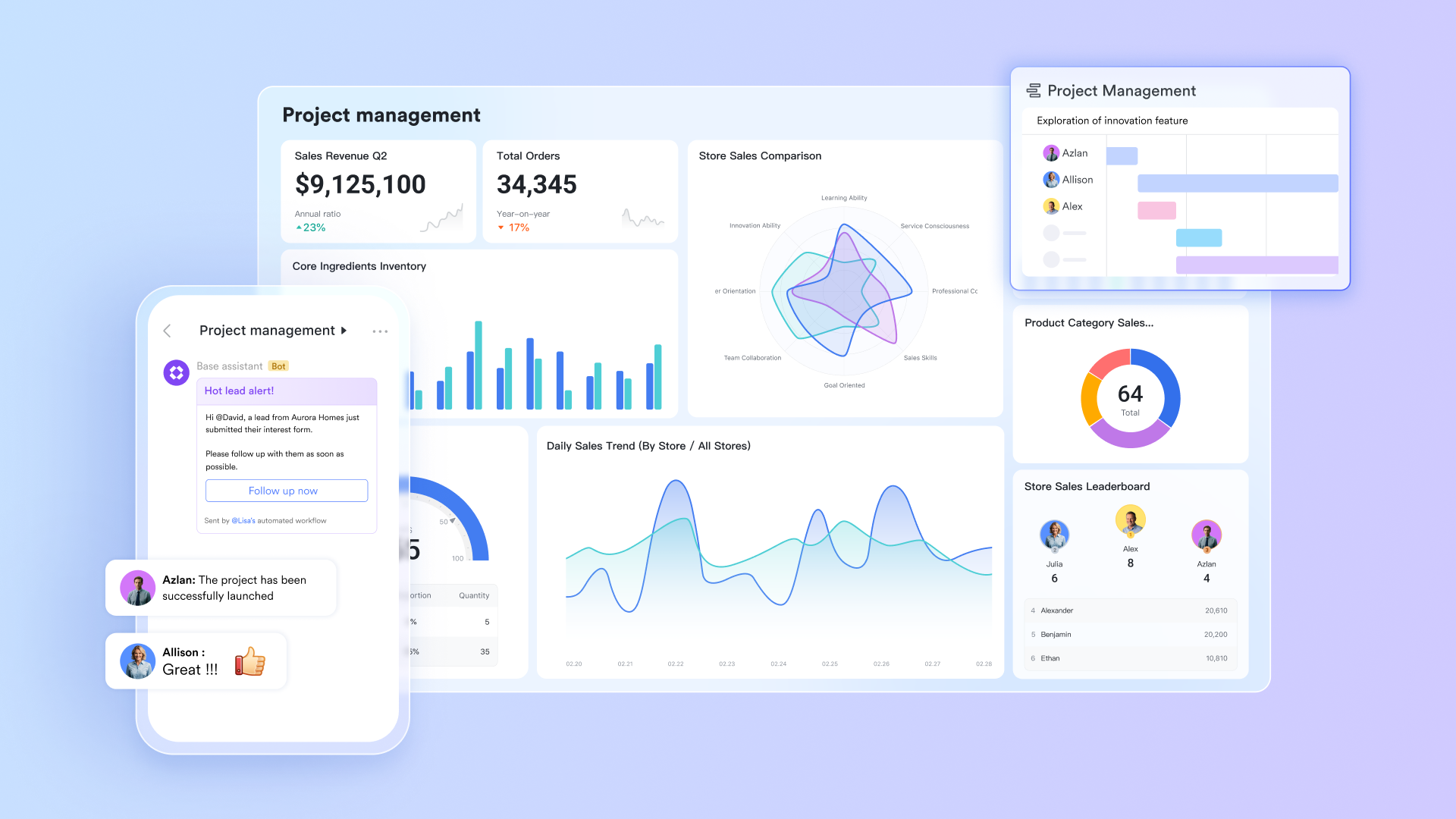
Unified platform: Realise automation via different features in one place
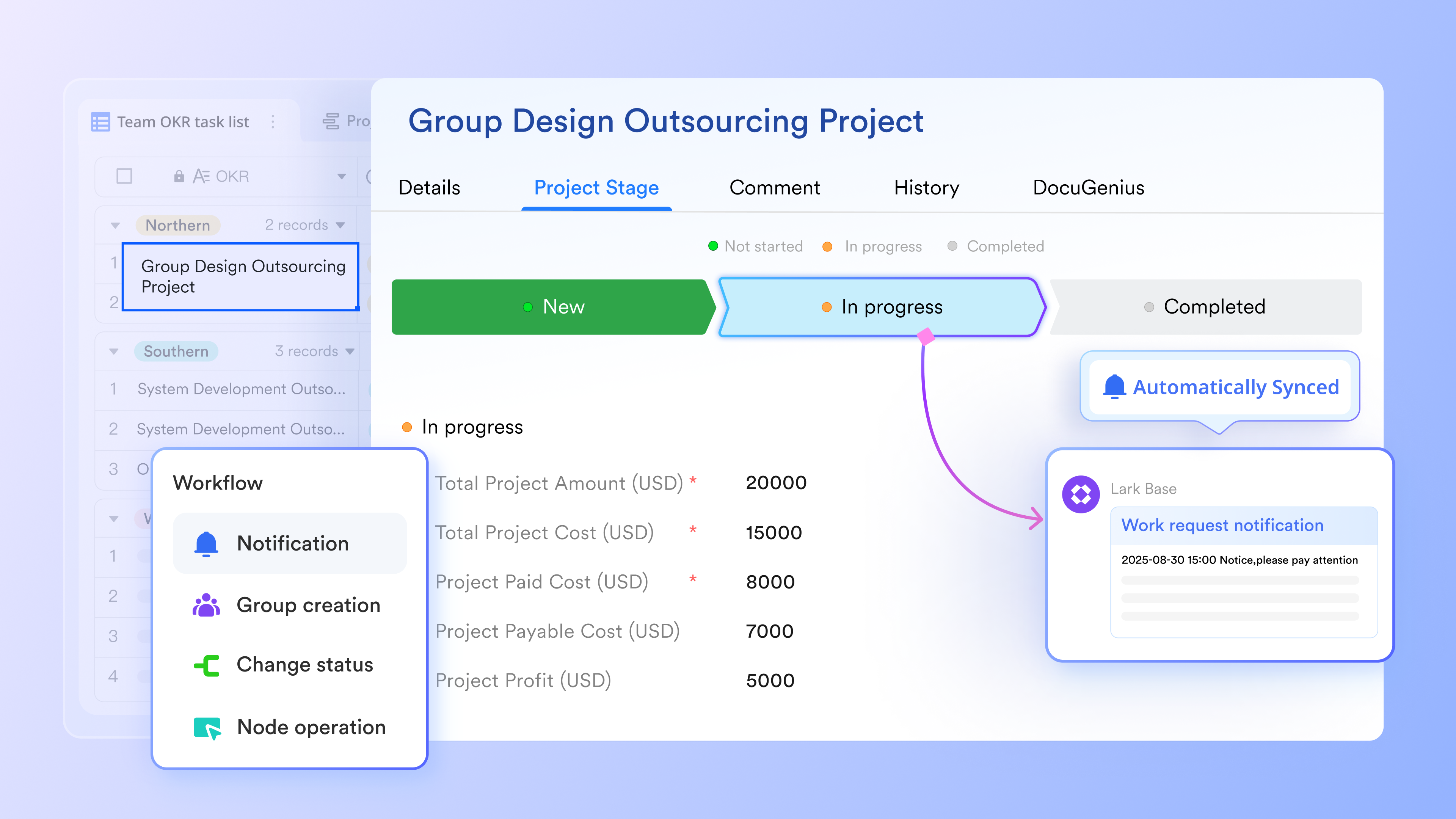
As a cohesive, all-in-one platform, Lark enables automation rules to operate seamlessly throughout the ecosystem. Information captured in Base can flow naturally into other parts of your workspace, allowing schedules, tasks, and team spaces to update themselves without manual effort. Data moves smoothly between project management tools, and even everyday interactions—such as receiving a message—can trigger larger workflows. This unified structure enables teams to streamline processes, eliminate repetitive work, and maintain alignment across a single, connected environment.
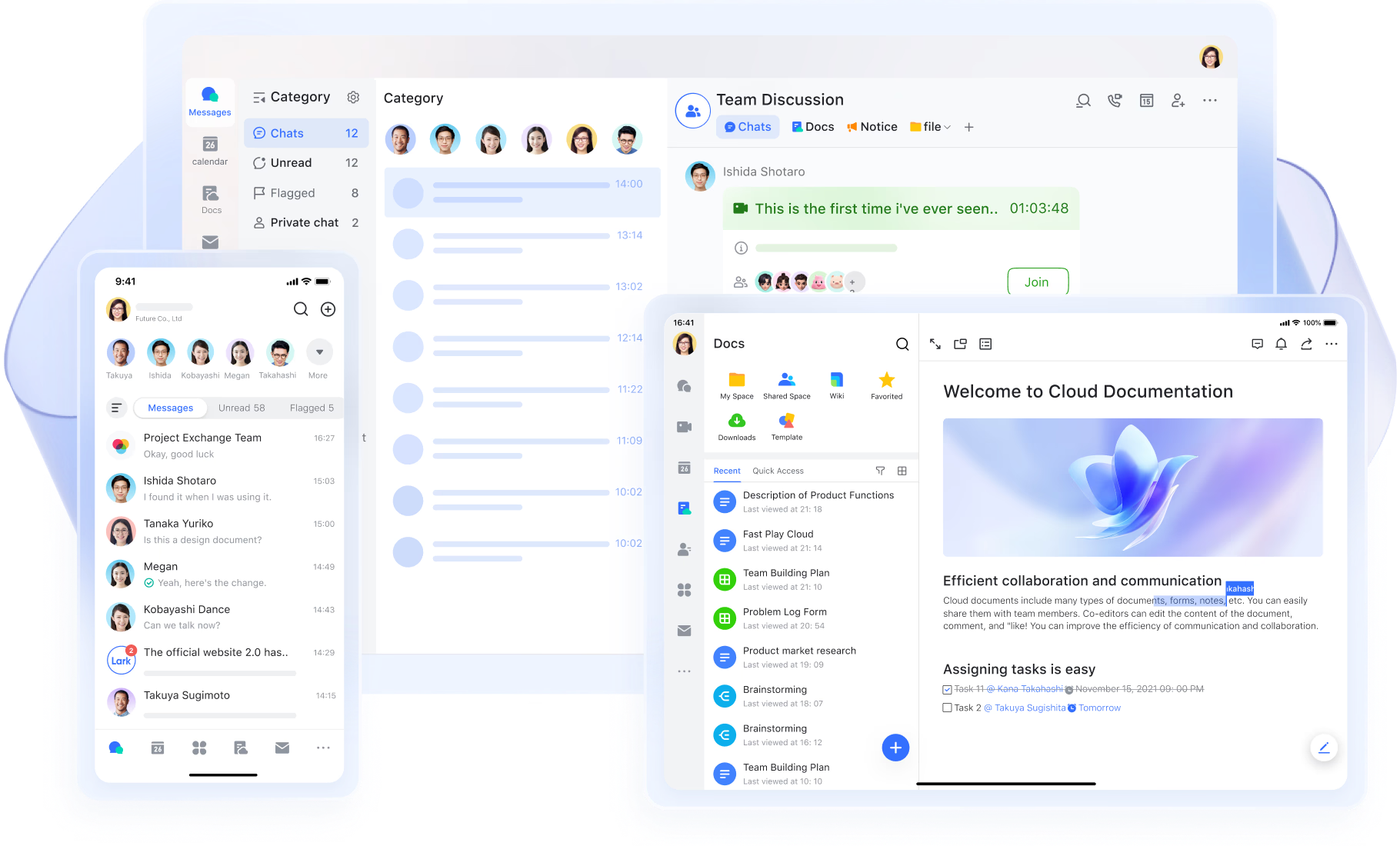
Formulas: Use smart equations to manage your project
Lark's automation formulas make project management smarter by letting you dynamically calculate and transform data as workflows progress. You can use formulas to sum up completed task hours into a project’s total, apply conditional logic (e.g., "if this field > X, then …"), or format values based on changing variables. This means your automations aren't just static triggers—they're context-aware and adapt based on your project data, which helps ensure accuracy, reduces manual updates, and keeps everything aligned as things evolve.
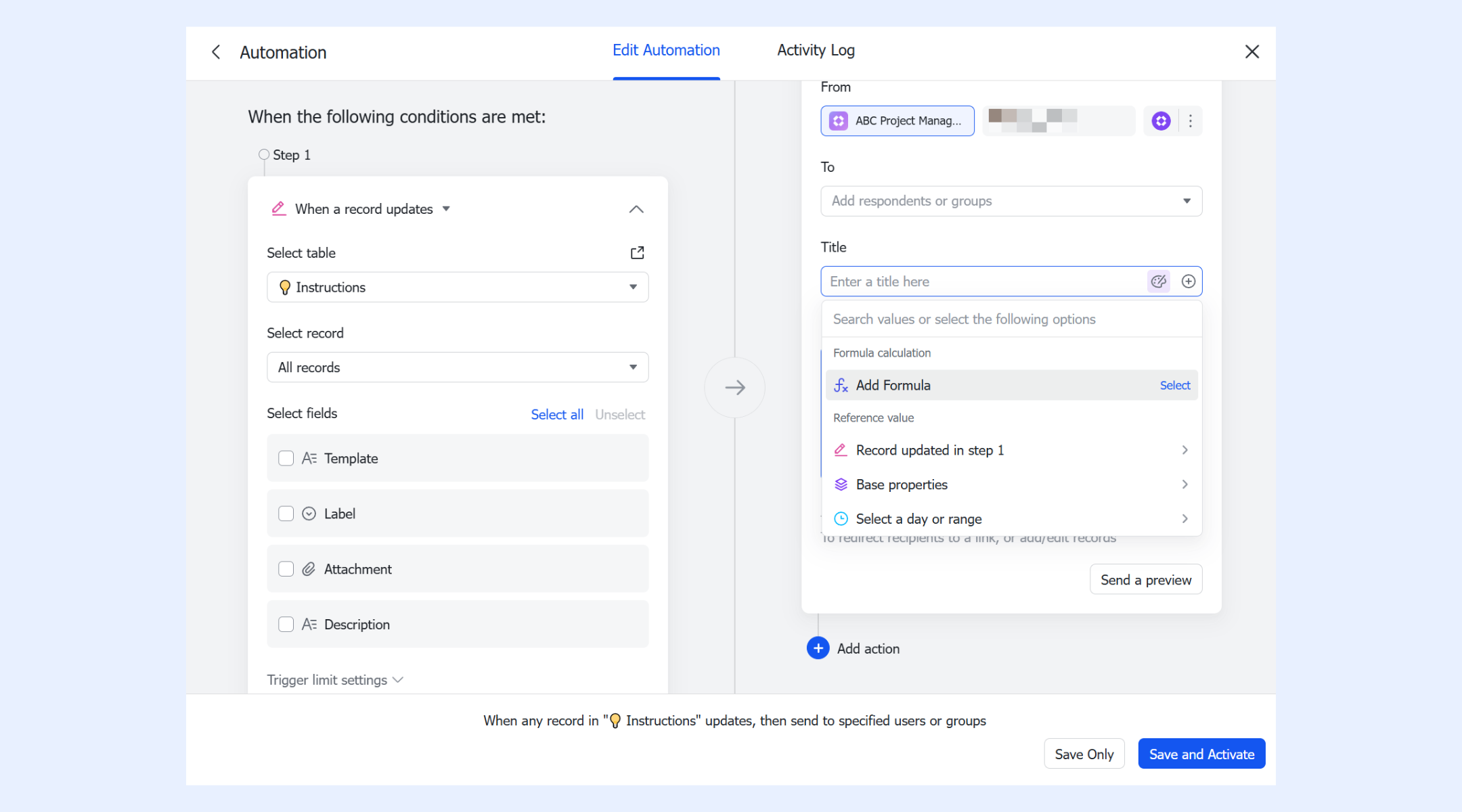
AI-generated text: Optimize, summarize, and generate content with AI
Lark allows workflows to incorporate AI models, including both built-in AI and OpenAI-powered options, to optimize tasks and generate meaningful content automatically. Teams can create workflows that summarize progress, rewrite descriptions, generate task notes, extract next steps, or produce structured updates for stakeholders. The generated text can be used immediately in the following steps, such as sending a summary to a team group or updating a project field. This creates a continuous automation loop where AI improves clarity, reduces manual writing, and accelerates project reporting.
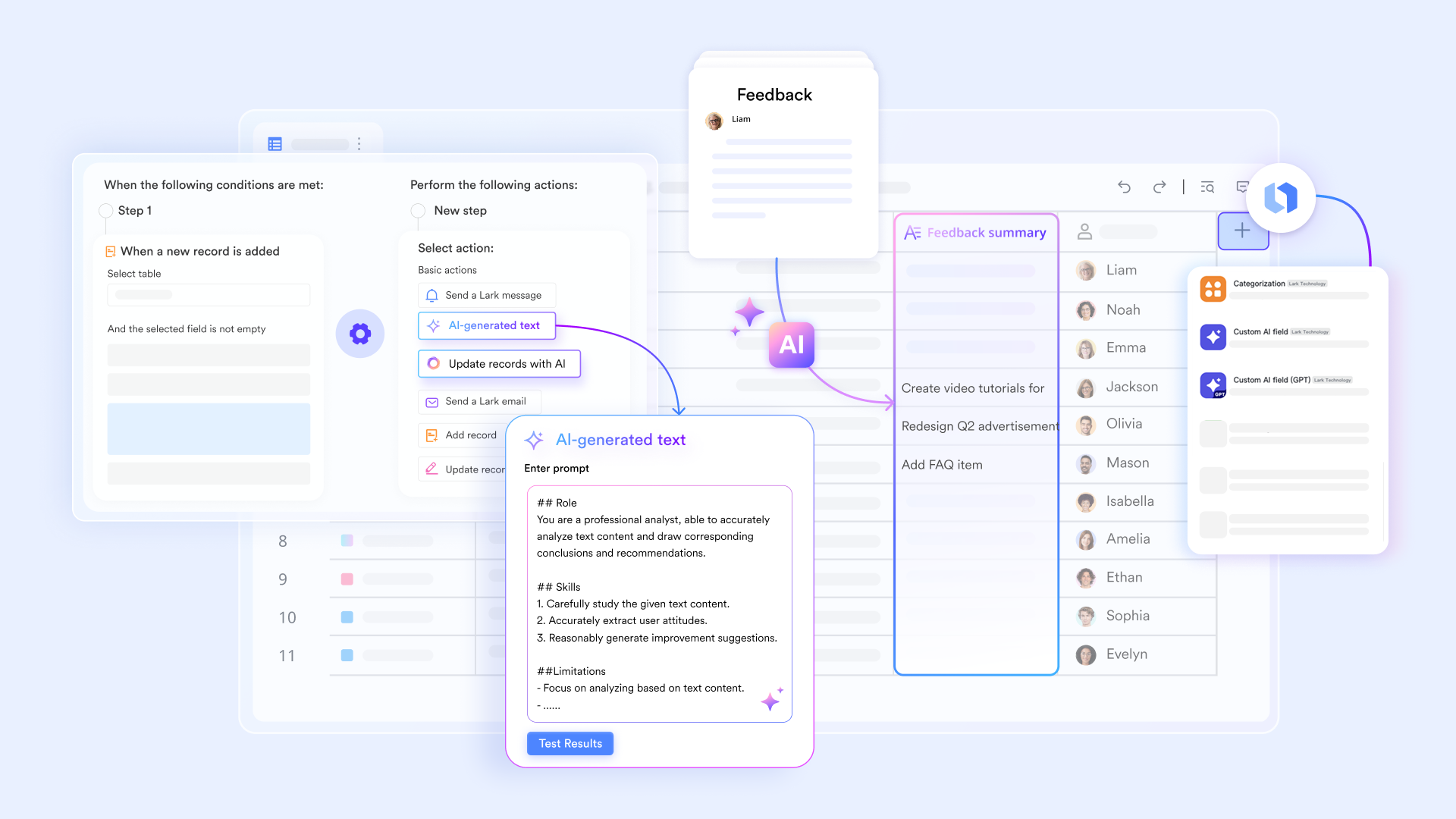
Find records: Automatically locate the data needed for downstream steps
The "Find records" action lets automations search for entries that match specific criteria, such as overdue tasks, items missing approvals, or deliverables reaching a particular phase. Lark filters those records and selects the relevant fields so that downstream actions can process only the required data. This is useful for generating automated digests, creating follow-up tasks, or routing items to reviewers. Instead of spending time manually checking tables, teams get dynamic, data-driven workflows that adapt instantly as project data changes.
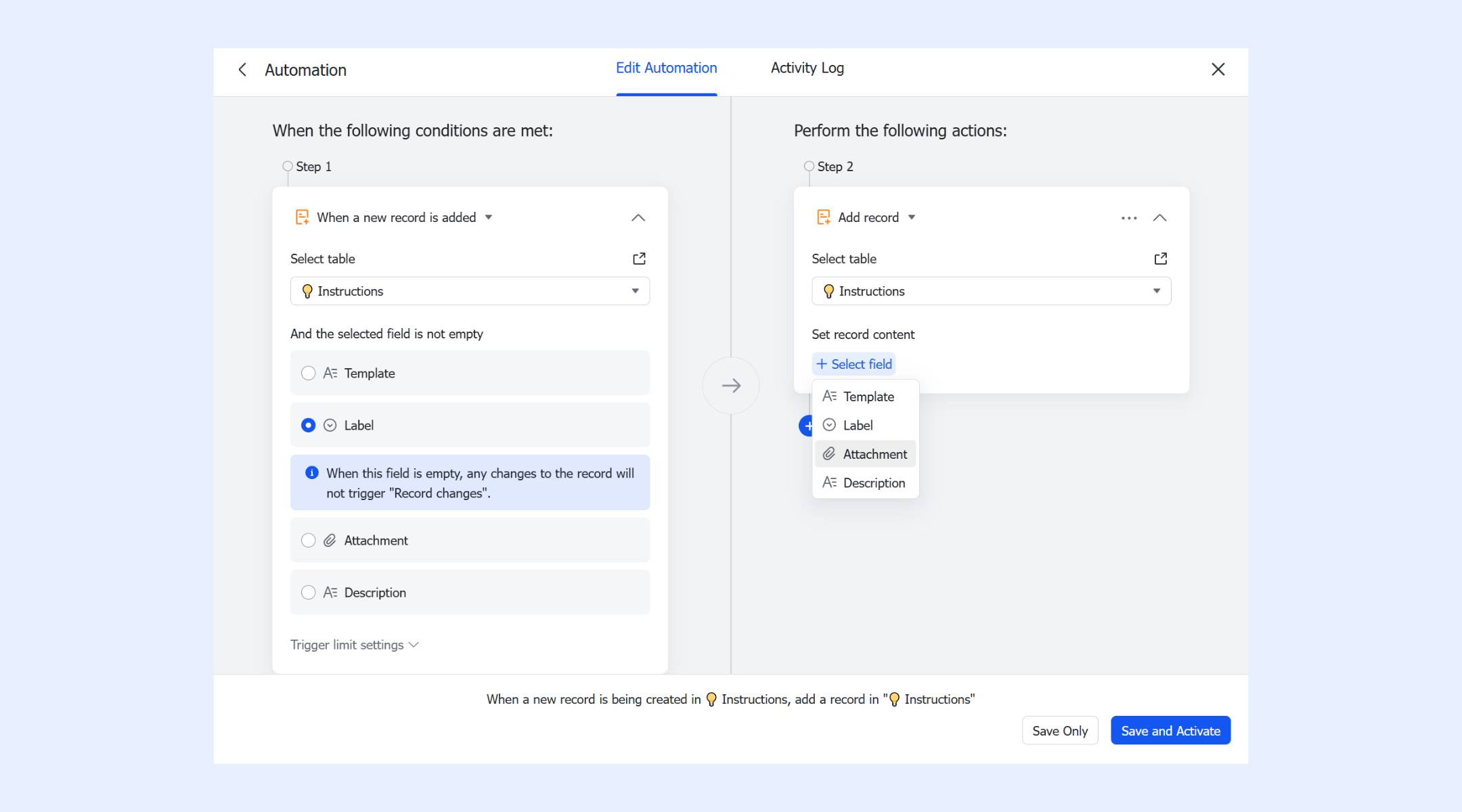
Automatic notification: Keeping updated on time
In Lark Base automations, you can create an automation rule that sends automated reminders when records are updated or at scheduled times. First, you click Automations, choose a trigger (for example, "When a record updates" or "At a scheduled time"), select which table and field to monitor, and then set the action to Send a Lark message. You can customize the message content (including links and formatted text using Markdown), choose to send it to an individual or a group, and then save or activate the automation. This setup allows you to automatically remind task owners, summarize progress reports, or send regular updates—keeping your team informed without manual follow-ups.
- Starter plan: Free forever plan that includes 11 powerful tools for up to 20 users. It also comes with 100GB of storage, 1000 automation runs, AI translations, and more.
- Pro plan: $12/user/month (billed annually) for up to 500 users. It includes everything in Starter plus group calling for up to 500 attendees, 15TB of storage, 50,000 automation runs, and more.
- Enterprise plan: Contact sales for custom pricing. Supports unlimited users and includes even more automation runs and advanced security, compliance, and management features.
Examples of automation you can build in Lark
Lark enables teams to implement project management automation with simple workflows that reduce manual work and improve efficiency. These examples show how automation can streamline everyday project tasks across departments.
- Auto-create tasks when a new project record is added: Whenever a new project entry is added, Lark can automatically generate related tasks for the relevant team members. This ensures nothing is overlooked and eliminates the need for manual task creation. Teams can start work immediately with clear ownership and deadlines.
- Scheduled reminders for overdue deliverables: Lark can send automated reminders for tasks that are overdue or approaching deadlines. This helps keep projects on track without requiring managers to follow up constantly. Team members stay accountable, and deadlines are less likely to slip.
- Automated update summaries sent to team groups: Teams receive automatic summaries of project progress, updates, or changes via Lark messages. This reduces manual reporting and ensures everyone is aligned in real time. Automated summaries improve visibility and facilitate faster decision-making.
- Event creation when projects enter review stages: Lark can automatically create calendar events or notifications whenever projects reach review or approval stages. Teams can plan meetings or approvals efficiently without manually tracking project phases. This ensures smoother handoffs and timely feedback.
- Auto-routing items to managers based on rules: Tasks, approvals, or project items can be automatically routed to the correct manager based on predefined rules. This eliminates confusion over ownership and speeds up decision-making. Cross-team workflows become seamless and consistent.
Why teams automate project management
Project management automation helps teams reduce manual effort, improve accuracy, and maintain predictable delivery across fast-moving projects. As workloads grow, automation becomes essential for supporting efficiency, collaboration, and scalable operations.
- Reduces repetitive work and administrative effort: Automating routine tasks, like reminders, updates, and routing, removes hours of manual coordination. Teams spend less time chasing information and more time executing real work. This frees capacity for strategy, problem-solving, and higher-value activities.
- Improves project predictability: Automated alerts, status updates, and rule-based actions keep projects aligned with timelines. Issues surfaced earlier, helping teams stay ahead of deadlines. Predictable workflows reduce last-minute surprises and improve overall delivery quality.
- Cuts down on context switching: Automation reduces the need to shift between tools, chats, and spreadsheets. Information reaches the right people automatically, decreasing mental load. Teams stay focused longer, improving productivity and accuracy.
- Strengthens cross-team coordination: Workflows route tasks and updates to the correct teams without manual intervention. This prevents bottlenecks and clarifies ownership at every stage. Cross-functional collaboration becomes smoother and more consistent.
- Enhances reporting and visibility: Automated summaries, dashboards, and digests remove the need for manual reporting. Leaders get real-time insights into progress, risks, and capacity. Visibility improves decision-making across all levels of the organization.
- Supports remote and hybrid workflows: Automation ensures consistent project movement regardless of time zones or locations. Remote teams receive structured updates without relying on synchronous communication. This creates stability and clarity in distributed environments.
- Enables scalable delivery for growing teams: As workloads increase, automation helps teams maintain quality without adding more administrative overhead. Workflows scale effortlessly across departments and project types. This makes automation essential for professional services and fast-growing organizations.
New trend: AI and automation in project management
AI enhances project management automation by providing intelligence, insights, and context that go beyond simple rule-based workflows. By combining AI and automation in project management, teams can make faster, data-driven decisions while reducing manual effort.
- AI for status updates & progress summaries: AI can automatically analyze task progress, deadlines, and comments to generate concise status updates. Teams receive clear summaries without manually compiling information. This improves communication and keeps everyone aligned with project goals.
- AI-based risk detection: Machine learning models identify potential risks, such as overdue tasks, workload bottlenecks, or dependencies at risk. Teams are alerted proactively, allowing them to take corrective actions. This minimizes delays and improves project predictability.
- Workload balancing recommendations: AI evaluates team assignments and suggests reallocation of tasks to prevent overload. It ensures that work is distributed efficiently across team members. Balanced workloads reduce burnout and improve overall productivity.
- Automated extraction of action items from meetings: AI can convert meeting notes into actionable tasks, deadlines, and owners. Teams no longer need to manually summarize discussions or track next steps. This ensures follow-through and accelerates project execution.
- AI-assisted project planning: AI helps generate timelines, resource allocations, and project plans based on historical data and current priorities. Teams can quickly visualize optimal schedules and dependencies. This accelerates planning cycles while improving accuracy and efficiency.
Conclusion
Project management automation transforms how teams plan, execute, and deliver work by reducing repetitive tasks, improving predictability, and enhancing cross-team collaboration. From automated task routing and rule-based triggers to AI-powered insights and workflow summaries, automation ensures projects run smoothly and efficiently. Teams across operations, IT, marketing, sales, manufacturing, and professional services benefit from faster execution, fewer errors, and better visibility. By implementing scalable, intelligent workflows, organizations can focus on strategy and value-added work instead of manual coordination. For teams seeking a unified platform to build, manage, and optimize automated project workflows, Lark provides all the tools needed to succeed.
FAQs
Is project management automation suitable for small teams?
Yes. Project management automation benefits teams of all sizes, including small teams, by reducing repetitive tasks, manual follow-ups, and administrative effort. Even with a limited number of members, tools offering the best project management automation features help maintain predictability and improve reporting. Small teams using the best project management software for automation can scale operations without extra resources, gaining efficiency through AI-powered updates and automated workflows.
How does project automation affect project timelines?
Project automation streamlines workflows, reduces delays, and ensures that tasks move seamlessly through each phase. Automated triggers, reminders, and status updates minimize bottlenecks and human errors, keeping projects on schedule. Teams can detect risks early, respond faster, and improve predictability, which ultimately accelerates delivery and ensures projects meet deadlines more consistently.
Do automated workflows require technical skills to build?
Not necessarily. Many modern project automation tools, including Lark, offer no-code or low-code workflow builders. Users can create and deploy automations without programming skills. Even non-technical team members can design rule-based triggers and conditional logic, while technical teams extend complexity when needed. This accessibility is a core advantage of the best project management software for automation, making advanced workflows easier to build in both general projects and project management software for professional services automation.
Can automation help with multi-department or cross-functional projects?
Absolutely. Automation ensures that tasks, approvals, and updates move seamlessly across departments or teams. Conditional logic, routing rules, and auto-notifications reduce miscommunication and handoff delays. By aligning workflows with project goals, automation improves cross-functional collaboration, keeps everyone on the same page, and enhances transparency in multi-department or professional services automation project management.
What types of tasks should not be automated?
Tasks requiring human judgment, creativity, or nuanced decision-making should remain manual. Complex problem-solving, strategic planning, and activities involving subjective evaluation are better handled by humans. While automation excels at repetitive, predictable processes, it cannot replace critical thinking, client relationship management, or context-sensitive decisions that require intuition and experience.
Related reading
Table of contents
Start using Lark today

Manage all your work in one place
Boost team efficiency by 10x
Save up to 70% on software costs
Table of contents
Start using Lark today
Manage all your work in one place
Boost team efficiency by 10x
Save up to 70% on software costs
Keep reading







2026 Lark Technologies Pte. Ltd.
Headquartered in Singapore with offices worldwide.






Explore: