The ability to track what you sell and what you have in stock has moved far beyond a back-office task. It now plays a direct role in customer experience, cash flow stability, and business growth. When inventory data lags behind sales activity, even by a few hours, businesses face stockouts, overselling, and inaccurate reporting that erodes trust.
Many organizations still rely on disconnected spreadsheets or basic tools that were never designed to support real-time operations. As sales channels expand across physical stores, ecommerce platforms, and social commerce, these gaps become more costly. A modern sales and inventory management system provides the operational foundation required to keep sales, stock, and teams aligned. This is especially valuable for growing businesses that need to keep pace with increasing complexity as they scale.
This guide explains how sales and inventory systems work, where POS fits in, what features matter today, and how businesses of different sizes can choose and implement the right solution. Throughout the guide, examples gradually show how platforms like Lark support structured inventory workflows without adding complexity.
What is a sales and inventory management system?
A sales and inventory management system serves as the digital backbone of a modern commercial enterprise. It is a specialized software ecosystem designed to unify two traditionally separate functions: Tracking physical goods () and recording commercial transactions (sales). By integrating these workflows, the system ensures that every time a barcode is scanned at checkout or an order is placed online, the central database reflects that change across the entire organization in real-time. Modern systems provide a single interface for users to track sales, update inventory, and access real-time data across the entire business, streamlining operations and ensuring accuracy.
Beyond mere record-keeping, this system provides the transparency required to manage cash flow effectively. It transforms raw data into actionable insights, such as identifying "dead stock" that occupies valuable shelf space or flagging "high-velocity" items that require immediate replenishment. For a business owner, it shifts the operational model from reactive scrambling when a shelf is empty to proactive, where dictate procurement and . Ultimately, it is the primary tool for maintaining a "single source of truth" in an increasingly complex marketplace.
Boost sales while maintaining inventory control
How POS and inventory systems work together
A high-performing sales and inventory system relies on a seamless, bidirectional flow of information. When these two components are properly synchronized, they function as a single unit rather than two separate databases. The moment a transaction is completed at the front end, the triggers an immediate update to the back-end inventory records. This eliminates the need for manual end-of-day reconciliations and ensures that your financial data is always current.
In an , this connection is critical for preventing "out-of-stock" scenarios. If a customer buys the last unit of a product in your physical store, a modern point of sale and inventory system will instantly update your website to show that item as unavailable. This prevents the reputational damage caused by taking online orders that cannot be fulfilled, effectively bridging the gap between your digital and physical storefronts.
Beyond stock levels, this integration facilitates sophisticated pricing and promotional logic. The inventory database feeds the POS terminal with updated product information, such as bulk discount rules, seasonal markdowns, and tax variations. This ensures that the price a customer sees on the shelf or screen is exactly what they are charged at checkout, maintaining trust and consistency across all touchpoints.
Ultimately, the goal of a is to remove the "human element" from data entry. By automating the deduction of goods and the recording of revenue, the system provides a clear, real-time audit trail. This transparency allows managers to focus on high-level strategies like optimizing product mix and improving margins rather than spending hours tracing missing inventory or correcting ledger discrepancies.
Key features modern businesses actually need
To stay competitive, your sales inventory system must do more than just count items. It needs to provide actionable intelligence through these four pillars. When selecting, look for essential features like vendor management and the ability to set reorder points to avoid stockouts and maintain optimal inventory levels:
- Real-time visibility: Whether you are managing a single storefront or an online sales and inventory management system, you need data that updates in seconds, not hours. Real-time visibility allows sales associates to check stock at other branches or in the warehouse without leaving the customer’s side.
- Barcode scanning: Manual entry is the enemy of accuracy. A point of sale inventory system should support mobile barcode scanning, allowing staff to receive shipments, perform cycle counts, and process sales using a smartphone or dedicated scanner.
- Low-stock alerts: The "set it and forget it" approach only works if the system notifies you when items are running low. Advanced systems like Lark allow you to set custom thresholds, such as reorder points, that trigger automated messages to procurement teams.
- Multi-location tracking: For growing brands, an inventory and must be able to distinguish between stock "in transit," stock in Warehouse A, and stock on the floor at Storefront B. The best solutions let you manage all your locations within one system, providing an all-in-one platform for both physical and online stores.
Sales inventory system across industries
Implementing a sales and inventory management system is not a one-size-fits-all endeavor; different industries face unique operational hurdles that dictate how they use these tools.
Retail: Managing trends and variants
In the retail sector, the primary challenge is managing a high volume of Stock Keeping Units (SKUs) across multiple categories. Retailers use these systems to track "variants" such as size, color, and material, ensuring that a "Medium Blue Shirt" isn't confused with a "Large Red Shirt." Beyond basic tracking, modern retail systems analyze "sell-through rates" to identify which items are trending, allowing managers to discount slow-moving "dead stock" before it becomes a liability.
Food & beverage: Controlling perishability
For the food and beverage industry, the priority shifts from variants to expiration dates. A specialized sales inventory system uses First-In, First-Out (FIFO) or First-Expiry, First-Out (FEFO) logic to ensure that older stock is used or sold first. This reduces spoilage and waste, directly protecting the thin profit margins typical of restaurants and cafes. Integrated systems can also track inventory at the "ingredient level," automatically deducting flour and sugar from the records every time a cake is sold.
Warehousing: Optimizing space and flow
In warehousing, the focus is on "" and space utilization. These systems help warehouse managers organize stock based on "velocity," placing high-demand items closer to the packing stations to reduce picking time. By using a sales and inventory management system integrated with barcode scanners, warehouse staff can process massive shipments with 100% accuracy, providing real-time updates to sales teams about what is "available to promise" to customers.
Pharmacies: Ensuring safety and compliance
Pharmacies operate under strict regulatory environments where accuracy is literally a matter of life and death. A point of sale and inventory system in this niche must track "lot numbers" and "batch IDs" to facilitate quick recalls if a manufacturer reports an issue. These systems also automate the monitoring of controlled substances and sensitive medications, ensuring that every milligram is accounted for and that the pharmacy remains compliant with .
Small business vs. enterprise: 5 differences in sales and inventory systems
When selecting a sales and inventory management system, the requirements change drastically as a business moves from a single boutique to a global operation. While a focuses on simplicity and cost, enterprise chains require deep architectural robustness. Here are the 5 key differences between what small shops and enterprise chains need:
- Scalability and multi-location support: Small shops typically operate out of one or two locations and need a system that handles local stock accurately. Enterprise chains, however, require a point of sale inventory system that can manage hundreds of stores across different regions, supporting complex inter-store transfers and global stock visibility from a single dashboard.
- Granular user permissions and security: In a small shop, the owner often handles everything, requiring few "roles." Enterprise-level sales inventory management system needs highly granular permissions to ensure that a floor associate in one city cannot access the financial records of a warehouse in another, protecting sensitive corporate data.
- Advanced automation and replenishment logic: Small businesses often rely on manual reordering or simple low-stock alerts. In contrast, large-scale inventory and sales management system users need "Smart Replenishment" driven by AI. This includes automated based on lead times, safety stock levels, and historical seasonal trends across thousands of SKUs.
- Integration ecosystems (APIs and EDI): An OS and inventory system for small businesses usually needs to connect to basic accounting, like QuickBooks. Enterprise chains require a system that acts as an ERP hub, integrating with Electronic Data Interchange (EDI) for suppliers, Third-Party Logistics (3PL) providers, and .
- Data analytics and reporting depth: While a small shop needs basic daily sales reports, an enterprise requires "Big Data" capabilities. This includes real-time heat maps of product performance, margin analysis by region, and predictive analytics to determine future stock needs, all of which are essential for high-level corporate decision-making.
Step-by-step system implementation plan
Transitioning to a new requires a methodical approach to ensure data integrity and team adoption. Following a structured roadmap prevents operational downtime and ensures your "go-live" is a success.
Step 1: System setup and configuration
The first phase involves building the of your business. During setup, you define your core parameters, such as tax rules, currency settings, and measurement units. This is also when you establish your "product architecture," deciding how to categorize items, set up variants (like size or color), and assign Stock Keeping Units (SKUs). If you are using a POS system with inventory management, this is the time to configure your hardware, such as receipt printers, barcode scanners, and payment terminals, to ensure they communicate perfectly with the cloud.
Step 2: Data migration and cleaning
Migration is often the most critical step in implementing an online sales and inventory management system. Rather than simply moving old data, you should "clean" it by removing discontinued items and correcting inconsistent naming conventions. You will typically export your current data into a CSV or Excel format and map those fields to the new system. It is vital to perform a final physical stock take right before the import so that the "opening balance" in your new sales inventory system is 100% accurate, eliminating "ghost inventory" from day one.
Step 3: Staff training and SOP development
A system is only as good as the people operating it. In this stage, you must develop Standard Operating Procedures (SOPs) for common tasks like processing a return, receiving a partial shipment, or marking an item as damaged. Training should be role-specific: sales associates need to master the point of sale and inventory system interface, while warehouse staff focus on mobile scanning and stock transfers. Using a collaborative platform like Lark can simplify this, as training manuals and video walkthroughs can be pinned in the team chat for easy reference. Step 4: Launch and post-go-live audit
The final step is the official "cut-over" to the new system. Many businesses choose to launch during a scheduled period of low activity to minimize customer impact. Once live, perform a "post-go-live audit" by spot-checking high-velocity items to ensure the sales and inventory system is deducting stock correctly with every transaction. Monitor your reports closely for the first 48 hours to identify any sync errors or user bottlenecks, ensuring the transition from the old workflow to the new automated one is permanent and stable.
Manage sales and inventory without losing balance
Modern choice: Explore how Lark powers smarter sales and stock control
powers smarter sales and stock control by connecting inventory data, sales activity, and team workflows in one unified workspace. Instead of managing stock in isolated systems, teams get real-time visibility into what is selling, what is running low, and what needs action. Sales updates and inventory changes stay synchronized automatically, reducing errors and delays. removes manual calculations and follow-ups from daily operations. With collaboration embedded directly into inventory workflows, decisions happen faster and with greater accuracy. This allows businesses to maintain control as volume, locations, and complexity grow. Using Lark for sales too? Watch: in Lark Base
Real-time inventory tracking via Lark Base
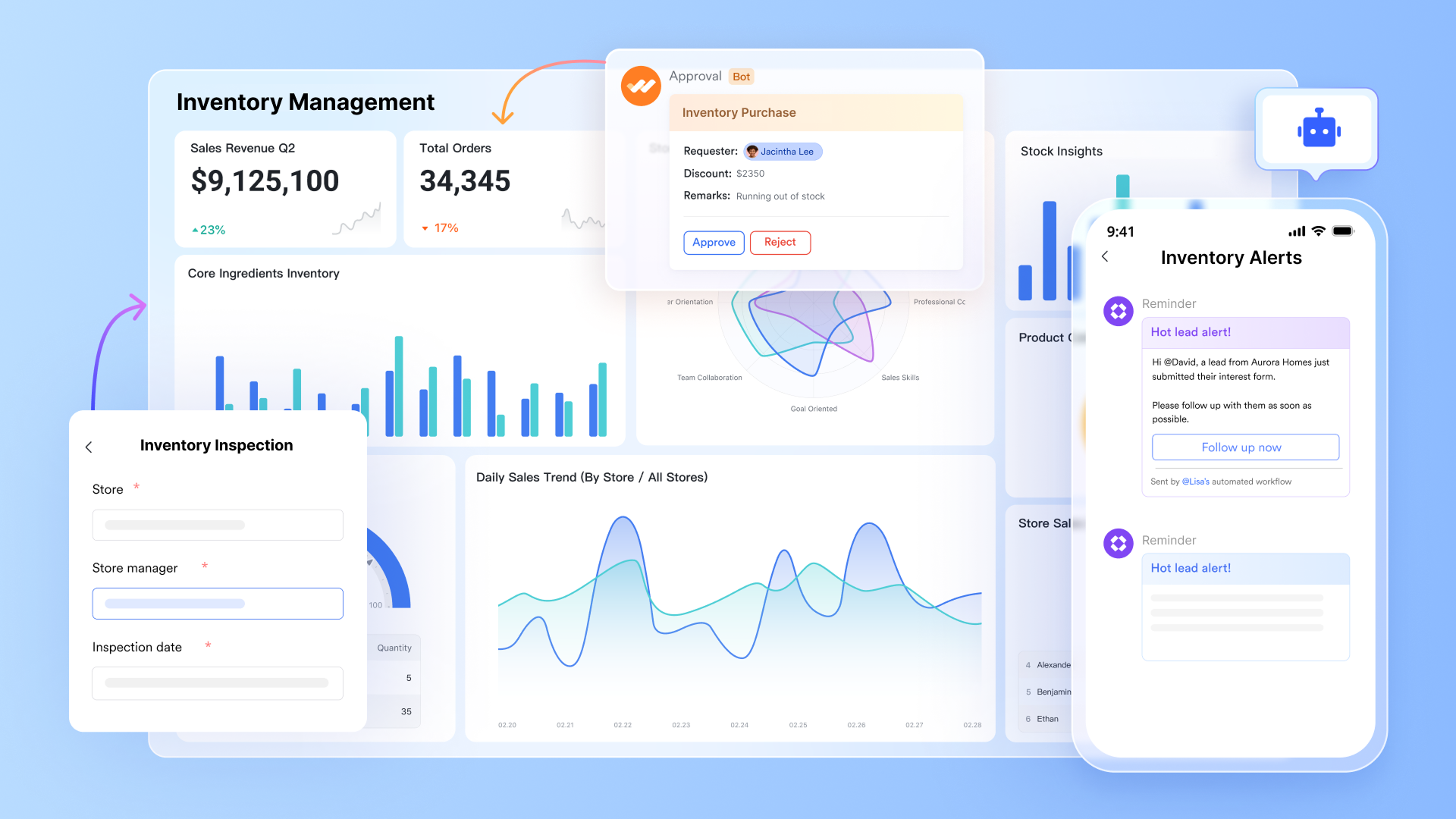
serves as the "live" heart of your sales and inventory management system. Unlike static spreadsheets, Base instantly updates stock levels across all views the moment a transaction is recorded or a shipment is received. This provides a single source of truth for both sales teams in the field and warehouse managers, ensuring that "available-to-promise" numbers are 100% accurate at any given second, effectively preventing overselling.
Order scheduling with Gantt and Kanban views
Visualizing the flow of goods is seamless with Lark's Gantt view. Managers can track order fulfillment statuses, shipping schedules, and lead times on a visual timeline, making it easy to spot potential bottlenecks in the supply chain. For day-to-day operations, the allows warehouse teams to drag and drop orders through stages like "Picking," "Packing," and "Shipped," providing a transparent look at the workload and ensuring no order is overlooked. 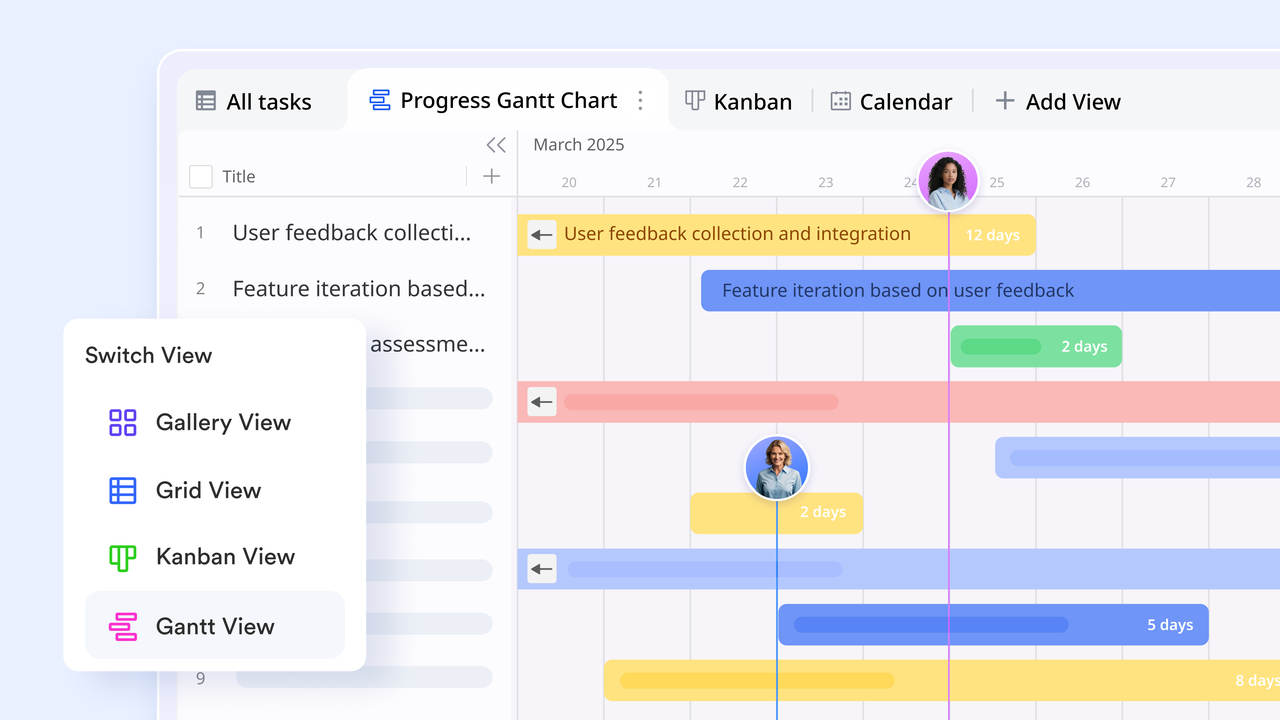
Barcode fields for mobile product cataloging
Lark eliminates the need for expensive proprietary hardware by offering native Barcode fields. Staff can use the Lark mobile app to scan UPC, EAN, or QR codes directly into a Base table. This feature automates product identification during receiving and audits, pulling up existing records or creating new ones instantly. It drastically reduces human error compared to manual typing and speeds up high-volume tasks like year-end stock takes or rapid front-of-house checkouts. 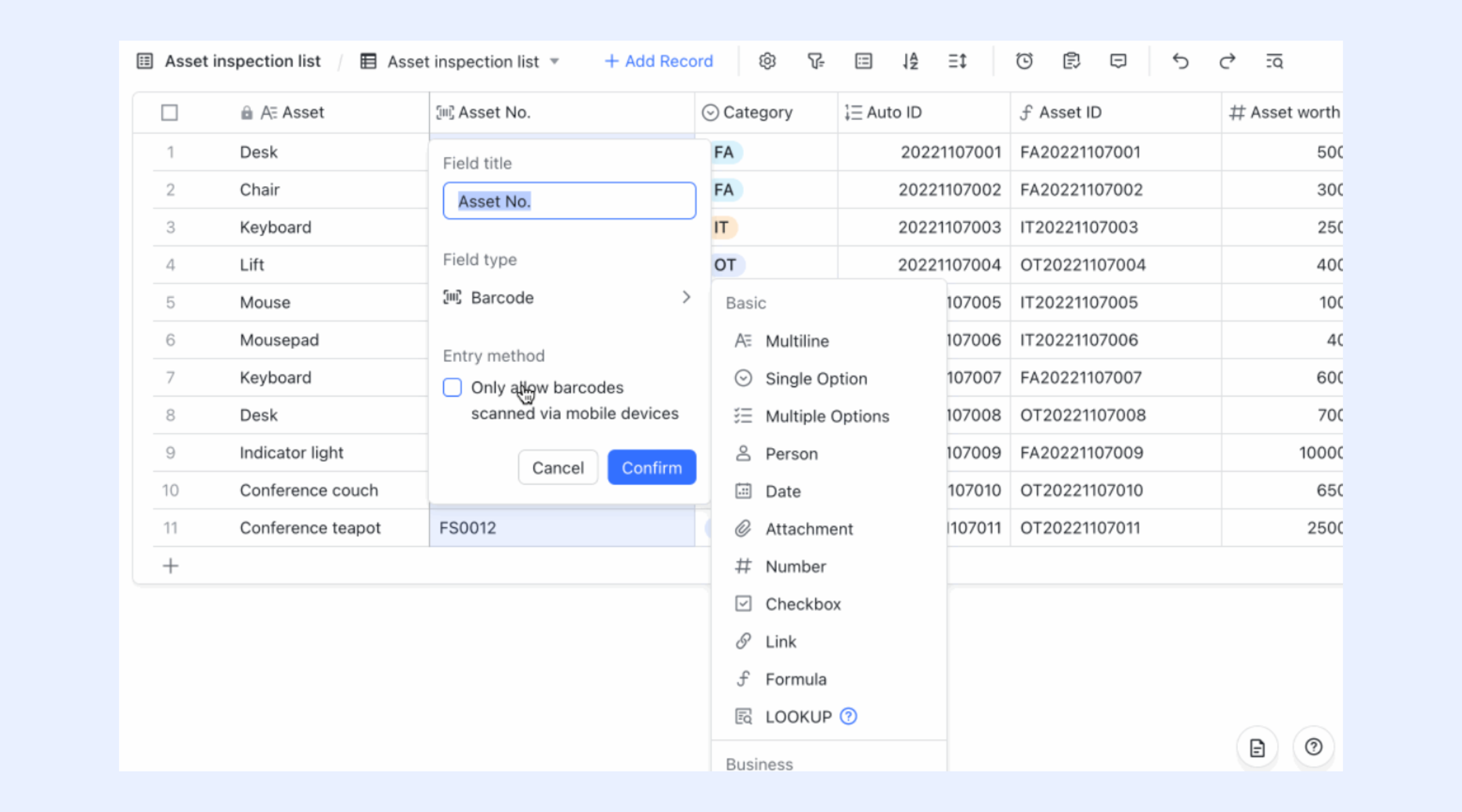
Detailed sales analysis and issue tracing
Lark Base provides dashboard and reporting tools that turn raw transaction data into visual insights. You can track high-velocity items, analyze seasonal sales trends, and calculate your inventory turnover ratio with a few clicks. Because every record in Lark includes an "Edit history," businesses have a complete audit trail for issue tracing, allowing you to see exactly who moved a stock item or updated a price, which is essential for security and accountability. 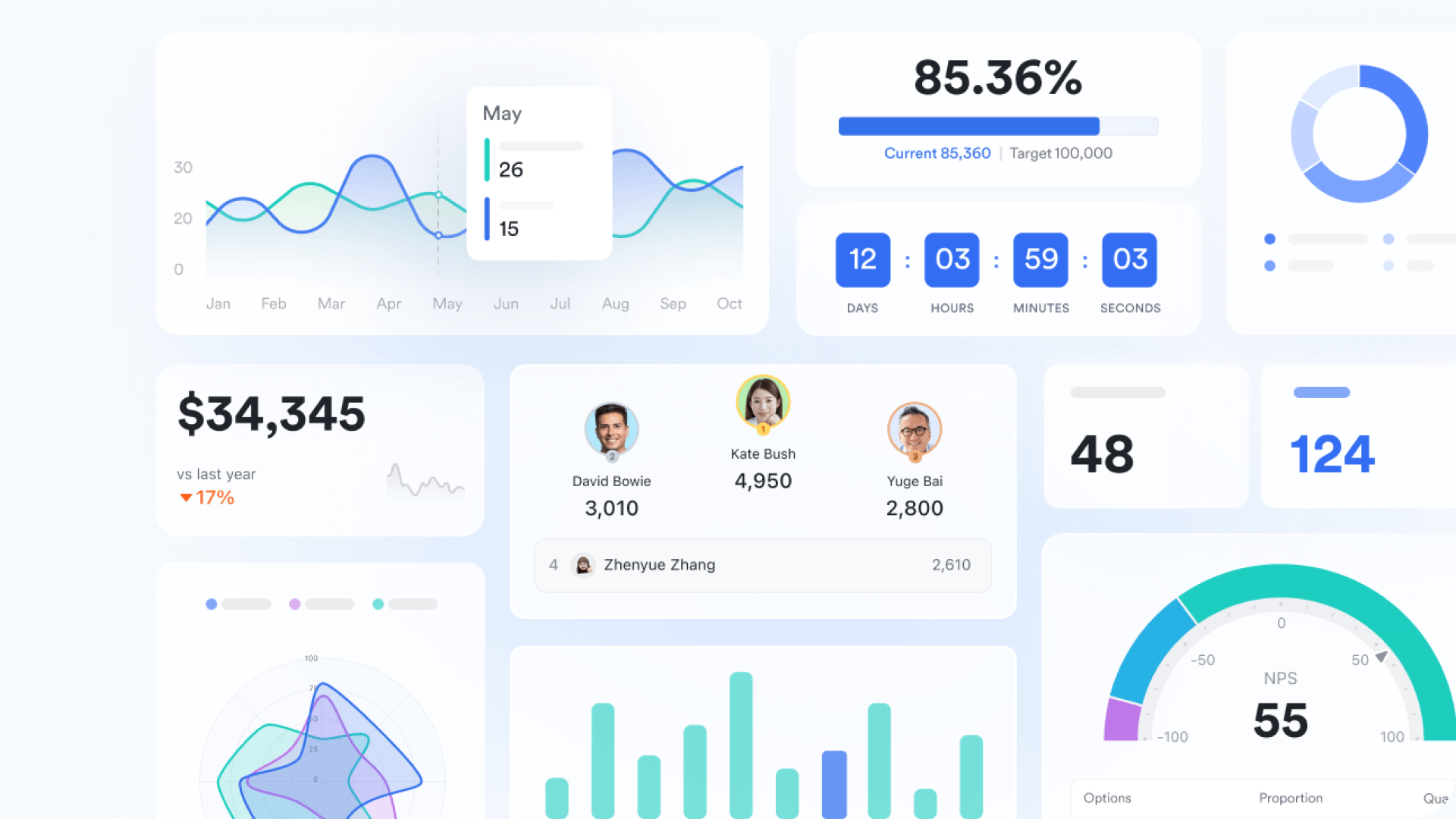
Smart forms for streamlined product submission
Adding new inventory items is simplified through Lark Forms, which are directly connected to your central base. These shareable, mobile-friendly forms allow vendors or warehouse staff to submit new product details, upload images, and input specifications without accessing the main database. Once a form is submitted, the data automatically populates a new record in your inventory table. Here, you can click "Analytics" to toggle the data in the Base dashboard, where you can view collected responses and analytics. 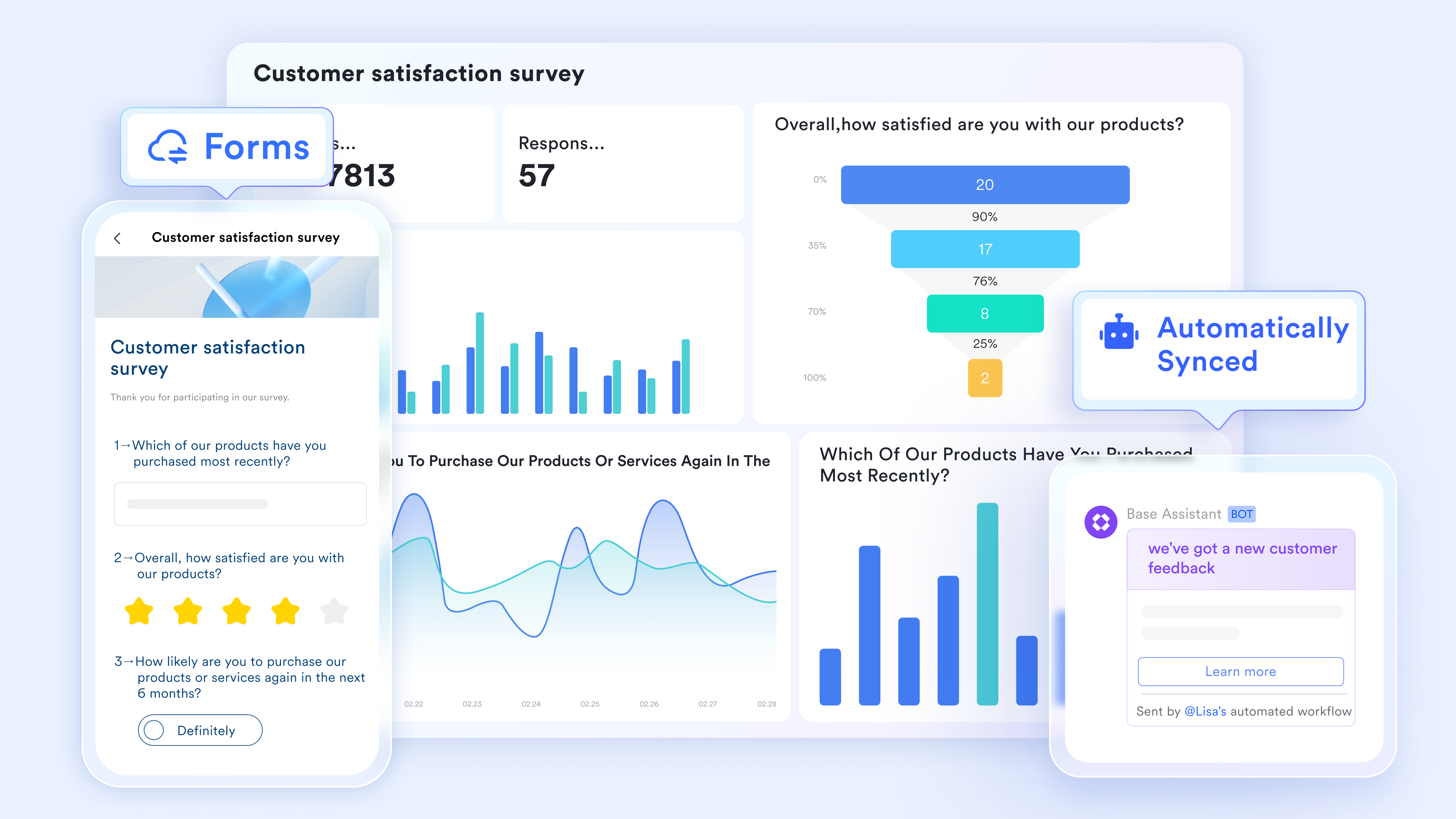
Automated stock calculations and logic
Lark uses workflow automations to handle the heavy lifting of inventory math. By setting up triggers such as "when a new sales record is created," Lark can automatically calculate and deduct the sold quantity from your total inventory balance. This "zero-touch" stock management ensures that your books are always reconciled. You can even build complex logic to manage "Kit" or "Bundle" inventory, where selling one package automatically deducts multiple sub-items from your stock. 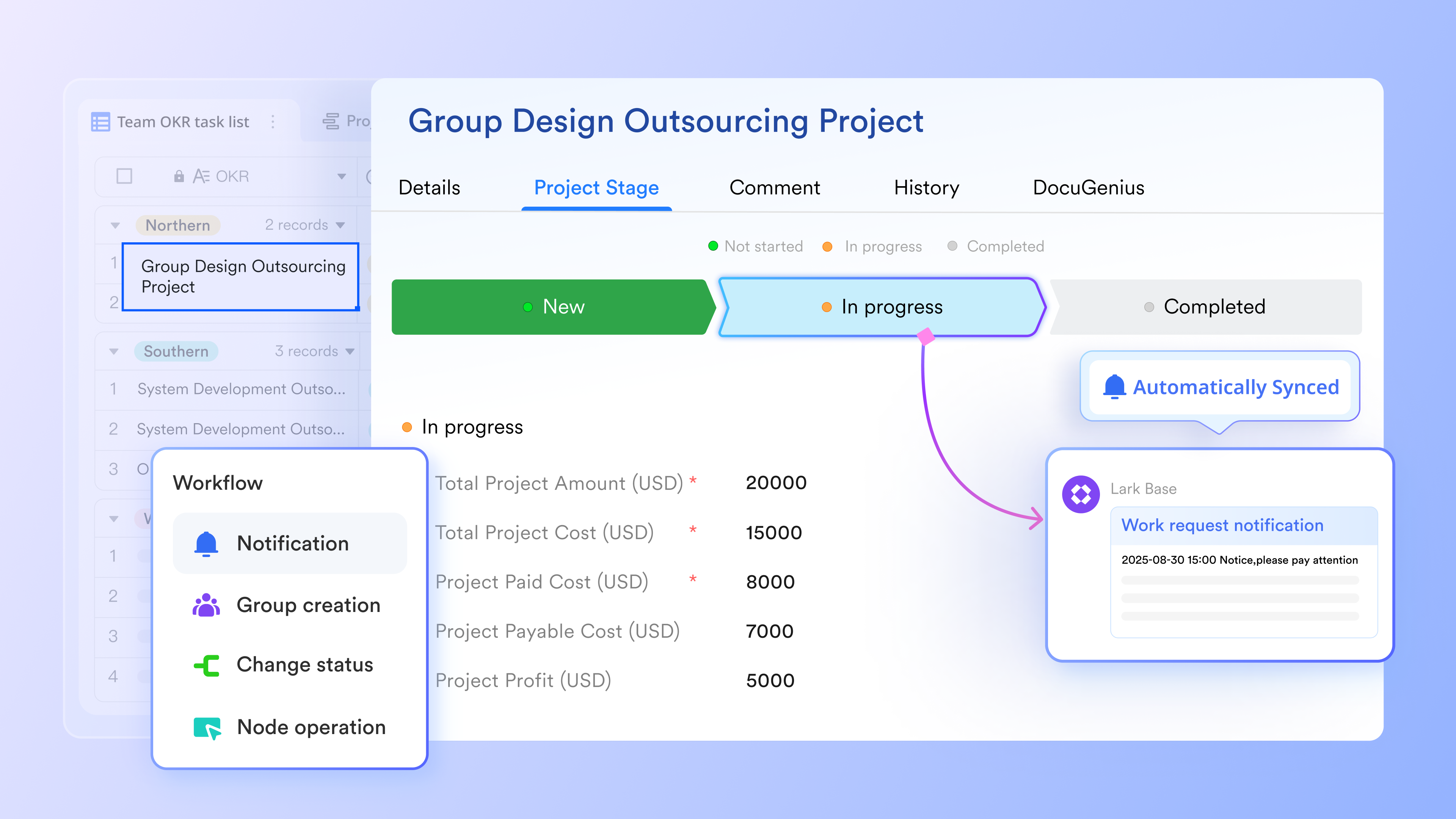
Restock reminders via Lark Messenger
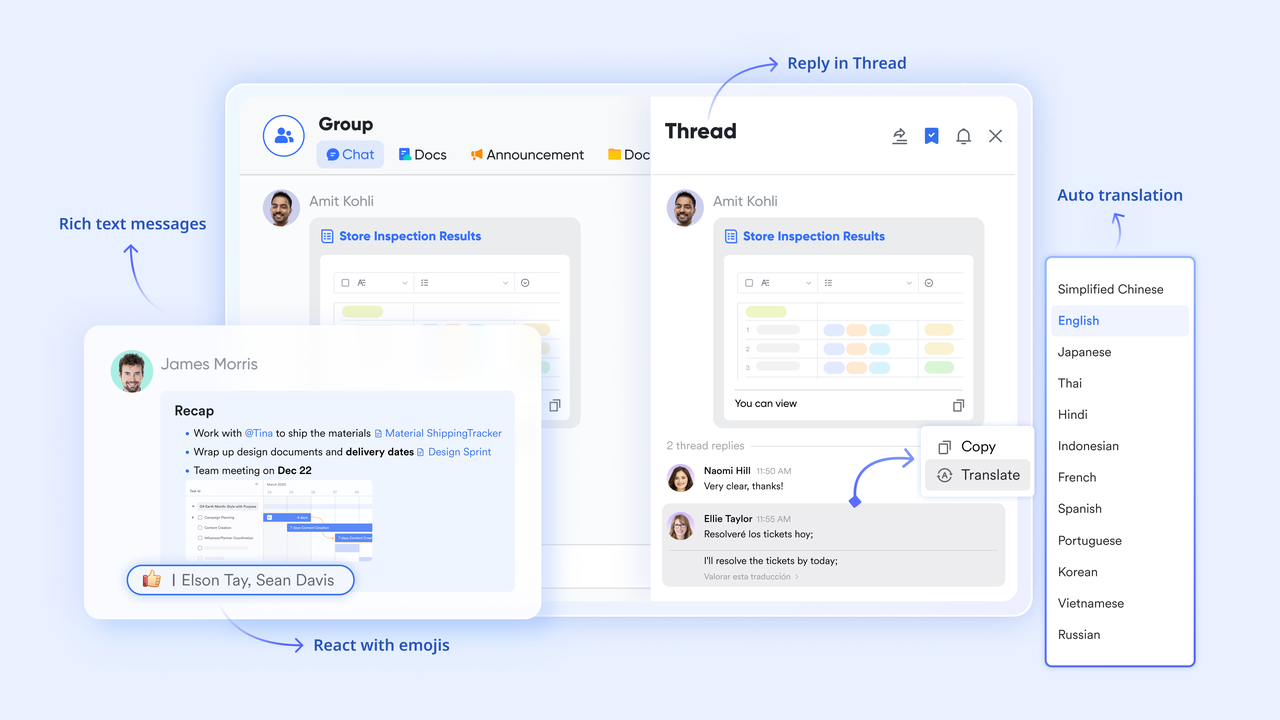
To prevent stockouts, Lark allows you to set up automated alerts that monitor your inventory thresholds. When a product's quantity falls below a predefined "Safety stock" level, Lark sends an instant notification via to the procurement team or manager. These reminders can include buttons to "Approve restock" or link directly to a purchase order, turning a passive alert into an immediate, actionable workflow that keeps your supply chain moving.
:
- Starter plan: Free forever plan that includes 11 powerful tools for up to 20 users. It also comes with 100GB of storage, 1000 automation runs, AI translations, and more.
- Pro plan: $12/user/month (billed annually) for up to 500 users. It includes everything in Stater plus group calling for up to 500 attendees, 15TB of storage, 50,000 automation runs, and more.
- Enterprise plan: for custom pricing. Supports unlimited users and includes even more automation runs and advanced security, compliance, and management features.
For small teams with simple communication needs

18 months message history
1000 Base automation runs/month
2000 rows per table in Base
Most POPULAR
For companies with comprehensive collaboration and management needs
Unlimited message history
500-participant video meetings
50k Base automation runs/month
20k rows per table in Base
For large companies with advanced security and organizational management needs
Get a personalized demo and pricing
Unlimited message history
500-participant video meetings
15 TB storage + 30 GB storage/user
500k Base automation runs/month
50k Base automation runs/month
Most POPULAR
For companies with comprehensive collaboration and management needs
Unlimited message history
500-participant video meetings
50k Base automation runs/month
20k rows per table in Base
Avoiding common mistakes in sales and inventory management
- Relying on manual stock updates: Manual data entry increases the risk of errors and delays. Real-time sync between sales and inventory is essential.
- Ignoring demand forecasting: Not analyzing sales trends leads to overstocking or stockouts. Forecasting helps plan smarter purchasing.
- Poor integration between sales channels: Disconnected online and in-store systems cause inaccurate stock counts and order issues.
- Lack of reorder thresholds: Without automated low-stock alerts, teams reorder too late or too early, impacting cash flow.
- No performance reporting: Without clear metrics like turnover rate and sell-through, decision-making becomes guesswork.
Future trends in sales and inventory systems
In 2026, the sales and inventory management system has evolved far beyond basic record keeping. Businesses now expect their systems to anticipate demand, coordinate across channels, and trigger actions automatically. Inventory tools are increasingly proactive, using data to guide decisions instead of simply reporting past activity. These trends reflect how inventory management is becoming a strategic advantage rather than an operational burden. Organizations that adopt these capabilities gain better control, lower costs, and faster response times. - AI-driven demand forecasting: Modern systems use predictive artificial intelligence to analyze historical sales patterns, seasonality, weather signals, and broader market trends. This enables businesses to anticipate shifts in customer demand before they occur. By adjusting purchase quantities and timing in advance, companies reduce both overstocking and missed sales opportunities. Forecasting also improves by aligning inventory investment with expected demand.
- Hyper-synchronized omnichannel 2.0: In 2026, physical stores and digital channels operate as a single connected inventory environment. Stock sold on one channel is reflected instantly across all others, eliminating discrepancies. Customers see accurate availability whether they shop in-store, online, or through mobile apps. This level of synchronization improves trust, reduces cancellations, and supports flexible fulfillment options like buy-online-pickup-in-store.
- Smart replenishment and automated POs: Smart replenishment systems monitor real-time sales velocity, safety stock thresholds, and supplier lead times continuously. When conditions are met, purchase orders are generated automatically without manual intervention. This just-in-time approach reduces excess warehouse holding costs while protecting availability for high-demand items. Over time, replenishment logic improves as the system learns from historical performance and supplier reliability.
Conclusion
Mastering a sales and inventory management system is no longer optional for businesses that want to scale sustainably. Manual tracking and disconnected tools introduce risk at every stage, from procurement to checkout. Modern systems replace uncertainty with clarity by keeping sales activity and stock data continuously aligned.
As businesses grow more complex, the need for a unified sales inventory management system becomes even more critical. Platforms like demonstrate how inventory workflows, automation, and can exist in one environment without adding friction. By gradually introducing structure and real-time visibility, organizations move from reactive problem-solving to confident, data-driven execution.
Whether you operate a single storefront or manage multi-location operations, investing in the right digital foundation improves margins, customer satisfaction, and operational resilience. The right system does not just track inventory. It empowers teams to act faster, plan better, and grow with confidence.
Build smarter sales and inventory with Lark
FAQs
What are the 4 types of inventory management?
The four primary types are Perpetual, Just-in-time, Economic order quantity, and . Each method helps businesses decide how frequently to track stock and when to reorder. Modern platforms increasingly combine these approaches instead of relying on just one. Tools like Lark support this by allowing teams to apply different inventory logic within the same system.
What is the 80-20 rule in inventory management?
The 80-20 rule suggests that a small portion of inventory generates most of the profit. Identifying these high-impact items helps businesses focus protection and replenishment efforts where they matter most. This approach improves cash flow and reduces operational waste. Systems such as Lark make it easier to surface these patterns through structured sales and inventory data.
How often should stock data sync?
In an omnichannel setup, stock data should sync in real time to avoid overselling and fulfillment errors. Continuous updates ensure that all channels reflect the same availability. High-priority items may still require frequent physical checks for accuracy. Platforms like Lark support real-time visibility while maintaining a clear audit trail for periodic reviews.
What reports matter most for store managers?
Store managers depend on and sell-through rate reports to understand sales efficiency. Stock aging and dead stock reports highlight where capital is getting stuck. Together, these insights guide pricing, promotions, and replenishment decisions. Using tools like Lark helps managers access these reports without manual data consolidation.
Related reading
































