














15+ Best Scheduling Apps: Plan Work and Collaborate Efficiently

Ryan Tanner
Product Marketing Specialist
Sep 18, 2026
Ryan Tanner
Sep 18, 2026


Key takeaways: 5 best scheduling apps
Quick overview: Top 5 scheduling apps compared

What is a scheduling app?
Scheduling apps for different use cases
- Employee scheduling app for shift workers: An essential tool for teams operating on fixed or rotating shifts. Retail, healthcare, manufacturing, and hospitality teams use a worker scheduling app to assign shifts, manage availability, and handle time off requests. Over time, businesses often look for a scheduling app for business that also supports communication and approvals, which is where platforms like Lark gradually become relevant.
- Scheduling app for remote teams: Remote teams depend heavily on clarity around availability and working hours. A scheduling app for business helps distributed teams understand who is available and when collaboration is possible. As coordination needs increase, tools such as Lark help centralize schedules, conversations, and updates in one place.
- Appointment scheduling for service businesses: Service businesses rely on appointment reliability to maintain revenue and customer trust. An online scheduling app allows clients to book time slots without manual coordination. Over time, teams may move beyond standalone appointment tools toward platforms like Lark that connect scheduling with internal workflows.
- Workplace scheduling for managers: Managers require a high-level view of people, time, and capacity. A workplace scheduling app consolidates meetings, shifts, and deadlines into a single system. Many organizations gradually adopt platforms such as Lark when they're free, but basic scheduling apps no longer offer sufficient visibility.
Best scheduling apps reviewed
1. Lark: All-in-one scheduling app for teams and workflows
- Unified platform: Combines scheduling, chat, meetings, and workflows within one system. This reduces tool switching and keeps conversations, decisions, and calendar updates connected in context. Teams spend less time moving between apps.
- Scalable structure: Works as a scheduling app free for small teams getting started, and scales smoothly as organizations grow. Additional users, calendars, and workflows can be added without changing tools or disrupting existing processes.
- Automation support: Reduces repetitive coordination tasks such as reminders, follow-ups, and status updates. Automation helps teams maintain accurate schedules while freeing up time for higher-value work.
- Onboarding time: Advanced features may require onboarding time for new beginners. However, Lark Help Center can provide guides for specific features
- Starter plan: Free forever plan that includes 11 powerful tools for up to 20 users. It also comes with 100GB of storage, 1000 automation runs, AI translations, and more.
- Basic plan: $6/user/month (billed annually) for up to 500 users. It includes everything in Starter plus group calling for up to 500 attendees, 5TB of storage, 1000 automation runs, and more. For more details, please contact sales.
- Pro plan: $12/user/month (billed annually) for up to 500 users. It includes everything in Basic plus group calling for up to 500 attendees, 15TB of storage, 50,000 automation runs, and more.
- Enterprise plan: Contact sales for custom pricing. Supports unlimited users and includes even more automation runs and advanced security, compliance, and management features.
Starter
For small teams with simple communication needs
$0
/ user / month

Pro
For companies with comprehensive collaboration and management needs
$12
/ user / month
Enterprise
For large companies with advanced security and organizational management needs
Get a personalized demo and pricing
Pro
For companies with comprehensive collaboration and management needs
$12
/ user / month
2. When I Work: Employee scheduling app for shift-based teams
- Shift scheduling: Managers assign shifts using a drag-and-drop interface that simplifies weekly and monthly planning.
- Availability tracking: Employees submit and update their availability digitally, keeping schedules accurate.
- Team messaging: Basic communication tools allow managers to notify teams about schedule changes.
- Time tracking: Track hours worked to support payroll alignment.
- Simple interface: Easy for frontline workers to learn and use without training.
- Strong shift focus: Works well as a personnel scheduling app for hourly environments.
- Mobile-friendly: Employees can view schedules and updates on the go.
- Limited workflow flexibility: Not ideal as a workplace scheduling app that connects scheduling with broader processes.
- Fewer integrations: Compared to a more comprehensive scheduling app for business platforms.
- Essentials plan: $2.50/user/month billed annually.
- Advanced plan: $5/user/month billed annually
3. Deputy: Workforce scheduling and labor management app
- Shift planning: Create, adjust, and manage schedules across locations and roles.
- Compliance tools: Automatically apply labor rules and alert managers to potential violations.
- Time tracking: Connects scheduled shifts with actual worked hours.
- Reporting: Provides insights into labor costs, attendance, and scheduling efficiency.
- Compliance strength: Ideal for industries with strict labor laws. It reduces manual checks.
- Scalable design: Supports growing teams and multi-location operations. Planning remains consistent as teams expand.
- Detailed reporting: Improves workforce planning and cost control over time.
- Higher cost: Not positioned as a free scheduling app option for small teams.
- Complex setup: Requires configuration to fully use compliance features.
- Lite plan: $5/user/month billed annually.
- Core plan: $6.50/user/month billed annually.
- Pro plan: $9/user/month billed annually.
4. Calendly: Simple online scheduling app for meetings
- Booking links: Share availability through a public link.
- Calendar sync: Automatically syncs with existing calendars to prevent double booking.
- Automated reminders: Send reminders before meetings to reduce no-shows.
- Team scheduling: Supports round robin scheduling for sales or support teams.
- Ease of use: Minimal setup required for individuals and teams. Users can start quickly.
- Free tier available: Works as a free scheduling app for basic appointment needs.
- Strong integrations: Connects with major calendars and meeting tools.
- Not shift-focused: Limited as an employee scheduling app.
- Workflow gaps: Does not support broader workplace scheduling needs.
- Free plan: $0 with one event type per user.
- Standard plan: $10/user/month billed annually.
- Teams plan: $16/user/month billed annually.
5. Homebase: Free scheduling app for hourly employees
- Shift scheduling: Create and share basic schedules quickly.
- Time clock: Track hours worked directly within the app.
- Team messaging: Communicate shift changes and updates in one place.
- Availability management: Employees update their availability to help managers plan accurately.
- Free core plan: Attractive option among free scheduling apps for small businesses.
- Easy onboarding: Quick setup with minimal configuration required.
- Small business focus: Fits simple operational environments well.
- Limited scalability: Not ideal for larger or more complex teams.
- Basic reporting: Offers fewer insights compared to the advanced scheduling app for business tools.
- Basic plan: Free.
- Essentials plan: $24/location/month billed annually.
- Plus plan: $56/location/month billed annually.
- All-in-one plan: $96/location/month billed annually.
6. Cal.com Customizable and self-hostable scheduling app for businesses
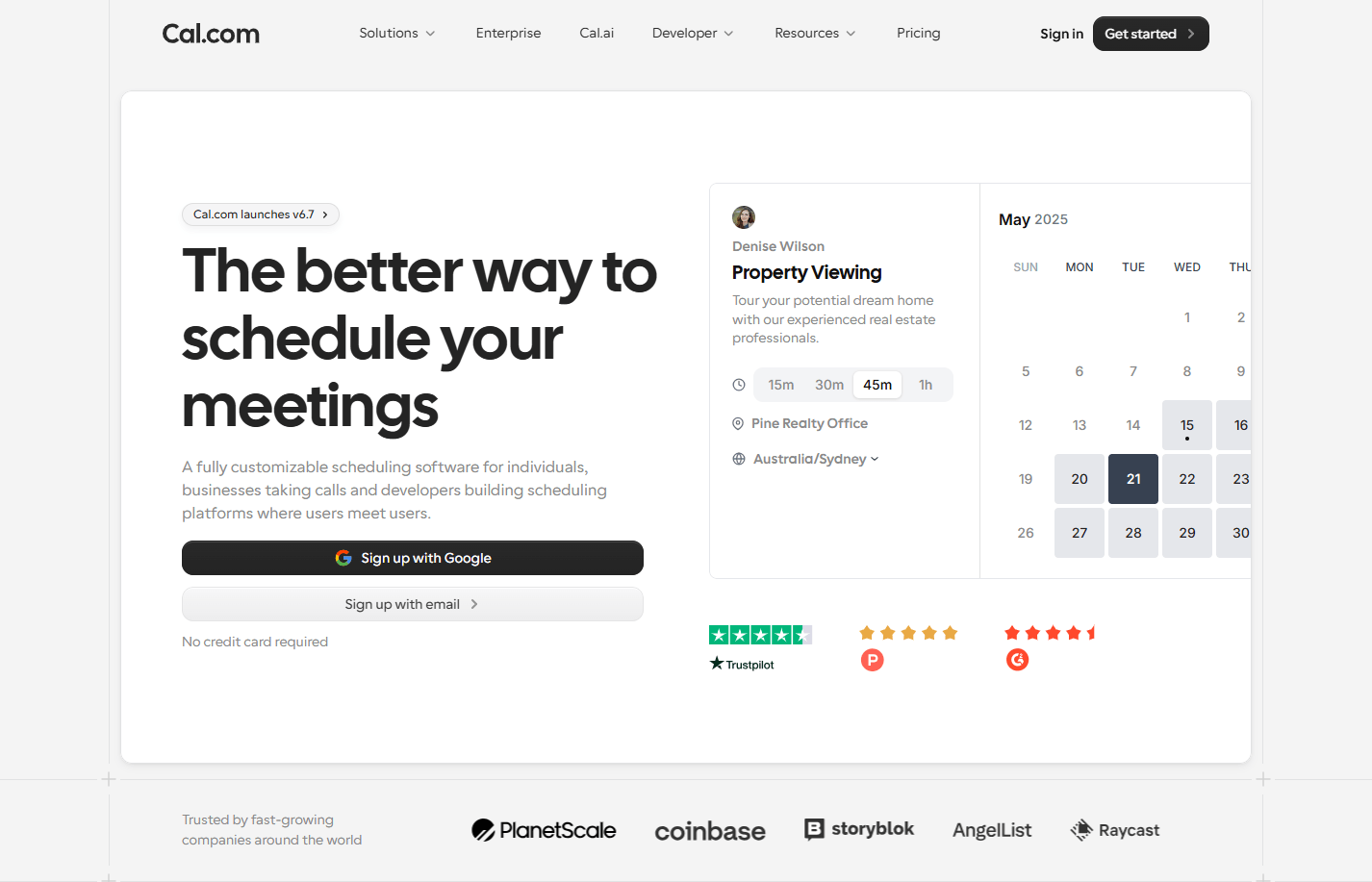
- Customizable booking pages: Cal.com supports complete rebranding and white-labeling of booking pages
- Two-way synchronization: Cal.com offers two-way sync with calendar apps and CRMs, like HubSpot and Salesforce
- Compliance support: Cal.com offers every enterprise-level compliance support, including ISO 27001, GDPR, SOC Type II, SSO, SAML, SCIM, and HIPAA
- Mobile support: Cal.com has a dedicated mobile app as well as browser extension to help users manage their schedule and availability on the move at all times
- Strong free tier: Offers one of the most robust free plans among all scheduling apps
- Self-hosting support: Users can self-host an instance of Cal.com using Cal.diy
- Custom domain and email SMTP server support: This allows users to maintain consistent branding when using Cal.com
- Experience required: Setting up Cal.com optimally requires some experience with scheduling apps
- Too powerful for basic scheduling: If you have limited scheduling requirements, Cal.com is overkill
- Free plan: Free forever for individuals with unlimited meetings and event types
- Teams plan: Pricing starts at $12/user/month, billed annually
- Organizations plan: Pricing starts at $28/user/month, billed annually
- Enterprise plan: Custom quote-based pricing
7. Clockify: Scheduling and time tracking app
- Schedule planning: Managers can assign planned work hours and schedules to individuals or teams.
- Time tracking: Employees track time using timers or manual entries. Tracked hours are linked to scheduled work for better accuracy.
- Calendar view: Displays planned schedules and actual logged time side by side
- Reporting: Generates reports on hours, projects, and users.
- Strong free plan: Works well as a free scheduling app for teams focused on time tracking. Many core features are available without payment.
- Clear workload visibility: Helps teams understand how scheduled work translates into real effort. This improves planning accuracy.
- Flexible usage: Suitable for freelancers, agencies, and service teams with varied schedules.
- Limited shift management: Not ideal for hourly teams as a worker scheduling app.
- Basic scheduling features: Advanced planning requires paid tiers.
- Free plan: $0 with basic time tracking and scheduling.
- Basic plan: $3.99/user/month billed annually.
- Standard plan: $5.49/user/month billed annually.
- Pro plan: $7.99/user/month billed annually.
- Enterprise plan: $11.99/user/month billed annually.
8. Sling: Worker scheduling app for shift management
- Shift scheduling: Managers create and manage shifts with automatic conflict detection.
- Availability management: Employees submit availability and time off digitally.
- Team communication: Built-in messaging keeps schedule-related conversations in one place.
- Labor cost tracking: Estimates labor costs based on scheduled hours.
- Shift-focused design: Built specifically as a worker scheduling app.
- Free core scheduling: One of the more popular free scheduling apps for shift teams.
- Cost awareness: Helps managers control labor expenses before schedules are finalized.
- Limited reporting depth: Advanced analytics are basic.
- Not ideal for enterprises: Scaling beyond mid-sized teams can be challenging.
- Free plan: $0 with basic scheduling.
- Premium plan: $1.70/user/month billed annually.
- Business plan: $3.40/user/month billed annually.
9. ZoomShift: Work schedule app for hourly teams
- Shift scheduling: Managers publish schedules quickly and push updates to employees instantly.
- Shift swaps: Employees request shift swaps directly in the app.
- Time off management: Centralizes time off requests and approvals.
- Notifications: Sends alerts for schedule updates, reminders, and approvals.
- Easy adoption: A simple interface lets hourly workers start using it immediately.
- Improved flexibility: Shift swap features reduce last-minute scheduling stress.
- Affordable pricing: Accessible option for small teams that need a reliable work schedule app.
- Limited integrations: Works best as a standalone tool.
- Basic analytics: Reporting features are simple.
- Essentials plan: Free up to 20 users
- Starter plan: $2/user/month billed annually.
- Premium plan: $4/user/month billed annually.
- Enterprise plan: Custom pricing.
10. Connecteam: Employee scheduling and operations app
- Employee scheduling: Create shifts and assign roles with real-time visibility.
- Task management: Connects schedules with daily tasks and checklists.
- In-app communication: Messaging and announcements stay tied to work context.
- Time tracking: Tracks attendance and work hours alongside schedules.
- All-in-one approach: Combines scheduling, communication, and tasks in one platform.
- Frontline friendly: Mobile-first design works well for deskless teams.
- Operational alignment: Scheduling is connected directly to daily work activities.
- Feature-rich interface: Can feel complex for small teams.
- Paid scaling: Costs increase as teams grow.
- Free plan: Up to 10 users.
- Basic plan: $29/month for up to 30 users.
- Advanced plan: $49/month for up to 30 users.
- Expert plan: $99/month for up to 30 users.
11. Shiftboard: Enterprise workforce scheduling platform
- Advanced shift planning: Manages complex rotations, roles, and coverage rules.
- Demand forecasting: Uses historical data to predict staffing needs.
- Compliance management: Applies labor rules automatically to prevent violations.
- Analytics: Provides insights into staffing efficiency and workforce performance.
- Enterprise scalability: Designed to handle thousands of employees across locations.
- Forecast-driven planning: Helps organizations align staffing with real demand.
- Strong compliance support: Ideal for regulated industries with strict labor rules.
- High cost: Not suitable as a free scheduling app.
- Long setup time: Requires implementation support.
- Enterprise pricing: Custom quote based on workforce size and needs.
12. ScheduleAnywhere: Staff scheduling software for businesses
- Staff scheduling: Assign shifts based on employee availability and qualifications.
- Coverage monitoring: Highlights understaffed or overstaffed periods.
- Employee self-service: Staff view schedules and submit requests online.
- Reporting: Tracks staffing patterns and availability trends over time.
- Coverage reliability: Helps ensure the right number of staff are scheduled at all times.
- Industry suitability: Well-suited for healthcare and service environments.
- Clear scheduling views: Simple layouts make schedules easy to understand.
- Limited integrations: Works best independently.
- Dated interface: User experience feels basic.
- Paid plans: Custom pricing based on users and features.
13. Humanity: Cloud-based employee scheduling app
- Shift scheduling: Automates schedule creation based on availability and rules.
- Labor forecasting: Predicts staffing needs using demand data.
- Time clock integration: Connects schedules with actual clock-in and clock-out data.
- Reporting: Analyzes labor efficiency and scheduling trends.
- Automation support: Reduces time spent building and adjusting schedules.
- Compliance awareness: Helps enforce labor regulations automatically.
- Scalable platform: Suitable for growing teams with increasing complexity.
- Paid-only model: No scheduling app free tier.
- Learning curve: Advanced features take time to master.
- Essentials plan: $2.75/user/month billed annually.
- Professional plan: $3.75/user/month billed annually.
- Enterprise plan: Custom pricing
14. SimplyBook.me: Online appointment scheduling app
- Online booking page: Clients book appointments without manual coordination.
- Availability rules: Set buffers, limits, and service durations.
- Payment integration: Accept payments at the time of booking.
- Notifications: Sends confirmations and reminders automatically.
- Client-focused design: Improves booking experience and convenience.
- Customizable setup: Adapts to different service-based businesses.
- Free entry point: Works as a free scheduling app for basic appointment needs.
- Not workforce-focused: Limited as an employee scheduling app.
- Feature gating: Advanced tools require paid plans.
- Free plan: Basic booking features.
- Basic plan: $9.90/month billed annually.
- Standard plan: $29.90/month billed annually.
- Premium plan: $59.90/month billed annually.
15. Setmore: Free scheduling app for service businesses
- Appointment booking: Enables clients to book services online at any time.
- Calendar sync: Syncs appointments with personal calendars.
- Staff assignment: Assigns bookings to specific team members.
- Email reminders: Send reminders to reduce no-shows.
- Quick setup: Teams can start using it almost immediately.
- Simple experience: Easy for both staff and clients to navigate.
- Limited customization: Advanced controls are basic.
- Not shift-oriented: Not a worker scheduling app.
- Free plan: $0 up to 4 users
- Pro plan: $5/user/month billed annually.
16. Google Calendar: Basic calendar app for scheduling
- Shared calendars: Teams share availability and events easily.
- Event reminders: Automatic notifications help prevent missed meetings.
- Calendar sync: Works across devices and platforms.
- Meeting links: Integrates with Google Meet for virtual meetings.
- Free and accessible: Common starting point as a free scheduling app.
- Familiar interface: Most users require no training.
- Strong ecosystem: Integrates seamlessly with Google Workspace tools.
- No shift management: Not suitable as an employee scheduling app.
- Limited controls: Lacks approval and workflow features.
- Free plan: $0 for personal use.
- Google Workspace plans: Starting at $6/user/month, billed annually.
17. YouCanBookMe: Online scheduling tool for small businesses
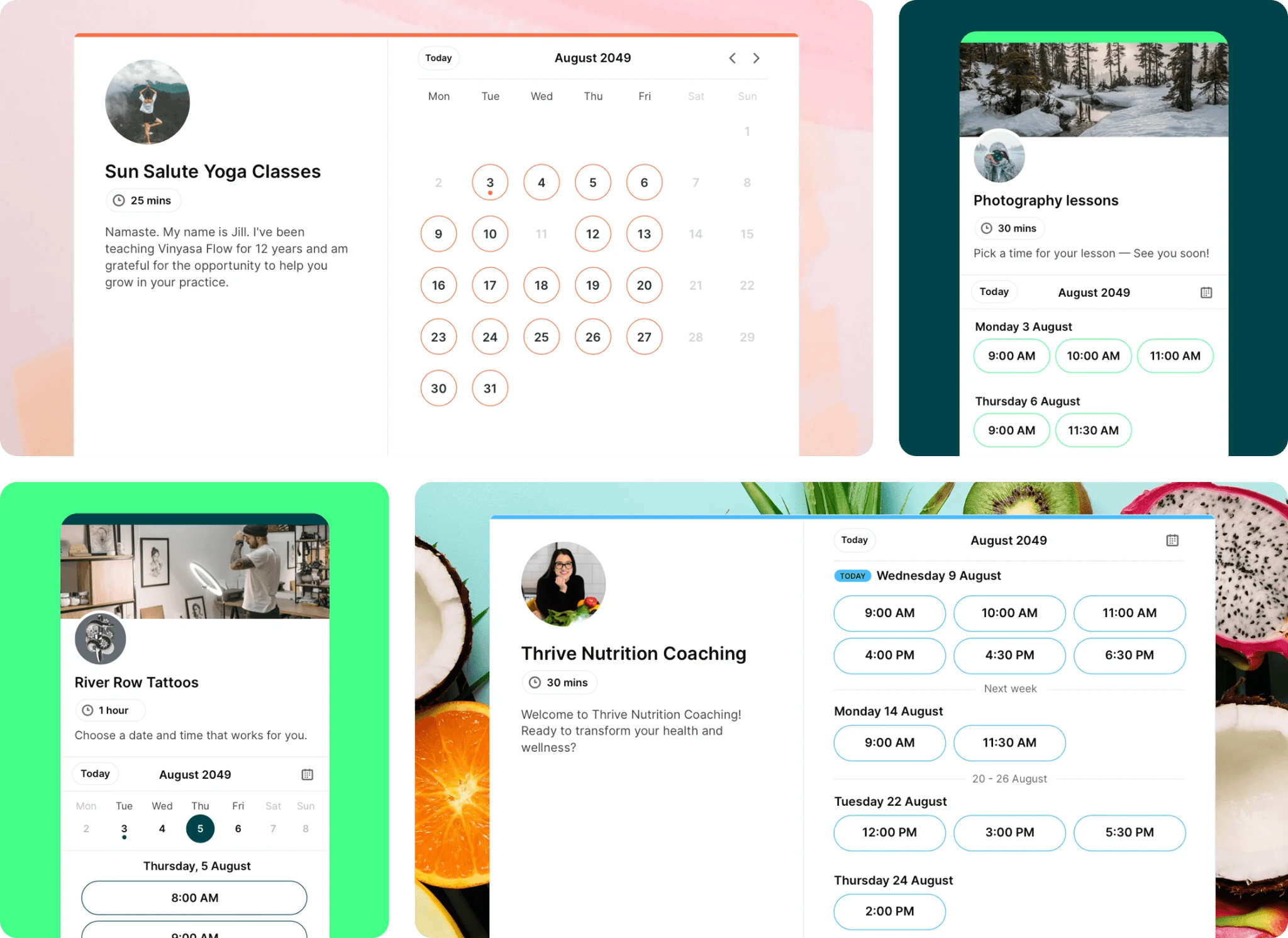
- Advanced availability controls: Manage your availability with buffer periods, booking limits, notice requirements, and request-only appointments.
- Video meeting integrations: Automatically generate and attach Zoom, Google Meet, or Microsoft Teams links to each booking, removing the need for manual setup.
- Automated notifications and workflows: Send personalized confirmations, reminders, and follow-up messages by email or SMS as part of your booking workflow.
- Strong branding control: Booking pages can be fully styled to match a business's identity.
- Built-in payments: Native Stripe support means you can take payments right at booking.
- Multi-calendar conflict checking: Syncs up to 10 calendars at once, so double-bookings don't slip through.
- Payments: No PayPal integration.
- Capacity: Group meetings capped at 50 participants.
- Free plan: 1 calendar connection, 1 booking page.
- Individual plan: $8.10/month billed annually.
- Professional plan: $11.70/month billed annually.
- Teams plan: $16.20/member/month billed annually.
How to choose the right scheduling app for your business
- Team size and scheduling complexity: Small teams often start with a free scheduling app to manage basic availability and meetings. As teams grow, scheduling becomes more complex with overlapping shifts, multiple roles, and approvals. A scalable employee scheduling app helps manage this complexity without breaking existing workflows.
- Industry requirements: Different industries have different scheduling demands. Retail and hospitality rely heavily on a worker scheduling app for shift coverage, while service businesses benefit more from an online scheduling app for appointments. Regulated industries may require a personnel scheduling app that supports compliance and audit trails.
- Ease of adoption: A scheduling app is only effective if teams actually use it. Tools with simple interfaces and mobile access are easier for frontline employees to adopt. A work schedule app that fits naturally into daily routines reduces training time and resistance to change.
- Budget considerations: Cost should be evaluated alongside time saved and errors avoided. Free scheduling apps can meet early needs, but growing teams often benefit from paid project management tools that reduce manual effort. Choosing a scheduling app for business with flexible pricing helps balance budget constraints with long-term value.
Common scheduling challenges businesses face
- Shift conflicts and last-minute changes: Manual planning often results in overlapping shifts or uncovered hours. When last-minute changes occur, updates are shared through messages that are easy to miss. Employees see updates in real time, which improves reliability.
- Poor visibility across teams: Without a centralized scheduling app for business, teams operate in silos. Managers cannot easily see workloads across departments or locations. This leads to some employees being overworked while others remain underutilized. A workplace scheduling app provides shared visibility, so planning decisions are based on real data.
- Manual scheduling errors: Spreadsheets, emails, and chat messages increase the chance of mistakes. Double bookings, missed shifts, and incorrect availability are common. An employee scheduling app enforces rules and standardizes inputs. This reduces human error and improves trust in the schedule.
- Time-consuming approvals: Approvals handled through chat or email slow down operations and create bottlenecks. Managers struggle to track what is pending and what is approved. A workplace scheduling app streamlines approvals by keeping requests and decisions in one place. This shortens response times and improves accountability.
Conclusion
FAQs
What is the best free scheduling app?
What is the most commonly used scheduling system?
Do scheduling apps support last-minute shift changes?
Can scheduling apps work across time zones?
Related reading

Start using Lark today

Manage all your work in one place
Boost team efficiency by 10x
Save up to 70% on software costs
Start using Lark today
Manage all your work in one place
Boost team efficiency by 10x
Save up to 70% on software costs
Keep reading







2026 Lark Technologies Pte. Ltd.
Headquartered in Singapore with offices worldwide.





