Slack has become one of the most widely adopted team communication tools in the workplace, making a Slack review especially relevant today. Many organizations initially turned to Slack to replace long email threads with real-time messaging and faster collaboration. As the platform has evolved, it has expanded beyond chat to include automation, integrations, and AI features. This shift means Slack review discussions now focus not only on messaging, but also on long-term cost, scalability, and productivity impact.
For small teams, Slack often feels simple and effective to use. As organizations scale, factors such as pricing, notification overload, and tool sprawl begin to influence daily experience. This Slack review examines Slack's core features, pricing structure, advantages, and limitations. It also explores why some teams eventually compare Slack with connected collaboration platforms like Lark.
What is Slack?
Slack is a platform designed around channels, direct messaging, and searchable conversations. In any review of Slack, its strength as a messaging hub is immediately clear. Teams use Slack to reduce internal email and centralize discussions across departments. Over time, Slack has evolved into a notification layer for many workplace tools. This role shapes how teams experience productivity inside Slack.
In a Slack app review, Slack is often described as the front door to other systems rather than a system of execution itself. Messages flow quickly, but work typically continues elsewhere. This design works well for . As workflows mature, some teams reassess whether messaging alone is sufficient.
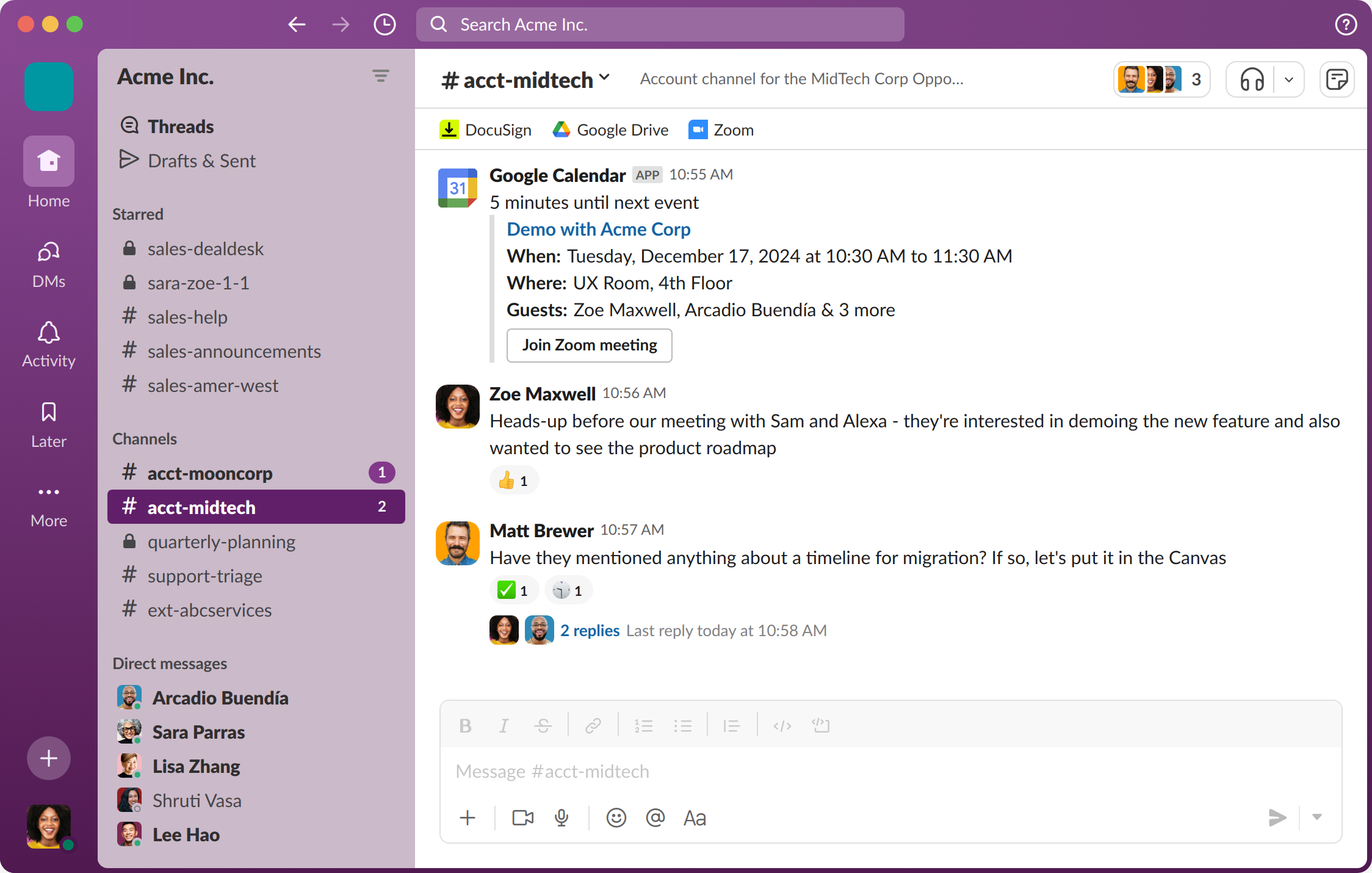
Image source: slack.com
Core features of Slack
Slack's core features are built around making team communication fast, searchable, and highly connected to other tools. The platform prioritizes real-time and asynchronous messaging as the primary way work moves forward. Most features are designed to reduce email usage and centralize conversations in one place. As teams grow, these features shape how information is shared, discovered, and acted on across the organization.
- Channels, threads, and direct messaging: Channels organize conversations around topics, projects, or teams, helping reduce reliance on email. Threads keep replies grouped, so discussions stay readable. Direct messaging supports quick private conversations between individuals or small groups. As channel counts grow, conversations can still become fragmented.
- File sharing and searchable message history: allows teams to upload documents directly into conversations for quick reference. Slack's search helps locate past messages, files, and links efficiently. This supports short-term knowledge recall and follow-ups. Over time, large message volumes can reduce clarity and context.
- Voice huddles and video calls: Voice huddles enable spontaneous audio conversations without scheduling meetings. Video calls support lightweight face-to-face discussions inside channels or direct messages. These features work well for informal communication. Structured meetings and detailed records usually require external platforms.
- Workflow automation and app integrations: Slack connects with thousands of third-party apps and supports basic . Workflows can send reminders, collect information, or route notifications. Most execution still happens in connected tools rather than Slack itself. Automation mainly enhances visibility instead of driving processes.
- Slack AI capabilities overview: In this Slack AI review, AI features focus on summarizing conversations and helping users catch up. AI improves message visibility. It does not convert discussions into structured tasks. Execution remains manual.
Slack pricing explained: What you get in each tier
Slack pricing is based on per-user subscriptions with increasing feature access. This section is often central to any Slack enterprise grid review.
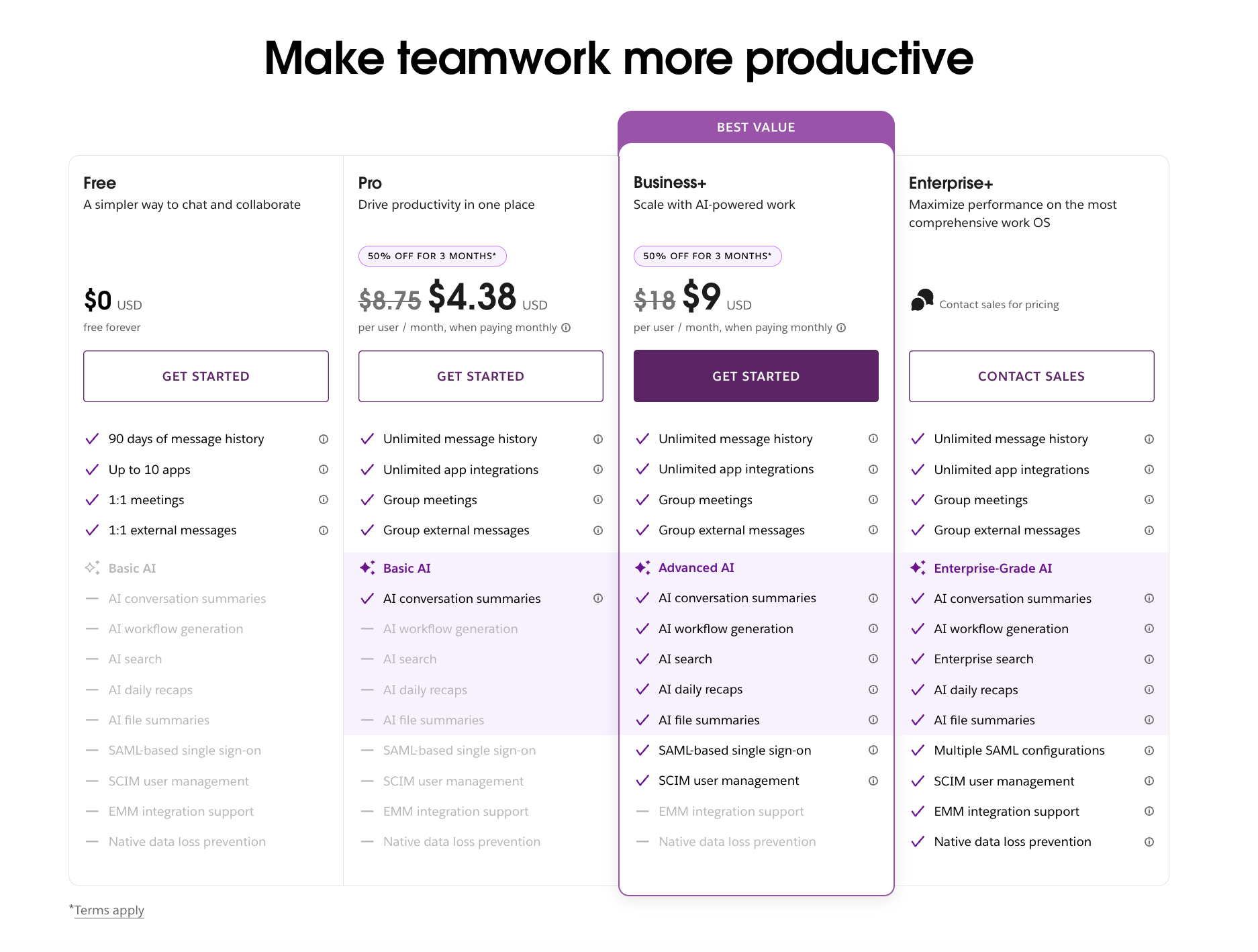
Image source: slack.com
Update time: 2025-12-22
Note: Pricing and plan details reflect publicly available data as of the update date and may vary based on region, billing cycle, and number of agents.
Hidden costs and scalability challenges
Slack's listed pricing often captures only the base subscription cost, not the full operational impact. As teams add integrations, workflows, and users, indirect expenses begin to surface. Managing multiple tools and subscriptions increases both financial and administrative overhead. These hidden costs become more visible as organizations scale and rely on Slack for daily coordination.
- Add-on and integration costs: Add-on and integration costs increase as teams connect Slack with other tools. Many essential workflows require paid third-party services. Subscription fees accumulate quietly over time. Slack becomes a connector rather than a complete solution.
- Enterprise Grid minimum seat requirements: In a Slack enterprise grid review, minimum seat requirements create fixed commitments for large organizations. Teams must pay for a baseline number of users regardless of active usage. This reduces pricing flexibility during growth or contraction. Scaling becomes more expensive than expected.
- Productivity loss from tool fragmentation: from tool fragmentation occurs when work spans multiple connected platforms. Context switching slows execution and increases cognitive load. Teams chase updates across tools. Manual coordination becomes a regular task.
Advantages of Slack
Slack remains popular because it delivers communication benefits that are easy to understand and quick to experience. Teams often adopt Slack to reduce internal email, speed up conversations, and create a more open communication culture. Its design emphasizes immediacy and accessibility, which helps teams feel connected even as they grow. These advantages have made Slack a default choice across startups, enterprises, and distributed teams. However, these strengths are primarily centered on communication rather than execution.
- Easy onboarding and familiar chat-based interface: Slack feels intuitive for most users from the first login because it mirrors consumer chat tools people already use. The interface requires very little formal training, which helps teams adopt it quickly. New hires can participate in conversations almost immediately. This lowers friction during rollout and shortens onboarding time.
- Massive integration ecosystem: Slack integrates with nearly every major workplace tool, including project management, development, and . Teams can centralize alerts, updates, and notifications in one place. This flexibility allows Slack to fit into many different workflows. As usage grows, managing integration becomes an ongoing responsibility.
- Strong async communication support: Channels and threads enable teams to collaborate without needing to be online at the same time. This is especially valuable for global and remote teams working across time zones. Messages remain visible and searchable, preserving context over time. The structure reduces pressure for immediate responses while keeping discussions accessible.
Limitations of Slack
As teams grow and rely on Slack for more than casual communication, its limitations become harder to ignore. What works well for small groups can introduce friction at scale, especially when conversations turn into ongoing workflows. Productivity issues often emerge alongside rising costs and tool sprawl. These challenges influence how effectively Slack supports and execution.
- Notification overload and context switching: Notification overload and context switching occur as channel counts and message volume increase. High activity creates frequent interruptions throughout the day. Important updates are easily buried under routine chatter. Users spend time managing alerts instead of focusing on meaningful work.
- Limited native productivity tools: Limited native mean Slack prioritizes conversation over execution. Tasks, documents, and approvals typically live in separate applications. Context breaks as teams move between tools to get work done. Manual follow-ups become necessary to maintain momentum.
- Rising costs as teams scale: Rising costs as teams scale become noticeable as Slack pricing increases per user. Advanced features and compliance tools require higher-tier plans. Costs grow in proportion to headcount rather than usage depth. Over time, the perceived value may decline for budget-conscious teams.
Focus on your work and boost your productivity easily
What real users like and dislike about Slack
User feedback across review platforms reveals consistent patterns in how Slack performs in real environments. Praise often centers on communication speed and familiarity, while criticism focuses on cost and noise. These insights help explain why Slack remains popular but is increasingly questioned. Long-term sentiment shows how user expectations evolve as teams scale.
- Common praise from G2, Capterra, and Reddit reviews: Common praise from G2, Capterra, and Reddit reviews highlights Slack's speed and reliability. Users value its extensive integration. The interface feels intuitive and familiar. Adoption remains strong across industries.
- Frequent complaints around pricing and noise: Frequent complaints around pricing and noise reflect user frustration with rising costs. Notification overload is commonly cited. Channel sprawl makes conversations harder to manage. Maintaining focus becomes challenging.
- Long-term user sentiment trends: Long-term user sentiment trends show many teams continue using Slack for messaging. Others reassess as workflows become more complex. Tool consolidation becomes more attractive. Alternatives receive increasing attention.
Afterthought
As collaboration matures, teams begin to expect more than fast messaging from their tools. While chat remains important, work increasingly requires clear ownership, follow-through, and visibility into progress. Messaging alone often leaves decisions and action items scattered across conversations. This is where many teams start looking beyond Slack.
Reduce collaboration tool sprawl from today
Trending option: Why do teams choose Lark instead of Slack
takes a more connected approach by combining , meetings, scheduling, and into an all-in-one workspace. Conversations link directly to documents and tasks. Work progresses without switching tools. By unifying these silos, the platform ensures that every meeting has a clear agenda, every chat has actionable outcomes, and every project remains organized in one place.
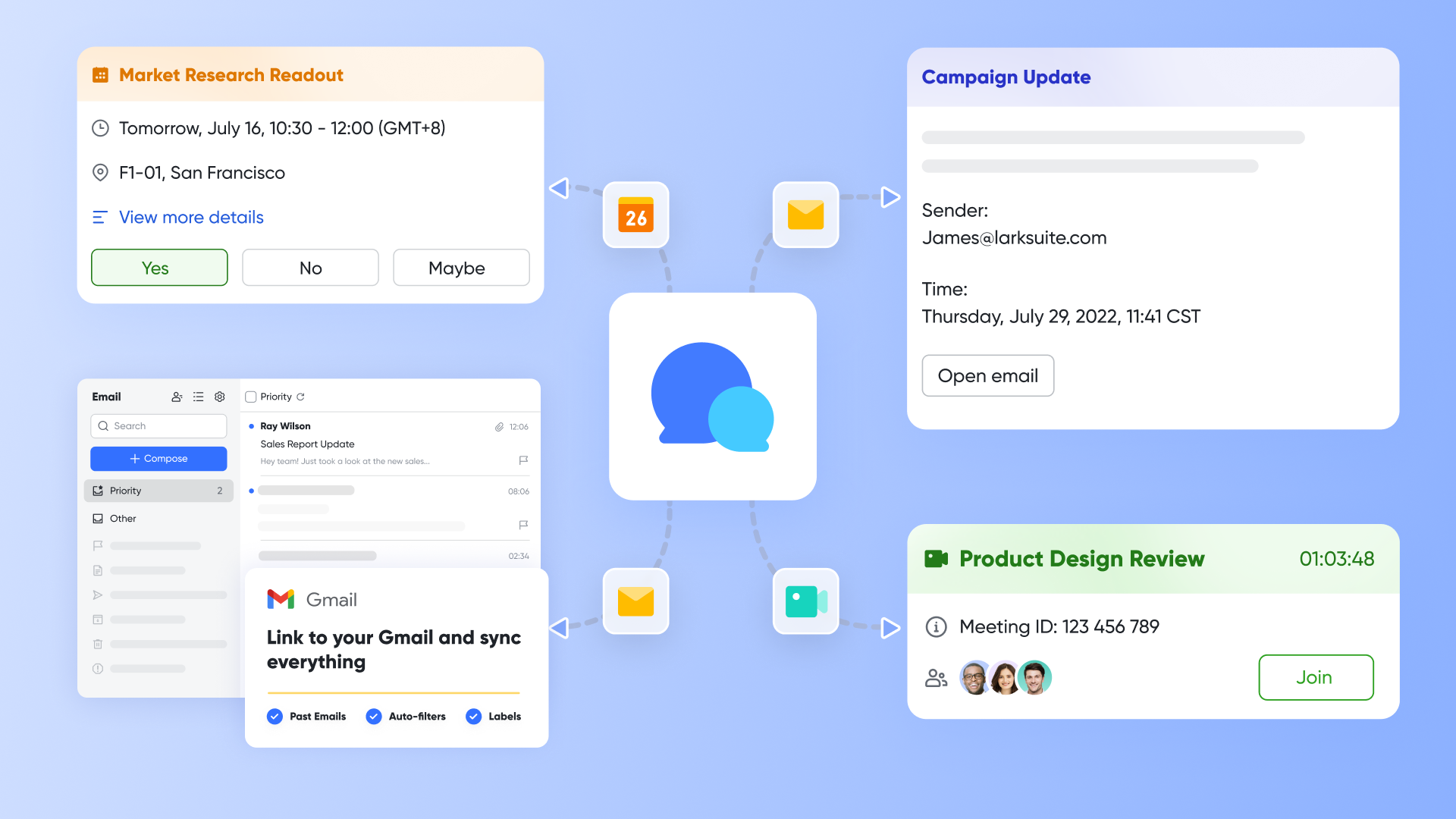
Lark Messenger that stays connected to real work
As a communication hub, helps your daily chatting with multiple functions. It features threaded replies and pinned messages to keep project discussions organized, while reading receipts and the "Buzz" tool ensure accountability for urgent updates. With the ability to translate messages in real-time and share documents with automatic permission syncing, it removes barriers to collaboration. Lark Messenger goes beyond chat by keeping conversations tied directly to execution. Messages can be turned into a task or converted into a document, instead of existing as isolated threads. Teams do not need to copy context into other tools to move work forward. Discussions remain actionable and traceable as they evolve. This helps teams avoid the communication gaps that often appear as collaboration scales.
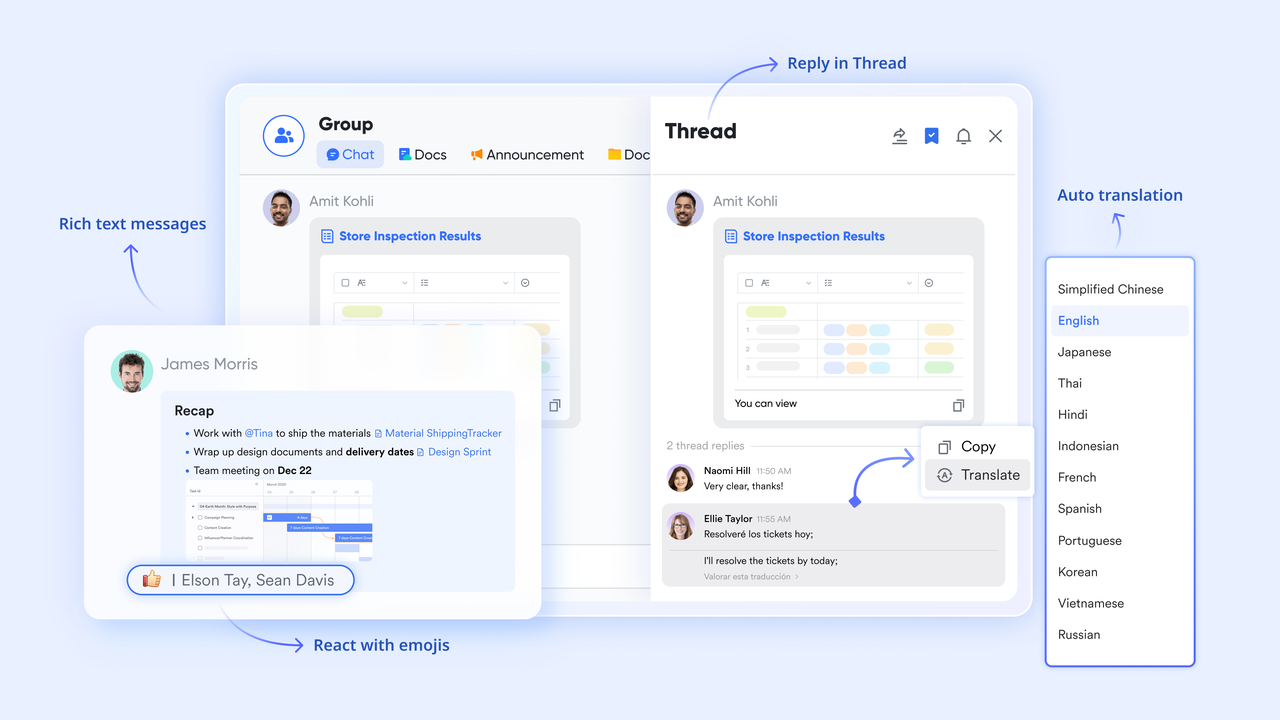
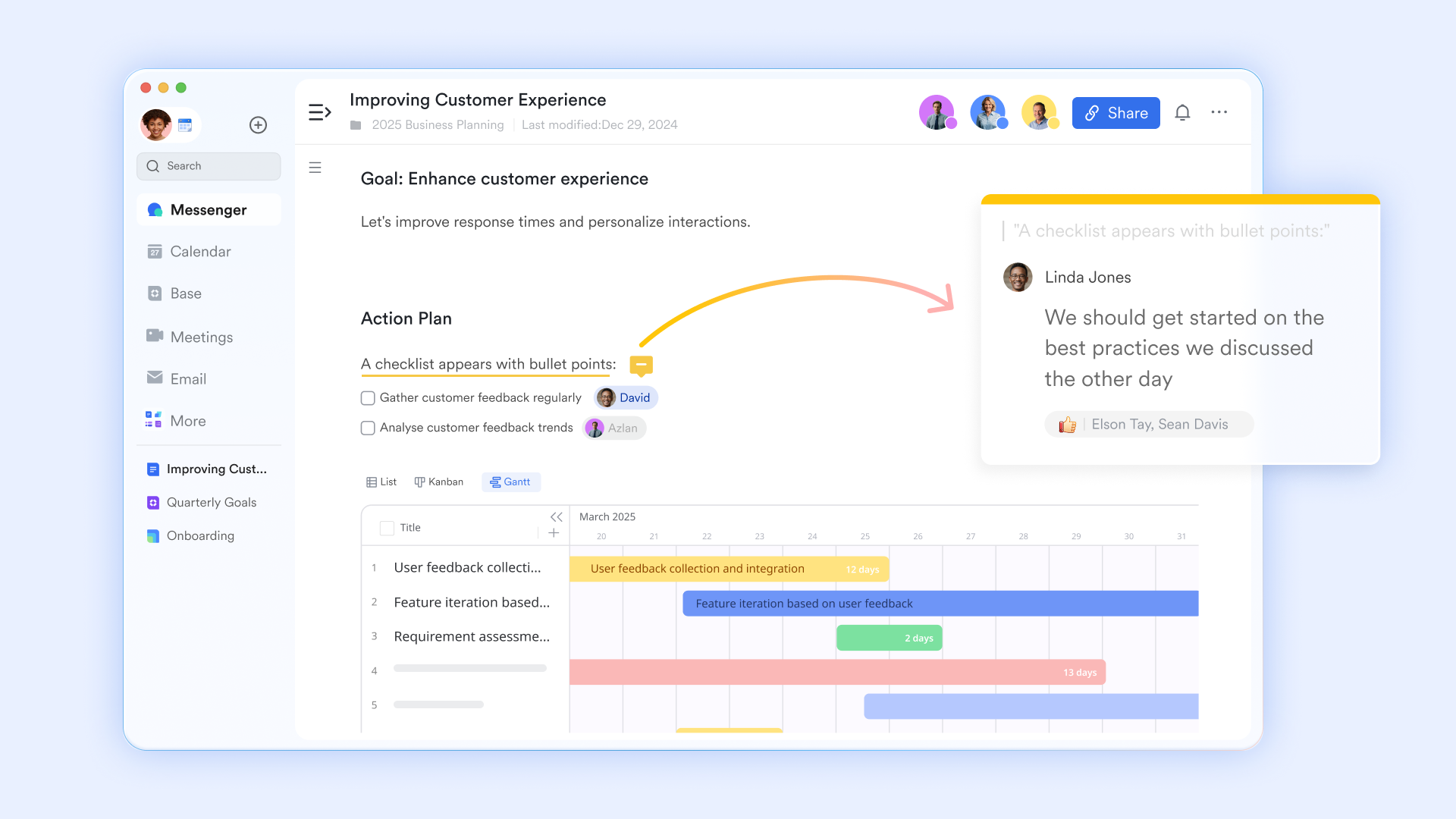
Lark Docs that turn conversations into shared context
As an online , allows your team to co-edit and embed diverse content like videos, task lists, and mind maps into a single, cloud-synced document. It facilitates real-time collaboration through multi-user editing, @mentions, and contextual comments, which keep team discussions organized and actionable. Also, "Suggesting mode" allows you to propose revisions that remain as "pending" highlights until they are approved, and "Edit history" keeps track of all edits and lets you retrieve original versions without fuzz.
Also, Lark Docs works closely with Lark Messenger and Lark Meetings to capture decisions as they happen. Teams can share the document right into group chats, discuss the plan, and start a meeting where all participants can co-edit the document via . In these ways, documents remain connected to ongoing discussions rather than becoming static files. This helps teams align faster and reduce duplicate documentation.
Lark Meetings with built-in notes and searchable transcripts
As the main online conference hub, provides real-time subtitles and live translation for over 100 languages, ensuring that every participant can speak their native tongue while others follow along instantly. During meetings, you can use tools like in-call polls for rapid decision-making, emoji reactions for non-intrusive feedback, and a virtual whiteboard for .
On the other hand, and transform meetings from temporary events into actionable assets. While AI notes provide immediate, structured summaries and to-do lists to keep projects moving, Lark Minutes offers a searchable, interactive transcript for deep-dive reviews. Together, they enable "asynchronous collaboration," where team members can catch up quickly.

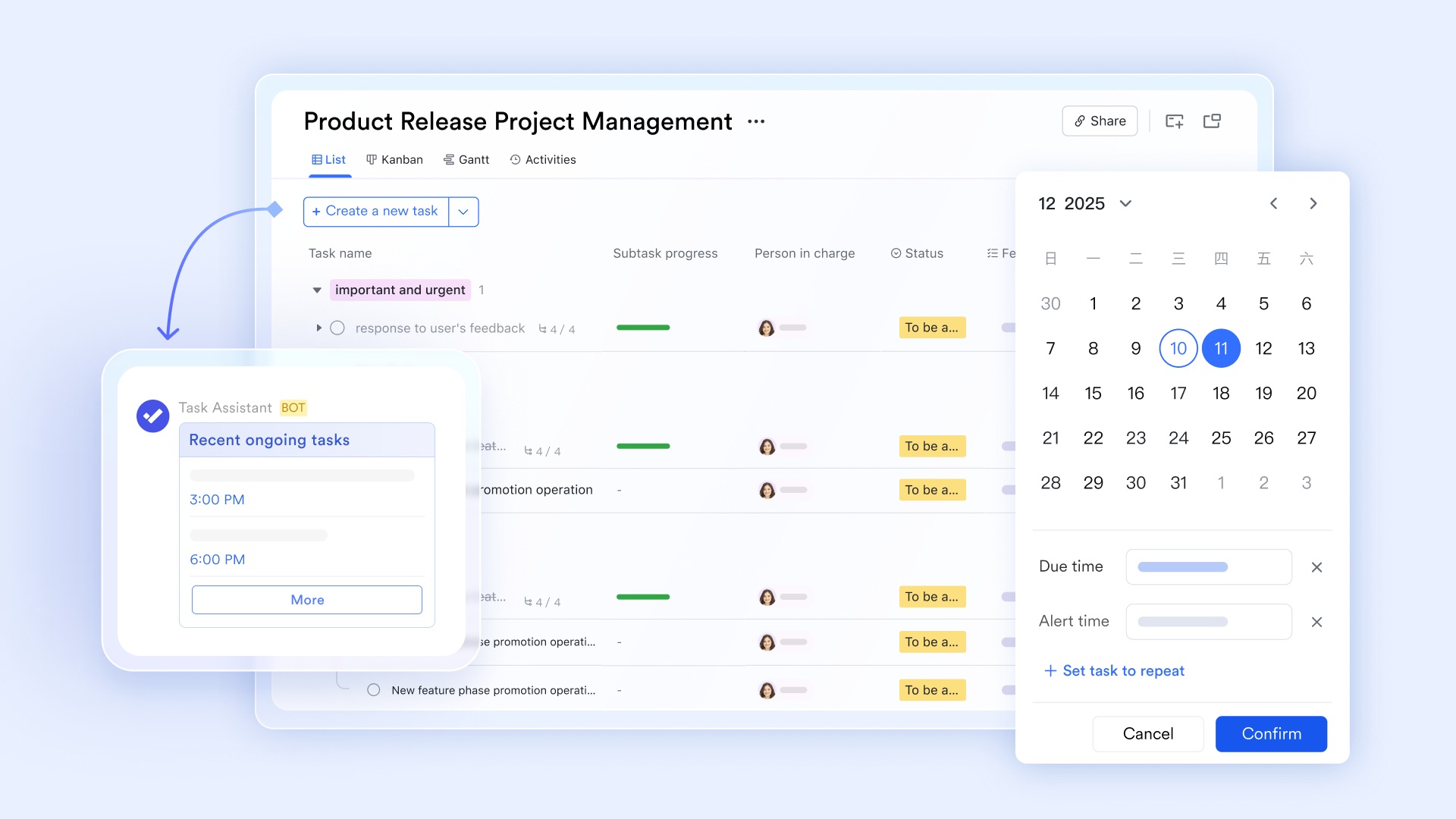
Lark Tasks that turn an assignment into a trackable execution
As a task management console, Lark Tasks bridges the gap between communication and execution with a checkbox-style interface and actionable items. By setting up task owners and subscribers, teams can break down large projects into manageable sub-tasks, assign specific owners, and set clear deadlines to ensure accountability across the organization. The tool enhances execution through centralized task lists and real-time updates, keeping all collaborators aligned on progress. By utilizing features like , automated recurring tasks, and custom fields for prioritization, teams can move from discussion to completion without losing momentum or overlooking critical details.
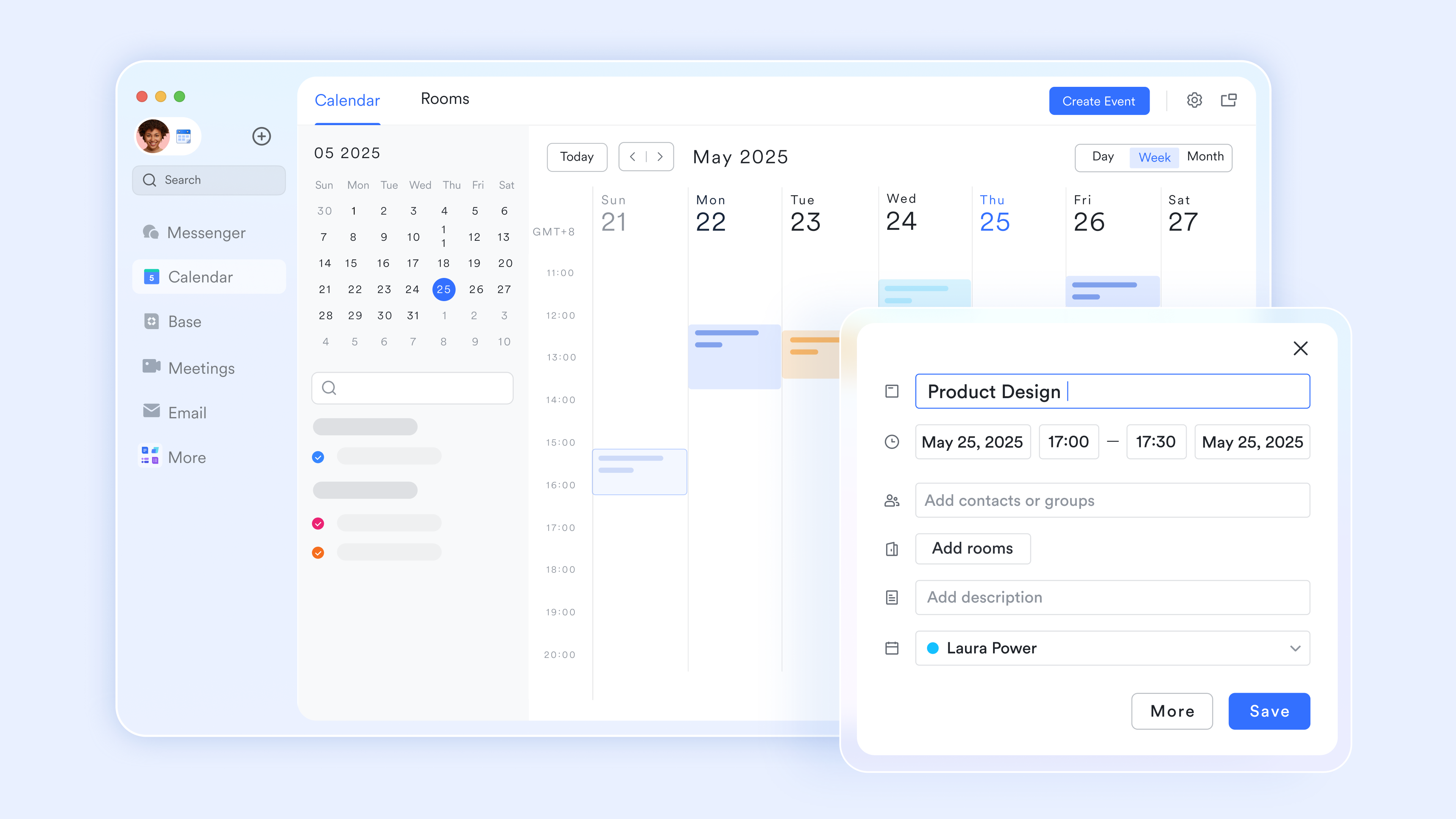
Lark Calendar for smart scheduling and smooth coordination
serves as a centralized coordination hub that inserts scheduling directly into your workflow. It allows inviting entire chat groups to meetings, viewing colleagues' availability side-by-side, and using an external "Scheduler" for client bookings. It also streamlines logistics by allowing users to reserve meeting rooms and manage time-bound tasks within a single interface. It also works well in the Lark ecosystem, automatically creating dedicated meeting chat groups and syncing collaborative Docs for agendas and notes. It bridges communication and action by embedding "one-click join" video links into event cards and sending instant RSVP notifications through Messenger.
:
- Starter plan: Free forever plan that includes 11 powerful tools for up to 20 users. It also comes with 100GB of storage, 1000 automation runs, AI translations, and more.
- Basic plan: $6/user/month (billed annually) for up to 500 users. It includes everything in Starter plus group calling for up to 500 attendees, 5TB of storage, 1000 automation runs, and more. For more details, please .
- Pro plan: $12/user/month (billed annually) for up to 500 users. It includes everything in Basic plus group calling for up to 500 attendees, 15TB of storage, 50,000 automation runs, and more.
- Enterprise plan: for custom pricing. Supports unlimited users and includes even more automation runs and advanced security, compliance, and management features.
For small teams with simple communication needs

18 months message history
1000 Base automation runs/month
2000 rows per table in Base
Most POPULAR
For companies with comprehensive collaboration and management needs
Unlimited message history
500-participant video meetings
50k Base automation runs/month
20k rows per table in Base
For large companies with advanced security and organizational management needs
Get a personalized demo and pricing
Unlimited message history
500-participant video meetings
15 TB storage + 30 GB storage/user
500k Base automation runs/month
50k Base automation runs/month
Most POPULAR
For companies with comprehensive collaboration and management needs
Unlimited message history
500-participant video meetings
50k Base automation runs/month
20k rows per table in Base
Slack vs Lark: Which collaboration platform fits better?
Slack and Lark approach collaboration from different starting points, which shapes how teams use them day to day. Slack is designed primarily around messaging, while Lark combines communication with execution tools in one workspace. As teams scale, these differences affect productivity, cost control, and workflow clarity. Choosing between them depends on whether communication alone is sufficient or if work needs to move directly from discussion to action. Understanding these contrasts helps teams select a platform that fits how they actually work.
- Communication vs collaboration depth: Communication vs collaboration depth highlights a key difference between the two platforms. Slack focuses on conversations and messaging as the core experience. Lark connects communication directly with tasks, documents, and structured data. This keeps work contextual and outcomes clearer.
- Cost comparison at scale: Cost comparison at scale becomes important as teams grow. Slack pricing increases on a per-user basis, especially at higher tiers. Lark bundles multiple tools into a single platform. This reduces the number of separate subscriptions and keeps costs more predictable.
- Productivity, automation, and AI comparison: Productivity, comparison shows how work moves forward after conversations. Slack AI helps summarize messages and improve visibility. Lark AI turns discussions into tasks and workflows. Automation focuses on execution rather than notifications.
- Which teams should choose Slack vs Lark: Which teams should choose Slack vs Lark depends on working style and scale. Slack suits teams that prioritize chat and rely on external tools. Lark fits execution driven organizations that want fewer handoffs. Team size and workflow complexity matter.
Final verdict: Is Slack still worth it?
Slack remains a for messaging-focused teams. It continues to perform well in a Slack app review and a Slack AI review for conversation management. However, as organizations grow, costs, fragmentation, and execution gaps become harder to ignore. For teams evaluating the best performance review tools, Slack often serves as a communication layer rather than a system of record. The same applies when considering the best integrations for code review with Slack, where execution still happens elsewhere. Platforms like Lark offer an alternative by turning conversations into coordinated work.
- When Slack remains a good fit: When Slack remains a good fit, teams primarily need fast and flexible communication. Messaging, integrations, and async collaboration are the main priorities. External tools handle execution and tracking. Slack works best in chat-first environments.
- When switching to Lark makes more sense: When switching to Lark makes more sense, teams want conversations to lead directly to action. Tasks, documents, and workflows need to stay connected. Reducing tool sprawl becomes a priority. Execution and visibility drive the decision.
- Final recommendation for decision-makers: Final recommendation for decision-makers depends on . Evaluate whether communication is the endpoint or the starting point. Consider cost growth and workflow complexity. Choose the platform that supports how work actually gets done.
Conclusion
Slack remains a strong communication platform with a mature ecosystem and broad adoption across many industries. For teams that primarily rely on fast messaging, channel-based discussions, and third-party integrations, it continues to deliver solid value. Its familiar interface and make it a dependable choice for everyday communication. However, as organizations grow, limitations around execution, rising costs, and tool fragmentation become harder to ignore. Collaboration increasingly demands more than chat alone, especially when work needs clear ownership and follow-through.
This is why many teams begin exploring connected workspaces. Platforms like preserve real-time communication while linking it directly to documents, tasks, meetings, and structured data. Instead of conversations ending in chat, work continues into execution with better visibility and accountability. The right choice ultimately depends on whether communication is the end goal or the starting point for getting meaningful work done across teams.
Build collaboration that drives execution
FAQs
Can Slack replace email completely for large organizations?
Slack can significantly reduce internal email by centralizing day-to-day conversations in channels. However, many large organizations still rely on email for formal communication, external messaging, and compliance requirements. Governance and record keeping often extend beyond chat tools. As a result, Slack usually complements rather than replaces email entirely. Some teams pair Slack with connected workspaces like Lark to handle execution and documentation alongside communication.
How secure is Slack for regulated industries like finance or healthcare?
Slack offers strong security features, especially on higher-tier plans that include compliance and . Regulated industries often need advanced governance, retention, and audit capabilities, which require Business+ or Enterprise tiers. Costs and configuration complexity increase as requirements grow. Some organizations compare this approach with platforms like Lark that bundle security and collaboration controls into a single workspace.
Does Slack work well for remote teams across multiple time zones?
Slack supports asynchronous communication through channels and threads, which works well for distributed teams. Messages remain visible and searchable, allowing team members to respond on their own schedules. Notification management becomes critical to avoid fatigue. Execution and follow-through often rely on additional tools. Platforms like Lark help remote teams by linking conversations directly to tasks and shared documents.
What happens to Slack data if a company downgrades its plan?
When a company downgrades its Slack plan, access to message history and certain features becomes restricted. Older messages may no longer be searchable, and integrations can be limited. Teams need to plan downgrades carefully to avoid losing context. Some organizations look for platforms like Lark that maintain core collaboration features consistently across plans.
Is Slack suitable for companies trying to reduce software costs?
Slack can be cost-effective for small teams with simple communication needs. As organizations scale, costs often increase due to per-user pricing and paid integrations. can quietly raise overall spend. This leads some companies to evaluate all-in-one platforms like Lark that combine communication, documents, and workflows under a single subscription.
Related reading






























