














Trello vs Slack: How to End the Debate and Build a Truly Connected Workflow

Fecilia Clarke
Solutions Marketing Specialist
Sep 18, 2026
Fecilia Clarke
Sep 18, 2026

15 min read


Are you caught in the classic team debate: Trello for tasks, Slack for talk? You are certainly not alone. Teams all over the world are evaluating project management tools, trying to strike the perfect balance between seeing their work in a clear, visual way and having the dynamic team communication needed to move that work forward. This common challenge leads to an equally common question: do we really need both these tools? More importantly, is paying for and juggling two separate software platforms the most efficient way to collaborate and get everyone on the same page?
This guide is here to help you navigate the Trello vs Slack dilemma. Based on our hands-on experience with both platforms, we offer an in-depth comparison, exploring the practical advantages and disadvantages of using Slack and Trello in real-world scenarios, and finally give you the best practice.
Key takeaways: Comparison table of Slack vs Trello
What is Slack?
At its core, Slack functions as a replacement for the endless email chains and siloed inboxes that once dominated the workplace. It’s best understood as your company’s digital headquarters, a central hub where conversations about work happen via instant messaging. Instead of sending an email and waiting for a response, teams can use Slack to have fluid, immediate discussions. It’s designed to replicate the spontaneous and collaborative nature of in-person office conversations, but for teams that may be distributed across the city or around the globe, making it one of the most popular business tools available today.
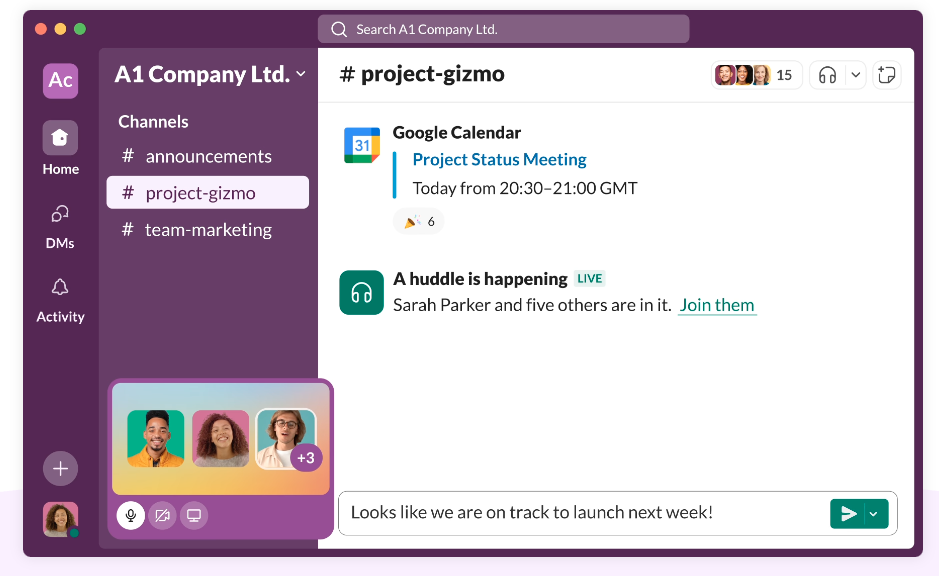
Image source: slack.com
Pros of using Slack:
- Exceptional communication hub: Slack excels at centralizing team communication. Its intuitive interface for instant messaging, combined with features like video calls, makes it a powerful tool for real-time conversation and quick problem-solving.
- Highly organized conversations: The power of Slack lies in its organization of conversations into dedicated Slack channels. This structure allows teams to keep discussions focused on specific projects, topics, or departments, preventing the chaos of a single, massive group chat.
- Vast integration ecosystem: With a vast Slack app directory, it can connect with thousands of third party apps. This allows teams to bring notifications and information from other tools directly into their communication flow.
- Simple workflow automation: For basic needs, Slack's workflow builder is a useful feature. Slack lets users configure simple, automated workflows to handle certain repetitive tasks, like sending welcome messages or collecting routine updates in a channel.
Cons of using Slack:
- Lacks robust project management functionality: Slack was not designed to be a system for managing tasks. It lacks the dedicated structure for tracking progress, managing dependencies, and visualizing workflows that specialized project management tools offer.
- Lost information: While Slack's free plan is a great starting point, its limited message history means important conversations can disappear. To maintain a complete record, teams must upgrade to paid plans for unlimited message history, turning a key piece of functionality into a recurring cost.
- Informal task management: While you can discuss tasks, actually tracking them is informal. Action items mentioned in a conversation can easily get buried and forgotten unless manually transferred to another system, making it an unreliable tool for accountability.
What is Trello?
While Slack is where work is discussed, Trello is where that work is visualized. It’s a project management tool that championed the Kanban methodology, a simple yet powerful system for tracking tasks as they move through different stages of a workflow. Think of it as a digital whiteboard covered in sticky notes, where each note represents a task and each column represents a stage, such as "To Do," "In Progress," and "Done." This visual organization makes it incredibly intuitive to see a project's status at a single glance, which is why it’s beloved by teams for managing projects.
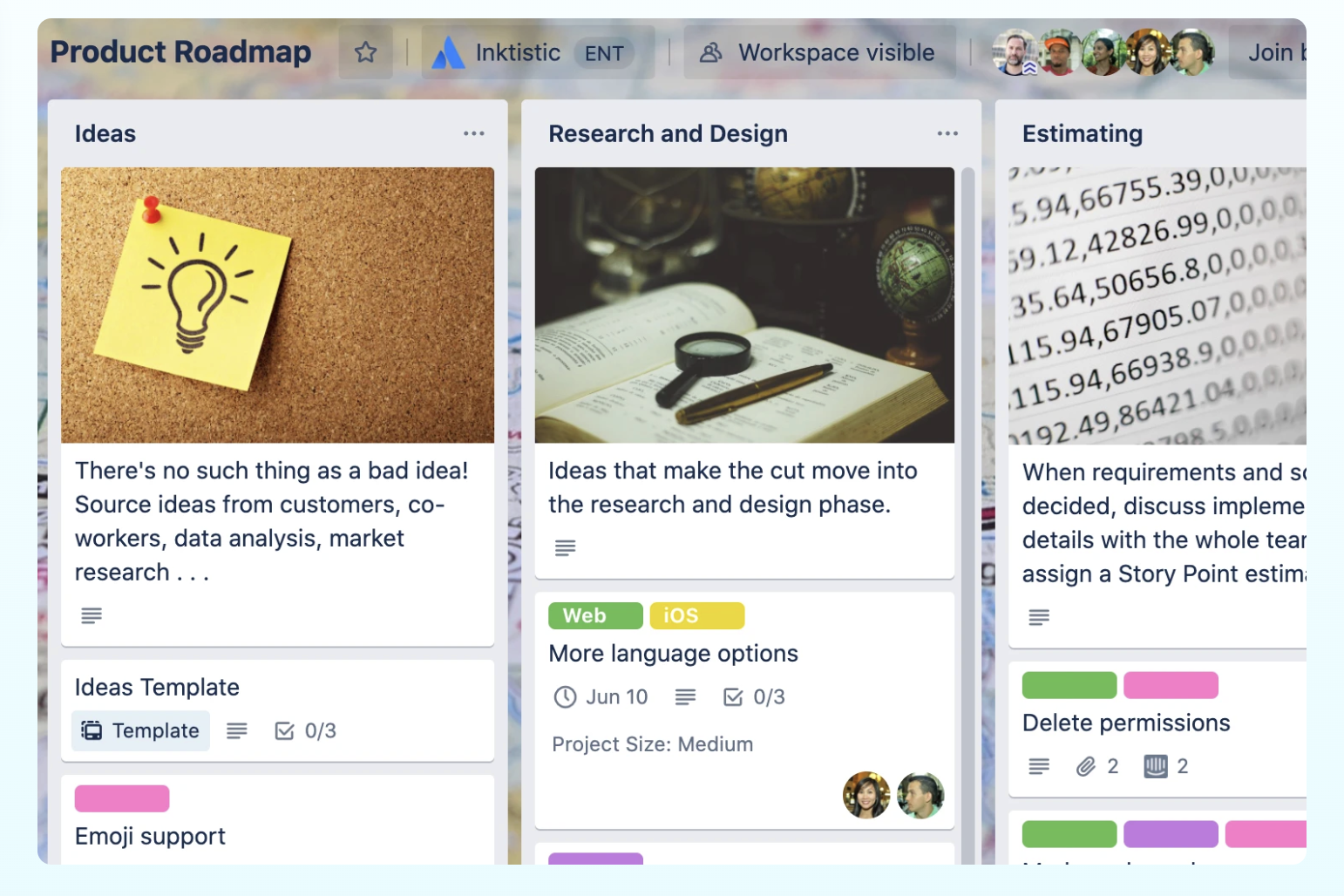
Image source: trello.com
Pros of using Trello:
- Exceptional visual organization: Trello’s core strength is its visual Kanban board structure. Using Trello boards, lists, and Trello cards, teams can get an immediate, at-a-glance understanding of a project's status, making it incredibly effective for tracking workflows.
- Intuitive and easy to use: With its clean drag and drop interface, Trello is famously user-friendly. Team members can start organizing tasks and tracking progress in minutes with minimal training, lowering the barrier to adoption.
- Generous free plan: The free plan is a major draw, offering unlimited boards and cards. This makes it a cost-effective choice for small teams, freelancers, or anyone starting to organize projects.
- Customizable with power-ups: While simple at its core, Trello can be extended with Power-Ups. These add-ons provide additional functionality, such as calendar views, time tracking, and integrations with other third party apps.
Cons of using Trello:
- Lacks rich context: The biggest drawback is that the context behind a task often lives elsewhere. The "why" behind a card's movement or a change in priority is usually discussed in a separate communication tool, leaving the Trello board as a disconnected artifact.
- Limited communication features: While cards have a comment section, Trello is not built for dynamic, real-time conversation. Discussions can be clunky and slow, making it difficult to resolve issues quickly without switching to another app.
- Oversimplified for complex projects: For large-scale projects, Trello's simplicity can be a weakness. It lacks native, advanced features like Gantt charts, dependency management, or detailed reporting, which are critical for managing projects with many moving parts.
- Reliant functionality on add-ons: Many features that teams consider essential, such as advanced automation or reporting, require adding Power-Ups. This can make the setup more complex and can involve additional costs, as the number of Power-Ups is limited on the free and standard plans.

The head-to-head comparison: A closer look at Trello vs Slack
To make an informed decision, it's essential to break down how each platform performs in the areas that matter most. In the Slack vs Trello matchup, their core capabilities are fundamentally different, and understanding these differences is the key to optimizing your team's workflow. We'll compare them across four critical categories: task management, team collaboration, integrations, and the true cost of using them. This side-by-side Slack vs Trello analysis will help clarify which tool is right for which job and highlight the gaps that often appear when trying to make them work together.
For task management features
When it comes to task management, Trello is the clear specialist. Its entire structure is built around creating, assigning, and tracking tasks through a visual workflow. A Trello card is a dedicated container for a piece of work, with a description, checklists, and an activity log, providing excellent task tracking. This creates a formal system for task organization, ensuring every item has a clear owner and a visible status. It provides the structure needed for accountability and long-term progress tracking, making it ideal for managing content calendars, product roadmaps, or even personal projects like wedding planning.
Slack, on the other hand, approaches tasks in a much more informal and conversational way. You can use reminders or pin items in a channel to keep track of action items, but these methods lack the structure and visibility of dedicated productivity tools for project management. A task mentioned in a busy channel can easily get buried and forgotten if it's not immediately captured. While Slack is excellent for creating quick, ad-hoc reminders, it falls short when it comes to managing a team's collective workload, tracking dependencies, and maintaining a clear overview of project progress. The task management features are simply not its primary focus.
For team collaboration
Team collaboration is where the lines between the two tools begin to blur, but their styles remain distinct.
Slack is built for synchronous collaboration—fast-paced, real-time discussions that allow teams to solve problems and brainstorm ideas. Its team chat functionality is second to none. This is perfect for urgent issues and quick check-ins, fostering a sense of camaraderie through active conversation. It is the digital equivalent of tapping a colleague on the shoulder to ask a question, making it a powerful collaboration tool.
Trello, by contrast, facilitates asynchronous collaboration. It allows team members to contribute to a project and update its status without needing to interrupt one another. You can leave comments on cards and tag colleagues to get their attention, but it lacks the immediacy of a dedicated chat tool. The collaboration is centered around the work itself, providing context directly on the task, but it doesn't support the free-flowing brainstorming that Slack excels at. It functions well as a team collaboration tool, but its communication features are limited to comments, not live conversation.
For integrations and automation
Both Trello and Slack offer integrations and automation capabilities, but they cater to different aspects of the workflow. While both platforms have extensive ecosystems, their core philosophies around integration and automation differ significantly. Trello focuses on extending the functionality of its visual boards, while Slack prioritizes connecting various tools into its communication hub. Let's examine how each platform approaches integrations and automation.
Trello's approach to integrations is primarily through Power-Ups. These are add-ons that enhance Trello boards with features from other services. For example, you might use a Google Drive Power-Up to attach documents directly to cards or a Calendar Power-Up to visualize deadlines. Trello also offers its own native automation features, previously known as Butler, now branded as rule-based automation. These features allow users to automate actions within Trello, such as automatically moving cards when checklists are completed, assigning team members based on certain triggers, or creating recurring tasks.
Slack, on the other hand, positions itself as the central communication hub, bringing information and actions from various tools into Slack channels. Its app directory is vast, offering integrations with project management tools, CRM systems, marketing platforms, and more. These integrations allow you to receive notifications, trigger actions, and share information from other apps directly within your Slack conversations.
For pricing and true cost
When evaluating a solution for your team, pricing is always a key consideration. Both Slack and Trello offer a range of packages and options, with functionalities and features that differ depending on the plan and the specific needs of end-users. To make a clear comparison, we'll break down the pricing into two main categories: free plans and paid plans. (The pricing information in this guide is based on the most recent details available on the official Slack and Trello websites in 2025.)
Free plans
Both Slack and Trello offer compelling free plans, allowing teams to get started without a financial commitment. However, it's important to understand the limitations of these free options.
- Slack (Free): Slack's free plan allows unlimited users but limits you to a searchable message history of the most recent 90 days. It also restricts you to a maximum of 10 integrations with other apps. The free plan does include 1:1 voice and video calls.
- Trello (Free): Trello's free plan is designed for up to 10 collaborators per Workspace. It allows for unlimited cards and provides features to capture to-dos from email, Slack, and Teams. There are also unlimited Power-Ups and storage (10MB/file), but you are limited to 10 boards per Workspace and 250 Workspace command runs per month.
Paid plans
Upgrading to a paid plan unlocks more advanced features and removes limitations, enabling teams to scale their usage of Slack and Trello. Here's an overview of the paid plan options for each platform (note that pricing may vary depending on region and contract terms):
- Pro plan: Starting at $8.75 per user per month, the Pro plan unlocks unlimited message history and unlimited integrations.
- Business+ plan: Starting at $18 per user per month, the Business+ plan includes all the features of the Pro plan, along with additional security features, compliance exports, and prioritized support.
- Standard plan: Starting at $5 per user per month, the Standard plan removes the board limit, provides unlimited boards, advanced checklists, custom fields, card mirroring, and 1,000 Workspace command runs per month.
- Premium plan: Starting at $10 per user per month, the Premium plan adds multiple project views, including Calendar, Timeline, Table, Dashboard, and Map. It also adds Atlassian Intelligence (AI) features, unlimited Workspace command runs, and enhanced administrative controls.
- Enterprise plan: Priced at $17.50 per user per month (billed annually, $210.00 annual price per user), the Enterprise plan is designed for larger organizations.
Which to choose: Aligning tools with your team's needs
Selecting between Trello and Slack hinges on identifying your team's primary operational focus. If your team thrives on dynamic communication, quick information sharing, and real-time collaboration, Slack is the superior choice. Its strength lies in fostering conversations and connecting various tools into a central communication hub. However, if your team requires a visual, organized, and easily understandable system for task management and project tracking, Trello emerges as the more suitable option. Its core competency is in providing a visual framework for workflow management.
Ultimately, the decision should be driven by where your team spends the majority of its time and what aspect of teamwork needs the most support. Do you need to streamline conversations, or do you need to visualize project workflows?
If you are interested in "slack vs asana vs trello" or "slack vs monday vs trello", I'd like to invite you to read the following blogs:
Can Trello and Slack work together?
The conventional wisdom is to use both these tools together. For a while, this Trello and Slack combo can work. But as your team grows and your projects become more complex, this "better together" approach starts to reveal its limitations. What once felt like a clever workflow begins to feel like a collection of compromises. The seamless collaboration you were promised by integrating Trello with Slack is interrupted by hidden frictions and information gaps that create drag on your team's productivity.
The hidden cost of context switching
Every time a team member has to toggle from a discussion in Slack to find the corresponding card in Trello, a small amount of mental energy is consumed. This is known as context switching, and while it seems minor in the moment, its cumulative effect is a massive drain on focus and productivity. The flow of work is interrupted, and the train of thought is lost. The context from the conversation—the nuance, the suggestions, the "why" behind the task—doesn't automatically travel with it.
This forces employees to perform digital gymnastics, holding information in their minds as they jump from one interface to another. A decision is made in Slack, but the implementation details are in Trello. A question is asked in a Trello comment, but the answer is delivered in a Slack direct message. This constant back-and-forth is not just inefficient; it's mentally taxing. It creates a work environment where team members are busy but not necessarily productive, spending a significant portion of their day simply managing the gap between their productivity tools.
The black hole of disconnected information
The most critical flaw in the Slack and Trello workflow is the risk of creating a black hole of information. A brilliant idea or a key decision can emerge from a fast-moving Slack conversation, but if no one takes the manual step to capture it and put it in the right Trello card, it effectively vanishes. The conversation scrolls away, and the insight is lost forever. The official project plan in Trello slowly drifts out of sync with the team's real-time discussions and decisions.
This creates a dual source of truth, which is just as bad as having no source of truth at all. A team member looking at the Trello board might see an outdated plan, while the most current information remains buried in a Slack channel they may not have even seen. This leads to confusion, rework, and a lack of accountability. When something goes wrong, it becomes impossible to trace the breakdown because the conversation and the task are completely disconnected. The Trello integration doesn't solve this; it merely provides a manual, and therefore fallible, bridge over the gap.
The inevitable scalability ceiling
While a small team of five can often manage the chaos of a two-tool system through sheer force of will, this approach simply does not scale. As your organization grows from ten people to fifty or a hundred, the cracks in the foundation begin to show. The number of Slack channels explodes, creating an overwhelming stream of notifications. The number of Trello boards multiplies, and with no way to connect them or get a high-level view, the project landscape becomes a disorganized sprawl.
At scale, the informal nature of the Trello-Slack combination becomes a liability. You need more structure, more automation, and a clearer connection between high-level strategy and daily tasks. The manual workarounds that were once manageable become a full-time job for a project manager. The workflow begins to feel chaotic and unprofessional for a growing business. This is the scalability ceiling—the point where your business tools stop helping you grow and start holding you back.
Beyond connecting tools: The power of a truly all-in-one collaboration platform
What if the solution wasn't to build a better bridge between your communication and project management tools, but to eliminate the gap between them entirely? This is the promise of a unified collaboration platform like Lark, where conversations, tasks, documents, and meetings exist together, seamlessly connected. Instead of patching together separate applications, this approach consolidates the entire workflow into one cohesive environment, designed from the ground up to keep your team in sync and in focus.
This isn't just about reducing the number of tabs you have open. It's about fundamentally changing how work flows through your team. When your tools are natively built in one app, context is never lost. Conversations naturally transform into actions, and projects are supported by a rich, accessible body of knowledge.
From conversation to action, in a single click
Imagine you're in a team chat discussing a new campaign. A great idea for a blog post comes up. In a typical workflow, you'd have to switch to Trello, find the right board, create a new card, copy-paste the details, and assign tasks. In Lark, you simply hover over that message in Lark Messenger and click "Add Task." The message instantly becomes a trackable item in Lark Tasks, with the original conversation permanently linked for context.
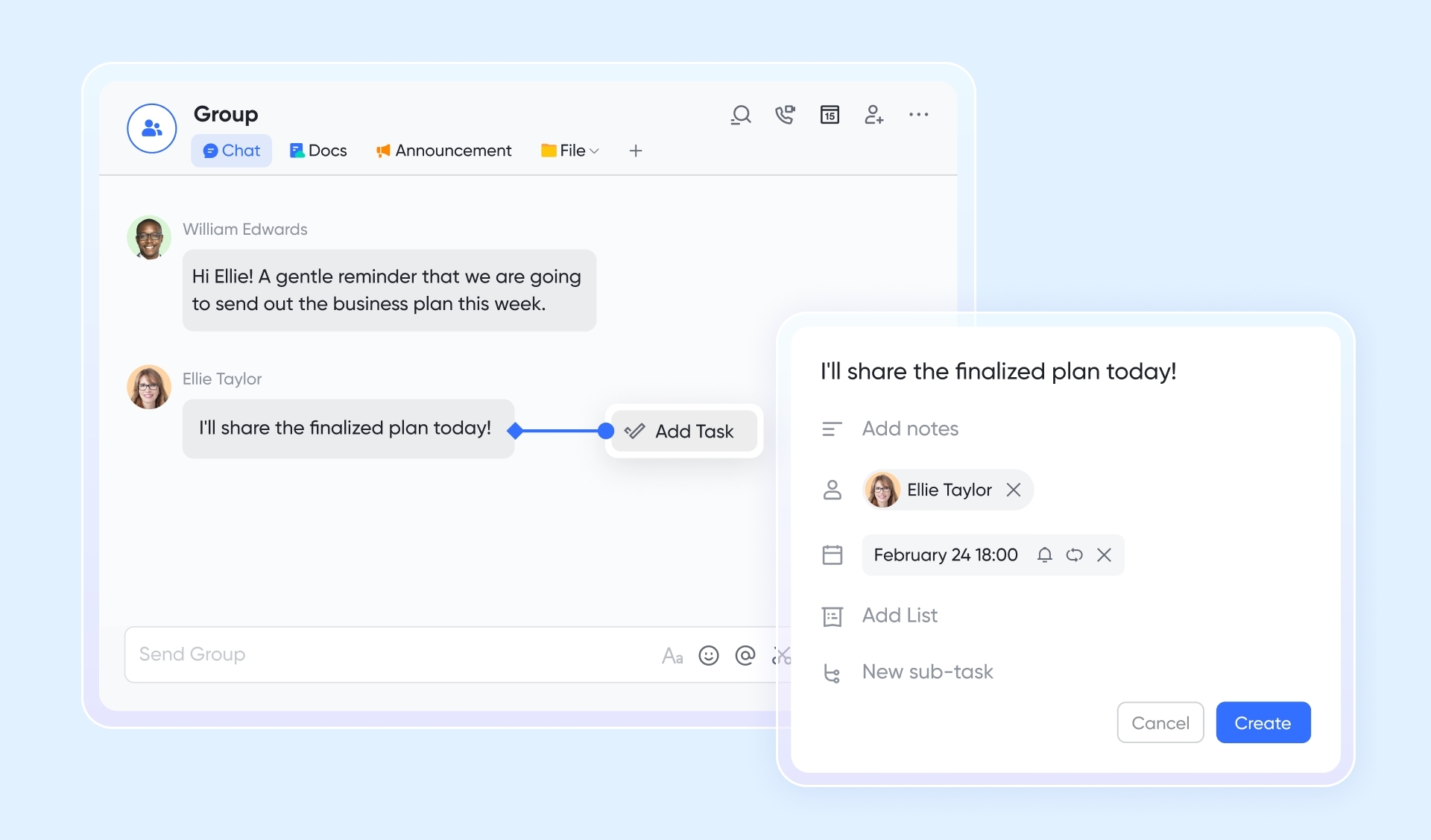
This simple but powerful feature completely dissolves the friction between discussion and execution. There's no context switching, no manual data entry, and zero chance of the idea getting lost. The task is assigned and given a due date right from the chat, ensuring that conversational momentum is immediately converted into productive action. It’s a workflow that is fundamentally more efficient because the tools for talking and doing are not just connected; they are one and the same, providing superior project management functionality.
Project management that actually adapts to your work
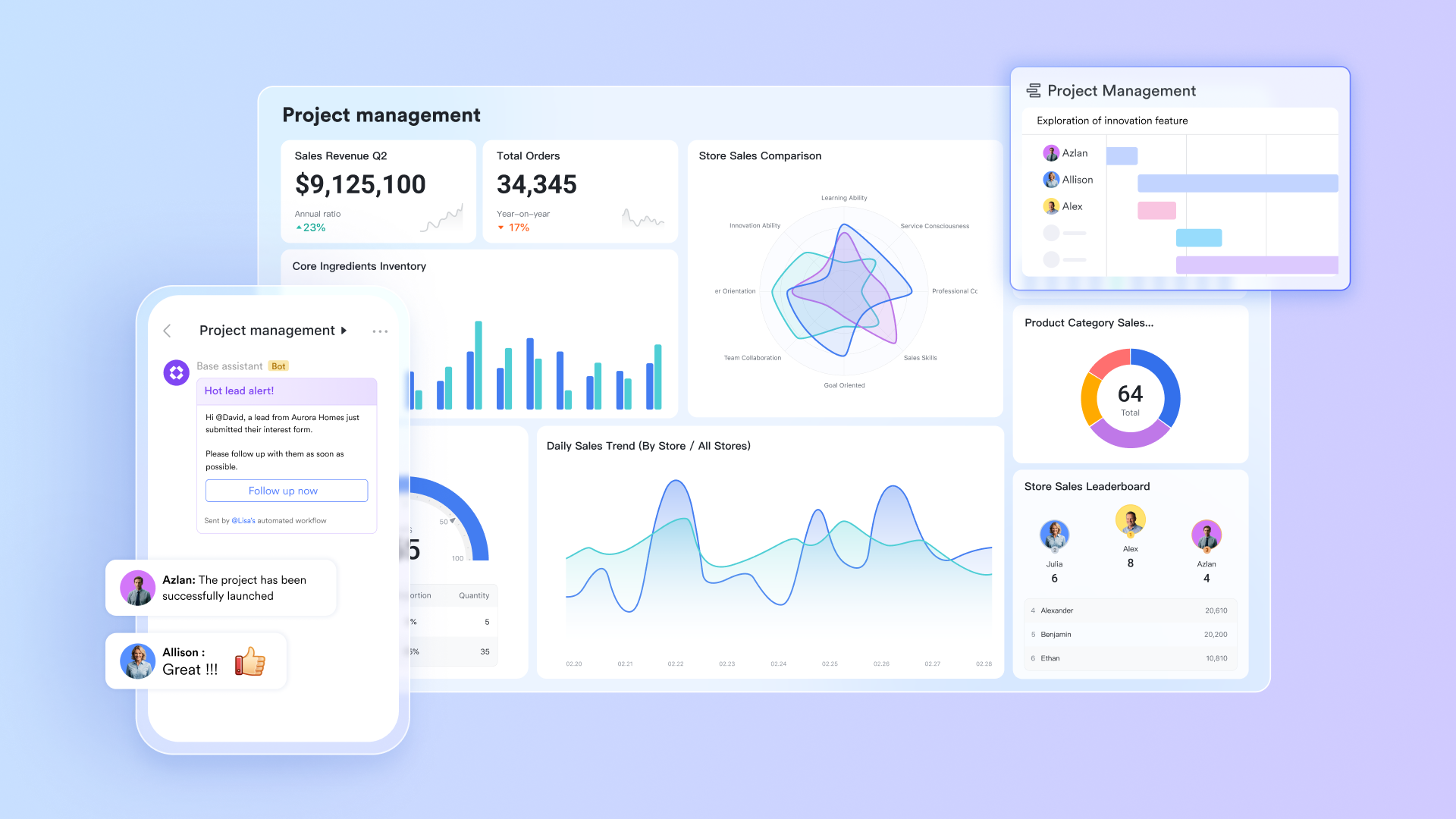
Trello’s Kanban board is excellent for one specific type of workflow, but not all work fits neatly into that model. What if you need to see your project on a timeline, or as a filterable database? Lark Base provides this flexibility. It’s a powerful, collaborative database that allows you to visualize the exact same set of project data in multiple ways. You can start with a Kanban view just like Trello for visual organization, then instantly switch to a grid view like a spreadsheet, a Gantt chart for advanced progress tracking, or a gallery view for design assets.
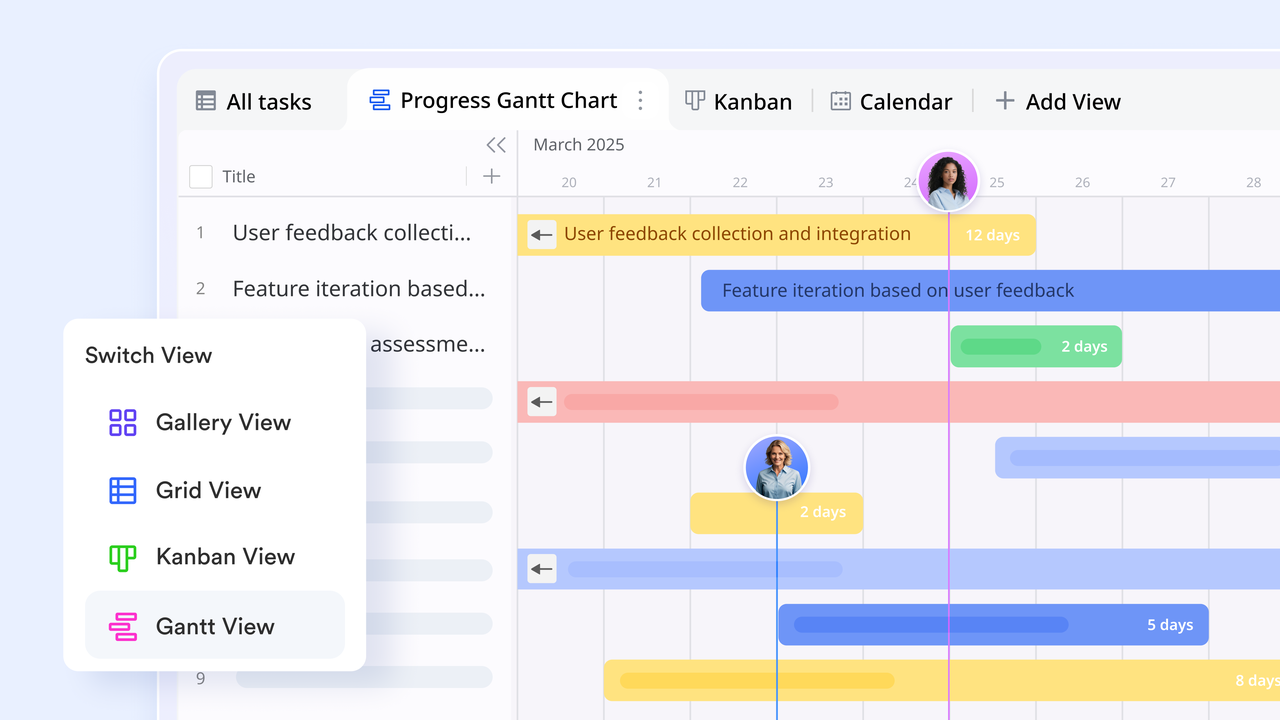
This means your marketing team can use a Kanban board to organize projects, while your operations team uses a detailed grid view to manage inventory from the very same data source. Everyone gets the view they need without duplicating information. Furthermore, you can use Lark Forms to collect requests that automatically populate your Base, triggering workflows and task assignments without any manual intervention. It’s the visual simplicity of Trello, but supercharged with the power and flexibility of a modern database for superior tracking progress.
Building a true single source of truth for every project
A project is more than just a collection of tasks; it's a body of knowledge. It includes briefs, meeting notes, and strategic decisions. In a two-tool system, this is scattered across Google Docs, Slack channels, and Trello attachments. Lark unifies this by combining Lark Docs, a powerful collaborative document editor, directly into your workspace. You can co-author project plans in real time and embed rich media, with every document being searchable and connected to your chats and tasks.
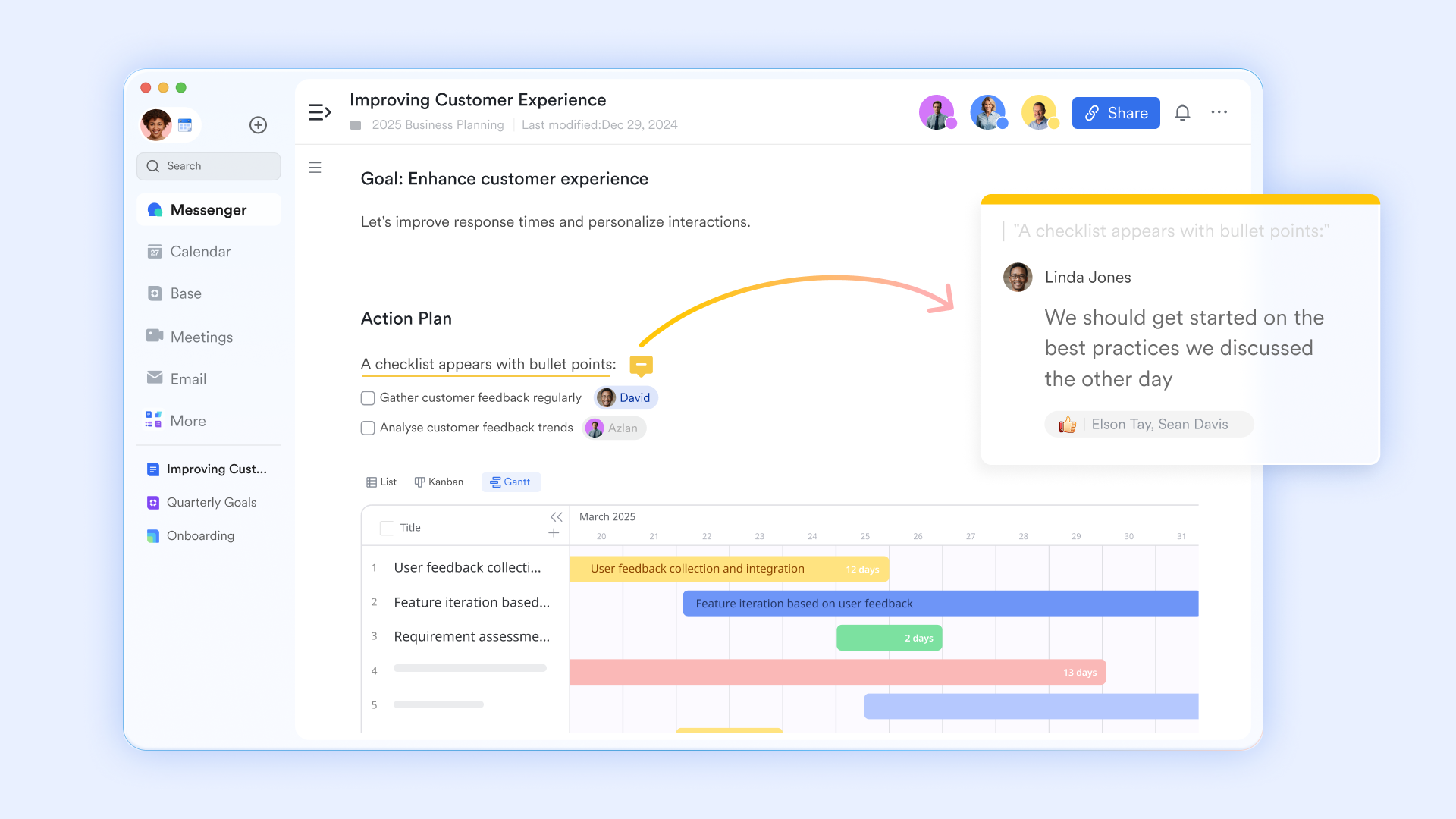
This consolidation extends to meetings as well. With Lark Meetings, you can set an agenda from Lark Docs, and after the call, AI Meeting Notes can automatically generate a transcript, a summary, and a list of action items. These action items can then be assigned as tasks with a single click. From the initial meeting to the final deliverable, the entire lifecycle of your project lives in one interconnected system. This creates a single, reliable source of truth that eliminates confusion and empowers your team to find the information they need, when they need it.
As an all-in-one solution, Lark contains all these features below in every plan:
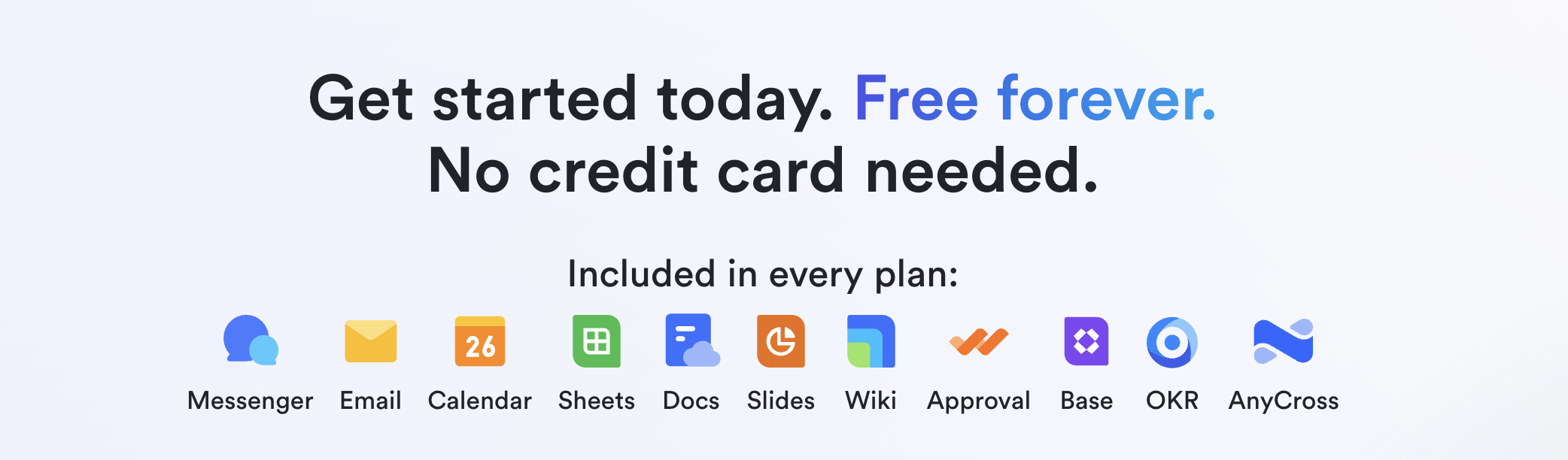
- Starter plan: Free forever plan with 11 powerful tools for up to 20 users, 100GB storage, 1,000 automation runs, AI translations, and more. No credit card needed.
- Basic plan: $6/user/month (billed annually) for up to 500 users. Includes everything in Starter plus unlimited message history, 5TB storage, 1,000 automation runs, and more. Some users may need to contact sales to purchase.
- Pro plan: $12/user/month (billed annually) for up to 500 users. Includes everything in Basic plus group calling for up to 500 attendees, 15TB storage, 50,000 automation runs, and more.
- Enterprise plan: Contact sales for custom pricing. Supports unlimited users and includes advanced automation, security, compliance, and management features.
Conclusion
The choice between Trello, Slack, and a unified platform like Lark ultimately depends on your team's size, the complexity of your projects, and your ambition for future growth. There is no one-size-fits-all answer, but we can provide some clear guidance. Your goal should be to select a system that not only solves today's problems but also provides a clear path forward as your team scales, whether you are a small startup or one of the world's large enterprises.
The Slack vs Trello debate has always been a sign of a deeper need in the market—a need for collaboration tools to finally bridge the gap between talking and doing. While connecting them is a start, the future of productivity lies in truly unifying them. By moving beyond the limitations of a fragmented tool stack by all-in-one tools like Lark, you can unlock a more focused, aligned, and efficient way of working for your entire team.
FAQs
Is Trello better than Slack?
Neither is inherently "better"; it depends on your team's needs. Trello excels at visual task management, offering clear project workflows. Slack shines in real-time communication and team collaboration. If your priority is organized task tracking, Trello is a better fit. If you need streamlined communication and quick information sharing, Slack is the more effective tool. Choose the platform that aligns with your team's core operational focus.
What is a disadvantage of Trello?
While Trello is excellent for visualizing workflows, it can lack rich context. The "why" behind a task is often communicated elsewhere, potentially leading to miscommunication. It can also become cumbersome for highly complex projects with intricate dependencies. Achieving advanced automation across platforms also requires external connectors, which adds complexity and subscription fees.
Is Trello still good in 2025?
Yes, Trello remains a valuable tool in 2025, especially for teams prioritizing visual task management and Kanban-style workflows. Its intuitive interface and customizable boards make it adaptable to various project types. While newer tools have emerged, Trello's established user base, integrations, and continued development ensure its relevance in the project management landscape.
Who is Slack's biggest competitor?
Slack's biggest competitor is Microsoft Teams. Both platforms offer similar features, including real-time messaging, file sharing, and integrations with other apps. Microsoft Teams has an advantage for organizations already using Microsoft 365, as it's often bundled with their existing subscriptions. Other competitors include Lark, Google Chat, and various other team communication platforms. For those exploring Google Workspace alternatives, especially in communication and collaboration, these platforms present compelling options, often with pricing models that differ from the typical Google Workspace pricing structures.
Related reading
Table of contents
Start using Lark today

Manage all your work in one place
Boost team efficiency by 10x
Save up to 70% on software costs
Table of contents
Start using Lark today
Manage all your work in one place
Boost team efficiency by 10x
Save up to 70% on software costs
Keep reading



Lark recognized in 2023 Gartner® Collaborative Content Workspaces and Meeting Solutions reports
Lark, the global superapp for productivity, is delighted to announce it receives recognition in the Gartner's 2023 Innovation Insight for Collaborative Content Workspaces and Market Guide for Meeting Solutions.





2026 Lark Technologies Pte. Ltd.
Headquartered in Singapore with offices worldwide.






Explore: