Scrum is a simple and structured framework that helps teams work in short, focused cycles to deliver value consistently. When people search for "what is Scrum", they often want to understand how it organizes work, supports collaboration, and adapts to changing requirements. Scrum breaks complex goals into manageable steps so teams can plan, review, and improve continuously. As more teams adopt digital ways of working, modern platforms like Lark start supporting these workflows gradually by bringing communication, documentation, and task tracking into one connected space without changing the core of Scrum itself.
Improve your Scrum workflow in one workspace
What is Scrum and why do modern teams adopt it?
Scrum is a lightweight approach that uses short periods of focused work to help teams deliver outcomes consistently. It breaks complex goals into smaller steps that are easier to plan, review, and refine. Teams appreciate Scrum because it promotes transparency and supports a shared understanding of progress. This structure helps organizations adapt to new information quickly while improving the quality of delivery.
Modern teams adopt Scrum when they need a predictable yet flexible way to manage changing requirements. Since Scrum emphasizes and regular feedback, it supports both in-person and distributed setups effectively. The combination of ceremonies, roles, and artifacts creates a rhythm that keeps everyone aligned. With these strengths, Scrum has become a central method for teams experimenting with what Agile Scrum is in .
What is Scrum methodology?
Scrum methodology provides a structured cycle for planning and delivering work through sprints. Each sprint creates a finished outcome that can be reviewed and improved in future iterations. This method limits complexity by focusing on short time periods where tasks can be clearly defined and tracked. As teams move through cycles, they learn continuously and adjust their .
The methodology suits teams that deal with uncertain requirements and evolving priorities. It helps teams explore what Scrum project management is by offering practical guidance on how to organize responsibilities and measure progress. Since the approach is based on feedback loops, teams become more confident in handling uncertainty. This repetitive structure supports better collaboration, especially for .
How Scrum fits into the Agile methodology
Scrum is one of the most popular ways to practice within real projects. Agile focuses on delivering value early, adapting quickly, and working closely with users. Scrum supports these ideas by creating a for planning, reviewing, and improving work. This helps teams understand what Scrum is in Agile by showing how processes translate into daily habits.
Scrum fits into Agile by translating broad principles into practical routines that teams can follow daily. When teams learn what Scrum Master is, they see how this role supports Agile flow by guiding ceremonies and protecting team focus. Understanding what is Scrum master certification also helps teams value trained facilitators who can reinforce Agile habits. Scrum acts as a bridge that brings Agile concepts into real, repeatable actions.
Core Scrum roles and responsibilities explained
Scrum defines key roles that distribute ownership and create clarity within the team. These roles help everyone understand how decisions are made and who is responsible for different parts of the workflow. By following this structure, teams learn what a Scrum team is in practice and maintain smooth coordination across different functions. Clear responsibilities reduce friction and create a balanced environment for collaboration.
- Product owner: Product owner acts as the vision holder and ensures the team understands product goals clearly. The role manages the product backlog by reviewing ideas, shaping user stories, and defining acceptance criteria. Stakeholder expectations are translated into practical priorities that match project objectives. The product owner helps teams stay focused by choosing tasks that maximize value. This role bridges the gap between strategic needs and daily execution.
- Scrum master: Scrum master guides the team by ensuring Scrum principles are followed and understood. The role is often linked to what a Scrum master is for new learners who explore how facilitation works in Agile teams. The Scrum master removes blockers that might slow progress and helps team members collaborate smoothly. Regular coaching supports continuous improvement and creates a stable environment for success. This role encourages open communication and problem-solving.
- Scrum team: Scrum team includes cross-functional members who own the delivery of sprint commitments. The team works collaboratively to refine stories, estimate effort, and within the sprint. Since members share responsibility, everyone contributes to quality and planning. This structure shows what Scrum is in action since coordination happens organically. A shared sense of ownership helps teams adapt when priorities shift.
Essential Scrum ceremonies and what they achieve
Scrum ceremonies help create alignment and maintain rhythm throughout the sprint. These events guide planning, communication, inspection, and improvements. Teams follow ceremonies to build transparency and encourage structured collaboration. By using these events consistently, teams gain a deeper understanding of how Scrum connects to what Scrum methodology is in real work.
- Sprint planning: helps teams define the goal for the upcoming sprint and decide which backlog items should be completed. The event brings the product owner, Scrum master, and team together to review priorities and discuss feasibility. Members estimate effort collectively and commit to achievable outcomes. The clear plan makes expectations understandable for everyone. This session sets the direction for the entire sprint.
- Daily Scrum: Daily Scrum supports quick updates on progress, blockers, and next steps. Teams explore what a is through this short event, where members share information that keeps work moving smoothly. Instead of long discussions, updates stay focused, so the meeting remains efficient. It is useful for identifying risks early before they grow. For distributed teams, this ceremony ensures steady communication.
- Sprint review: The sprint review allows teams to present completed work to stakeholders and gather feedback. This event encourages transparency about the increment and invites discussions about upcoming priorities. Stakeholders share their insights, which helps refine backlog decisions for future sprints. The review strengthens collaboration between teams and contributors. It also helps validate whether the increment meets expectations.
- Sprint retrospective: The sprint retrospective creates time to reflect on what worked well and what needs improvement. Team members share observations openly to identify areas for positive change. The session builds trust by encouraging honest feedback. Improvement actions recorded here help strengthen upcoming sprints. This event nurtures a habit of continuous learning.
- Backlog refinement: Backlog refinement improves the clarity, structure, and priorities of the product backlog. Teams review items together to adjust estimates, rewrite user stories, and remove unnecessary ideas. This reduces confusion during sprint planning and speeds up future decisions. It also helps the product owner maintain a realistic roadmap. Regular refinement keeps the backlog ready for upcoming cycles.
Scrum artifacts and how they drive transparency
Scrum artifacts support visibility by showing what work exists, what is planned, and what has been completed. These artifacts guide teams through each stage of the sprint while keeping stakeholders informed. The structured nature of these helps new learners understand what Scrum is in a practical context. When artifacts are used effectively, teams reduce ambiguity and maintain alignment.
- Product backlog: Product backlog serves as the central list of all potential work items for the product. It contains user stories, improvements, bug fixes, and research items. The product owner updates this list as priorities evolve. Transparent backlog management supports decision-making and ensures the team tackles high-value tasks first. This artifact grows alongside the product vision.
- Sprint backlog: The sprint backlog contains the selected user stories and tasks committed for the current sprint. It gives the team a clear view of what must be completed within the cycle. Members frequently update the backlog to and adjust workloads. This artifact supports planning and coordination across the team. The visibility helps prevent misunderstandings during execution.
- Increment: Increment represents all completed work from the sprint that meets the definition of done. It gives stakeholders a functional outcome they can evaluate. Since increments are delivered frequently, users experience value early. This encourages stakeholders to provide timely feedback. The increment becomes the foundation for future progress.
- Definition of done: Definition of done outlines what it means for a user story or task to be considered complete. It helps teams maintain consistent quality across all deliverables. By following this standard, team members avoid assumptions about expectations. The definition also improves accountability during reviews. This clarity reduces rework and strengthens team confidence.
Silent features of Scrum that teams often overlook
Scrum includes subtle practices that significantly influence team behavior and project outcomes. These often go unnoticed but play a central role in strengthening and long-term success.
- Timeboxing maintains rhythm: Timeboxing limits how long activities can take, helping teams stay focused and productive. It creates predictable routines for planning, reviewing, and daily coordination. Teams waste less time on unfocused discussions and gain more consistency in their schedule. This structure supports smoother sprint cycles.
- Empirical process control encourages learning: Empirical process control relies on real observations instead of assumptions. Teams inspect progress regularly and adjust based on evidence. This habit supports better decisions and helps teams refine their approach. It also aligns with Agile principles and continuous improvement.
- Self-managed teams increase ownership: Self-managed teams decide how work should be completed without needing constant direction. Members take responsibility for identifying tasks, solving problems, and coordinating efforts. This autonomy improves motivation and builds accountability. It also helps teams respond more quickly to changing priorities.
- Transparency reduces micromanagement: Transparency ensures work status, challenges, and outcomes are visible to everyone. This openness builds trust because leaders do not need to micromanage progress. Members stay aligned and communicate more effectively. Transparent practices reduce confusion and improve focus.
- Definition of done supports consistency: Definition of done ensures that completed work meets a shared standard of quality. It aligns expectations between developers, testers, and stakeholders. Teams avoid incomplete or unclear deliverables that lead to rework. This consistency supports smoother sprint reviews and better planning.
Tools teams use for Scrum and why many outgrow basic boards
Teams typically begin with simple tools that offer basic task tracking and board views. These platforms help teams and understand early concepts in what Scrum methodology is. As teams mature, they often require more advanced capabilities to manage communication, documentation, and structured data.
- Traditional choices: Traditional tools like Trello, Jira, Asana, and ClickUp provide accessible boards for tracking progress. Teams can move tasks across stages and gain a clear overview of sprint status. These platforms support early learning and simplify coordination. They are helpful for small teams that rely on visual task management.
- Limitations of simple boards: Simple boards become restrictive when work involves multiple teams or complex dependencies. Information spreads across different platforms, creating fragmented workflows. Coordination becomes harder as sprint responsibilities expand. Teams often realize they need a more connected environment.
- Need for unified communication and data: As teams scale, they need tools that centralize messaging, documentation, tasks, and structured data. Switching between many platforms slows decision-making. Unified systems help teams reduce friction and maintain clarity. They also support stronger alignment across functions.
- Shift toward modern connected platforms: Many teams transition to solutions that combine automation, flexible views, and unified communication. These systems help reduce tool overload and improve productivity. Over time, teams recognize how platforms like Lark can support planning, documentation, and daily coordination. The shift happens smoothly as teams seek more connected workflows.
Explore how Lark supports advanced Scrum setups
Practice Scrum: Use Lark to manage Scrum workflows in projects
Scrum teams often struggle when their work is scattered across multiple tools for planning, communication, documentation, and execution. offers a connected workspace that brings everything into one environment without forcing teams to change their processes. This allows Scrum teams to maintain familiar rituals while improving clarity and reducing context switching. Its unified structure naturally supports collaboration for distributed or .
Lark Base for backlog structure and sprint planning
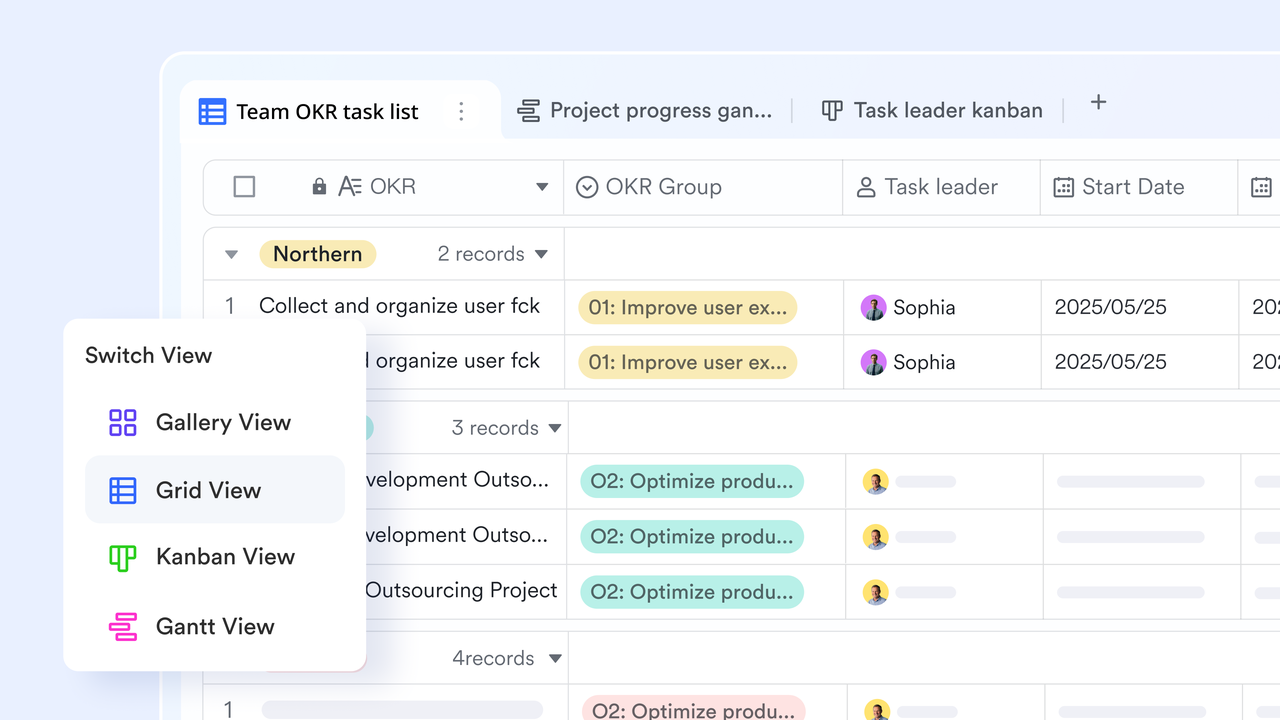
supports Scrum planning by giving teams a structured space to manage product backlogs, sprint items, and priorities. With features like relational tables, , , linked records, and customizable fields, Base helps product owners refine user stories, organize sprint goals, and break down epics into manageable items. Teams can easily switch between Grid, Kanban, or Gallery views to visualize what's planned, what's in progress, and what's ready for refinement. This creates a clear and flexible foundation for sprint planning and workflow organization.
Lark Base automated workflow for refining processes and managing rituals
Scrum relies on recurring activities that need consistency and clear coordination across every sprint. Teams often spend time managing reminders, follow-ups, and updates that can interrupt focus during busy cycles. Lark Base automated workflow helps simplify these routines by handling repetitive steps and keeping information accurate across the workspace. This support allows teams to maintain steady momentum while ensuring that essential Scrum rituals stay organized and reliable. 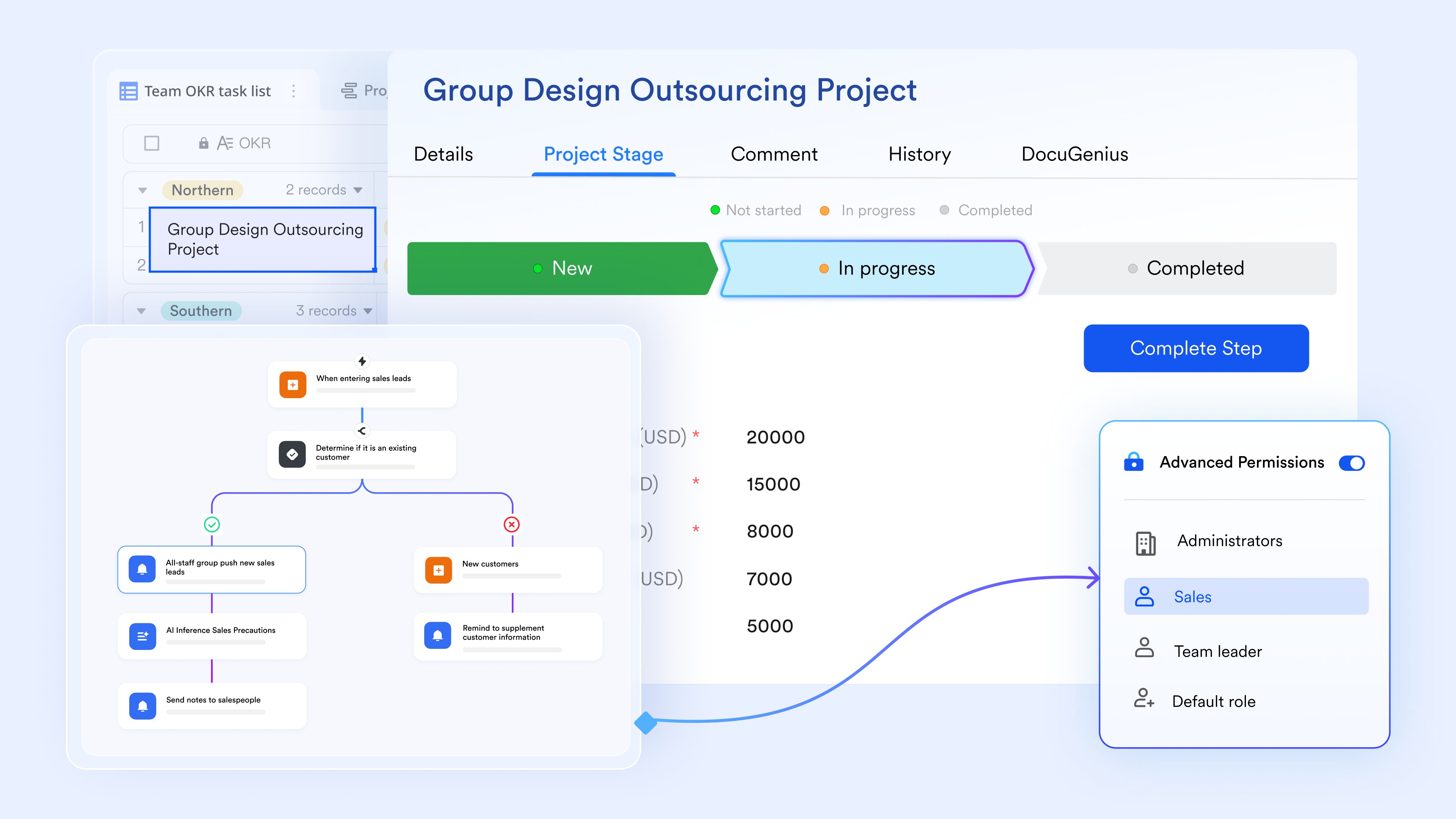
Lark Tasks for organizing sprint execution
Lark Tasks brings clarity to daily execution by turning user stories into actionable tasks connected to the wider Scrum workflow. Teams can assign ownership, set priorities, add subtasks, define dependencies, and track progress in real time. The My Tasks view consolidates each member's workload, while project task views give Scrum Masters and Product Owners full sprint visibility. Tasks also support file attachments, comments, and linked Docs or Base records, ensuring every piece of work stays connected to the story it belongs to. 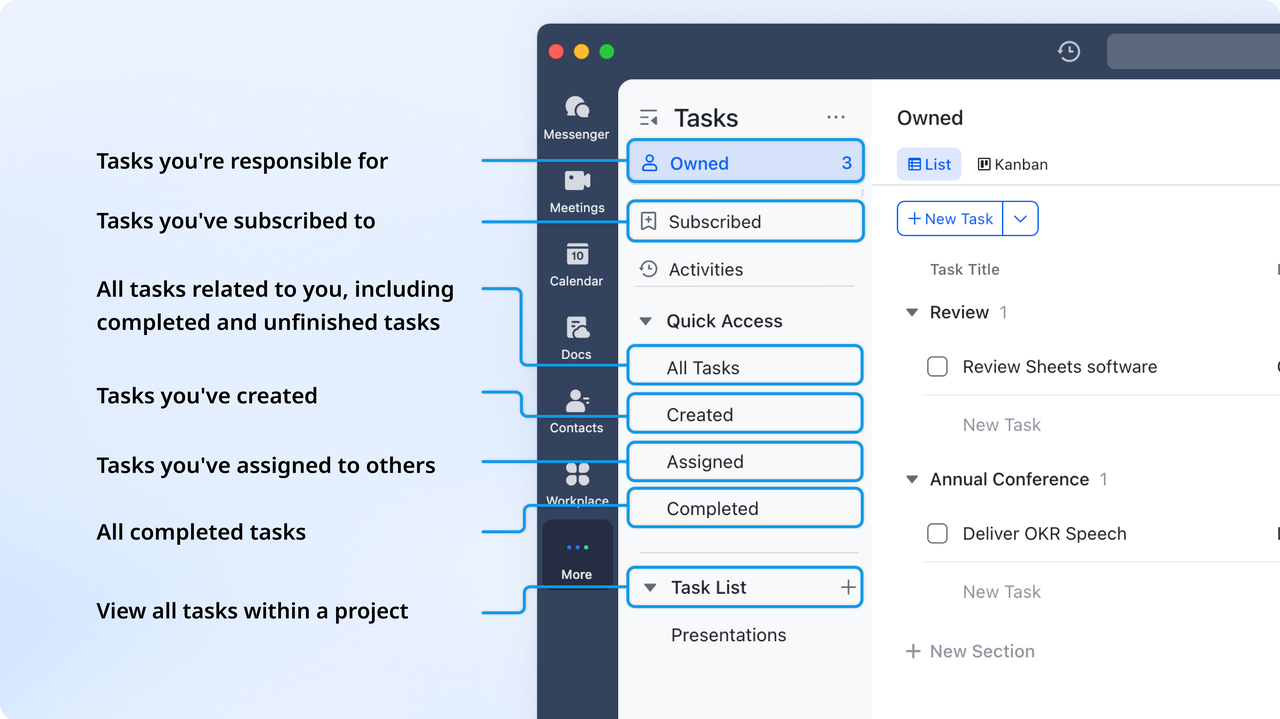
Lark Messenger for contextual daily Scrums
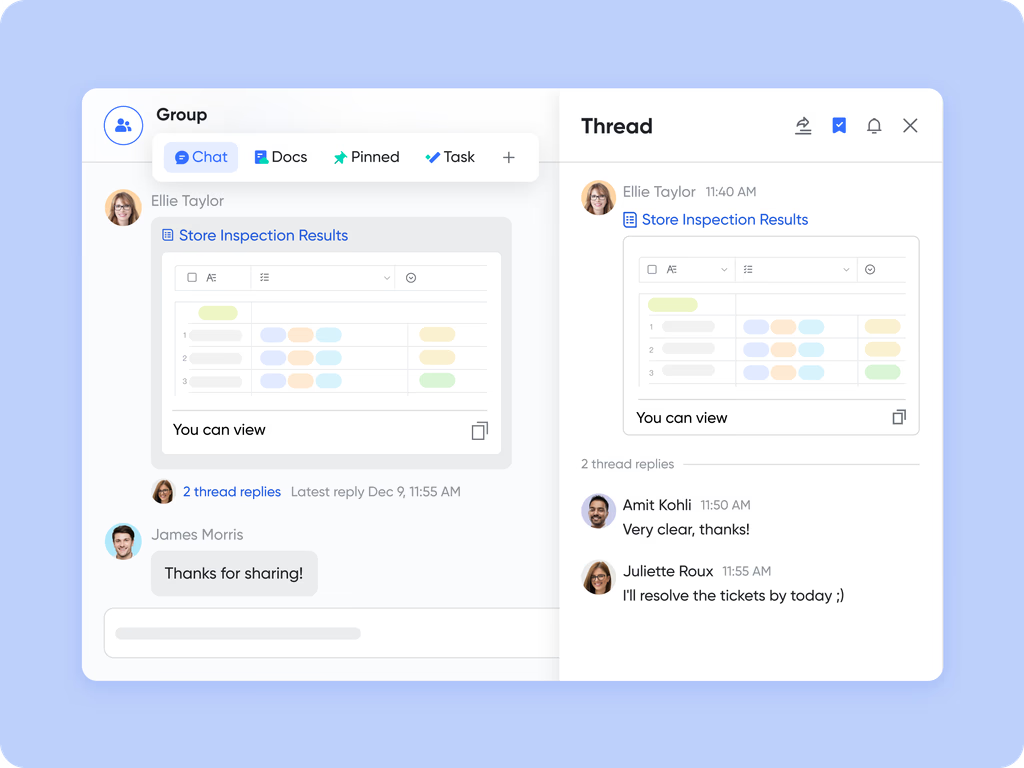
Daily standups become more efficient with , where teams share updates, blockers, and next steps through group chats or threaded discussions. Voice notes, message pins, and direct links to tasks make standups faster and more contextual. Instead of switching tools, team members can report progress and identify problems directly within the same workspace used for sprint execution. This keeps communication aligned with sprint goals and reduces friction across distributed or hybrid teams.
Lark Docs for sprint reviews and retrospectives
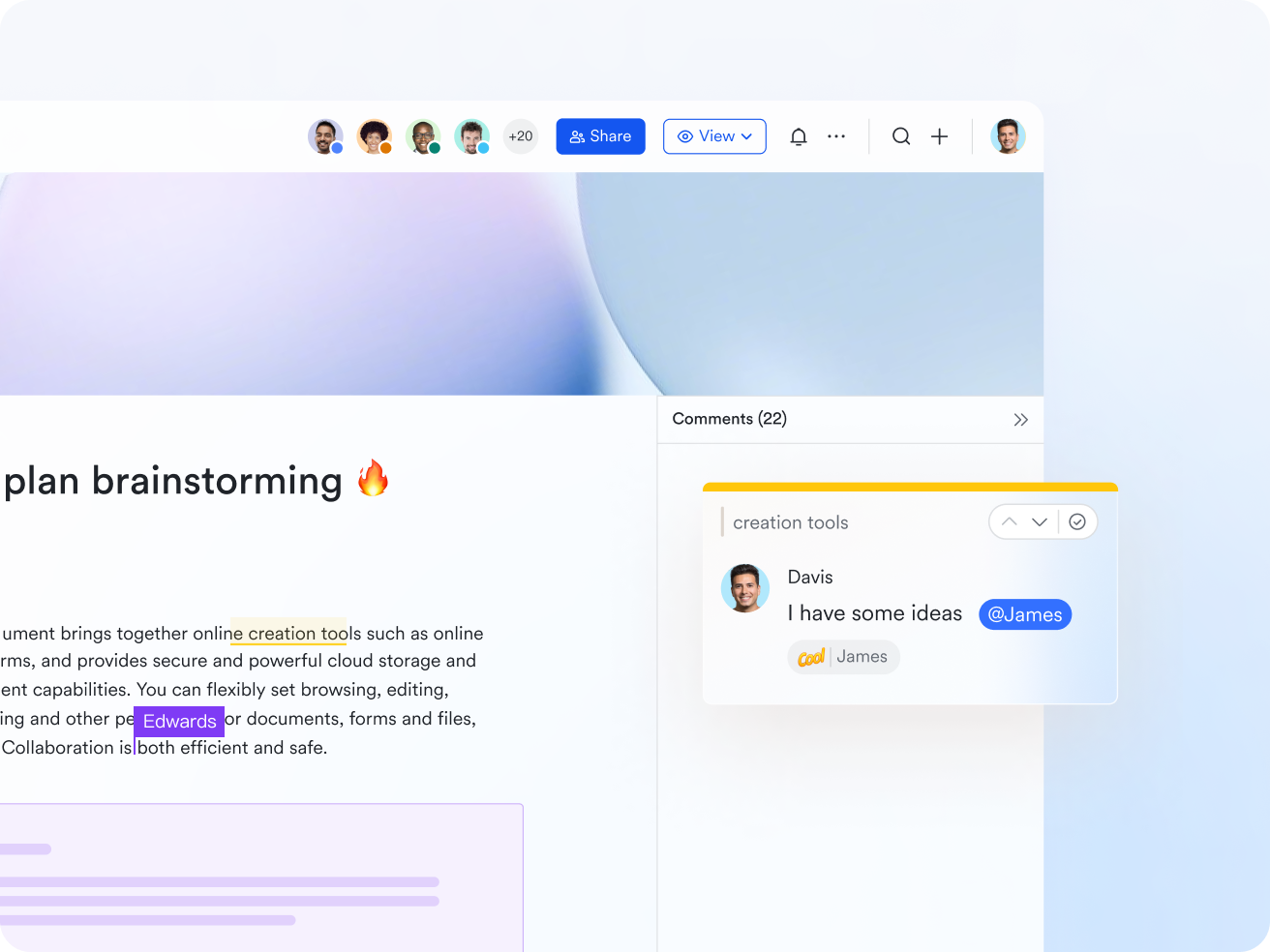
provides a collaborative space for teams to document user stories, acceptance criteria, sprint summaries, and retrospective action items. Real-time co-editing, inline comments, @mentions, rich formatting, tables, and version history help teams refine work and reflect on performance clearly. During Sprint Reviews, Docs can store demo notes and stakeholder feedback; during Retrospectives, teams can record improvements and assign actions. These documents link directly to tasks or base records, ensuring insights remain unified with the ongoing workflow.
Lark Meetings for sprint reviews, planning, and alignment ceremonies
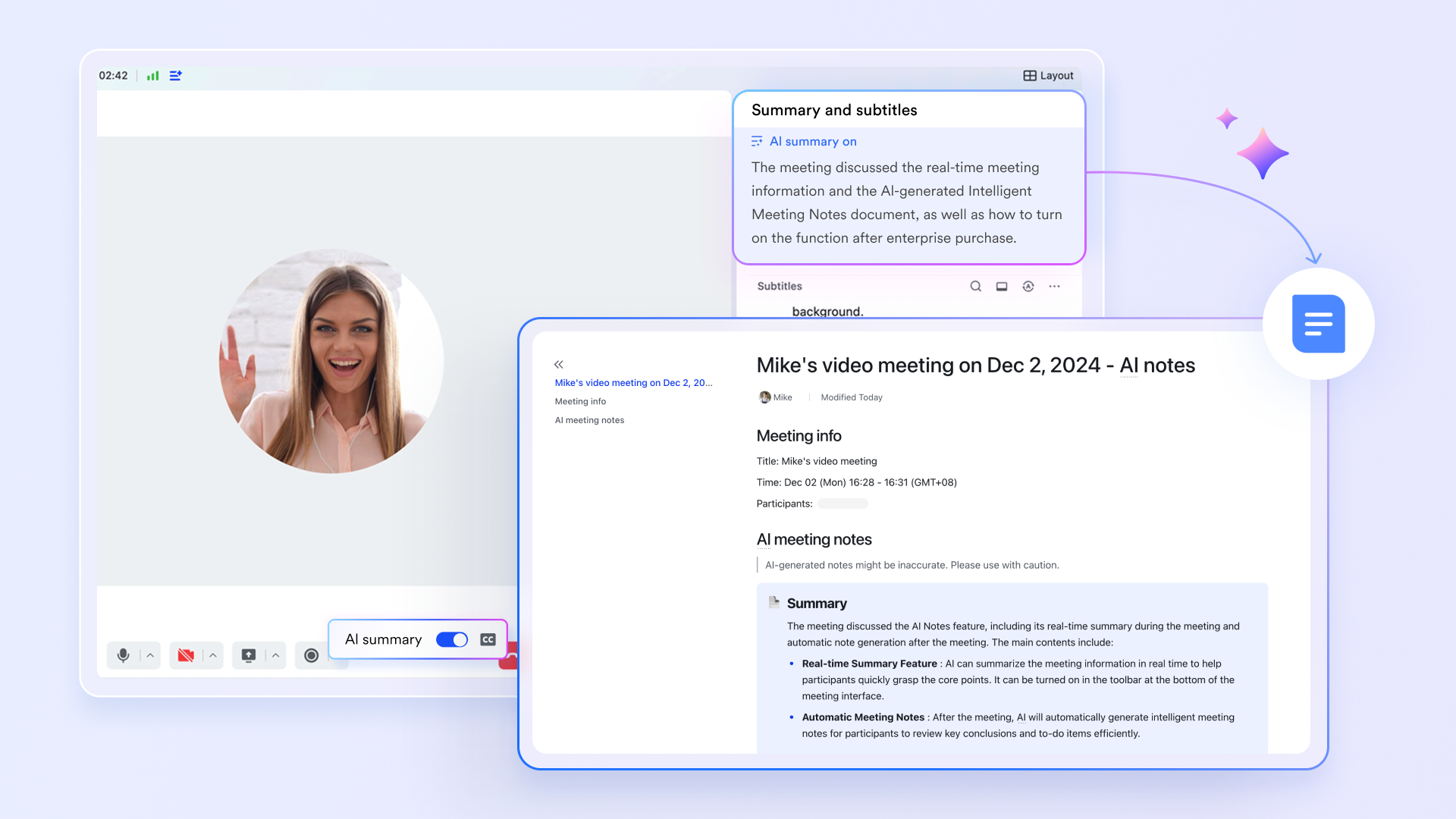
Sprint Planning, Reviews, and Retrospectives often require live discussion, and supports these ceremonies with high-quality video, screen sharing, recording, and in-meeting chat. Teams can present the increment, guide stakeholders through updates, or walk the group through backlog items during planning. When the button is clicked, AI Meeting notes can be taken directly in , and recordings can be stored in Drive for reference. Calendar links, attendee status, and reminders ensure Scrum ceremonies run smoothly and remain well-organized.
:
- Starter plan: Free forever plan that includes 11 powerful tools for up to 20 users. It also comes with 100GB of storage, 1000 automation runs, AI translations, and more.
- Pro plan: $12/user/month (billed annually) for up to 500 users. It includes everything in Starter plus group calling for up to 500 attendees, 15TB of storage, 50,000 automation runs, and more.
- Enterprise plan: for custom pricing. Supports unlimited users and includes even more automation runs and advanced security, compliance, and management features.
For small teams with simple communication needs

18 months message history
1000 Base automation runs/month
2000 rows per table in Base
Most POPULAR
For companies with comprehensive collaboration and management needs
Unlimited message history
500-participant video meetings
50k Base automation runs/month
20k rows per table in Base
For large companies with advanced security and organizational management needs
Get a personalized demo and pricing
Unlimited message history
500-participant video meetings
15 TB storage + 30 GB storage/user
500k Base automation runs/month
50k Base automation runs/month
Most POPULAR
For companies with comprehensive collaboration and management needs
Unlimited message history
500-participant video meetings
50k Base automation runs/month
20k rows per table in Base
Conclusion
Scrum provides teams with a simple structure that supports continuous improvement, , and stronger alignment. Its cycles help teams deliver value steadily while adapting to change with confidence. When supported by a connected digital workspace, Scrum becomes even more effective because teams can communicate clearly, maintain documentation, and track progress seamlessly. As organizations evolve, platforms like gradually become valuable partners for planning sprints, refining work, and managing rituals without disrupting core Scrum practices. This combination helps teams stay focused, organized, and ready to improve across every sprint cycle.
Strengthen your Scrum planning process using Lark
FAQs
What is a certified Scrum master?
A certified is someone trained to guide teams through Scrum principles, ceremonies, and collaboration techniques. They support teams by removing blockers and improving workflow predictability. As teams adopt digital tools to manage rituals more effectively, platforms like Lark can help Scrum masters keep tasks, notes, and communications organized. This combination strengthens their ability to coach teams toward consistent improvement.
How does Scrum adapt to remote-first or globally distributed teams?
Scrum adapts well to remote work by emphasizing clear communication, structured rituals, and shared visibility into progress. Distributed teams benefit from tools that keep tasks, docs, and meetings connected in one place. When a workspace like Lark provides messaging, video calls, and together, it becomes easier to maintain alignment across time zones. This helps remote Scrum teams follow the same rhythm as co-located groups.
What is Scrum vs Agile?
Agile is a broad philosophy or mindset centered on iterative development, flexibility, and customer collaboration. Scrum is a specific, lightweight framework that teams use to put the Agile philosophy into practice through a set of roles, events, and artifacts. In essence, Scrum is a method of doing Agile, making the relationship one of the specific implementation versus the general guiding principles.
What are the five principles of Scrum?
The five core values of the Scrum framework are: Commitment (dedication to the goal), Focus (concentrating on the sprint work), Openness (transparency about work and challenges), Respect (valuing team members' capabilities), and Courage (the strength to do the right thing). These principles guide the team's behavior and decisions to maximize efficiency and value delivery.
What is Scrum vs. Sprint?
Scrum is the entire framework encompassing the roles (e.g., Scrum master), documentation (e.g., product backlog), and meetings (e.g., daily scrum) that guide the project. A sprint is a time-boxed, recurring event (typically 2-4 weeks long) within Scrum during which all the work necessary to produce a usable, valuable increment of the product is completed. The sprint is the heartbeat of Scrum.
Related reading





























