Every organization runs on workflows—from onboarding employees and approving refunds to fulfilling orders and managing patient records. Over time, even well-designed workflows drift as extra approvals creep in, spreadsheets multiply, and emails replace systems. Soon, simple tasks take far longer than they should. That's where workflow analysis helps. It examines how work truly moves through people, tools, and decisions, and requires a thorough understanding of how workflows operate in practice to identify friction and redesign processes, so everything works together. In today's fast-moving, distributed, and compliance-driven environments, inefficient workflows aren't just slow—they're risky, especially when regulatory compliance is a critical concern for many organizations.
This guide explains what workflow analysis is, why it matters, how to do it step by step, and how tools like Lark support data-driven workflow improvement.
What is workflow analysis?
Workflow analysis is the structured process of examining how work moves through an organization from start to finish. It looks at every step in a process—who performs each task, what tools are used, how decisions are made, and where information is handed off—to understand how efficiently and accurately work gets done. Instead of relying on assumptions or outdated documentation, workflow analysis focuses on how work actually happens in real situations. Direct observation, such as shadowing or interviews, is often used to accurately capture real workflow practices.
The goal is to identify delays, bottlenecks, errors, and unnecessary steps that slow teams down or create risk. By mapping the current workflow, , gathering data (both quantitative and qualitative), and analyzing data patterns, organizations can identify where time, money, and effort are being wasted. This allows them to redesign processes to be faster, clearer, and more reliable.
Workflow analysis is widely used in business operations, IT, , and healthcare, where improving coordination, compliance, and service quality is essential.
3 types of workflow analysis
Different business processes require different approaches to workflow analysis. Understanding the main types helps organizations choose the best method for their needs.
- Linear workflow analysis is ideal for processes that follow a strict, step-by-step sequence—think of manufacturing lines or standardized . This approach focuses on optimizing each stage and ensuring smooth handoffs, making it easier to spot and eliminate redundant tasks or delays.
- Cross-functional workflow analysis is used when workflows span multiple departments or involve several teams. These processes often suffer from communication gaps and data silos, which can slow down operations and reduce overall workflow performance. Cross-functional analysis aims to improve collaboration, clarify responsibilities, and ensure that information flows smoothly between all stakeholders.
- Hybrid workflow analysis combines elements of both linear and cross-functional approaches. It's particularly useful for complex workflows that include both sequential steps and, such as product development or patient care in healthcare settings. By blending these methods, organizations can fine-tune linear steps while also addressing the challenges of cross-functional coordination.
Preparing 3 things for workflow analysis
Before diving into analyzing workflows, it's essential to lay a solid foundation for success:
Preparation 1: Start by pinpointing which business processes or workflows need attention—these are often areas where delays, errors, or inefficiencies are most visible, or where patient outcomes and customer satisfaction could be improved. Gather input from a range of stakeholders, including frontline employees, managers, and even customers, to get a well-rounded view of workflow efficiency and pain points.
Preparation 2: Next, assemble a multidisciplinary team that represents all relevant departments, including IT and operations. This team will be responsible for gathering both quantitative and qualitative data, analyzing workflows, and recommending actionable improvements.
Preparation 3: Selecting the right is also crucial at this stage. Tools like process mapping software, workflow management systems, and workflow visualization tools make it easier to collect, organize, and analyze data, as well as to visualize how work actually flows across your organization.
By preparing thoroughly—identifying the right workflows, involving the right people, and equipping your team with effective analysis tools—you set the stage for a successful workflow analysis that can identify bottlenecks, streamline business operations, and drive better workflow efficiency and patient outcomes.
Find better ways to manage and improve your processes
How to analyze your workflow in 5 steps
Analyzing your workflow helps you understand how work truly moves through your organization, not just how it is supposed to move. A structured approach makes it easier to spot inefficiencies, delays, and hidden risks. These five steps provide a practical way to evaluate, improve, and continuously refine any business process.
Step 1: Map your current workflow
involved in your process from beginning to end. Observe how work actually moves among people, teams, and systems rather than relying on assumptions. Include handoffs, , tools used, and decision points to build a realistic picture. This creates a clear baseline of your existing workflow. Accuracy matters more than perfection at this stage.
Step 2: Identify delays and bottlenecks
Review the mapped workflow to spot where work slows down or gets stuck. Look for approval stages that take too long, tasks that keep bouncing back, or steps where teams frequently wait on information. Track turnaround times and notice patterns in missed deadlines or repeated escalations. These areas usually indicate deeper process issues. Bottlenecks reveal where improvement will have the biggest impact.
Step 3: Analyze root causes
Instead of fixing surface problems, dig into why each issue happens. Ask "why" repeatedly to uncover underlying causes such as unclear ownership, manual data entry, lack of automation, or poor communication. Use simple root cause techniques to separate symptoms from real problems. This prevents temporary fixes that fail later. Strong analysis leads to lasting improvements.
Step 4: Redesign the workflow
Once root causes are clear, simplify the process by removing unnecessary steps and reducing approvals where possible. Introduce automation for repetitive tasks and clarify roles to avoid confusion. The test is run in a small group before rolling it out. The goal is to improve speed without sacrificing quality. Keep the redesign practical and easy to adopt.
Step 5: Monitor and refine continuously
After implementing changes, to see if the workflow improves. Measure cycle time, error rates, and overall efficiency. Gather feedback from team members who use the process daily. Adjust steps as business needs evolve. Workflow analysis is continuous, not a one-time exercise.
Meet Lark: Data-based analysis & practice-based workflow optimization
Modern workflow analysis requires more than charts and checklists—it needs around live data. brings teams, workflows, and analytics into one connected workspace so everyone works from the same source of truth. Instead of switching between messaging, spreadsheets, and dashboards, teams can see, discuss, and in one place. This makes it easier to spot bottlenecks, test changes, and track results as they happen. By connecting people and processes, Lark turns workflow analysis into a continuous, collaborative improvement cycle.
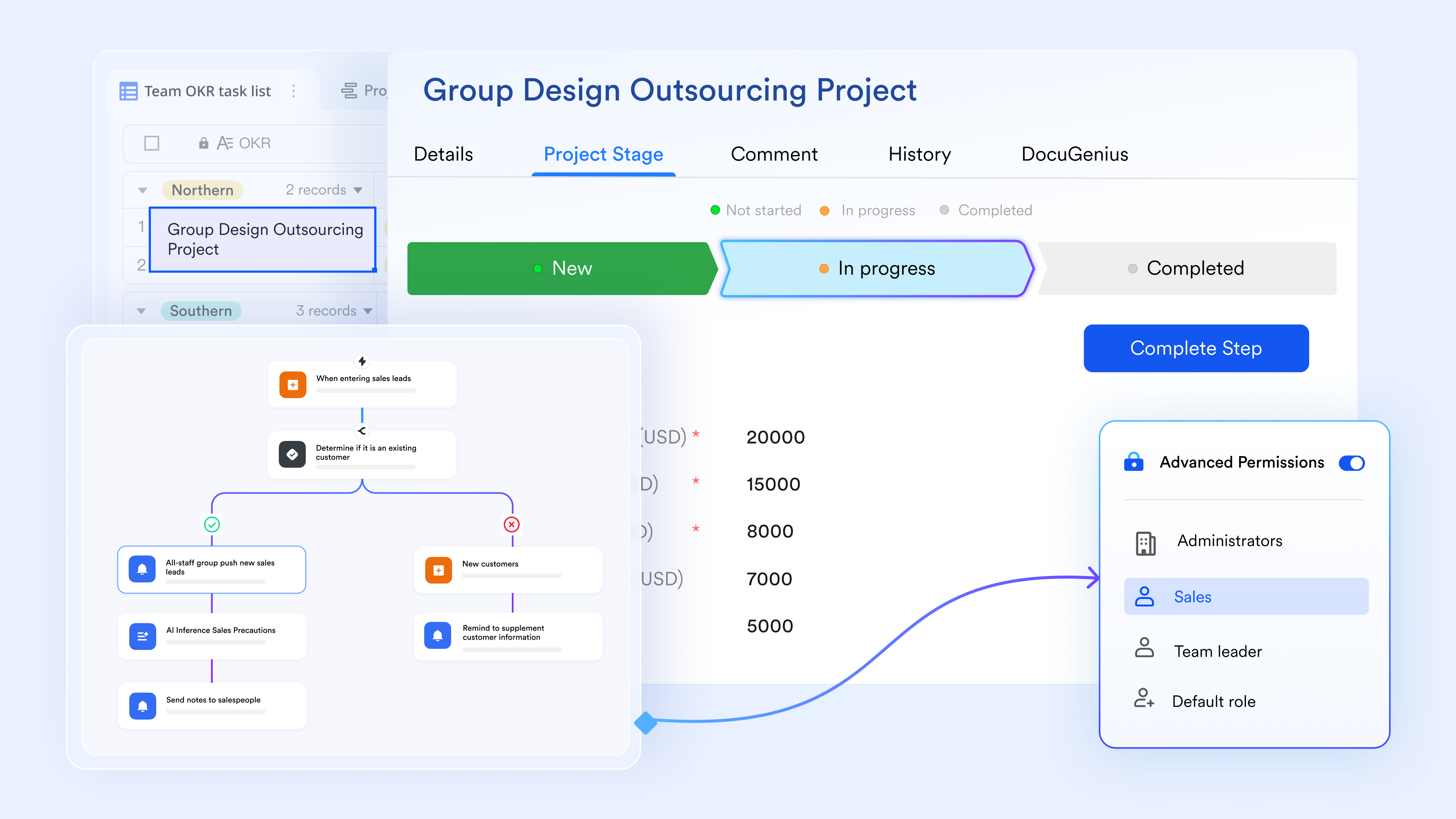
Structural intelligence: Designing the data architecture
Lark Base acts as the "source of truth" by standardizing how information enters your organization. Instead of loose emails, users can experience two-way link records to create sturdy relationships between tables—connecting a "Client" to their "Project" and "Invoices." 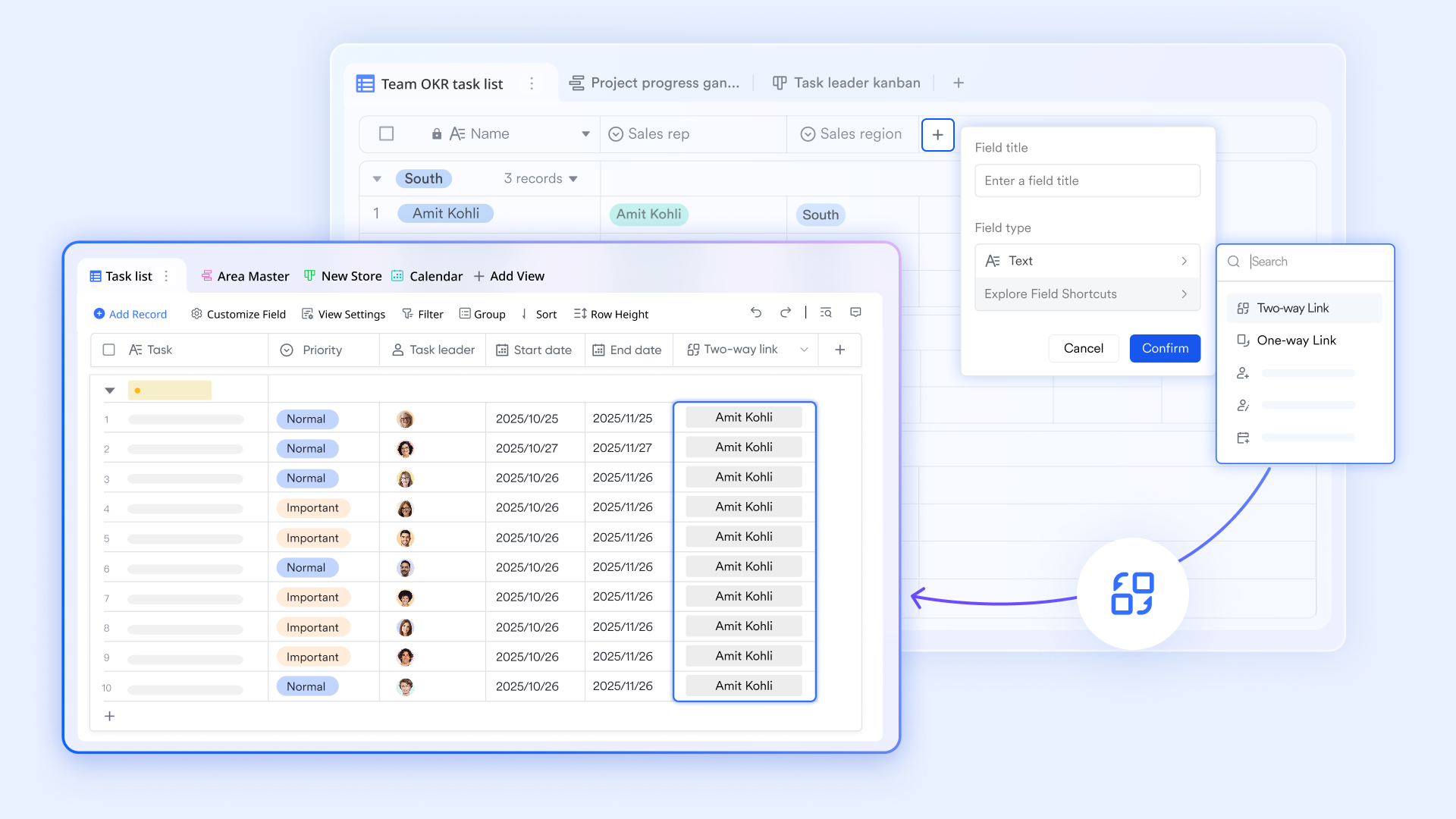
For process analysis, switch to the Kanban view to visualize "pile-ups" in a specific stage (like "Pending review") or the Base Gantt view to see a high-level timeline of your records. By adding Formula fields, you can automatically measure "Cycle Time"—the exact time a task takes from creation to completion—providing the data needed to justify process changes based on hard metrics 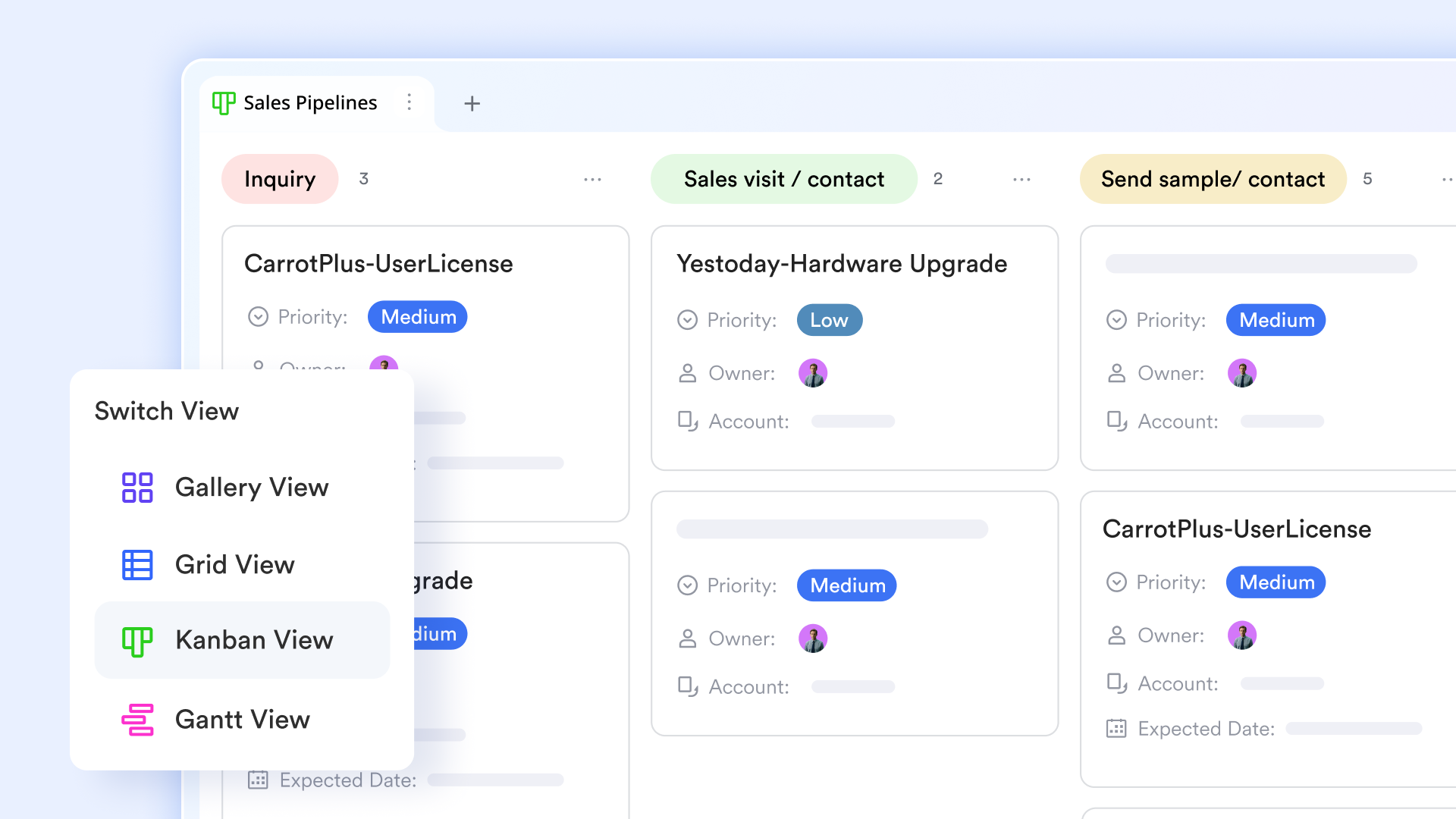
Operational logic: Automating the flow of work
Once your data is structured, Lark Base workflows execute the movement. Using a visual, no-code automation canvas, you can map out trigger-action sequences that eliminate manual handoffs—such as automatically assigning a "QA Engineer" the moment a developer marks a task as "Deployed." To analyze efficiency, use the run history feature to audit the success rate of your automations. This allows you to spot "Friction Points" where automated tasks consistently fail or time out, giving you a clear roadmap for where the business logic needs to be refined. 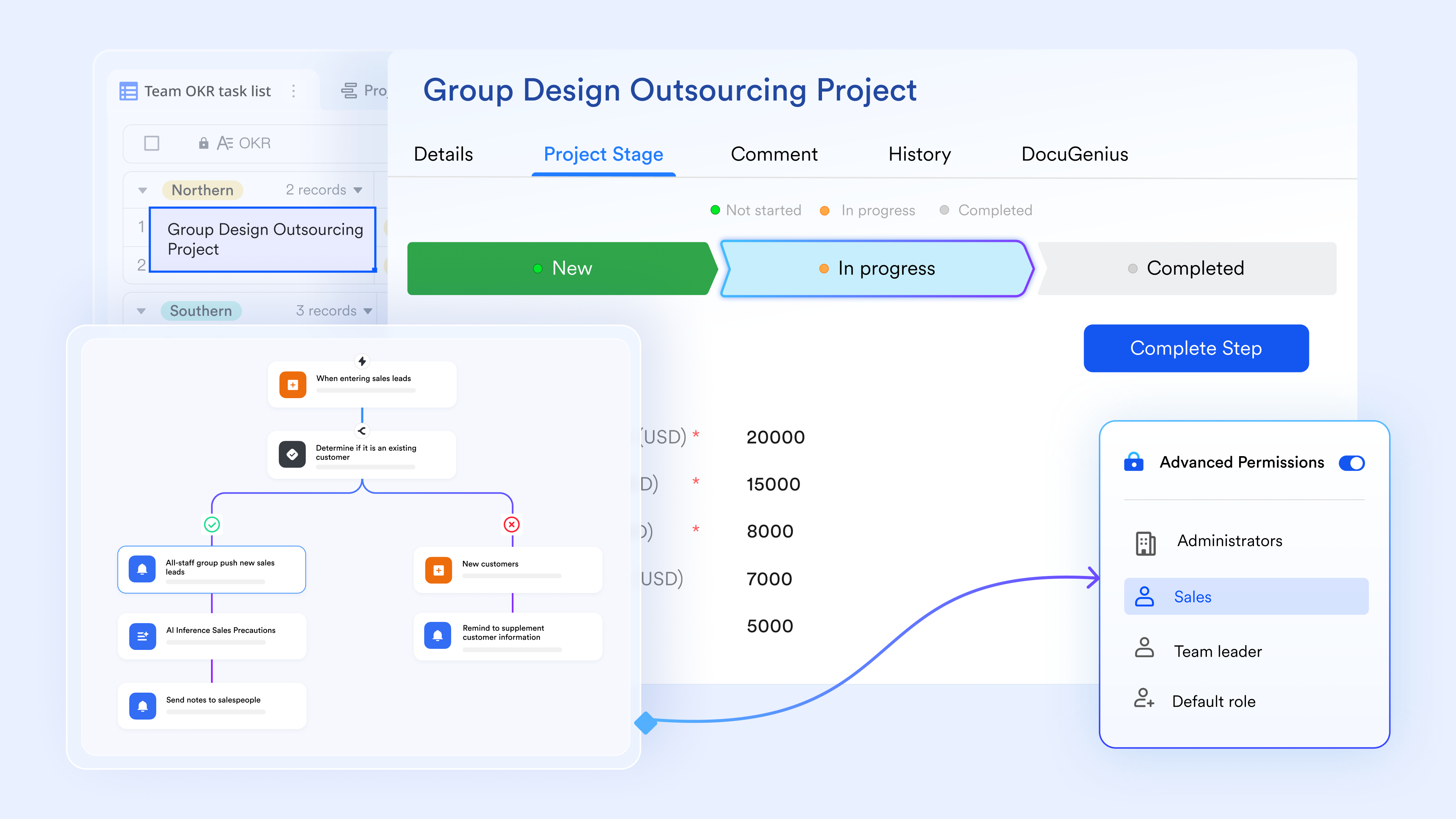
Execution accountability: Closing the loop on tactical output
While Base manages the "Big Picture," Lark Tasks handles the granular execution that keeps processes alive. Use the to analyze completion rates across different teams. This feature allows you to see the "Gap" between your planned process and actual team output. If certain types of tasks are consistently overdue, it's an analytical signal that your mapped workflow might be unrealistic or under-resourced, allowing you to rebalance assignments and set more accurate expectations for future business cycles. 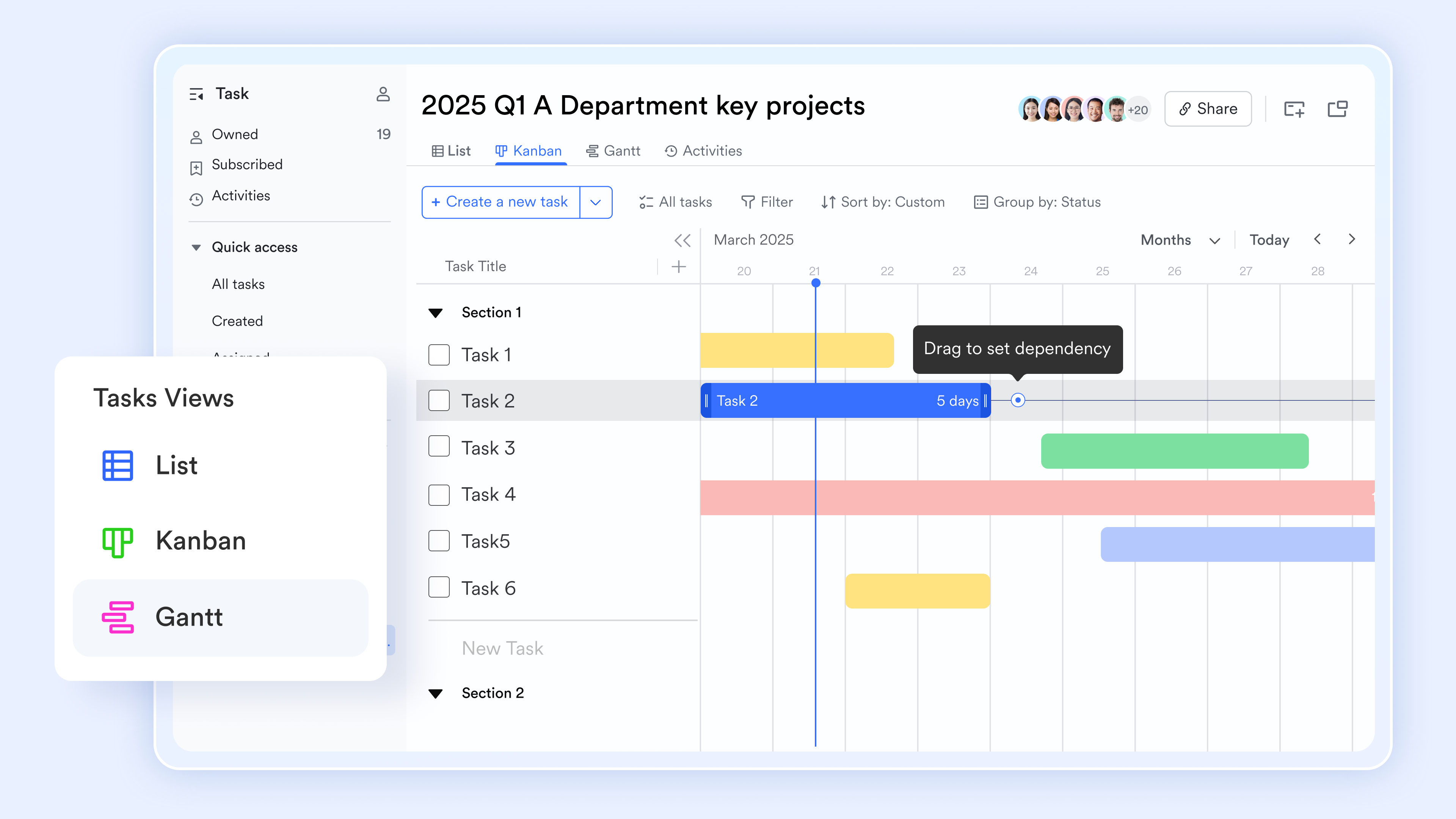
Governance transparency: Streamlining decision checkpoints
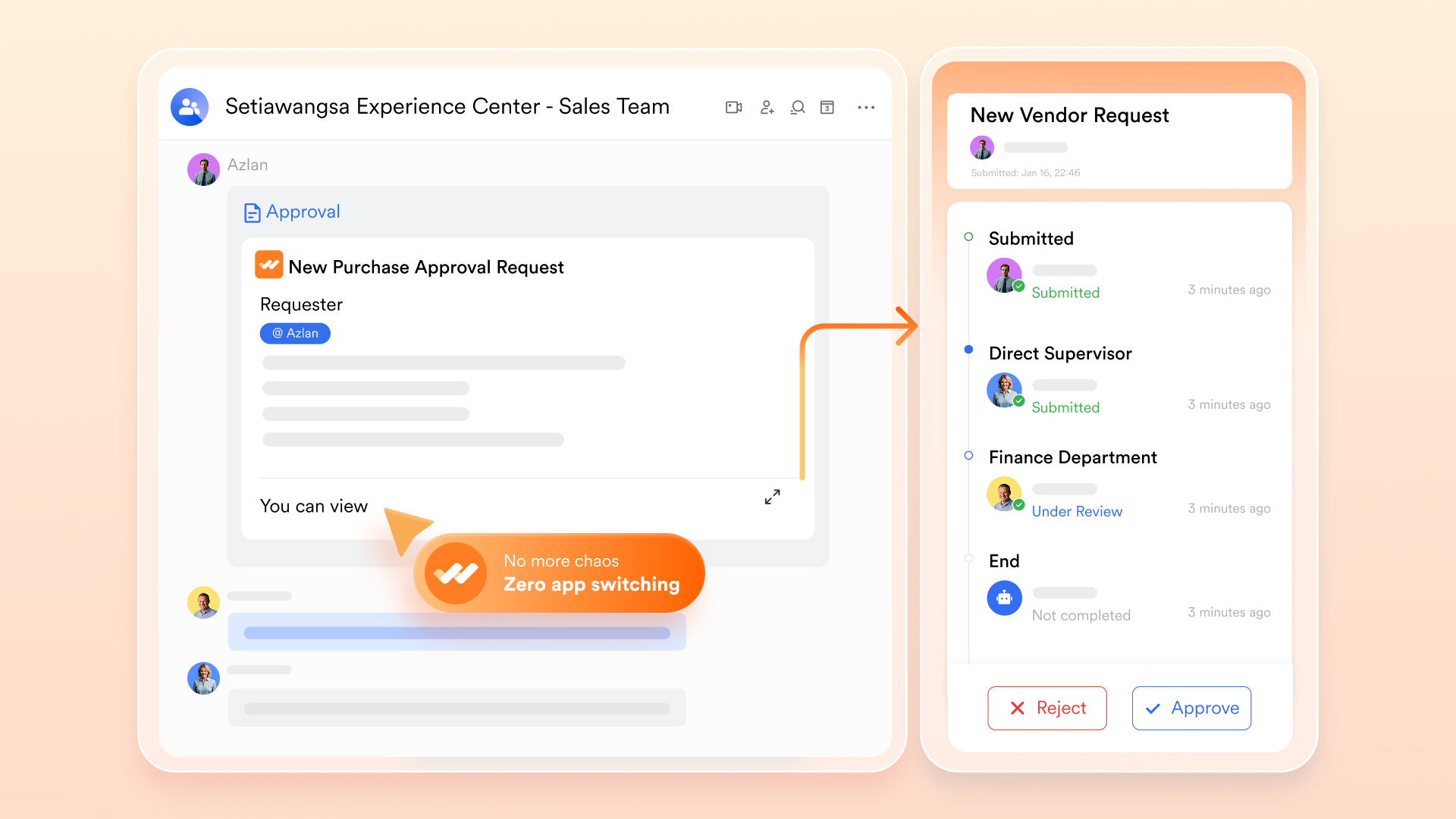
The "Decision Stage" is where most workflows stall. centralizes these bottlenecks into a trackable hub. You can map out multi-step and conditional approval routes, ensuring requests are automatically escalated based on criteria like budget or risk level. For analysis, the approval efficiency diagnosis tool provides timestamps for every sign-off. This transparency reveals "Dwell Time"—identifying if a specific manager or department is a persistent bottleneck—allowing you to adjust workloads or simplify your governance policies to keep the organization moving.
Collaborative velocity: Keeping communication in context
Information decay often happens when work moves from a discussion to a task. solves this by linking chat threads directly to records, keeping the "Why" behind a decision attached to the "What." During , use Magic Share to co-edit live workflow maps or project boards on-screen, turning a review session into an immediate optimization event. then summarize the discussion and extract action items, ensuring that verbal decisions are instantly documented as trackable steps in your digital workflow, maintaining momentum without manual follow-up. 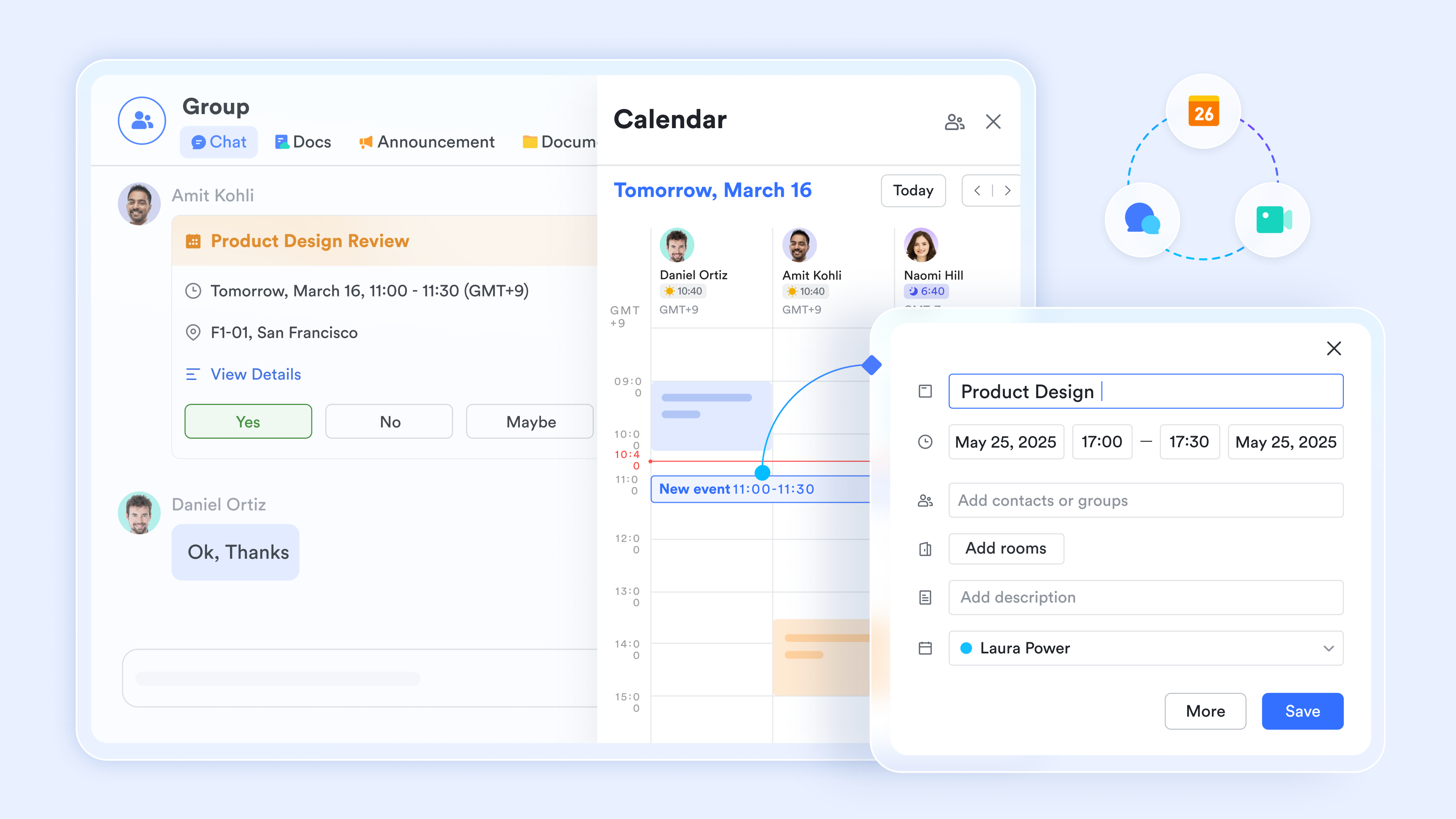
:
- Starter plan: Free forever plan that includes 11 powerful tools for up to 20 users. It also comes with 100GB of storage, 1000 automation runs, AI translations, and more.
- Pro plan: $12/user/month (billed annually) for up to 500 users. It includes everything in Starter plus group calling for up to 500 attendees, 15TB of storage, 50,000 automation runs, and more.
- Enterprise plan: for custom pricing. Supports unlimited users and includes even more automation runs and advanced security, compliance, and management features.
For small teams with simple communication needs

18 months message history
1000 Base automation runs/month
2000 rows per table in Base
Most POPULAR
For companies with comprehensive collaboration and management needs
Unlimited message history
500-participant video meetings
50k Base automation runs/month
20k rows per table in Base
For large companies with advanced security and organizational management needs
Get a personalized demo and pricing
Unlimited message history
500-participant video meetings
15 TB storage + 30 GB storage/user
500k Base automation runs/month
50k Base automation runs/month
Most POPULAR
For companies with comprehensive collaboration and management needs
Unlimited message history
500-participant video meetings
50k Base automation runs/month
20k rows per table in Base
Workflow analysis examples with use cases
Workflow analysis examples show how different teams use process mapping and data to remove friction and improve results across daily operations. By studying real workflows, organizations can identify what slows work down and where improvements matter most. These use cases illustrate how workflow analysis applies across industries and functions.
- Customer support ticket handling: Workflow analysis reveals where tickets wait too long or are unnecessarily reassigned. Improving handoffs helps teams resolve issues faster and raise customer satisfaction.
- Employee onboarding: shows where paperwork, approvals, or system access delays new hires. Streamlining these steps helps employees become productive sooner.
- Healthcare patient admissions: Workflow analysis highlights bottlenecks in registration, triage, and record entry. Fixing these improves patient flow, safety, and .
- Finance invoice processing: By analyzing approval and data-entry steps, finance teams reduce payment delays and errors. This leads to better cash flow and stronger vendor relationships.
Turn your workflows into real use today
Common mistakes in workflow analysis
Even well-intentioned workflow analysis efforts can fail if they focus on the wrong things or skip critical steps. Knowing the most common mistakes helps teams avoid wasted time and misleading conclusions.
- Documenting how work should happen instead of how it does: Teams often map ideal processes rather than real ones, missing everyday workarounds. This leads to improvements that look good on paper but fail in practice.
- Ignoring data and relying only on opinions: Without , error rates, or volumes, teams guess where problems exist. Data reveals the true bottlenecks and their real impact.
- Overcomplicating the analysis: Adding too many diagrams, tools, or frameworks can stall progress. Simple, clear workflows are easier to fix and easier for teams to follow.
- Treating workflow analysis as a one-time project: as the business grows, but many teams stop reviewing them. Without continuous updates, improvements quickly become outdated.
Conclusion
Workflow analysis gives organizations a practical way to see how work truly moves across people, systems, and decisions. By , identifying bottlenecks, and understanding root causes, teams can eliminate delays, reduce errors, and improve overall efficiency. Whether in business operations or healthcare environments, better workflows lead to faster service, stronger compliance, and more confident teams. The real value of workflow analysis is not just fixing what is broken, but building processes that can adapt as your organization grows and changes.
helps make continuous improvement possible by bringing together collaboration, data, and automation in a single connected workspace. Teams can track workflows in real time, analyze performance, and coordinate changes without switching between tools. If you are ready to turn scattered processes into clear, actionable workflows, it is time to explore how Lark can support smarter, more efficient ways of working across your organization.
See how teams streamline everyday business processes
FAQs
How long does workflow analysis take?
The time required depends on the process's complexity and maturity, but most teams complete the core workflow analysis steps within a few weeks. Smaller workflows can be mapped and improved much faster with the right structure. Using Lark helps teams collaborate, , and move through each stage more efficiently.
Who should lead workflow analysis?
Workflow analysis should be led by a cross-functional owner who understands both operations and the workflow analysis definition in practice. This is often a process manager, operations lead, or quality improvement specialist. With Lark, leaders can bring different stakeholders into one shared workspace to align on improvements.
Can workflow analysis be automated?
Many aspects of workflow analysis, including tracking cycle time and identifying patterns in root cause analysis workflows, can be automated with modern platforms. Automation reduces manual reporting and highlights issues in real time. Lark supports this by connecting live data with workflow tracking and alerts.
What tools are best for healthcare workflow analysis?
Healthcare teams need tools that support compliance, , and ehr workflow analysis across departments. The right platform should show how patient data, approvals, and tasks move together. Lark helps healthcare teams analyze and improve workflows while keeping information centralized and secure.
How often should workflows be reviewed?
Workflows should be reviewed regularly, especially when volumes, regulations, or technology change. Continuous review ensures that improvements stay relevant and effective over time. With Lark, teams can monitor workflows and make adjustments as conditions evolve rather than waiting for problems to appear.
Related reading





























