Zendesk is often positioned as the default customer support platform for growing teams, but the reality in 2026 is more nuanced. While Zendesk remains strong at ticket handling and customer-facing interactions, many teams now evaluate it through a broader operational lens that includes execution, internal coordination, and cost scalability. As support issues increasingly require cross-team collaboration, the limits of ticket-first systems become more visible. This Zendesk review examines how the platform performs in real-world usage, how pricing and AI features actually scale, and why some teams begin looking beyond Zendesk as support evolves into execution.
What is Zendesk?
Zendesk is a customer service and support platform designed to help businesses manage customer interactions across multiple channels, including email, chat, voice, social media, and web forms. It is best known for its ticket-based system, which centralizes customer requests into a single queue so support teams can track, prioritize, and resolve issues efficiently. Over time, Zendesk has expanded beyond basic help desk functionality to include AI-driven automation, self-service tools, and products that support sales, customer engagement, and . This evolution has positioned Zendesk as a broad customer service platform rather than a single-purpose support tool.
In real-world usage, Zendesk is primarily adopted by organizations that need structured operations with clear accountability and performance tracking. Teams rely on it to manage service-level agreements, measure response and resolution times, and maintain consistent communication with customers. Zendesk is commonly used in SaaS, ecommerce, and B2B environments where support volume is high and customer expectations are well-defined. However, while it excels at managing incoming requests, Zendesk is fundamentally designed around handling support interactions rather than coordinating cross-team execution once work extends beyond the support queue.
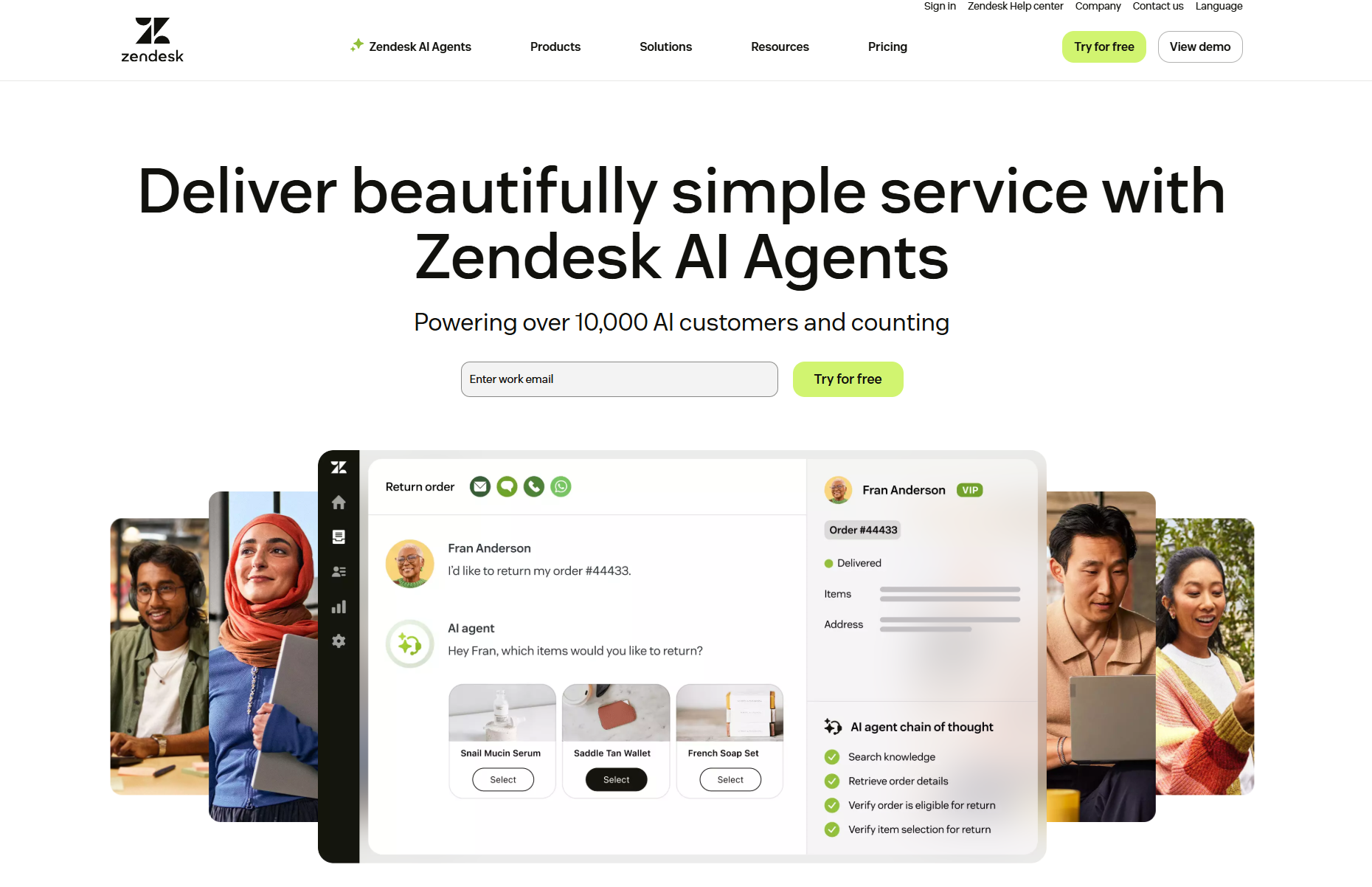
Image source: zendesk.com
Reviews of Zendesk: How industries should choose them
Zendesk is not a single tool but a collection of products that teams adopt at different stages of their support maturity. In practice, most organizations don't use every product equally. Usage tends to cluster around immediate support needs rather than long-term workflow execution.
Zendesk Sell review
Zendesk Sell is a modern, cloud-based designed to improve sales team productivity by removing friction from daily workflows. Formerly known as Base CRM, it is now fully integrated into the Zendesk ecosystem, providing a unified view of the customer across sales and support.
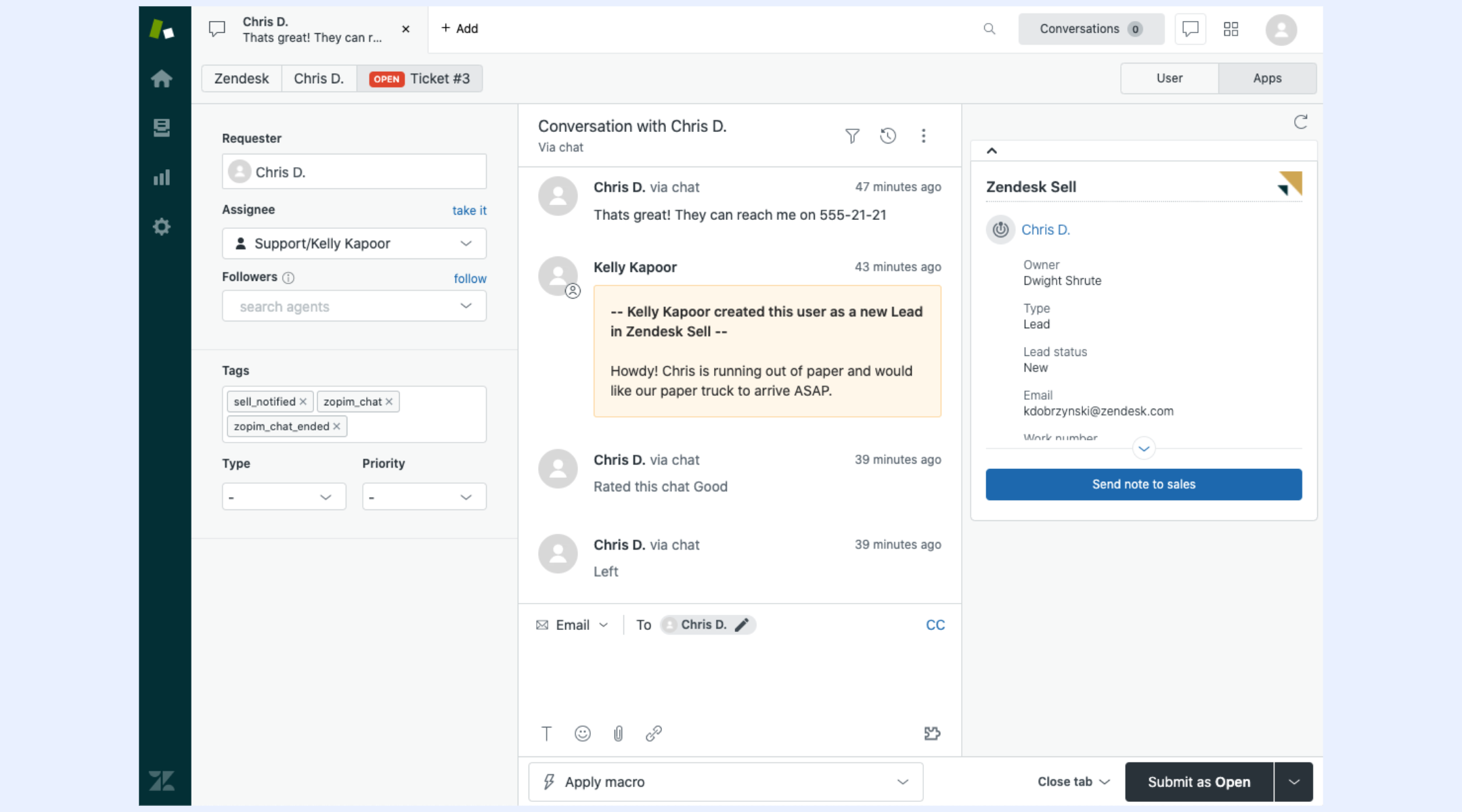
Image source: zendesk.com
Key features:
- Visual sales pipeline provides a clear, drag-and-drop interface to track deals through every stage of the sales cycle.
- Complete email integration syncs with Gmail and Outlook to track opens, clicks, and automate follow-up sequences.
- Native dialer and text messaging allow reps to make calls and send texts directly from the with automatic logging and recording.
- Unified customer view displays active support tickets from Zendesk Support within the sales dashboard for better context during outreach.
- Smart lists enable real-time filtering and segmentation of leads based on specific criteria like activity or deal value.
How well it performs: Zendesk Sell delivers strong performance through an intuitive interface and seamless support integration that provides sales teams with a complete 360-degree customer view. While it features a top-rated mobile app for field productivity, it lacks the deep workflow automation of its enterprise competitors and restricts advanced features to its most expensive tiers.
Zendesk Service review
Zendesk Service is a comprehensive, AI-powered designed to manage and scale support operations across every digital channel. By unifying ticketing, messaging, and self-service into one agent workspace, it enables businesses to deliver personalized experiences while improving internal operational efficiency.
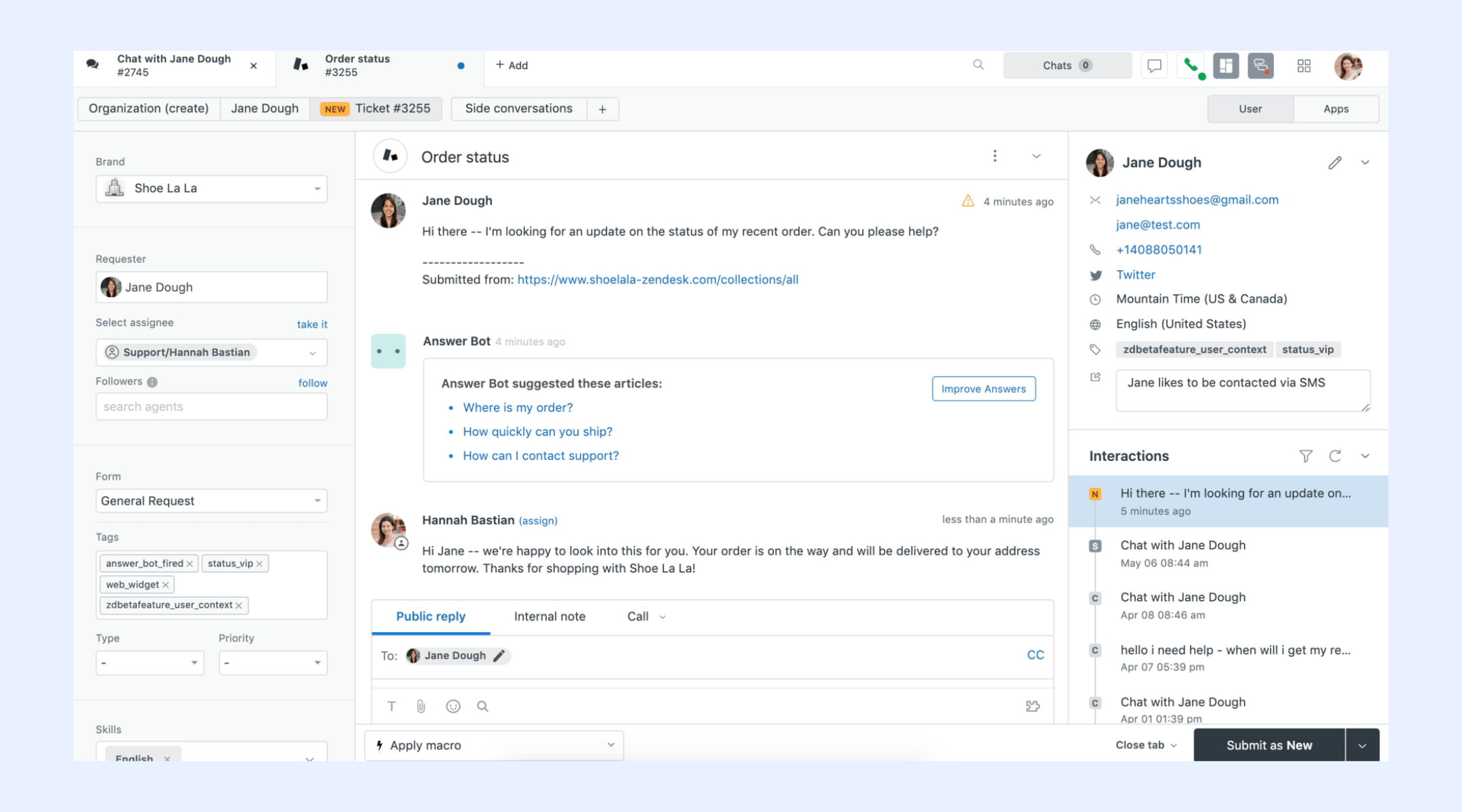
Image source: zendesk.com
Key features:
- Omnichannel ticketing system centralizes customer inquiries from email, phone, social media, and messaging apps into a single, unified agent conversation.
- AI-powered agents and bots utilize generative AI to resolve routine customer queries instantly and provide agents with suggested responses and sentiment analysis.
- Integrated help center and community forum empower customers to find answers through self-service, significantly reducing the volume of incoming support tickets.
- Agent workspace customization allows teams to tailor the interface with relevant customer data and third-party tools for faster, more informed resolutions.
- Advanced reporting and analytics track key performance metrics like first-response time and CSAT to provide actionable insights into support team health.
How well it performs: Zendesk Service leads the market with its high scalability and seamless omnichannel integration, making it a reliable choice for growing businesses. While its AI features significantly boost efficiency, the platform's advanced reporting and automation tools often require a steep learning curve and higher-tier subscriptions to unlock fully.
Zendesk Chat review
Zendesk Chat (now Zendesk Messaging) has evolved from a traditional live chat tool into a modern, AI-enhanced messaging solution that supports persistent conversations across web, mobile, and social channels. It is designed to bridge the gap between instant support and long-term , allowing agents to manage real-time interactions with the full context of a customer's history.
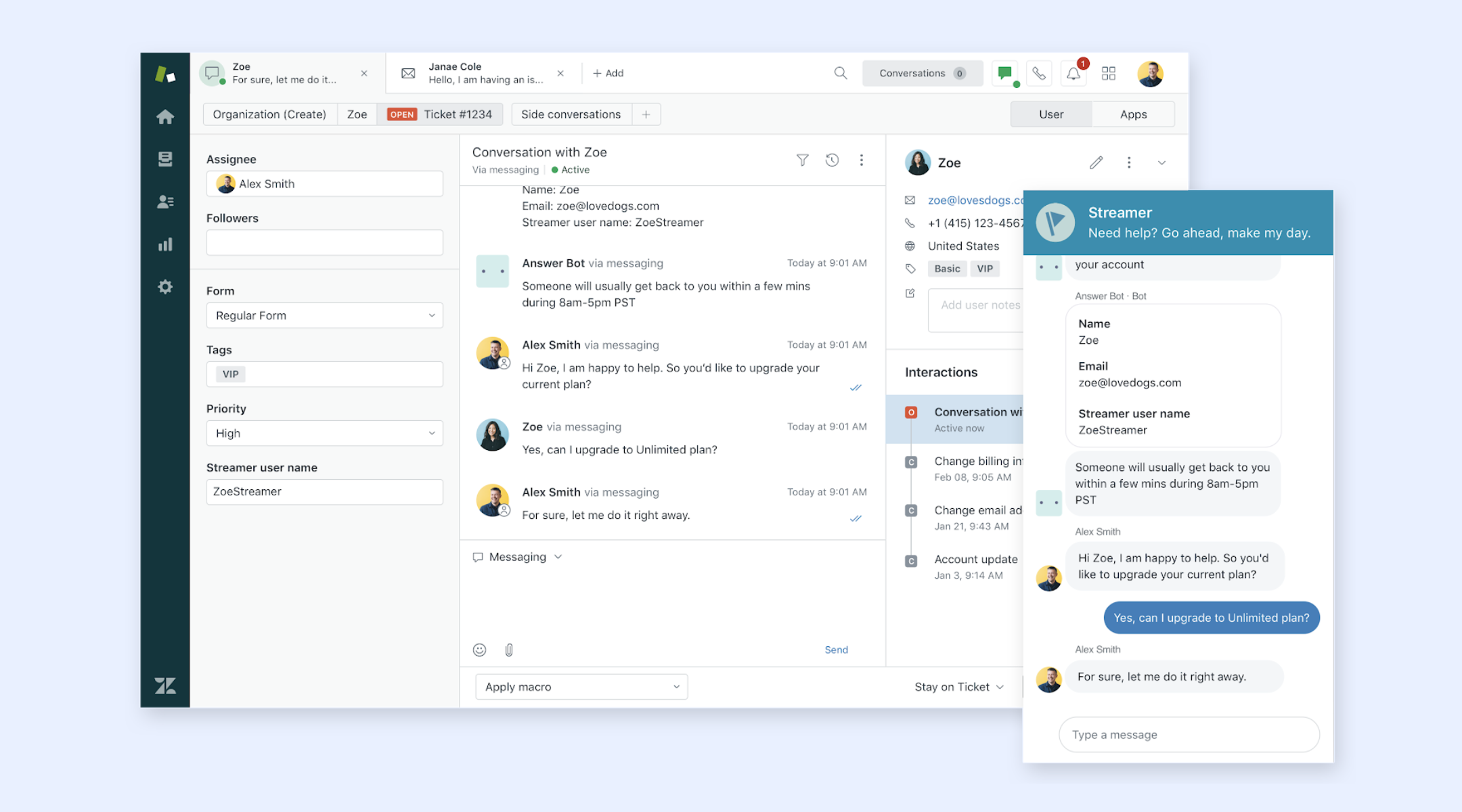
Image source: zendesk.com
Key features:
- Persistent omnichannel messaging allows customers to start a chat on a website and continue it later via WhatsApp or social apps without losing conversation history.
- Automated triggers and proactive engagement send targeted messages to visitors based on specific behaviors, such as spending a set amount of time on a checkout page.
- Native AI agent integration uses bots to handle high-volume FAQs instantly, only escalating complex issues to human agents when necessary.
- Real-time visitor tracking provides agents with immediate insights into which page a customer is viewing, helping them provide more personalized and relevant support.
- Customizable chat widgets offer a seamless brand experience by allowing businesses to tailor the look, feel, and localized language of the chat bubble.
How well it performs: Zendesk Chat excels at providing low-friction, high-speed support that significantly improves customer satisfaction through its seamless transition between automated bots and live agents. However, its most powerful features, such as advanced routing logic and full AI capabilities, carry a higher price point and require a well-structured knowledge base to function at peak efficiency.
Zendesk ITSM review
Zendesk ITSM is a modern, cloud-based internal help desk solution designed to streamline employee support and IT service management. It applies the same intuitive, "customer-first" philosophy to internal teams, allowing IT, HR, and facilities departments to manage employee requests, hardware issues, and internal workflows with professional-grade efficiency.
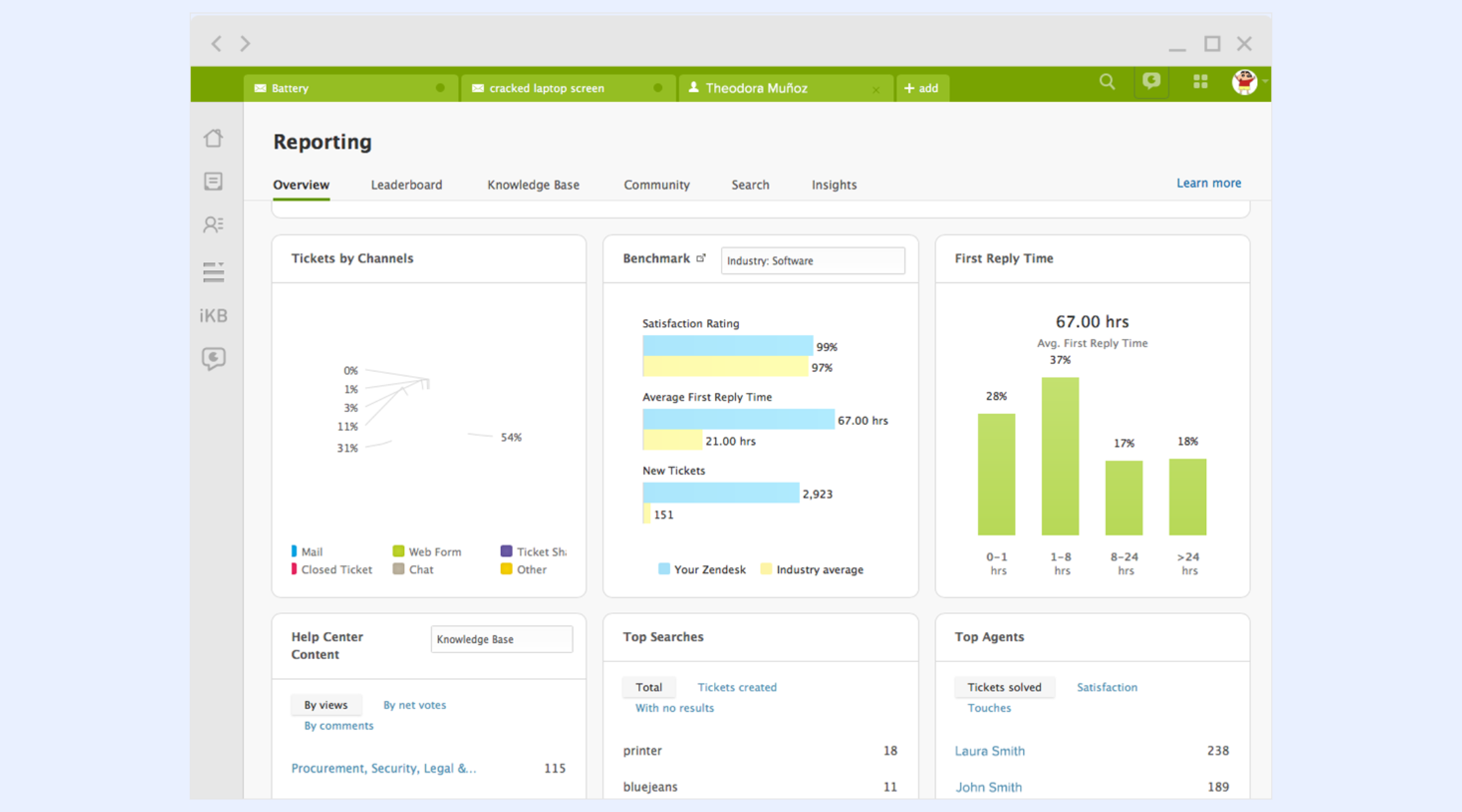
Image source: zendesk.com
Key features:
- Unified employee portal provides a single, branded destination for staff to submit tickets, track request statuses, and access internal knowledge base articles.
- Knowledge management for employees enables self-service for common IT issues, such as password resets and VPN setups, reducing the burden on internal support staff.
- Automated internal workflows use triggers and macros to route tickets to the correct department and automate repetitive administrative tasks.
- AI-powered employee bots offer instant support via Slack or , resolving routine internal inquiries through natural language processing.
- Side conversations for internal collaboration allow IT agents to consult with external vendors or other internal departments directly within the ticket interface.
How well it performs: Zendesk ITSM performs exceptionally well for organizations seeking an easy-to-deploy, user-friendly alternative to traditionally complex legacy IT tools. While it is highly effective for service-centric tasks and employee engagement, it may lack some of the deep technical asset management and specialized ITIL-specific features found in "heavyweight" ITSM competitors.
Zendesk pricing explained beyond the plan page
Zendesk pricing often looks straightforward when viewed at a plan level, but the real cost and value only become clear when you examine what each tier actually enables in day-to-day . Beyond headline prices, Zendesk plans differ significantly in how they support omnichannel engagement, automation depth, reporting, and scalability as support volumes grow. Understanding these differences helps teams avoid overpaying for unused features or underinvesting in capabilities they will need later. This breakdown looks beyond the plan page to show how Zendesk pricing aligns with real support use cases, team maturity, and long-term operational needs.
Information source: zendesk.com
Update time: 2025-12-23
Note: Pricing and plan details reflect publicly available data as of the update date and may vary based on region, billing cycle, and number of agents.
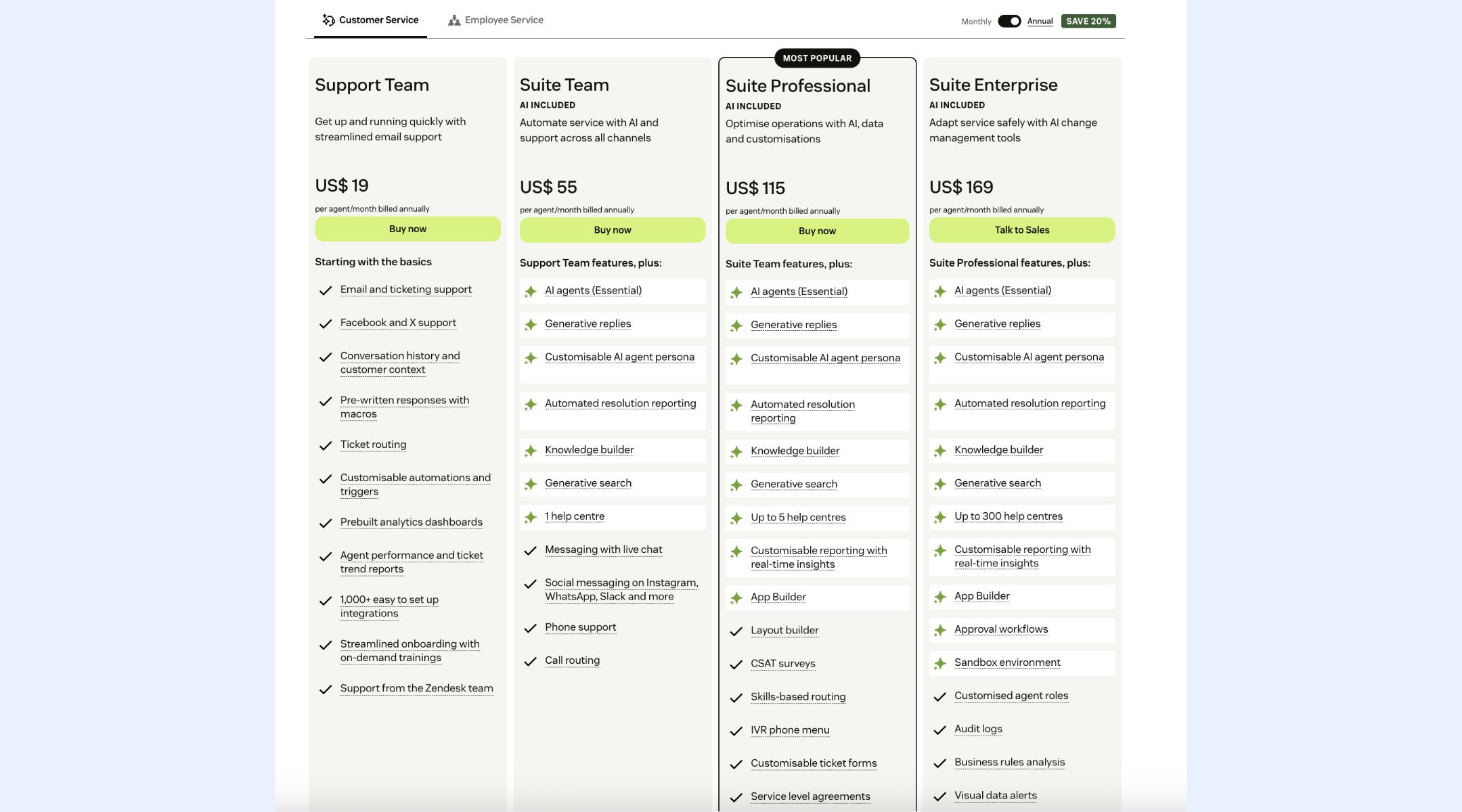
Image source: zendesk.com
Where Zendesk starts to feel restrictive
Zendesk is highly effective for managing customer support at the ticket level, but limitations begin to surface as organizations scale or expand beyond traditional support use cases. What works well for handling inbound requests can become a bottleneck when issues require deeper investigation, , or ongoing execution. Many teams find that Zendesk's structure is optimized for resolution speed rather than end-to-end ownership. As a result, friction often appears not during intake, but after the initial response phase.
- Ticket-first thinking: Zendesk is fundamentally built around tickets, which shapes how teams think about and manage work. Every request is treated as an isolated case that moves through a predefined lifecycle, even when the issue requires broader coordination. Once a ticket involves product, engineering, finance, or operations, it often stops being the best representation of the actual work being done. Teams end up tracking progress outside Zendesk, using documents, chats, or spreadsheets to manage follow-ups. This ticket-first mindset can limit flexibility when work does not fit neatly into a linear support flow.
- Support-only workflows: Zendesk workflows are designed primarily for customer support teams and do not easily adapt to non-support processes. Internal requests, approvals, investigations, or multi-step operational tasks often require significant customization or the use of external tools. While triggers and automations help with routing and notifications, they lack the depth needed for complex, across departments. As a result, Zendesk works best when support owns the entire lifecycle of an issue. When ownership extends beyond support, workflows begin to fragment.
- Weak visibility once work leaves the queue: Visibility in Zendesk is strongest while a ticket remains in the active support queue. Once work is handed off to another team or moves into investigation mode, tracking progress becomes challenging. Updates are often buried in internal notes or spread across external systems. Stakeholders outside support may lack real-time visibility into status, blockers, or ownership. This loss of transparency makes coordination more challenging and increases the risk of delays, missed follow-ups, or duplicated efforts.
Scale your teams with smooth workflows
New solution: Use Lark as an execution-first alternative beyond Zendesk
Lark is positioned as an execution-first alternative beyond Zendesk because it is designed to manage not just conversations, but the actual work that follows them. While Zendesk excels at capturing, routing, and resolving tickets within a support queue, many teams struggle once issues require coordination across departments, approvals, or ongoing follow-up. Lark addresses this gap by combining structured records, automation, and into a single workspace where requests can move from intake to resolution without losing context. For organizations that view support as part of a broader operational workflow rather than a standalone function, offers a more flexible and scalable foundation for execution beyond traditional ticketing.
Flexible ticket modeling and robust data views
Zendesk is built around tickets. In Lark, the same function is handled through , where each record acts as a ticket. Teams can create structured tables for IT issues, HR requests, internal support, or customer follow-ups. Fields capture status, priority, assignee, SLA timing, and request type, while Kanban views, list views, and calendar views show progress at a glance. Unlike Zendesk's fixed ticket model, Base lets teams fully customize what a "ticket" contains without being locked into a predefined schema. 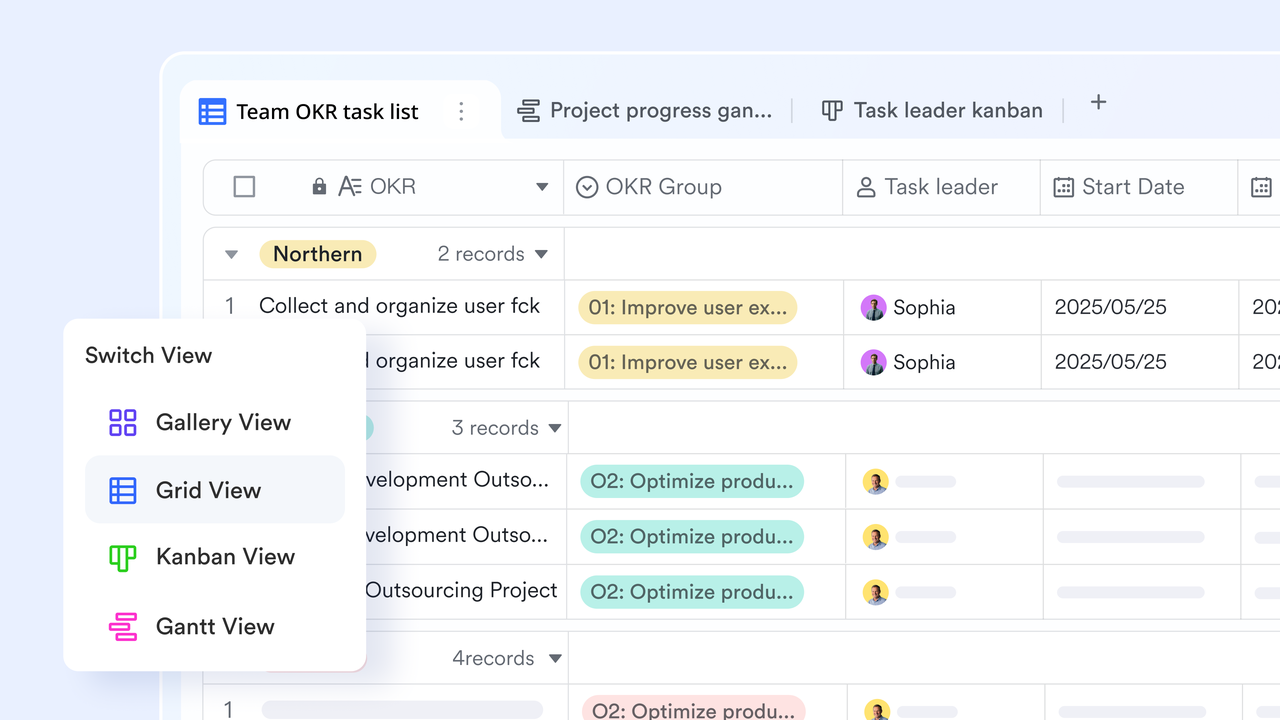
Low-friction request intake with Forms, links, and QR codes
Zendesk relies on ticket forms and portals for request submission, while Lark uses Forms connected directly to Base to capture requests with less friction. Each form submission instantly creates a structured Base record using fields like dropdowns, attachments, and people selectors. Quick-add links and QR codes allow users to submit requests from chat or mobile without opening the database. Records open in a dedicated details pane, reducing errors and back-and-forth. Built-in automations then handle assignment, alerts, and status changes automatically. 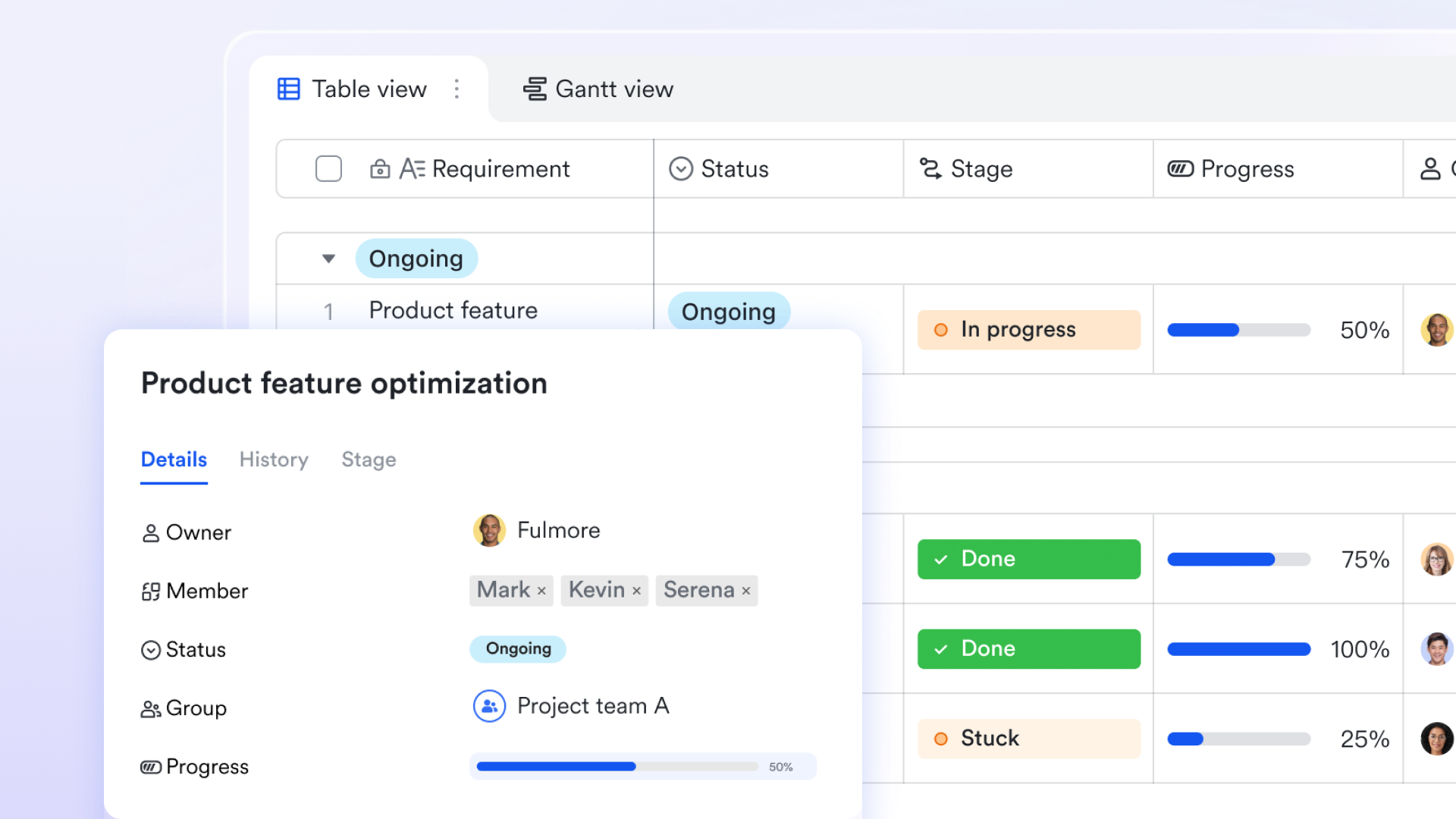
Workflow-driven automation beyond static triggers
Zendesk uses predefined triggers and macros, while Lark Base workflows and automations provide deeper, record-level control over how tickets move. In Lark, teams can trigger workflows when a record is created, updated, or meets specific conditions, then automatically assign owners, update status fields, or send Messenger notifications. Conditional branches like the If/Else node let different actions run based on priority, department, or workload, rather than a single fixed rule. Formulas inside workflows calculate values like SLA deadlines or shift ownership before actions run. This makes Lark especially effective for internal support processes that require flexible, rule-driven handling rather than static ticket macros. 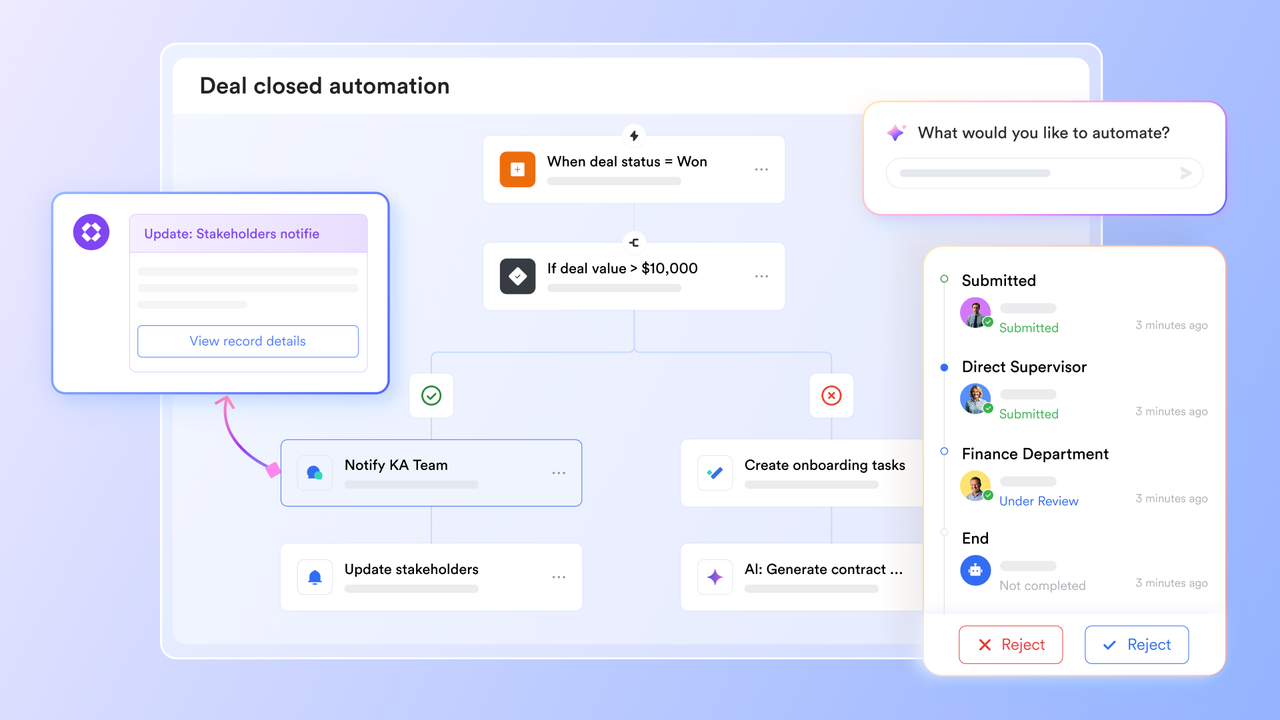
In-chat ticket collaboration with shared records
Zendesk keeps ticket context inside the help-desk interface, while lets teams share individual records directly into as live preview cards. Each shared record shows key fields at a glance, so stakeholders can review details without opening the full database. Permissions carry over automatically, ensuring viewers can only see or edit what they're allowed to. Teams can comment, update, or resolve issues directly from chat, keeping discussions tied to the actual record. This reduces back-and-forth and keeps ticket conversations visible, contextual, and secure outside a traditional ticketing UI. 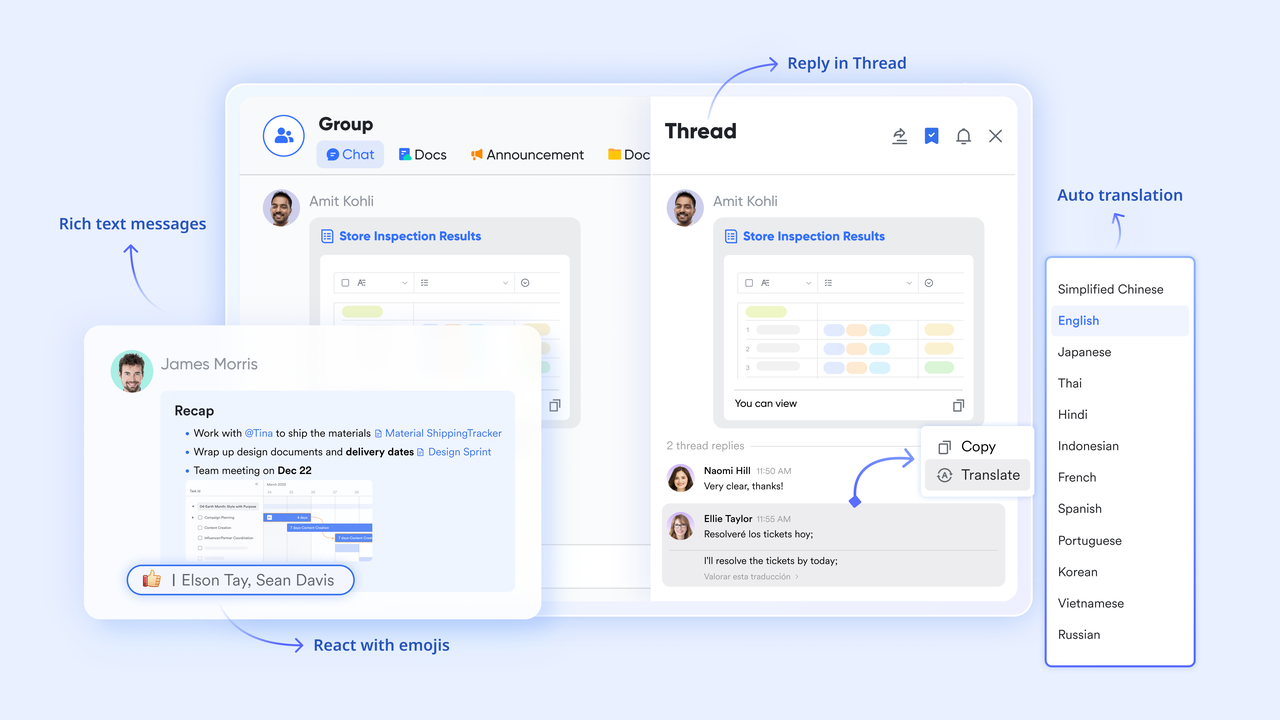
AI-powered tables for faster ticket handling
embeds AI directly into tables, where each record can act as a ticket or request. AI field shortcuts let teams summarize issues, extract key details, categorize requests, or translate content directly inside fields, without switching tools. AI-recommended records automatically suggest related records when using linked fields, helping teams connect repeat issues, similar requests, or historical cases. AI-generated formulas remove the complexity of writing logic-heavy formulas, making SLA calculations, priority scoring, or routing rules easier to build and maintain. 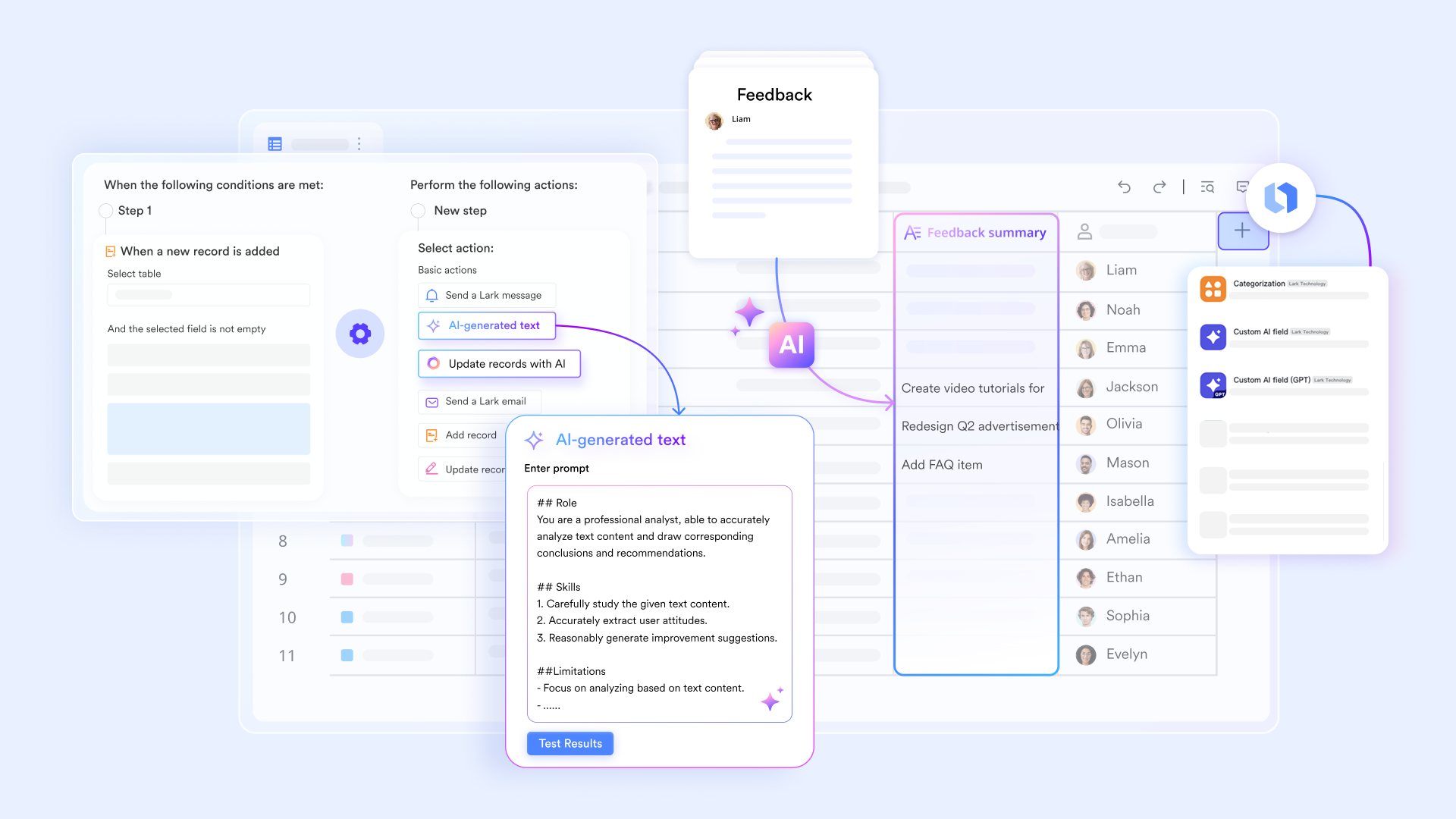
:
- Starter plan: Free forever plan that includes 11 powerful tools for up to 20 users. It also comes with 100GB of storage, 1000 automation runs, AI translations, and more.
- Pro plan: $12/user/month (billed annually) for up to 500 users. It includes everything in Starter plus group calling for up to 500 attendees, 15TB of storage, 50,000 automation runs, and more.
- Enterprise plan: for custom pricing. Supports unlimited users and includes even more automation runs and advanced security, compliance, and management features.
For small teams with simple communication needs

18 months message history
1000 Base automation runs/month
2000 rows per table in Base
Most POPULAR
For companies with comprehensive collaboration and management needs
Unlimited message history
500-participant video meetings
50k Base automation runs/month
20k rows per table in Base
For large companies with advanced security and organizational management needs
Get a personalized demo and pricing
Unlimited message history
500-participant video meetings
15 TB storage + 30 GB storage/user
500k Base automation runs/month
50k Base automation runs/month
Most POPULAR
For companies with comprehensive collaboration and management needs
Unlimited message history
500-participant video meetings
50k Base automation runs/month
20k rows per table in Base
Which teams should stick with Zendesk and which shouldn't
Teams that should stick with Zendesk are those whose primary focus is customer support execution within a well-defined, ticket-driven model. Organizations with dedicated support teams, clear ownership boundaries, and predictable request types benefit most from Zendesk's strengths in queue management, SLAs, and omnichannel intake. If your workflows revolve around responding to customer inquiries, to resolve, and closing tickets efficiently, Zendesk remains a reliable and mature platform. Companies with sufficient budgets for add-ons and internal resources to manage configuration, reporting, and ongoing optimization are also better positioned to get long-term value from Zendesk without friction.
On the other hand, teams that should not rely solely on Zendesk are those whose work extends beyond traditional support into cross-functional execution, internal requests, or ongoing operational workflows. Fast-growing organizations often struggle when tickets need to turn into tasks, investigations, approvals, or projects involving multiple departments. Zendesk becomes limited once work leaves the support queue and requires visibility, , or shared ownership across teams. In these cases, organizations frequently look for execution-first platforms that connect requests, conversations, and outcomes in one workspace, rather than forcing everything back into a ticket-centric system.
Conclusion
Zendesk continues to be a strong and reliable platform for teams whose primary goal is managing customer support through structured, ticket-based workflows. Its strengths in omnichannel intake, SLA tracking, and agent accountability make it well-suited for organizations with clearly defined support boundaries and predictable request patterns. For these teams, Zendesk delivers consistency, mature tooling, and a proven ecosystem that supports high-volume customer interactions. However, as support issues increasingly evolve into investigations, follow-ups, or cross-team work, the limits of a ticket-first system become more apparent. Costs rise as teams scale, configurations grow complex, and visibility weakens once work leaves the support queue.
As customer support becomes more intertwined with execution across departments, many organizations begin looking beyond traditional help desk models. This is where execution-first platforms start to enter the conversation, not as replacements for customer interaction, but as systems that manage the work that follows it. Tools like are often explored when teams need shared ownership, flexible workflows, and real-time collaboration that extends beyond tickets. Rather than forcing every process into a support framework, these platforms help organizations connect requests, conversations, and outcomes in one workspace, supporting how modern teams actually operate as they scale.
Experience execution beyond tickets
FAQs
How does Zendesk perform when multiple teams share ownership of one customer issue?
Zendesk performs well during the initial intake and triage phase, especially when ownership remains within the support team. However, once an issue requires input from product, engineering, finance, or operations, coordination often moves outside the ticketing system into chats or emails. This can fragment context and slow resolution. Teams often compensate by adding internal notes or side conversations, but visibility still drops once work leaves the queue. As organizations mature, some begin exploring platforms like Lark that allow shared ownership across teams while keeping records, discussions, and actions connected in one workspace.
Can Zendesk workflows adapt to non-support processes without heavy customization?
Zendesk workflows are designed primarily around customer support scenarios, using triggers and macros optimized for ticket handling. While it is possible to adapt them for internal requests or operational workflows, doing so usually requires significant configuration and ongoing maintenance. Non-support processes such as IT requests, HR approvals, or internal service desks can feel forced into a ticket-first structure. Over time, teams looking for more flexible, record-based workflows often evaluate tools like Lark that allow processes to be modeled without being locked into a support-centric framework.
What happens to customer context once a ticket is closed?
Once a Zendesk ticket is resolved and closed, it becomes a historical record rather than an active workspace. Follow-up actions, internal investigations, or long-term tracking often move to other systems, reducing continuity. While reporting helps analyze trends, the day-to-day operational context can be lost after closure. This is manageable for transactional support teams but challenging for organizations that treat customer issues as ongoing relationships. Some teams gradually adopt platforms like Lark to keep context alive beyond resolution, especially when issues evolve into projects or cross-team initiatives.
How do fast-growing teams manage Zendesk complexity over time?
Fast-growing teams often experience increasing complexity as they add agents, channels, brands, and automation rules in Zendesk. What starts as a clean setup can become difficult to manage without dedicated administrators. Costs also rise as teams move into higher-tier plans and add paid features. To cope, organizations either invest more in Zendesk expertise or reassess whether a ticket-centric model still fits their operational scale. This reassessment sometimes leads teams to consider broader collaboration platforms like Lark that scale across departments with fewer structural constraints.
Is ticket-based support still the best model for modern customer operations?
Ticket-based support remains effective for handling high volumes of structured customer inquiries with clear resolution paths. However, modern customer operations increasingly involve collaboration, follow-through, and cross-functional execution beyond the initial response. In these cases, tickets alone may not fully capture the lifecycle of work. Many organizations now combine ticketing with execution tools to bridge this gap. Platforms like Lark are often evaluated as complementary or alternative systems that support both customer interaction and the operational work that follows.
Related reading


















