Are you finding it a challenge to keep your projects on track while using project management software? It's a common issue. Many teams invest in tools like Teamwork.com, hoping for seamless collaboration and efficient task management, but sometimes the reality falls short of expectations. Perhaps deadlines are still being missed, communication is fragmented, or you're struggling to fully utilize the platform's features.
Teamwork.com offers a wide range of functionalities to help teams organize their work and collaborate effectively. This guide dives into how to make the most of Teamwork.com for task management. We'll explore practical strategies to improve collaboration, boost productivity, and achieve your project goals. Effective teamwork task management is crucial for project success, and understanding how to leverage Teamwork.com is the first step.
Understanding Teamwork.com for task management
Teamwork.com is a project management platform designed to help teams organize, collaborate, and track their work. It offers a suite of features, including task lists, , , file sharing, and communication tools. The platform aims to provide a centralized hub for all project-related activities, making it easier for teams to stay on the same page and manage their tasks effectively.
At its core, Teamwork.com facilitates teamwork task management by providing a structure for breaking down projects into smaller, manageable tasks, assigning those tasks to team members, and tracking their progress. It emphasizes the collaborative aspect of by enabling teams to communicate and share information directly within the platform.
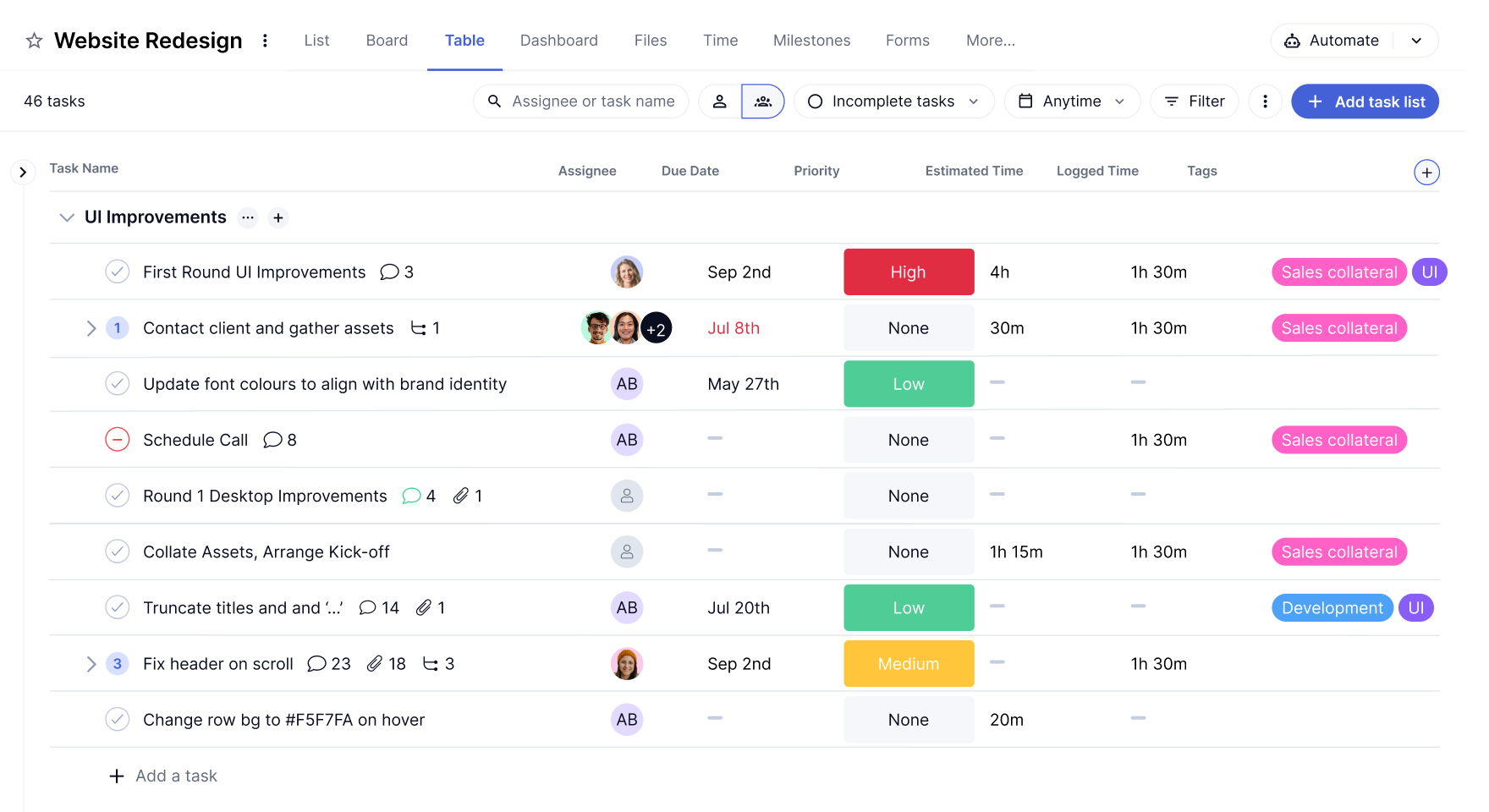
Image source: teamwork.com
So, why is effective teamwork task management with Teamwork.com so important?
- Improved communication and collaboration: Teamwork.com provides various communication tools, such as task comments and direct messaging, which help teams stay connected and share updates in real time. This reduces the risk of miscommunication and ensures that everyone is on the same page.
- Increased productivity and efficiency: By organizing tasks and , Teamwork.com helps teams stay focused and avoid wasting time on unnecessary activities. The platform's features, such as and , streamline workflows and improve overall efficiency.
- Better project visibility and control: Teamwork.com provides dashboards and reports that give project managers a clear overview of project status. This allows them to identify potential roadblocks early on and take corrective action to keep projects on track.
- Enhanced accountability and ownership: When tasks are clearly assigned and tracked, team members are more likely to take ownership of their work and be accountable for their results. This leads to higher quality work and improved project outcomes.
- Streamlined workflows: Teamwork.com allows you to create standardized workflows for different types of projects. This ensures that everyone follows the same process and reduces the risk of errors or inconsistencies.
Understanding these benefits is the first step to mastering teamwork task management reviews for your organization.
Tutorial to task management in Teamwork.com step by step
Let's dive into a detailed, step-by-step guide on how to effectively manage tasks within Teamwork.com. This teamwork task management tutorial will cover the essential features and functionalities you need to know to get started and maximize your team's efficiency.
Step 1: Create a new project
This is the starting point for all work. In Teamwork.com, a project is the container for all tasks.
Navigation: After logging in, click "Create a New Project" from the homepage or the "Projects" area.
Key settings:
- Project name: Use a clear name, e.g., "Q4 2023 Brand Marketing Campaign".
- Project description: , and key information.
- Visibility & permissions: Set the project to Public (visible company-wide) or Private, and configure member roles in detail (Owner, Admin, Member, Observer).
- Template application: You can start from scratch or use built-in templates for , , Event Planning, etc., to quickly generate a pre-defined task structure and workflow, significantly improving setup efficiency.
Step 2: Organize with task lists
Task lists are the secondary structure within a project, used to group tasks logically.
Core purpose: Break down a large project into manageable modules. For example, a website development project might have lists like "Requirements Analysis," "UI/UX Design," "Frontend Development," and "Testing & Launch."
Action & tip: Inside your project, click "Add a Task List". It is recommended to name your lists by phase, functional module, or responsible department to make the project structure clear at a glance.
Step 3: Add specific tasks to lists
This is the step where work gets specified.
Creating a task: Within the relevant task list, click "Add a Task" and enter a title.
Configuring task details:
- Assign a responsible person: Select from the project members. The assignee will be notified.
- Set dates: Define both a start date and a due date.
- Mark as "High", "Medium", or "Low" to help the team focus on what's critical.
- Detailed description: In the "Description" area of the task detail page, use the rich text editor to elaborate on the context, requirements, acceptance criteria, or links to relevant resources. This is key to ensuring complete task information and reducing miscommunication.
Step 4: Configure task dependencies & milestones
This is core to planning complex projects and ensuring a smooth workflow.
Set task dependencies:
- In the , you can visually establish dependencies (Finish-to-Start is the most common type) by dragging connection lines between tasks.
- This ensures tasks are executed in a logical sequence, prevents team members from working at cross-purposes, and automatically calculates the project completion date.
Set milestones:
- Milestones represent critical, zero-duration checkpoints in a project (e.g., "Requirements Sign-off Complete," "Official Launch").
- After creating a task, simply check the "Mark as Milestone" box. They help the team align on key goals and serve as health checkpoints for the project.
Step 5: Track progress with tools & views
Teamwork.com offers multiple tools to visualize and manage your workflow.
Choose your view:
- Board view: Ideal for agile teams. Drag and drop task cards between status columns (e.g., "To Do," "Doing," "For Review") to intuitively reflect workflow.
- List view: Best for managing a large number of tasks, facilitating sorting, filtering, and bulk actions.
- Gantt chart view: The ultimate tool for managing project timelines and dependencies, providing a global overview of progress.
Updating progress: Task assignees should regularly update the task status (e.g., "Not Started," "In Progress," "Completed") or the percentage complete to maintain transparency.
Step 6: Utilize communication & collaboration features
All collaboration should center around the task itself to avoid fragmented information.
- Task comments: Use the comment box below a task to @mention colleagues, ask questions, or provide updates. The entire conversation history is permanently attached to the task, creating a complete contextual record.
- File sharing: Drag and drop files directly into the task comment area or the "Files" section, or link to files in connected cloud drives like Google Drive.
- Time tracking: Use the "Log Time" feature to record hours spent on a task. This is crucial for analyzing efficiency, calculating costs, and client billing.
Step 7: Regular review & adjustment
Use data to drive decisions and continuously optimize.
- Generate reports: In the "Reports" area, you can generate in-depth reports on task completion, estimated vs. actual time, team workload, and project profitability.
- Review meetings: Based on report data and the (which provides a global view of project health, overdue tasks, etc.), hold regular review meetings to identify bottlenecks, adjust plans, and to keep the project on track.
By following these steps, you can effectively manage tasks within Teamwork.com and improve your team's overall productivity and collaboration. Remember to explore Teamwork.com's resources to learn more!
Considering Teamwork.com pricing before using it for task management
Before fully committing to Teamwork.com for your teamwork task management needs, it's essential to understand its pricing structure and how it aligns with your budget and requirements. Teamwork.com offers various pricing plans, each with different features and limitations. Evaluating these options carefully will ensure you choose the plan that best suits your team's size, project complexity, and desired level of functionality.
Here's a general overview of what you might find in Teamwork.com's pricing structure:
- Free: For small new teams; permanently free (no credit card required). Includes TeamworkAI, basic project/client management tools, up to 5 projects/users, and 100 monthly automation actions.
- Deliver: For more robust project oversight; $10.99/user/month (yearly billing), 30-day free trial. Adds project health reports, intake forms, 20 templates, 5,000 monthly automations, 100GB storage (plus all Free plan features).
- Grow: For complex client projects; $19.99/user/month (yearly billing), 30-day free trial. Adds budgeting/financial tools, HubSpot integration, 50 templates, 20,000 monthly automations, 250GB storage, 600 projects (plus all Deliver plan features).
- Scale: For boosting client work productivity/profit; custom pricing, 30-day free trial. Adds unlimited premium features, profitability reports, 100,000 monthly automations, 500GB storage (plus all Grow plan features).
Information source: teamwork.com
Update time: 2025-12-4
What's not included in Teamwork.com
- Native advanced design collaboration tools (e.g., ; requires third-party integrations).
- Niche industry-specific project templates (e.g., specialized healthcare/construction frameworks).
- 24/7 priority support for free/entry-level plans (limited to community docs or standard response times).
- Built-in video conferencing (relies on integrations with tools like Zoom).
- Unlimited permanent data archiving (storage limits apply; older data may need manual backups).
- On-premise deployment options (only cloud-based hosting is available).
Carefully considering these factors will help you choose a Teamwork.com pricing plan that provides the best value for your money and meets your team's specific teamwork task management requirements. It also helps you avoid surprises down the road.
Gain more features at a cheaper price
Teamwork.com benefits and challenges in task management
To provide a balanced perspective, let's explore the benefits and challenges of using Teamwork.com for task management. Understanding these advantages and drawbacks will help you make an informed decision about whether Teamwork.com is the right tool for your team. While there are many teamwork task management reviews, this section focuses on providing a concise overview.
Benefits
- Comprehensive feature set: Teamwork.com offers a wide array of features for task management, including task lists, Gantt charts, time tracking, , and communication tools. This robust feature set makes it a versatile platform capable of handling projects of various sizes and complexities.
- User-friendly interface: Users often praise Teamwork.com for its intuitive and user-friendly interface. Designed for ease of navigation, the platform allows individuals, even those who are not familiar with project management software, to quickly learn and utilize its functionalities.
- Customizable workflows: The platform allows users to customize workflows to suit specific project needs, offering flexibility that enables tailoring the application to fit unique processes and preferences.
- Integrations with other tools: Teamwork.com seamlessly integrates with popular tools like Google Drive, Dropbox, and Slack, allowing users to connect it to their existing workflows and streamline processes efficiently.
- Good reporting and analytics: Teamwork.com delivers comprehensive r. These capabilities aid in tracking progress, identifying potential bottlenecks, and fostering improvements in overall project performance.
Challenges
- Can be overwhelming: The vast array of features available can be daunting for new users. Learning to navigate the platform's functionalities effectively may require a considerable investment of time and effort, especially for users of the teamwork task management free version who might encounter less guidance.
- Pricing can be expensive: For small teams or businesses with tight budgets, Teamwork.com's pricing can be a concern. Its per-user, per-month pricing model can quickly escalate costs as team size increases.
- Limited customization in some areas: While there is flexibility in workflow customization, some users have noted limitations in areas such as interface customization or the creation of custom fields, which may restrict personalization for certain teams.
- Learning curve for advanced features: Although the basic features are straightforward, more advanced functionalities, such as automation tools and specialized integrations, may involve a steeper learning curve.
- Reporting can be complex: While Teamwork.com offers robust reporting capabilities, a minority of users have reported that the reporting interface can be complex and challenging to navigate, requiring additional effort to extract specific data.
- Customer support response time: Feedback indicates that some users have experienced slow response times from customer support, particularly during high-demand periods.
By carefully weighing these benefits and challenges, you can better determine whether Teamwork.com is the right task management solution for your team's specific needs and budget. Always consider what aspects are most critical to your team and project success.
Avoid these challenges with a powerful software
A powerful alternative to Teamwork.com for task management
While Teamwork.com is a robust platform for client work and project delivery, modern teams often need more than traditional, siloed . They need a unified work ecosystem where is not a separate activity but the central outcome of communication, documentation, and planning. provides this by unifying core task management functions into a seamless, intelligent platform, effectively matching Teamwork's strengths while transforming its weaknesses into opportunities for greater fluidity and insight.
From fragmented integrations to a unified work hub
Teamwork requires you to connect separate apps like Slack and Google Drive for communication and file sharing, which can create data silos. Each integration is a potential point of friction and context loss.
Lark eliminates this need. Task management happens natively within the same platform where your team chats in , co-edits a Doc, and joins a meeting. You can create a task directly from a chat message about a bug fix, or assign an action item within a . This seamless flow ensures that every task is born with full context, reducing the back-and-forth and ensuring nothing gets lost in translation between apps.
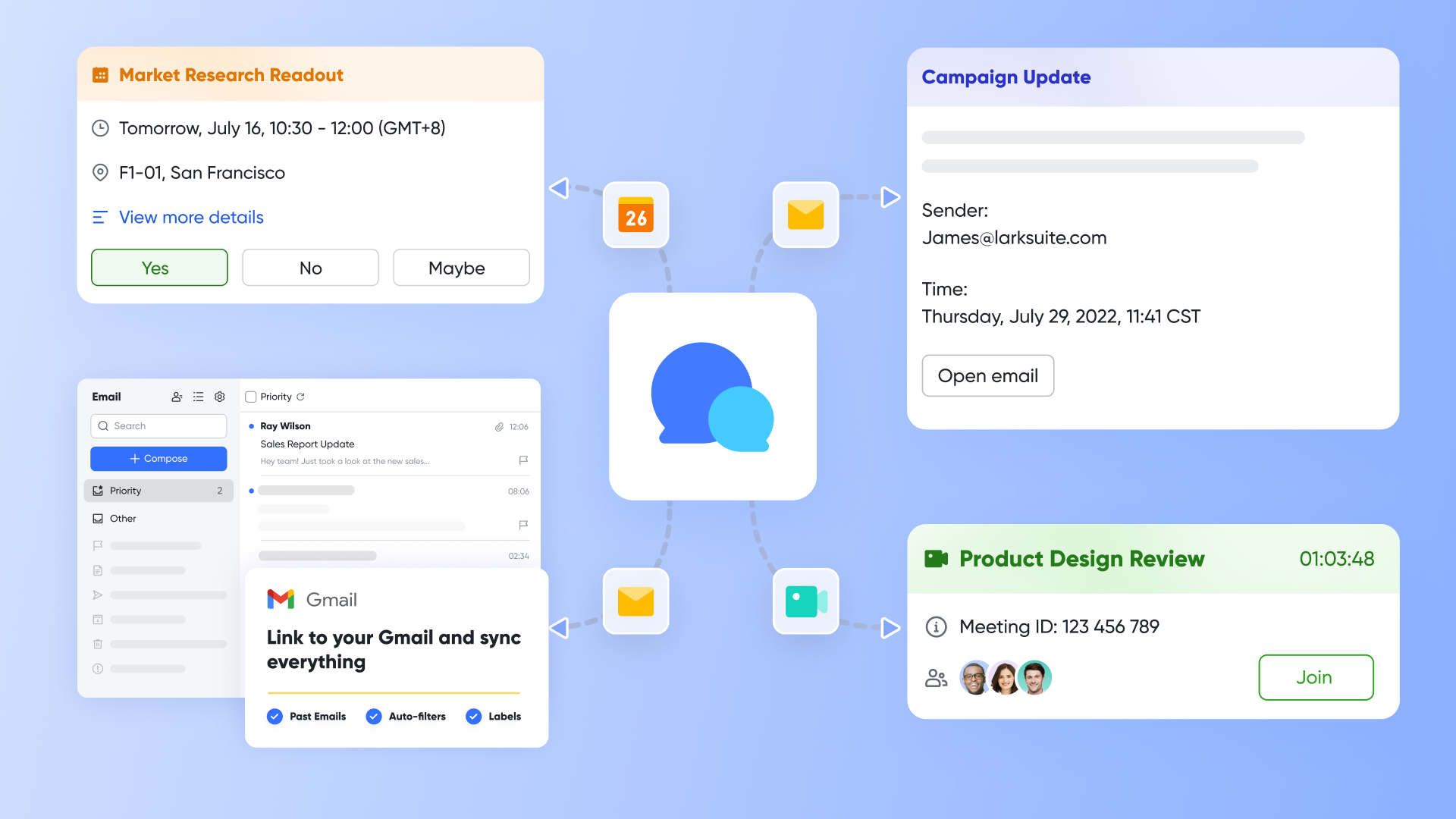
From manual updates to intelligent, automated workflows
While Teamwork offers automation, Lark embeds intelligence directly into the task lifecycle. Consider a recurring pain point: post-meeting follow-up. Instead of manually transcribing notes and creating tasks, can automatically generate summaries and, crucially, you can create follow-up tasks with owners and deadlines with just one click. This transforms talk into immediate, tracked action. Furthermore, routine processes like approval requests are streamlined with . A task requiring budget sign-off can trigger a customized approval form that automatically routes to the correct manager, with all relevant documents attached. The status is updated in real-time for the requester, eliminating bottlenecks and manual tracking.
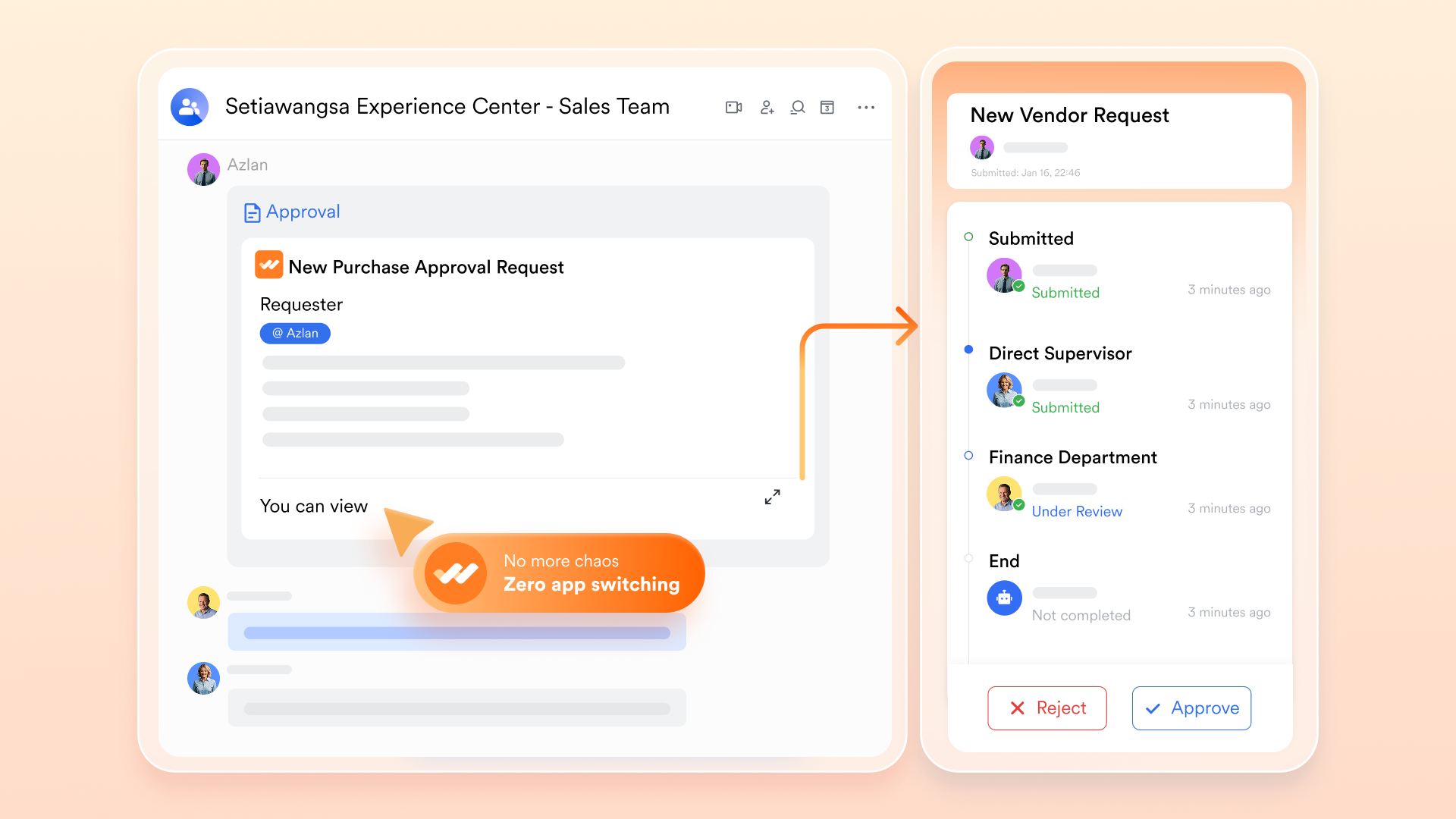
From isolated project views to holistic, outcome-focused visibility
Teamwork provides reporting dashboards, often scoped on individual projects or resource pools. Leaders may still struggle to connect these dots across the organization.
Lark addresses this with and Lark Sheets. You can build a live dashboard in Base that aggregates tasks and , campaigns, or departments into a single view. This shifts the focus from micromanaging activity to measuring impact and outcomes. For financial tracking, teams can collaboratively manage project budgets in live Lark Sheets, with changes visible to all, ensuring financial oversight is unified with execution. 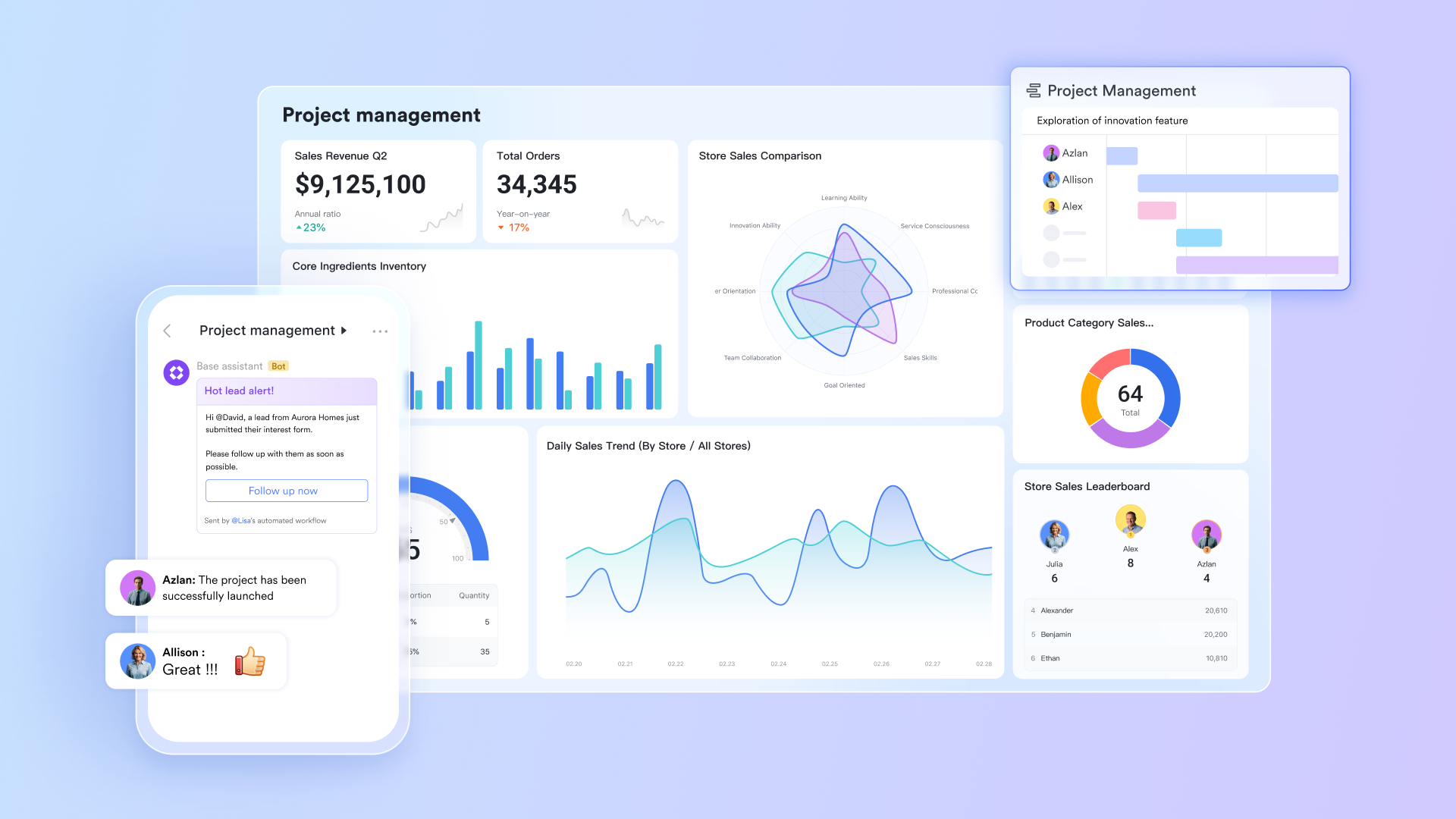
From rigid structures to adaptable collaboration for all work modes
Teamwork excels at managing structured, client-facing projects with clear timelines. However, modern work also includes a high volume of ad-hoc, cross-functional collaboration that can feel constrained by formal project setups.
Lark's architecture is built for this duality. You can manage a formal product launch with and milestones, while simultaneously powering a fast-paced marketing campaign where tasks are created on-the-fly in a group chat and tracked on a simple, shared Kanban board. is particularly powerful here, acting as a flexible database that can be adapted for anything from a simple task tracker to a complex CRM, all within the same platform. This flexibility prevents tool sprawl and ensures that both planned and spontaneous work are captured and visible. 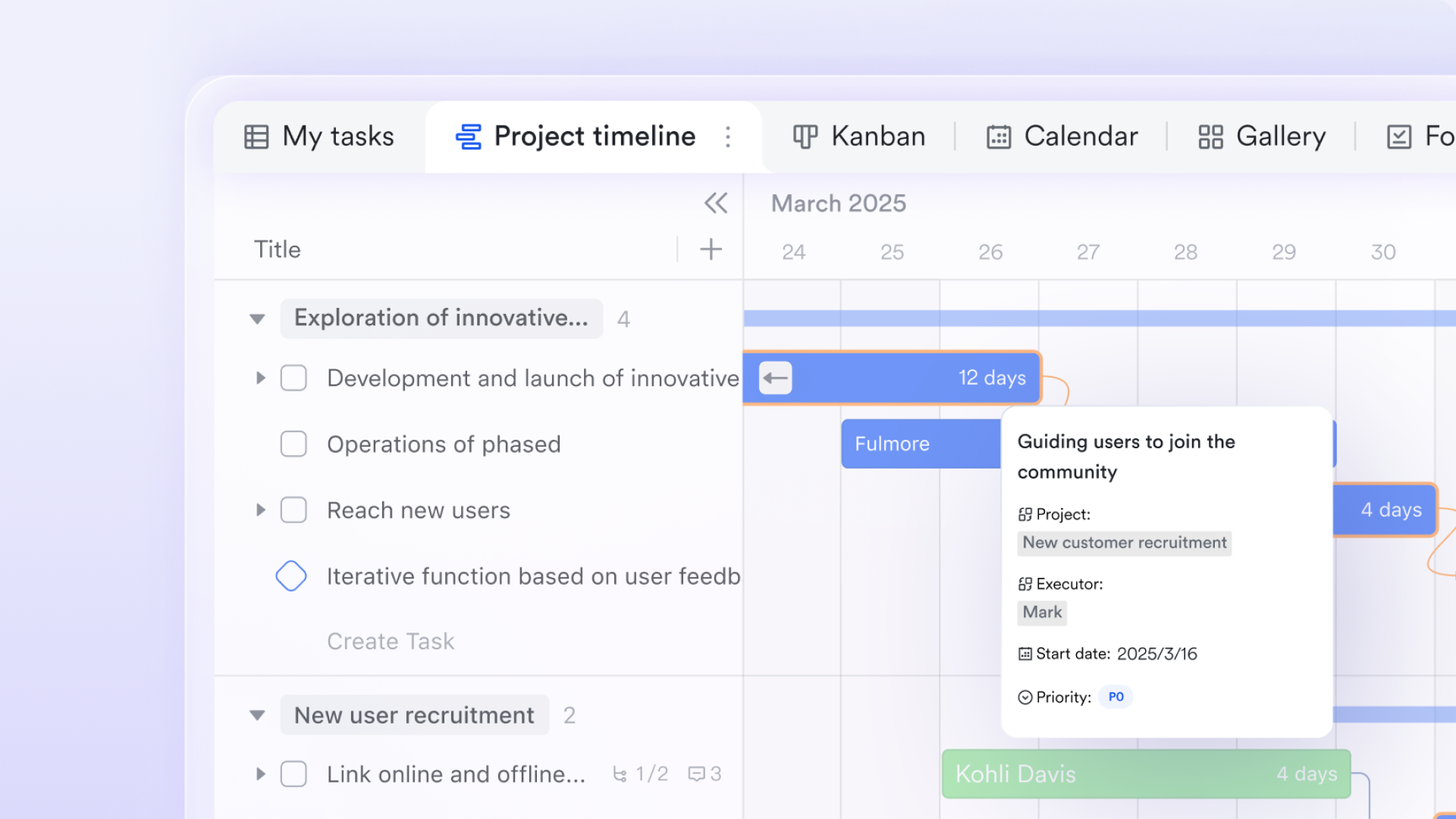
From generic tooling to built-in support for global teams
For teams spread across regions, tools must bridge more than just functional gaps. Teamwork, like many tools, assumes a common working language and culture.
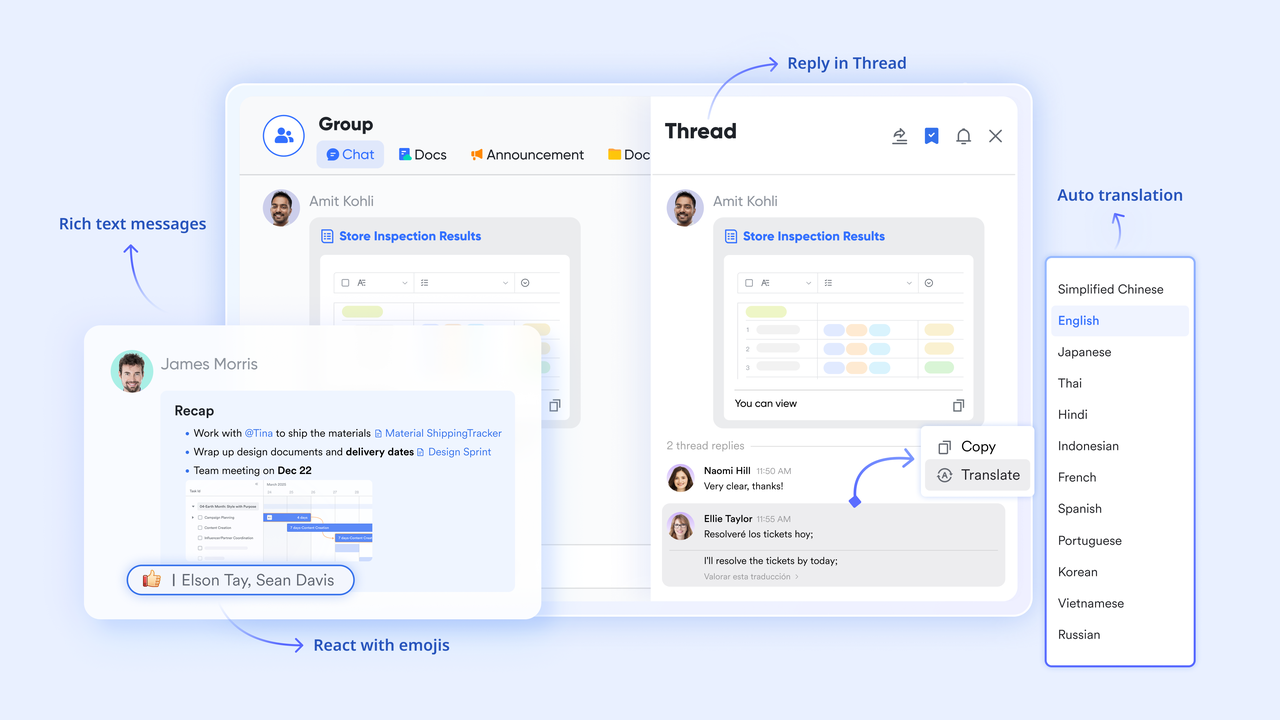
Lark is designed as a "super-app" for cross-border collaboration. Its built-in translation feature can automatically translate chat messages and documents, allowing team members to collaborate in their preferred language. Scheduling a task deadline or a related meeting across time zones is simplified with . This native support for global work reduces the hidden coordination tax that distributed teams often pay and ensures that task management is inclusive and efficient for every member, regardless of location.
- Free plan: Includes 11 powerful products, supporting up to 20 users, 100 GB storage, 1,000 automation runs and unlimited AI translation in chats, docs and email.
- Basic plan: $6/user/month (billed annually) for up to 500 users. Includes everything in Starter plus unlimited message history, 5TB storage, 1,000 automation runs, and more. Some users may need to to purchase.
- Pro plans: $12/user/month, supporting up to 500 users. Includes unlimited message history, 50,000 automated Base workflow executions per month.
- Enterprise plan: for custom pricing. Supports unlimited users and includes even more automation runs and advanced security, compliance, and management features.
For small teams with simple communication needs

18 months message history
1000 Base automation runs/month
2000 rows per table in Base
Most POPULAR
For companies with comprehensive collaboration and management needs
Unlimited message history
500-participant video meetings
50k Base automation runs/month
20k rows per table in Base
For large companies with advanced security and organizational management needs
Get a personalized demo and pricing
Unlimited message history
500-participant video meetings
15 TB storage + 30 GB storage/user
500k Base automation runs/month
50k Base automation runs/month
Most POPULAR
For companies with comprehensive collaboration and management needs
Unlimited message history
500-participant video meetings
50k Base automation runs/month
20k rows per table in Base
Useful templates for your task management
Adopting a new task management system is one thing, but knowing where to start is another. To help you and your team quickly implement the powerful methodologies discussed earlier, offers a suite of ready-to-use templates. These templates are designed to accelerate your setup, embed best practices, and leverage Lark's unique AI and automation capabilities from day one.
Task management template
This is your essential, all-purpose template for tracking work. It provides the fundamental structure to break down a project into actionable items, mirroring the best practice of decomposing large initiatives into manageable tasks and milestones. You can easily list tasks, assign them to owners, set due dates, and track progress through status columns. It's perfect for teams seeking an immediate, organized, and collaborative space to replace scattered to-do lists or spreadsheet trackers, ensuring everyone has a single source of truth for the project's workload.
Task management with automatic reminder template
This template builds on the foundation by solving a common productivity leak: forgotten deadlines. It combines automation rules into as due dates approach. You can configure reminders to go out a specific number of days before a task is due, ensuring owners have ample notice. This not only improves on-time completion but also fosters a culture of personal accountability, as team members receive automated nudges directly in their , eliminating the need for managers to manually chase updates.
Task management with AI autofill task summary template
This intelligent template leverages AI to reduce manual work and enhance clarity. Often, a task's detailed description contains all necessary information, but a quick, scannable summary is invaluable for overviews and reports. With this template, you can set up an AI-powered field that automatically generates a concise summary of the longer description. This ensures that at a glance, both team members and stakeholders can instantly grasp the task's core objective without reading through lengthy text, streamlining communication and status reviews. OKR task management template
Designed for strategic execution, this template bridges the gap between high-level goals and daily work. It allows you to seamlessly link individual tasks to your team's or company's . This creates vital visibility, showing how everyday contributions drive measurable outcomes. It fosters alignment and transparency, as everyone can see how their work ladders up to shared ambitions, turning strategic goals from abstract concepts into actionable plans.
Task management with overdue alert template
For teams that need to maintain velocity, this template enables proactive management. It uses automation to instantly highlight tasks that have passed their due date. These alerts can be configured to notify task owners, project managers, or a dedicated channel. By automatically surfacing delays, this template allows teams to identify bottlenecks early, quickly reassign resources if needed, and keep projects on track without requiring constant manual oversight of every deadline.
These templates are more than just static structures; they are launchpads for efficient, intelligent, and aligned work. By choosing the one that fits your immediate need, you can instantly harness the power of Lark's unified platform to manage tasks more effectively.
Final comparison between Lark and Teamwork.com
To help you make an informed decision, let's compare Lark and Teamwork.com across key aspects of task management:
Ultimately, the best choice for your team will depend on your specific needs and priorities. Consider your team's size, budget, required features, and preferred level of integration when making your decision. While researching teamwork task management reviews, consider how 's unique selling points resonate with your team's goals.
Conclusion
Effective teamwork task management is essential for project success, and choosing the right tools can make all the difference. While Teamwork.com offers a robust set of features, presents a compelling alternative for teams seeking a more unified and collaborative experience. By carefully evaluating your team's needs and priorities, you can select the platform that best empowers you to achieve your goals. Ready to unlock seamless collaboration and boost your team's productivity? Explore Lark today and discover a new way to work!
Start optimizing your task management right now
FAQs
How to manage your team tasks?
Effective team task management involves clear task assignment, realistic deadlines, and consistent progress tracking. Use project management software like Teamwork.com or Lark to centralize tasks, facilitate communication, and monitor individual contributions. Regular check-ins and open communication are key to keeping everyone aligned and on track. Lark, in particular, offers seamless collaboration between task management and team communication.
Who owns Teamwork project management?
While individual team members are responsible for completing their assigned tasks, project management within Teamwork.com typically falls under the purview of a project manager or team lead. They are responsible for creating projects, assigning tasks, setting deadlines, tracking progress, and ensuring that the project stays on schedule and within budget. It's about defining clear roles and responsibilities to ensure effective task completion.
How much does Teamwork PM cost?
Teamwork.com offers various pricing plans depending on the features you need. Be sure to compare teamwork task management pricing plans and consider your team size and specific requirements to find the best fit. If cost is a major concern, explore alternatives like Lark, which offers a free plan and competitive pricing for its paid plans.
How to create a task in Teamwork?
In Teamwork.com, navigate to your project, select the relevant task list, and click "Add Task." Enter the task name, description, assignee, start and due dates, and any relevant attachments. Setting clear task details and dependencies is key to keeping projects on track. Consider checking out tutorials for further information about Teamwork.com and managing your teamwork task management free.
Related reading


















