When teams choose a project management platform, cost and capability go hand in hand. Teamwork pricing attracts attention for its flexibility and tiered plans—but understanding what's included (and what's not) can be tricky. Beyond basic project tracking, each Teamwork product—Projects, Desk, and CRM—has its own subscription model, which can quickly increase total spend.
In this guide, we'll unpack every Teamwork pricing plan, review what each tier offers, and explore why an all-in-one workspace like delivers more value at a lower overall cost.
Discover smarter project solutions
Overview of Teamwork pricing
Teamwork (formerly Team Projects) pricing follows a tiered model designed to scale with team size and project complexity. From a free starter plan to solutions, each level adds more control, visibility, and automation. The structure works well for agencies and service teams, though costs rise as advanced features unlock at higher tiers.
Note: Teamwork Desk, CRM, and Spaces are sold separately, each with their own pricing models. Teamwork Collection Pricing and Teamwork Project Management pricing are inaccessible due to the cancellation of the bundle and the plan.
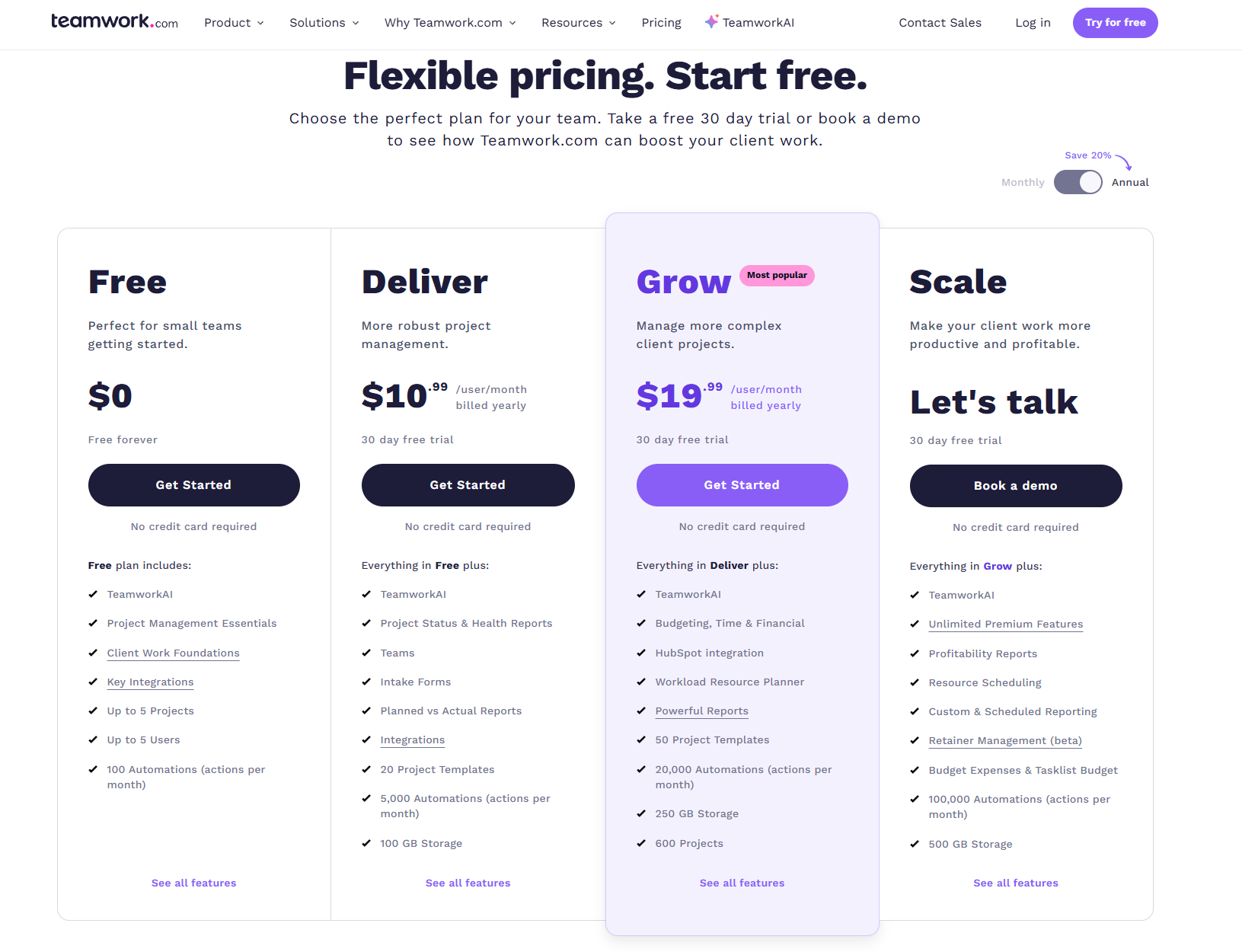
Image source: teamwork.com
Teamwork CRM pricing
Teamwork CRM is the customer-relationship management module offered by Teamwork that helps businesses track leads, manage deals, and coordinate sales activity alongside project delivery. Unlike the separate Teamwork Projects product, Teamwork CRM focuses specifically on the sales lifecycle—from initial contact and pipeline management to forecasting and closed deals—while still being part of the Teamwork product family.
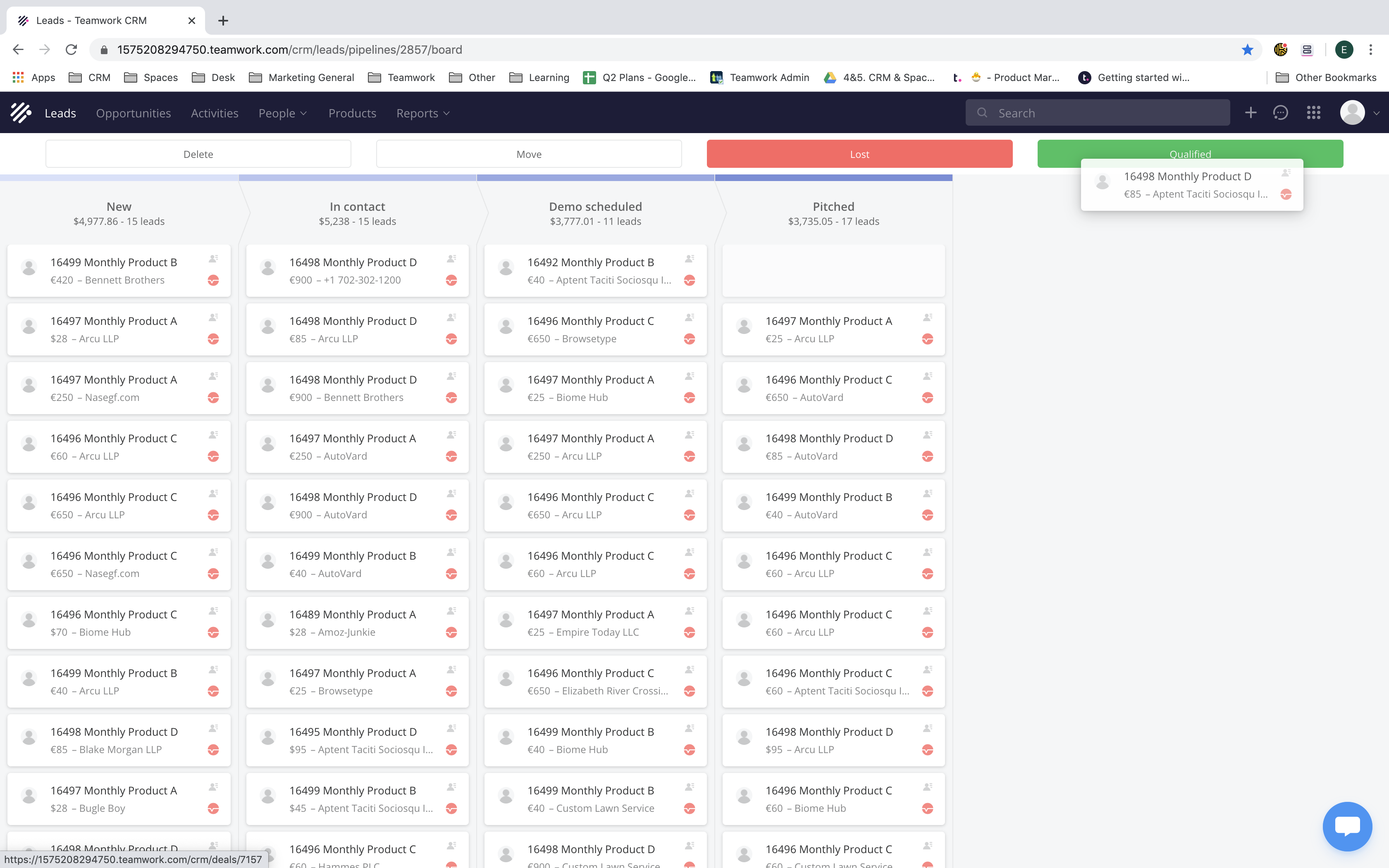
Image source: g2.com
Pricing:
According to data from Capterra and Software Advice, Teamwork CRM starts at approximately $15 per user per month, making it one of the more affordable CRM options within the Teamwork suite. Pricing scales based on the number of users and additional features required, with enterprise-grade functionality available through custom quotes.
Unlike many competitors that include CRM capabilities within their main project management pricing, Teamwork offers CRM as a separate subscription. This means teams that also use Teamwork Projects or Teamwork Desk will need to maintain multiple plans if they want full sales-to-delivery visibility.
Teamwork Desk pricing
Teamwork Desk is also a separate application used for customer support and help desk management. It converts client emails into trackable tickets and helps teams manage customer queries efficiently. It integrates seamlessly with Teamwork.com so that support teams can link tickets directly to ongoing projects.
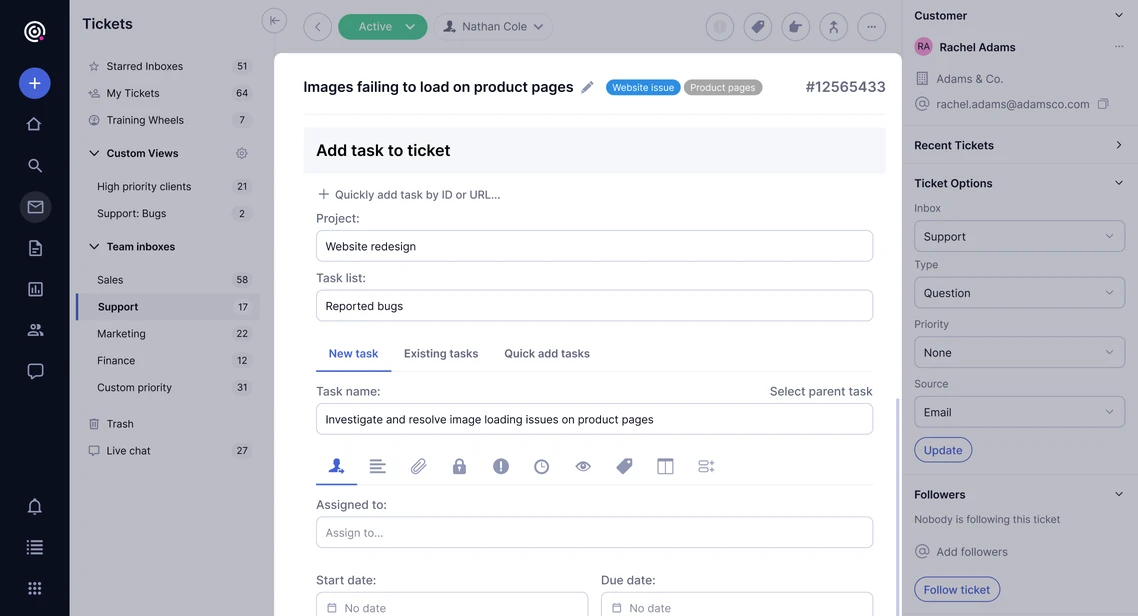
Image source: teamwork.com
Pricing:
- Starter: $9.50 per user/month (billed yearly)
- Pro: $17 per user/month (billed yearly)
- Premium: $33 per user/month
- Includes help desk ticketing, automation, and customer support portals.
- Suitable for customer-facing teams but requires additional subscriptions for project collaboration.
Features included in Teamwork plans
Free Plan
- Basic essentials, including tasks, , and built-in time tracking for personal or small team use.
- Client work foundations: ability to manage client users, track billable time, and view project status summaries.
- Up to 5 users, 5 projects, and 100 automations per month.
- Integrations with tools like Slack, Zapier, and Microsoft Teams.
- A strong starting point for teams wanting basic visibility, but missing many advanced features.
Deliver Plan ($10.99 /user/month billed annually)
- Includes everything in the Free plan, plus project health reports, intake forms, and additional templates.
- Automations increased: ~5,000 actions per month; 100 GB storage.
- 20 project templates, team features (teams by function), and integrations with accounting tools like QuickBooks and Harvest.
- Ideal for teams who need project discipline, automated follow-ups, and basic workflow control across clients.
Grow Plan ($19.99 /user/month billed annually)
- Adds higher-level capabilities: , financial management, advanced reporting, workload/planning.
- Up to 20,000 automations/month, 250 GB storage, support for up to 600 projects, and 50 project templates.
- Enables custom fields, HubSpot integration, user-utilization tracking, and more robust management features suited for growth agencies or multi-project teams.
Scale/Enterprise Plans (Custom pricing)
- Scale: Builds on Grow, offering unlimited projects, unlimited templates, unlimited custom fields, profitability reports, resource scheduling and up to 100,000 automations/month.
- Enterprise: Adds features like advanced security (SSO, dedicated infrastructure), increased API limits, up to 1 TB+ storage, dedicated account manager and tech-services hours.
- Designed for large organizations with complex workflows, , and enhanced compliance or governance needs.
Teamwork pricing reviews: Key advantages and limitations
Understanding Teamwork's pricing structure is essential for evaluating whether it fits your team's needs. Below is a breakdown of the key advantages and limitations of its pricing plans, helping you weigh the benefits against potential trade-offs.
Pros
- Offers a free forever plan that gives small teams access to core —a strong option for startups.
- Clear, tiered pricing that scales up as your team or project requirements grow.
- Robust feature set even in the lower paid tiers: includes things like , templates, and automation.
- Good reviews for collaboration, and tracking across multiple projects and clients.
- Flexible billing options (monthly vs annual) and solid value compared to many alternatives.
Cons
- Advanced features ( planning, unlimited automations, large storage) only come in higher-tier plans, which can raise costs significantly.
- Pricing can accumulate when combining multiple products (Projects + + Desk) since each offers separate plans.
- Steeper learning curve for teams adopting the platform—some users find the interface and features overwhelming at first.
- Some users report that the UI/navigation, especially for bulk editing and certain views, could be more intuitive.
- Teamwork pricing free plan has limitations (e.g., user cap, project cap, fewer automations) which may restrict growing teams.
Teamwork pricing analysis: Is Teamwork worthy?
Understanding Teamwork pricing goes beyond looking at plan costs—it's about how the entire ecosystem is structured. While each tool under teamwork.com pricing offers solid features individually, using multiple modules together can quickly increase both cost and complexity.
- Pricing increases notably when using multiple Teamwork tools together
- Each Teamwork product—Projects, Desk, CRM—has its own separate subscription cost. Once teams start combining them for full visibility and workflow coverage, the overall expense grows significantly. What begins as an affordable solution for can soon become a costly, multi-tool setup for everyday operations.
- Each product is billed separately, making centralized visibility harder
- Because Teamwork bills every product independently, tracking usage, costs, and performance across platforms becomes cumbersome. Teams often juggle separate , logins, and dashboards—reducing the unified view that project managers need for smooth execution and reporting.
- Advanced features only unlock in higher-tier plans
- Many essential functions—like reporting, resource control, and billing—are locked behind Teamwork Projects' Grow and Scale plans. This means smaller teams miss out on valuable insights unless they upgrade to premium tiers, which raises per-user costs and limits scalability for growing organizations.
- Collaboration tools like chat, meetings, or shared docs are not native
- Unlike platforms with integrated communication, Teamwork projects pricing does not include , video meetings, or collaborative docs. Teams must rely on third-party tools such as Slack or Google Workspace, creating disconnects between communication and task execution while adding more subscription costs.
Afterthought
Given the rising costs, fragmented billing, and reliance on separate tools for collaboration in Teamwork, many teams are exploring more unified solutions. However, that's not the end of this guide. Instead, Lark emerges as a compelling alternative, offering an all-in-one workspace that combines project management, communication, and automation. Let's take a look at this tool and try out a different experience today.
Start optimizing your workspace
Meet Lark: The unified alternative to Teamwork
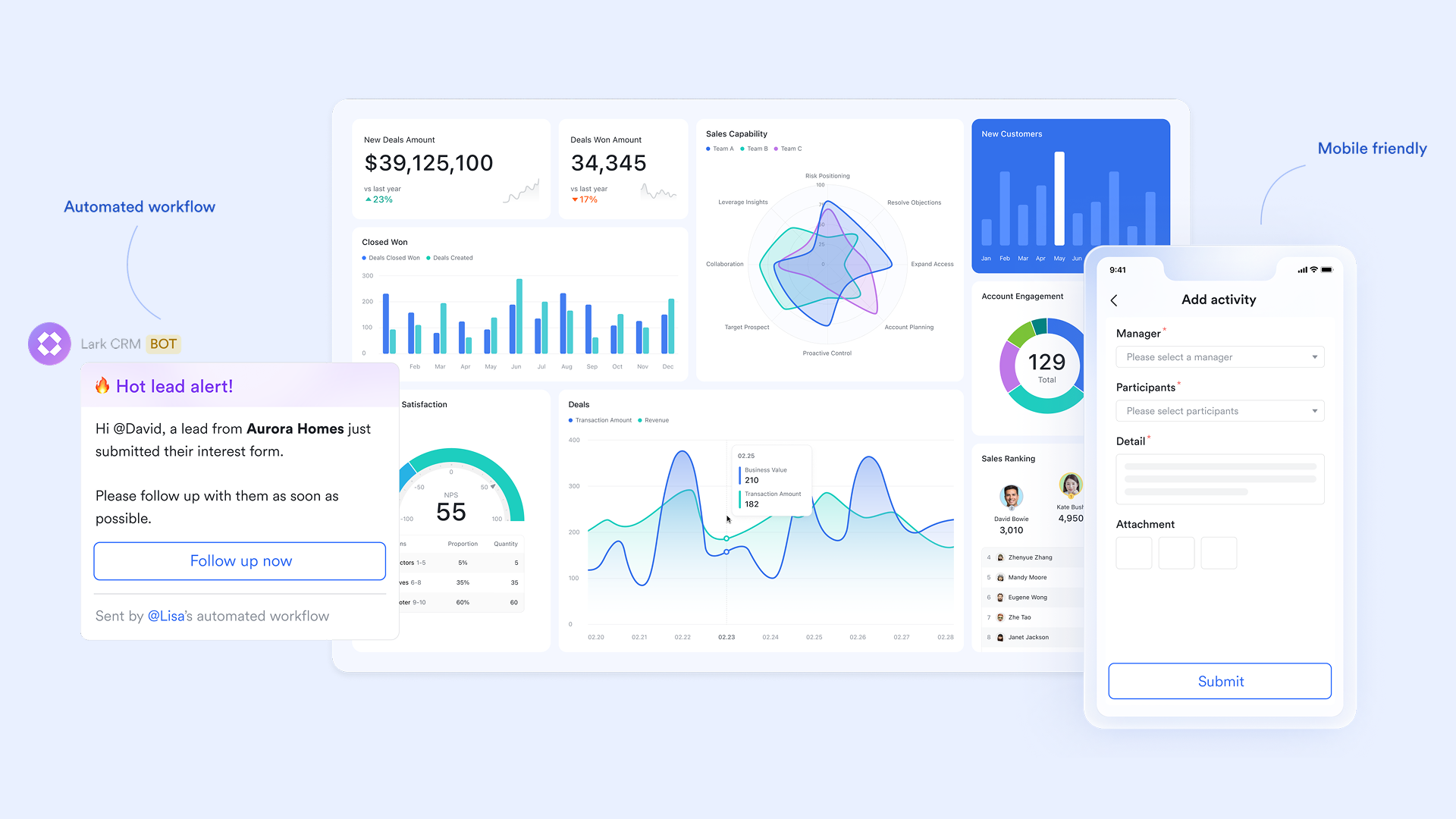
brings together all the essential tools for , communication, and into one connected workspace. Unlike Teamwork, which separates functions across different modules, Lark delivers a seamless experience with a single platform for messaging, meetings, documents, databases, and automation—all available across its pricing plans.
Lark Base: Structured project data and automation
functions as the data engine of the workspace, allowing teams to manage structured information such as project milestones, budgets, or client data. With customizable tables, linked records, and multiple views (Grid, Kanban, Gantt, and Gallery), Base offers a flexible yet organized way to track complex projects. Teams can automate repetitive workflows—like task assignments or notifications—reducing manual effort and maintaining accuracy across the lifecycle of a project. 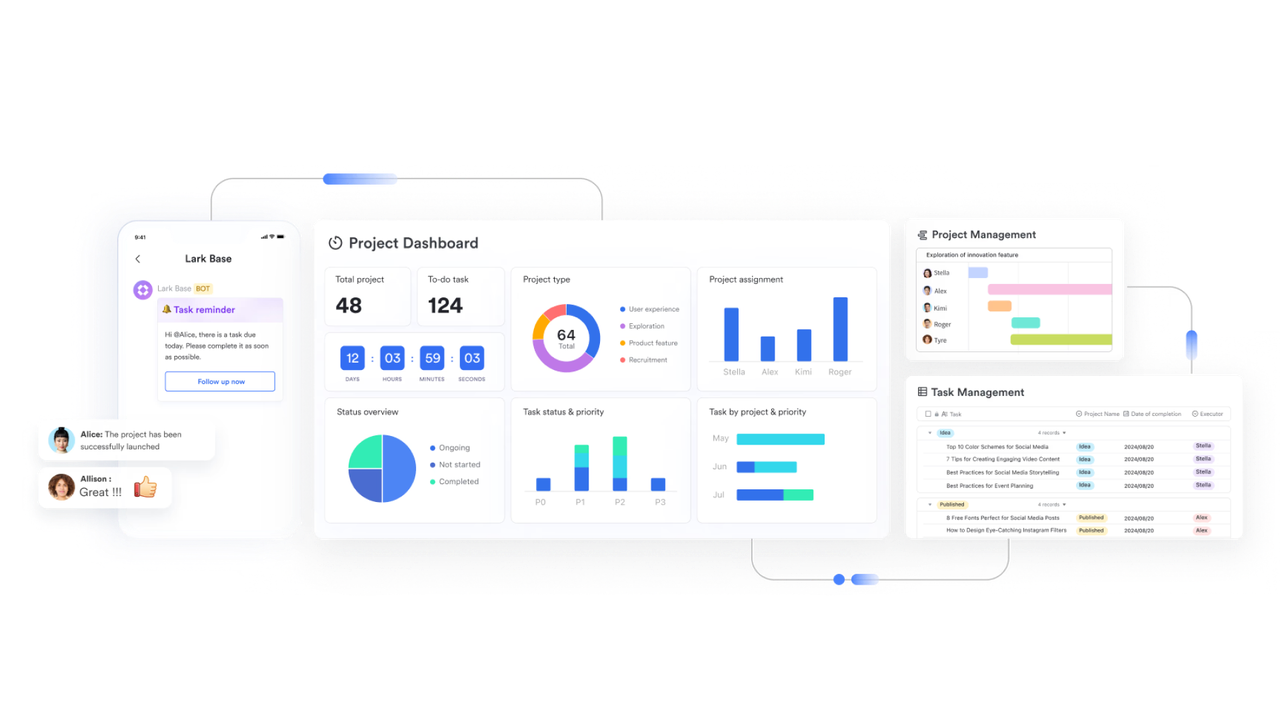
Lark Messenger: Real-time team communication
serves as the hub for all team communication, enabling instant messaging, threaded discussions, and file sharing within a unified workspace. Teams can start group chats, share Docs or Base links directly in conversations, and use reactions or comments to keep discussions actionable. Every message remains connected to its project context, reducing miscommunication and keeping workflows organized. With searchable history and pinned updates, teams always stay aligned. 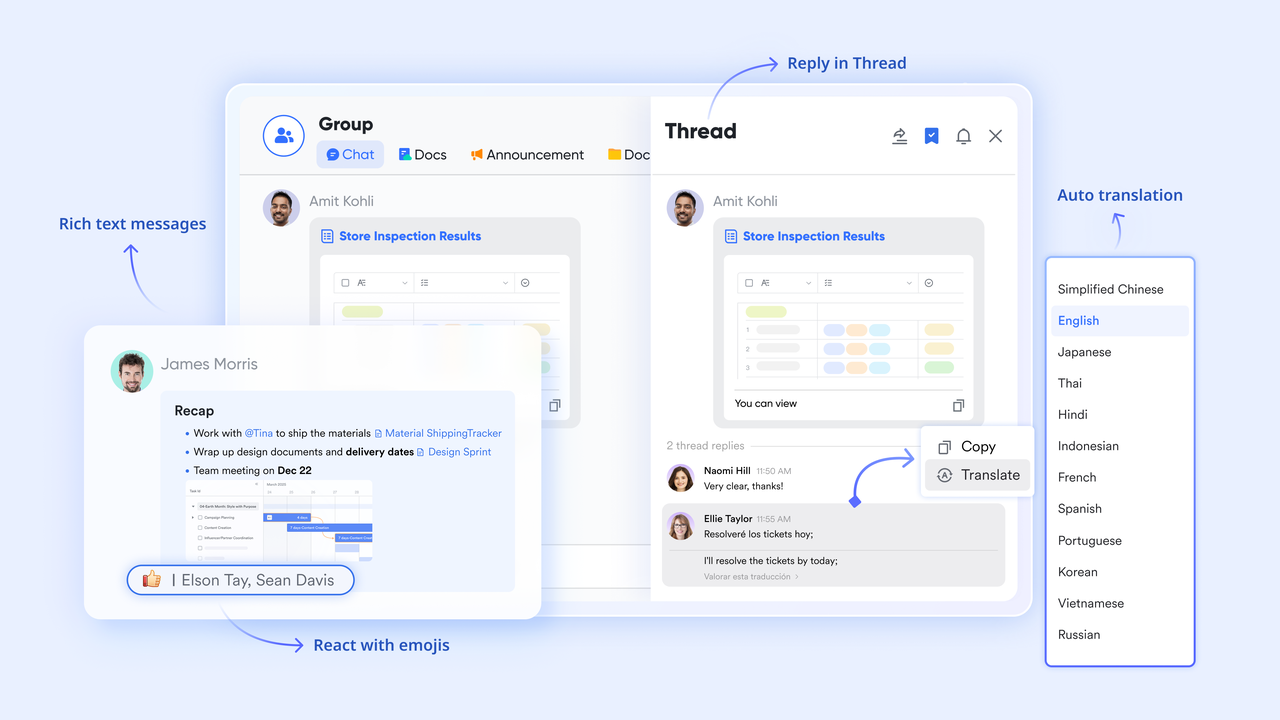
Lark Meetings: Video conferencing built for collaboration
allows teams to host video calls with features like screen sharing, real-time co-editing of Lark Docs, and meeting recording. Participants can collaborate live on agendas or project plans during meetings, while key decisions are captured automatically in shared minutes. Meetings also link with Lark Calendar, so teams can schedule and join calls seamlessly without switching apps—improving coordination across time zones and departments. 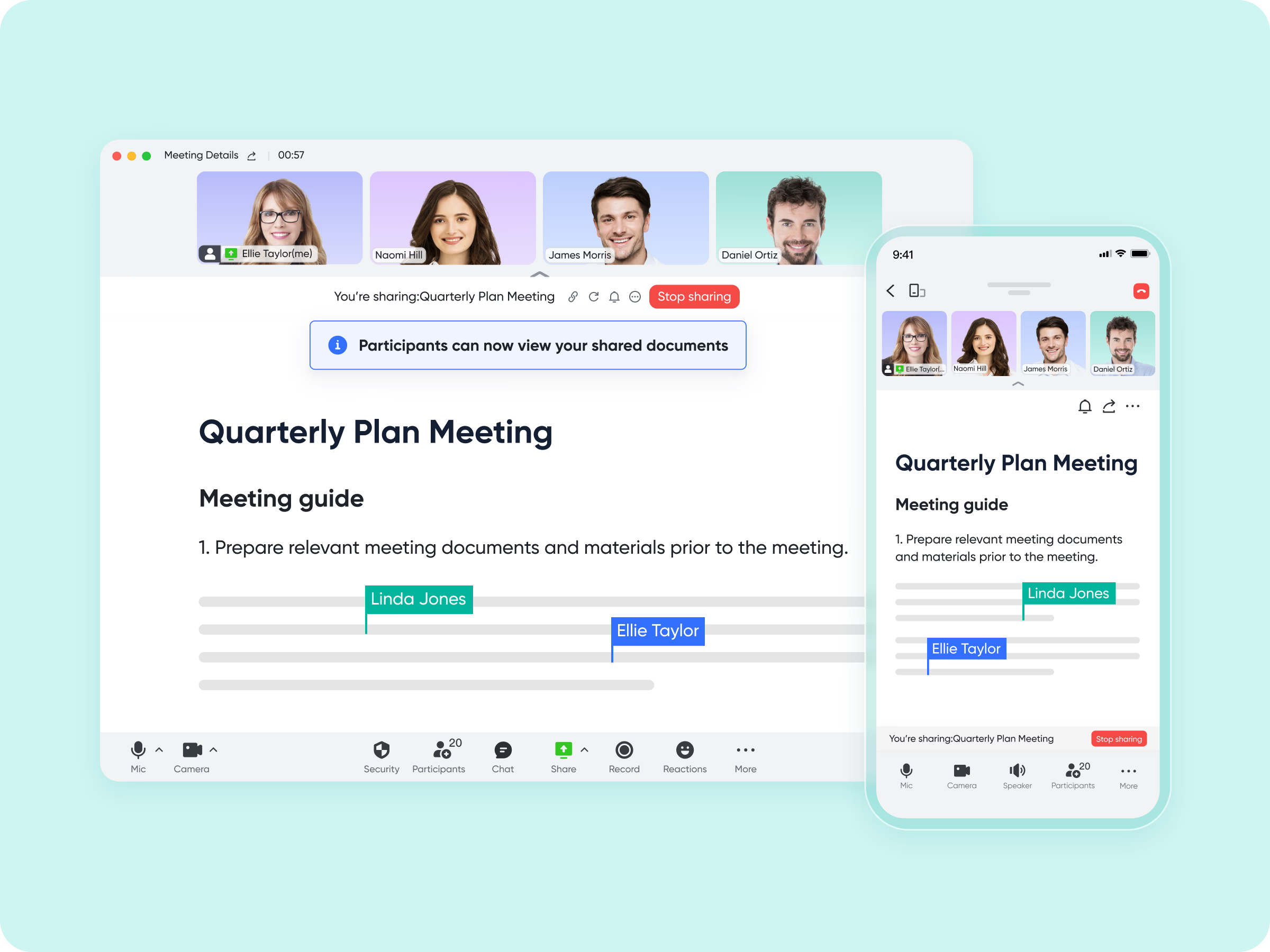
Lark Docs: Collaborative documentation and shared knowledge
enables teams to create, edit, and collaborate on documents in real time. Multiple team members can project briefs, timelines, or reports simultaneously, with comments and mentions for feedback and clarification. Docs can be embedded in chats, tasks, or Base records—making documentation directly actionable. Built-in templates like Project Plan, Proposal Outline, and Meeting Notes help teams start quickly and maintain a consistent structure across departments. 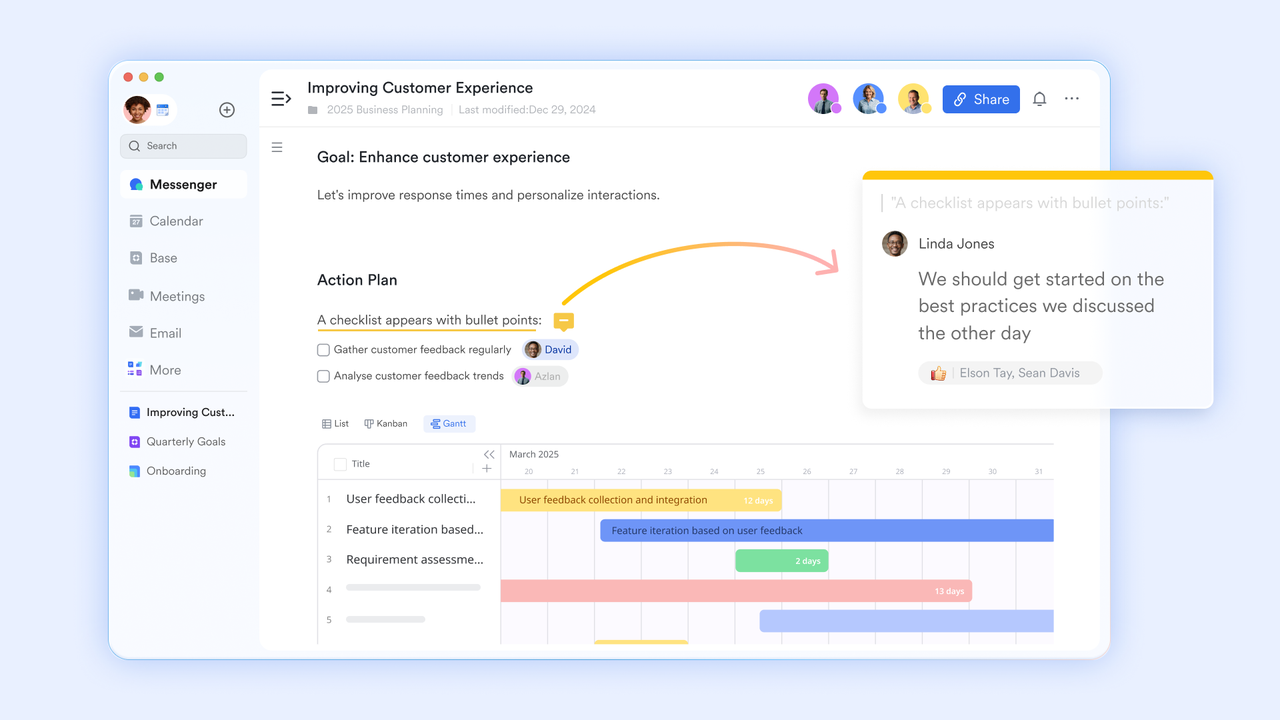
Lark Tasks: Streamlined project execution
Lark Tasks helps teams organize, assign, and track daily work efficiently. Users can create shared task lists, add deadlines, attach Docs, and monitor completion in real time. Tasks sync automatically with Calendar and Messenger, ensuring that updates are visible to everyone involved. For managers, progress tracking and accountability become easier with clear ownership and reminders, while contributors stay focused on priorities. 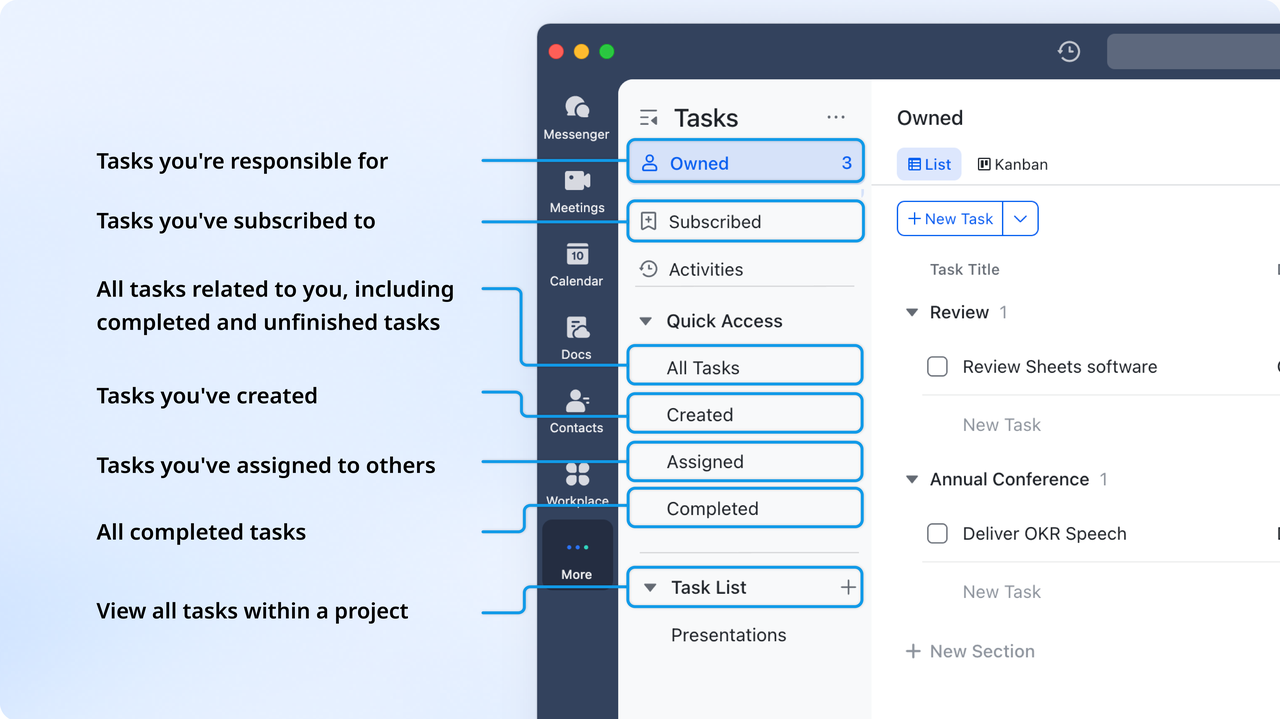
Lark Calendar: Schedule and coordinate effortlessly
Lark Calendar centralizes scheduling across the organization. Teams can create shared calendars, schedule meetings, and link events directly to project Docs or tasks. Availability insights and automatic reminders make coordination smoother. Because it's part of the same workspace, Calendar connects seamlessly with Meetings and Tasks—keeping time management tightly integrated with ongoing work. 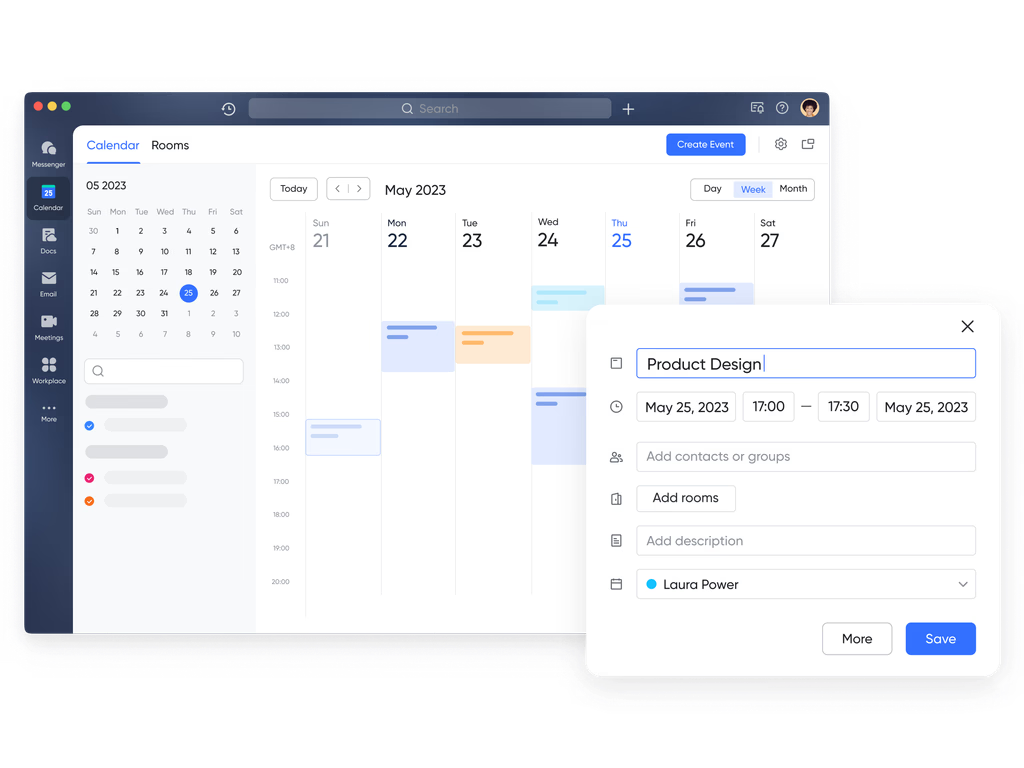
Lark OKR: Align goals with team performance
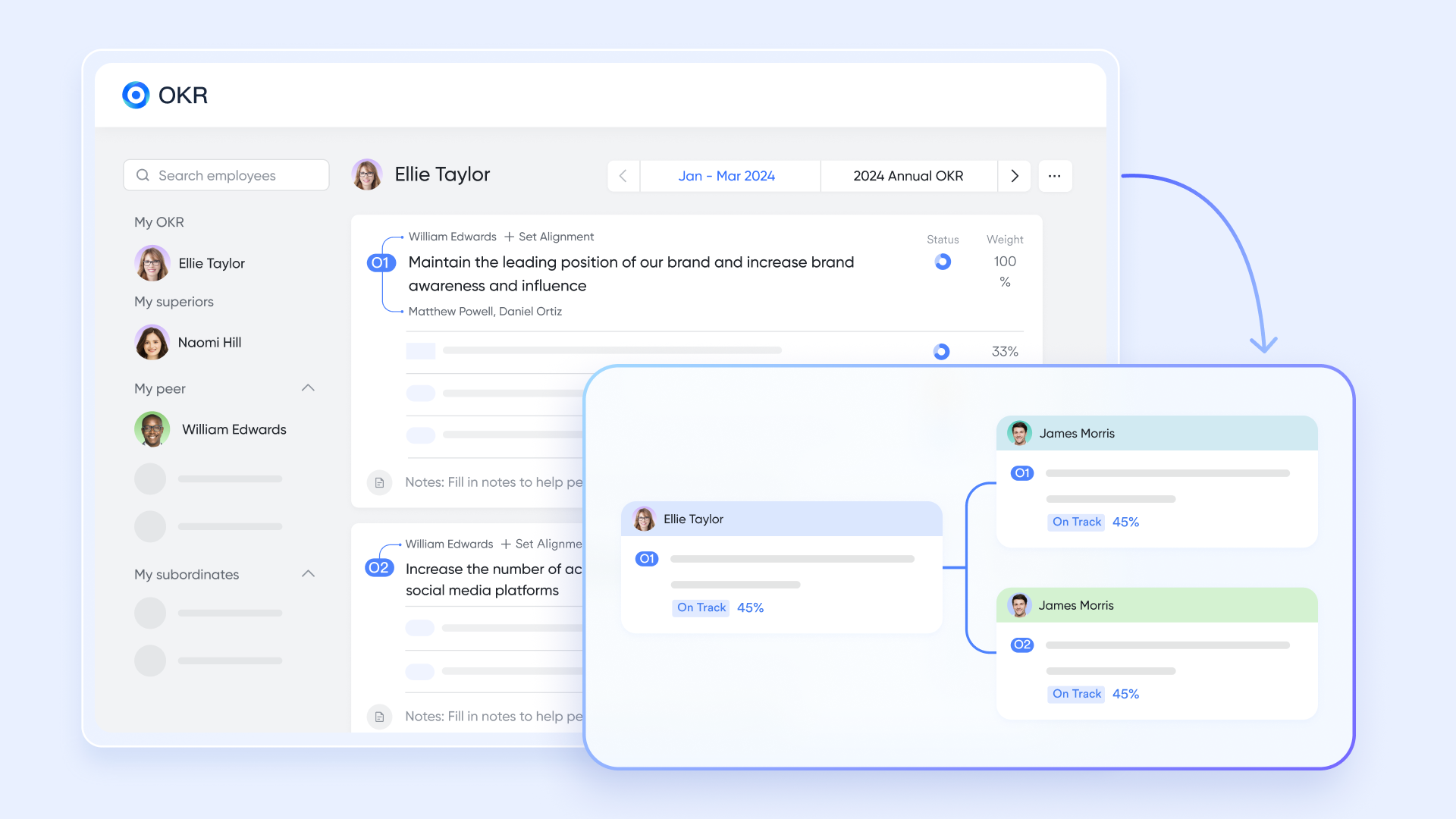
The tool helps teams align objectives with measurable results. Leaders can set company-wide or team-specific goals, link them to projects in Base or , and track progress through visual dashboards. Regular check-ins and comments encourage transparency, while automatic progress updates ensure alignment between strategic goals and daily operations.
Lark Wiki: Centralized knowledge management
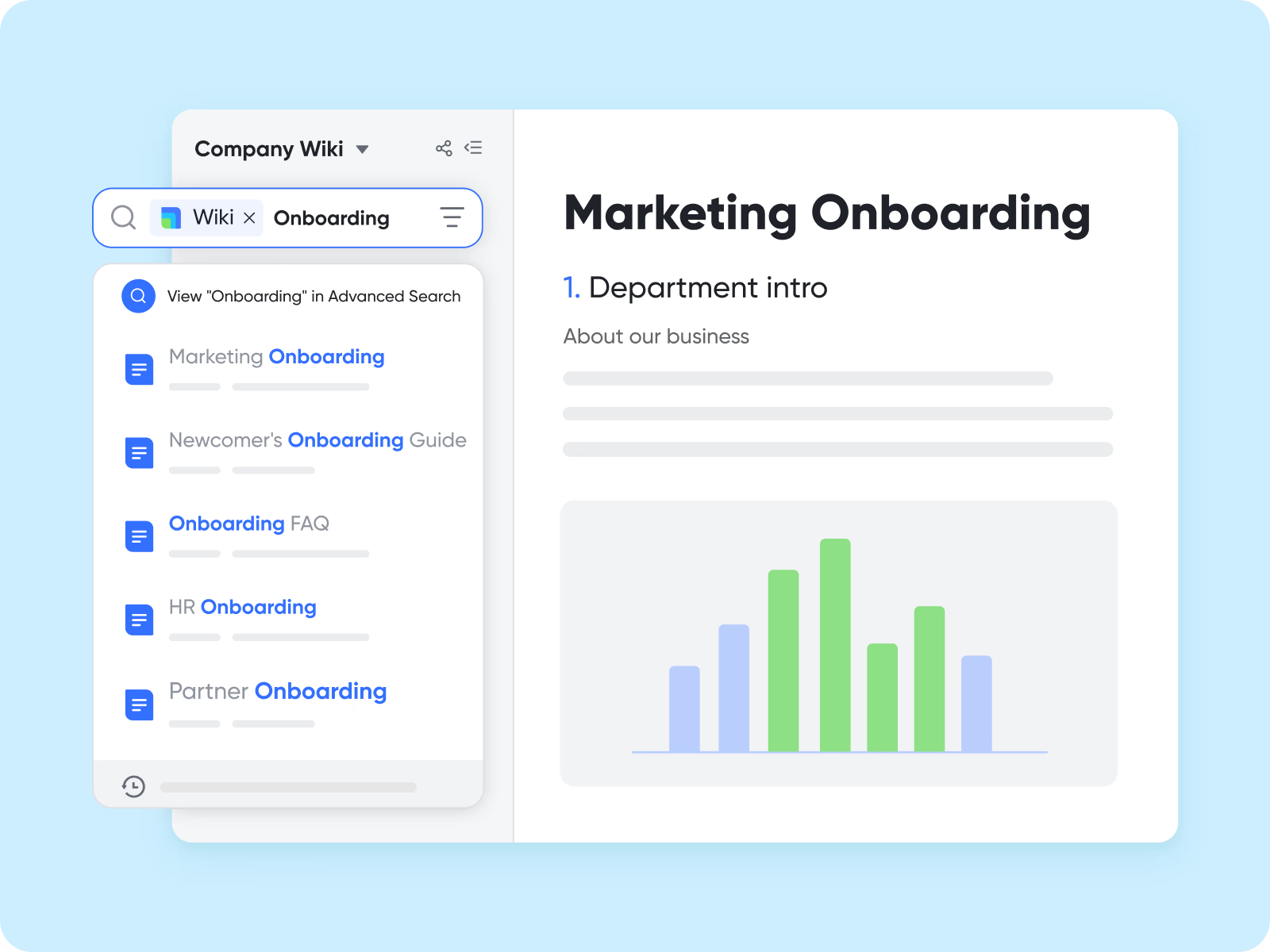
provides a shared space for teams to document best practices, internal policies, and project learnings. It acts as a searchable, structured knowledge base where teams can organize content hierarchically and connect pages to Docs or Base data. Wiki helps organizations preserve institutional knowledge, making and collaboration smoother.
Lark Approval: Simplified request and approval management
Lark Approval allows teams to streamline processes like budget sign-offs, purchase requests, or leave applications. Forms can be customized to match organizational workflows, and automated keep approvers and requesters informed in real time. Each approval record links to related Docs, Tasks, or Base entries, ensuring that approvals are transparent and easy to track. 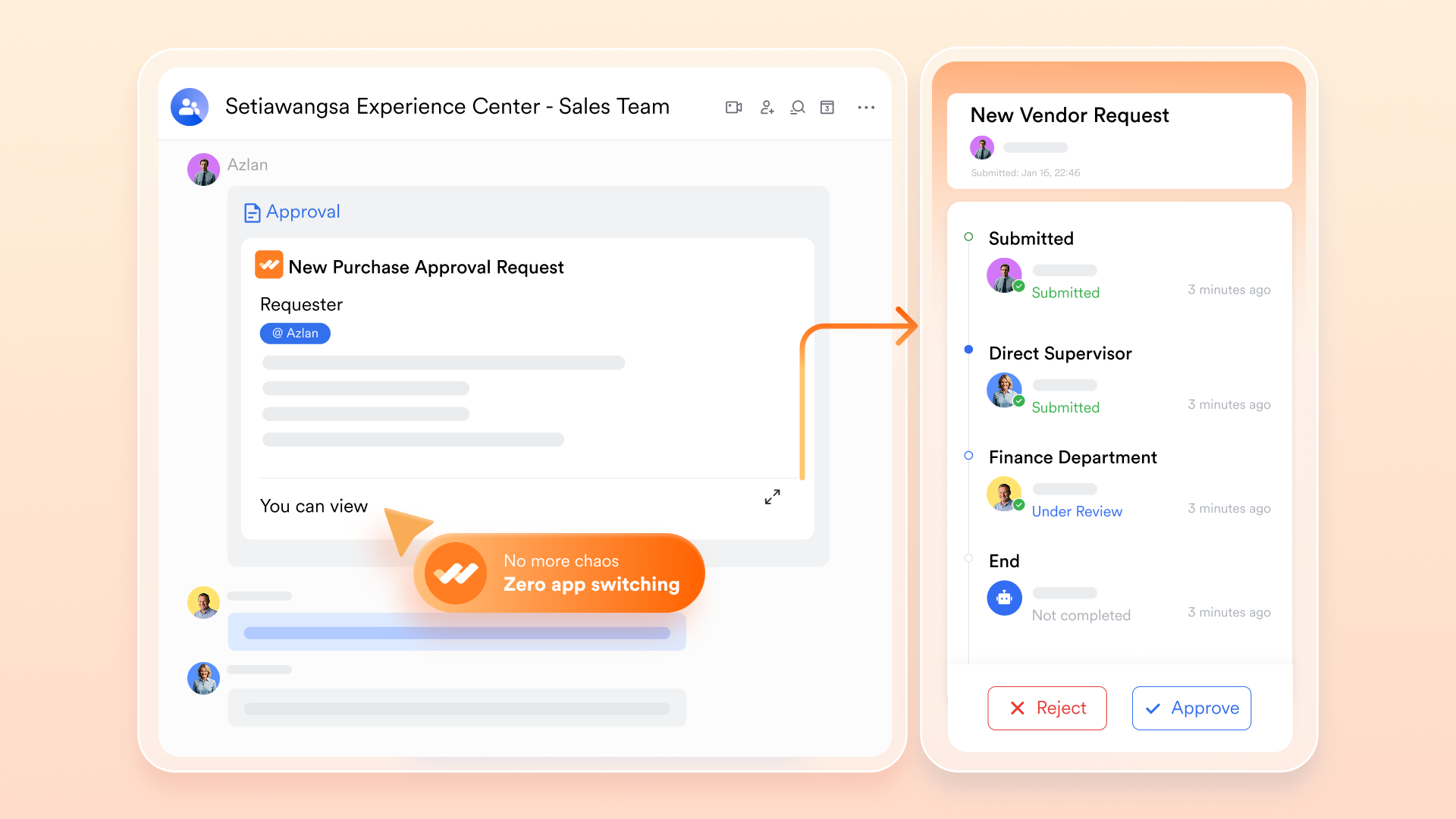
:
- Starter plan: Free forever plan that includes 11 powerful tools for up to 20 users. It also comes with 100GB of storage, 1000 automation runs, AI translations, and more.
- Basic plan: $6/user/month (billed annually) for up to 500 users. Includes everything in Starter plus unlimited message history, 5TB storage, 1,000 automation runs, and more. Some users may need to contact sales to purchase.
- Pro plan: $12/user/month (billed annually) for up to 500 users. It includes everything in Basic plus group calling for up to 500 attendees, 15TB of storage, 50,000 automation runs, and more.
- Enterprise plan: for custom pricing. Supports unlimited users and includes even more automation runs and advanced security, compliance, and management features.
For small teams with simple communication needs

18 months message history
1000 Base automation runs/month
2000 rows per table in Base
Most POPULAR
For companies with comprehensive collaboration and management needs
Unlimited message history
500-participant video meetings
50k Base automation runs/month
20k rows per table in Base
For large companies with advanced security and organizational management needs
Get a personalized demo and pricing
Unlimited message history
500-participant video meetings
15 TB storage + 30 GB storage/user
500k Base automation runs/month
50k Base automation runs/month
Most POPULAR
For companies with comprehensive collaboration and management needs
Unlimited message history
500-participant video meetings
50k Base automation runs/month
20k rows per table in Base
: Switching to Lark's Pro plan can lead to significant cost savings— for example, a 100-employee company using Slack, Google Workspace, and Airtable could save approximately $25,200 annually by consolidating their tools with Lark.
Note: For more information, you can refer to and .
Why Lark offers stronger value than multi-tool models
When comparing Lark pricing with Teamwork.com pricing, one clear advantage stands out—simplicity. Lark brings together every essential work tool in one unified workspace, eliminating the need for multiple paid subscriptions or complex system stitching. The result: lower costs, seamless collaboration, and faster execution.
- Unified workspace: Instead of paying separately for project management, chat, documents, and calendars, Lark gives teams everything under one roof. This connected environment reduces vendor overhead, improves visibility, and ensures information flows effortlessly between people, projects, and decisions.
- All-in-one pricing tier: Even Lark's lower-tier plans include chat, docs, tasks, calendar, and automation—tools that other platforms often charge extra for. Upgrading simply expands capacity and performance, not complexity. There's no need to add new modules or integrate external apps as your team grows.
- Scalability without fragmentation: From Free to Pro to Enterprise, Lark's plans follow a smooth, continuous growth path. Teams can scale from small to enterprise-level operations without rebuilding processes or migrating data between systems. Every upgrade keeps the same unified structure—just with more power and automation.
- Better collaboration and context: Because conversations, files, tasks, and workflows all live in one connected workspace, becomes natural and transparent. Teams no longer lose context switching between apps, and every message or update stays tied to the right project—a major advantage over fragmented project-management tools.
- Predictable costs: With one vendor and one pricing structure, Lark pricing stays clear and easy to manage. is straightforward, free from the uncertainty of stacking multiple subscriptions or add-ons. Finance, IT, and operations teams gain full cost visibility while keeping total ownership low.
Lark vs. Teamwork: Pricing and value comparison
When comparing Teamwork pricing to modern all-in-one platforms, it's important to look beyond numbers. While Teamwork's modular structure charges separately for each product, unified platforms bundle essential tools under one plan. This section breaks down how each tier compares—revealing where teams can gain more capability for the same or lower cost.
Lark provides better value by merging all tools in one ecosystem—no layered subscriptions or add-ons needed.
Conclusion
When comparing Teamwork pricing with modern all-in-one platforms, it's clear that multiple tools mean higher costs and fragmented workflows. Lark simplifies everything—communication, projects, approvals, and data—in one connected workspace. Teams save time, reduce tool fatigue, and gain full visibility across every task and department. With transparent pricing and enterprise-ready scalability, Lark delivers more capability per dollar spent. For growing businesses that want clarity, speed, and true collaboration without stacking subscriptions, isn't just an alternative—it's the smarter way forward.
Learn what upgrades unlock
FAQs
Does Teamwork offer a free version?
Yes,—Teamwork offers a Free Forever plan that supports up to 5 users, up to 5 projects, and includes essentials like tasks, milestones, built-in time tracking and 100 automations/month. This makes it a good entry option for very small teams or startups.
Is Teamwork suitable for large organizations?
Yes—Teamwork supports large-scale operations with its “Scale” and “Enterprise” tiers that offer unlimited projects, advanced resource scheduling, profitability reporting, and premium automation/action limits. However, because different products (Projects, Desk, CRM) are priced separately, costs and complexity can increase for enterprise setups.
How does Lark compare to Teamwork's paid plans?
Lark is positioned as a unified workspace that bundles messaging, docs, tasks, calendar, automation, and Base (database) in one platform. Unlike Teamwork's modular approach where Projects, Desk, CRM are separate, Lark's packages include many work-tools under one subscription—helping simplify tool sprawl and potentially reduce total cost of ownership.
Does Lark include automation and reporting in all tiers?
Yes—Lark supports workflow automation across its Base and other modules: triggers, actions, table updates, etc. Reporting and dashboards are also part of the platform, meaning automation + insight capabilities are built in rather than requiring a separate add-on.
Can Lark replace both Teamwork Projects and Desk?
Yes—Lark covers both project-management features (tasks, timelines, views, work tracking) and service/desk-style workflows (form/approval workflows, automation, centralized data) in one platform. While specific help-desk features (ticketing SLAs) may differ, for many teams the integrated approach replaces the need for separate Projects + Desk subscriptions.
Related reading






























