Managing time at work is more challenging than ever, with constant distractions, remote collaboration, and growing workloads. That's why the right tools for managing time are essential for staying focused and productive. Modern time management apps go beyond basic to-do lists, helping individuals and teams plan schedules, prioritize tasks, track time, and collaborate more effectively. In this guide, we've curated the 12 best time management tools and apps for work and teams, covering everything from all-in-one platforms to simple task and time-tracking tools, so you can find the right solution to work smarter and get more done in less time.
Key takeaways: 5 best time management tools
To help you find the right fit quickly, we've pinpointed five standout solutions that address the most common productivity hurdles. While these five are our top recommendations, the rest of this guide dives into a comprehensive breakdown of 12 different tools for managing time, ensuring there is a perfect match for every team size and personal work style.
1. Lark: Best for unified team coordination and reducing "app switching" fatigue.
2. Todoist: Best for personal daily task clarity and rapid entry.
3. Notion: Best for users who want to build a customized, all-in-one planning system.
4. Asana: Best for complex team projects requiring clear task dependencies.
5. Clockify: Best for simple, free time tracking and billable hour reporting.
Overview of the best tools for managing time
To provide a quick reference for the top contenders, the table below breaks down how these tools stack up in real-world scenarios. We've moved beyond basic checklists to look at how each platform handles the specific friction points of a modern workday.
Information source: Official vendor sites
Update time: 2026-01-30
Note: Pricing and plan details reflect publicly available data as of the update date and may vary based on region, billing cycle, and number of agents.
Manage your time with the #1 tool today
What is time management in today's work environment?
Time management has shifted from simple scheduling to a focus on energy and synchronization. We no longer just manage an eight-hour block. Instead, we coordinate across borders, shared timelines, and a constantly evolving . This new reality demands for managing remote teams across time zones to prevent project delays. The goal is to stop "shadow work" like hunting for files or sitting in redundant meetings.
Effective time management now means removing friction from the process itself. It’s about protecting your focus from constant digital interruptions and aligning daily work with clear . By using tools for managing time, you create a seamless flow between deep work and collaboration. Success today isn't just about being busy; it's about being intentional with every minute.
4 common types of time management tools
- Planning and scheduling tools focus on deciding when work should happen. They help users organize calendars, set timelines, and allocate time for meetings, deep work, and deadlines. By making schedules visible, these tools reduce last-minute conflicts and give users a clearer sense of how their time is structured.
- Priority and concentrate on what needs to be done and in what order. These tools allow users to break work into manageable tasks, set priorities, assign ownership, and track progress. This helps people stay focused on high-impact activities instead of reacting to distractions throughout the day.
- Time tracking and productivity analysis tools look at how time is actually spent. By recording time spent on tasks or projects and turning that data into reports, these tools help users identify inefficiencies, understand work patterns, and make informed adjustments to improve productivity and workload balance.
- and distributed teams address how people work together across locations and time zones. They combine communication, shared documents, and coordination features to reduce delays, minimize unnecessary meetings, and keep everyone aligned. This is especially important for teams that rely on asynchronous work and flexible schedules.
Together, these four types form a complete time management system, from planning and prioritization to execution, analysis, and collaboration.
Full list: 12 best tools for managing time to use
1. Lark: All-in-one workspace for time management and team collaboration
is built on a simple but powerful premise: fragmentation is the enemy of time. When your calendar is in one app, your tasks in another, and your team chats in a third, you aren't just losing minutes—you're losing focus. Lark solves this by acting as a "super-app" for the workplace. It is especially vital as one of the few tools for managing remote teams across time zones that treats "asynchronous work" as a first-class citizen.
Intelligent scheduling for global synchronization
Managing a fragmented schedule is a primary hurdle for those seeking tools for managing remote teams across time zones. allows you to view multiple team members' schedules side-by-side in a single view, with all times automatically adjusted to your local zone. By using the "Check Availability" function within a chat, the system identifies overlaps and suggests optimal meeting slots that respect everyone's working hours. 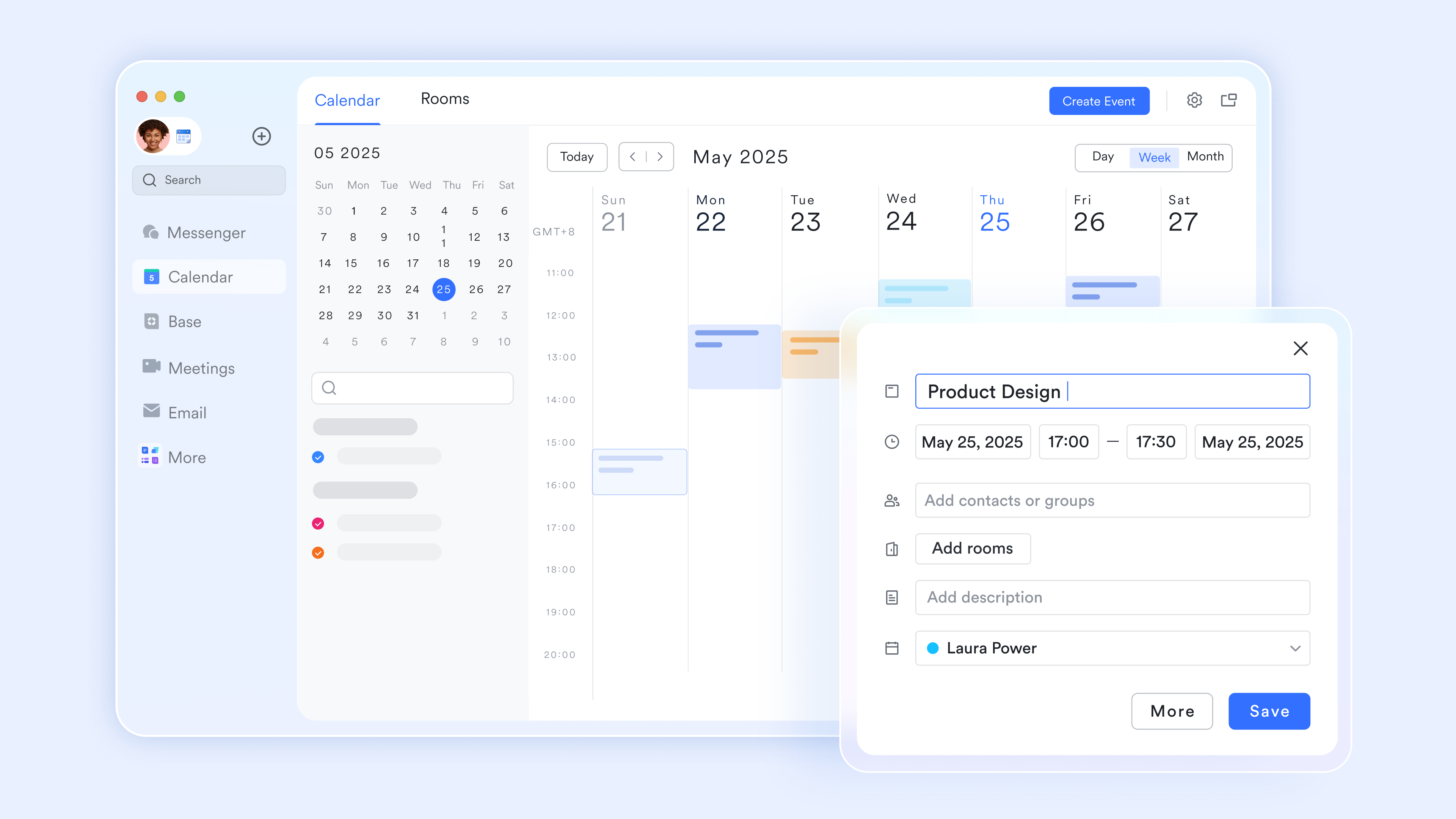
Smart attendance, clock-ins, and timesheets
For employee time management, people often seek instant, data-driven insights into team capacity. Luckily, Attendance automates tracking for diverse work environments through GPS, Wi-Fi, and photo-based . It supports fixed, scheduled, and free shifts, suitable for both office-based and flexible teams. With built-in leave, overtime requests, and generated timesheets, the platform automatically calculates work durations and balances in real-time. 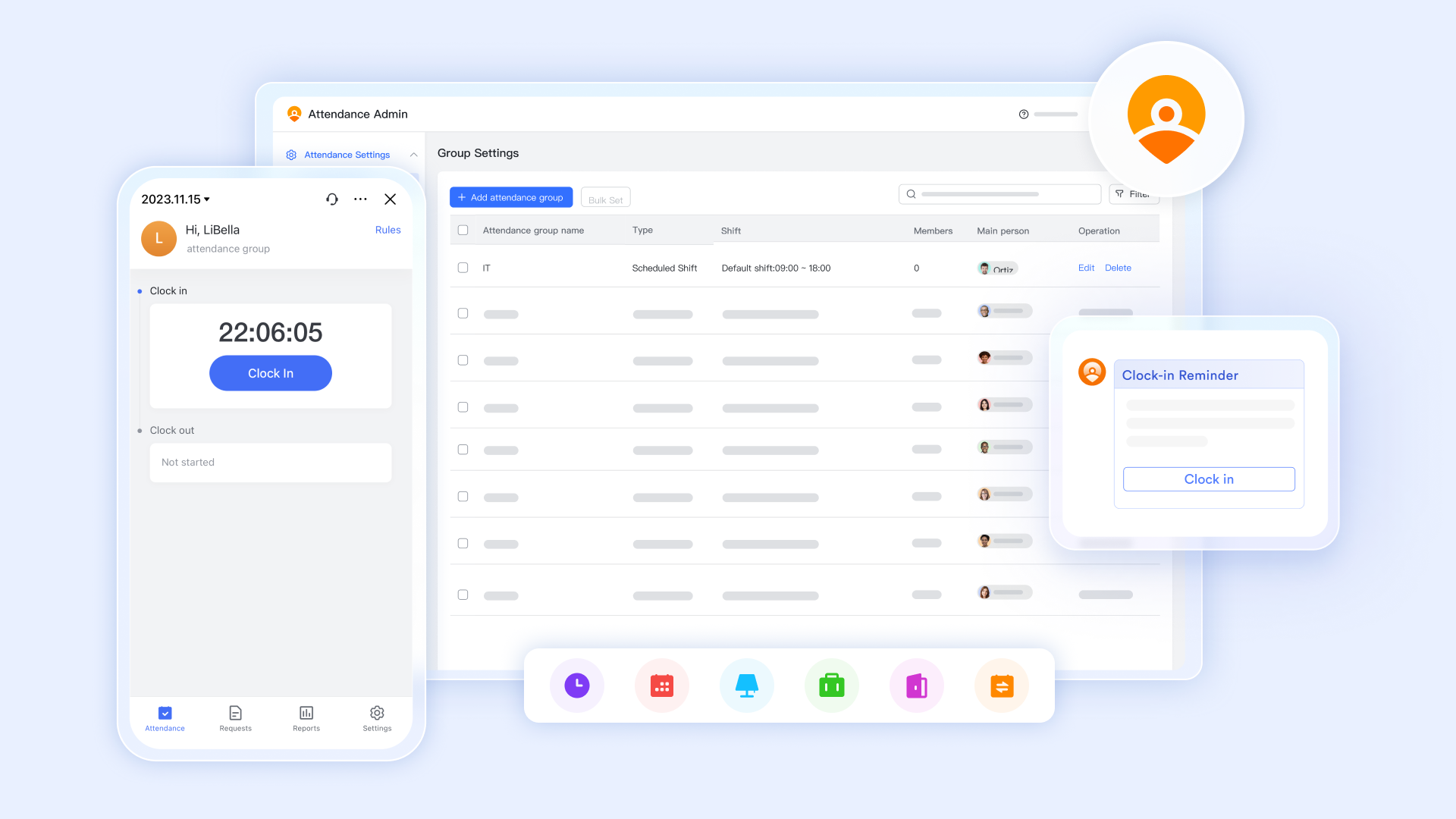
Accurate time tracking for tasks
To master the timeline between idea and execution, you need a tool built for precision. Lark Tasks turn a complex goal into actionable steps through structured tasks. Its Gantt chart view eliminates scheduling conflicts by visualizing and highlighting the critical path to success. Teams can automate routine work with recurring task rules, while proactive reminders and a "set-and-forget" assistant ensure no deadline is missed. 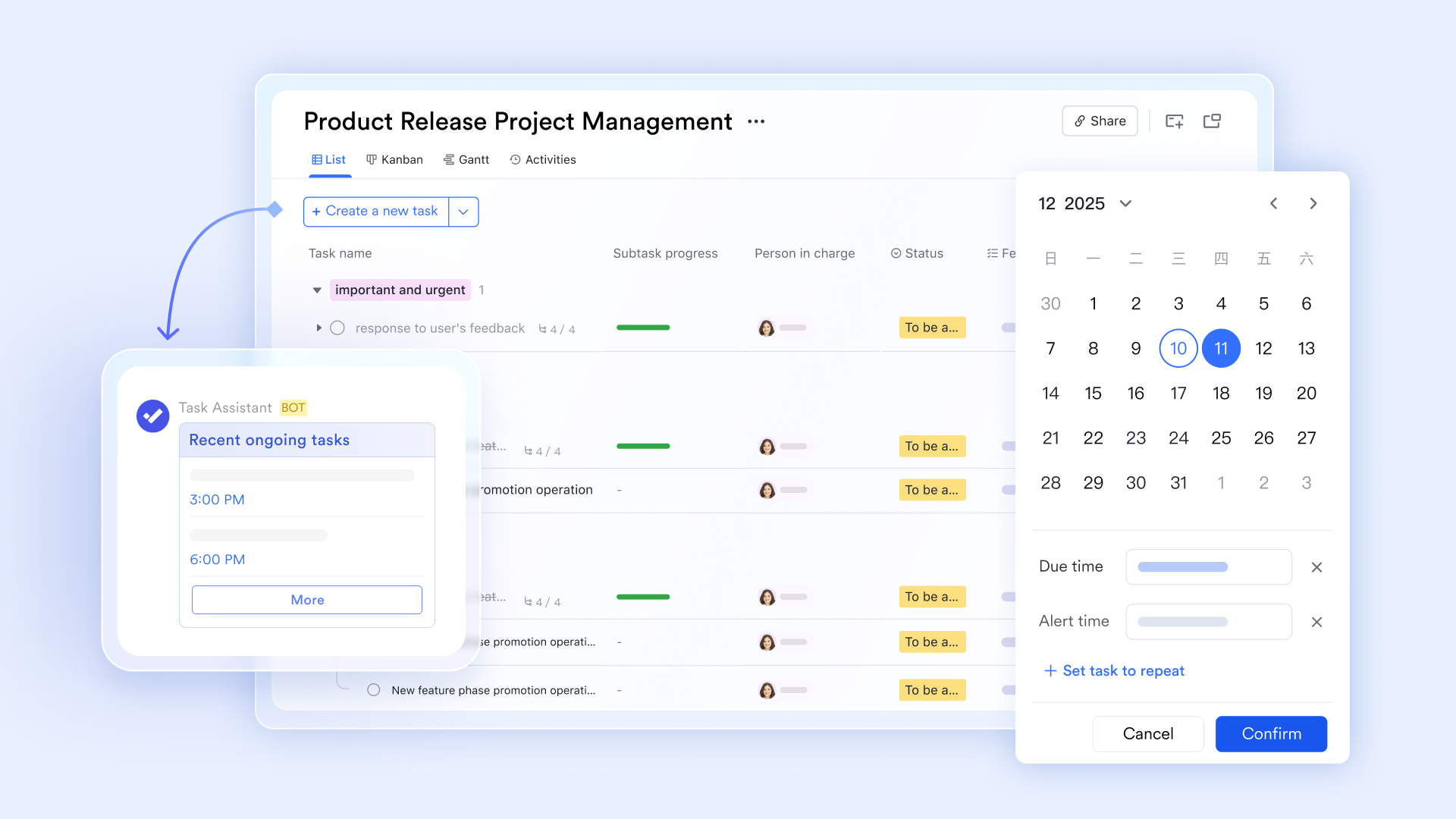
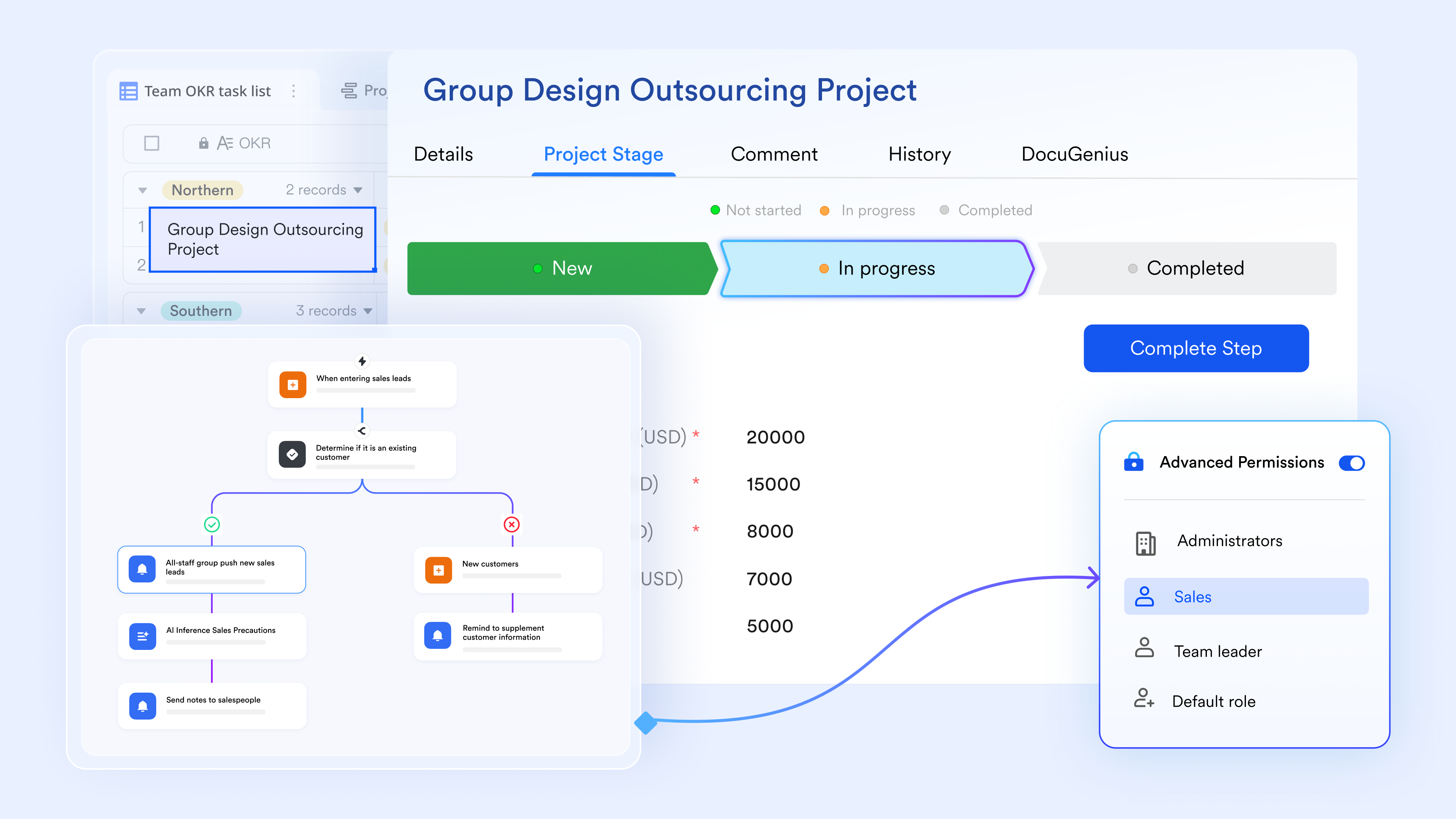
Automated project engines and cycle-time tracking
To truly master time management techniques, you need a system that tracks itself. is a multi-dimensional database engine that turns static project data into a dynamic workflow. Its workflow function allows you to build that trigger instant notifications, update records, or send emails when a deadline is reached.
:
- Starter plan: Free forever plan that includes 11 powerful tools for up to 20 users. It also comes with 100GB of storage, 1000 automation runs, AI translations, and more.
- Basic plan: $6/user/month (billed annually) for up to 500 users. It includes everything in Starter plus group calling for up to 500 attendees, 5TB of storage, 1000 automation runs, and more. For more details, please .
- Pro plan: $12/user/month (billed annually) for up to 500 users. It includes everything in Basic plus group calling for up to 500 attendees, 15TB of storage, 50,000 automation runs, and more.
- Enterprise plan: for custom pricing. Supports unlimited users and includes even more automation runs and advanced security, compliance, and management features.
For small teams with simple communication needs

18 months message history
1000 Base automation runs/month
2000 rows per table in Base
Most POPULAR
For companies with comprehensive collaboration and management needs
Unlimited message history
500-participant video meetings
50k Base automation runs/month
20k rows per table in Base
For large companies with advanced security and organizational management needs
Get a personalized demo and pricing
Unlimited message history
500-participant video meetings
15 TB storage + 30 GB storage/user
500k Base automation runs/month
50k Base automation runs/month
Most POPULAR
For companies with comprehensive collaboration and management needs
Unlimited message history
500-participant video meetings
50k Base automation runs/month
20k rows per table in Base
2. Todoist: Lightweight task manager for daily planning and prioritization
Todoist is a popular task management tool designed to help individuals and teams plan their day, organize tasks, and stay focused on priorities. Known for its minimal interface and ease of use, Todoist works well for users who want a simple yet powerful way to manage daily to-do lists without unnecessary complexity.
The platform supports task creation with due dates, recurring schedules, priority levels, and labels, making it ideal for both personal productivity and light team collaboration. Todoist is available across web, mobile, and desktop platforms, ensuring seamless task tracking from anywhere.
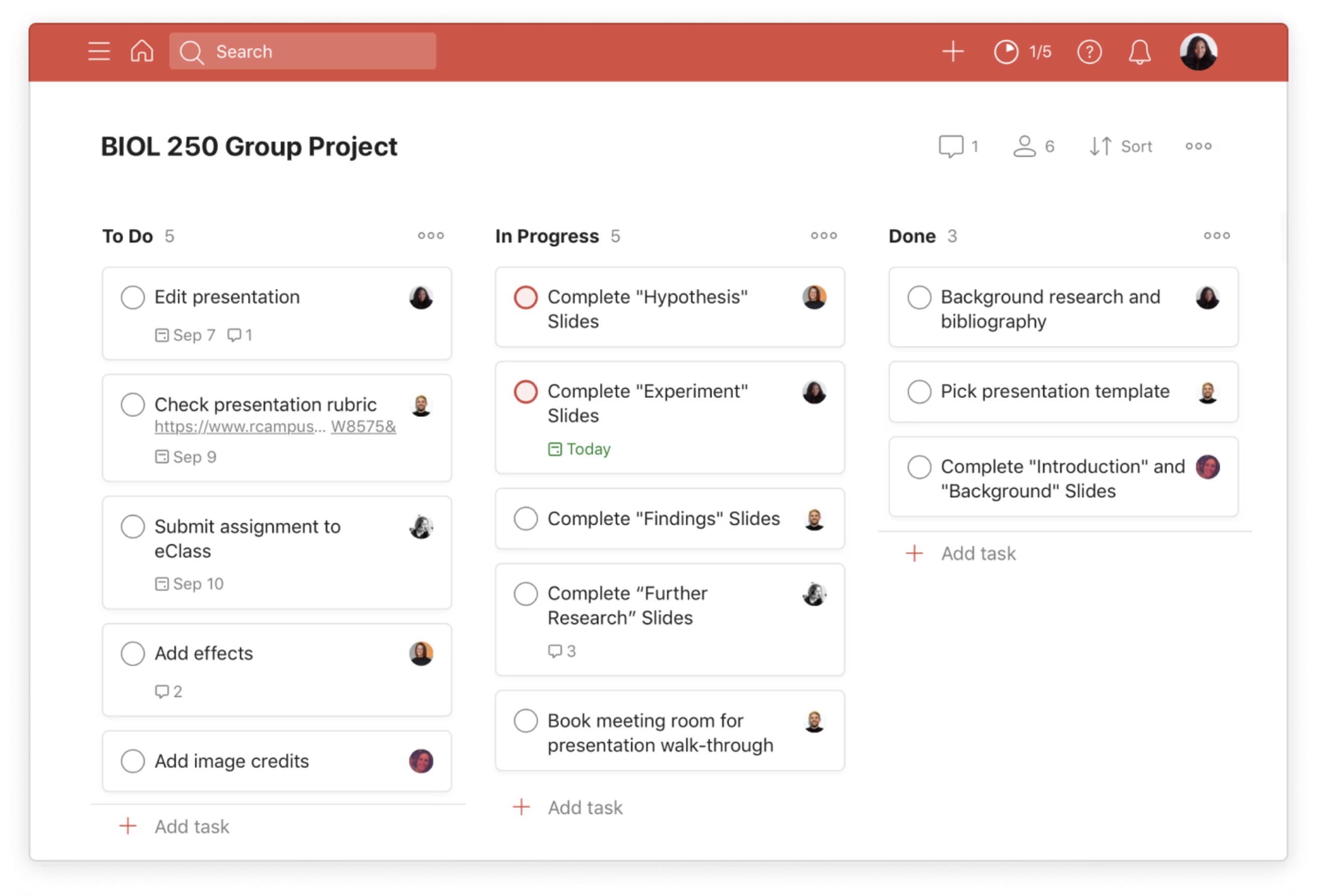
Image source: todoist.com
Key features:
- Task creation with due dates, recurring reminders, and priority levels
- Projects and sub-tasks for better task organization
- Labels and filters to categorize and quickly find tasks
- Natural language input (e.g., "Submit report tomorrow at 5 PM")
Pros:
- Clean, lightweight, and user-friendly interface
- Quick task entry using natural language processing
- Works smoothly across multiple devices
- Suitable for personal use and small teams
Cons:
- Limited advanced project management features
- No built-in time tracking
- Collaboration features are basic compared to enterprise tools
Pricing:
- Beginner: $0 for individual user
- Pro: $5/user/month (billed annually)
- Business: $8/user/month (billed annually)
3. Notion: Customizable workspace for tasks, schedules, and planning systems
Notion is an all-in-one productivity platform and one of the most flexible tools for managing time, combining task management, note-taking, scheduling, and database creation into a single customizable workspace. Unlike traditional to-do list apps, Notion lets users design their own planning systems, making it ideal for individuals and teams who prefer flexibility over rigid structures.
With drag-and-drop blocks, ready-made templates, and powerful databases, Notion can be used for daily task tracking, content planning, project management, and knowledge organization. It works especially well for users who want to centralize their work, notes, and schedules in one place using reliable tools for managing time.
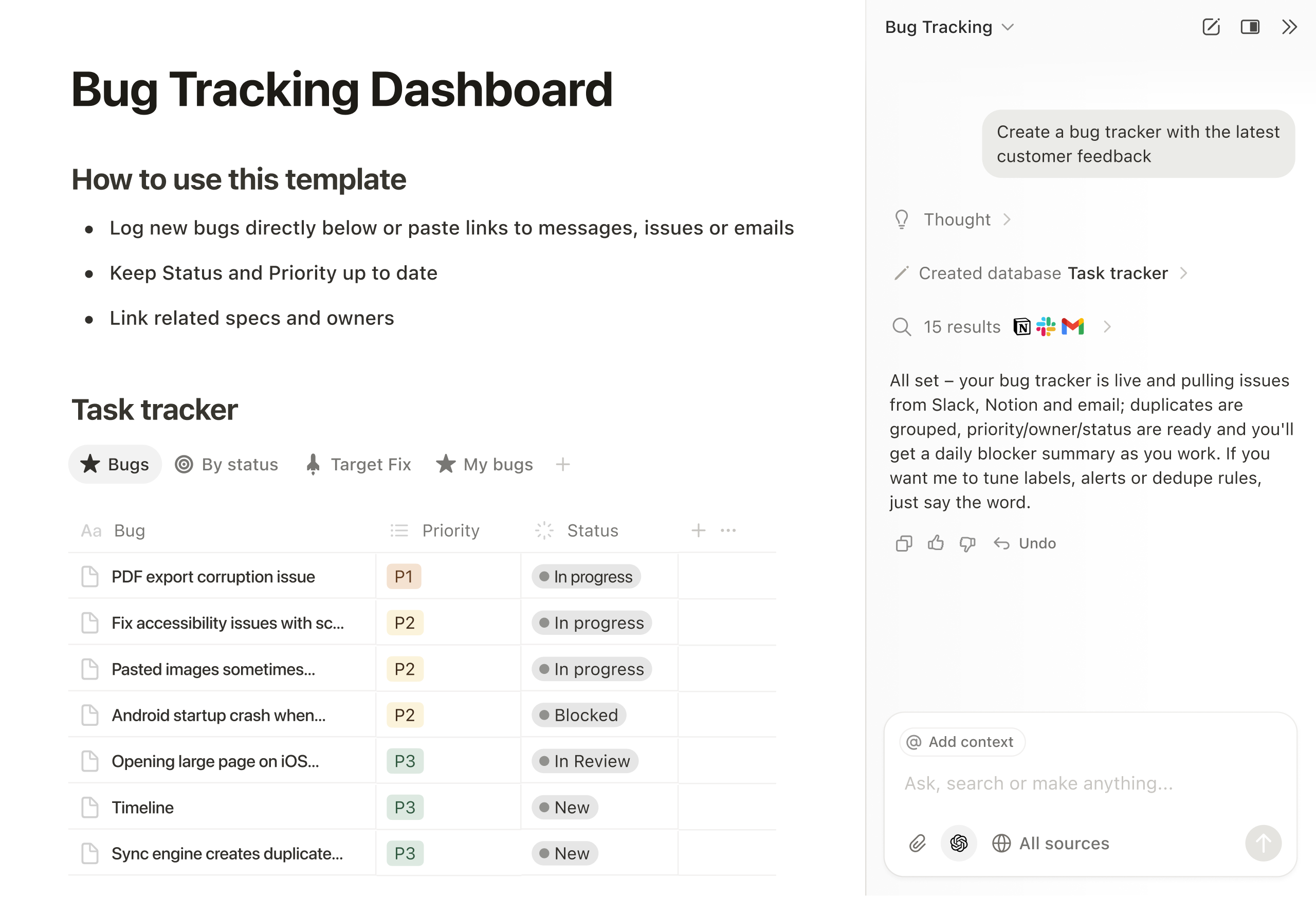
Image source: notion.com
Key features:
- Customizable pages and blocks for tasks, notes, and schedules
- Databases with filters, views (table, board, calendar, timeline), and relations
- Task management with due dates, priorities, and status tracking
- Pre-built and community templates for planning and workflows
Pros:
- Highly flexible and customizable workspace
- Combines multiple productivity tools into one platform
- Suitable for personal use, teams, and businesses
- Strong collaboration and documentation features
Cons:
- Steeper learning curve for new users
- Requires manual setup for advanced workflows
- Can feel overwhelming for simple task management needs
Pricing:
- Free plan: $0/user/month
- Plus plan: $10/user/month (billed annually)
- Business plan: $20/user/month (billed annually)
- Enterprise plan: Custom pricing (billed annually)
4. Asana: Task and timeline management for structured team workflows
Asana is a powerful project and task management platform designed to help teams plan, track, and manage work across multiple projects. It is especially well-suited for structured workflows where tasks, dependencies, and deadlines need to be clearly defined and monitored.
With features like task assignments, timelines, and project views, Asana enables teams to collaborate efficiently while maintaining visibility into progress. The platform is commonly used by marketing teams, product teams, and operations teams that require clear accountability and organized execution.
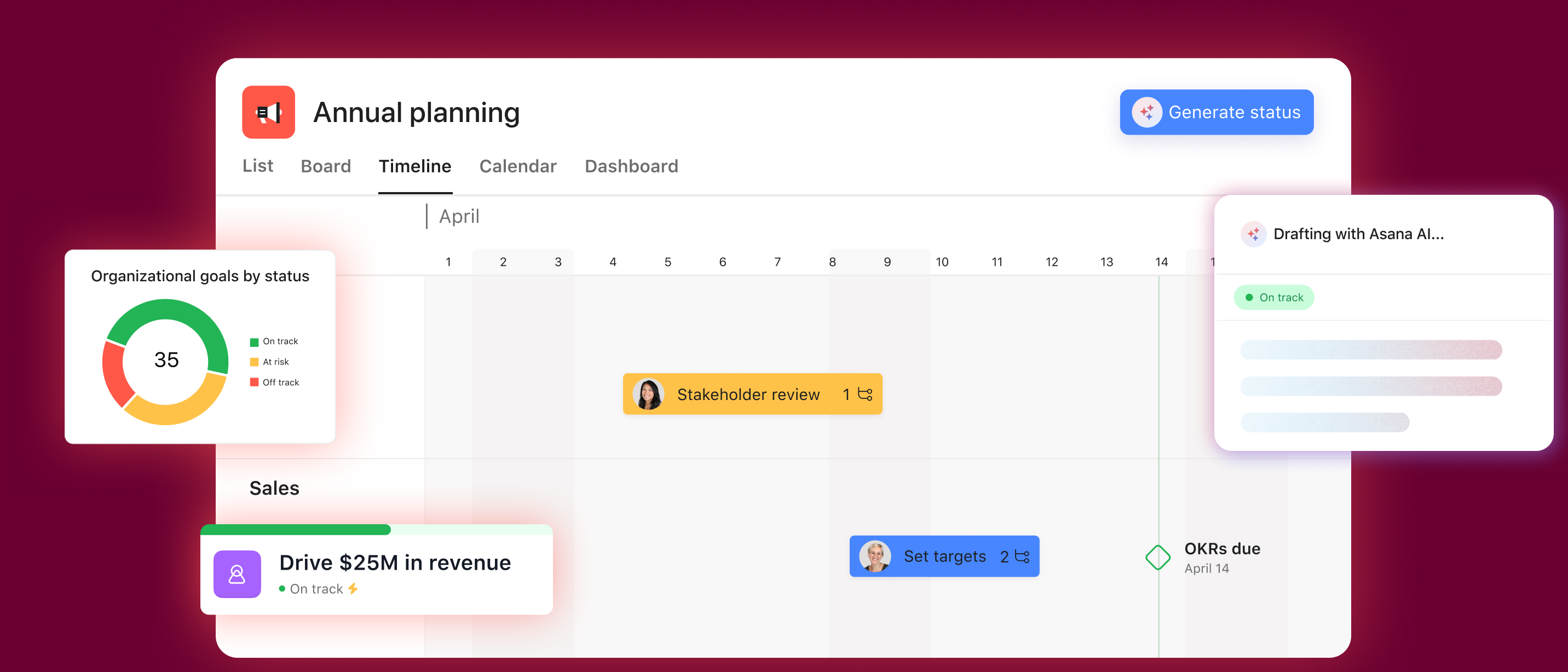
Image source: asana.com
Key features:
- Task creation with assignees, due dates, and dependencies
- Multiple project views, including list, board, calendar, and timeline
- Workflow automation with rules to reduce manual work
- Team collaboration with comments, file attachments, and mentions
Pros:
- Excellent for managing complex and structured team workflows
- Clear task ownership and accountability
- Powerful timeline and dependency tracking
- Scales well for growing teams and organizations
Cons:
- Can feel complex for individual or simple task use
- Limited features in the free plan
- Learning curve for new users managing advanced projects
Pricing:
- Personal: $0 free for individuals
- Starter: $10.99 user/month (billed yearly)
- Advanced: $24.99 user/month (billed yearly)
- Enterprise custom: Contact sales for tailored solutions
5. Trello: Visual board-based tools for managing time and tasks
Trello is a visual task management tool that uses boards, lists, and cards to help users organize work and track progress at a glance. Its Kanban-style layout makes it easy to manage tasks, deadlines, and workflows without overwhelming users with complex features.
Trello works well for individuals and teams who prefer visual planning and simple task tracking. From daily to-do lists to team projects and content calendars, Trello provides a flexible and intuitive way to manage tasks and time effectively.
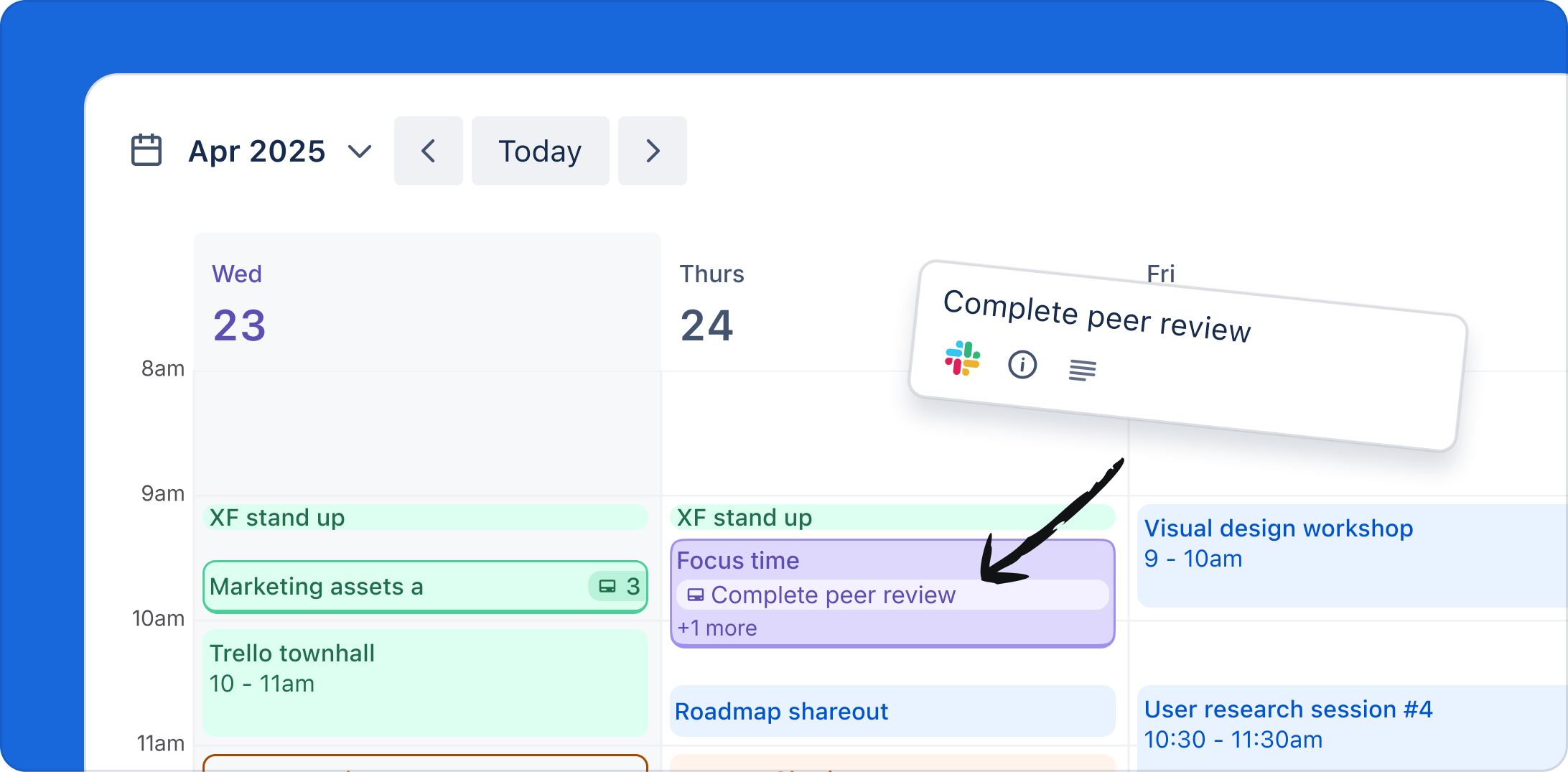
Image source: trello.com
Key features:
- Boards, lists, and cards for visual task organization
- Drag-and-drop interface for easy task movement
- Due dates, checklists, labels, and attachments
- Power-Ups to add features like calendars, automation, and integrations
Pros:
- Extremely easy to use with a minimal learning curve
- Visual layout makes task tracking intuitive
- Suitable for individuals, small teams, and beginners
- Flexible boards for different workflows
Cons:
- Limited advanced project management features
- Not ideal for complex or dependency-heavy projects
- Heavy reliance on Power-Ups for extended functionality
Pricing:
- Free: Free for up to 10 collaborators per workspace
- Standard: $5/user/month (billed annually)
- Premium: $10/user/month (billed annually)
- Enterprise: $17.50/user/month (billed annually)
6. ClickUp: Productivity platform for tasks, time tracking, and goals
ClickUp is a suite of tools for managing time, productivity, and project management. It is built to replace multiple work tools with a single, unified system. It combines task management, time tracking, goal setting, and collaboration features, making it suitable for teams and individuals who want detailed control over their workflows.
The platform supports a wide range of use cases, from simple to-do lists to complex project planning with dependencies and automation. ClickUp is especially useful for teams that need visibility into task progress, time spent, and performance metrics in one place.
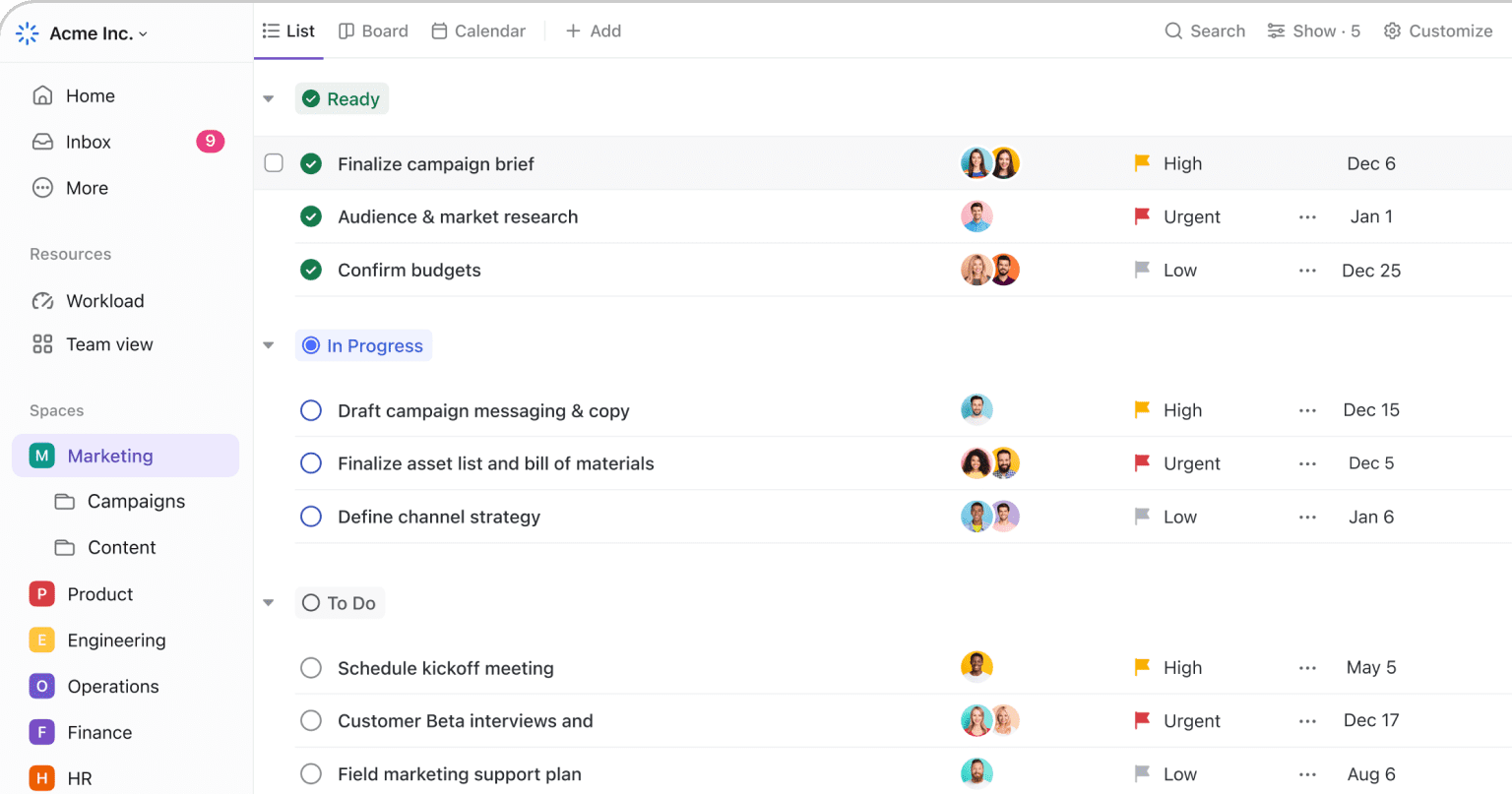
Image source: clickup.com
Key features:
- Task management with priorities, statuses, and dependencies
- Built-in time tracking and workload management
- Goals and milestones for tracking progress
- Multiple views, including list, board, calendar, and Gantt
Pros:
- Feature-rich platform covering multiple productivity needs
- Built-in time tracking and goal management
- Highly customizable workflows and views
Cons:
- Interface can feel overwhelming for new users
- Performance may slow down with complex setups
- Requires time to configure workflows effectively
Pricing:
- Free forever: $0 free for individual users (billed annually)
- Unlimited plan: $7/user/month (billed annually)
- Business plan: $12/user/month (billed annually)
- Enterprise plan: Custom pricing (billed annually)
7. Monday.com: Work management tool with time tracking and automation
Monday.com is a flexible work management platform designed to help teams plan, track, and automate their daily work. It combines task management, time tracking, and workflow automation into a visually structured system that suits teams managing ongoing operations, projects, and deadlines.
The platform uses customizable boards with columns for status, timelines, owners, and time tracking, making it easy to monitor progress and team performance in real time. Monday.com is widely used by marketing, sales, IT, and operations teams that require clear workflows and automation.
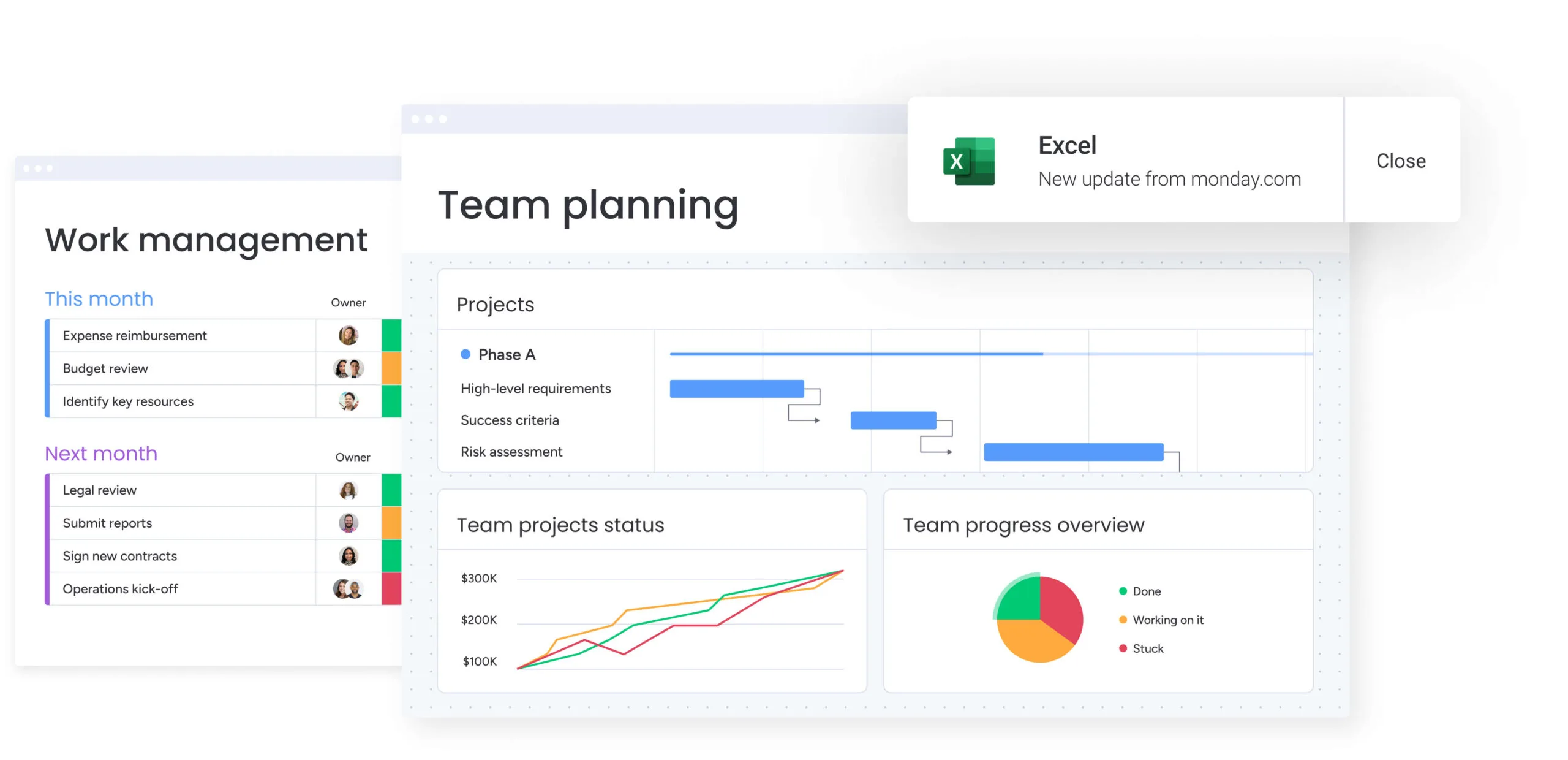
Image source: monday.com
Key features:
- Customizable boards for tasks, projects, and workflows
- Built-in tools for managing time tracking for tasks and team activities
- Automation rules to reduce repetitive manual work
- Multiple views, including table, board, timeline, and calendar
Pros:
- Visually appealing and easy-to-understand interface
- Strong automation and workflow customization
- Built-in time tracking without third-party tools
Cons:
- Pricing can be expensive for small teams
- Learning curve for setting up complex automations
- Limited functionality on the basic plan
Pricing:
- Basic plan: $9/user/month (billed annually)
- Standard plan: $12/user/month (billed annually)
- Pro plan: $19/user/month (billed annually)
8. Clockify: Free time tracking tool for individuals and teams
Clockify is a popular time tracking tool designed to help individuals and teams monitor how time is spent on tasks and projects. It is especially useful for freelancers, remote teams, and businesses that need accurate time tracking for productivity analysis, billing, and reporting.
The platform allows users to track time manually or using a built-in timer, assign time entries to projects and clients, and generate detailed reports. With support for web, desktop, and mobile apps, Clockify makes it easy to track time from anywhere.
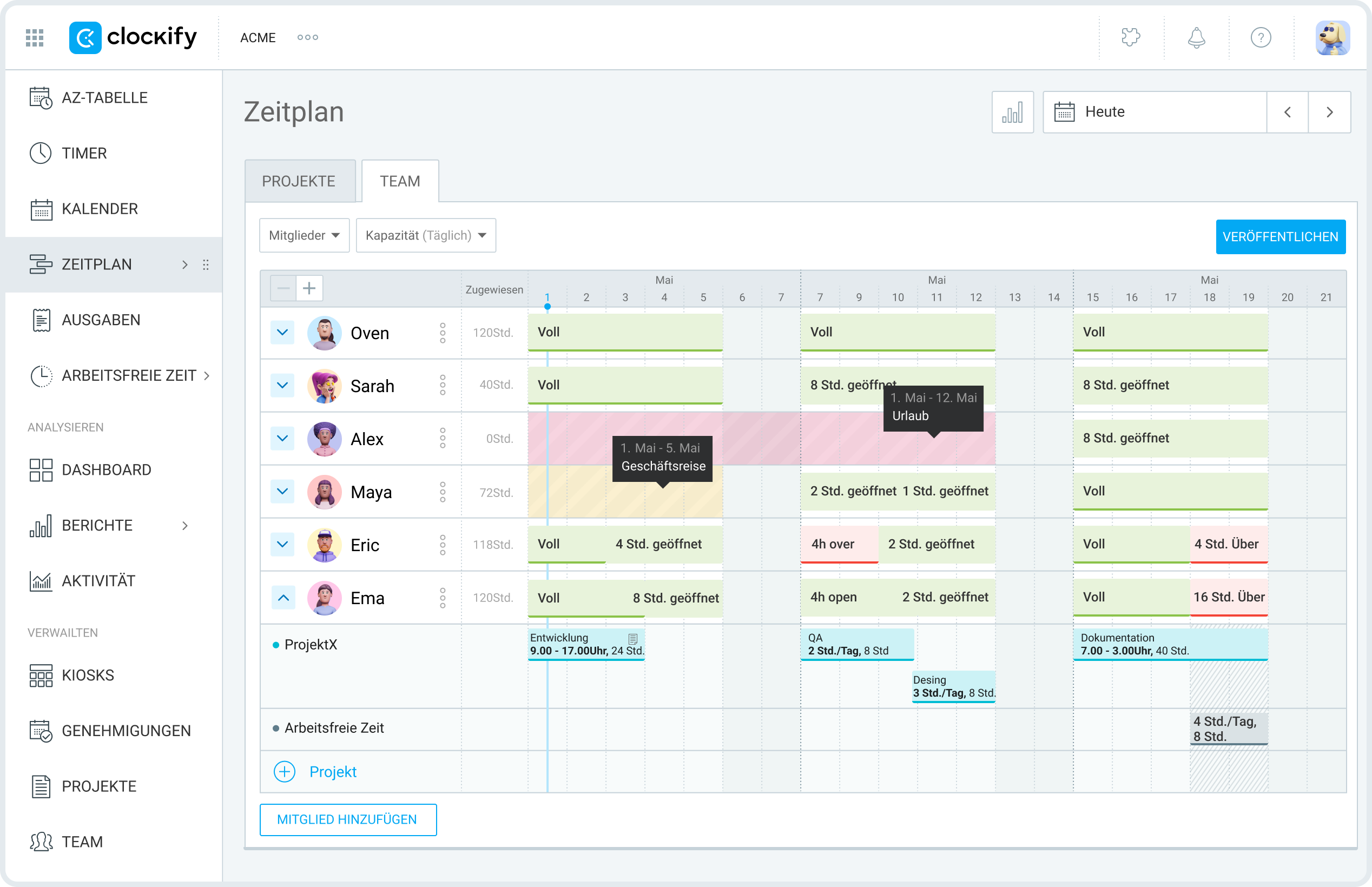
Image source: clockify.me
Key features:
- One-click timer and manual time entry
- Project, task, and client-based time tracking
- Detailed reports for productivity, budgeting, and billing
- Team management with user roles and permissions
Pros:
- Completely free for unlimited users and projects
- Easy to use with a minimal learning curve
- Suitable for freelancers, remote teams, and agencies
Cons:
- No built-in task management system
- Interface feels basic compared to premium tools
- Advanced features require add-ons
Pricing:
- Free: $0 for an unlimited number of users
- Basic: $3.99/user/month (billed annually)
- Standard: $5.49/user/month (billed annually)
- Pro: $7.99/user/month (billed annually)
- Enterprise:$11.99/user/month (billed annually)
9. RescueTime: Automatic time tracking and focus analytics tool
RescueTime is an automatic time tracking and productivity analytics tool designed to help individuals understand how they spend their time on digital devices. Unlike manual time trackers, RescueTime runs in the background and automatically records activity across apps, websites, and software, providing detailed insights into work habits and focus patterns.
The platform is ideal for professionals, remote workers, and students who want to improve focus, reduce distractions, and make data-driven decisions about time usage. With productivity scoring and focus reports, RescueTime helps users identify time-wasting activities and optimize their daily routines.
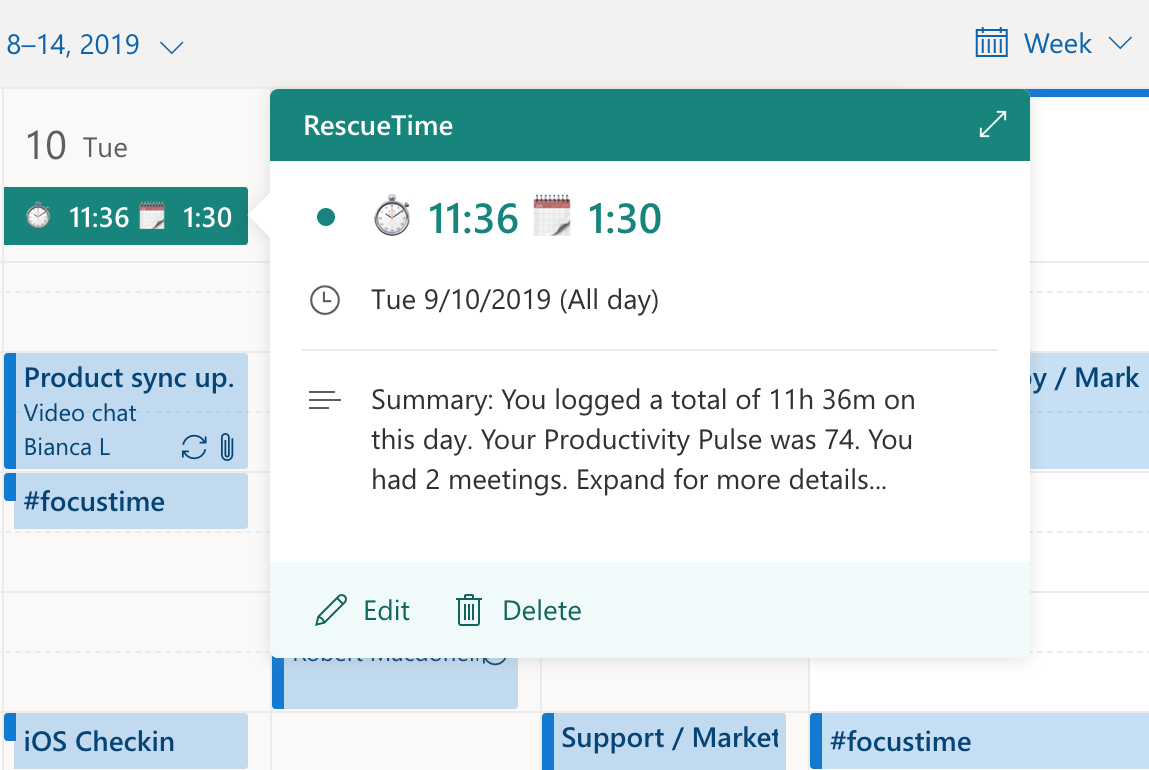
Image source: rescuetime.com
Key features:
- Automatic tracking of apps, websites, and software usage
- Productivity scoring and focus reports
- Goal setting for focused work time
- Alerts and notifications for distractions
Pros:
- Fully automatic tracking with no manual input required
- Provides deep insights into productivity patterns
- Helps identify distractions and time-wasting habits
Cons:
- Limited task or project-level tracking
- Not suitable for billing or client-based time tracking
- Privacy concerns for some users due to activity monitoring
Pricing:
- Solo: $7/month (billed annually)
- Solo+: $12/month (billed annually)
- Team: $10 user/month (billed annually)
- Team+: $16 user/month (billed annually)
10. Toggl Track: Simple time tracking for productivity analysis
Toggl Track is a lightweight and user-friendly time tracking tool designed to help individuals and teams analyze how their time is spent. It focuses on simplicity and speed, making it easy to start and stop tracking tasks without disrupting workflow.
The platform is widely used by freelancers, consultants, and remote teams who need clear visibility into productivity without a complex setup. With detailed reports and cross-platform support, Toggl Track helps users identify inefficiencies, improve time allocation, and optimize work habits.
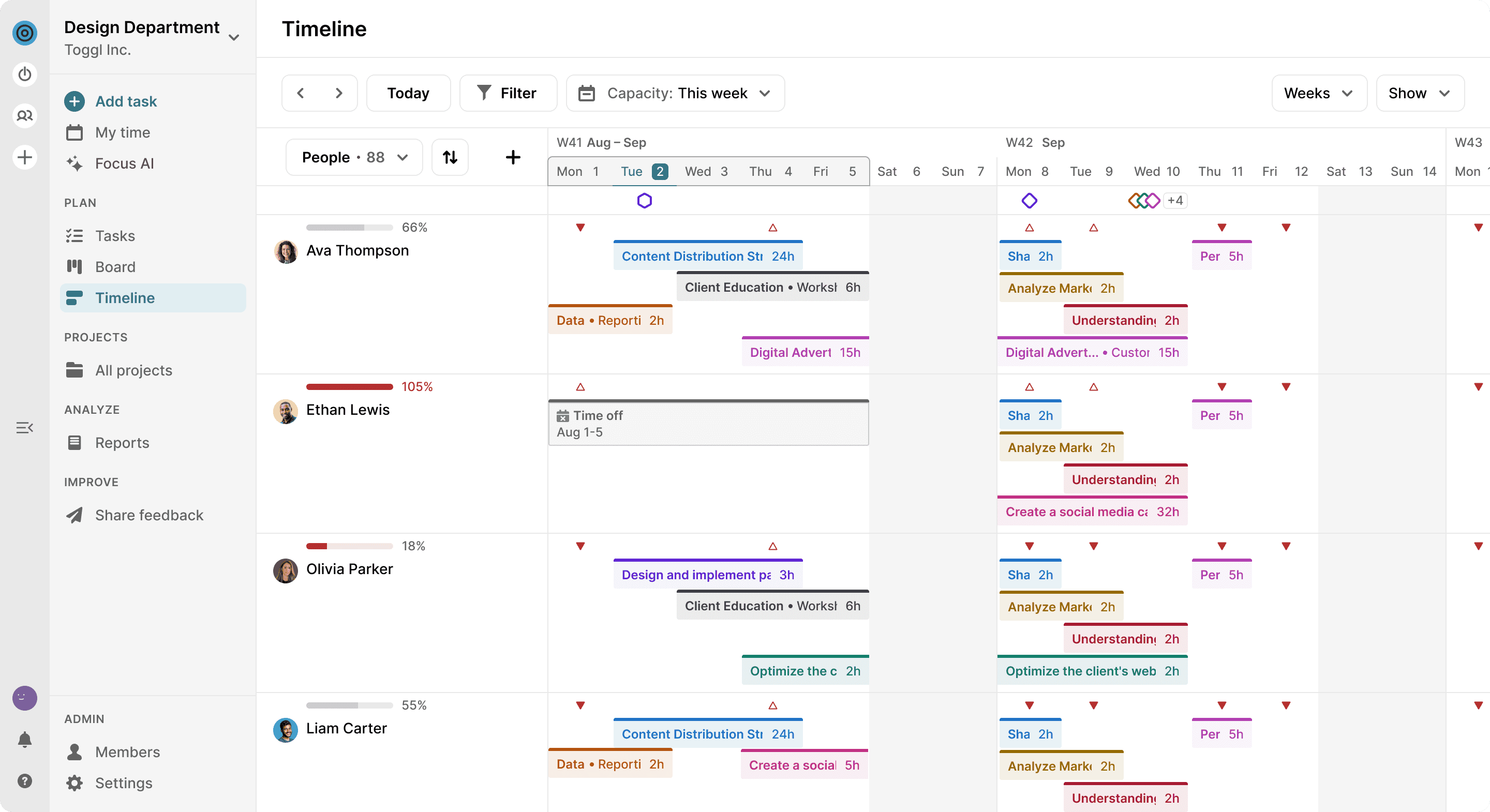
Image source: toggl.com
Key features:
- One-click time tracking with manual and timer modes
- Project and task-based time tracking
- Detailed reports and productivity insights
- Idle detection and reminders
Pros:
- Extremely easy to use with minimal setup
- Clean and distraction-free interface
- Accurate time tracking and reporting
Cons:
- Limited project management capabilities
- Advanced reporting locked behind paid plans
- Not ideal for complex team workflows
Pricing:
- Free: $0 for up to 5 users
- Starter: $9 user/month (billed annually)
- Premium: $18 user/month (billed annually)
- Enterprise: Custom pricing
11. Google Calendar: One of the best free time management tools
Google Calendar is a widely used scheduling and time management tool that helps individuals and teams plan their day, manage events, and organize tasks through effective time blocking. It allows users to schedule meetings, set reminders, and allocate specific time slots for focused work, making it an essential tool for daily planning.
With seamless integration across Google services and real-time syncing across devices, Google Calendar is ideal for professionals, students, and remote teams who need a reliable way to manage schedules and avoid conflicts.
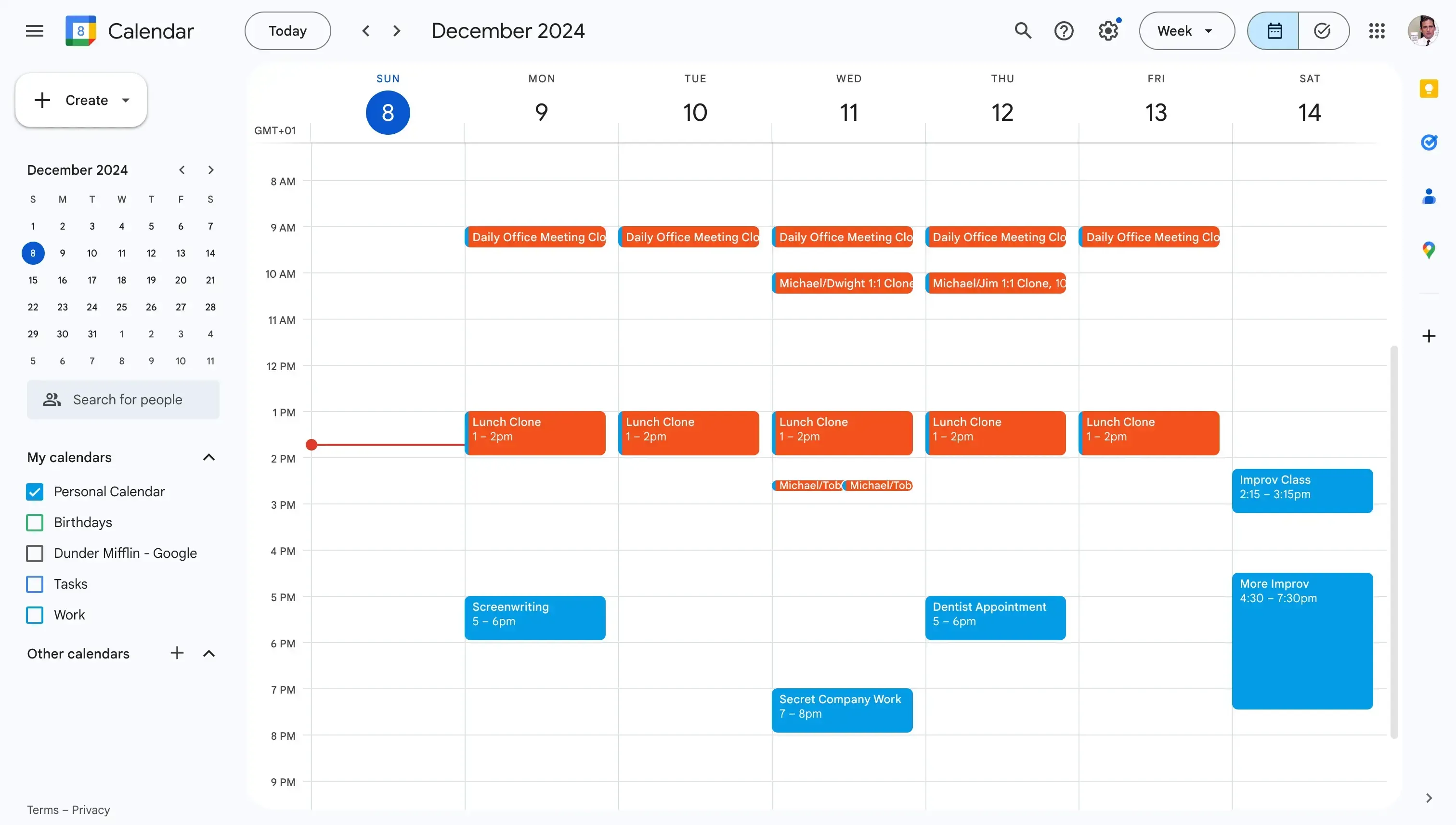
Image source: google.com
Key features:
- Event scheduling with reminders and notifications
- Time blocking for focused work and productivity planning
- Multiple calendar creation and color-coded views
- Integration with Gmail, Google Meet, and other Google Workspace tools
Pros:
- Simple and intuitive interface
- Excellent for time blocking and schedule visualization
- Real-time syncing across devices
Cons:
- Limited built-in task management features
- Not suitable for detailed project tracking
- Advanced workflow automation is not available
Pricing:
- Free: Free for anyone with a Google account
12. Microsoft To Do: Best in free tools for managing time
Microsoft To Do is a simple and reliable task management app designed to help users plan daily tasks, set reminders, and stay organized. It is deeply integrated with the Microsoft ecosystem, making it a natural choice for users who already rely on tools like Outlook, Microsoft Teams, and Microsoft 365.
The app focuses on straightforward task planning rather than complex project management. With features like smart lists and daily planning, Microsoft To Do works well for individuals and small teams who want an easy way to manage tasks across work and personal life.
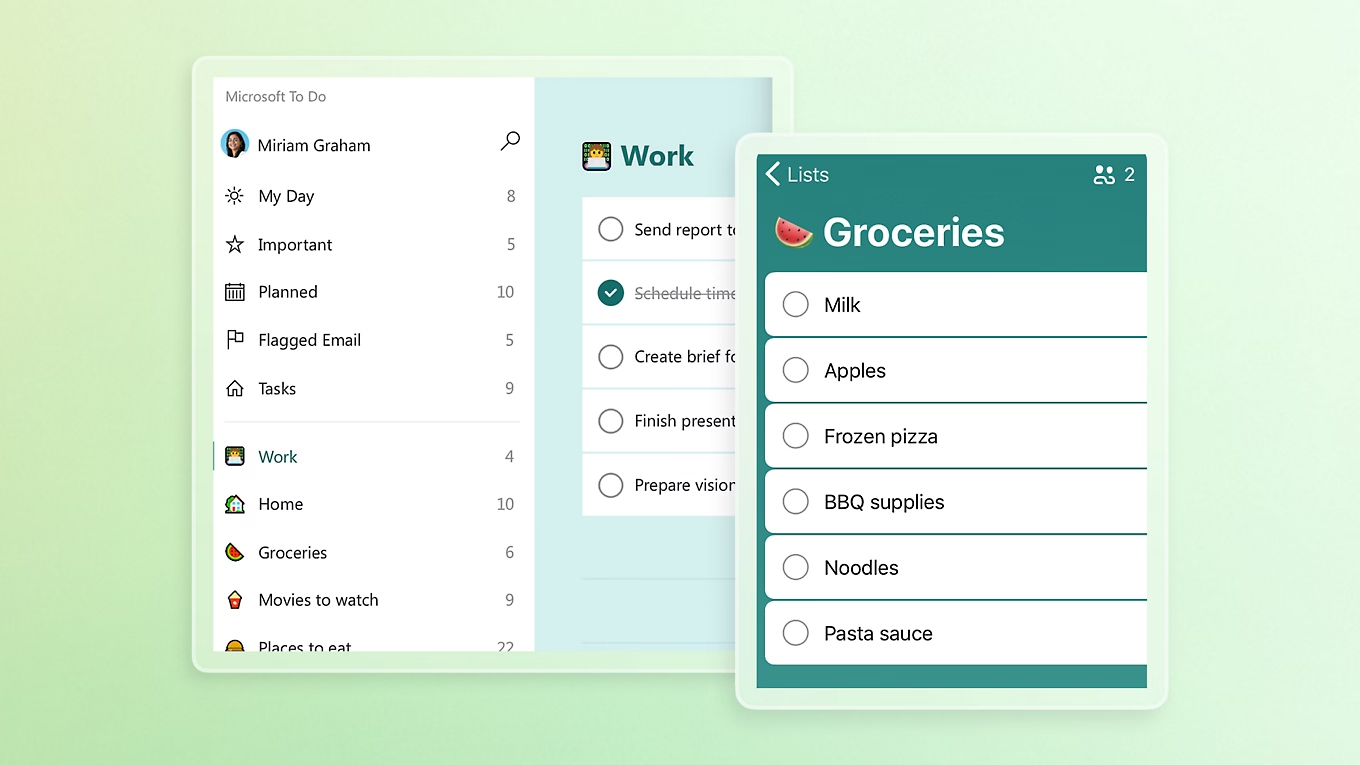
Image source: microsoft.com
Key features:
- Task creation with due dates, reminders, and recurring tasks
- Smart lists like My Day, Important, and Planned
- Integration with Outlook tasks and Microsoft 365 apps
- Shared task lists for collaboration
Pros:
- Easy to use without learning curves
- Seamless integration with Microsoft services
- Ideal for daily task planning and personal productivity
Cons:
- Limited advanced project management features
- Not suitable for complex team workflows
- Fewer customization options compared to competitors
Pricing:
- Microsoft To Do is completely free to use for everyone with a Microsoft account
How to choose the best time management tool for your needs
Choosing the right time management tool depends on how you work, what you track, and the level of control you need over your time. Consider the following factors before making a decision:
- Identify your primary goal: Decide whether you need , time tracking, scheduling, or focus analytics. Some tools specialize in one area, while others combine multiple features.
- Consider your work style: Visual planners may prefer board-based tools, while structured teams benefit from timeline and workflow-driven platforms. Choose a tool that matches how you naturally plan and execute tasks.
- Evaluate ease of use: A powerful tool is only effective if you actually use it. Look for an intuitive interface and minimal setup, especially if you're new to time management tools.
- Check integration requirements: Ensure the tool integrates with the apps you already use, such as calendars, email, , or collaboration platforms.
- Assess team vs. Individual needs: Some tools are designed for personal productivity, while others focus on team collaboration, reporting, and accountability. Pick one based on whether you work solo or with a team.
- Compare pricing and scalability: Start with a free plan if available, but consider whether the tool can scale as your workload or team grows. Make sure paid features justify the cost.
The benefits of time management
Why invest the effort into learning new ? The return on investment is felt across every area of your life:
- Reduced stress and burnout: When you have a clear plan, you eliminate the "constant panic" of forgetting a task. Knowing exactly what is on your plate allows you to truly disconnect after work.
- Higher quality output: Time management allows for "Deep Work." By blocking out distractions, you can focus on complex tasks that require high-level thinking, leading to better results than if you were multitasking.
- Improved work-life balance: When you are efficient during work hours, you don't have to "catch up" on weekends. This gives you more time for family, hobbies, and rest.
- Faster project cycles: With built-in and plug-and-play tools for managing cycle time, teams can instantly identify bottlenecks and delays. Clear visibility into progress helps fix issues faster and ship projects on time.
- Greater professional reputation: Reliability is a top-tier professional trait. Managing your time effectively ensures you consistently meet deadlines and arrive prepared for meetings, building trust with clients and leaders.
Conclusion
Time is one of the few resources you can’t recover, and in today’s fast-paced, remote-first work environment, managing it well is essential. The right tools for managing time help cut distractions, clarify priorities, and create a smoother flow between , execution, and collaboration. As this guide shows, modern solutions go far beyond basic to-do lists, supporting task prioritization, scheduling, time tracking, and seamless coordination across teams and time zones. Platforms like bring these capabilities together in one unified workspace, helping teams spend less time switching apps and more time getting meaningful work done.
There is no single “best” time management tool for everyone. The right choice depends on your goals, work style, and whether you’re managing personal tasks or collaborating with a distributed team. By starting with free plans, experimenting with a few options, and building consistent habits, you can create a system that truly works for you. When used thoughtfully, especially within an all-in-one platform like Lark, time management tools don’t just boost productivity; they reduce stress, improve work-life balance, and help you stay focused on what matters most.
Save and manage time effectively with Lark
FAQs
Can using too many time management tools reduce productivity?
Yes. Using too many tools can actually reduce productivity by increasing context switching and "tool fatigue." Constantly moving between apps for tasks, calendars, communication, and can create extra mental load. It's often more effective to choose one or two tools that cover your core needs well rather than managing multiple overlapping platforms.
Are time management apps suitable for students and freelancers?
Absolutely. Time management apps are especially useful for students and freelancers because they help organize flexible schedules, track deadlines, and maintain consistency without external supervision. Students can use them for study planning and assignment tracking, while freelancers benefit from time tracking, client-based work organization, and productivity insights.
How long does it take to see results after using time management tools?
Most users begin noticing improvements within one to two weeks of consistent use. Initial benefits often include better task clarity and reduced stress. Long-term results, such as improved productivity habits and time awareness, typically develop over several weeks as workflows become more refined.
Do time tracking tools affect work performance or motivation?
Time tracking tools can improve performance when used as a self-awareness aid rather than a surveillance tool. They help identify distractions, optimize workloads, and support better planning. However, excessive monitoring or misuse can feel restrictive, so it's important to use these tools for insights and improvement—not pressure.
What's the best way to transition from manual planning to digital tools?
Start gradually. Begin by digitizing your existing system, such as transferring a paper to-do list or weekly planner into one app. Avoid changing everything at once. Focus on building a simple daily habit, explore advanced features only when needed, and give yourself time to adapt before adding any more tools or .
Related reading





























