Keeping track of "who is doing what" shouldn't feel like a full-time job, yet most teams struggle with project lists that are either too messy to follow or too out-of-date to matter. In this guide, we're breaking down how to move past the "everything is a priority" trap by building a project list that actually works. Also, we will explain the vital difference between a project and a simple task, show you how to structure a list that stays clean, and point out the common mistakes that turn good plans into cluttered graveyards. Let's dive in now.
What is a project list?
A project list is a centralized record of all approved initiatives that an individual, team, or organization is responsible for delivering. It provides a high-level view of what work exists, who owns it, and where each . Unlike task lists that focus on daily actions, a project list tracks entire initiatives such as product launches, audits, system migrations, or campaigns.
A well-maintained project list typically includes essential details like project name, owner, status, priority, timeline, and strategic importance. Its purpose is to support planning and decision-making rather than execution. Showing all active, upcoming, and paused projects in one place helps teams avoid overload, identify conflicts early, and allocate resources more effectively. Used correctly, a project list becomes a single source of truth that improves transparency, alignment, and prioritization across teams, ensuring that effort is focused on the work that matters most.
Create your own project lists without efforts
Differences: Project list vs project task list vs to-do list
To help you stop "granularity confusion," it is essential to see precisely how these three lists differ in scope, ownership, and purpose. Using the wrong format for the wrong goal is usually why project data becomes overwhelming or neglected.
4 common types of project lists teams use with examples
Teams use different types of project lists depending on their goals, scale, and level of visibility required. Choosing the correct format helps prevent overload while keeping work organized and actionable.
- Portfolio-level project list: This list provides a high-level view of all ongoing and planned initiatives across teams or departments. It is often supported by a list of to provide leadership with strategic oversight.
- Team or department project list: Focused on projects owned by a specific function, this list helps managers balance capacity and deadlines. It commonly connects with a list to track progress consistently.
- Project execution list: This type breaks a single initiative into structured phases and deliverables without going into daily tasks. It is often confused with a project management task list, but it remains milestone-driven.
- Capability or growth-focused project list: Used for such as training or process upgrades, this list aligns projects with development goals. It supports long-term planning tied to a project management skills list.
Discover smarter methods to track projects
What should be included in a complete project list
A complete project list provides clear visibility into work, ownership, and priorities, helping teams make informed decisions. When structured properly, it remains useful over time rather than becoming cluttered or ignored.
- Project name and objective: Each entry should clearly state the project's name and objective. A ensures everyone understands the outcome the project is meant to deliver.
- Owner and key stakeholders: Every project must have a clearly accountable owner responsible for progress and decisions. Listing key stakeholders helps and approvals.
- Status, priority, and timeline: Including standardized statuses, priority levels, and target dates allows teams to assess urgency quickly. This makes it easier to balance workloads and resolve conflicts early.
- High-level milestones and dependencies: Key milestones show meaningful progress without excessive detail. Noting significant dependencies highlights risks that could delay delivery if not managed proactively.
How to make a project list
Building a project list isn't just about writing things down; it's about creating a reliable system that tells you exactly where your resources are going. If you follow a structured approach, you can prevent your list from becoming a cluttered "dumping ground" for every random idea. Here is how to build a list that actually drives progress.
Step 1: Centralize and audit existing work
Start by gathering every active and planned initiative from , meeting notes, and personal documents into a single location. This audit ensures you have complete visibility of the team's current workload and prevents "hidden" projects from draining resources in the background.
Step 2: Define explicit metadata and categories
Standardize the information across projects by adding columns for the owner, status, priority, and deadline. Using consistent labels like "In Progress" or "Needs Review" makes it possible to filter and sort your list effectively as it grows.
Step 3: Establish a prioritization framework
Rank your projects based on their strategic impact versus the effort required to complete them. By assigning a clear priority level (such as P0 for critical or P1 for necessary), you ensure the team always knows which project to protect when deadlines clash.
Step 4: Map out high-level milestones
Avoid the trap of listing every tiny task; instead, identify the 3–5 major milestones that define a . Mapping these key dates on a timeline or Gantt chart provides a macro-view of the project's health without getting bogged down in the "weeds" of daily chores.
Step 5: Select a dynamic management tool
Move your list to a collaborative platform that supports real-time updates and automated reporting. A tool like Lark keeps your project list "alive," triggering notifications when statuses change and ensuring everyone is looking at the most current version of the truth.
Learn practical ways to prioritize projects
Lark: From static project lists to dynamic prioritization
Traditional project lists often freeze the moment they are created, quickly falling behind real work. Lark reimagines project lists as living systems that as work progresses. Instead of manually chasing statuses, teams gain continuous visibility into priorities, ownership, and progress. By linking projects, tasks, and collaboration in one workspace, Lark helps teams focus on what matters most at any given moment. The result is more precise prioritization, faster decisions, and less time spent maintaining lists.
Project management hub with multi-dimensional views
Lark Base functions as a relational database rather than a flat spreadsheet. With custom fields and records, it will represent all the project information, such as name, owner, status, start dates, deadlines, and more. Also, it has multiple views that let you control your project lists, allowing you to toggle between a to track dependencies and a to manage workflow stages. This ensures that while the underlying data (your project list) remains consistent, every team member can view it in the format that best suits their specific workflow. 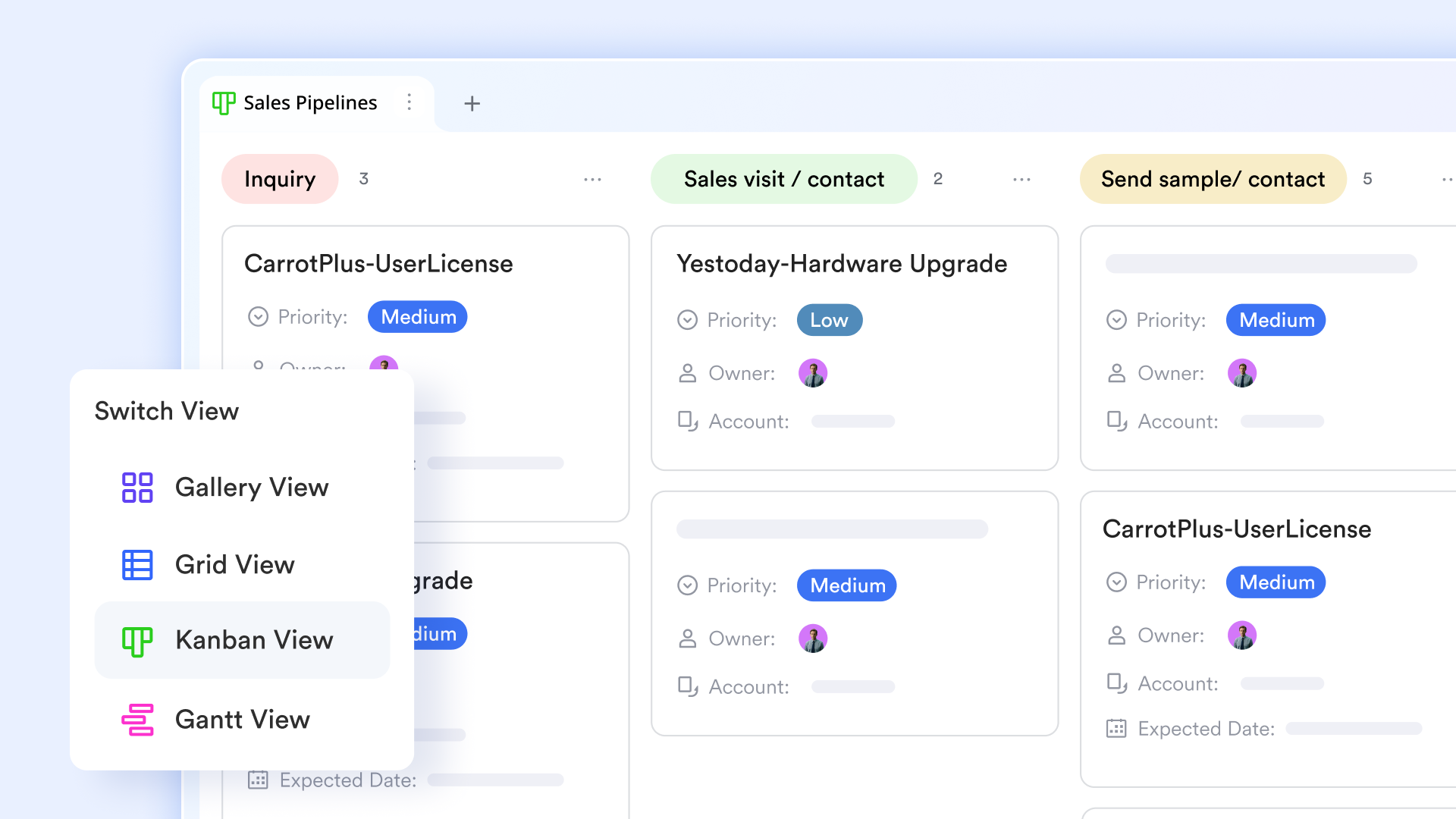
Semantic organization: Groups and filtering
As project lists scale, finding information becomes difficult. Lark Base "multi-condition filtering" allows you to drill down into your project list using "And/Or" logic (e.g., show tasks that are "High Priority" and "Assigned to Engineering"). Additionally, the "Group by" function allows you to instantly reorganize the project list by "Status" or "Deadline," giving you an immediate heat map of where the team's energy is currently focused. 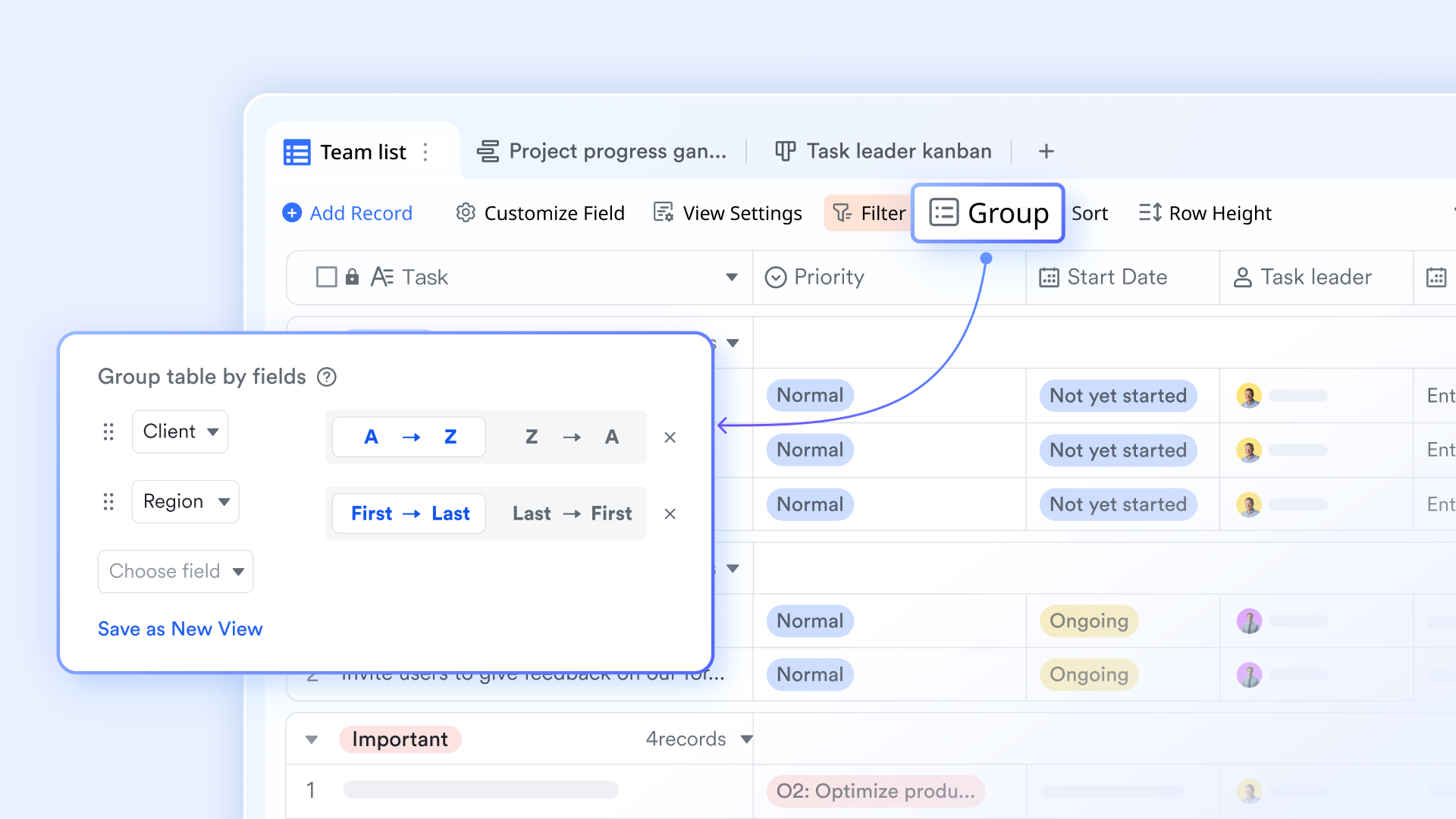
Real-time insights: Native dashboards for progress tracking
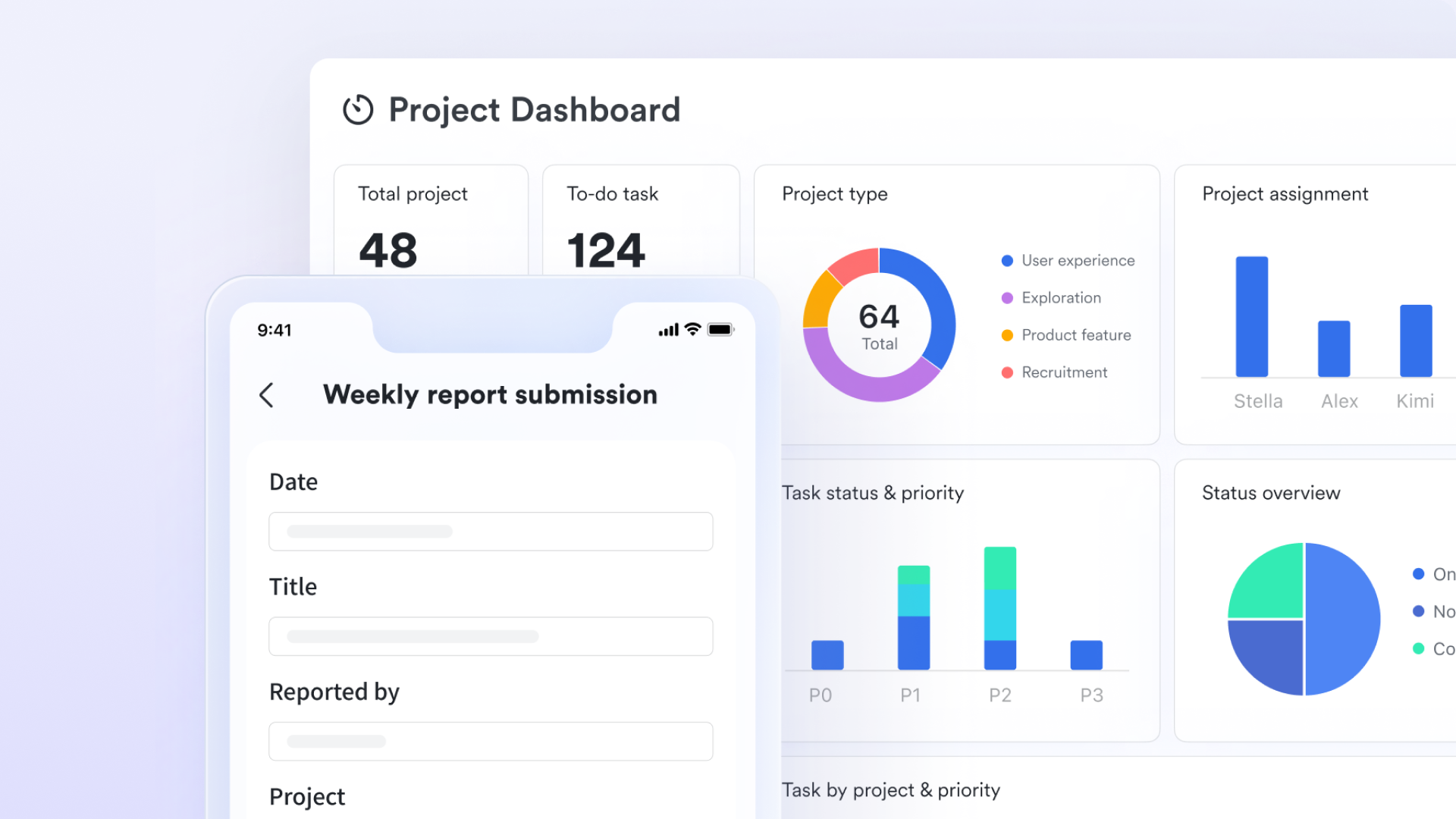
function as a centralized "control room," transforming fragmented project lists into a high-level visual representation of organizational health. With 36 different types of blocks, you can insert Number widgets to track total budget spend or chart widgets to percentages across various departments. This visual intelligence ensures that bottlenecks are identified immediately through customizable color-coded alerts, keeping every department aligned on the final delivery goal.
Actionable accountability: Task lists & collaborator management
Instead of fragmented to-do lists, Lark Tasks serves as a centralized execution engine. A specific high-value function is the "Sub-task Hierarchy," which allows you to break down a single project list item into smaller, manageable steps, each with its own owner and deadline. By adding "Collaborators" to these tasks, you ensure that every of updates, eliminating the need for manual status pings. 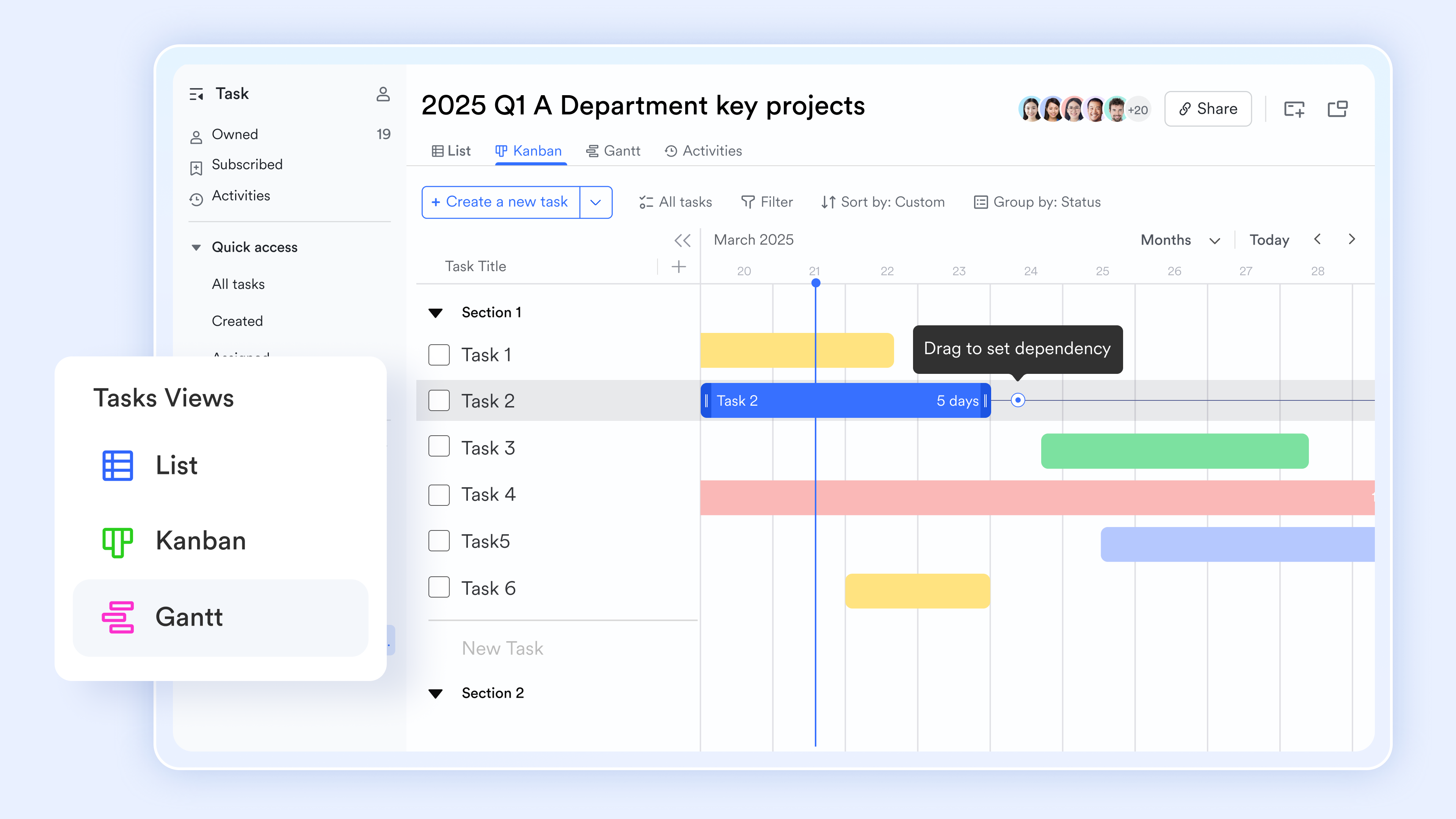
:
- Starter plan: Free forever plan that includes 11 powerful tools for up to 20 users. It also comes with 100GB of storage, 1000 automation runs, AI translations, and more.
- Pro plan: $12/user/month (billed annually) for up to 500 users. It includes everything in Starter plus group calling for up to 500 attendees, 15TB of storage, 50,000 automation runs, and more.
- Enterprise plan: for custom pricing. Supports unlimited users and includes even more automation runs and advanced security, compliance, and management features.
For small teams with simple communication needs

18 months message history
1000 Base automation runs/month
2000 rows per table in Base
Most POPULAR
For companies with comprehensive collaboration and management needs
Unlimited message history
500-participant video meetings
50k Base automation runs/month
20k rows per table in Base
For large companies with advanced security and organizational management needs
Get a personalized demo and pricing
Unlimited message history
500-participant video meetings
15 TB storage + 30 GB storage/user
500k Base automation runs/month
50k Base automation runs/month
Most POPULAR
For companies with comprehensive collaboration and management needs
Unlimited message history
500-participant video meetings
50k Base automation runs/month
20k rows per table in Base
Ready-to-use Lark template to automate your project list
To help teams move faster, Lark offers ready-to-use templates that remove guesswork from setting up a project list. These templates are designed to handle structure, prioritization, and . By starting with a proven setup, teams can focus on execution instead of building systems from scratch.
Multi-project tracker
The multi-project tracker template is designed to give teams a clear, consolidated view of multiple initiatives at once. It helps track owners, statuses, priorities, and timelines across projects without switching between separate files. This makes it easier to spot overloads, , and make informed prioritization decisions quickly.
Project planning & implementation
The project planning and implementation template supports teams in moving projects from idea to execution with a clear structure. It helps define timelines, responsibilities, and to reduce confusion during delivery. This ensures plans translate into consistent progress and predictable outcomes.
Project tracking
The project tracking template helps teams monitor progress, deadlines, and ownership throughout a project's lifecycle. It provides visibility into what is on track, at risk, or delayed. This makes it easier to take timely action and keep delivery aligned with expectations.
Task management
The task management template helps teams organize, assign, and track individual tasks within a project. It clarifies ownership and deadlines, so nothing falls through the cracks. This structure improves accountability and day-to-day execution.
Product development progress management
The product development progress management template helps teams track product initiatives from concept through release. It provides visibility into stages, dependencies, and delivery status across functions. This keeps product work aligned with timelines, priorities, and customer expectations.
Common mistakes teams make with project lists
Even well-intentioned project lists can lose value if they aren't maintained with discipline. These common mistakes gradually reduce clarity, trust, and the .
- Treating the list as a backlog graveyard: Teams often dump every request or idea into the project list without review. This turns it into a to-do list project management tool instead of a strategic overview.
- Mixing ideas, tasks, and approved projects: When and daily actions live alongside active initiatives, priorities become unclear. The list starts to resemble a to-do list project rather than an accurate project tracker.
- Failing to retire completed or cancelled projects: Old or cancelled initiatives that remain listed create noise and false workload signals. Over time, even a well-designed project task list template in Excel loses credibility and falls out of use.
As project lists grow, keeping them accurate, prioritized, and visible becomes harder with static documents. Teams need a way to move beyond manual updates and disconnected files without adding complexity. This is where Lark helps transform project lists from passive records into active systems. By connecting planning, execution, and visibility in one place, Lark ensures project lists stay current, trusted, and decision-ready.
Turn project lists into actionable plans
Conclusion
A well-structured project list is more than a record of work—it is a foundation for clarity, prioritization, and accountability. When teams clearly separate projects from tasks, define ownership, and regularly review what is active or complete, project lists become reliable rather than static documents. Using the proper structure and templates helps maintain visibility as work scales, while avoiding common mistakes keeps the list relevant over time.
enables teams to take this further by transforming project lists into dynamic, connected systems. By linking planning, execution, and progress tracking in one workspace, Lark reduces manual updates and keeps everyone aligned on what matters most. Whether managing a few initiatives or an entire portfolio, Lark helps teams stay focused, organized, and adaptable. Get started with Lark today and build project lists that support real progress instead of slowing teams down.
FAQs
What is the five-project rule?
The five-project rule suggests that a team should actively focus on no more than five projects at one time. This rule helps reduce context switching and improve delivery quality. In Lark, teams can clearly see active priorities and pause lower-impact work when capacity is stretched.
What are the seven elements of a project plan?
A project plan typically includes objectives, scope, timeline, resources, budget, risks, communication, and success criteria. These elements provide structure and clarity from start to finish. Lark helps keep all these components visible and connected in one workspace.
How many projects should a single team track at once?
Most teams can effectively manage three to seven active projects, depending on complexity and capacity. Tracking more often leads to delays and burnout. Lark makes it easier to monitor workload and rebalance priorities as conditions change.
Should ideas and approved projects live in the same project list?
Ideas and approved projects should be kept separate to avoid confusion and clutter. A dedicated project list template in Lark ensures only validated initiatives are tracked, while ideas can be reviewed and promoted when ready.
Related reading





























