














Ultimate Guide to AI Workflow Management Tools

Emma Zong
Product Marketing Manager
Nov 3, 2026
Emma Zong
Nov 3, 2026

20 min read
Add to preferred sources


AI workflow management tools empower organizations to automate repetitive tasks, streamline daily operations, and enhance team collaboration through intelligent automation. By leveraging AI workflow management, businesses can optimize complex processes, identify bottlenecks, and make data-driven decisions in real time.
These tools use artificial intelligence to analyze patterns, predict delays, and recommend the most efficient next steps, ensuring smoother project execution and higher productivity. They also reduce manual errors, boost transparency, and improve accountability across departments. Here is the tools list for AI workflow management software:
1. Lark: All-in-one AI workflow platform combining automation, chat, docs, and analytics
2. Zapier: Connects thousands of apps to automate tasks and simplify multi-app workflows
3. Appian: AI workflow management platform offering process automation and predictive decisioning
4. Make: Visual AI workflow builder with drag-and-drop automation and real-time scenario tracking
5. Cflow: No-code AI workflow automation tool for streamlining approvals and team processes
6. Pega: Advanced enterprise workflow solution powered by AI decisioning and process automation

What is AI workflow management, and why it matters
AI workflow management is the practice of using artificial intelligence to automate, optimize, and monitor business processes for greater efficiency. By automating repetitive and time-consuming tasks, teams save valuable time, reduce human error, and focus on high-impact work. These intelligent systems learn from data patterns to continually improve operations and ensure consistency across workflows.
Moreover, AI-driven workflows can identify bottlenecks, predict potential delays, and generate actionable insights that enhance decision-making and resource allocation. Organizations implementing AI workflow tools benefit from faster project execution, smoother collaboration, and improved transparency. As a result, teams achieve better alignment across departments and gain the agility needed to adapt quickly to changing business demands.
Image source: unsplash.com
Key features of top AI workflow management tools
Top AI workflow tools are designed to simplify how teams build, automate, and manage business processes. These tools combine artificial intelligence with intuitive interfaces to help teams collaborate in real time, minimize errors, and make data-driven decisions. From workflow design to analytics, every feature contributes to smarter, faster, and more efficient operations.
- Drag-and-drop workflow builder: Create and automate workflows visually without any coding skills. Teams can design complex processes easily using templates and customizable elements. This ensures faster deployment and easier maintenance of automated workflows.
- AI-powered task prioritization: Let AI analyze workload, deadlines, and dependencies to recommend the next best action. It helps managers assign tasks intelligently and balance team capacity. Over time, AI learns patterns to continuously optimize task flow and productivity.
- Real-time collaboration: Enable multiple users to edit and update workflows simultaneously. Instant notifications and live sync keep everyone aligned on progress and changes. This fosters transparency and prevents bottlenecks in communication.
- collaboration with chat, docs, and project tools: Combine communication, document sharing, and task management in one unified workspace. Teams can move seamlessly between conversations and workflows without losing context. This improves speed, coordination, and accountability.
- Analytics and reporting: Get real-time insights into workflow efficiency and team performance. Track KPIs, identify bottlenecks, and make data-backed improvements. Continuous monitoring helps organisations refine processes and achieve operational excellence.
Comparison table of AI workflow management software
Top 6 AI workflow management tools
AI workflow tools are transforming the way businesses operate by automating repetitive tasks, minimizing human errors, and accelerating decision-making. These intelligent systems streamline daily operations, allowing organizations to focus more on strategy and innovation rather than manual execution. By handling routine processes automatically, teams gain efficiency and consistency across all stages of work.
Moreover, AI-powered project management tools empower businesses to identify inefficiencies, predict potential issues, and continuously improve productivity. Workflows can be adapted dynamically to suit changing project or market requirements, ensuring flexibility and agility. As a result, organisations save time and resources while maintaining alignment with strategic objectives, fostering collaboration, and driving sustainable growth across departments.
1. Lark: All-in-one platform with AI workflow
Managing modern workflows requires more than disconnected tools; it needs a platform that unifies communication, documentation, data, and automation. Lark delivers exactly that. As a standout choice among modern Google Workspace alternatives, Lark acts as an all-in-one AI-driven workspace that connects every aspect of collaboration, from real-time chat and document creation to data automation and performance tracking. Its seamless combination of features helps teams simplify operations, eliminate manual steps, and move faster.
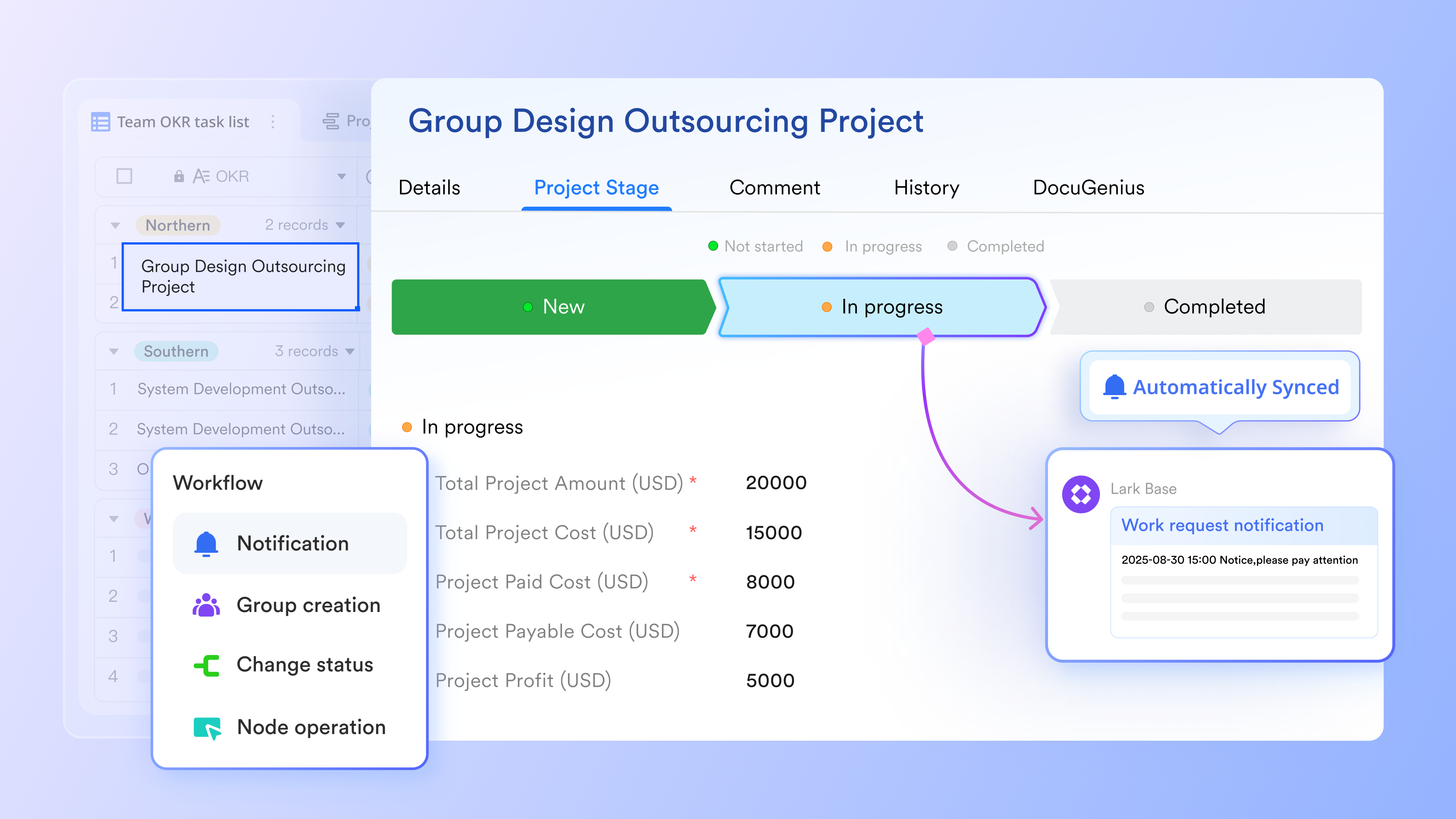
Key features:
- Lark Base for AI-powered data and workflow automation
Lark Base forms the foundation of intelligent workflow management. It allows teams to design dynamic processes using database-style tables, Kanban boards, and automated rules all without code. Base's AI field shortcuts can categorize and classify data according to specified rules, which is useful for data management and analysis. The AI can generate options for categorization and update content automatically when source data changes.
Teams can visualize projects through dashboards and Gantt views while automations handle repetitive tasks such as status updates or notifications. Whether tracking sales leads, managing service requests, or orchestrating complex projects, Lark Base helps teams build workflows that run themselves, freeing up time for higher-value work.
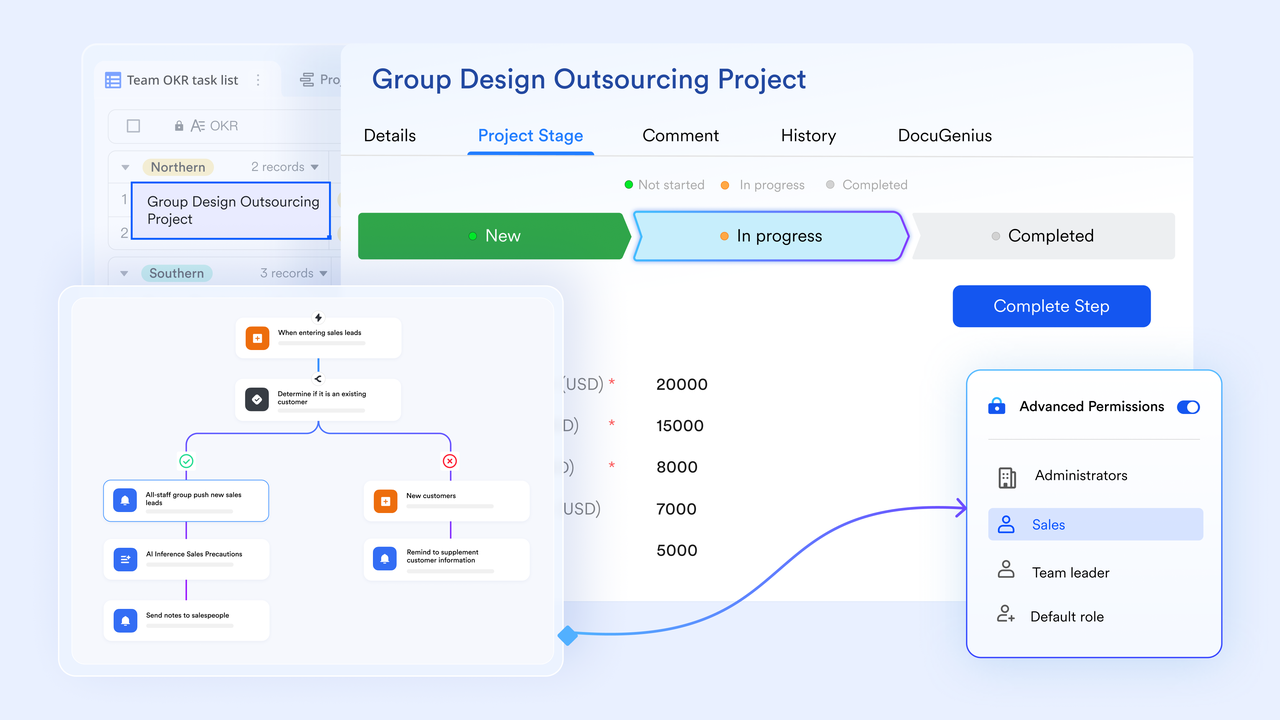
- Lark Approval for intelligent request automation
Lark Approval automates structured business processes such as leave requests, reimbursements, and purchase orders. Teams can design approval routes with conditional logic and automated triggers, reducing turnaround times. Each approval request links directly to the relevant Base record or Doc, keeping data centralized. Lark Approval adds structure and accountability to routine administrative workflows.
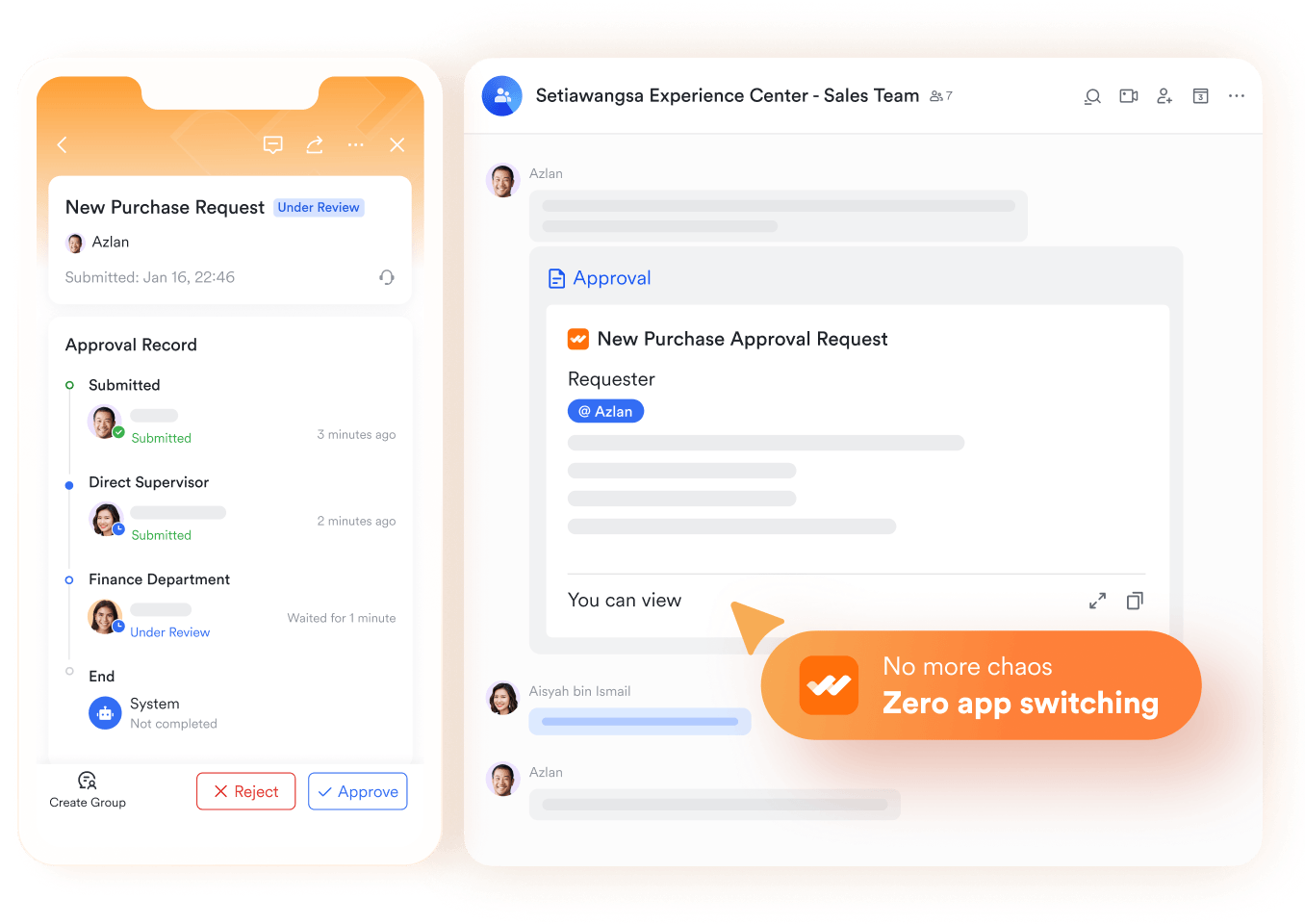
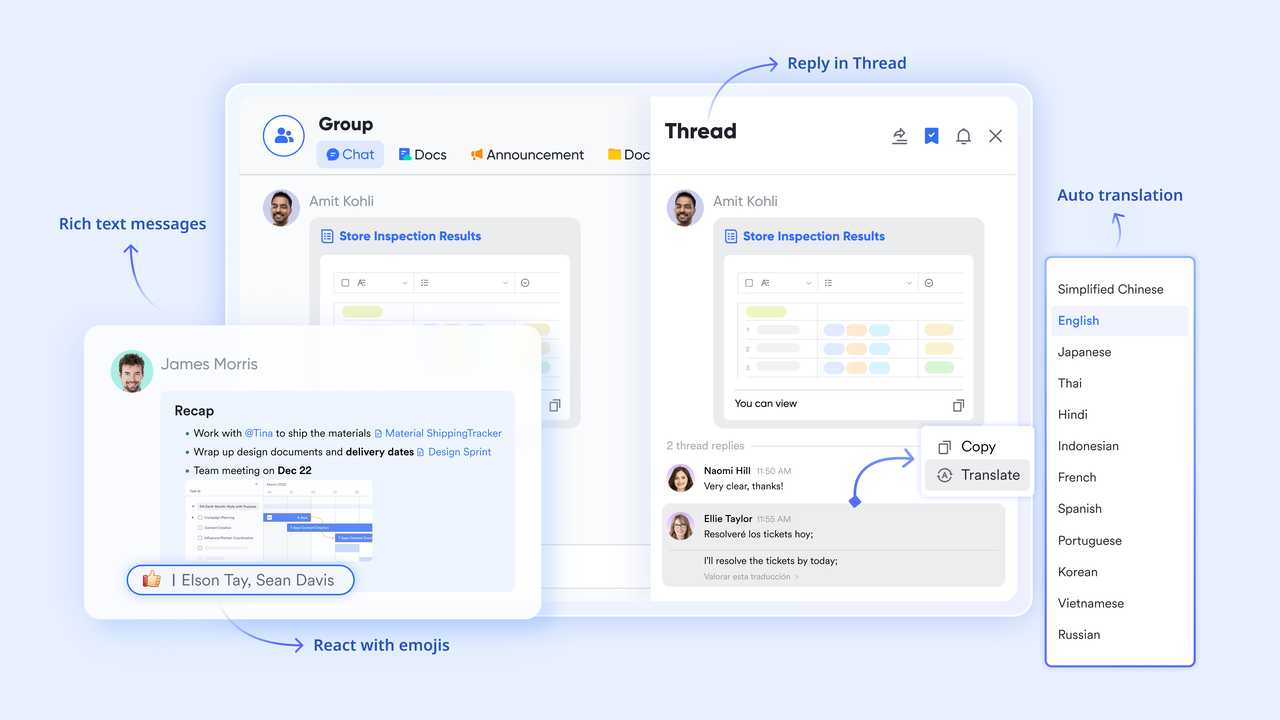
- Lark Messenger for contextual communication for seamless collaboration
Lark Messenger turns conversations into actionable workflows. Instead of siloed chats, discussions in Messenger stay linked with Lark Tasks, Base records, or Docs, ensuring that every decision leads to execution. Users can assign tasks, attach files, or share approval links directly within chat threads. AI features such as instant translation and powerful search function make it easy for global teams to stay aligned. Lark Messenger minimises context-switching, keeping communication, decision-making, and task execution in one place.
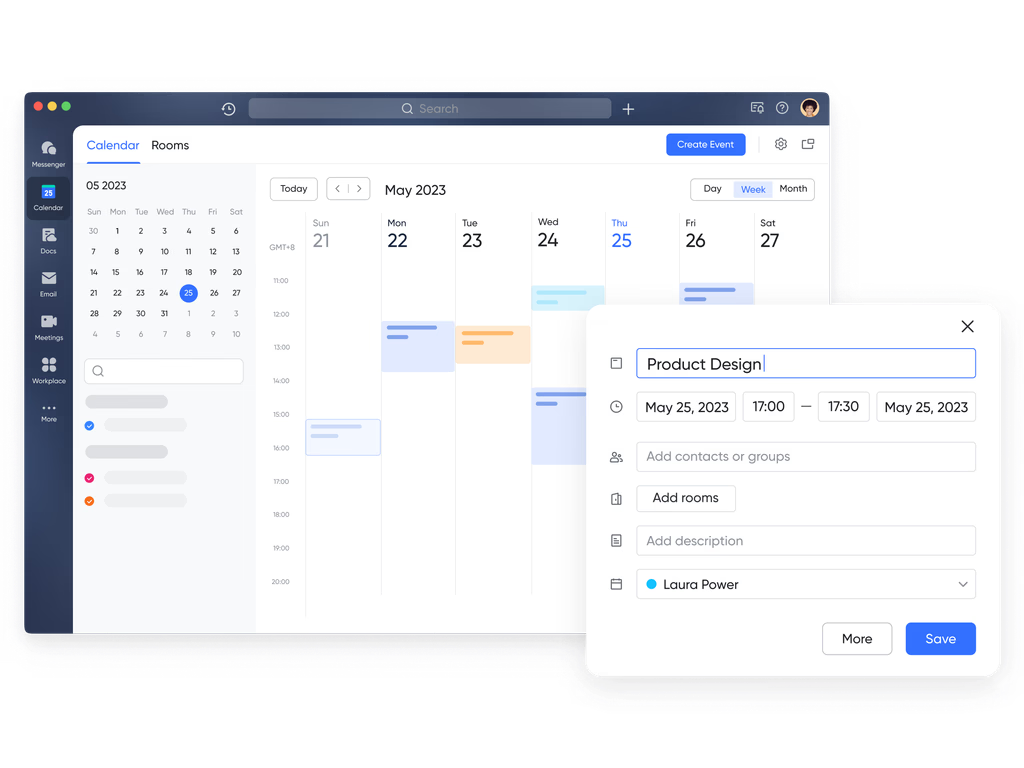
- Lark Calendar for smart scheduling and coordination
With Lark Calendar, scheduling becomes an intelligent part of your workflow rather than a separate task. Lark Calendar automatically suggests meeting times based on participants' availability and existing schedules. Events can be directly linked to relevant Docs, or Tasks, so attendees have all the necessary context before the meeting. Smart reminders and AI-driven conflict detection help prevent overlaps, while synchronized updates ensure everyone stays in sync. Lark Calendar keeps timelines, milestones, and project commitments visible to every stakeholder.
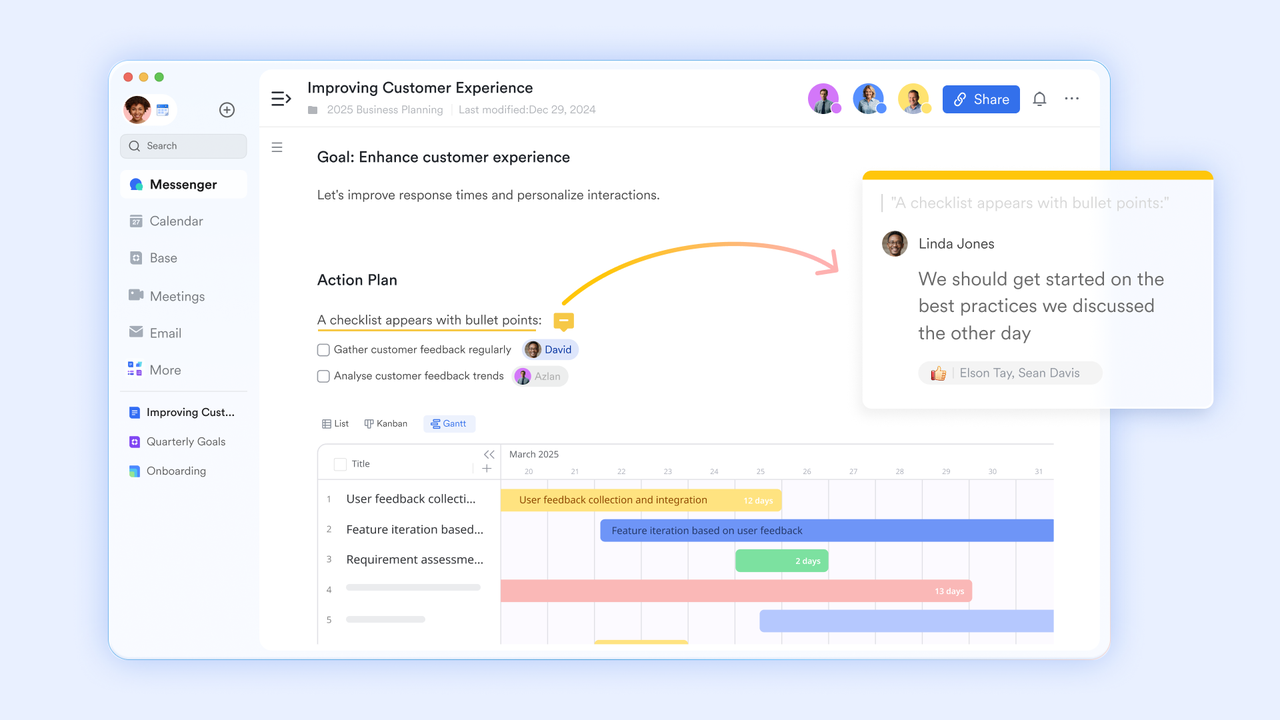
- Lark Docs for AI-assisted collaboration and documentation
Lark Docs enables teams to create, edit, and share documents collaboratively in real time. With AI assistance, users can instantly summarize content, rewrite sections, or generate drafts from prompts. Docs can be linked to Tasks, Wiki pages, or Base tables, ensuring that every file fits seamlessly into your workflow. Version control, comments, and permissions make it easy to manage collaborative writing and maintain accuracy. Whether drafting proposals, SOPs, or meeting notes, Lark Docs turns documentation into a living part of your workflow ecosystem. After each meeting, Lark Meetings can automatically generate minutes as a Lark Doc, making it easy for participants to review action items, share updates, and keep discussions transparent.
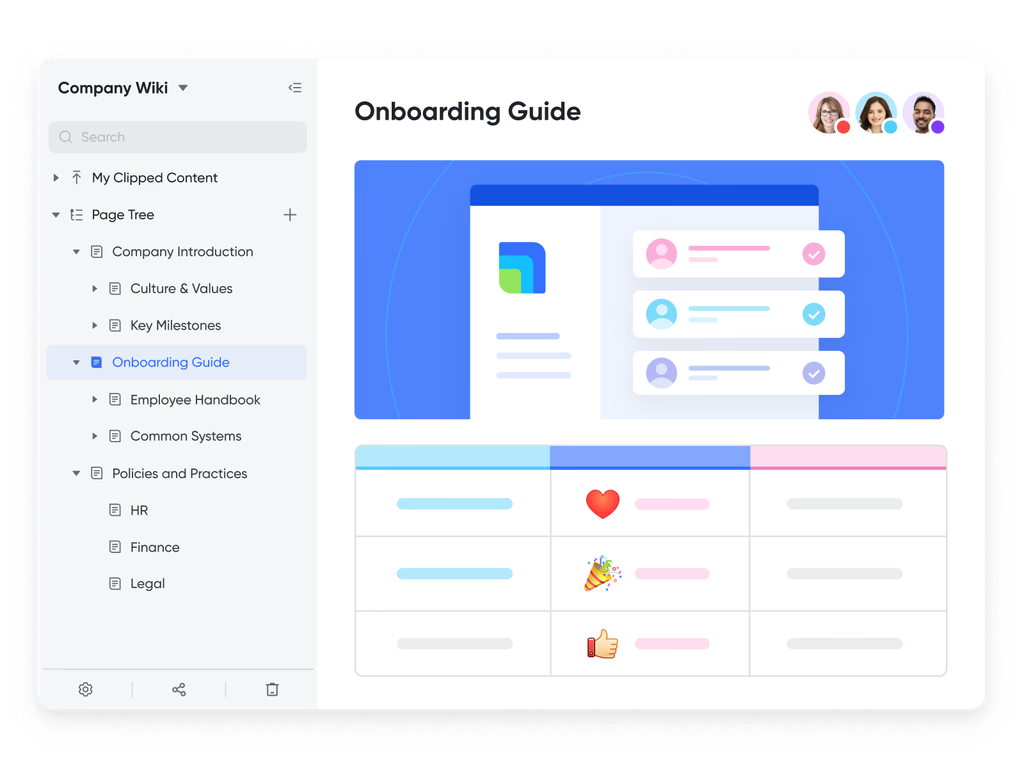
- Lark Wiki for centralized knowledge management
Lark Wiki helps teams transform accumulated information into structured, accessible knowledge. It provides a dedicated space for guides, process documentation, and internal resources. Each Wiki page can connect with related Docs or Tasks, providing context for ongoing projects. AI search capabilities allow users to find content instantly, surfacing relevant pages from across the workspace. By maintaining an organized, searchable knowledge base, Lark Wiki ensures institutional knowledge is always within reach.
- Lark Meetings for real-time collaboration and AI summaries
Lark Meetings redefines virtual collaboration by embedding productivity into every session. During a meeting, participants can co-edit Docs through Magic Share, discuss Base data, or update Tasks in real time. Afterward, Lark AI Meeting Notes captures key points and action items, automatically linking them back to the relevant workflows. This ensures that decisions made during meetings translate into immediate follow-up actions. Lark Meetings keeps discussions efficient, documented, and results-oriented.
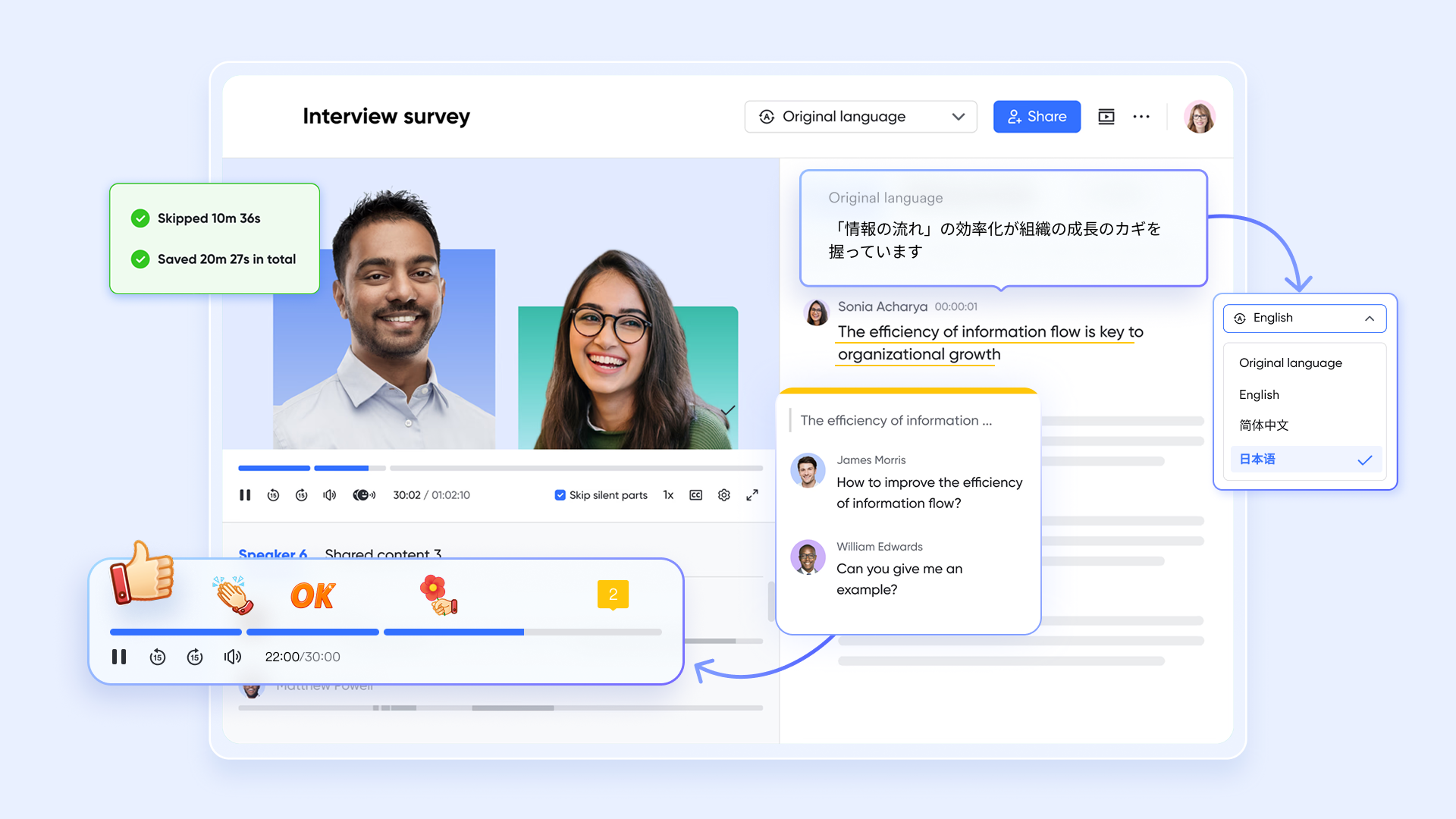
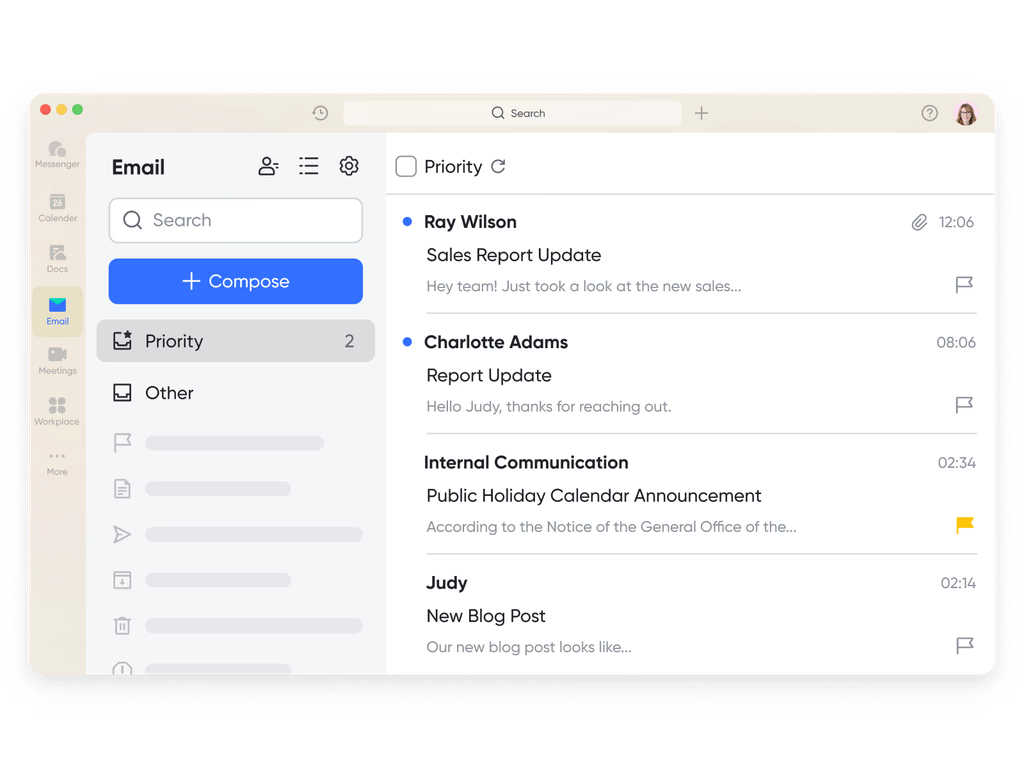
- Lark Mail for connected email workflow management
Lark Mail unites external communication with internal workflows. Users can turn emails into actionable items — such as tasks or Base entries — with a single click. It connects seamlessly with Messenger, Docs, and Approval, so every conversation stays within the broader workflow context, eliminating information gaps between teams and clients. With automation flows enabled in Lark, teams can set rules that flag incoming emails, create tasks based on keywords or status, and send follow-up reminders without manual coordination.
Pros:
- All-in-one platform combining chat, docs, tasks, and automation for seamless AI workflow management.
- AI-powered automation that streamlines repetitive tasks and enhances decision-making with real-time insights.
- Real-time collaboration with combined communication, document sharing, and smart notifications.
- Scalable and secure solution suitable for teams of all sizes with enterprise-grade protection.
Cons:
- Slight learning curve for new users exploring its comprehensive features.
- Limited offline functionality requiring internet for full performance.
- Starter plan: Free forever plan that includes 11 powerful tools for up to 20 users. It also comes with 100GB of storage, 1000 automation runs, AI translations, and more.
- Basic plan: $6/user/month (billed annually) for up to 500 users. It includes everything in Starter plus group calling for up to 500 attendees, 5TB of storage, 1000 automation runs, and more.
- Pro plan: $12/user/month (billed annually) for up to 500 users. It includes everything in Starter plus group calling for up to 500 attendees, 15TB of storage, 50,000 automation runs, and more. Understanding current Google Workspace pricing and ClickUp pricing can help organizations better evaluate overall software costs.
- Enterprise plan: Contact sales for custom pricing. Supports unlimited users and includes even more automation runs and advanced security, compliance, and management features.
2. Zapier: Automate tasks effortlessly
Zapier is a leading AI workflow management tool that helps teams automate repetitive tasks and connect thousands of apps without coding. It simplifies multi-step workflows through AI-driven suggestions, saving time and reducing manual effort. With integrations across tools like Gmail, Slack, Trello, and HubSpot, Zapier ensures seamless process automation. Ideal for teams of all sizes, it enhances productivity by keeping tasks, data, and communications synchronized automatically.
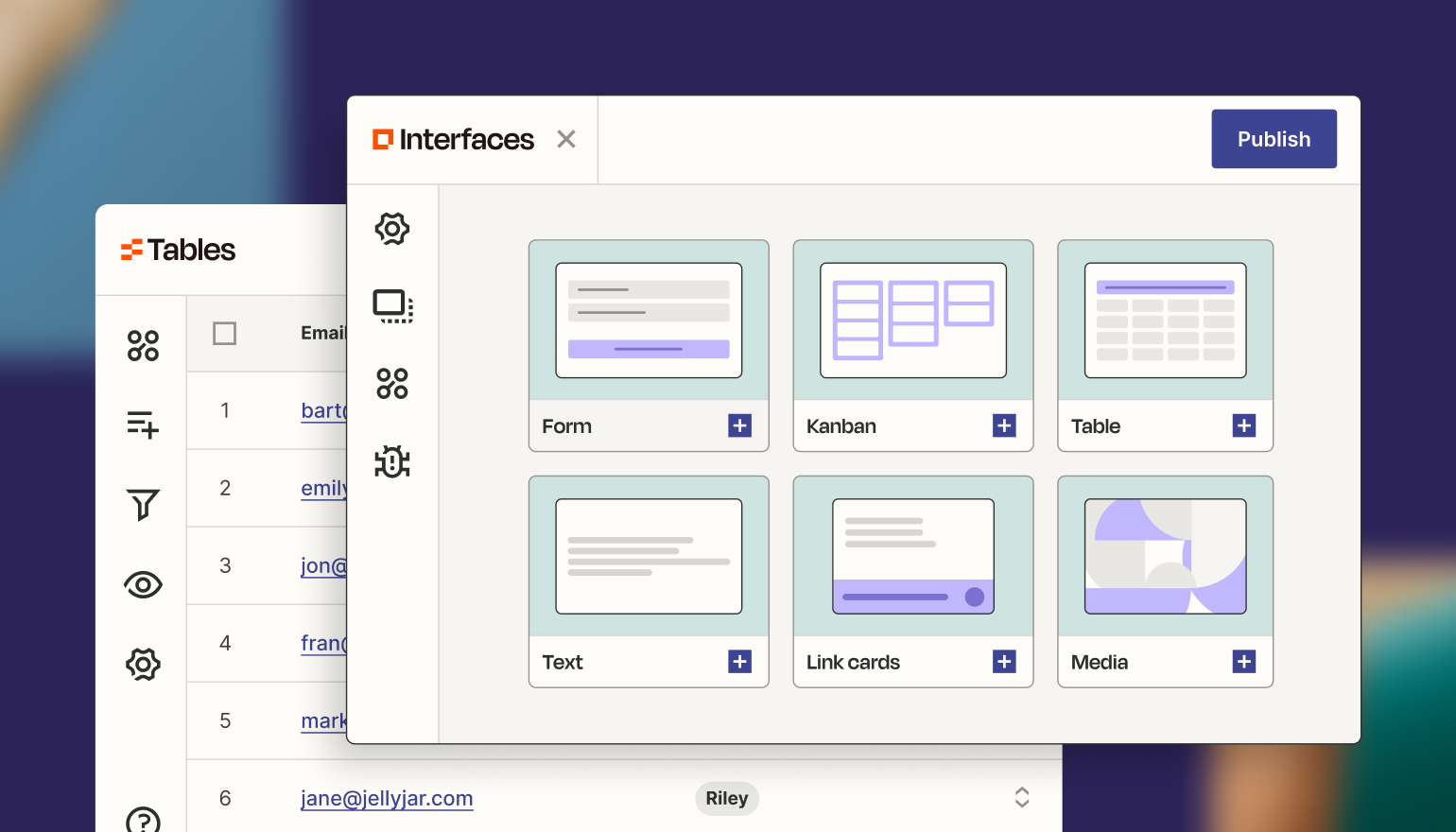
Image source: zapier.com
Key features:
- Multi-app integrations: Connect over 6000 apps like Google Workspace, Salesforce, and Asana for seamless automation.
- AI workflow builder: Automatically suggests triggers and actions to optimize repetitive workflows.
- Conditional logic: Add if/then rules to create advanced, dynamic workflows tailored to business logic.
- Real-time monitoring: Track automation performance, identify errors, and ensure every task executes correctly.
- Pre-built templates: Access a vast library of ready-to-use automation workflows to set up processes quickly.
Pros:
- Extremely easy to use with no coding required.
- Integrates with nearly every popular business application.
- Reliable performance and transparent execution logs.
- AI recommendations help optimize workflows and reduce manual configuration.
Cons:
- Costs can increase significantly for high-volume automation.
- Limited real-time collaboration features within the platform.
Pricing:
- Free plan: Up to 100 tasks/month with basic automation.
- Starter plan: $19.99/month for simple multi-step workflows.
- Professional plan: $49/month with unlimited premium apps.
- Team plan: $69/month for collaboration and shared workflows.
- Company plan: Custom pricing for enterprise automation needs.
3. Appian: Intelligent workflow automation
Appian is an enterprise-grade AI workflow management platform built for organizations that require robust process automation and intelligent decision-making. It combines low-code development, robotic process automation (RPA), and AI insights to streamline complex workflows. Appian helps enterprises design, automate, and optimize operations quickly while ensuring scalability and compliance. Its AI-driven analytics enhance decision-making, making it ideal for industries like finance, healthcare, and government where efficiency and accuracy are critical.
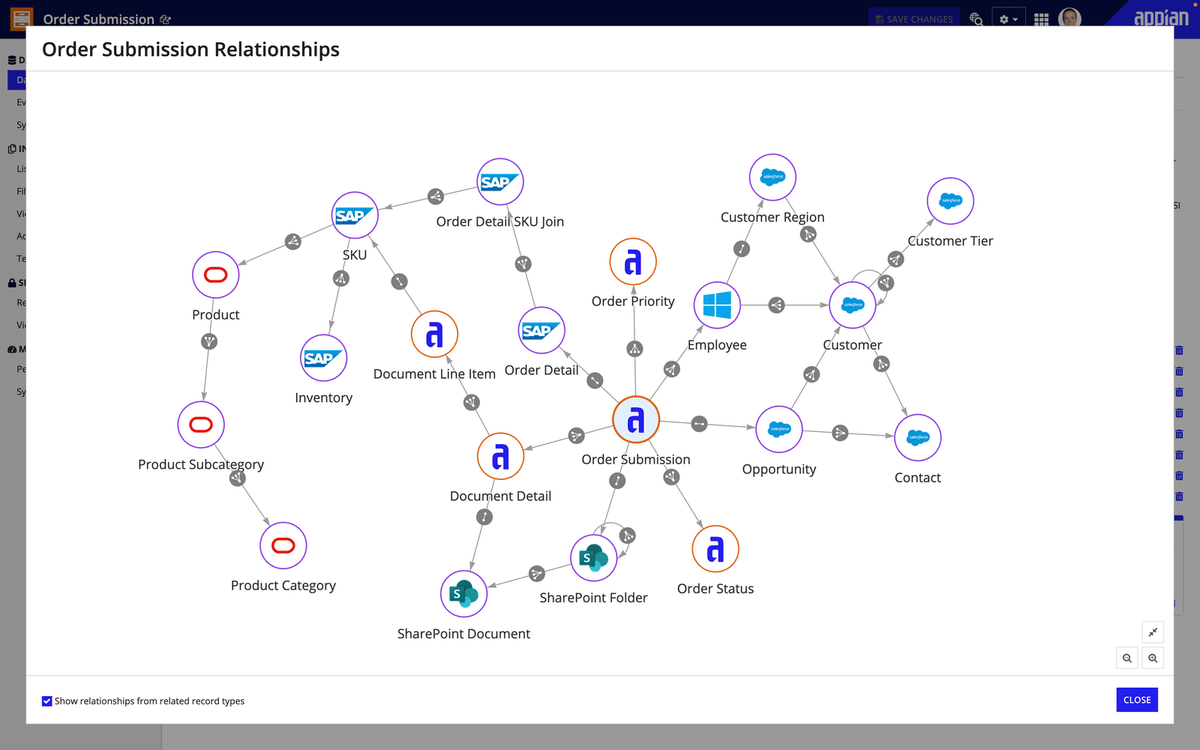
Image source: appian.com
Key features:
- Low-code workflow builder: Create and modify enterprise workflows quickly without deep coding expertise.
- AI decision engine: Use predictive analytics to guide smarter business decisions.
- RPA integration: Automate rule-based and repetitive tasks to improve speed and accuracy.
- Unified data fabric: Access and analyze data across multiple systems in one interface.
- Advanced analytics: Monitor performance through real-time dashboards and reports.
Pros:
- Excellent for large-scale and mission-critical automation.
- Strong security and compliance support for regulated industries.
- Powerful AI insights for smarter operations.
- Scalable and customizable to enterprise needs.
Cons:
- Complex implementation for smaller teams.
- Pricing available only through custom enterprise quotes.
Pricing:
- Custom pricing: Based on organizational size and workflow complexity.
- Free trial: Available on request for qualified enterprise users.
4. Make: Smart workflow builder
Make (formerly Integromat) is a visual AI workflow management tool that allows teams to design and automate workflows effortlessly using a drag-and-drop interface. It's ideal for businesses seeking flexibility and customization in automation. With real-time visualization, users can track how data moves through workflows, identify inefficiencies, and adjust instantly. Make's AI capabilities recommend workflow optimizations and detect errors automatically, ensuring processes run smoothly across apps and systems.
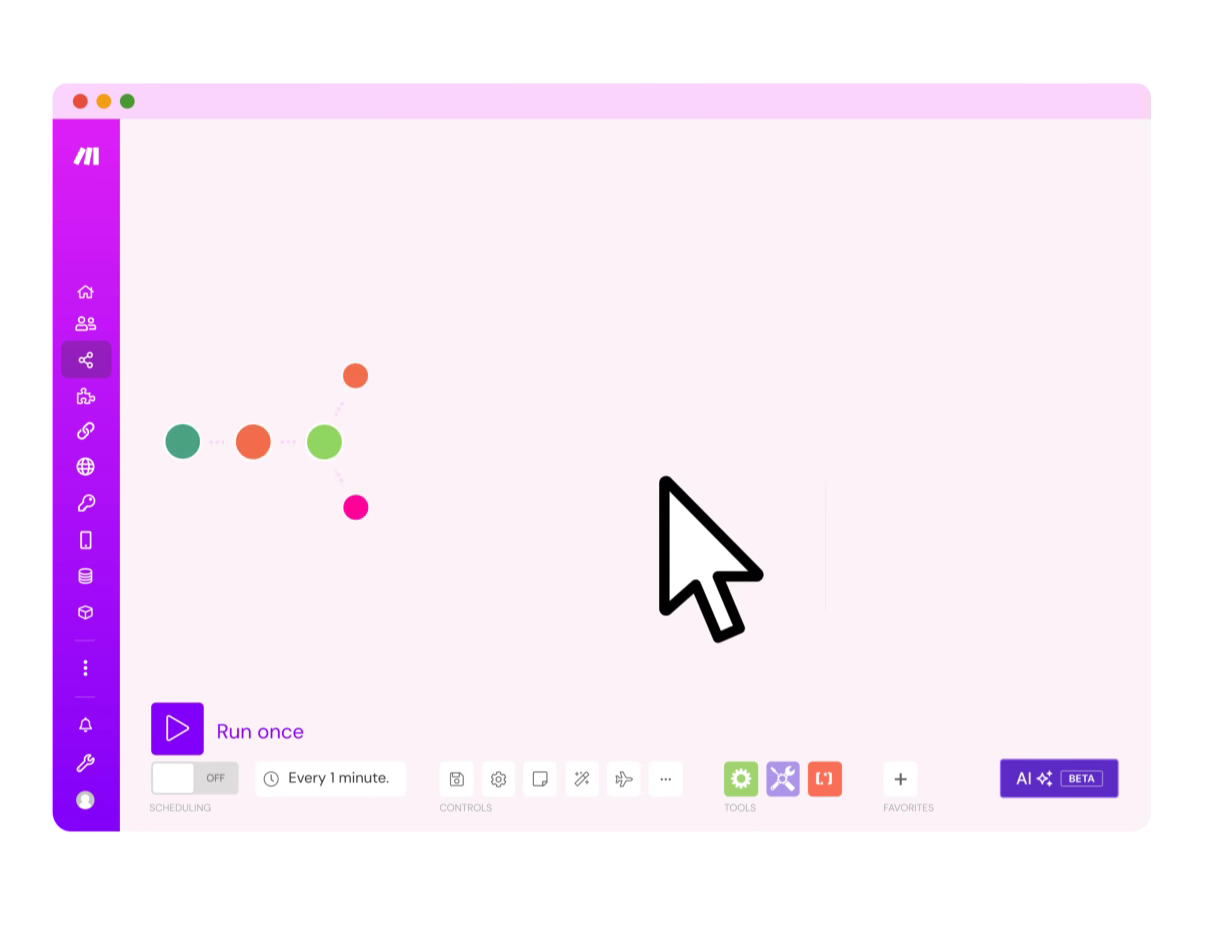
Image source: make.com
Key features:
- Visual workflow editor: Build and visualize multi-step workflows without coding.
- Real-time monitoring: Watch workflows execute live and troubleshoot instantly.
- AI optimization: Receive smart recommendations to enhance efficiency.
- App integrations: Connect 1000+ popular apps and tools for seamless operations.
- Scenario templates: Use ready-made automation templates to speed up setup.
Pros:
- Intuitive and user-friendly drag-and-drop interface.
- Affordable for startups and small businesses.
- Transparent execution visualization.
- Scalable with strong API and integration support.
Cons:
- Slight learning curve for first-time users.
- Limited in-app collaboration options.
Pricing:
- Free plan: 1000 operations/month.
- Core plan: $9/month for essential automations.
- Pro plan: $16/month with advanced features.
- Teams plan: $29/month for team collaboration.
- Enterprise plan: Custom pricing available.
5. Cflow: Streamline team workflows
Cflow is a no-code AI workflow automation software that helps teams create, manage, and optimize business workflows effortlessly. It is ideal for SMBs looking to streamline approvals, automate processes, and gain better visibility into team performance. Cflow's intuitive design allows non-technical users to set up workflows quickly using pre-built templates and AI-powered logic. It brings structure and accountability to repetitive processes, making team collaboration smoother and faster.
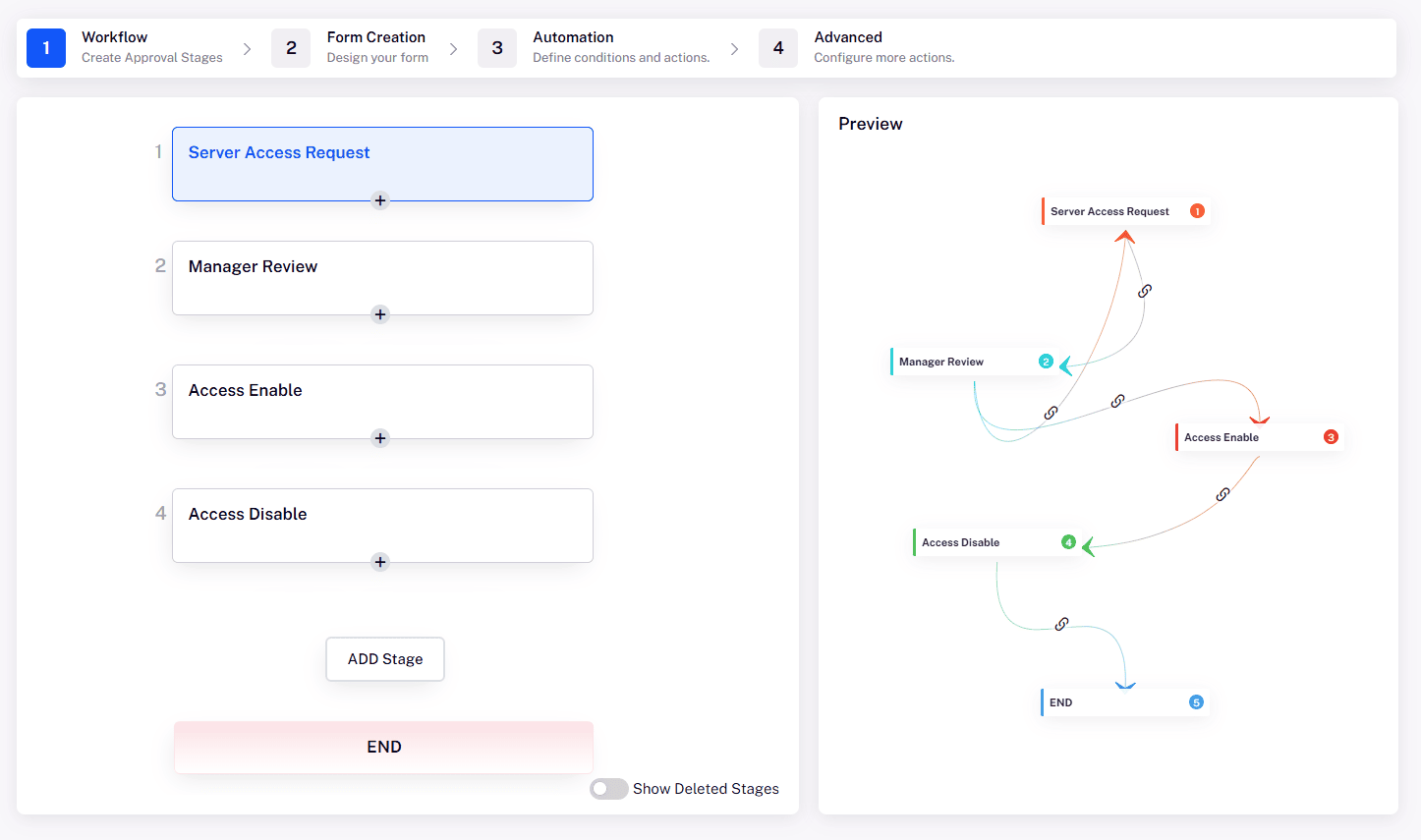
Image source: cflow.com
Key features:
- No-code workflow designer: Build and deploy workflows easily without technical expertise.
- Smart approvals: Automate approval chains and track request progress in real time.
- Analytics dashboard: Visualize process performance and identify areas for improvement.
- App integrations: Connect with Google Workspace, Slack, and other business tools.
- AI-powered optimization: Detect process inefficiencies and suggest workflow enhancements.
Pros:
- Simple, no-code interface ideal for non-developers.
- Quick to set up and easy to maintain.
- Strong reporting and performance insights.
- Cost-effective solution for SMBs.
Cons:
- Limited AI features compared to enterprise platforms.
- Smaller integration library than tools like Zapier.
Pricing:
- Free trial: Available for all users.
- Basic plan: $7/user/month.
- Pro plan: $14/user/month.
- Enterprise plan: Custom pricing
6. Pega: Enterprise AI workflow
Pega is an advanced AI workflow management tool built for large enterprises that demand intelligent automation at scale. It integrates robotic process automation, AI decisioning, and real-time analytics to handle complex workflows across multiple departments. Pega's unified architecture enables end-to-end automation, allowing teams to manage cases, predict outcomes, and optimize processes continuously. Its AI engine helps organizations make proactive decisions, ensuring accuracy and efficiency across business operations.
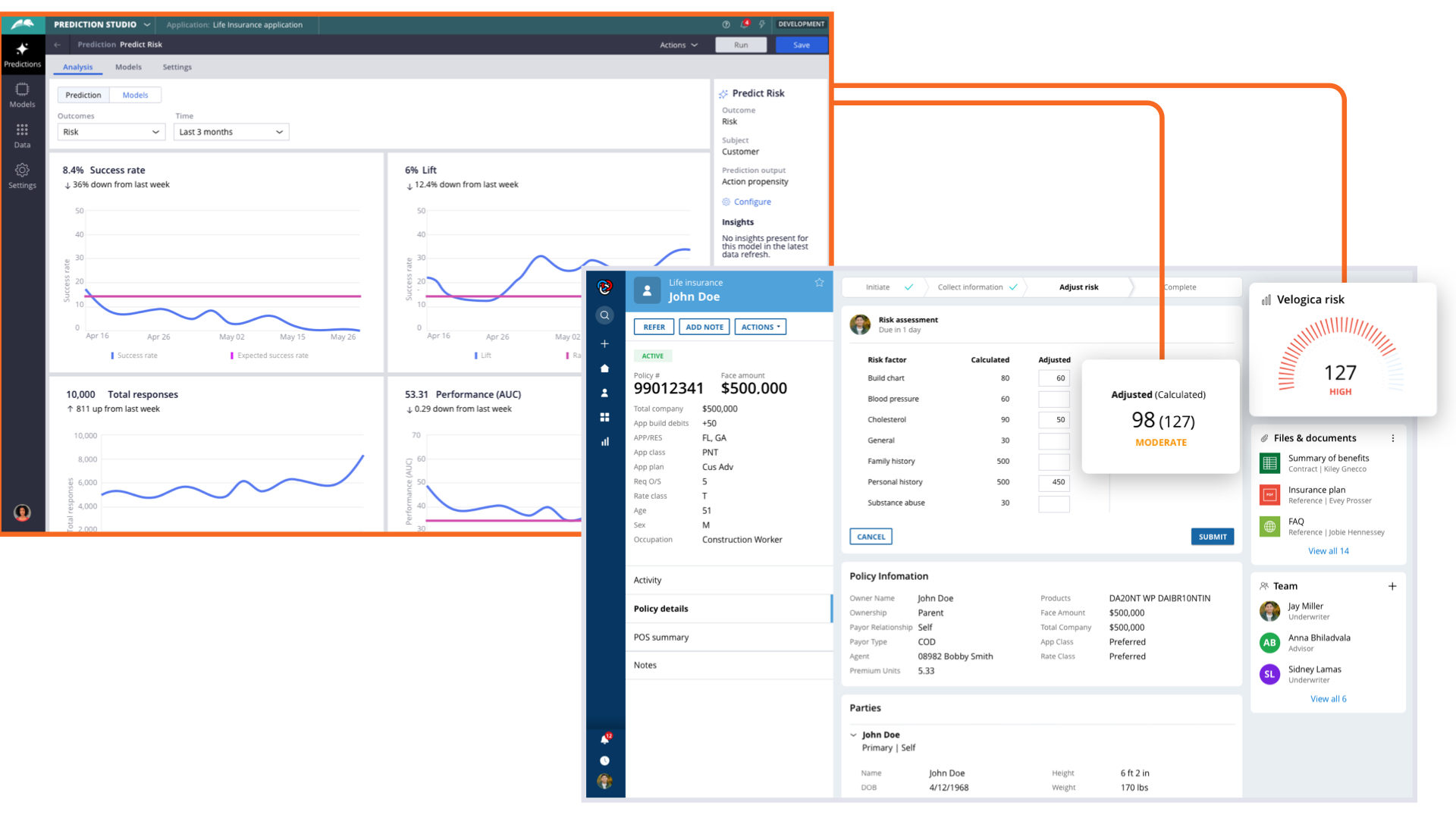
Image source: pega.com
Key features:
- AI decision management: Delivers predictive and adaptive insights for better business outcomes.
- End-to-end automation: Automates entire workflows, from data input to reporting.
- RPA and chatbots: Simplifies repetitive tasks through bots and AI assistants.
- Real-time analytics: Monitors process efficiency with live performance data.
- Enterprise integrations: Connects seamlessly with ERP, CRM, and legacy systems.
Pros:
- Scalable for large, complex organizations.
- Strong AI-driven decision-making and process optimization.
- Excellent compliance and governance support.
- Suitable for highly regulated industries.
Cons:
- Requires technical expertise for setup and maintenance.
- High cost compared to smaller-scale tools.
Pricing:
- Custom enterprise pricing: Based on deployment scale and business needs.
- Demo and consultation: Available through Pega's sales team.
Security and compliance in AI workflows
As businesses adopt AI workflow management tools, ensuring data privacy, regulatory compliance, and ethical AI usage becomes critical. These platforms often handle sensitive information across multiple departments, making security a top priority. A reliable AI workflow system should protect user data, maintain transparency, and ensure trust at every stage of automation.
- Handling sensitive business data safely: AI workflows often process confidential company data, including financial records and client information. Ensuring encryption, access controls, and secure storage is vital to prevent breaches. Regular audits and strict permission settings further safeguard sensitive business assets.
- Regulatory compliance (GDPR, HIPAA): Compliance with data protection regulations like GDPR and HIPAA is essential for maintaining user trust. AI workflow tools must include built-in compliance frameworks that handle consent, retention, and data portability. This helps businesses meet legal obligations while maintaining workflow efficiency.
- AI transparency and ethical usage: Ethical AI usage ensures fairness, accountability, and explainability in automated decision-making. Organizations should choose tools that clearly document how AI models make predictions and suggestions. Transparent systems reduce bias and foster responsible automation practices.
- Vendor trust and reliability: Selecting a reputable vendor ensures consistent support, data security, and compliance management. Trusted providers maintain certifications like ISO 27001 and SOC 2, offering proof of secure infrastructure. Long-term vendor reliability reduces operational risks and ensures sustainable automation success.
Tips for implementing AI workflow management successfully
- Identify repetitive tasks suitable for automation: Start by pinpointing routine, time-consuming tasks that can be automated to boost efficiency and reduce manual errors. These are the best candidates for implementing AI-driven workflows.
- Start small with high-impact workflows: Begin automation with simple, high-value processes to demonstrate quick results. This approach builds confidence and ensures smoother adoption across teams.
- Train teams on tool usage: Provide proper training so employees understand how to use AI workflow tools effectively. Well-trained teams can maximize productivity and adapt faster to new systems.
- Monitor and adjust workflows regularly: Continuously track workflow performance to identify gaps and inefficiencies. Regular adjustments help maintain accuracy and long-term optimization.
- Leverage AI insights for continuous improvement: Use data-driven AI insights to refine workflows and make smarter operational decisions. This fosters innovation and sustainable process improvement.
AI workflow use cases across different industries
- IT & software development: Automate sprint planning, task tracking, and bug triaging to boost productivity and ensure timely releases. AI workflows help teams manage code reviews, testing, and deployments more efficiently.
- Marketing & sales: Streamline campaign management, lead tracking, and performance reporting with AI automation. These workflows enhance collaboration and help teams focus on strategy instead of manual updates.
- HR & administration: Simplify repetitive HR processes like timesheet management, leave approvals, and employee onboarding. AI-driven workflows improve accuracy, transparency, and employee experience.
- Finance: Automate invoice approvals, expense tracking, and compliance reporting to eliminate manual errors. AI workflows ensure consistency, faster approvals, and better financial oversight.
- Operations: Optimize supply chain management, order processing, and task allocation with intelligent automation. This leads to improved coordination, reduced delays, and smoother end-to-end operations.
Conclusion
AI workflow management tools play a vital role in transforming how modern organizations operate by boosting efficiency, accuracy, and overall productivity. Through intelligent automation, these tools help teams reduce manual effort, eliminate errors, and focus on strategic initiatives that drive growth. They also enable real-time collaboration, smarter decision-making, and improved accountability across departments.
Among the many options available, Lark stands out as a complete all-in-one solution that combines workflow automation, communication, documentation, and analytics — making it ideal for teams of all sizes. Whether managing projects, tracking tasks, or optimizing processes, Lark ensures seamless coordination and measurable outcomes. Ultimately, the key to success lies in choosing AI workflow management tools that best fit your team's size, industry, and project objectives for sustainable operational excellence.
FAQs
Can AI workflow tools work offline?
Most AI workflow tools require an active internet connection since they rely on cloud-based processing and real-time data synchronization. However, some platforms offer limited offline access for viewing or editing files. Once reconnected, changes are automatically synced to the system. This ensures teams always work with the most updated data.
Are these tools suitable for small businesses?
Yes, many AI workflow tools are designed with scalability in mind and offer affordable plans for small businesses. They help automate repetitive tasks, improve efficiency, and reduce costs. Small teams can benefit from simplified workflows, faster decision-making, and seamless collaboration without heavy technical investment.
How secure is data in AI workflow software?
Leading AI workflow platforms prioritize security through encryption, role-based access control, and compliance with global standards like GDPR and ISO 27001. Data is stored securely in cloud environments with regular audits. Vendors also implement authentication measures and activity monitoring to prevent unauthorized access and maintain confidentiality.
What is the difference between workflow automation and AI workflow management?
Workflow automation focuses on executing predefined tasks automatically, while AI workflow management adds intelligence to the process. AI uses data analysis, predictions, and recommendations to optimize workflows dynamically. This enables smarter decision-making, adaptability, and continuous improvement beyond simple automation.
What metrics can I track using AI workflow tools?
AI workflow tools allow teams to monitor productivity, task completion rates, turnaround time, and process efficiency. They also provide insights into workload distribution, error frequency, and collaboration patterns. Advanced analytics help managers identify bottlenecks and improve performance through data-driven adjustments.
Related reading
Table of contents
Start using Lark today

Manage all your work in one place
Boost team efficiency by 10x
Save up to 70% on software costs
Table of contents
Start using Lark today
Manage all your work in one place
Boost team efficiency by 10x
Save up to 70% on software costs
Keep reading








2026 Lark Technologies Pte. Ltd.
Headquartered in Singapore with offices worldwide.






Explore: