A business process workflow is the backbone of how work moves through an organization, from requests and approvals to execution and reporting. When designed well, workflows bring clarity, consistency, and accountability to every team, helping businesses reduce errors and accelerate outcomes. But as operations grow more complex, the need for structured, automated, and collaborative workflows becomes essential.
In this guide, we break down what business process workflows are, how they work, key examples, tools, and best practices to help you build efficient, scalable processes. You'll also see how Lark empowers teams to manage and automate workflows seamlessly.
What is a business process workflow?
A business process workflow is a structured sequence of tasks, decisions, and approvals that guides how work is completed within an organization. It defines the movement of information, the responsibilities of each participant, and the rules that ensure consistency and accuracy. A strong workflow helps teams reduce manual errors, , and maintain compliance across daily operations.
Modern workflows often rely on business process , allowing systems to handle repetitive steps, route tasks intelligently, and enforce standardized procedures. This forms the foundation of workflow and business process management, helping organizations scale without losing control. Whether used for onboarding, procurement, customer support, or project operations, an automated business process workflow ensures clarity and efficiency from start to finish.
As part of broader business process management workflows, these systems give teams visibility, traceability, and performance insights that support long-term operational improvement.
Types of business process workflows
Organizations use different workflow structures depending on the complexity and nature of their operations. A well-designed business process workflow ensures tasks move smoothly while adapting to real-time conditions and business rules.
- Sequential workflows: follow a strict step-by-step order where each stage must be completed before the next begins. They are ideal for predictable, repeatable processes such as purchase approvals or onboarding sequences. This structure ensures clarity, consistency, and minimal variation across tasks.
- State machine workflows: State machine workflows allow tasks to move between various states rather than following a linear path. Teams can revisit, pause, or re-route steps based on changing information or conditions. This flexibility makes them perfect for customer support, legal reviews, or any iterative process.
- Case management workflows: Case management workflows focus on processes where each case is unique and requires human judgment. Instead of rigid steps, they rely on contextual information, documents, and collaboration. These workflows are used in HR cases, compliance reviews, healthcare, and complex service operations.
- Rule-based/conditional workflows: rely on predefined conditions and business logic to determine the next action. They can route tasks based on values, roles, regions, or urgency, ensuring the right people handle the right work. This approach enhances accuracy and supports scalable business-process management workflow design.
- Automated business process workflows (AI-enabled): AI-enabled workflows handle repetitive tasks, predict next steps, classify requests, and trigger intelligent routing. They reduce manual workload and increase speed by automating data entry, triaging, and approvals. These automated business process workflows help teams operate with precision and real-time intelligence.
Key components of a modern business process workflow
Every effective business process workflow relies on several core building blocks that ensure accuracy, speed, and consistency. These components create a clear structure that supports automation, collaboration, and continuous improvement across teams.
- Workflow mapping: visualizes each step in a process to clarify responsibilities, handoffs, and dependencies. It helps teams understand how work flows from start to finish. A clear map also becomes the foundation for future optimization and automation.
- Form and data collection: Reliable workflows start with structured, accurate data. Forms capture the essential inputs needed to initiate and advance tasks. Substantial data collection reduces errors, ensures compliance, and enables precise workflow automation.
- Routing logic: Routing logic determines where each request goes based on rules, conditions, or data values. This ensures tasks always reach the right person or department. Intelligent routing increases speed while reducing manual coordination.
- Approvals and escalations: Approvals confirm that tasks meet quality, policy, or budget requirements before progressing. Escalations activate automatically when deadlines slip or criteria aren't met. Together, they ensure accountability and prevent workflow bottlenecks.
- Task execution: This is where work gets completed, whether drafting documents, , or completing checklists. Automated triggers help assign tasks instantly after approvals. Precise task execution ensures momentum and avoids delays between steps.
- Notifications & collaboration: Notifications keep teams informed about updates, deadlines, and next steps. Built-in collaboration tools let members discuss, comment, and resolve issues directly within the workflow. This reduces scattered communication and speeds decision-making.
- Reporting and optimization: Modern workflows include dashboards and analytics that track performance, bottlenecks, and processing times. These insights help teams refine processes and increase efficiency. Continuous optimization ensures workflows evolve with changing business needs.
How to create a business process workflow
Building an effective business process workflow requires clarity, structure, and a strong understanding of how work moves across teams. These steps help you design workflows that are scalable, automation-ready, and easy for everyone to follow.
Step 1: Identify stages: Start by outlining the major phases of the process from beginning to end. This gives you a high-level structure of how the . Clear stages make it easier to visualize handoffs and dependencies.
Step 2: Capture inputs & outputs: Define the information needed at each step and the expected outputs. Inputs help trigger specific tasks, while outputs guide the flow into the next stage. This reduces ambiguity and ensures a smooth transition between steps.
Step 3: Map responsibilities: Assign ownership for each activity, approval, or decision point. Clear responsibility prevents tasks from getting stuck or overlooked. It also ensures accountability throughout the workflow. Step 4: Build triggers & routing paths: Set rules that automatically move tasks forward based on conditions, approvals, or data values. These routing paths reduce manual handoffs and minimize errors. Triggers also enable workflow automation at scale.
Step 5: Test exceptions & escalations: Every workflow should handle delays, missing information, and exceptional cases through exception paths. Escalations ensure that stalled tasks are flagged or reassigned. Testing these scenarios prevents operational gaps after launch.
Step 6: Monitor metrics, optimize continuously: Use workflow analytics to track processing times, bottlenecks, and error rates. These insights help refine steps and improve efficiency over time. Continuous optimization keeps the workflow aligned with evolving business needs.
Business process workflow examples
Business process workflows appear across every department, supporting both everyday operations and complex, multi-step activities. Below are real-world examples showing how structured workflows create clarity, reduce errors, and enable automation across teams.
- New employee onboarding: This workflow coordinates HR, IT, and administration by collecting documents, setting up access, and providing role-based training. Each step ensures the new hire gets everything they need from day one. Automation helps accelerate setup tasks and keeps the consistent.
- Purchase approval workflow: A purchase request moves through manager review, finance validation, and procurement execution. Rules-based routing ensures high-value or sensitive purchases reach the correct approvers. This workflow improves compliance, audit readiness, and spending oversight.
- Customer ticket resolution cycle: flow through categorization, assignment, investigation, and final resolution. Agents collaborate using shared records and structured status updates. Automated routing ensures urgent or high-impact issues get immediate attention.
- Vendor onboarding: This process includes collecting vendor details, verifying documents, reviewing compliance, and setting up payment profiles. Each department, procurement, legal, and finance, works in a coordinated sequence. A structured workflow reduces risk and speeds vendor activation.
- Contract lifecycle workflow: A contract progresses through drafting, internal review, legal checks, negotiation, approval, and final archiving. Version control and recorded decisions keep all stakeholders aligned. Purpose-built helps automate these steps, reducing errors and ensuring consistency across agreements.
- Project change request: When a project change is proposed, it moves through evaluation, impact assessment, timeline adjustments, and approval. This ensures all stakeholders understand risks and implications before implementation. It also maintains clear documentation for future reference.
- CRM pipeline progression: Sales opportunities move through lead qualification, discovery, demo, proposal, negotiation, and closing. Automated nudges, task assignments, and data updates keep the pipeline healthy. This workflow helps sales teams stay organized and prevents deals from slipping through the cracks.
Build up your business process workflow today
Action time: Use Lark to streamline process workflows across teams
A modern business process workflow needs more than ; it needs a unified system that connects data, people, and actions in real time. brings these pieces together so teams can design, automate, and without silos. Whether it's approvals, onboarding, or cross-department execution, Lark keeps everything connected in one place.
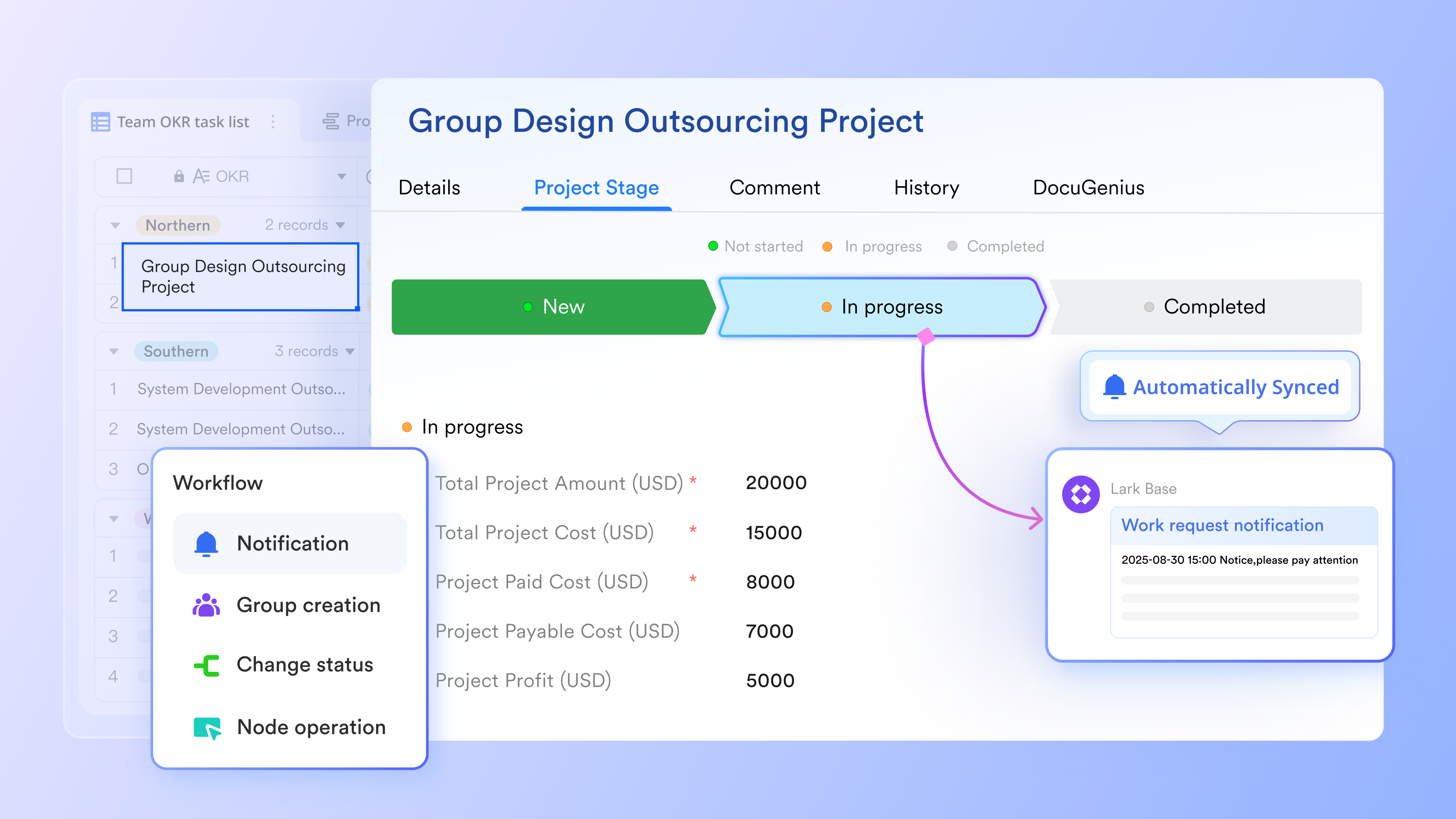
Workflow foundations built on structured, living records
acts as the operational core for any business process by turning every request, form entry, or record into a dynamic workflow anchor. These records evolve with each update, review, or action, giving teams a single source. With built-in automation features, you can create events, tasks, and groups based on table data or trigger actions when records are updated or messages are received, reducing manual follow-ups and improving workflow management. 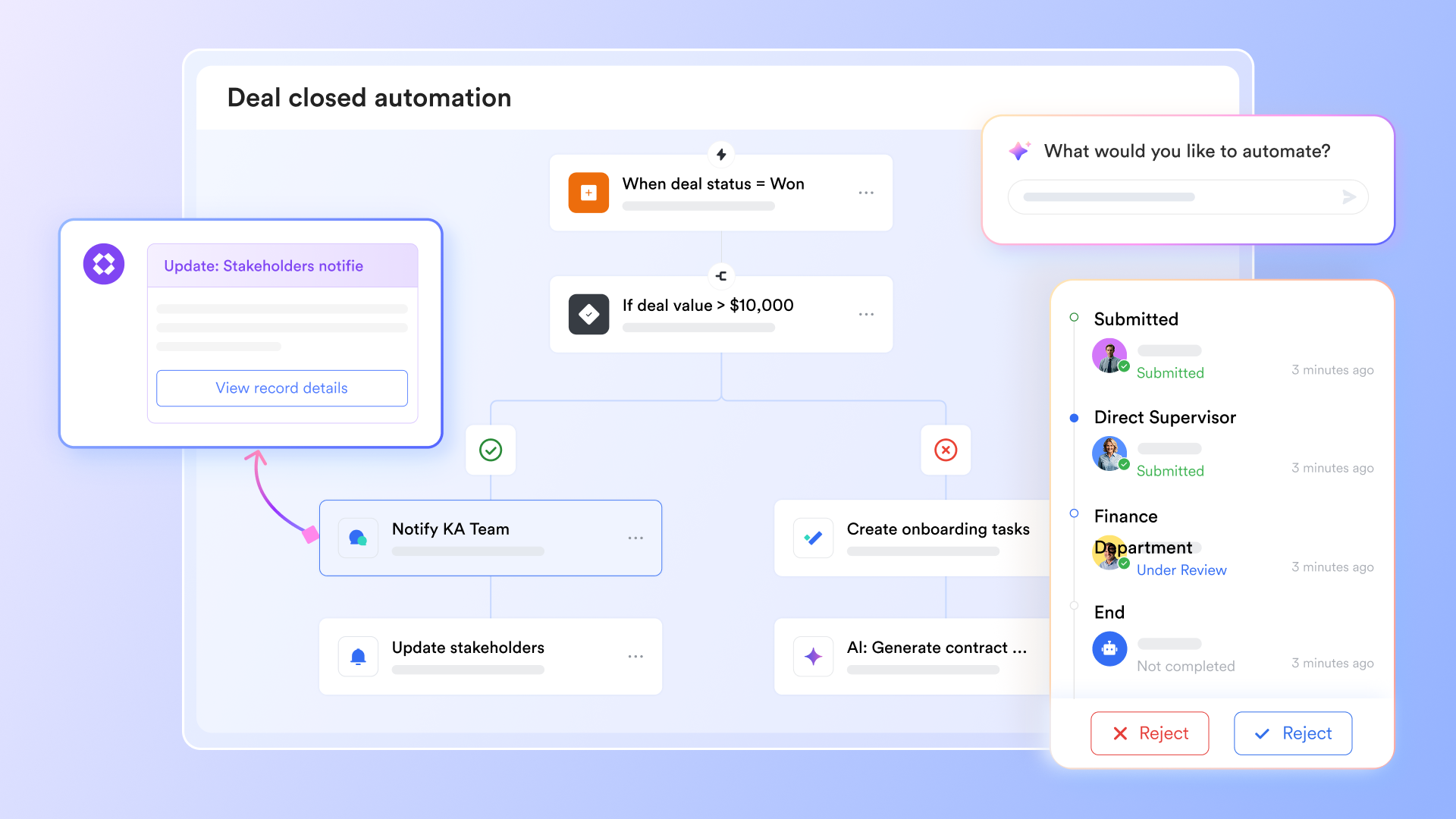
Seamless handoffs powered by context-aware routing
Instead of relying on rigid flows, can move items between departments based on real-time conditions, such as roles, workload, record values, or status changes. Marketing requests can be routed to design, procurement documents to finance, and HR cases to IT when needed. Each transition maintains full context, preventing miscommunication and delays.
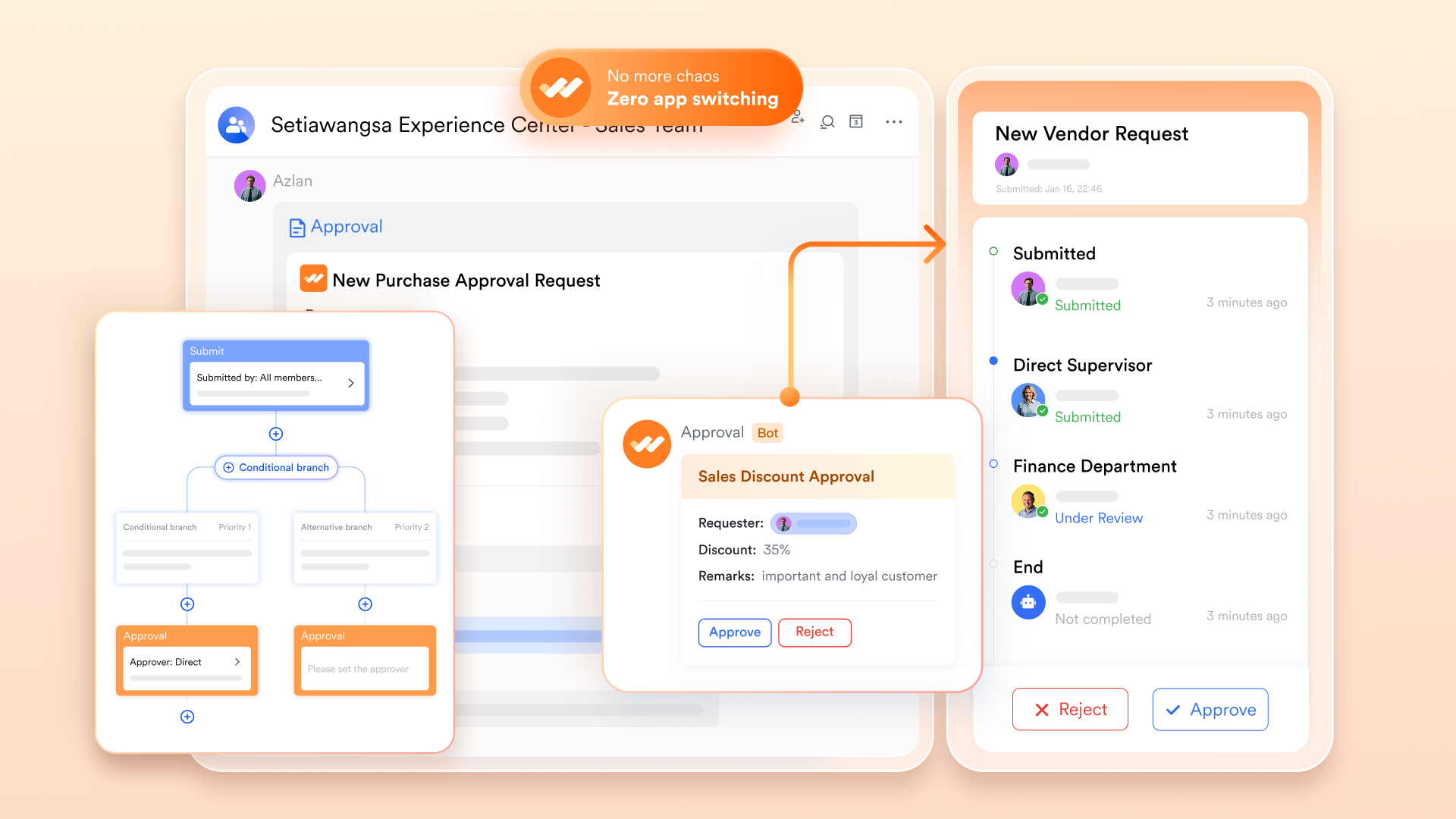
Multi-channel workflow visibility for teams on the move
Every process, whether it involves approvals, record updates, or critical tasks, can be monitored from dashboards, mobile notifications, threads, or the Base interface. Executives see high-level summaries, team leads track workloads, and individuals get clear next steps. This reduces dependency on email and ensures that time-sensitive workflow actions are never missed. 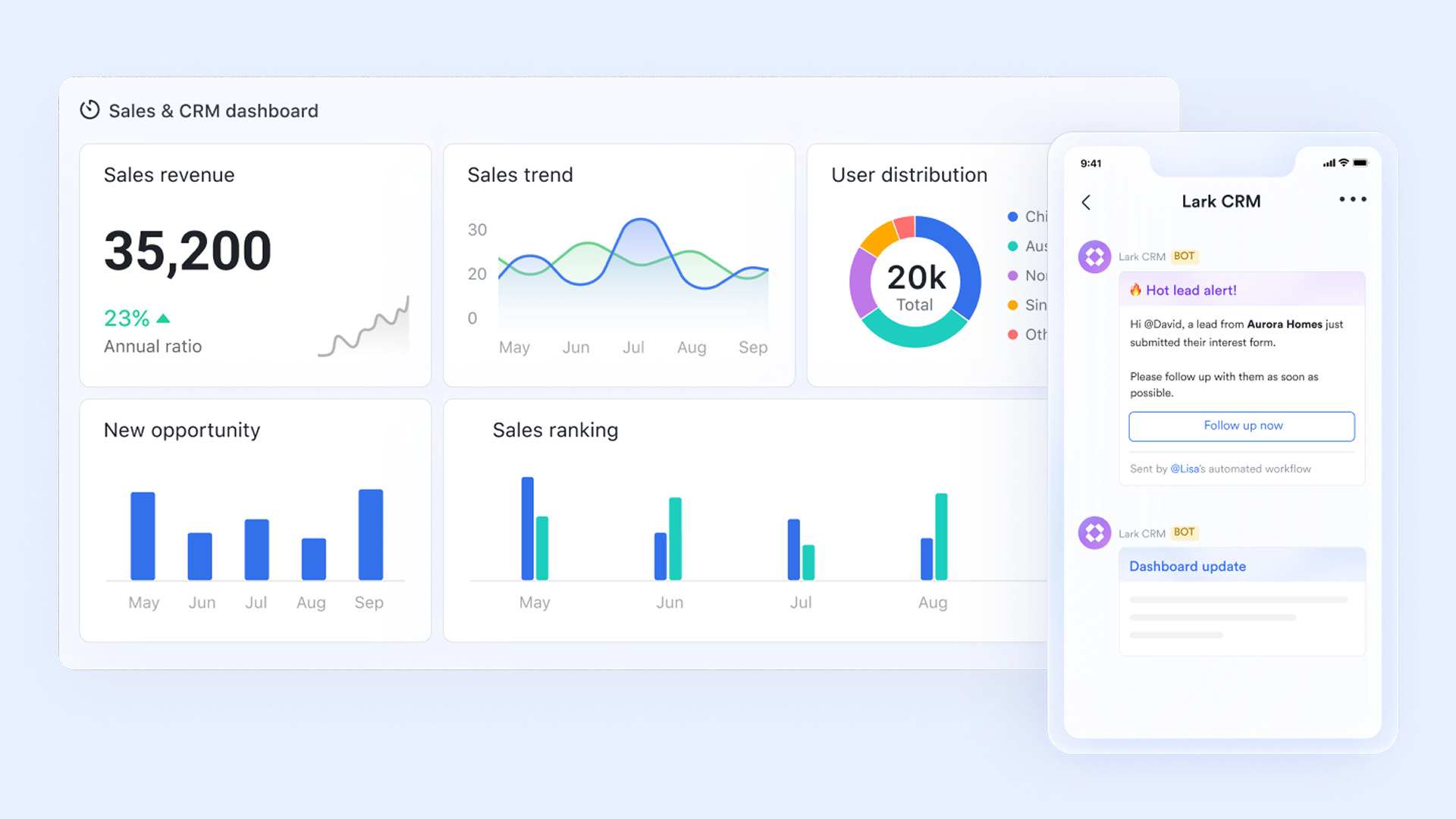
Execution-ready workstreams that connect decisions to action
Once a review or approval is completed, Lark automatically generates downstream workstreams, tasks, follow-ups, document updates, or scheduled meetings, directly linked to the originating process. For example, approving a new hire automatically creates a technical setup checklist, sends , and logs onboarding timelines. This creates operational momentum without manual coordination. 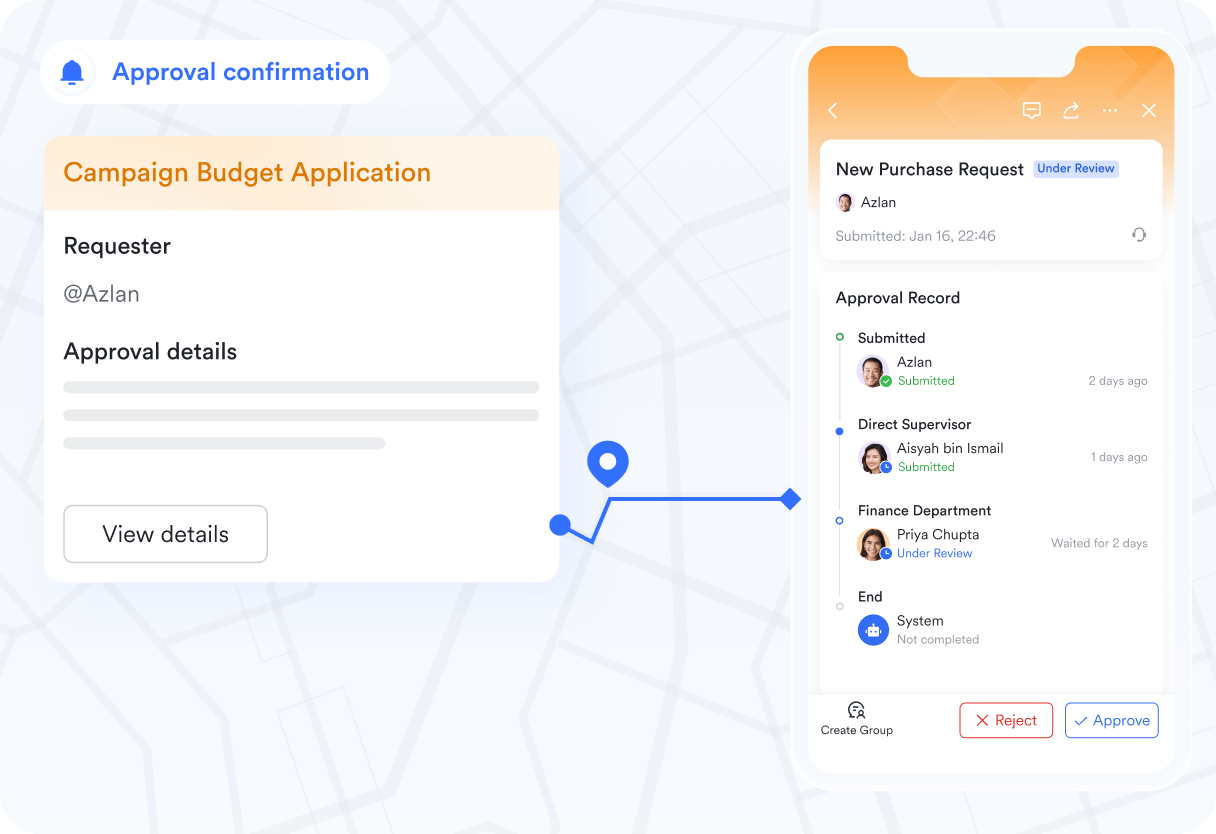
Documentation that stays tied to ongoing workflows
ensures every guideline, brief, contract draft, or policy stays connected to the workflow step it supports. When teams revise documents, updates sync instantly with live workflows, keeping all stakeholders aligned. This is particularly valuable in , project planning, and governance-heavy processes where accuracy is essential.
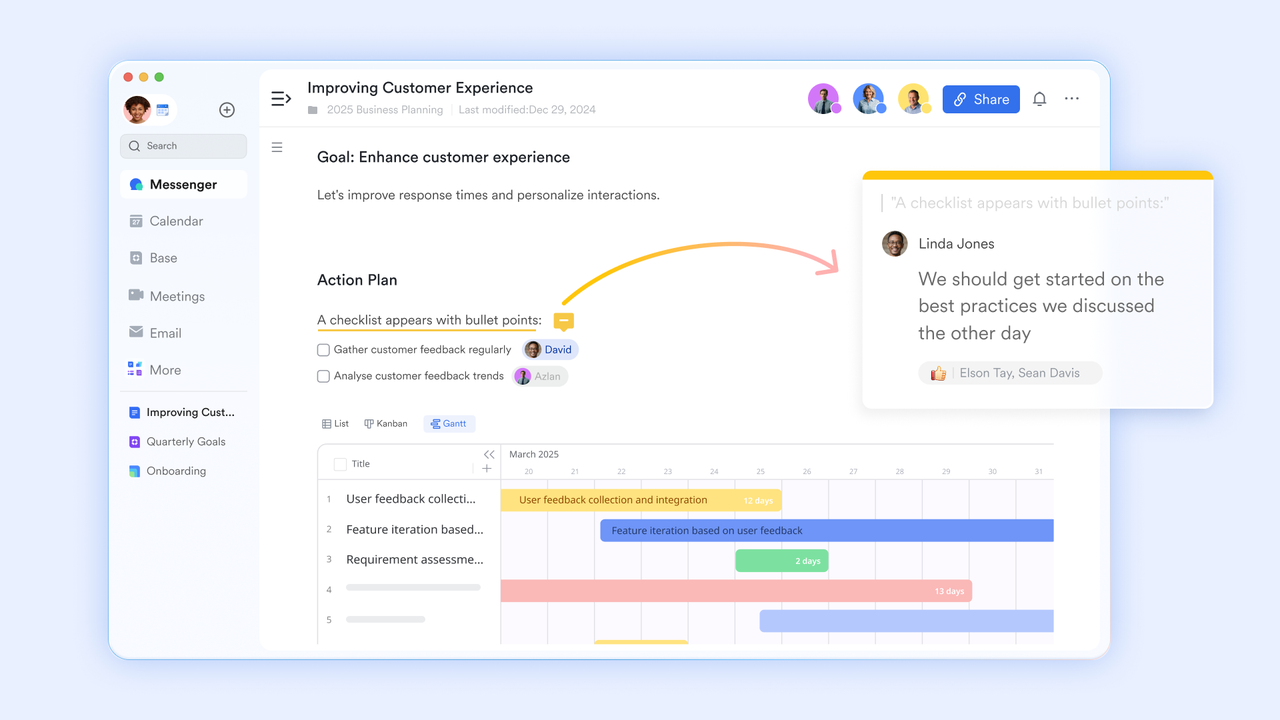
Cross-team communication that follows the workflow automatically
Messenger, comments, and stay attached to process records, making communication part of the workflow instead of an external side channel. Every discussion, budget clarification, vendor follow-up, and HR policy question remains tied to the corresponding process item. This eliminates the scattered communication problem common in traditional workflow tools. 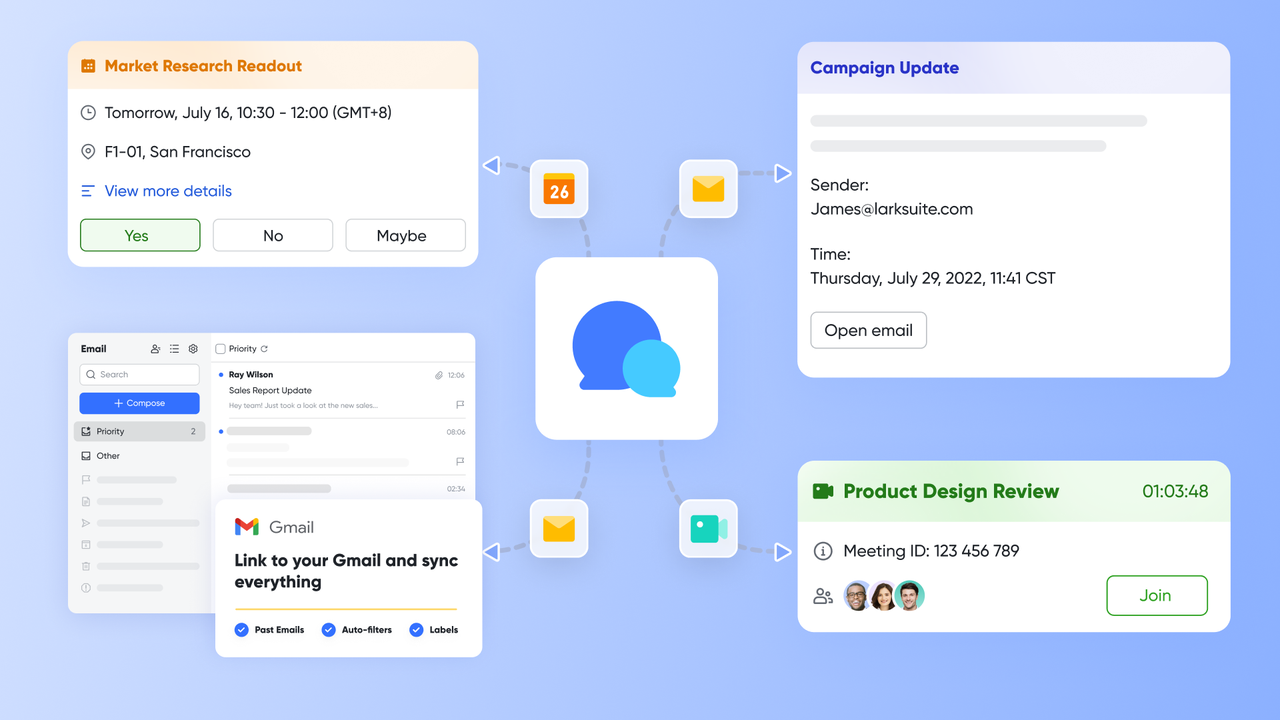
:
- Starter plan: Free forever plan that includes 11 powerful tools for up to 20 users. It also comes with 100GB of storage, 1000 automation runs, AI translations, and more.
- Pro plan: $12/user/month (billed annually) for up to 500 users. It includes everything in Starter plus group calling for up to 500 attendees, 15TB of storage, 50,000 automation runs, and more.
- Enterprise plan: for custom pricing. Supports unlimited users and includes even more automation runs and advanced security, compliance, and management features.
For small teams with simple communication needs

18 months message history
1000 Base automation runs/month
2000 rows per table in Base
Most POPULAR
For companies with comprehensive collaboration and management needs
Unlimited message history
500-participant video meetings
50k Base automation runs/month
20k rows per table in Base
For large companies with advanced security and organizational management needs
Get a personalized demo and pricing
Unlimited message history
500-participant video meetings
15 TB storage + 30 GB storage/user
500k Base automation runs/month
50k Base automation runs/month
Most POPULAR
For companies with comprehensive collaboration and management needs
Unlimited message history
500-participant video meetings
50k Base automation runs/month
20k rows per table in Base
Common mistakes to avoid when designing business process workflows
Even well-intended business process workflows can fail if they're poorly structured or lack proper governance. Avoiding these common mistakes helps teams build workflows that are efficient, scalable, and easy for everyone to follow.
- Over-complication: Adding too many steps, conditions, or approval layers slows down progress and confuses users. Overly complex workflows often lead to workarounds that undermine their purpose. Start simple, then scale only when needed.
- Missing documentation: Without documentation, teams lose clarity when employees change roles or new members join. A lack of reference material also leads to inconsistent execution. Always maintain up-to-date workflow guides and diagrams.
- Poor user permissions: Incorrect can create bottlenecks or expose sensitive data. Users should only access the stages or records relevant to their roles. Proper access control keeps workflows secure and efficient.
- No monitoring loop: Workflows degrade over time if . Without tracking metrics such as turnaround time and error rates, inefficiencies go unnoticed. Regular reviews ensure workflows stay optimized and aligned with business needs.
- Ignoring downstream tasks: Approvals aren't the end; execution tasks must follow smoothly to complete the process. Forgetting downstream steps leads to delays, miscommunication, and incomplete outcomes. Make sure every approval triggers the next set of actionable tasks.
Conclusion
A well-designed business process workflow gives organizations the structure, clarity, and consistency needed to operate efficiently at scale. By defining stages, responsibilities, routing logic, and automation triggers, teams reduce errors, speed up decision-making, and stay aligned across every department. Modern workflow tools make it easier than ever to track performance, streamline collaboration, and continuously improve processes. As businesses grow, these workflows become essential for maintaining quality and operational control. With flexible, automation-ready features and unified collaboration, helps teams build smarter, faster, and more connected workflows across the entire organization.
Boost team efficiency now
FAQs
How do you decide whether a business process should be automated or handled manually?
Teams should automate a process when it is repetitive, rules-based, and high-volume, making it ideal for business process workflow automation or an . Manual handling is best for judgment-intensive tasks that require human context. Reviewing a business process workflow diagram helps identify steps suited for automation, ensuring efficiency without losing necessary human oversight.
What departments typically see the fastest wins after implementing business process workflows?
Departments with repetitive requests, such as HR, finance, procurement, and IT, gain the most tremendous benefits first. These areas rely heavily on structured steps, making them ideal for a business process automation workflow or workflow business process management approach. Using strong business process workflow tools accelerates approvals, reduces errors, and improves turnaround times almost immediately.
How often should teams review and update their business process workflows?
Teams should evaluate their workflows quarterly to ensure they remain aligned with goals, policies, and operational realities. Regular reviews support effective business process management, workflow automation, and help refine any outdated steps. This continuous improvement approach keeps workflow and business process management systems efficient, compliant, and adaptable as the business evolves.
What is the difference between workflow automation and business rules management?
Workflow automation manages the movement of tasks across stages using business process workflow software, while business rules management defines the logic that governs decisions. Together, they form a complete business process and workflow management system. Automation handles routing and execution, whereas rules ensure consistent decisions based on policies, conditions, or thresholds.
How do business process workflows support compliance and audit readiness?
Structured workflows standardize procedures, create clear audit trails, and ensure every step follows policy. With business process and , teams automatically capture timestamps, approvals, and decisions. A well-implemented business process management workflow or business process workflow example ensures organizations maintain accountability, meet regulatory requirements, and respond quickly during audits.
Related reading
















