














Trello vs ClickUp: Which Project Management Tool Wins for Teams?

Ryan Tanner
Product Marketing Specialist
Sep 18, 2026
Ryan Tanner
Sep 18, 2026

15 min read


Both ClickUp and Trello are leading project management tools, but they serve different needs. Trello is ideal for small teams that value simplicity and visual task tracking through Kanban boards. ClickUp, on the other hand, caters to growing businesses that need advanced features like automation, dashboards, and custom workflows for complex projects.
This ClickUp vs Trello comparison examines their key differences in usability, collaboration, and pricing to help you select the bestd fit for your team. Plus, discover how Lark offers a connected workspace that unifies task management, communication, and automation for modern, fast-moving teams.

ClickUp vs Trello: Quick comparison table
When comparing ClickUp vs Trello, both tools shine in project management but cater to different team needs. Trello thrives on simplicity, using its signature Kanban boards to make task tracking visual and effortless. ClickUp, meanwhile, delivers a more robust experience with advanced views, automation, and detailed reporting for growing teams. Whether you prioritize ease of use or in-depth customization, understanding their key differences helps you choose the right platform.
Below is a quick ClickUp vs Trello comparison table highlighting their core features, strengths, and ideal use cases for every team size.
ClickUp vs Trello: Feature-by-feature comparison
Ease of use
Trello is exceptionally beginner-friendly, making it ideal for small projects or those managing straightforward visual workflows. Its intuitive drag-and-drop Kanban interface requires almost no onboarding. However, as projects become more complex, its limited flexibility and structure can restrict scalability.
ClickUp, on the other hand, offers a broader and more powerful workspace with extensive customization options for task types, fields, and dashboards. While this flexibility supports larger, process-driven teams, it also means a steeper learning curve for new users.
Views and visualization
Trello primarily focuses on Kanban boards, which are well-suited for task tracking and agile project management. Additional views, such as a timeline or a calendar, are available only through Power-Ups or paid tiers.
ClickUp offers a more comprehensive visualization system, featuring List, Gantt, Table, Calendar, and Mind Map views. This variety enables teams to view workloads from multiple perspectives—ideal for planning, monitoring, and reporting on complex projects.
Collaboration tools
Trello offers basic collaboration features like comments, mentions, and file attachments. It works well for lightweight coordination but lacks built-in real-time chat, document co-editing, or meeting integration.
ClickUp enhances collaboration with shared Docs, task comments, assigned mentions, and in-app notifications. However, it still depends on external communication tools for live discussions or synchronous collaboration.
Automation and workflow management
Trello includes automation through its "Butler" feature, which can handle routine actions such as moving cards or assigning tasks. However, automation is limited by plan tiers and Power-Up restrictions on free users.
ClickUp excels in workflow automation, offering native triggers and actions that automate repetitive processes, send reminders, and support conditional logic. This makes it more suitable for larger teams with structured workflows.
Integrations and scalability
Trello integrates seamlessly with popular tools like Slack, Google Drive, and other Atlassian products, fitting well into small or medium-sized ecosystems. However, its lightweight structure makes it less adaptable for enterprise-level project management.
For more Google Workspace's information, you can refer to Google Workspace Pricing and Google Workspace alternatives.
ClickUp supports a much wider integration library, connecting with CRM, communication, and productivity tools. Its scalable workspace structure accommodates multi-department teams and complex project hierarchies.
Both platforms, however, rely on external tools for advanced collaboration and cross-functional communication, which can lead to fragmented workflows at scale.
ClickUp pricing vs Trello pricing
Understanding pricing is crucial when choosing between ClickUp and Trello because cost scales with team size and feature needs. While both tools offer free plans to get started, the paid tiers vary significantly in features and value:
Plan tier | ClickUp (per user/month*) | Trello (per user/month*) |
Free plan | $0 – Free forever | $0 – Free forever |
Entry plan | $7 (Unlimited) | $5 (Standard) |
Mid-tier plan | $12 (Business) | $10 (Premium) |
Top/Enterprise tier | Custom pricing | $17.50 (Enterprise) |
Billing note | Discounts for annual billing | Discounts for annual billing |
ClickUp pricing
Free Forever Plan
- Unlimited tasks, collaborative Docs, Kanban boards, and Calendar view
- Basic custom fields, 60MB file upload limit, and in-app video recording
- Real-time chat, integrations, and 24/7 support included
Unlimited Plan: $7/user/month (billed annually)
- Everything in the former plan
- Unlimited storage, integrations, dashboards, and Gantt charts
- Custom fields, forms, native time tracking, goals, and portfolios
- Guests with permissions and advanced reporting
Business Plan: $12/user/month (billed annually)
- Everything in the former plan
- Adds Google SSO, advanced automations, workload management, and timelines
- Includes Mind Maps, whiteboards, and advanced dashboard customization
- Enhanced permissions and priority support
Enterprise Plan: Custom pricing
- Everything in the former plan
- White labeling, advanced security, SCIM provisioning, and SSO
- Data residency options, dedicated onboarding, and enterprise support
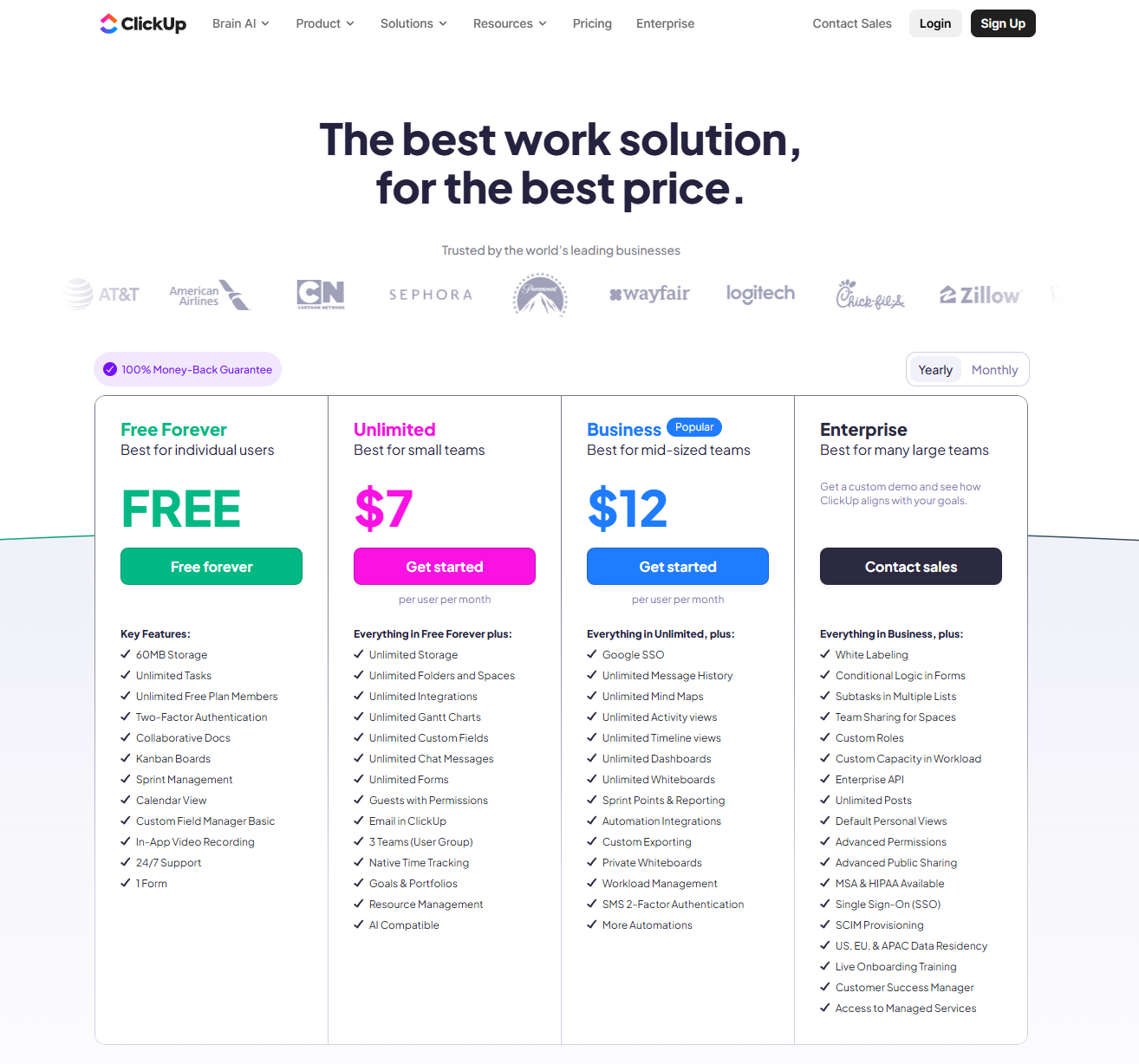
Image source: asana.com
Trello pricing
Free Plan
- Unlimited cards and members, up to 10 boards per workspace
- 250 command runs/month with Butler automation
- Unlimited Power-Ups per board, basic integrations, and 10MB/file upload limit
Standard Plan: $5/user/month (billed annually)
- Everything in the former plan
- Unlimited boards and storage (up to 250MB/file)
- Advanced checklists, custom fields, and 1,000 automation runs/month
- Priority support for workspaces and guest access
Premium Plan: $10/user/month (billed annually)
- Everything in the former plan
- Adds Timeline, Calendar, Table, Dashboard, and Map views
- Enhanced admin and security controls with unlimited automation
- Priority support and workspace-level customization
Enterprise Plan: Custom pricing
- Everything in the former plan
- Centralized admin controls, SAML SSO, and user provisioning
- Organization-wide permissions and advanced data gover
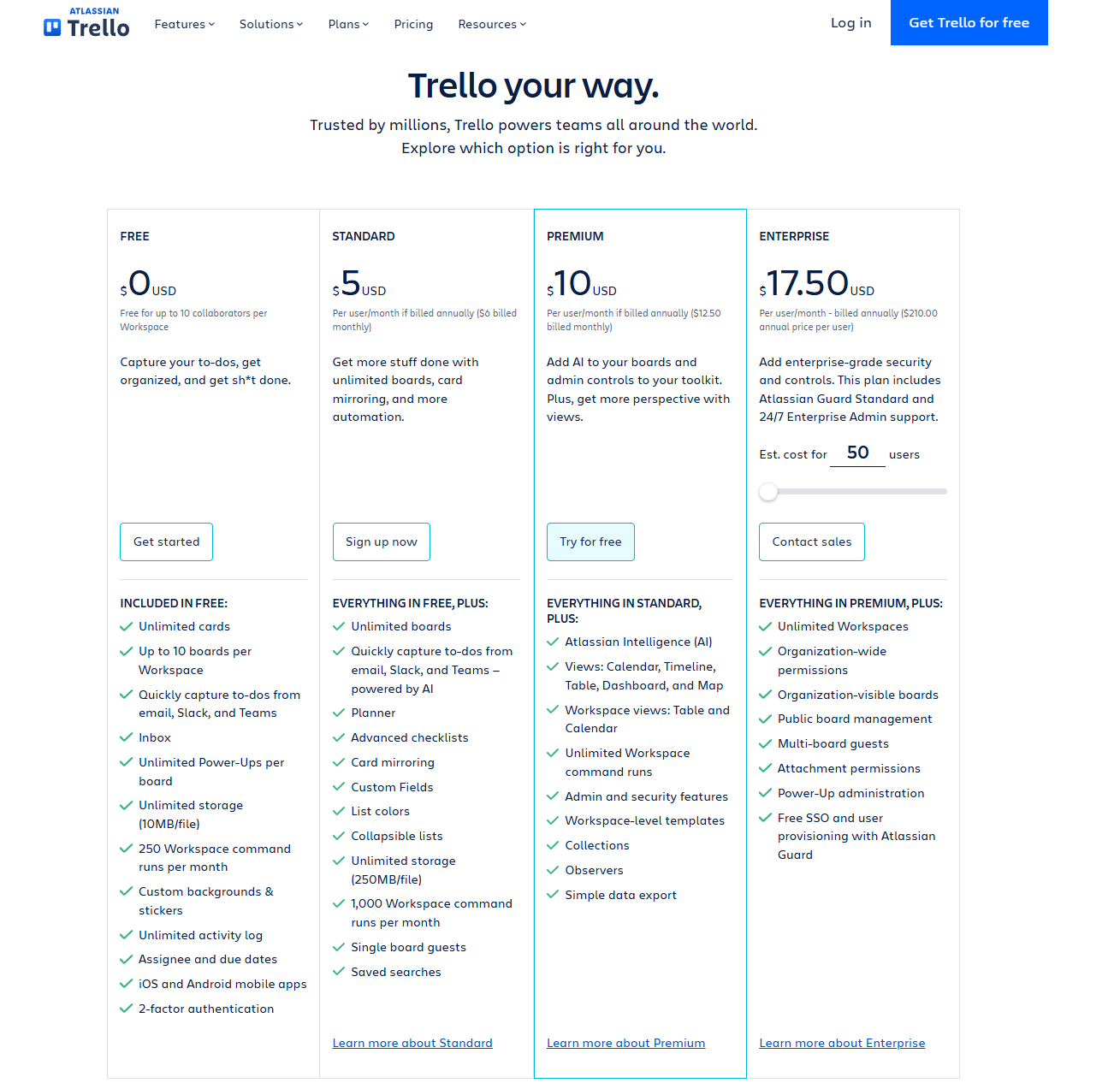
Image source: trello.com
Pros and cons of ClickUp and Trello
Both ClickUp and Trello are top project management tools, but they serve different types of teams. Trello focuses on simplicity and visual workflows, making it ideal for small teams or personal task tracking. ClickUp, on the other hand, offers advanced customization, reporting, and automation that cater to growing or complex teams. Understanding their strengths and limitations helps you choose the tool that fits your workflow best.
ClickUp
Pros
- Highly customisable workflows: ClickUp allows you to tailor views, statuses, fields, and more to match your processes.
- Multiple project views: Views like List, Board, Gantt, and Table give good flexibility for different types of tasks and teams.
- Built-in collaboration features: It includes comments, documents, integrations, and real-time updates, helping teams work together without switching between multiple apps.
- Streamlined workflow: Strong integration ecosystem and built-in automation/triggers to reduce repetitive tasks.
- Good value for features: Many users feel that you get enterprise-level capabilities at competitive pricing.
Cons
- Steep learning curve: Because there are so many features and options, new users may feel overwhelmed.
- Performance and load-time issues: Some users report lag, especially with large projects or many items.
- Overkill for simple use-cases: If you only need basic task tracking, ClickUp might feel too complex.
- Mobile app limitations: Some reviewers say the mobile version lacks parity with the desktop or has bugs.
- Incomplete experience: Certain advanced features are still locked behind higher-tier plans.
Trello
Pros
- Very easy to use and very quick to adopt: Boards, lists, and cards make for a very visual, intuitive workflow.
- Excellent for small teams or simple workflows: Simplicity is a strength when you don't need complex dependencies.
- Strong free tier and good mobile support: It helps get started with minimal cost or training.
- Large ecosystem of integrations: (Power-Ups) to extend its functionality when needed.
Cons
- Limited advanced features: It lacks built-in capabilities like Gantt charts, complex time tracking, and deep reporting.
- Scalability concerns: When you have many boards, many teams, or complex workflows, Trello can become hard to manage.
- Heavy reliance on Power-Ups: It relies on Power-Ups (add-on) advanced capabilities, which can increase cost and complexity.
- Boards & cards can become cluttered and lose clarity when lots of tasks or subtasks accumulate.
Which tool should you choose?
Trello works best for small, visually driven projects that don't require complex tracking or automation. Its intuitive drag-and-drop Kanban boards make task management simple and collaborative, perfect for startups, freelancers, or teams managing straightforward workflows.
ClickUp, on the other hand, suits mid-to-large teams that need structured project tracking, detailed reporting, and automation. With multiple views, dashboards, and customizable fields, it offers the control and depth required for fast-growing businesses.
However, if your team wants to go beyond task management with built-in communication, document co-editing, and connected workflows, Lark provides an all-in-one solution. Lark unifies chat, video meetings, docs, project tracking, and approvals in a single workspace—eliminating the need to switch between multiple apps. For teams seeking both collaboration and execution power, Lark delivers the flexibility of Trello and the structure of ClickUp in one seamless platform.
Meet Lark: The better alternative to ClickUp and Trello
Unlike ClickUp and Trello, which focus solely on task management, Lark connects every part of team collaboration—projects, communication, and documentation—under one roof. It's designed as a unified digital workspace where teams can chat, meet, co-edit documents, and track projects in real time without switching between apps
Lark Base: Visualize and automate projects
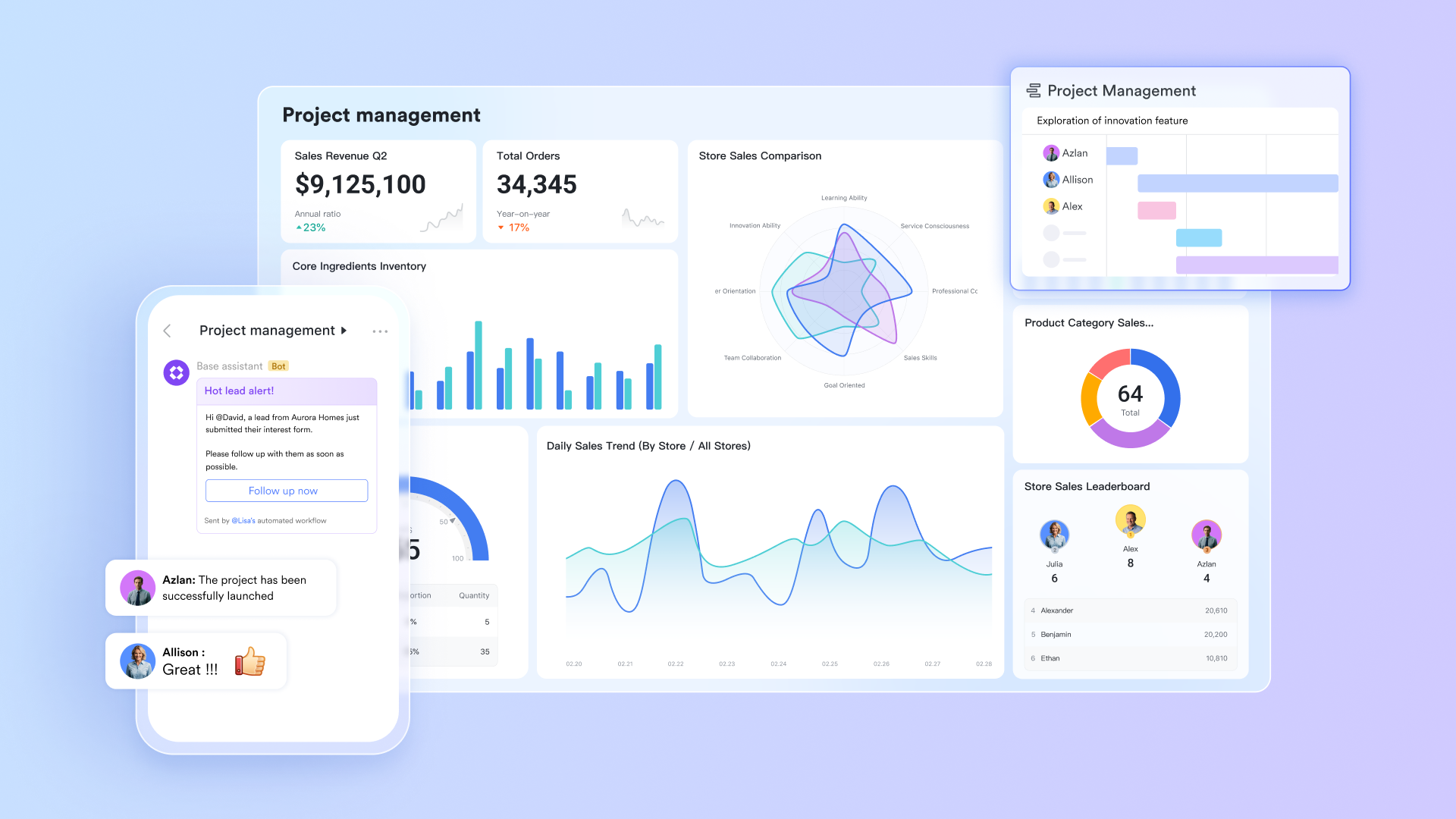
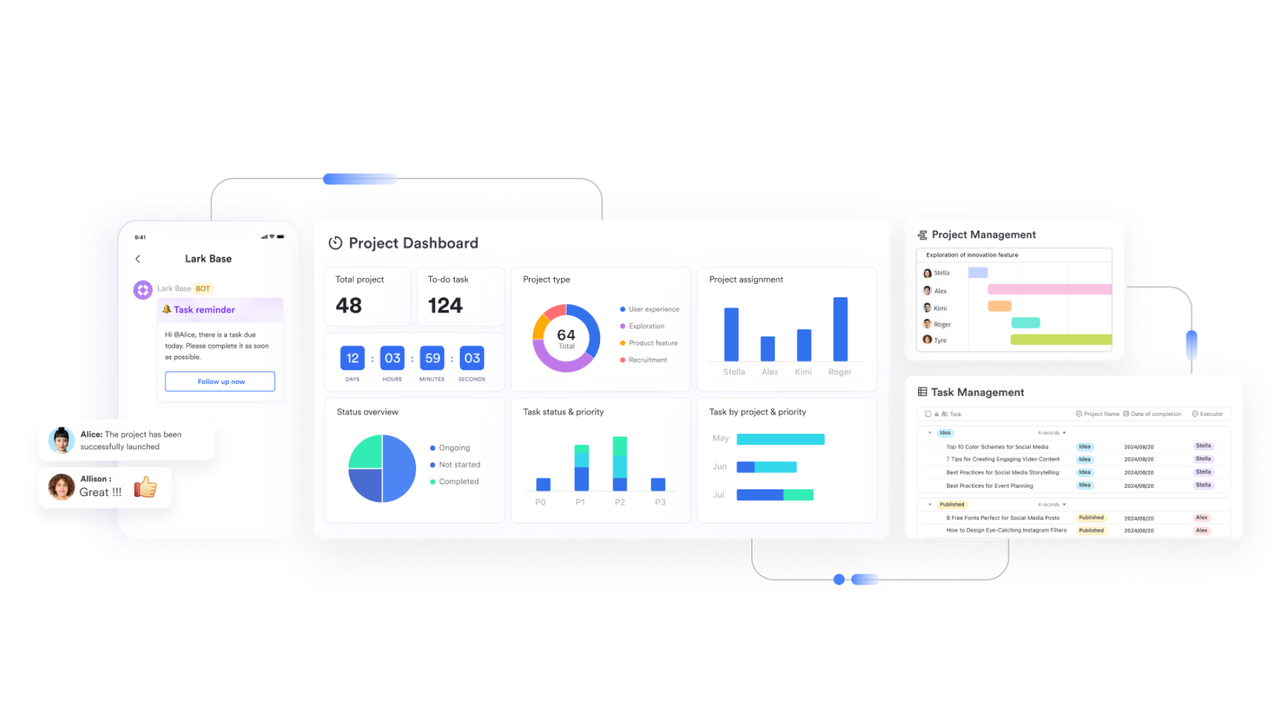
Both ClickUp and Trello help teams visualize tasks, but they take very different approaches. Trello is highly visual with Kanban boards but lacks flexibility for scaling—additional views like Gantt or Timeline require Power-Ups, which slow performance on larger projects. ClickUp offers more view types (List, Table, Gantt, etc.), but its deep customization often overwhelms new users and adds setup time.
Lark Base bridges this gap by combining ClickUp's structure with Trello's simplicity.Teams can create project databases with grid, Kanban, or Gantt views that automatically update as work progresses. Built-in automation runs handle repetitive updates, status changes, and reminders—no Power-Ups or integrations needed. For teams that want robust visualization without sacrificing usability, Lark Base delivers power and speed within a single workspace.
Lark Messenger: Built-in communication
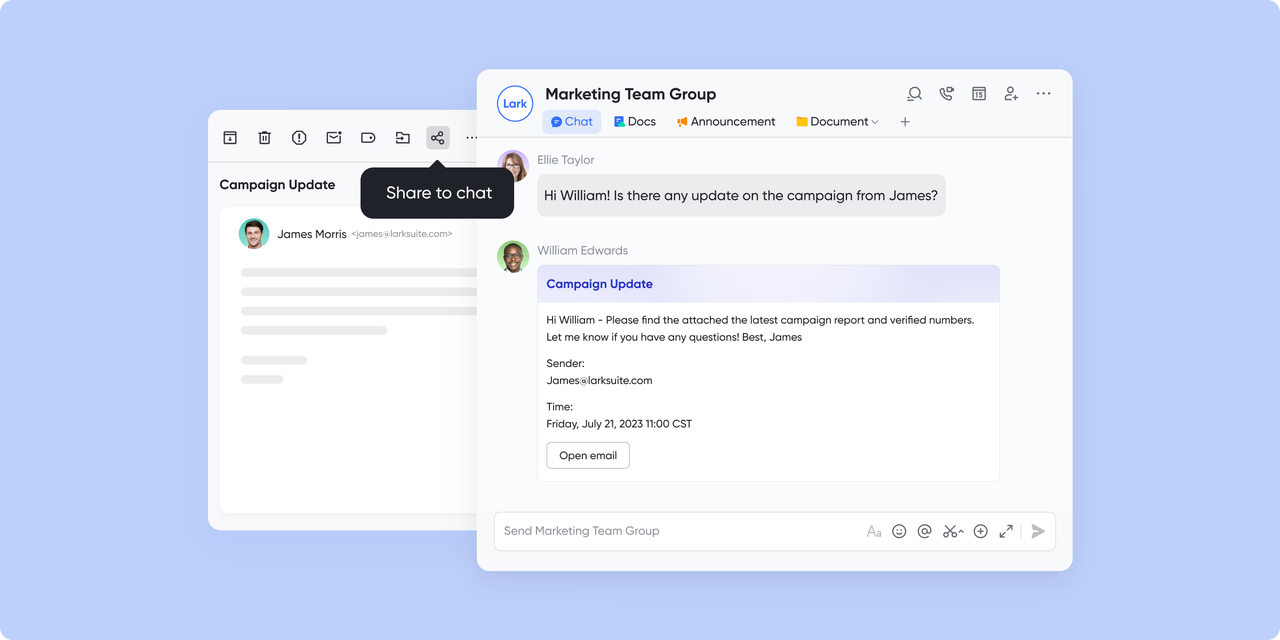
Neither ClickUp nor Trello truly solves the communication gap in project management. Trello relies on external tools like Slack or email for team discussions, whereas ClickUp features comment threads but lacks real-time messaging and video call capabilities. This forces teams to juggle multiple platforms to stay aligned.
Lark Messenger eliminates this fragmentation. It includes real-time chat, voice calls, and video meetings directly linked to your projects. You can discuss updates, share files, or tag teammates without leaving your workspace—turning every project into an active communication hub.In essence, what Trello lacks in depth and ClickUp compensates with integrations, and Lark simplifies with a seamless, built-in communication layer.
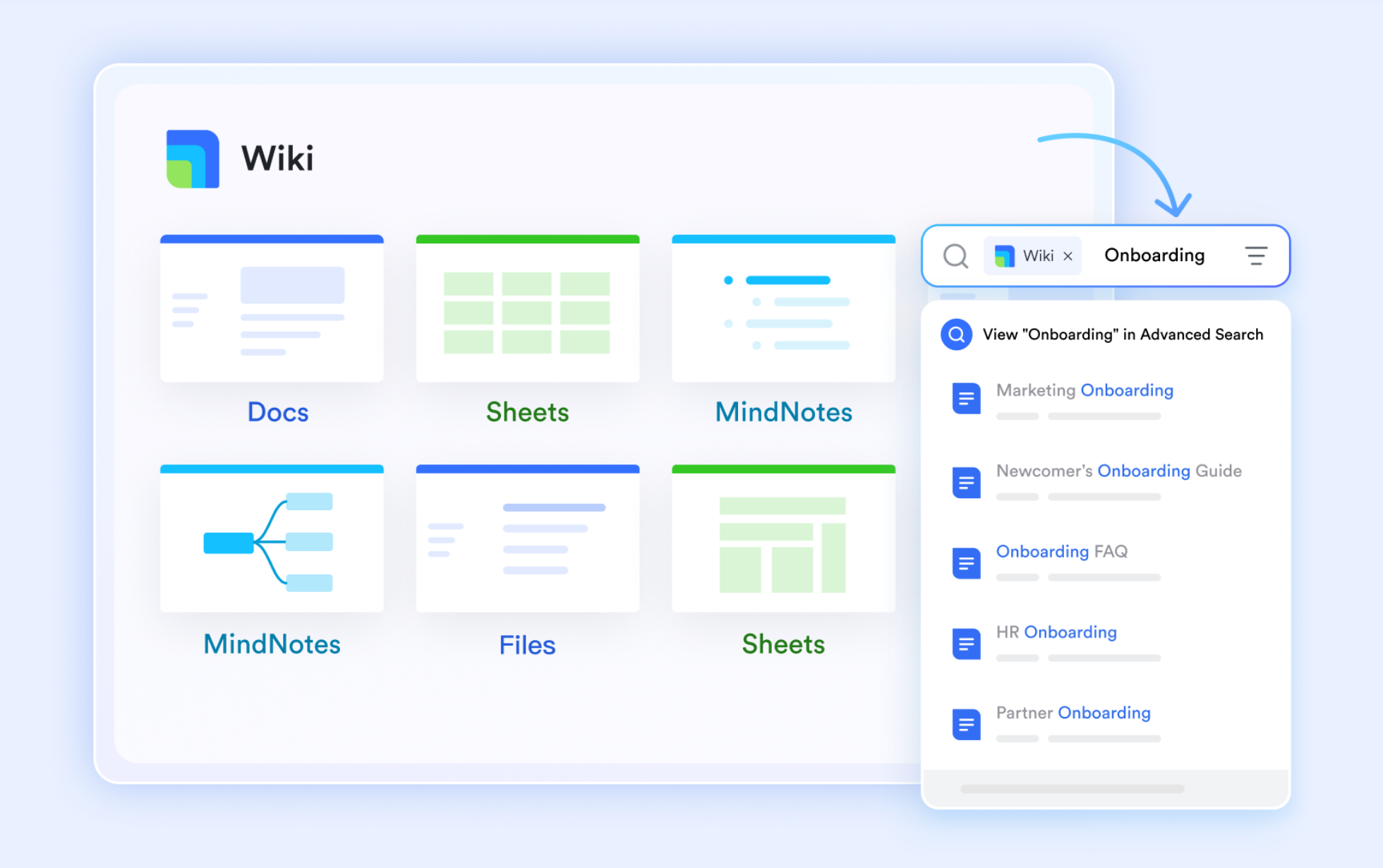
Lark Docs & Wiki: Collaborative documentation
ClickUp offers internal Docs, but they're limited to simple note-taking. Trello, meanwhile, has no built-in document collaboration—users rely on Google Docs or Dropbox attachments. This creates friction between planning and content creation, especially when teams need shared templates, briefs, or reports.
Lark Docs changes that by providing real-time co-editing and version control inside the same workspace.
Marketing, design, or product teams can collaborate simultaneously on strategies or reports while commenting online. Once finalized, these documents can be published on Lark Wiki, creating a searchable, living library for company knowledge. Neither Trello's static attachments nor ClickUp's basic docs come close to Lark's dynamic, connected documentation system.
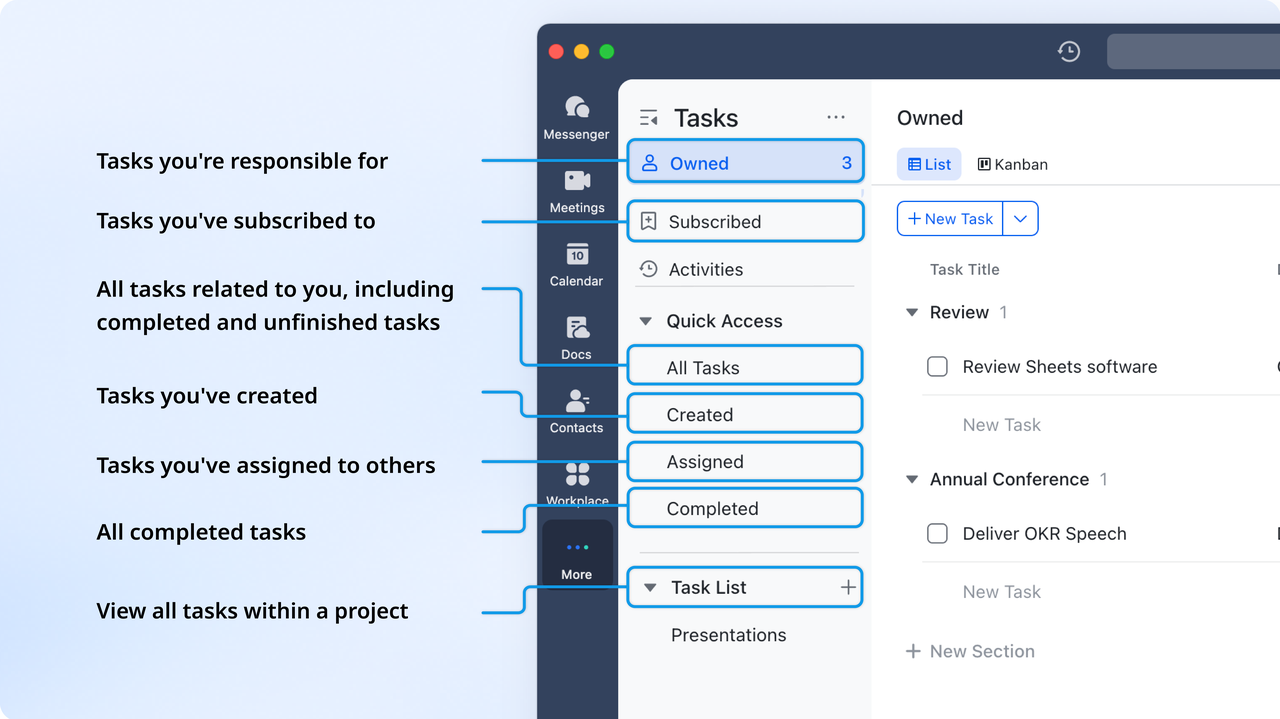
Lark Tasks: Assign and track accountability
ClickUp is strong in task management, with custom statuses and automation, while Trello focuses on simplicity through cards and checklists. However, both require users to manually create tasks from meetings, chats, or notes—creating disconnects between discussion and execution.
With Lark Tasks, every conversation or document can be turned into an actionable task instantly. Assign owners, set due dates, and monitor progress in shared dashboards or calendar views—all synced with Lark Base and Lark Calendar. This ensures complete visibility across the project lifecycle. It's the perfect balance of ClickUp's control and Trello's clarity—giving teams accountability without clutter or tool overload.
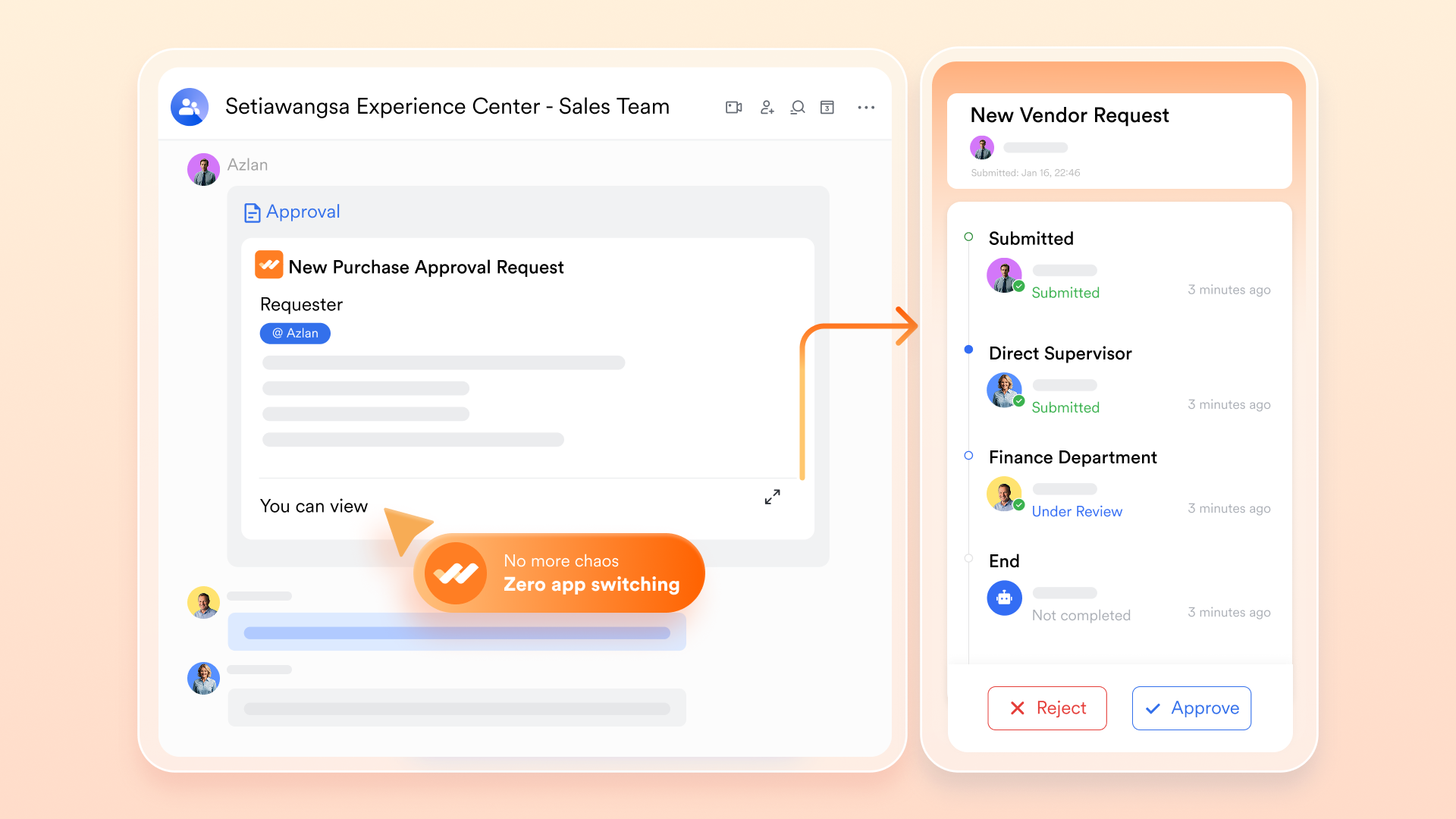
Lark Approval: Streamline decision-making
ClickUp offers automation rules for workflows but lacks structured approval systems, while Trello relies on third-party Power-Ups for approval chains. This often means manual tracking for budget approvals, creative reviews, or change requests.
Lark Approval builds this process directly into your workspace. You can create multi-level approval flows for any request—from purchase orders to content sign-offs—with notifications, timestamps, and full audit visibility. Reviewers can approve directly from Messenger or Mail, ensuring quick decisions without back-and-forth communication delays. It combines Wrike's enterprise-level approval logic with ClickUp's ease of setup, natively, and at no extra cost.
- Starter plan: Free forever plan that includes 11 powerful tools for up to 20 users. It also comes with 100GB of storage, 1000 automation runs, AI translations, and more.
- Basic plan: $6/user/month (billed annually) for up to 500 users. It includes everything in Starter plus group calling for up to 500 attendees, 5TB of storage, 1000 automation runs, and more.
- Pro plan: $12/user/month (billed annually) for up to 500 users. It includes everything in Starter plus group calling for up to 500 attendees, 15TB of storage, 50,000 automation runs, and more.
- Enterprise plan: Contact sales for custom pricing. Supports unlimited users and includes even more automation runs and advanced security, compliance, and management features.
Summary: How Lark stands above ClickUp and Trello
When comparing Lark, ClickUp, and Trello, the differences extend beyond project management features—it's about how seamlessly teams can collaborate and execute work. While Trello simplifies task tracking with visual boards and ClickUp enhances control through advanced customization, both still depend on external tools for communication, documentation, and approvals.
Lark, however, unifies these capabilities into one connected workspace. It brings together messaging, video calls, docs, tasks, and automation without relying on add-ons or integrations. Below is a quick summary table showing how Lark stands above ClickUp and Trello in functionality, connectivity, and value.
Conclusion
In the ClickUp vs Trello debate, the right choice depends on your team's priorities. Trello is perfect for small teams that value visual simplicity and straightforward task tracking, while ClickUp offers robust customization and automation for larger, fast-scaling organizations. However, both tools rely on external apps for communication, document collaboration, and approvals—creating fragmentation in workflows. That's where Lark stands out. By combining project management, messaging, video calls, docs, and automation in one unified workspace, Lark helps teams work faster and stay perfectly aligned. For modern teams seeking true all-in-one collaboration, Lark is the smarter alternative.
FAQs
Is ClickUp better than Trello for large teams?
Yes—ClickUp is generally better suited for large or growing teams because it supports multiple project views, hierarchies (spaces, folders, lists), task dependencies, and deeper reporting than Trello. Trello remains simpler and more suited to smaller, visual-workflow-oriented teams.
Can Trello handle automation like ClickUp?
Trello has built-in automation through its Butler tool (rules, buttons, commands) and supports integrations/power-ups for additional actions. However, automation in ClickUp is more advanced (custom triggers/actions, built-in workflow automation), so Trello's automation capability is more basic by comparison.
Does Lark offer free project management features?
Yes—Lark provides a "Free forever" plan with core features including chat, docs, tasks, and basic project management. It allows teams to explore project tracking and collaboration without upfront cost, though some advanced features are reserved for paid tiers.
What makes Lark a better alternative to ClickUp and Trello?
Lark unifies tasks, docs, chat, calendar, and approvals in a single workspace—reducing tool-switching. It offers built-in communication (chat/video), real-time co-editing of docs, workflow automation, and project views combined. Thus, while Trello is simple and ClickUp is powerful, Lark aims to bring both collaboration and execution into one platform.
Can I migrate my Trello or ClickUp workflows to Lark?
Yes—migration is possible. Lark supports integration and imports capabilities from other tools. For example, you can create workflows between Trello and Lark via Zapier. While a full "one-click" migration from large ClickUp or Trello projects may require manual mapping, the move is feasible.
Related reading
Table of contents
Start using Lark today

Manage all your work in one place
Boost team efficiency by 10x
Save up to 70% on software costs
Table of contents
Start using Lark today
Manage all your work in one place
Boost team efficiency by 10x
Save up to 70% on software costs
Keep reading



Lark recognized in 2023 Gartner® Collaborative Content Workspaces and Meeting Solutions reports
Lark, the global superapp for productivity, is delighted to announce it receives recognition in the Gartner's 2023 Innovation Insight for Collaborative Content Workspaces and Market Guide for Meeting Solutions.





2026 Lark Technologies Pte. Ltd.
Headquartered in Singapore with offices worldwide.






Explore: