














Communication Plan Templates: Steps, Examples, and the Best Tool

Ryan Tanner
Product Marketing Specialist
Sep 18, 2026
Ryan Tanner
Sep 18, 2026

17 min read


Effective collaboration starts with clear communication. Without it, even the most detailed project plans can fail due to missed updates or unclear ownership. A well-designed communication plan template for project management helps teams stay organized by outlining how information is shared, who receives updates, and how frequently they occur. It creates alignment across departments and keeps everyone accountable throughout the project lifecycle. With modern tools like Lark, teams can bring messaging, meetings, and documentation into one connected workspace ensuring every discussion, decision, and update is visible, timely, and easy to track.

What is a communication plan in project management?
A communication plan in project management is a structured framework that defines how, when, and with whom information will be shared during a project. It outlines the communication channels, timing, message types, and responsibilities for each participant.
For example, daily task updates may happen in chat, weekly reports can be shared through a document, and milestone reviews might take place in scheduled meetings or via project management tools. By organizing communication in this way, teams avoid redundancy and reduce the chance of missed updates.
A communication plan also makes it easier to manage distributed teams. Whether your team works in-office or remotely, everyone follows a single communication rhythm and knows exactly where to look for updates.
Why do you need a communication plan for projects
A project communication plan goes beyond simply setting up meetings or sending messages. It builds a communication culture that keeps everyone aligned and reduces uncertainty.
- Keeps all stakeholders aligned with project goals: When communication is structured, every team member knows the objectives and progress updates. This alignment ensures that each decision supports the broader project vision.
- Defines ownership for updates and deliverables: A communication plan clearly lists who is responsible for sharing progress reports, risk alerts, and milestone updates. This accountability helps avoid miscommunication or missed reports.
- Reduces confusion caused by scattered messages or emails: Instead of digging through inboxes or message threads, teams can find all project-related discussions in one place, organized by topic or task.
- Ensures faster decision-making with centralized communication: When all discussions and documents are connected, leaders can review real-time updates and make informed decisions without waiting for reports.
- Improves transparency, especially in hybrid or remote teams: Distributed teams often struggle with information silos. A consistent communication plan ensures equal visibility for everyone, regardless of time zone or role.
Each of these benefits contributes to smoother collaboration and greater confidence in project outcomes.
Key components of a project communication plan
Every strong communication plan includes a few essential components that help define structure and consistency.
Let's break these down in more detail:
- Stakeholders: Identify everyone who will receive project information. This includes team members, clients, executives, and external partners. Each group may require different types of updates and at different frequencies.
- Communication goals: Define what the communication plan should achieve. Examples include improving update consistency, reducing miscommunication, or increasing project visibility.
- Channels: Choose platforms that support clarity and accessibility. For instance, using Lark Messenger for instant updates and Lark Docs for structured reports ensures all information is connected.
- Frequency: Decide how often updates occur. Daily stand-ups, weekly reports, and monthly reviews are common patterns.
- Message type: Categorize information, such as task progress, risk alerts, or decisions, to ensure clarity.
- Owner: Assign responsibility for updates. A clear owner prevents delays and confusion over who should communicate what.
- Format: Choose consistent presentation methods like dashboards, checklists, or meeting summaries.
- Feedback method: Communication should flow both ways. Provide clear channels for responses, such as Lark chat threads or meeting discussions.
Types of communication plans (with examples)
Different projects may require different communication plans depending on their goals and audiences.
- Project communication plan: Used for internal coordination and task tracking. It defines how teams share daily updates, meeting outcomes, and deliverables.
- Stakeholder communication plan: Focused on leadership, clients, or investors who need regular progress insights without technical details.
- Crisis communication plan: Essential during emergencies or delays. It establishes escalation paths, responsible contacts, and contingency communication.
- Change management communication plan: Useful during project transitions such as technology upgrades or process overhauls. It keeps employees informed and engaged throughout change.
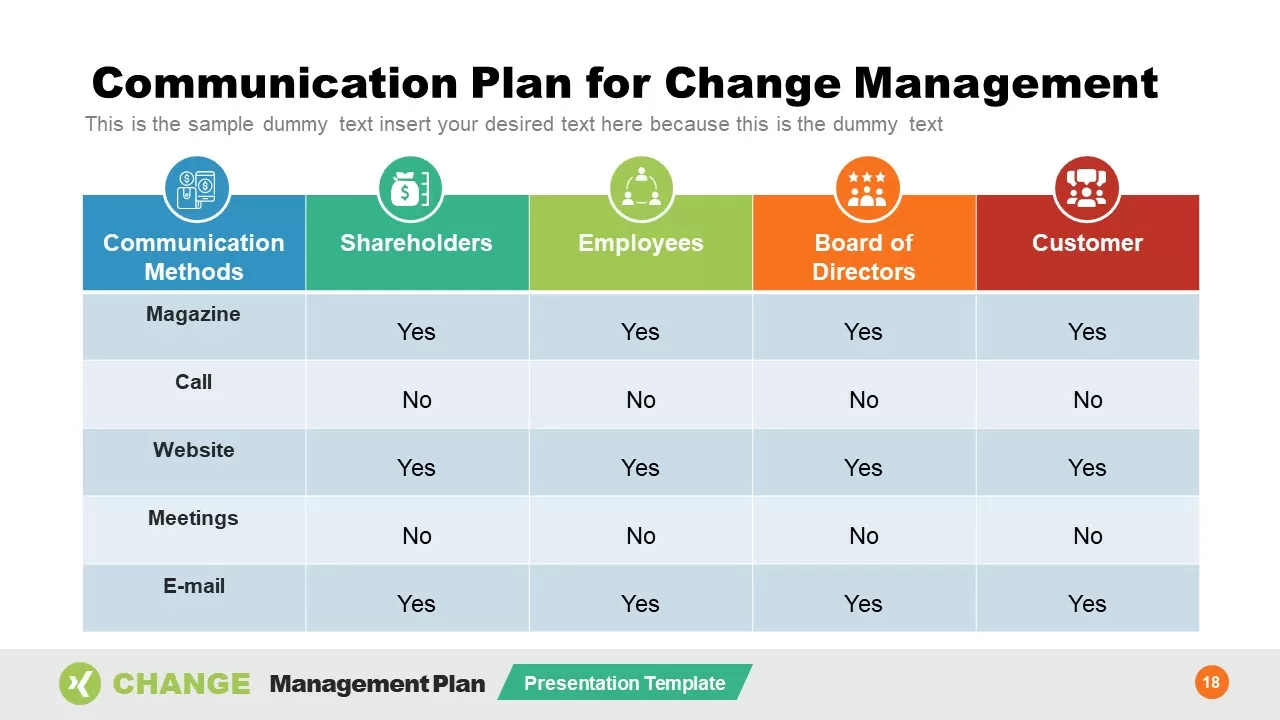
Image source: slidemodel.com
How to create a communication plan in 5 easy steps
Step 1: Identify stakeholders
List everyone involved in the project internal teams, clients, management, and vendors. Categorize them based on their involvement level and determine how much information each group needs.
Step 2: Define communication goals
Set clear goals for communication. For example, "Ensure transparency across all deliverables" or "Enable quicker feedback on design changes." These goals help measure the effectiveness of your communication plan.
Step 3: Choose channels
Pick communication tools that match your team's workflow. Chat is ideal for fast collaboration, while shared documents and dashboards are better for structured reporting.
Step 4: Set frequency and ownership
Define how often updates will occur and assign specific owners for each communication type. For example, project managers can share weekly progress summaries, while technical leads report risk updates.
Step 5: Document and share
Use a shared workspace to store your communication plan. In Lark Docs, everyone can view, comment, and update the plan in real time, ensuring version control and alignment.
Free communication plan template (editable)
Start building your project communication plan with this editable template in Lark. It helps define communication goals, stakeholders, and update frequency in one shared workspace. Teams can co-edit the document in real time, add comments, and tag members for accountability. This template improves structure, alignment, and transparency across all project stages.
Communications plan
A communications plan outlines how information will be shared throughout a project to keep everyone aligned and informed. It defines who needs updates, what details should be shared, and which channels to use. By setting clear communication rules early, teams can reduce confusion, improve collaboration, and ensure consistent progress toward project goals.
Communication matrix report
A communication matrix helps teams organize who needs to be informed about each project task, when, and through which channel. This report template provides a clear framework for managing updates across multiple stakeholders. It allows teams to visualize ownership, message types, and delivery schedules in one place. It is ideal for project managers who want consistency and visibility in communication.
Communication hazard communication plan
This communication hazard communication template helps organizations maintain safety and compliance by defining how information is shared during emergencies or high-risk situations. It outlines communication responsibilities, escalation paths, and reporting procedures to ensure clarity during critical moments. It is useful for assigning roles, documenting processes, and keeping all stakeholders aligned under pressure.
Stakeholder analysis template
The stakeholder analysis template in Lark Base helps project managers create a clear communication plan by identifying and categorizing key stakeholders. It allows you to map stakeholder interests, influence, and engagement needs, ensuring that messages are tailored and delivered effectively. By organizing who needs updates, when, and through which channels, teams can prevent miscommunication and maintain alignment throughout the project lifecycle. This template turns complex stakeholder dynamics into a structured communication strategy, helping projects run smoothly and stakeholders stay informed.
Action plan for communication template
The action plan for communication template is designed for project coordinators, managers, and team leads who want to ensure effective communication throughout their projects. It is also suitable for communication officers and stakeholders who want a clear understanding of the communication plan and their roles in it. Whether you're managing a small project or a large-scale initiative, this template helps streamline communication processes and keep everyone informed and engaged.
Action plan for retail template
The action plan for retail template is designed to help you effectively plan and manage your retail projects. It provides a comprehensive framework for organizing tasks, setting priorities, and tracking progress. With this template, you can easily allocate resources, conduct risk assessments, develop project timelines, set up communication plans, identify key stakeholders, review and adjust plans, and finalize project scopes. Using this template ensures that retail projects are executed smoothly and efficiently.
Crisis communication plan for crisis managers template
In times of crisis, effective communication is crucial for managing the situation and maintaining trust with stakeholders. This crisis communication plan template is designed to help crisis managers prepare for and respond to various crisis scenarios. It includes a structured approach to identifying key messages, communication channels, responsible persons or teams, action items, deadlines, and status updates. Using this template ensures a coordinated and timely response to any crisis situation.
Project problem tracker plan template
The project problem tracker template helps teams identify, document, and resolve issues that arise during a project. It includes fields for problem descriptions, attachments, assigned handlers, handling times, and approvers. This ensures accountability and timely resolution of problems, minimizing project delays and enhancing team collaboration.
Communication matrix report template ClickUp
This template from ClickUp helps visualize who needs to be informed about each task, project phase, or update. It organizes communication responsibilities clearly so no message is missed. Managers can easily assign owners, track status, and monitor update frequency. It is best suited for teams that need structured, repeatable communication workflows.
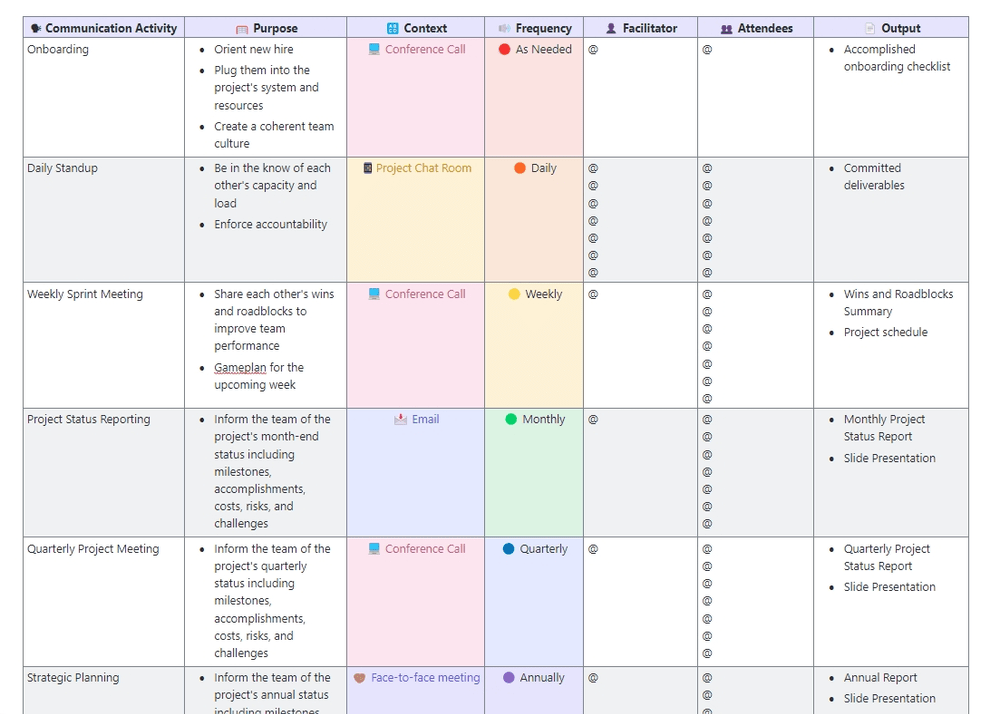
Image source: clickup.com
Crisis communication plan Zapier
Zapier’s crisis communication template offers a simple framework for managing emergency updates. It helps define roles, escalation paths, and message timing when quick, coordinated action is needed. The template keeps information clear and accessible for all stakeholders. It ensures that critical responses happen smoothly under pressure.
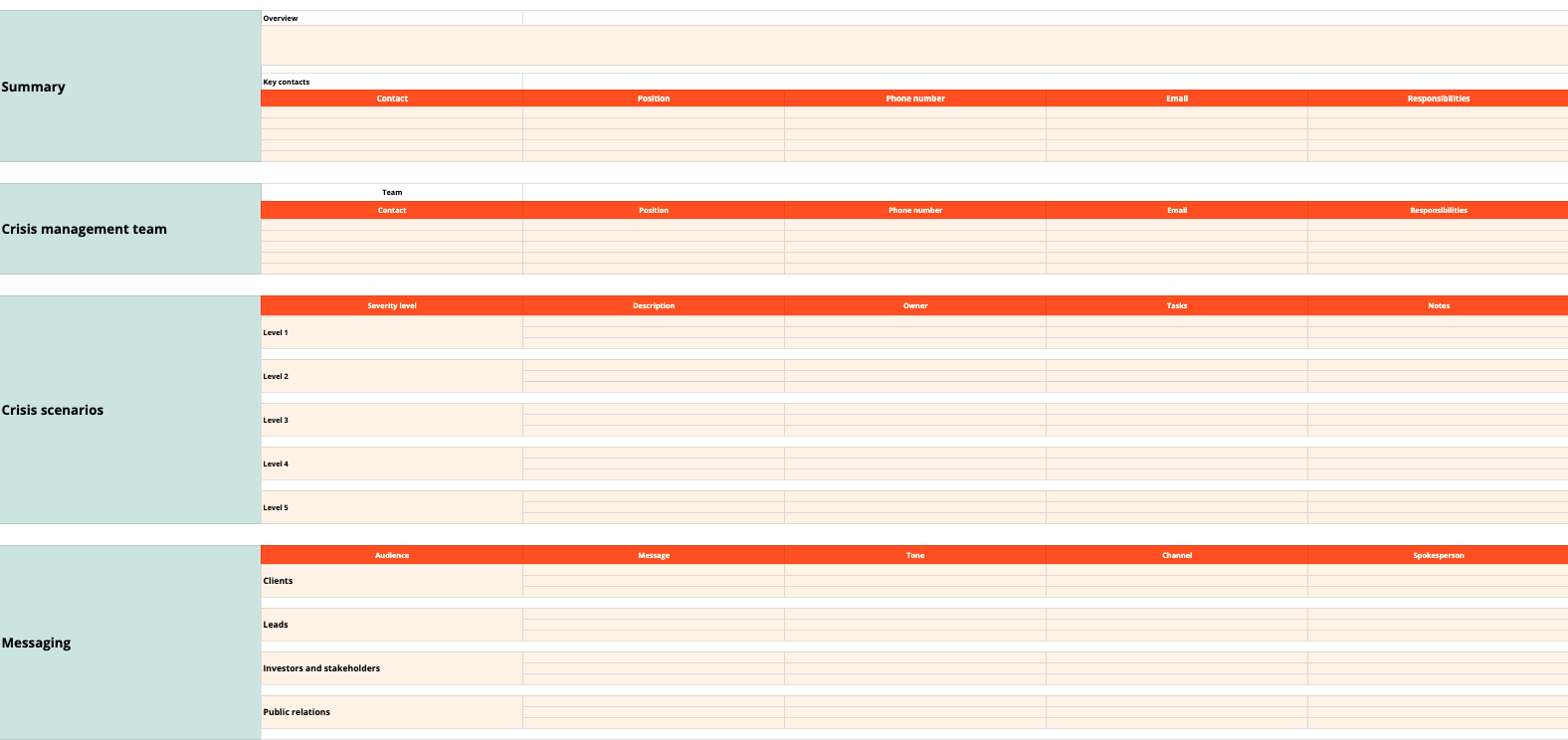
Image source: zapier.com
Communication plan template Projectmanager
This Projectmanager template is built to help teams create professional communication plans quickly. It includes fields for stakeholders, channels, and reporting schedules. By using it, teams can maintain clarity and consistency throughout every project phase. It’s ideal for project managers who need a structured, easy-to-customize plan for cross-team communication.
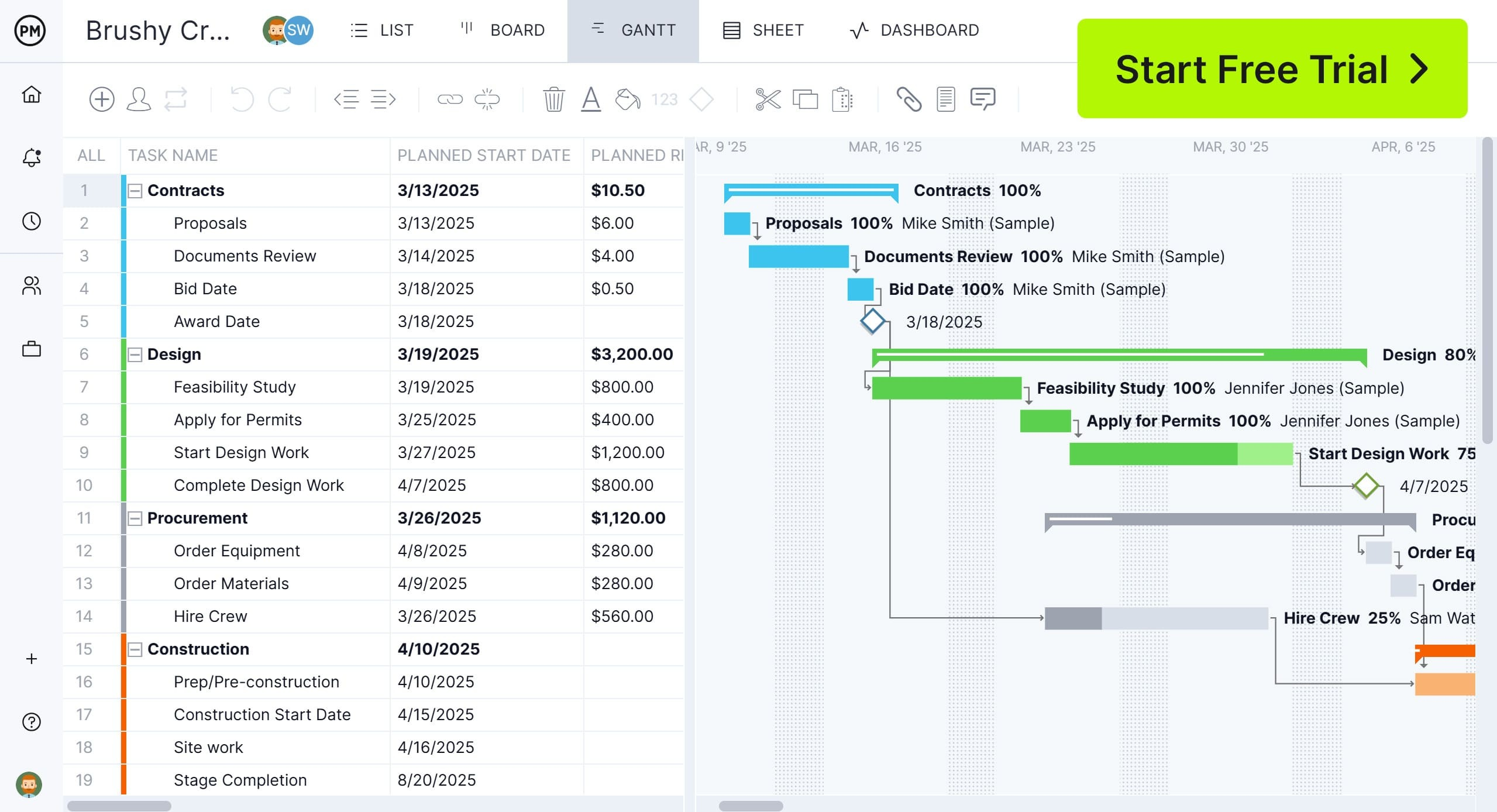
Image source: projectmanager.com
Building your communication plan in Lark without hassle
A communication plan works best when communication actually happens in one place. Many teams rely on different tools for chats, documents, meetings, and data, but that often creates silos. Lark solves this by combining every communication layer into one connected platform. Teams can plan, execute, and track every discussion, document, and update without leaving the workspace.
Whether you're defining communication goals, tracking stakeholder updates, or sending reports, Lark ensures everything stays visible, synchronized, and actionable. Here's how each product helps you build a seamless communication system.
Key features:
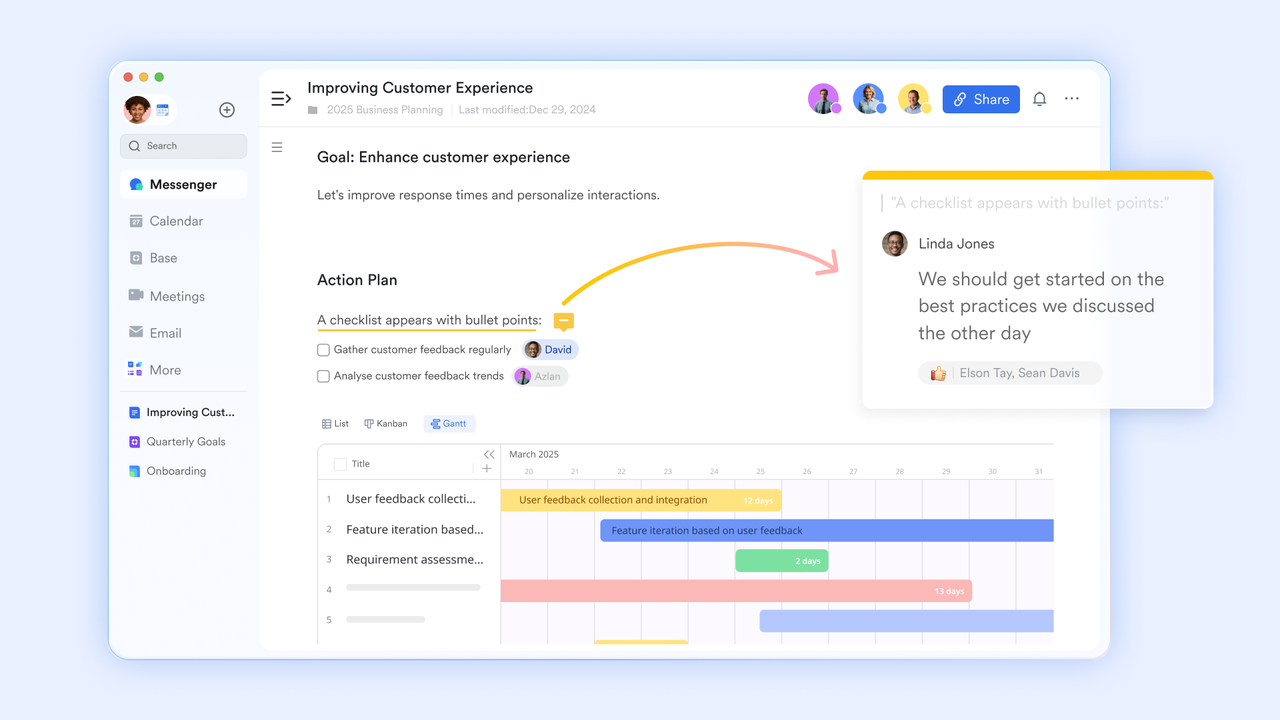
Lark Docs: Build and share your plan
Lark Docs acts as the foundation of your communication plan. It allows you to create structured documents that evolve as your project progresses.
- Start with ready-to-use templates: Lark offers customizable templates for communication plans, reports, and stakeholder metrics. You can open the communication plan template for project management directly in Lark Docs and adapt it to your project's goals, audience, and timelines.
- Collaborate in real time: Unlike traditional word processors, Lark Docs supports live co-editing. Multiple team members can work on the same document, comment inline, and see changes instantly. This ensures your communication plan stays up to date as project conditions shift.
- Add context through smart mentions: Tag team members, link Lark Base tables, or reference tasks directly inside your plan. This creates a living document that connects goals with execution.
- Maintain version control automatically: Every edit is saved, so you can track who made changes and revert to earlier versions when needed.
- Example: A project manager drafts the stakeholder communication plan while department leads add reporting schedules in real time. Each update automatically notifies the relevant team through Lark Messenger, ensuring no step is missed.
Lark Docs replaces static files with dynamic collaboration, helping teams align faster without endless email exchanges.
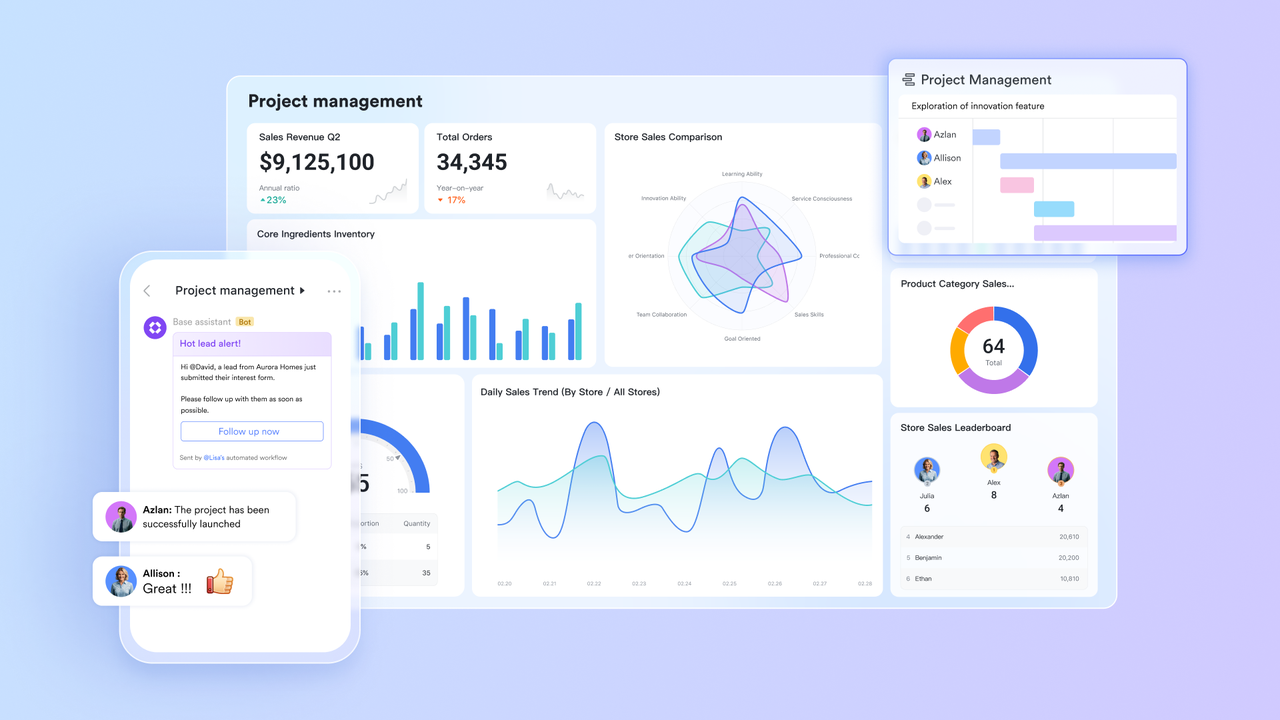
Lark Base: Visualize communication workflows
Lark Base gives your communication plan a visual backbone. It helps you organize every detail from stakeholder lists to communication schedules into structured, filterable views.
- Centralize all communication data: Store stakeholder names, update frequencies, channels, and responsible owners in one Base. Each field can be customized to match your project's requirements.
- Switch between multiple views: Use Table view for structured data, Calendar view to schedule communication touchpoints, and Kanban view to track progress across communication tasks.
- Automate communication reminders: Set up automation rules that notify stakeholders before a deadline. For example, Lark can automatically send a reminder two days before a weekly status meeting.
- Connect with Docs and Messenger: Link each communication task in Base with its related Lark Doc or Messenger thread. This keeps context connected, no switching between tools.
- Example: Your Base might include a record showing that "Weekly project updates" are owned by the project manager, sent every Monday at 10 a.m., and shared in Lark Messenger with a link to the latest progress Doc.
With Lark Base, you turn your communication plan into a live system that updates itself as the project evolves.
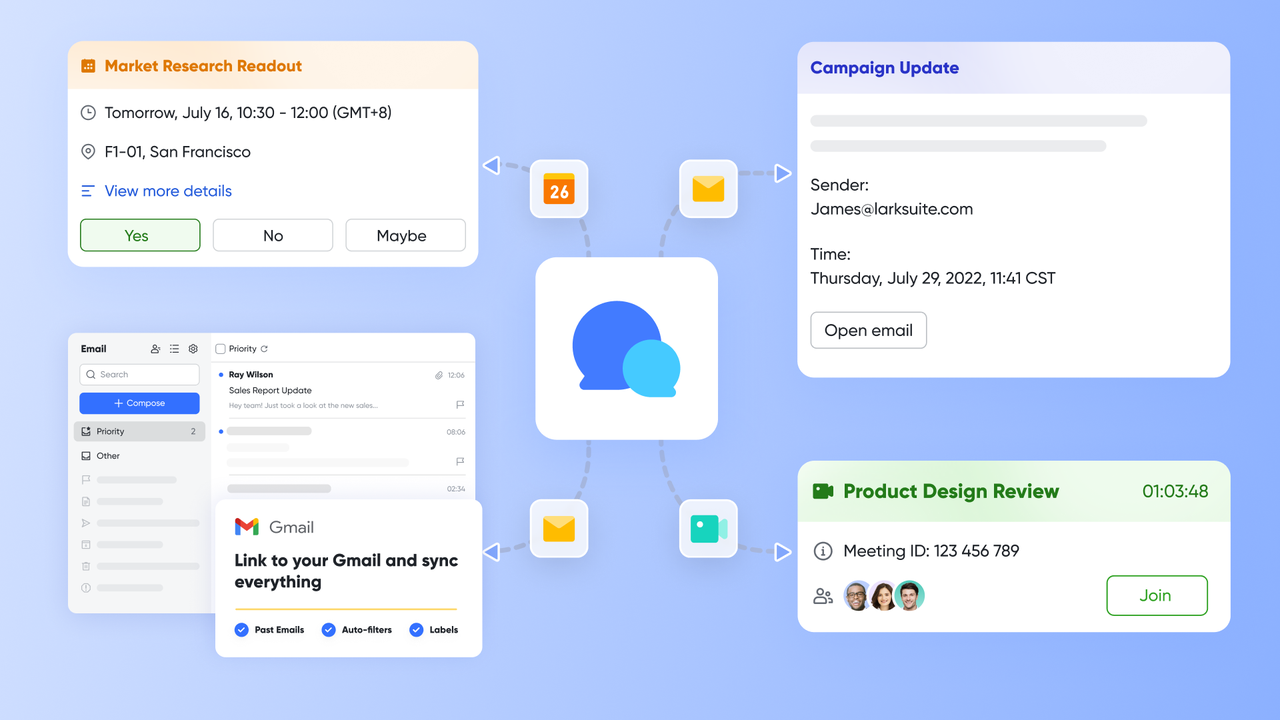
Lark Messenger & Lark Meetings: Keep communication flowing
Lark Messenger and Lark Meetings ensure your communication plan doesn't stop at documentation. They help bring plans to life through consistent dialogue, quick decisions, and automatic meeting summaries.
- Contextual messaging: Share your Lark Docs or Base records directly within chat threads. Each link opens in context, so team members don't need to search for background information.
- Dedicated communication channels: Create channels for project phases or stakeholder groups. For example, have one Messenger group for internal updates and another for client communication.
- AI-powered meeting summaries: After every Lark Meeting, AI-generated notes automatically capture decisions, action items, and next steps. These summaries can be attached directly to your communication plan in Docs.
- Built-in scheduling and recording: Lark Meetings unifies with Lark Calendar, allowing teams to schedule status calls, record discussions, and share recaps instantly.
- Example: After a weekly meeting, Lark automatically sends AI notes to the Messenger group, highlights new risks in the chat, and links the summary back to the project's communication Doc.
This collaboration ensures nothing gets lost between meetings and messages. Every conversation becomes part of the project's living record.
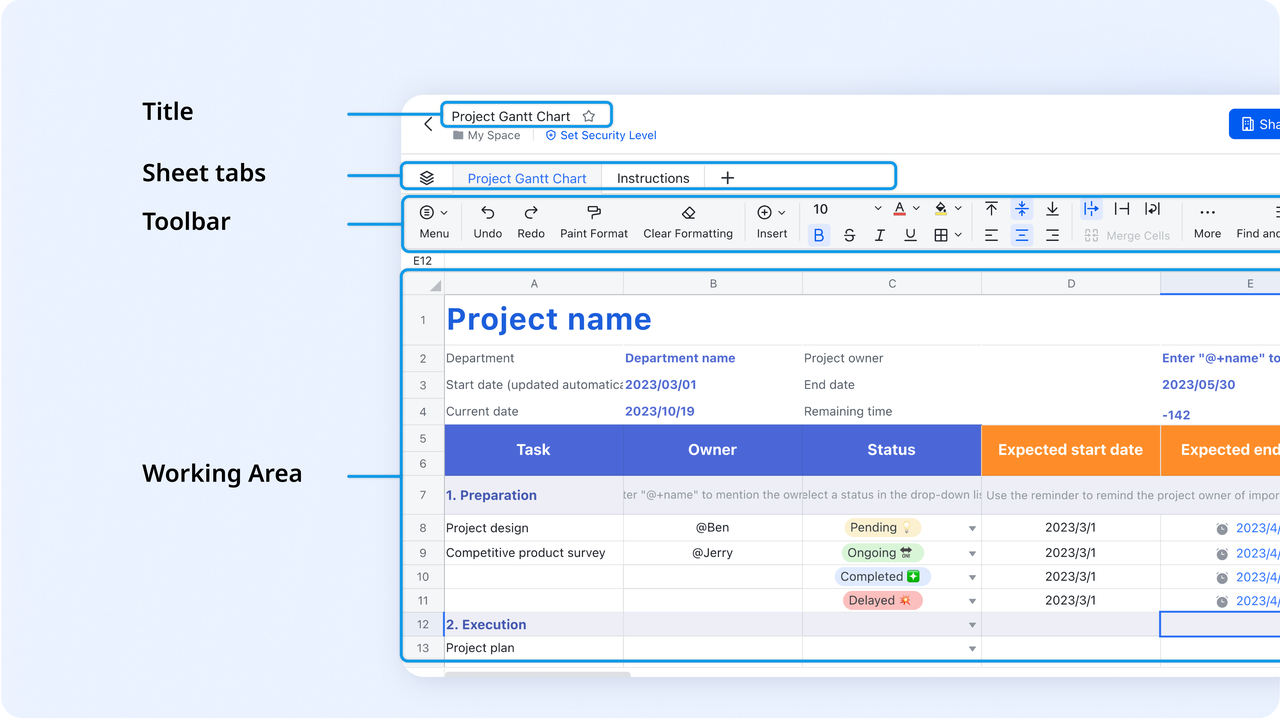
Lark Sheets: Track communication KPIs
Tracking how communication performs is just as important as defining it. Lark Sheets transforms your communication plan into measurable insights with easy-to-use data tracking and visualization.
- Monitor communication effectiveness: Track metrics such as message response time, overdue updates, and meeting attendance. These indicators show how well your communication strategy works in practice.
- Collaborate on reporting: Since Lark Sheets supports real-time collaboration, multiple managers can update metrics simultaneously. There's no need to merge files or email attachments.
- Connect with other Lark tools: Link your Sheets data directly to Lark Docs or Base. For example, embed a chart showing stakeholder engagement directly inside your communication plan document.
- Example: A project lead tracks weekly update completion rates in Lark Sheets, notices delays for one department, and flags it to the responsible team through a linked Messenger thread.
By turning raw communication data into actionable insights, Lark Sheets helps teams refine their approach and improve efficiency over time.
- Starter plan: Free forever plan that includes 11 powerful tools for up to 20 users. It also comes with 100GB of storage, 1000 automation runs, AI translations, and more.
- Pro plan: $12/user/month (billed annually) for up to 500 users. It includes everything in Starter plus group calling for up to 500 attendees, 15TB of storage, 50,000 automation runs, and more.
- Enterprise plan: Contact sales for custom pricing. Supports unlimited users and includes even more automation runs and advanced security, compliance, and management features.
Benefits of using Lark for project communication plans
- Centralized workspace: Lark brings chat, documents, and meetings together so teams never have to switch between tools.
- Real-time updates: All participants see the latest information instantly, reducing the risk of outdated data.
- Automated reminders and summaries: AI-powered notifications and meeting recaps keep communication timely and accurate.
- Improved collaboration for remote teams: Distributed teams stay aligned through shared spaces and transparent updates.
- Scalable for multiple projects: Whether managing one project or many, teams can duplicate templates and maintain consistency.
Conclusion
A communication plan defines how information moves through a project, but tools like Lark ensure it moves efficiently. By combining chat, documents, meetings, and data tracking, Lark turns communication plans into living systems that evolve with your projects. Teams can build their plans in Lark Docs, organize workflows in Lark Base, and keep conversations active through Messenger and Meetings. Lark Sheets then helps track communication effectiveness with real-time metrics. Together, these tools remove friction, reduce silos, and keep every stakeholder aligned. With Lark, communication planning becomes effortless, connected, and built for continuous improvement.
FAQs
What should a project communication plan include?
A project communication plan should list stakeholders, goals, message frequency, and communication channels. In Lark, you can build this directly in Docs using ready templates, assign owners in Base, and manage real-time updates through Messenger and Meetings.
How often should a communication plan be updated?
Update your plan after major milestones or changes in project scope. With Lark Docs, edits are shared instantly, while Base automation reminds teams to review schedules and update reporting timelines regularly.
Can I use Excel or Docs to create a communication plan?
Yes, but Lark Docs offers a more collaborative alternative. Teams can co-edit the plan, tag members, and link Base records or Sheets dashboards to keep communication structured and visible for everyone.
How does Lark automate communication tracking?
Lark automates reminders, meeting summaries, and update notifications. For example, Base can trigger alerts before report deadlines, Messenger keeps threads active, and AI meeting notes in Meetings record every key decision automatically.
What's the difference between a communication plan and a project plan?
A project plan defines deliverables and timelines, while a communication plan defines how updates are shared and discussed. In Lark, both plans stay connected, docs outline strategies, Base organizes workflows, and Messenger keeps collaboration flowing.
Related reading
Table of contents
Start using Lark today

Manage all your work in one place
Boost team efficiency by 10x
Save up to 70% on software costs
Table of contents
Start using Lark today
Manage all your work in one place
Boost team efficiency by 10x
Save up to 70% on software costs
Keep reading







2026 Lark Technologies Pte. Ltd.
Headquartered in Singapore with offices worldwide.






Explore: