














Top 10 Construction Time Tracking Software to Manage Crews and Hours

Ryan Tanner
Product Marketing Specialist
Sep 18, 2026
Ryan Tanner
Sep 18, 2026

16 min read


Managing crews, tracking labor hours, and keeping payroll accurate are daily challenges in construction. That's where construction time tracking software makes a difference, helping teams log hours precisely, monitor on-site attendance, and coordinate field operations across multiple projects.
In this guide, we'll cover what this software does, why it's essential, and the key features to consider. We'll also review the 10 best construction time tracking tools, including Lark, Connecteam, Workyard, and ExakTime, each built to simplify workforce management and ensure every hour on site counts.
1. Lark: Best for unified project coordination and field team tracking
2. Connecteam: Best for mobile-first construction time clocks
3. Workyard: Best for precise GPS time tracking and labor cost accuracy
4. Timeero: Best for GPS geofencing and crew route tracking
5. ExakTime: Best for rugged time tracking devices and jobsite compliance
6. ClockShark: Best for scheduling + crew time tracking combination
7. Raken: Best for daily reports + time tracking for field crews
8. BusyBusy: Best for equipment tracking + mobile timesheets
9. QuickBooks Time: Best for accounting-friendly time tracking
10. Eyrus: Best for large construction sites and workforce visibility

Quick overview of the best construction time tracking software
Choosing the right construction time tracking software depends on your team size, site conditions, and management priorities. Some tools excel at GPS-based tracking, while others focus on payroll accuracy or large-scale workforce visibility. Below is a quick overview of the best construction time tracking software, highlighting what each tool does best, key capabilities, and indicative pricing to help you find the right fit for your operations.
Information source: Official vendor sites
Update time: 2025-118-13
Note: Pricing and plan details reflect publicly available data as of the update date and may vary based on region, billing cycle, and number of agents.
What is construction time tracking software?
Construction time tracking software is a digital solution—a specialized category of project management tools—that helps construction teams record, manage, and analyze work hours across multiple job sites. Instead of relying on paper timesheets or manual logs, crews can clock in and out using mobile devices, GPS tracking, or geofencing tools, ensuring every hour is logged accurately. For project managers and payroll teams, this software simplifies job costing, attendance tracking, and labor compliance while reducing payroll errors and time theft.
Many platforms, like Lark, Connecteam, and Workyard, also include features such as shift scheduling, field reporting, and mobile crew management for seamless site coordination. Whether you're managing small residential projects or large commercial builds, construction time tracking software gives you real-time visibility into workforce activity, helping you improve productivity, control labor costs, and deliver projects on schedule with full transparency.
Key features to look for in time tracking software for construction
Choosing the right construction time tracking software means focusing on the features that truly make site management smoother and more efficient. From GPS-based attendance to payroll-ready data exports, these capabilities help contractors stay organized, compliant, and cost-efficient. Here's what to look for:
- Mobile-friendly time clocks: Construction workers can clock in and out directly from their smartphones, no matter where the job site is. Mobile apps ensure convenience for crews constantly on the move. This also eliminates paperwork and keeps attendance data synced in real time.
- Geofencing and location tracking: Geofencing tools automatically log the time when workers enter or leave a designated site area. It verifies attendance accuracy and prevents false clock-ins. Location tracking also helps supervisors see where crews are deployed throughout the day.
- Job costing and project codes: Each recorded hour can be tagged to specific projects, tasks, or cost codes. This helps calculate true job costs and track project budgets with precision. Managers gain clear visibility into labor expenses and profitability across multiple sites.
- Scheduling and shift planning: Digital scheduling tools allow managers to assign shifts, adjust timetables, and notify crews instantly. Whether dealing with rotating teams or night shifts, everyone stays informed. It keeps manpower balanced and prevents costly overtime or understaffing.
- Reporting and analytics: Comprehensive reports show trends in attendance, labor costs, and productivity. Analytics dashboards help project managers identify inefficiencies and make data-driven decisions. These insights lead to better forecasting and long-term workforce planning.
- Crew management tools: Supervisors can group employees by trade, location, or project phase for easier oversight. They can track attendance, assign tasks, and communicate updates within one system. This ensures smoother coordination across field and office teams.
- Payroll-ready exports: Automatically formatted timesheet data can be exported directly to payroll systems. This reduces manual entry, prevents pay discrepancies, and speeds up processing. It ensures that every worker is compensated correctly and every record is audit-ready.
10 best construction time tracking software
1. Lark: Best for unified project coordination and field team tracking
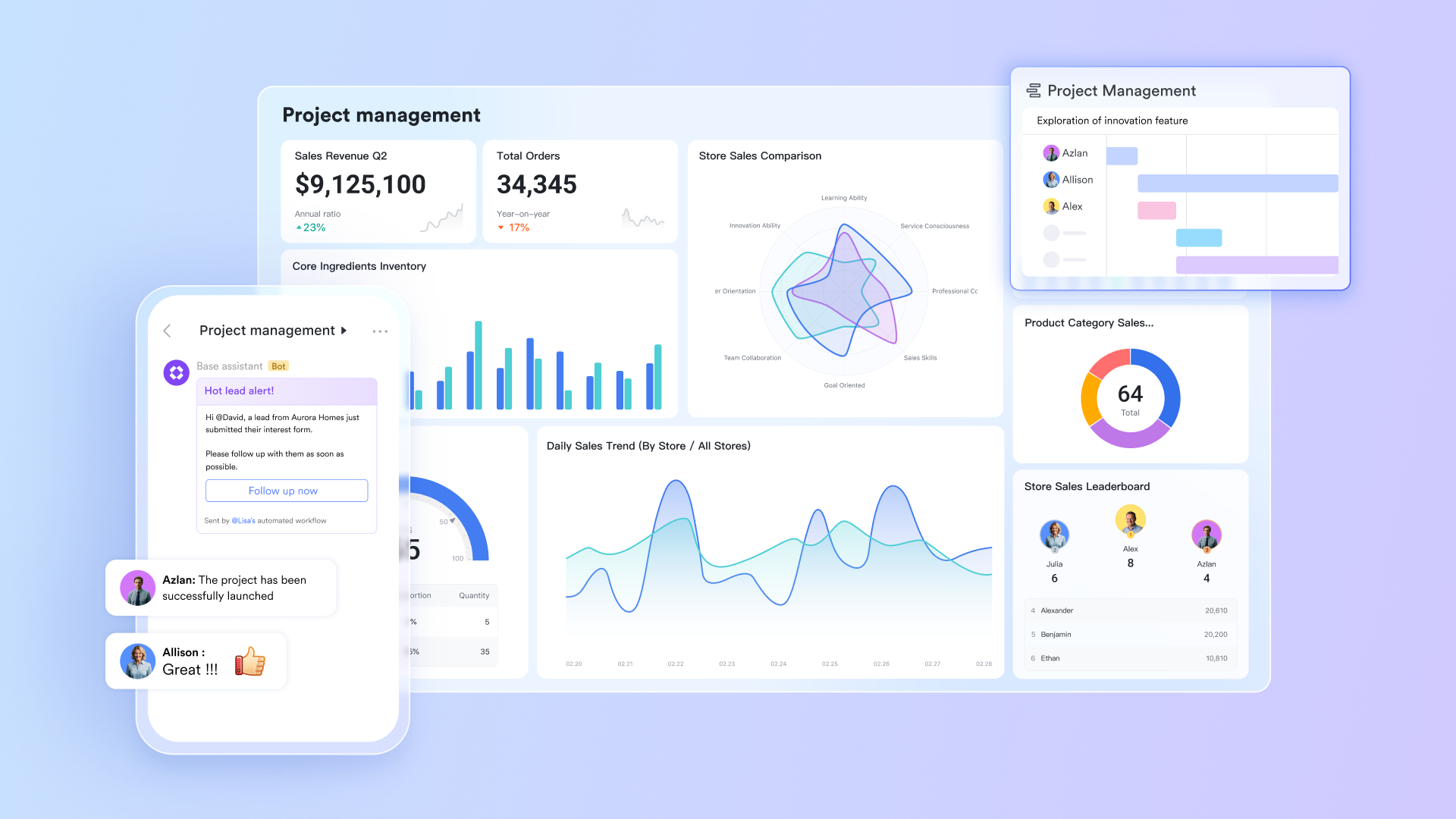
Lark streamlines construction time tracking by giving teams a unified workspace that goes beyond attendance alone. While crews clock in from the field, supervisors use Lark Base to manage project tables, Gantt timelines, cost logs, material tracking, subcontractor tasks, and phase-by-phase progress in one live database. Lark Calendar adds real-time scheduling for crews, equipment, and daily tasks, helping managers avoid resource clashes and maintain predictable workflows across multiple sites. With automated reminders, synced schedules, and accurate hour logs working together, construction teams get clearer visibility, smoother coordination, and faster execution from foundation work to final handover.
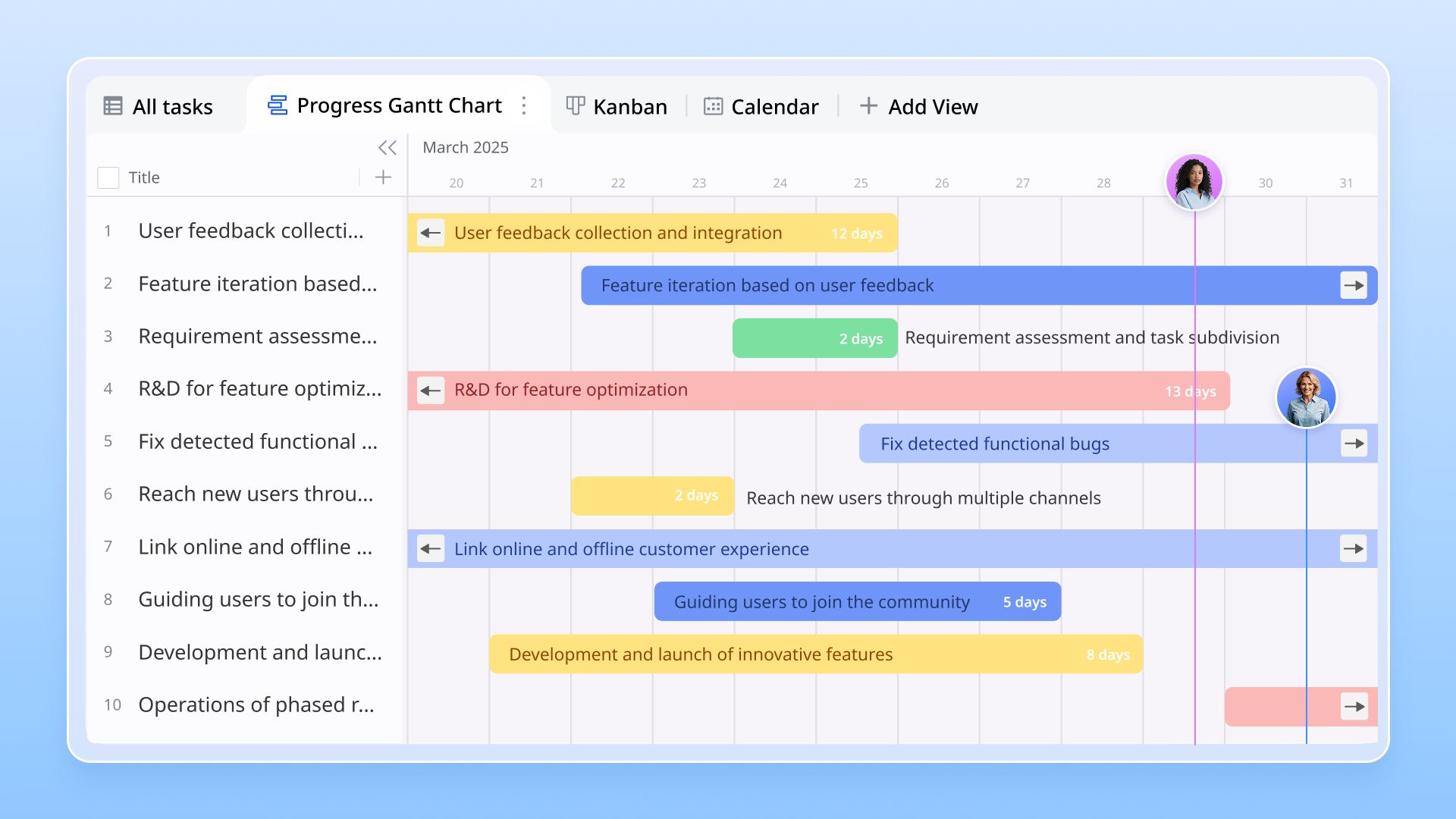
Gantt views & countdown blocks for a clean process and deadline
Lark Base helps with time tracking in construction projects by giving teams a clear, real-time view of schedules and deadlines. With the Gantt view, you can visualize the timeline of tasks—showing start and end dates—and monitor progress through time bars generated from date fields. Countdown blocks on dashboards let you highlight important milestones and dynamically display how much time remains until deadlines. Date fields also support reminders and time-sensitive alerts, ensuring every phase of the construction project stays on track.
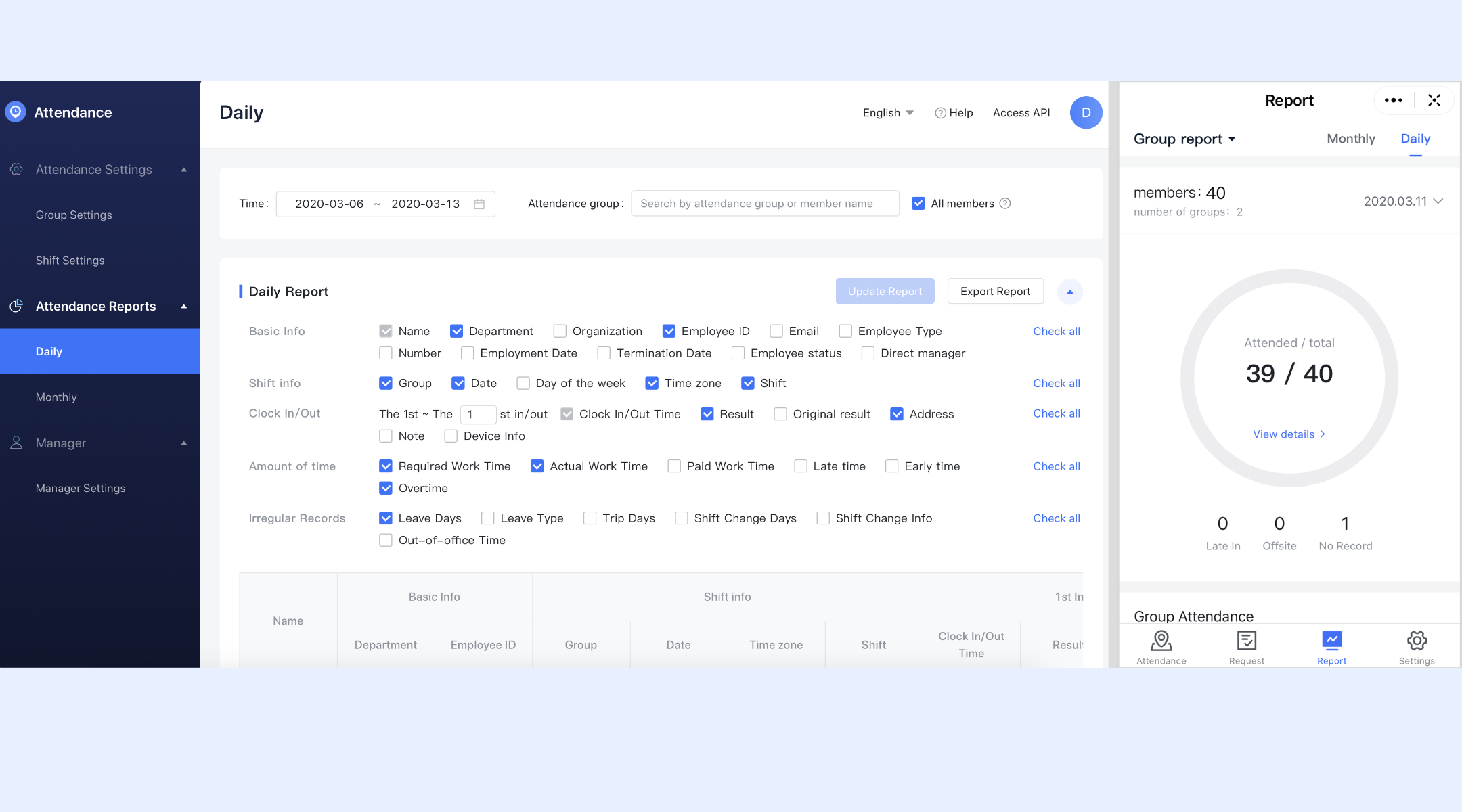
Clock-in and clock-out rules for field teams
Lark Attendance lets administrators create precise clock-in and clock-out rules based on job roles, job zones, project teams, or contractor groups. When workers arrive at a site, they clock in through the Attendance app, and Lark captures timestamps and calculates total hours automatically. This ensures accurate labor records even when teams move between sites. A project supervisor can, for example, set separate rules for the foundation crew and the finishing crew, so every hour is logged under the correct project phase.
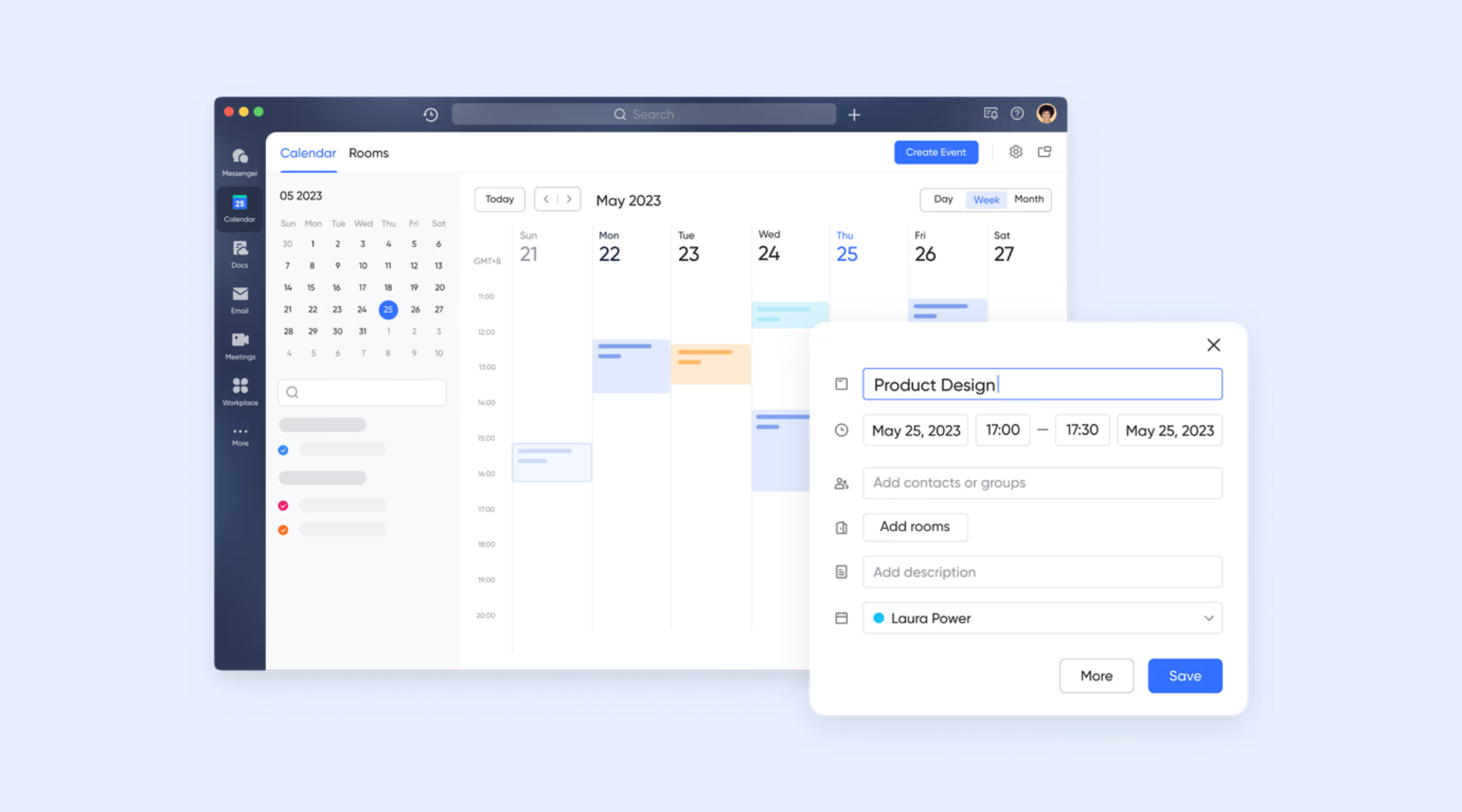
Shift scheduling for rotating and fixed crew patterns
Lark supports the creation of both fixed and flexible shift schedules, making it easy to plan hours for daily crews, rotating subcontractors, or alternating heavy-equipment teams. Admins can build schedules manually or import them directly from Excel. For projects involving night concrete pours, staggered electrical shifts, or alternating plumbing and framing crews, this keeps scheduling structured and easy to follow.
Overtime tracking with company-specific rules
Teams can set overtime rules that match internal policies, project contracts, or regional labor guidelines. Lark automatically applies these rules to attendance logs, helping payroll teams maintain accurate compensation. This is essential in construction, where overtime often occurs during weather-affected work, accelerated timelines, or emergency repairs, ensuring both fairness and precise job costing.
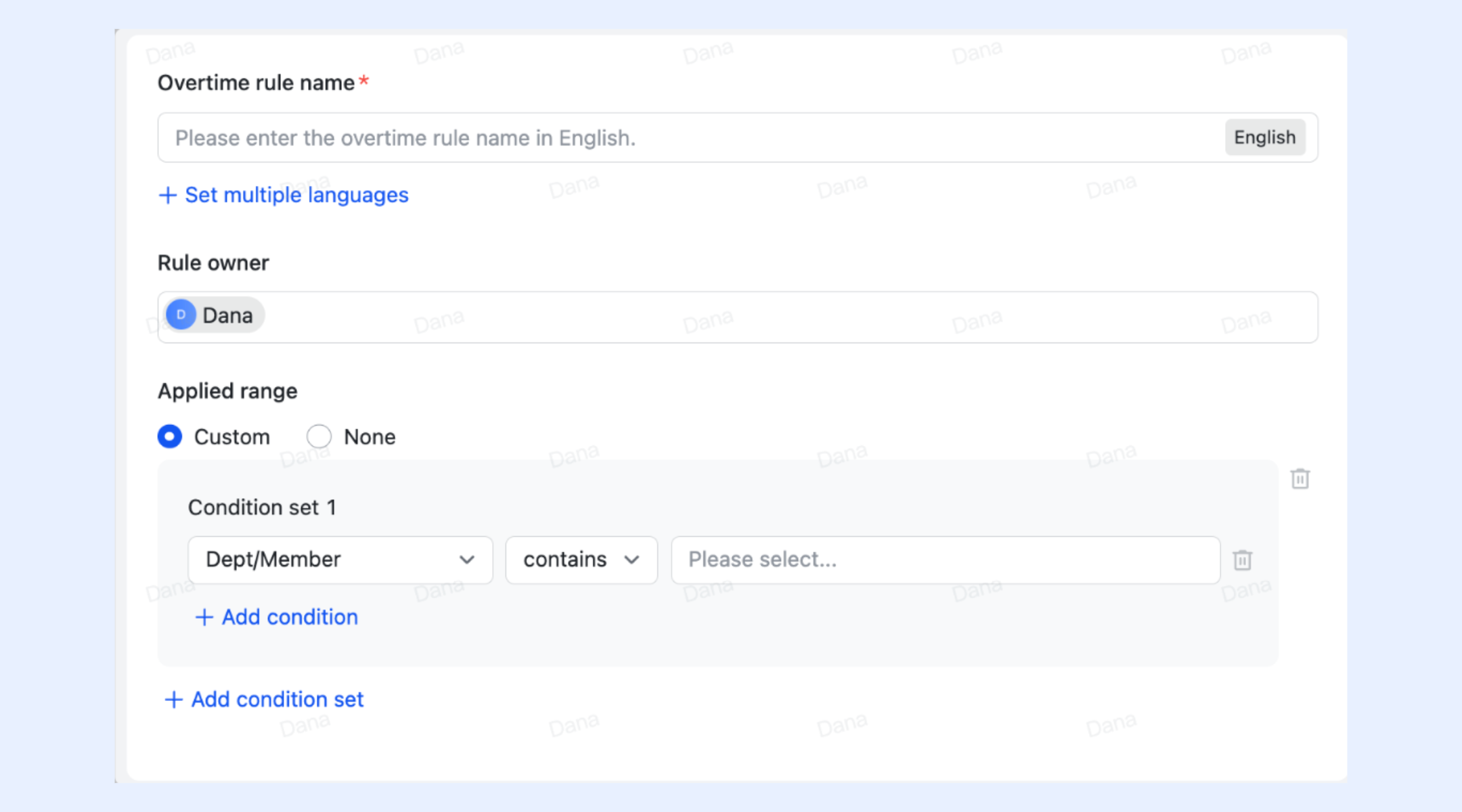
Automated reminders to prevent missed punches
Automatic reminders notify workers to clock in and out at the right time. Reminders can be sent via Attendance bot, app notifications, messages, or phone calls, and can be customized by time and method. On construction sites where crews begin tasks quickly or spread across large areas, these reminders help avoid missing punches and reduce end-of-week timesheet corrections.
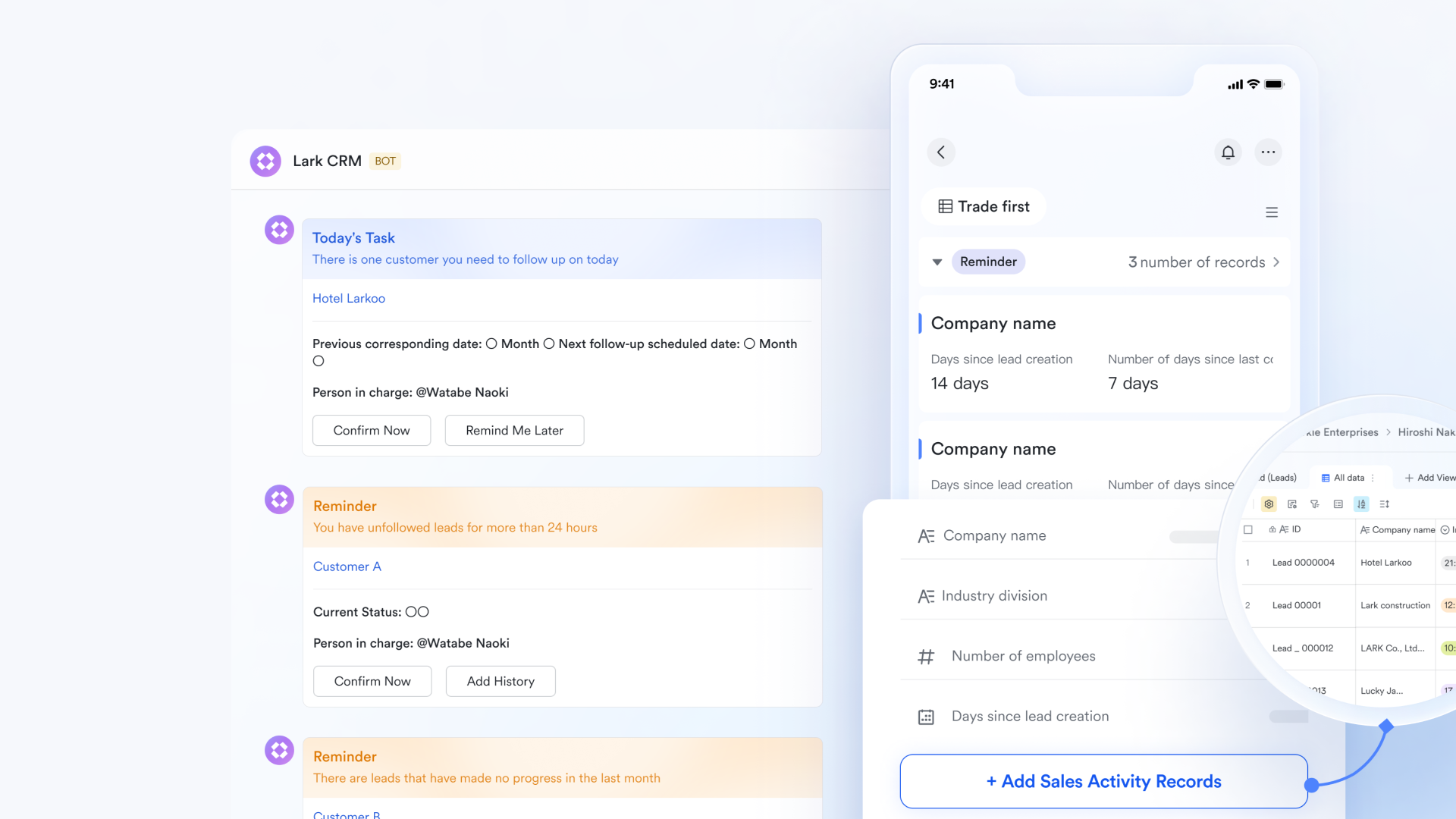
Lark templates provide Gantt timelines for construction project tracking
Base provides Gantt views that show the full timeline of construction activities, including phases, dependencies, and deadlines. Managers can map critical tasks, foundation, framing, electrical, plumbing, drywall, finishing, and immediately see how delays in one stage affect subsequent work. This supports better sequencing, resource allocation, and risk mitigation across large, multi-team projects.
- Starter plan: Free forever plan that includes 11 powerful tools for up to 20 users. It also comes with 100GB of storage, 1000 automation runs, AI translations, and more.
- Basic plan: $6/user/month (billed annually) for up to 500 users. It includes everything in Starter plus group calling for up to 500 attendees, 5TB of storage, 1000 automation runs, and more. Some users may need to contact sales to learn more about this pricing plan.
- Pro plan: $12/user/month (billed annually) for up to 500 users. It includes everything in Starter plus group calling for up to 500 attendees, 15TB of storage, 50,000 automation runs, and more.
- Enterprise plan: Contact sales for custom pricing. Supports unlimited users and includes even more automation runs and advanced security, compliance, and management features.
2. Connecteam: Best for mobile-first construction time clocks
Connecteam is one of the most popular construction time tracking software platforms designed specifically for mobile field teams. It gives construction companies a simple, app-based way to manage time, tasks, and communication, all from workers' smartphones. Whether you're tracking daily attendance, job-site hours, or field progress, Connecteam's mobile-first approach ensures accuracy even when crews are spread across multiple locations. It's ideal for construction firms that need flexible, real-time tracking without relying on paper timesheets or manual inputs.
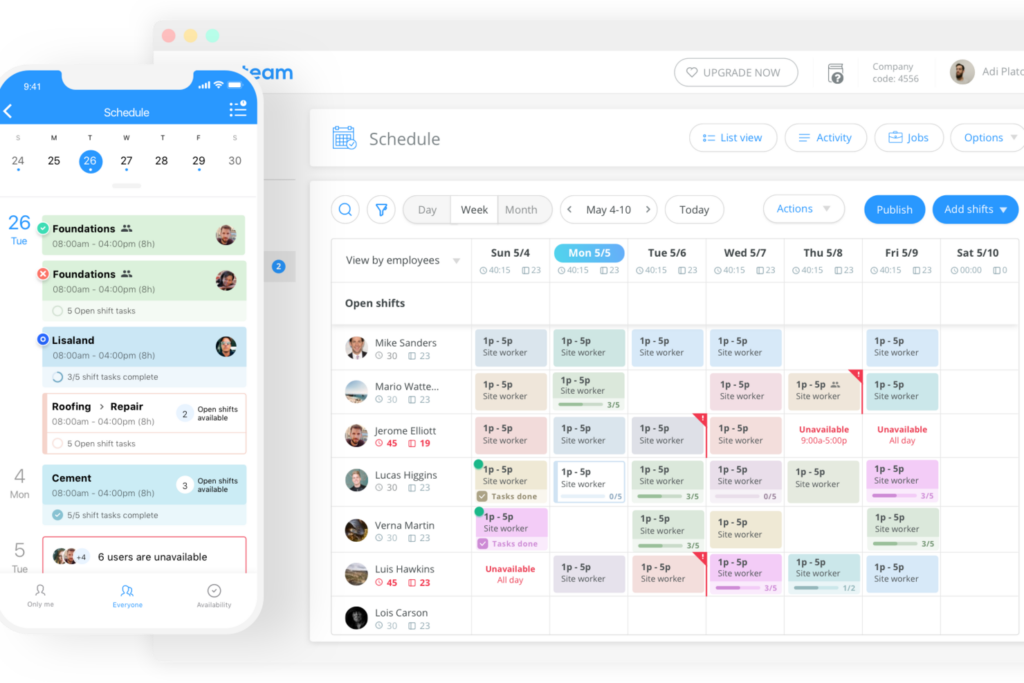
Image source: connecteam.com
Key features:
- Mobile time clock: Workers clock in and out directly from their phones with GPS verification, ensuring every punch is location-accurate.
- Geofencing: Set virtual job-site boundaries so employees can only clock in when they're on-site, reducing time fraud and buddy punching.
- Job scheduling: Drag-and-drop scheduling tools make it easy to assign shifts, notify teams, and adjust work hours on the go.
- Timesheet automation: Convert clock-ins into digital timesheets instantly, ready for payroll and reporting.
- In-app communication: Supervisors and crew members can message, share updates, or send photos directly through the app for seamless coordination.
Strengths:
- Extremely user-friendly mobile interface built for field crews
- Real-time GPS tracking ensures location accuracy for every shift
- All-in-one platform for time tracking, communication, and scheduling
- Strong offline mode for remote or low-connectivity job sites
Limitations:
- Limited project management features compared to enterprise tools like Lark
- Reporting customization options can feel basic for large contractors
Pricing:
- Free plan: Up to 10 users with basic time tracking and scheduling
- Basic plan: $29/month (up to 30 users) with advanced GPS tracking and scheduling
- Advanced plan: $49/month (up to 30 users) with automation and reporting
- Expert plan: Custom pricing for large construction businesses
3. Workyard: Best for precise GPS time tracking and labor cost accuracy
Workyard is a powerful construction time tracking software built for contractors who need pinpoint accuracy in labor hours and job costs. It uses advanced GPS tracking to capture exact locations and routes, helping construction managers verify attendance, monitor travel time, and reduce payroll errors. Designed for both field and office teams, Workyard focuses on turning precise time data into actionable cost insights, making it a top choice for firms that prioritize profitability and accountability.
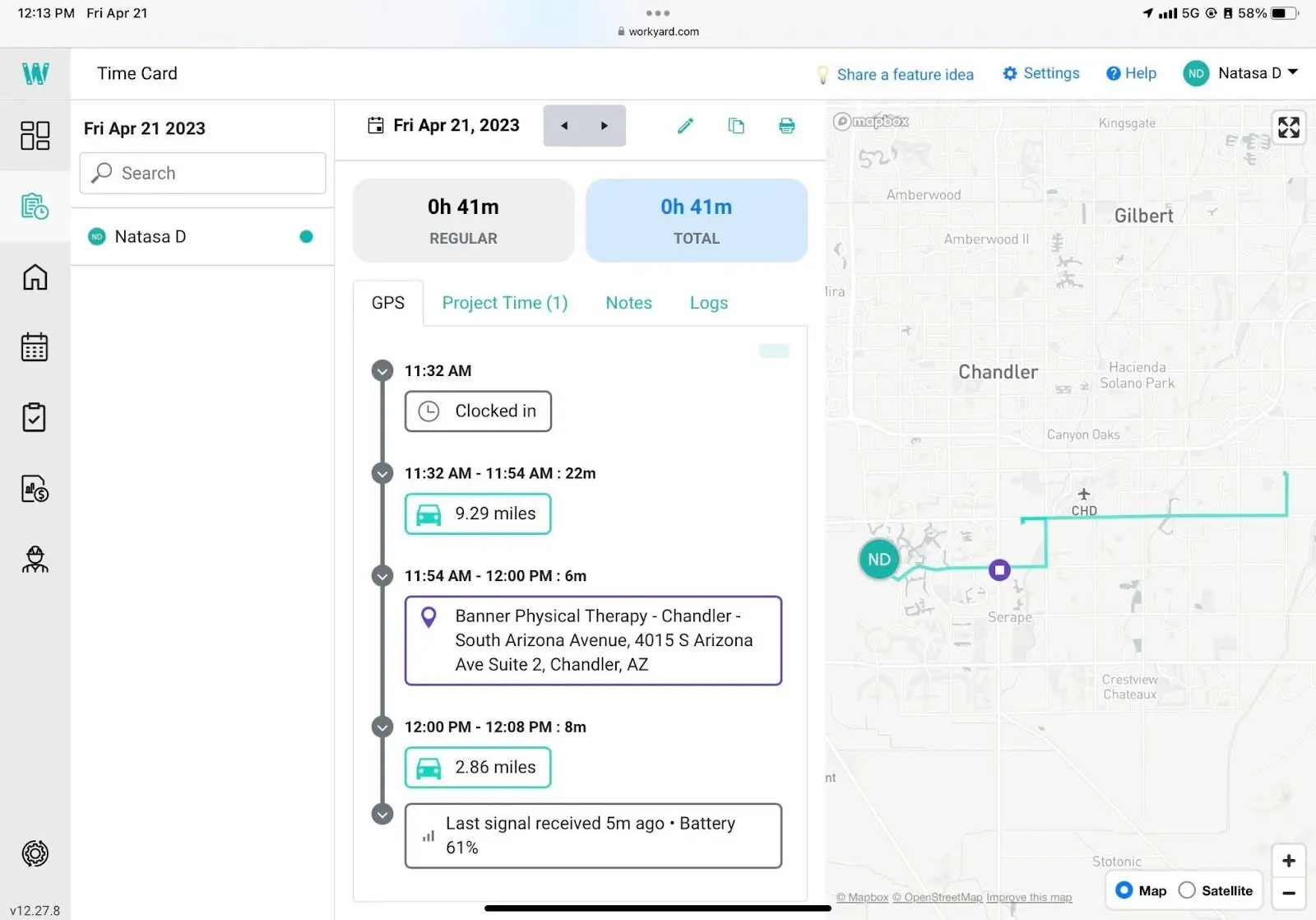
Image source: workyard.com
Key features:
- High-accuracy GPS tracking: Captures worker movements every few minutes for verified time and location logs.
- Automated timesheets: Converts GPS-tracked activity into digital timesheets ready for review and approval.
- Job costing tools: Assigns hours and wages to specific projects, helping teams understand true labor costs in real time.
- Crew visibility: See who's on-site, en route, or finished for the day from one dashboard.
- Payroll and accounting exports: Syncs time data directly with QuickBooks, Gusto, and other payroll platforms.
Strengths:
- Industry-leading GPS accuracy and route tracking
- Excellent labor cost and job expense insights
- Reduces time theft and manual data entry
- Ideal for companies managing multiple active sites
Limitations:
- No built-in task management or communication tools
- GPS tracking may drain a mobile battery faster on older devices
Pricing:
- Starter plan: $6/user/month + $50/month company fee
- Pro plan: Custom pricing with advanced job costing, automation, and reporting tools
4. Timeero: Best for GPS geofencing and crew route tracking
Timeero is a location-smart construction time tracking software designed to monitor where your crew is and how they move between job sites. With powerful GPS geofencing, route replay, and mileage tracking, it gives supervisors total visibility into employee movements throughout the workday. This makes it ideal for construction, landscaping, and contracting teams that operate across multiple sites or need accurate travel documentation for billing and compliance.
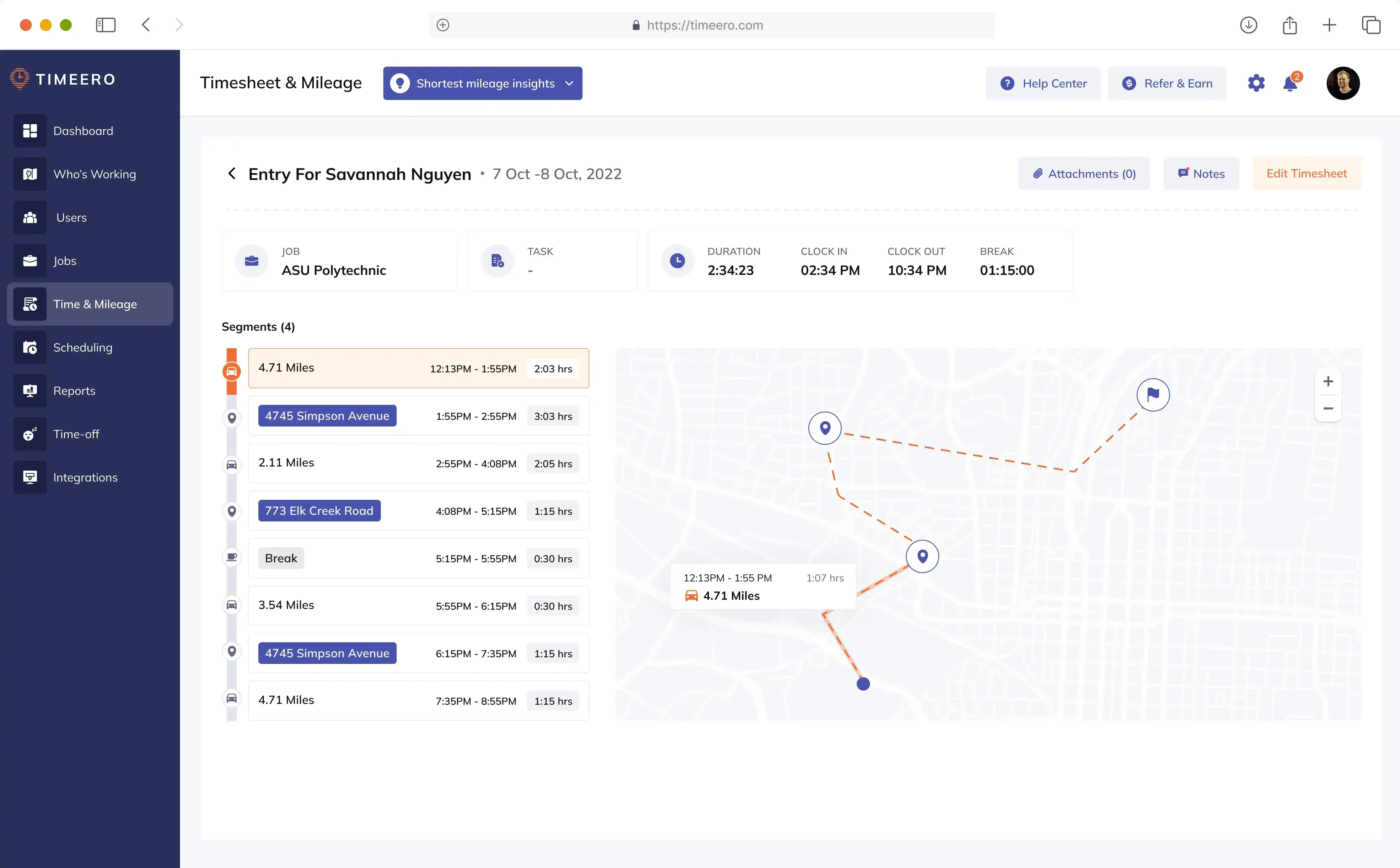
Image source: timeero.com
Key features:
- GPS geofencing: Automatically tracks clock-ins and clock-outs when workers enter or leave defined job-site zones.
- Route replay: Visualize an employee's travel route during work hours for transparency and accountability.
- Mileage tracking: Automatically calculates travel distance for reimbursements or job costs.
- Offline tracking: Records data even in low-signal areas, syncing once back online.
- Mobile app dashboards: Managers can view attendance summaries and crew locations in real time from their phones.
Strengths:
- Excellent for managing mobile and multi-site construction crews
- Mileage tracking simplifies reimbursements and travel reporting
- Easy-to-use app interface with minimal setup
- Real-time crew visibility reduces unnecessary downtime
Limitations:
- No built-in payroll or scheduling module
- Some advanced reports are only available on higher-tier plans
Pricing:
- Basic: $4/user/month
- Pro: $8/user/month
- Premium: $11/user/month
5. ExakTime: Best for rugged time tracking devices and jobsite compliance
ExakTime is a durable, field-tested construction time tracking software trusted by contractors managing large or harsh job sites. Known for its rugged time clocks and mobile app, ExakTime is built to withstand dust, moisture, and extreme outdoor conditions. It's especially useful for heavy construction, roadwork, and infrastructure projects where reliability and compliance are critical. With features that combine physical hardware, GPS verification, and labor compliance tracking, ExakTime ensures every clock-in is accurate and audit-ready.
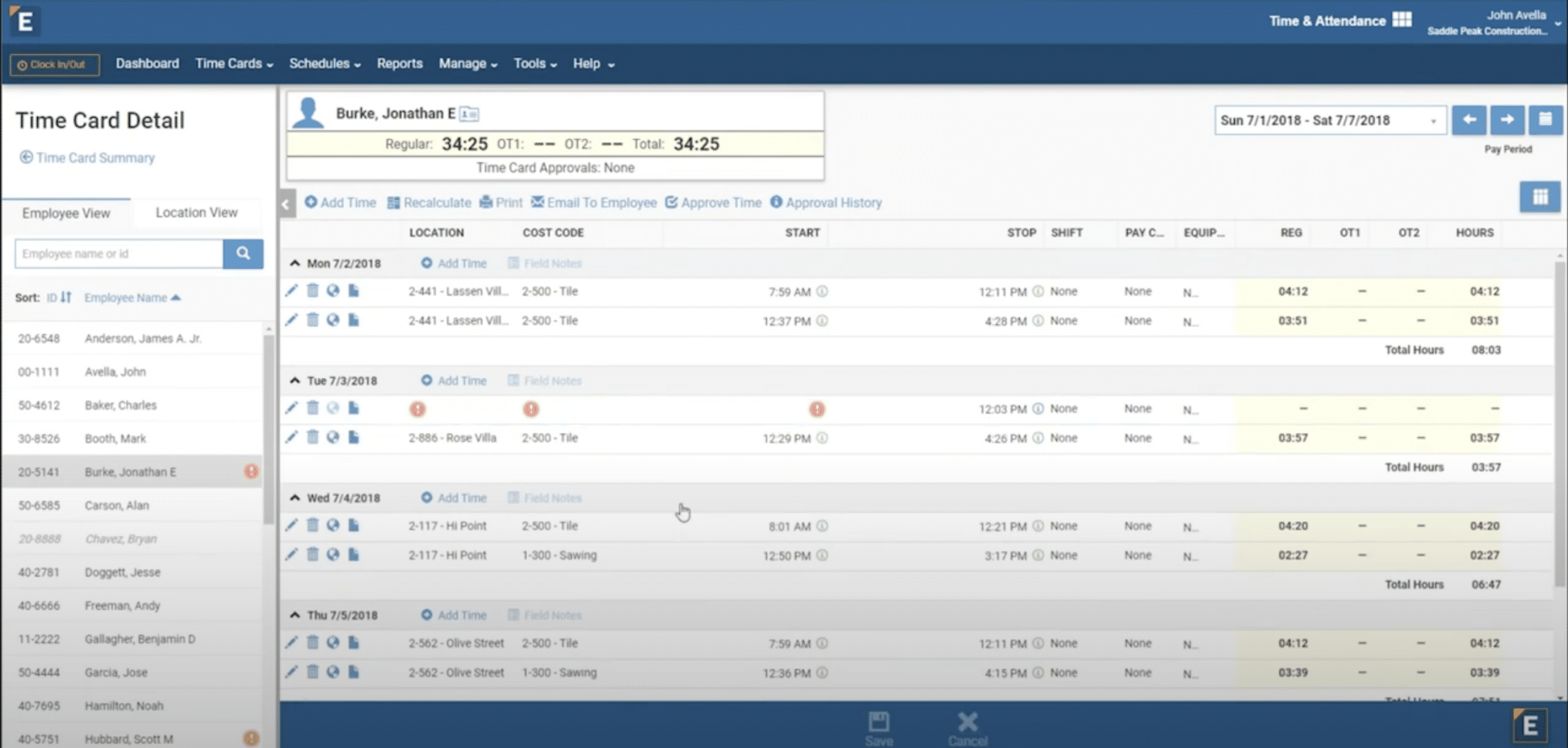
Image source: exaktime.com
Key features:
- Rugged time clock devices: Designed for job-site durability, allowing touch-free or PIN-based clock-ins.
- Mobile app for field crews: Crew members can clock in from their phones when on-site or traveling between locations.
- GPS and photo verification: Each punch is tagged with a GPS location and an optional selfie to verify worker identity.
- Labor compliance tracking: Simplifies recordkeeping for wage laws, safety mandates, and certified payroll requirements.
- Real-time dashboard: Supervisors can monitor attendance, job codes, and total hours for every active site.
Strengths:
- Extremely reliable hardware for tough job-site environments
- Ensures full compliance with labor and safety reporting standards
- GPS and photo verification reduce time fraud
- Strong reporting capabilities for payroll and auditing
Limitations:
- Hardware setup adds upfront cost for small firms
- Interface can feel dated compared to newer mobile-only tools
Pricing:
- Pricing not publicly listed; available upon consultation
- Offers tailored enterprise packages based on the number of devices and users
6. ClockShark: Best for scheduling + crew time tracking combination
ClockShark is an all-in-one construction time tracking software that combines time tracking, crew scheduling, and job costing into a single, easy-to-use platform. It's built for construction, field service, and trade businesses that need a simple way to track hours, assign shifts, and keep everyone aligned. With its drag-and-drop scheduling interface and GPS-powered mobile time clock, ClockShark helps teams eliminate confusion and improve coordination between the field and office.
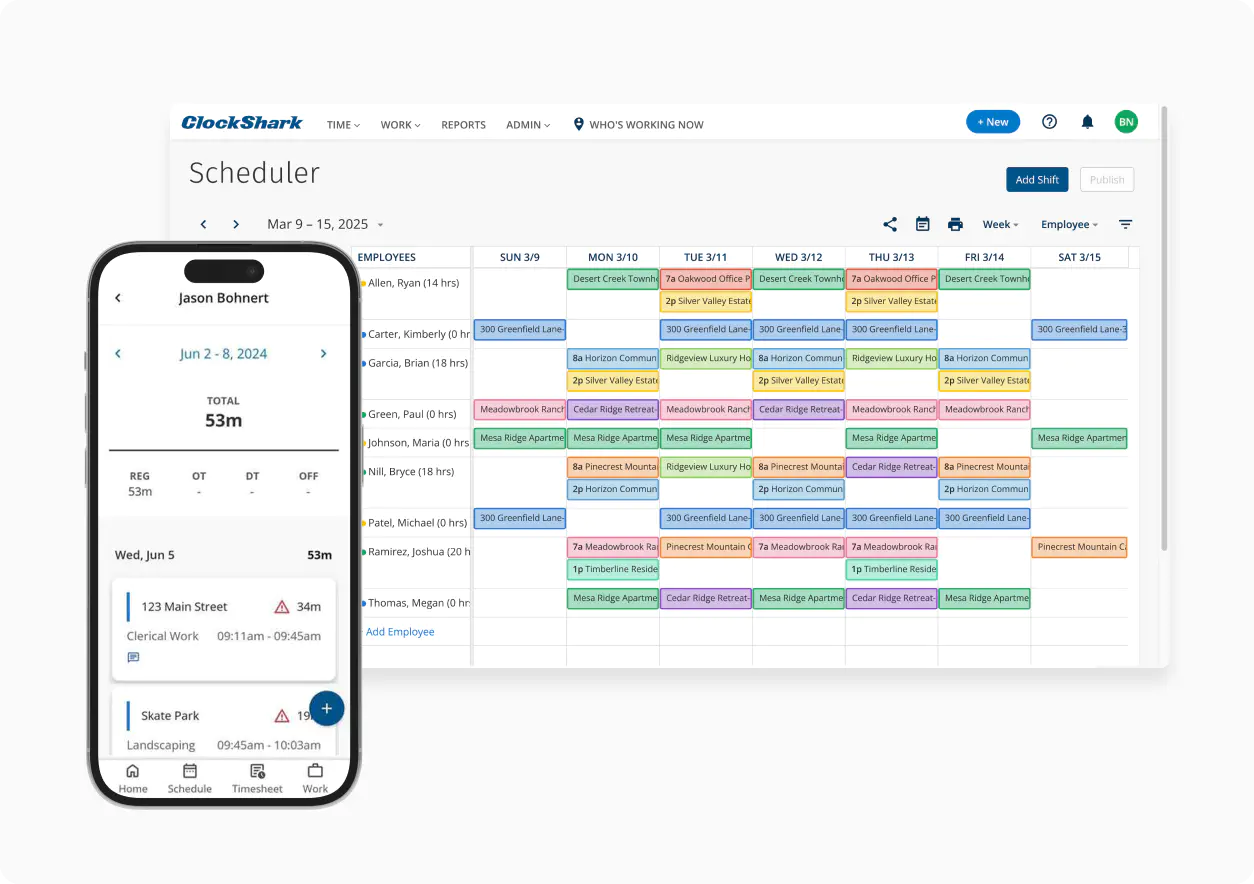
Image source: clockshark.com
Key features:
- Drag-and-drop scheduling: Quickly create, adjust, and share schedules with crews via the web or mobile app.
- GPS time tracking: Automatically records location-based time entries for accurate attendance and accountability.
- Job and task tracking: Tag hours to specific projects or tasks for detailed labor costs.
- Team communication: Send shift updates, notes, and reminders directly within the app.
- Payroll and accounting exports: Syncs with QuickBooks, ADP, and other payroll systems to streamline pay runs.
Strengths:
- Intuitive scheduling interface ideal for construction supervisors
- Combines time tracking, job costing, and scheduling in one tool
- Reliable GPS verification for field accountability
- Easy integration with payroll and accounting platforms
Limitations:
- Reporting tools are less advanced than enterprise-level options
- Occasional sync delays between mobile and web apps
Pricing:
- Pricing not publicly listed; custom quotes available based on team size
- Offers a free trial and demo for new users
7. Raken: Best for daily reports + time tracking for field crews
Raken stands out in the realm of construction time tracking software by combining robust field-time tracking with powerful daily jobsite reporting and documentation. Designed for crews in motion and supervisors needing real-time visibility, Raken enables companies to capture hours, validate location and identity, and produce comprehensive job-site logs, all from mobile devices. It's especially helpful for construction firms focused on both accurate labor tracking and field insights such as progress photos, production metrics, and cost codes. Ideal for teams that want one tool for time tracking, reporting, and field documentation.
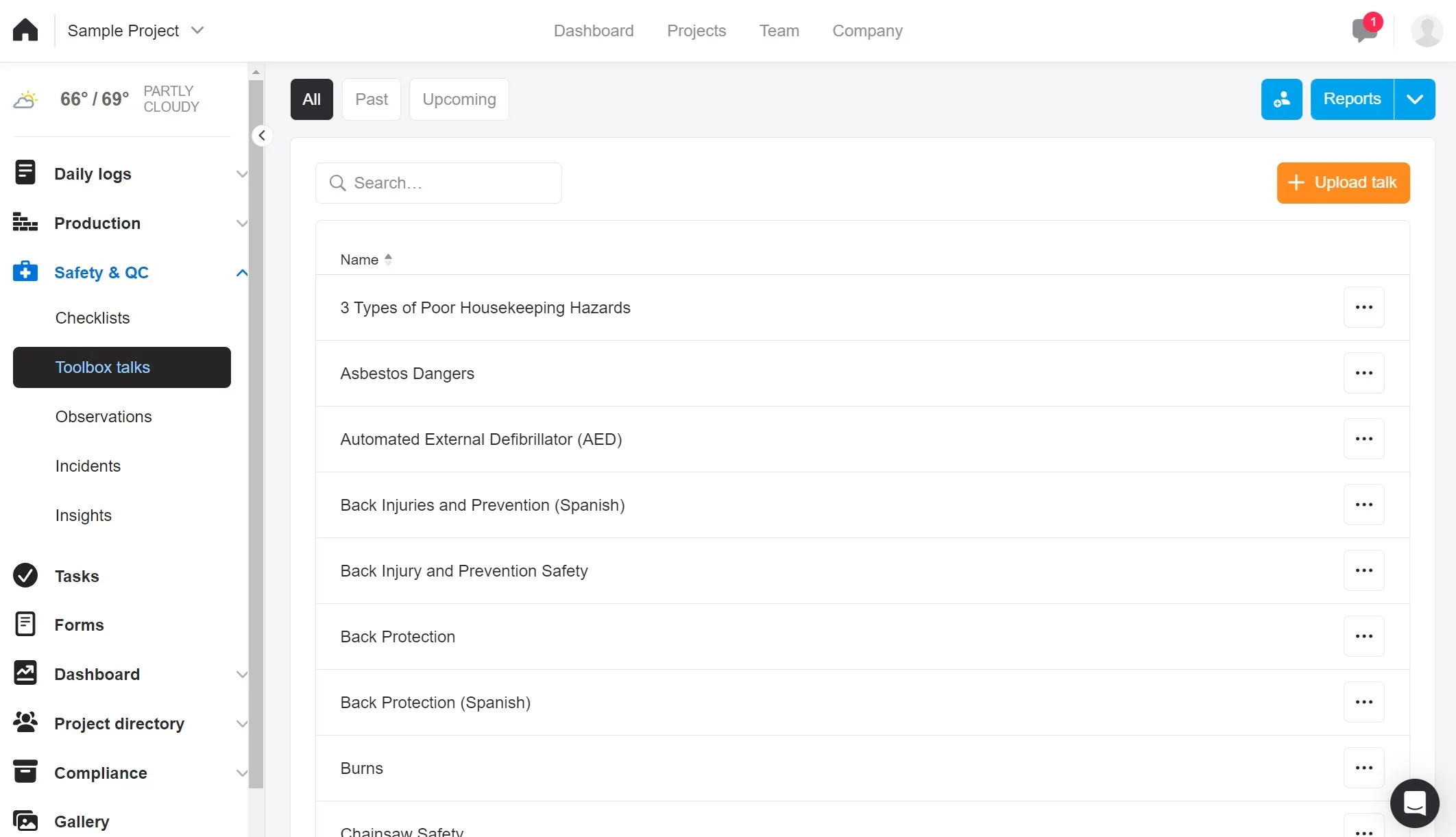
Image source: rakenapp.com
Key features:
- Time clock + kiosk modes – Workers can clock in/out using their own device or via a shared kiosk. Location and identity verification options help ensure accurate polled hours.
- Cost-codes & project tagging – Hours logged can be assigned to specific jobs, phases, or cost codes, enabling precise job costing and budget tracking.
- Daily reports & field logs – Crews can upload photos, notes, and shift summaries directly from the job site. The system generates shareable reports for supervisors and stakeholders.
- Timesheet approvals & payroll integration – Supervisors can review, approve, and lock time entries; the software supports data export to payroll/accounting tools.
- Production insights & dashboard analytics –The Dashboards turn raw time data into performance insights: planned vs actual hours, crew productivity, attendance exceptions.
Strengths:
- Excellent user interface geared towards field crews, with high adoption rates among mobile users.
- Strong integration of time tracking + field reporting means less friction between hours logged and job-site documentation.
- Cost-code and project tag features deliver better control over labour cost and cost‐centre allocation.
- Versatile time capture methods (mobile, kiosk, time cards) support various crew scenarios and site conditions.
Limitations:
- Pricing is not transparently published on the website; custom quotes are needed.
- Some users report mobile app glitches and a slower rollout of advanced features compared to the web version.
Pricing:
- Not publicly listed; available on request via a sales consultation.
- Free trials or demos are typically offered for evaluation.
8. BusyBusy: Best for equipment tracking + mobile timesheets
BusyBusy is a mobile-first construction time tracking software designed specifically for crews and equipment on the move. It blends time logging, GPS verification, equipment usage tracking and job-site documentation into one app built for field conditions. If you want to track labour hours and equipment hours for improved job costs and field visibility, BusyBusy offers a compelling solution for construction-industry operations.
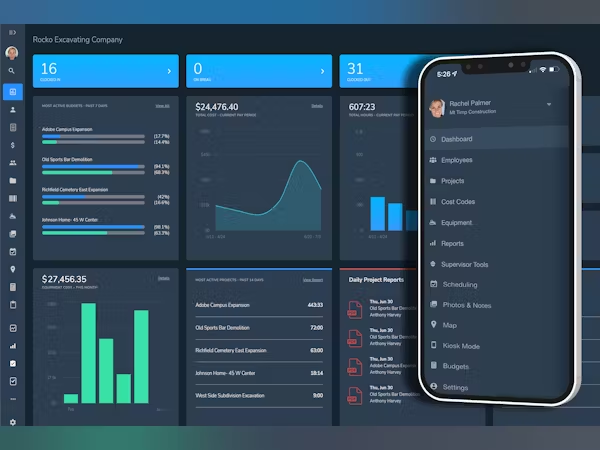
Image source: busybusy.com
Key features:
- GPS time tracking & breadcrumbing: Field crews clock in/out with GPS-based location verification and "breadcrumb" tracking of travel, ensuring accurate labour records.
- Equipment usage logging: Track machine hours, equipment location and link equipment time to jobs, helping integrate equipment costs into labour/job-costing.
- Cost-codes and job costing: Assign time entries to specific jobs, cost codes, phases or equipment types, enabling detailed insight into labour vs budget.
- Offline mode: Crews working in low-connectivity environments can still clock in/out offline and sync later, preventing lost data on remote job-sites.
- Scheduling and daily reports: Supervisors can schedule crews, prompt shift start notifications, and field teams submit daily reports/photos/notes along with their time.
Strengths:
- Very strong mobile-user interface and field adoption, making it easy for crews to actually use the system.
- Equipment tracking gives a rare dual focus: both labour hours and machine/equipment hours in one tool.
- Accurate job costing via cost codes and equipment + labour correlation helps improve project profitability.
- Free-forever plan available, good entry point for small crews or trial purposes.
Limitations:
- Some advanced features (equipment analytics, detailed reports) may require higher-tier plans or add-ons, cost can escalate.
- For very large enterprise-level integration (ERP, advanced scheduling), the feature set may feel less extensive than heavy-duty platforms.
Pricing:
- Free plan: $0 per user/month.
- Pro plan: $9.99 per user/month (billed annually).
- Premium plan: $14.99 per user/month (billed annually) with added daily reports, document sharing, and team messaging.
9. QuickBooks Time: Best for accounting-friendly time tracking
QuickBooks Time is a mobile and web-based time tracking solution tailored for construction teams that already use or plan to use QuickBooks Online or other Intuit accounting tools. By integrating time-tracking, project codes, GPS logging and payroll-ready exports, it streamlines workforce management and financial reconciliation. For construction firms keen to tie labour hours directly into budgets, invoicing and job-costing, QuickBooks Time provides a compelling bridge between field crews and office workflows.
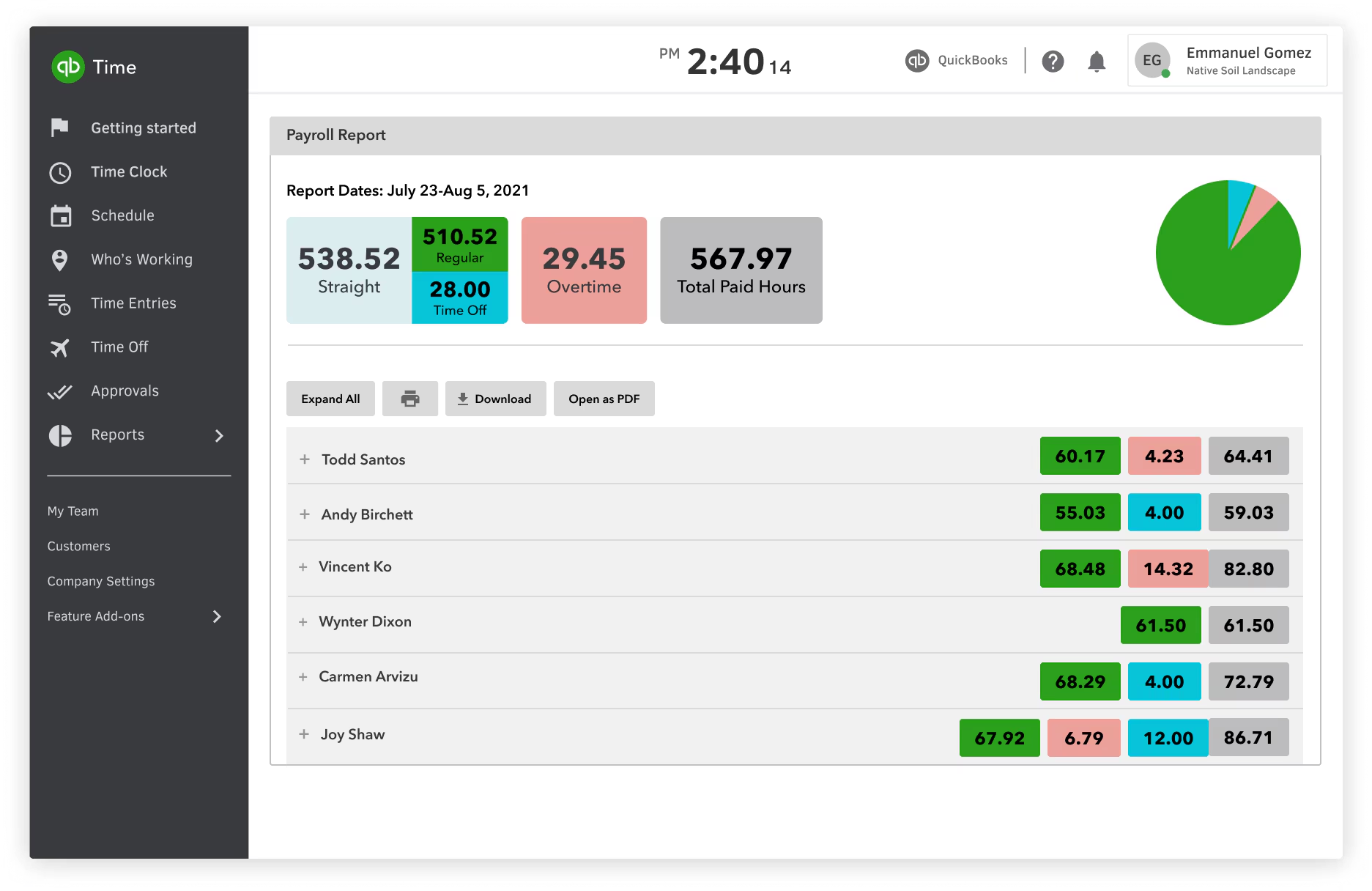
Image source: quickbooks.intuit.com
Key features:
- Mobile time clock with GPS: Workers can clock in/out via smartphone or tablet, and locations are logged to ensure accuracy.
- Scheduling and job codes: Create shifts, assign employees, and tag hours to specific jobs or cost centres to enable job costing insights.
- Payroll & accounting integration: Seamless export of time data to QuickBooks Online or payroll systems reduces duplicate work and speeds up payday.
- Reporting & analytics: Generate dashboards showing labour hours, cost by project vs. estimates, and operational insights.
- Geofencing & mileage tracking (Elite tier): Define job-site zones, restrict clock-ins/out based on location, and track mileage for mobile crews.
Strengths:
- Direct integration with the QuickBooks accounting ecosystem simplifies financial workflows.
- Strong mobile support ensures crews can log time from anywhere, helpful for off-site jobs.
- Detailed reporting, especially around labour vs. budget, helps improve job costs.
- Supports job-site location verification via geofencing, boosting accountability.
Limitations:
- Pricing is relatively high compared to some construction-specific time tracking tools.
- Some users report mobile app glitches or limitations on advanced scheduling features.
Pricing:
- Time Premium: Base fee $20/month + $8/user/month.
- Time Elite: Base fee $40/month + $10/user/month; includes advanced features such as mileage, geo-fencing.
10. Eyrus: Best for large construction sites and workforce visibility
Eyrus is a full-scale worksite intelligence platform built for construction firms that need visibility, compliance, and automation at a large scale. Rather than just mobile time clocks, Eyrus combines worker registration, time & attendance, access control (badges/turnstiles), video monitoring and analytics into one system. It's designed for general contractors, multi-site owners and complex builds where you need real-time data on who's on site, which subcontractor crews are active, and how labour hours are tracking across zones. With Eyrus, you're looking at "construction time tracking software" elevated into full workforce and site control.
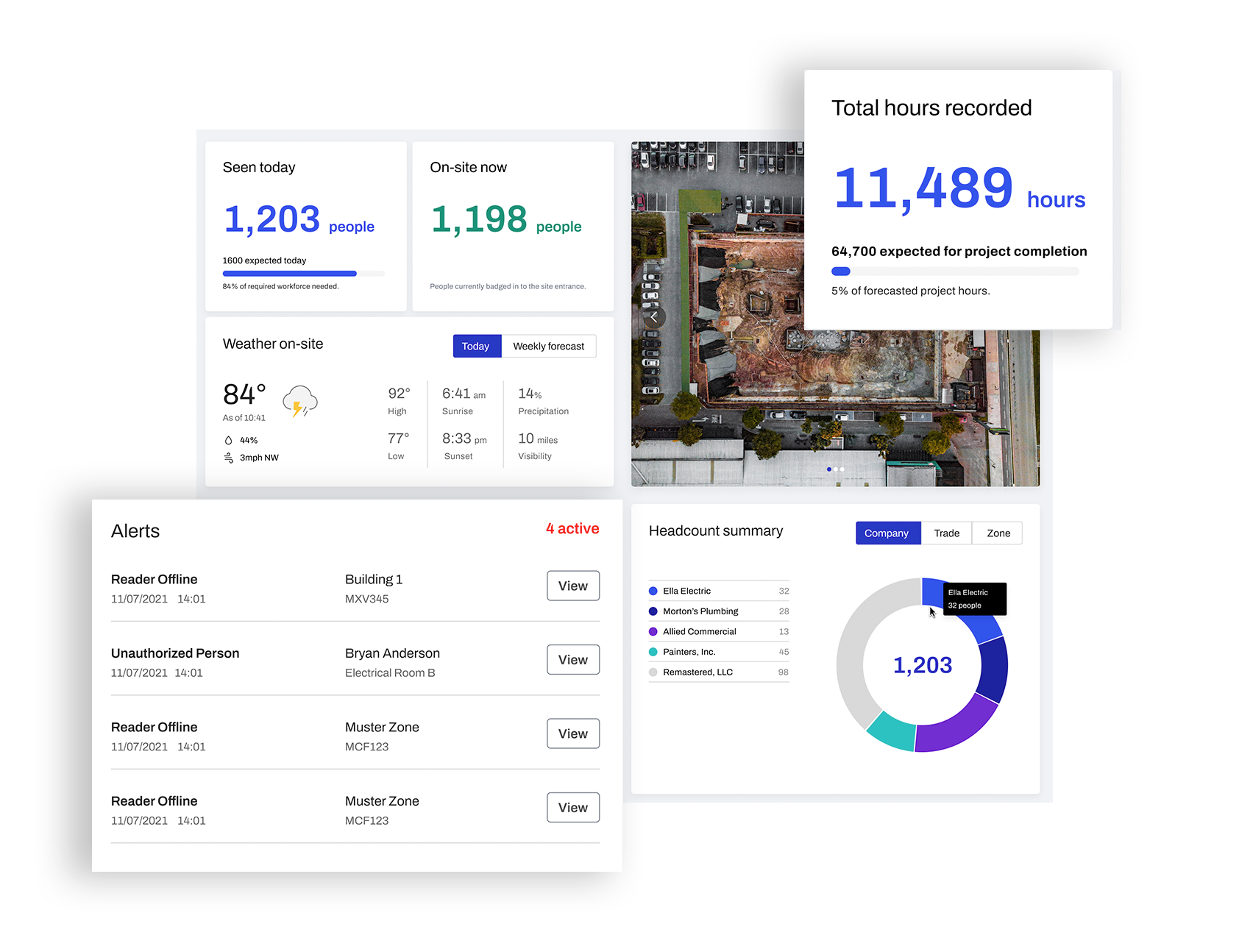
Image source: eyrus.com
Key features:
- Automated time & attendance capture: Workers clock in via mobile, badge or kiosk; hours are logged automatically by zones, crews and subcontractors.
- Access control and zone monitoring: BLE/NFC badges, turnstiles and gates track entries/exits by zone or area, giving you real-time headcount by location.
- Workforce analytics & dashboards: Supervisors and owners can see labour utilisation, crew deployments, subcontractor hours and cost code breakdowns.
- Integration with project systems: Eyrus links with tools like Procore, Autodesk Construction Cloud and other PM systems, so time data flows into project logs and accounting.
- Compliance and audit-ready reporting: Automated timesheets, badge logs, subcontractor breakdowns, and headcounts help meet labour, safety, and wage-rate compliance.
Strengths:
- Truly scalable for large builds with hundreds or thousands of workers across multiple sites.
- Deep visibility into workforce operations, not just time tracking, but also site entry, subcontractor loads, and zone usage.
- Strong for compliance-driven projects, labour rates, prevailing wage, subcontractor tracking, and safety audits.
- Modular system: you can start with core time & attendance and scale into access control, environmental monitoring, and analytics.
Limitations:
- Because it's designed for large-scale, the setup, hardware (badges/turnstiles), site zones, and onboarding can require significant initial investment.
- The user interface and subscription cost may feel over-complex or too high for smaller contractors or single-site crews.
Pricing:
- Starting plan listed from "Onboarding & Communication" at ~$99/month.
- More advanced plans (Automated Time & Attendance, Secure Site Solution) require custom pricing based on team size, hardware, site zones, and modules.
Benefits of using construction time tracking software
Implementing construction time tracking software helps contractors and field teams streamline operations, cut costs, and improve workforce management. Automating attendance and labor tracking ensures greater accuracy, transparency, and productivity across every project site. Here's how it delivers measurable impact:
- More accurate labor hours: With GPS-based time clocks and mobile apps, crew members can log hours from any job site. Every punch-in and punch-out is location-verified, preventing buddy punching or missed entries. This ensures precise records and simplifies overtime calculations.
- Reduced payroll errors: Automated timesheets eliminate manual data entry and miscalculations. Payroll teams receive verified, up-to-date hours directly from the system, cutting down disputes and delays. As a result, employees are paid correctly and on time.
- Improved job costing and profitability: By tagging labor hours to specific jobs or cost codes, managers can track true project costs. This data helps identify overruns early and improve budget accuracy for future bids. Over time, this leads to healthier profit margins.
- Better visibility for field supervisors: Supervisors can view live dashboards showing who's on-site, current work hours, and progress updates. This real-time visibility enables faster decision-making and more efficient crew deployment. It also helps prevent delays caused by miscommunication or absenteeism.
- Faster reporting and compliance management: Digital logs make it easy to generate reports for payroll, audits, and labor law compliance. Supervisors can instantly access attendance histories or export data for stakeholders. This reduces paperwork while ensuring transparency and accountability.
- Stronger accountability and workforce productivity: When workers know their time and performance are being accurately tracked, accountability naturally improves. Teams become more punctual, focused, and goal-driven. Over time, this consistency boosts overall job-site productivity and morale.
Common use cases of the best construction time tracking software
The versatility of construction time tracking software makes it valuable for every segment of the industry, from large-scale infrastructure firms to small local crews. Here's how different construction professionals benefit from it:
- General contractors: General contractors oversee multiple projects, sites, and subcontractors at once. Time tracking software centralizes all crew data, making it easy to monitor hours, manage payroll, and keep every project phase on schedule. It brings transparency across teams and simplifies project billing.
- Residential construction: For home builders and remodelers, accurate time tracking ensures each phase, from framing to finishing, stays within budget. Mobile-friendly apps let workers record hours directly from job sites, giving managers instant visibility into progress and costs.
- Commercial construction: Commercial builders manage large teams, tight timelines, and strict client reporting. Time tracking tools provide real-time attendance logs, job costing, and productivity reports, ensuring efficient labor allocation and timely project delivery across multiple locations.
- Civil engineering and infrastructure: Infrastructure projects like roads, bridges, and utilities require precise workforce coordination. GPS-enabled time tracking helps teams monitor remote sites, control labor costs, and maintain compliance with safety and government regulations.
- Subcontractors and trade teams: Subcontractors, such as electricians, plumbers, and HVAC specialists, use time tracking software to log billable hours accurately. It helps them align with general contractors' schedules, provide transparent reports, and ensure fair compensation for all site work.
- Small construction crews: For smaller firms, cloud-based time tracking eliminates manual spreadsheets and miscommunication. Managers can easily assign tasks, track hours, and process payroll, all from a mobile device, making operations simpler, faster, and more cost-effective.
Conclusion
Managing construction crews and tracking hours efficiently is essential for productivity, accountability, and project profitability. The top 10 tools highlighted in this guide each offer unique strengths — from real-time tracking and GPS logging to automated reporting and payroll integration. Choosing the right solution depends on your team size, project complexity, and workflow needs. For teams seeking a comprehensive, all-in-one platform that combines time tracking, task management, and collaboration, Lark provides a connected workspace to simplify operations, improve visibility, and keep crews aligned from planning through completion.
FAQs
What is the best time tracking app for construction workers?
The best construction time tracking software depends on your team size and project needs. Tools like Lark, Connecteam, and Workyard stand out for mobile time clocks, GPS tracking, and payroll-ready reports. They simplify attendance, scheduling, and job costing, helping construction workers and supervisors manage hours and productivity with real-time accuracy.
How does GPS time tracking work?
GPS time tracking records when and where employees clock in or out using their mobile devices. When workers enter or leave a designated job-site zone, the system logs their attendance automatically. This ensures accurate labor records, prevents time fraud, and helps managers confirm that crews are working at the correct locations throughout the day.
Can time tracking reduce labor costs?
Yes, construction time tracking software significantly reduces labor costs by eliminating time theft, buddy punching, and manual entry errors. It helps managers monitor crew productivity, manage overtime, and allocate labor more efficiently. By ensuring accurate hours and preventing overpayment, businesses can improve profit margins and better control overall project expenses.
Do construction time tracking tools work offline?
Most construction time tracking tools offer offline functionality for remote or low-connectivity sites. Workers can still clock in, record hours, and update tasks without internet access. Once reconnected, the data syncs automatically to the system, ensuring no information is lost and labor records remain complete and accurate for reporting and payroll.
How do I track subcontractor hours?
To track subcontractor hours, use construction employee time tracking software that supports multiple user groups or roles. Subcontractors can clock in using mobile apps or geofenced job sites, while managers review attendance and labor reports in real time. This ensures transparency, accurate billing, and simplified collaboration between general contractors and independent trade teams.
Related reading
Table of contents
Start using Lark today

Manage all your work in one place
Boost team efficiency by 10x
Save up to 70% on software costs
Table of contents
Start using Lark today
Manage all your work in one place
Boost team efficiency by 10x
Save up to 70% on software costs
Keep reading








2026 Lark Technologies Pte. Ltd.
Headquartered in Singapore with offices worldwide.






Explore: