Flock is known as a communication and productivity platform designed for teams that want simple messaging, quick coordination, and basic collaboration tools. As more users compare Flock pricing options, understanding what each plan includes and how its features support growing teams becomes increasingly important. Choosing the right plan often depends on how much messaging history teams need, how they manage video calls, and how they handle administrative control as they scale. Considering those needs, this guide will focus on understanding what's included in Flock's pricing structure and how each plan meets different needs.
Begin your workspace upgrade
What is Flock?
Flock is a built to help teams stay connected through real-time messaging, channels, and quick information sharing. It was created to simplify how groups coordinate work by providing a lightweight environment for chats, file sharing, and simple productivity features. Users who explore flock pricing per month often evaluate whether the features included match their team's size and long-term workflow needs. Flock supports both desktop and mobile platforms, allowing teams to stay updated whether they are working remotely or in the office. While the tool focuses on messaging, it also includes calling, basic automation, and organizational controls that help small teams stay aligned throughout the workday.
Flock has gained popularity among and early-stage teams because of its balance between simplicity and structure. Many users rely on channels to organize discussions by topic, department, or project. The platform also offers built-in tools like polls, reminders, and to-dos, which help streamline daily communication. When evaluating flock pricing, individuals and teams often look at whether these features provide enough value as operations grow. For organizations that need more combined , meetings, or complex coordination, additional tools may be required. Flock works best for groups that want a strong messaging core without the complexity of a fully connected workspace.
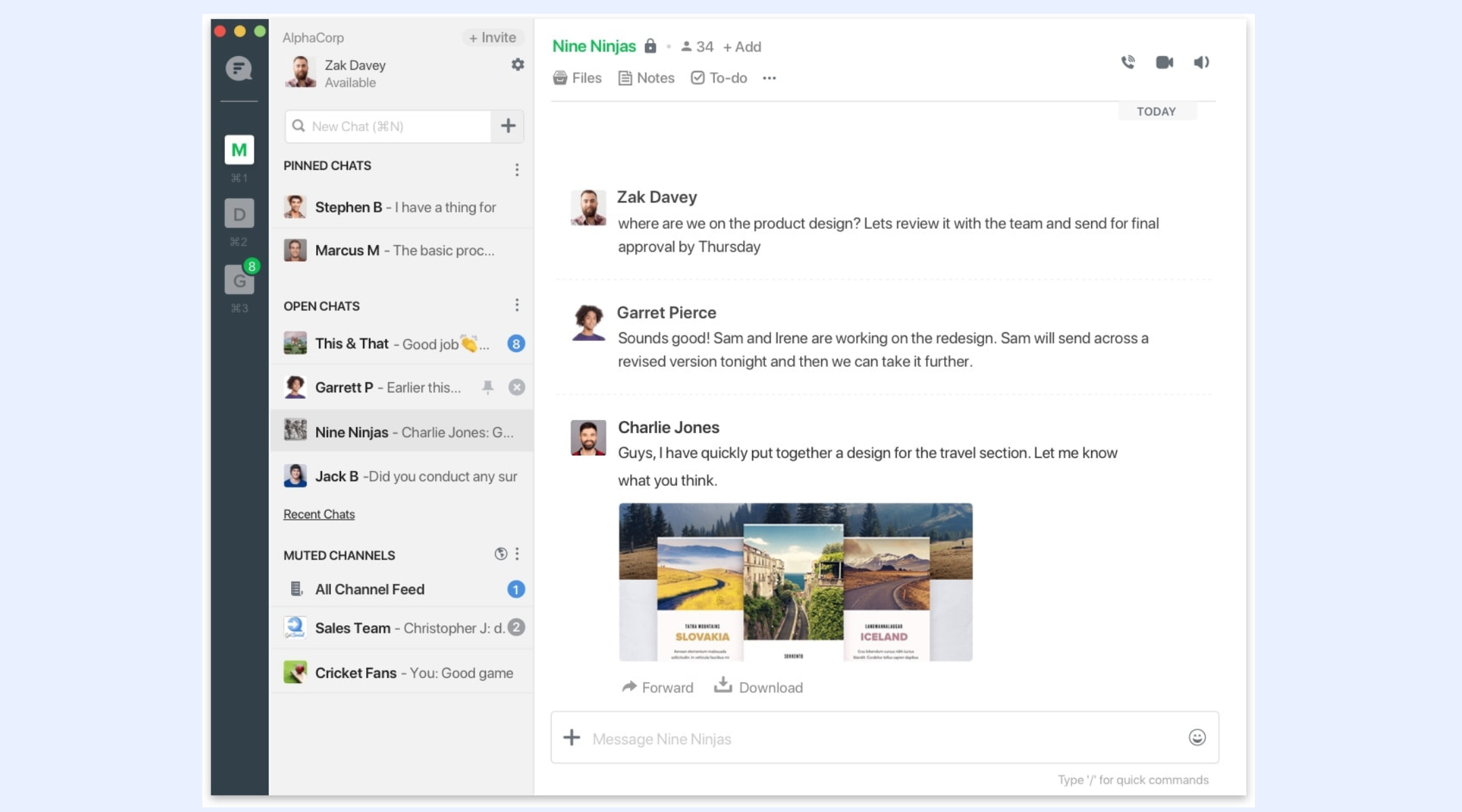
Image source: flock.com
Key features of Flock
Flock includes several tools that support messaging-centered collaboration. Users who analyze flock pricing per month typically explore how these features improve and whether they scale well across departments. The platform is designed to reduce email dependency and make internal conversations feel more immediate and organized. Below is a detailed breakdown of the central features found in Flock and how they contribute to daily teamwork across different types of organizations.
- Real-time team messaging with channels and direct chats: Flock provides fast chat tools that allow teams to communicate through topic-based channels or private conversations. Messages sync instantly across devices, making it easy to stay informed. This supports fast-paced environments where quick decisions are necessary. Channels help categorize updates, so discussions remain easy to reference. For teams evaluating flock pricing, this feature is often the main reason to consider the platform.
- Video conferencing and voice calls: Flock includes built-in calling tools that allow users to switch from text conversations to quick meetings when needed. Video and voice calls support real-time decision-making without relying on external tools. This is especially helpful for distributed teams that need fast check-ins. The quality suits small groups, but larger teams may eventually require more advanced meeting capabilities.
- File sharing and searchable chat history: Flock allows users to upload files directly into chats, making document sharing fast and convenient. The platform also includes a searchable history that helps teams revisit past discussions or locate essential updates. This helps reduce lost information and improves accountability. Search limits vary by flock pricing tier, affecting long-term usability for growing teams.
- Built-in productivity tools such as to-dos, reminders, polls, and notes: Flock includes lightweight tools that support basic organization without requiring external apps. Users can create reminders, track simple tasks, and gather feedback through polls. This improves team alignment and helps reduce context switching throughout the day. When comparing plans, many users evaluate how well these tools support their daily routines.
- combinations with popular apps (Google Drive, Trello, GitHub, etc.): Flock connects with tools such as Google Drive, Trello, and GitHub, allowing teams to sync files and updates more effectively. These combinations help teams reduce the need to manually transfer information, which is a vital consideration for businesses weighing against their total software spend. While Flock is often cited among popular for team communication, it is important to note that integration depth varies, and some advanced workflows may still require additional specialized tools.
- Admin controls for and security: Flock provides administrative tools that help organizations manage users, set permissions, and handle channel visibility. These features help protect sensitive information and ensure consistent access across the workspace. These controls become more important when teams evaluate whether flock pricing aligns with their security needs.
- Mobile and desktop apps for : Flock's apps allow teams to stay connected across devices. Whether users are working from laptops or phones, conversations, files, and reminders are accessible. This mobility helps keep communication steady, even for teams working across locations.
Flock pricing in details
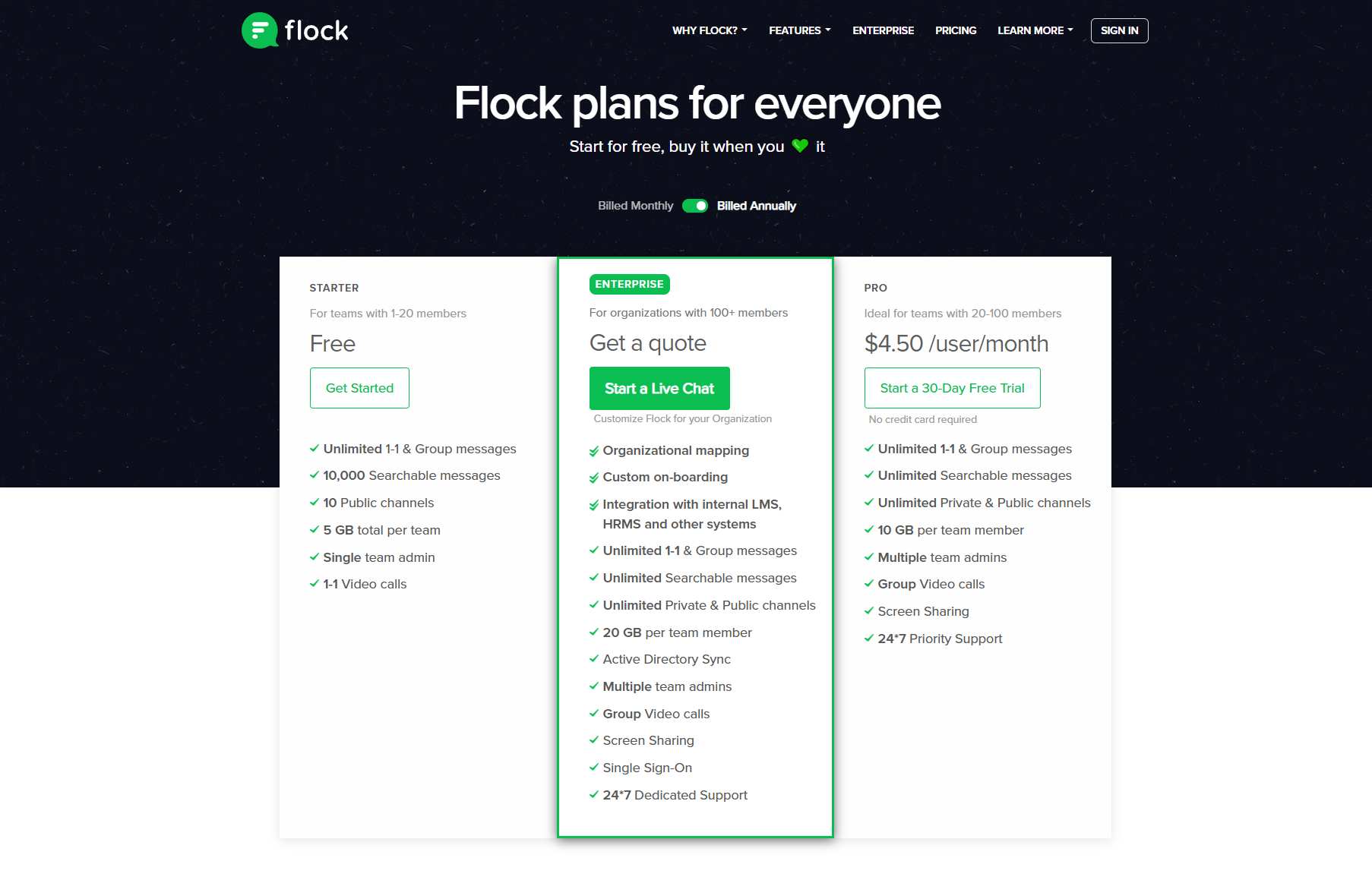
Flock pricing ranges across three different plans designed for teams with and workflow needs. Users comparing flock pricing per month often look closely at storage limits, messaging history, , and administrative controls. Flock's plans include a Starter tier, Pro tier, and Enterprise tier, each with different levels of access to advanced features. The table below provides a clear overview of these plans based on publicly available details. This helps teams decide whether the features included at each level meet their operational and collaboration requirements.
Information source: flock.com
Update time: 2025/12/10
Note: Pricing and plan details reflect publicly available data as of the update date and may vary based on region, billing cycle, and number of agents.
Flockmail pricing & additional costs to consider
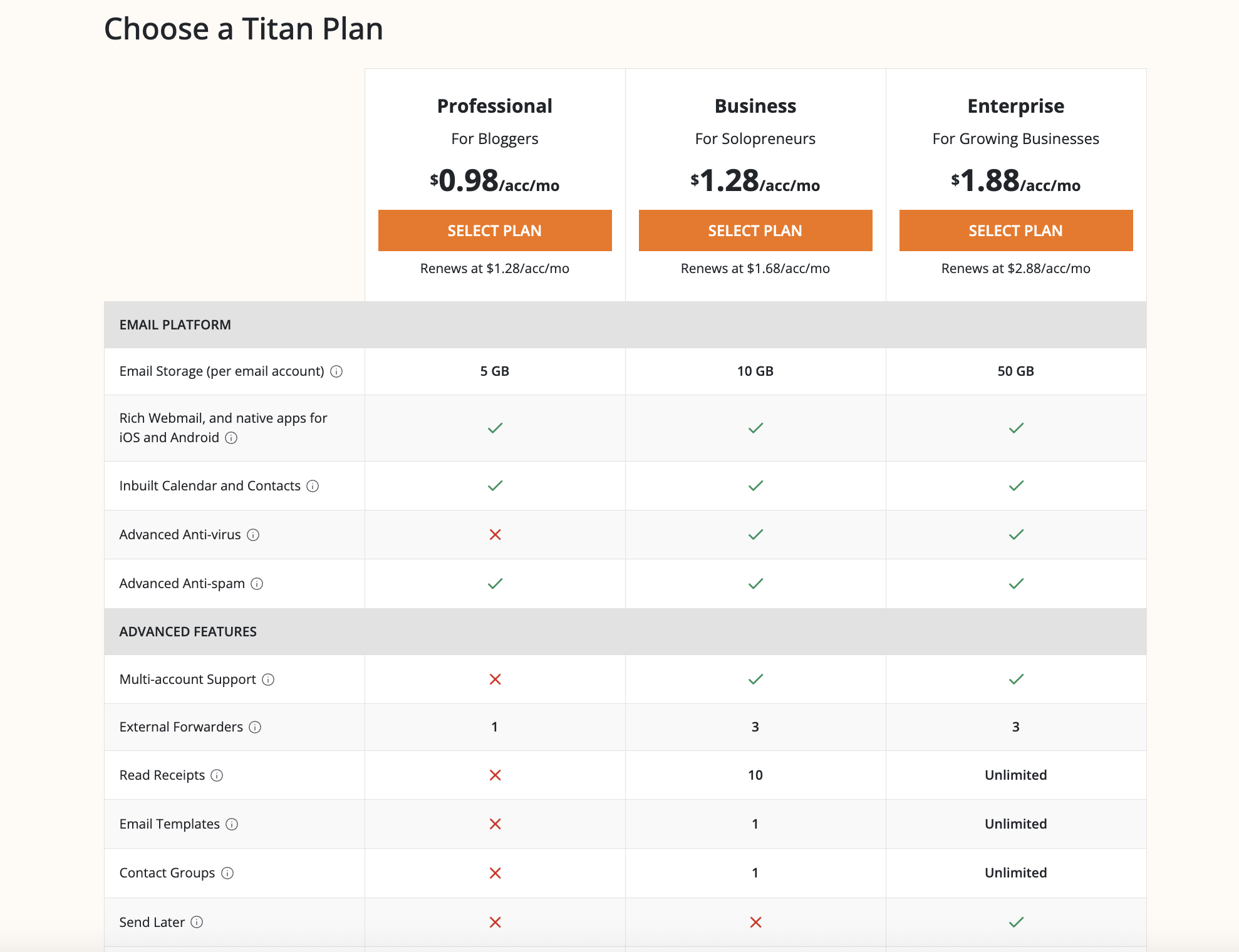
Flockmail is no longer offered as a standalone product and is now available under the Titan business email brand. Titan does not publish a single, centralized pricing page of its own. Instead, pricing and feature availability are determined by individual domain registrars and hosting partners that resell Titan email services.
As a result, the pricing referenced in this guide is based on publicly available information from official vendor and partner sites, and may vary by provider, region, and billing terms. When evaluating Flockmail pricing today, it’s important to review Titan's plans, storage limits, and potential add-on costs directly from the vendor you plan to purchase from to understand the true long-term cost for your team.
Information source: titan.email.com
Update time: 2025/12/10
Note: Pricing and plan details reflect publicly available data as of the update date and may vary based on region, billing cycle, and number of agents.
Is Flock worth the price?
Evaluating whether Flock is worth the investment depends on a team's size, workflow complexity, and . Smaller teams benefit from its messaging tools, while growing organizations may run into limitations with workflows and combinations. Understanding both strengths and gaps helps teams decide where Flock fits into their broader operations.
- Who benefits most from Flock's paid plans: Flock's paid plans work well for small teams that rely heavily on and need simple tools for coordination. These organizations benefit from straightforward channels, calls, and task reminders without requiring advanced workflow capabilities. Flock remains useful as long as messaging is the central part of the team's workflow.
- Situations where Flock may fall short (scaling needs, advanced workflows, complex combinations): Teams with cross-functional processes or structured projects often outgrow the platform because it lacks deeper . Scaling organizations may struggle with visibility, documentation, and multi-team coordination. These limitations become more noticeable as projects expand or require tighter combinations between communication and execution.
- Summary of value based on reviews and user feedback: Reviews generally highlight that Flock performs well for lightweight communication but falls behind when teams need , complex workflows, or high scalability. Users appreciate its simplicity but note rising costs when adding tools like email or storage upgrades. For growing companies, these factors may influence whether the platform continues to deliver long-term value.
Limitations of Flock that affect long-term scalability
While Flock works well for small teams needing messaging and , many organizations outgrow the platform as their operations expand. Flock's messaging-centric setup means cross-team visibility, process control, and structured project work become harder to manage. Storage limits, a simplified task system, and limited workflow capabilities can create friction once teams require tighter collaboration, . These constraints push growing organizations to consider platforms that offer communication, structured workflows, and execution in one environment—setting the stage for a more scalable option like Lark.
Explore smarter workflow options today
Meet Lark: Smooth team collaboration without tool sprawl
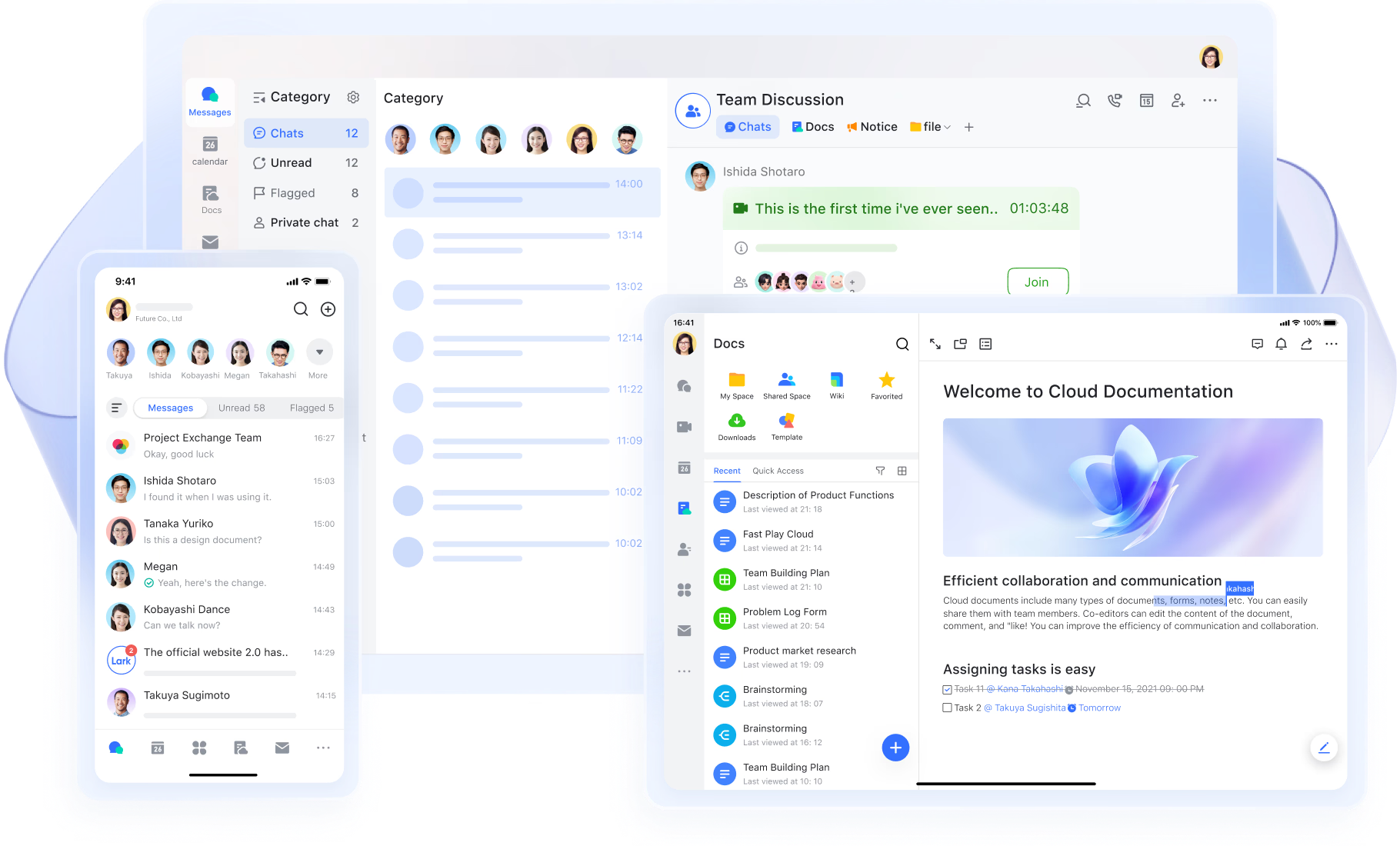
Teams that begin with Flock for messaging often reach a point where they need deeper collaboration tools, connected workflows, and smoother communication across departments. brings these elements together in a single workspace that includes , meetings, , tasks, and automation. This combination helps teams reduce tool switching and maintain stronger alignment as their operations grow.
Faster and clearer communication for teams
offers fast, responsive messaging through direct chats and group channels, making it easy for teams to coordinate, share updates, and stay aligned throughout the workday. Conversations remain organized with threads, mentions, and smart search, helping users quickly find past discussions or relevant files. Flock also provides messaging and channels, but conversations often become siloed within different chat spaces. Messenger delivers a more unified experience, keeping communication closely tied to documents, tasks, and meeting workflows-all within the same environment. This reduces tool-switching and makes collaboration feel more fluid than in Flock's chat-centric model. 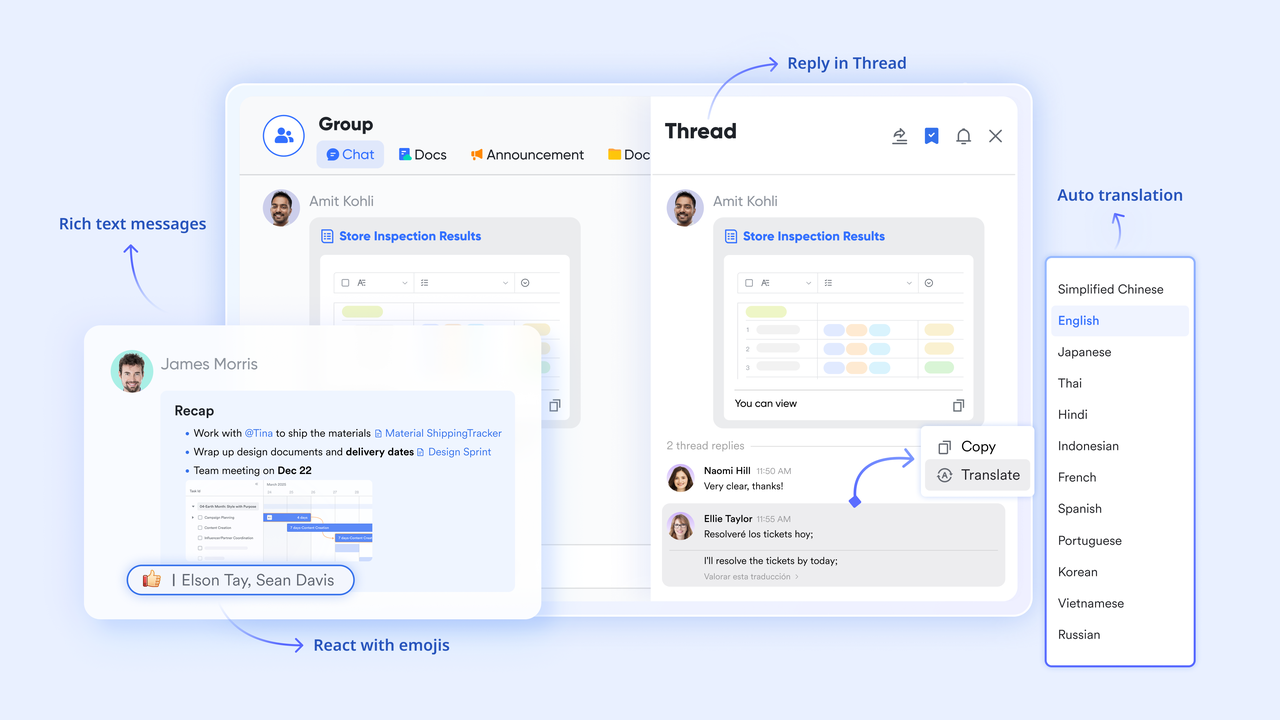
A more reliable and collaborative meeting experience
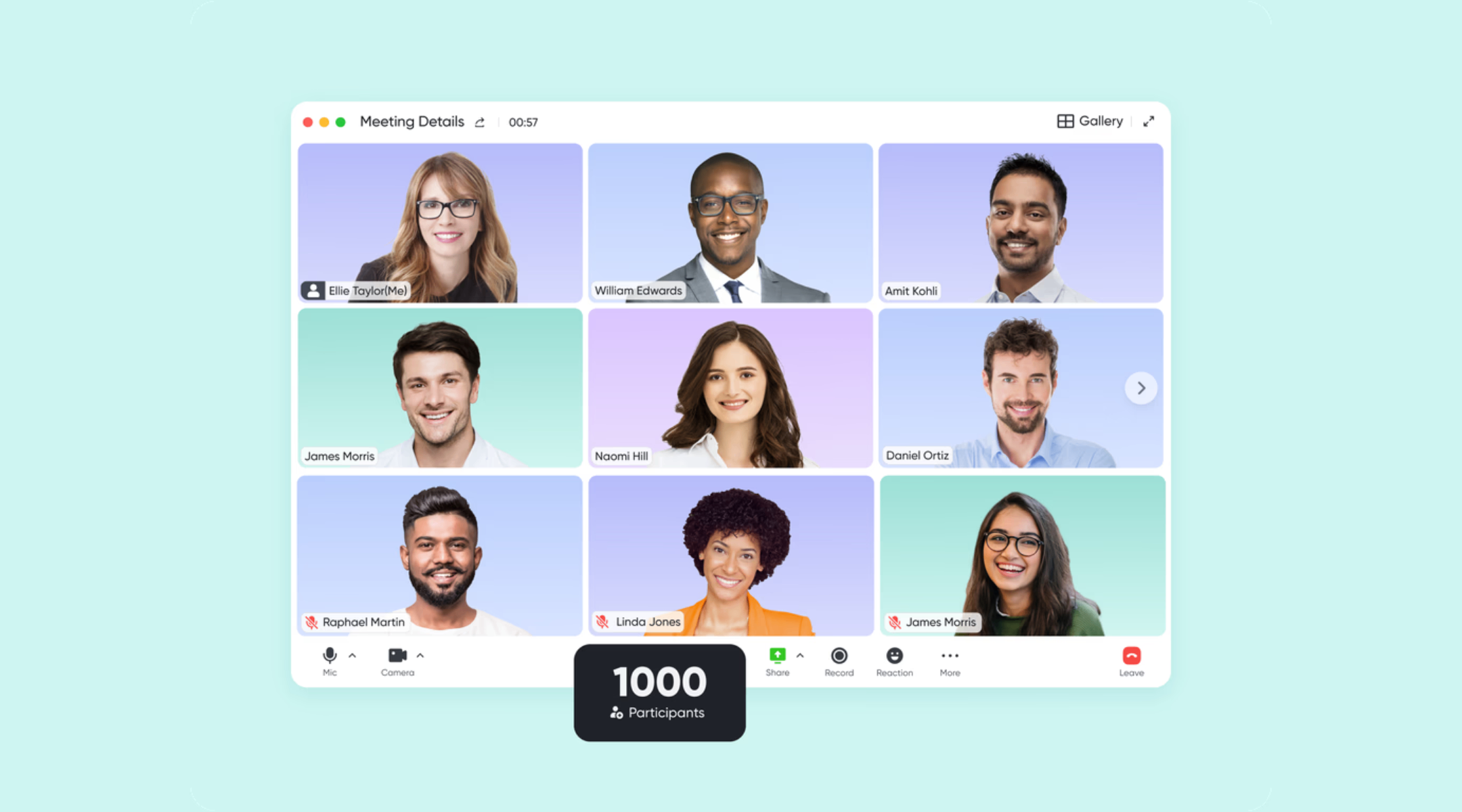
built-in video meetings offer a stable, reliable environment for team calls with smooth performance and refined controls. Users can start meetings directly from Messenger or Calendar, creating a seamless transition between messaging and live conversation. Flock supports video calls but relies on a simpler setup with fewer collaborative elements. Lark Meetings provides deeper functionality, allowing users to collaborate on content, share notes, and stay organized during and after meetings. This makes Lark more suitable for teams that depend on video communication for decision-making and daily operations.
Smarter content sharing during live discussions
Magic Share in Lark Meetings elevates meeting collaboration by allowing participants to share documents and content in a fluid, interactive way. Instead of static screen-sharing, teammates can view and engage with the same material simultaneously, creating a more immersive and productive meeting experience. Flock's screen-sharing tools are basic and do not support this kind of dynamic collaboration. Magic Share gives Lark a significant edge in team alignment, especially during project reviews, brainstorming sessions, or training. 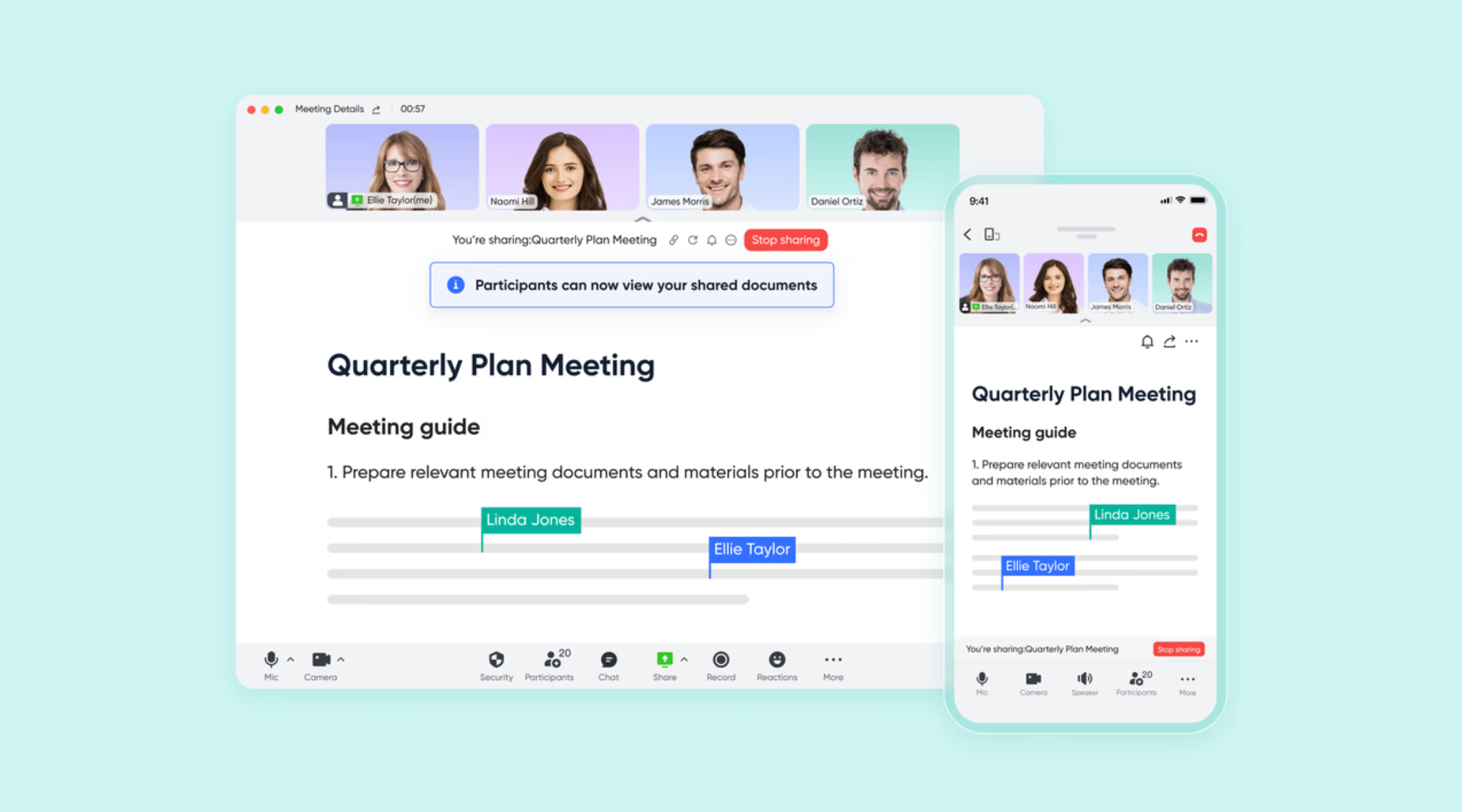
Native feature collaboration turns ideas into action
Unlike different features in Flock, collaboration between Lark Messenger, , and Tasks ensures that communication directly informs scheduling and action. By simply hovering over a text, voice message, event card, or poll and selecting "Add Task," you can assign an owner, set a due date, and even add sub-tasks directly from the chat context. You can schedule meetings directly from chats by clicking the Calendar icon, which immediately displays free time slots for all chat members, simplifying coordination. Crucially, tasks with milestones, such as due dates, are automatically displayed and editable in your Calendar view by selecting "My tasks" in the Managing category, offering a that turns conversational items into actionable, time-bound events. 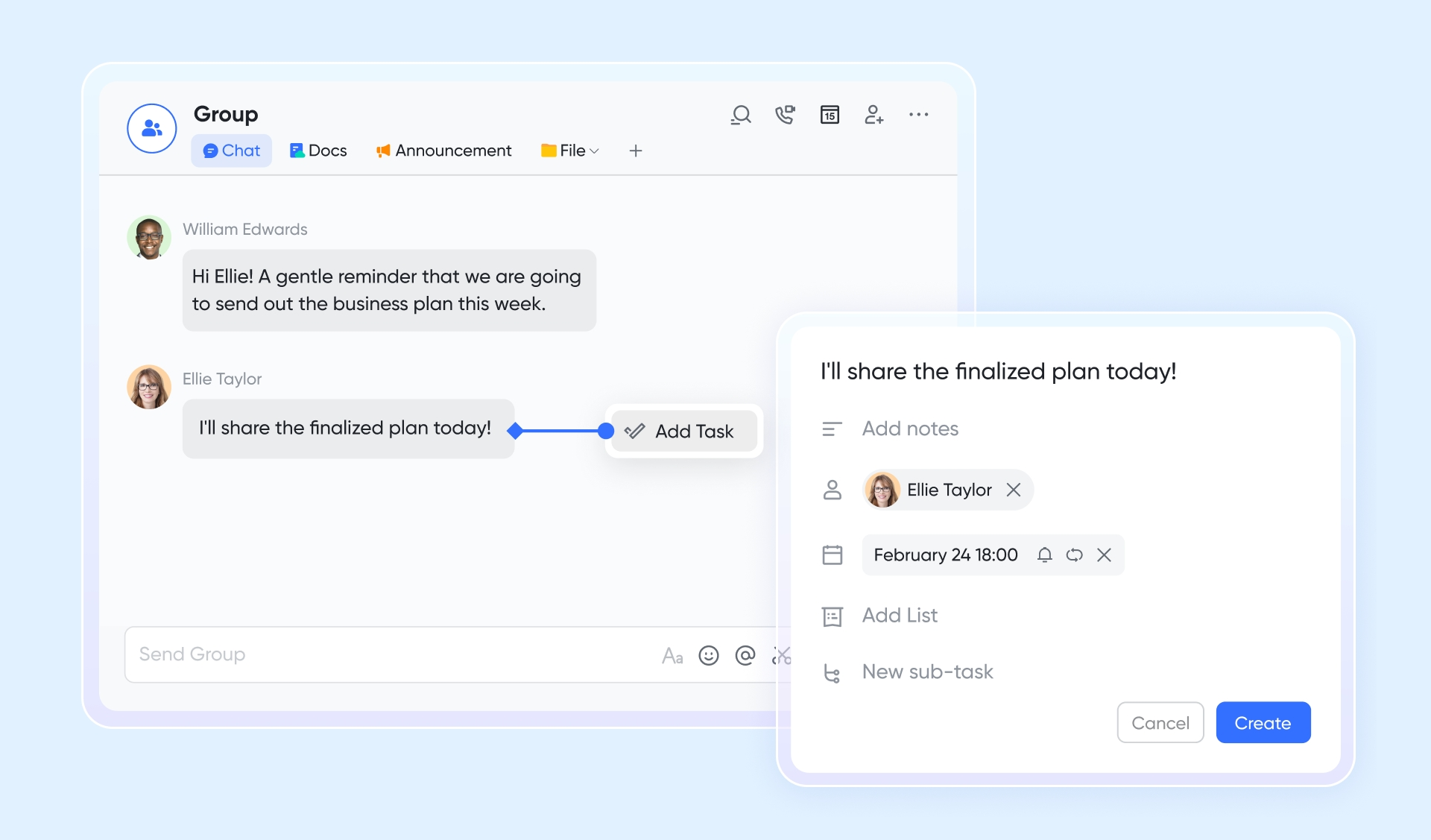
Automated documentation that saves meeting time
can automatically generate meeting minutes from recordings or uploaded audio/video files with minimal manual effort. This ensures every meeting produces clear, usable documentation that the team can refer back to. Flock does not offer automated minutes. Teams are forced to rely on manual note-taking or chat summaries, which can lead to inconsistencies or missing details. automation dramatically improves documentation quality and saves valuable time for fast-moving teams. 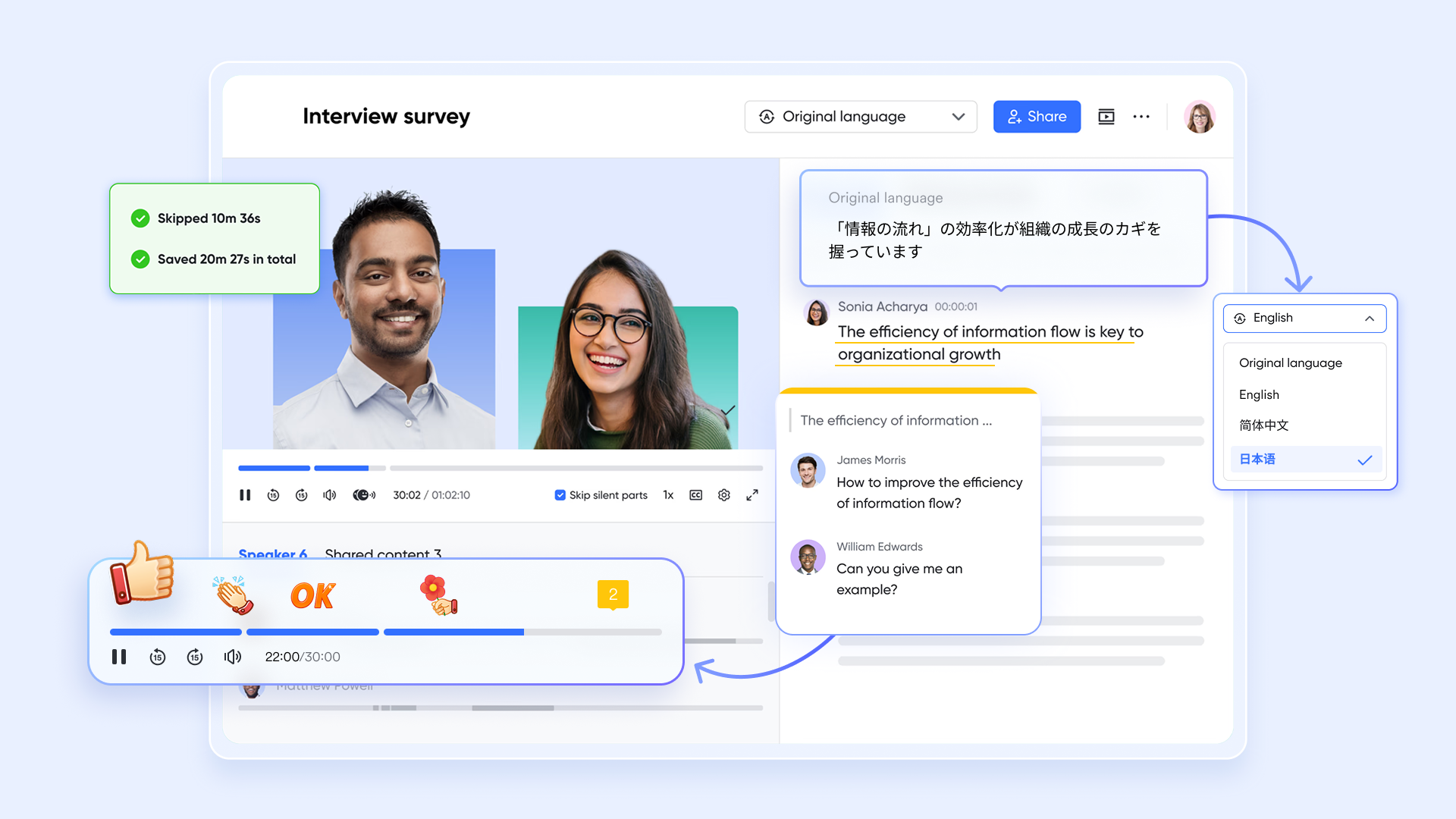
Intelligent summaries that turn conversations into actions
transform raw meeting discussions into structured, readable summaries that highlight action items, decisions, and insights. Teams gain instant clarity without reviewing recordings or taking detailed notes. Flock lacks built-in Lark AI meeting capabilities, meaning users must rely on external tools or manual transcription to capture important points. Lark's AI-driven meeting notes provide an unmatched advantage, particularly for organizations that run frequent calls and need swift, accurate follow-ups. 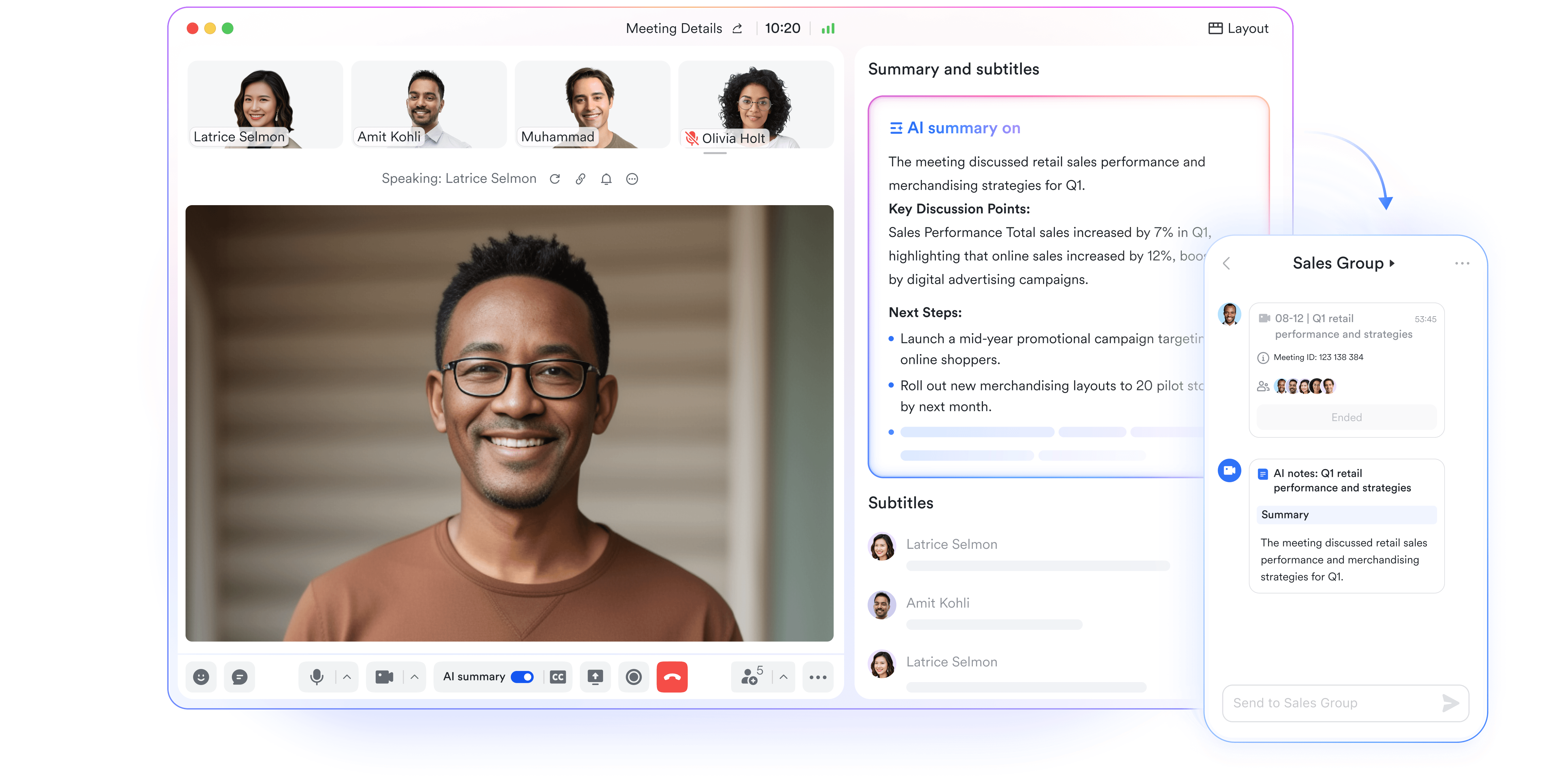
:
- Starter plan: Free forever plan that includes 11 powerful tools for up to 20 users. It also comes with 100GB of storage, 1000 automation runs, AI translations, and more.
- Basic plan: $6/user/month (billed annually) for up to 500 users. It includes everything in Starter plus group calling for up to 500 attendees, 5TB of storage, 1000 automation runs, and more. For more details, please .
- Pro plan: $12/user/month (billed annually) for up to 500 users. It includes everything in Basic plus group calling for up to 500 attendees, 15TB of storage, 50,000 automation runs, and more.
- Enterprise plan: for custom pricing. Supports unlimited users and includes even more automation runs and advanced security, compliance, and management features.
For small teams with simple communication needs

18 months message history
1000 Base automation runs/month
2000 rows per table in Base
Most POPULAR
For companies with comprehensive collaboration and management needs
Unlimited message history
500-participant video meetings
50k Base automation runs/month
20k rows per table in Base
For large companies with advanced security and organizational management needs
Get a personalized demo and pricing
Unlimited message history
500-participant video meetings
15 TB storage + 30 GB storage/user
500k Base automation runs/month
50k Base automation runs/month
Most POPULAR
For companies with comprehensive collaboration and management needs
Unlimited message history
500-participant video meetings
50k Base automation runs/month
20k rows per table in Base
Quick final comparison: Lark vs. Flock (Which is better)
Below is a side-by-side overview showing how the two platforms differ in messaging, meetings, collaboration, and long-term scalability. While Flock focuses mainly on chat and basic video calls, Lark delivers a more powerful, unified environment that supports and team operations end-to-end.
Conclusion
Flock offers a simple and accessible platform for small teams that rely heavily on messaging and . Its pricing tiers give users options for expanding message history, increasing storage, improving support, and enabling more administrative oversight. Flock is a practical solution for organizations that mainly need channels, direct messages, group calls, and . Teams that remain within this scope often find flock pricing appropriate for their needs. As larger workflows develop, organizations frequently look for systems that combine communication with documentation, meetings, and task execution.
Platforms like begin entering the conversation when teams want a more unified workspace that connects chat, video meetings, documents, and actionable tasks. Lark helps teams reduce tool switching, improve alignment, and create stronger long term collaboration across departments. Exploring both platforms allows organizations to choose the environment that supports their long term growth, scalability, and daily efficiency.
Move toward better teamwork
FAQs
Does Flock offer a lifetime or one-time purchase option?
Flock does not provide a lifetime license or a one-time purchase model. All plans operate on recurring subscriptions that renew monthly or annually, depending on a team's selection. Users reviewing flock pricing per month often choose annual billing for reduced rates. Organizations that want long-term stability sometimes explore alternative platforms like Lark, which offer tools within predictable subscription structures.
Can Flock pricing be locked in for multiple years to avoid cost increases?
Flock may allow long-term contracts for Enterprise clients, but standard users typically renew on regular billing cycles. Multi-year commitments sometimes include discounts, depending on discussions with the sales team. For teams evaluating flock pricing, it is important to confirm terms directly with support. Some organizations later Lark when seeking flexible pricing with broader collaboration tools included.
Does Flock provide refunds for unused months or early cancellations?
Flock's refund policy depends on the billing cycle and terms agreed upon at the time of purchase. Monthly subscribers may have fewer refund options, while annual contracts may vary based on region. Users comparing collaboration platforms often check refund policies before committing. As workflows evolve, some teams consider Lark when they want a workspace with merged features and upgrade paths.
Are there storage caps for file uploads in the Pro or Enterprise plans?
Flock includes limits on team member storage even in higher tiers, with caps such as 10 GB or 20 GB, depending on the plan. These limits apply to files stored across chats and channels. Teams handling large volumes of content may eventually need more scalable storage solutions. This is where platforms like Lark become appealing due to their flexible storage options in higher plans.
Does Flock offer regional pricing for countries like India or Southeast Asia?
Flock may provide localized pricing in some regions, though availability varies and may depend on currency settings or promotions. Users comparing flock pricing often evaluate whether these adjustments make long-term use more cost-effective. Growing organizations sometimes explore Lark when seeking a global collaboration platform with features that support distributed teams.
Related reading






























