Google Sheets project management templates have become a familiar starting point for teams that want structure without complexity. They are easy to access, free to use, and flexible enough to handle basic planning needs. Many teams begin with a project management template in Google Sheets because it feels approachable and customizable. Over time, these spreadsheets often grow into shared planning hubs.
As projects multiply and collaboration increases, teams begin noticing both the strengths and limits of a project management Google Sheets template. This guide explores free templates, practical use cases, and where spreadsheets still work well. It also looks ahead when teams gradually consider more scalable workspaces like Lark, without forcing a sudden switch.
Move beyond basic spreadsheet tracking
What is Google Sheets project management?
Google Sheets project management refers to using spreadsheets to plan, track, and coordinate project work. Teams rely on rows for tasks, columns for owners and deadlines, and formulas for . A Google Sheets template for project management usually includes task lists, timelines, and status indicators that are easy to customize.
For many teams, a project management template for Google Sheets replaces more complex software during early stages. These templates are shared in real time and updated collaboratively. While the structure is manual, it gives teams visibility without learning a new tool. This simplicity explains why the project management spreadsheet template Google Sheets approach remains popular.
10 free Google Sheets templates you can explore
The following templates cover common project management use cases. Each option serves as a project management spreadsheet template that Google Sheets users can customize to suit team size and workflow needs.
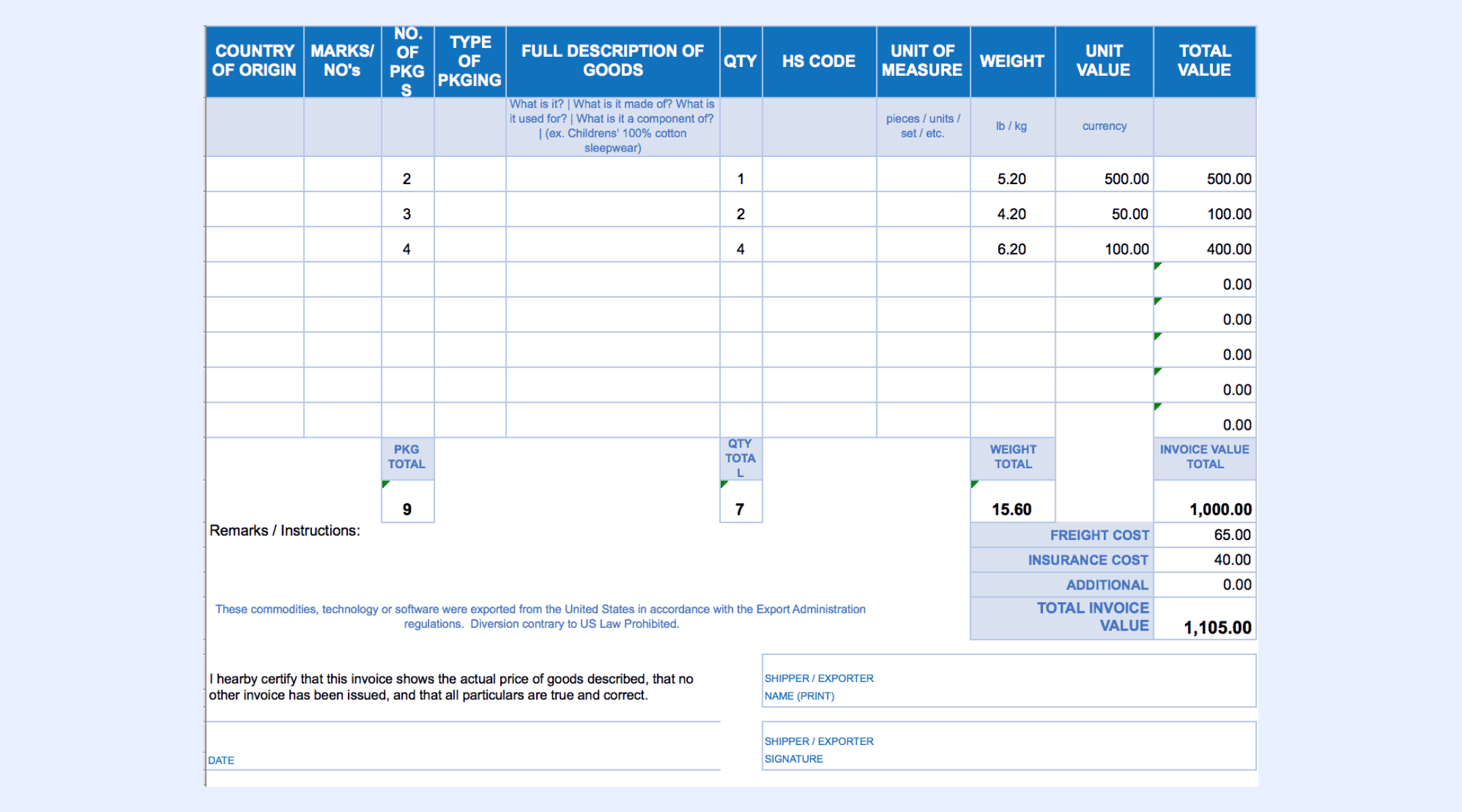
Invoice template
Invoice templates help teams track billable work, costs, and payment status alongside project delivery. They are often used together with task trackers to connect expenses with milestones. A project management template in Google Sheets with invoicing, works well for freelancers and service teams. Manual updates are required as project scope changes.
Simple project spreadsheet for mid-sized companies
This template focuses on task names, owners, deadlines, and current status. It provides clarity without unnecessary complexity. Many teams use this as a base project management template for a Google Sheets structure. It works well for operational tracking with limited dependencies.
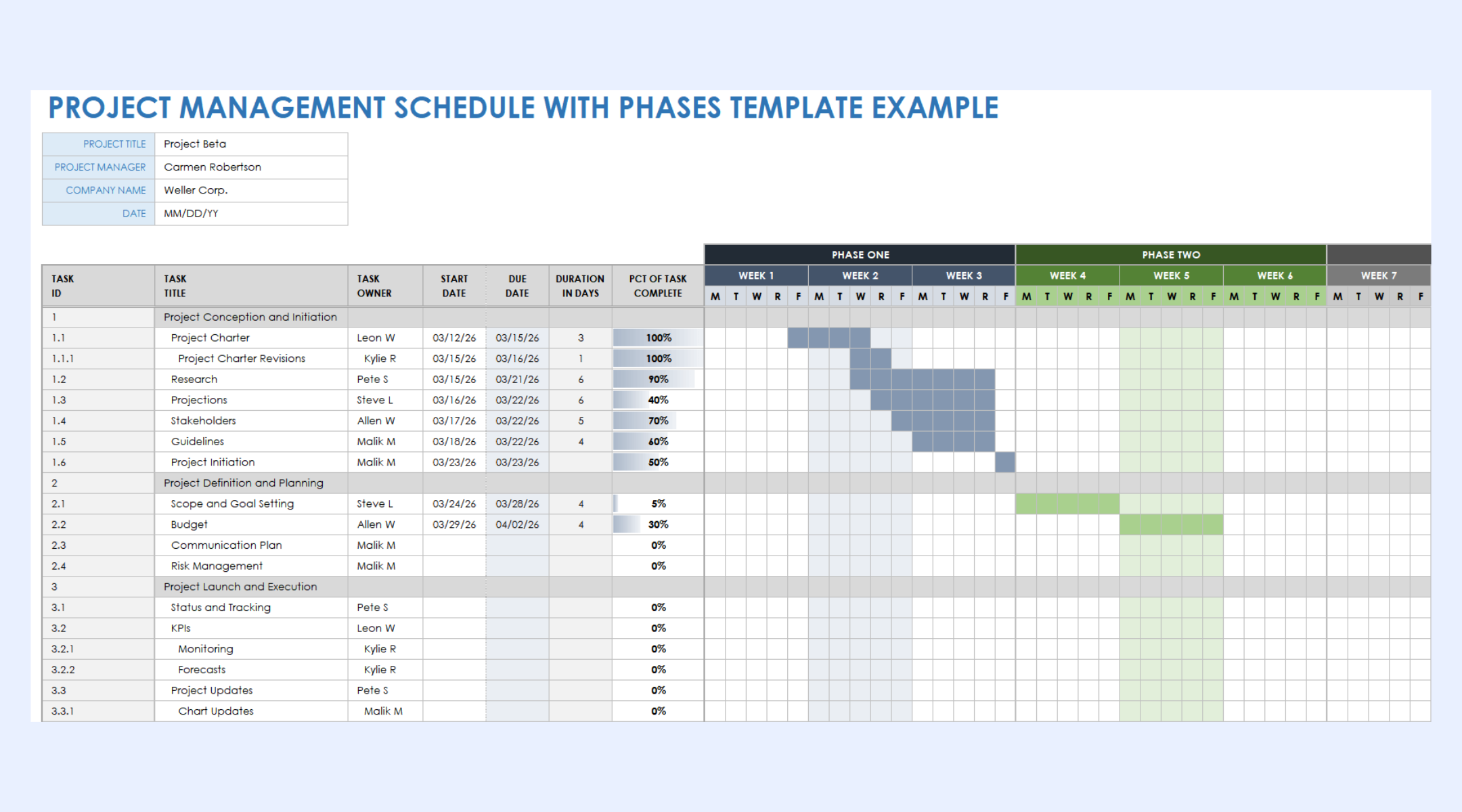
Intuitive Gantt template for small and mid-sized teams
Gantt templates visualize project timelines and task dependencies using date-based bars. A free Google Sheets project management template with a helps teams understand sequencing and duration. It requires consistent manual updates to remain accurate. This format is best suited for planning rather than day-to-day execution tracking.
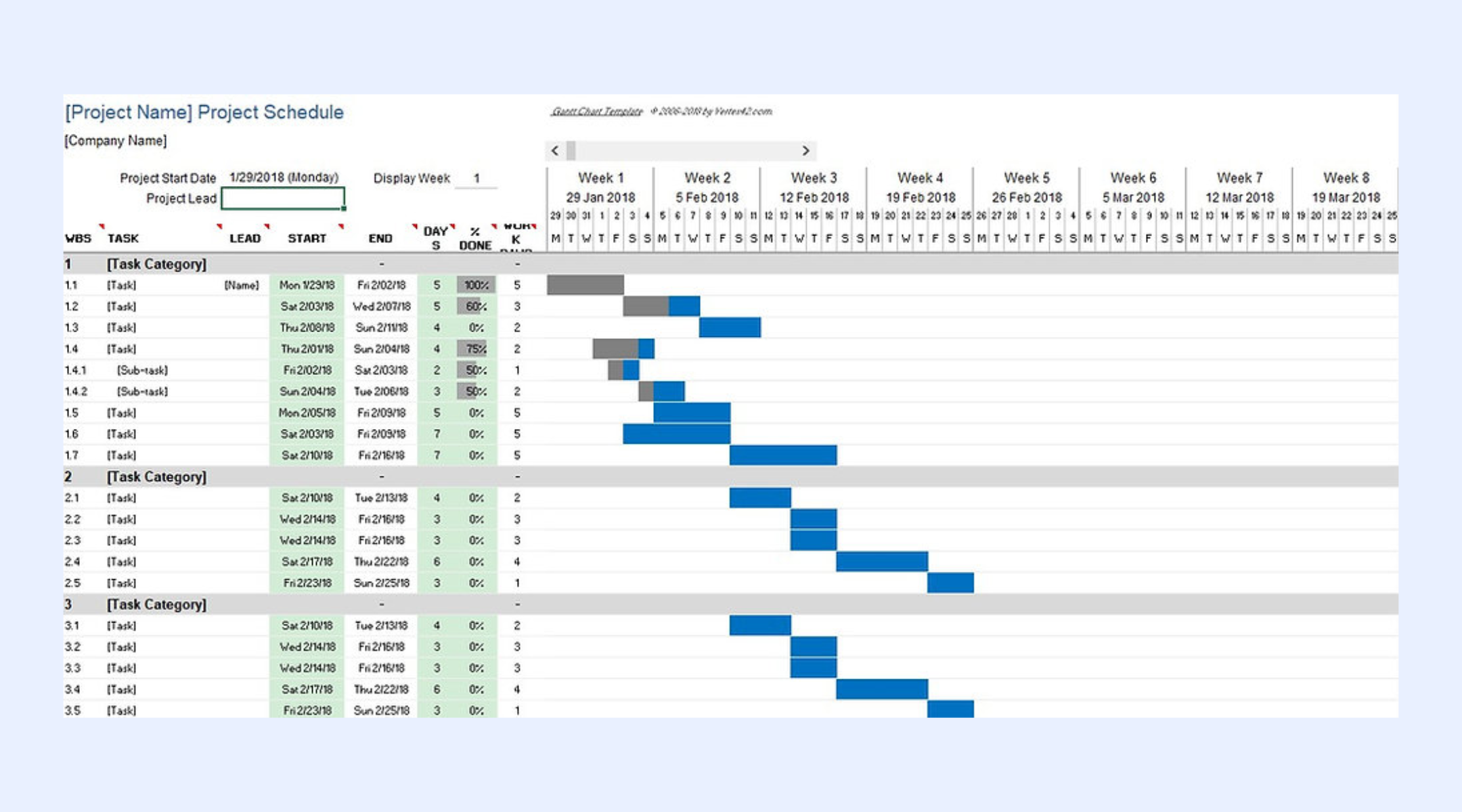
Project plan template
Project plan templates capture objectives, milestones, timelines, and owners in a single view. A project management Google Sheets template like this supports early alignment across stakeholders. Teams often use it during kickoff phases. Ongoing maintenance increases as execution progresses.
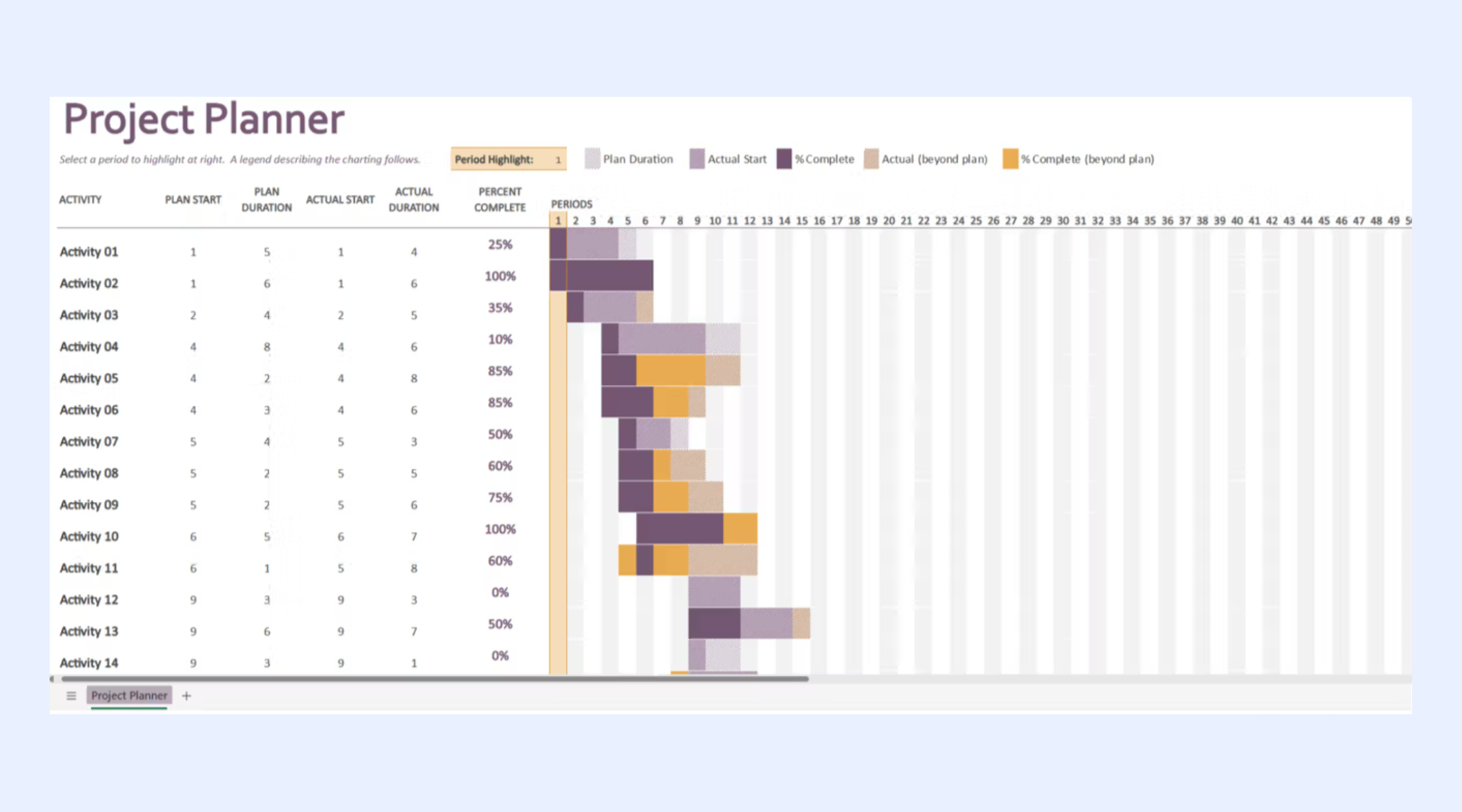
Color-coded Kanban spreadsheet template
Kanban spreadsheet templates represent workflow stages using columns. A Google Sheets template for project management with a offers visual clarity for task movement. Color coding improves readability and prioritization. Task movement remains manual and can become time-consuming as volume grows.
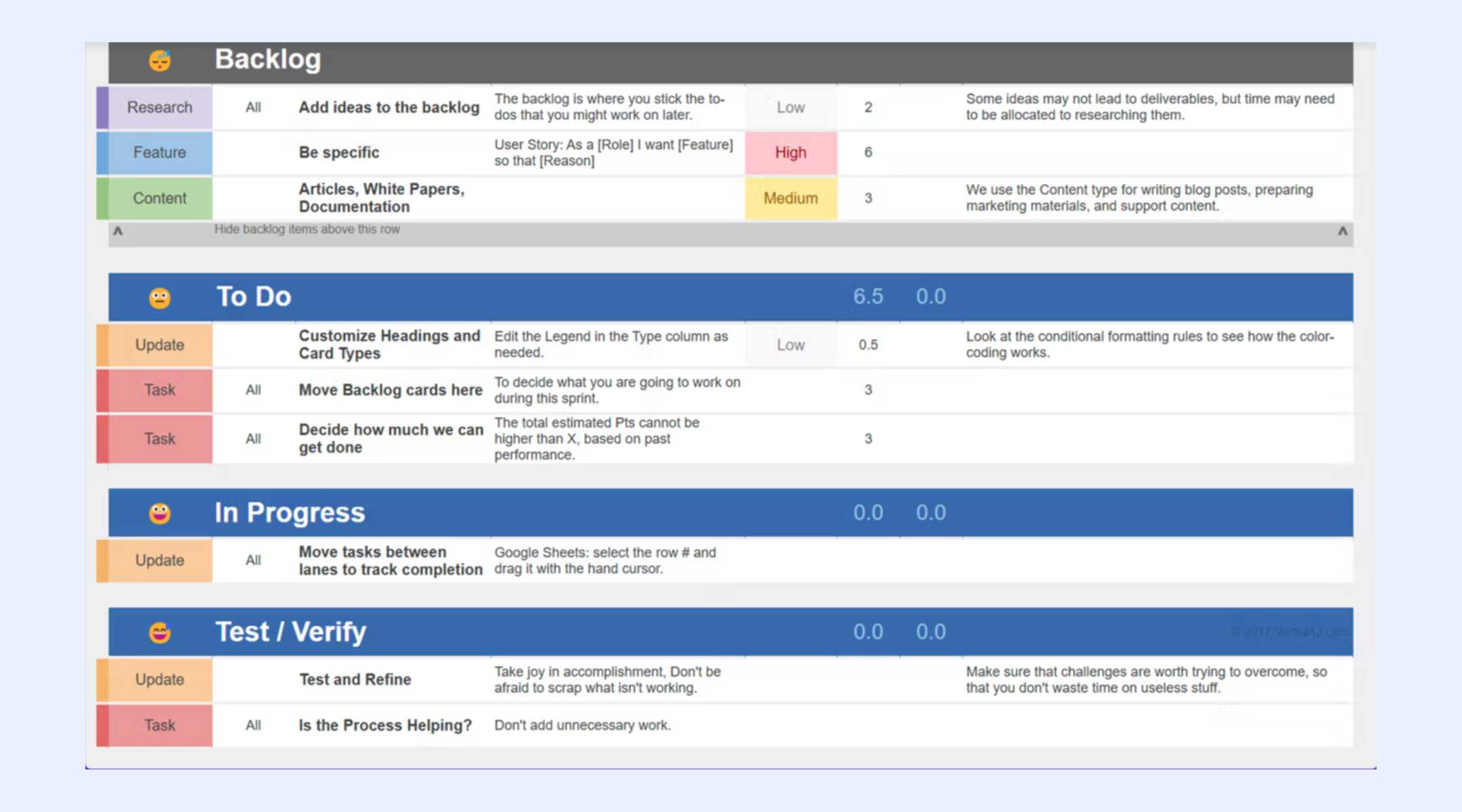
Sticky card-inspired Kanban dashboard
This version mimics card-based boards using formatting and layout techniques. Teams often choose this Google Sheets project management template as a free alternative to visual tools. It improves engagement and clarity for small boards. Performance can decline as the number of cards increases.
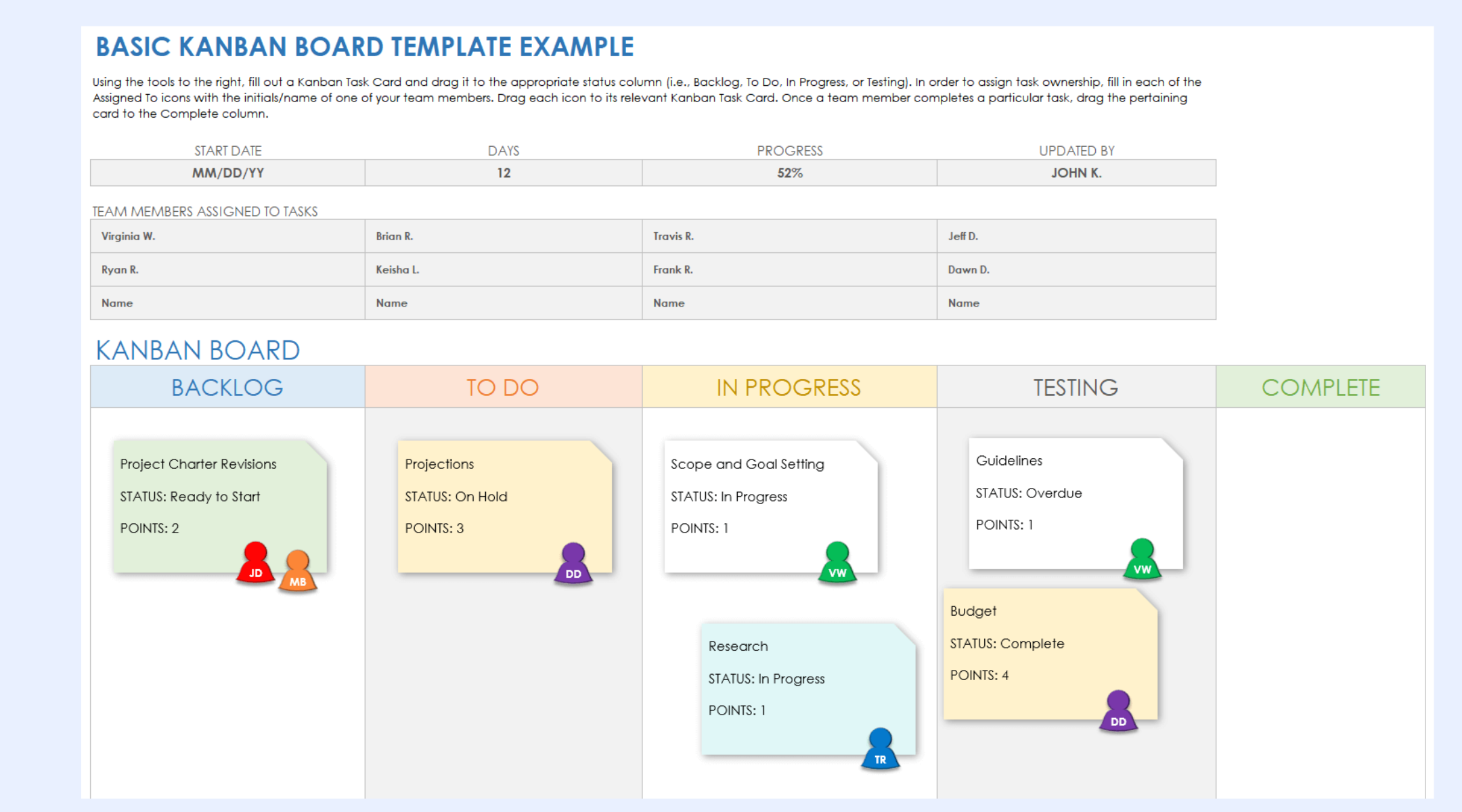
All-purpose project status report template
Status report templates summarize progress, risks, blockers, and next steps. A Google Sheets project management spreadsheet template format works well for weekly or monthly updates. Stakeholders can review progress without editing access. Reports require manual compilation and updates.
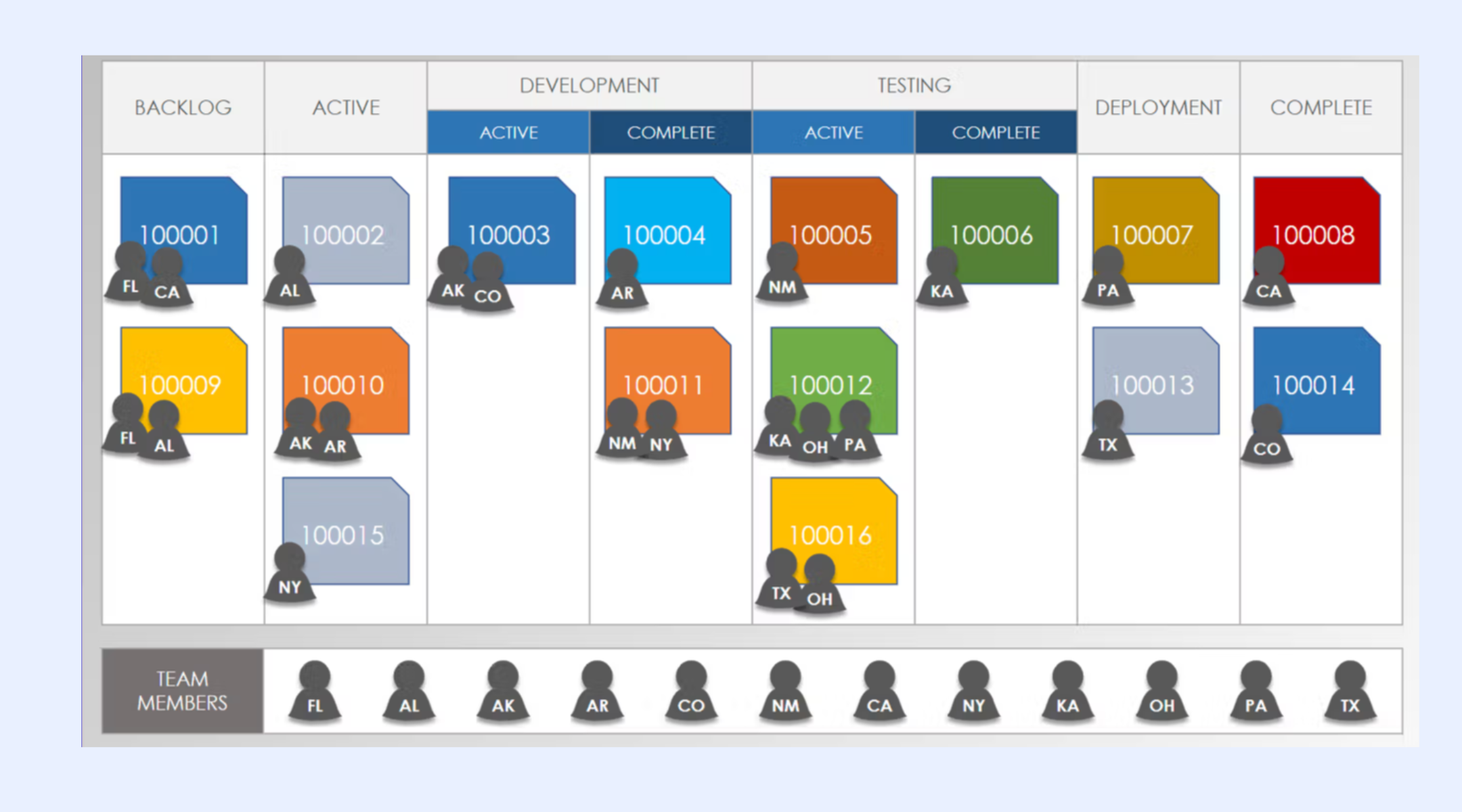
Detailed project timeline template
Timeline templates track phases and milestones across longer durations. This Google Sheets project management template with a timeline view helps teams visualize project flow. It supports high-level planning and coordination. Detailed dependency tracking requires extra manual work.
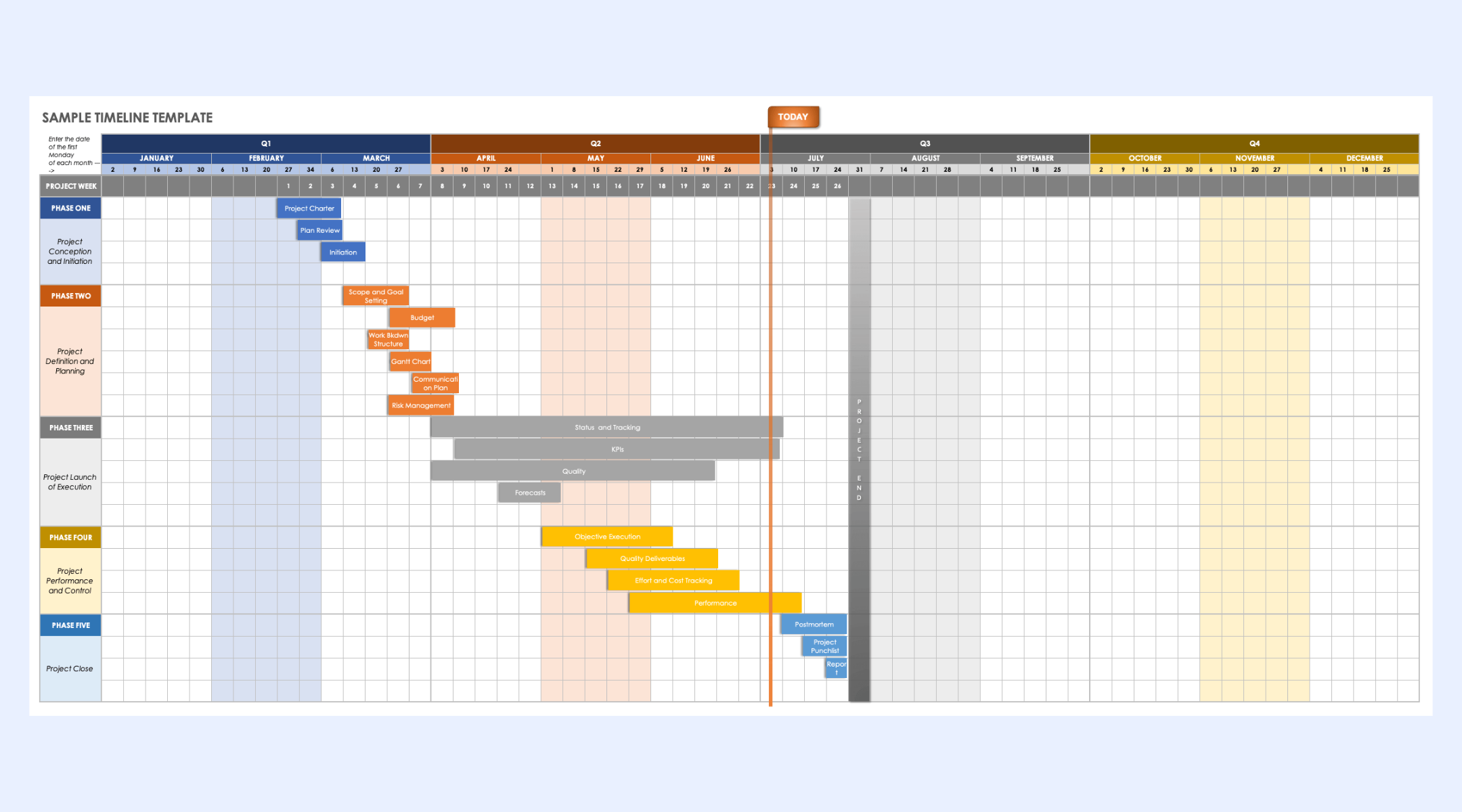
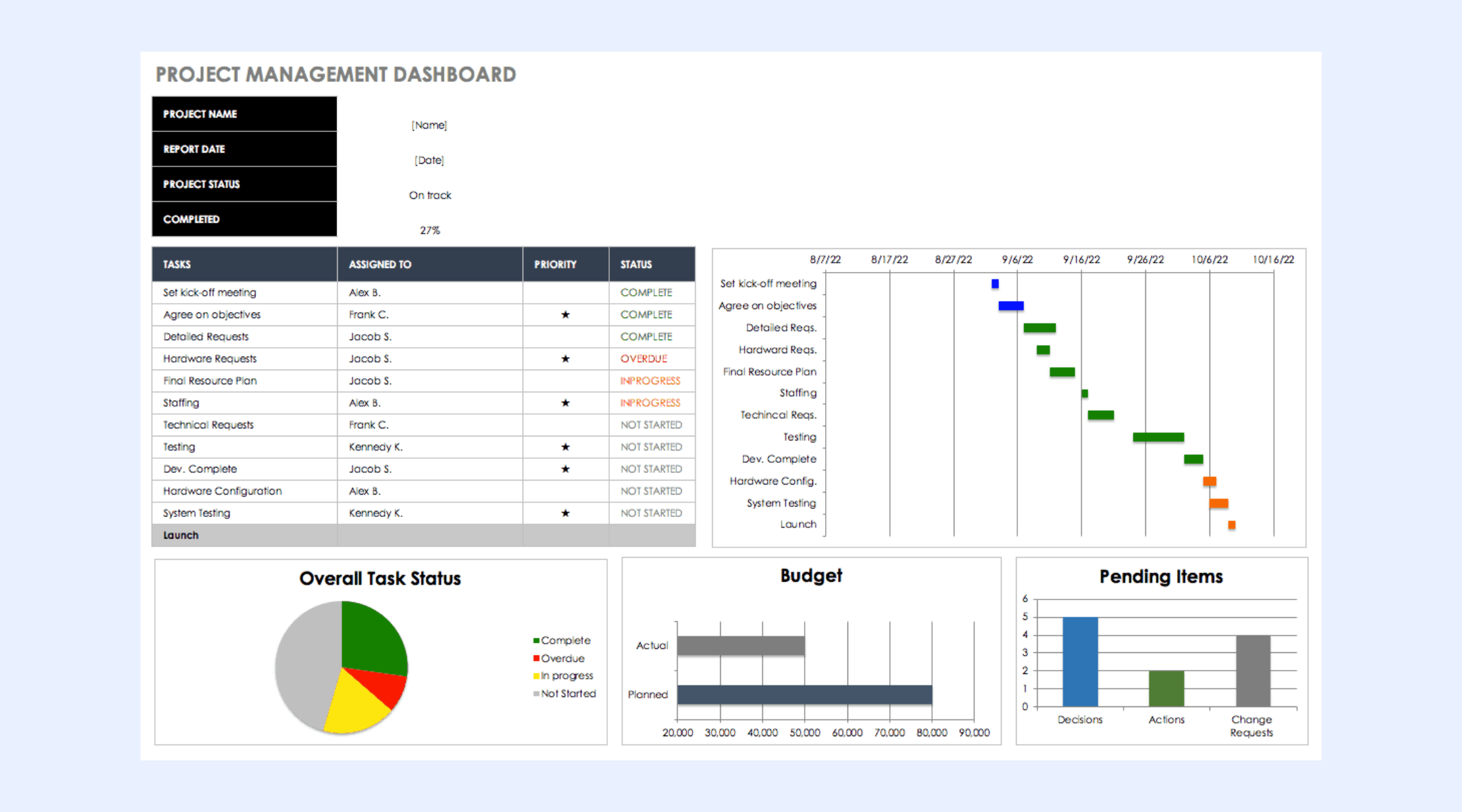
Budget-related dashboard template
Budget dashboards track planned versus actual costs across projects. This Google Sheets template project management with a budget view supports basic financial oversight. Teams often pair it with task and invoice sheets. Accuracy depends on consistent data entry.
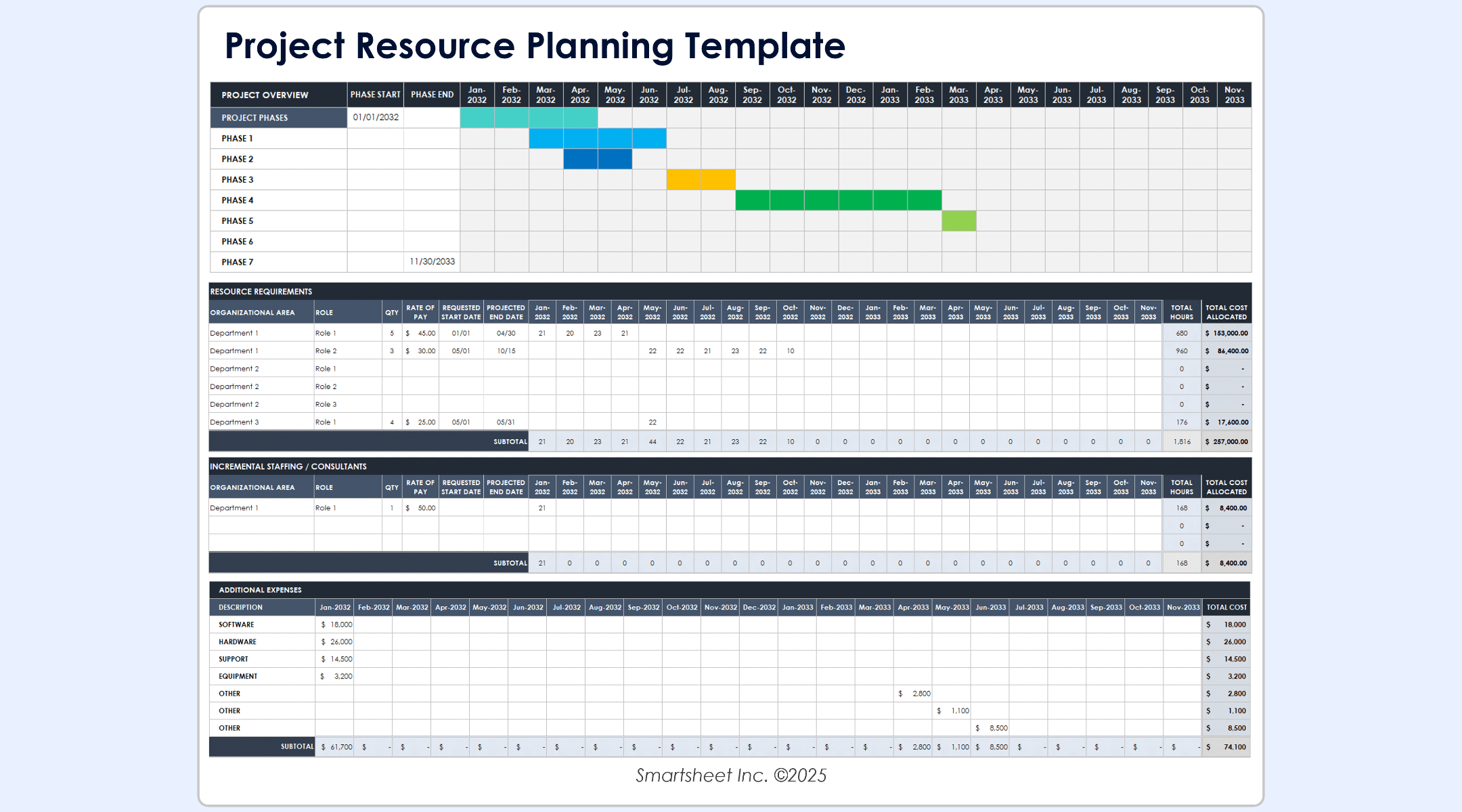
Resource allocation template
templates assign people to tasks and track workload distribution. A free Google Sheets project management template like this helps prevent overbooking. Teams must update availability frequently. This becomes harder as team size grows.
Is a Google Sheets template right for you?
Google Sheets templates are often the first choice for teams that want structure without added complexity. They are easy to access, familiar to most users, and flexible enough for basic planning. However, this does not mean they are suitable for every team in every project stage. Here are the full breakdowns of benefits and limitations:
Benefits of using Google Sheets templates
- Universal familiarity: Most team members already know how to use spreadsheets, eliminating the need for specialized software training and allowing for immediate adoption.
- Low barrier to entry: You can set up a project tracker in minutes using existing templates, which is ideal for "scrappy" teams or projects in the very early stages.
- Zero additional cost: Unlike other , it is included in the Google Workspace suite, providing a highly cost-effective solution without requiring new line items in your budget.
- Complete flexibility: Unlike rigid project management software, a spreadsheet is a "blank canvas," allowing you to customize columns, colors, and layouts exactly how you want them.
- Real-time collaboration: Multiple users can edit the same sheet simultaneously, making it easy to host quick status syncs and see updates as they happen.
Limitations of Google Sheets templates
- The "Admin Tax": Because there is no native automation, managers must manually update statuses, dates, and assignments, which consumes time that should be spent on the work itself.
- Lack of dynamic dependencies: Spreadsheets don't "understand" the relationship between tasks. If a task is delayed, you must manually move every subsequent date rather than having the timeline shift automatically.
- Data integrity risks: A single accidental deletion of a formula or an incorrect keystroke can break the entire tracker, making it difficult to maintain a "single source of truth."
- Scalability issues: As the number of rows and collaborators grows, sheets often become slow, laggy, and visually cluttered, making it harder to find critical information.
- Poor visibility for stakeholders: Creating high-level reports or Gantt charts in Sheets is often a manual, static process that doesn't provide the real-time, interactive insights needed for complex decision-making.
Reduce spreadsheet maintenance overhead
Meet Lark: A smarter way to manage projects, data, and teamwork
As teams move beyond basic spreadsheets, they often need a stronger structure without losing flexibility. combines spreadsheet-style tables with , automation, and data relationships in one workspace. is designed to handle growing datasets and connected workflows while still feeling familiar to spreadsheet users. It keeps data organized in structured tables and reduces manual upkeep as work scales. Teams can manage logic, relationships, and reporting across Lark from a single, connected system.
Dynamic project management hub with multiple views
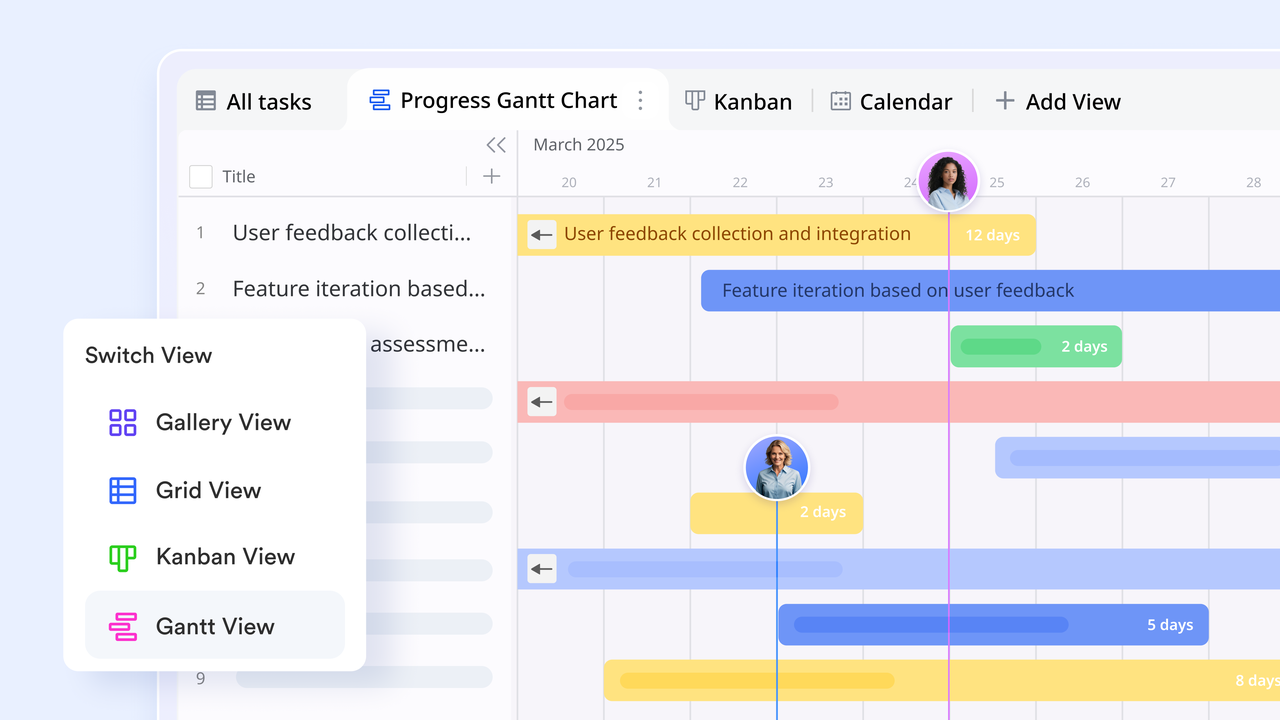
offers a unified data foundation visualized through versatile views like , Kanban, Form, and Grid, ensuring that updates in one view reflect instantly across the entire project. It facilitates structured management through four-level task hierarchies and standardized data entry via Form views, allowing teams to balance high-level planning with granular execution. When someone fills out a form, the response is automatically converted into a structured record in your table, ready to be assigned and scheduled.
Editable linked records with contextual detail views
Lark Base treats linked records as structured relationships between tables. From a record's detail view, users can see related tables, open linked entries, and update values directly. Changes happen without leaving context or switching files. Permissions remain enforced at the source table level. This makes it easier to model connections such as projects linked to tasks or orders linked to line items. 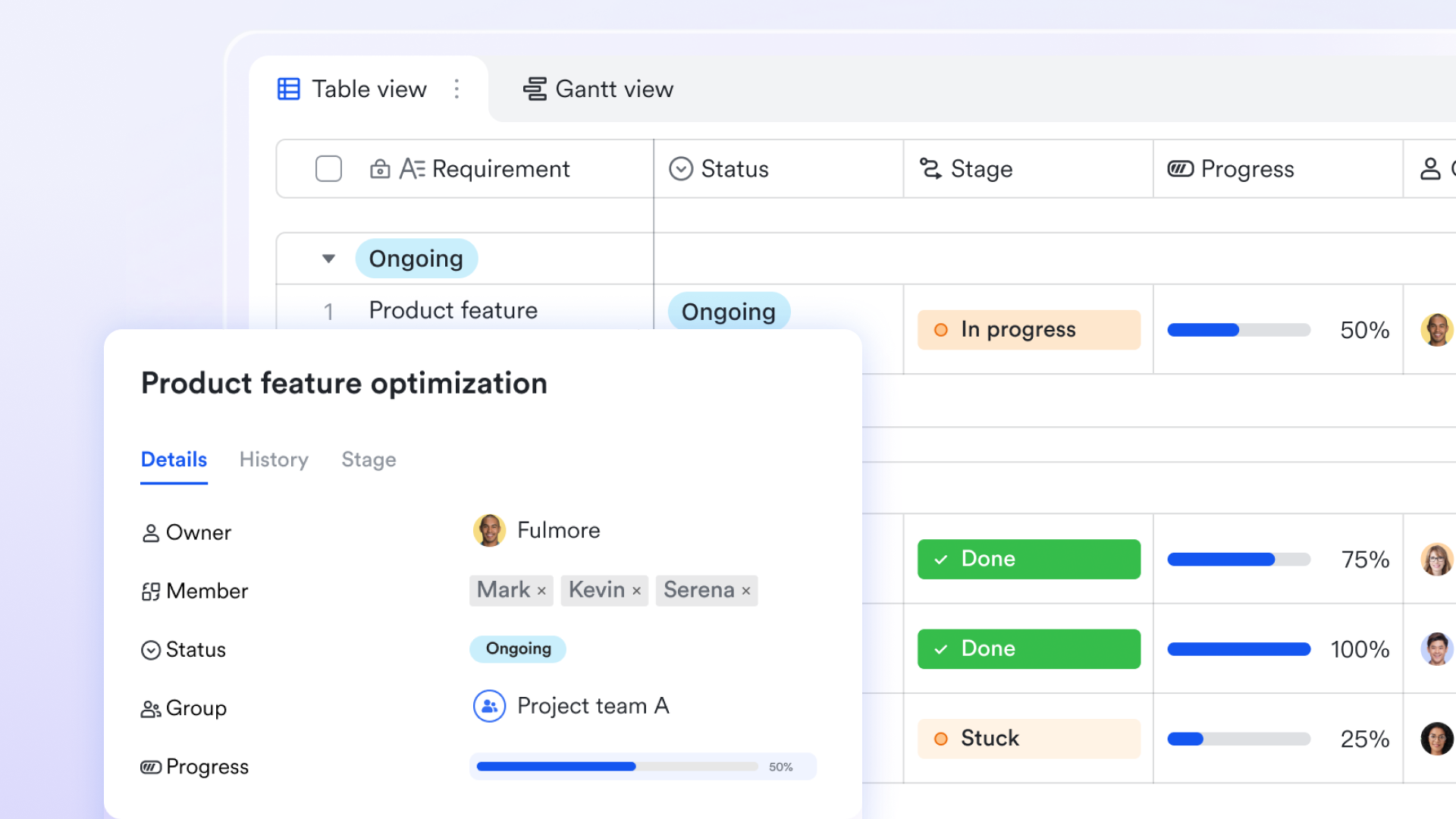
Formula-driven logic at the record level (IF, IFS, MAP)
Lark Base applies formulas at the record level rather than at individual cells, which changes how logic behaves as tables grow. Functions like IF and IFS evaluate conditions such as task status, budget limits, or performance tiers consistently across all records. MAP formulas extend this approach by applying transformations across multiple values using a single rule. Because formulas are tied to fields, new records automatically follow the same logic. This reduces manual copying and long-term maintenance. 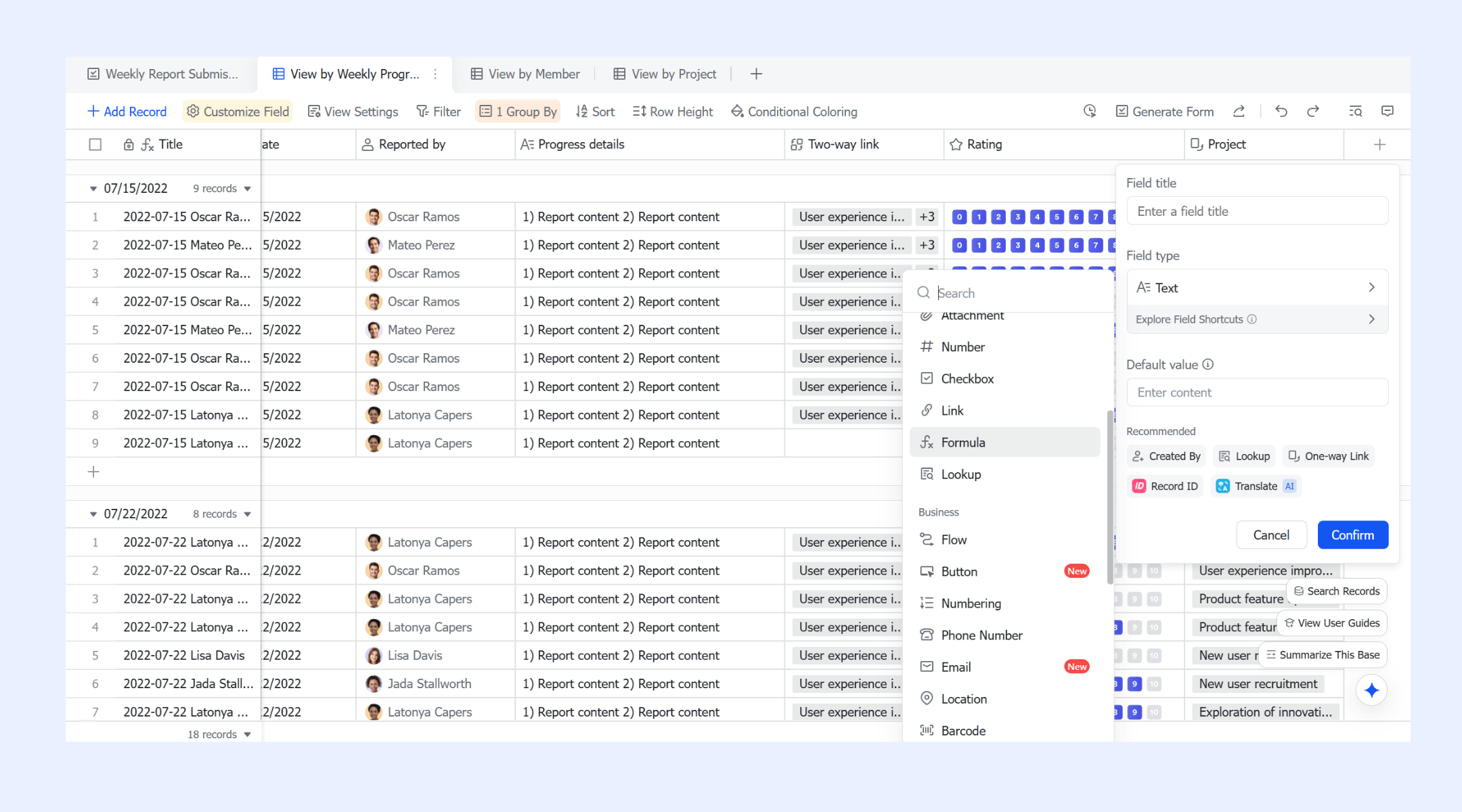
Automated workflows power up project management
Lark Base workflows automate project management by executing complex logic, such as automatically assigning tasks to specific team members based on project priority or category. You can create branching paths that route high-budget requests through multiple managers or trigger immediate alerts when a deadline is flagged as "Delayed." Additionally, workflows can manage recurring status reports or use loop nodes to update all sub-tasks simultaneously when a parent project phase is marked complete. These automated triggers ensure that project handoffs and communications happen instantly, maintaining a structured and efficient team rhythm without manual overhead. 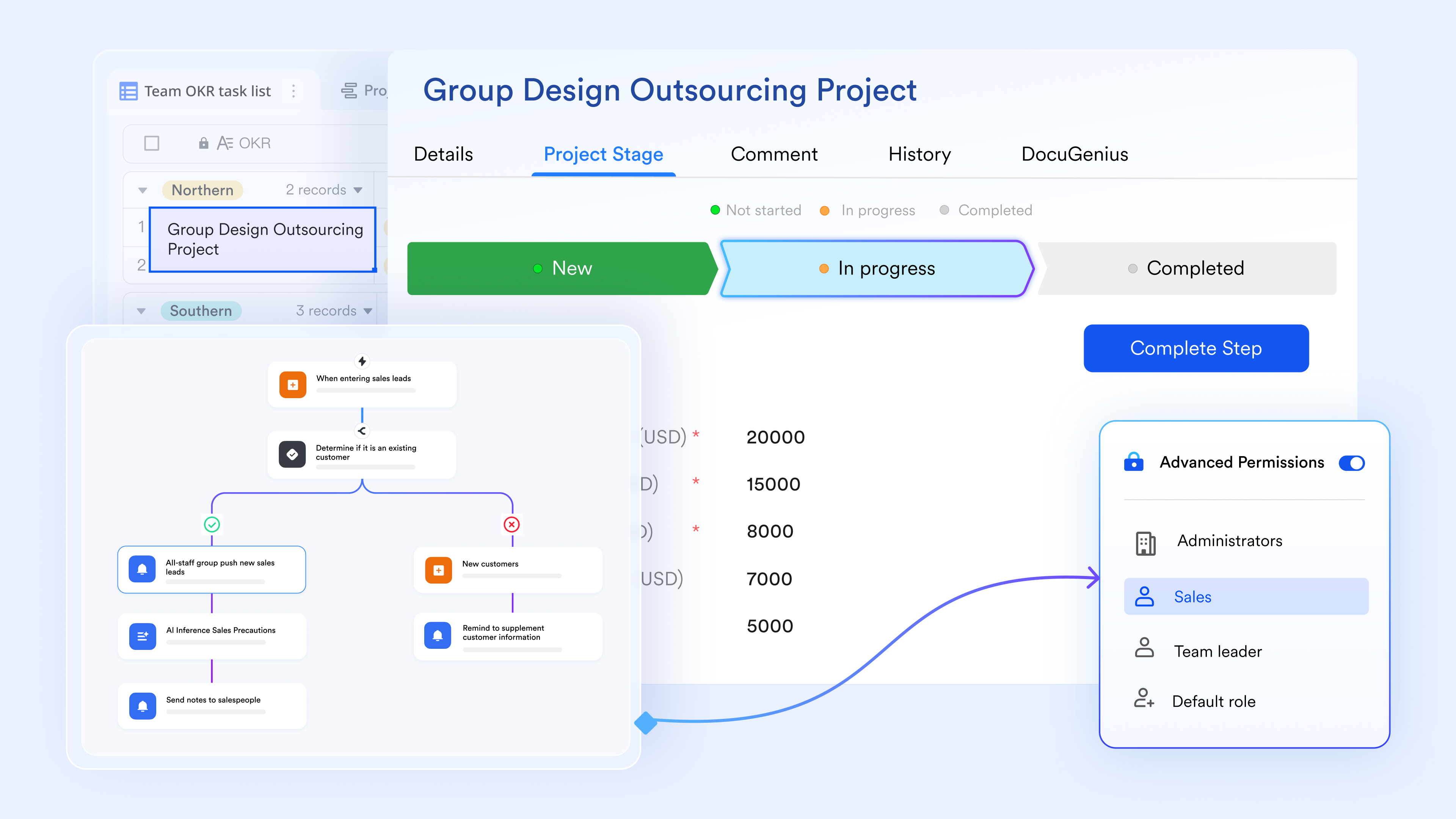
Interactive dashboards with filters and pivot tables
Lark Base dashboards turn structured data into interactive views for analysis. Filters and pivot tables allow users to explore metrics across multiple dimensions. Teams can drill down into underlying records directly from dashboards. Aggregations update automatically as data changes. This creates a shared, live reporting experience rather than static spreadsheet charts. 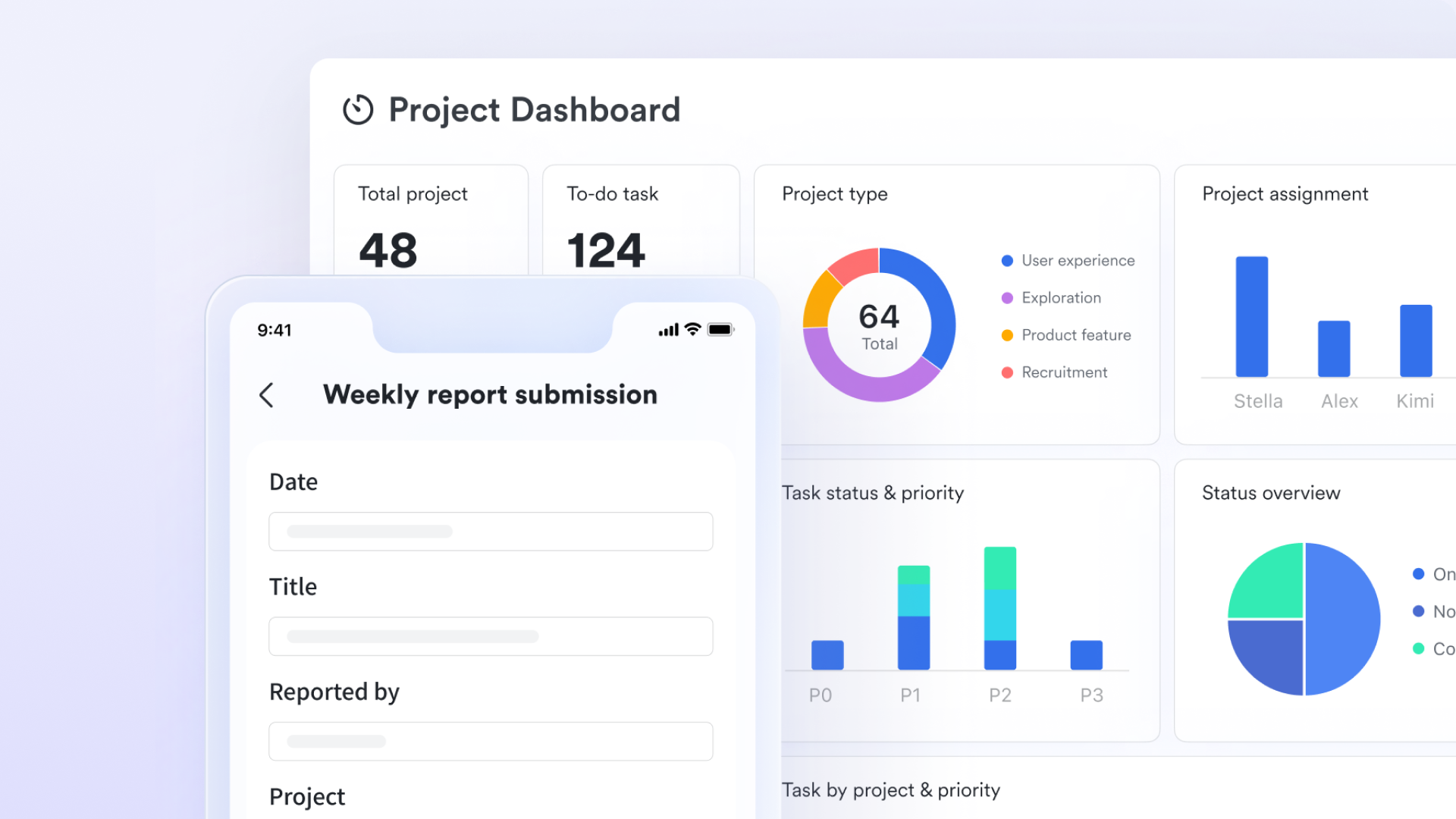
Scalable data handling with expandable row limits
As data volume increases, Lark Base supports controlled expansion up to two million rows per table. When limits expand, the underlying engine is upgraded automatically for better performance. Formula calculations run faster, and pages load more quickly. Advanced recovery features support long-term reliability. This makes Base suitable for large operational datasets that outgrow traditional spreadsheets. :
Lark's pricing plans cover the overall suite, providing an all-in-one ecosystem that includes Messenger, Mail, Calendar, Approval, Docs, Wiki, Meetings, OKR, and so on. The "plans" are not just for a single tool but for the overall suite. This means your Base tables and workflow are natively connected to the overall system.
- Starter plan: Free forever plan that includes 11 powerful tools for up to 20 users. It also comes with 100GB of storage, 1000 automation runs, AI translations, and more.
- Pro plan: $12/user/month (billed annually) for up to 500 users. It includes everything in Starter plus group calling for up to 500 attendees, 15TB of storage, 50,000 automation runs, and more.
- Enterprise plan: for custom pricing. Supports unlimited users and includes even more automation runs and advanced security, compliance, and management features.
For small teams with simple communication needs

18 months message history
1000 Base automation runs/month
2000 rows per table in Base
Most POPULAR
For companies with comprehensive collaboration and management needs
Unlimited message history
500-participant video meetings
50k Base automation runs/month
20k rows per table in Base
For large companies with advanced security and organizational management needs
Get a personalized demo and pricing
Unlimited message history
500-participant video meetings
15 TB storage + 30 GB storage/user
500k Base automation runs/month
50k Base automation runs/month
Most POPULAR
For companies with comprehensive collaboration and management needs
Unlimited message history
500-participant video meetings
50k Base automation runs/month
20k rows per table in Base
Ready-to-use Lark project management templates
offers ready-made project management templates that help teams move beyond spreadsheet-based tracking while keeping workflows familiar. These templates are especially useful for teams transitioning from a Google Sheets project management template, as they preserve table-based thinking while adding structure, automation, and collaboration.
Multi-project tracker template
Centralize multiple workstreams into a single dashboard to maintain high-level visibility across different departments or clients. This template allows you to monitor progress, health status, and owner accountability for every project in your portfolio simultaneously. It replaces the need for disparate sheets by linking sub-tasks to master projects for real-time reporting.
Task management template
Streamline daily operations by organizing work by priority, owner, and due date with automated reminders to replace manual follow-ups. Users can switch between to visualize their workload according to their personal preference. The built-in automation ensures that no deadline is missed by sending instant notifications to owners when a task is overdue.
Project roadmap chart template
Track and milestones visually while maintaining a structured data table for all task details and dependencies. The interactive Gantt view allows project managers to drag and drop dates to adjust schedules, which automatically updates the underlying spreadsheet data. This is ideal for long-term planning where understanding the critical path is essential for successful delivery.
Product development progress management template
Manage from ideation to launch with dedicated fields for requirement tracking, versioning, and stakeholder approvals. This template bridges the gap between technical teams and product managers by providing a shared space for documentation and progress updates. It includes pre-configured workflows to move features through development, testing, and release stages.
Kanban Board Template (with AI)
Streamline workflows using visual cards that automatically update a central master spreadsheet as they move through various production stages. This template leverages AI to summarize task descriptions or categorize tickets based on their content, reducing manual data entry for the team. It is perfect for agile teams that need a flexible, highly visual way to manage their continuous work cycles.
Design project management template
Centralize creative assets, feedback, and deadlines in a high-visibility table designed specifically for the unique needs of creative teams. The template supports large image previews and file attachments, making it easy to review drafts and provide feedback directly within the record. It helps creative leads manage resource bandwidth and ensure that brand standards are met across all design requests.
Employee task tracker template
Monitor individual workloads and task completion rates to ensure balanced resource allocation and prevent burnout across the entire team. Managers can use the dashboard to identify who is over-capacity and who has the bandwidth to take on new initiatives. This spreadsheet-based approach makes more objective by providing a clear history of completed work and contributions.
Project problem tracker template
Log, categorize, and resolve project blockers or bugs with a structured issue-management spreadsheet that tracks time-to-resolution. It allows teams to assign severity levels to issues and notify relevant technical staff automatically when a "High" priority bug is logged. This template ensures that no bottleneck goes unnoticed and provides a historical log of how past problems were solved.
OKR management template
Align team tasks with high-level objectives and key results using linked records that provide transparency into how daily work drives company goals. This template allows every employee to see the connection between their specific tasks and the broader strategic vision of the organization. It simplifies the quarterly review process by automatically aggregating progress from individual key results into the main objective.
Marketing content calendar template
Plan and manage multi-channel content schedules with unified views for both deadlines and campaign assets across social media, blogs, and email. The calendar view provides a clear look at the publishing cadence, while the spreadsheet view allows for detailed tracking of SEO keywords and performance metrics. It facilitates seamless collaboration between writers, editors, and social media managers in one unified workspace. Google Sheets vs. Lark: When to make the switch
Google Sheets works well when projects are small, updates are infrequent, and collaboration remains lightweight. A project management template Google Sheets setup is usually enough for , simple timelines, and basic reporting. However, as teams grow, spreadsheets begin to require more manual upkeep. Version control, permission management, and reporting accuracy become harder to maintain consistently.
The switch often happens when spreadsheets start slowing work down instead of supporting it. Teams look for better structure, automation, and connected data without losing flexibility. This is where platforms like Lark come into consideration. Lark supports spreadsheet-style thinking while adding databases, automation, and collaboration features that scale more naturally as projects and teams expand.
Conclusion
Google Sheets remains a practical starting point for project management. A project management spreadsheet template Google Sheets approach offers flexibility, accessibility, and zero cost. For small teams and simple projects, these benefits often outweigh the limitations. Templates help teams develop structure before committing to dedicated tools.
Over time, scaling introduces friction. builds on familiar spreadsheet logic while adding . Choosing the right path depends on how complex your work becomes and how long spreadsheets can realistically support it.
Design projects that scale smoothly
FAQs
Are Google Sheets project management templates free to use?
Yes, most Google Sheets project management templates are free to access and copy. A free Google Sheets project management template usually includes task lists, basic timelines, and simple status tracking. These templates rely on standard spreadsheet features rather than built-in . Teams can start using them immediately without setup costs. As needs grow, some teams later look at platforms like Lark for added structure.
What are the limitations of using Google Sheets for project management?
Google Sheets lacks native automation and relational data features. A project management template in Google Sheets becomes harder to maintain as task volume and dependencies grow. Teams often rely on manual formulas and duplicated sheets. Reporting accuracy can decline over time. This is where teams may gradually explore tools such as Lark that offer more structure.
Can Google Sheets handle large or complex project data?
Google Sheets can handle large datasets, but performance often declines as complexity increases. A project management Google Sheets template with many formulas requires careful maintenance. Load times and recalculations can slow down noticeably. Errors become more likely as data grows. Some teams later turn to platforms like Lark for better scalability.
Which Google Sheets project management template is best for small teams?
Simple task lists and Kanban-style layouts work best for small teams. A free Google Sheets project management template with minimal formulas reduces maintenance effort. Clear ownership and basic status tracking are usually enough. Small teams value speed and clarity at this stage. As teams expand, like Lark may offer smoother scaling.
When should teams switch from Google Sheets to a dedicated project management tool?
Teams often consider switching when manual updates start consuming too much time. A project management spreadsheet template in Google Sheets can limit visibility as increases. Reporting and permissions become harder to manage consistently. At this point, teams look for solutions that grow with their workflows. Platforms like Lark are often evaluated as spreadsheets reach their limits.
Related reading






























