IT teams often face a breaking point where manual troubleshooting and alert fatigue overwhelm daily operations. Finding a reliable IT automation tool is no longer just about saving a few minutes; it is about orchestrating complex, cross-departmental workflows and significantly lowering your Mean Time To Repair (MTTR). In this guide, I will walk you through the top IT process automation software for 2026. We will look past the marketing noise to help you consolidate your toolchains, reduce shadow IT, and keep operations running smoothly without relying on heavy engineering resources.
Why specialized IT tools might be slowing down your resolution times
A prevalent misconception in enterprise IT is that a specialized software solution is needed for every new problem. While this appears logical, it often creates operational data silos and hinders efficient incident resolution. The industry standard of fragmented tools – where infrastructure monitoring, ticketing, and team communication reside in separate applications – forces teams to waste valuable time manually transferring context between them.
Consider the "swivel chair delay": when a critical server fails, an alert is generated. However, the operations engineer must manually copy alert details, switch to a separate communication app, find the correct channel, paste the context, and tag the on-call developer. Subsequently, the developer logs into a third system to update the ticket. This fragmented process wastes 10 to 15 minutes of crucial Mean Time To Resolution (MTTR) simply by shuffling information across disconnected platforms.
True IT automation demands a where alerts, data, and human communication coexist seamlessly. With a platform like Lark, you bypass this friction entirely. By piping infrastructure alerts directly into dedicated chat groups via custom bots, IT teams can dramatically reduce response times and collaborate on issue resolution instantly. When the toolchain is unified within a single workspace, the workflow manages itself, drastically improving MTTR.
What is an IT process automation (ITPA) tool?
An) tool acts as the central nervous system for your technical operations. While basic task automation handles repetitive, isolated actions—like deleting temporary files or scheduling a database backup—an ITPA platform orchestrates multi-step, cross-departmental workflows.
Modern ITPA software connects your underlying business applications, infrastructure monitoring, and human approval chains into a single cohesive process. The goal is to shift your operations from reactive firefighting to proactive orchestration. For example, instead of waiting for a new hire to request access to specific software, an ITPA platform can the moment the HR department adds the employee to the company directory, routing approval requests to the relevant managers and notifying IT to provision the licenses.
As businesses scale across hybrid environments, IT leaders need platforms that bridge the gap between technical infrastructure and non-technical business units. An effective ITPA tool reduces manual intervention while ensuring that data governance and security protocols remain intact across the entire organization.
Key features to look for in an IT automation platform
Selecting the right ITPA platform involves more than just checking boxes on a feature list. You need to ensure the system actually supports the way your enterprise teams work.
- No-code/low-code orchestration: Enterprise leaders should based on the "shadow IT prevention" metric. This measures how easily non-technical managers can adopt the platform to build their own custom workflows. When a tool requires deep coding knowledge, frustrated departments often buy unauthorized SaaS apps to get their work done. Platforms that offer accessible, zero-engineering logic builders prevent this sprawl.
- AIOps and automated root cause analysis (RCA): Modern platforms use machine learning to detect anomalies and identify cause-and-effect relationships between system events. This allows the software to parse massive amounts of log data and pinpoint the exact origin of a failure, surfacing actionable insights before a human ever touches the system.
- Unified collaboration channels: The best automation is invisible. Look for tools that sync system alerts directly into the team's primary workspace. Whether it is a messaging chat or a shared digital document, bringing the automated alert to where the team already works ensures rapid incident response.
- Cloud operations and FinOps visibility: A strong IT automation tool helps you track the financial impact of your technical operations. By aligning automated resource provisioning with cost , IT teams can ensure their technical decisions support broader business goals.
Optimize IT auto via Lark
Top IT automation tools compared for 2026
Evaluating IT process automation software requires looking past the marketing jargon to see how these platforms actually perform in daily operations. Based on core strengths, scalability, and workflow orchestration capabilities, here is my breakdown of the top tools to consider this year.
1. Lark: The unified hub for IT asset workflows
is a comprehensive platform designed for growing enterprises and remote teams. It aims to eliminate shadow IT by , document management, and into a single, unified workspace.
Lark approaches IT automation by addressing the human element first. Instead of forcing teams to jump between a ticketing portal and an enterprise chat app, Lark brings the automation directly to where employees already communicate. You can build custom bots and set up automated routing for IT requests without writing any code. Using Lark Base and the built-in Approvals system, an IT manager can quickly set up a hardware request form that automatically checks departmental budgets and pings the correct supervisor for sign-off right in their chat window.
Key features:
Intelligent AI agent node for autonomous task planning
At the heart of 's advanced automation lies the AI agent node, which enables intelligent, autonomous task planning and execution through large language models. This node features built-in memory, allowing it to parse previous chat history and understand context for more effective decision-making. IT teams can equip these agents with various tools (e.g., data extraction, message sending), and the agent will autonomously determine which ones to call based on instructions, automating complex IT tasks with intelligent foresight. 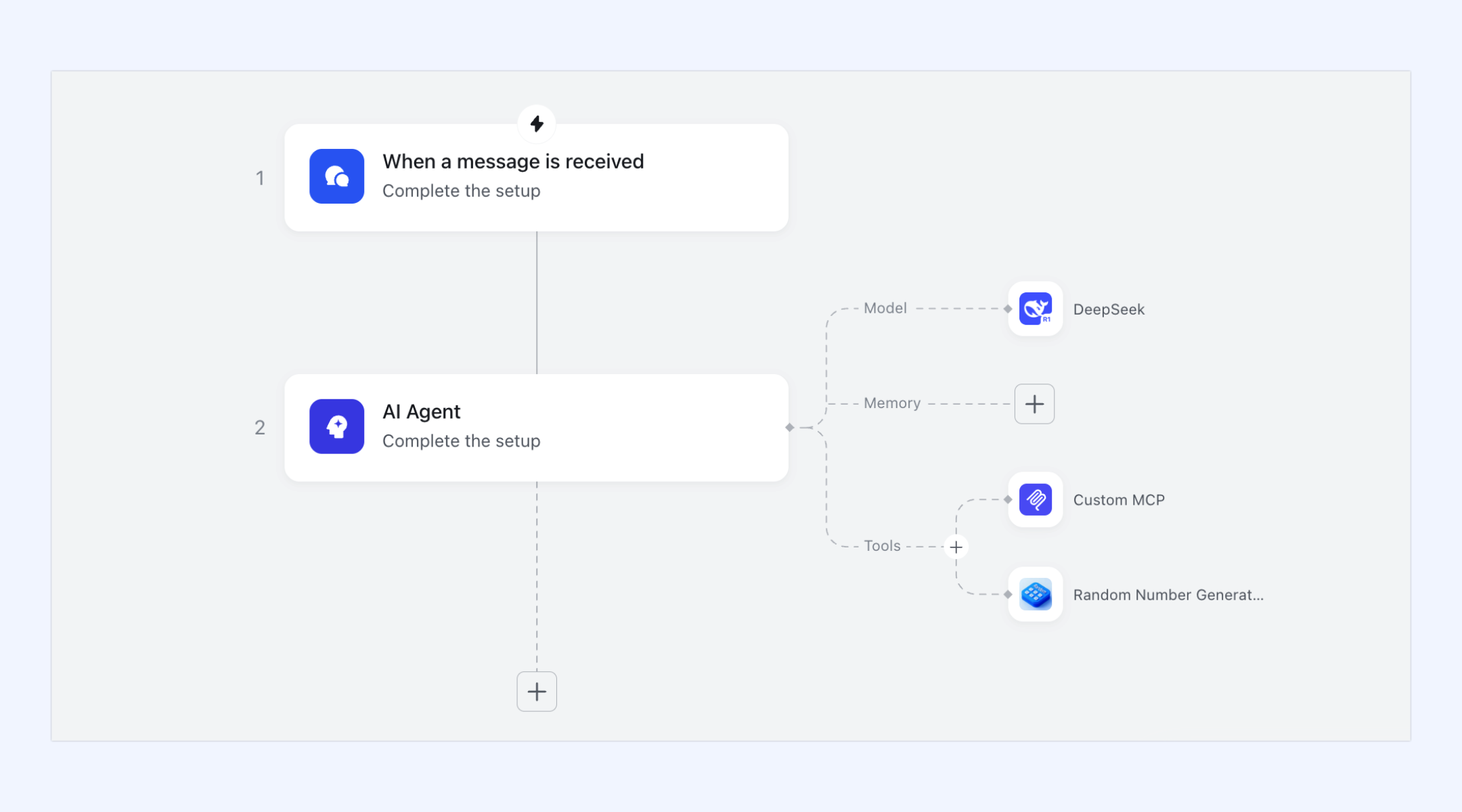
Automated, logic-driven approvals for enhanced efficiency
simplifies administrative bottlenecks by utilizing conditional branches to route requests. IT managers can set sophisticated rules: for instance, short leave requests might be auto-approved, while complex financial or critical access requests are routed through a multi-level hierarchy. These approvals are seamlessly integrated into , allowing managers to sign off on requests with one click directly from their chat interface, even on mobile. This ensures business processes, particularly IT-related ones, do not stall due to manual delays. 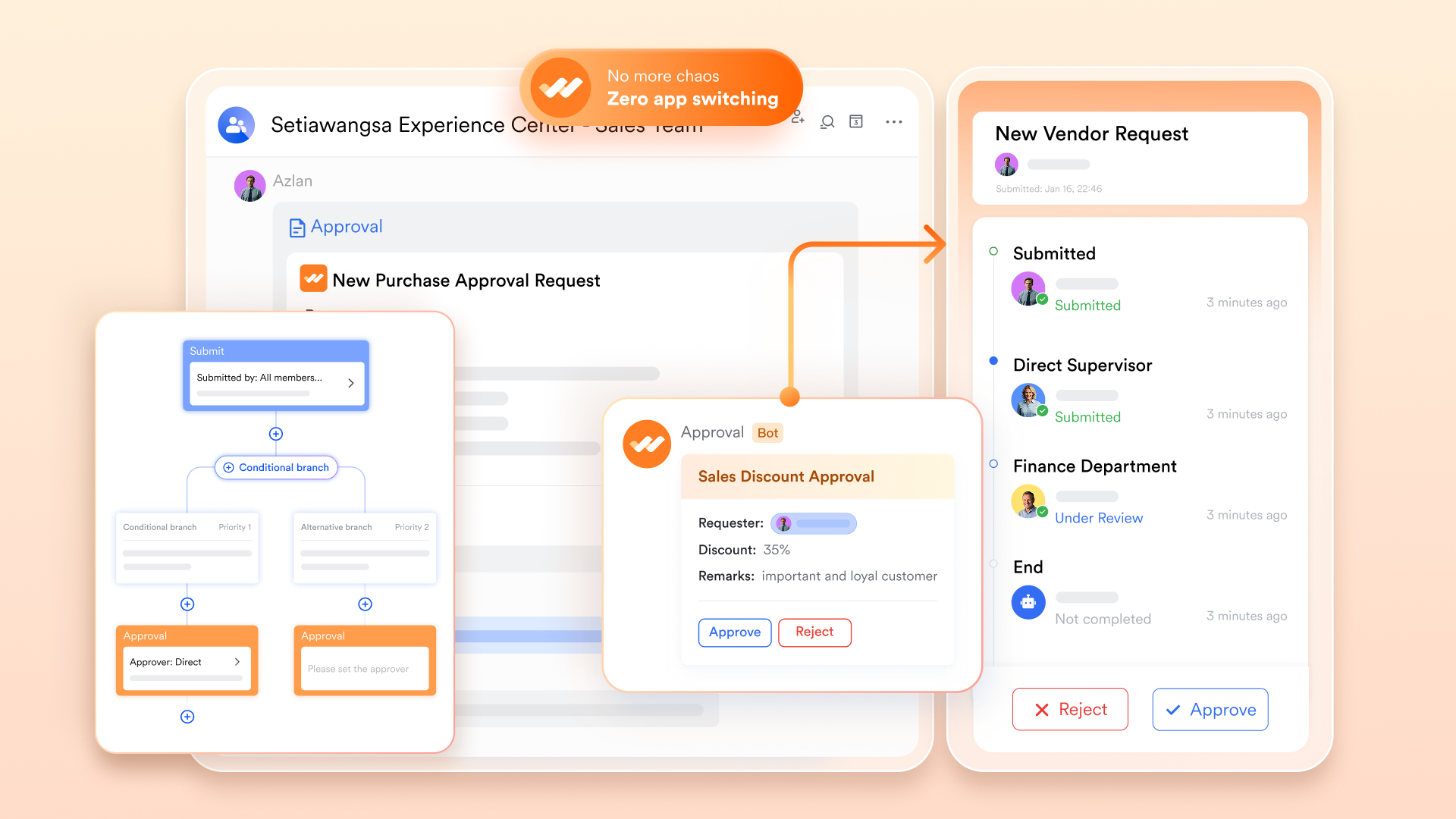
Lark AnyCross for intelligent cross-app integration
Lark AnyCross is a powerful combined engine that seamlessly connects Lark to thousands of external applications such as Salesforce, Jira, or SAP, which are critical to IT and business operations. This enables IT teams to build sophisticated automation workflows where data from external systems intelligently triggers actions within Lark. For example, a new deal in Salesforce can automatically create a dedicated group chat in Lark, generate a project Wiki, and schedule a kick-off meeting in for the relevant team. This intelligent cross-app functionality ensures IT processes are fully integrated with the broader enterprise ecosystem. 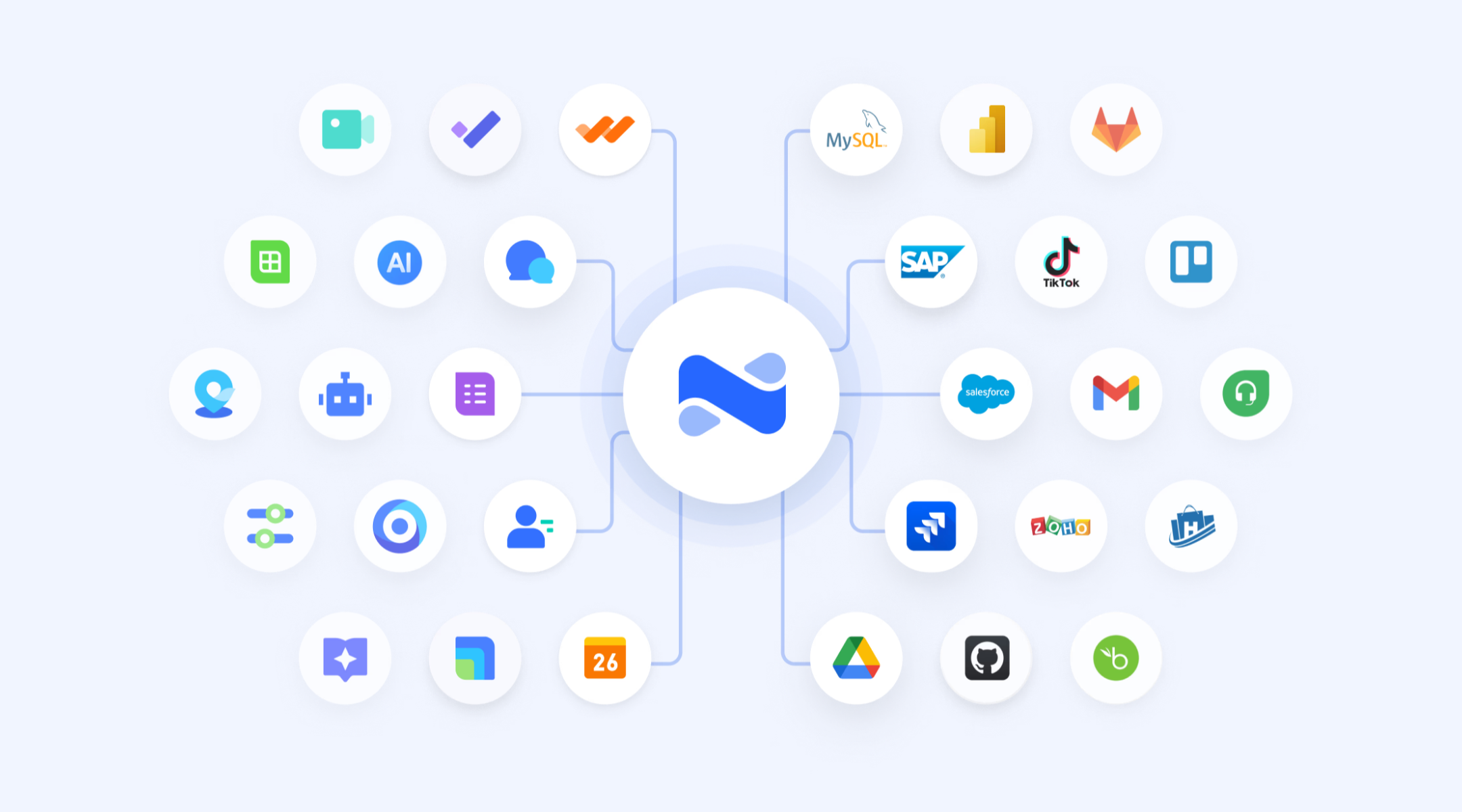
Pros:
- Replaces fragmented toolchains by combining chat, video, docs, and automation into an all-in-one suite.
- via Lark Base empowers non-technical managers to build their own automated pipelines.
- Generous free tier includes substantial storage and automation capabilities right out of the box.
Cons:
- Initial configuration of complex database automations takes a short learning period.
:
- Starter plan: that includes 11 powerful tools for up to 20 users. It also comes with 100GB of storage space, 1000 automation runs, AI translations, and more. No credit card needed.
- Basic plan: (billed annually) for up to 500 users. It includes everything in Starter and unlimited message history, 5TB of storage space, 1,000 automation runs, and more. Some users may need to to purchase this plan.
- Pro plan: (billed annually) for up to 500 users. It includes everything in Basic plus group calling for up to 500 attendees, 15TB of storage space, 50,000 automation runs, and more.
- Enterprise plan: for custom pricing. Supports unlimited users and includes even more automation runs and advanced security, compliance, and management features.
For small teams with simple communication needs

18 months message history
1000 Base automation runs/month
2000 rows per table in Base
Most POPULAR
For companies with comprehensive collaboration and management needs
Unlimited message history
500-participant video meetings
50k Base automation runs/month
20k rows per table in Base
For large companies with advanced security and organizational management needs
Get a personalized demo and pricing
Unlimited message history
500-participant video meetings
15 TB storage + 30 GB storage/user
500k Base automation runs/month
50k Base automation runs/month
Most POPULAR
For companies with comprehensive collaboration and management needs
Unlimited message history
500-participant video meetings
50k Base automation runs/month
20k rows per table in Base
2. Celigo: Business process orchestration for cloud applications
Celigo is an integration platform as a service (iPaaS) that excels at orchestrating complex business processes across various cloud applications. It's particularly suited for operations leaders who need to connect disparate systems without extensive engineering resources.
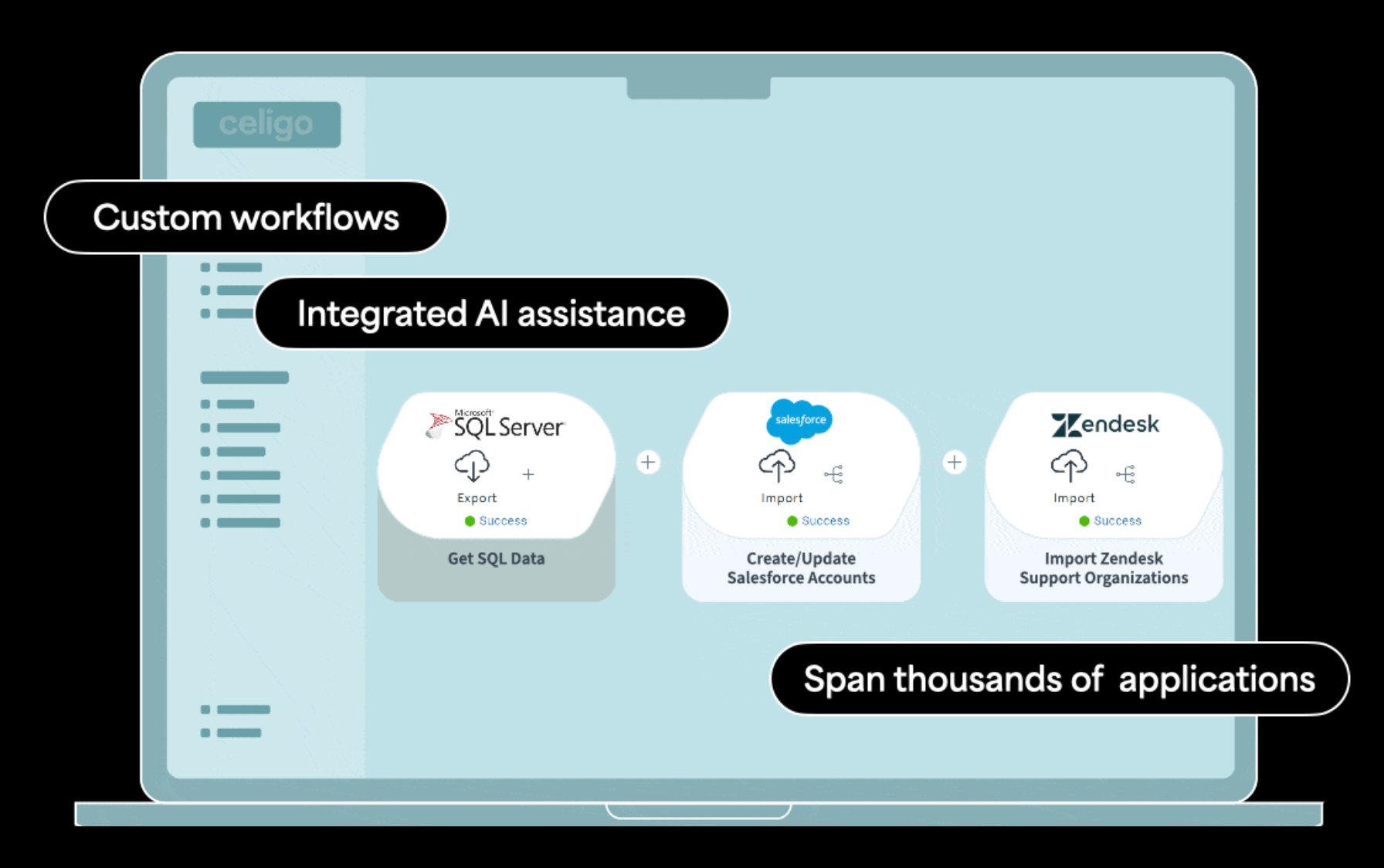
Image source: celigo.com
Celigo shifts the focus from isolated task execution to broad process orchestration. It excels at linking different business applications together, ensuring data flows smoothly between departments like HR, Finance, and IT. By utilizing a low-code/no-code design environment, Celigo empowers business users to build automated data pipelines, minimizing manual data entry and reducing human error across cross-functional operations.
While it is exceptionally strong at bridging cloud software stacks (iPaaS), it leans heavily toward business process management. If your primary goal is deep technical observation of hybrid network hardware, you might find it over-indexed on business logic. But for syncing employee onboarding data from HR software directly into IT provisioning pipelines, it connects the dots effectively.
Pros:
- Strong focus on connecting disparate cloud applications into unified, cross-departmental workflows.
- Low-code environment lowers the barrier to entry, allowing business leaders to manage their own automation.
- Built-in data governance features maintain security and compliance across automated tasks.
Cons:
- Primarily focused on business app orchestration rather than deep, technical IT infrastructure monitoring.
- The platform can become complex to manage as the number of endpoint connections scales up.
Pricing & Free Plan:
- Custom Pricing: Contact sales for quote. No public free plan.
3. ScienceLogic: Automated root cause analysis for hybrid IT
ScienceLogic is a specialized platform for DevOps and SRE teams managing complex hybrid IT environments. It provides automated root cause analysis to significantly reduce incident response times.
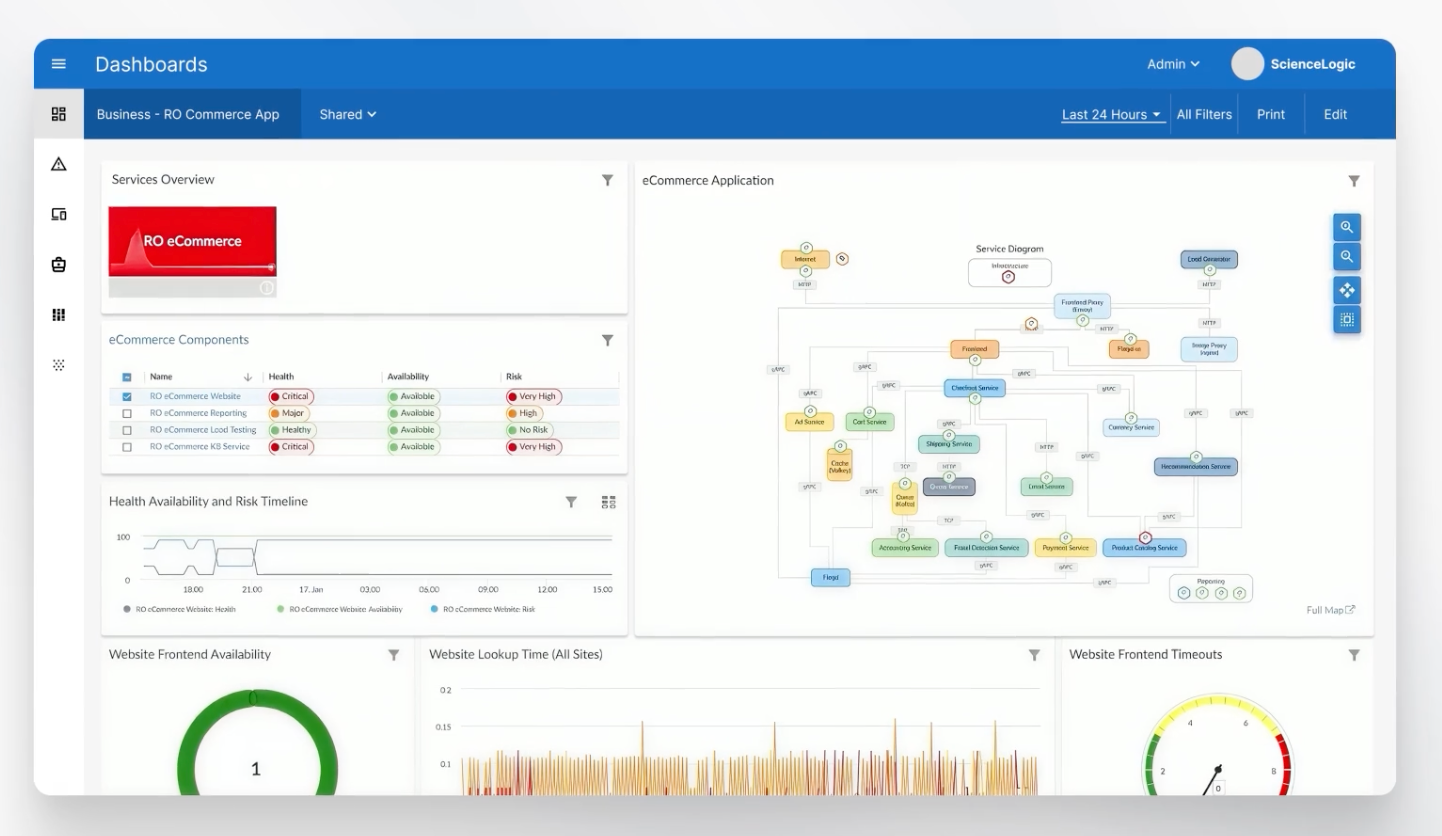
Image source: sciencelogic.com
When managing multi-cloud or hybrid environments, manual troubleshooting quickly becomes a severe bottleneck. ScienceLogic tackles this by applying machine learning to detect anomalies and correlate events, identifying cause-and-effect relationships before human operators even notice a problem. Their Skylar Automated RCA tool specifically parses massive amounts of log data to pinpoint exact failure points, dramatically lowering MTTR.
The interface and capabilities are highly technical, built specifically for IT operations professionals. It consolidates various IT monitoring functions into a single operational view. However, this deep technical focus means non-IT staff cannot use it for daily business workflows, making it a highly specialized infrastructure tool rather than a general enterprise productivity platform.
Pros:
- Advanced machine learning automatically correlates system events to find root causes accurately.
- Skylar RCA significantly reduces MTTR in massive, complex hybrid setups.
- Consolidates fragmented technical monitoring dashboards into a single operational view.
Cons:
- Highly technical interface requires specialized IT knowledge to operate and configure effectively.
- Does not cover non-technical business workflow orchestration.
Pricing & Free Plan:
- Standard: From $5 USD Per device/month
- Advanced: From $6 USD Per device/month
- Custom Pricing: Request custom quote.
4. IBM IT automation solutions: Enterprise-grade automation for scale
IBM provides an extensive, enterprise-grade automation suite tailored for massive organizations. It prioritizes FinOps, cloud resilience, and Site Reliability Engineering (SRE) efficiency at a grand scale.
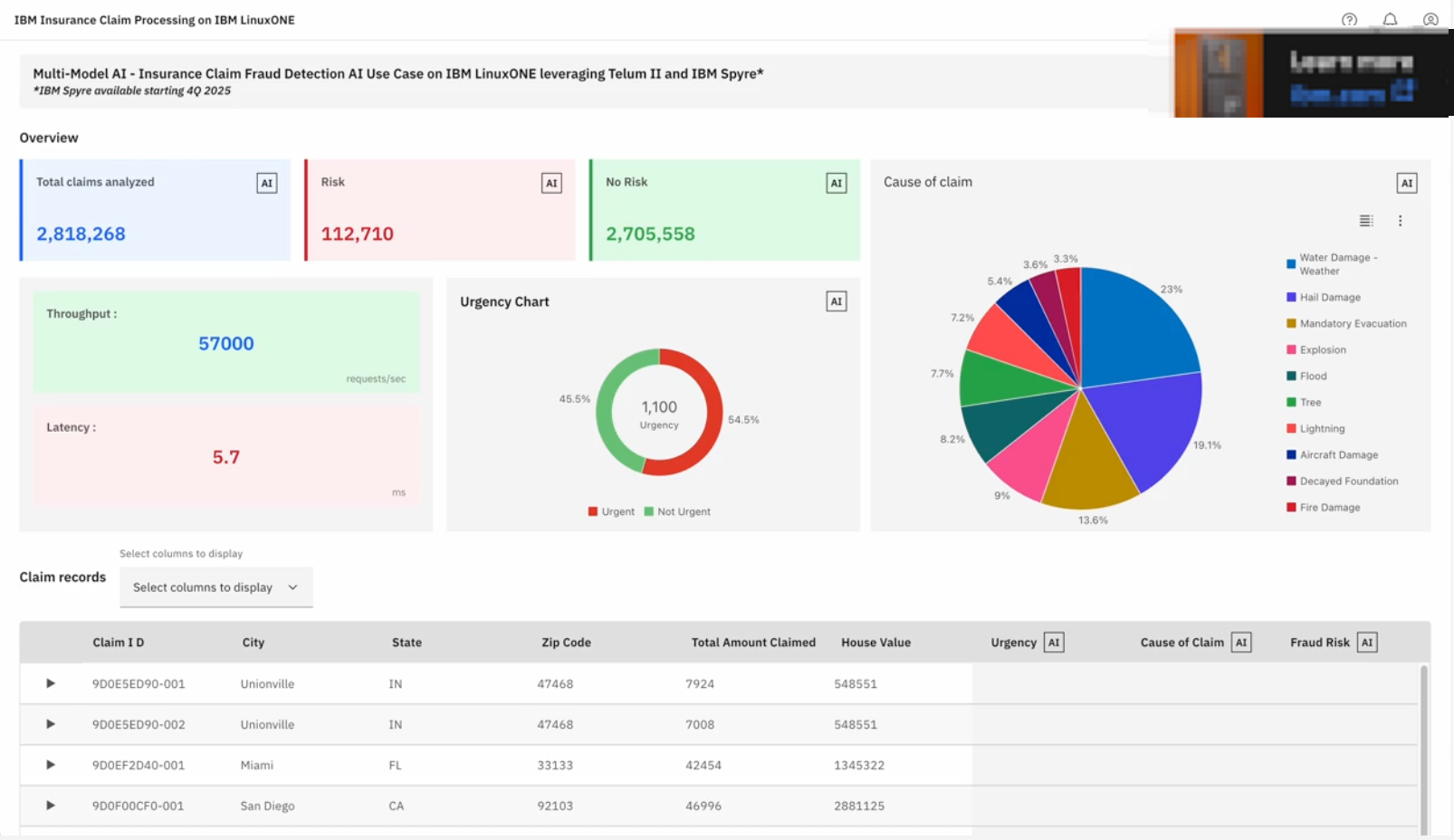
Image source: ibm.com
IBM frames IT automation squarely around business value and financial alignment. Their solutions connect cloud operations with application delivery, giving SRE teams the real-time visibility needed to focus on high-value tasks rather than manual maintenance. A standout capability is their intelligent cost management (FinOps), which helps IT leaders align their technical infrastructure decisions directly with concrete financial goals.
As expected from IBM, the platform is geared toward large-scale enterprise architecture, as evidenced by deployments at organizations like Transport for London. This means implementation is a major project, often requiring internal architectural transformation. Mid-level managers looking for a quick, deployable process automation tool will find this suite too heavy and complex for fast, nimble adoption.
Pros:
- Strong emphasis on FinOps ensures IT automation aligns with financial reporting and cost controls.
- Excellent track record handling massive, high-stakes deployments in highly regulated sectors.
- API-driven automation effectively manages complex, multi-cloud enterprise architectures.
Cons:
- Extremely heavy enterprise deployment process that takes considerable time, budget, and resources.
- Overkill for mid-market companies needing quick, everyday process orchestration.
Pricing & Free Plan:
- Custom Enterprise Pricing: Contact sales for quote.
5. Workato: AI-powered workflow orchestration for cross-functional teams
Workato is an advanced automation platform ideal for cross-functional enterprise teams that need to orchestrate complex workflows across IT, HR, and finance. It distinguishes itself by utilizing role-based AI agents to manage complex business logic rather than just moving data between applications.
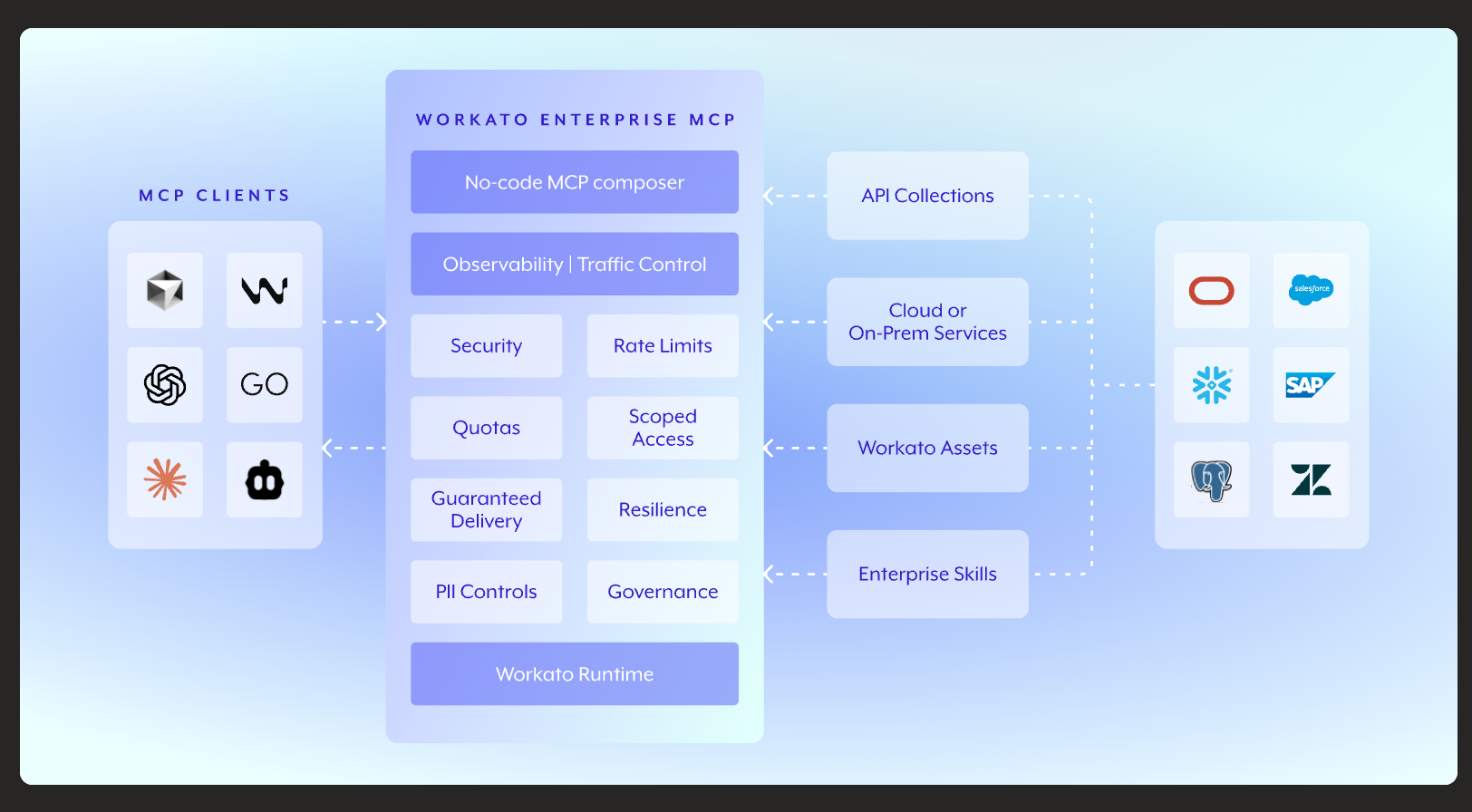
Image source: workato.com
Workato goes beyond simple task triggers, acting as an orchestration layer for entire business processes. For example, their ITGenie AI assistant can handle internal operations directly within Slack. When a new hire requests database access, the system does not simply forward an email; it checks HR records, reviews company policies, offers secure alternatives, and automatically creates a ticket for final approval.
The platform relies on its Agent Studio to let users build AI bots that take real actions based on company data. You retain tight control over logic, access rights, and escalation paths. However, setting up these advanced features requires navigating somewhat sparse documentation, and reaching customer support can take longer than expected during critical deployments.
Pros:
- GenAI agents manage actual business actions instead of just answering chat queries.
- Flexible design environment easily handles human approval routing and escalations.
- Built-in role recognition speeds up employee onboarding and IT access provisioning.
Cons:
- Customer support response times can be sluggish for complex technical issues.
- Documentation lacks sufficient depth for configuring the more advanced AI features.
Pricing & Free Plan (As of late 2023/early 2024):
- Custom Pricing: Contact sales for quote. No public free plan.
6. Zapier: Simple, no-code automation for everyday apps
Zapier is a popular integration tool designed for solo operators, marketers, and non-technical managers seeking zero-code connections between everyday applications. It is renowned for its vast ecosystem of pre-built templates, enabling workflow creation in minutes.
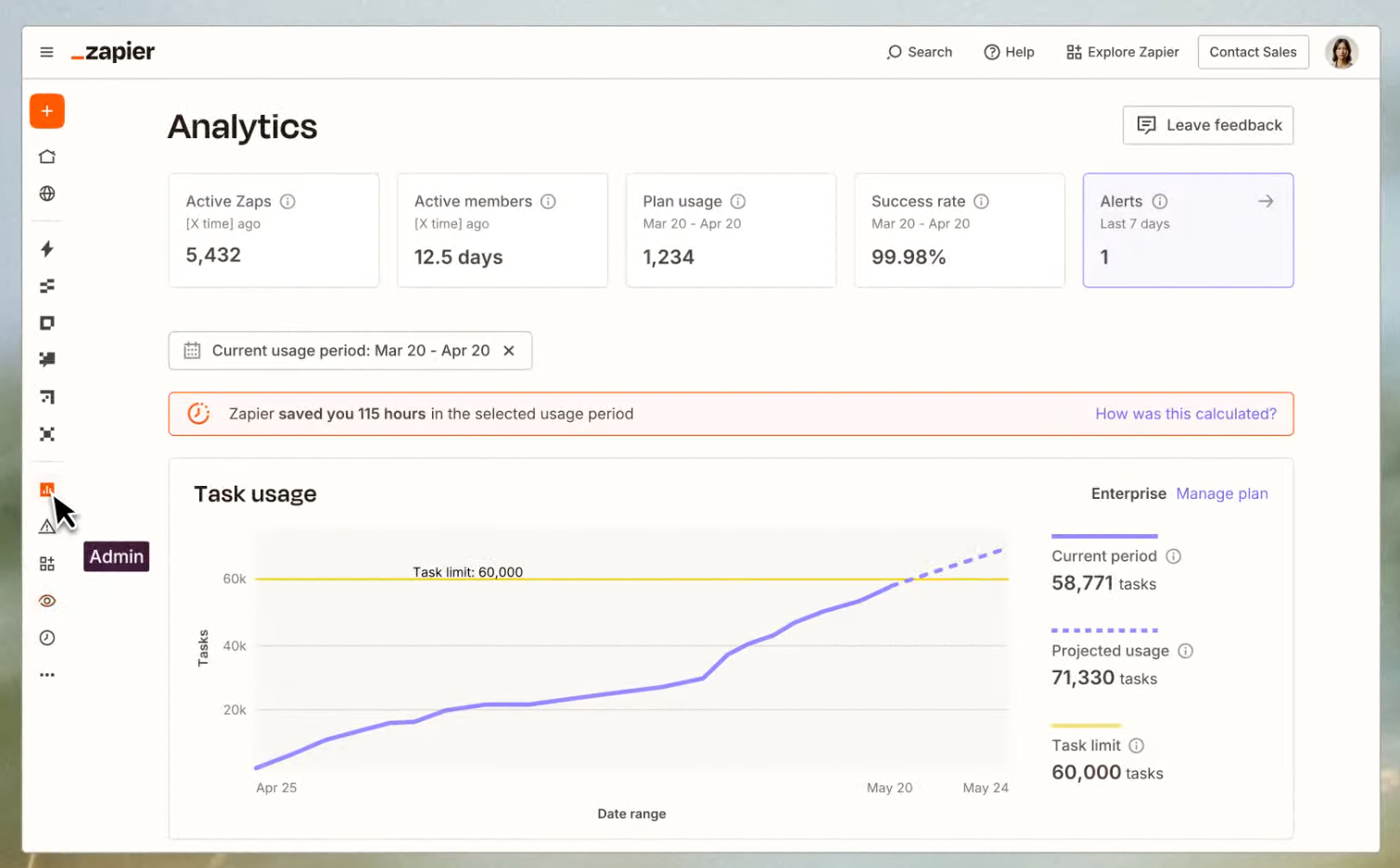
Image source: zapier.com
If you need a fast way to sync form submissions to a CRM or automatically send follow-up emails, Zapier is the industry standard. Users simply choose their apps, define a trigger, and let the platform manage the rest. Recently, they added an AI assistant that builds workflows from plain-language prompts—you just type "when someone fills out a form, send a thank you email," and the system constructs the flow automatically.
Zapier connects with over 7,000 different software applications, making it incredibly versatile for lightweight automation. They also introduced Zapier Tables, allowing users to manage structured data like a lightweight database to run auto-calculations. However, if an underlying API changes, Zaps can break without warning, and high-volume, multi-step operations can cause costs to skyrocket.
Pros:
- Massive library connecting over 7,000 applications out of the box.
- Zero-code interface allows anyone to build basic automated routines instantly.
- AI assistant helps construct workflows simply by typing plain-language prompts.
Cons:
- Pricing spikes dramatically when scaling up to multi-step or high-volume tasks.
- Changes to third-party APIs can cause sudden, hidden errors in your active workflows.
Pricing & Free Plan:
- Professional Plan: $19.99/month.
- Enterprise: contact sales.
7. n8n: Developer-first automation with granular API control
n8n is a powerful automation tool primarily for technical teams and developers who desire complete, self-hosted control over their automation logic. It offers API-level flexibility without the typical bloat of traditional enterprise platforms.
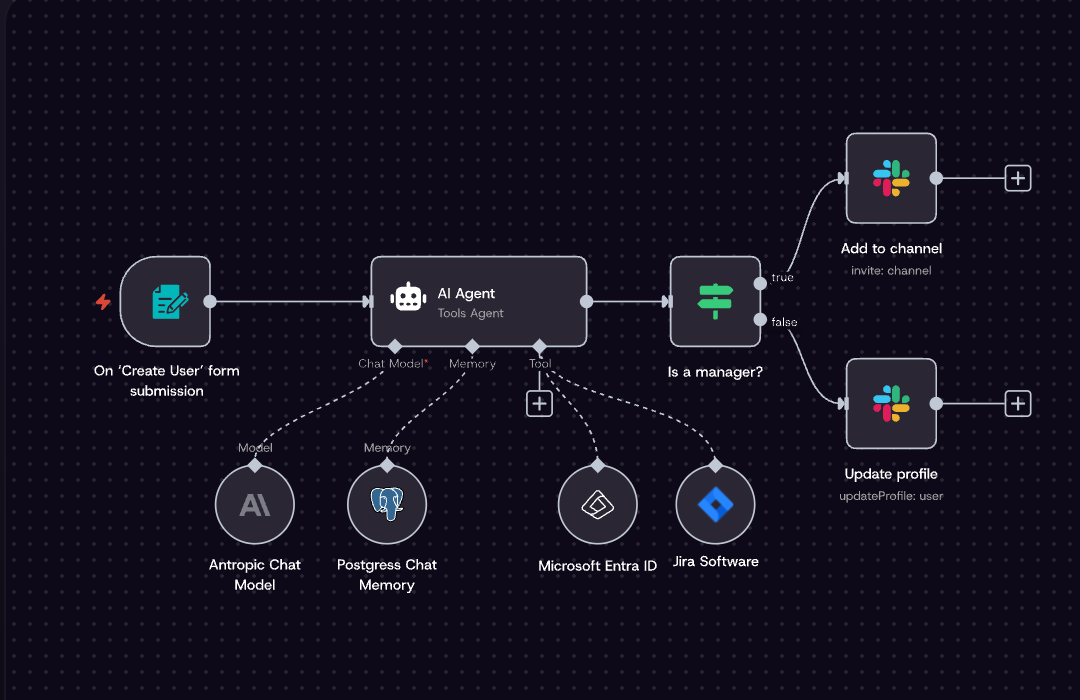
Image source: n8n.io
n8n takes a developer-first approach to process automation. Instead of relying purely on restrictive no-code templates, it allows users to connect APIs, utilize conditional logic, and manage webhooks manually. You can build advanced sequences using HTTP requests, custom headers, and JSON parsing all within a visual drag-and-drop interface.
Because it is built on an open-source foundation, organizations can self-host the platform to maintain strict data privacy, or opt for the managed cloud version. The system handles high-frequency automations easily and allows for programmatically triggered workflows. However, the UI can slow down when processing massive workflow maps, and beginners will find the technical requirements intimidating.
Pros:
- Open-source foundation provides excellent self-hosting and data privacy options.
- Offers granular API control, custom webhooks, and advanced JSON parsing.
- Includes highly searchable execution logs to quickly troubleshoot and filter errors.
Cons:
- The visual interface suffers performance dips when loading very large workflows.
- Documentation for newer app connections is often sparse or missing.
Pricing & Free Plan:
- Cloud Starter: $20/month.
- Cloud Business: $667/month.
8. BrowserStack: Real-device cloud for automated software testing
BrowserStack is an indispensable tool for development and QA teams. It facilitates running automated software tests across a wide range of real devices and browsers, effectively eliminating the need for physical device labs and significantly accelerating release cycles.
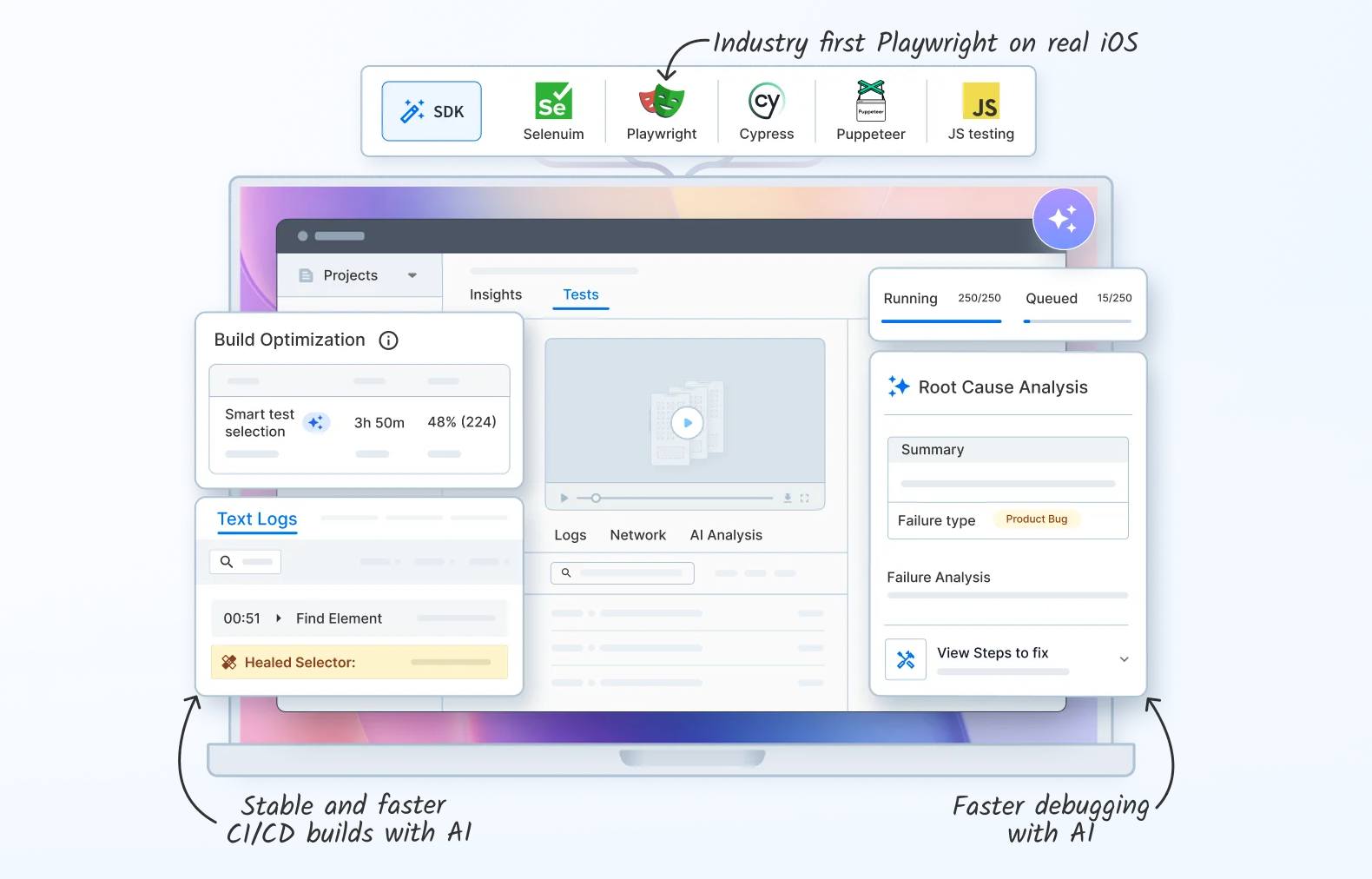
Image source: browserstack.com
Software automation goes beyond business processes; it also applies to continuous testing in CI/CD pipelines. BrowserStack provides access to a massive cloud of real mobile devices and desktop browsers. Instead of relying on software emulators—which often miss critical layout bugs—QA teams can run parallel automated tests on actual hardware.
The platform recently introduced AI-powered observability agents that detect failure patterns automatically. For example, if a test only fails during a specific maintenance window, the AI flags the environmental issue rather than labeling it a broken script. While it connects easily with Jenkins and GitHub Actions, smaller teams might find the restrictive free tier limiting for serious trial runs.
Pros:
- Access to a massive cloud of real, physical devices rather than software emulators.
- AI agents accurately categorize test failures into script errors, bugs, or network issues.
- Parallel execution capabilities cut test suite runtimes from hours down to minutes.
Cons:
- The free tier only offers 100 minutes per month, which burns out very quickly.
- Costs can become prohibitive for early-stage startups needing high concurrency.
Pricing & Free Plan:
- Team Ultimate: $375/month.
Step-by-step: Automating the IT service desk lifecycle
Let us walk through exactly what this looks like in practice. Instead of discussing abstract orchestration concepts, I will break down a common operational bottleneck: managing software access requests.
When an employee needs a new software license, relying on scattered email threads or disconnected ticketing portals slows everyone down. Here is how you can set up a frictionless, zero-engineering pipeline using Lark Base and its built-in approvals.
- Step 1: employee submits request via customized form. Employees directly submit a customized form within to request software access.
- Step 2: The system automatically routes the approval process. functionality automatically triggers an approval process based on predefined conditions (e.g., license type or department), routing the request to the appropriate approvers.
- Step 3: automated processing and record-keeping achieved. Once approved, all subsequent steps (such as notifying IT administrators for authorization, updating asset records) are executed automatically, significantly reducing manual intervention and accelerating processing speed.
This setup leverages the powerful automated workflows and conditional branching capabilities of Lark Base and approvals, ensuring smooth handling of software access requests and significantly boosting IT service desk efficiency.
Streamline your task workflows with Lark today
Choosing the right automation tool for financial services
Highly regulated industries cannot afford loose data pipelines or undocumented manual workarounds. In the financial services sector, an IT process automation tool must do more than just execute commands; it has to maintain a pristine, auditable trail of every action taken.
When evaluating tools for financial operations, prioritize platforms that emphasize strict data governance and compliance tracking. You need a system that enforces secure, automated record-keeping for every infrastructure change or access request. If a database goes down or a user requests elevated permissions, the software must log exactly who approved the action, when it happened, and what remediation steps the system applied.
Platforms that map their automated workflows directly to your cost management and FinOps dashboards also provide the financial visibility required to justify IT expenditures to regulatory bodies and internal auditors. By bridging technical operations with compliance standards, IT leaders can ensure their automation strategy aligns with enterprise risk management goals.
Conclusion
Moving away from fragmented toolchains toward unified, automated orchestration is the most effective way to lower your MTTR and eliminate shadow IT. Buying hyper-specialized software for every single problem only creates more silos. Instead, evaluate platforms that bring your alerts, data, and human communication into one shared workspace. , for instance, offers a comprehensive solution that integrates these critical elements. I encourage IT leaders to audit their current software stack and look for consolidation opportunities. By choosing tools with high cross-functional adoption rates, like Lark, you empower your entire enterprise to operate more efficiently.
Try Lark for free, no credit card needed
FAQs
What is an automation tool?
An automation tool is a software application designed to execute repetitive tasks, orchestrate complex workflows, or monitor network systems with minimal human intervention. By replacing manual effort with predefined logic or machine learning, these platforms help organizations increase operational efficiency, reduce human error, and free up employees to focus on high-value, strategic work.
What is the difference between task automation and IT orchestration?
Task automation handles single, repetitive actions, like scheduling a server reboot or deleting temporary files. IT orchestration manages complex, multi-step workflows that span across different departments and software systems, linking human approvals with technical execution.
What are the 4 pillars of automation?
While operational frameworks vary, the four core pillars of enterprise automation generally include:
Process discovery: Identifying which manual workflows and bottlenecks slow down your operations.
Task execution: Deploying software to handle single, repetitive actions reliably.
Workflow orchestration: Connecting multiple automated tasks across different departments to form a cohesive pipeline.
Continuous optimization: Using analytics and machine learning to monitor performance and refine those processes over time.
What are the top 10 automation tools?
The top tools span different categories based on their primary function. Based on industry presence and capabilities, ten notable options include:
1. Lark: Best for unified workspace and zero-engineering workflow orchestration.
2. Celigo: Leading platform for connecting business applications (iPaaS).
3. ScienceLogic: Top choice for hybrid IT monitoring and AIOps.
4. IBM: Enterprise-grade solution for SRE efficiency and FinOps.
5. UiPath: Powerful for robotic process automation (RPA).
6. Workato: Excellent for enterprise workflow orchestration.
7. Zapier: Popular for simple, user-friendly app connections.
8. Boomi: Strong contender in enterprise data orchestration.
9. Lindy: Emerging choice for personal, AI-driven task agents.
10. BrowserStack: Leading tool for automated software testing.
What's the best IT automation platform?
The best platform depends entirely on your organizational needs. If you want to consolidate your software stack and allow non-technical managers to build their own workflows, Lark is a highly effective choice. If you need deep hybrid network monitoring and machine learning for anomaly detection, ScienceLogic is a premier option. For massive, global enterprises prioritizing SRE alignment and cloud resilience, IBM provides a highly robust solution.
What's the top automation tool for IT monitoring?
For complex hybrid IT setups, ScienceLogic stands out due to its advanced AIOps capabilities. It specifically targets infrastructure monitoring by using machine learning to parse logs and pinpoint system failures automatically.
How does AI improve automated root cause analysis?
AI and machine learning process massive volumes of network data to spot anomalies and identify cause-and-effect relationships. This allows the software to highlight the exact origin of a problem before an operations engineer has to manually sift through system logs.
How do automation platforms connect with existing cloud environments?
Enterprise platforms rely on API-driven connections to link with multi-cloud and hybrid environments. This setup allows the automation software to pull real-time data, sync alerts, and execute commands across your existing infrastructure without needing to migrate your core databases.
Related Reading






























