We often get so bogged down in the granular details of execution—the daily tickets, the bug reports, the sub-tasks—that we lose sight of the big picture. This is where the project overview becomes your most valuable asset. It is not just another piece of administrative paperwork to file away. A well-crafted overview bridges the gap between high-level strategy and day-to-day execution, ensuring that everyone from the intern to the executive knows exactly where the ship is sailing and why.
In this comprehensive guide, we will move beyond the basics. We will explore what makes a project overview effective, how to write a project overview that secures immediate buy-in, and how to move away from static, dead documents to create dynamic, living summaries using modern collaborative like Lark.
What is a project overview?
At its core, a is a concise, high-level summary of a project’s critical information. It outlines the "what," the "why," and the "how" of a specific initiative without getting lost in the weeds of the "when" and "who" that characterize a detailed project plan. It serves as the landing page for your project, providing a snapshot that anyone in the organization can read in five minutes or less to understand the project's intent and status.
However, confusion often arises because the terminology in project management can be fluid. To write an effective overview, you must understand how it differs from other common project documents. It is distinct from , which is a formal request often used to secure funding or approval before a project begins. While a proposal is a "pitch," the overview is a "dashboard" or a "guide" that persists throughout the lifecycle.
Furthermore, a project overview is definitely not a project plan. A is a comprehensive, often massive document (or Gantt chart) that details every single task, dependency, and resource allocation. If the project plan is the detailed topographical map used by the hikers (the execution team), the project overview is the itinerary given to the travel agency (the stakeholders). It focuses on milestones and outcomes rather than daily checklists.
The primary goal of the project overview statement is and alignment. It translates complex technical requirements into business language. Whether you are launching a new software feature, organizing a company-wide conference, or restructuring a department, the project overview is the single source of truth that keeps the narrative consistent across the organization.
Drive stakeholder buy-in with visual data
Why every successful project needs an overview
You might be thinking, "My team is small and agile. Do we really need formal documentation?" The answer is a resounding yes. The absence of a clear project overview is often the root cause of project failure, manifesting as confusion, delays, and frustration. When you fail to define the basics, you invite chaos.
Ensures alignment among team members
The most critical benefit of a project management overview is alignment. In the early stages of a project, team members often have different interpretations of success. Marketing might think the goal is brand awareness, while Product thinks the goal is user retention. A written overview forces these assumptions into the open, ensuring everyone is on the same page before work begins.
Shields against scope creep
A strong project overview acts as a shield against scope creep—the silent killer of projects. Minor requests and "nice-to-have" features can gradually expand the , leading to missed deadlines and blown budgets. By clearly defining what is in scope and explicitly stating what is out of scope, your overview provides a reference point to refer back to when stakeholders attempt to add "just one small thing" later on.
Simplifies onboarding
Projects rarely have a static team from start to finish. New designers, developers, or consultants may join midway through. Without an overview, the must spend hours explaining the context to each new arrival. A comprehensive project overview enables self-service onboarding, allowing new team members to quickly read the document and grasp the project's history, goals, and constraints in just a few minutes.
Enhances executive visibility
Senior leaders manage of many projects and do not have time to sift through Jira tickets or detailed spreadsheets. They require a concise document that respects their time. A crisp project overview allows leadership to assess project health and progress at a glance, which is essential for maintaining their support and securing necessary resources.
Unite scattered project docs in one hub
Key elements of a winning project overview
A blank page can be intimidating. To create a project overview that is both informative and concise, you should build it around a standard framework. While every project is unique, the most effective overviews almost always contain the essential elements listed below. Including these key details ensures your document is robust.
Project aims and objectives
This is the heart of your document. It answers the question: "Why are we doing this?" However, vague aspirations like "improve performance" or "increase sales" are not enough. You must differentiate between outputs (what you build) and outcomes (what value is created).
Use the here. Goals and objectives should be Specific, Measurable, Achievable, Relevant, and Time-bound. Instead of "Launch a new website," a strong objective would be "Launch the redesigned e-commerce portal to reduce cart abandonment rates by 15% by Q3." This gives the team a clear metric of success to aim for. This section defines the project aims clearly.
Project scope and deliverables
Defining the project scope requires a delicate balance. You need to outline the boundaries of the work. This section should describe the specific deliverables you will produce. Equally important, but often overlooked, is the "Exclusions" or "Out of Scope" section.
Explicitly listing what you will not do is a power move in project management. If you are building a mobile app, explicitly stating that "tablet optimization is out of scope for Phase 1" prevents endless debates down the road. This clarity protects your task progress and manages stakeholder expectations from day one.
Timeline and project phases
In a project overview, you do not need a daily schedule. Instead, focus on high-level milestones. Think of these as the major chapters in your project's story. Key dates might include the kickoff, the completion of the design phase, the start of beta testing, and the final go-live date.
This bird's eye view helps stakeholders understand the general trajectory without overwhelming them. It is also helpful to highlight any critical project phases—external events or other projects that must finish before your milestones can be met. You need to set deadlines that are realistic.
Budget and resources section
Every project has a cost, whether it is direct financial spend or human capital. Your resources section should summarize the budget allocation and the key resources required. This doesn't need to be a line-item invoice, but it should give a ballpark figure of the investment.
This section serves as a reality check. If the objectives are massive but the list is thin, the discrepancy becomes immediately visible in the overview. It forces the conversation about resource allocation to happen early, rather than when the team is already burned out.
Key stakeholders and roles
Projects are done by people, for people. Your overview should list . Who is the executive sponsor (the person paying for it)? Who is the project manager? Who are the key representatives from different departments?
Using a framework like RACI (Responsible, Accountable, Consulted, Informed) can be helpful here, but for a general overview, simply listing the core project team and the primary decision-makers is usually sufficient. This ensures that if someone has a question about a specific domain, they know exactly who to contact.
Stop manually updating dead project timelines
Transforming your project overview with Lark
The traditional way of creating a project overview—typing it into a static word processor, saving it as a PDF, and emailing it to the project team—is fundamentally broken. The moment you hit "send," the document is dead. As soon as a timeline shifts or a requirement changes, that PDF becomes misinformation.
require living documents. This is where changes the game. Lark’s all-in-one collaboration suite allows you to create project overviews that are dynamic, interactive, and deeply integrated into your team's workflow. It provides the tools you need to succeed.
From static text to dynamic docs
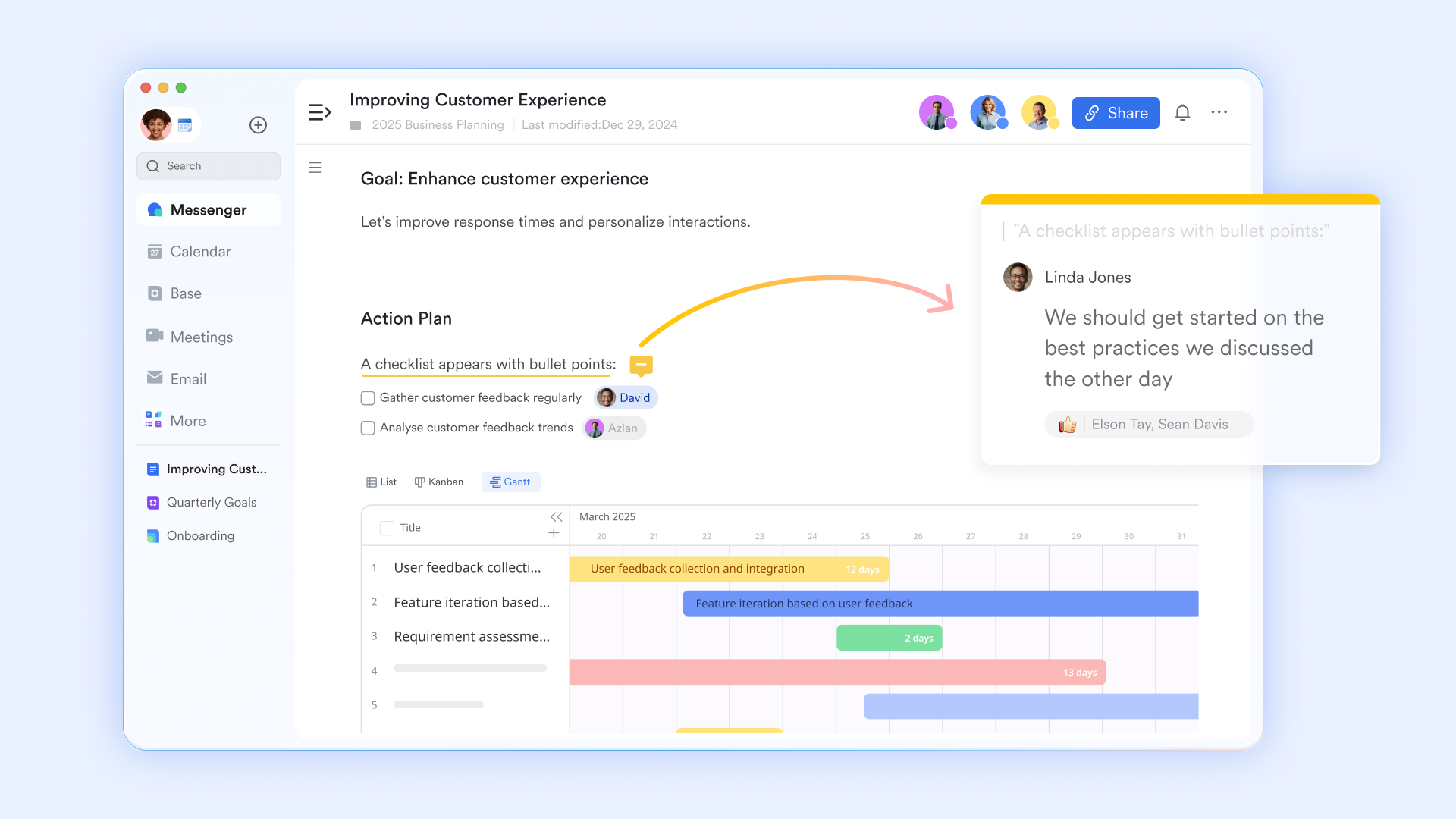
are not just digital pages; they are collaborative workspaces. You can write your project narrative while also allowing team members to contribute and edit in real-time. Lark supports seamless —users can easily @mention colleagues within the document to assign tasks or ask questions, ensuring that everyone stays engaged. Additionally, your project overview can be stored in the Wiki for easy access and ongoing reference, creating a centralized knowledge hub for the team.
The power of embedded Base
The biggest challenge with project overviews is keeping the timeline and project details up to date. With Lark Base, you can manage your project tasks, milestones, and budget in a powerful database. The magic happens when you embed that Base directly into your Lark Docs.
Imagine your project overview Docs containing a view of the . This is not a screenshot; it is a live window into the database. When an engineer marks a task as "Complete" in the Base, the task progress in your project overview updates instantly. Your overview remains the single source of truth without you ever having to manually edit the dates. It creates real-time dashboards right inside your doc. 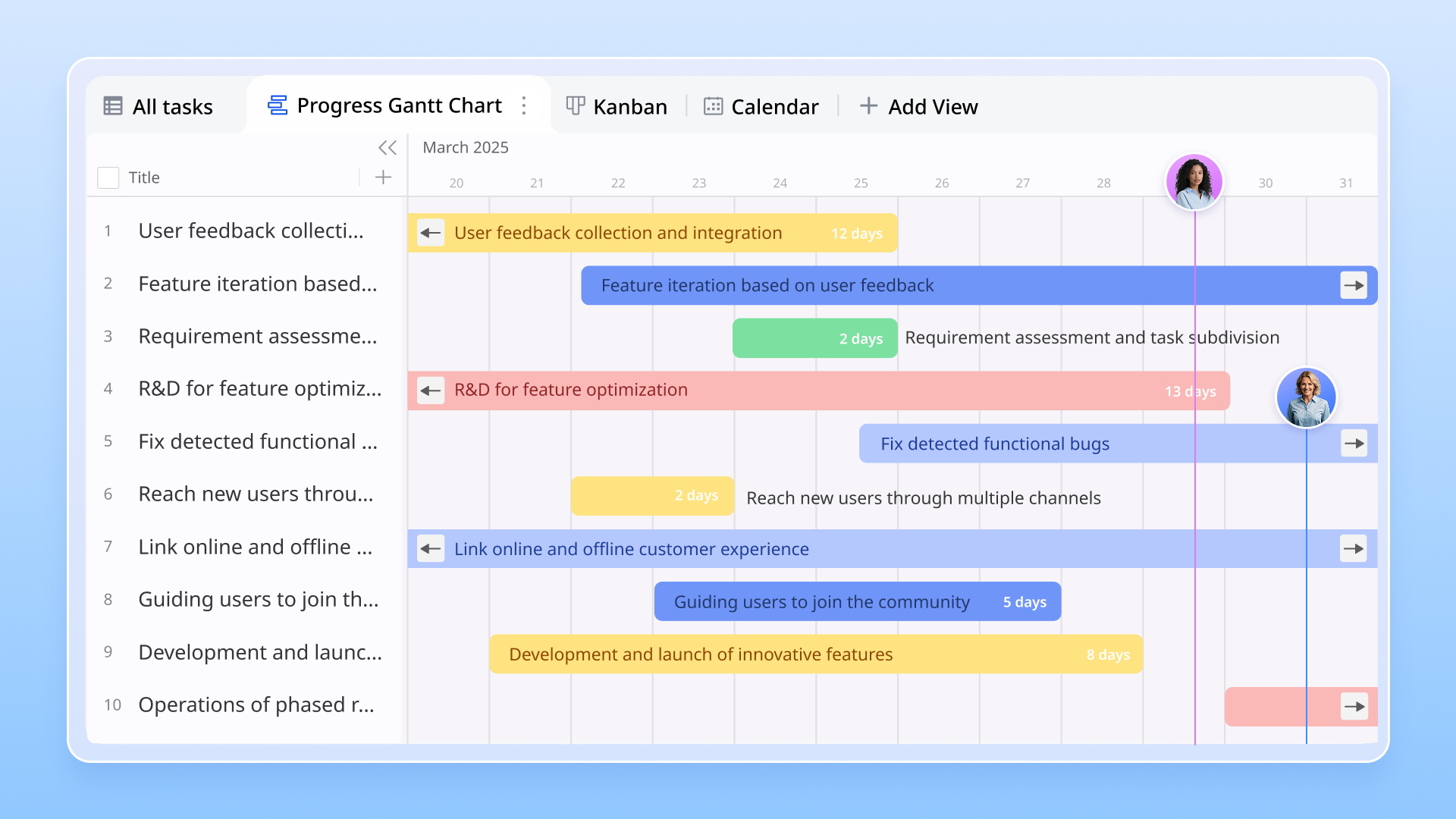
Create engaging project overview slides
Creating a compelling project overview presentation is essential for clearly communicating objectives, timelines, and expectations to your team and stakeholders. Lark Slides simplifies this process by offering an intuitive platform for designing visually appealing and informative slides.
With Lark Slides, you can easily embed interactive elements such as charts, graphs, and images that bring your project data to life. The platform allows for real-time collaboration, enabling team members to contribute ideas and feedback directly on the slides. This ensures that all relevant input is incorporated, fostering a sense of ownership and alignment among the contributors. 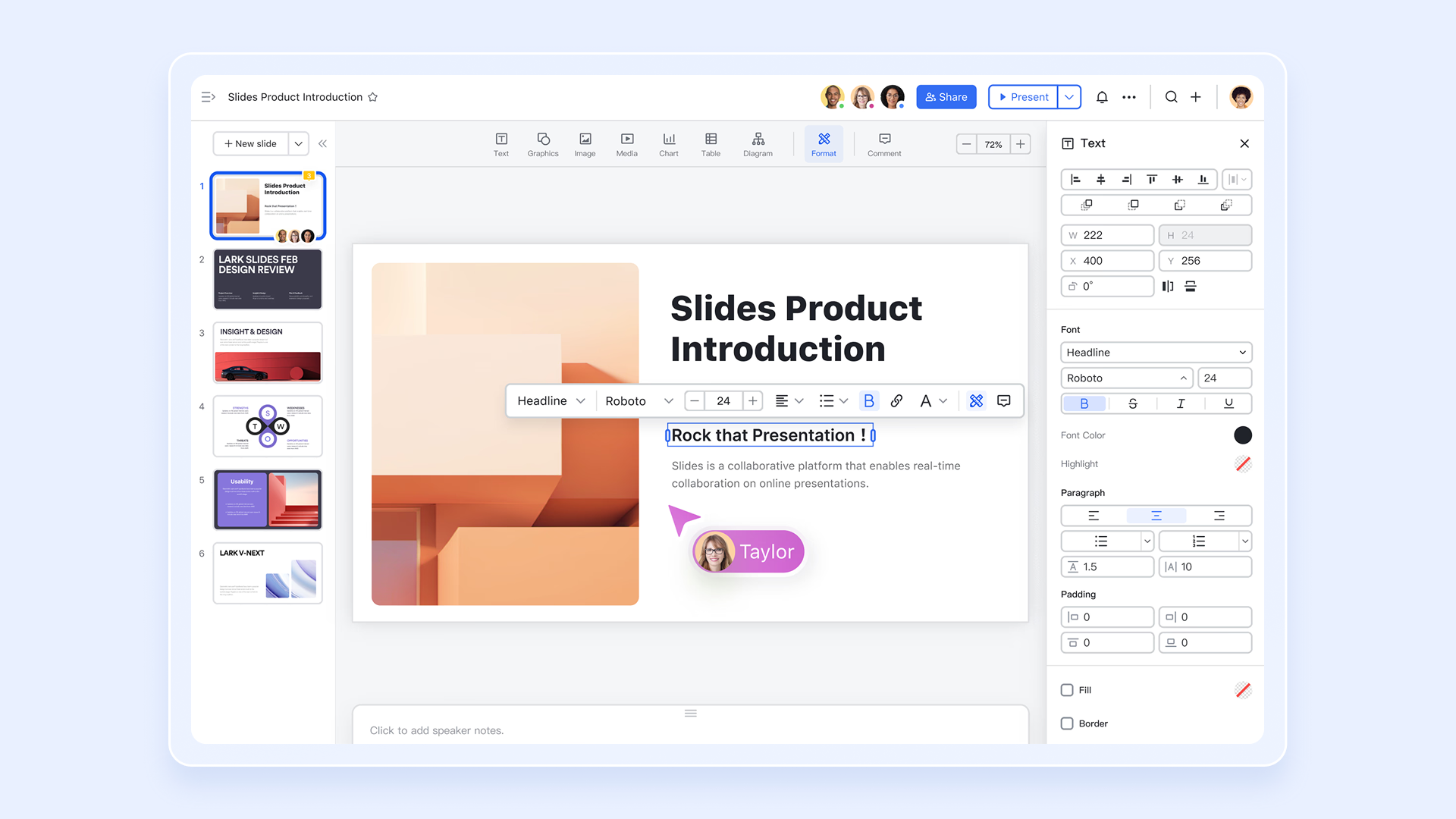
Contextual communication
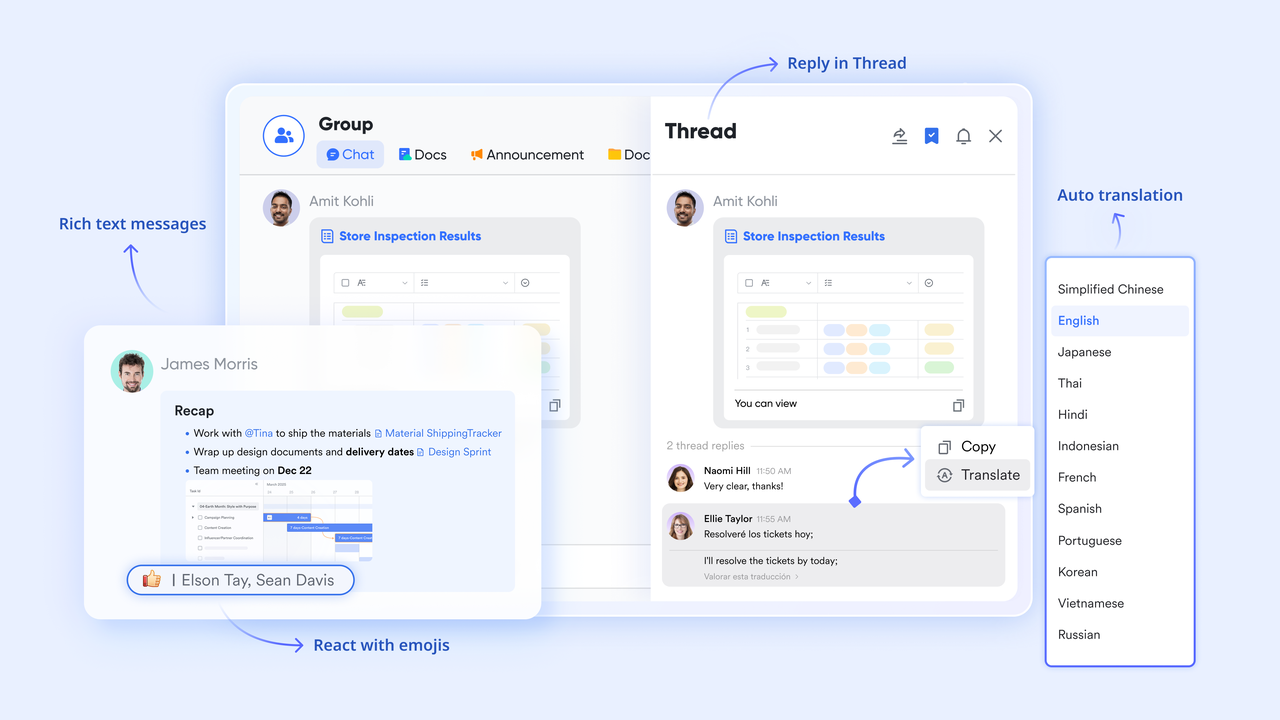
In traditional workflows, the project document lives in a folder, and the conversation about the project happens in email or chat apps. The context is lost in the switching cost.
With , you can pin the project overview doc to the sidebar of your project’s group chat. It is always one click away. Furthermore, team members can leave comments directly on specific parts of the document, and you can mention colleagues (@name) to assign them tasks right from the text. The conversation happens inside the documentation, preserving the context for everyone.
Strategic alignment with OKRs
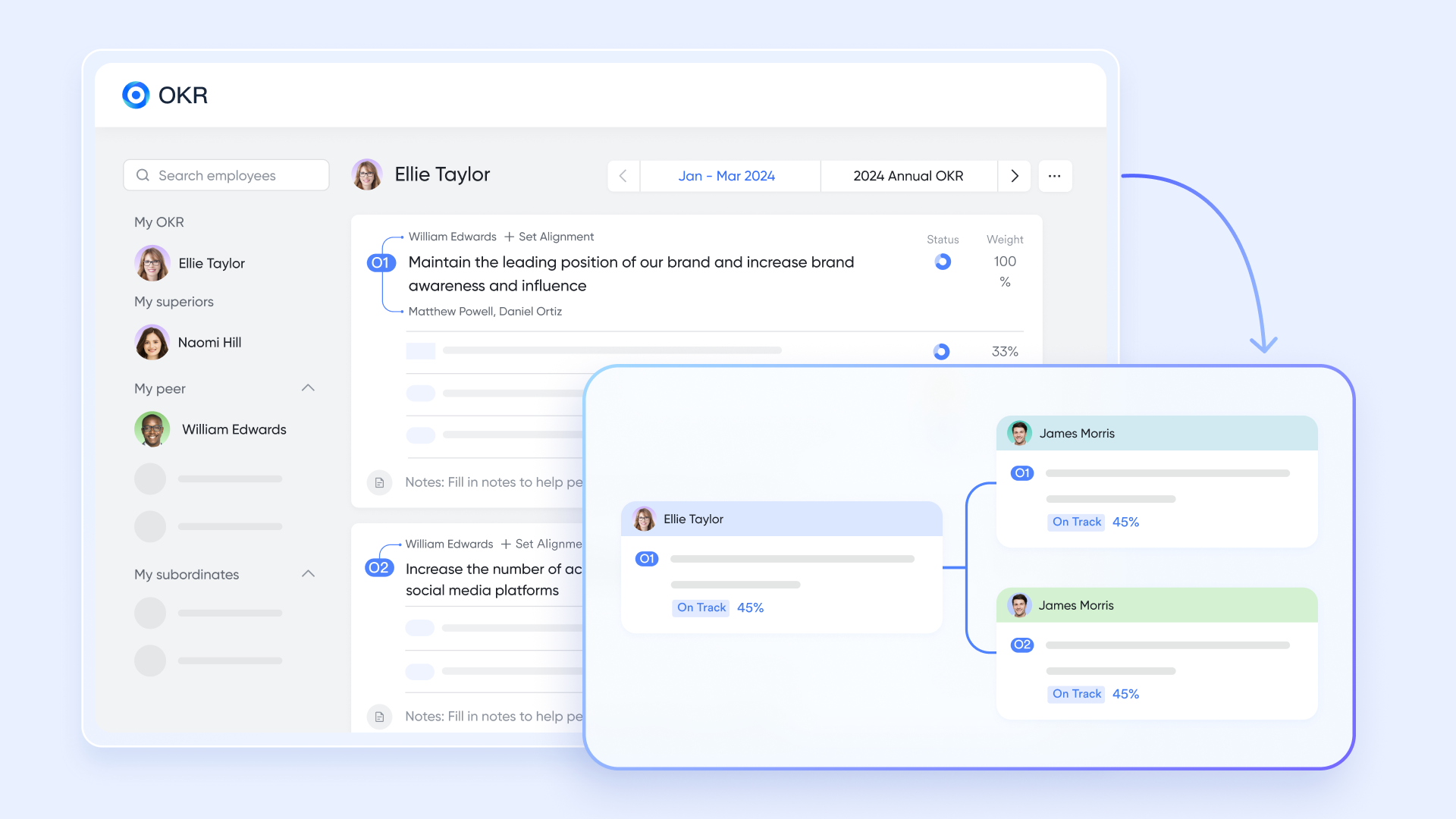
How do you ensure your project aligns with the company’s broader strategy? allows you to integrate organizational goals and objectives directly into your project overview. You can embed an OKR card that shows which high-level objective this project supports. This gives the team visibility into how their daily work contributes to the company's success, boosting morale and strategic focus. It links the project's goals to the company's mission.
🌟 Learn more about :
As an all-in-one solution, Lark includes all these features below in every plan:

- Free plan: Includes 11 powerful products, supporting up to 20 users, 100 GB storage, 1,000 automation runs and unlimited AI translation in chats, docs and email.
- Pro plan: $12/user/month, supporting up to 500 users. Includes unlimited message history, 50,000 automated Base workflow executions per month.
For small teams with simple communication needs

18 months message history
1000 Base automation runs/month
2000 rows per table in Base
Most POPULAR
For companies with comprehensive collaboration and management needs
Unlimited message history
500-participant video meetings
50k Base automation runs/month
20k rows per table in Base
For large companies with advanced security and organizational management needs
Get a personalized demo and pricing
Unlimited message history
500-participant video meetings
15 TB storage + 30 GB storage/user
500k Base automation runs/month
50k Base automation runs/month
Most POPULAR
For companies with comprehensive collaboration and management needs
Unlimited message history
500-participant video meetings
50k Base automation runs/month
20k rows per table in Base
How to write an agile project management overview in 5 steps
Writing this document requires you to switch hats from "manager" to "editor." You need to synthesize a vast amount of project information into a digestible format. Here is a step by step guide to help you create a project overview that shines.
Step 1: Define the business case
Before you write a single word about what you are building, clarify the why. Interview the executive sponsor or clients. Ask them what problem they are trying to solve. Is this project a response to a competitor? Is it to fix a compliance issue? Is it to open a new revenue stream?
Start your draft with a "Problem Statement" followed by a "Proposed Solution." This narrative structure engages the reader immediately. It frames the project not as a list of tasks, but as a strategic initiative that adds business value to the organization. This effectively builds your business case.
Step 2: Identify your audience
Who will read this project overview? If the audience is primarily engineers, you might use technical language and focus on architecture. If the audience is the C-suite, you should strip away the jargon and focus on ROI and timelines.
Most of the time, your audience will be mixed. In this case, aim for the "intelligent outsider." Write in plain language that anyone in the company can understand, regardless of their department. Avoid acronyms unless they are universally known within your organization. This ensures you provide relevant information to everyone.
Step 3: Draft the scope and timeline
Gather your initial estimates. Talk to your team members to get a realistic sense of what is feasible. Remember, in the overview stage, these are often estimates, not promises. Use language that reflects this, such as "Estimated Completion" or "Target Milestone."
Be ruthless in your editing of the scope. If a deliverable is minor, leave it out of the overview. You want the reader to grasp the core value proposition, not the minutiae of every sub-feature. You must set deadlines and end dates that the team believes in.
Step 4: Visualize the data
This is where most project overviews fail—they become walls of text. Human beings process visual information significantly faster than text. Instead of writing a paragraph about the schedule, include a simple timeline graphic. Instead of describing the budget in sentences, use a pie chart.
Visuals break up the reading experience and make the document more engaging. They also serve as quick references. A might not read the whole text, but they will definitely look at the timeline visualization.
Step 5: Review and refine
Once you have a draft, put it through the "brevity test." Can you cut 20% of the words without losing meaning? Short sentences and bullet points are your friends. A short document is more likely to be read than a long one.
Send the draft to a trusted colleague or a key stakeholder for a sanity check before publishing. Ask them: "Is this clear? Is anything missing? Is anything confusing?" Their feedback will help you polish the document into a professional, persuasive tool. Ensure the project name is clear and catchy.
Launch projects faster with ready-made templates
Best practices for managing your project overview
Creating the document is just the first step. To get the most value out of your project overview, you need to manage it effectively throughout the project lifecycle. Adopting these practices will ensure long-term success.
Keep it visible
A project overview that no one can find is useless. Do not bury it in a personal drive or a deep folder structure. Use to organize your project documentation. Lark Wiki provides a structured, tree-view that makes it easy for anyone in the organization to browse and discover project information. By categorizing your overview properly, you ensure that knowledge is democratic and accessible.
Present actively, not passively
When kicking off a project, avoid the habit of emailing the overview and hoping people read it. Instead, use the kickoff meeting to walk through it.
If you are using , leverage the Magic Share feature. This allows you to share the project overview doc directly in the video call window. Unlike a traditional screen share where participants simply watch you scroll, Magic Share allows them to scroll through the document at their own pace, click on a link, and even make edits or comments in real-time while you are talking. It turns a passive presentation into an active working session. Update regularly
Treat your overview as a dashboard. Set a recurring reminder—perhaps once a week or once a sprint—to review the document. Has the project status changed? Have we hit a milestone? Is the risk profile different?
Because you are using dynamic tools like Lark, these updates are quick. Often, the data from the built-in has already updated itself. You might just need to tweak the executive summary or update the "Current Focus" section. A current overview builds trust with stakeholders; an outdated one destroys it.
Manage permissions intelligently
While transparency is generally good, some important details might be sensitive, such as budget specifics or confidential IP. Modern tools allow for granular permission control.
In Lark, you can set the project overview to be viewable by the whole company but editable only by the core project team. You can even lock specific sections or columns in a Base so that stakeholders can see the timeline but cannot accidentally drag a deadline and mess up the schedule.
Conclusion
A well-written project overview is the catalyst that generates the clarity. It aligns the team, manages expectations, and provides a roadmap for success. It acts as a sales pitch for your hard work.
By shifting your mindset from "filling out forms" to "creating alignment," you transform the project overview from a bureaucratic hurdle into a strategic advantage. And by leveraging dynamic tools like , you ensure that your overview remains a living, breathing part of your team's daily workflow, rather than a fossilized PDF in a forgotten folder. You can track and manage everything in one place.
Get access to a free project overview template and discover how our all-in-one collaboration suite can keep your team aligned, focused, and moving forward.
Clarify expectations with transparent project summaries
FAQs
What is the meaning of project overview?
A project overview is a concise document that summarizes the critical aspects of a specific initiative. It acts as a high-level executive summary, outlining the project's goals, scope, timeline, and key stakeholders. Its primary meaning lies in alignment; it ensures everyone—from the execution team to the CEO—understands the "big picture" objectives without getting lost in the minute details of daily tasks.
What to write in an overview?
To write an effective overview, focus on the "who, what, why, and when." Essential sections include SMART objectives (specific goals), the project scope (defining what is in and out), high-level milestones (key dates), budget estimates, and the core team structure. It should also briefly mention the business case—why this project matters—and any critical risks that might impact successful delivery.
What is the general project overview?
A general project overview is a standardized summary used to communicate a project's status and intent to a broad, non-technical audience. Unlike technical specifications or detailed Gantt charts, it uses plain language to describe the project's value proposition and trajectory. It serves as the central "landing page" for the initiative, ensuring that cross-functional partners and stakeholders can quickly grasp the project's health and direction.
How do I write a project summary?
Start by identifying the core problem your project solves. Then, distill the solution into a few paragraphs, focusing on business outcomes rather than technical outputs. Avoid jargon and keep it brief—ideally under two pages. To make it engaging, use bullet points for deliverables and visual timelines for dates. Finally, use a dynamic tool like Lark to keep the summary updated automatically.
Related reading































