Jira is one of the most widely adopted work management platforms in the world. Built originally for software development and issue tracking, it has expanded into service management, IT operations, and cross-functional project coordination. As teams rely more heavily on Jira, a common question emerges: Can Jira work as a CRM?
At first glance, a Jira CRM seems practical. Customer requests arrive as tickets, workflows can be customized, and dashboards show progress across teams. But using Jira to manage customer relationships is fundamentally different from using a purpose-built CRM. In this guide, we examine how teams attempt CRM in Jira, what it takes to make it work, where it breaks down, and why many eventually adopt customer-first tools instead.
What is Jira CRM?
Jira CRM is not a native Atlassian product, but a term teams use to describe attempts to in Jira. In practice, it refers to using Jira projects, issues, custom fields, workflows, and dashboards to track leads, accounts, deals, or customer requests. Instead of dedicated customer records, customer data is stored inside Jira issues and organized through statuses and filters.
For many teams, CRM in Jira starts with Jira Software or Jira . Sales or support requests are created as issues, customer details are captured through custom fields, and workflows are configured to resemble sales pipelines or support lifecycles. Some teams extend this setup with Jira Service Desk CRM integration to handle customer communication through portals and email.
While this approach can function as a basic CRM for Jira, it remains issue-centric. A Jira CRM system focuses on tracking customer-related work, rather than managing end-to-end customer relationships.
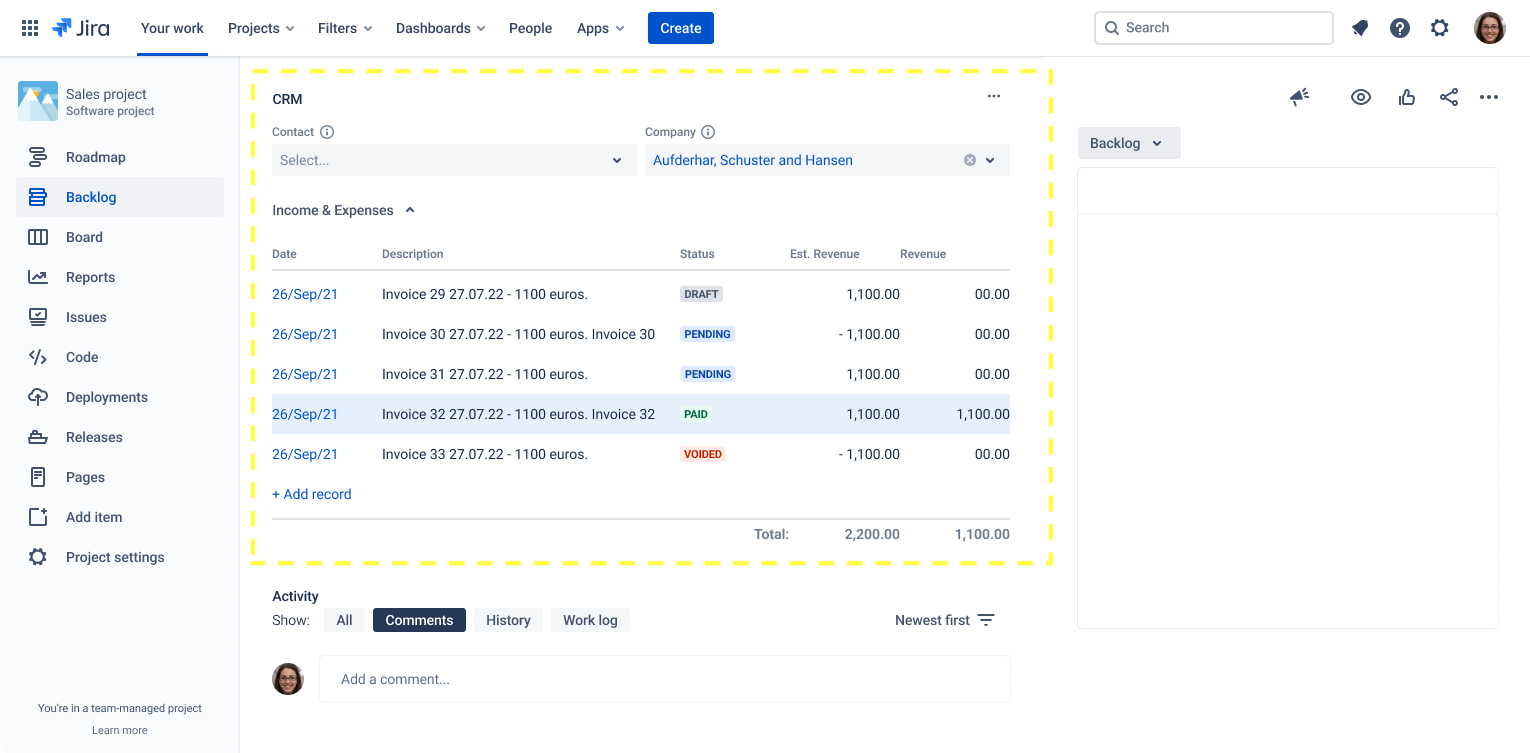
Image source: atlassian.com
Why teams try to use Jira as a CRM
Teams often turn to Jira as a CRM out of convenience rather than as a strategic choice. When Jira is already embedded in daily workflows, extending it to customer-related use cases feels efficient. Custom fields, workflows, and dashboards make seem achievable. For many organizations, this creates the impression that a separate CRM system may not be necessary.
- Issues and epics for customer tracking: Teams use issues to represent customer requests, leads, or accounts, and epics to group related customer work across multiple tickets.
- Custom fields for customer details: Jira allows custom fields for contact names, account IDs, priority, and status, which teams repurpose to store basic CRM-style information.
- Configurable workflows and statuses: Sales or support stages are mapped to Jira workflow statuses, giving teams a visual sense of progress similar to a pipeline.
- Jira Service Management for : Service desks provide portals, email intake, and ticket-based communication, making Jira feel customer-facing for support-heavy teams.
- Permissions and role-based access: Jira's permission schemes allow teams to control who can view or update customer-related tickets, which is vital for sensitive accounts.
- Dashboards and filters for visibility: Filters, JQL, and dashboards help teams track open issues, customer requests, or SLA performance in one place.
- Strong integration ecosystem: Jira integrates with many external tools, encouraging teams to bolt on CRM functions to an existing Jira setup rather than adopt a new system.
What will you need to do to make Jira a CRM?
Turning Jira into a basic CRM is possible, but it requires significant customization, ongoing maintenance, and process discipline. Jira's flexibility, custom workflows, fields, automation, dashboards, and Atlassian ecosystem tools can be shaped to resemble CRM behavior, but it is very much a DIY setup.
Step 1: Build a custom workflow to act as your sales pipeline
Start by creating or adapting a Jira project using the template as a foundation. Then customize workflow statuses to reflect CRM stages such as lead generation, nurturing, opportunity, and closure. Using the workflow editor, you define allowed transitions between stages so deals move in a controlled sequence. Automation rules can be layered on top to trigger notifications or assignments when stages change. This workflow becomes the backbone of your Jira CRM.
Step 2: Create custom fields to store customer and deal data
Because Jira is not designed for customer records, custom fields are required to capture information like company name, contact details, deal value, owner, and close date. These fields must be created at the project level and added to the appropriate issue screens. Each deal is then represented as a single issue containing all related customer data. As CRM needs grow, the number of fields often increases, making careful essential.
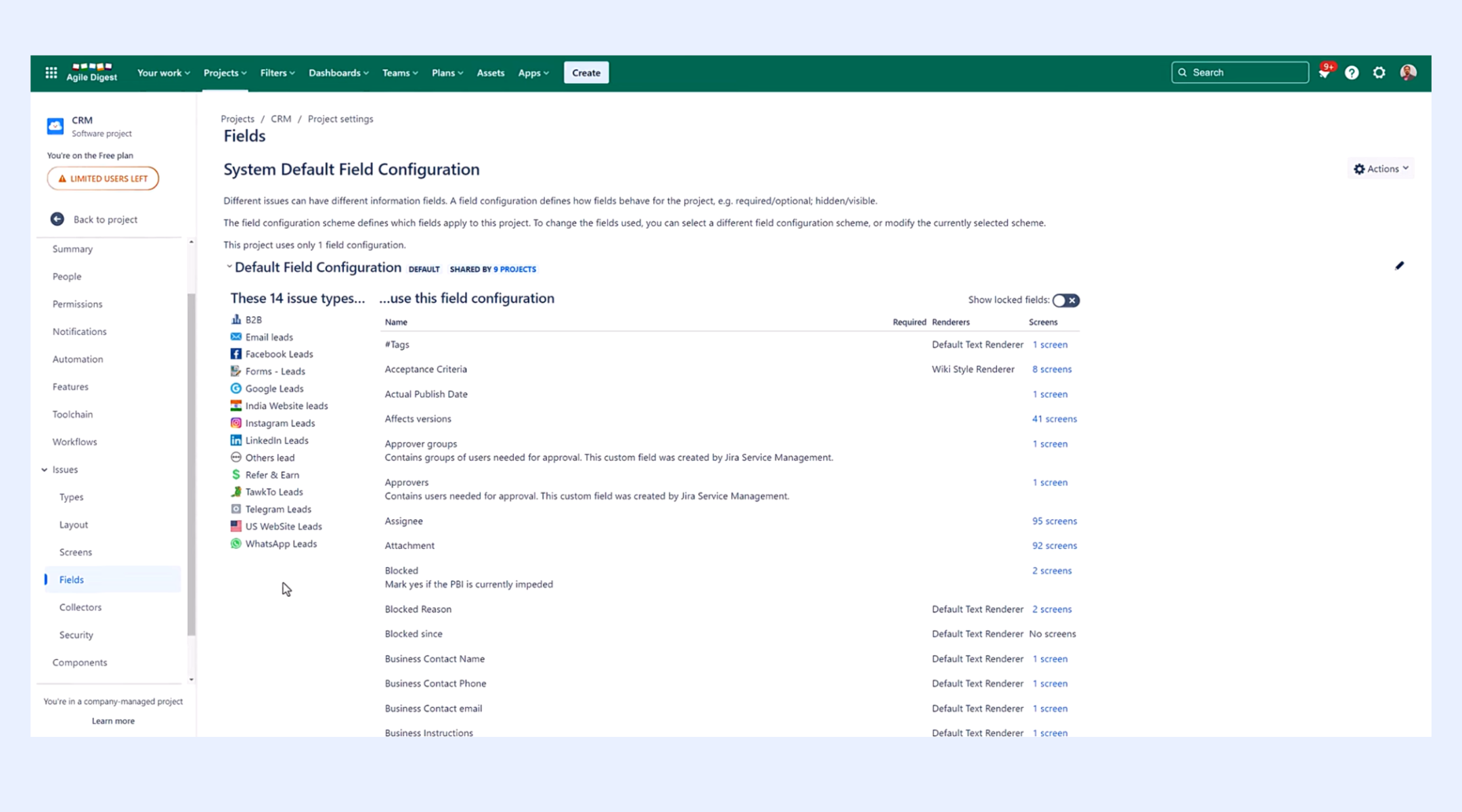
Image source: atlassian.com
Step 3: Set up dashboards and reports for pipeline visibility
Dashboards are critical for turning Jira issues into CRM-style insights. Teams configure dashboards to track deals by stage, pipeline value, deal aging, and workload distribution. Jira's can show trends and performance, but more advanced CRM reporting often requires marketplace apps. Dashboards help leadership understand pipeline health, but they must be manually maintained as workflows evolve.
Step 4: Add automation to simulate CRM behavior
Using Automation for Jira, teams create rules to handle repetitive CRM tasks. Examples include assigning owners when a new deal is made, sending alerts when a deal reaches a specific stage, or automatically updating fields. These no-code IF/THEN rules help reduce manual effort and mistakes. However, automations must be carefully designed and maintained to stay aligned with changing sales processes.
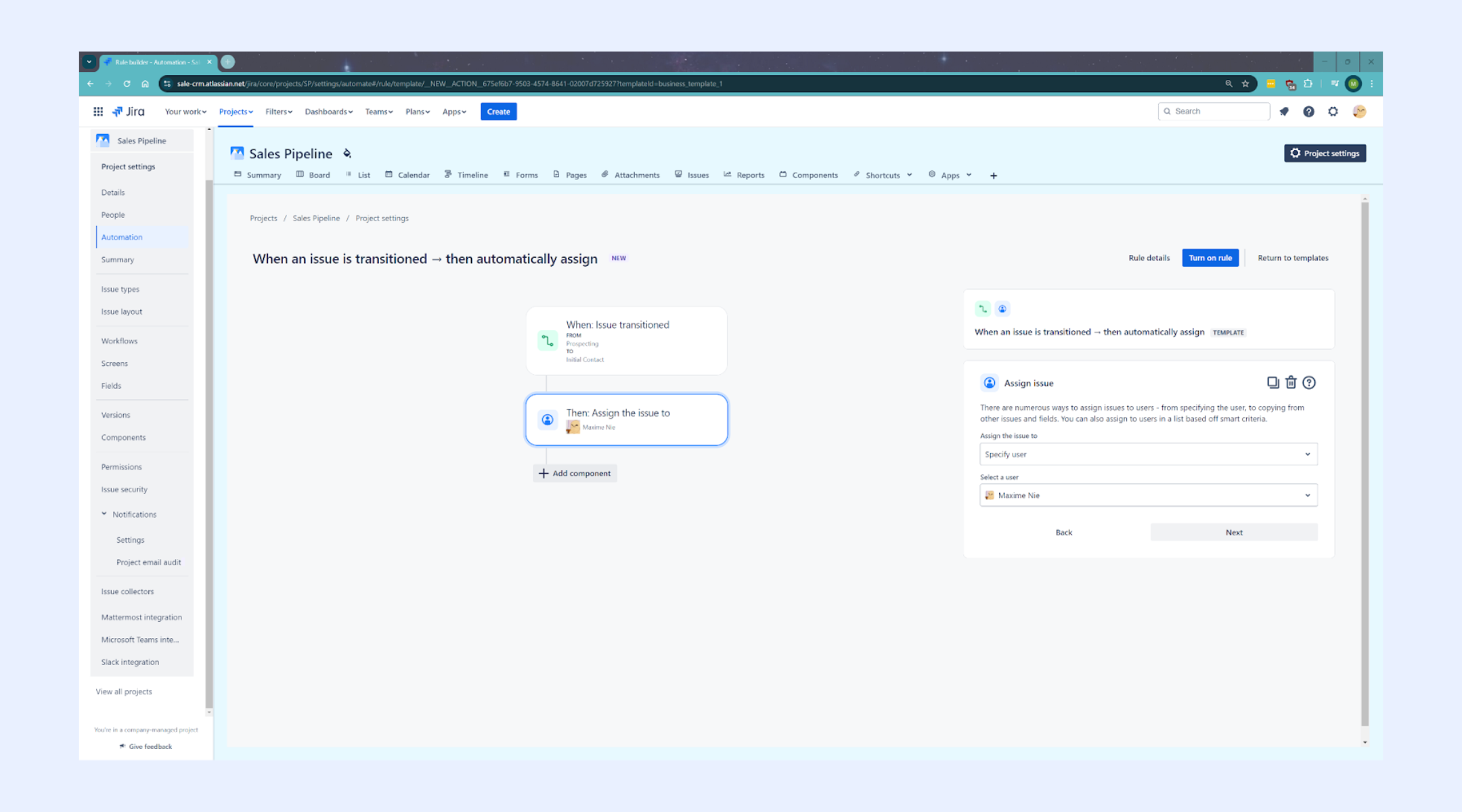
Image source: atlassian.com
Step 5: Connect Jira with Confluence and Jira Service Management
To make Jira feel more like a CRM, teams rely heavily on the broader Atlassian ecosystem. Jira Service Management is used for customer intake and communication, while Confluence stores customer notes, deal documentation, and account context. Linking issues, tickets, and pages helps reduce silos and gives teams a fuller picture of customer activity. This connectivity significantly improves usability but also increases system complexity.
Jira CRM integrations: Connecting, not replacing
Most teams that try to use Jira as a CRM eventually rely on integrations with dedicated to fill functional gaps. These connections are designed to sync information, not turn Jira into a complete CRM system.
CRM integrations typically push customer or deal updates from a CRM into Jira issues so delivery and support teams can see relevant context. Status changes, comments, or ticket activity may sync back to the CRM to keep sales or success teams informed. This helps align teams but still splits customer data across multiple systems.
Because Jira remains issue-centric, the CRM continues to act as the source of truth for customer records, reporting, and . Jira simply reflects a subset of that information for execution purposes. As a result, teams often switch between tools to get a complete customer view.
In practice, these integrations reduce friction between teams but increase maintenance overhead, dependency on sync rules, and troubleshooting when data falls out of sync. That's why Jira CRM integrations are best seen as a way to connect workflows, not as a replacement for a purpose-built CRM.
The hidden friction of using Jira for CRM
At a small scale, a Jira-based CRM can feel flexible and efficient. But as customer volume, data complexity, and team usage grow, hidden friction starts to surface. Jira's issue-centric design introduces structural limitations that aren't obvious early on. Over time, these limitations affect data quality, reporting reliability, and cross-team adoption.
- Customer history is fragmented across issues: Customer context is spread across multiple tickets, epics, and comments, making it hard to see a complete relationship timeline in one place.
- CRM reporting is difficult to maintain: , deal aging, and customer value require complex filters and dashboards that break easily as workflows change.
- Non-technical teams struggle with usability: Jira's interface and terminology are optimized for engineering teams, creating friction for sales, success, and operations users.
- Permissions lead to data duplication: Project-level access control often prompts teams to create multiple projects to manage visibility, further fragmenting customer data.
- High maintenance as processes evolve: Custom fields, workflows, automations, and integrations all require ongoing upkeep, turning into a continuous admin task.
While Jira excels at tracking "what" is being built, it struggles to manage "who" you are building it for and the conversations surrounding those relationships. This gap between task management and communication is exactly why many teams are moving toward a more fluid, integrated ecosystem. If you are looking for a platform that treats your customer data, team communication, and project tracking into one place, Lark is the very answer here.
Discover CRM without workflow gymnastics
Meet Lark: Bring all CRM management into structured workflows
Traditional CRM setups built on tickets and issues focus on managing work about customers rather than managing customer relationships themselves. reframes the by moving away from ticket-based thinking toward structured, relational data. Instead of forcing customer information into tasks or cases, Lark treats accounts, contacts, and deals as first-class records. This approach gives teams a clearer, more durable view of the customer lifecycle across sales, service, and operations.
Record relationships instead of issue hierarchies
supports accurate relational data modeling, where customer accounts, contacts, deals, renewals, and activities exist as separate but linked records. A single account record can connect to multiple deals, contacts, and ongoing actions, and updates sync automatically across all linked views. This allows teams to see the full customer lifecycle in one place. Jira relies on issue hierarchies (issues, epics, links), which are designed for tracking work, not relationships, making fragmented and challenging to scale.
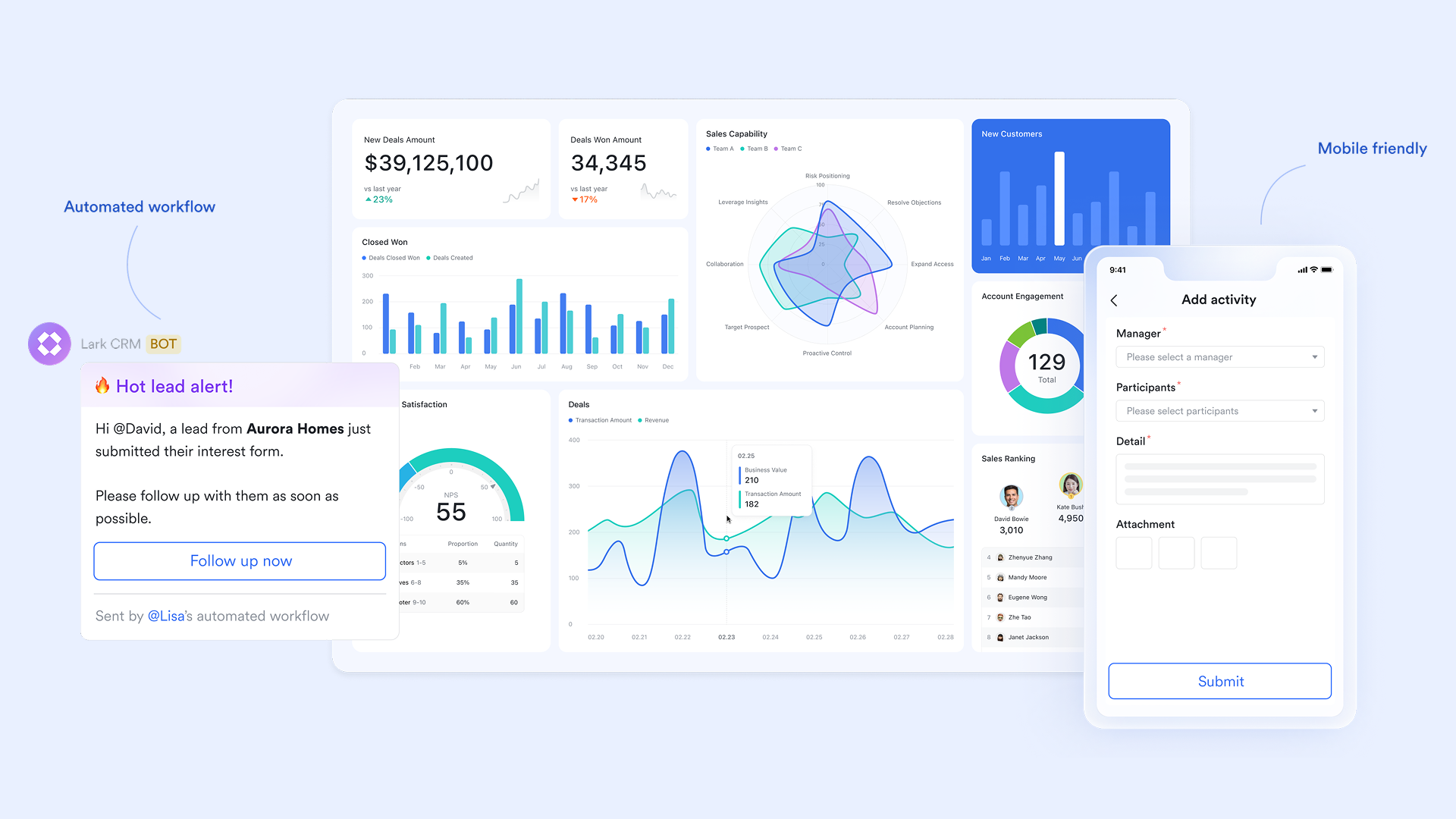
Role-specific CRM views built on a single source of truth
Lark Base allows teams to create multiple synchronized views from the same CRM data. It allows you to manage via Kanban boards, track outreach deadlines in Calendar view, and automate lead capture through Form view. Because all views share one data source, updates made in a visual for client onboarding instantly reflect in the master Grid list. In Jira, different teams typically require separate boards or projects, which leads to fragmented customer visibility and inconsistent data. 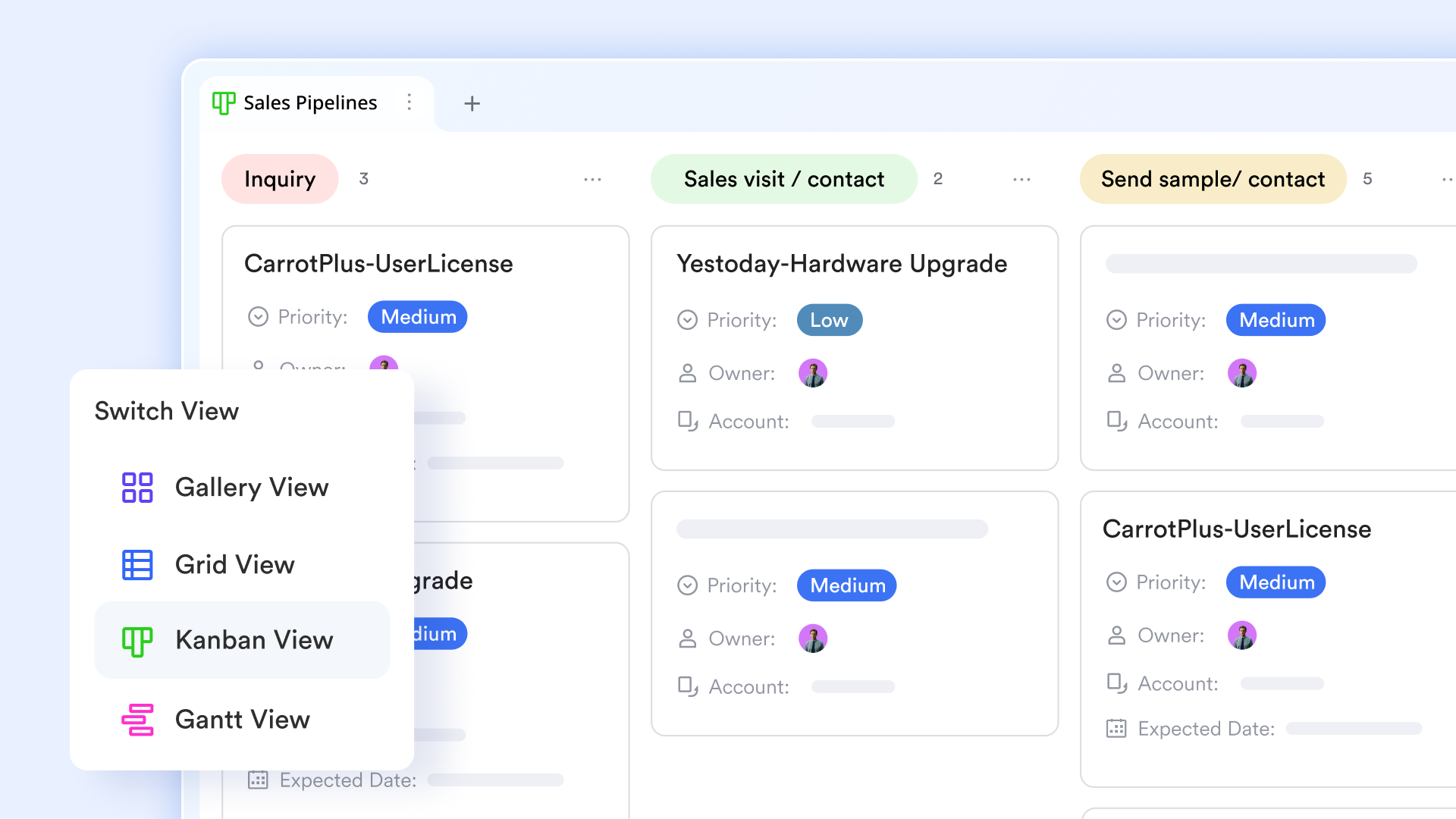
Automated workflows that reduce manual efforts
While Jira workflows are structured around rigid status transitions for technical project management, Lark Base workflows are data-driven and built for general business operations. It streamlines CRM workflows by using If/Else and Switch logic to automatically and assign tasks based on specific deal criteria. By using Loop nodes for bulk updates and real-time activity logs for troubleshooting, it eliminates manual data entry and administrative bottlenecks. 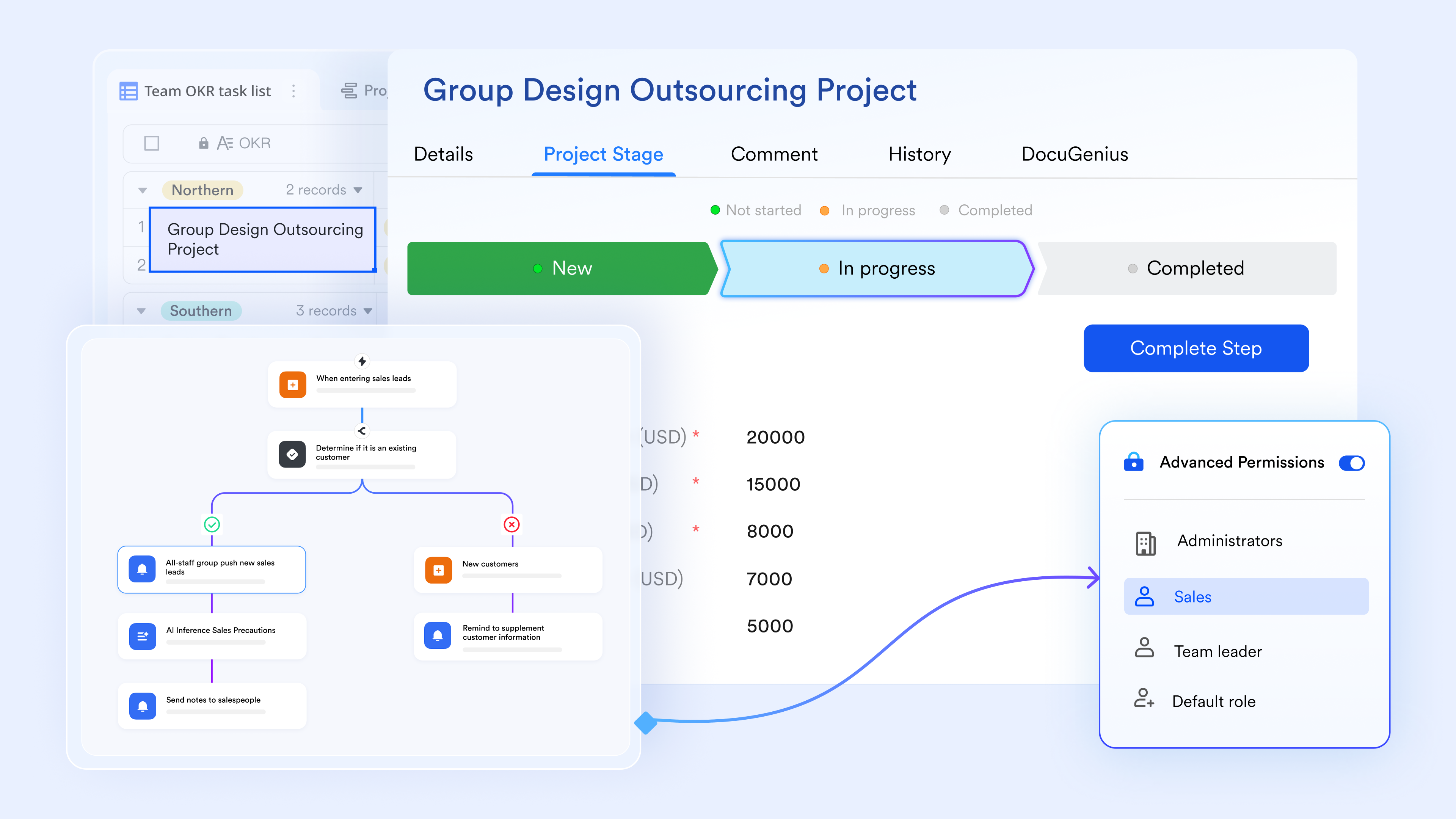
Field-level and row-level permissions for CRM governance
Lark Base provides granular access control at both the record and field level. Teams can restrict visibility of sensitive CRM data, such as pricing, contract terms, or internal notes, while keeping the rest of the customer record shared. Jira's project-based permissions often force teams to split customer data across multiple projects, increasing duplication and reducing trust in the system. Seamless communication boosts CRM workflows
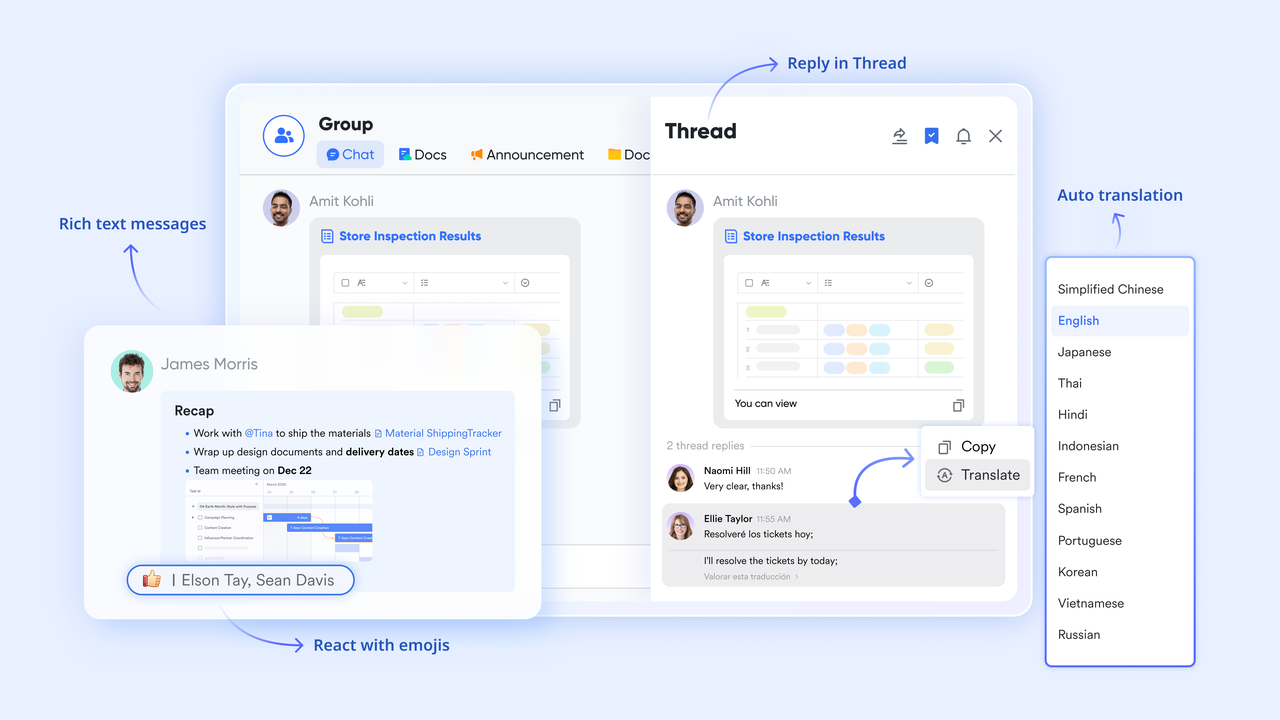
As a communication hub, streamlines your everyday . You can send and receive not just text, but videos, images, folders, and Base record, and CRM proposal directly in chats. It enhances client communication through real-time read receipts, "Buzz" alerts for urgent leads, and the ability to extract text from images like business cards. Unlike Jira, which requires Slack or Teams, teams can stay organized by using custom labels to categorize high-priority clients and threaded replies to keep specific deal discussions focused. Overall, it eliminates tool-switching by nesting meetings, files, and project updates within a single communication interface.
:
- Starter plan: Free forever plan that includes 11 powerful tools for up to 20 users. It also comes with 100GB of storage, 1000 automation runs, AI translations, and more.
- Basic plan: $6/user/month (billed annually) for up to 500 users. It includes everything in Starter plus group calling for up to 500 attendees, 5TB of storage, 1000 automation runs, and more. For more details, please .
- Pro plan: $12/user/month (billed annually) for up to 500 users. It includes everything in Basic plus group calling for up to 500 attendees, 15TB of storage, 50,000 automation runs, and more.
- Enterprise plan: for custom pricing. Supports unlimited users and includes even more automation runs and advanced security, compliance, and management features.
For small teams with simple communication needs

18 months message history
1000 Base automation runs/month
2000 rows per table in Base
Most POPULAR
For companies with comprehensive collaboration and management needs
Unlimited message history
500-participant video meetings
50k Base automation runs/month
20k rows per table in Base
For large companies with advanced security and organizational management needs
Get a personalized demo and pricing
Unlimited message history
500-participant video meetings
15 TB storage + 30 GB storage/user
500k Base automation runs/month
50k Base automation runs/month
Most POPULAR
For companies with comprehensive collaboration and management needs
Unlimited message history
500-participant video meetings
50k Base automation runs/month
20k rows per table in Base
Final perspective: When Jira CRM makes sense, and when it doesn't
A Jira CRM can work in specific situations, but it is not a universal replacement for a dedicated customer relationship management system. The key is understanding whether your team is or managing customer relationships.
When Jira CRM makes sense
- You primarily manage customer-related work, not customer lifecycles: Jira works well when the goal is to track tasks, requests, or deliveries tied to customers rather than long-term relationship history. Teams focused on execution, issue resolution, or internal handoffs benefit most from this model.
- Engineering or IT teams already live in Jira: For technical teams, using CRM-style workflows in Jira reduces tool switching and keeps customer-related work close to delivery. This is especially effective when sales involvement is minimal or indirect.
- Customer interactions are short-lived or ticket-driven: If primarily occurs through support tickets or time-bound requests, a Jira Service Management–based setup can provide sufficient visibility without the full complexity of a CRM.
When Jira CRM doesn't make sense
- You need a complete view of the customer relationship: Jira struggles to represent accounts, contacts, deals, renewals, and activities as connected entities. Customer history becomes fragmented across issues, making long-term relationship tracking difficult.
- Non-technical teams rely heavily on the system: Sales, customer success, and operations teams often find Jira's interface and terminology unintuitive. This friction slows adoption and increases reliance on manual workarounds.
- Revenue, forecasting, and renewals are critical: A Jira CRM system lacks native support for forecasting, revenue tracking, and lifecycle reporting. As these needs grow, teams typically outgrow Jira and move toward customer-first platforms.
Explore a better way to manage customers
Conclusion
Using Jira as a CRM is a practical experiment for teams that want to track customer-related work without adding another system. With custom workflows, fields, dashboards, and integrations, Jira can simulate basic CRM behavior and support execution-focused use cases. However, as customer data grows more complex and relationship management becomes strategic, the limitations of an issue-centric model become clear. Reporting becomes harder to maintain, customer history fragments, and non-technical teams struggle with usability. By combining communication, workflows, and data into a single platform, helps CRM teams eliminate siloed tools, reduce manual handoffs, and resolve many of the operational pain points that traditional, ticket-based CRM setups struggle to scale.
FAQs
Can Jira track customer relationships across multiple years?
A CRM in Jira can store historical issues, but long-term customer relationships are difficult to maintain. Over time, data spreads across closed or archived issues, epics, and projects. Without a true customer object, a Jira CRM system lacks a unified timeline, making multi-year relationship tracking fragmented and hard to analyze.
How do non-technical teams adapt to Jira-based CRM workflows?
Non-technical teams often struggle with CRM Jira setups because Jira's language and interface are optimized for engineering work. Sales or success teams must adapt to issues, statuses, and boards rather than customer records. Even with training, a CRM for Jira typically requires ongoing admin support to stay usable.
What happens to customer reporting when issues are archived?
When issues are archived, they are removed from filters, dashboards, and reports. This breaks historical analysis in a Jira , especially for pipeline or lifecycle reporting. Teams relying on CRM in Jira often lose visibility into older customer data unless they export or duplicate records elsewhere.
Is Jira suitable for tracking revenue and renewals?
Jira can store revenue or renewal fields, but it lacks native forecasting, rollups, and . As a result, CRM for Jira setups struggle to track revenue accurately. Most teams rely on a Jira CRM integration with a dedicated CRM to handle renewals and financial reporting reliably.
How do teams untangle customer data from Jira without disruption?
Teams usually extract customer fields, issues, and histories into a dedicated CRM while keeping Jira for execution. A phased approach using Jira Service Desk CRM integration or sync tools helps reduce disruption. Over time, Jira shifts back to work tracking, while customer data lives in systems built for relationships.
Related reading
































