Jira has become almost synonymous with Agile project management. From startups shipping their first MVP to enterprises coordinating hundreds of teams, Jira plays a central role in modern software delivery. As the platform has evolved from a simple bug tracker into a broad, multi-product ecosystem, many teams now question whether it still fits their needs. This Jira review takes a practical, unbiased look at the platform's core features, product lineup, pricing, and real-world pros and cons. What is Jira?
Jira is a project and developed by Atlassian, widely used by software development and IT teams to plan, track, and deliver work. Originally designed for bug tracking, Jira has evolved into a comprehensive work management system supporting Agile, DevOps, and service-oriented workflows. In a typical Jira software review, the platform is recognized for its flexibility in handling issues such as tasks, bugs, user stories, and epics through highly configurable workflows.
Jira is best known for its Agile capabilities, including Scrum and Kanban boards, , and detailed reporting for velocity and cycle time. Beyond development, Atlassian has expanded the ecosystem to include products like Jira Service Management for IT support, Jira Product Discovery for product planning, and enterprise tools.
To evaluate Atlassian's ecosystem, it helps to understand its product lineup, as different teams require specialized tools:
- Jira Software: The core engine optimized for Scrum and Kanban.
- Jira Service Management: Designed for IT teams running ITSM, handling SLA management and incident response.
- Jira Product Discovery: Built for product managers to map ideation and prioritize features.
- Jira Align: An enterprise-grade portfolio management tool discussed in any Jira Align review for large-scale SAFe deployments.
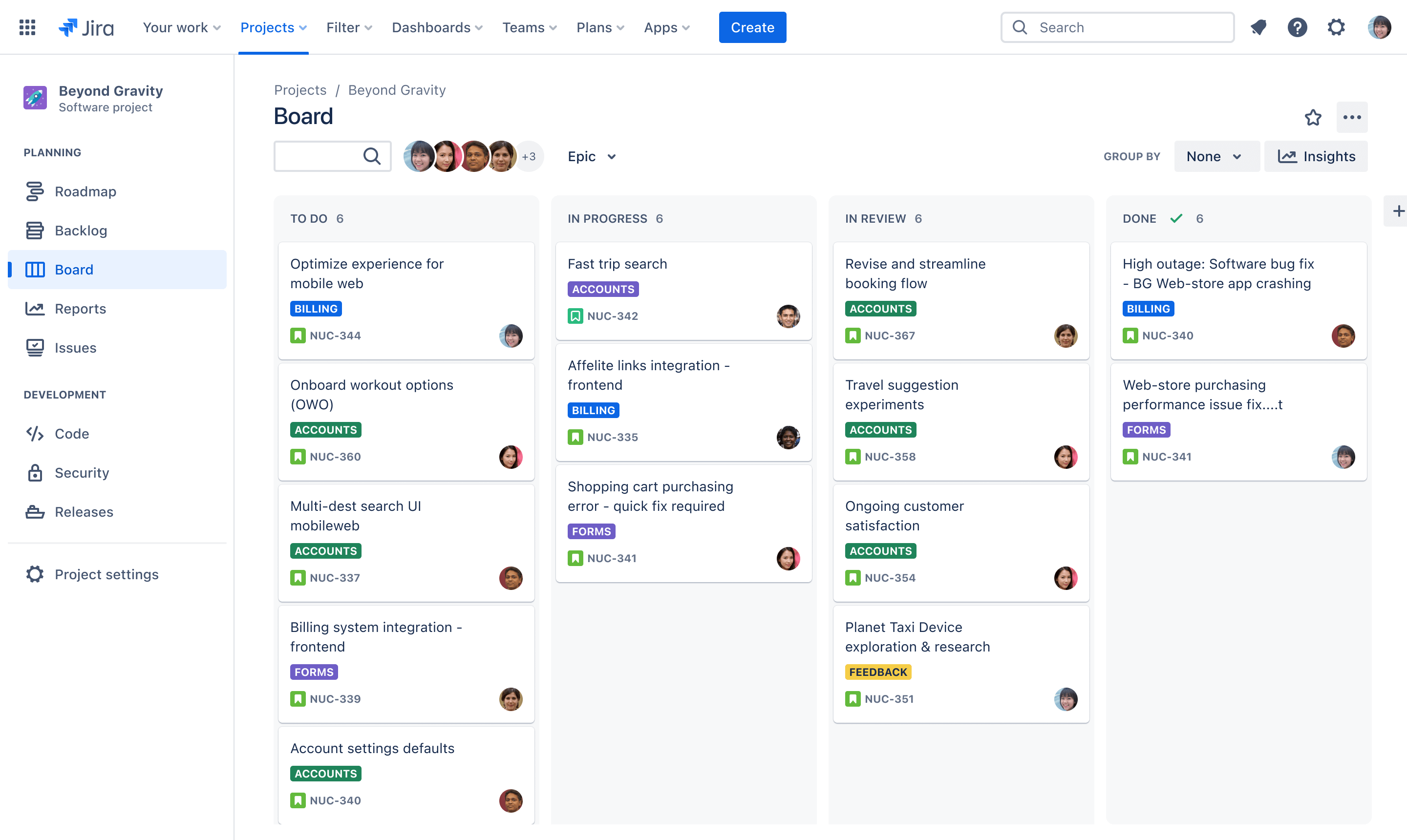
Image source: jira.com
Core Jira features explained
In any in-depth Jira review, the platform's feature set is the most critical factor to evaluate. , handle complex, fast-moving work across teams, especially in Agile and DevOps environments. The sections below explain how Jira's core features work in practice and why they matter for growing teams.
Issue & task management
Issue and are the foundation of Jira. Every piece of work in Jira is represented as an "issue," which can take many forms, such as tasks, bugs, user stories, epics, or custom issue types. This flexible structure allows teams to model their real-world processes closely, whether they are tracking software defects, feature development, or operational work.
Jira allows teams to create custom issue types and fields to match their workflows, which is often highlighted in a Jira core review. Issues can be linked together to show dependencies, blockers, or related work, helping teams understand how tasks impact one another. Priority levels, labels, and components further organize work, making it easier to manage significant backlogs and complex projects.
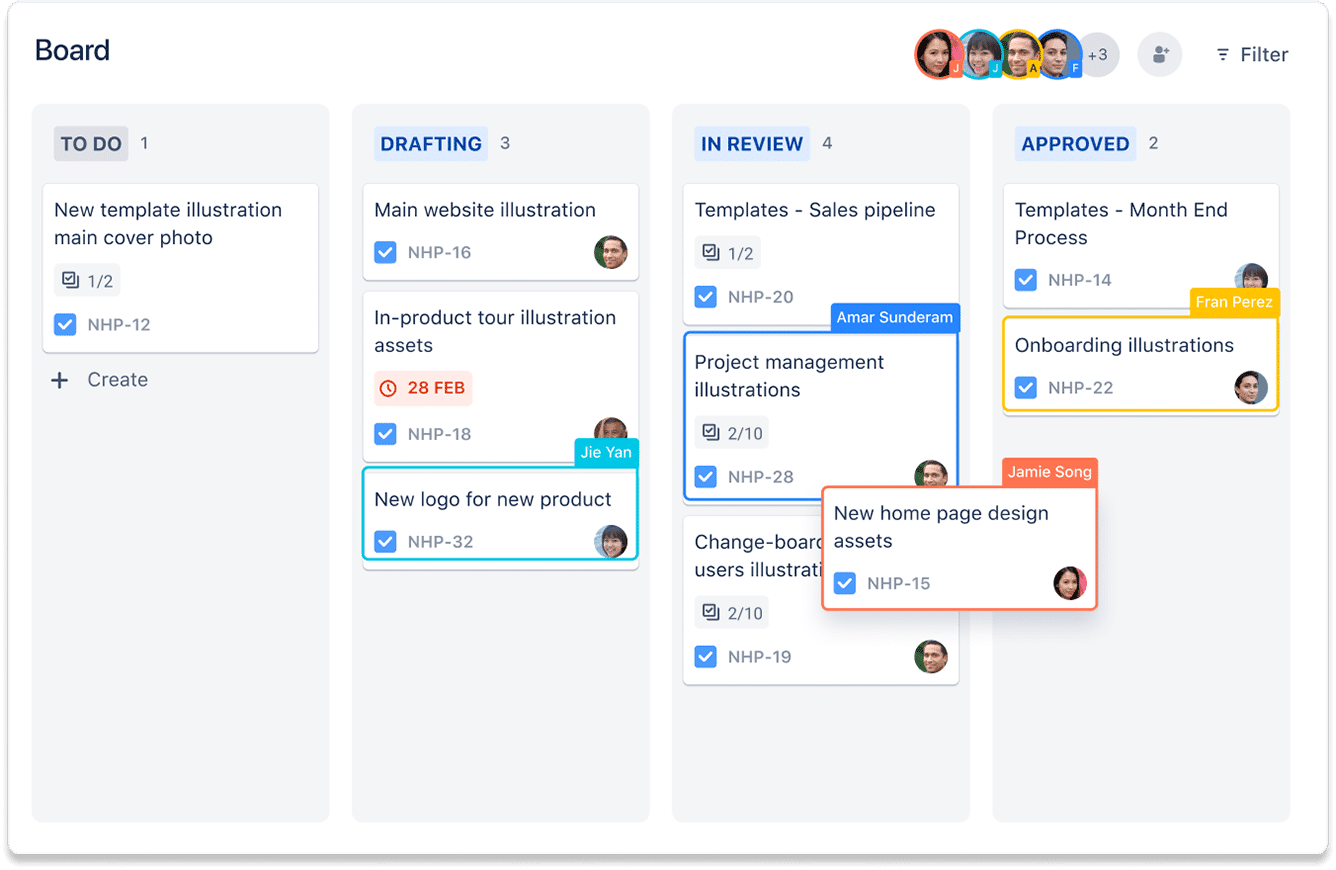
Image source: jira.com
Agile boards
are one of Jira's most widely used features and a significant reason it dominates Agile project management. Jira supports both Scrum and Kanban boards, allowing teams to choose the methodology that best fits their workflow. Scrum boards are optimized for sprint-based development, while Kanban boards support continuous delivery and operational work.
Teams can groom their backlog, reorder priorities, and visualize work as it moves through different stages. Work-in-progress (WIP) limits help prevent overload and encourage focus. Because Jira boards update in real time, distributed teams can collaborate effectively without relying on constant meetings or status updates.
Sprint planning & execution
Jira provides a structured environment for planning and executing sprints, making it a core tool for Scrum teams. During sprint planning, teams can select issues from the backlog, estimate effort using story points or time-based estimates, and commit to a defined sprint goal. Capacity planning features help teams avoid overcommitting work.
Throughout the sprint, Jira automatically using burndown and burn-up charts. Velocity charts help teams forecast future delivery based on historical performance. At the end of each sprint, teams can review completed work and analyze insights during retrospectives, making continuous improvement easier over time.
Devops & code review in Jira
In any software development team, connecting task tracking with the codebase is vital. A typical Jira code review process involves linking pull requests directly to Jira issues to maintain a single source of truth.
Developers can leverage the Jira development panel to view branches, commits, and pull requests, and even provide comments directly on code without leaving their workspace. By enforcing mandatory approvals within customizable workflows, engineering teams can ensure no code is merged before a successful peer review. This integration helps maintain high code quality and streamlines the transition of tickets from "In Review" to "Done" within a single sprint.
Workflow customization
Workflow customization is one of Jira's most potent and complex capabilities. Jira's workflow defines how issues move through statuses such as "To Do," "In Progress," and "Done." Teams can use a drag-and-drop workflow editor to design workflows that reflect their exact processes.
Advanced features such as conditions, validators, and post-functions allow teams to enforce rules at each step. For example, Jira can require approvals, restrict transitions, or automatically trigger actions. Different workflows can be applied to various projects, which is helpful for organizations running multiple teams with unique requirements, but it also increases setup and maintenance effort.
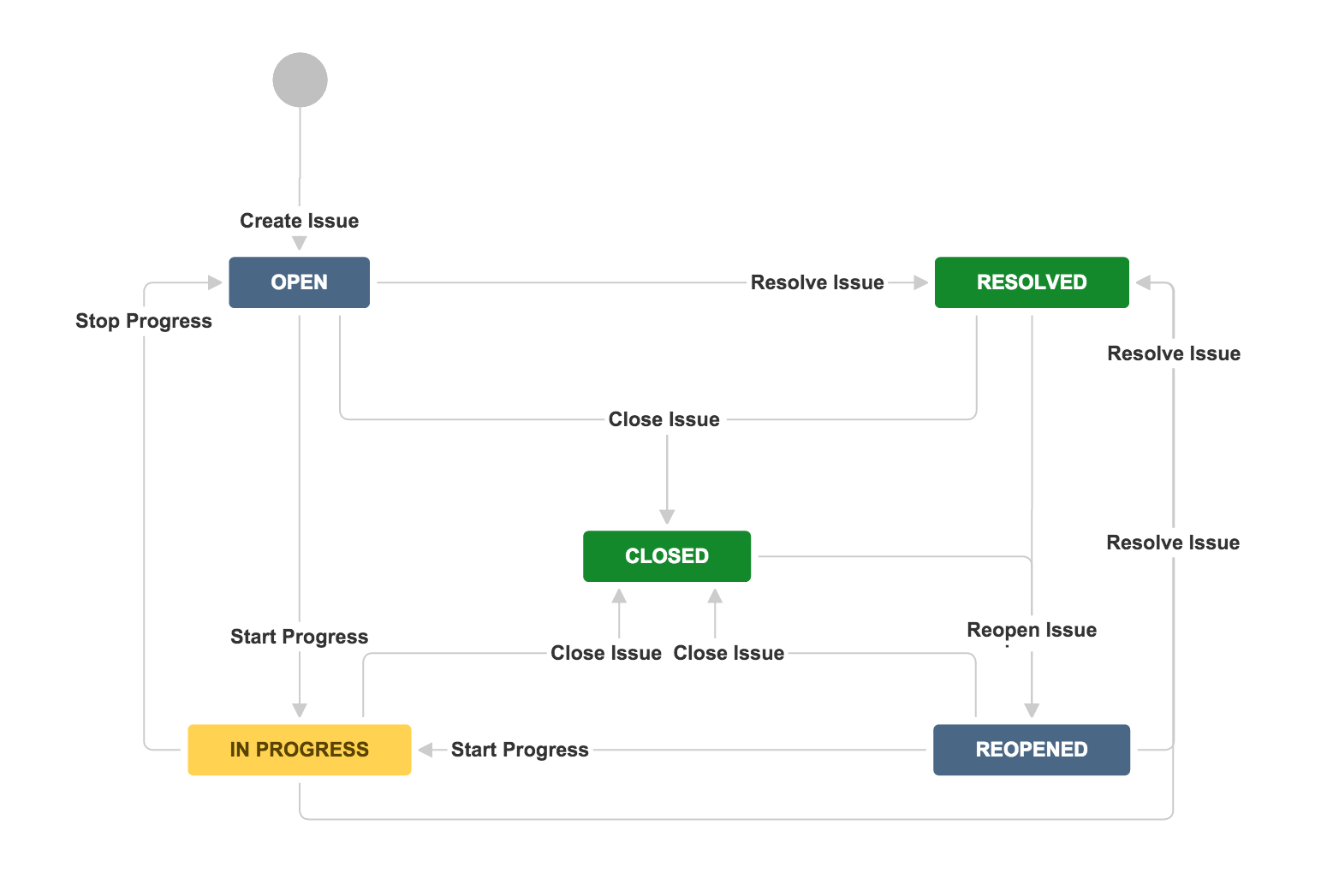
Image source: jira.com
Automation
Jira includes a engine that helps teams reduce repetitive manual work. Automation rules are created using triggers, conditions, and actions. For example, an issue can be automatically assigned when created, moved to a new status when a condition is met, or trigger notifications when deadlines approach.
Automation can operate at both the project level and globally across Jira, helping standardize processes at scale. However, as highlighted in many Jira software reviews, automation rules can become complex to manage over time, especially in large environments with multiple projects and administrators.
Roadmaps & project planning
Jira offers that help teams plan work over longer time horizons. Basic roadmaps provide simple timeline views that show how epics and initiatives align over time. These are useful for team-level planning and stakeholder visibility.
Advanced roadmaps, available in higher-tier plans, support multi-team planning, dependency tracking, and delivery forecasting. Teams can visualize how work across projects connects and identify risks early. These features are often discussed in Jira Align review conversations, especially for enterprises coordinating work across many teams and programs.
Reporting & analytics
Reporting and analytics are key strengths in most Jira reviews. Jira includes more than 25 built-in reports designed to measure and delivery health. These reports cover metrics such as burndown, velocity, cycle time, and cumulative flow.
Teams can also build custom dashboards using gadgets to track progress across projects and teams. Jira Query Language (JQL) enables advanced filtering and reporting, providing specific insights. While powerful and effective, reporting often requires experience with Jira's data model and configuration options.
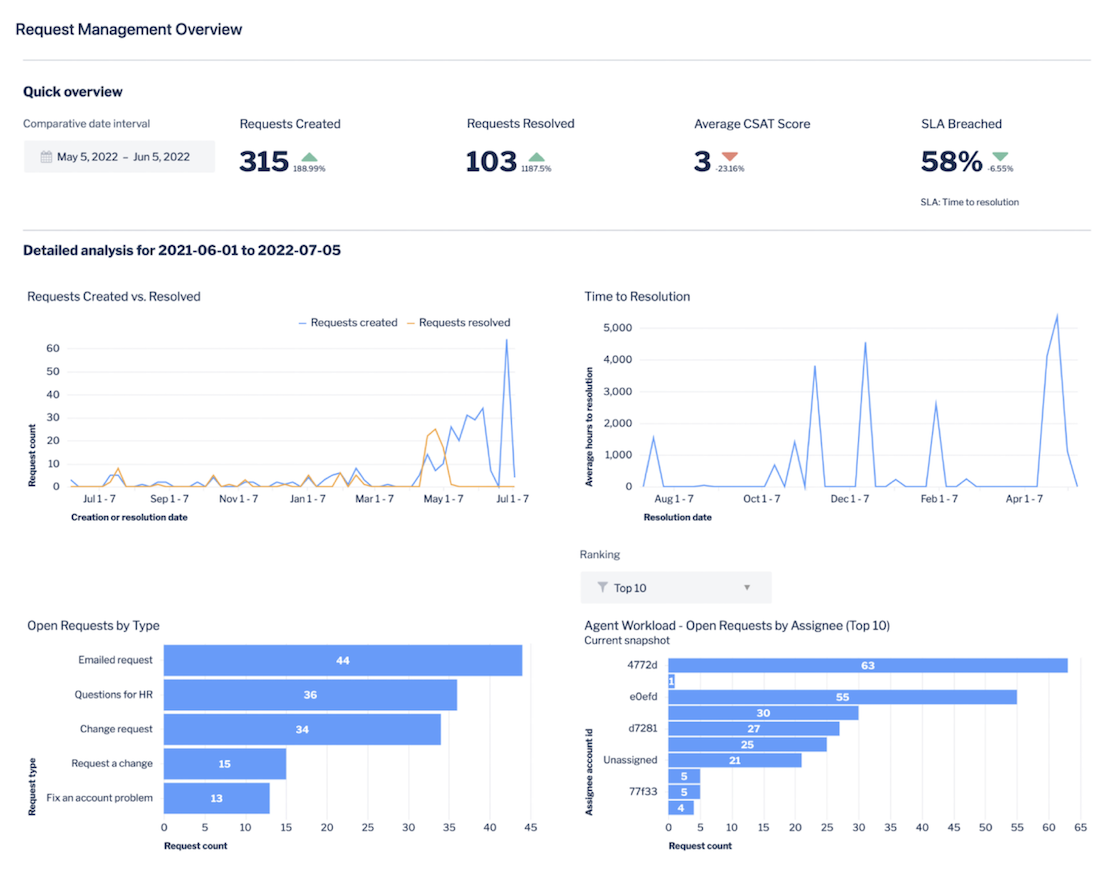
Image source: jira.com
Permissions & admin controls
Jira is built with enterprise governance in mind, offering detailed permission and security controls. Administrators can define role-based access settings, customize project roles, and control who can view or edit specific issues. Issue-level security is significant for sensitive work or regulated environments.
Audit logs track changes to issues, workflows, and configurations, providing accountability and traceability. These controls make Jira suitable for large organizations but also contribute to its administrative complexity, particularly for teams without dedicated Jira admins.
Integrations & marketplace apps
Jira integrates deeply with other Atlassian products such as Confluence and Bitbucket, as well as external tools like GitHub, GitLab, Slack, and CI/CD platforms. These integrations allow development and product teams to connect code, documentation, and communication directly to their work items.
In addition, the Atlassian Marketplace offers over 7,000 apps for testing, reporting, automation, time tracking, OKRs, and more. While this ecosystem greatly extends Jira's capabilities, many teams rely on multiple paid add-ons, which can increase costs and system complexity over time.
Collaboration tools
Collaboration in Jira centers on issues. Team members can comment on issues, use @mentions to notify others, and attach files such as specifications, screenshots, or design documents. Notifications keep stakeholders informed as work progresses or changes.
Jira provides shared visibility across engineering, product, and operations teams, but its collaboration model is primarily asynchronous and task-focused. For and broader collaboration, teams often supplement Jira with additional tools, which can fragment the overall work experience.
Jira pricing model explained
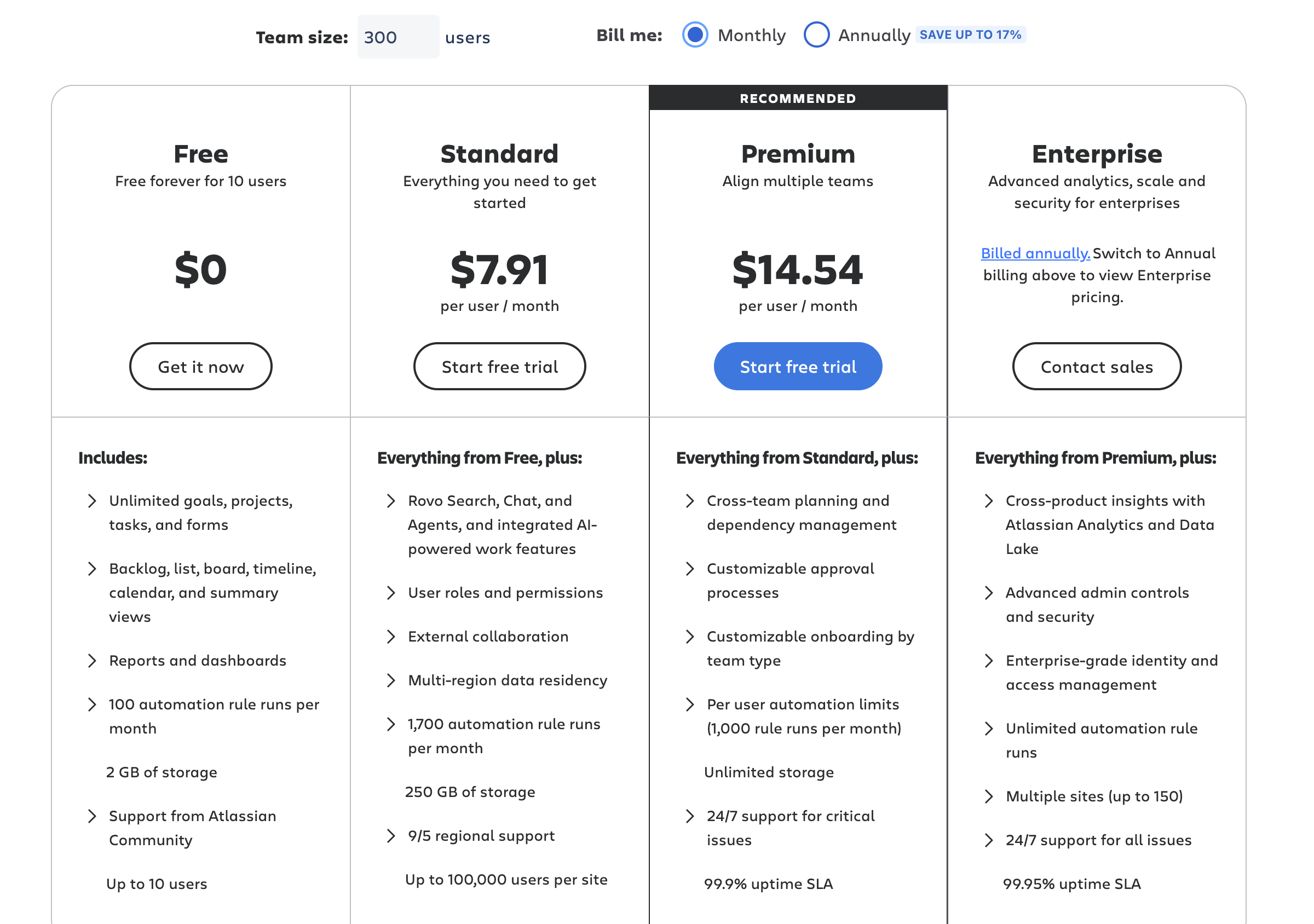
Understanding Jira's pricing is essential for teams evaluating the platform. Jira uses a tiered, progressive pricing model for monthly subscriptions, meaning the per-user cost decreases as you add more seats. While Atlassian offers a Free plan for small teams, advanced features, enterprise capabilities, and add-ons can increase overall expenses. Below is the updated breakdown of Jira's cloud pricing plans and key features.
Information source: jira.com
Update time: 2025/07/29
Note: Pricing and plan details reflect publicly available data as of the update date and may vary based on region, billing cycle, and number of agents.
Jira's free plan supports up to 10 users, and Jira's free tier is considered generous for small teams testing agile project management tooling. The Standard plan costs $7.91 per user per month-the typical entry point for growing teams. The Premium plan is priced at $14.54 per user per month and adds cross-project automation, Advanced Roadmaps, and sandbox environments. Enterprise pricing for Jira is custom and varies by organization.
Hidden costs matter. Marketplace apps for features like Gantt charts, test management, or resource planning can add 20–40% on top of your core subscription cost. Factor in admin time for setup, ongoing governance, and training for non-technical users. If your team also needs Confluence, Bitbucket, or Atlassian Guard, those are separate subscriptions.
By comparison, 's Starter plan is free for up to 20 users (with unlimited users on the Enterprise plan), the Basic plan runs $6/user/month, and Pro is $12/user/month-each bundling chat, meetings, docs, and task management in a single subscription.
Pros and cons of Jira
Any balanced Jira review needs to weigh the platform's strengths against its limitations. While Jira is widely respected for its depth and scalability, real-world usage shows that its complexity and cost structure can affect different teams in very different ways.
Pros
- Extremely powerful and customizable: Jira offers a high level of flexibility through custom issue types, workflows, fields, and . Teams can tailor the platform to match particular processes, a significant advantage in complex Agile and DevOps environments. This customization allows Jira to support everything from software delivery to IT operations at scale.
- Industry-standard for Agile development: Jira is one of the most widely adopted Agile tools. Its support for Scrum, Kanban, sprint planning, and Agile reporting makes it a default choice for many engineering teams. Because of its popularity, Agile frameworks, certifications, and third-party tools often assume familiarity with Jira.
- Large integration ecosystem: Jira integrates seamlessly with Atlassian products like Confluence and Bitbucket, as well as external tools such as GitHub, GitLab, and Slack. The Atlassian Marketplace adds thousands of plugins for testing, reporting, and automation. This ecosystem allows teams to extend Jira far beyond its out-of-the-box capabilities.
- Scales well for enterprises: Jira is designed to support large organizations with multiple teams and complex governance needs. Features like role-based permissions, audit logs, and advanced reporting make it suitable for enterprise environments. As teams grow, Jira can handle increased workloads, user counts, and project complexity effectively.
Cons
- Steep learning curve for new users: Jira's flexibility comes with complexity, making onboarding difficult for new or non-technical users. Concepts like workflows, schemes, and JQL require time and training to understand. Many teams report that productivity initially drops before users become comfortable with the platform.
- Can feel bloated for simple projects: For or straightforward projects, Jira can feel overly complex. Setting up projects, workflows, and permissions may take more effort than the work itself. This is a common reason teams compare Jira with lighter tools, such as Trello, in discussions about Jira vs Trello.
- Costs increase significantly with add-ons and scale: While Jira's base pricing can appear affordable, total costs often rise as teams add users, upgrade plans, or rely on Marketplace apps. Many commonly needed features require paid add-ons, which can significantly increase long-term expenses for mid-market teams.
- Requires ongoing administration and configuration: Jira typically requires dedicated administrative effort to maintain workflows, permissions, automations, and integrations. As usage grows, managing configuration changes and plugin updates becomes more time-consuming. This ongoing maintenance is often underestimated during initial adoption.
Who Jira is really for and why teams look for simpler Jira alternatives
Tool fit depends on team size, technical maturity, and whether your work is primarily software development or broader cross-functional projects.
Jira's ideal profile:
- Software development and IT teams of 10+ people running formal Scrum or Kanban
- Organizations with a dedicated admin or agile coach who can configure and maintain the tool
- Large enterprises with distributed engineering teams, strict compliance needs, and existing Atlassian adoption
Even in a comprehensive Jira review, it's important to acknowledge why some teams explore alternative tools. While Jira excels in complex, technical environments, its depth and ecosystem can create challenges that impact adoption and efficiency.
- Workflow fatigue: Jira's flexibility allows teams to create highly customized workflows, but over time, can become exhausting. Teams may spend more time maintaining process rules than actually completing tasks. This "workflow fatigue" is widespread in organizations with frequent process changes or multiple teams using different workflows.
- Plug-sprawl: Many Jira users rely on third-party plugins to fill functionality gaps, from reporting and testing to and OKRs. While these plugins extend Jira's capabilities, using too many can make the system complicated and harder to maintain. Plug-sprawl also introduces additional costs and potential compatibility issues when upgrading Jira versions.
- Rising admin maintenance: As Jira instances grow, administrative tasks increase significantly. Admins must manage permissions, workflows, automation rules, and integrations across projects and teams. This ongoing maintenance can be time-consuming, especially for organizations without dedicated Jira administrators.
- Incomplete adoption across non-technical teams: Jira's interface and structure are optimized for technical users, which can hinder adoption among non-technical departments. Teams in marketing, HR, or operations may find Jira's issue-centric model complex and unintuitive. Limited adoption outside engineering reduces overall collaboration and transparency.
The challenges of workflow fatigue, plug-sprawl, high admin costs, and poor adoption by non-technical teams all highlight the friction created by Jira's modular and issue-centric design. This systemic friction is why many organizations look for an alternative that prioritizes simplicity and integration. Here, Lark directly addresses these pain points by offering a unified workspace that natively contains a set of collaborative tools. If you are looking to escape this tool fragmentation, Lark offers a highly integrated, human-centric workspace that natively bridges these execution gaps.
Say goodbye to plug-sprawl and embrace a new option
Meet Lark: An all-in-one alternative to Jira's multi-product ecosystem
The core value of lies in its role as a unified workspace, directly countering the complexity and friction inherent in modular tools like Jira. By natively built-up essential functions, including visual workflows, real-time documentation, and , Lark eliminates the need for numerous third-party plugins and reduces the administrative burden. This approach ensures a low learning curve and drives high adoption across all departments, enabling fluid, company-wide process and collaboration that fragmented tools often fail to achieve.
A flexible workspace for managing structured workflows
provides teams with a structured environment for building workflows, including customizable tables, , grouped records, and formula-based fields. This setup supports everything from simple project tracking to multi-stage operational processes. While Jira requires configuring issue types, schemes, and workflows before teams can start working, Lark allows immediate setup with minimal admin effort. Teams can quickly adapt workflows as needs change, making it suitable not only for engineering groups but also for cross-department collaboration. 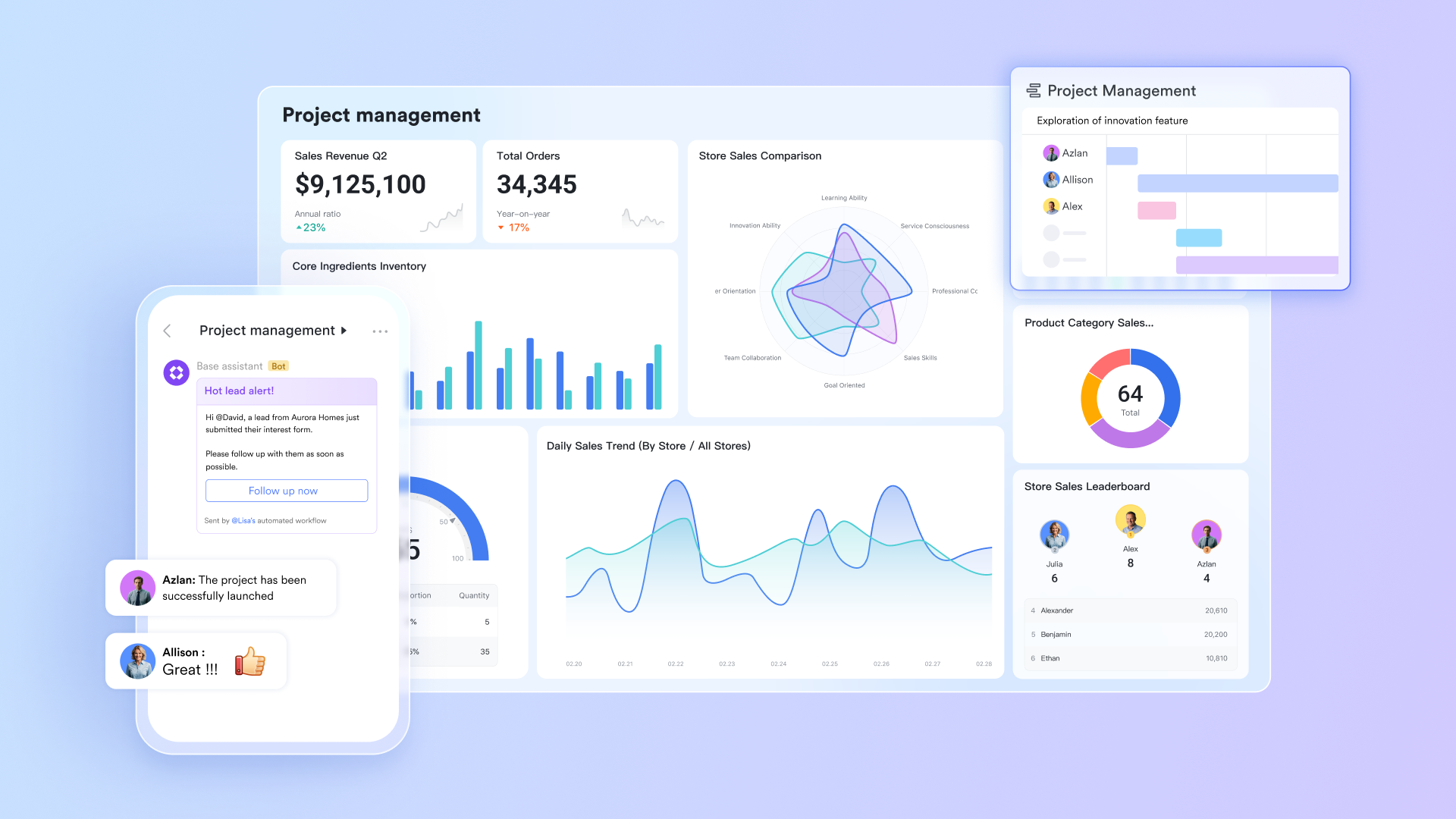
Automated processes to reduce manual effort
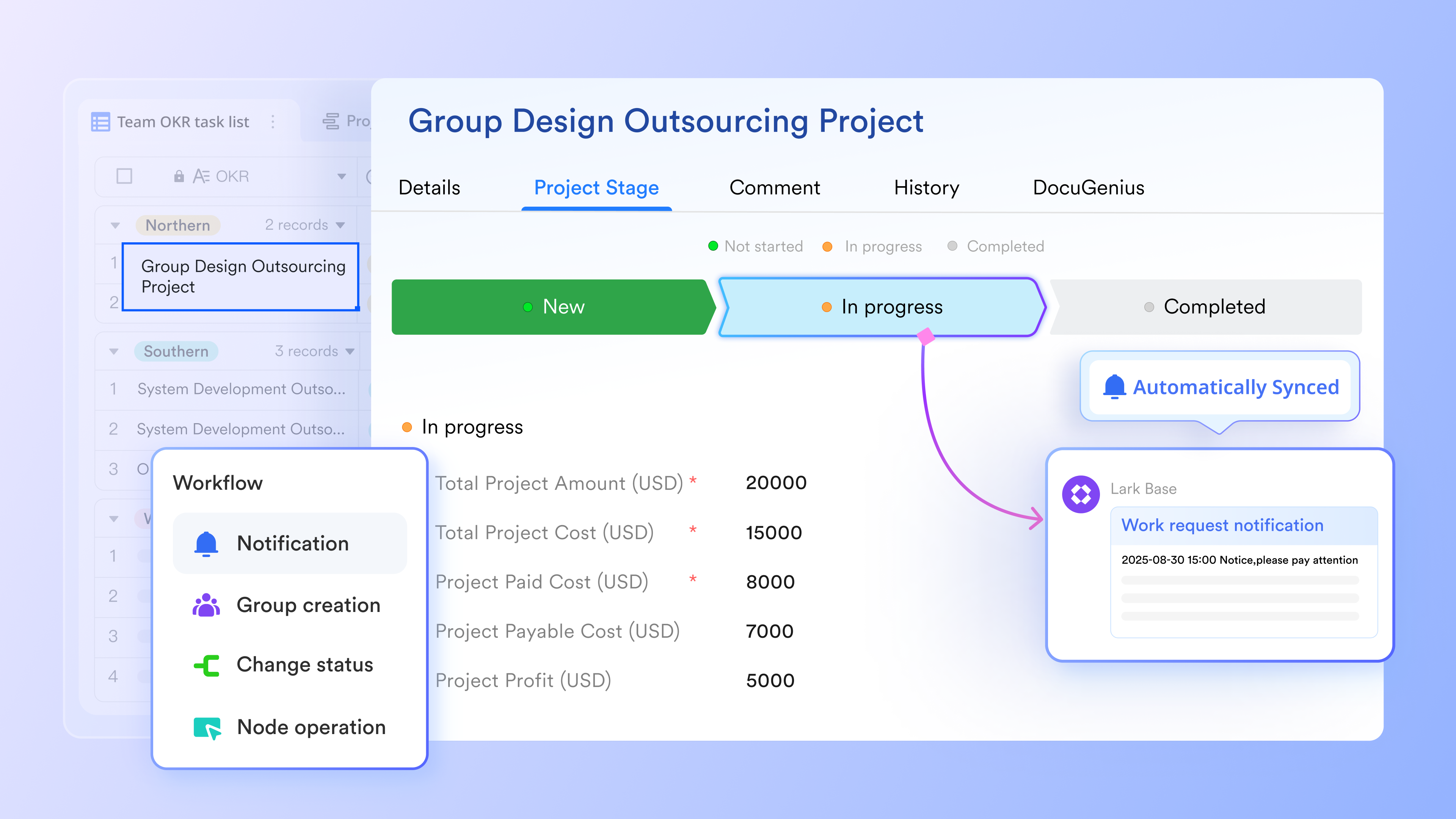
Lark lets teams such as status updates, reminders, notifications, and conditional actions inside structured workspaces. This helps maintain consistency and reduces repetitive work without requiring deep admin skills. Jira also supports automation, but building rules often requires navigating complex conditions, triggers, and project-level configurations. Lark's approach makes automation more accessible for non-technical teams while still supporting meaningful workflow improvements.
Precise execution across teams with organized task management
Lark Tasks enables teams to manage assignments, deadlines, and follow-up actions in a single, easy-to-read system. Tasks can be linked to discussions, documents, or structured records, giving teams full context for each responsibility. Unlike Jira, where task visibility lives inside issue structures that can feel overwhelming for non-technical users, Lark offers a straightforward approach that helps all team members stay aligned on priorities and progress without navigating complex project layers. 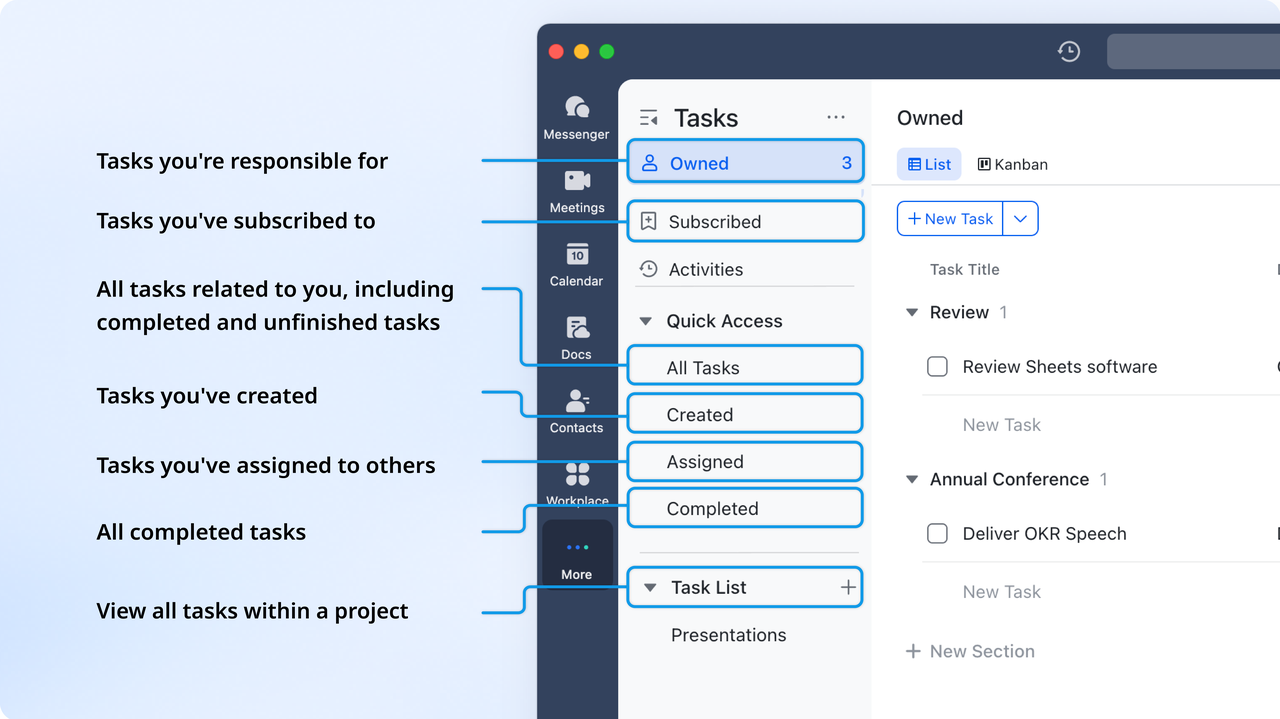
Real-time collaboration on documentation and planning
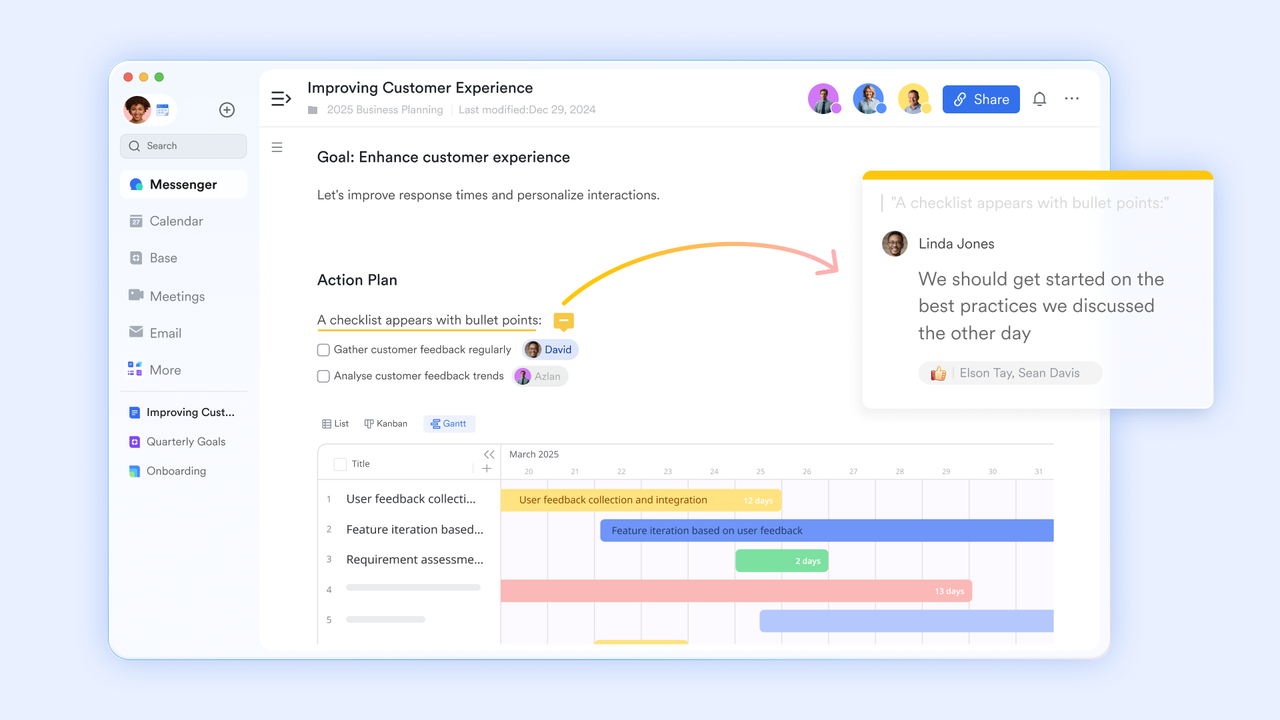
provides a shared documentation space where teams can , add comments, embed tables, and in collaborative docs. This eliminates the need for external documentation platforms and ensures every update happens in real time. Jira requires teams to rely on Confluence for documentation, creating a split experience between issue tracking and content work. With Lark, teams build knowledge, plans, and proposals in the same workspace where their communication and execution already live.
Communication that stays connected to ongoing work
supports fast, fluid communication through threads, mentions, voice messages, shared files, and group channels, all tied to ongoing tasks and workflows. Teams can discuss updates, clarify details, and resolve issues without switching between chat apps and . In comparison, Jira's comment system is designed mainly for issue-level discussions and lacks the immediacy needed for daily teamwork, pushing companies to add Slack or email into the workflow. Lark eliminates this fragmentation by bringing conversation and execution together. 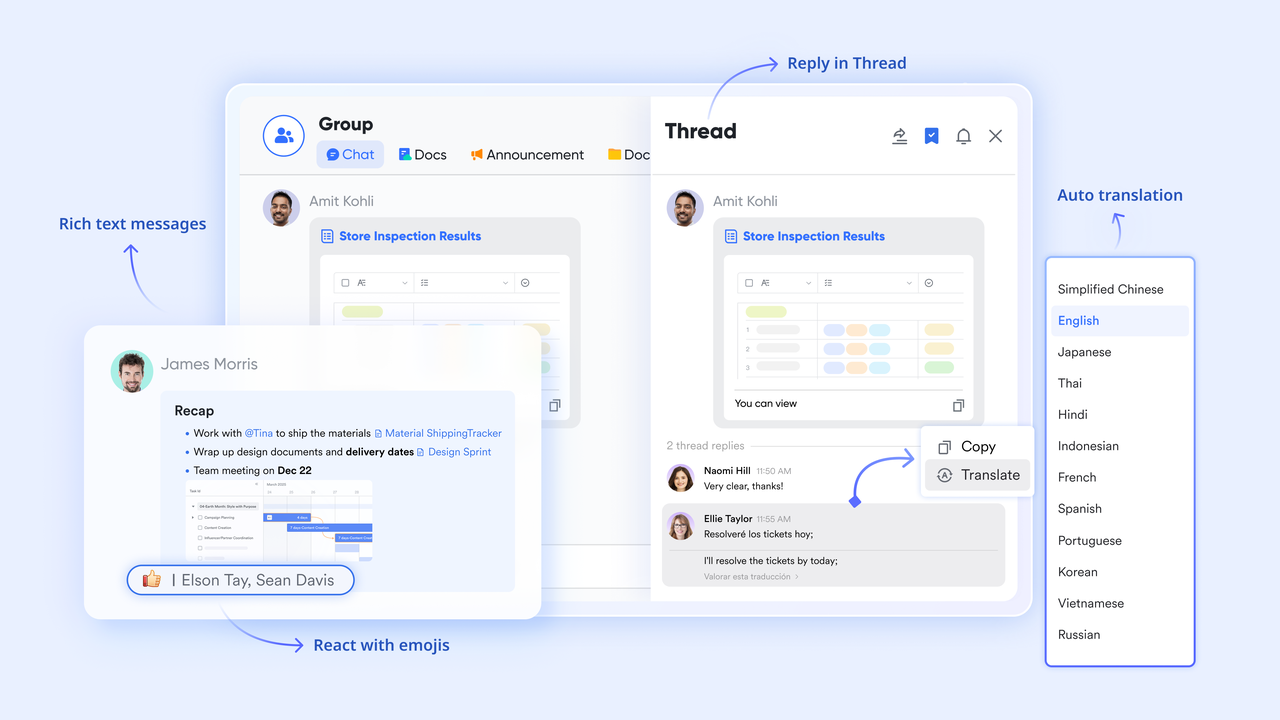
This seamless integration of conversation and execution is exactly what fast-moving teams experience in practice. Here is how Dasher uses Lark's unified workspace to keep their retail operations fully aligned:

"Lark helps me stay organized and I can quickly act on any feedback or issues. It has also made communication with the team so much easier — everyone is on the same page, and we’re able to work together more effectively."

Oliver Lim
Manager of O2O Stores and the Mystery Shopper Program
:
- Starter plan: Free forever plan that includes 11 powerful tools for up to 20 users. It also comes with 100GB of storage, 1000 automation runs, AI translations, and more.
- Basic plan: $6/user/month (billed annually) for up to 500 users. It includes everything in Starter plus group calling for up to 500 attendees, 5TB of storage, 1000 automation runs, and more. For more details, please .
- Pro plan: $12/user/month (billed annually) for up to 500 users. It includes everything in Basic plus group calling for up to 500 attendees, 15TB of storage, 50,000 automation runs, and more.
- Enterprise plan: for custom pricing. Supports unlimited users and includes even more automation runs and advanced security, compliance, and management features.
For small teams with simple communication needs

18 months message history
1000 Base automation runs/month
2000 rows per table in Base
Most POPULAR
For companies with comprehensive collaboration and management needs
Unlimited message history
500-participant video meetings
50k Base automation runs/month
20k rows per table in Base
For large companies with advanced security and organizational management needs
Get a personalized demo and pricing
Unlimited message history
500-participant video meetings
15 TB storage + 30 GB storage/user
500k Base automation runs/month
50k Base automation runs/month
Most POPULAR
For companies with comprehensive collaboration and management needs
Unlimited message history
500-participant video meetings
50k Base automation runs/month
20k rows per table in Base
Final verdict: Which tool should you choose, Jira or Lark?
Choosing between Jira and Lark depends primarily on your team's technical depth and whether you need a specialized engineering tool or an all-in-one business operations hub.
Who should choose Jira
Jira remains the industry gold standard for software development. If your core "project" is a codebase, Jira's native integration with DevOps tools, detailed burn-down charts, and agile-specific reporting are irreplaceable. It is built for teams that live and breathe "tickets" and need a rigid, professional-grade audit trail for every line of code or system change.
Who should choose Lark
Lark is the better choice for modern business operations. If you find Jira "too technical" or "too clunky" for non-developers, Lark provides a more human-centric experience. It excels at being a single source of truth because your CRM (Base) and your execution (Tasks) live exactly where your conversations happen (Messenger). Choose Lark if you want to move fast, automate manual work via AI, and keep your entire company on one platform.
Conclusion
This Jira review highlights why Jira remains a leading platform for Agile project management and technical teams. Its strengths, customizable workflows, robust reporting, automation, and a large integration ecosystem, make it ideal for engineering-led organizations and enterprises with complex processes.
However, the platform's steep learning curve, administrative overhead, and reliance on plugins can pose challenges for smaller or non-technical teams. Organizations seeking a more straightforward setup, faster onboarding, and unified collaboration may find lighter alternatives more suitable. For teams looking to combine structured workflows, real-time collaboration, and agile execution without extensive configuration, offers a compelling solution.
Collaborate in real time across teams
FAQs
FAQ About Jira review
How much admin time should teams expect to maintain Jira setups long-term?
Maintaining Jira requires consistent administrative effort, especially as projects, users, and workflows expand. Admins must update permissions, configure workflows, manage automation rules, and monitor integrations to keep the platform running smoothly. Teams should plan for ongoing maintenance to avoid bottlenecks, particularly in larger deployments. This consideration is often highlighted in a Jira core review.
What are the hidden costs of Marketplace apps for mid-market teams?
While Jira's base subscription may seem affordable, many essential features depend on paid Marketplace apps. Costs can accumulate quickly with reporting tools, testing plugins, and integrations. Mid-market teams often underestimate these expenses, which can significantly raise the total cost of ownership. These hidden costs are frequently discussed in a Jira software review.
How does Jira handle cross-department workflows compared to newer unified platforms?
Jira is optimized for technical teams, which can make adoption by non-technical departments challenging. Cross-department workflows often require extra customization, plugins, or training, and visibility can remain siloed. Newer unified platforms aim to reduce these barriers by integrating communication and simplifying task management, offering smoother adoption. This is a key topic in the Jira Service Management review.
What factors determine whether a team outgrows Trello and should switch to Jira?
Teams typically outgrow Trello when they need advanced Agile planning, reporting, and dependency tracking. Complex projects with multiple sprints, significant backlogs, or cross-team coordination often require Jira's structured workflows, automation, and analytics. Evaluating this transition is central to many Trello vs. Jira review discussions.
How does Jira's automation system compare to lightweight workflow tools?
Jira's automation engine supports multi-step rules, triggers, and project-level configurations, offering deep customization. However, building and maintaining rules can be complex and time-consuming. Lightweight workflow tools prioritize ease of use and rapid setup, appealing to teams with simpler needs. These differences are often examined in a Jira vs. Smartsheet comparison review.
Related reading






























