Often, teams find themselves in situations where multiple issues arise simultaneously, leading to confusion about task ownership and progress. One of the most popular tools is issue tracking in Jira, which has robust capabilities to help teams identify, manage, and resolve issues efficiently. However, navigating Jira effectively can be challenging. In this article, we will provide an overview of Jira issue tracking software, including its features, common challenges teams face, and best practices for utilizing Jira to its fullest potential. We will also introduce a better alternative, a collaborative tool that can enhance your team's ability to address issues seamlessly.
What is issue tracking?
is a systematic approach to recording, managing, and resolving issues that arise during a project's lifecycle. By maintaining an organized log of issues, teams can ensure that no critical problems are overlooked and that resolutions are implemented effectively. The importance of issue tracking in cannot be overstated. Here are a few key reasons why it matters:
- Visibility: Issue tracking provides teams with real-time visibility into the status of project challenges. This transparency helps everyone understand what issues are in progress, what has been resolved, and what remains outstanding.
- Accountability: With a structured issue tracking system, assigning responsibility for resolving issues becomes easier. Each issue can be linked to a team member, ensuring that accountability is maintained.
- : A dedicated issue tracking system fosters communication among team members. It becomes a central place for discussions, annotations, and updates related to specific issues, ultimately .
- Data for future reference: An organized log of issues serves as a valuable historical reference. For example, a Jira bug report might highlight a recurring issue that can be addressed in future , helping to prevent similar issues from arising again.
See real-time issue tracking in action
Tutorial of issue tracking in Jira
has established itself as a leading issue tracking software widely used by teams across various industries. Its immense popularity stems from its ability to facilitate agile project management and its robustness in handling diverse project needs. Let's dive into how to use Jira effectively for issue tracking.
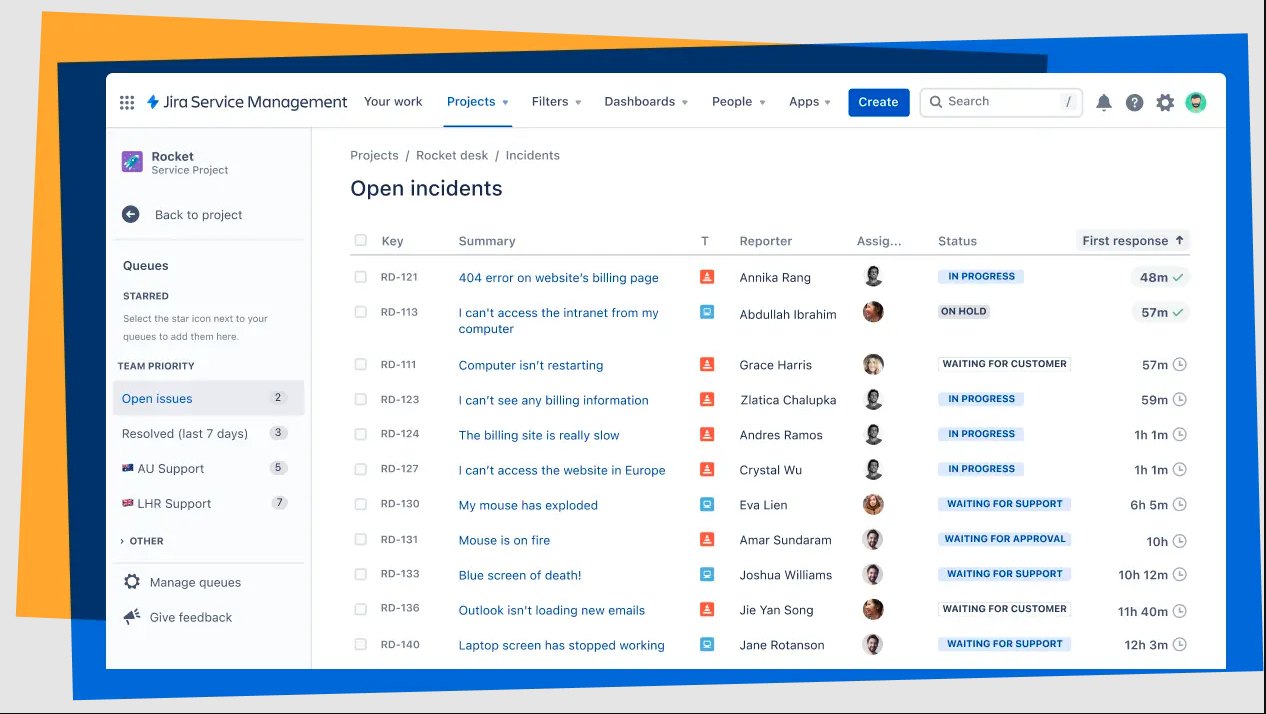
Image source: atlassian.com
Setting up an issue tracking workflow in Jira
To begin using Jira for effective issue tracking, follow these fundamental steps that outline how to set up and manage issues within the platform:
- Start by . Choose a project template that fits your team's workflow needs. For example, you can select a Kanban board for continuous delivery or a scrum framework for iterative sprints.
- Then define the project key and name, then set necessary permissions and roles for team members.
- Jira allows you to define various issue types, including tasks, bugs, and stories. Clearly define the types relevant to your project to categorize issues effectively.
- You can customize issue types by going to "Jira settings" and selecting "Issues." Here you can add new types or modify existing ones to better fit your workflow.
- Once your project is set up, begin creating issues. To do this, click on the "Create" button in the top navigation bar.
- Fill in essential fields such as the issue type, priority, summary, and description. Make sure to provide detailed information on what the issue entails, especially if you're creating a jira bug report. You can even attach screenshots or files to provide additional context.
- Assign issues to team members to ensure accountability. This can be done during the creation of the issue or afterward by editing the issue details.
- You can also create a group of assignees if the issue requires collaboration from multiple team members.
- Utilize the priority field to rank issues based on urgency and impact on the project. Jira allows teams to set custom priority levels, ensuring alignment with business objectives.
- Regularly review and update priorities to adapt to changing project dynamics.
- Jira provides visual status tracking through boards. These boards can be customized to reflect different statuses, such as "To do," "In progress," and "Done."
- Move issues across the board as they progress through various stages of your workflow. This visual representation helps provide clarity on the team's progress and workload.
- Using filters and queries
- Leverage Jira's powerful filtering and querying options. You can search for specific issues using "Jira Query Language (JQL)" or apply pre-defined filters to see issues based on specific criteria.
- Saving frequently used filters can streamline the process of accessing important issues quickly.
- Take advantage of automation features in Jira to reduce manual workload. You can create automation rules for repetitive tasks, such as automatically closing issues when a pull request is merged or sending reminders for overdue tasks.
- To set up automation, navigate to project settings, select "Automation," and create your rules based on triggers and conditions relevant to your workflow.
- Utilize Jira's reporting capability to gain insights into team performance and issue management. Reporting options include burndown charts, cumulative flow diagrams, and sprint reports.
- Regularly reviewing these reports can help teams identify areas for improvement and facilitate discussions during retrospective meetings.
- Integrating with other tools
- Jira integrates smoothly with various development and collaboration tools, including Confluence for documentation, Bitbucket for , and Slack for team communication.
- Set up these integrations to consolidate your workflow, allowing for and collaboration on issues.
By following these steps, teams can leverage Jira's issue tracking capabilities to enhance their project management processes. The flexibility and extensive features of Jira not only offer a robust framework for handling issues but also allow for customization based on team needs. With effective training through resources like the Jira bug tracking tutorial, teams can maximize their use of Jira to promote accountability, improve communication, and drive project success.
Case studies: Successful implementations
Many organizations have successfully leveraged issue tracking in Jira to enhance their project management capabilities. Below are a few case studies that demonstrate effective implementations of Jira for issue tracking.
- Training new members: Teams often employ a Jira tutorial to train new members on best practices. This training ensures that new hires understand how to document issues properly, track progress, and resolve problems efficiently. By familiarizing team members with the platform, organizations can reduce the learning curve and improve overall productivity.
- Reducing bug resolution time with GitHub integration: A software development team reduced issue resolution time by connecting Jira directly to their GitHub repository. By utilizing automated workflows, they ensured that any new bugs reported in GitHub would automatically create a corresponding issue in Jira. This integration streamlined communication between developers and , allowing teams to respond quickly to coding errors and reducing resolution times significantly.
- Improving prioritization with standardized Jira templates: A product organization improved clarity and prioritization by adopting a consistent Jira bug tracking template. They developed a standardized template that included fields for issue severity, assigned team members, and expected resolution dates. This consistency helped maintain clarity across the board, enabling better prioritization of issues based on their potential impact on projects.
- Focusing on user feedback: A product team focused on gathering user feedback to identify bugs and enhancements that could improve their software. They used Jira to create a straightforward workflow for logging user-reported issues, ensuring these feedback items were visible to the relevant development teams. This proactive approach led to faster resolution of user issues and improved overall product satisfaction.
These case studies highlight how organizations are effectively using issue tracking in Jira to enhance their processes, ensuring improved communication, accountability, and ultimately, better project outcomes. By implementing automation, training, and standardized processes, teams can optimize their issue tracking efforts and foster a culture of continuous improvement.
Common challenges faced by teams using Jira
Despite its many benefits, teams using issue tracking in Jira often encounter practical challenges in day‑to‑day work. Understanding these pain points in advance helps teams and support plans, rather than assuming the tool alone will solve their problems.
Complexity and steep learning curve
A major hurdle with Jira issue tracking software is its inherent complexity. The platform offers extensive configuration options, custom fields, workflows, and permissions. While powerful, this richness can overwhelm new users who simply want to log a bug, update a status, or check priorities.
Without clear guidelines, many teams end up with cluttered boards, inconsistent issue types, and confusing workflows. New members may rely on workarounds or skip fields entirely, leading to poor data quality. As a result, Jira's full potential is underused: Reports become unreliable, priorities are unclear, and managers cannot easily see which issues truly need attention.
Connecting Jira with other tools
Another frequent challenge in issue tracking with Jira is linking it to the rest of the team's tool stack. Many organizations use separate applications for source code (such as GitHub), documentation, chat, and meetings. When these tools are not properly connected to Jira, information about the same issue becomes scattered.
Teams may face problems such as bugs not being reflected correctly between systems, pull requests not tied to Jira tickets, or status changes in one place not appearing in another. This lack of smooth synchronization leads to duplicated work, manual updates, and gaps in the issue history, all of which slow down resolution.
Communication and collaboration gaps
Jira provides a structured space to record and track issues, but it does not automatically ensure effective communication around them. Comments on tickets can easily be missed if team members do not receive or check notifications regularly. Discussions often spill over into or chat tools, leaving important decisions outside the Jira issue.
As a result, issue tracking in Jira can become fragmented: Some context lives in the ticket, some in chat threads, and some only in people's memories. This fragmentation increases the risk of misunderstandings, rework, and delays, especially when handovers occur or new members join a project. Over time, teams may feel that while issues are "in Jira," they are not truly managed in a collaborative, transparent way.
Overcome all challenges in an all-in-one solution
Moving beyond Jira: A better tool for issue tracking
As teams continue to search for the best solutions for their issue tracking needs, it's essential to consider , especially when complexity, onboarding time, or cross‑team collaboration become bottlenecks. For organizations that want a more streamlined experience while still keeping structured workflows, Lark emerges as a compelling option—combining flexible issue tracking with built‑in messaging, docs, and automation in a single workspace that can either complement or replace issue tracking in Jira.
Overview of Lark's features
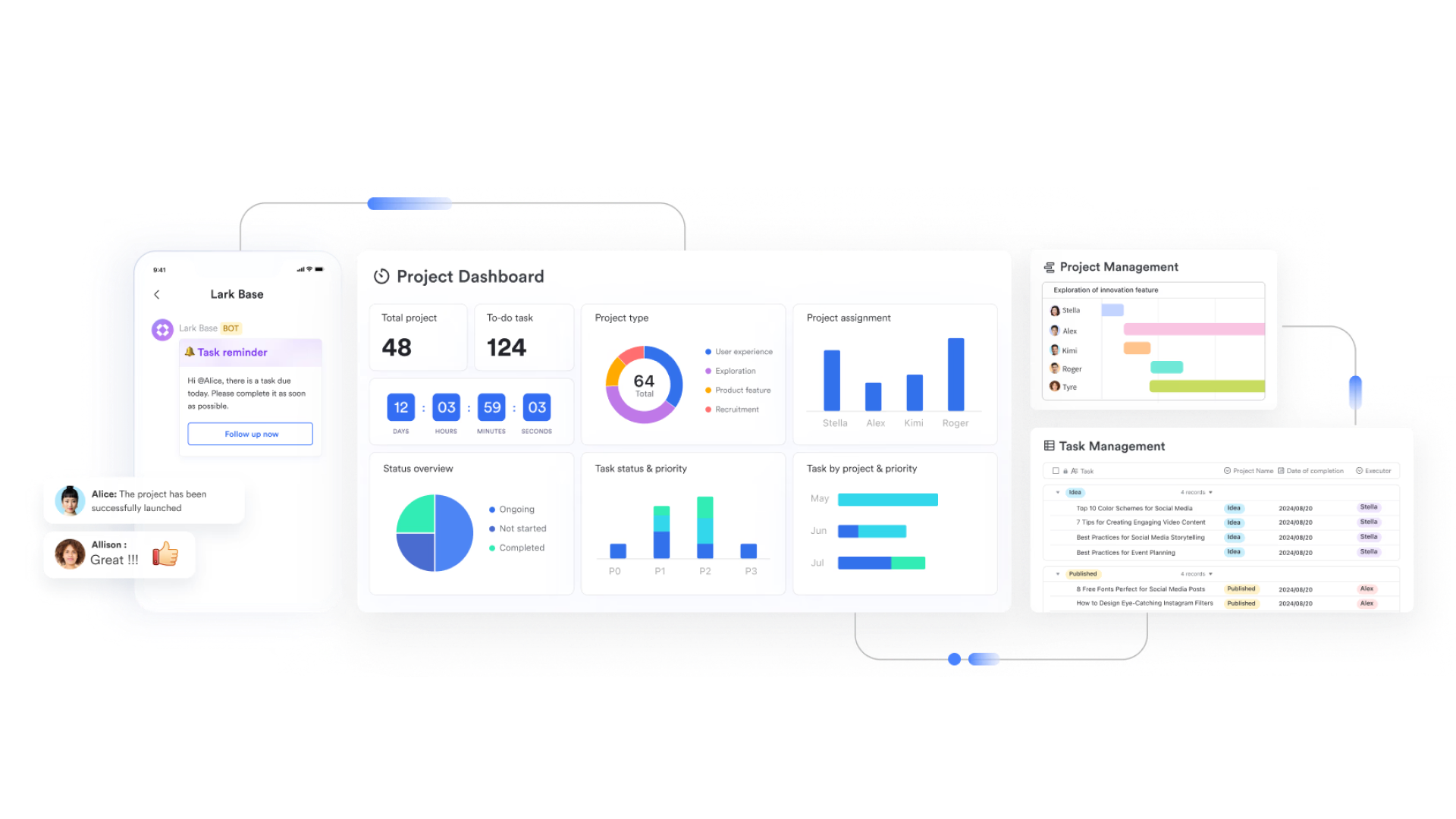
One promising alternative is , a collaborative platform that enhances communication and issue tracking without the complexity often associated with Jira. Unlike Jira, which can create silos between teams and hinder , Lark offers an environment where essential tools coexist seamlessly. Here are the key features of Lark that facilitate effective issue tracking:
: Lark Base lets you build an issue tracking table with custom fields (priority, status, owner, component, SLA, etc.) and views (Kanban, list, calendar) tailored to each team. Compared with Jira's heavier workflow setup, Base makes it easier to spin up or adjust an "issue tracker" for different projects while still keeping structured data for reporting.
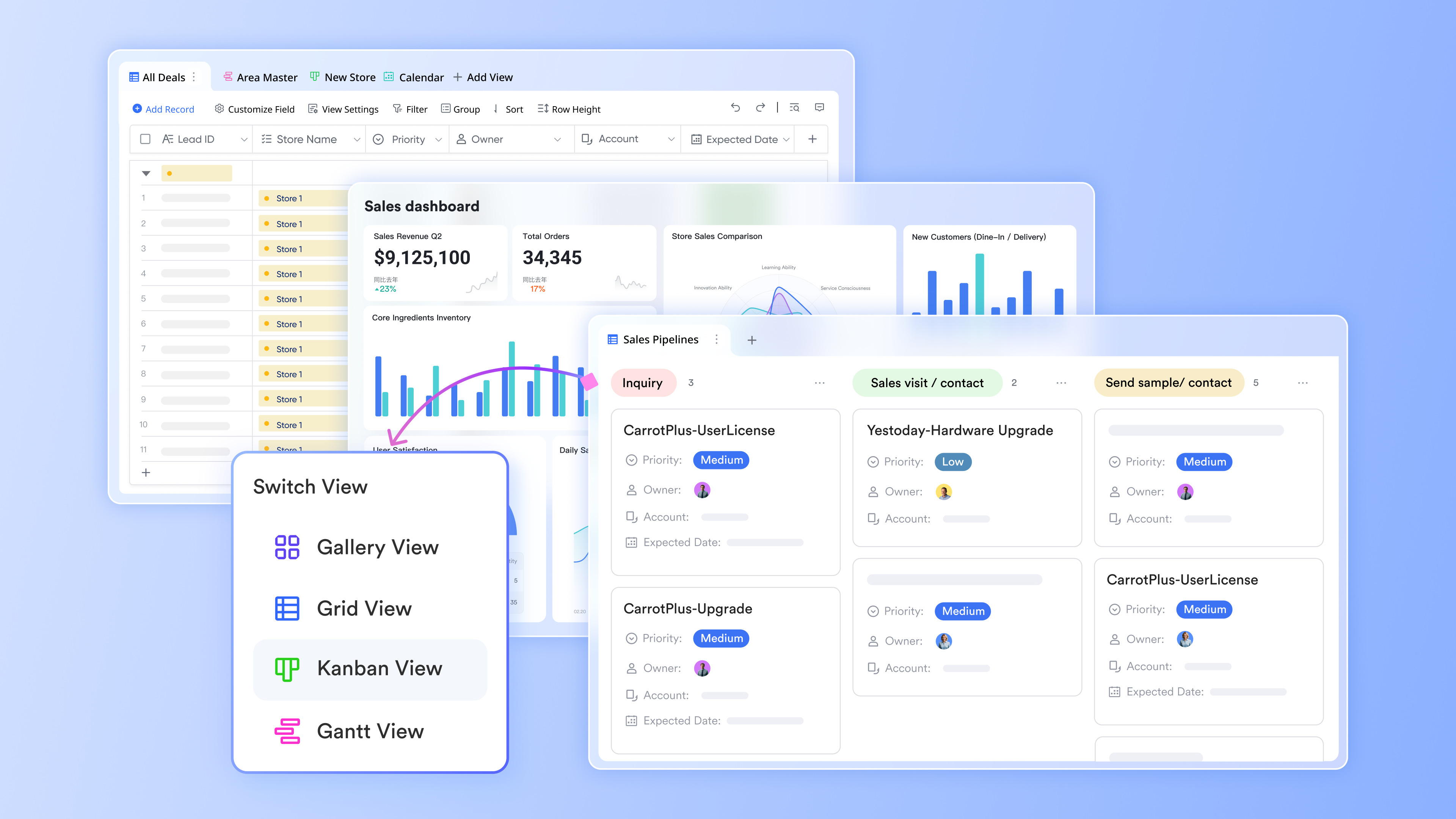
: This feature enables teams to discuss issues in real-time, promoting immediate collaboration. With built-in chat functionality, team members can share updates and insights instantly, reducing delays in communication and speeding up resolution times.

: Lark Docs allows for real-time documentation of issues. Team members can collaboratively edit documents, ensuring that all updates and changes are immediately visible to everyone. This accessibility enhances transparency and keeps all stakeholders informed. This keeps documentation tightly connected to issues, unlike Jira environments where context is often spread across multiple tools or lost in long comment threads.
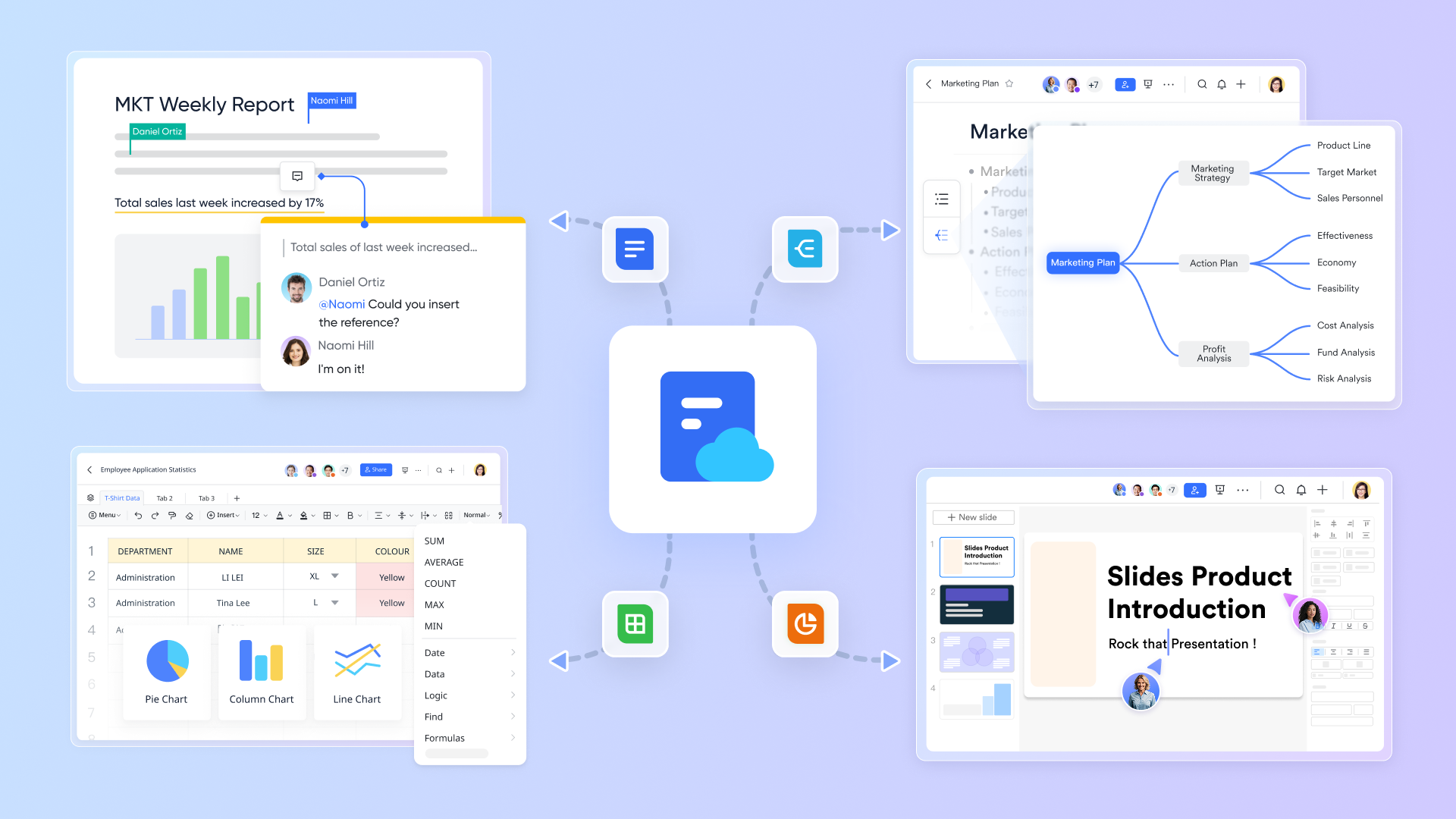
: This functionality captures essential discussions and decisions made during meetings automatically. By preventing critical information from being overlooked, it ensures that follow-up actions are clear and that team members can refer back to important points discussed during their meetings.

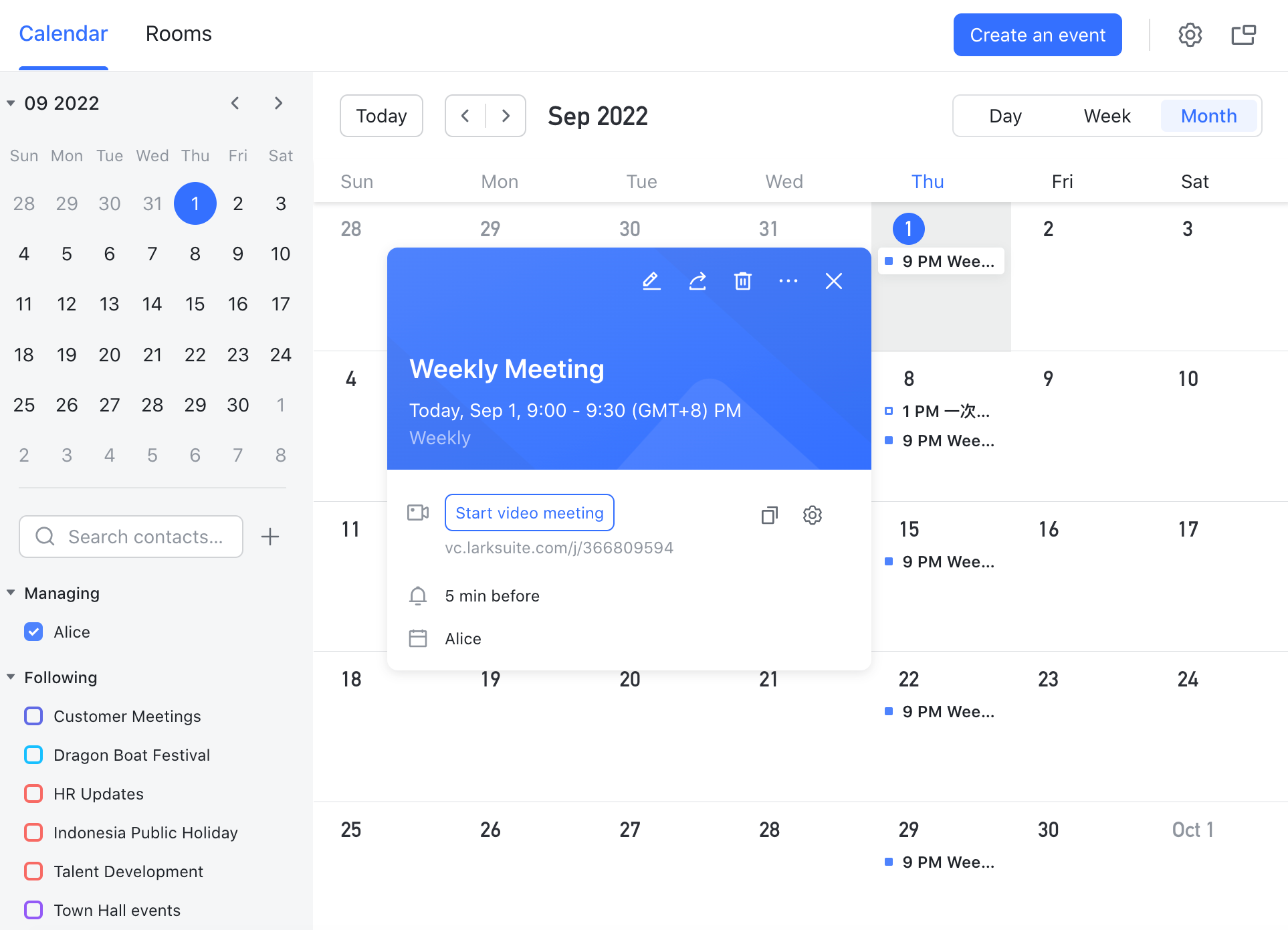
: Lark's calendar feature facilitates the scheduling of follow-up tasks and reminders. This helps ensure that team members and aware of important deadlines, further enhancing task management. This complements Jira's workflow rules by turning due dates into shared schedules that everyone can see and act on.
User-friendly experience: Lark provides a more intuitive interface compared to other platforms, reducing the learning curve for new users. By focusing on usability, Lark empowers teams to track issues effectively while maintaining robust communication and workflow efficiency. For some teams, Lark Base can fully replace issue tracking in Jira; for others, it can sit alongside Jira as a simpler tracker for non‑engineering teams while keeping all collaboration in one place.
Overall, Lark's suite of features promotes collaboration and enhances the efficiency of issue tracking, making it an excellent choice for teams looking to improve their processes without the complexities found in traditional tools like Jira.
Lark pricing
- Starter plan: Free forever plan with 11 powerful tools for up to 20 users, 100GB storage, 1,000 automation runs, AI translations, and more. No credit card needed.
- Basic plan: $6/user/month (billed annually) for up to 500 users. Includes everything in Starter plus unlimited message history, 5TB storage, 1,000 automation runs, and more. Some users may need to to purchase.
- Pro plan: $12/user/month (billed annually) for up to 500 users. Includes everything in Basic plus group calling for up to 500 attendees, 15TB storage, 50,000 automation runs, and more.
- Enterprise plan: for custom pricing. Supports unlimited users and includes advanced automation, security, compliance, and management features.
For small teams with simple communication needs

18 months message history
1000 Base automation runs/month
2000 rows per table in Base
Most POPULAR
For companies with comprehensive collaboration and management needs
Unlimited message history
500-participant video meetings
50k Base automation runs/month
20k rows per table in Base
For large companies with advanced security and organizational management needs
Get a personalized demo and pricing
Unlimited message history
500-participant video meetings
15 TB storage + 30 GB storage/user
500k Base automation runs/month
50k Base automation runs/month
Most POPULAR
For companies with comprehensive collaboration and management needs
Unlimited message history
500-participant video meetings
50k Base automation runs/month
20k rows per table in Base
Still wondering about which tool to choose? . Switching to Lark's Pro plan can lead to significant cost savings— for example, a 100-employee company using Slack, Google Workspace, and Airtable could save approximately $19,800 annually by consolidating their tools with Lark.
Grab a real bargain and get more!
How to use issue tracking in Lark
Using Lark for issue tracking centers around Lark Base as your issue database, with Lark Docs, Lark Messenger, and AI Meeting Notes providing the surrounding context and collaboration. Instead of treating Lark as "just chat", you can design a lightweight but structured tracker that mirrors many core Jira capabilities without the same setup overhead.
- Designing your issue tracker in Lark Base: Start by creating a Lark Base table specifically for issues. Add key fields such as status, priority, assignee, component, sprint, due date, and links to related tasks or incidents. You can then create different views (Kanban, grid, calendar, or filtered lists) for engineering, product, or support—each seeing the same underlying issues, but in the format that best fits their workflow.
- Setting up issue tracking workflows: Creating tailored workflows in Lark can help manage the issue tracking process simply and intuitively. This allows teams to customize workflows to match their unique requirements, promoting accountability throughout.
- Utilizing Lark Docs for documentation: in Lark Docs ensures that every issue tracked is recorded, allowing for accessible real-time updates. This feature is particularly valuable when generating reports or reviewing issues from previous sprints.
- Enhancing communication with Lark Messenger: With built-in messaging, teams can discuss issues promptly, , and provide updates without having to switch contexts. This integration fosters a culture of collaboration, making it easier to work through issues together.
- Using AI Meeting Notes for follow-ups: The AI-driven note-taking feature helps teams capture important discussions and resolutions during meetings, ensuring no detail is missed, especially in follow-up actions regarding issue resolution.
In conclusion, while issue tracking in Jira is a prevalent choice for many teams, it's essential to recognize its limitations. Exploring alternatives like Lark can empower teams to track issues more efficiently, leading to improved communication and ultimately successful project outcomes. In the next sections, we will discuss the benefits of implementing effective issue tracking and delve deeper into best practices that can enhance your team's productivity, whether using Jira or other platforms like Lark.
Start issue tracking in a smarter tool today
Benefits of effective issue tracking
Effective issue tracking goes beyond simply logging problems; it's a pivotal aspect of successful project management that can greatly affect team dynamics and project outcomes. When issues are tracked properly, teams can expect several benefits that enhance collaboration, efficiency, and overall productivity.
Enhanced visibility
One of the primary benefits of using Jira issue tracking software is the enhanced visibility it provides into the status of current issues. Teams can quickly ascertain which problems are still unresolved, which have been addressed, and which are awaiting feedback or final approval. This visibility allows project managers and team members to prioritize tasks effectively and where they are needed most.
- Transparency: Issues documented in a jira bug report can be viewed by all stakeholders, ensuring everyone is informed about project progress.
- Prioritization: With the issues laid out clearly, teams can prioritize high-impact tasks, addressing the most critical issues first in line with project timelines.
Improved communication
Effective issue tracking facilitates better communication among team members. When issues are documented transparently, teams can engage in discussions directly related to the specific items at hand. This context-rich environment nurtures collaboration.
- Centralized discussions: Relevant comments, updates, and resolutions are captured alongside each issue, providing context for everyone involved and minimizing misunderstandings.
- Regular updates: Teams can leverage features like email notifications or alerts within Jira to keep all members updated about changes to issue statuses or conversations related to issues.
Increased accountability
By assigning specific issues to team members, the chances of accountability improve significantly. Each issue tracked in Jira can be associated with an owner, making it clear who is responsible for resolution.
- Ownership: When a team member takes ownership of an issue, they are more likely to drive it towards resolution actively.
- : Managers can easily monitor progress on specific issues and hold team members accountable if deadlines are not met.
Valuable historical data
An organized and well-maintained issue tracking system acts as a rich source of historical data. This data can provide valuable insights into the types of issues that frequently arise and how efficiently they are resolved.
- Trend analysis: By examining past issues logged in the jira bug tracking template, teams can identify patterns, such as recurring bugs or user complaints.
- Process improvement: Historical data can help teams refine their processes and prevent similar issues from occurring in future projects.
Score all these benefits with a cure-all
Conclusion
In summary, issue tracking in is an essential component of effective project management. The numerous benefits—ranging from visibility and accountability to improved communication—create a solid foundation for teams striving to maintain high productivity levels in fast-paced environments. While Jira remains a prominent tool for many organizations, alternatives like Lark also provide integrated solutions that address some of the shortcomings associated with traditional issue tracking methods.
As teams continue to evolve and adapt, understanding the principles behind effective issue tracking and actively participating in their implementation can lead to more successful and collaborative outcomes. By leveraging best practices in issue tracking, including utilizing templates and historical data analysis, teams can streamline their workflows, reduce time spent on repetitive issues, and ultimately foster a culture of proactive problem-solving.
The journey to mastering issue tracking may involve initial challenges, but the rewards far outweigh the costs. Whether your team chooses to utilize Jira, explore alternatives like , or adopt a hybrid approach, prioritizing effective issue tracking and communication can set you on the path to greater project success and team cohesion.
Begin a journey to master issue tracking in Lark
FAQs
How do I create a tracker in Excel?
To create a tracker in Excel, start by opening a new spreadsheet. Define your columns based on the data you want to track, such as "Issue ID," "Description," "Status," and "Assignee." Use filters for easy sorting and entry validation to maintain data integrity. For enhanced collaboration, consider using tools like Lark.
How to make a complaint tracker in Excel?
To make a complaint tracker in Excel, create a new sheet and set up columns for "Complaint ID," "Date Received," "Customer Name," "Complaint Details," "Status," and "Resolution Date." Utilize drop-down lists for the "Status" column to streamline updates. For better management, platforms like Lark can simplify tracking and collaboration.
Does Microsoft have an issue tracker?
Microsoft does not offer a standalone issue tracking tool, but it provides capabilities within applications like Microsoft Teams and Azure DevOps. These tools allow users to manage tasks and track issues. However, for a more integrated issue tracking solution, teams might benefit from using Lark, which combines multiple features into one platform.
How to prepare an issue tracker?
To prepare an issue tracker, start by defining the key components such as issue description, priority, status, assignee, and due date. Create a template in Excel or a project management tool. For dynamic tracking and collaboration, consider using Lark, which offers built-in tools for seamless issue management and team engagement.
What is Jira?
Jira is well-known for bug tracking and project management. It offers comprehensive features that support teams in managing their tasks and projects efficiently. Jira's capabilities extend beyond simple tracking; it allows teams to prioritize issues, automate workflows, and generate insightful reports.
Related reading































