Choosing the right online form builder is no longer just about collecting data—it's about managing workflows, automating repetitive tasks, and ensuring scalable collaboration across teams. Jotform has grown into one of the most widely used form platforms for businesses, nonprofits, and healthcare providers, thanks to its flexible builder and extensive integration. But understanding Jotform pricing, mainly how limits and add-ons affect real operating costs, is essential before committing your team to a long-term plan.
This guide provides a detailed breakdown of all Jotform pricing plans, including free and paid tiers, hidden costs, enterprise options, and HIPAA-compliant workflows. Let's dive in now.
Upgrade your data collection into a smart way
What is Jotform
Jotform is a builder that enables users to create contact forms, surveys, registration forms, feedback forms, payment forms, and more — all without writing code. Its intuitive drag-and-drop interface, plus a rich library of pre-built templates and customizable fields, makes form creation quick and accessible even to users with minimal technical experience.
Jotform is especially well-suited for small businesses, nonprofits, educators, freelancers, and professionals who need to gather data, registrations, or payments with minimal setup. For larger teams, enterprises, or organizations with heavy data collection, submission volume, or compliance needs, Jotform's higher-tier offerings under "jotform enterprise pricing" deliver more storage, higher submission limits, multi-user support, advanced security, and scalable workflows — making it a solid choice when volume and .
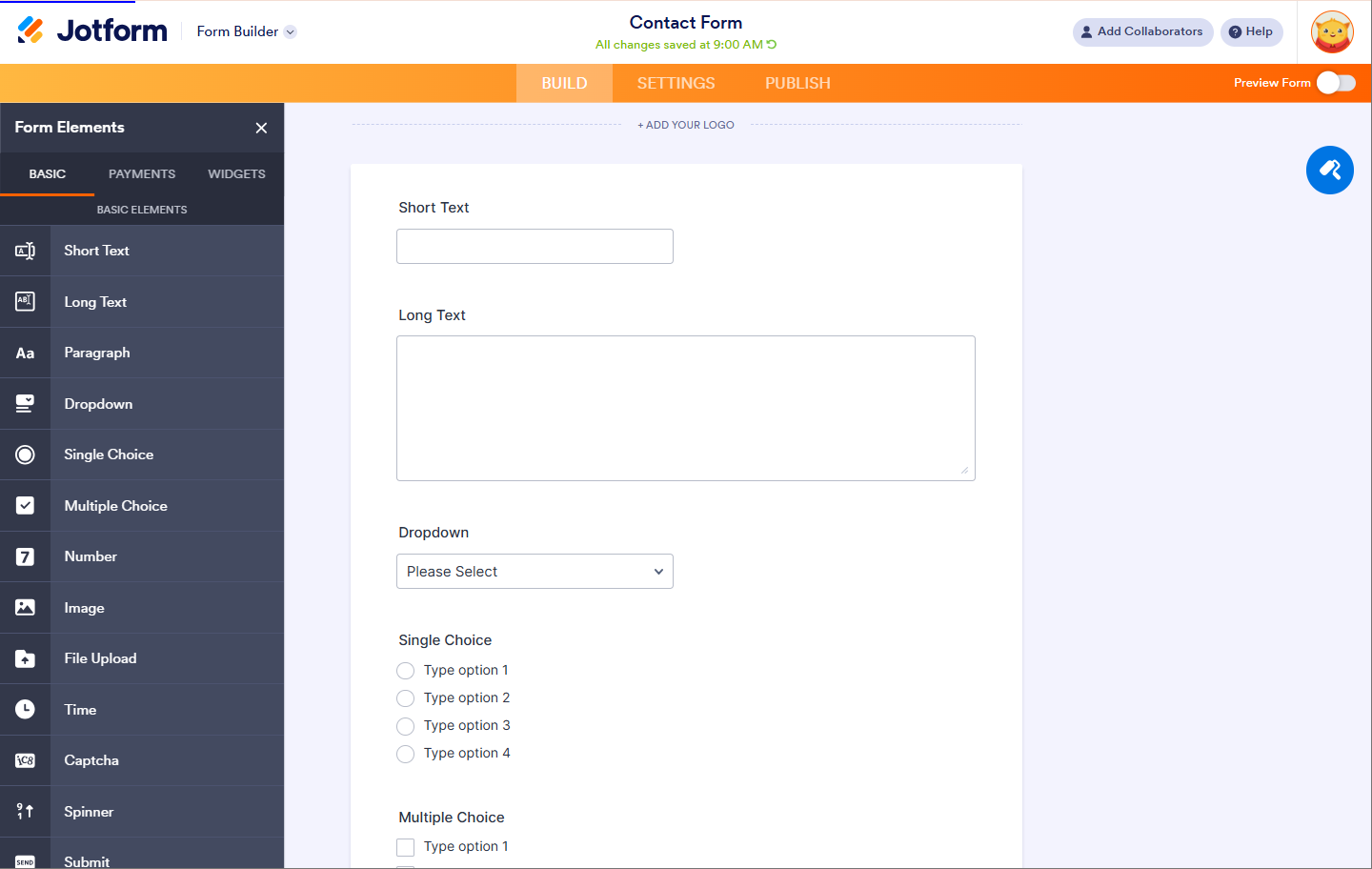
Image source: jotform.com
Features Jotform offers
Jotform offers a robust suite of features designed to help individuals and businesses collect, manage, and act on data more efficiently. Its tools go far beyond simple form creation, supporting everything from payment collection and digital signatures to and team collaboration. Whether you're building customer intake forms, processing registrations, or managing approvals, Jotform provides flexible components that adapt to a wide range of use cases. Together, these features make it a versatile platform for streamlining everyday operational processes.
Form builder and templates
Jotform's drag-and-drop form builder allows users to create contact forms, surveys, registrations, feedback forms, and payment forms without coding. Users can start from hundreds of prebuilt templates or designs, or build from scratch using , conditional logic, and layout customization to match branding needs.
Payment collection
Jotform supports online payments through gateways such as Stripe, PayPal, Square, and Authorize.net. Users can accept one-time payments, donations, registrations, or product orders directly within forms. Pricing tiers determine monthly submission limits—high-volume payment workflows often require higher plans.
Electronic signatures (Jotform Sign)
Jotform Sign enables document signing within workflows, allowing teams to create contracts, consent forms, NDAs, or agreements that can be executed digitally. Documents can be routed to one or multiple signers, and signed copies are stored for record-keeping. Signature volume and storage depend on the selected plan tier.
Workflow automation
Automation tools allow form submissions to trigger actions such as sending emails, , updating spreadsheets, or routing approvals. Users can create simple conditional workflows to reduce repetitive tasks, though multi-step business processes are limited without advanced plan upgrades.
File uploads and storage
Forms can collect files, such as IDs, images, or documentation. Files are stored within Jotform accounts, with storage capacity strictly capped by plan, ranging from 100 MB on free plans to 100 GB on Gold tiers.
HIPAA compliance
Jotform offers workflows for healthcare and medical organizations under paid HIPAA-enabled plans. These plans provide data encryption, restricted access controls, Business Associate Agreements (BAAs), and other safeguards for the collection and storage of protected health information (PHI).
Submission management
Users can view, filter, export, and analyze submissions from the Jotform dashboard. Data exports support formats such as Excel, CSV, and PDF. Basic filtering tools allow sorting and tagging, though complex data pipelines and cross-team workload management are limited.
Team management (Enterprise tier)
Enterprise plans unlock multi-user accounts with role-based permissions and user management features. Teams can , control access to forms, and manage large-scale workflows through centralized administration with SSO support.
Third-party connections and API access
Jotform supports API connectivity for syncing form data with third-party tools and databases. Advanced use requires higher-tier pricing and technical setup, particularly for enterprise-scale deployments.
Reporting and analytics
Built-in analytics provide submission trends, conversion rates, and basic . Reports help track daily activity and traffic volumes, but are limited to advanced dashboarding and cross-project performance monitoring, and do not support exporting data to external tools.
Jotform pricing plans compared by tier
Here's a quick snapshot of how Jotform's pricing plans stack up against each other across features like form limits, submission quotas, storage, and user access. It helps you determine which tier aligns best with your workflow requirements — whether you're a solo user just starting or a growing team with heavy data traffic. Use this overview to compare costs against capacity and scalability before committing to a plan. 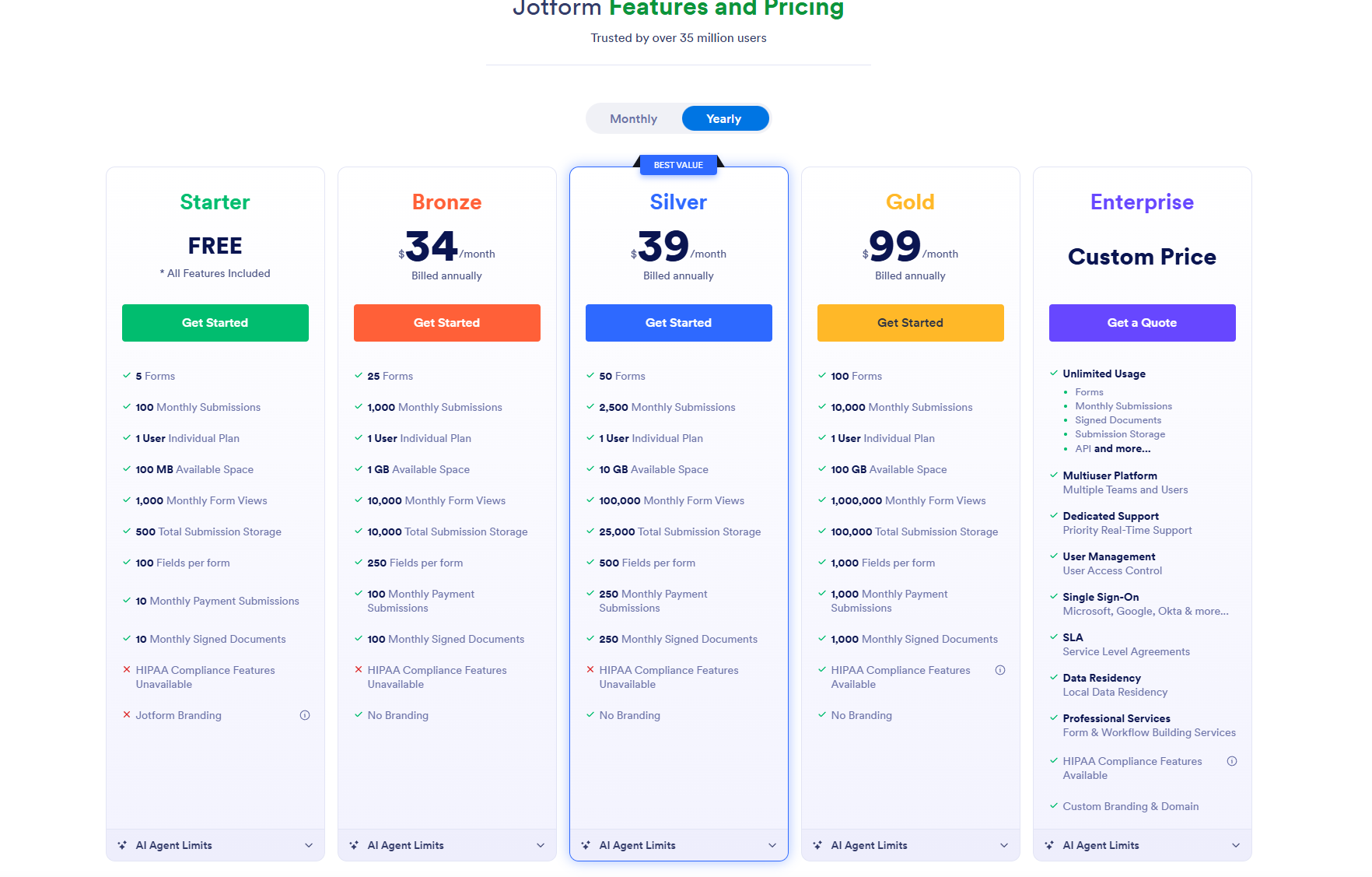
Image source: jotform.com
Image source: jotform.com
Update time: 2025-12-06
Note: Pricing and plan details reflect publicly available data as of the update date and may vary based on region, billing cycle, and number of agents.
Starter plan (Free)
The Starter plan is Jotform's entry-level option designed for individuals who only need simple, low-volume forms. It's ideal for testing workflows, collecting occasional submissions, or running small personal projects. With fundamental limits and single-user access, it suits minimal operational needs.
Key features:
- Limited form and submission volume: The plan allows five forms and 100 monthly submissions, making it suitable for small projects. These limits prevent overuse but keep basic functionality accessible. It's best for beginners or low-frequency processes.
- Modest storage and view capacity: Starter includes 100 MB of space, 1,000 monthly views, and 500 total submission storage, enough for basic text entries with minimal uploads. Users must manage storage carefully. It fits workflows that rarely require attachments.
- Single-user individual plan: Only one user can access the account, restricting collaboration. This supports simple without multi-user coordination. Teams will need to upgrade as soon as shared access becomes essential.
Bronze plan: $34/month (billed annually)
Bronze is the first paid tier and offers expanded usage for small businesses running multiple ongoing forms. It provides more breathing room for marketing campaigns, registrations, and customer engagement. The increased allowances make operations smoother without significant investment.
Key features:
- Expanded operational limits: With 25 forms and 1,000 monthly submissions, Bronze suits organizations running several active workflows. The higher capacity supports stable monthly demand. It's a practical step up for teams that quickly outgrow the free plan.
- Larger storage pool with higher view limits: Users receive 1 GB of space, 10,000 monthly views, and 10,000 total submission storage, with mild file uploads. The increased view limit prevents traffic blockages. It works well for consistently viewed embedded forms.
- Maintains individual user structure: This plan supports only one user, reinforcing that Bronze remains a single-owner workspace. It's ideal when only one team member manages forms. Organizations requiring joint oversight will need a higher tier.
Silver plan: $39/month (billed annually)
Silver is designed for scaling teams that need dependable volume, more storage, and better long-term capacity. It bridges affordability and enterprise-lite capabilities. It's the plan most suited for departments or growing organizations.
Key features:
- Higher throughput for busy workflows: Silver supports 50 forms and 2,500 monthly submissions, enabling multiple departments or processes to run independently. This dramatically reduces the need for mid-month adjustments. It suits teams with predictable monthly traffic.
- Substantial storage for file-heavy processes: With 10 GB space, 100,000 form views, and 25,000 total submission storage, Silver supports high-traffic or documentation-heavy workflows. It is ideal for , inspections, or multi-step requests. The improved limits reduce the pressure on data maintenance.
- Still single-user but operationally scalable: Although limited to 1 user, Silver's scale allows that user to manage complex workflows effectively. It's ideal for centralized management in mid-sized teams. Multi-user needs still require Enterprise.
Gold plan: $99/month (billed annually)
Gold is designed for organizations that require high-volume form handling, substantial storage, and reliable performance across multiple operations. It is ideal for businesses relying heavily on documentation or large-scale public engagement. This tier removes most mid-level constraints.
Key features:
- High-capacity form and submission ecosystem: Gold includes 100 forms and 10,000 monthly submissions, supporting a wide range of operational uses across multiple workflows. This volume suits enterprises with recurring cycles of customer, employee, or partner data collection. It ensures continuity even under heavy demand.
- Enterprise-like storage and visibility limits: Users receive 100 GB storage, 1,000,000 monthly views, and 100,000 total submission storage, , media uploads, or sustained public traffic. It supports national campaigns or large operational portals. Storage issues become rare at this level.
- Single-user with extensive operational coverage: Although still a single-user account, the Gold plan enables it to manage enterprise-like workloads. It is optimal for centralized administration with a broad impact. For distributed access, an Enterprise is necessary.
Enterprise plan: Custom pricing
The Enterprise plan is designed for organizations that need unlimited scale, multi-user architecture, advanced security, and centralized management. It removes nearly every operational limit found in standard tiers. This is the preferred option for regulated industries and large teams.
Key features:
- Unlimited usage across all categories: Enterprise offers unlimited forms, submissions, signed documents, storage, payment submissions, and more. This provides complete freedom from volume-based constraints. It's suited for mission-critical, continuous operations.
- Multiuser platform with admin-level control: Teams can add multiple users with permission-based access and user management. This enables collaboration across departments. It also supports audit trails and governance oversight.
- Premium security and support ecosystem: Enterprise includes SSO (Google, Microsoft, Okta, etc.), dedicated priority support, and . These features support compliance-heavy operations, including healthcare and finance. It is designed for organizations where uptime and security are non-negotiable.
Notes for readers
- All non-enterprise tiers are single-user plans, which limit team collaboration without upgrading.
- Usage limits scale by plan, primarily across submissions, storage, form views, and submission history.
- Enterprise plans remove caps, add multi-user access, user management controls, Single Sign-On (SSO), and priority support.
- HIPAA compliance, advanced security features, and enterprise workflows require higher-tier or custom plans depending on the use case.
Hidden costs to factor into Jotform pricing
Even though Jotform's tiers are straightforward, several operational expenses can surface as your usage grows. These hidden costs can influence your , especially for teams managing heavy or unpredictable form activity.
- Increased fees when exceeding submission limits: Going over your monthly submission quota may require an immediate plan upgrade to restore form functionality. This creates unplanned spikes in cost during high-traffic periods.
- Storage overages: Once upload storage reaches its cap, users must delete files or upgrade to a higher plan. This can be costly for , media files, or verification uploads.
- Team seat expansion costs: Non-enterprise plans support only one user, meaning multi-user access requires upgrading to Enterprise. This dramatically increases pricing when collaboration becomes essential.
- API scaling limitations: API usage caps can restrict data syncing and automation at scale, pushing teams toward higher tiers. Businesses relying on integration may be forced to upgrade as activity grows.
Collaboration challenges with Jotform workflows
While Jotform excels at data collection, is not its core strength. As teams grow, these limitations become more noticeable across day-to-day operations.
- Minimal real-time teamwork inside forms: Most actions in Jotform are performed individually, with limited simultaneous editing or live co-working options. This slows teams that rely on shared, real-time collaboration.
- Lack of shared project views: Jotform focuses on form-level data rather than project-level visibility. Teams cannot monitor multi-step processes or cross-form workflows in a unified dashboard.
- Siloed document creation vs execution tracking: Documents, notes, and approvals often exist outside the form submission process. This disconnect makes it harder to track context, decisions, and follow-through.
- No built-in task coordination layer: Submissions do not automatically translate into , dependencies, or assignments. Teams must rely on external tools to manage actual execution.
As these collaboration gaps grow—especially the lack of real-time teamwork, unified project views, and built-in task coordination—teams often find themselves stitching together multiple tools just to keep work moving. That's why many look for a platform that connects data collection with communication and execution in one place. Lark offers exactly that, providing a unified workspace where teams can collaborate, track progress, and manage workflows without fragmentation.
Connect form collection and execution with ease
Meet Lark: A robust, comprehensive alternative to Jotform
stands out as a stronger alternative to Jotform because it brings forms, collaboration, and workflow execution into a single workspace. Instead of treating data collection as an isolated step, Lark connects submissions directly to documents, tasks, and . This makes follow-through faster and far more organized across departments. Teams don't have to juggle separate tools or manually transfer information to keep work moving. For organizations that rely on steady coordination rather than one-off forms, Lark offers a more complete and practical solution.

Lark Forms: Intelligent form creation for team workflows
Lark Forms is Lark's primary solution for building data-collection workflows that go far beyond basic surveys. Users can create multi-step forms for requests, approvals, registrations, lead capture, onboarding, audits, and inspections. Conditional logic routes questions dynamically based on responses, while real-time submission syncing pushes data directly into . Instead of forms ending at data collection, submissions can automatically trigger assignments, , follow-up actions, and status updates, enabling complete operational workflows to be managed collaboratively rather than in isolation. 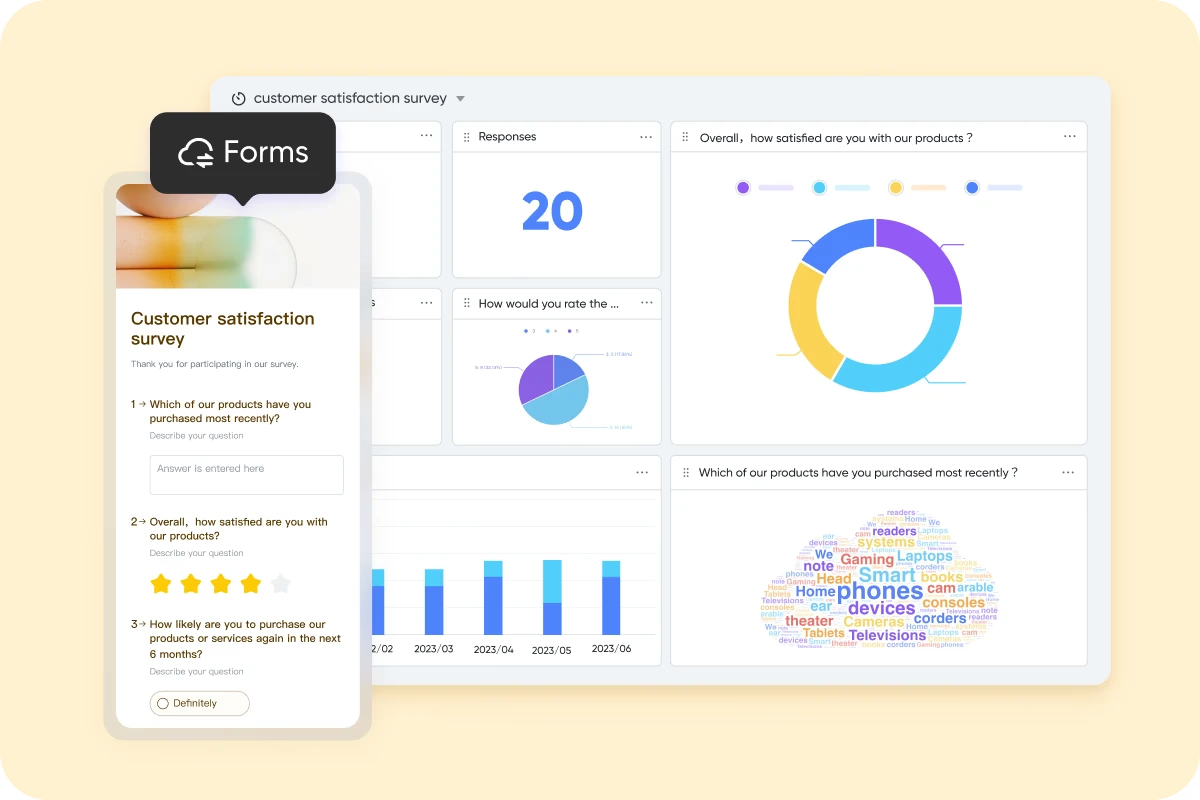
Lark Base: Workflow pipelines and submission databases
All data collected through Lark Forms can be stored and managed in . Teams organize submissions into structured tables or to monitor progress across stages such as "Received," "In review," "Approved," or "Completed." Advanced filters highlight urgent cases, while automations update statuses, route requests to managers, and notify stakeholders as records move through pipelines, replacing manual tracking spreadsheets. 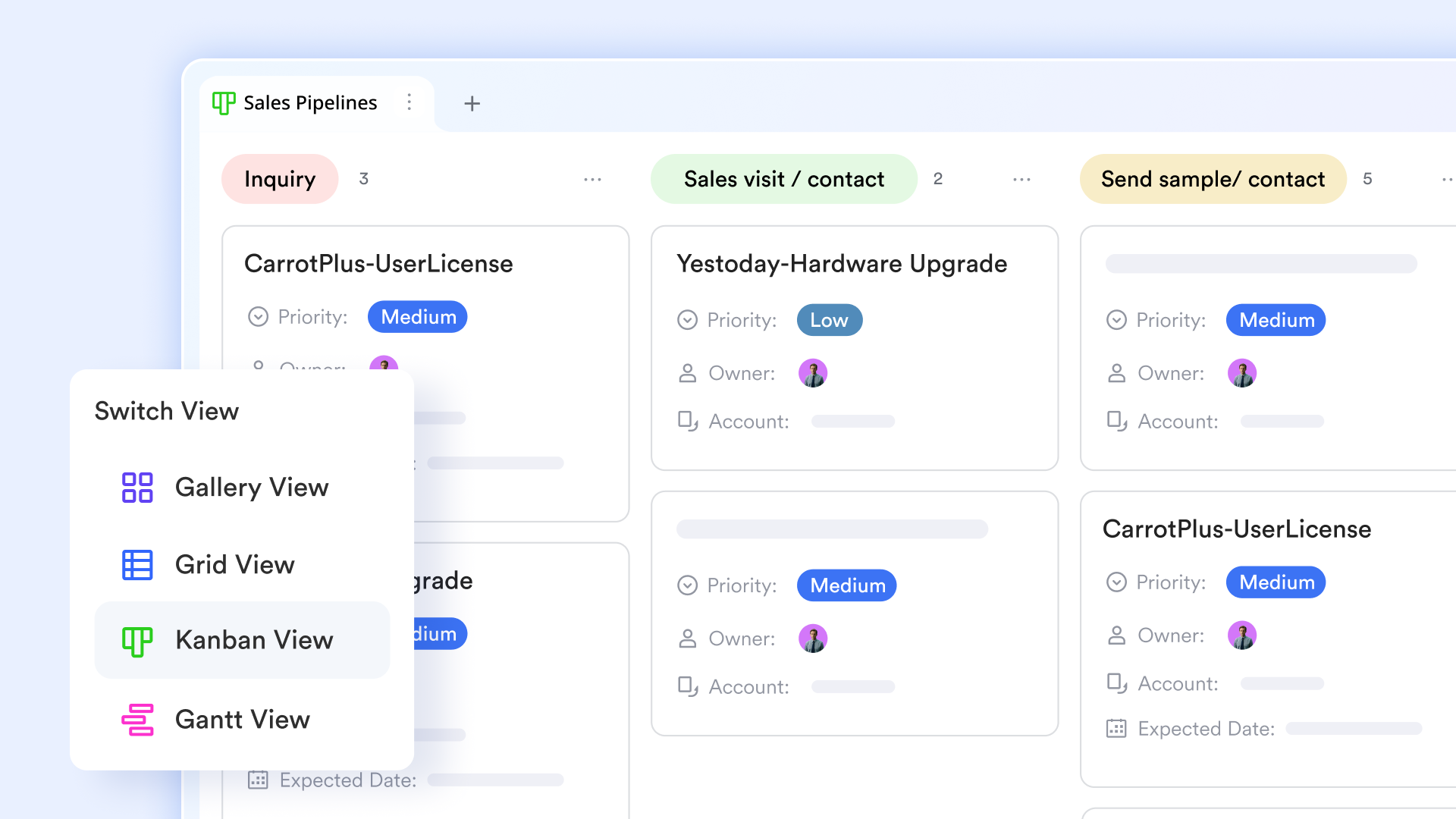
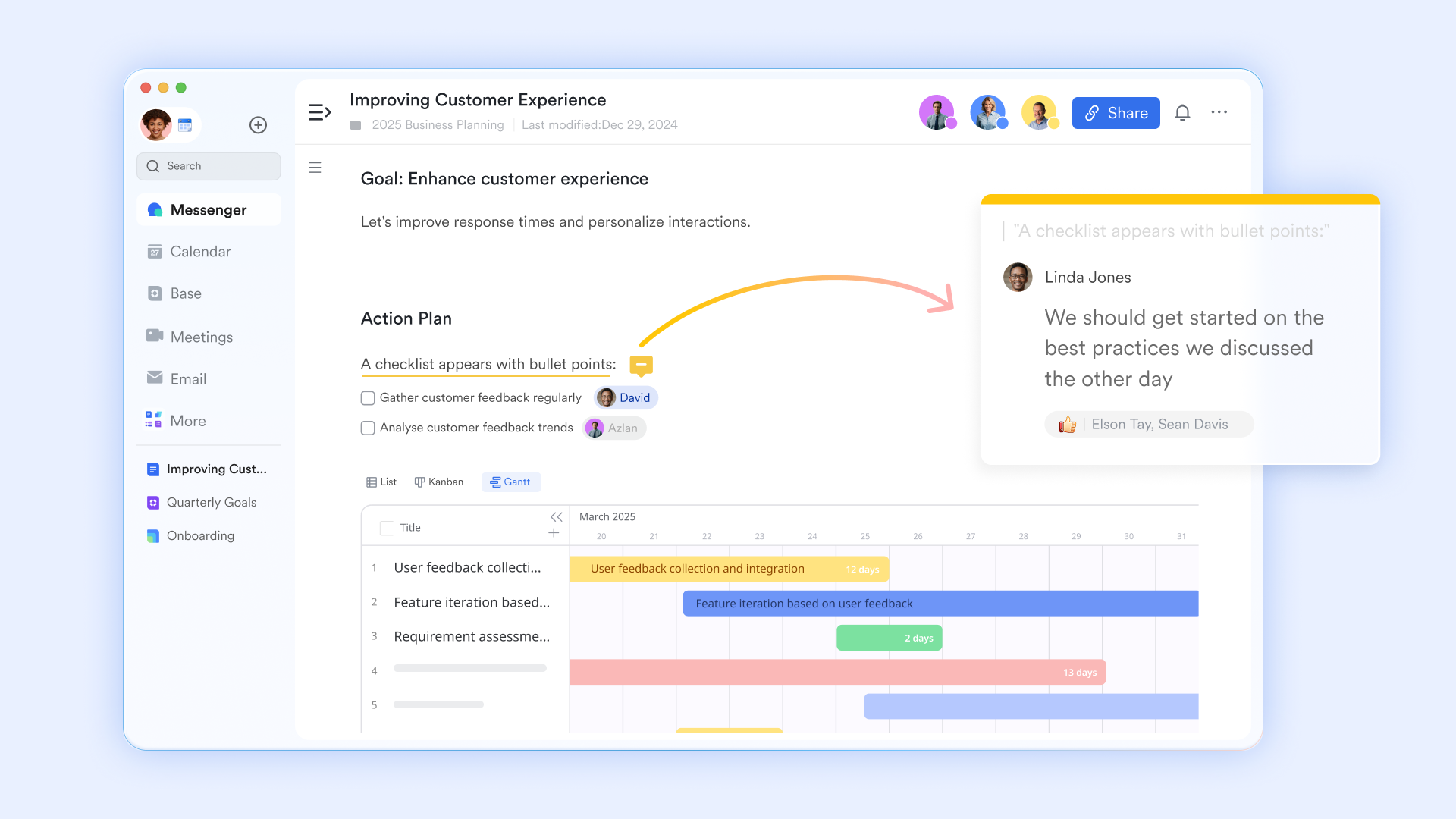
Lark Docs: Collaborative documentation and form
helps manage online forms by allowing you to embed Lark Forms directly into documents. This enables users to fill out forms within the doc itself, streamlining data collection and collaboration. You can set sharing permissions for who can respond, and view responses in dashboards with charts for easy analysis. Invalid or incorrect responses can be deleted to maintain data accuracy.
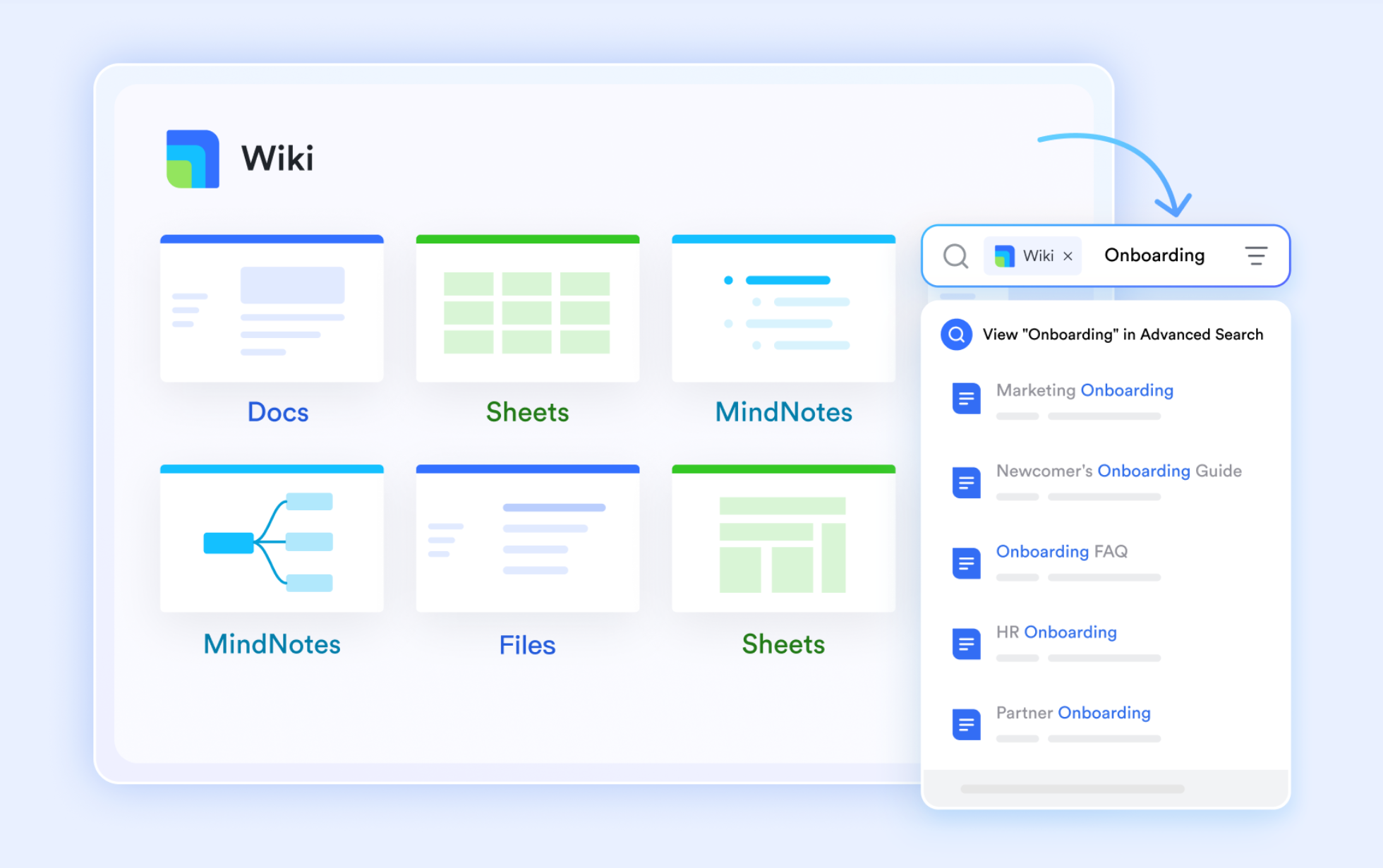
Lark Wiki: Central hub for form and documentation
helps manage online forms by creating a centralized, structured space where related documents and form links are organized within a clear page tree structure. This hierarchy makes it easy for members to understand the framework and quickly find the necessary information or links. Crucially, the Wiki allows you to set detailed, granular permissions for every document or form link, controlling who can read, share, or copy the content. Furthermore, members can use an independent keyword search to quickly locate relevant forms.
Lark Tasks: Action tracking from form submissions
You can automate Lark Tasks creation directly from form submissions using Base’s automation features to transform incoming requests into tracked action items without manual processing. By setting up a structured form in Lark Base to collect submissions—such as service requests, sales inquiries, or project intake entries—teams can capture standardized information at the source. An automation rule can then trigger whenever a form is submitted, instantly creating a corresponding task linked to the original data record. Tasks can be assigned to internal teammates or external collaborators, with options to require all assignees or any assigned person to complete the work. Due dates and time limits can also be set automatically, ensuring consistent follow-up and accountability across workflows. 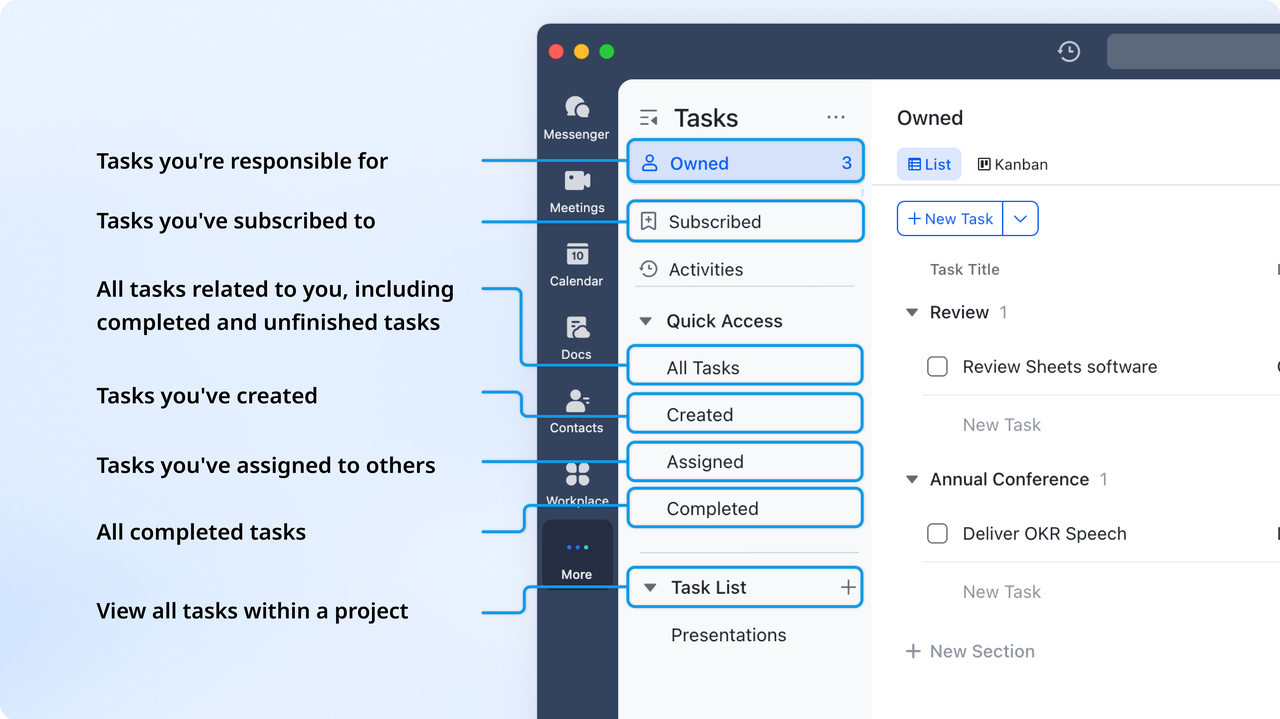
:
- Starter plan: Free forever plan that includes 11 powerful tools for up to 20 users. It also comes with 100GB of storage, 1000 automation runs, AI translations, and more.
- Basic plan: $6/user/month (billed annually) for up to 500 users. It includes everything in Starter plus group calling for up to 500 attendees, 5TB of storage, 1000 automation runs, and more. For more details, please .
- Pro plan: $12/user/month (billed annually) for up to 500 users. It includes everything in Basic plus group calling for up to 500 attendees, 15TB of storage, 50,000 automation runs, and more.
- Enterprise plan: for custom pricing. Supports unlimited users and includes even more automation runs and advanced security, compliance, and management features.
For small teams with simple communication needs

18 months message history
1000 Base automation runs/month
2000 rows per table in Base
Most POPULAR
For companies with comprehensive collaboration and management needs
Unlimited message history
500-participant video meetings
50k Base automation runs/month
20k rows per table in Base
For large companies with advanced security and organizational management needs
Get a personalized demo and pricing
Unlimited message history
500-participant video meetings
15 TB storage + 30 GB storage/user
500k Base automation runs/month
50k Base automation runs/month
Most POPULAR
For companies with comprehensive collaboration and management needs
Unlimited message history
500-participant video meetings
50k Base automation runs/month
20k rows per table in Base
Which platform should you choose: Jotform vs Lark
When selecting between Jotform and Lark, the right pick often depends on your team size, workflow complexity, and collaboration needs. Below are practical recommendations based on typical usage scenarios:
Conclusion
Choosing the right platform ultimately depends on how your organization works and what you need beyond basic data collection. Jotform offers flexible form-building, solid customization, and predictable pricing for individuals and small teams that simply need to gather and organize information. But as workflows become more interconnected and collaboration grows across departments, the limits of a standalone form tool become apparent. That's where provides a meaningful advantage—bringing forms, documents, approvals, messaging, and together in one unified workspace. It not only captures information but also drives action, helping teams move from submissions to real execution without switching tools.
If you're looking to streamline operations, enhance visibility, and support more brilliant teamwork, exploring a collaborative solution is the logical next step. Start your workflow transformation with Lark and see how much smoother collaboration can be.
Streamline data management with the right solution
FAQs
How does Jotform pricing compare to Google Forms for large teams?
Jotform offers more advanced features than Google Forms, but the Jotform pricing free plan becomes restrictive as teams grow. Large teams often face limits on submissions, storage, and unless they upgrade. Lark provides a unified workspace that scales more naturally for multi-user environments.
For more Google Workspace's information, you can refer to and .
Can Jotform handle internal employee workflow requests at scale?
Jotform can support basic internal requests, but complex routing and multi-team processes become more complicated to manage. Features tied to approvals and document handling often require add-ons or higher tiers, such as Jotform Sign. Lark handles these workflows more seamlessly, with built-in collaboration and execution tools.
What is the true ROI of switching from manual forms to automated workflows?
Digital forms reduce errors and save time, especially when using features covered under Jotform Sign pricing. But real ROI comes when automation connects directly to tasks, documents, and team communication. Lark maximizes this by turning submissions into action without switching platforms.
Which industries benefit most from all-in-one collaboration platforms like Lark?
Compliance-heavy sectors such as healthcare or legal often compare tools based on Jotform HIPAA pricing. These industries benefit from platforms that merge secure forms with workflow transparency. Lark offers this blend by integrating forms, documentation, and approval flows in one place.
Are submission limits the biggest bottleneck in form-based platforms?
Submission caps restrict growth, but operational bottlenecks often appear earlier in and follow-through. Form tools alone can't manage tasks, deadlines, or handoffs effectively at scale. Lark overcomes these gaps by linking data collection directly to team workflows.
Related reading






























