Picture a healthcare IT team deploying secure chat to handle sensitive patient data. They start with a free download, but soon discover that calculating the true Mattermost pricing is notoriously difficult. Beyond the Professional plan or custom Enterprise quotes, organizations must absorb massive hidden costs—from late-night DevOps server maintenance to fragmented third-party video licenses. In this breakdown, we will uncover the reality of its pricing and explore why consolidating your workspace with an all-in-one suite like Lark offers a vastly superior return on investment.
Mattermost pricing plans: What do the different tiers cost?
Pricing note: Mattermost does not publish a fixed list price for its paid plans on the official pricing page, and typically requires you to contact sales (or request a quote) for the latest pricing.
The dollar figures shown in the table are references from third-party pricing directories (e.g., Capterra and SaaSworthy) and may be outdated. Please confirm final pricing and licensing terms with Mattermost directly.
When evaluating Mattermost, the first thing I notice is that the platform operates on an open-core model. This means that while the fundamental code is open-source and free, the advanced security, compliance, and user management features required by growing businesses are locked behind paid commercial licenses.
Mattermost currently divides its offering into three primary tiers. Depending on your team size and your infrastructure requirements, the jump from one tier to the next can significantly impact your annual software budget.
Mattermost Professional pricing
The entry point for most organizations is the Mattermost Professional Edition. This version is targeted primarily at small teams or developer groups with up to 250 users. For organizations that have the technical capacity to spin up their own servers, this sounds like a highly attractive proposition.
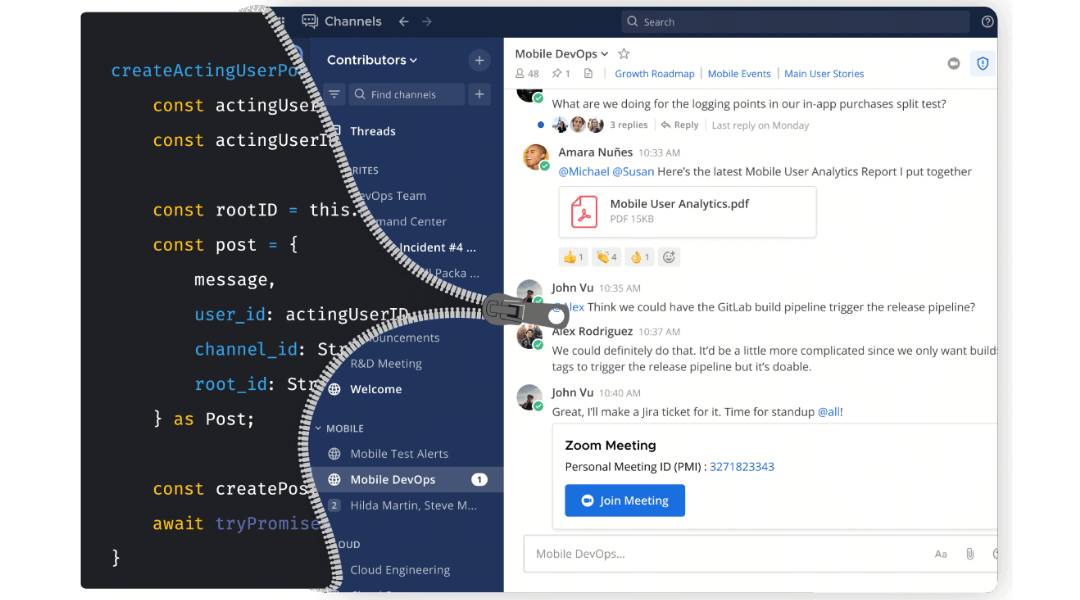
Image source: mattermost.com
However, I find that growing teams quickly hit a wall with the Professional edition. While it provides basic channel-based messaging and file sharing, it imposes strict limitations that hinder scalability. For instance, this version heavily restricts your access to message history, limits the number of native calls you can make, and places caps on third-party integrations. Furthermore, the Professional lacks the advanced compliance tools, multi-factor authentication enforcement, and user permission controls that IT administrators need to manage a secure workspace.
Besides, there is a catch regarding the minimum commitment. Mattermost requires a minimum subscription of 11 users to activate a commercial license. Therefore, even if you are a small startup with only five employees, your baseline software cost for the Professional tier will be calculated at that 11-user minimum.
Essentially, this tier is an evaluation tool. It allows your engineering team to test the platform's interface, but if you intend to use it as a company-wide communication hub, you will almost certainly need to upgrade to other plans to regain control over your data retention and administrative rights.
Mattermost Enterprise pricing
The next step up is the Mattermost Enterprise plan, which requires you to contact sales to get the exact pricing. This tier is designed to provide the robust collaboration tools that mid-sized organizations require.
When you upgrade to the Enterprise tier, you are paying for crucial administrative capabilities. With this plan, your IT team gains the ability to provision guest accounts, which is vital if you need to collaborate with external vendors or clients without giving them full access to your internal directories. You also receive access to advanced access controls, business hours support from the Mattermost team, and basic compliance features to help meet industry standards.
Mattermost Enterprise Advanced pricing
For large organizations, defense contractors, and financial institutions, the Professional and Enterprise plans will not suffice. These sectors require the Mattermost Enterprise Advanced editions. Mattermost does not publish transparent pricing for this tier; instead, they require you to contact their sales team for a custom quote.
The Enterprise Advanced tier is heavily focused on multi-domain secure operations. It unlocks military-grade security features such as mobile data encryption, mobile biometrics, offline operation capabilities, and advanced logging systems designed for . It also supports high scalability, accommodating up to 200,000 concurrent users with .
Because the pricing is obfuscated, calculating the exact Mattermost Enterprise and Enterprise Advanced pricing requires looking at community feedback and buyer sentiment. Based on reports from IT administrators and forum discussions, the Enterprise tier can cost upwards of $30 plus VAT per user per month. At this price point, buyer expectations shift dramatically. When you are paying over $30 a month for a single user, you expect a comprehensive, out-of-the-box solution. Yet, that even at this premium price tag, Mattermost remains primarily a text-based chat application. You are still required to bring your own LLM API keys for AI functionalities and manage your own integrations for video conferencing, which limits the platform's ability to deliver holistic value relative to its high cost.
Unpacking Mattermost self-hosted pricing and hidden costs
The biggest misconception I encounter when teams evaluate open-source software is the assumption that "self-hosted" is synonymous with "free." In reality, Mattermost self-hosted pricing involves substantial hidden costs that rarely appear on a vendor's pricing page.
It is true that initiating a mattermost download costs you nothing. However, the moment that software package lands on your internal servers, the financial meter begins running. To accurately project your budget, you must account for the heavy operational and infrastructure expenses required to keep the platform secure and functional.
The cost of DevOps and deployment
Deploying Mattermost is not a plug-and-play experience. Whether your engineering team is pulling the latest repositories from Mattermost GitHub or configuring a mattermost docker container, this process requires specialized DevOps labor. Your engineers will need to allocate hours to provision AWS EC2 instances, configure PostgreSQL databases, set up load balancers, and ensure your block storage can handle years' worth of message history and file attachments.
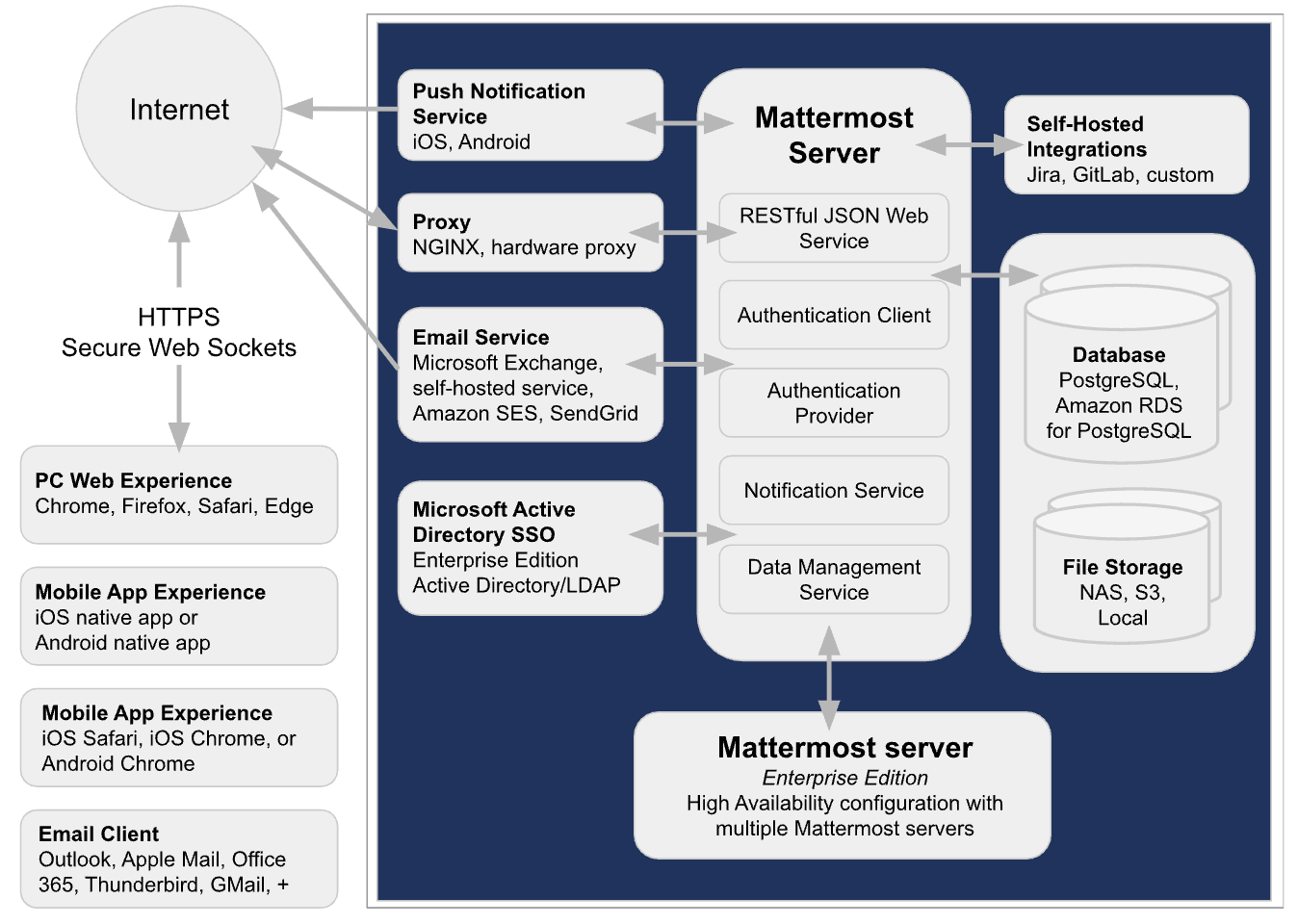
Image source: mattermost.com
If you lack the internal resources to manage this infrastructure, you might opt for third-party cloud hosting providers like Stackhero. While these providers can spin up a Mattermost instance in a few minutes with clear hourly billing, this introduces a separate, ongoing infrastructure bill that sits completely outside of your software licensing fees.
Ongoing server maintenance and security patching
The hidden costs compound over time. Every time Mattermost releases a security patch or a major version update, your IT team must plan a maintenance window, back up the database, apply the patch, and verify system integrity. In a SaaS model, these updates happen automatically in the background at no extra charge. In a self-hosted model, every update consumes expensive engineering salary hours. If your servers experience downtime, it is your internal team—not Mattermost support—that must wake up at 2:00 AM to troubleshoot the Docker containers.
Administrative friction and true-up reports
Beyond infrastructure, the administrative burden of commercial self-hosted plans creates its own unique hidden cost. Mattermost enforces strict licensing management through their System Console. If you purchase an annual self-hosted license, you are legally bound to submit quarterly "true-up reports."
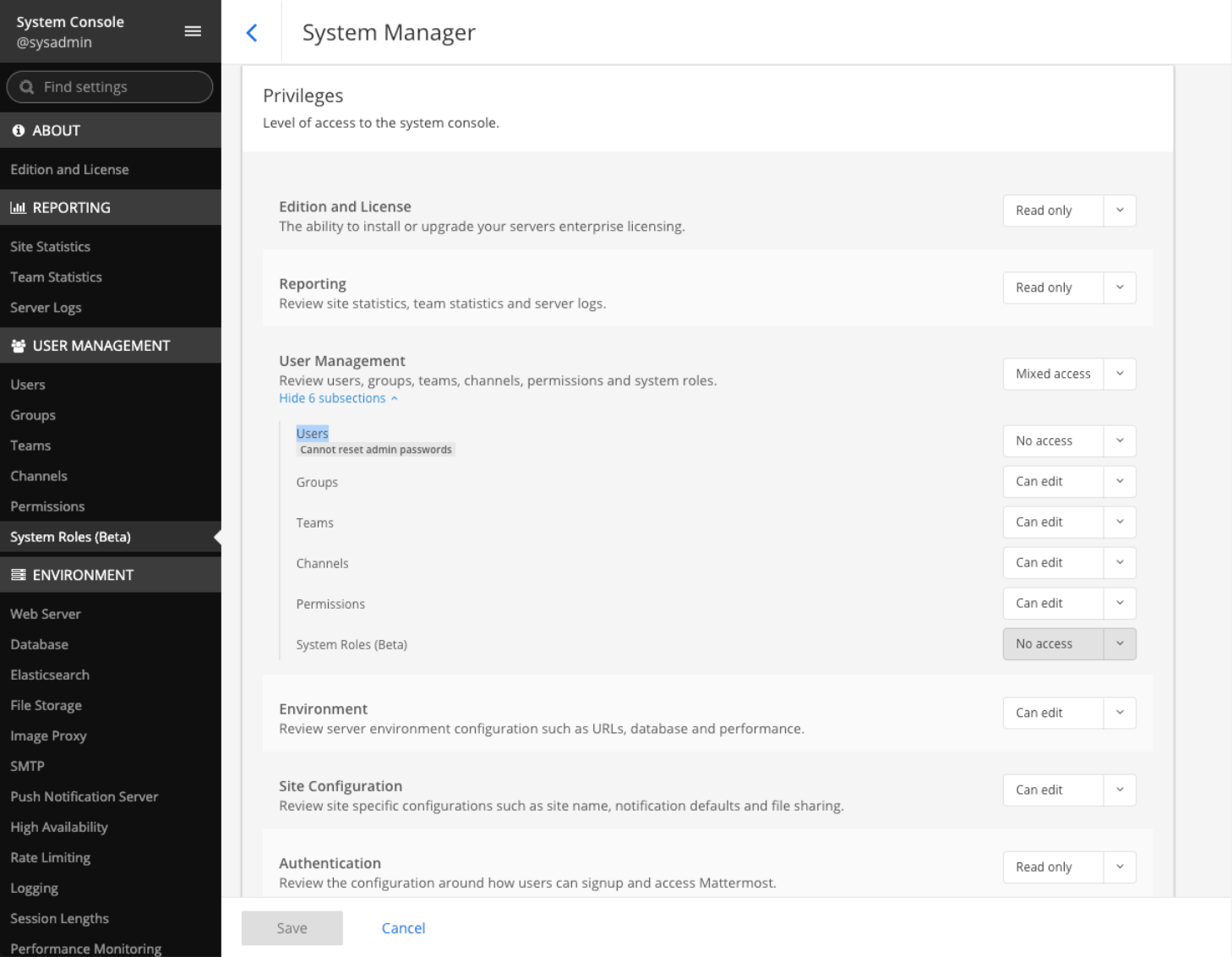
Image source: mattermost.com
A true-up report is a mandatory administrative process where your IT team must audit the actual number of activated users on your self-hosted server and submit this data back to Mattermost. If you added more users than your initial license covered, you are billed retroactively for the difference. This manual auditing process is a significant administrative headache, requiring time and precision to ensure compliance with the vendor's licensing terms. Modern cloud-native SaaS platforms handle user provisioning and billing automatically, whereas this self-hosted model forces your IT team to act as software auditors four times a year.
Furthermore, if your team is under 100 users but you require Enterprise features, community reports indicate you are forced to self-host, removing the option for Mattermost's managed cloud deployment entirely. This forces smaller, high-security teams to absorb massive infrastructure costs just to access necessary compliance features.
The true total cost of ownership (TCO) for Mattermost
To understand the actual financial impact of adopting this platform, we must look past the per-user licensing fee and calculate the true Total Cost of Ownership (TCO) for mattermost. When you combine software licenses, infrastructure fees, and internal labor, the numbers tell a very different story than the marketing materials suggest.
Let's run a hypothetical TCO scenario for a mid-sized engineering team of 200 users over a one-year period.
If this team opts for the Mattermost Professional plan, the base software licensing cost appears straightforward: 200 users multiplied by 10 per month equals 2,000 per month, or $24,000 per year.
However, because this is a self-hosted deployment, the calculation cannot stop there. We must add the infrastructure and labor costs required to run the software.
Server Hosting and Infrastructure
To support 200 concurrent users with reliable uptime, you will need a robust AWS or Azure environment. This includes compute instances, managed database services (like Amazon RDS for PostgreSQL), scalable file storage (Amazon S3), and backup solutions. A conservative estimate for enterprise-grade hosting for this user volume is around $600 to $800 per month, adding roughly $8,500 per year.
DevOps Labor and Maintenance
Your infrastructure does not run itself. Managing Mattermost Docker deployments, applying routine security patches, troubleshooting internal network issues, and handling periodic licensing reconciliations (for example, quarterly true-forward adjustments) all require dedicated IT time.
For example, if a DevOps engineer spends just 10 hours per month maintaining the Mattermost environment at an average loaded rate of $100/hour, that equates to $1,000/month, or $12,000/year in ongoing operational costs.
Third-Party Integrations (Video and AI)
Because Mattermost focuses primarily on secure text chat, your 200-person team still needs video conferencing capabilities. If you purchase standard Zoom or Microsoft Teams licenses for these users at roughly 15 USD per user per month, that adds an additional 36,000 USD per year to your communication stack budget.
When you calculate the true TCO, that initial 24,000 USD software license balloons to over 80,000 USD per year just to maintain a functional, secure communication and video stack.
Mattermost frequently claims in its marketing materials that it offers a cost-effective alternative to cloud-only platforms, citing savings of over 60% compared to Slack Enterprise Grid. However, I find that these claims often compare pure SaaS licensing costs against Mattermost's licensing costs, conveniently ignoring the tens of thousands of dollars in internal DevOps labor and server hosting required to keep a self-hosted platform running. If your IT team is spending hours every month acting as server administrators just to keep a chat application online, the perceived savings of open-source software quickly evaporate.
Reduce your total cost of ownership with Lark
The fragmented workspace: Why secure chat alone falls short
When calculating the total cost of a software deployment, IT leaders often focus strictly on server and licensing fees. However, I find that the true cost of using a standalone chat application lies in the productivity lost to a fragmented workspace.
Mattermost is fundamentally a highly secure, text-based communication tool. While it excels at keeping channel messages encrypted and compliant, text chat is only one fraction of how modern teams collaborate. Relying solely on Mattermost forces your organization to purchase, integrate, and maintain an entire ecosystem of supplementary tools just to run your business.
Consider a typical project management workflow when diagnosing a critical bug:
- The Alert: A developer receives an urgent ping in a Mattermost channel.
- The Call: Because Mattermost lacks a built-in video conferencing solution, the developer must leave the chat client, open a separate application (like Zoom or Microsoft Teams), generate a meeting link, and paste it back into the chat.
- The Documentation: Once on the call, the team needs to update the project timeline and document the bug fix, which requires opening a third application (such as Google Workspace or Atlassian Jira).
This constant context switching kills momentum. Every time an employee jumps between a chat interface, a video client, and a disconnected spreadsheet, they lose focus. Furthermore, your IT department is now paying for three separate software licenses just to accomplish one unified workflow.
The friction also extends heavily into modern AI capabilities. Today, enterprise teams expect artificial intelligence to summarize long chat threads, draft project proposals, and translate messages.
While Mattermost markets AI integration, it operates on a "Bring Your Own Key" (BYOK) model. This means your IT department must manually:
- Create accounts with third-party providers like OpenAI or Anthropic.
- Secure billing credentials and monitor API rate limits.
- Maintain custom developer setups via GitHub to keep the AI bots functional.
You are not buying an out-of-the-box intelligent assistant; you are taking on a continuous developer project just to enable basic AI chat summaries. When you are paying premium enterprise prices, this fragmented, do-it-yourself approach simply falls short of modern expectations.
How Lark provides a high-ROI alternative to Mattermost
For growing SMEs to large enterprises, especially struggling with fragmented tool stacks, the alternative to this self-hosted complexity is a unified SaaS model. Instead of paying premium per-seat prices just for secure chat and then absorbing the costs of separate video licenses and server infrastructure, I highly recommend evaluating .
is an all-in-one B2B SaaS platform designed to eliminate the friction of jumping between disconnected applications. Rather than forcing your team to cobble together a workspace, Lark natively combines , , , , , , and into a single, unified interface.
What makes Lark particularly compelling is its clarity, which completely removes the hidden infrastructure fees associated with open-source tools:
- Starter plan: Free forever plan with 11 powerful tools for up to 20 users, 100GB storage, 1,000 automation runs, AI translations, and more. No credit card needed.
- Basic plan: $6/user/month (billed annually) for up to 500 users. Includes everything in Starter plus unlimited message history, 5TB storage, 1,000 automation runs, and more. Some users may need to to purchase.
- Pro plan: $12/user/month (billed annually) for up to 500 users. Includes everything in Basic plus group calling for up to 500 attendees, 15TB storage, 50,000 automation runs, and more.
- Enterprise plan: for custom pricing. Supports unlimited users and includes advanced automation, security, compliance, and management features.
For small teams with simple communication needs

18 months message history
1000 Base automation runs/month
2000 rows per table in Base
Most POPULAR
For companies with comprehensive collaboration and management needs
Unlimited message history
500-participant video meetings
50k Base automation runs/month
20k rows per table in Base
For large companies with advanced security and organizational management needs
Get a personalized demo and pricing
Unlimited message history
500-participant video meetings
15 TB storage + 30 GB storage/user
500k Base automation runs/month
50k Base automation runs/month
Most POPULAR
For companies with comprehensive collaboration and management needs
Unlimited message history
500-participant video meetings
50k Base automation runs/month
20k rows per table in Base
When you contrast Lark's pricing with Mattermost's ecosystem, the return on investment becomes remarkably clear.
Built-in video calling and cloud-native docs
The most immediate financial benefit of transitioning to Lark is the elimination of redundant software licenses. With Mattermost, you are paying $10 per month purely for the Professional chat client. To hold a company all-hands meeting, you must still pay for a Zoom Enterprise license.
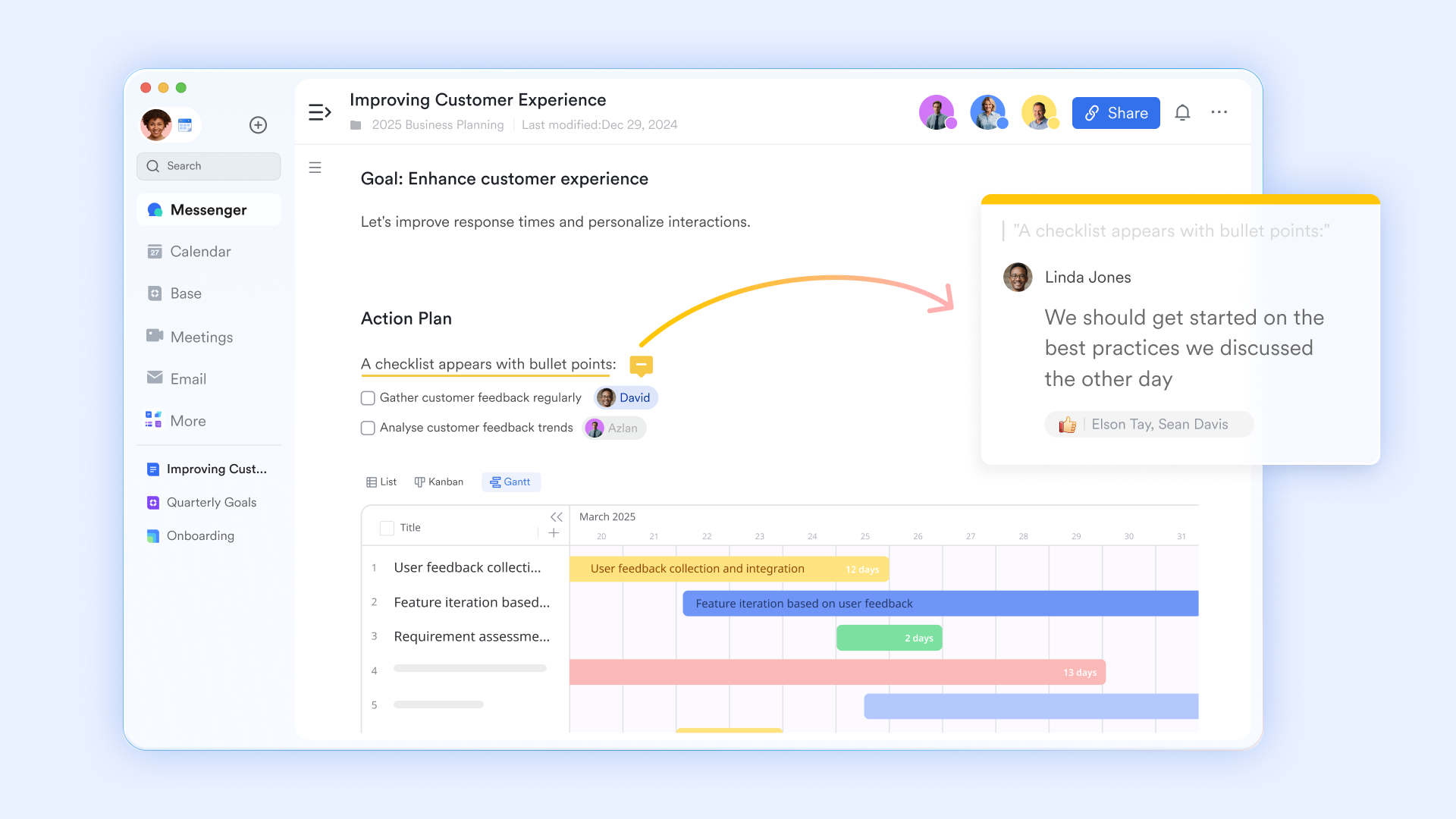
consolidates these expenses. On the Pro plan, your team receives access to high-quality native video meetings that support up to 500 attendees. You can initiate a video call directly from a chat channel with a single click, and the meeting window remains accessible within the same interface as your text threads.
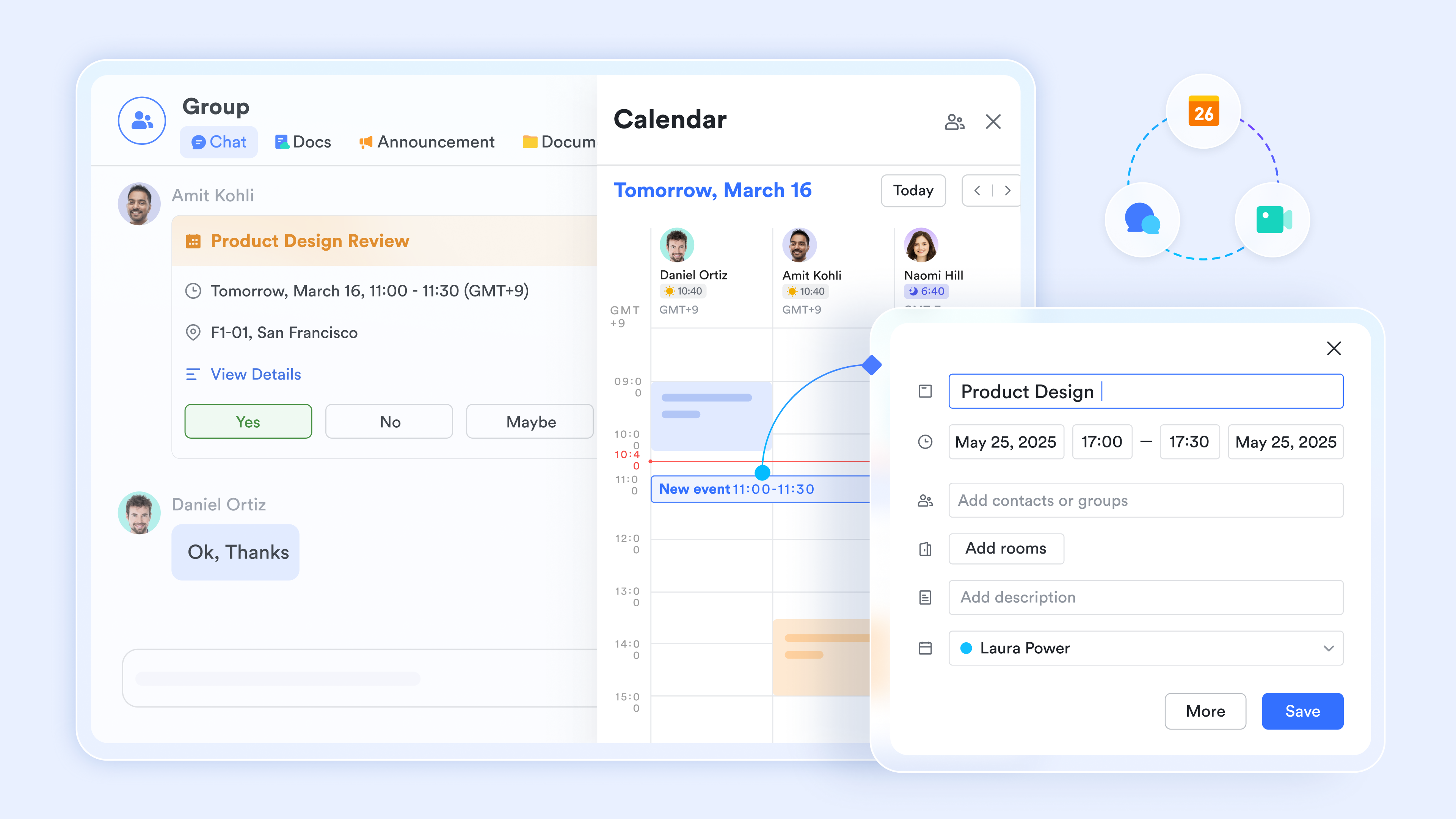
Furthermore, Lark replaces fragmented or local Office files with highly scalable, cloud-native documents and sheets. During a video meeting, your team can open a Lark Doc directly within the meeting window. Multiple users can co-edit the document, assign action items with @mentions, and in real-time without ever sharing a screen or opening a new browser tab. By combining project management, real-time document collaboration, and video conferencing, Lark keeps your entire team focused in one unified workspace.
Consolidate your communication tools with Lark
Pain-free deployment without DevOps overhead
If your organization is tired of acting as a software hosting company, Lark's cloud-native SaaS model offers massive relief. As we explored earlier, maintaining a self-hosted Mattermost deployment requires dedicated DevOps labor to manage Docker containers, pull GitHub updates, and configure Linux servers.
With , deployment requires zero infrastructure overhead. There are no AWS EC2 instances to provision, no PostgreSQL databases to maintain, and no late-night security patches to install. Your IT team can deploy the platform company-wide in an afternoon. Because Lark handles all the backend infrastructure, your IT budget becomes entirely predictable.
Additionally, Lark eliminates the administrative friction that plagues . There are no mandatory quarterly true-up reports to audit, and you are not restricted by rigid minimum user counts. You simply pay for the exact number of user licenses you need, allowing your business to scale operations up or down without bureaucratic roadblocks.
Transparent pricing with advanced automation
Modern businesses run on automated workflows, and building these workflows should not require a computer science degree. While Mattermost often requires custom bots and developer intervention to automate basic tasks, provides deep right out of the box.
Lark’s unified ecosystem means that different tools talk to each other natively. For example, you can set up an approval workflow for PTO requests or IT hardware requisition. When an employee submits the form via , the manager receives a directly in their , where they can approve or deny the request with a single tap.
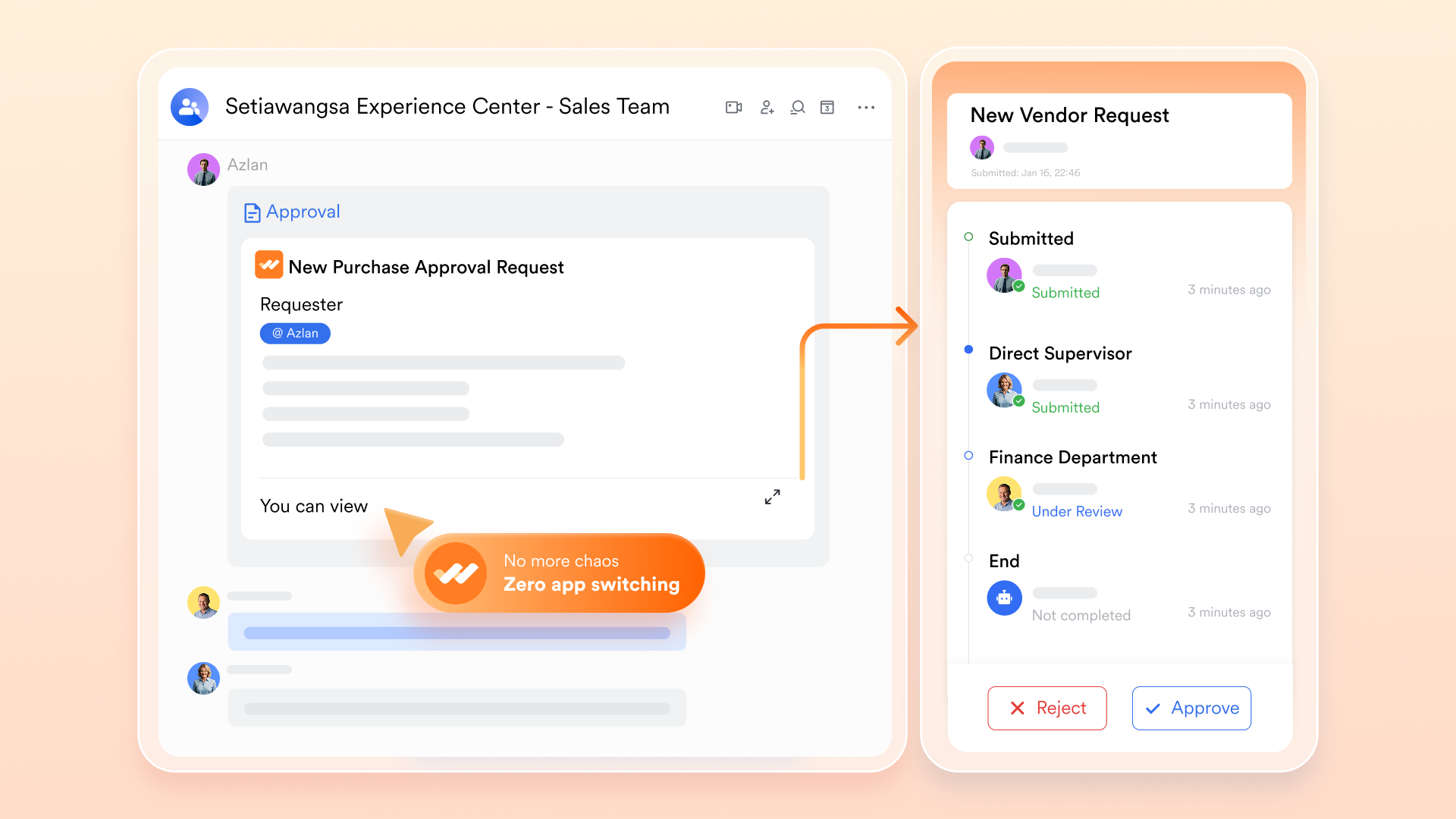
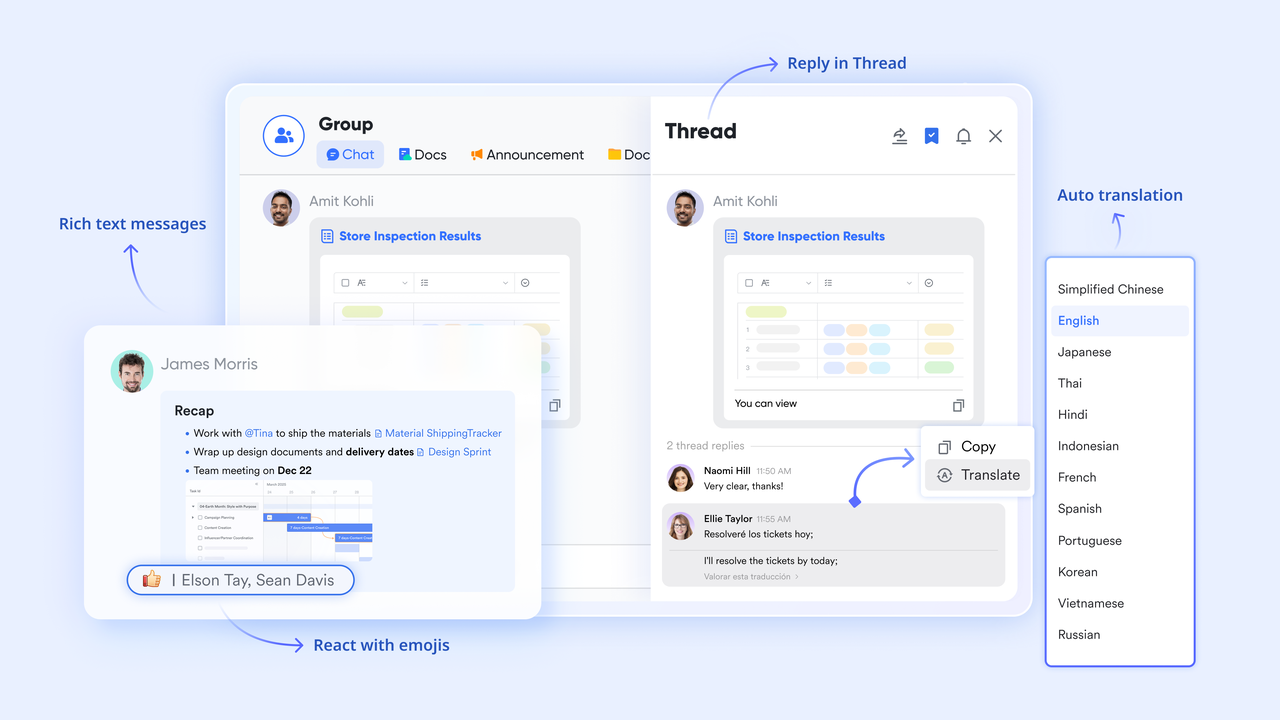
The inclusion of these tools makes the pricing model exceptionally valuable. Even on the free Starter plan, your team has access to 1,000 automation runs and built-in AI translations that support real-time multilingual collaboration. Upgrading to the Pro plan grants you 50,000 automation runs. You do not need to configure or pay additional usage fees to access these intelligent features. For just two dollars more than Mattermost’s basic $10 chat license, Lark provides a comprehensive suite of chat, video, documents, OKR management, and high-volume automation, delivering a clearly superior ROI for cost-conscious IT departments.
Conclusion
While Mattermost offers excellent security for highly regulated sectors, its open-core model hides substantial costs. The reality of Mattermost self-hosted pricing means absorbing heavy DevOps labor, server fees, and manual true-up reports. Relying strictly on secure chat also forces you to buy separate video and AI tools. For modern teams, an all-in-one suite like provides superior ROI. By natively unifying chat, video meetings, cloud documents, and automation, it eliminates hidden infrastructure fees and fragmented workflows. Stop paying for isolated tools—explore Lark’s plan today to streamline your productivity.
Unify your workspace and boost ROI with Lark
FAQs
Are there hidden costs in Mattermost self-hosted pricing?
Yes. While the basic software download is free, self-hosting requires significant financial investment in server infrastructure (such as AWS, Azure, or Stackhero hosting). Additionally, you must account for the ongoing DevOps labor required to manage Docker containers, apply security patches, and troubleshoot network issues. Commercial self-hosted plans also require IT teams to spend administrative hours compiling and submitting mandatory quarterly true-up reports.
Does Mattermost have native video conferencing?
No. Mattermost is fundamentally a secure messaging platform. While it supports voice and video calls through third-party plugins and integrations, it does not offer a proprietary, built-in video conferencing tool out of the box. Teams using Mattermost must maintain separate subscriptions to platforms like Zoom, Microsoft Teams, or Google Meet to facilitate comprehensive video meetings.
How does Lark's pricing compare to Mattermost?
Mattermost’s Professional plan costs $10 per user per month purely for secure chat, excluding infrastructure costs. In contrast, Lark offers a completely unified SaaS workspace without DevOps overhead. Lark provides a Free Starter plan for up to 20 users with 100GB storage. Paid tiers include the Basic plan at 6/user/month(5TBstorage) and the Pro plan at 6/user/month(5TBstorage) and the Pro plan at 12/user/month, which includes chat, unlimited message history, cloud docs, 15TB of storage, 50,000 automation runs, and native group video calling for up to 500 attendees.
Does Mattermost cost money?
Yes, while Mattermost offers a free open-source foundation, using the platform for a growing business requires purchasing a commercial license. The Professional plan costs $10 per user per month, and it requires a minimum commitment of 11 users. If your organization requires strict compliance features, Zero Trust security, or advanced administrative controls, you must upgrade to the Enterprise tier, which requires a custom sales quote. Additionally, because the software is primarily self-hosted, you will always spend money on server infrastructure and internal IT maintenance.
Can I use Mattermost for free?
Yes, you can initiate a basic deployment using the free open-source version. However, I advise keeping in mind that this free version heavily restricts administrative controls, access permissions, and advanced integrations. Furthermore, the software license might be free, but you are still financially responsible for the AWS, Azure, or Stackhero servers required to host it. If you want a completely free collaboration platform that does not require you to pay for your own server hosting, I suggest exploring Lark’s Starter plan, which is entirely cloud-hosted and free for up to 20 users.
Is Mattermost cheaper than Slack?
Mattermost marketing materials often claim their platform offers savings of over 60% compared to Slack Enterprise Grid. On a pure per-license basis, Mattermost's $10 Professional plan is cheaper than Slack's premium tiers. However, when you calculate the true Total Cost of Ownership (TCO), this claim often falls short. Because Slack is a fully managed cloud SaaS, your IT team does not need to maintain servers. With Mattermost, you must add tens of thousands of dollars in annual DevOps labor, database maintenance, and cloud hosting fees to your budget. Once you account for this infrastructure overhead, the perceived savings quickly disappear.
Is Mattermost entry free?
Yes, the Mattermost Entry edition is free to download and use. It serves as an evaluation tier targeted at small teams testing the platform before committing to a purchase. It provides access to certain advanced features but places strict limits on your usage—such as capping your accessible message history. Just remember that "free to download" does not mean free to operate. Your organization will still need to allocate engineering resources to configure Docker containers and pay monthly cloud hosting bills to keep the Entry edition online.
Related reading