














Microsoft Planner vs Project: Choose Your Best Tool

Donna Shao
Content Specialist
Nov 3, 2026
Donna Shao
Nov 3, 2026

22 min read
Add to preferred sources


Choosing the right tool for managing work represents a significant challenge for modern organizations. Many businesses exploring Microsoft's ecosystem find themselves carefully weighing Microsoft Planner vs Project. While both tools originate from the same software family, they serve fundamentally different purposes and operate on distinct philosophical approaches to work management. The optimal choice depends on thoroughly understanding your team's size, project complexity, collaboration requirements, and long-term strategic goals.
Having all the information about Microsoft Project vs Planner, including their features and differences, is essential for making an informed decision.
This comprehensive analysis will provide an in-depth comparison of Microsoft Project vs Microsoft Planner, explore their ideal use cases with practical examples, and introduce Lark as a powerful, unified alternative for teams seeking a more streamlined workflow experience.
What is Microsoft Planner?
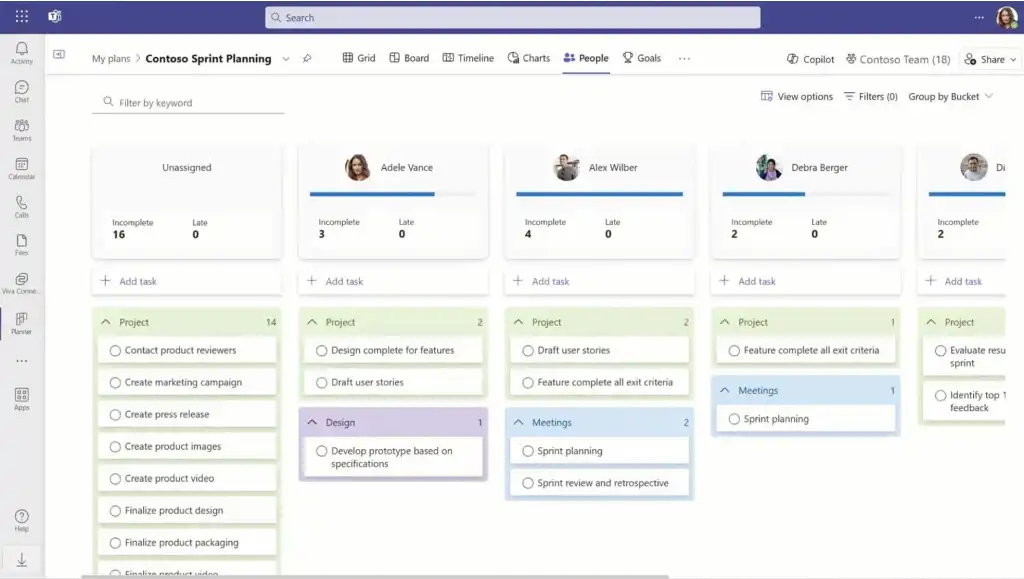
Image source: microsoft.com
Microsoft Planner stands as a deliberately lightweight, visually-oriented task management application designed with simplicity and team collaboration at its core. Within the app, users can create plans and assign tasks, operating primarily on a Kanban-board style interface that enables teams to intuitively create, assign, and track task progress through customizable columns. Each task card functions as a container for detailed information, supporting file attachments, checklists, labels, and deadline tracking while maintaining seamless integration with Microsoft 365 applications like Teams and Outlook.
The app's primary strength emerges from its immediate accessibility and minimal learning curve. As an app within the Microsoft 365 suite, teams can establish their first project within minutes, making it ideally suited for managing straightforward initiatives like marketing campaign tracking, event planning coordination, or departmental task lists. Planner brings essential clarity to team responsibilities by visually answering fundamental questions about task ownership, status, and deadlines without overwhelming users with complex project management terminology or elaborate features.
What is Microsoft Project?
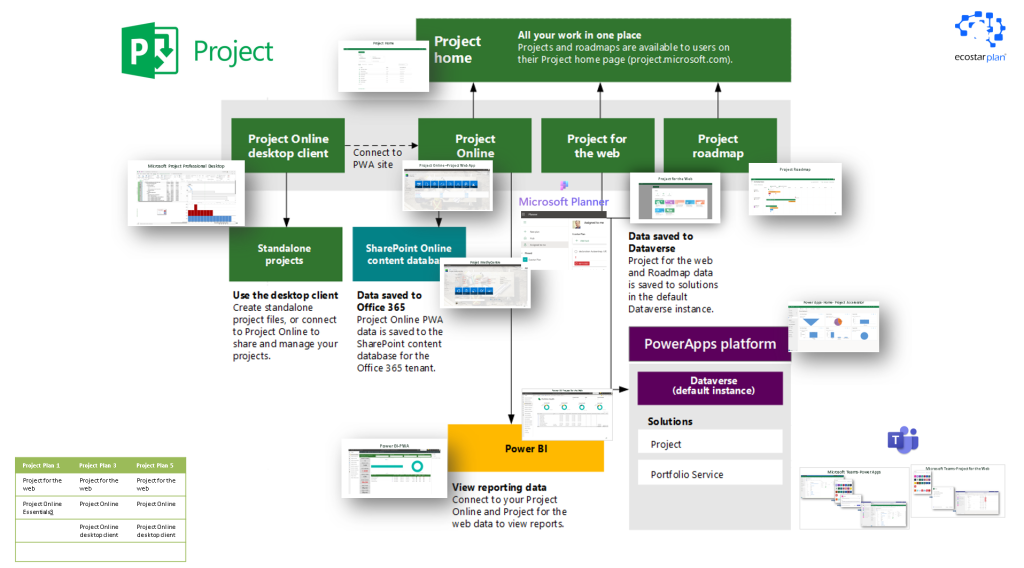
Image source: costarplan.com
Microsoft Project is a comprehensive project management solution engineered for handling large-scale, complex initiatives with precise control requirements. This powerful application serves as an industry standard for traditional project management methodologies, offering sophisticated features including detailed Gantt charts for visual scheduling, critical path analysis, advanced resource capacity planning, and in-depth budget tracking capabilities. Project enables users to manage multiple tasks simultaneously within complex projects, ensuring that large, multi-skilled teams can coordinate efficiently. It also allows for detailed management and allocation of resources, supporting complex scheduling and project workflows.
It is crucial to understand that Microsoft Project is not a single product, but an ecosystem comprising several different offerings tailored to various deployment preferences and organizational needs. The primary components include Microsoft Project Desktop (both Standard and Professional versions), Microsoft Project Online, and Microsoft Project for the web.
- Microsoft Project Desktop: The foundation for complex planning
- Microsoft Project Desktop represents the classic, locally-installed client application, divided into two main editions:
- Project Standard: This version provides core project management capabilities for a single user, including task scheduling, Gantt chart creation, and baseline tracking. It operates as a standalone tool.
- Project Professional: This edition includes all features of Project Standard but adds the critical ability to connect to and collaborate through Project Server or Microsoft Project Online. This enables enterprise-level resource management and participation in a centralized project portfolio.
- Microsoft Project Online: The enterprise hub (Note: Approaching retirement)
- Microsoft Project Online is a cloud-based solution that serves as the central hub for Microsoft's Enterprise Project Management (EPM) capabilities. It is built on the SharePoint Online platform and provides a flexible online solution for project portfolio management (PPM), allowing users to access project information from virtually any device. Microsoft Project Online is offered through different subscription tiers (Plan 1, Plan 3, Plan 5), each catering to different roles like team members, project managers, and portfolio managers.
- Important update: Microsoft has officially announced that Microsoft Project Online will be retired on September 30, 2026. This decision is driven by its legacy architecture, which limits the delivery of modern, AI-powered experiences.
- Microsoft Project for the web: The modern, cloud-native evolution
- Microsoft Project for the web is Microsoft's newer, cloud-native work management product, designed for simplicity and agility. It offers a more intuitive and user-friendly interface, making it accessible to a broader range of users, including informal project managers. Unlike Microsoft Project Online, it is built on the modern Microsoft Power Platform (utilizing Power Apps, Power Automate, and the Dataverse), which allows for greater customizability and integration with other business applications. Its design focuses on streamlined project management and is considered the forward-looking direction for Microsoft's work management solutions. Project for the web also features a grid view, allowing users to organize and visualize project data in a tabular format for easier management of tasks and resources.
The relationship between these tools defines the Microsoft Project ecosystem. Microsoft Project Desktop (Professional) is often the authoring tool used by project managers to create detailed plans that are then published to the collaborative hub of Microsoft Project Online. Meanwhile, Microsoft Project for the web represents a strategic shift towards a more agile and modern user experience. With the impending retirement of Microsoft Project Online, Microsoft is consolidating its future around technology underpinning Microsoft Project for the web.
Project establishes itself as the preferred solution for certified project managers across industries like construction, engineering, and enterprise software development, where meticulous planning, exact resource allocation, and rigorous timeline control prove critical to project success. The application provides the granular control necessary to manage intricate project plans with hundreds of interdependent tasks while offering comprehensive reporting on project health measured against established baselines. Project's robust reporting and monitoring features allow users to track progress across multiple tasks and timelines, ensuring projects stay on schedule and within scope.
Feature comparison table in detail

Key differences in the Microsoft Planner vs project debate
When evaluating Microsoft Planner vs Project, it becomes clear these tools embody fundamentally different approaches to work management. Understanding their distinct philosophies helps in selecting the right solution.
Core design philosophy: Collaboration vs control
- When evaluating the Microsoft Project vs Planner choice, it begins with their core philosophies. Microsoft Planner builds its foundation on visual collaboration and accessibility. The platform emphasizes simplicity through its Kanban-board interface, enabling teams to quickly grasp task status and responsibilities. This approach prioritizes immediate usability, making it ideal for environments where team alignment matters most.
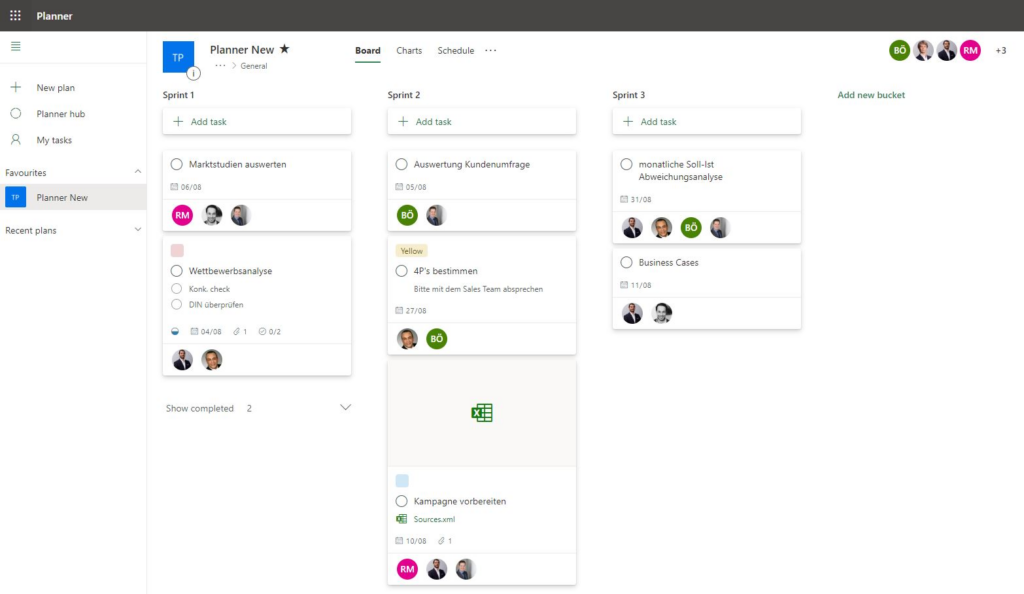
Image source: blog.virtosoftware.com
- Microsoft Project operates from a control and precision paradigm. It treats project management as a professional discipline requiring detailed planning and rigorous tracking. The system assumes projects benefit from comprehensive planning, particularly for initiatives where schedule deviations carry significant consequences. Its focus on next-generation features and AI integration positions Microsoft Project for future workflows, making it suitable for organizations seeking advanced, future-ready project management solutions.
Target user base: Team members vs project professionals
- Planner serves broad team participation across experience levels. Its intuitive design welcomes casual users who need to manage tasks without formal project management training. Departmental teams and administrative staff typically find Planner immediately accessible.
- Project specifically targets professional project managers and PMOs. These users typically possess formal methodology training and require sophisticated tools to manage complex work structures, resource constraints, and stakeholder reporting requirements. Project is also designed to meet the needs of various stakeholders involved in complex projects, ensuring effective collaboration and communication among all parties.
Project complexity and scale capabilities
- Planner excels in managing straightforward projects and team initiatives. The platform comfortably handles work involving dozens of tasks and small teams. Its strength lies in maintaining clarity for projects where task relationships remain relatively simple.
- Project specializes in managing complex, high-stakes initiatives. The system handles intricate task dependencies, multiple resource pools, and complex constraints across projects spanning months or years. It maintains value for large-scale construction and technology projects.
When deciding between Microsoft Planner vs Project, it's important to consider the specific needs of your team or project to ensure the best fit and optimal results.
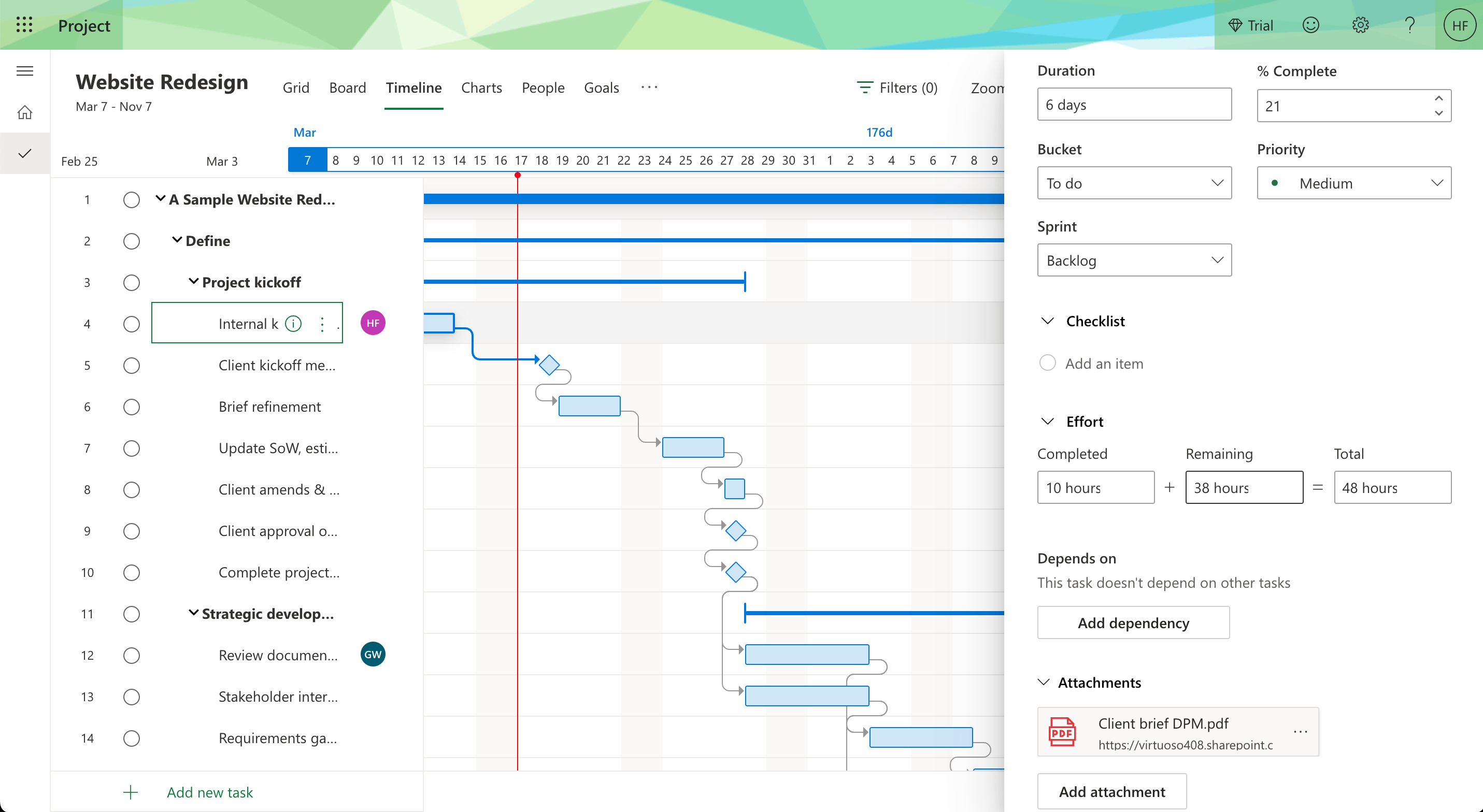
Image source: thedigitalprojectmanager.com
Task management approach: Simplicity vs sophistication
- Planner implements lightweight task management centered on cards containing basic information. Tasks typically include descriptions, assignments, due dates, and file attachments. The system focuses on answering "who does what and when" without administrative overhead.
- Project delivers comprehensive task structuring through Work Breakdown Structures. Tasks contain detailed attributes, precise durations, dependency relationships, and resource assignments that dynamically influence project scheduling. This approach supports sophisticated planning but requires more setup.
Integration and ecosystem positioning
- Planner positions as the task management layer within Microsoft 365. It integrates seamlessly with Teams, Outlook, and To Do, creating a unified experience for daily collaboration. This tight integration makes Planner feel natural within the Microsoft environment. However, Planner can also be used as a standalone tool without the need for other apps, making it accessible and easy to use on its own.
- Project functions as a specialized platform within the Microsoft stack. While it connects with Microsoft 365 applications, it maintains its distinct professional identity with deeper connections to enterprise systems and portfolio management tools.
Cost structure and licensing
- Planner follows an accessible licensing model, typically included in Microsoft 365 Business Standard and higher subscriptions. This positions Planner as a standard collaboration tool available to Microsoft ecosystem users.
- Project maintains a premium, capability-tiered pricing structure. With multiple subscription levels, Project aligns its cost with functional sophistication and organizational requirements. This reflects its position as a specialized tool delivering value through improved project outcomes. This tiered model is a key differentiator in the Microsoft Planner Premium vs Project cost consideration.
Pricing and plans comparison
Information source: microsoft.com
Update time: 2025-10-31
When to use Microsoft Planner vs Microsoft Project?
For Microsoft Planner
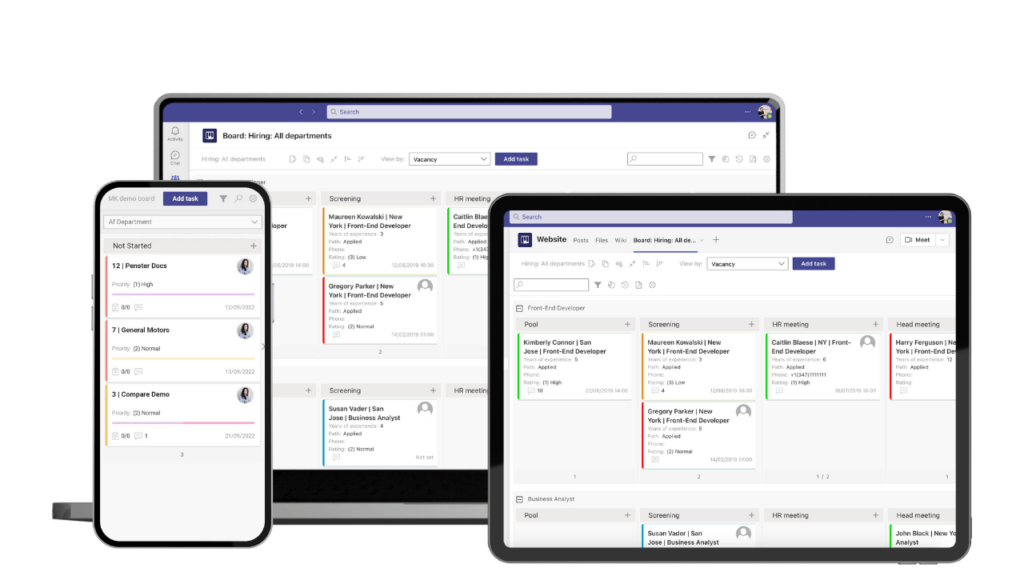
Image source: blog.virtosoftware.com
Organizations should strongly consider Microsoft Planner when their primary needs center around team coordination and workflow visibility rather than intricate project scheduling or resource optimization.
Ideal operational scenarios for Planner include:
- Marketing departments visually tracking campaign component progress through completion stages
- HR teams managing multi-step employee onboarding checklists across departments
- Development teams organizing sprint backlogs and task progression using visual Kanban methodologies
- Any operational context where the central objective involves quickly answering "What is our current workload status, and what requires immediate attention?"
Planner's intentional simplicity becomes its most valuable characteristic in these environments, enabling rapid implementation and widespread adoption with minimal training investment or organizational disruption.
For Microsoft Project
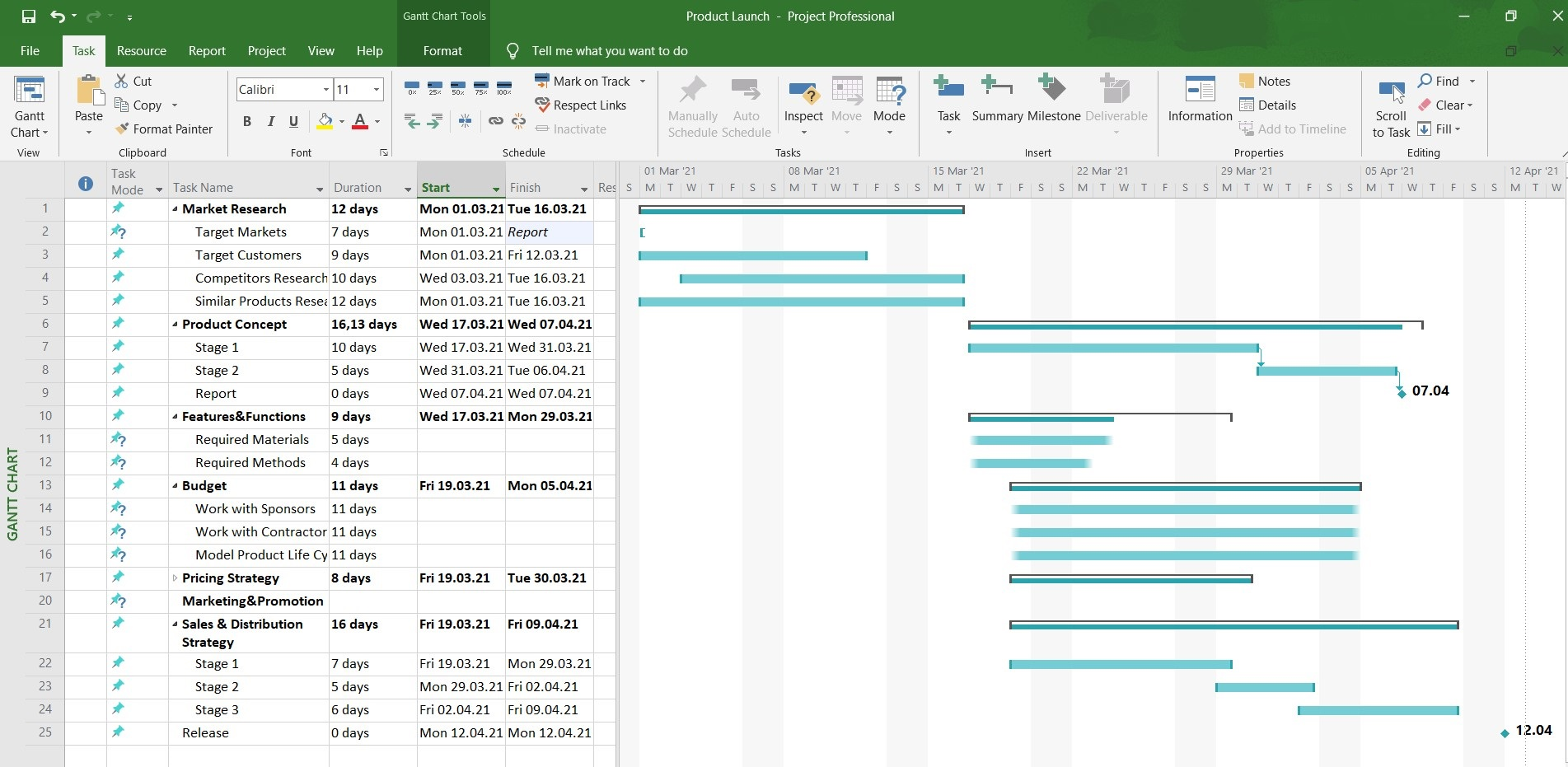
Image source: blog.ganttpro.com
On the other end of the spectrum in the Microsoft project vs Microsoft planner evaluation, Project establishes itself as the appropriate professional solution when project failure carries significant consequences, and initiatives demand rigorous, methodology-driven management approaches.
Organizations should adopt Microsoft Project for:
- Construction initiatives requiring precise scheduling of subcontractor sequences, material deliveries, and regulatory inspections
- Large-scale software implementation projects with complex technical dependencies and cross-functional resource constraints
- Enterprise-level technology rollouts where portfolio management visibility and compliance reporting prove essential
- Any project environment requiring sophisticated scenario modeling, performance tracking against established baselines, and formal earned value analysis
In these professional contexts, Project's advanced capabilities transition from desirable features to essential operational requirements for successful project delivery and risk management.
A superior alternative to providing a unified work platform
While the Microsoft planner vs project discussion provides valuable insights into Microsoft's ecosystem, it inherently operates within a paradigm of multiple, separate applications requiring conscious integration efforts. This fragmented approach frequently creates operational challenges where project discussions reside in Teams, task updates occur in Planner, and critical meeting decisions remain isolated in OneNote.
Lark introduces a fundamentally different architectural approach. Designed from inception as a natively unified work platform, it seamlessly combines team messaging, calendar management, content creation tools, and workflow applications within a single, cohesive environment. This all-in-one environment directly addresses the persistent problems of organizational context switching and information silos that often undermine productivity even within well-planned technology ecosystems.
Centralized project workspace
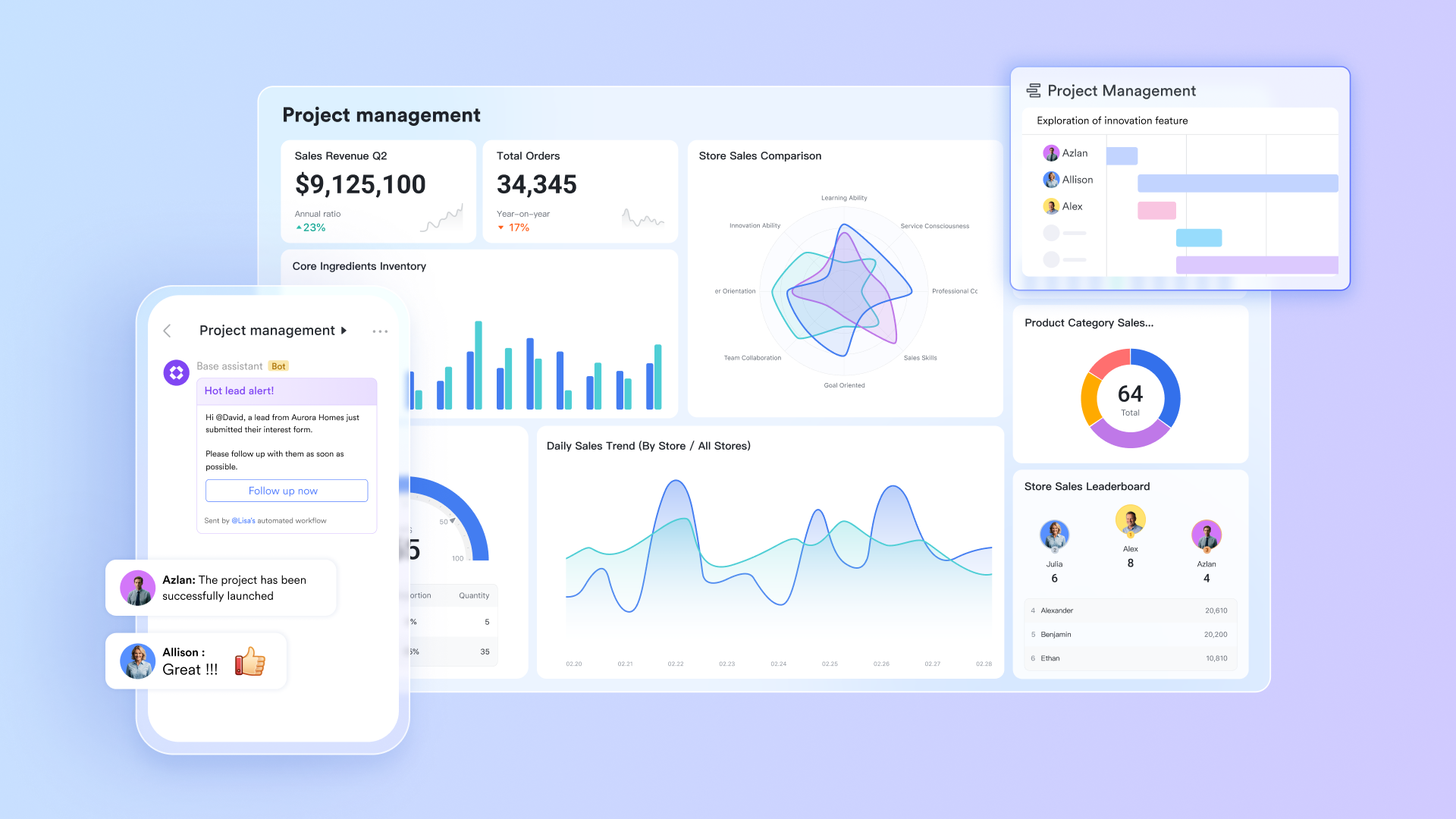
Rather than navigating multiple specialized tools like Planner for task management, SharePoint for document libraries, and Excel for data analysis, Lark Base consolidates database functionality, spreadsheet flexibility, and file storage capabilities within a unified, highly customizable environment.
Teams can construct comprehensive project management systems that perfectly align with their unique workflows without constant application switching. For example, a single Base can maintain complete project timelines, interconnected task records, relevant documentation, and real-time performance dashboards—all synchronized within a collaborative workspace. This approach effectively consolidates and streamlines functions typically distributed across simple Project plans and Planner boards, all accessible within a single, coherent interface.
Seamless communication capability
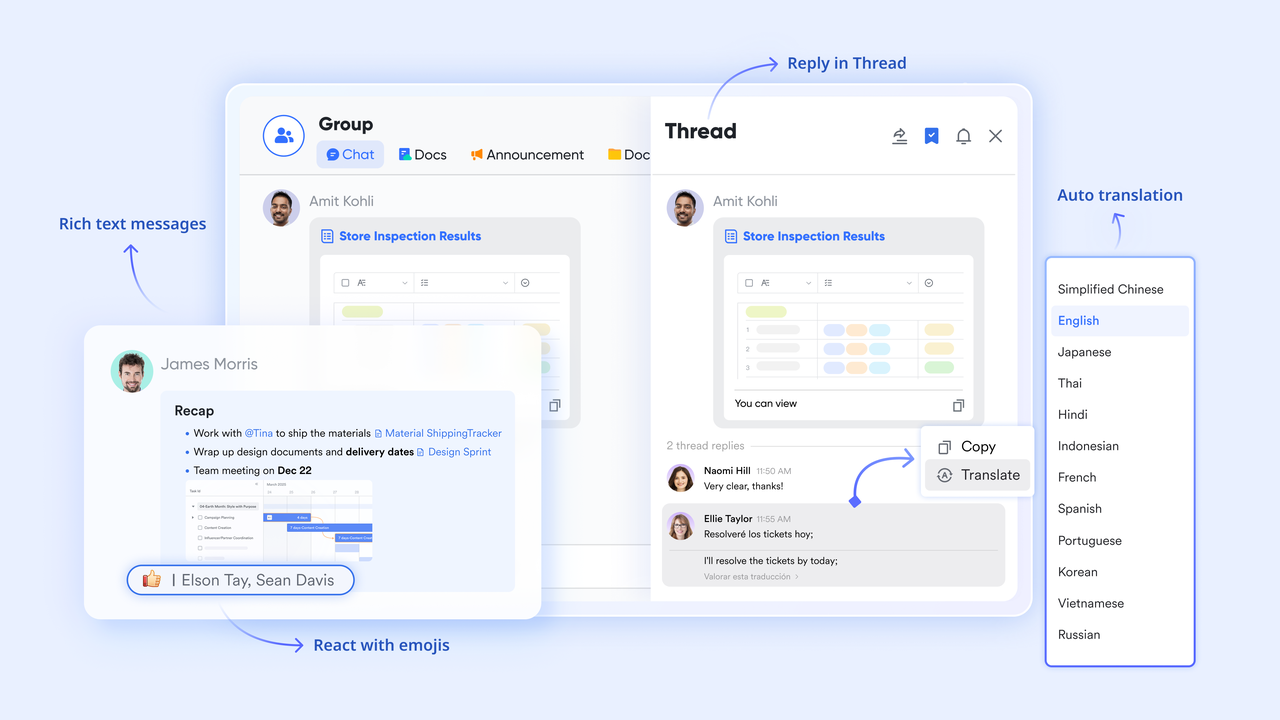
Within conventional Microsoft deployments, project context frequently becomes scattered across applications. Team discussions remain trapped in Teams chats, task status updates live separately in Planner, and critical decisions documented in OneNote create information accessibility challenges.
Lark Messenger architecturally addresses this fragmentation by enabling teams to pin specific Tasks, Docs, or Calendar events directly within group conversations, ensuring all relevant context remains accessible alongside discussion threads. Furthermore, the capability to generate Lark Tasks directly from chat messages ensures that action items and strategic decisions receive proper tracking from inception through completion, establishing a seamless transition from communication to execution.
Streamlined approval workflows
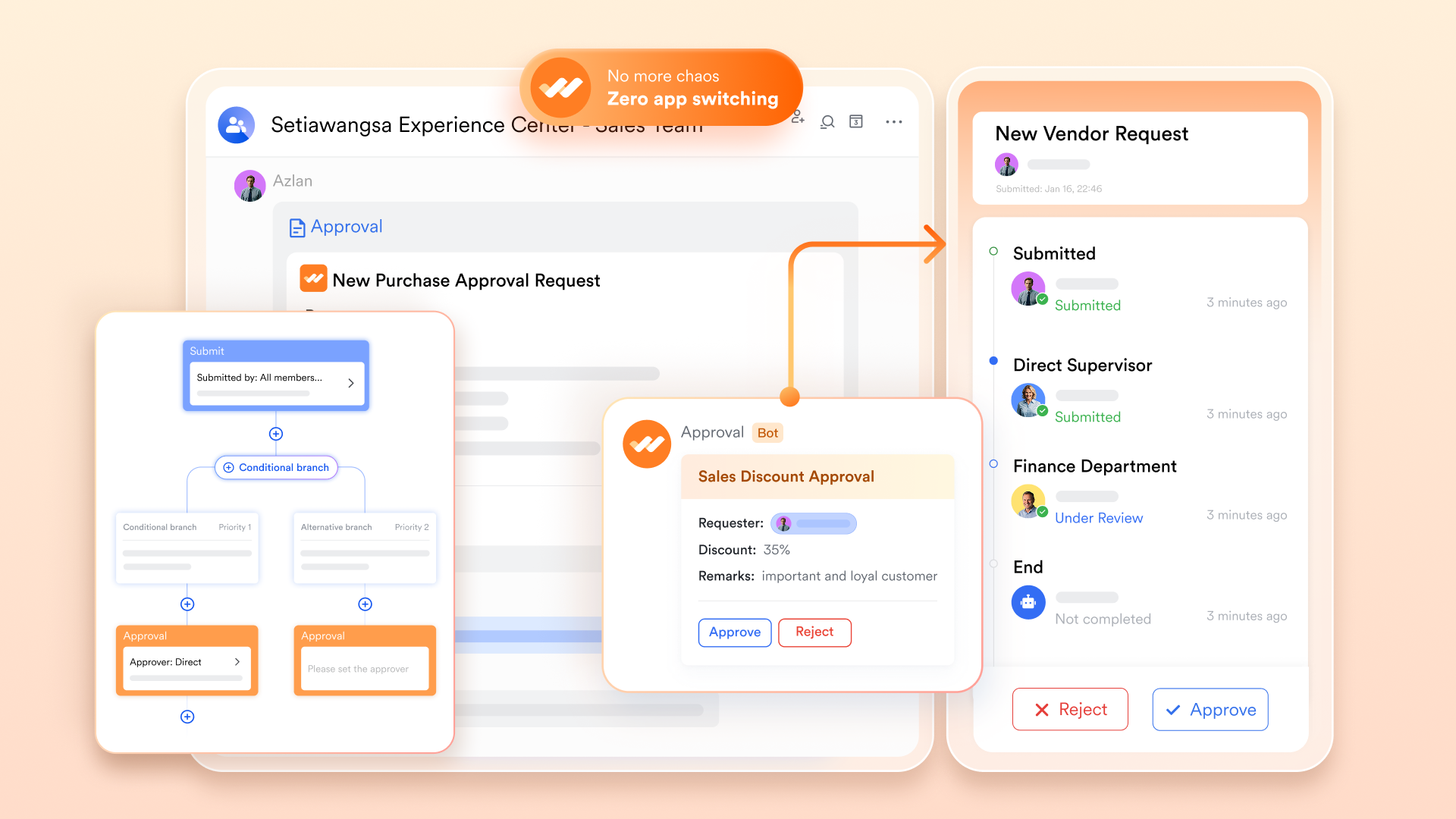
Unlike Microsoft's ecosystem where approval processes often involve separate email chains or form submissions, Lark Approval embeds decision-making directly into the workflow. Teams can create customized automated approval with multiple levels and conditions, all accessible within the same interface where work happens. The entire process is transparent, with real-time status tracking and instant notifications, significantly reducing decision latency compared to traditional email-based approval systems that often create bottlenecks in project timelines.
Collaborative documentation environment
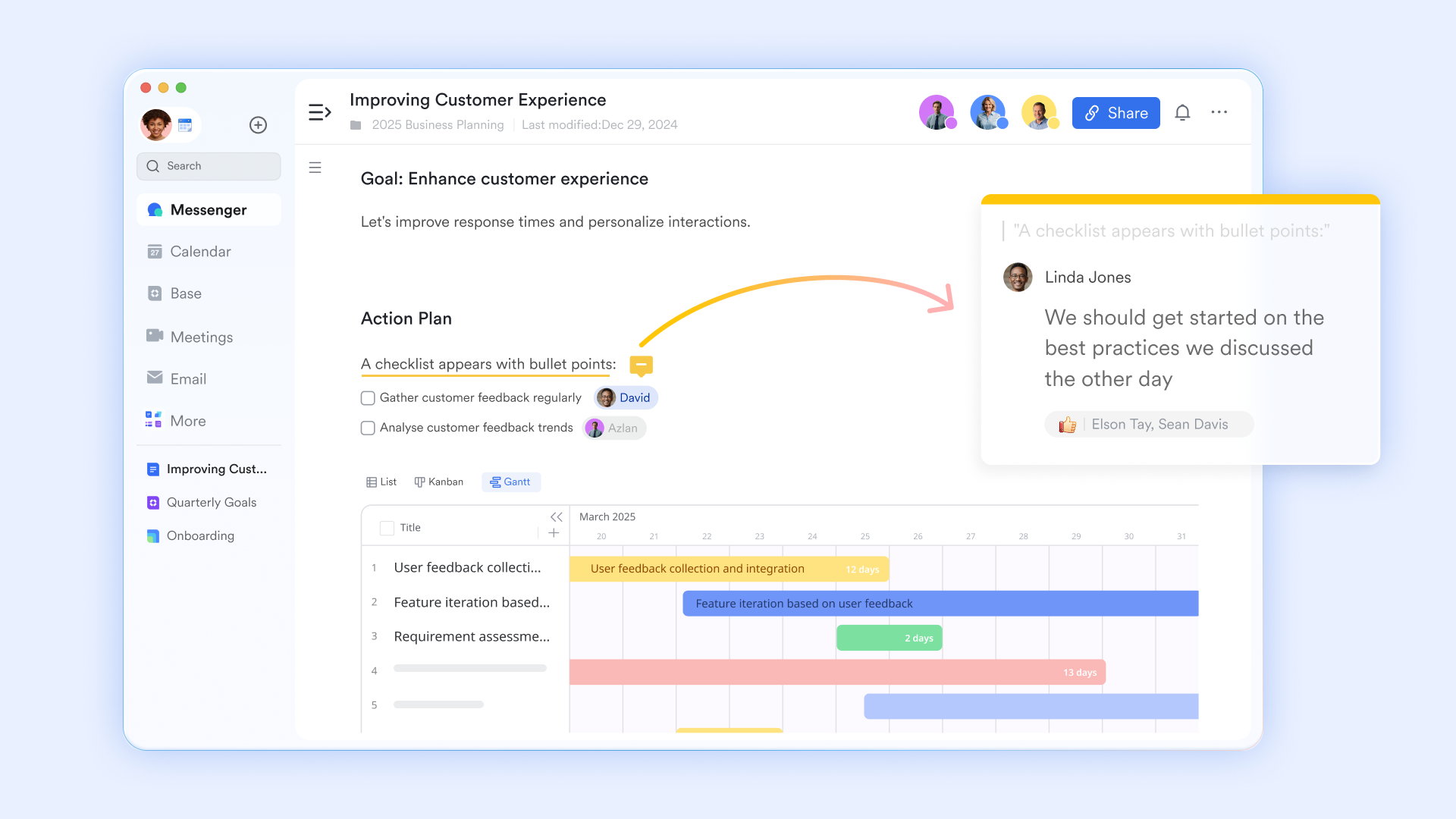
Lark Docs transforms traditional document creation into a seamless collaborative experience within the unified workspace. Unlike standalone document tools that operate in isolation, Lark Docs enables real-time co-editing where multiple team members can simultaneously work on the same document. This eliminates version confusion and accelerates content creation.
The platform enhances collaborative efficiency through intuitive commenting and mention features. Team members can provide specific feedback and directly tag colleagues using @mentions to assign responsibility. This creates clear accountability and ensures timely responses.
Unified time and task management
A persistent challenge in project management involves the organizational disconnect between formal project plans and individual team member schedules. Using Outlook Calendar alongside Planner or Project often necessitates managing separate views of time commitments and project deadlines.
Lark Calendar and Lark Tasks shows deep bidirectional combination. Tasks containing specific due dates automatically appear within calendar views, providing a unified perspective of meetings, project milestones, and personal work blocks. This feature resolves the persistent problem of maintaining project plans in isolation from available working time, enabling more realistic planning and comprehensive time management across individual and team schedules.
Pricing:
- Free plan: Includes 11 powerful products, supporting up to 20 users, 100 GB storage, 1,000 automation runs and unlimited AI translation in chats, docs and email.
- Basic plan: Starts at $6/user/month, supporting teams with over 20 users. Includes 1,000 runs/month for workflows and automations, 2,000 rows in a single Base table, 5TB storage, unlimited Open API calls, and 10 SSO apps.
- Paid plans: Starts at $12/user/month, supporting up to 500 users. Includes unlimited message history, 50,000 automated Base workflow executions per month.
- Enterprise plan: Contact sales for custom pricing. Supports unlimited users and includes even more automation runs and advanced security, compliance, and management features.
Making the right choice for your team
The journey through the Microsoft Planner vs Project landscape reveals two capable tools, each with distinct strengths and limitations. Planner excels in lightweight task management for small teams, while Project delivers powerful controls for complex enterprise initiatives. However, both operate within a fragmented ecosystem that requires constant context switching between applications.
The fundamental question in the Microsoft planner vs project debate isn't just about choosing between these two tools, but whether your organization should continue navigating these inherent limitations. When evaluating your needs:
- Team composition and project complexity: Do your projects consistently fall into one category or do you need flexibility to handle both simple and complex work?
- Collaboration requirements: Are you satisfied with disconnected communication and execution, or do you seek truly integrated workflows?
- Operational efficiency: Can your team afford productivity loss from constantly switching between applications?
- Future readiness: Are you building a work environment that can adapt to evolving business needs?
While Planner and Project each serve specific use cases, Lark emerges as the superior solution that transcends this traditional dichotomy. Rather than forcing teams to choose between simplicity and power, Lark delivers both within a unified environment. It provides Planner's accessibility alongside Project-level capabilities, all while eliminating the friction of multiple applications.
For organizations looking beyond the limitations of segmented tools, Lark represents the optimal path forward - offering a cohesive workspace where communication, planning, and execution naturally converge to drive meaningful productivity gains.
Conclusion
Selecting between Microsoft Planner vs Microsoft Project fundamentally involves choosing the appropriate tool for specific organizational challenges. Planner demonstrates particular strength in lightweight task management and team-based collaboration scenarios, while Project remains unsurpassed in its sophisticated capabilities for managing complex, resource-intensive business initiatives. This important technology decision should originate from careful analysis of project scope, team capabilities, and necessary control levels.
For teams seeking to break free from application silos and disconnected workflows, Lark presents a compelling alternative that reimagines how work gets done. Its natively unified platform eliminates the friction of switching between multiple tools, creating a seamless environment where communication, planning, and execution coexist naturally. We encourage teams to experience this all-in-one approach firsthand - try Lark today to discover how a truly connected workspace can transform your team's productivity and collaboration dynamics. The right tools not only support your current processes but open new possibilities for how your organization can work together more effectively.
FAQs
What is the difference between Microsoft Project and Microsoft Planner?
Microsoft Project is designed for complex project management with advanced features like Gantt charts and resource management. Planner serves as a lightweight task management tool for team collaboration. Project suits enterprise-level projects while Planner works better for simple team tasks.
Is Microsoft Project replaced by Planner?
No, Microsoft Project is not being replaced by Planner. Both tools continue to coexist serving different purposes. Microsoft is actually enhancing Planner with some Project capabilities while maintaining Project for complex project management needs.
What is a drawback of Microsoft Project?
The primary drawback is its steep learning curve and complexity for casual users. The extensive features require proper training to utilize effectively, making it overwhelming for simple project needs. The cost can also be prohibitive for small teams.
What is MS project now called?
The product remains officially called Microsoft Project. However, Microsoft now offers it through different platforms including Microsoft Project Online and Microsoft Project for the web. The core product maintains its name while expanding to cloud-based solutions.
Related reading
Table of contents
Start using Lark today

Manage all your work in one place
Boost team efficiency by 10x
Save up to 70% on software costs
Table of contents
Start using Lark today
Manage all your work in one place
Boost team efficiency by 10x
Save up to 70% on software costs



2026 Lark Technologies Pte. Ltd.
Headquartered in Singapore with offices worldwide.






Explore: