How to choose the right project management tool is crucial for enhancing team efficiency. Microsoft Project vs Asana are two leading platforms that cater to different project management needs. Microsoft Project is known for its powerful features and detailed scheduling, making it ideal for larger organizations requiring extensive resource management. In contrast, Asana provides a user-friendly interface tailored for teams focused on collaboration and task management. Additionally, Lark offers a modern alternative, integrating project management, communication, and document sharing into one seamless platform. This article will compare Microsoft Project and Asana while highlighting how Lark can serve as a comprehensive solution for your team's needs.
Explore smarter project management today
Microsoft Project vs Asana: Overview
What is Microsoft Project?
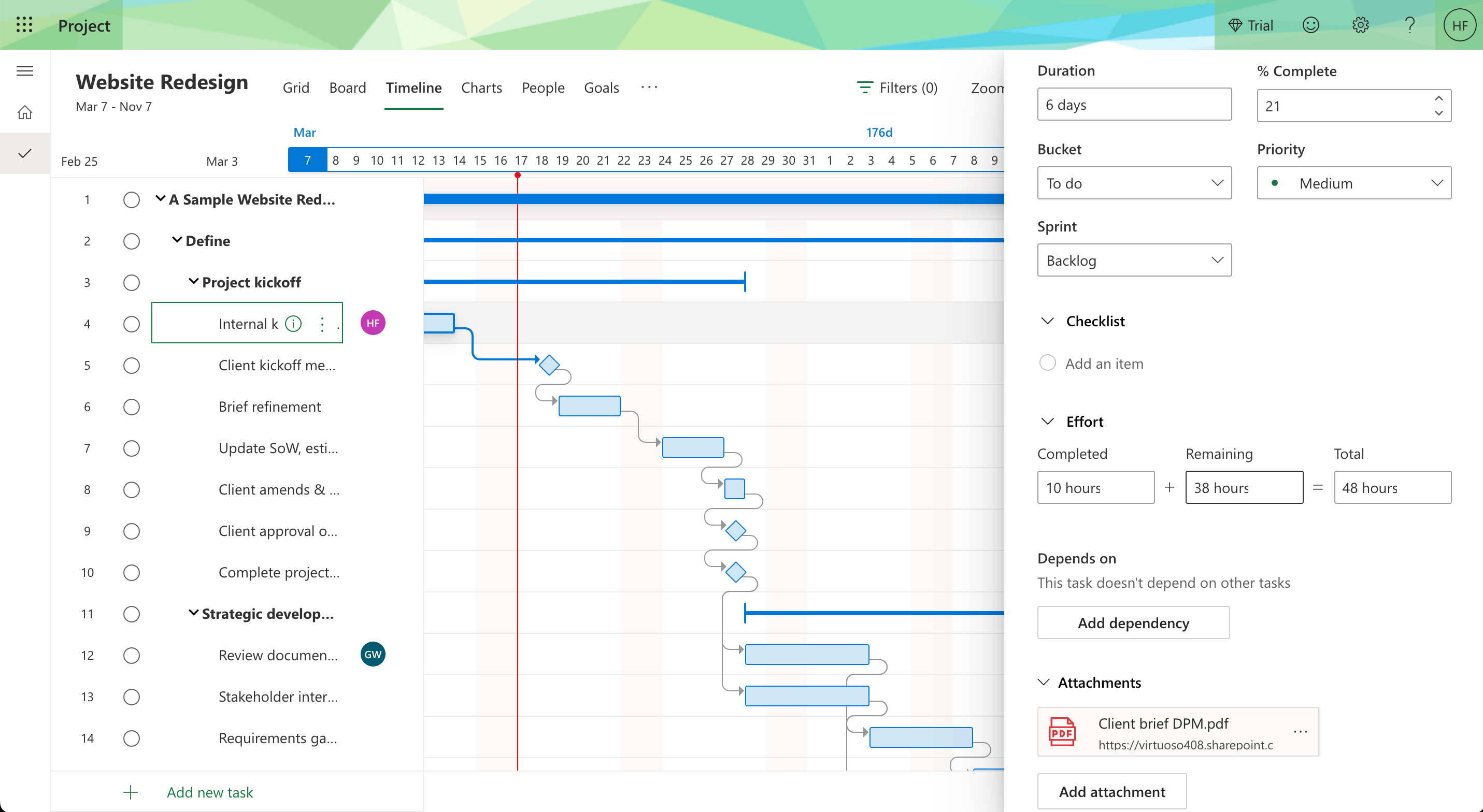
Image source: thedigitalprojectmanager.com
Microsoft Project is a robust developed by Microsoft, tailored for professional project managers seeking an extensive set of tools for planning, executing, and closing projects. It provides features such as , critical path management, and resource allocation, which are essential for detailed project tracking and management. Microsoft Project allows users to map out project timelines, assign resources, monitor progress, and adjust plans as necessary, making it a powerful solution for complex project environments. Its depth of functionality is designed to support large teams and intricate projects, ensuring that every aspect of project execution is accounted for.
What is Asana?

Image source: asana.com
Asana is a widely used task management tool that emphasizes team collaboration and communication. It offers an intuitive interface that allows users to create visual project boards, helping teams break down their work into manageable tasks. With Asana, users can assign responsibilities, set deadlines, and in real-time, fostering a transparent and collaborative working environment. By prioritizing simplicity and user-friendliness, Asana appeals to a varied audience, ranging from small teams looking to streamline their workflow to large enterprises needing . Its focus on ease of use makes it an attractive option for teams seeking to enhance productivity without the complexity often associated with traditional project management tools.
Microsoft Project vs Asana: Feature-by-feature comparison
When evaluating project management tools, it is essential to compare key features that can significantly impact your team's productivity and collaboration. Below are five critical features that highlight how Microsoft Project and Asana stack up against each other, making it easier for users to determine which platform aligns best with their project management needs.
Microsoft Project offers advanced task management capabilities, allowing users to create tasks with dependencies, deadlines, and assigned resources. This complexity is particularly beneficial for large projects where task interdependencies can significantly affect timelines.
In contrast, Asana simplifies task management with its intuitive interface, enabling team members to assign tasks easily, set due dates, and track progress without extensive training. Although Asana's approach may be less sophisticated in terms of features, it excels in its ease of use, making it suitable for teams prioritizing straightforward task management and collaboration.
One of the standout features of Microsoft Project is its comprehensive Gantt chart functionality. This allows users to visualize project timelines, dependencies, and overlapping tasks in detail, providing an invaluable overview of . This feature is crucial for project managers who need to ensure all tasks align with the overall project schedule. On the other hand, Asana offers a more basic timeline view that provides a high-level overview but lacks the detailed Gantt capabilities of Microsoft Project. This limitation means that while Asana supports project visualization, it may not be sufficient for more complex project timelines that require in-depth scheduling and analysis.
Resource allocation
Efficient resource management is vital for successful project execution, and here, Microsoft Project truly excels. It provides in-depth resource allocation tools that allow project managers to assign, track, and manage resources effectively across multiple projects, ensuring optimal utilization. In contrast, Asana offers basic resource tracking features, which may suffice for smaller tasks or teams but can fall short in projects requiring detailed resource management. For teams needing advanced resource allocation capabilities, the Microsoft Project vs. Asana comparison strongly favors Microsoft Project.
Collaboration and communication
In the realm of collaboration, Asana shines with its strong focus on teamwork and communication tools. It allows users to comment on tasks, , and collaborate in real time, making it an excellent choice for teams that prioritize seamless communication. Conversely, Microsoft Project has more limited collaboration features. While it does allow for comments and file sharing, its primary focus is on project scheduling and , which can impede effective communication among team members. For teams where collaboration is a critical element, the Asana vs. Microsoft Project comparison highlights Asana's superior capabilities in this area.
User interface and ease of use
The user experience can significantly impact how effectively a team utilizes a project management tool. Asana is praised for its intuitive and user-friendly interface, which allows teams to get started quickly without extensive training or onboarding. This simplicity makes it particularly appealing for smaller teams or those new to project management software. In contrast, Microsoft Project features a more complex interface tailored for detailed project analysis, which may prove overwhelming for new users. Its steeper learning curve can lead to challenges, particularly for teams looking for a straightforward approach. Thus, in the Microsoft Project vs. Asana discussion, Asana's user-friendly design makes it the preferred choice for teams focused on ease of use.
Pros and Cons of Microsoft Project
Pros:
- Comprehensive feature set: Offers a wide range of functionalities tailored for complex project management, making it ideal for larger projects.
- Detailed reporting: Equipped with powerful reporting tools for and progress tracking.
- Familiarity: Many users are already accustomed to Microsoft Office tools, facilitating easier adaptation.
- Robust Gantt chart support: Allows for precise project scheduling and visualization.
Cons:
- Complex learning curve: New users may find the extensive feature set overwhelming, requiring additional training.
- Higher cost: The pricing structure can be expensive, particularly for smaller organizations.
- Limited collaboration: Not as focused on team collaboration, which can impede real-time communications.
- Resource-heavy software: As a primarily desktop application, it may require significant system resources.
Pros and Cons of Asana
Pros:
- User-friendly interface: Intuitive design enables new users to manage tasks efficiently without extensive training.
- Strong collaboration features: Promotes teamwork and allows users to easily comment and share updates on tasks.
- Flexible task management: Organize tasks in various formats, catering to different project management styles.
- : Offers a free plan and flexible pricing, making it accessible to smaller teams.
Cons:
- Limited advanced features: Lacks some of the deeper functionality found in Microsoft Project, especially for resource management.
- Basic reporting tools: Reporting capabilities are less comprehensive than those of Microsoft Project.
- Less effective for complex projects: May struggle with very large or intricate projects requiring detailed planning.
- No built-in time tracking: Requires integration with third-party applications for time tracking functionality.
Microsoft Project and Asana: Pricing and plans
Quick comparison of Microsoft Project and Asana
Choosing the right project management tool involves not just understanding the features but also evaluating the cost implications of each option. Both Microsoft Project and Asana offer various pricing tiers, catering to different needs and team sizes. Below, we delve into a detailed cost comparison of these two platforms, highlighting their respective plans, ideal use cases, and features.
Microsoft Project pricing structure
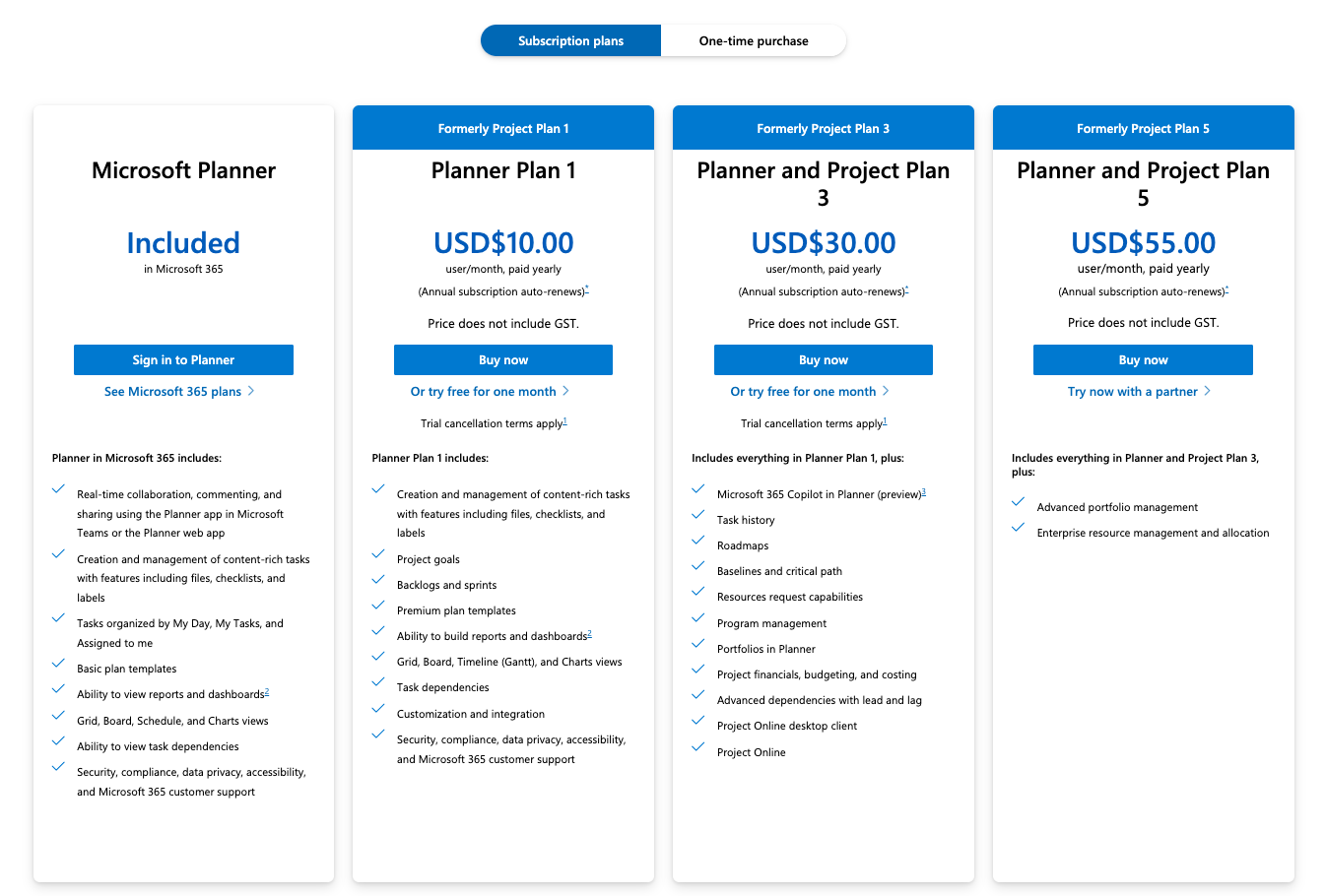
Image source: microsoft.com
Microsoft Project offers a range of subscription plans along with one-time purchase options, allowing organizations to select the best fit based on their usage and needs.
Subscription Plans:
Planner Plan 1
Price: $10/user/month (billed annually)
Key features:
- Basic task and project management capabilities
- Grid views and timeline features for simple scheduling
- Collaboration tools, such as file sharing
- Integration within the Microsoft 365 ecosystem
Best for: Small teams or departments that need essential task tracking without the comprehensive features of higher tiers.
Trial: Free trial available for one month.
This plan lacks desktop application access and advanced reporting features, making it suitable for teams with basic management needs.
Planner and Project Plan 3
Price: $30/user/month (billed annually)
Key features:
- Full desktop access in addition to web functionality
- Advanced features including resource management, cost tracking, and custom timesheets
- Reporting capabilities with custom reports and portfolio dashboards
- Enhanced collaboration features to facilitate teamwork
Best for: Professional project managers managing multiple projects who require intermediate features and flexibility.
Trial: Free trial available for one month.
This plan represents a balance between cost and features, making it ideal for organizations ready to step up from basic project management.
Planner and Project Plan 5
Price: $55/user/month (billed annually)
Key features:
- Comprehensive portfolio management including advanced analytics and scenario planning
- Demand management capabilities for project proposal workflows
- Enterprise-level resource planning and governance features for scalability
Best for: Large organizations with complex project needs requiring extensive portfolio management.
Trial: Try this plan with a partner to evaluate its fit.
This plan is designed to accommodate the demands of larger teams, providing cloud scalability without the need for extensive infrastructure costs.
One-Time Purchase Options
For organizations preferring not to commit to a subscription, Microsoft Project also offers the following one-time purchase plans:
- Price: $679.99 (one-time fee)
- Key features: Desktop application with basic project scheduling capabilities.
- Best for: Individuals or teams needing simple project management tools without ongoing subscription costs.
- Project Professional 2024
- Price: $1,129.99 (one-time fee)
- Key features: Full project management capabilities, including advanced resource management and collaboration tools.
- Best for: Professional users who demand comprehensive features for project management.
Organizations opting for one-time purchases should be aware that while they avoid subscription fees, they may incur additional costs for upgrades and miss out on cloud-based collaboration, which is increasingly important for modern teams.
Asana pricing structure
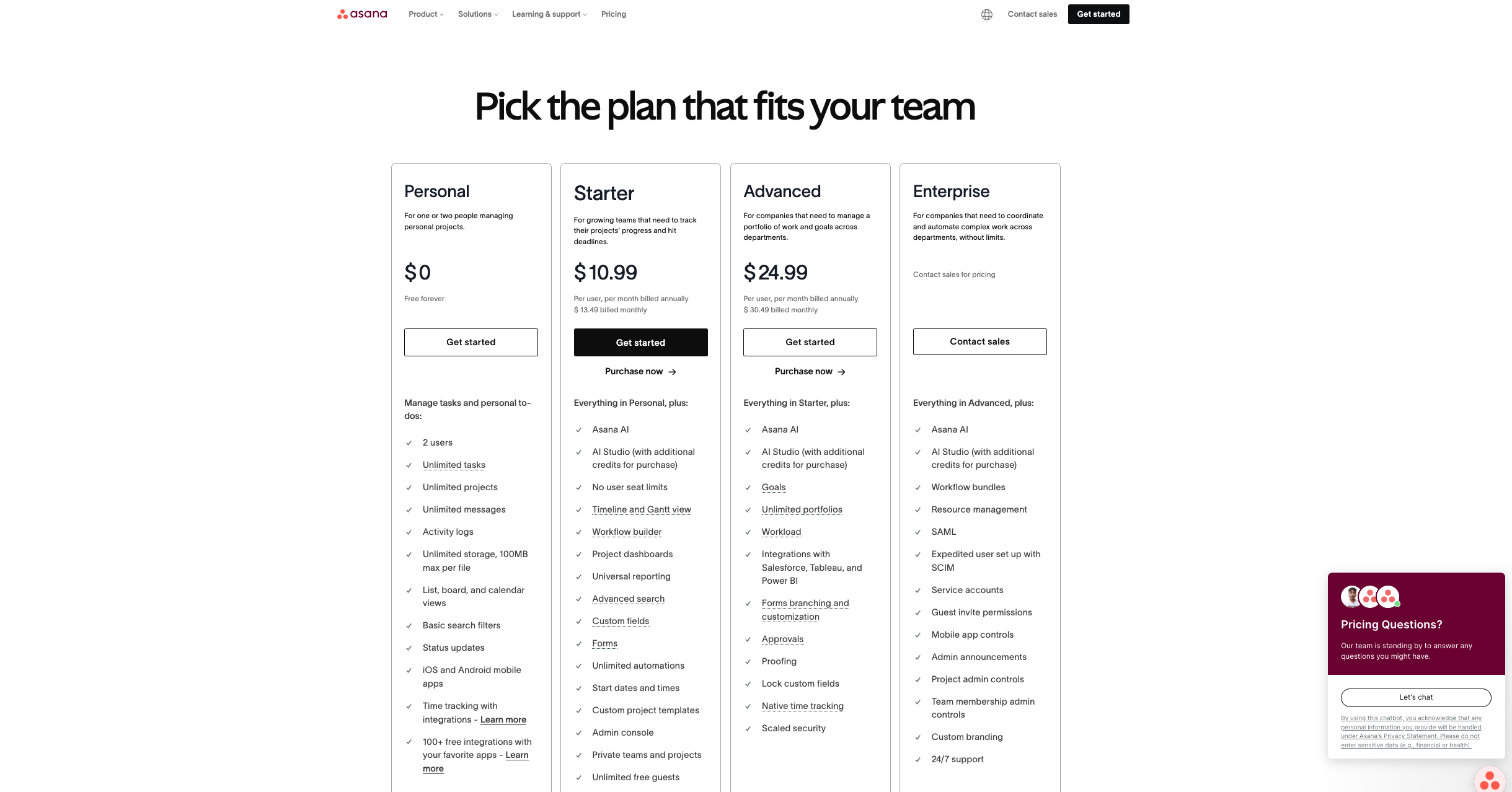
Image source: asana.com
Asana's pricing is straightforward and designed to accommodate a variety of team needs. The platform also offers a free tier, making it accessible to small teams or individuals just starting with project management.
Personal plan
- Task assignments with due dates
- Basic project management tools
- Limited board views for project tracking
- Best for: Individuals or small teams looking for fundamental task management without financial commitment.
Starter plan
- Price: $10.99/user/month(billedannually)or13.49/user/month (billed monthly)
- Timeline view (lightweight Gantt chart functionality)
- Advanced search, reporting features, and custom fields
- Project templates to streamline setup
- Best for: Teams requiring more detailed project tracking and management capabilities.
- Trial: Free trial option available.
Advanced plan
- Price: $24.99/user/month(billedannually)or30.49/user/month (billed monthly)
- All features from the Premium Plan
- Advanced integrations with tools like Salesforce and Adobe Creative Cloud
- Goals tracking and portfolios for managing multiple projects
- Best for: Medium to large teams needing sophisticated project tracking and resource management.
- Trial: Free trial option available.
Enterprise plan
- Price: Custom pricing based on organization size and needs.
- Key features: All Business Plan features plus enhanced security, compliance, and support options.
- Best for: Large organizations that require strict oversight and advanced capabilities.
- Trial: N/A; organizations typically go through sales processes to evaluate fit.
User testimonials and reviews
When considering any project management tool, user experiences can provide valuable insights. Below are summarized reviews and testimonials from users of both Microsoft Project and Asana, highlighting their strengths and weaknesses.
Microsoft Project user testimonials
Asana user testimonials
Summary table
A modern alternative to Microsoft Project and Asana: Lark
Overview
Lark is an all-in-one collaboration suite that encompasses , communication, and functionalities, making it an attractive alternative to traditional tools like Microsoft Project and Asana. It simplifies team collaboration by integrating various tools into one platform.
Key features
Centralized communication:
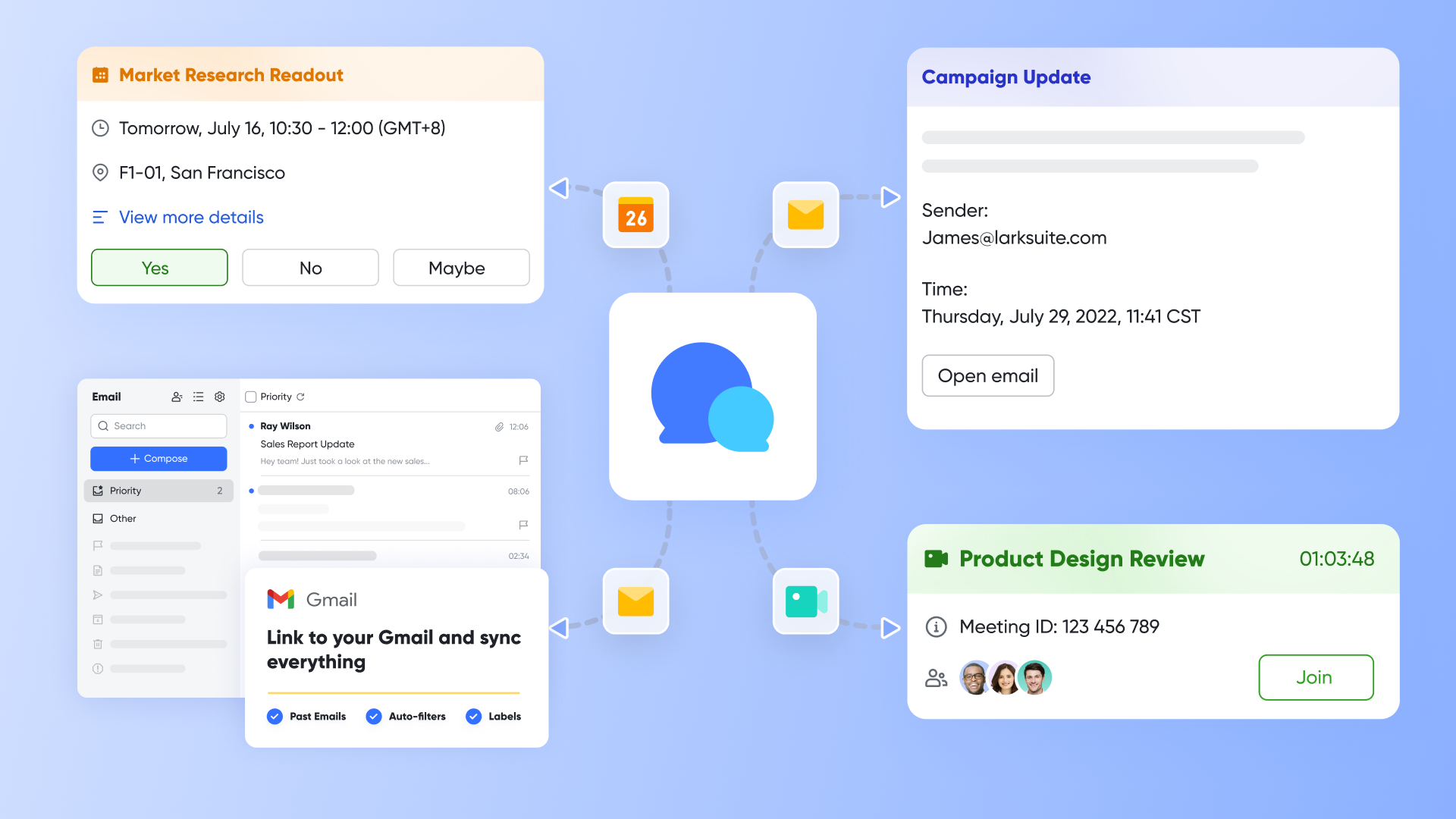
At the heart of Lark's functionality is Lark Messenger, which serves as a vital communication hub for teams. This feature allows users to engage in real-time chats, send files, and , promoting an agile workflow that enhances decision-making and minimizes delays. Unlike other project management tools that require teams to switch between different applications to communicate, Lark Messenger integrates communication directly into the workflow.
With Lark Messenger, teams can create specific chat groups to discuss particular projects or tasks. This not only organizes conversations but also makes it easier to refer back to previous discussions. Additionally, the platform supports @mentions, ensuring that messages reach the intended recipients promptly. This level of immediacy is essential in keeping all team members aligned on project goals and timelines, further enhancing the collaborative environment.
Streamline task management:
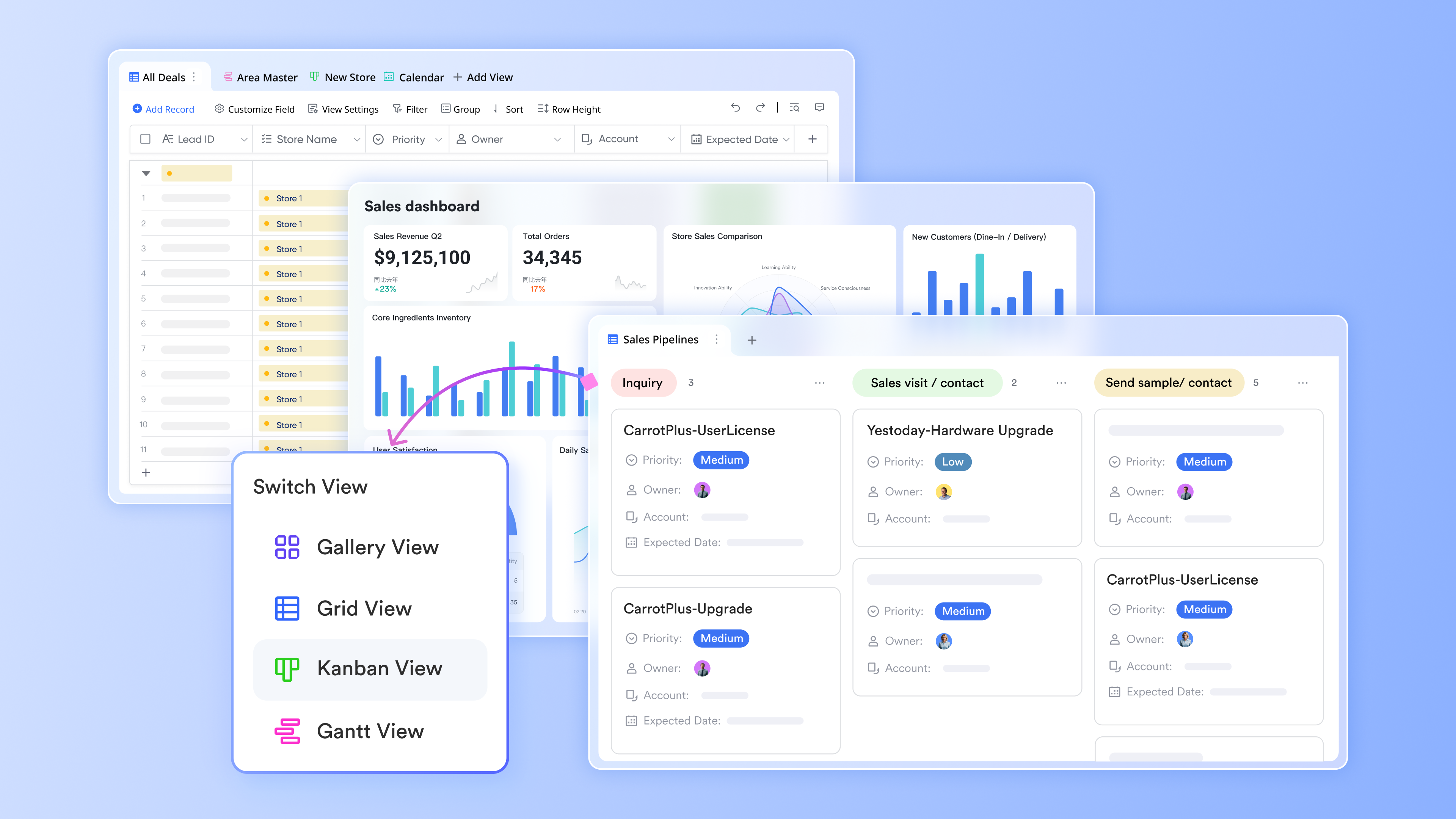
Lark Base offers an intuitive task management solution that allows teams to effectively organize and prioritize their work. This feature enables users to create tasks, set deadlines, and assign responsibilities—all in one place. By having all task-related information centralized, Lark Base eliminates the confusion of across multiple platforms.
Each task in Lark Base can include detailed descriptions, due dates, and checklists, ensuring that team members have all the context they need to complete their assignments efficiently. The built-in notification system keeps everyone up-to-date on approaching deadlines and task updates, fostering accountability within the team. Managers can easily track progress through visual tools like Kanban boards, allowing for quick adjustments to project plans as needed. Moreover, Lark Base facilitates seamless collaboration by allowing team members to comment on tasks directly. This encourages feedback and discussion right where the work is happening, making it easier to address issues promptly and keep projects moving forward.
Real-time document collaboration:
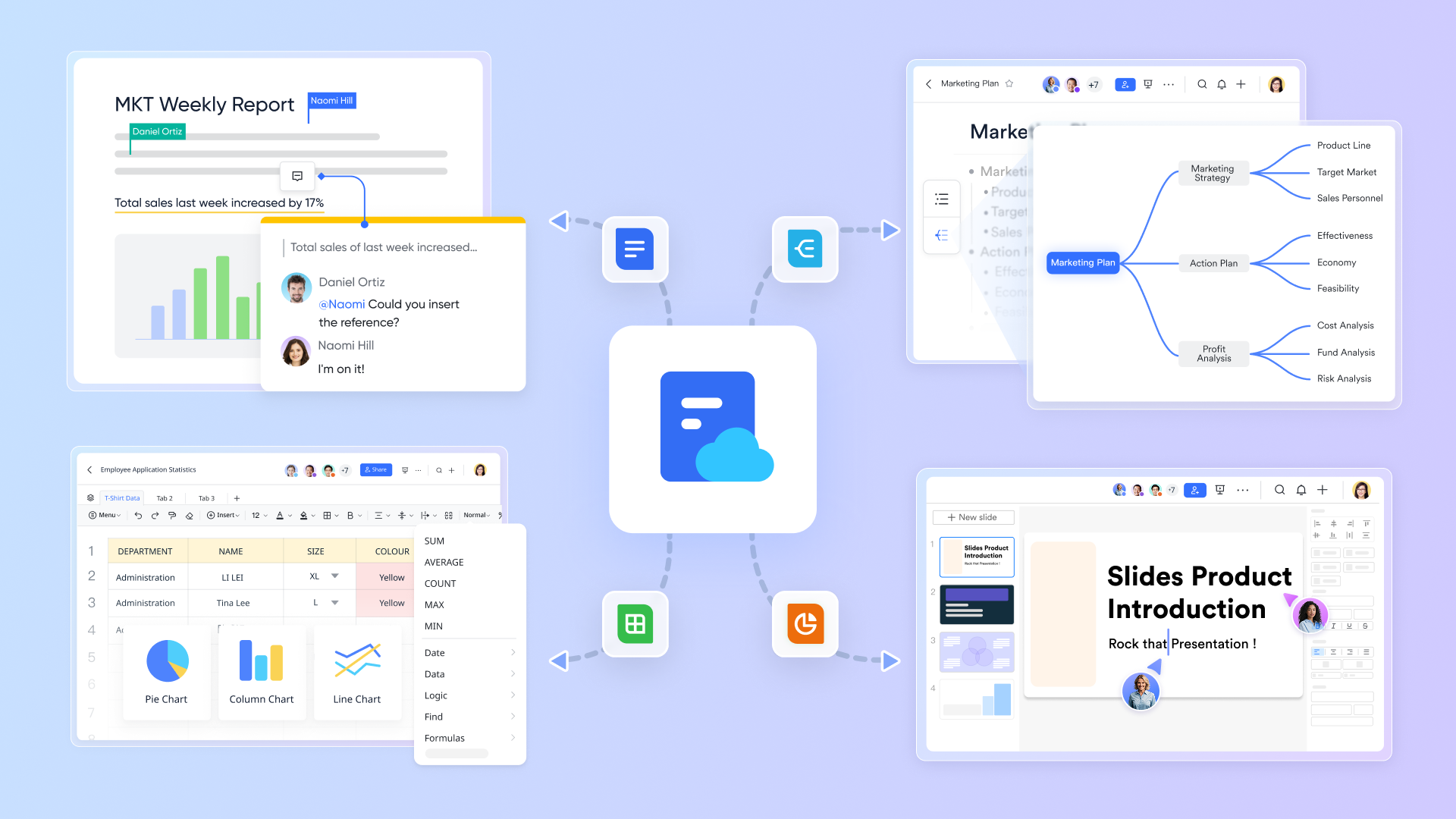
Lark Docs elevates the traditional document collaboration experience by enabling simultaneous editing and sharing of documents among team members. Each user can contribute to a document in real-time, which significantly reduces the time spent on emails and version control issues commonly seen in traditional document management systems. Furthermore, Lark Docs allows teams to comment directly on sections of a document, creating a contextual collaboration space where feedback is straightforward and actionable.
It supports various file types and collaborates seamlessly with Lark's other features, allowing users to attach documents directly to their communications within Lark Messenger.
This level of collaboration is particularly beneficial during , where input from multiple team members is crucial. With robust formatting tools and the ability to create tables, charts, and other visuals, Lark Docs becomes a comprehensive tool for drafting proposals, reports, and project blueprints all in one place.
Efficient meeting management:
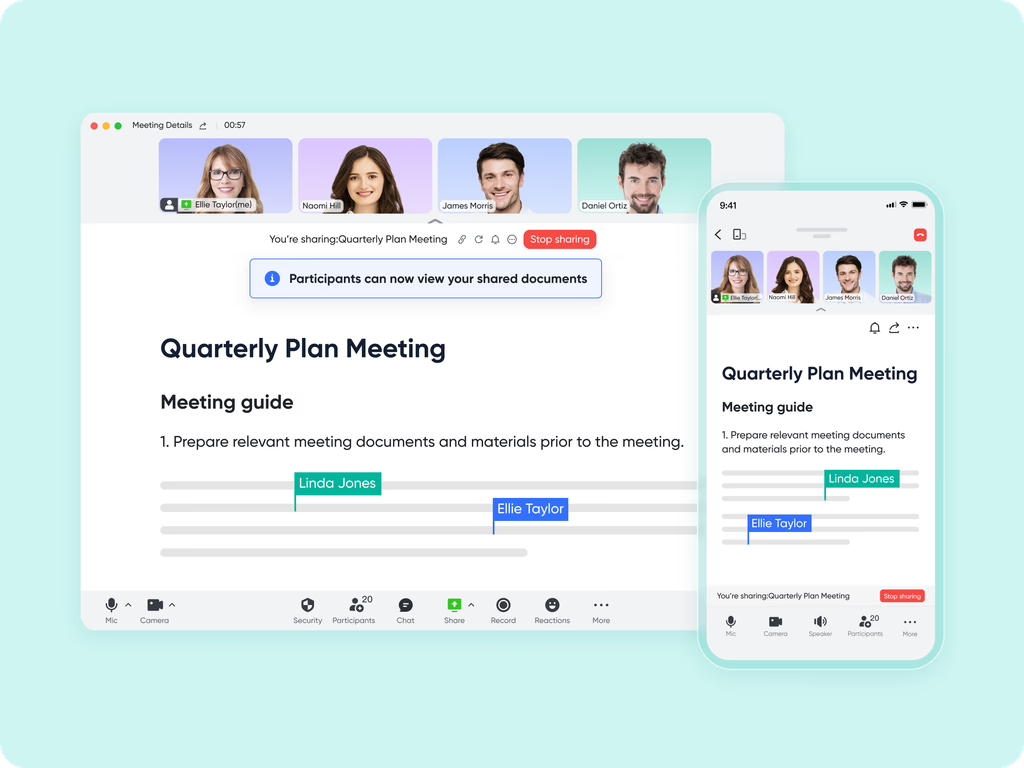
Meetings can often bog down productivity, but with Lark Meetings, scheduling and conducting video calls becomes streamlined and efficient. Users can create, manage, and track meeting agendas and participants within the Lark platform. This integration ensures that meetings are purpose-driven and that all relevant discussions are documented for future reference.
Lark Meetings allows users to send calendar invites that sync directly with their Lark Calendar, facilitating easier management of schedules and minimizing conflicts. During meetings, users can utilize features such as screen sharing and , which allow for thorough documentation of discussions and decisions made in each session.
Moreover, Lark offers , which automatically generates meeting minutes based on the discussion points covered during the call. This feature is particularly valuable in ensuring accountability and tracking progress, as it provides a clear record of what was discussed, who was responsible for what tasks, and any decisions made.
Comprehensive calendar and scheduling:
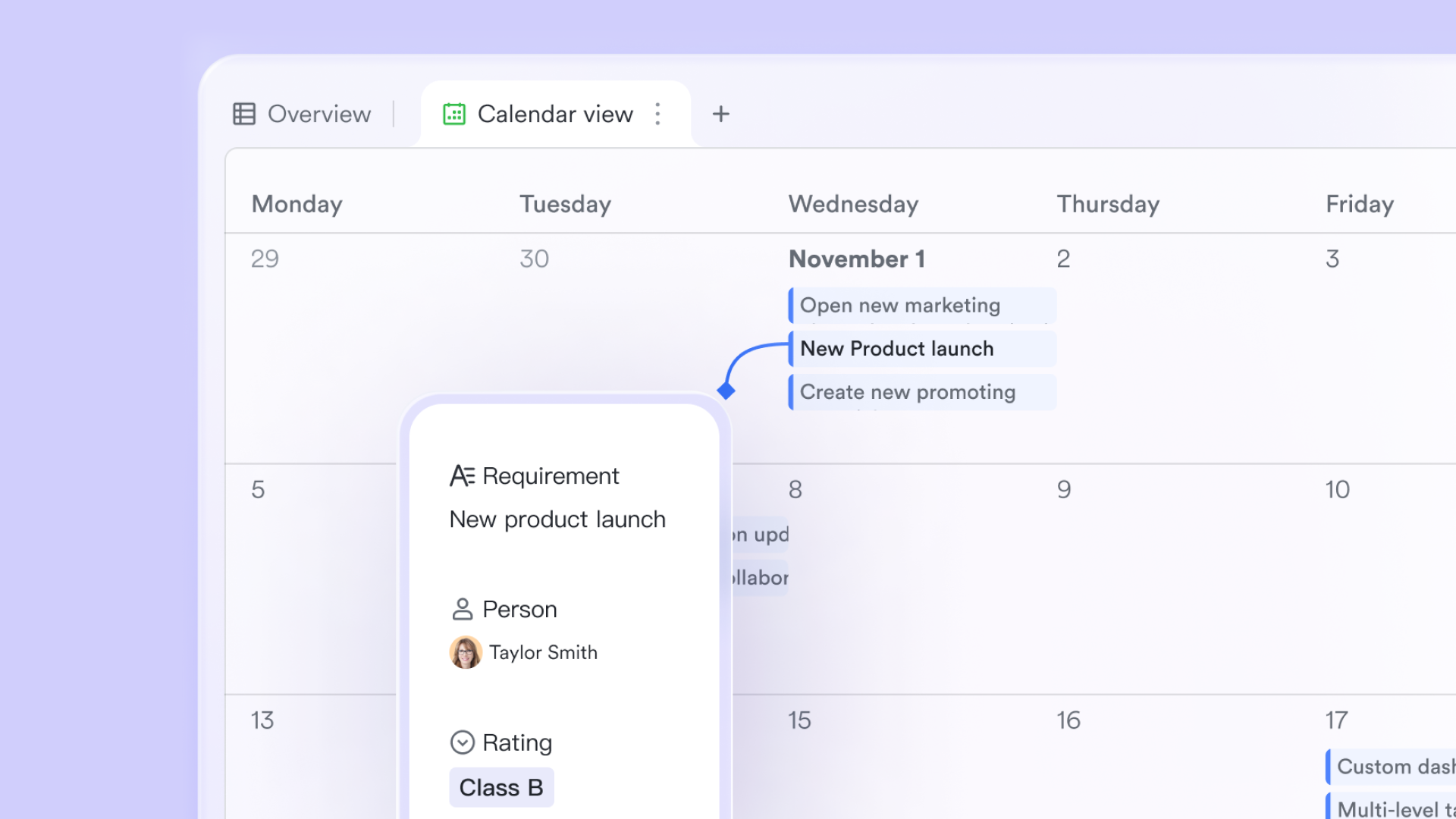
Managing schedules can often be a complex endeavor, but Lark Calendar simplifies this process by providing a single place to view all meetings, tasks, and deadlines. The calendar seamlessly collaborates with Lark Meetings, allowing users to create events that autofill with essential meeting details and participants.
With Lark Calendar, users can for important dates and deadlines, ensuring that project milestones are met consistently. The calendar's sharing capabilities also allow teams to coordinate better, as members can view each other's availability and schedule meetings accordingly.
Moreover, Lark Calendar includes features such as recurring event creation and various viewing options (daily, weekly, monthly), which enhance user experience and promote better across projects. By centralizing scheduling within the same platform used for communication and document collaboration, Lark minimizes the risk of scheduling conflicts and enhances overall team coordination.
Best for
Lark is ideal for teams that seek an integrated platform for communication and project management, particularly in setups. It appeals to organizations prioritizing collaboration without the complexity of traditional project management software.
Limitations
- Although user-friendly, new users may require time to adapt to its comprehensive functionalities, which truly helps.
:
- Starter plan: Free forever plan with 11 powerful tools for up to 20 users, 100GB storage, 1,000 automation runs, AI translations, and more. No credit card needed.
- Basic plan: $6/user/month (billed annually) for up to 500 users. Includes everything in Starter plus unlimited message history, 5TB storage, 1,000 automation runs, and more. Some users may need to to purchase.
- Pro plan: $12/user/month (billed annually) for up to 500 users. Includes everything in Basic plus group calling for up to 500 attendees, 15TB storage, 50,000 automation runs, and more.
- Enterprise plan: for custom pricing. Supports unlimited users and includes advanced automation, security, compliance, and management features.
For small teams with simple communication needs

18 months message history
1000 Base automation runs/month
2000 rows per table in Base
Most POPULAR
For companies with comprehensive collaboration and management needs
Unlimited message history
500-participant video meetings
50k Base automation runs/month
20k rows per table in Base
For large companies with advanced security and organizational management needs
Get a personalized demo and pricing
Unlimited message history
500-participant video meetings
15 TB storage + 30 GB storage/user
500k Base automation runs/month
50k Base automation runs/month
Most POPULAR
For companies with comprehensive collaboration and management needs
Unlimited message history
500-participant video meetings
50k Base automation runs/month
20k rows per table in Base
: Switching to Lark's Pro plan can lead to significant cost savings— for example, a 100-employee company using Slack, Google Workspace, and Airtable could save approximately $19,800 annually by consolidating their tools with Lark.
For more Google Workspace's information, you can refer to and .
Try affordable plans for all teams
How to choose the right project management tool
Selecting the best project management tool requires careful consideration of your team's specific needs. Here are some factors to consider:
- Team size and structure: Evaluate the size of your team and how they work together. Some tools are better suited for larger teams with complex hierarchies, while others are designed for smaller, agile teams.
- Project complexity: For complex projects requiring detailed planning, tools like Microsoft Project may be more beneficial. If your projects are less complex, Asana's straightforward design may be sufficient.
- Budget constraints: Assess your budget for project management software. Asana's free options can be appealing for startups, while Microsoft Project may be worth the investment for larger organizations.
- Integration requirements: Consider the existing tools your team uses. Ensure that the project management tool you choose integrates smoothly with other applications to .
- User experience: Prioritize tools with an intuitive interface that caters to your team's technological proficiency. A user-friendly platform will reduce the learning curve and encourage adoption.
- Collaboration needs: If your teams rely heavily on collaboration, choose a tool that emphasizes communication features and allows task sharing and feedback among team members.
- Scalability: Look for tools that can grow with your team. You may want to switch to more comprehensive features as your projects become more complex.
Conclusion
In the ongoing debate of Microsoft Project vs Asana, each tool brings distinct advantages tailored to specific use cases. Microsoft Project stands out for its robust features and capabilities designed for comprehensive project management, making it suitable for complex projects and larger organizations. On the other hand, Asana's user-friendly interface and strong collaboration features make it perfect for smaller teams looking for efficient task management.
For those seeking a modern alternative, Lark offers a unique solution by combining project management with comprehensive communication tools in one platform. As you weigh your options, consider your team's specific needs, budget, and the types of projects you'll be managing. By selecting the right tool, you'll foster greater productivity and collaboration within your organization, leading to successful project outcomes.
Whether you prefer the structured approach of Microsoft Project, the collaborative ethos of Asana, or the all-in-one capabilities of Lark, understanding each option's strengths and limitations will empower you to make an informed choice that aligns with your team's objectives. Ultimately, the best project management tool is the one that fits seamlessly into your workflow, enhances communication, and drives your projects forward.
Discover all-in-one project solutions
FAQs
Is the Microsoft Project being phased out?
No, Microsoft Project is not being phased out. However, Microsoft continues to enhance other productivity tools like Microsoft Planner and Teams, which integrate well with Project. For a more collaborative approach, consider alternatives like Lark that seamlessly combine project management with communication.
What are the disadvantages of Microsoft Project?
Microsoft Project can be complex for new users, requiring substantial training to maximize its features. Additionally, its higher cost may not be ideal for small teams. For those seeking user-friendly project management, Lark offers a simpler interface while encompassing essential features.
Does Microsoft have an Asana equivalent?
Microsoft Planner is often viewed as an equivalent to Asana, offering basic task management and collaboration features. However, if you need an all-in-one platform, Lark combines project management, communication, and document collaboration, providing a comprehensive solution for teams.
What will replace Microsoft Project?
While there are no direct replacements for Microsoft Project, tools like Microsoft Planner and third-party applications can serve similar functions. For a modern alternative that integrates project management with communication, Lark is worth considering, as it balances functionality with ease of use.
Can Lark be used for project management?
Yes, Lark offers robust project management features such as task assignments, deadline tracking, and document collaboration. Its built-in tools streamline workflows and enhance team communication, making it an excellent alternative to traditional project management software like Microsoft Project and Asana.
Related reading


















