














Microsoft Project vs Smartsheet: Which Project Management Tool Fits Your Team Best?

Satvik Saxena
Content Specialist
Nov 3, 2026
Satvik Saxena
Nov 3, 2026

16 min read
Add to preferred sources


Choosing the right project management tool can make or break team efficiency, which is why comparing Microsoft Project vs Smartsheet is essential. Microsoft Project offers structured planning with advanced Gantt charts and reporting, perfect for enterprise teams managing complex workflows. Smartsheet provides a flexible, spreadsheet-style interface that supports cross-functional collaboration and real-time updates.
As workflows become more hybrid and collaborative, relying on multiple disconnected tools, emails, spreadsheets, and chat apps can slow progress. This guide explores the features, pricing, strengths, and limitations of both platforms.

Microsoft Project vs Smartsheet: Quick comparison snapshot
When choosing between Microsoft Project and Smartsheet, understanding their core differences is key. Microsoft Project excels in structured, enterprise-level planning with detailed Gantt charts and reporting. Smartsheet offers a more flexible, collaborative approach for teams needing real-time updates and cross-functional workflow tracking. The table below provides a quick comparison of their features, pricing, and best use cases.
Microsoft Project: Enterprise-grade control and structured planning
Microsoft Project provides financial and project teams with enterprise-level control over tasks, timelines, and resources. It allows managers to structure complex projects, assign responsibilities, and monitor progress across multiple teams. With built-in Gantt charts, task dependencies, and reporting tools, teams gain clarity on schedules and deliverables. The platform supports collaboration while ensuring accountability and visibility for every task. Ideal for large-scale projects, Microsoft Project turns complexity into structured, trackable workflows.
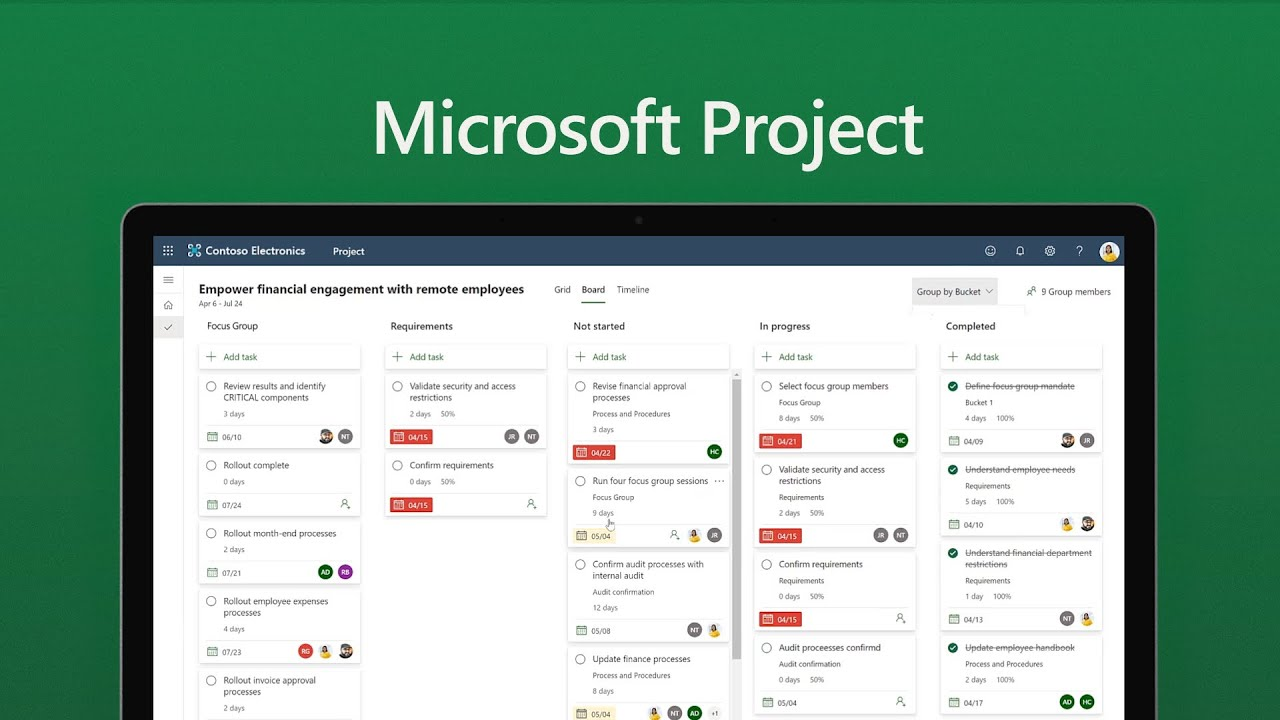
Image source: microsoft.com
Key features
When comparing Microsoft Project vs Smartsheet, one of Microsoft Project's strengths is its robust feature set designed for enterprise project management. These features help teams manage complex projects with precision, control, and detailed reporting.
- Detailed Gantt charts with dependencies and baselines: Microsoft Project provides advanced Gantt charts that clearly visualize task sequences, dependencies, and project timelines. Baselines allow teams to track progress against original plans, making deviations easy to identify. This ensures projects stay on schedule and aligned with goals.
- Resource and capacity management for enterprise planning: Teams can allocate resources efficiently, track workloads, and prevent overallocation with Microsoft Project's resource management tools. Capacity planning helps balance team availability and project demands, reducing bottlenecks. It ensures the right people are assigned to the right tasks at the right time.
- Advanced reporting with Power BI and dashboards: Microsoft Project integrates with Power BI to deliver detailed, customizable dashboards. Teams can analyze project health, costs, and performance metrics in real time. These insights enable data-driven decision-making and improve project visibility for stakeholders.
- Timesheets and cost tracking for budgeting and forecasting: Timesheets allow tracking of hours worked per task, while cost tracking monitors budgets, expenses, and forecasts. Microsoft Project helps ensure projects remain financially on track. This feature is essential for enterprise teams managing multiple projects simultaneously.
- Portfolio and program management for multiple projects: Microsoft Project supports oversight of multiple projects through program and portfolio management. Teams can prioritize initiatives, allocate resources across projects, and monitor overall performance. This centralization ensures alignment with organizational goals and strategic objectives.
Strengths
When comparing Microsoft Project vs Smartsheet, Microsoft Project stands out for its enterprise-grade strengths that support structured, complex workflows. These advantages make it ideal for organizations managing large-scale projects with strict requirements.
- Excellent for traditional project management (Waterfall): Microsoft Project is designed to handle sequential, phase-based workflows typical of Waterfall methodology. Teams can map dependencies, milestones, and deliverables clearly. This makes it easier to plan, execute, and monitor projects with predictable timelines.
- Deep customization and scalability: The platform allows teams to customize views, reports, and fields according to project needs. It can scale from single projects to entire portfolios across departments. This flexibility ensures it can adapt to evolving business requirements over time.
- Ideal for large organizations requiring governance and compliance: Microsoft Project provides tools for enforcing standards, tracking approvals, and maintaining documentation. Its features support regulatory compliance and internal governance policies. This makes it suitable for enterprises where accountability and process adherence are critical.
Limitations
When evaluating Microsoft Project vs Smartsheet, it's important to recognize some limitations that may affect team adoption and efficiency. These factors can influence whether the tool fits your workflow and budget.
- Steeper learning curve for non-technical users: Microsoft Project's robust features come with complexity, making it challenging for users without technical experience. Setting up tasks, dependencies, and reports often requires training. This can slow down onboarding and reduce overall team productivity.
- Collaboration feels disconnected from actual workflows: While Microsoft Project excels in structured planning, real-time collaboration is limited. Teams often need to rely on external tools like Teams or email for updates. This can create gaps between planning and execution.
- High cost for full suite access (Project + Microsoft 365): Accessing all Microsoft Project features typically requires purchasing multiple licenses, including Microsoft 365. For smaller teams, this can become expensive. Budget-conscious organizations may find the total cost prohibitive.
Smartsheet: Flexible, collaborative project management
When comparing Microsoft Project vs Smartsheet, Smartsheet takes a more flexible approach to project management. Its spreadsheet-style interface is familiar to many users, reducing the learning curve. Smartsheet emphasizes real-time collaboration, allowing teams to update tasks, share files, and communicate seamlessly. It supports multiple views like Grid, Gantt, Calendar, and Card to suit different project styles. This flexibility makes it ideal for mid-sized businesses and cross-functional teams managing dynamic workflows.
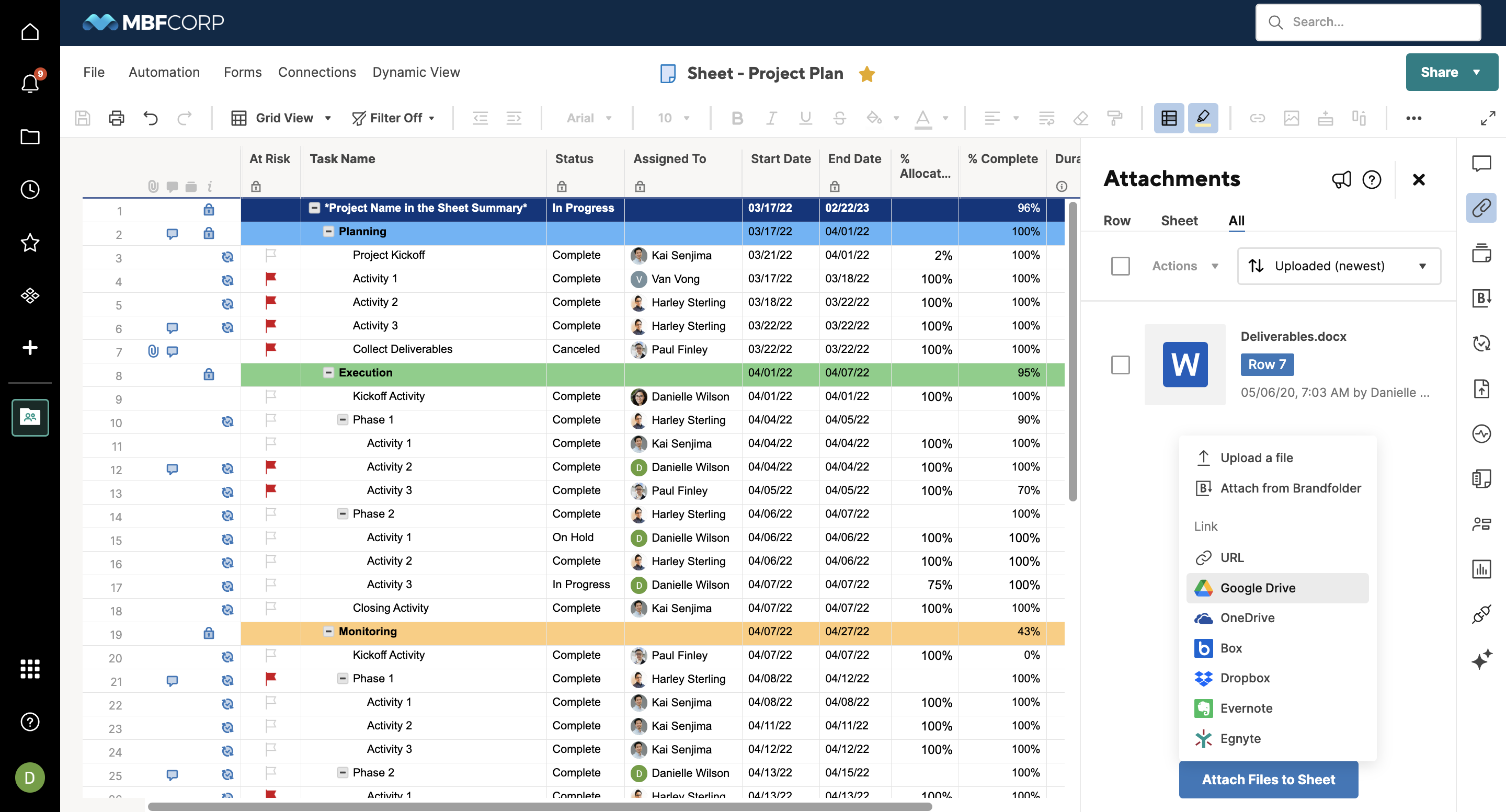
Image source: smartsheet.com
Key features
When comparing Microsoft Project vs Smartsheet, Smartsheet stands out for its flexibility and user-friendly interface, making it ideal for cross-functional teams. Its features focus on collaboration, real-time updates, and easy project tracking.
- Spreadsheet-like interface for quick data entry and tracking: Smartsheet mimics familiar spreadsheet layouts, allowing teams to enter and manage data quickly. This reduces the learning curve for Excel users. Teams can track tasks, deadlines, and progress without complex setup.
- Multiple views like Gantt, Calendar, Grid, Card: Users can switch between different project views to match their workflow needs. Gantt charts visualize timelines, Calendar shows scheduling, Grid offers a spreadsheet feel, and Card view supports Kanban-style management. This flexibility helps teams work efficiently.
- Automation builder for reminders, approvals, and updates: Smartsheet allows teams to set up automated workflows without coding. Notifications, approval requests, and status updates are sent automatically. This reduces manual follow-ups and keeps projects moving smoothly.
- Shared dashboards for real-time visibility across teams: Dashboards consolidate key project metrics, KPIs, and progress updates in one place. Teams and stakeholders can see project status at a glance. Real-time visibility improves decision-making and accountability.
- Content collaboration and attachment management: Files and documents can be attached directly to tasks, with comment threads for discussion. Teams can collaborate on shared resources without leaving the platform. This centralizes project information and reduces email clutter.
Strengths
When evaluating Microsoft Project vs Smartsheet, Smartsheet shines for its ease of use and adaptability, making it a strong choice for hybrid and cross-functional teams. These strengths help teams get up and running quickly while supporting flexible workflows.
- Easy onboarding and familiar layout for Excel users: Smartsheet's spreadsheet-style interface feels intuitive for users familiar with Excel. Teams can start managing projects immediately without extensive training. This familiarity reduces the learning curve and accelerates adoption.
- Great for hybrid teams and fast-moving projects: Smartsheet supports real-time updates, cloud-based access, and collaborative commenting. Remote and distributed teams can track progress and communicate efficiently. This makes it ideal for projects that require speed and agility.
- Scalable across functions like operations, HR, and marketing: The platform can be adapted to manage workflows across different departments. From HR onboarding to marketing campaigns, teams can customize sheets to fit their needs. This versatility allows organizations to scale Smartsheet usage across the company.
Limitations
When comparing Microsoft Project vs Smartsheet, it's important to understand the limitations that might affect workflow efficiency and scalability. These drawbacks may influence whether Smartsheet fits your team's specific project needs.
- Limited offline access: Smartsheet is primarily cloud-based, which means users need an internet connection to access and update projects. Offline functionality is minimal, limiting flexibility in low-connectivity environments. Teams working remotely without a consistent internet connection may face interruptions.
- Reporting is less advanced than Microsoft Project: While Smartsheet provides customizable dashboards, its reporting capabilities lack the depth and analytics of Microsoft Project. Enterprise teams needing detailed portfolio-level insights may find this limiting. Complex performance tracking often requires external tools.
- Automation lacks the sophistication of enterprise-grade workflows: Smartsheet's automation handles reminders, approvals, and basic triggers effectively, but it cannot match the complexity of Microsoft Project's rule-based enterprise workflows. Organizations with intricate processes may need additional tools to achieve the same level of automation.
Pricing: Smartsheet vs Microsoft Project comparison
When analyzing Microsoft Project vs Smartsheet, pricing often becomes a deciding factor for teams. Microsoft Project's structured plans cater to enterprise-level users with deeper budgets, while Smartsheet offers more flexibility for mid-sized businesses. Both tools follow a subscription model, but their value depends on your organization's scale, needs, and user base.
Source note: Microsoft and Smartsheet pricing may vary by region, billing term, or number of users. Always verify directly with the vendor for your location and licensing model.
Microsoft Project pricing
- Plan 3: $30/user/month (annual). It includes advanced project‑management capabilities like task history, lead/lag dependencies, resource requests, program/demand management, plus both Project Online and the Project Online desktop client.
- Plan 5: $55/user/month (annual). It builds on Plan 3 by adding portfolio management, enterprise‑wide resource management, and optimization tools for prioritizing initiatives and managing capacity.
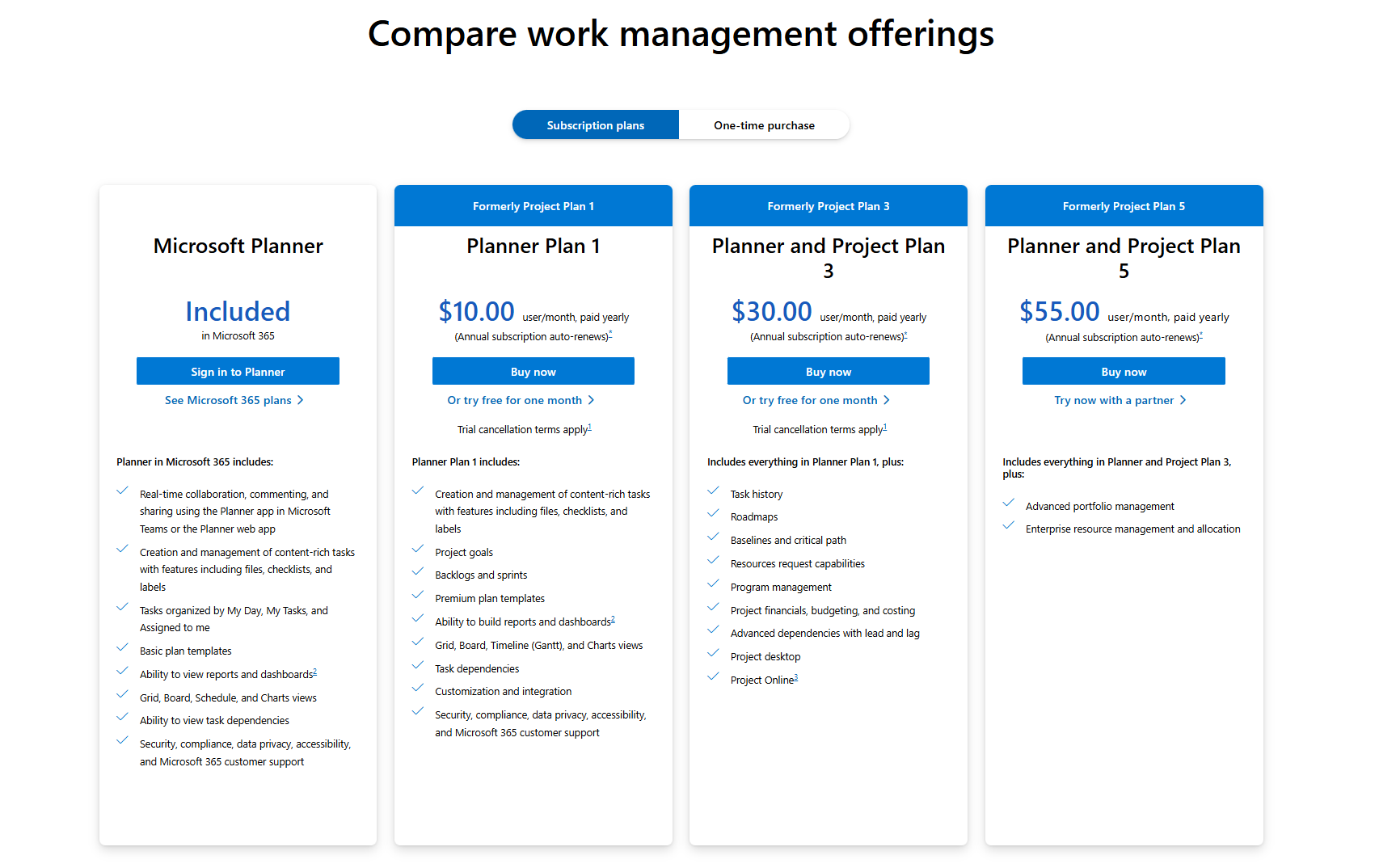
Image source: microsoft.com
Smartsheet pricing
- Pro: $9 per member/month. It is suitable for small teams, providing unlimited sheets, forms, reports, Gantt/calendar/board views, and basic automations.
- Business: $32 per member/month. It adds unlimited automations, timeline and workload tracking, admin controls, and 1 TB attachment storage.
- Enterprise: Custom pricing. It includes advanced security, SSO, portfolio-level features, and enterprise management capabilities.
- Advanced Work Management: Custom pricing. It adds premium tools like Control Center, Data Shuttle, DataMesh, Dynamic View, Calendar App, Jira/Salesforce connectors, and premium support.
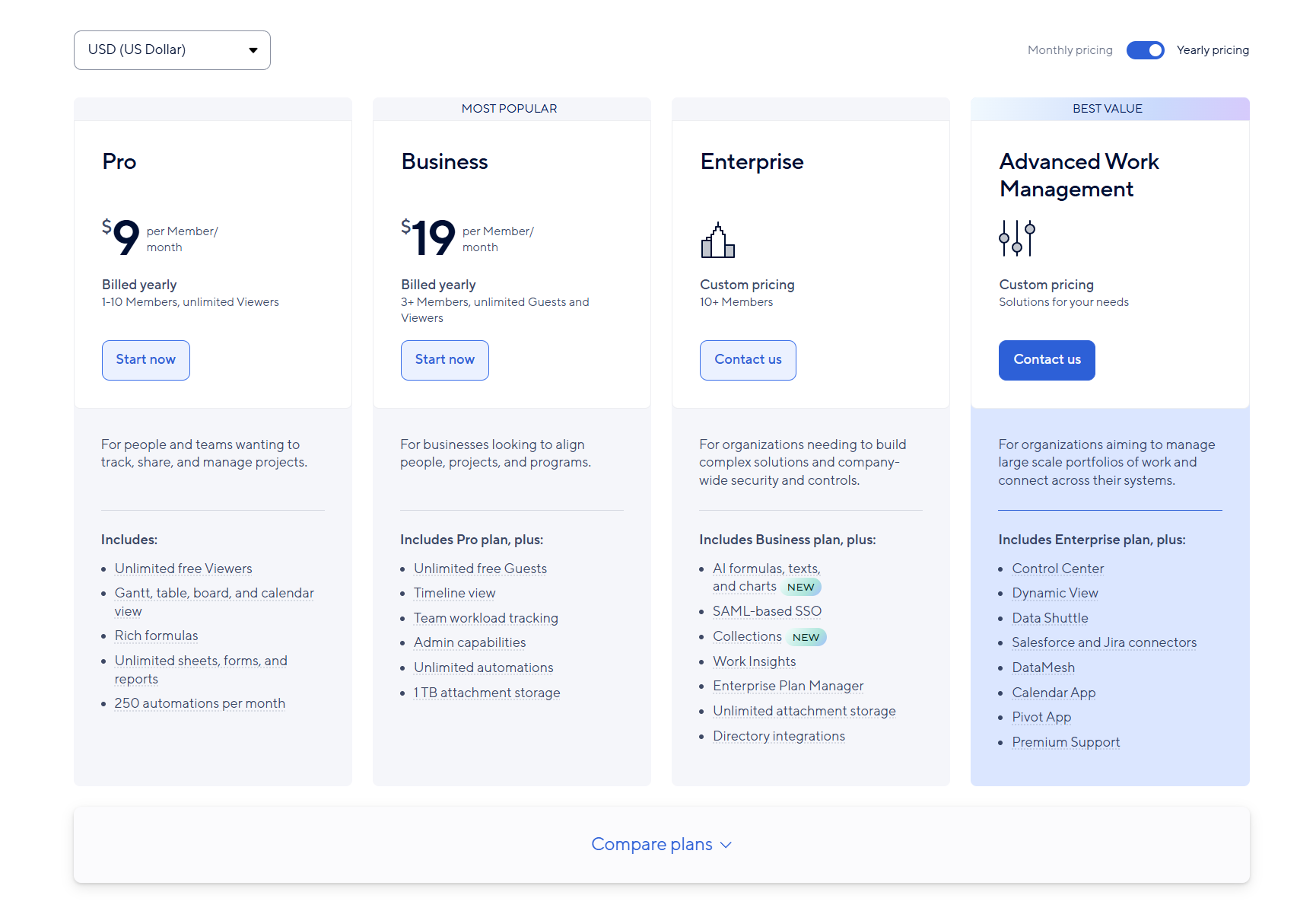
Image source: smartsheet.com
Use case comparison: Which tool suits your workflow?
While both Microsoft Project and Smartsheet have proven valuable in helping teams organize and execute work, they still come with limitations that modern businesses increasingly outgrow. Microsoft Project offers structure but often feels rigid and technical, while Smartsheet enhances flexibility yet still relies on multiple disconnected tools for communication, documentation, and collaboration. As teams shift toward faster, more collaborative workflows, the need for a connected platform, one that unites planning, execution, and communication in real time, becomes clear. This is where Lark stands out as a unified workspace built for the modern way of managing projects.
Lark: Unified alternative to Microsoft Project and Smartsheet
Lark delivers a modern approach to project management by merging structured planning with seamless collaboration. Where Microsoft Project focuses on scheduling precision and Smartsheet emphasizes flexibility, Lark combines both and adds real-time communication, document co-editing, and automation in one connected workspace. The result is a tool that supports the entire project lifecycle, from planning and execution to reporting and communication, without switching between multiple platforms.
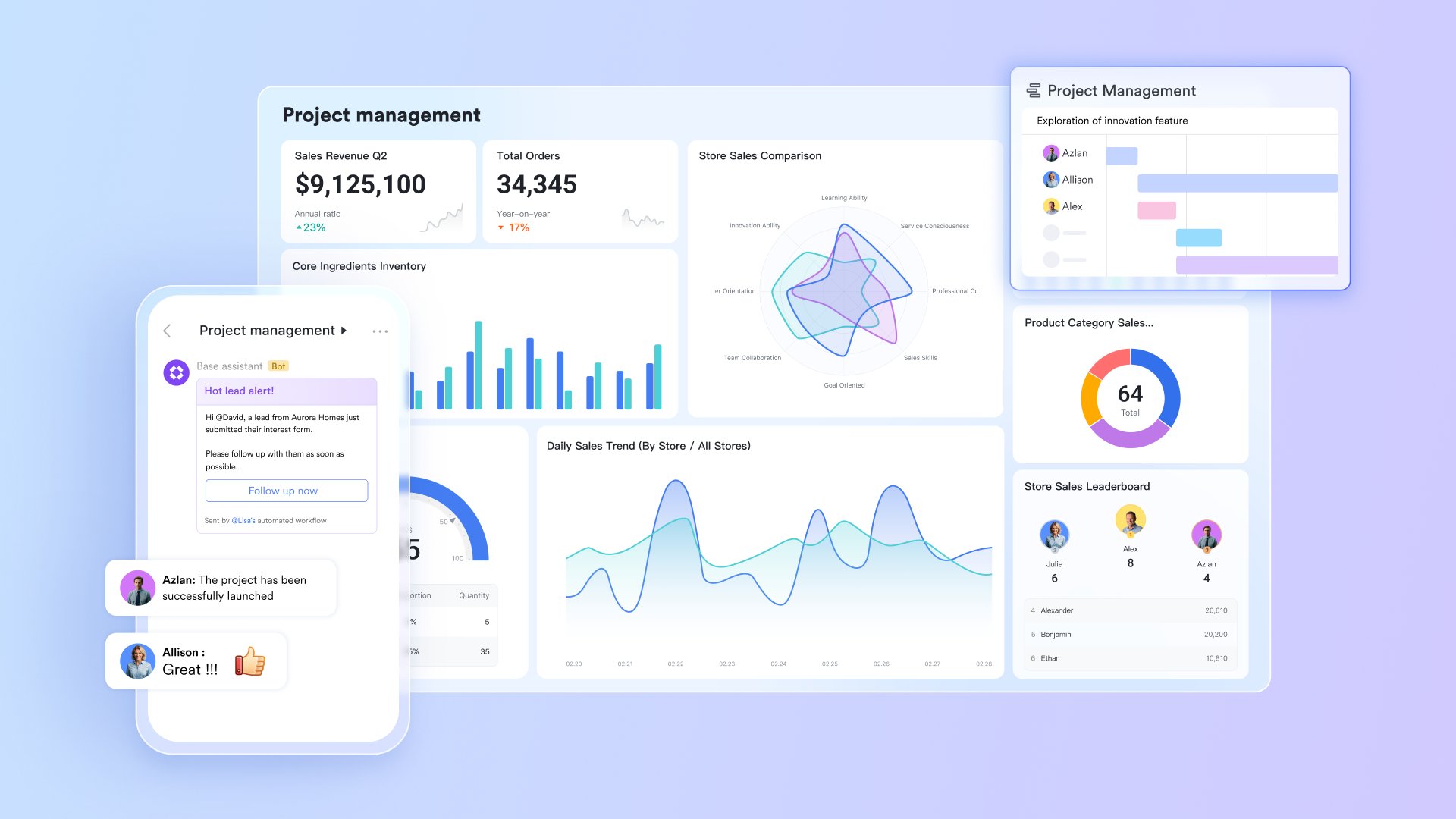
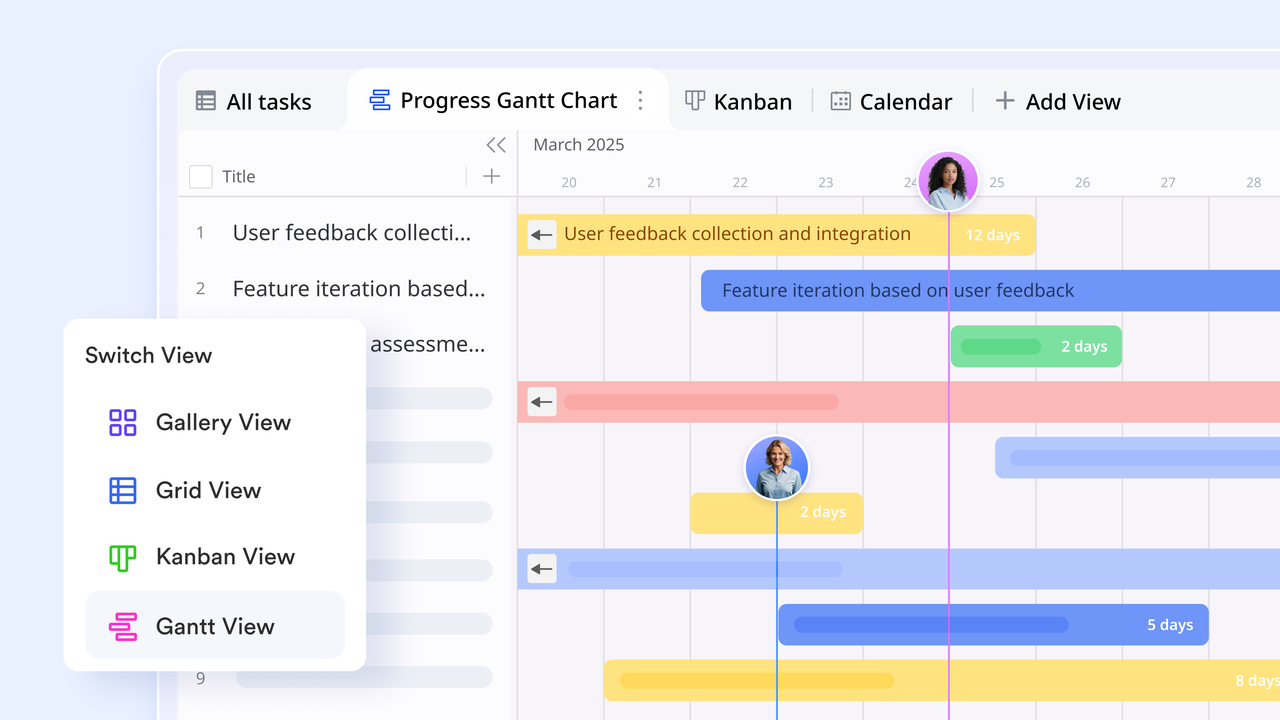
Lark Base: Centralized project tracking and reporting
Lark Base replaces the complexity of Microsoft Project's Gantt charts and Smartsheet's spreadsheet grids with a dynamic, visual workspace. Teams can design custom tables and fields to manage everything, tasks, milestones, budgets, or resource allocations, in a structured yet adaptable way.
Multiple view modes, such as Kanban, Gantt, Calendar, and Grid, give flexibility for both agile and traditional project styles. Unlike Microsoft Project, which requires technical setup for dependencies and reporting, Base allows users to drag, drop, and link items intuitively. Data syncs automatically across tables, providing real-time visibility into progress and performance. Built-in dashboards with charts and KPIs offer instant insights, removing the need for Power BI or complex data exports.
Simply put, Lark Base gives teams enterprise-grade structure, without the steep learning curve or disconnected reporting tools.
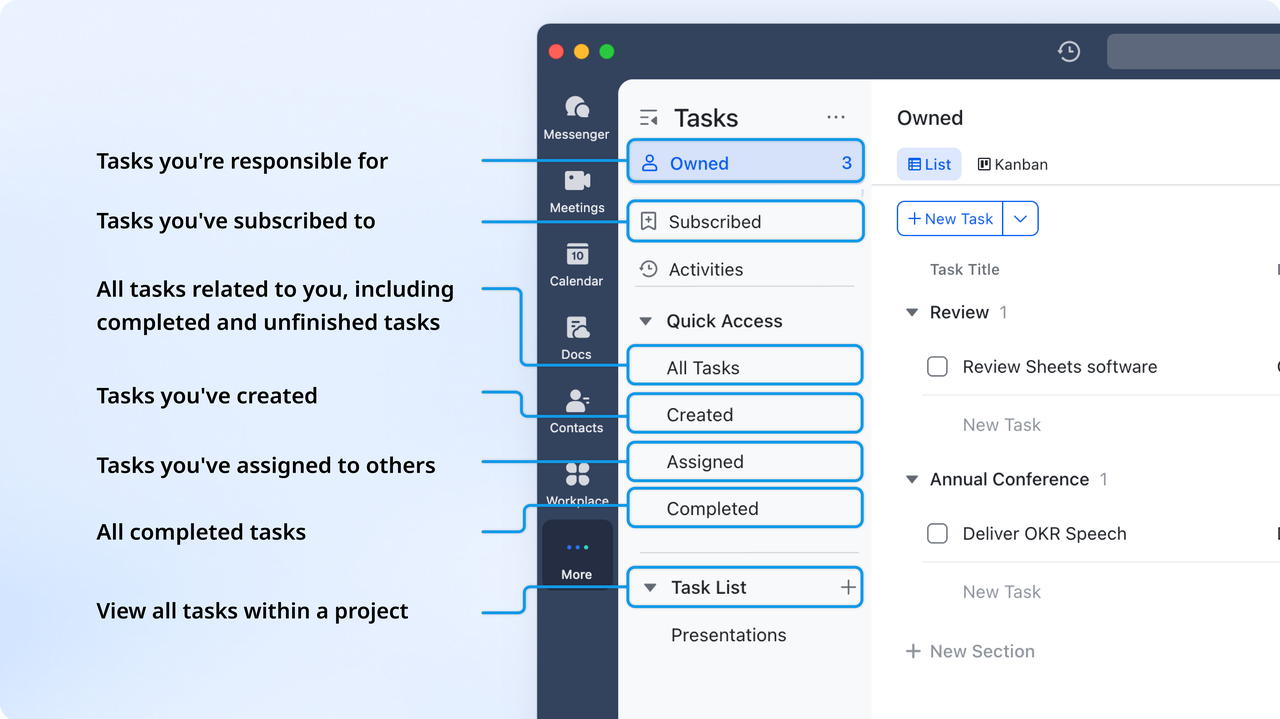
Lark Tasks: Assign, organize, and track progress effortlessly
While Microsoft Project manages tasks through hierarchical dependencies and Smartsheet uses cell-based assignments, Lark Tasks keeps things practical and human-centered. Tasks can be created directly from chat messages, Docs, or Base tables, ensuring no follow-up is ever lost in conversation threads.
Each task includes owners, deadlines, subtasks, and priorities, with progress tracked visually through list or board views. Teams can view all deliverables in one place and receive real-time notifications for updates or overdue items.
This approach replaces the manual follow-ups required in Smartsheet and the heavy configuration often needed in Microsoft Project. Lark Tasks makes accountability visible and actionable, no plugins, no manual updates, no context switching.
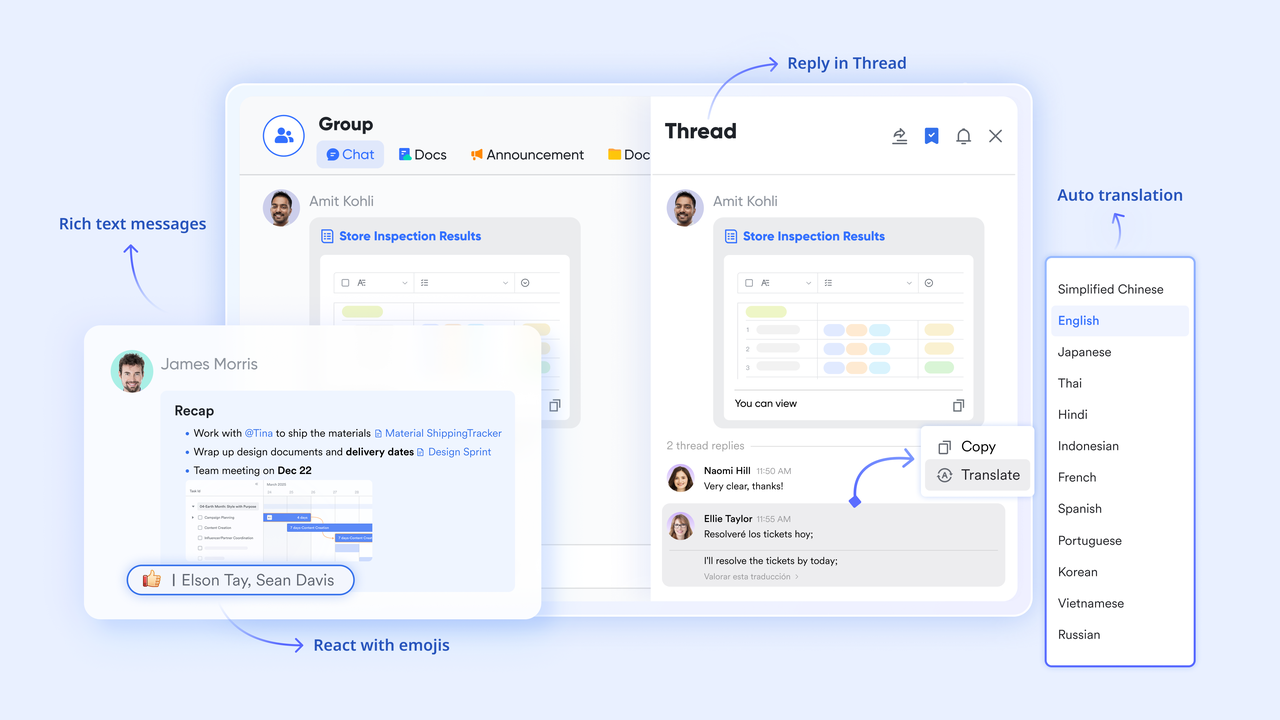
Lark Messenger: Communication where work happens
One of the biggest gaps in both Microsoft Project and Smartsheet is real-time collaboration, something Lark solves natively. Lark Messenger connects every conversation directly to the work being done.
Teams can discuss project updates, share attachments, or tag Base records right within chat threads. A simple message like “Update the client deliverable” can turn into a task or calendar event instantly. Group chats for projects or departments replace the endless email threads often required in Microsoft Project's environment.
Messenger also supports voice and video calls, file sharing, and smart search, so teams spend less time finding context and more time executing. This integration ensures that communication drives action, not just discussion.
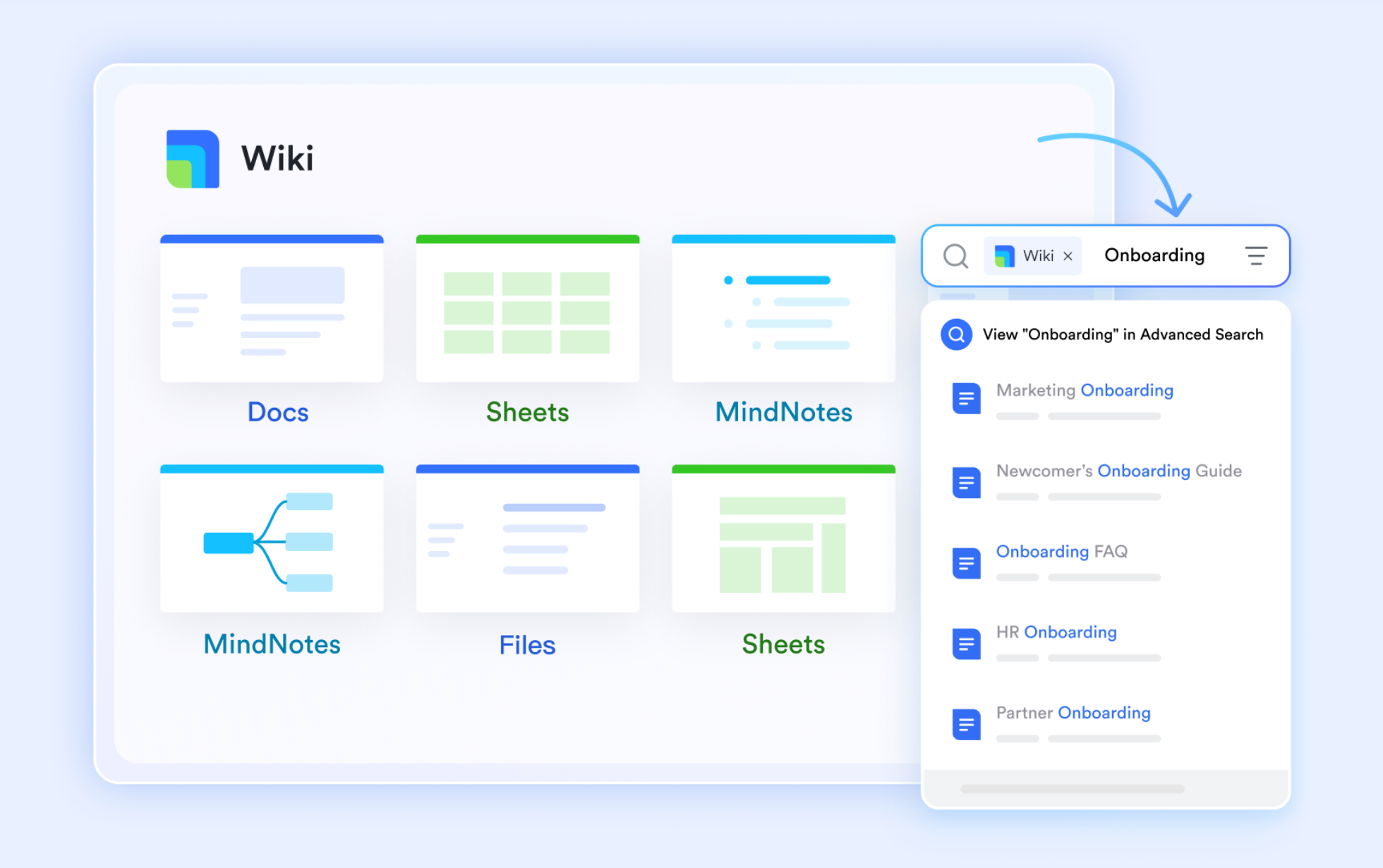
Lark Docs & Wiki: Shared knowledge and real-time documentation
Microsoft Project users often rely on separate tools like Word, SharePoint, or Confluence for documentation. Smartsheet offers limited note-taking or version control. Lark changes that by embedding full collaboration into Lark Docs and Lark Wiki.
Teams can co-edit documents, comment inline, and embed live data from Base or Sheets, turning static plans into interactive, real-time project dashboards. For example, a product roadmap in Docs can include live Gantt data from Base, ensuring every stakeholder sees the latest updates without switching platforms.
Lark Wiki then serves as a knowledge hub, storing key processes, post-project reports, and templates accessible to everyone. This unified documentation flow removes the disjointed file management issues common in Microsoft Project and Smartsheet setups.
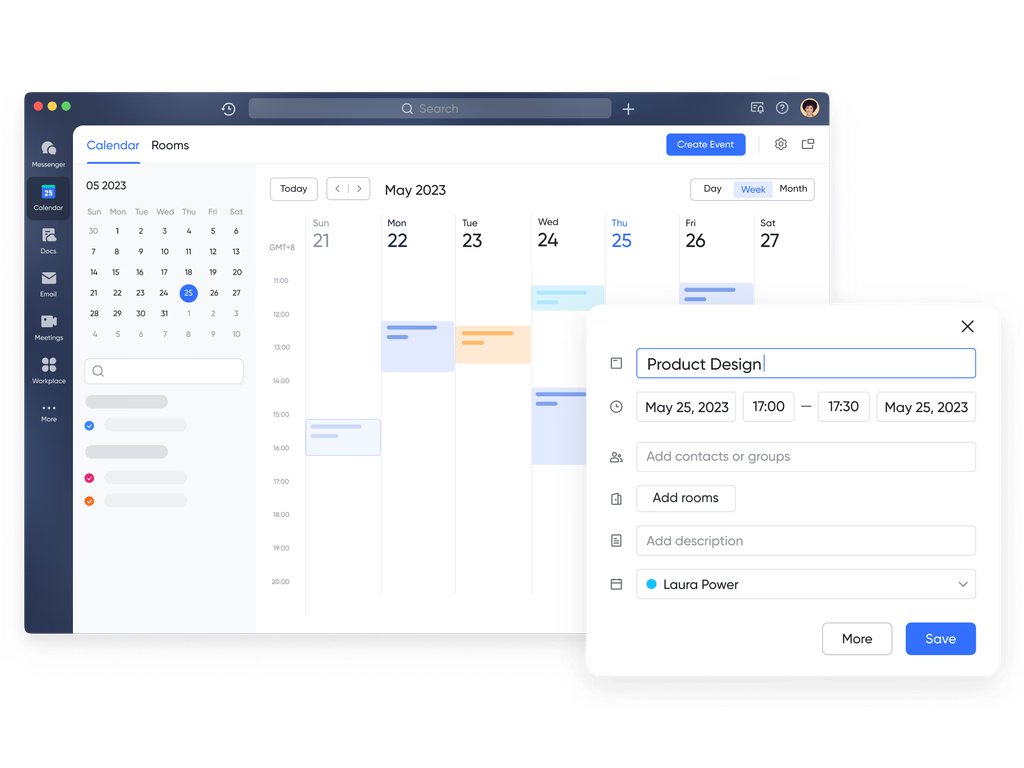
Lark Calendar: Simplified scheduling and milestone alignment
Both Microsoft Project and Smartsheet include timeline tools, but neither provides the everyday simplicity of the Lark Calendar. It unifies all meetings, tasks, and milestones into a single view, directly connected to chat and email.
You can schedule events from within a message, attach Docs or Base entries to the invite, and track availability across teams automatically.
Unlike Microsoft Project's standalone scheduling or Smartsheet's event rows, Lark Calendar keeps every plan connected to its context, making it easier to track commitments, sync teams, and prevent overlaps in project timelines.
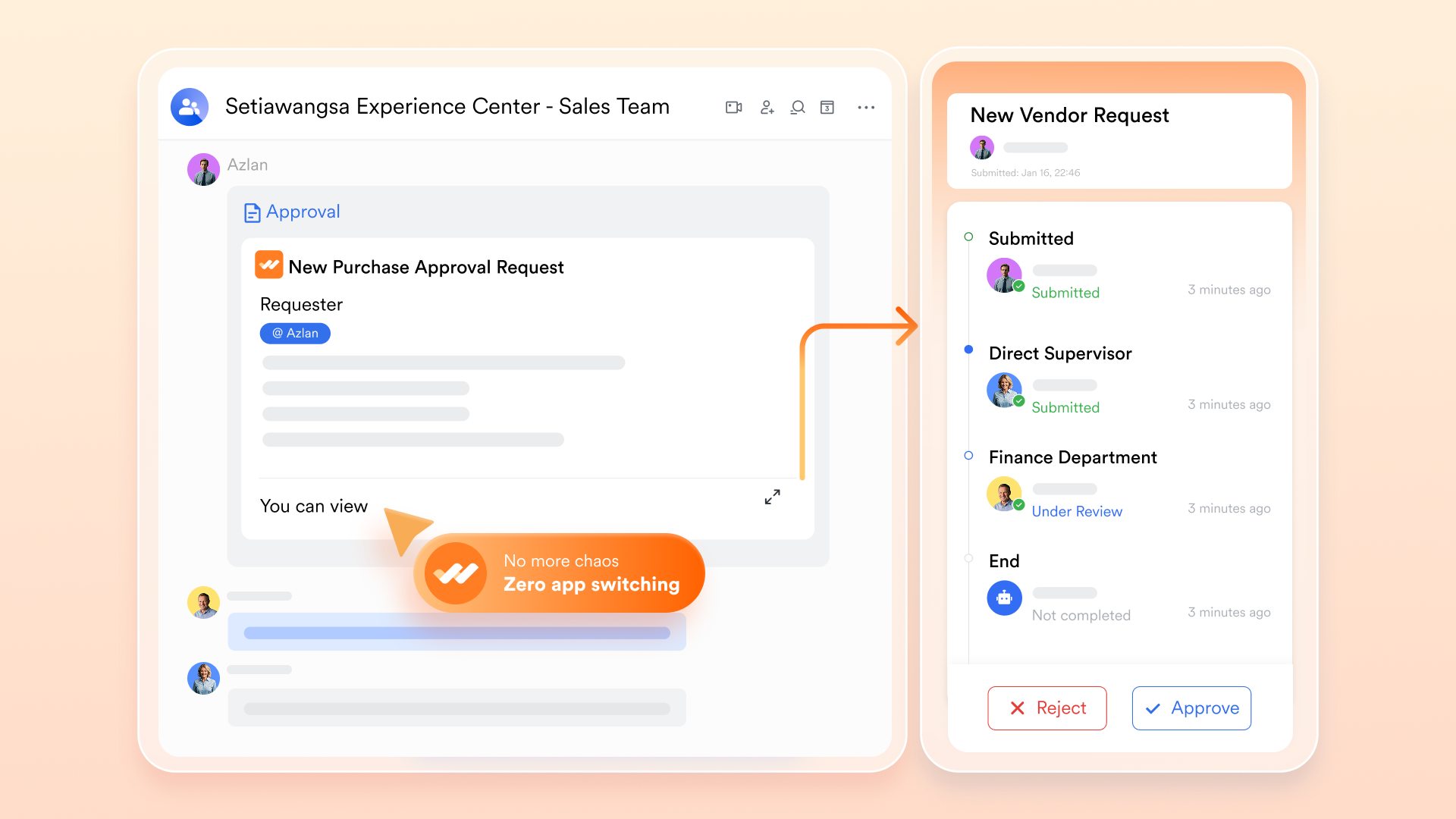
Lark Approval: Smarter workflows without coding
While Microsoft Project offers automation through complex rule sets and Smartsheet provides basic triggers, Lark makes it intuitive and visual. The Lark Approval feature enables structured decision-making: expense claims, project sign-offs, and content reviews can all move through customizable paths with real-time visibility.
For example, when a new project budget is added to Approval, it can automatically send an automated approval request to the finance lead in Messenger and update status fields once approved.
This built-in automation saves hours of manual coordination, reduces delays, and ensures every project moves forward consistently, without relying on external connectors or add-ons.
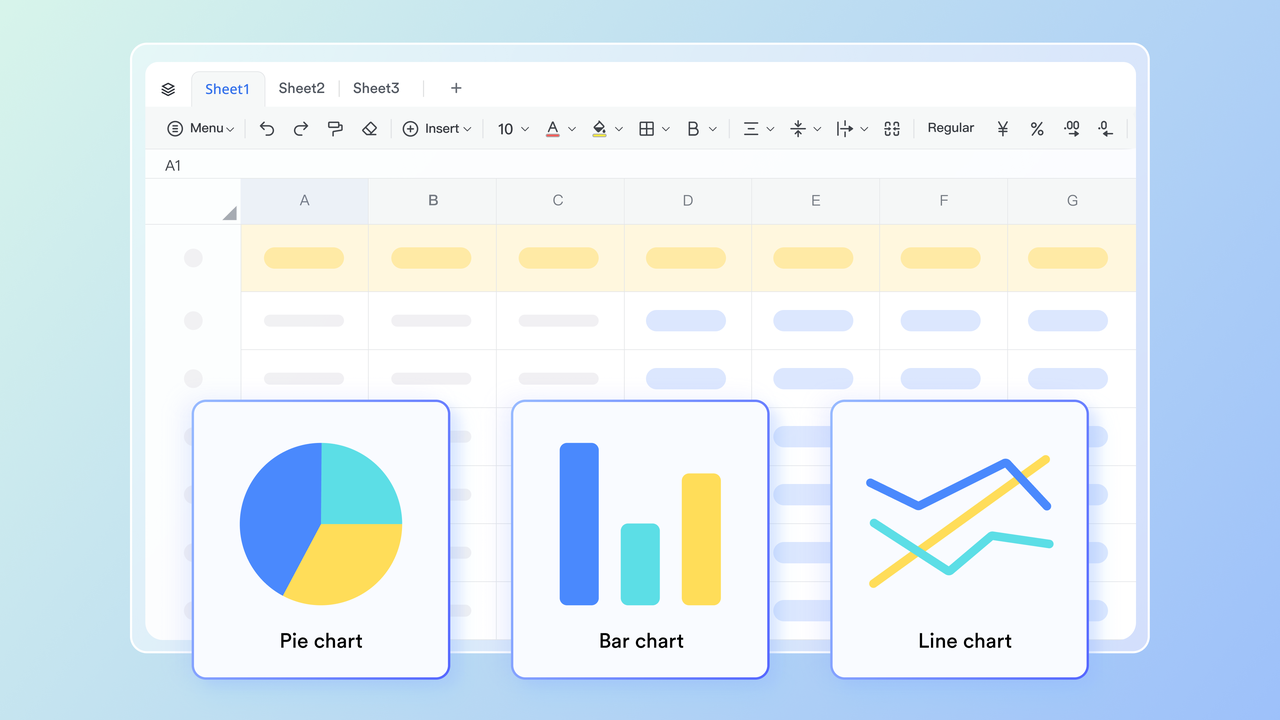
Lark Sheets: Flexible, collaborative data management
For teams accustomed to Smartsheet's spreadsheet interface, Lark Sheets offers familiar functionality, but with far more depth. Users can collaborate in real time, comment directly on cells, and link Sheets to Docs, Base, or Tasks.
Sheets are ideal for budget tracking, task logs, or resource planning, and can pull data from multiple sources across Lark's ecosystem. Where Smartsheet's automation stops at reminders, Sheets connects to workflow triggers, making it not just a spreadsheet, but a live operational tool that adapts with your project.
- Starter plan: Free forever plan that includes 11 powerful tools for up to 20 users. It also comes with 100GB of storage, 1000 automation runs, AI translations, and more.
- Basic plan: $6/user/month (billed annually) for up to 500 users. It includes everything in Starter plus group calling for up to 500 attendees, 5TB of storage, 1000 automation runs, and more. For more details, contact sales about this plan.
- Pro plan: $12/user/month (billed annually) for up to 500 users. It includes everything in Starter plus group calling for up to 500 attendees, 15TB of storage, 50,000 automation runs, and more.
- Enterprise plan: Contact sales for custom pricing. Supports unlimited users and includes even more automation runs and advanced security, compliance, and management features.
Microsoft Project vs Smartsheet vs Lark: Quick comparison snapshot
When choosing a project management platform, the best option depends on your team's size, workflow, and collaboration needs. Microsoft Project offers enterprise-grade control, while Smartsheet provides flexibility and a familiar spreadsheet experience. Lark, however, unifies planning, communication, and automation, eliminating tool-switching and enabling teams to move faster within one connected workspace.
Both Microsoft Project and Smartsheet serve distinct audiences. The project brings precision and control for enterprise planning, while Smartsheet offers flexibility and accessibility for cross-functional teams. Yet, neither delivers the fully connected experience that today's hybrid and fast-moving organizations demand.
Lark bridges this gap by combining project structure, real-time collaboration, and intelligent automation in a single workspace. Teams can plan projects in Base, discuss updates in Messenger, co-edit documents in Docs, and track performance through live dashboards, all without switching between apps or paying for multiple subscriptions.
Where Microsoft Project feels rigid and Smartsheet depends on external tools, Lark keeps everything unified, making project management simpler, faster, and more transparent. For teams that value agility and connected workflows, Lark isn't just an alternative; it's the evolution of modern project management.
Conclusion
Both Microsoft Project and Smartsheet are powerful project management tools with distinct strengths. Microsoft Project excels in structured, enterprise-grade planning with advanced analytics, while Smartsheet shines in flexibility, collaboration, and ease of use. However, as modern teams balance hybrid work, communication, and execution, switching between multiple tools can slow progress. That's where Lark stands out, unifying project planning, task management, real-time communication, and reporting in one seamless workspace. With Lark, teams can move from planning to execution without friction, boosting collaboration, visibility, and overall productivity.
FAQs
Is Smartsheet better than Microsoft Project for small businesses?
Yes, Smartsheet is often better suited for small businesses due to its user-friendly interface, affordability, and collaborative features. Unlike Microsoft Project's enterprise-focused setup, Smartsheet allows teams to manage tasks, track progress, and automate updates easily without technical complexity. Its spreadsheet-style layout makes onboarding quick and efficient for growing teams.
Does Microsoft Project support agile workflows like Smartsheet?
Microsoft Project primarily supports traditional Waterfall methodologies but has limited agile capabilities through add-ons and templates. Smartsheet, however, provides more flexibility for agile workflows with Kanban views, task cards, and automated updates. For teams practicing Scrum or hybrid project management, Smartsheet offers an easier way to adapt agile principles without heavy configuration.
Which is more affordable, Smartsheet or Microsoft Project?
Smartsheet is generally more affordable than Microsoft Project, especially for small to mid-sized teams. Microsoft Project's full suite often requires multiple licenses, including Microsoft 365, increasing overall cost. Smartsheet's pricing tiers, Pro, Business, and Enterprise, provide flexible options with collaborative features at a lower entry point, making it more budget-friendly for growing organizations.
What's the key takeaway from the Microsoft Project vs Smartsheet review?
Microsoft Project excels at structured, enterprise-level planning, while Smartsheet wins on flexibility and ease of collaboration. The right choice depends on your workflow and team size. However, modern teams increasingly need unified tools that blend planning, communication, and execution, an area where Lark delivers a smarter, all-in-one project management experience.
Why is Lark considered the best alternative?
Lark is considered the best alternative because it combines project planning, task tracking, real-time chat, meetings, and reporting in one unified platform. Unlike Microsoft Project or Smartsheet, Lark eliminates tool-switching by connecting data, discussions, and decisions seamlessly. Teams can plan, execute, and collaborate effortlessly, boosting productivity and reducing operational friction across every project.
Related reading
Table of contents
Start using Lark today

Manage all your work in one place
Boost team efficiency by 10x
Save up to 70% on software costs
Table of contents
Start using Lark today
Manage all your work in one place
Boost team efficiency by 10x
Save up to 70% on software costs
Keep reading



Lark recognized in 2023 Gartner® Collaborative Content Workspaces and Meeting Solutions reports
Lark, the global superapp for productivity, is delighted to announce it receives recognition in the Gartner's 2023 Innovation Insight for Collaborative Content Workspaces and Market Guide for Meeting Solutions.






2026 Lark Technologies Pte. Ltd.
Headquartered in Singapore with offices worldwide.






Explore: