














Mind Maps for Project Management: Guide, Templates & Examples

Ryan Tanner
Product Marketing Specialist
Sep 18, 2026
Ryan Tanner
Sep 18, 2026

17 min read


Mind maps for project management bring structure, clarity, and creativity into brainstroming by transforming scattered ideas into organized visual frameworks. They help teams see connections, simplify complex information, and outline project goals with better focus and alignment. Whether planning a new initiative, organizing requirements, or breaking down workloads, mind maps give projects a clear starting point and a flexible blueprint. They promote smoother collaboration, faster decision-making, and stronger understanding across teams. In today's fast-paced work environment, mind maps offer an intuitive way to turn brainstorming into actionable and well-defined project plans.

What are mind maps in project management?
Mind maps in project management act as visual thinking tools that help teams structure ideas, simplify planning, and understand project components more clearly. They turn complex concepts into clean, branching diagrams that are easy to explore and refine. By placing the central project theme at the core and expanding it into organized branches, mind maps support clearer communication, stronger alignment, and faster decision-making. They provide a flexible way to outline goals, tasks, resources, risks, and workflows during any stage of a project. A well-structured project management mind map helps teams organize goals, tasks, and resources in a visual format that simplifies planning and communication.
Key uses of mind maps across the project lifecycle
Mind maps support every stage of the project lifecycle by giving teams a visual structure to organize ideas, outline workflows, and connect decisions with outcomes. They help project managers simplify complexity, identify priorities, and keep everyone aligned from initiation to review. As projects evolve, mind maps allow teams to expand details naturally without losing the bigger picture. This makes them valuable across planning, execution, communication, and improvement stages. Their flexibility enables fast-paced decision-making and stronger collaboration across cross-functional teams.
Clarifying project purpose during initiation
Mind maps help teams capture the project's purpose, goals, constraints, and early considerations in one visual space. They make it easier to explore stakeholder expectations, highlight potential risks, and identify what success looks like before deeper planning begins. By structuring brainstorming into clear branches, mind maps ensure nothing important is overlooked. This strengthens early clarity, supports better conversations with stakeholders, and prepares teams for more detailed planning with a solid, shared foundation.
Structuring scope, deliverables, and timelines in planning
During planning, mind maps make it simple to break down project scope, tasks, deliverables, and timelines into organized segments. Teams can expand each branch to reveal more detail, allowing everyone to clearly understand responsibilities and upcoming work. This promotes smoother scheduling and reduces confusion later. Visualizing the entire project structure also helps managers spot dependencies, prioritize work, and set more realistic timelines. As plans evolve, mind maps remain flexible and easy to update.
Mapping team roles and resources for stronger collaboration
Mind maps help clarify roles, responsibilities, and ownership within the project. They visually map how team members are connected, where skills align, and where gaps may exist. This also supports better workload distribution and helps identify interdependencies between teams or individuals. When teams understand how responsibilities connect, collaboration strengthens and accountability improves. Mind maps provide a clear overview of resource planning and help ensure each person's role contributes effectively to the overall project.
Visualizing risks and building mitigation strategies
Mind maps help project managers identify risks, categorize them, and understand their possible impact. By visualizing risk probability and potential responses, teams can better prepare mitigation strategies. This process of risk analysis supports proactive planning instead of reactive problem-solving. Mind maps make it easier to trace how risks relate to specific tasks, stakeholders, or external factors. This leads to stronger preparedness and helps teams communicate risk management decisions with greater confidence.
Organizing requirements into structured and expandable branches
Mind maps are powerful for organizing requirements because they reveal structure without forcing teams into rigid formats. They allow teams to map features, user stories, customer needs, and acceptance criteria in clean, expandable branches. This reduces misunderstandings and ensures every requirement has context. Visualizing connections also helps identify gaps or overlapping requests. As discussions progress, teams can adjust or refine branches quickly, supporting more accurate and comprehensive requirement definition.
Running structured project reviews and retrospectives
Mind maps help teams reflect on what worked, what did not, and what needs improvement. They make it easy to capture insights from different team members and organize them into meaningful themes. The visual layout supports clear thinking and avoids scattered notes. Teams can track patterns across reviews, highlight recurring challenges, and record ideas for future improvement. This leads to stronger continuous improvement and more effective project practices over time.
Essential elements of a project management mind map
A strong project management mind map is built on clear structure, intuitive organization, and the ability to expand details without losing the project's overall direction. These elements help teams simplify complex information, maintain consistency, and collaborate more effectively. By using visual cues, grouped branches, and layered details, mind maps provide both high-level clarity and deep insight. They allow project managers to communicate scope, responsibilities, risks, and dependencies in a format that remains flexible as the project evolves.
- Central project theme: The central theme serves as the anchor of the entire mind map, making it easy for teams to understand the project's core purpose. By placing the project name or main objective at the center, all related branches flow outward in a logical and organized way. This supports clearer thinking, keeps planning focused, and helps teams quickly identify the most important elements. A solid central theme ensures the map remains structured as details grow.
- Branches for objectives, tasks, resources, risks, KPIs: Branches create the main structure of a mind map, dividing the project into essential categories such as goals, deliverables, resources, risk areas, and performance indicators. These branches give teams a clear overview while still allowing deeper detail through sub-branches. This layered approach helps highlight priorities, clarify responsibilities, and maintain balance across project areas. It also makes it easier to identify dependencies and track how each branch contributes to successful project delivery.
- Color coding for clarity: Color coding helps teams distinguish between topics, importance levels, or responsibility areas at a glance. It brings visual structure to dense information, making the mind map easier to scan and understand. Colors can represent urgency, stage of work, or thematic groups, helping reduce confusion. This improves clarity during discussions and helps stakeholders interpret relationships quickly. Color coding also enhances memory retention and supports faster decision-making during planning or review sessions.
- Icons, tags, or labels for quick categorization: Icons and tags help teams add context without overwhelming the map with text. They highlight information such as priority level, task type, risk category, or team ownership. This visual shorthand improves navigation and increases clarity during presentations or team meetings, helping to seamlessly make images bigger for better visual impact. Icons also support consistent interpretation across different team members. By using them strategically, project managers can make mind maps more intuitive, organized, and aligned with project workflows.
- Links or notes for detailed information: Mind maps often require deeper context beyond what can be shown visually. Adding links or notes allows teams to connect documents, requirements, files, or explanations directly to relevant branches. This keeps the map uncluttered while still providing access to important details. It supports smoother transitions between planning and execution because team members can open supporting resources instantly. This approach increases transparency, reduces confusion, and ensures everyone has access to the information they need.
- Modular branches to expand or collapse details: Modular branches let teams manage complexity at their own pace, expanding details when needed and collapsing them to maintain a high-level view. This flexibility is essential for fast-paced projects that evolve over time. Modular design helps teams stay organized even when information grows significantly. It prevents overwhelm and keeps the mind map clean. This structure also supports better stakeholder communication by showing only the necessary level of detail in any situation.
Use Lark to map out the routes projects should follow
Lark brings mind mapping directly into the project workspace, allowing teams to brainstorm, structure ideas, and plan visually without jumping between disconnected tools. By placing mind maps alongside tasks, documents, messaging, and project data, Lark creates a seamless environment where ideas move smoothly into execution. With visual planning built into everyday workflows, Lark helps teams with project management, offering greater clarity and speed.
Visualize your mind map within the document
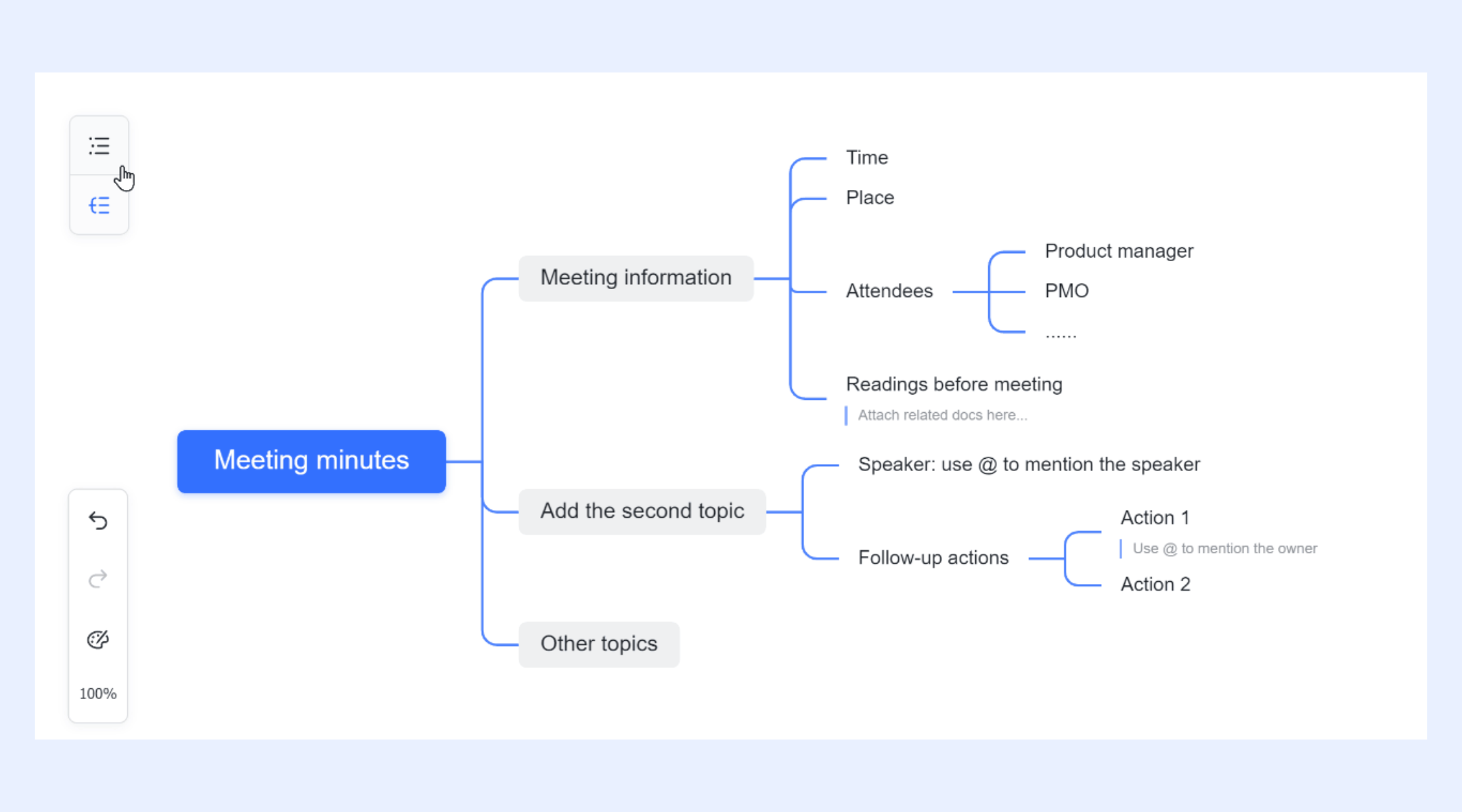
MindNotes in Lark Docs gives teams a visual canvas for brainstorming, structuring ideas, and mapping complex project components. You can easily switch between outline and mind map views to visualize your ideas and spark creativity. In mind map view, you can add, edit, and move nodes to organize information, insert images to enrich your map, and zoom or adjust the canvas for better visibility. Nodes can be formatted with bold, italic, underline, or highlight, and you can mark them as completed while adding detailed descriptions for clarity.
Make brainstorming worthy and easy
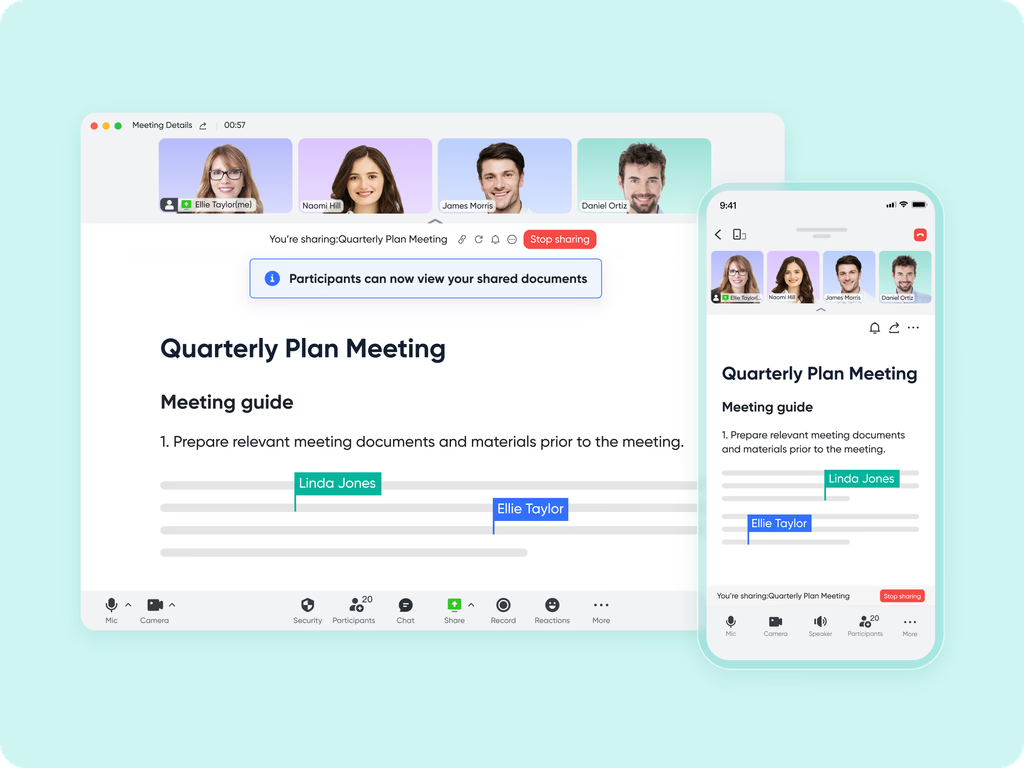
Lark Meetings, combined with the Magic Share feature, makes refining and revising mind maps highly collaborative. Participants can interact with shared mind maps in real time, follow along, or explore at their own pace. They can leave comments on the overall map or on specific nodes, providing focused feedback. Additionally, screen-sharing and whiteboard tools allow teams to brainstorm, doodle, and refine ideas in real time, ensuring the mind map evolves effectively during discussions.
Turn conception and routes into practical actions
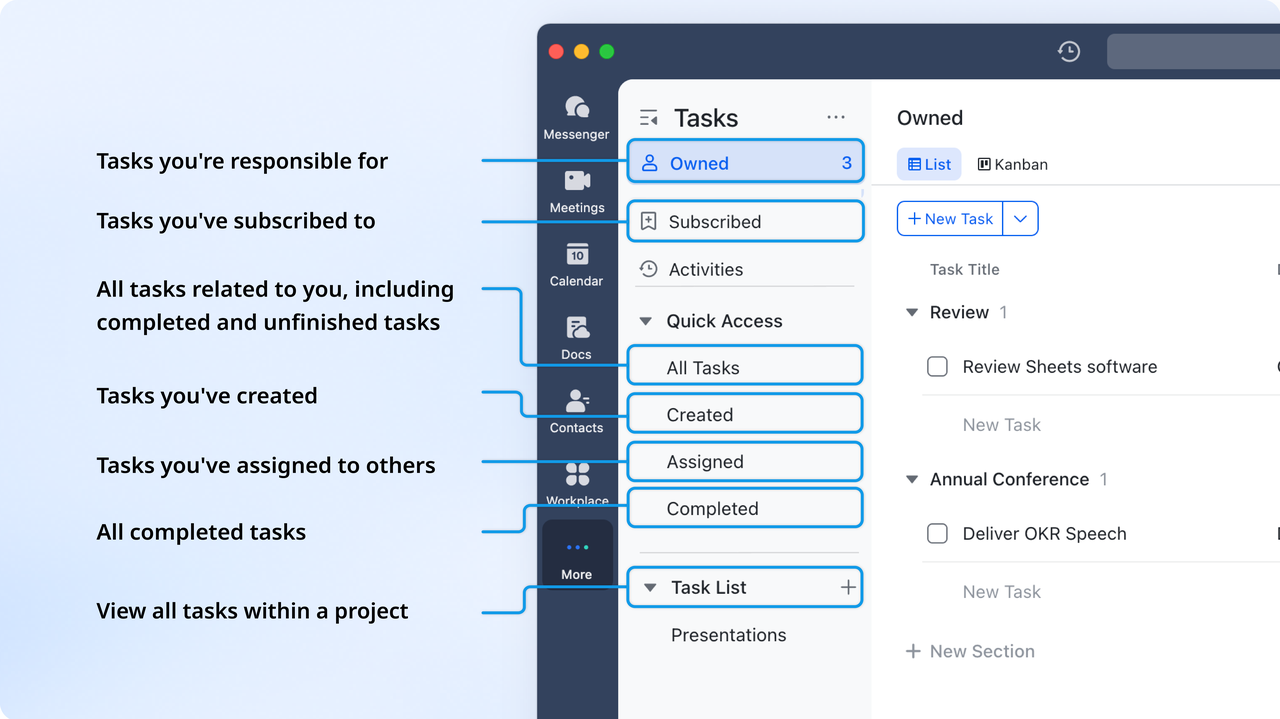
Lark Tasks helps turn mind maps into actionable plans by seamlessly converting ideas into structured tasks. Users can break down concepts from a mind map into individual tasks directly within Lark Docs, assign them to team members with deadlines and detailed descriptions, and track progress in Lark Tasks to ensure accountability. Additionally, tasks can be visualized with Gantt charts embedded in Docs, providing a clear overview of timelines and dependencies, making it easy to move from brainstorming to execution.
Streamline repetitive tasks in execution
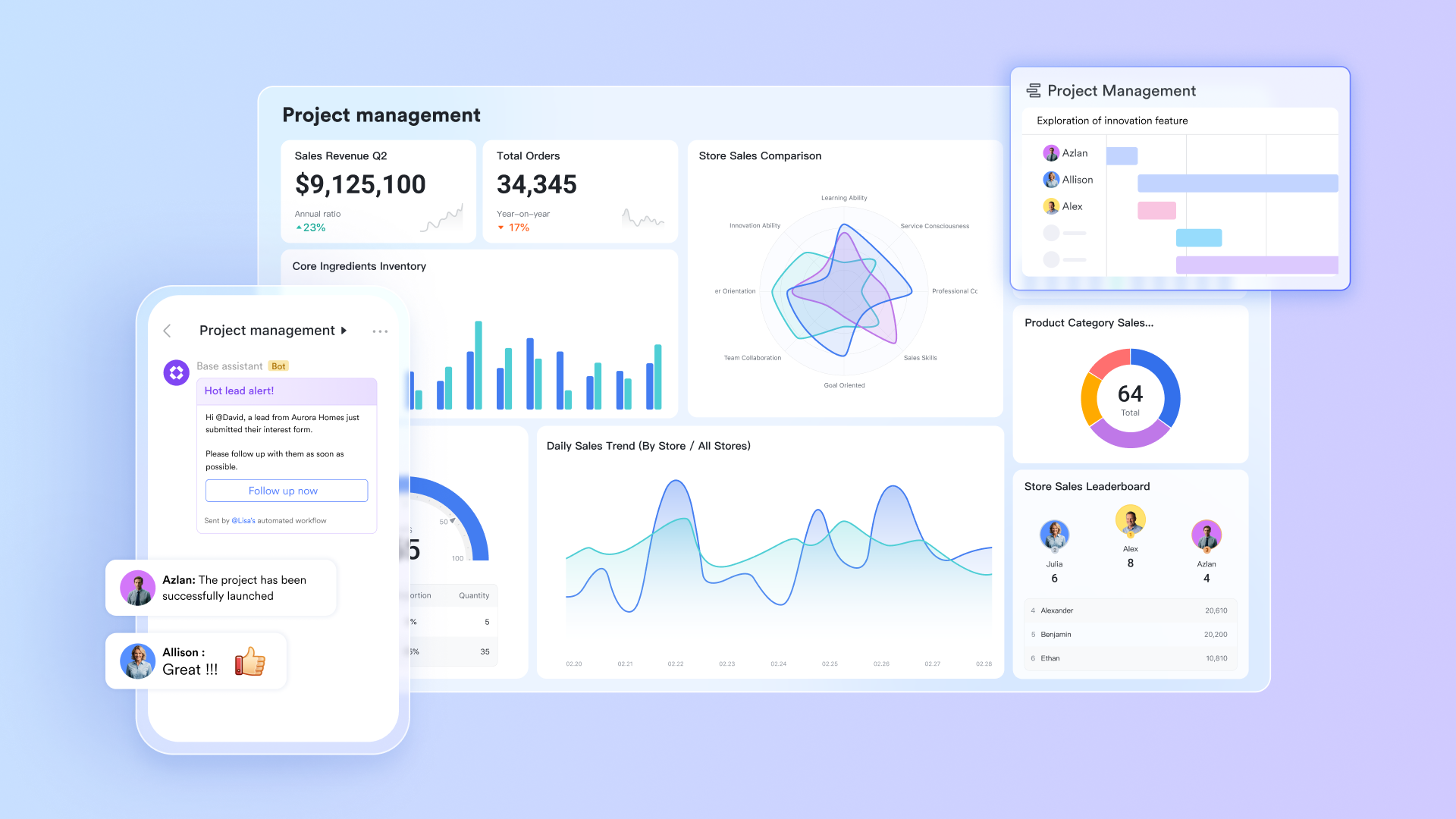
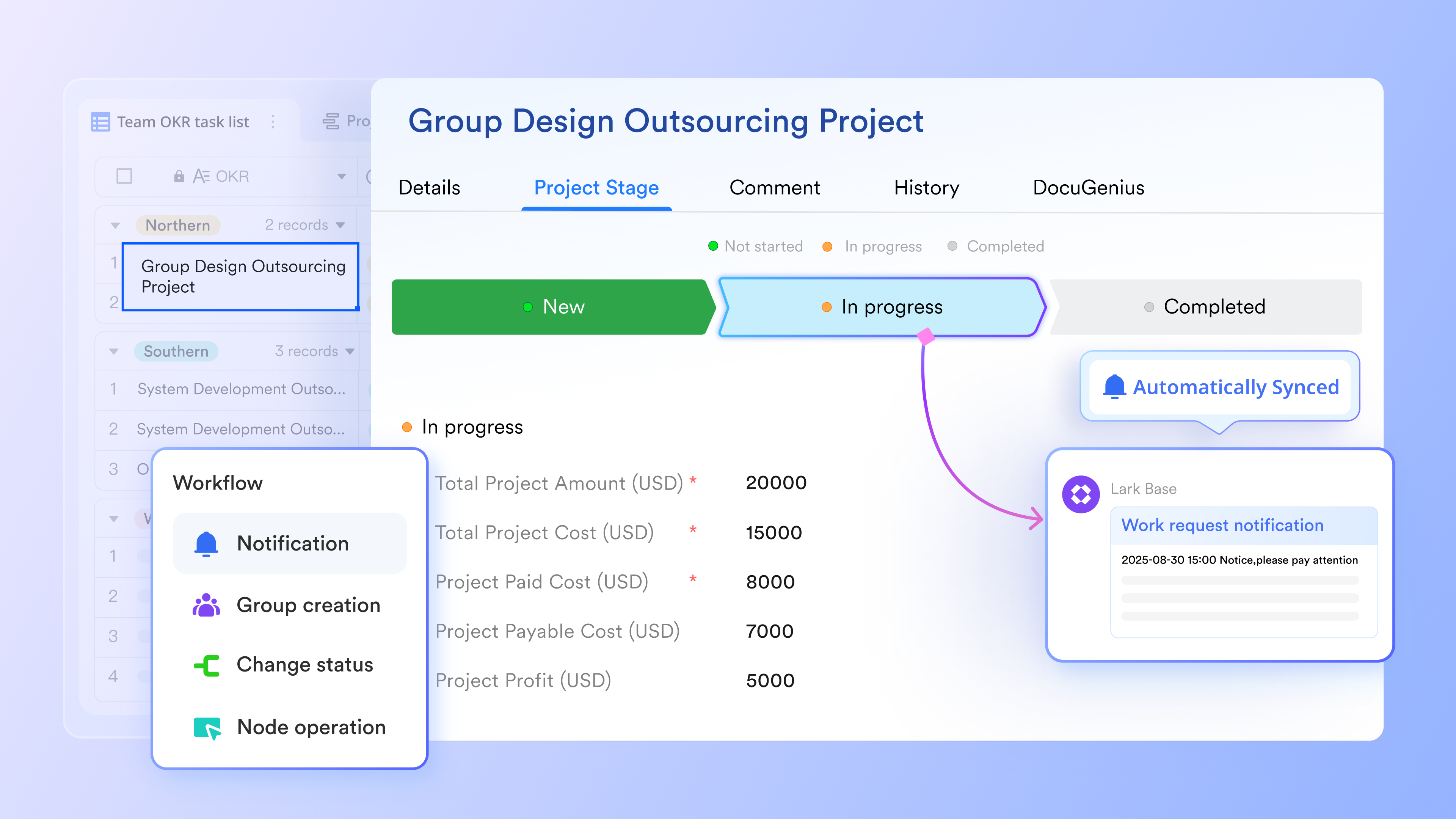
To practice mind mapping without misarranging resources, automations in Lark Base help streamline repetitive work that manual tasks waste avoidable time. They can automatically generate tasks, update records, or trigger notifications whenever ideas or nodes are added, reducing manual effort. Conditional logic and formulas ensure that workflows adapt dynamically, prioritizing and organizing work without constant oversight. This allows teams to focus on execution and decision-making, while routine steps from brainstorming to actionable tasks are handled automatically.
- Starter plan: Free forever plan that includes 11 powerful tools for up to 20 users. It also comes with 100GB of storage, 1000 automation runs, AI translations, and more.
- Pro plan: $12/user/month (billed annually) for up to 500 users. It includes everything in Starter plus group calling for up to 500 attendees, 15TB of storage, 50,000 automation runs, and more.
- Enterprise plan: Contact sales for custom pricing. Supports unlimited users and includes even more automation runs and advanced security, compliance, and management features.
Bonus: Lark's ready-to-use mind map templates
Work breakdown structure (WBS) mind map
A work breakdown structure (WBS) template visually breaks down the project into tasks and sub-tasks, making it easier to understand workload distribution. By expanding each branch into actionable units, teams gain a complete picture of what needs to be done and how components relate to each other. This supports better scheduling, clearer delegation, and more accurate forecasting. It also reduces confusion by organizing large workloads into manageable segments that can be reviewed at any stage of the project.
Requirements mind map template
The requirements template helps product and project teams outline features, user stories, dependencies, and acceptance criteria in a structured way. It allows teams to see the full range of requirements without losing the overall context. By expanding branches into detailed specifications, teams can identify gaps, clarify priorities, and ensure alignment with user needs. This reduces ambiguity during development and keeps everyone focused on delivering the right outcomes.
Event planning mind map
Hosting an event can be a daunting task, but with proper planning and organization, you can ensure everything runs smoothly. Our Event Planning Mind Map template helps you set objectives, identify promotion channels, create an implementation plan, and prepare for all the important details. This mind map covers everything from the event's background and objectives to promotion and post-event review, making it an essential tool for successful event planning.
OKR mind map template
Setting and tracking objectives and key results (OKRs) is crucial for any department to ensure progress and success. This OKR mind map development template helps you organize your department's objectives, key results, and business objectives clearly and concisely. It allows you to assign roles to team members, set development timelines, and provide relevant introductions to each business objective. With this template, you can easily track your department's progress and make adjustments as needed to achieve your goals.
Why mind maps work so well for project management
Mind maps support a fast-paced project environment by helping teams simplify complex ideas, visualize information clearly, and keep planning flexible and dynamic. They encourage structured thinking while still allowing creative exploration, making them useful across early discovery, detailed planning, and team collaboration. When project details begin to grow, mind maps prevent overwhelm by presenting information in clean, expandable branches. Teams often rely on mind map project management practices to break down complex information into clear branches that improve focus and alignment. This clarity strengthens alignment, reduces miscommunication, and ensures every stakeholder sees the full picture of the project from the start.
- Improve clarity during early-stage project planning: Mind maps bring structure to the earliest phases of a project when ideas are scattered and priorities are still forming. By placing the core objective at the center and expanding it into clean, logical branches, teams can see patterns, identify missing pieces, and understand the scope more easily. This supports smoother conversations, reduces confusion, and builds a shared understanding before formal plans or timelines are created. It also encourages open thinking without losing organization.
- Help break large goals into actionable components: Big project goals often feel overwhelming until they are broken into smaller, manageable parts. Mind maps support this process by letting teams divide goals into tasks, sub-tasks, dependencies, and measurable outcomes. Each branch reveals more detail without cluttering the bigger picture. This helps teams identify what needs to be done, who is responsible, and how each part contributes to the overall project outcome. It also improves visibility when transitioning from high-level planning to structured execution.
- Enhance collaboration and idea sharing: Because mind maps are visual and easy to understand, they encourage open discussion and shared ownership during planning sessions. Team members can add insights, highlight missing details, or reorganize branches to match evolving ideas. This builds stronger engagement and ensures everyone contributes meaningfully. The format also reduces misunderstandings because visual connections help teams interpret relationships instantly. As a result, collaboration becomes faster, more inclusive, and better aligned with project goals and expectations.
- Support better memory retention and problem-solving: Mind maps mirror how the brain naturally organizes information, which makes them effective tools for recall and deeper understanding. The visual structure helps team members remember details more easily while also identifying gaps or inconsistencies in logic. This leads to faster problem-solving because ideas are easier to track, compare, and evaluate. The format also reduces cognitive overload by showing all components in a clean structure, enabling teams to think more clearly during decision-making.
- Allow teams to visualize relationships and dependencies: Understanding how project elements connect is essential for avoiding delays or misalignment. Mind maps allow teams to outline dependencies visually, making it easier to see which tasks rely on others and how changes ripple across the project. This improves planning accuracy and supports better risk identification. When teams can visualize relationships clearly, they can schedule smarter, allocate resources more effectively, and anticipate bottlenecks before they disrupt progress.
Conclusion
Using mind maps for project management allows teams to gain clarity quickly and maintain a visual overview as projects grow more complex. Mind maps bring clarity, structure, and creative problem-solving into every stage of project management. They help teams simplify complex information, maintain alignment, and move from ideas to execution with greater confidence.
By organizing tasks, resources, risks, and workflows visually, mind maps support faster decision-making and reduce miscommunication across teams. Their flexibility makes them suitable for projects of any size, allowing details to grow naturally without losing the bigger picture. When used consistently, mind maps become a powerful foundation for planning, collaboration, and continuous improvement throughout the entire project lifecycle.
FAQs
How do you convert a mind map into an actionable project plan?
A mind map can be transformed into a plan by breaking each branch into tasks, assigning owners, adding deadlines, and linking supporting documents. In Lark, MindNotes maps can be connected to Tasks or Base tables to create structured workflows.
Are mind maps suitable for large, complex projects?
Yes. Mind maps are useful during early scoping, risk identification, and requirement gathering. They help teams visualize complexity before converting details into structured project management tools like Gantt or Kanban.
What's the difference between a mind map and a work breakdown structure (WBS)?
A mind map is free-form and visual, ideal for brainstorming. A WBS is hierarchical and structured for project planning. Mind maps can be used first, then refined into a WBS.
Can mind maps improve cross-team communication?
Mind maps create a shared visual language that helps teams quickly understand scope, dependencies, and responsibilities. When shared collaboratively in a tool like Lark, they help reduce misunderstandings and improve alignment.
Do mind maps work for both Agile and traditional project management?
Absolutely. Agile teams use mind maps for sprint planning and retrospectives, while traditional teams use them for scope definition, scheduling, and risk management. Their flexibility makes them useful across all methodologies.
Related reading
Table of contents
Start using Lark today

Manage all your work in one place
Boost team efficiency by 10x
Save up to 70% on software costs
Table of contents
Start using Lark today
Manage all your work in one place
Boost team efficiency by 10x
Save up to 70% on software costs
Keep reading







2026 Lark Technologies Pte. Ltd.
Headquartered in Singapore with offices worldwide.






Explore: