The idea of local-first software has gained real momentum over the past few years. As concerns around data ownership, privacy, and long-term access grow, more professionals are rethinking cloud-only tools. That shift explains why Obsidian has built such a devoted following. In this Obsidian review, we examine how Obsidian approaches note-taking differently, focusing on local files, personal control, and flexible knowledge structures rather than centralized systems.
This in-depth Obsidian review explores what makes Obsidian unique, how its workflows feel in daily use, where it excels, and where it begins to show limitations—especially when individual notes need to become shared, trackable work. We also briefly touch on why some teams eventually complement Obsidian with tools like Lark as personal knowledge evolves into coordinated execution.
Explore how note-taking workflows evolve over time
What is Obsidian?
Obsidian is a local-first note-taking application designed to help individuals think, learn, and . Instead of storing notes in the cloud by default, Obsidian saves them as plain Markdown files directly on your device, giving users full ownership and control over their data.
At its core, Obsidian is built around linked thinking. Users can connect notes via backlinks and bi-directional links, gradually forming a personal knowledge graph that reflects how ideas relate to one another. Features like graph view, tags, folders, daily notes, and templates support flexible organization without forcing a rigid structure.
Obsidian is highly customizable through themes and community plugins, allowing users to shape workflows for research, writing, learning, or technical documentation. However, it is primarily designed for individual use rather than , making it best suited for solo knowledge work rather than team-based execution.
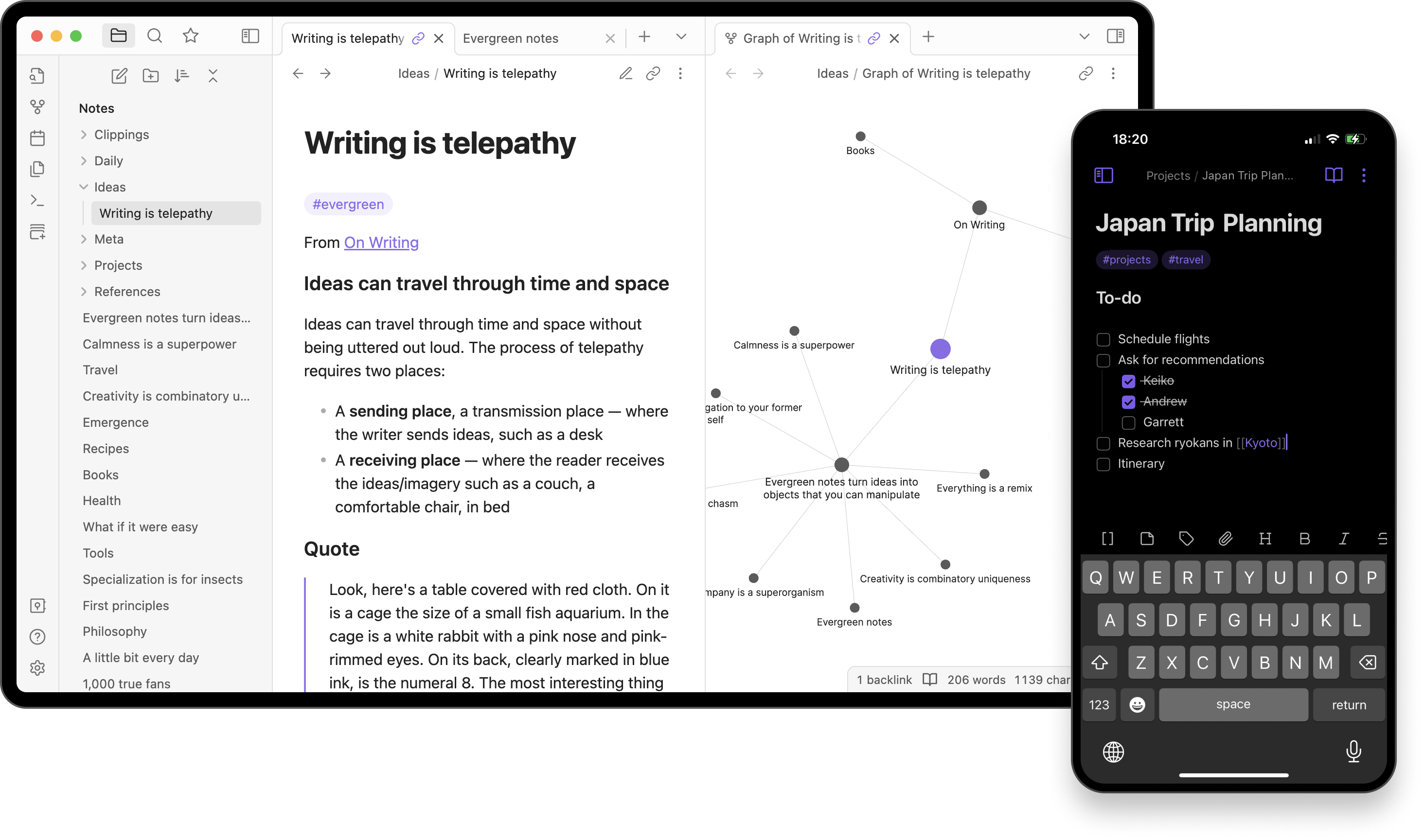
Image source: obsidian.com
Core features of Obsidian
Obsidian is built around flexible, local-first features that prioritize personal knowledge ownership. Its core tools support deep thinking, idea linking, and without forcing rigid workflows.
- Markdown editor and file-based notes: Obsidian uses plain Markdown files stored locally on your device, ensuring full data ownership and long-term accessibility. Notes remain readable outside the app, reducing dependency on proprietary formats.
- Backlinks and bidirectional linking: Users can link notes both ways, automatically revealing connections between ideas. This encourages networked thinking and helps surface related concepts without manual cross-referencing.
- Graph view for visual knowledge mapping: The graph view displays notes as interconnected nodes, offering a . It helps identify clusters, gaps, and relationships at a glance.
- Tags, folders, and search: Tags and folders provide lightweight organization, while powerful search helps retrieve information quickly. Users can combine methods to suit different organizational styles.
- Daily notes and templates: Daily notes support journaling, logging, or task capture with minimal friction. Templates allow users to standardize recurring note formats and workflows efficiently.
Obsidian's user interface review
Obsidian offers a clean, minimal user interface that prioritizes focus over visual complexity. The default layout is intentionally simple, with a file explorer, editor pane, and optional panels for backlinks, tags, and graph view. This makes the interface feel lightweight and distraction-free, especially for long writing or .
However, Obsidian's interface is highly configurable, which can be both a strength and a challenge. Users can rearrange panes, apply custom themes, and extend functionality through plugins, allowing the workspace to evolve. For experienced users, this flexibility enables deeply personalized workflows. For new or non-technical users, the lack of guided setup and heavy reliance on manual configuration can feel overwhelming.
Navigation is fast and keyboard-friendly, but some features remain hidden behind commands or settings. Overall, Obsidian's UI rewards users who invest time learning it, rather than those seeking immediate ease of use.
Who Obsidian is best for
Obsidian is designed primarily for individual use, making it especially effective for people who manage their own knowledge systems. Its flexibility supports deep thinking, long-term learning, and highly personal workflows rather than shared execution. - Solo knowledge workers: Obsidian suits individuals who capture, connect, and revisit ideas over time. It helps consultants, analysts, and independent professionals build durable personal knowledge bases.
- Researchers and writers: Researchers and writers benefit from Obsidian's linking and graph-based thinking. It supports idea development, source tracking, and long-form writing without imposing rigid .
- Developers and privacy-focused users: Developers appreciate Markdown, keyboard shortcuts, and extensibility through plugins. Privacy-focused users value local storage, offline access, and complete control over their data.
Obsidian pricing and cost considerations
Obsidian uses a flexible model centered on a free, local-first experience, with optional paid add-ons for sync and publishing. Because your core notes work locally, you can use Obsidian without a subscription if you don't need advanced services. Paid plans , hosting, and commercial usage rights. When evaluating cost, consider how much you value seamless cross-device access, team sharing, and managed backups alongside the zero-cost base functionality.
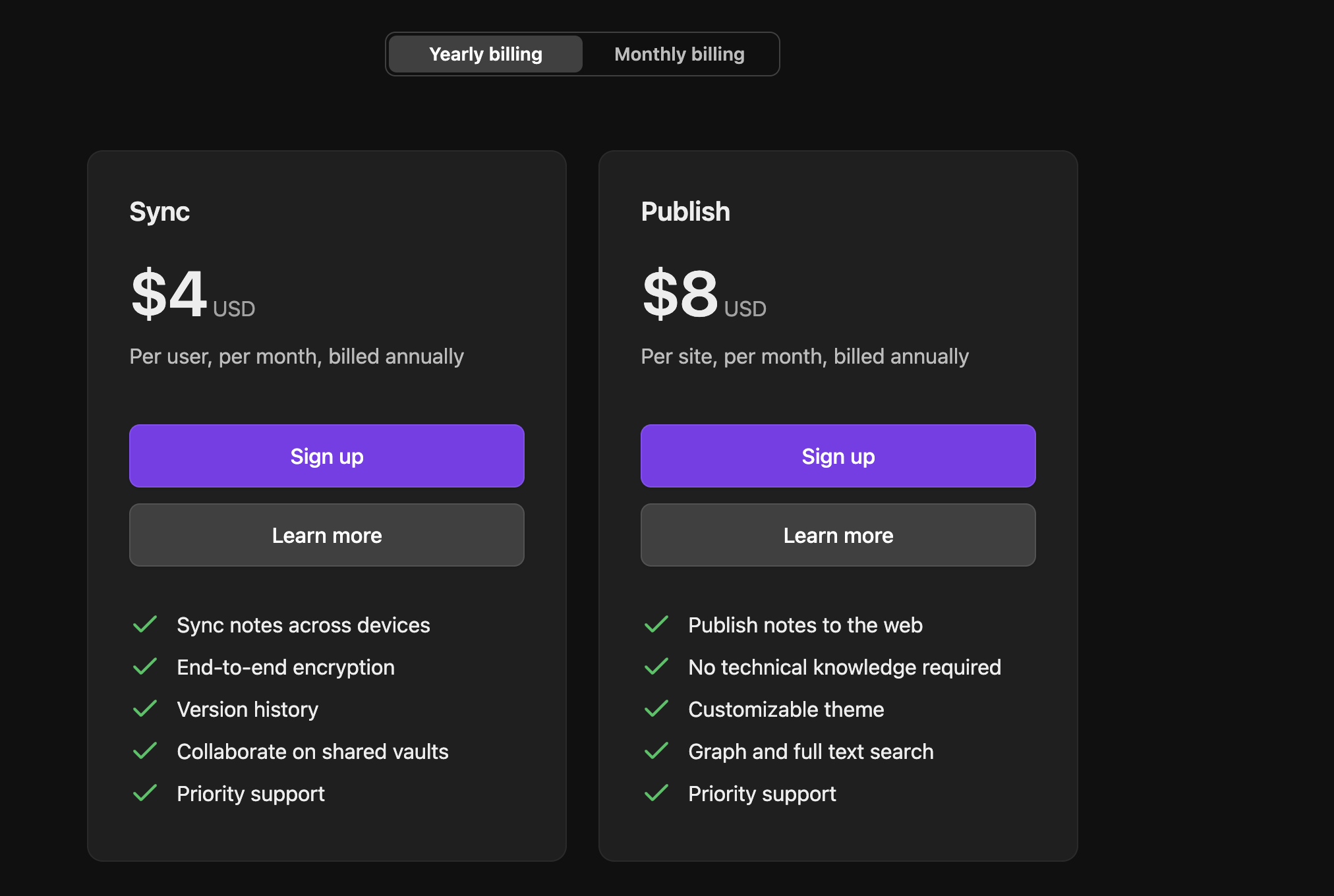
Image source: obsidian.com
Update time: 2025-12-21
Note: Pricing and plan details reflect publicly available data as of the update date and may vary based on region, billing cycle, and number of agents.
Obsidian Sync plan ($4/user/billed annually)
The Sync plan is designed for users who want seamless access to their notes across multiple devices. It builds on Obsidian's local-first foundation while adding managed . This plan is billed annually on a per-user basis and focuses on secure continuity rather than publishing.
Key features:
- Sync notes across devices: This feature keeps your vault consistent across desktop and mobile devices. Changes made on one device are automatically reflected everywhere. It removes the need for manual file syncing or third-party cloud setups.
- End-to-end encryption: All synced data is encrypted, so only you can read your notes. Obsidian cannot access or view the content being synced. This maintains privacy while still enabling cloud convenience.
- Version history: The Sync plan automatically stores previous versions of notes. Users can recover earlier states if content is deleted or overwritten. This adds a safety net for .
Obsidian Publish plan ($8/user/billed annually)
The Publish plan is aimed at users who want to share notes publicly on the web. It converts selected notes into a hosted site without requiring technical setup. Pricing is billed annually on a per-site basis rather than per user.
Key features:
- Publish notes to the web: Users can turn parts of their vault into a public website. Notes are rendered cleanly and remain searchable online. This is useful for documentation, blogs, or knowledge sharing.This functionality provides a simple, dedicated publishing platform, which might be a more focused solution than trying to repurpose a document shared through Google Drive or a project page in a large like Notion or ClickUp.
- Customizable theme: Publish allows of the site's appearance. Users can adjust themes to match personal or brand preferences. This avoids a generic documentation look. This level of customization is something users often look for in tools, similar to how businesses might evaluate the visual flexibility of tiers or various plans when considering their brand representation.
- Graph and full-text search: Published sites include full-text search and graph navigation. Visitors can explore content through links and relationships. This preserves Obsidian's networked knowledge feel on the web.
Where Obsidian will appeal to you
Obsidian appeals strongly to users who value control, flexibility, and long-term thinking. Its design favors depth and durability over quick setup or . Many of its strengths become more noticeable the longer you use them, especially as your knowledge base grows.
- Local-first data ownership: Notes are stored as plain files on your device, giving you complete control over access and backups. This reduces dependency on vendors or constant internet access.
- Powerful linked thinking: Backlinks and bidirectional links help ideas connect naturally over time. This makes it easier to surface relationships that would remain hidden in linear notes.
- Highly customizable workflows: Themes, plugins, and layouts allow users to shape Obsidian around their thinking style. Advanced users can build deeply personalized systems.
- Offline reliability and longevity: Obsidian works fully offline and uses open formats. Your for years, regardless of platform changes.
Where Obsidian struggles in real-world use
While Obsidian excels at personal knowledge management, its limitations become clearer in shared or execution-focused environments. These challenges often surface when teams try to use them beyond individual note-taking.
- No real-time collaboration: Obsidian does not support live, multi-user editing out of the box. Collaboration requires workarounds that feel fragmented and slow for teams.
- Steep learning curve for non-technical users: The interface assumes comfort with Markdown and manual configuration. Non-technical users often struggle to get productive quickly.
- Plugin dependency risk: Many advanced features rely on community plugins. Plugin updates, abandonment, or conflicts can disrupt .
- Difficult team onboarding: There is no guided onboarding for shared vaults or team standards. Consistency depends heavily on individual discipline.
- Limited workflow and task execution: Obsidian focuses on notes rather than . Tasks, ownership, and progress require external tools or manual systems.
As knowledge moves beyond individual thinking and into shared work, the limits of personal-first tools become more noticeable. Teams begin to need structure, visibility, and coordination alongside documentation. This is often the point at which organizations look for platforms that connect notes to communication and execution. Tools like Lark are typically explored to support that next stage of collaboration.
Learn how ideas move from notes to real execution
Meet Lark: Give personal knowledge base a collaborative touch
is a unified "super-app" designed to combine communication, workflows, and documents into a single platform. It scales individual into a structured "Team Brain" that links every document to live projects, automated AI-generated meeting summaries, and . This entire ecosystem is always available across devices for the whole team and optimized for high-speed collaboration, turning static files into a living workspace where ideas evolve in real time.

Comprehensive document collaboration platform
transforms standard note-taking into a "Team Brain" by combining rich multimedia documents with deep organizational logic. Unlike Obsidian's private, text-heavy environment, Lark allows you to embed live databases, task lists, and directly into your notes for immediate action. By using the @ command, you can link people, group chats, or other documents, instantly creating a network where every note is connected to the relevant team members and live projects. 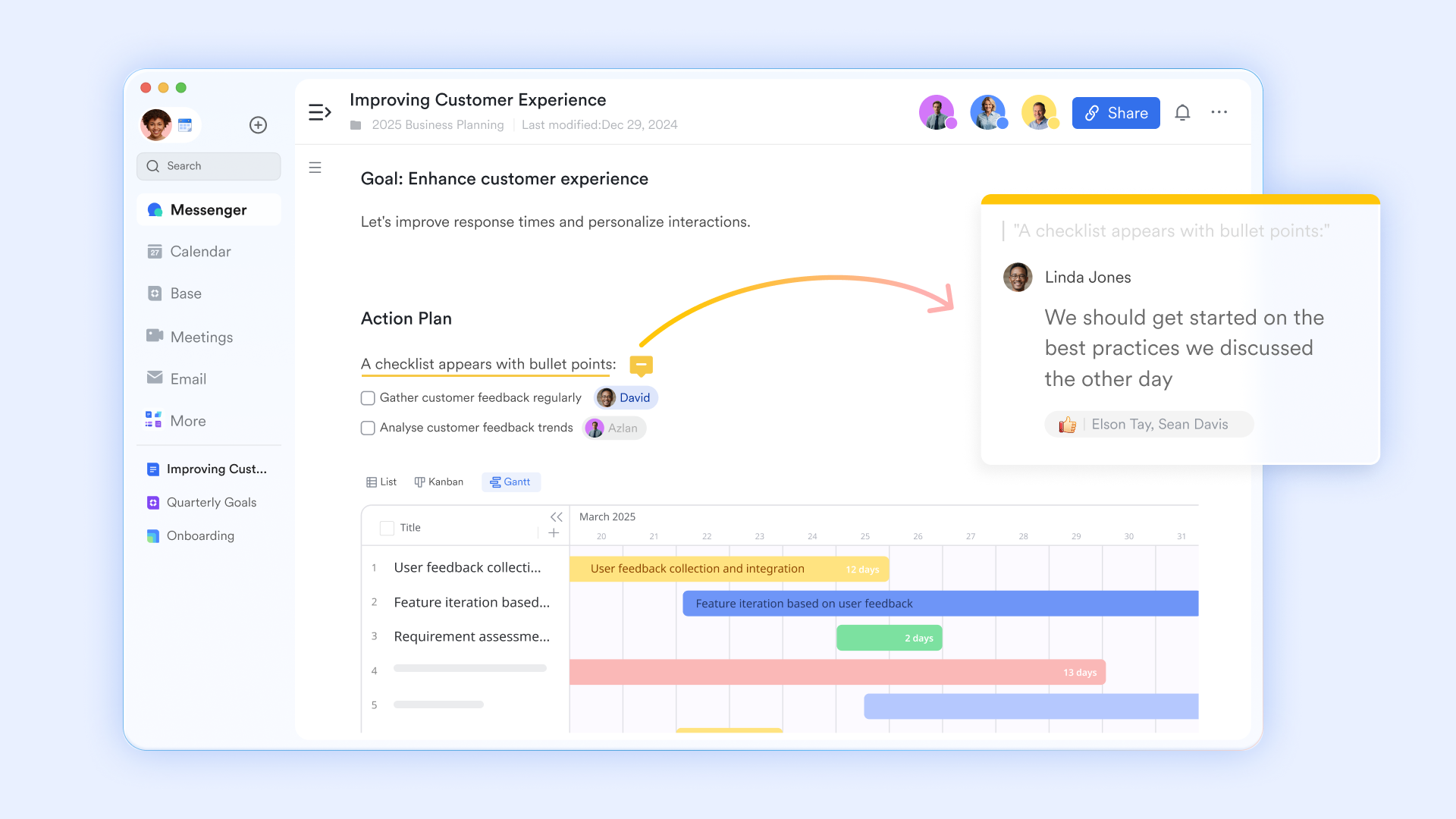
Visual note-taking with mind map flow
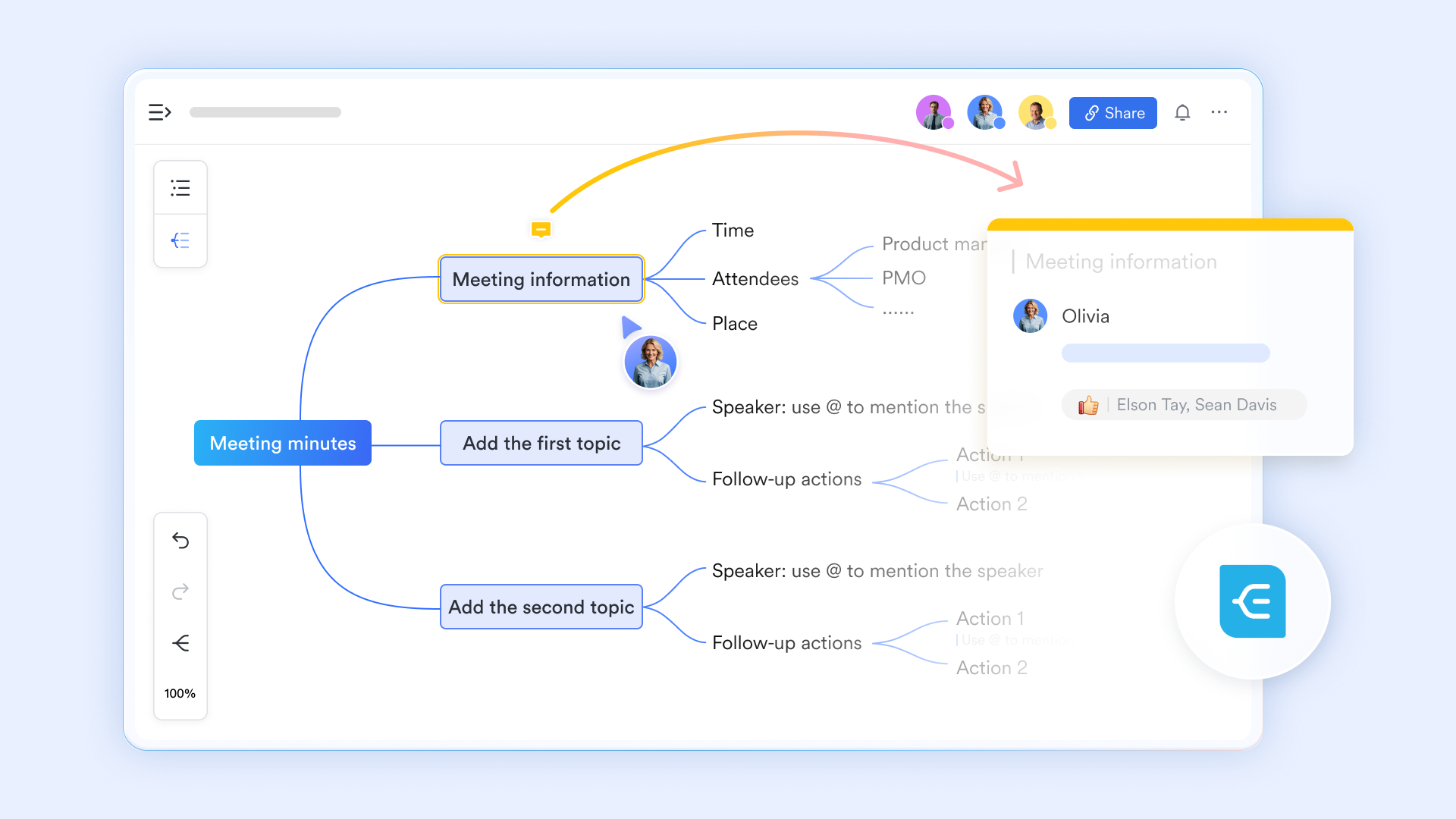
allows users to insert fully editable mind maps directly inside documents. Teams can brainstorm, expand nodes, add images, collapse branches, and . It's built-in mind maps support up to 10,000 nodes and can be edited across desktop, web, and mobile. Obsidian supports visual thinking through plugins, but collaboration, live editing, and embedded visual boards are not native to the platform. Lark makes visual thinking a shared, real-time experience rather than a solo cognitive tool.
Bi-directional links with built-in context and governance
supports bi-directional links that automatically show backlinks, mentioned documents, and a visual relationship graph. When you view a document, the "Backlinks" panel reveals every other doc that references it, ensuring you never miss related updates or historical context. With a graphical view, this creates a "networked knowledge" system in which information is never isolated, allowing teams to see exactly how a single project spec relates to meeting notes, research papers, or task lists. However, unlike Obsidian's graph view, Lark's links respect and organizational access, ensuring users see only what they're allowed to.
Structured organizational knowledge
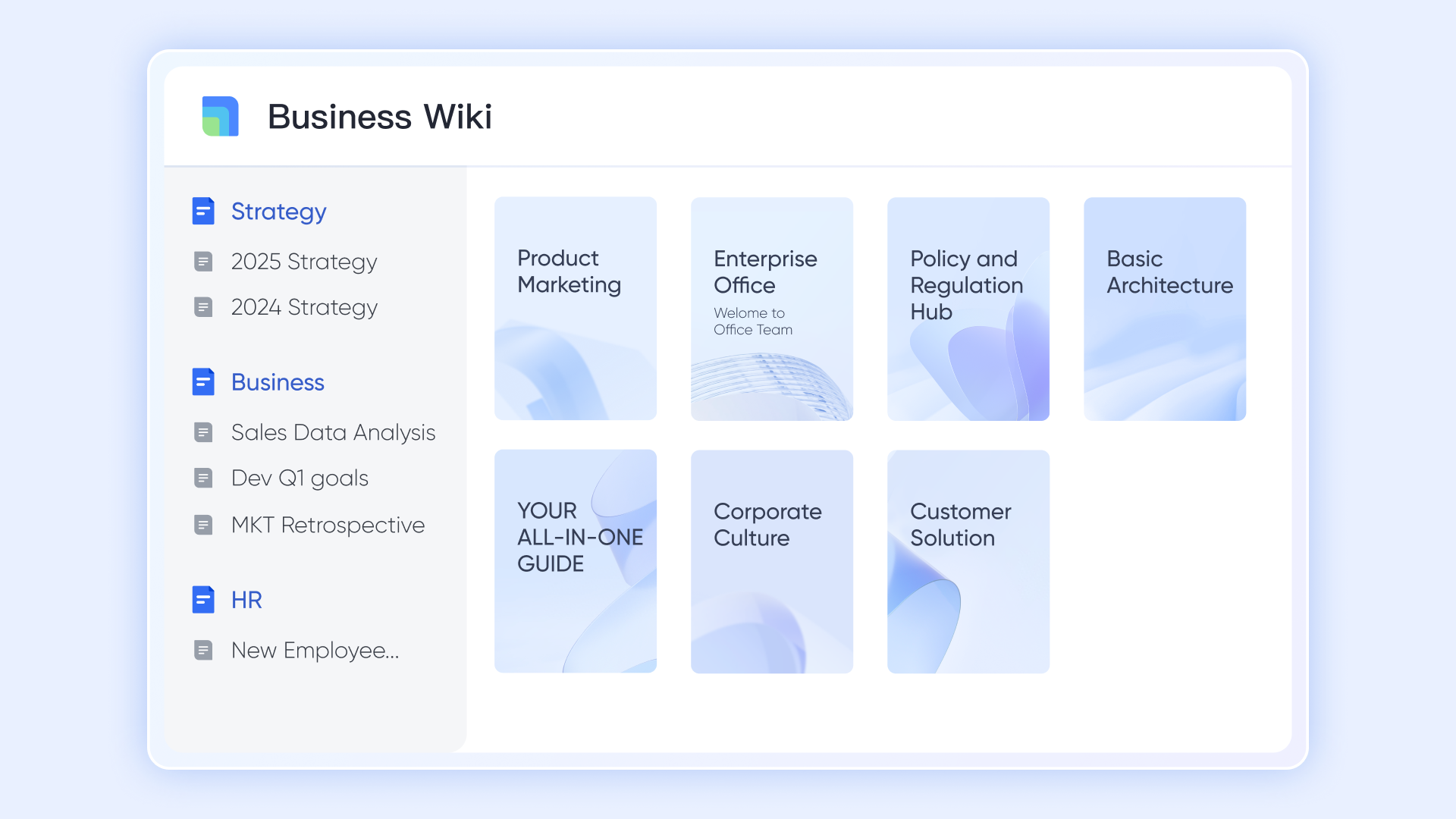
is designed for company-wide knowledge sharing, using a directory tree structure with inherited permissions. Teams can publish Docs, embed mind maps, include AI meeting notes, and maintain a single source of truth for processes and playbooks. Obsidian's folder-based vaults work well for individuals but struggle with ownership, , and shared governance. Lark Wiki scales knowledge across teams and departments, not just individual users.
AI-enhanced meeting notes that turn conversations into action
automatically generate structured summaries, action items, and smart chapters during and after meetings. Instead of relying on manual note-taking, teams receive an AI Notes document that links discussions directly to follow-ups and shared context. These notes can be , permissioned, and reused across Docs or Wiki. Obsidian requires users to manually capture meeting notes and organize them later, with no native connection to live meetings or action tracking. Lark captures knowledge as it's created and immediately turns it into shared, actionable documentation.

:
- Starter plan: Free forever plan that includes 11 powerful tools for up to 20 users. It also comes with 100GB of storage, 1000 automation runs, AI translations, and more.
- Basic plan: $6/user/month (billed annually) for up to 500 users. It includes everything in Starter plus group calling for up to 500 attendees, 5TB of storage, 1000 automation runs, and more. For more details, please .
- Pro plan: $12/user/month (billed annually) for up to 500 users. It includes everything in Basic plus group calling for up to 500 attendees, 15TB of storage, 50,000 automation runs, and more.
- Enterprise plan: for custom pricing. Supports unlimited users and includes even more automation runs and advanced security, compliance, and management features.
For small teams with simple communication needs

18 months message history
1000 Base automation runs/month
2000 rows per table in Base
Most POPULAR
For companies with comprehensive collaboration and management needs
Unlimited message history
500-participant video meetings
50k Base automation runs/month
20k rows per table in Base
For large companies with advanced security and organizational management needs
Get a personalized demo and pricing
Unlimited message history
500-participant video meetings
15 TB storage + 30 GB storage/user
500k Base automation runs/month
50k Base automation runs/month
Most POPULAR
For companies with comprehensive collaboration and management needs
Unlimited message history
500-participant video meetings
50k Base automation runs/month
20k rows per table in Base
Obsidian vs Lark: Different tools for different stages
Obsidian and Lark serve different purposes and often fit different stages of work maturity. Obsidian is an excellent choice for individuals who want complete control over their notes, value offline access, and enjoy building a personal knowledge system through linked thinking. It works best when knowledge creation is private, exploratory, and not tightly tied to execution or coordination with others.
As work evolves from individual insight to shared responsibility, new needs emerge. Teams require , clearer ownership, structured documentation, and visibility into decisions and next steps. This is typical when organizations consider adding or transitioning to tools like Lark, which are built to support shared context, collaboration, and follow-through.
Rather than viewing the tools as direct replacements, many users see them as complementary. Obsidian supports deep personal thinking, while platforms like Lark help turn that knowledge into .
Conclusion
Obsidian stands out as a , offering flexibility, privacy, and deep support for personal knowledge building. Its strengths lie in individual workflows—connecting ideas, exploring concepts, and maintaining long-term notes without relying on the cloud. For solo users, researchers, and privacy-focused professionals, it remains a reliable and thoughtfully designed option.
However, as knowledge moves beyond individual use and into shared work, gaps in collaboration, onboarding, and execution become harder to ignore. Teams need more than well-connected notes—they need shared context, visibility, and a clear path from discussion to action. This is where platforms designed for collaboration add value.
If your work is shifting from personal thinking to coordinated execution, it may be time to explore tools like . Lark helps teams turn knowledge into shared outcomes by connecting documentation, communication, and follow-through in one workspace.
Discover what changes after knowledge is shared
FAQs
Is Obsidian practical for non-technical teams?
For many non-technical users, Obsidian can feel complex due to Markdown, plugins, and manual setup, as noted in many Obsidian app reviews. Teams without technical comfort may struggle with consistency and . This is why some groups pair or transition to Lark for easier shared workflows and collaboration.
How hard is it to migrate away from Obsidian?
Migrating is relatively straightforward because notes are stored as plain Markdown files, a key advantage highlighted in any Obsidian notes review. Content can be reused in other tools without heavy export processes. Teams often move structured knowledge into Lark when collaboration and execution become priorities.
What happens when plugins break or go unsupported?
Community plugins may stop working or become incompatible after updates. This can disrupt workflows that rely heavily on extensions. Teams sometimes offset this risk by using Lark for stable, built-in collaboration features.
Should teams combine Obsidian with a collaboration tool?
Yes, many teams use Obsidian for personal thinking and drafting. They then share the finalized Lark knowledge for collaboration, visibility, and follow-through. This combination balances individual depth with team execution.
Related reading






























