














Project Projectment in Retail: Know the Core and Find the Right Tool

Ryan Tanner
Product Marketing Specialist
Sep 18, 2026
Ryan Tanner
Sep 18, 2026

20 min read


Managing projects in retail can be challenging. From store openings to product launches, marketing campaigns, and inventory management, every project involves multiple teams and tight deadlines. Using the right project management approach makes it easier to stay organized, track progress, and ensure timely execution. In this post, we will review some of the best tools available to help retail teams streamline workflows, improve communication, and boost overall efficiency.
Here, we'll explore other top project management in retail tools such as Asana, Trello, Monday.com, Wrike, Smartsheet, Lark and ClickUp. Each tool offers unique features that cater to different aspects of retail operations. Whether you manage a single store or a nationwide retail chain, these solutions can simplify complex processes and help your team deliver results faster and more efficiently.
- Lark: Best for an all-in-one solution for retail teams
- Asana: Best for task coordination
- Trello: Best for simple visual project tracking
- Monday: Best for customizable workflows
- Wrike: Best for enterprise retail management
- Smartshee: Best data-driven retail projects
- ClickUp: Best for multi-department collaboration

What is project management in retail?
Project management in retail is the structured process of planning, organizing, and executing projects within a retail business. It covers a wide range of activities, from store design and merchandising to marketing campaigns, inventory planning, and logistics. Each project aims to enhance customer experience, boost efficiency, and drive sales while staying within time and budget limits.
Unlike traditional project management, retail project management moves at a faster pace and requires tighter coordination across multiple departments. Teams must align merchandising schedules with marketing timelines, coordinate with suppliers, and manage store rollouts or seasonal changes quickly. This fast turnaround, coupled with constant market shifts, makes flexibility and clear communication essential for success in retail project execution.
Why does project management matter in retail?
Project management plays a vital role in keeping retail operations on track. Retailers often face challenges like tight deadlines, scattered teams, inventory dependencies, and constantly changing customer trends. Without a structured approach, these factors can lead to delays, miscommunication, and higher costs.
A solid project management system helps retailers plan better, allocate resources efficiently, and monitor progress in real time. It streamlines coordination across departments, ensuring every task supports the overall business goal. For example, during a store renovation, project management ensures design, procurement, and installation happen in sync. Similarly, a new product launch can stay on schedule when marketing, supply chain, and sales teams work through a unified plan.
Key stages of retail project management
Retail project management follows a structured process to keep every initiative organized and efficient. Each stage plays a key role in ensuring projects run smoothly from start to finish.
- Planning: This stage sets the foundation. It involves defining clear objectives, identifying deliverables, and outlining the project's scope. Whether it's launching a new product or opening a store, proper planning ensures everyone understands the goals.
- Scheduling: Once the plan is in place, tasks and timelines are mapped out. Scheduling helps coordinate work between departments such as marketing, procurement, and logistics, keeping everything on track.
- Execution: This is where plans turn into action. Teams collaborate to complete assigned tasks, manage inventory, set up displays, or roll out campaigns while tracking progress against deadlines.
- Monitoring: Key performance indicators (KPIs) like budget adherence, sales impact, and timeline accuracy help measure performance and identify potential issues early.
- Closure: The final step involves reviewing outcomes, documenting lessons learned, and identifying ways to improve future projects. This reflection helps refine strategies and strengthen operational efficiency over time.
Common retail projects that need strong management
Strong project management is essential across many areas of retail, where multiple teams and tight timelines often overlap. Some of the most common projects that benefit from structured management include:
- Store openings or renovations: Coordinating design, construction, merchandising, and staffing requires precise scheduling and communication to ensure stores open on time and within budget.
- Product launches and seasonal promotions: From sourcing products to executing marketing campaigns, project management keeps every step aligned and helps retailers hit key sales periods efficiently.
- Supply chain optimization: Managing logistics improvements, vendor changes, or new distribution strategies demands close monitoring to reduce delays and costs.
- POS or ERP software rollouts: Implementing new systems across stores requires planning, training, and testing to avoid operational disruptions.
- Marketing campaign coordination: Creative, digital, and in-store promotions under one timeline ensures consistent messaging and maximum impact across all customer touchpoints.
Essential skills for retail project managers
Retail project managers need a diverse mix of skills to handle the fast pace and complexity of retail operations. Success depends on balancing strategy, coordination, and execution while keeping teams aligned and goals clear.
- Time management and multitasking: Retail projects often run on tight . The ability to prioritize tasks and manage multiple deadlines is essential for meeting launch dates and campaign rollouts.
- Cross-functional communication: Retail involves coordination between marketing, sales, supply chain, and store teams. Clear communication ensures everyone stays informed and aligned.
- Vendor and stakeholder management: Project managers must handle suppliers, contractors, and internal stakeholders effectively to maintain quality and deadlines.
- Budget control and reporting: Keeping costs under control and providing accurate financial updates helps prevent overspending and ensures accountability.
- Familiarity with digital tools and automation: Using project management platforms, analytics dashboards, and automation tools improves efficiency, tracks progress, and simplifies collaboration across dispersed teams.
Best project management tools for retail teams
When choosing a project management tool for retail, some criteria matter more than others. The best project management tools are easy to use (especially for store-managers or field staff who aren't PM specialists), enable strong collaboration across departments, offer automation to cut down repetitive tasks, scale well so they can work across many stores or large product lines, and include features tuned to retail (inventory visibility, merchandising, seasonal campaigns etc.).
Here are several tools that perform well under those criteria:
1. Lark: Best all-in-one solution for retail teams
Lark is a comprehensive platform that tackles the major challenges associated with conventional spreadsheet applications: disconnection and insufficient collaboration functionalities. For teams requiring advanced calculations and detailed data analysis, Lark Sheets delivers powerful spreadsheet capabilities along with an extensive and continually expanding array of formula functions. For project oversight, customer relationship management, or general data organization, Lark Base offers a no-code, customizable solution that incorporates automation and live dashboards. Both tools smoothly with the included messaging service, ensuring that notifications are always received and enabling team members to easily tag one another for immediate collaboration.
Lark Base: From planning to organized implementation
At the core of Lark is Lark Base, a versatile data hub where teams can simultaneously plan projects and oversee business operations. Business leaders are able to construct relational tables to monitor ongoing initiatives, allocate resources, and track key performance indicators. At the same time, project managers can connect deliverables, owners, and dependencies within a unified workspace. For example, a marketing agency can keep one table that tracks company-wide campaigns (business perspective) and another that oversees ad deliverables (project perspective). Linking these tables enables executives to understand how daily creative efforts contribute to revenue objectives. By merging adaptability with structure, Lark Base bridges the strategic "why" of business management with the tactical "how" of project execution.
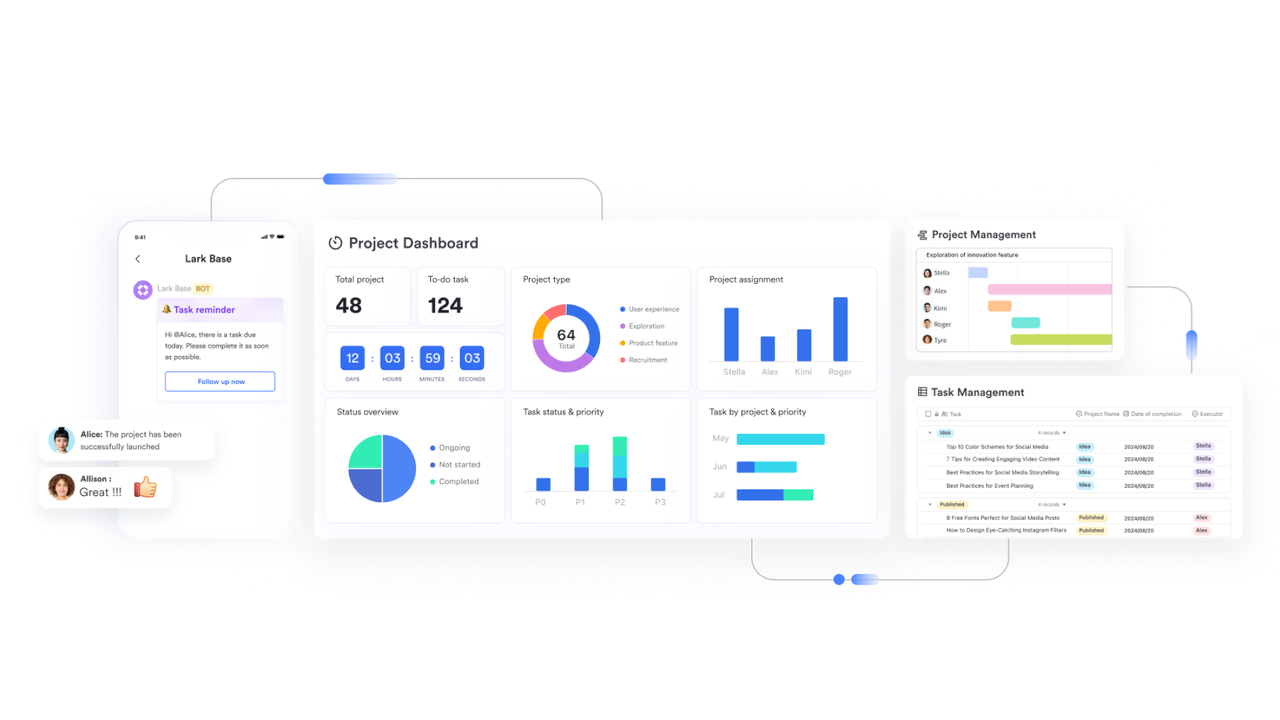
Lark Tasks: Transforming business strategies into executable tasks
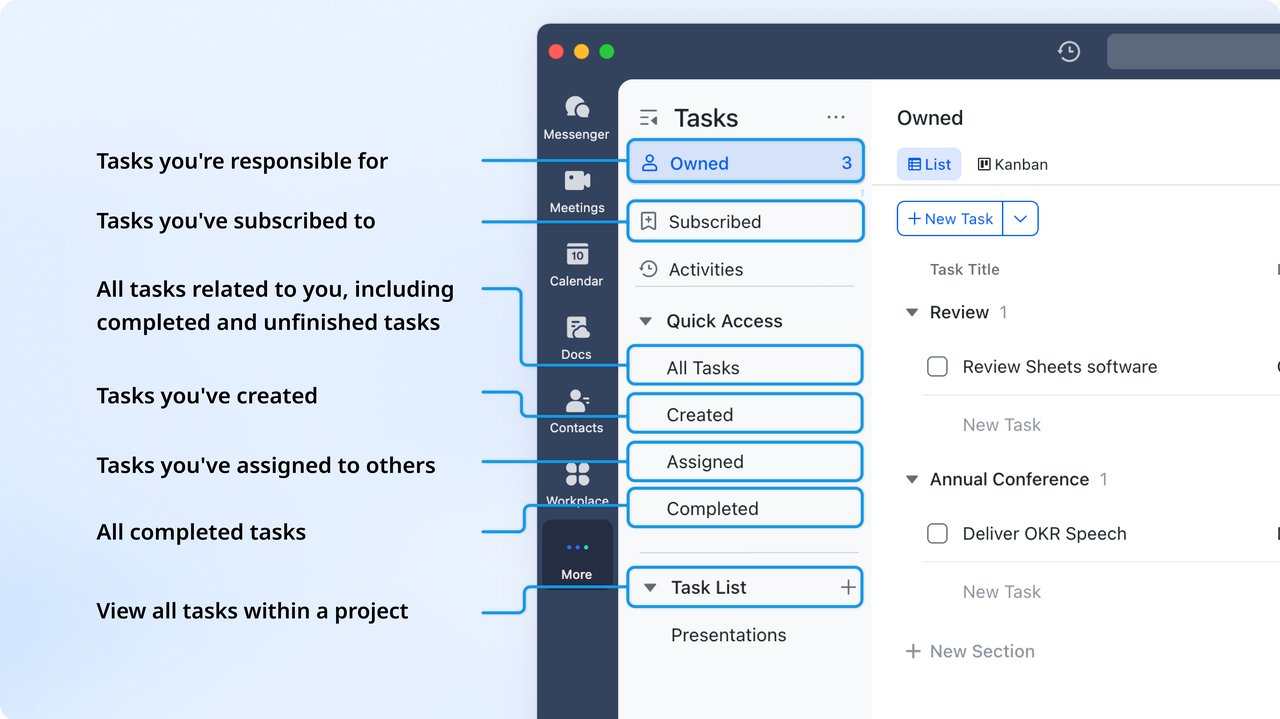
While leaders concentrate on strategic direction, project teams require clear guidance on subsequent actions. Lark Tasks guarantees that business plans are converted into concrete steps. Managers can designate tasks with responsible individuals, deadlines, and interdependencies while monitoring progress in real time. For instance, when a business objective in Lark Base is to "Introduce a new product line in Q2," related milestones automatically generate as project tasks for design, procurement, and marketing teams. As tasks are finished, Lark refreshes the overall business dashboard, ensuring that both managers and executives remain coordinated without the need for manual reporting.
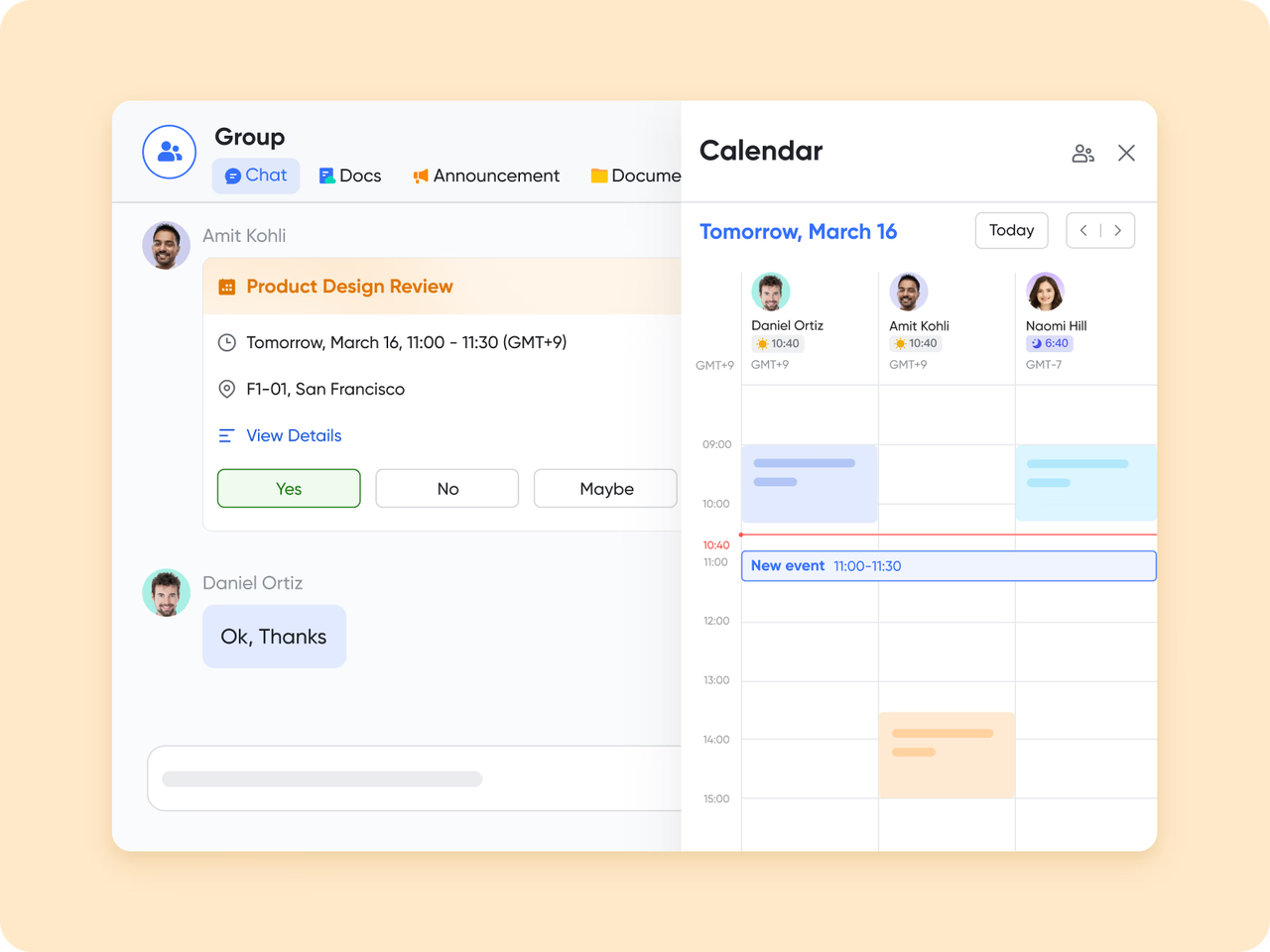
Lark Calendar: Aligning business priorities with project schedules.
Scheduling is frequently where business management intersects with the realities of project execution. With the Lark Calendar, organizations can synchronize executive planning meetings, project evaluations, and milestone check-ins in a unified view. When a quarterly business meeting is arranged, it automatically meets the relevant project deadlines, avoiding scheduling conflicts and ensuring that essential deliverables are prepared for review. For instance, a product manager gearing up for an executive update can easily see when design, QA, and launch dates coincide — minimizing last-minute scrambles and enhancing time-to-market.
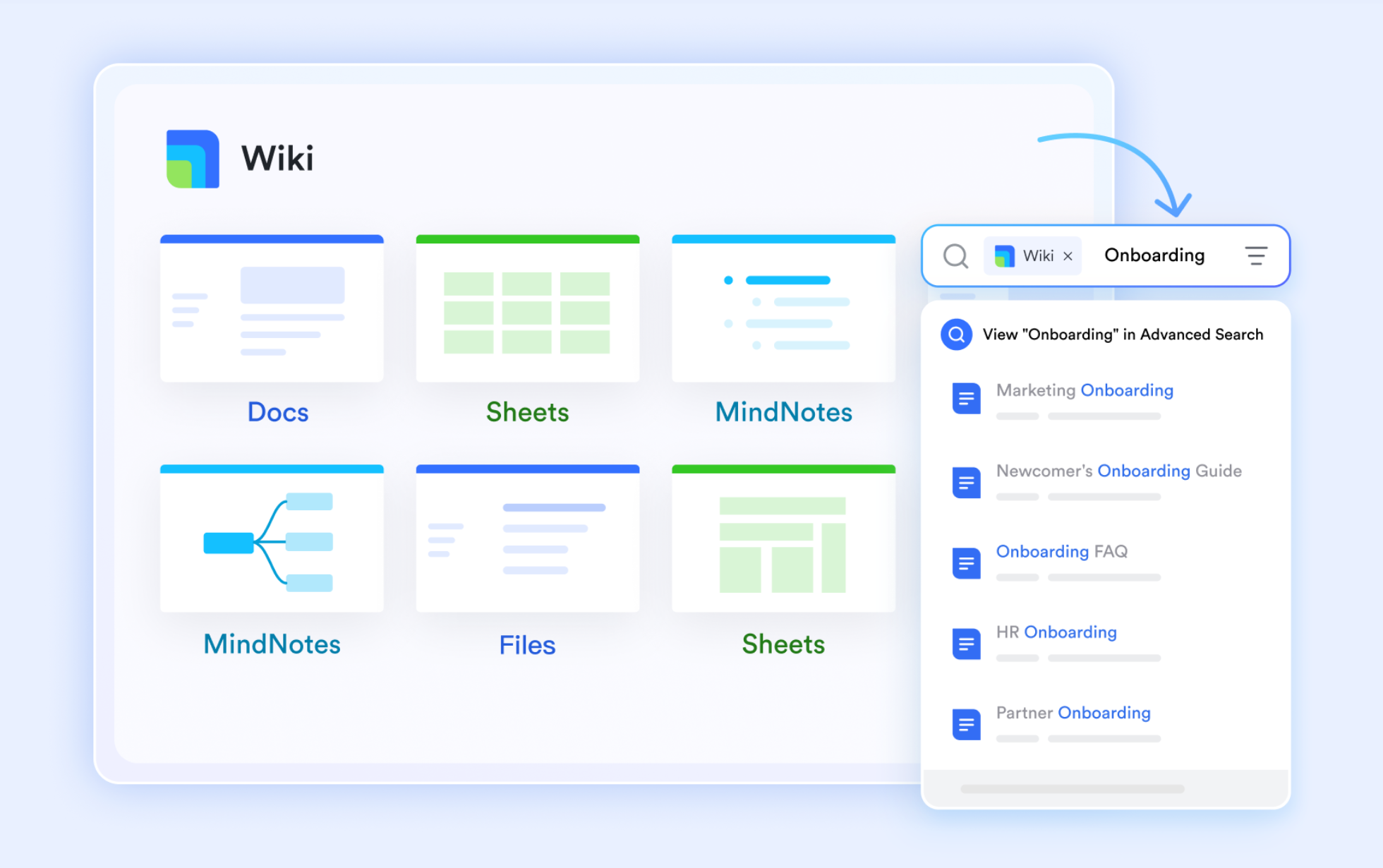
Lark Docs & Lark Wiki: Bringing together strategy, expertise, and teamwork
In many organizations, strategic planning and project documentation often exist in separate areas. Lark Docs & Wiki bridges that divide. Executives can detail yearly business goals in Docs, while project teams can collaboratively draft execution plans or campaign outlines within the same system. The Lark Wiki acts as a permanent archive for SOPs, templates, and best practices, making business knowledge readily accessible.
For example, a marketing team can document brand guidelines, tone of voice, and campaign templates in the Wiki, ensuring consistency across all client projects. Meanwhile, creative leads can reference those same materials in Docs while planning new campaigns, keeping strategy and execution aligned. With real-time co-editing and commenting, Lark ensures that both strategic direction and daily execution remain connected and transparent for every team member.
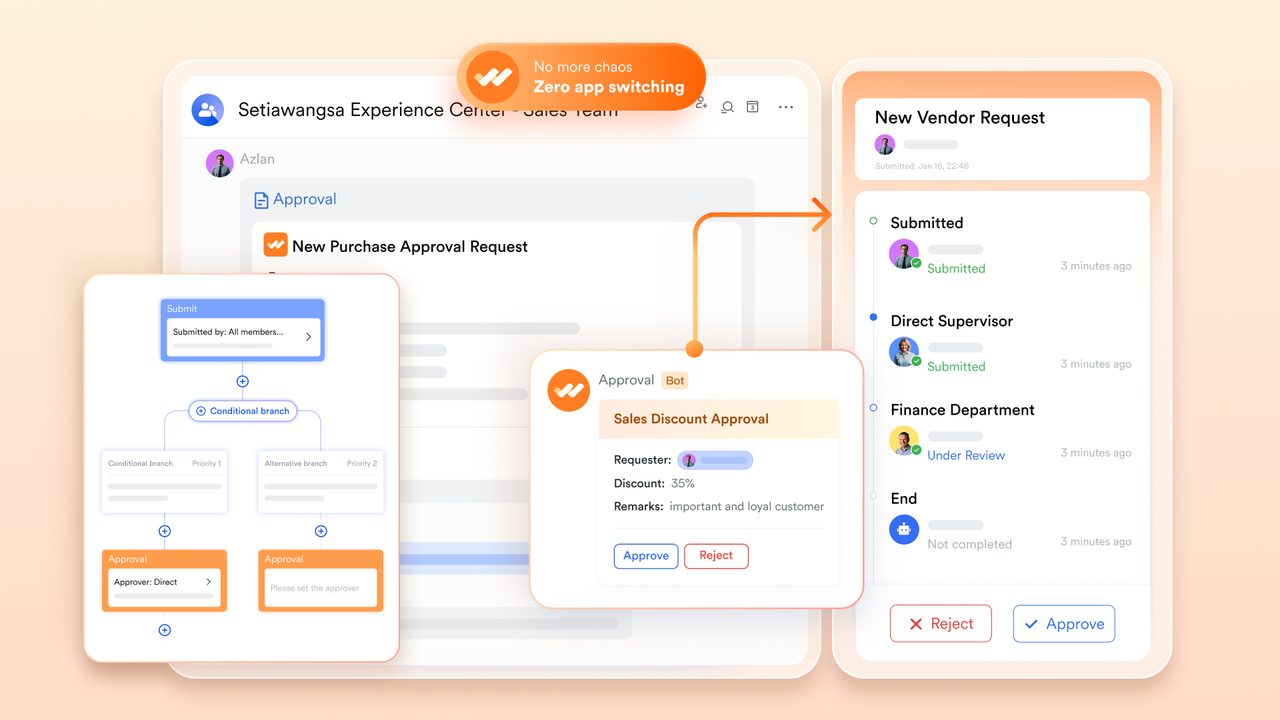
Lark Approval: Streamlining governance and responsibility
Efficient execution depends on having a clear framework — this is where Lark Approval business governance into project management. Teams have the ability to automate approval processes for budgets, proposals, or change requests, ensuring accountability while maintaining momentum. A project manager can present a scope expansion for approval, which is automatically directed to department leaders and finance before receiving final approval. Every action is documented, resulting in a clear audit trail for compliance and tracking performance. This approach replaces the disorganized email approval process with a cohesive, automated workflow that ensures decisions remain in line with business objectives.
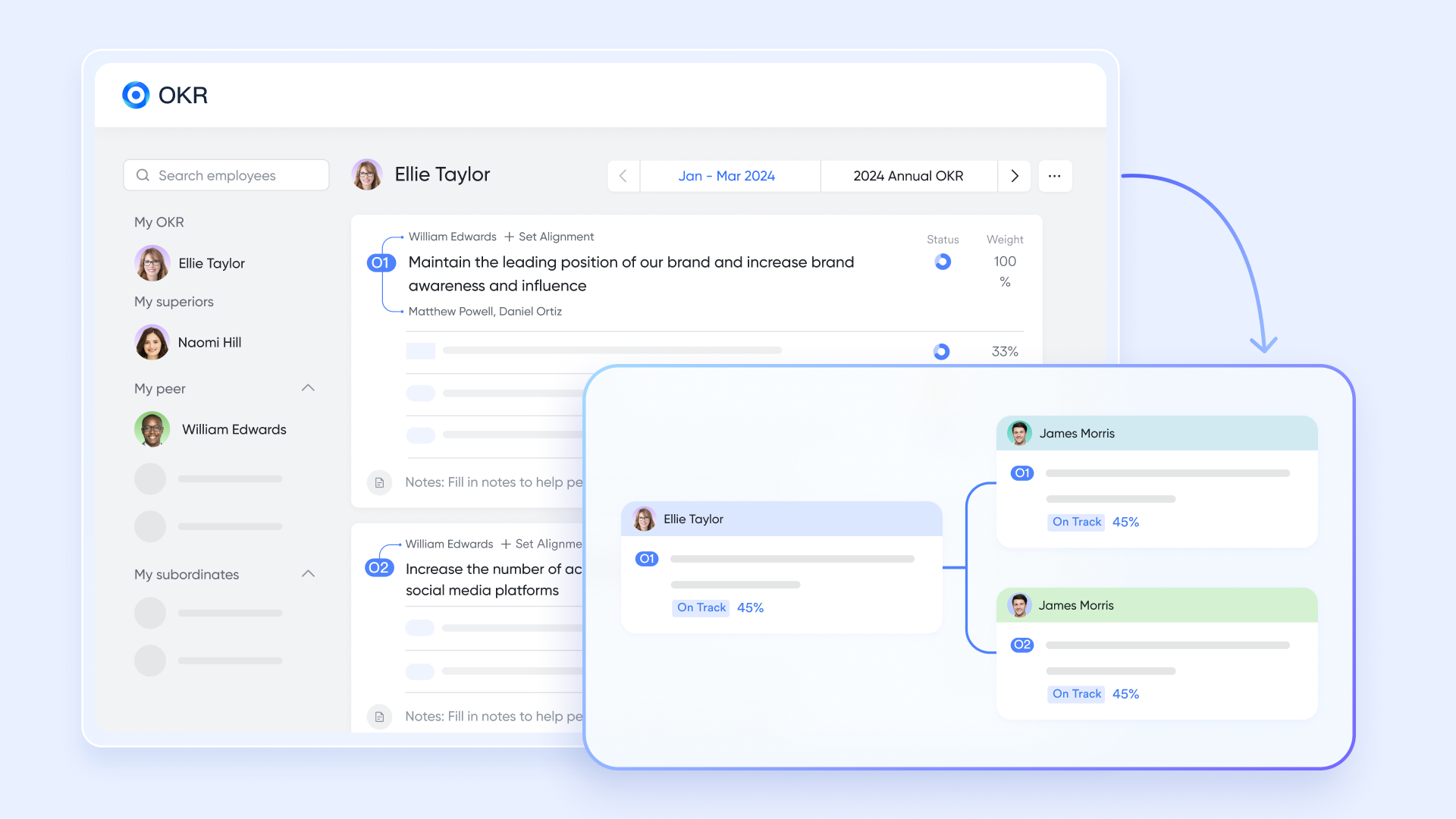
Lark OKR: Connecting execution to strategic results
No business strategy can thrive without a clear connection between objectives and actions. Lark OKR aligns company-wide goals with project-specific deliverables, ensuring everyone understands how their contributions fit into the overarching success. For instance, a company's OKR aimed at "Increasing client retention by 20%" can be directly connected to customer success efforts, onboarding tasks, and renewal initiatives. As project teams achieve their milestones, updates to OKR progress occur automatically—providing leadership with a real-time view of how execution aligns with strategy. It's a straightforward yet impactful method to transform aspirations into quantifiable results.
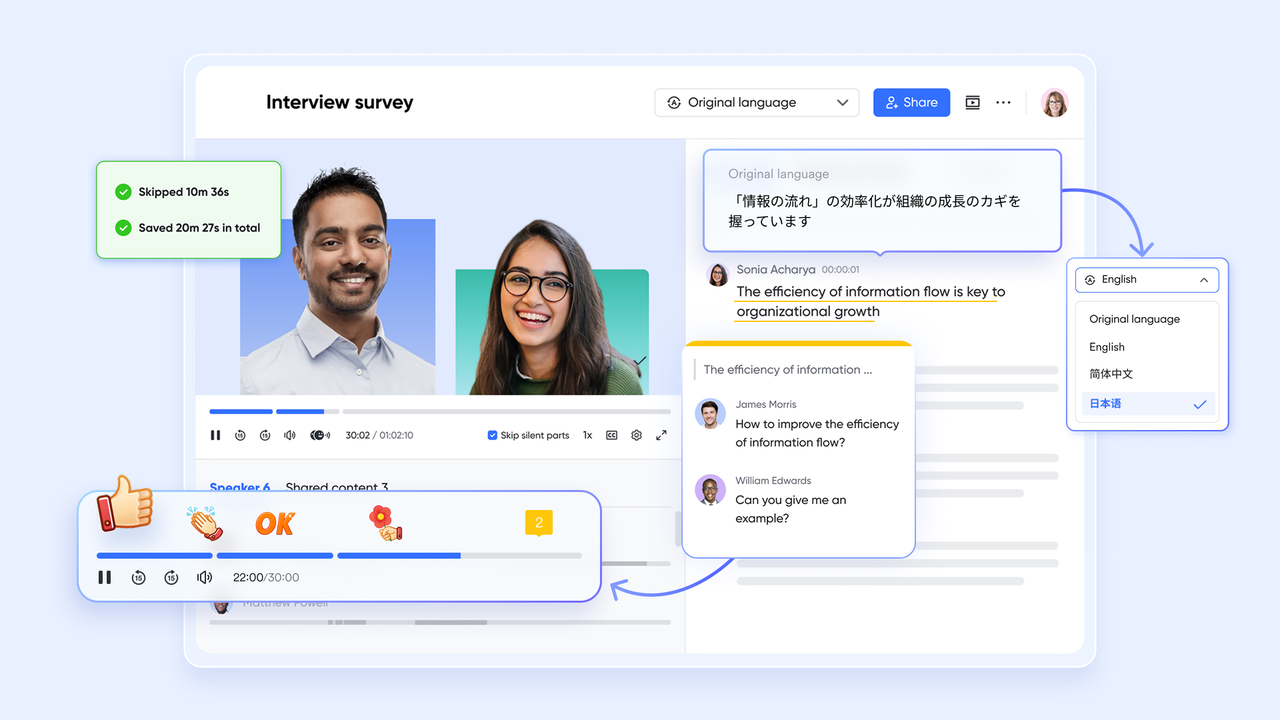
Lark Messenger & Meetings: Maintaining a link for collaboration
Effective management hinges on ongoing communication. Lark Messenger empowers teams to collaborate on plans, communicate updates, and address obstacles all within the same workspace. Any message regarding a postponed milestone can quickly be transformed into a task, associated with a project, and monitored until completion. Additionally, Lark Meetings enables teams to evaluate their progress during live sessions—meeting notes automatically synchronize with Docs, and future actions are recorded as new tasks. Picture a strategic meeting where executives evaluate a product delay; in just a few moments, the related project task is updated, a follow-up is arranged, and accountability is established clearly.
- Starter plan: Free forever plan that includes Sheets, Docs, Base, and 8 other powerful tools for up to 20 users. It also comes with 100GB of cloud storage, 1000 automation runs, AI translations, and more.
- Pro plan: $12/user/month (billed annually) for up to 500 users. It includes everything in Starter plus group calling for up to 500 attendees, 15TB of storage, 50,000 automation runs, and more.
- Enterprise plan: Contact sales for custom pricing. Supports unlimited users and includes even more automation runs and advanced security, compliance, and management features.
2. Asana: Best for task coordination
Asana is a project and task management tool built to help teams coordinate work more transparently and efficiently. For retail teams, that means aligning merchandising, store operations, marketing, and supply chain tasks under one roof. It offers ways to assign tasks, schedule timelines, automate repetitive work, and monitor progress — all with an eye toward keeping everyone on the same page.
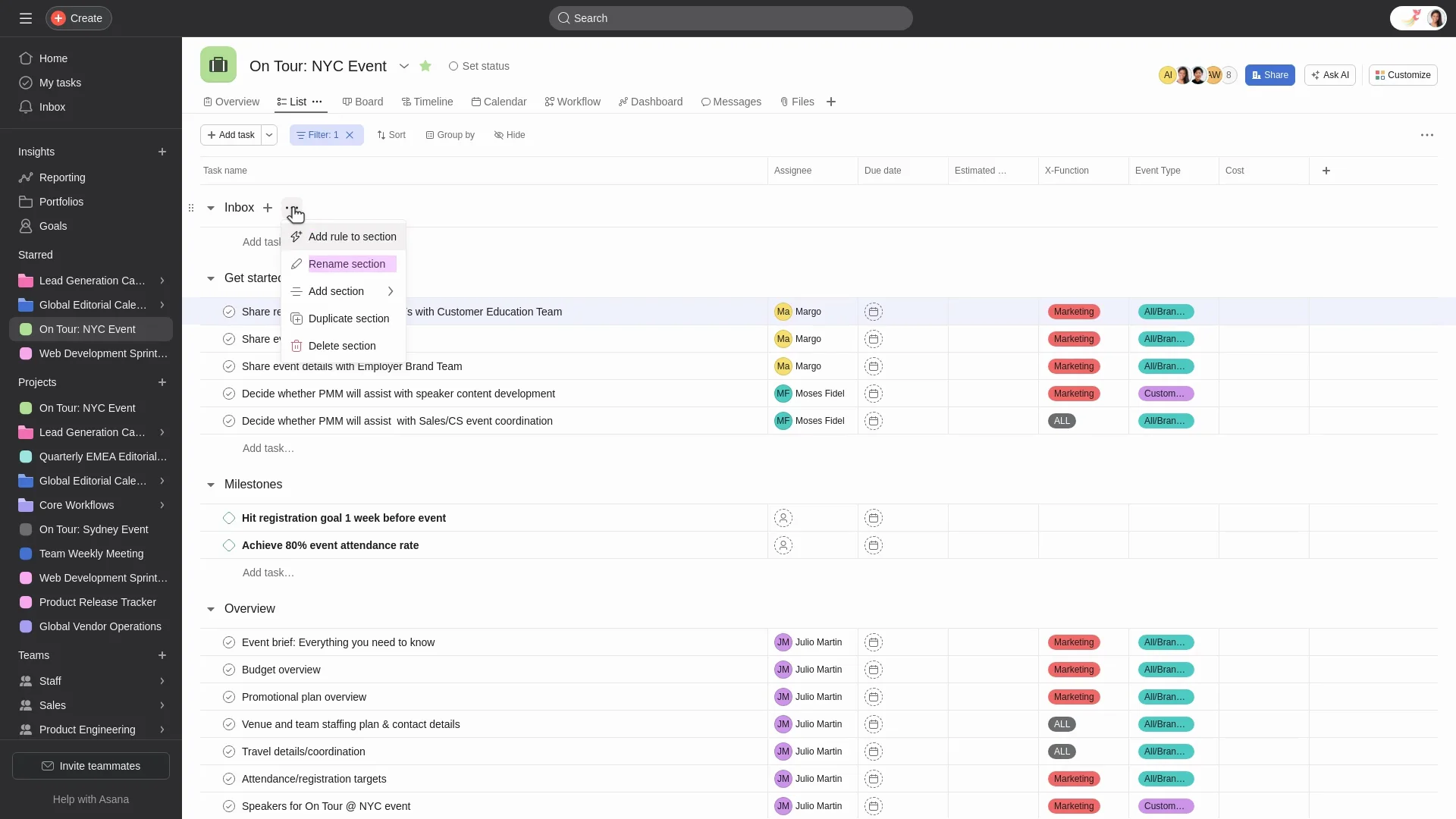
Image source: asana.com
Functional overview:
- Task & project views: Asana supports multiple views (list, board, calendar, timeline) so teams can visualize tasks in different ways depending on what works best.
- Automation via rules & forms: You can set triggers and workflows (e.g. this task moves here when that's done, or a request form feeds directly into tasks). Helpful for things like inventory alerts or approval flows.
- Collaboration & communication: Teams can comment, tag each other, share files, see status updates in dashboards. This keeps cross-department communication clear.
- Goal & portfolio tracking: Beyond individual tasks, Asana lets you track higher-level goals, link multiple projects together, see how they're progressing. Useful for retail initiatives like seasonal campaigns or store roll-outs.
- Security & permissions: Controls for who can see or edit what, roles, permissions, data security, SSO (single sign-on), two-factor auth etc. Makes it safer and more manageable at scale.
Strengths:
- Flexibility in organizing work: You can adapt the setup to different types of projects (store opening, product launch, marketing) because of the views, dependencies, custom fields etc.
- Good for cross-team visibility: Everyone (stores, inventory, marketing) can see what others are doing, reducing duplication, missed handoffs, miscommunication.
- Helps reduce repetitiveness with automations: Rules, forms, recurring tasks lessen manual load and speed up standard processes.
- Strong for tracking & reporting: Dashboards, progress tracking and the ability to connect tasks up to goals or larger initiatives make it easier to measure outcomes.
Limitations:
- Pricing can get high & features behind paywalls: Many advanced features (portfolios, more custom fields, certain workflows) only in higher-tier plans. For smaller retail teams or limited budgets, this may be a barrier.
- Gaps in very complex workflow management: When projects have many dependencies, they need multiple people responsible for a task, or need built-in time tracking. Asana shows its limits. Also, lack of built-in time tracking means relying on it.
3. Trello: Best for simple visual project tracking
Trello is a visual project management tool that utilizes boards, lists, and cards to organize tasks and workflows. Its intuitive interface and flexibility make it a popular choice for teams seeking a straightforward, visual approach to task coordination.
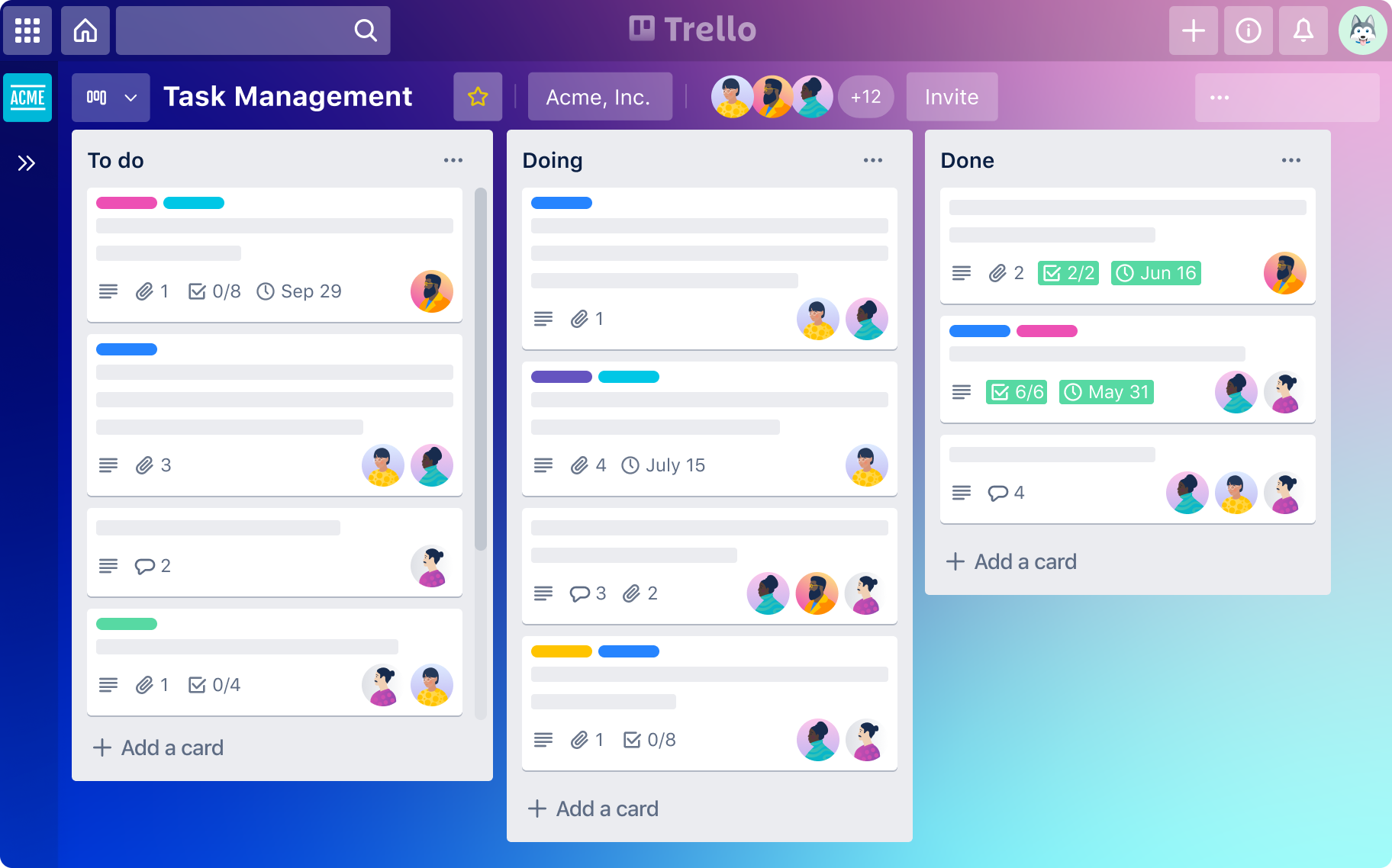
Image source: trello.com
Functional overview:
- Visual organization: Trello employs boards to represent projects, lists for task categories, and cards for individual tasks. This structure allows teams to easily visualize and manage their workflows.
- Checklists and due dates: Within each card, users can add checklists to break down tasks into smaller steps and set due dates to ensure timely completion.
- Labels and attachments: Cards can be color-coded with labels for categorization and priority setting. Additionally, users can attach files directly to cards, centralizing all relevant information.
- Comments and notifications: Team members can comment on cards, facilitating communication and collaboration. Notifications keep everyone informed about updates and changes.
- Power-ups : Trello offers power-ups with other tools like Slack, Google Drive, and calendar applications, enhancing its functionality.
Strengths:
- User-friendly interface: Trello's drag-and-drop functionality and simple layout make it accessible for users of all technical levels.
- Flexibility: The tool can be customized to fit various workflows, from simple to complex projects.
- Collaboration features: Real-time updates, comments, and notifications promote effective team collaboration.
- Mobile accessibility: Trello's mobile app ensures that team members can manage tasks on the go.
Limitations:
- Limited advanced features: While Trello is excellent for basic task management, it lacks advanced project management features like Gantt charts and time tracking.
- Scalability concerns: For large teams or complex projects, Trello's simplicity might become a limitation, requiring additional tools or to meet all needs.
4. Monday.com: Best for customizable workflows
Monday.com is a versatile work operating system designed to streamline project management through customizable workflows, automation, and real-time collaboration. Its visual interface and robust features make it suitable for retail teams managing complex projects across multiple locations and departments.
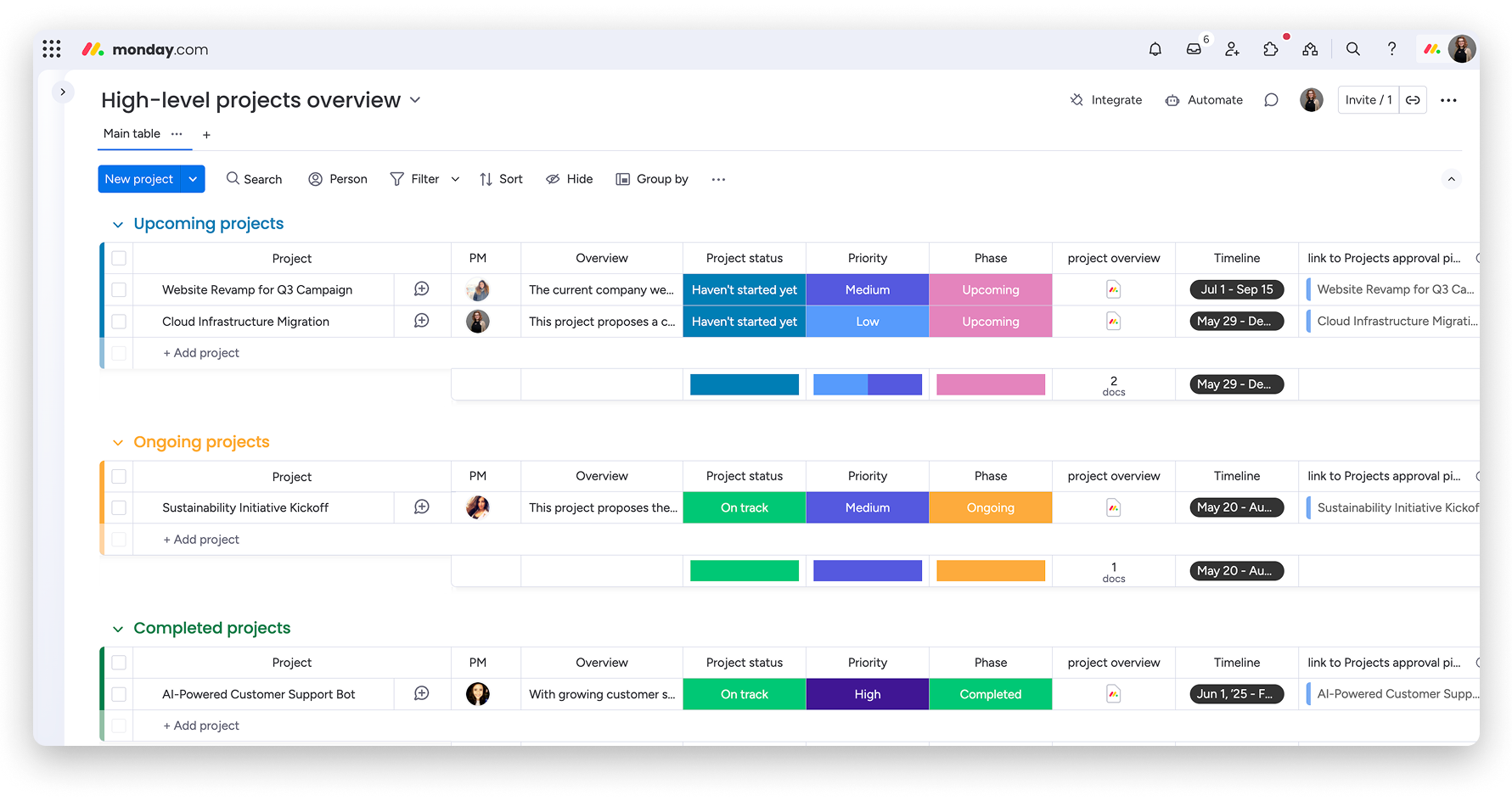
Image source: monday.com
Functional overview:
- Customizable dashboards: Monday.com allows users to create personalized dashboards to track project progress, budgets, timelines, and team workloads, providing a comprehensive overview of all ongoing tasks.
- Visual project tracking: The platform offers various views, including Kanban, Gantt charts, and timelines, enabling teams to visualize tasks and dependencies effectively.
- Automation: Monday.com supports automation of repetitive tasks, such as status updates and notifications, reducing manual effort and increasing efficiency.
- Collaboration tools: Teams can communicate in real-time, share files, and provide feedback directly within the platform, ensuring seamless collaboration.
Strengths:
- User-friendly interface: Monday.com's intuitive design makes it accessible to users with varying levels of technical expertise.
- Scalability: The platform can accommodate teams of all sizes, from small businesses to large enterprises, adapting to their evolving needs.
- Advanced reporting: Monday.com offers advanced reporting features, allowing teams to generate detailed insights into project performance and resource allocation.
- Mobile accessibility: The mobile app ensures that team members can manage tasks and collaborate on the go, enhancing flexibility.
Limitations:
- Learning curve: New users may experience a learning curve due to the platform's extensive features and customization options.
- Pricing: While Monday offers a free plan, access to advanced features requires a subscription, which may be a consideration for budget-conscious teams.
5. Wrike: Best for enterprise retail management
Wrike is a comprehensive project management and collaboration platform designed to streamline workflows, enhance team collaboration, and provide real-time insights. Its robust features make it suitable for retail teams managing complex projects across multiple locations and departments.
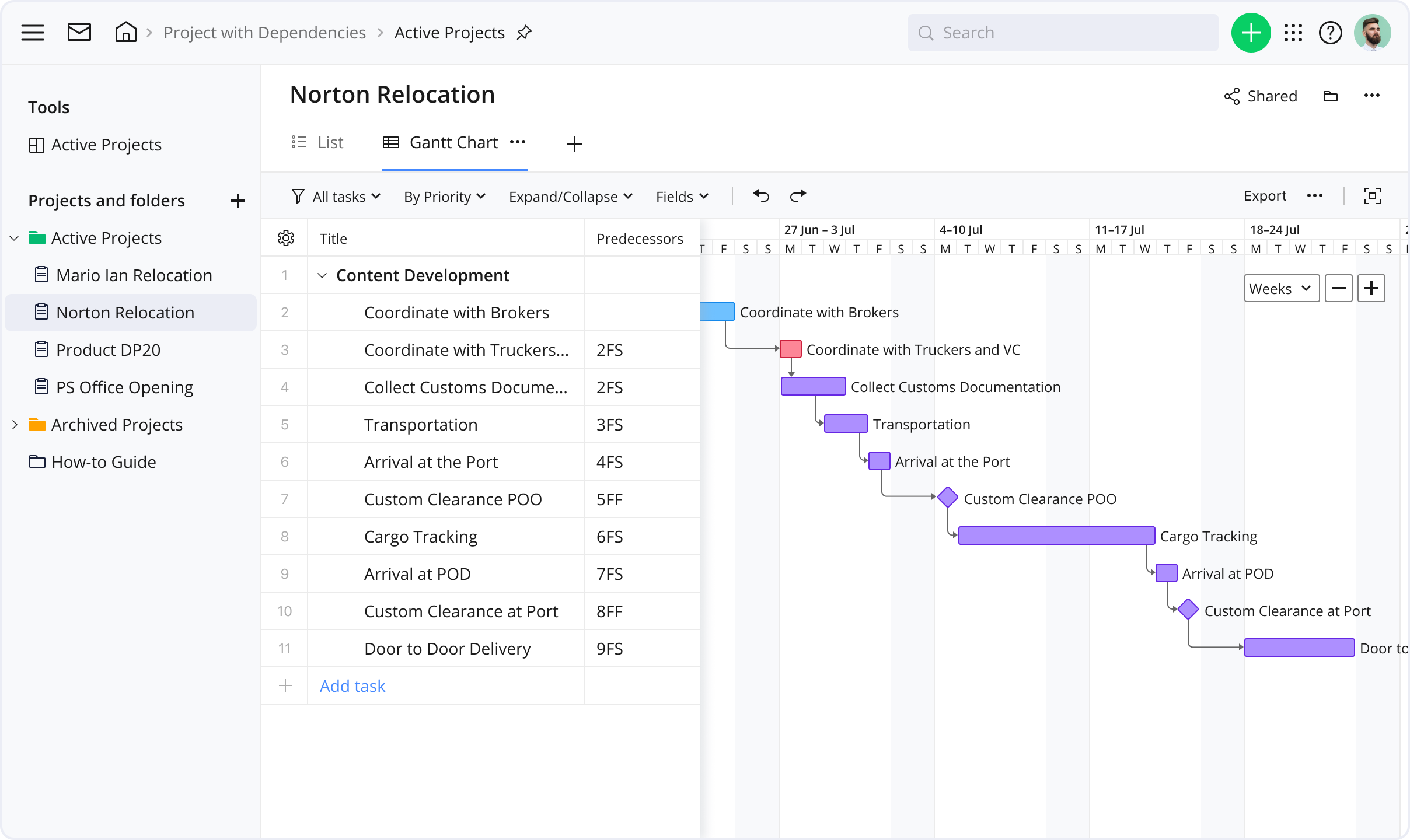
Image source: wrike.com
Functional overview:
- Customizable dashboards: Wrike allows users to create personalized dashboards to track project progress, budgets, timelines, and team workloads, providing a comprehensive overview of all ongoing tasks.
- Visual project tracking: The platform offers various views, including Gantt charts, Kanban boards, and calendars, enabling teams to visualize tasks and dependencies effectively.
- Automation: Wrike supports automation of repetitive tasks, such as status updates and notifications, reducing manual effort and increasing efficiency. Additionally, AI predicts project risks and generates detailed reports.
- Resource and time management: Wrike provides tools for resource planning, time tracking, and budgeting, helping teams allocate resources effectively and manage project costs.
- Collaboration tools: Teams can communicate in real-time, share files, and provide feedback directly within the platform, ensuring seamless collaboration.
Strengths:
- Comprehensive feature set: Wrike offers a wide range of features, including customizable workflows, detailed reporting, and advanced resource management, making it suitable for complex retail projects.
- Scalability: The platform can accommodate teams of all sizes, from small businesses to large enterprises, adapting to their evolving needs.
- Advanced reporting and analytics: Wrike provides real-time reporting tools that allow teams to measure project performance and make data-driven decisions.
- Capabilities: Wrike collaborates with various third-party applications, including Slack, Google Drive, and CRM systems, centralizing all project-related data.
Limitations:
- Complexity for new users: Due to its extensive features, new users may experience a learning curve. Adequate training and onboarding are recommended to fully leverage the platform's capabilities.
- Pricing: While Wrike offers a free plan, access to advanced features requires a subscription, which may be a consideration for budget-conscious teams.
6. Smartsheet: Best for data-driven retail projects
Smartsheet is a cloud-based platform that combines the familiarity of spreadsheets with powerful project management features. It's designed to help teams plan, track, and automate work processes, making it particularly useful for retail operations that require structured data management and cross-department coordination.
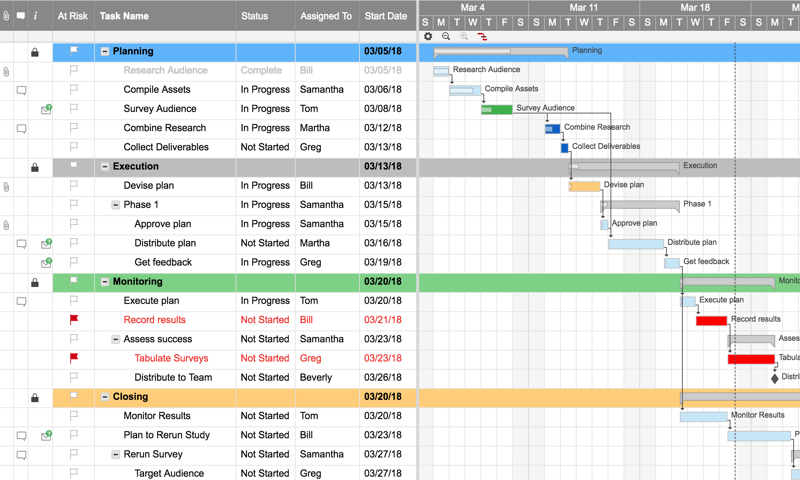
Image source: smartsheet.com
Functional overview:
- Spreadsheet interface: Smartsheet offers a grid-based interface similar to Excel, allowing users to manage tasks, timelines, and budgets in a familiar format. This design facilitates quick adoption for teams accustomed to spreadsheet tools.
- Gantt charts and calendar views: Users can visualize project timelines and dependencies through customizable Gantt charts and calendar views, aiding in effective scheduling and resource allocation.
- Automation and workflows: The platform supports automation of repetitive tasks, such as sending reminders, updating statuses, and assigning tasks, streamlining workflows and reducing manual effort.
- Resource management: Smartsheet provides tools to track team availability, allocate resources, and monitor workloads, ensuring efficient utilization across projects.
- Reporting and dashboards: Users can create real-time dashboards and generate reports to monitor project progress, track key performance indicators (KPIs), and make data-driven decisions.
Strengths:
- Familiar interface: The spreadsheet-like interface makes it easy for users to transition from Excel, reducing the learning curve associated with adopting new software.
- Customizable views: Smartsheet offers various views, including grid, Gantt, card, and calendar, allowing teams to choose the most suitable format for their project needs.
- Collaboration features: The platform supports real-time collaboration, enabling team members to share updates, communicate through comments, and attach files, enhancing teamwork and transparency.
- Scalability: Smartsheet is suitable for both small teams and large enterprises, offering scalability to manage projects of varying complexity and size.
Limitations:
- Performance with large data sets: Some users have reported slower performance when handling large volumes of data, which could impact efficiency in extensive retail projects.
- Mobile app limitations: The mobile application may not offer the full range of features available on the desktop version, potentially limiting functionality for users on the go.
7. ClickUp: Best for multi-department collaboration
ClickUp is a comprehensive project management platform designed to streamline workflows, enhance team collaboration, and provide real-time insights. Its robust features make it suitable for retail teams managing complex projects across multiple locations and departments.
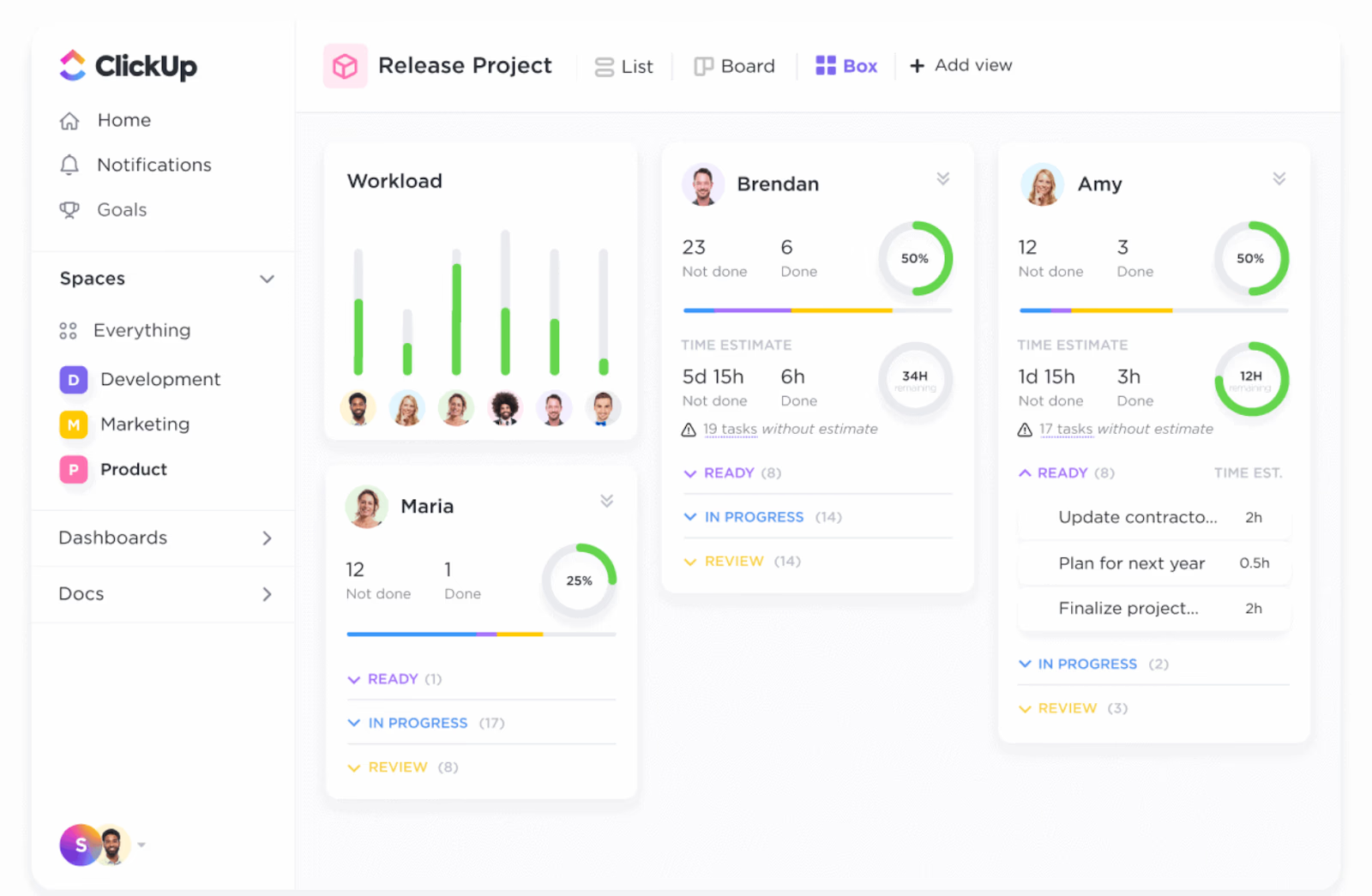
Image source: clickup.com
Functional overview:
- Customizable dashboards: ClickUp allows users to create personalized dashboards to track project progress, budgets, timelines, and team workloads, providing a comprehensive overview of all ongoing tasks.
- Visual project tracking: The platform offers various views, including Gantt charts, Kanban boards, and calendars, enabling teams to visualize tasks and dependencies effectively.
- Automation: ClickUp supports automation of repetitive tasks, such as status updates and notifications, reducing manual effort and increasing efficiency. Additionally, AI predicts project risks and generates detailed reports.
- Resource and time management: ClickUp provides tools for resource planning, time tracking, and budgeting, helping teams allocate resources effectively and manage project costs.
- Collaboration tools: Teams can communicate in real-time, share files, and provide feedback directly within the platform, ensuring seamless collaboration.
Strengths:
- Comprehensive feature set: ClickUp offers a wide range of features, including customizable workflows, detailed reporting, and advanced resource management, making it suitable for complex retail projects.
- Scalability: The platform can accommodate teams of all sizes, from small businesses to large enterprises, adapting to their evolving needs.
- Advanced reporting and analytics: ClickUp provides real-time reporting tools that allow teams to measure project performance and make data-driven decisions.
- Capabilities: ClickUp with various third-party applications, including Slack, Google Drive, and CRM systems, centralizing all project-related data.
Limitations:
- Complexity for new users: Due to its extensive features, new users may experience a learning curve. Adequate training and onboarding are recommended to fully leverage the platform's capabilities.
- Pricing: While ClickUp offers a free plan, access to advanced features requires a subscription, which may be a consideration for budget-conscious teams.
How to choose the right tool for your retail team
Choosing the right project management tool is crucial for retail teams, where fast-paced operations and cross-department collaboration are the norms. Several factors should guide the decision:
- Scalability: The tool should grow with your business, supporting more stores, larger teams, and more complex projects without slowing down operations.
- Usability: A user-friendly interface ensures quick adoption across teams, from store managers to marketing staff.
- Mobile access: Retail teams are often on the move, so robust mobile functionality allows updates, approvals, and task management from anywhere.
- Pricing: Evaluate the cost against your team size and features needs to ensure it fits within budget while offering the functionalities required.
Quick tip: Start with a pilot project before rolling the tool out organization-wide. This lets you test workflows, gather feedback from users, and adjust configurations before full-scale adoption, minimizing disruption and maximizing effectiveness.
Best practices for successful retail project management
Successful retail project management depends on clear planning, organization, and ongoing oversight. Adopting best practices ensures projects run smoothly and deliver the expected results.
- Set realistic timelines and budgets: Avoid overpromising by assessing resources, dependencies, and potential risks before committing to deadlines or expenditures. This helps prevent delays and cost overruns.
- Use dashboards for visibility: Centralized dashboards give teams and managers a real-time overview of project progress, making it easier to identify bottlenecks and keep tasks on track.
- Automate repetitive workflows: Automating recurring tasks, approvals, or notifications reduces manual effort and minimizes errors, freeing teams to focus on strategic work.
- Keep all communication centralized: Using a single platform for updates, comments, and file sharing ensures everyone stays informed, reducing miscommunication across departments.
- Regularly review project KPIs: Track key performance indicators like timeline adherence, budget compliance, and sales impact to measure success, identify improvement areas, and guide future projects.
These practices help retail teams streamline operations, improve collaboration, and achieve consistent results across diverse projects.
Conclusion
Structured project management is essential for retail success, helping teams navigate tight deadlines, coordinate across departments, and deliver consistent results. With the right tool, such as Lark, retailers can centralize communication, streamline workflows, and increase operational efficiency, ensuring projects move faster and more smoothly. Embracing modern project management solutions empowers retail teams to stay ahead of trends, respond quickly to challenges, and achieve their goals with confidence. It's time to modernize your workflows and turn every retail project into a well-orchestrated success.
FAQs
What is the role of a project manager in retail?
A retail project manager oversees the planning, execution, and completion of projects such as store openings, product launches, marketing campaigns, or system rollouts. They coordinate teams across departments, manage budgets and timelines, resolve issues, and ensure the project meets its objectives efficiently.
How can project management tools improve retail operations?
Project management tools streamline communication, centralize tasks, and provide real-time visibility into project progress. They help automate repetitive workflows, track deadlines and budgets, and enhance collaboration across departments, ensuring projects stay on schedule and aligned with business goals.
Which is the best project management software for retail chains?
The best software depends on your team size, complexity of projects, and specific needs. Popular options include Lark,Asana, Trello, Monday.com, Wrike, Smartsheet, and ClickUp. Each offers features like task tracking, collaboration, automation, and reporting to suit retail workflows.
How does Lark help retail teams manage multiple projects?
Lark centralizes communication, task management, and document sharing in one platform. Retail teams can assign tasks, track progress, automate approvals, and collaborate in real time, making it easier to manage multiple projects across stores and departments efficiently.
What challenges do retailers face in project implementation?
Retailers often deal with tight deadlines, dispersed teams, inventory dependencies, and changing customer trends. Miscommunication, delays, and resource constraints can impact project outcomes. Structured project management and the right tools help mitigate these challenges by improving coordination and visibility.
Related reading
Table of contents
Start using Lark today

Manage all your work in one place
Boost team efficiency by 10x
Save up to 70% on software costs
Table of contents
Start using Lark today
Manage all your work in one place
Boost team efficiency by 10x
Save up to 70% on software costs
Keep reading







2026 Lark Technologies Pte. Ltd.
Headquartered in Singapore with offices worldwide.






Explore: