














Waterfall Project Management Methodology: A Complete Guide

Ryan Tanner
Product Marketing Specialist
Sep 18, 2026
Ryan Tanner
Sep 18, 2026

10 min read


Every successful project relies on the right framework. Choosing the right project management methodology can mean the difference between staying on track—or falling behind.
The Waterfall project management methodology is a classic, sequential, step-by-step approach. It has been widely adopted in industries like construction, IT, manufacturing, and government projects where structure and documentation are essential.
While often seen as traditional, Waterfall can be made more efficient with modern project management tools like Lark. With features for planning, tracking, reporting, and automating workflows, teams can run structured projects with ease.

What is the Waterfall methodology in project management?
The Waterfall methodology in project management is one of the earliest structured frameworks, first introduced in the 1970s to bring clarity and order to large, complex projects. It is a linear model where work progresses through clearly defined stages, including requirements, design, implementation, testing, and deployment. Each step must be completed in full before the project can move forward.
The core principle of this approach is its sequential structure. Unlike Agile or hybrid models, which allow for iteration and flexibility, Waterfall requires all planning and documentation to be completed at the start. This makes it highly predictable, with fewer surprises during execution, but also less adaptable to change once the project is underway.
Because of its focus on structure and documentation, the waterfall project management methodology is ideal for industries like construction, government, and regulated IT projects. For instance, building a bridge or developing healthcare software benefits from its step-by-step process, ensuring compliance, accuracy, and reliable deliverables.
How to use Lark to practice the Waterfall project management methodology
1. Requirements gathering — capture, review, and lock the source of truth
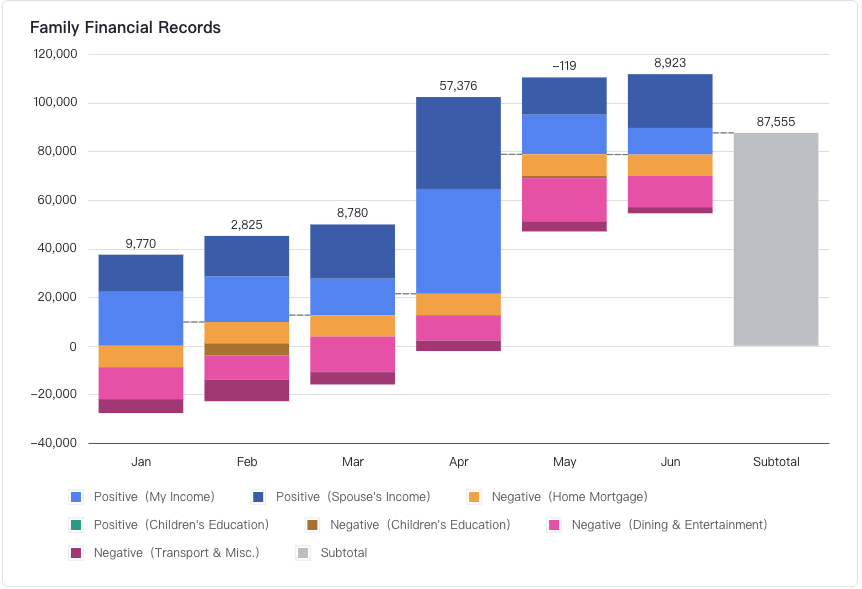
Start drafts in Lark Docs so stakeholders can co-edit requirements in real time, leave inline comments, and @-mention subject-matter experts for quick clarifications. Use version management to save official snapshots (e.g., "Requirements v1.0") so you can compare changes or restore a prior state when needed; once approved, move the finalized doc into Lark Wiki for a single source of truth and long-term discoverability. For requirement sequencing and high-level budget/timeline visualizations, embed a waterfall chart in Lark Sheets to show how pieces build toward the project baseline. Set doc and wiki permissions (view/edit) to control who can change requirements and use Forms (or embedded Sheets) to collect stakeholder sign-offs if needed.
2. System and design planning — map responsibilities, dependencies and milestone views in Lark Base
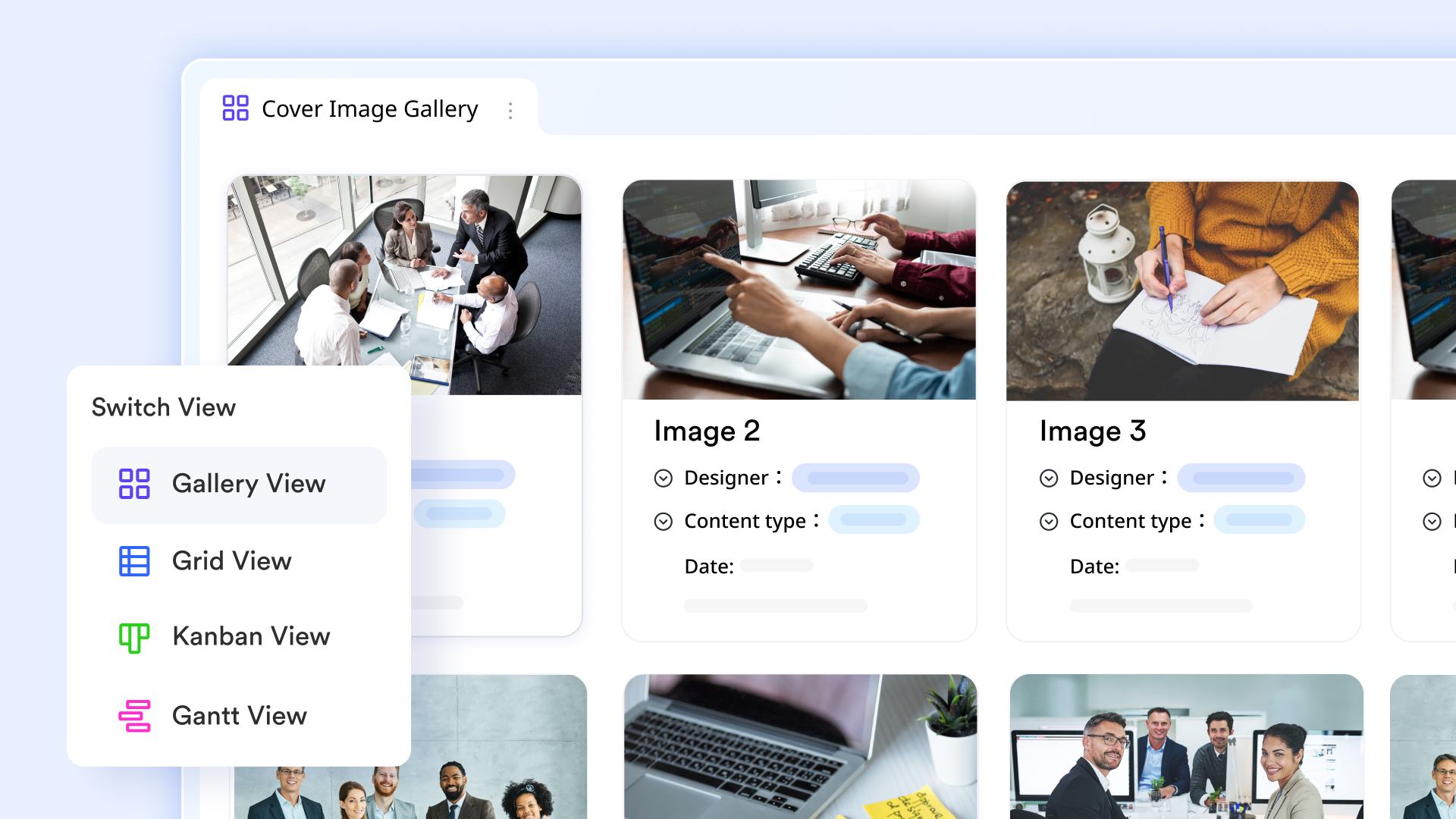
Use Lark Base as your planning backbone: create a "System Design" base with fields for component, owner, estimated effort, dependencies (link/lookup fields), and risk. Configure multiple views — table/grid for data entry, Kanban for handoff states, and a Gantt or timeline view for schedule sequencing — so different stakeholders see the same data in the view that helps them act. Add calculated/flow fields (status rollups, percent complete) and build a Dashboard with blocks that surface milestone slippage, upcoming approvals, and resource load. Finally, set Base automations to trigger actions when conditions change (e.g., when a component's design is approved, automatically create implementation tasks or calendar events). This turns static plans into living, actionable artifacts.
3. Implementation — break work into Lark Tasks, assign ownership and track progress
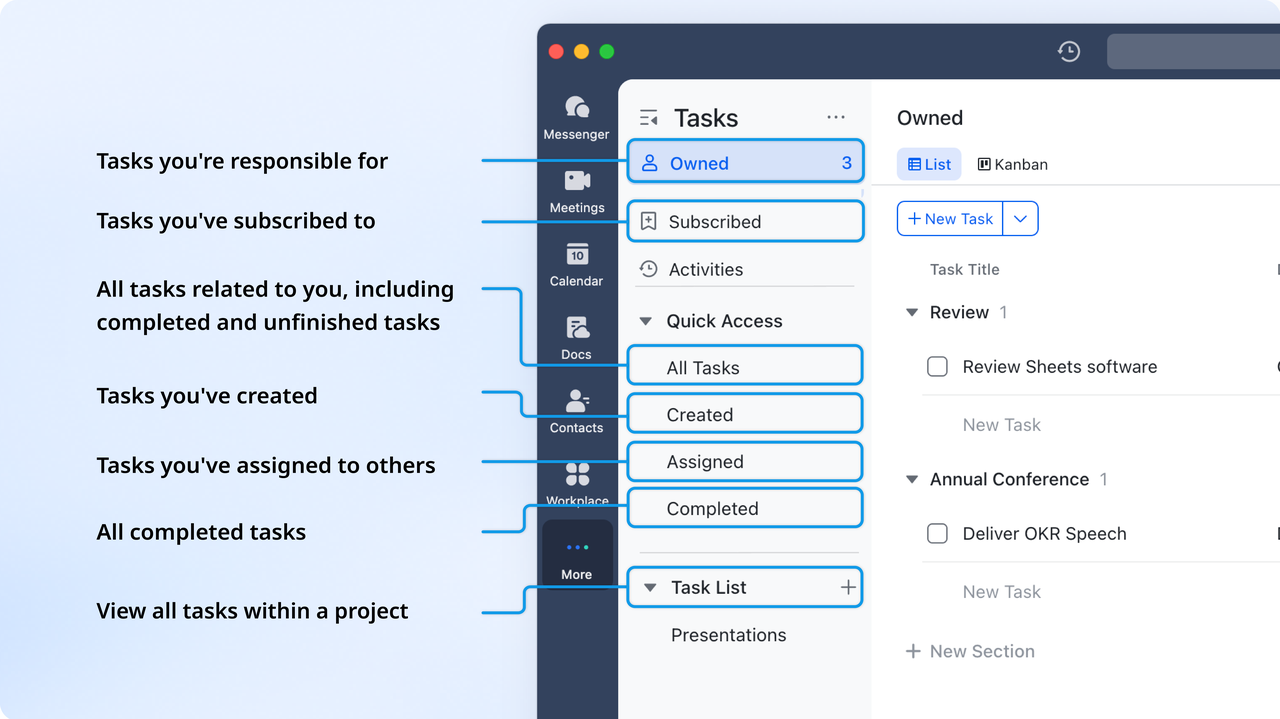
During implementation, use Lark Tasks as your operational task manager: create parent tasks for each deliverable and nested sub-tasks for granular work (Lark supports multiple nested levels), assign owners, set start/due dates and priorities, and add attachments/links back to design Lark Docs or Lark Base records. Convert important chat decisions into tasks straight from Lark Messenger when discussions produce action items. Use Task Dashboards or a Base Gantt view (if you prefer schedule-level planning inside Base) to monitor progress and spot blocked items. If you need repeatable work, save task templates or use Base automations to spin up prepopulated task lists for recurring implementation patterns.
4. Testing / verification — centralize test cases, defects and traceability
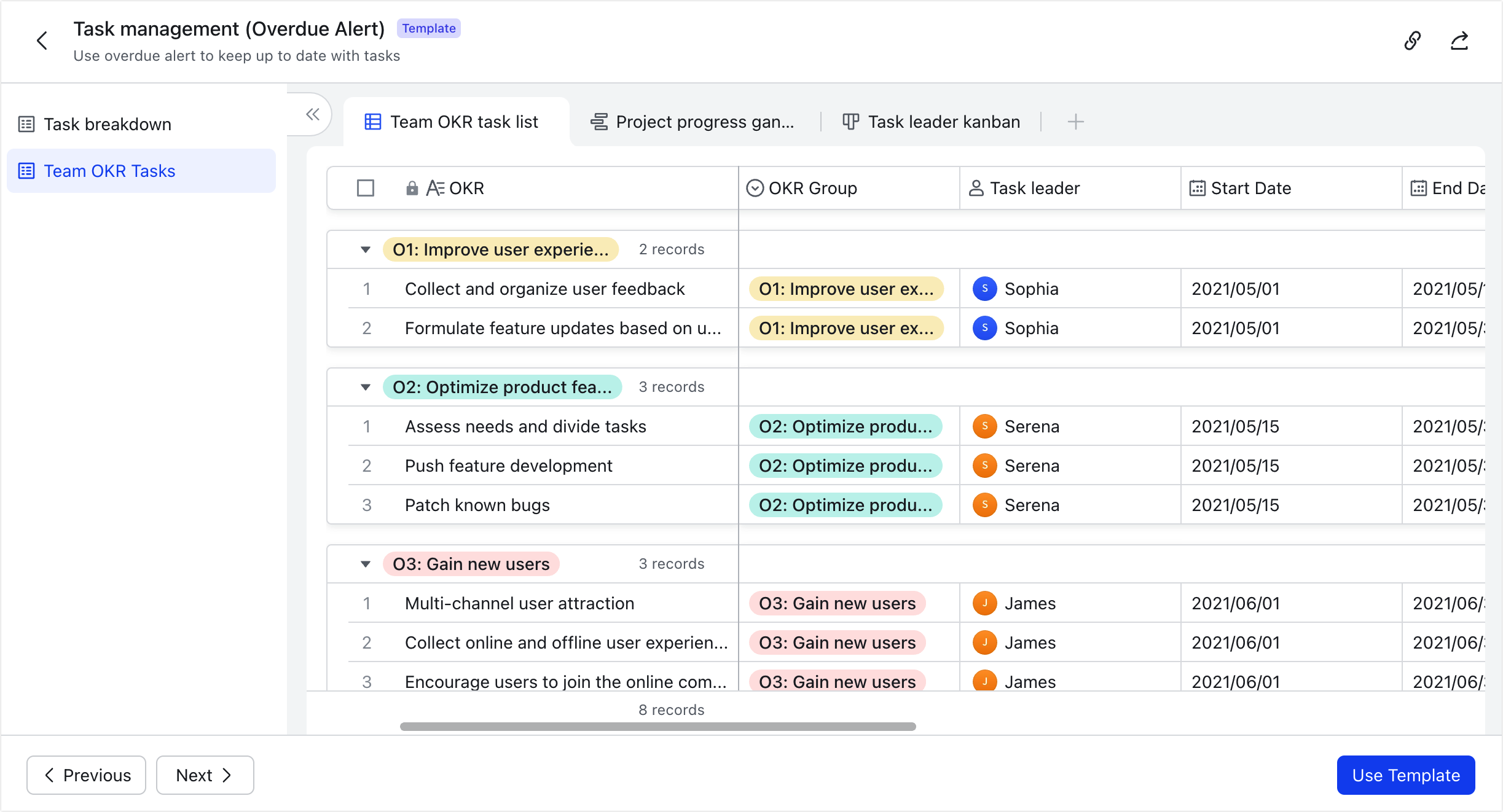
Keep test plans and test cases in Lark Docs (versioned so every test run is auditable). Use a Base table (bug/issue tracker) to log defects with fields for severity, steps to reproduce, assignee, linked requirement ID, and status. Create automations so when a defect is created or its status changes it notifies the relevant assignee/team in Lark Messenger, or automatically creates a follow-up task in Tasks. For formal sign-offs (release to QA / acceptance), use Lark Approval templates or workflows so approvals are tracked and time-stamped — this is especially important in regulated projects. Use Docs' version history to show how test artifacts evolved between runs.
5. Deployment and maintenance — schedule, communicate, and automate follow-ups
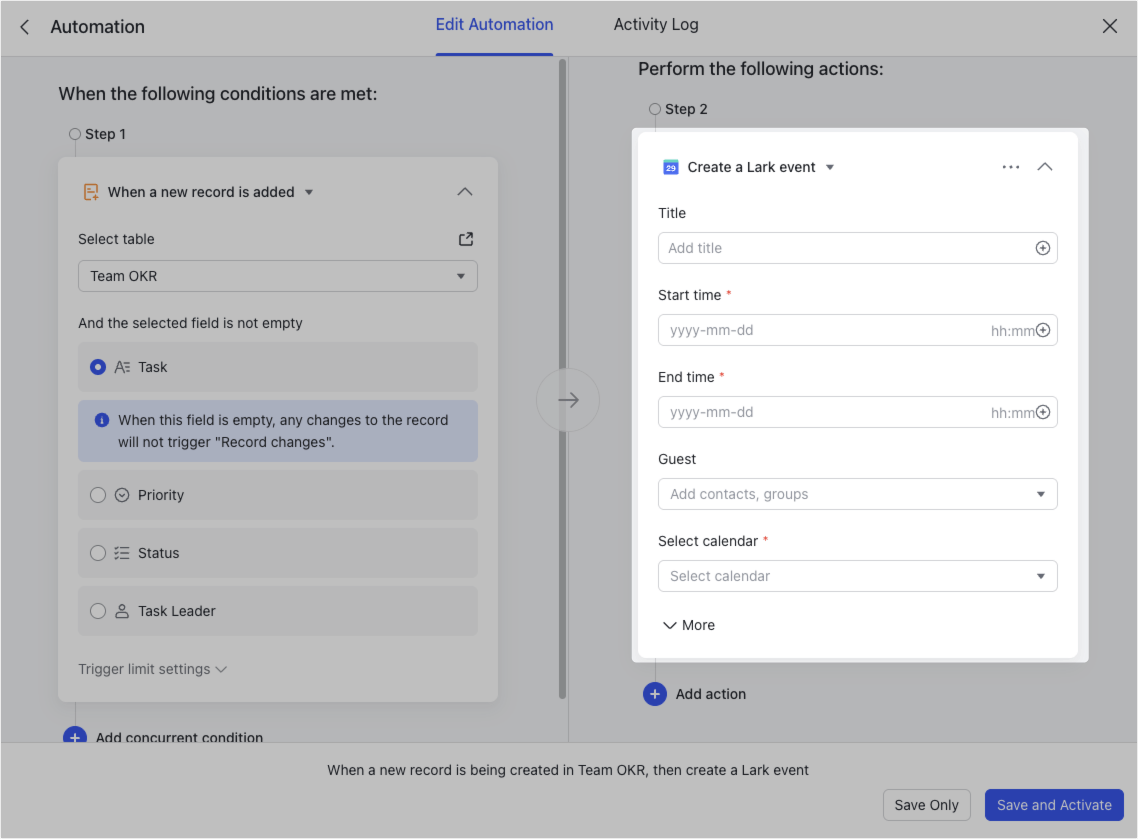
Schedule releases and maintenance windows in Lark Calendar and enable Calendar Assistant reminders so everyone gets timely notifications. Use Base automations to create calendar events and tasks from successful build flags or milestone updates (e.g., when "Deployment Ready" is set, auto-create a release event and a post-deploy checklist). During deployment, use Lark Messenger channels or t to broadcast status updates, pin the release checklist, and escalate issues quickly. After deployment, use Tasks (recurring) for maintenance checks and Wiki to store runbooks and post-mortem notes; tie Approval workflows to any post-deployment sign-offs (handover to ops, security checklist completed). This keeps launches repeatable and auditable.
- Starter plan: Free forever plan that includes 11 powerful tools for up to 20 users. It also comes with 100GB of storage, 1000 automation runs, AI translations, and more.
- Pro plan: $12/user/month (billed annually) for up to 500 users. It includes everything in Starter plus a group calling for up to 500 attendees, 15TB of storage, 50,000 automation runs, and more.
- Enterprise plan: Contact sales for custom pricing. Supports unlimited users and includes even more automation runs and advanced security, compliance, and management features.
Advantages of the Waterfall methodology
One of the reasons the waterfall project management methodology remains popular is its ability to provide structure and predictability. Its sequential nature makes it easy for both managers and stakeholders to track progress and ensure accountability.
- Clear structure and deliverables: Because each phase must be completed before moving on, the Waterfall approach provides a straightforward roadmap. Stakeholders know exactly what outputs to expect at every stage, from requirements to final delivery.
- Easy to manage and understand: The methodology's linear flow makes it simple for teams of all sizes to follow. New team members can quickly get up to speed by reviewing documentation and understanding where the project currently stands.
- Works well for predictable projects with fixed requirements: In industries like construction or government contracts, where changes are minimal and compliance is strict, Waterfall ensures stability. Teams can plan upfront and deliver with confidence.
- Strong documentation trail: Every step is documented, leaving behind a reliable record. This is especially useful for audits, compliance reporting, and knowledge transfer in long-term or large-scale projects.
Disadvantages and challenges of Waterfall methodology
While the waterfall project management methodology offers clarity and structure, it also has limitations that can make it less effective in fast-changing or uncertain environments. Teams should weigh these challenges before choosing it as their framework.
- Inflexible if requirements change: Because Waterfall requires sign-off before moving to the next phase, it becomes difficult and costly to revisit earlier steps. If requirements evolve mid-project, the rigid structure can cause delays or force rework.
- Issues discovered late (testing phase): Testing and verification occur only after implementation is complete. This means critical defects or misalignments may only surface near the end, increasing the risk of costly fixes.
- Slow adaptation to dynamic environments: In industries where priorities shift rapidly, Waterfall's linear flow struggles to keep pace. Unlike Agile, it doesn't allow for iterative adjustments or frequent feedback loops.
- Risk of scope creep if requirements not locked: Although Waterfall thrives on fixed requirements, unclear or incomplete early documentation can lead to uncontrolled scope expansion, making budgets and timelines harder to maintain.
Waterfall vs Agile project management methodology
The waterfall project management methodology is linear and sequential: project phases flow one after another with heavy emphasis on upfront planning, formal documentation, and fixed deliverables. Agile, by contrast, is iterative and incremental — work is split into short cycles (sprints) with frequent feedback, continuous delivery, and an emphasis on adapting to change.
Key differences (quick):
- Waterfall = predictable, documentation-heavy, single-pass verification.
- Agile = flexible, feedback-driven, continuous improvement.
- Waterfall favors certainty and compliance; Agile favors speed and learning.
When to use each:
- Choose Waterfall for projects where requirements are stable, regulatory compliance is essential, and change is costly (e.g., large infrastructure, regulated software).
- Choose Agile for innovation-led, user-centric projects that benefit from rapid iteration and frequent stakeholder input (e.g., product features, exploratory UX work).
Sometimes a hybrid approach (Waterfall for hardware/regulatory components + Agile for software/features) gives the best of both worlds.
- For Waterfall: use Lark Base to model sequential components with timeline/Gantt views, Lark Docs/Wiki for formal specs and approvals, Tasks for stepwise execution, and Calendar/Approval for locked milestones.
- For Agile: use Base Kanban views or Tasks sprint boards, short-lived Docs for backlog items, and Messenger for rapid standups and reviews.
Because Lark supports multiple views, templates, and automations, teams can start in Waterfall and progressively adopt Agile practices (e.g., add sprint boards, convert tasks to iterative cycles) without moving data out of the platform.
Practical use cases of the Waterfall methodology
The waterfall project management methodology works best in projects where predictability, documentation, and compliance are non-negotiable. With Lark's connected features, teams in different industries can streamline each stage while maintaining control and traceability.
- Construction projects: Large construction initiatives often require strict adherence to blueprints and fixed milestones. Teams can store and update blueprints in Lark Docs, while milestone schedules are tracked in Lark Calendar. Contractors and project managers can rely on version history to ensure everyone is aligned with the latest requirements.
- IT projects (compliance): For IT initiatives subject to audits and regulatory checks, Lark Base can be used to maintain test documentation, approvals, and defect logs. Coupled with Approval workflows, teams gain a clear audit trail for compliance reporting.
- Government and defense contracts: These projects demand high security and strict documentation control. Lark Wiki centralizes critical project documents, while automated sign-offs via Approval ensure accountability. Workflows can be designed so no stage proceeds without formal authorization.
- Manufacturing and engineering: Teams managing complex assemblies can use Lark Sheets waterfall templates to track bills of materials (BOMs), resource allocations, and quality checks. Waterfall charts help visualize dependencies and production stages.
- Large-scale infrastructure: Projects like highways or power plants benefit from project-wide visibility. Lark Base dashboards consolidate data across phases, displaying KPIs such as progress by milestone, resource usage, and pending risks in a single view.
Conclusion
The waterfall project management methodology remains a trusted framework for projects that demand structure, predictability, and a clear sequence of deliverables. By moving step by step — from requirements gathering through design, implementation, testing, and deployment — teams gain control, documentation, and visibility across the entire lifecycle.
With modern platforms like Lark, Waterfall no longer has to feel rigid or outdated. Using Docs, Wiki, Base, Tasks, Sheets, Calendar, Messenger, and Approval workflows, teams can apply Waterfall's disciplined approach while benefiting from real-time collaboration, automation, and easy tracking. Templates and dashboards ensure every phase is managed with precision, while centralized documentation keeps stakeholders aligned.
FAQs
How do you choose between Waterfall and Agile for a project?
Choose the waterfall project management methodology if requirements are fixed, compliance is critical, or the cost of mid-project changes is high. Agile is better for projects that require flexibility, rapid iteration, or continuous stakeholder feedback.
Are there certifications for Waterfall project management?
Yes. While there isn't a single "Waterfall certification," many PMP (Project Management Professional) and PRINCE2 training programs cover Waterfall as a core methodology.
Can Waterfall be used for remote or distributed teams?
Absolutely. With collaboration platforms like Lark, remote teams can document requirements in Docs/Wiki, manage tasks in Base and Tasks, and stay aligned through Calendar and Messenger.
Can small businesses use Waterfall methodology?
Yes. Even small teams benefit from Waterfall's structure, especially for client projects with clear deliverables. Lark templates make setup fast without overwhelming smaller organizations.
How do Waterfall charts support project management?
Waterfall charts in Lark Sheets help visualize budgets, dependencies, and project timelines, making it easier to spot gaps or resource issues early.
How can Lark's templates make Waterfall easier for beginners?
Lark provides ready-to-use templates for project phases, tasks, and dashboards. Beginners can start with structured workflows immediately, without building everything from scratch.
Related reading
Table of contents
Start using Lark today

Manage all your work in one place
Boost team efficiency by 10x
Save up to 70% on software costs
Table of contents
Start using Lark today
Manage all your work in one place
Boost team efficiency by 10x
Save up to 70% on software costs
Keep reading







2026 Lark Technologies Pte. Ltd.
Headquartered in Singapore with offices worldwide.






Explore: