Modern organizations run on workflows, yet most teams don’t clearly see how work moves between people, tools, and decisions. Tasks pass through emails, chats, spreadsheets, and approvals, creating invisible delays and confusion. Workflow mapping solves this by turning real-world processes into clear visual systems that reveal how work actually flows. Workflow mapping is used to create visual representations of workflows and processes within organizations.
Instead of relying on assumptions or outdated SOPs, workflow maps show every step, decision, and handoff, making inefficiencies and ownership gaps easy to spot. From employee onboarding to invoice processing, mapped workflows create the foundation for smarter operations.
This guide covers workflow mapping methods, diagram types, step-by-step techniques, leading software, and how platforms like Lark use AI and automation to turn static maps into living systems.
What is workflow mapping in simple terms
Workflow mapping, in simple terms, is the practice of visually showing how a task or process moves from start to finish. It lays out every step, decision, and handoff so people can clearly see how work actually gets done, rather than how it is assumed to happen. Whether it’s approving a or handling a customer request, a map shows who does what, in what order, and which tools to use.
Through workflow process mapping, teams can identify delays, duplicate work, missing approvals, or unclear responsibilities that slow everything down. Instead of guessing where problems are, they become visible on the map. Teams can easily create a process map using modern tools, including AI-powered features, templates, and by importing existing process maps from popular diagramming software.
Modern teams often use workflow mapping software to create these diagrams digitally, update them easily, and even connect them to automation. Many solutions offer a user-friendly platform that simplifies collaboration and process mapping for users of all experience levels. This makes workflow mapping not just a , but a way to continuously improve and optimize how work flows across the organization.
5 methodologies for workflow process mapping
Workflow process mapping can be done using different methodologies depending on how detailed, technical, or improvement-focused a team wants to be.
Each approach offers a unique way to visualize, analyze, and and systems.
- Basic flow mapping: This method uses simple shapes to show the sequence of steps in a process from start to finish. It is commonly created with a workflow mapping tool for quick, easy documentation.
- BPMN (Business Process Model and Notation): BPMN provides a standardized way to map complex processes involving systems, roles, and rules. It is widely used in enterprises that rely on advanced workflow mapping tools for compliance and automation.
- Value stream mapping: This methodology focuses on measuring time, delays, and value added at each step. It helps organizations remove waste and .
- Service blueprinting: Service blueprinting maps customer-facing actions along with behind-the-scenes processes. It is ideal for improving service quality and user experience.
- Data-driven workflow mapping: This approach uses system data and analytics from workflow process mapping tools to show how processes perform in real life, not just on paper.
4 types of workflow mapping diagrams
Workflow mapping diagrams come in different formats because no single for every type of process. Some diagrams focus on roles and handoffs, while others highlight decisions, timing, or value creation. Choosing the right diagram helps teams understand workflows more clearly and spot problems faster.
Swimlane diagrams
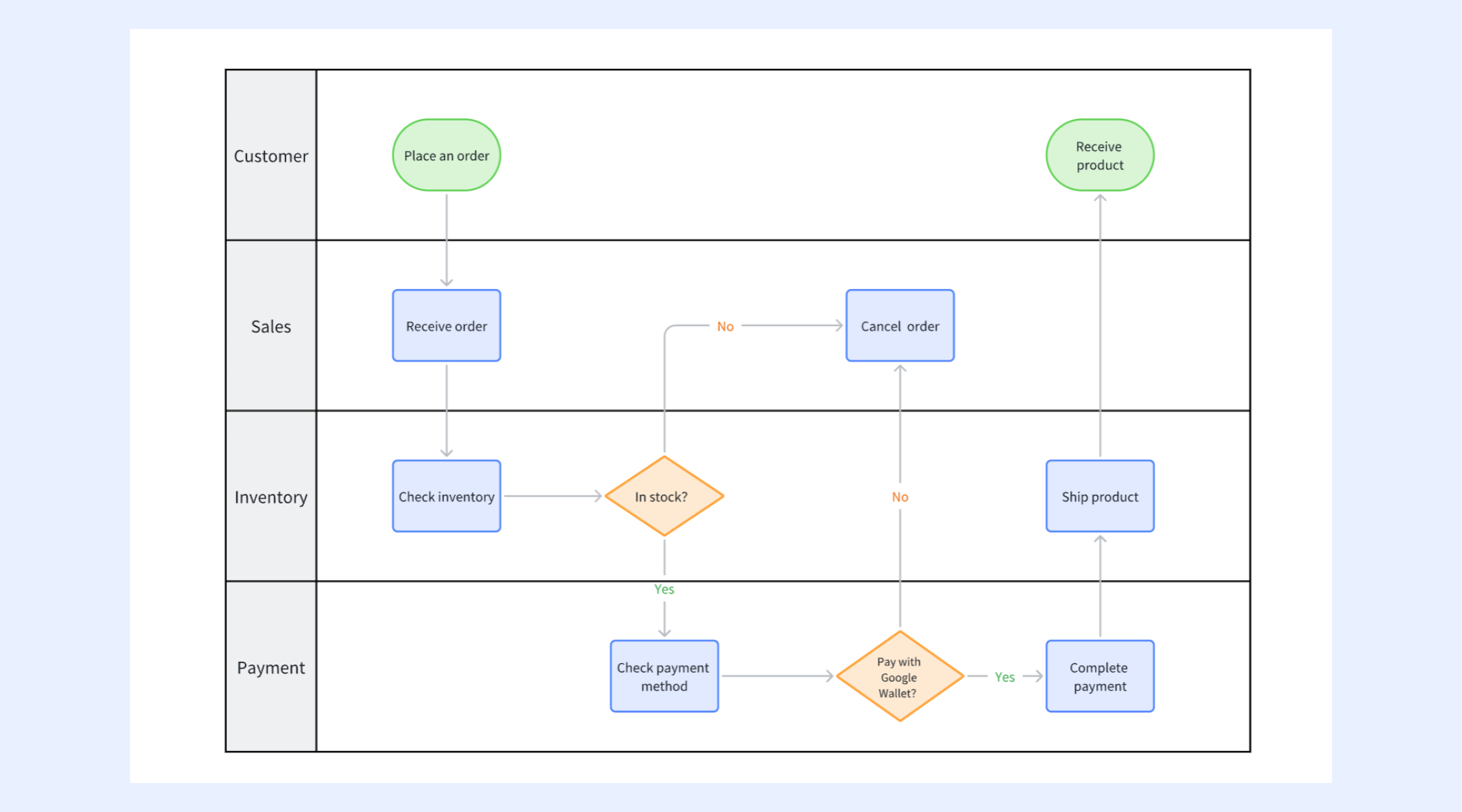
Swimlane diagrams organize a workflow by separating steps into lanes based on roles, teams, or systems. This makes it easy to see who is responsible for each part of the process and where handoffs occur. They are especially useful for identifying delays, overlaps, and accountability gaps in cross-functional workflows.
Flowcharts
Flowcharts show a workflow as a sequence of actions and decisions, using standardized symbols such as boxes and diamonds. They make it easy to follow how a process moves from start to finish without needing technical knowledge. Flowcharts are widely used to document procedures, , and clarify complex processes.
Value stream maps
Value stream maps visualize how work and through a process, showing time, delays, and value added at each step. They help teams identify waste, bottlenecks, and inefficiencies that slow down delivery. This makes them especially useful for process improvement, lean management, and operational optimization.
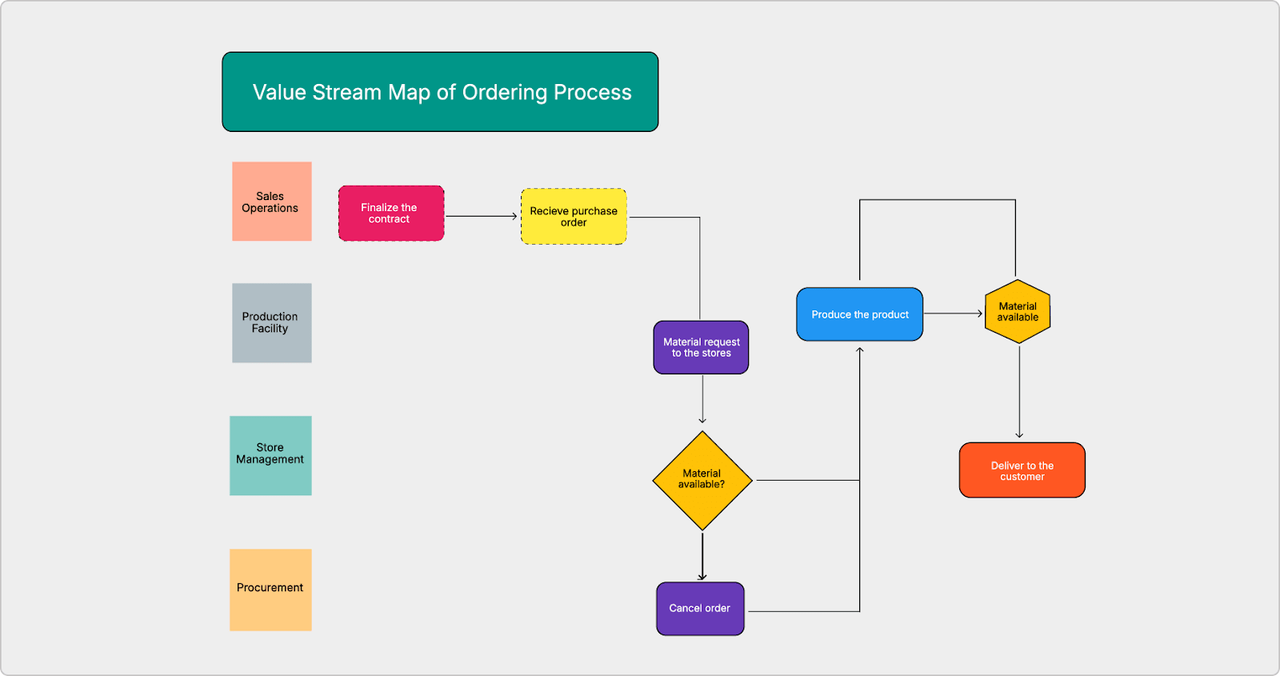
Image source: businessmap.io
Decision trees
Decision trees map out different paths a process can take based on specific conditions or choices. Each branch represents a possible outcome, making it easier to understand how decisions affect results. They are commonly used for approvals, risk analysis, and automated routing in complex workflows.
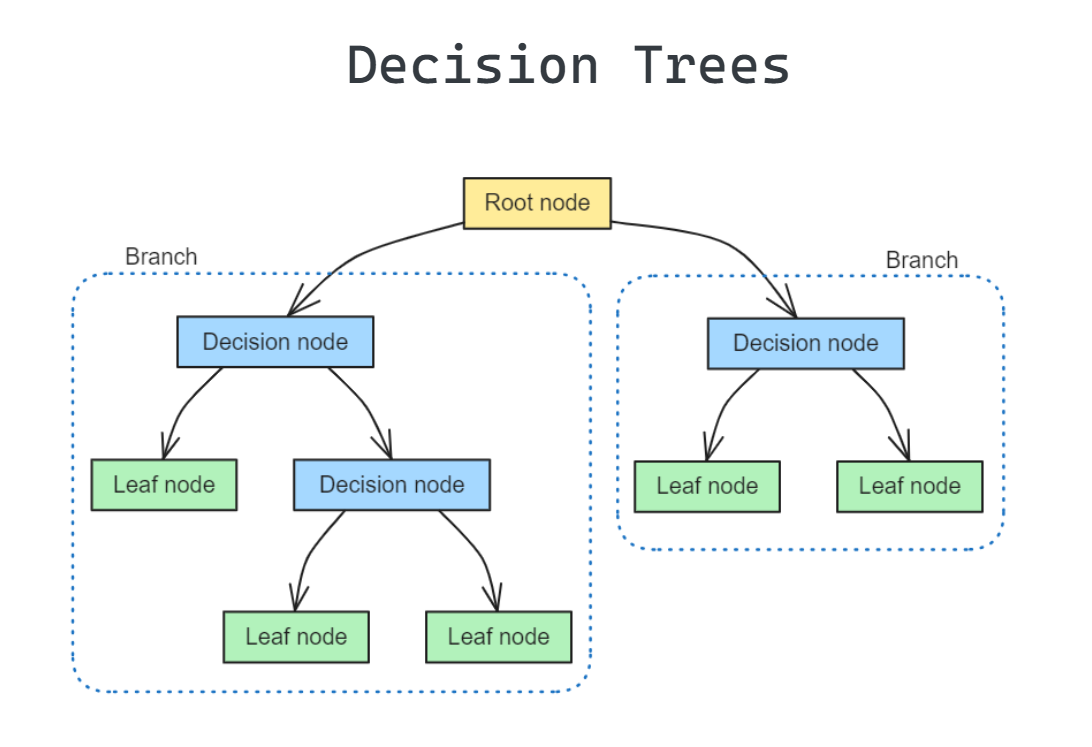
Image source: mlpills.substack.com
Steps on how to do workflow process mapping
Workflow process mapping works best when it follows a clear, rather than relying on guesswork. These steps help turn a rough idea of a process into a reliable workflow mapping template that teams can use.
Step 1: Identify scope
This step defines where the process begins and ends, so the map stays focused and relevant. A clear scope prevents unnecessary activities from being included and causes confusion.
Step 2: Capture real steps
You record what actually happens during the process, not what is written in manuals or policies. This ensures the workflow process mapping template reflects real working conditions.
Step 3: Add owners
Each task is assigned to a specific role, team, or system to avoid ambiguity. This makes it easier to see where responsibility sits at every stage.
Step 4: Validate flow
Stakeholders review the map to confirm that the sequence of steps is accurate and complete. Their feedback helps remove errors and identify missing or outdated actions.
Step 5: Finalize map
The workflow is refined into a clean, easy-to-read . It is then shared as a reference point for training, improvement, and automation.
See how teams simplify and improve their workflows
Start mapping: Try Lark to visualize workflows and put them into practice
offers a unified workspace where visual planning and real-world execution live side by side. Instead of letting process maps gather dust in separate documents, you can design clear, cross-functional blueprints that transition instantly into live, automated systems. With smart features for documents, , and , Lark helps your team move faster, reduce manual errors, and turn organizational strategy into daily practice.
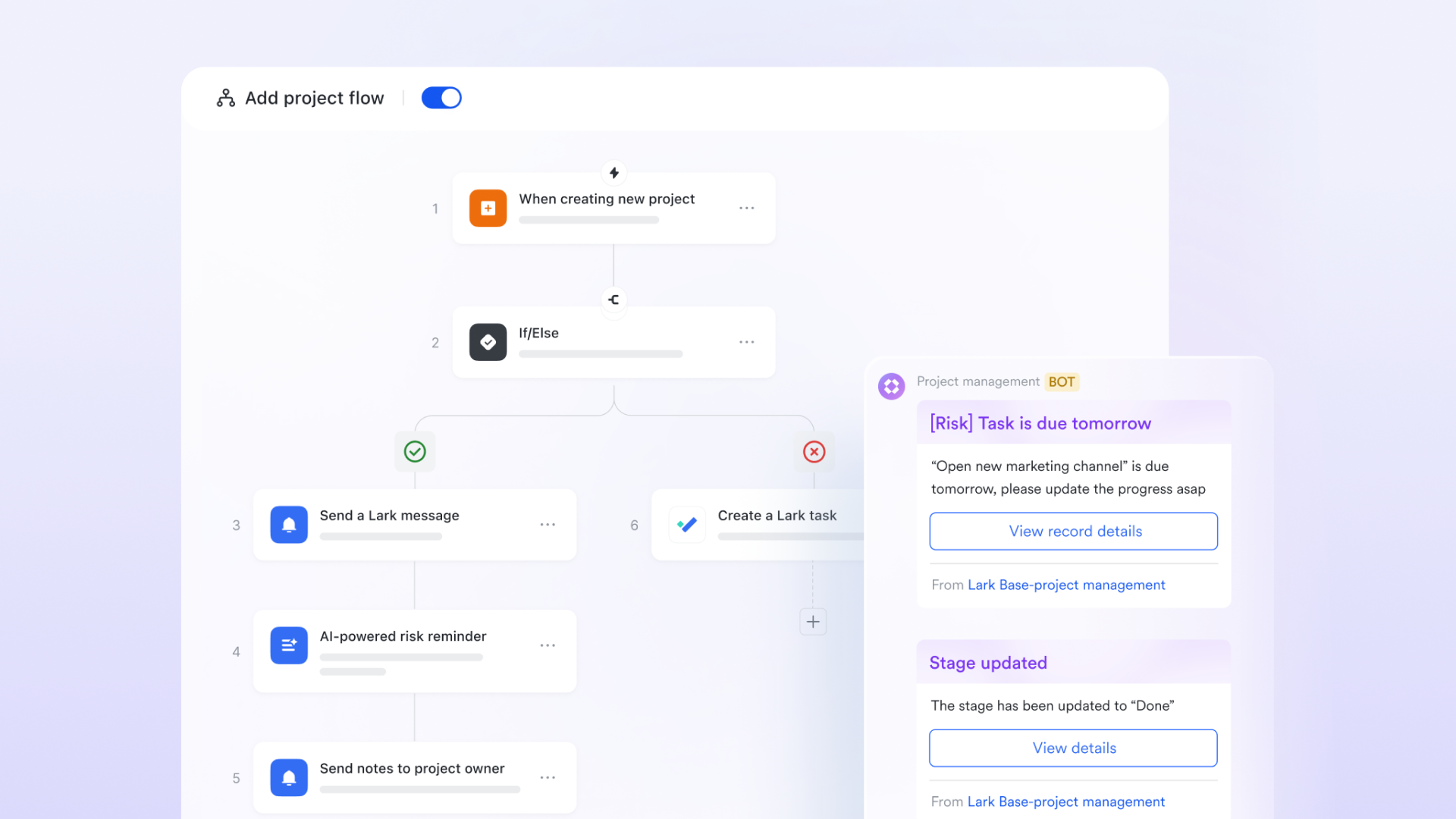
Blueprinting with purpose: Swimlanes, flowcharts, and mind maps
Lark Board serves as your digital infinite canvas for the "Discovery" phase of a workflow. You can use Swimlane diagrams to clearly define cross-functional responsibilities, showing exactly where a task moves from Marketing to Sales. help you map out complex decision logic, while Mind Maps allow for brainstorming the various sub-tasks required for a project. This visual clarity ensures that before you build any automation, every stakeholder understands their role in the process. 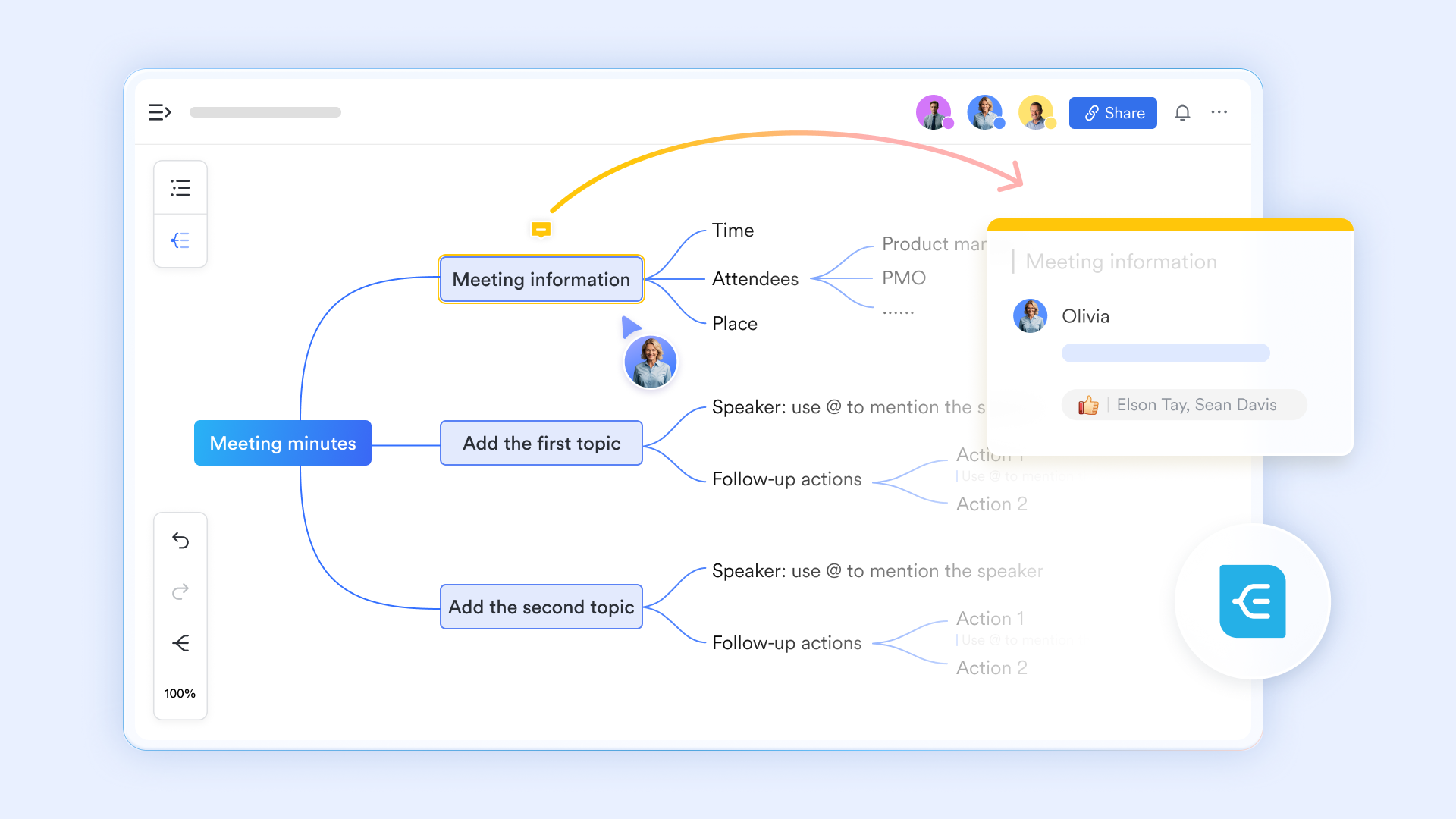
Live process refinement: Collaborative editing and Magic Share
Workflows shouldn't be designed in a vacuum. Lark allows for real-time collaborative editing, where multiple team members can move connectors and edit nodes on a Board simultaneously. During a video call, use Magic Share to turn the Lark Board into an interactive presentation. Instead of just watching, participants can jump into the board and "revise on the fly," ensuring that the final workflow map reflects the actual expertise of the people doing the work. 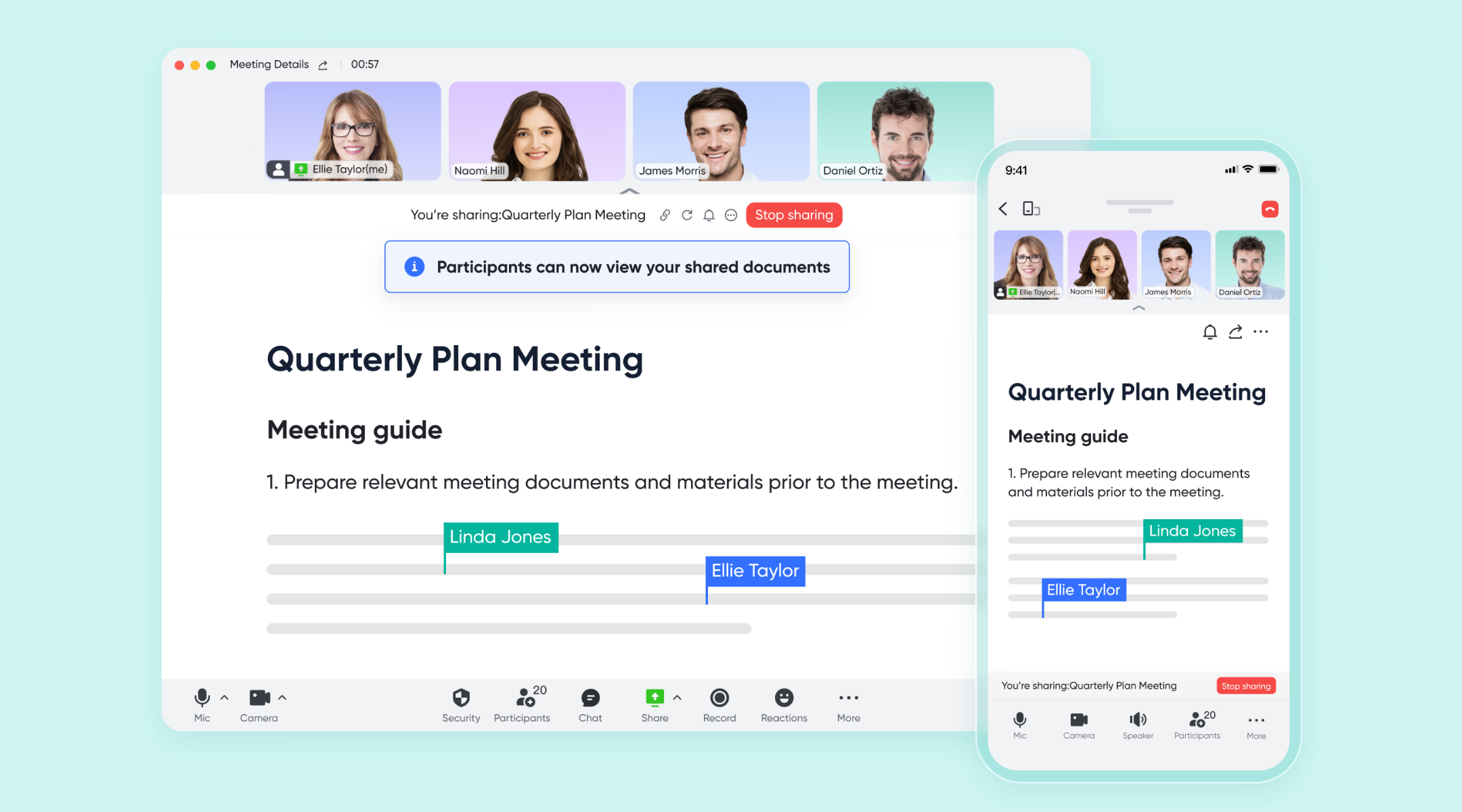
Logic-based actions: Advanced routing with nodes
To help you practice workflows, Lark Base workflow feature supports logic-based actions as nodes, specifically the If/Else and Switch nodes. These features provide the decision-making "brain" for your process maps. The If/Else node handles binary decisions—directing the workflow down a "True" or "False" path based on specific criteria such as budget size or priority level. The Switch node is more advanced, allowing for multi-path routing (up to 10 branches) based on different categories, similar to a "Choose Your Own Adventure" for data. These nodes eliminate the need for manual sorting, ensuring that every to the correct department or owner. 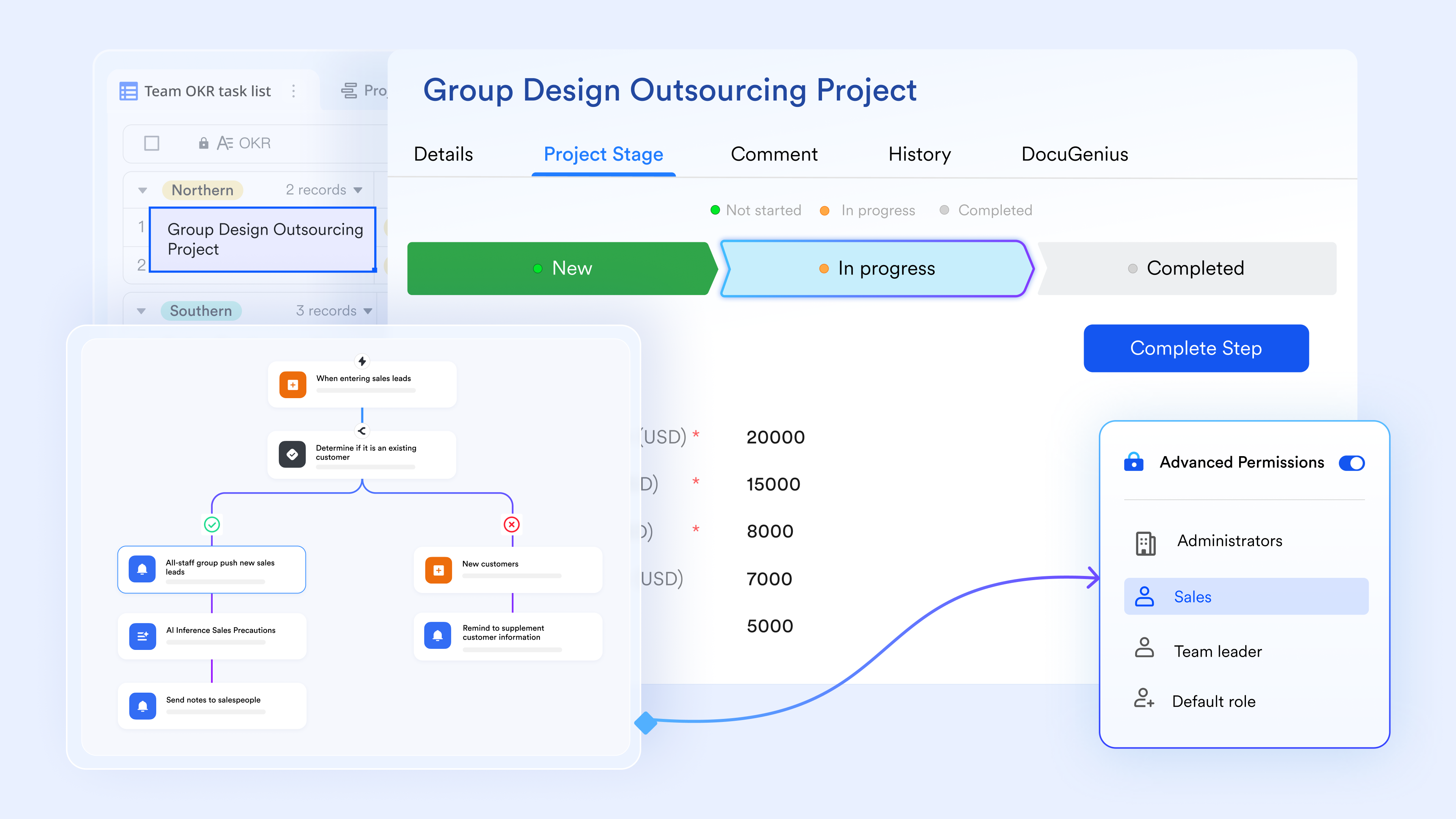
Node shortcuts: Efficiency in design
Node shortcuts are a design-efficiency feature located in the Lark Base workflow shortcut center. These act as "ready-made" automation blocks that combine complex configurations into a single, clickable shortcut. Instead of manually setting up an API call to an AI model or configuring a third-party integration from scratch, you can use a Node Shortcut to quickly add functions like "Generate Random Number" or "Translate Text" into your workflow map. This feature is designed to lower the technical barrier for users, allowing them to build sophisticated, by simply dragging and dropping proven templates into their logic flow. 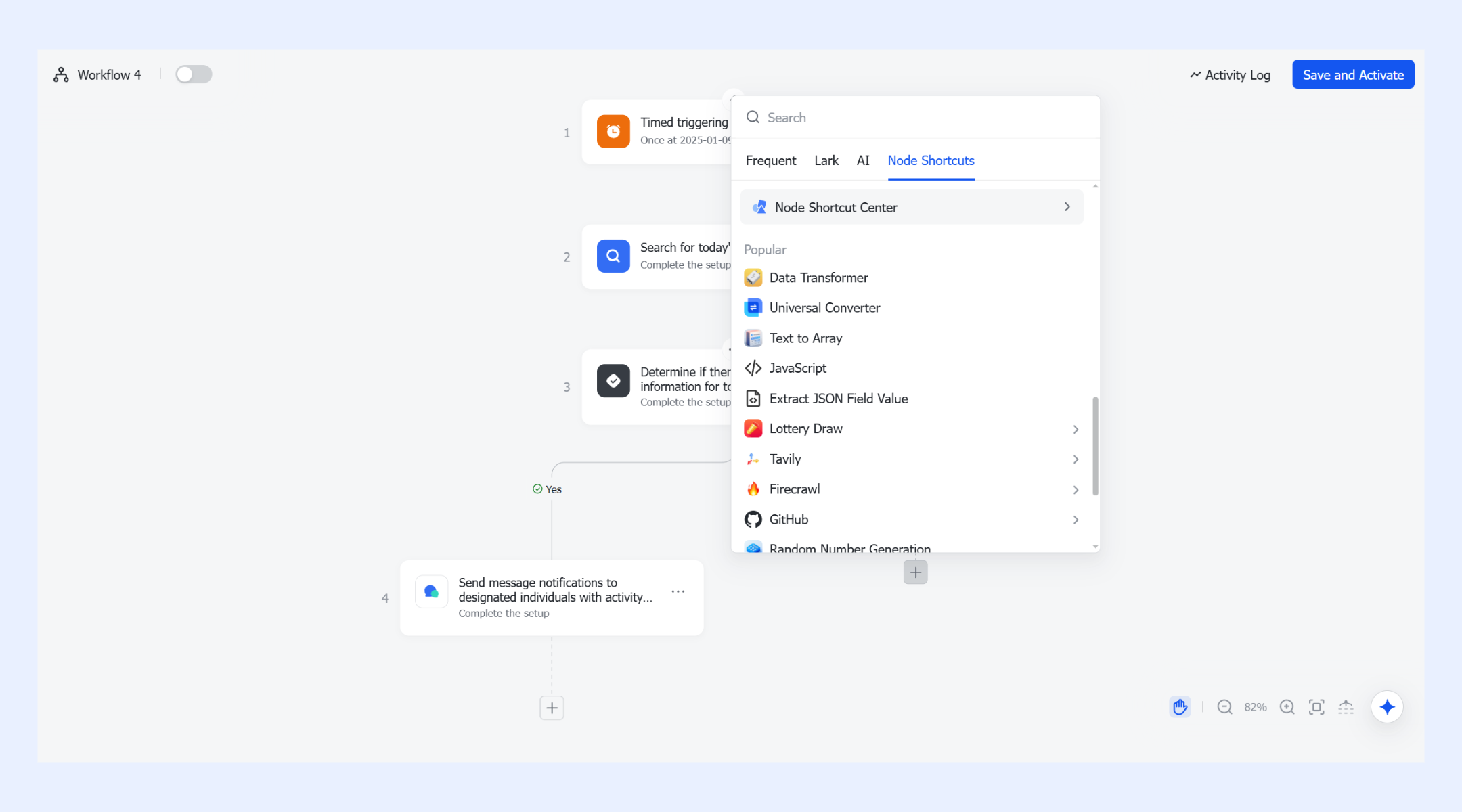
Standardized governance preventing unauthorized skips
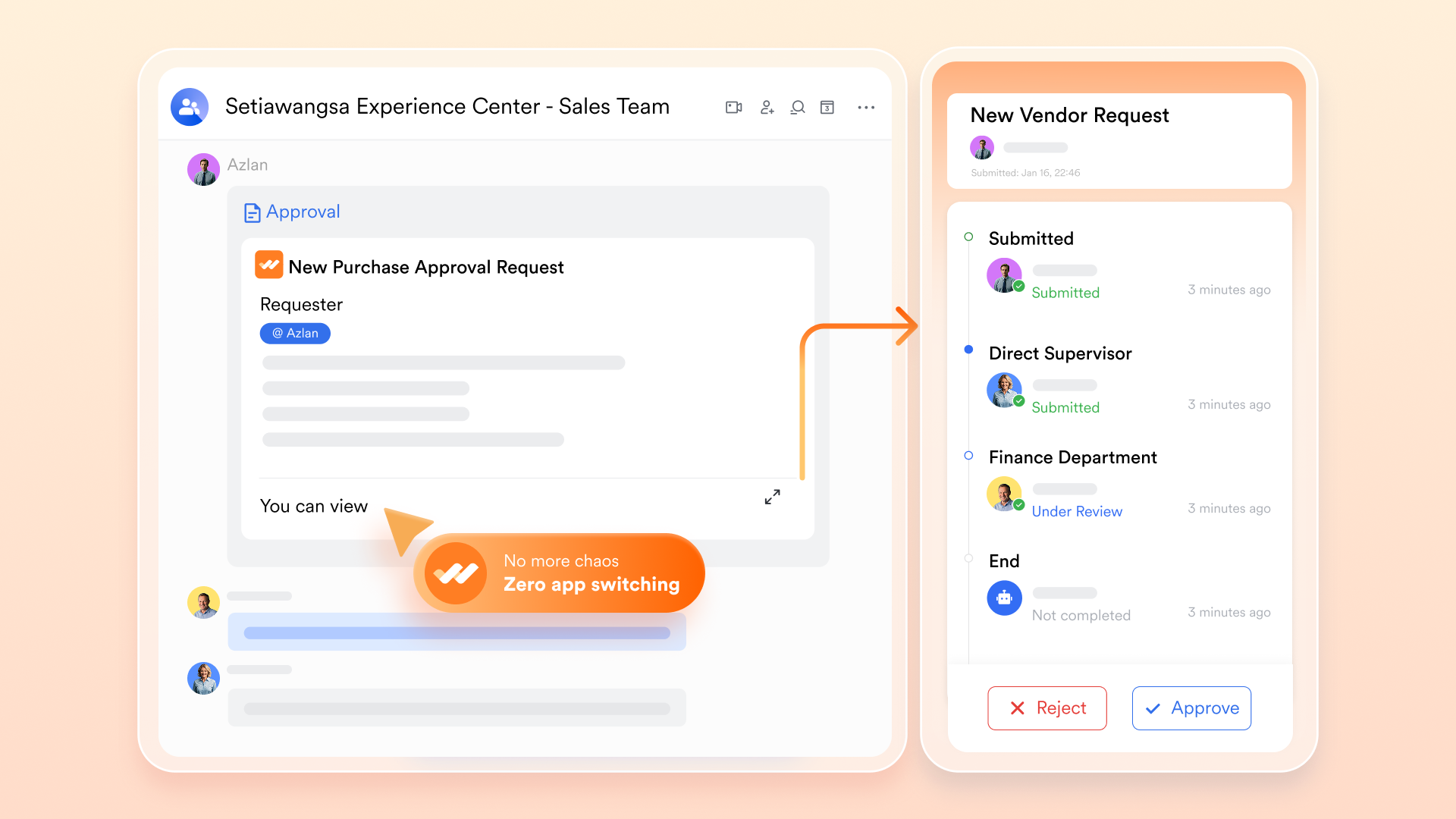
The final part of any professional workflow is the "Gatekeeper." You can use for your requests or approval workflows. When a task reaches a specific milestone on your map (like "Contract finalization"), the system automatically triggers a formal approval request. This ensures that the governance you visualized on your board—such as requiring a signature from both Finance and Legal—is enforced digitally, providing a clear audit trail and preventing unauthorized skips in the process.
:
- Starter plan: Free forever plan that includes 11 powerful tools for up to 20 users. It also comes with 100GB of storage, 1000 automation runs, AI translations, and more.
- Pro plan: $12/user/month (billed annually) for up to 500 users. It includes everything in Starter plus group calling for up to 500 attendees, 15TB of storage, 50,000 automation runs, and more.
- Enterprise plan: for custom pricing. Supports unlimited users and includes even more automation runs and advanced security, compliance, and management features.
For small teams with simple communication needs

18 months message history
1000 Base automation runs/month
2000 rows per table in Base
Most POPULAR
For companies with comprehensive collaboration and management needs
Unlimited message history
500-participant video meetings
50k Base automation runs/month
20k rows per table in Base
For large companies with advanced security and organizational management needs
Get a personalized demo and pricing
Unlimited message history
500-participant video meetings
15 TB storage + 30 GB storage/user
500k Base automation runs/month
50k Base automation runs/month
Most POPULAR
For companies with comprehensive collaboration and management needs
Unlimited message history
500-participant video meetings
50k Base automation runs/month
20k rows per table in Base
Best practices for workflow process mapping
Workflow process mapping works best when it is treated as an rather than a one-time documentation exercise.
Following proven best practices helps teams create maps that are accurate, useful, and easy to maintain.
- Map real processes, not ideal ones: Capture what actually happens in daily work, including shortcuts and delays. This ensures the map reflects reality and highlights where improvements are truly needed.
- Keep roles and ownership clear: Every step should have a clearly defined owner or responsible team. This prevents confusion and makes accountability .
- Avoid unnecessary complexity: Start with a simple, high-level view before adding too much detail. Overly complex maps are harder to understand and less likely to be used.
- Review and update regularly: Processes change as teams grow, tools evolve, and priorities shift. Regular updates keep the workflow map accurate and useful over time.
Conclusion
Workflow mapping gives organizations the clarity they need to understand how work truly flows across people, systems, and decisions. By visualizing every step, handoff, and , teams can uncover inefficiencies, remove bottlenecks, and build and improve. From simple flowcharts to advanced value stream maps, the right approach helps turn everyday work into a more predictable and efficient system.
takes this one step further by connecting workflow maps directly to automation, collaboration, and AI-driven intelligence. Instead of static diagrams that quickly go out of date, Lark enables teams to run, track, and optimize their workflows in real time. With built-in workflow builders, smart routing, and ready-to-use templates, teams can move faster without losing control. If you are ready to turn your workflow maps into living, working systems, Lark provides the platform to make it happen.
Understand how to improve process efficiency today
FAQs
Can workflow mapping be used for highly technical or scientific processes?
Workflow mapping is widely used in scientific and laboratory environments where precision matters. In a peptide mapping workflow, every validation, handoff, and data point must follow a controlled path. Lark allows teams to document and automate these technical workflows in a single system.
Can workflow mapping support infrastructure and utility operations?
Organizations managing physical networks rely on utility mapping workflow software to track inspections, repairs, and approvals. Clear process maps ensure that field teams and control centers stay aligned. Lark brings these workflows onto a single platform for real-time coordination and traceability.
How does AI improve the accuracy of workflow mapping?
With automated workflow mapping AI, real system data is used to reveal how work actually moves through a process. This helps uncover hidden delays and unnecessary steps that manual mapping might miss. Lark uses AI to keep workflows accurate and continuously optimized. Is workflow mapping useful for remote or distributed teams?
Workflow mapping helps remote teams understand who owns each task and when actions are required. This reduces confusion across time zones and . Lark provides a shared workspace where distributed teams can view, update, and run workflows together.
How do workflow maps stay relevant as processes change?
Modern workflows evolve quickly as tools, teams, and priorities shift. Keeping maps connected to real data ensures they remain accurate over time. Lark links workflow maps to live automation, so processes stay up to date automatically.
Related reading





























