Automation has become essential for modern teams, helping them eliminate repetitive tasks, connect tools more efficiently, and accelerate everyday operations. But Zapier's pricing, structured around the number of tasks your automations run, can become increasingly expensive as workflows grow. This makes it important for teams to clearly understand how each Zapier plan works, what limits apply, and how its newer AI Orchestration model affects overall cost.
In this guide, we break down Zapier's pricing tiers, key features, usage limits, and potential drawbacks so you can decide which plan fits your automation needs and long-term budget.
Start simplifying daily tasks with automation
Quick summary: Which Zapier pricing tiers is right for whom?
Choosing the right Zapier pricing tier depends on how often your team and the level of collaboration you need. Each plan scales based on task volume, not user count—so understanding your workflow intensity is key. From solo creators testing simple Zaps to enterprises running complex automation networks, there's an option for every stage of growth. Here's a quick guide to help you decide which Zapier plan fits your needs best.
Information source: Official vendor sites
Update time: 2025-11-13
Note: Pricing and plan details reflect publicly available data as of the update date and may vary based on region, billing cycle, and number of agents.
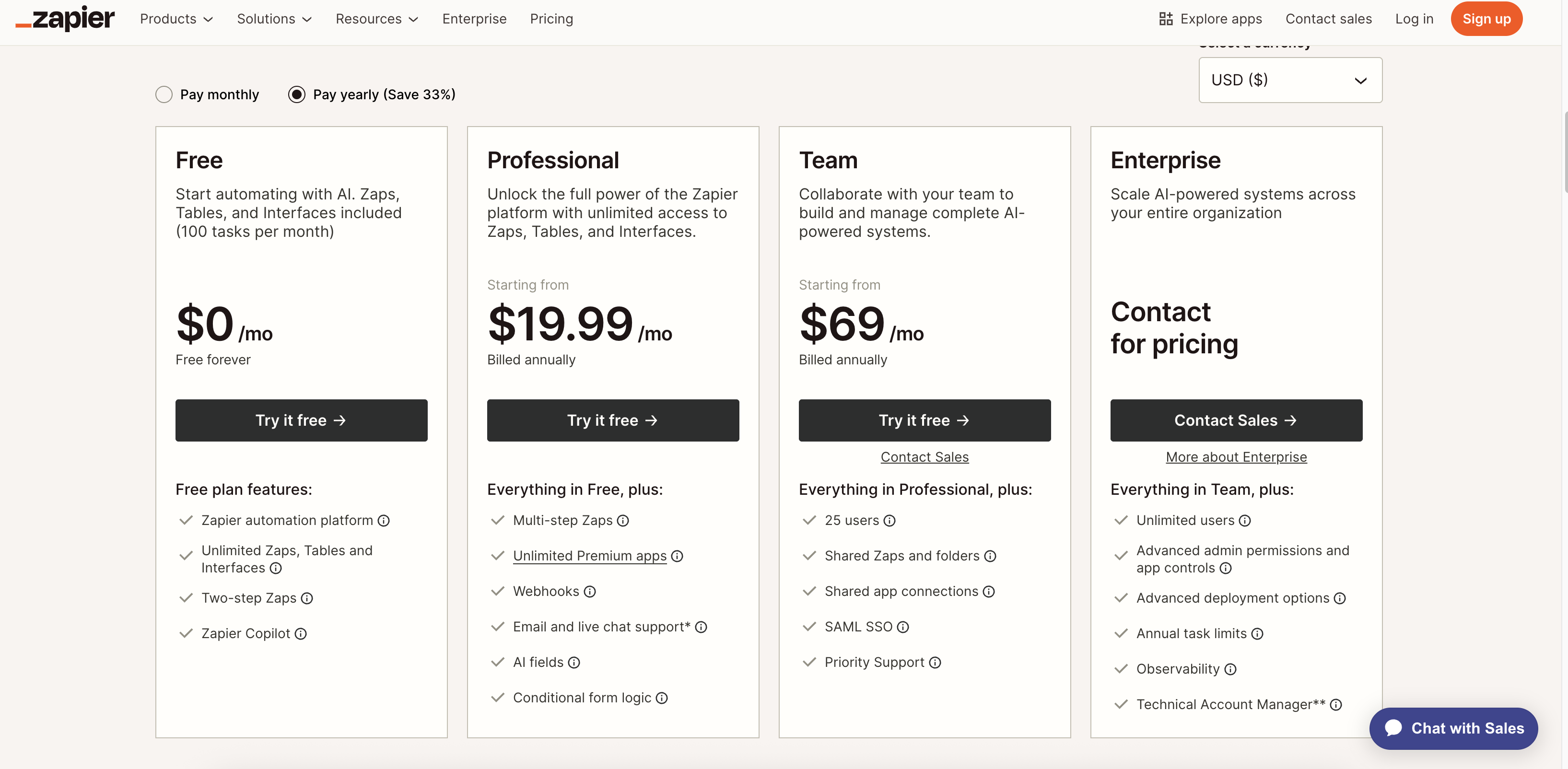
Image source: zapier.com
Start plan: Zapier free plan pricing & features
- Best for: The Zapier Free Plan is ideal for freelancers, individuals, and hobbyists who want to experiment with automation without committing to a paid subscription. It's a great way to learn the basics of workflow automation and explore how connecting apps can save time. However, it's not designed for business use or , as its capabilities are limited.
- Tasks included: This plan allows you to run up to 100 tasks per month, which automatically resets at the beginning of each billing cycle. Each time a Zap runs for example, when an email is logged to a spreadsheet, it consumes one task from your quota. Once the limit is reached, all automations are paused until the next month unless you upgrade to a paid plan.
- Zaps: The free plan lets you create unlimited Zaps, giving flexibility to experiment with different workflows. However, these are limited to 2-step Zaps one trigger and one action, such as "when I get an email, add it to a Google Sheet." Multi-step workflows or branching logic (e.g., adding filters or conditional paths) are only available in higher Zapier pricing tiers like Professional.
- Speed: Automations in the free plan check for new data every 15 minutes, which can cause noticeable delays compared to paid plans. This slower polling interval means that real-time or time-sensitive workflows may not trigger instantly. For cycles, Zapier's paid plans reduce polling intervals to just a few minutes.
- Features: The Zapier Free Plan includes access to core automation tools and the Zapier Copilot (AI assistant), which helps you build simple workflows. You can connect popular apps like Gmail, Slack, Trello, and Google Drive to start automating routine actions. You can even connect various .However, more advanced tools—such as filters, paths, or webhooks—are reserved for paid plans.This is an important factor to consider when balancing your overall software budget alongside and .
- Limitations: While the free tier is generous for beginners, it lacks access to premium apps like Salesforce, HubSpot, or QuickBooks. It also doesn't include shared folders or team collaboration features, which limits its use for multi-user environments. As a result, businesses or teams looking to manage shared workflows will quickly outgrow this plan.
- Ideal use case: The Zapier pricing free plan works best for testing ideas, learning how automation fits into your workflow, or creating small proof-of-concept automations. It's perfect for connecting simple apps, logging data, or automating notifications. But once your automations expand or require advanced logic, you'll need to move to a paid plan.
- Upgrade note: If your workflows exceed 100 monthly tasks or require faster triggers, upgrading to the Professional or Team plans becomes essential. These higher Zapier pricing plans unlock multi-step Zaps, collaboration tools, priority support, and access to premium integrations. This ensures your automations scale smoothly as .
Medium plans: Professional and Team plans pricing & features
According to the official zapier.com pricing page, each plan is structured around the number of tasks your automations execute every month. This means that even if your team size stays constant, higher workflow activity can quickly drive up your subscription cost. Understanding this model helps teams plan budgets and select a tier that matches their actual automation volume.
- Breakdown of task limits and scaling costs: The Zapier Professional plan starts at $19.99/month for 2,000 tasks, with pricing increasing as task limits grow. For instance, 10,000 tasks cost around $89/month and 50,000 tasks nearly $299/month. The Team plan, starting at $69/month, adds shared folders, SSO, and up to 25 seats—but higher usage quickly drives up costs.
- Real-world examples of workflow impact: A marketing team connecting HubSpot, Mailchimp, and Trello might run thousands of automated actions weekly, consuming large task volumes. Similarly, HR teams using Zaps for onboarding or payroll syncs often exceed limits faster than expected. Each automated action counts as a task, so complex workflows can quickly burn through monthly quotas.
- Costs can reach $200+ per month for active teams: As automations expand, task consumption—not user count—becomes the cost driver. Businesses running multi-step Zaps across departments can easily exceed $200/month in Zapier costs. What starts as affordable for small teams can become expensive once workflows scale across apps or daily operations.
- Per-task scalability, not per-user billing: Unlike per-user tools, Zapier pricing scales based on the number of tasks executed. This provides flexibility for but makes expenses unpredictable when automation volume increases. More users creating or triggering Zaps means faster task usage—and higher monthly bills.
Higher plan: Enterprise plan pricing & features
Zapier's Enterprise plan is built for large organisations that depend on automation across multiple teams and departments. It offers the highest level of control, scalability, and customisation but comes with a premium price tag. This plan is ideal for companies that need strict security compliance, administrative oversight, and dedicated technical support for managing extensive automation networks.
- Includes admin controls, security features, and dedicated support: The provides advanced administrative controls, SAML single sign-on (SSO), and SOC 2 compliance for enhanced data protection. It also enables role-based permissions and centralized management for better governance. Enterprise customers receive priority support and a dedicated account manager to help optimize automation performance.
- Custom task volumes and pricing based on usage: Unlike standard plans, the Enterprise tier offers customizable task volumes tailored to each organization's usage needs. Pricing is determined based on the number of tasks and workflow complexity rather than a fixed rate. This flexible structure allows high-volume teams to align costs with actual automation requirements.
- Typically suited for automation-heavy enterprises and SaaS teams: The Enterprise plan works best for automation-intensive organizations such as, IT departments, and large marketing teams. It supports companies that run thousands of Zaps across multiple systems daily. While it delivers advanced features and security, it's most suitable for businesses that can fully utilize its scale and support resources.
Bonus details: Zapier AI orchestration plans
Zapier's AI Orchestration plans are designed to help teams build, manage, and using AI-driven components combining the existing Zaps, Tables, Interfaces, and Zapier MCP (Model Control Platform) into one unified platform.
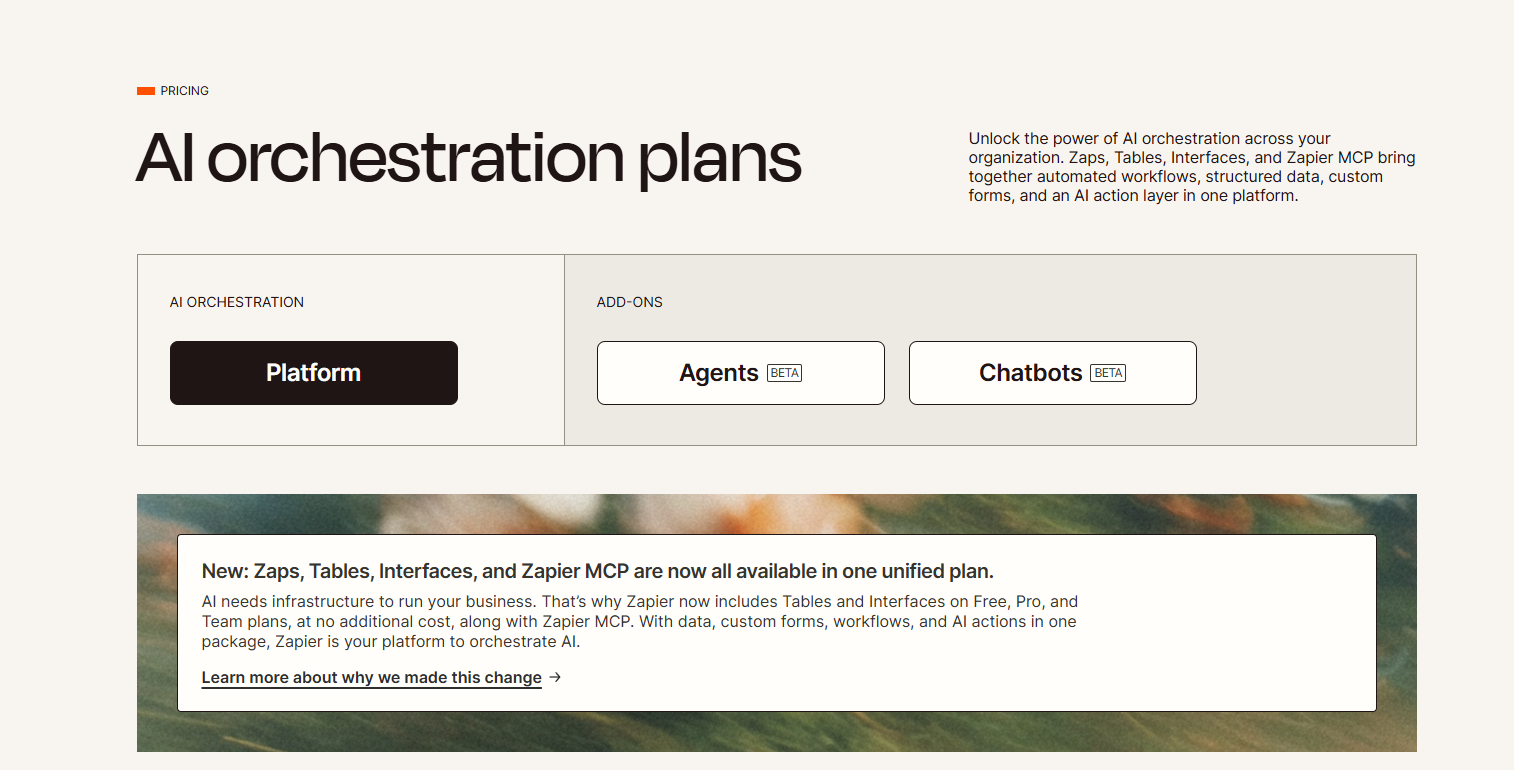
Image source: zapier.com
Main plan: "Platform"
This is the core AI orchestration plan, replacing the traditional separation between individual features like Zaps or Interfaces.
- It includes Zaps, Tables, Interfaces, and Zapier MCP by default.
- Designed for businesses that want to build AI-powered systems—combining automation, structured data, and AI logic in one environment.
- Available across Free, Pro, and Team tiers at no additional cost (Zapier folded these tools into all plans).
Essentially, the"Platform" plan acts as the central , where businesses can orchestrate complex data flows and interactions across apps using AI-driven logic.
Add-ons: Agents (Beta) and Chatbots (Beta)
Zapier is testing two new AI features as optional add-ons to the Platform plan:
In summary: The AI Orchestration plan isn't a separate paid tier—it's Zapier's new unified product model.
It merges automation, data management, forms, and AI functionality into a single experience, while Agents and Chatbots are emerging add-ons that expand Zapier's AI capabilities.
Common hidden costs to watch out for
The pricing Zapier follows is designed to offer flexibility, but it can also become unpredictable as your automation needs grow. When workflows scale across multiple tools and departments, task usage increases rapidly—leading to fluctuating monthly expenses. This makes it crucial for teams to regularly track how automations are triggered and how tasks are consumed.
Another factor is team usage. As more users create or , tasks are consumed faster, accelerating cost growth even if you're not adding new Zaps. Additionally, premium app connections such as Salesforce, HubSpot, or QuickBooks are only available on paid tiers, which can significantly increase your total monthly spend.
Lastly, collaboration features like shared folders, team permissions, and shared app connections are restricted to the Team or Enterprise plans. For growing teams, this often means upgrading sooner than expected—turning Zapier's flexible automation model into a costly scaling challenge.
Which Zapier plan is right for you? (Quick guide)
However, most Zapier alternatives still treat automation as a standalone function—focusing only on connecting external apps, without addressing how teams actually collaborate or execute tasks once an automation runs. This separation often forces businesses to juggle multiple platforms: one for workflows, another for messaging, and yet another for . As a result, costs add up, data gets scattered, and productivity slows down. What teams really need isn't just automation between tools, but a unified environment where automation, communication, and execution happen together. That's exactly where Lark stands out—bringing everything your team needs to automate, collaborate, and deliver results into one connected workspace.
Compare automation tools and pricing plans today
Beyond Zapier: Meet Lark's connected workspace with robust features
While Zapier focuses on connecting external tools, Lark eliminates the need for that complexity altogether by combining automation, , and management in one unified environment. Every feature inside Lark is designed to interact fluidly, reducing friction, centralizing data, and helping teams move faster.
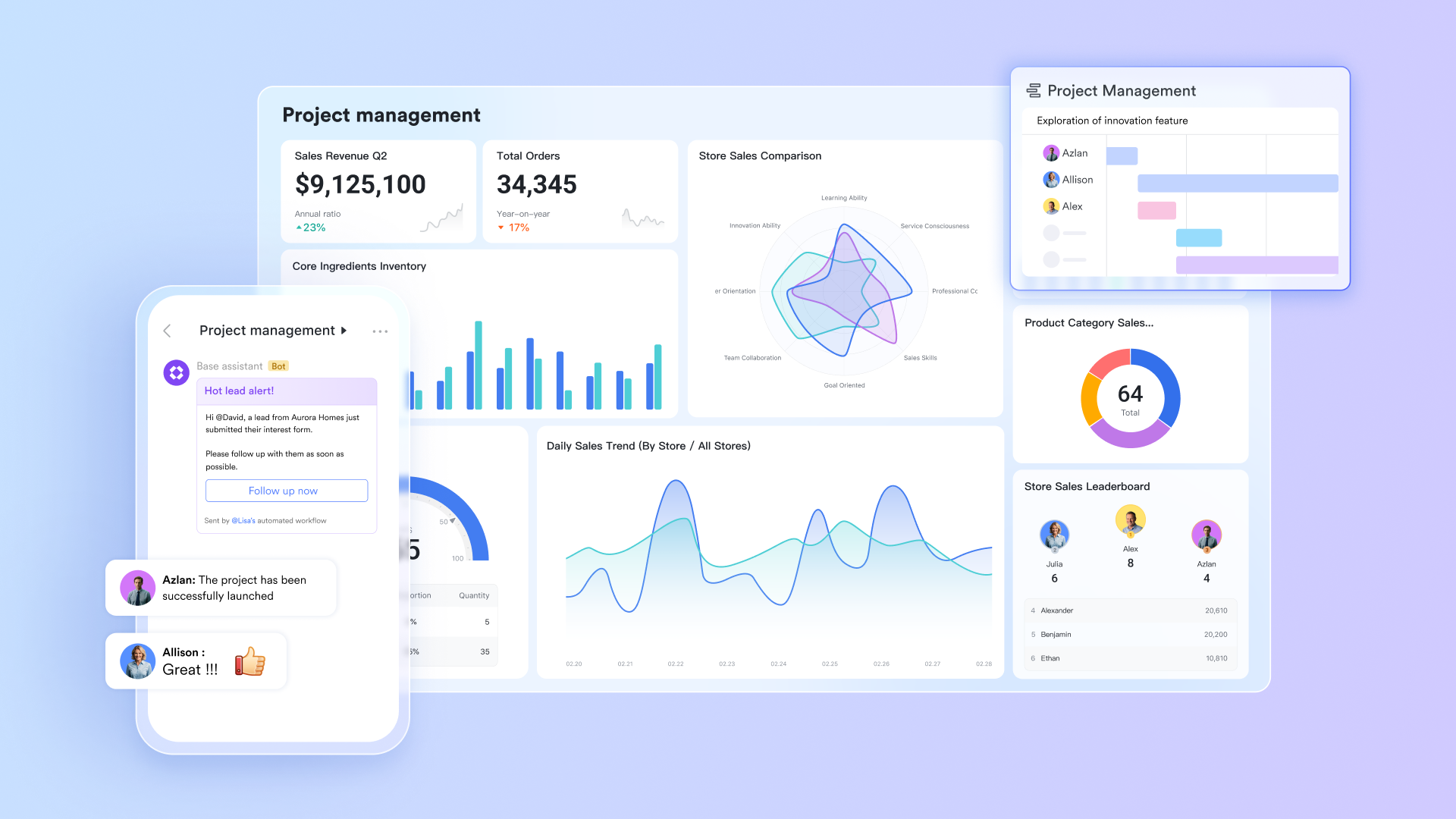
Lark Base: Visual database for structured workflows
functions as the operational hub where teams can organize, track, and analyze data through customizable tables, , or Gantt charts. You can build full databases such as client pipelines, recruitment trackers, or project dashboards with configurable fields, filters, and relational links. Teams can set automation rules within Base to trigger updates or assign tasks when records change, and visualize progress instantly through dynamic charts and dashboards. Unlike Zapier's connector model, which relies on third-party apps for data visibility, Lark Base stores and manages your operational data directly inside the workspace, offering complete visibility without switching systems.
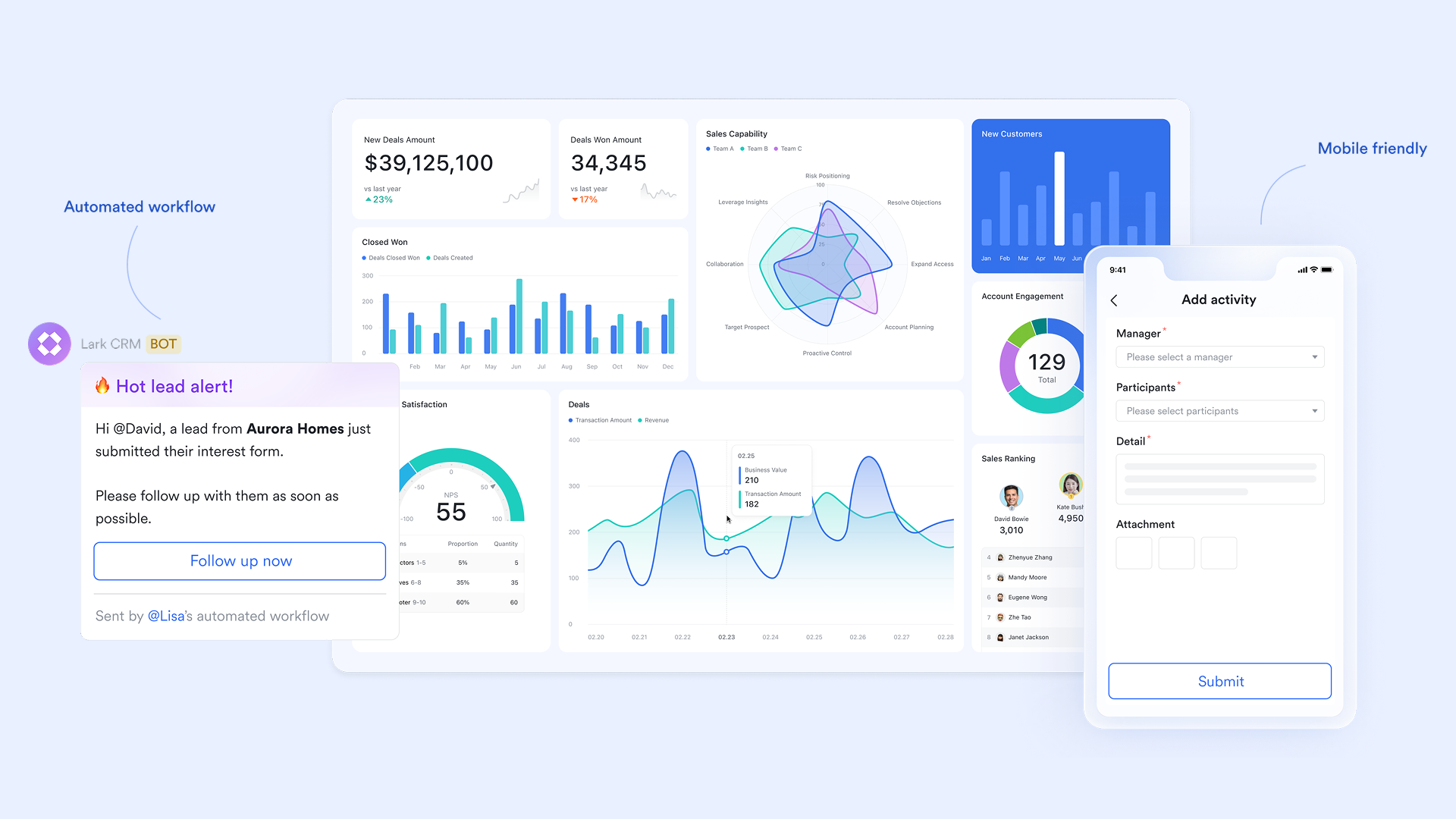
Lark Tasks: Action management built into collaboration
In Lark, task management isn't an add-on, it's part of your daily workflow. Lark Tasks lets teams assign responsibilities, set priorities, track progress, and link actions directly to messages or Docs. For instance, when a discussion in Messenger results in a next step, you can create a task from that chat message instantly without breaking the flow of work. Tasks can be displayed in list or Kanban format, grouped by assignee, project, or deadline. Automation rules can then update task status, send reminders, or trigger approvals. This embedded task ecosystem ensures nothing gets lost between discussions, documents, or automated updates—a major advantage over Zapier's disjointed task notifications. 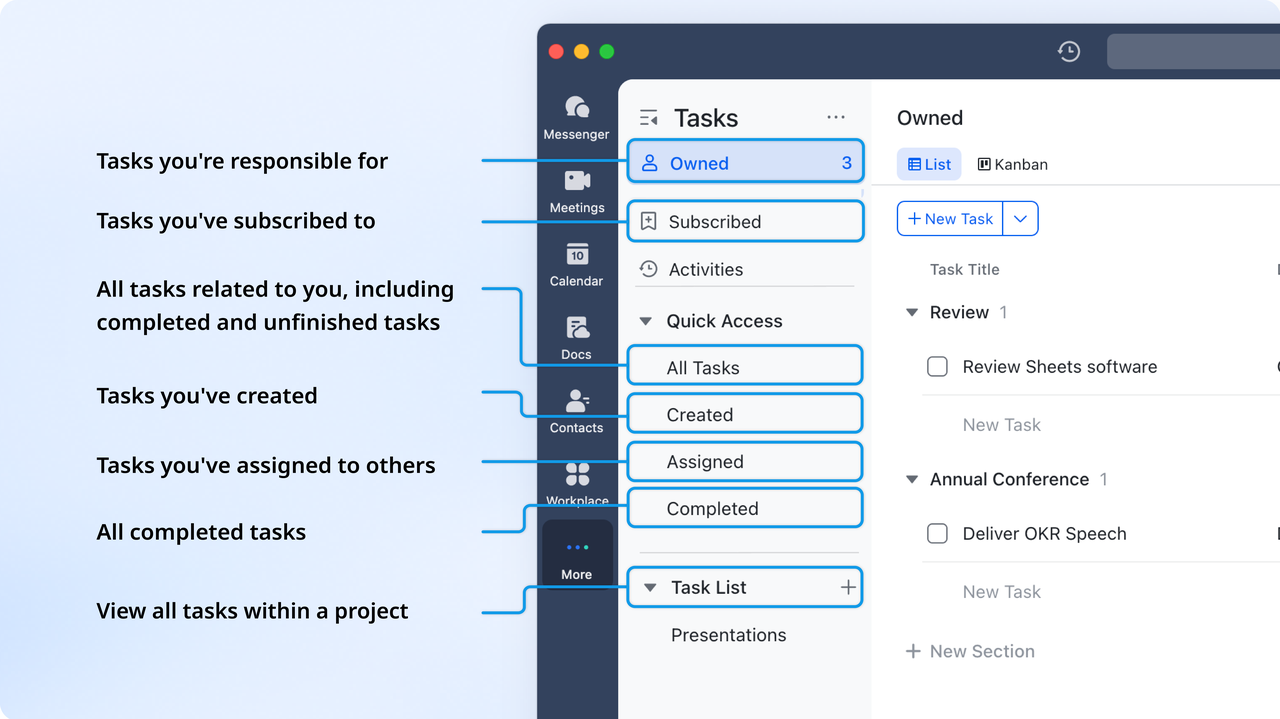
Lark Docs & Lark Wiki: Centralized knowledge and collaboration
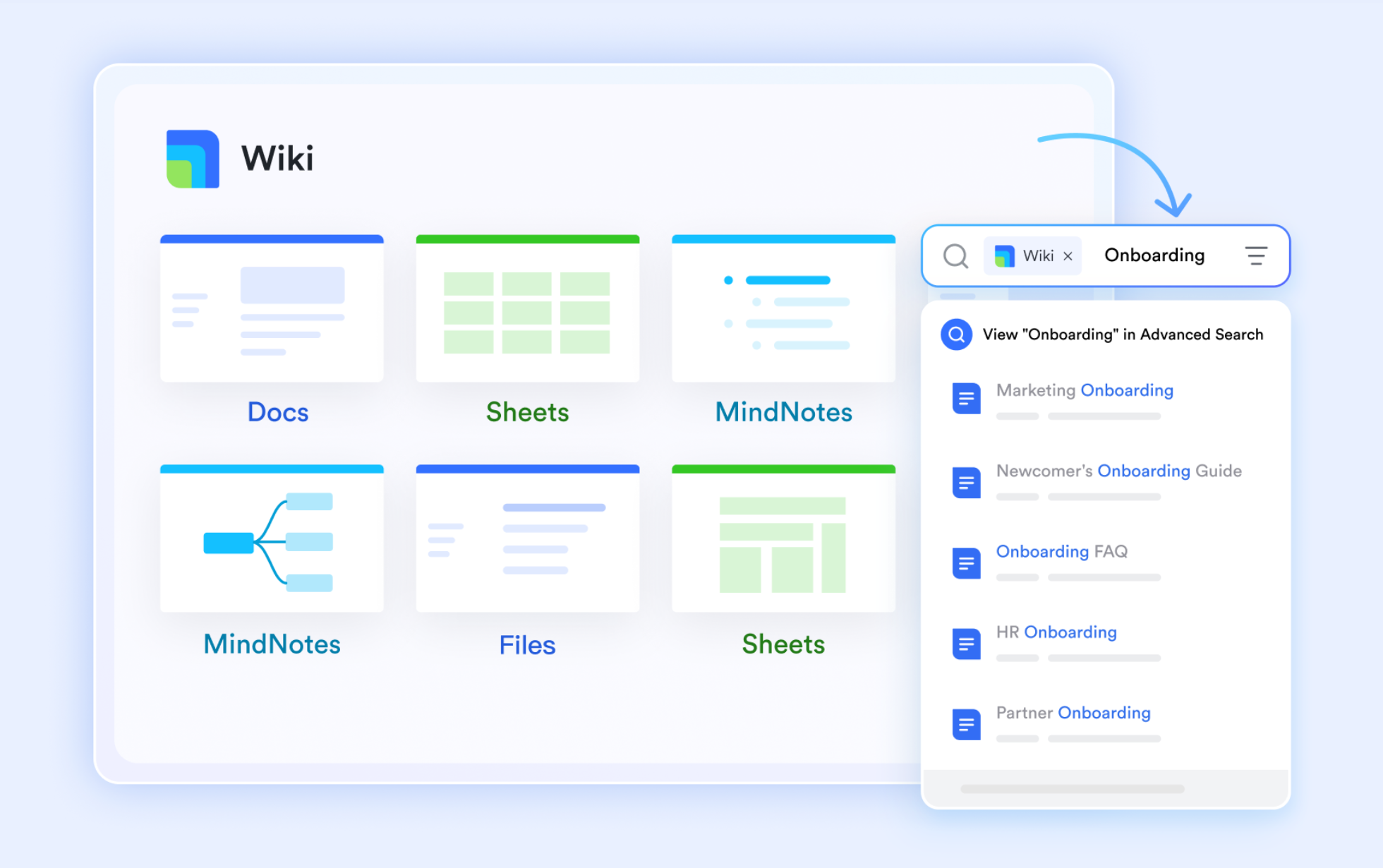
Where Zapier relies on external tools for documentation or data capture, provides real-time co-editing, inline comments, and smart mentions built directly into the workspace. You can turn a project document into a live workspace embedding tables from Lark Base, linking tasks, and adding workflows within the same page. Once documents are finalised, they can be stored in —the shared knowledge hub for your company, ensuring information remains accessible and version-controlled. This combination replaces multiple tools like Google Docs, Confluence, or Notion, streamlining communication around shared context.
Lark Messenger: Communication that powers execution
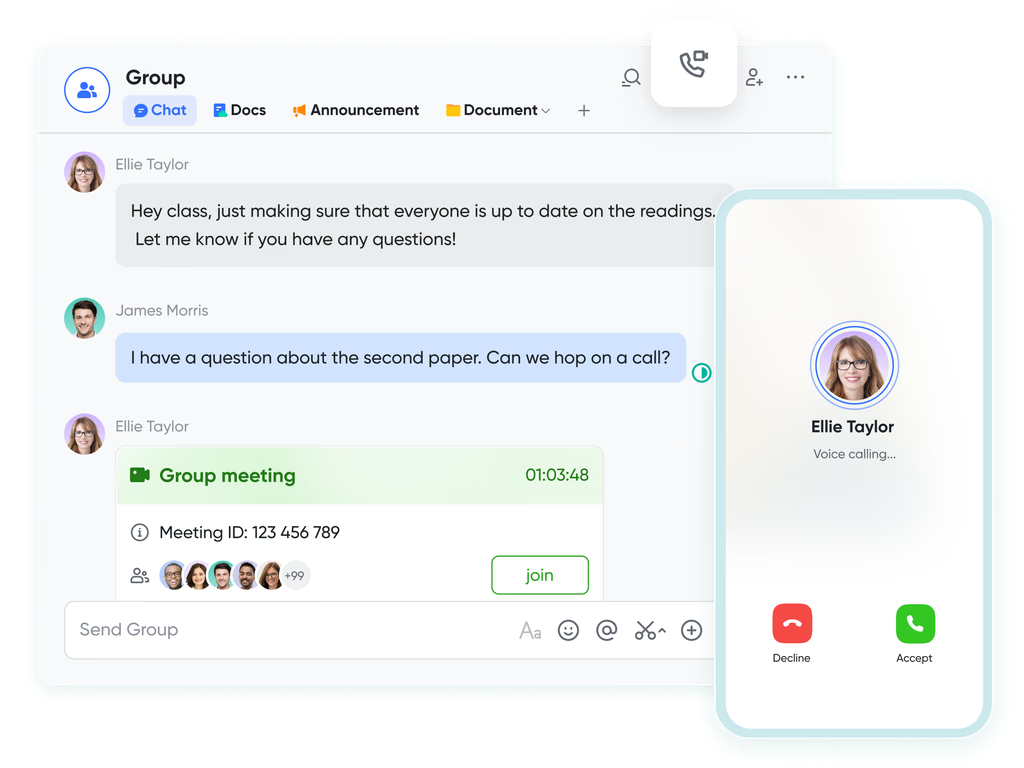
Unlike Zapier, which doesn't include native communication, brings conversations, files, and actions together in one place. Each message can reference a document, calendar event, or task, keeping discussions contextual. You can start meetings, share Docs, or update task status directly within chats. Threaded discussions prevent clutter, while smart search and topic groups make retrieving past decisions effortless. This constant flow of communication and action ensures that automation doesn't just move data—it connects people to decisions in real time. 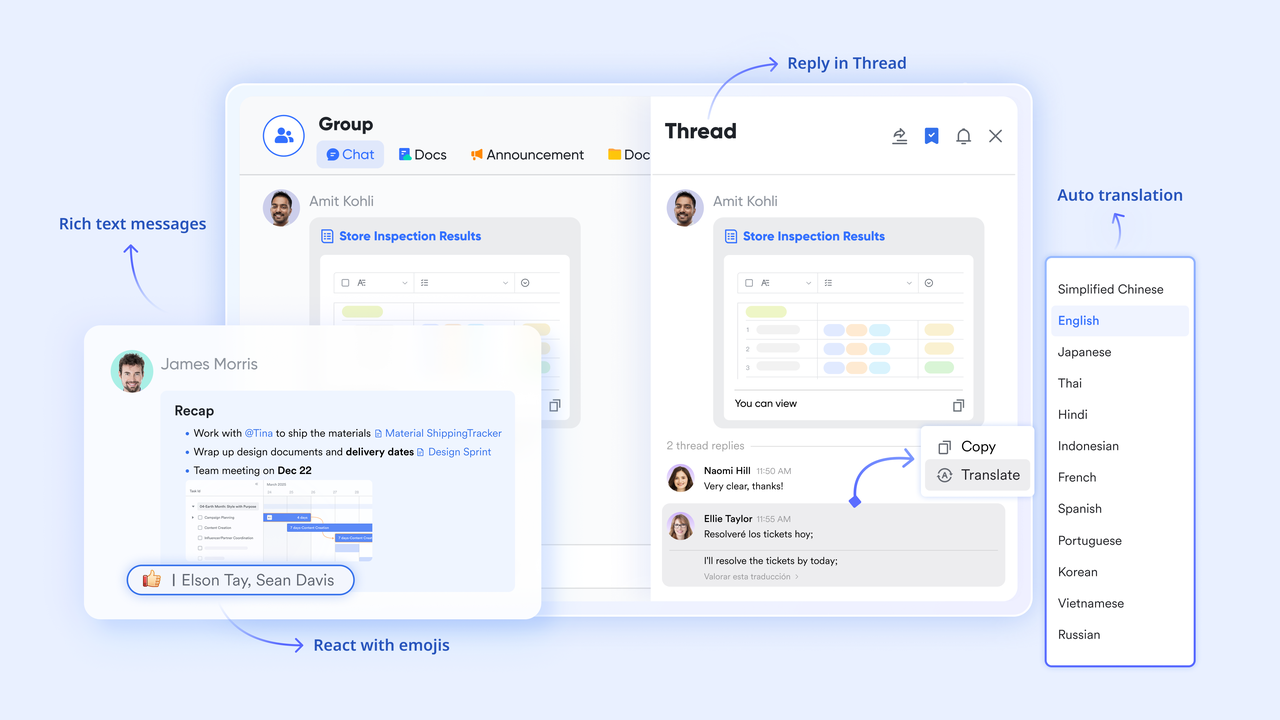
Lark Approval: Streamlined decisions and accountability
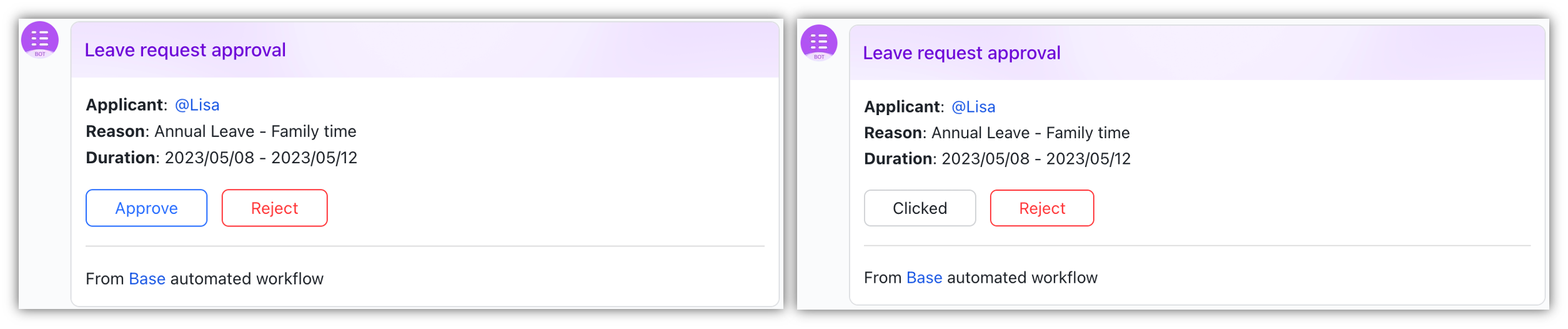
simplifies formal processes like expense requests, hiring decisions, or contract sign-offs.
Customizable templates let teams design approval flows that match internal policies—single-level or multi-level, with automated notifications and reminders. Approvals can trigger follow-up actions such as creating new records in Base or notifying stakeholders in Messenger. Unlike using Zapier to link multiple approval apps or forms, Lark keeps the entire process inside one secure system with full traceability and transparency.
Lark Meetings: Real-time collaboration meets context
For teams that rely on discussions to drive outcomes, comnbines directly with Messenger and Calendar. You can launch HD video calls instantly from chats, share screens, or co-edit documents during discussions. AI Meeting Notes capture and summarize key points automatically, converting them into actionable tasks or reminders. This creates a continuous feedback loop between communication, documentation, and action—something standalone automation tools can't replicate.
:
- Starter plan: Free forever plan that includes 11 powerful tools for up to 20 users. It also comes with 100GB of storage, 1000 automation runs, AI translations, and more.
- Pro plan: $12/user/month (billed annually) for up to 500 users. It includes everything in Starter plus group calling for up to 500 attendees, 15TB of storage, 50,000 automation runs, and more.
- Enterprise plan: for custom pricing. Supports unlimited users and includes even more automation runs and advanced security, compliance, and management features.
For small teams with simple communication needs

18 months message history
1000 Base automation runs/month
2000 rows per table in Base
Most POPULAR
For companies with comprehensive collaboration and management needs
Unlimited message history
500-participant video meetings
50k Base automation runs/month
20k rows per table in Base
For large companies with advanced security and organizational management needs
Get a personalized demo and pricing
Unlimited message history
500-participant video meetings
15 TB storage + 30 GB storage/user
500k Base automation runs/month
50k Base automation runs/month
Most POPULAR
For companies with comprehensive collaboration and management needs
Unlimited message history
500-participant video meetings
50k Base automation runs/month
20k rows per table in Base
Choose your tool: Lark vs Zapier comparison
To choose effectively between Lark and Zapier, it's useful not only to compare their capabilities but also to understand how they're priced. Below are the different plan tiers for each platform, which reflect how they scale for teams, automation needs, and enterprise usage.
Why Lark offers better long-term pricing value
When comparing the two pricing models side by side, Lark provides far more predictable and scalable value for growing teams. Because Lark charges per user—not per automation run—costs remain stable even as your workflows expand, your projects grow, and your operations become more automated. Teams can collaborate, manage projects, store documents, communicate, and build automated workflows all within the same workspace without worrying about hidden task consumption fees.
Zapier delivers powerful cross-app automation, but its task-based pricing means expenses rise every time automations become more active or more teams start relying on them. For organizations moving toward heavier automation, this can make long-term budgeting unpredictable.
In contrast, Lark's pricing model supports continuous automation, daily teamwork, and high-volume operations without incremental charges. This makes it a more sustainable, cost-efficient choice for teams that want to scale smarter—especially those looking for a workspace that combines collaboration, project management, and automation in one place.
Conclusion
Zapier remains one of the most powerful automation tools for connecting apps and streamlining workflows. Its flexibility and wide range of integrations make it a top choice for teams that want to eliminate manual tasks. However, its task-based pricing model can quickly become expensive as automation usage scales. Businesses often find themselves upgrading tiers or paying overages just to maintain essential workflows.
For teams seeking a more predictable and connected approach, offers a compelling alternative—combine automation, collaboration, and project management within one unified platform. Instead of paying per task, teams can automate directly inside their workspace, keeping data, communication, and execution in sync. The result is smarter automation, better teamwork, and more control over long-term costs.
Discover smarter ways to scale your workflows
FAQs
What are Zapier's free plan limitations?
Zapier's free plan offers 100 tasks per month and supports only 2-step Zaps, which restricts complex workflows. It also excludes premium app connections and team collaboration features like shared folders or app connections. This makes it best suited for testing or personal productivity, not business-scale automation.
How does Zapier pricing compare to other automation tools?
Zapier's pricing is based on task volume, not user count. This can make it more expensive as workflow complexity grows. Competitors like Make or Activepieces offer higher task limits at similar prices, while all-in-one platforms like Lark include automation within broader collaboration tools—eliminating per-task billing altogether.
Does Zapier offer discounts or nonprofit pricing?
Yes. Zapier provides a nonprofit discount program where eligible organizations can request special pricing through its sales team. However, the discount percentage isn't published, and approval depends on organization size, region, and purpose. Nonprofits can alternatively explore Lark's free plan, which includes automation and team collaboration at no cost for up to 20 users.
Is Zapier suitable for enterprise automation at scale?
Zapier's Enterprise plan supports unlimited users, SSO, admin permissions, and observability tools—but pricing is customized and scales with task usage. Enterprises with extensive workflows may find costs increasing quickly. Platforms like Lark provide automation, data management, and communication under one license, offering better control and predictability.
What is the difference between Zapier and Lark for workflow automation?
Zapier focuses on connecting external apps, charging per task based on automation volume. In contrast, Lark combines automation with native tools—including messaging, tasks, approvals, and documentation—in one workspace. This eliminates tool-switching, reduces costs, and keeps data, communication, and execution aligned in real time.
Related reading




























