Managing software bugs is more than just logging issues — it's the foundation of predictable delivery, faster releases, and high-quality products. Whether you're shipping SaaS updates, mobile apps, or enterprise software, your bug-tracking system directly influences how quickly teams uncover, prioritize, and resolve defects. Zoho Bug Tracker remains a popular choice among small and mid-sized engineering teams for its affordability and tight integration with the broader Zoho ecosystem. But how well does it perform for modern, fast-moving agile teams?
This comprehensive review breaks down Zoho Bug Tracker's features, pricing, advantages, limitations, and real-world usability. Let's dive into this guide and make your own choice today.
Upgrade how your teams track and resolve bugs
What is Zoho bug tracker used for?
Zoho Bug Tracker is used to capture, organize, and manage software defects across projects in a . It helps teams maintain visibility over issue progress and ensures bugs move efficiently from detection to resolution.
- Bug logging and prioritization explained: Zoho lets teams log bugs with standardized fields for severity, priority, tags, modules, and reproduction steps. This ensures clarity for developers and helps managers prioritize issues based on impact and urgency.
- Sprint-based development compatibility: The tool integrates with , allowing teams to link bugs to sprints, track progress, and align fixes with release cycles. This helps maintain predictable delivery and ensures unresolved bugs surface early during sprint reviews.
- User roles (QA, dev, managers): Zoho supports defined roles, such as QA testers, developers, and project managers, to ensure . Each role sees tailored views and permissions, ensuring structured collaboration without overlapping responsibilities.
Zoho bug tracker core features overview
Zoho's bug tracker provides structured tools for capturing, organizing, and resolving issues across development teams. Its feature set supports predictable workflows while keeping defect and easy to manage.
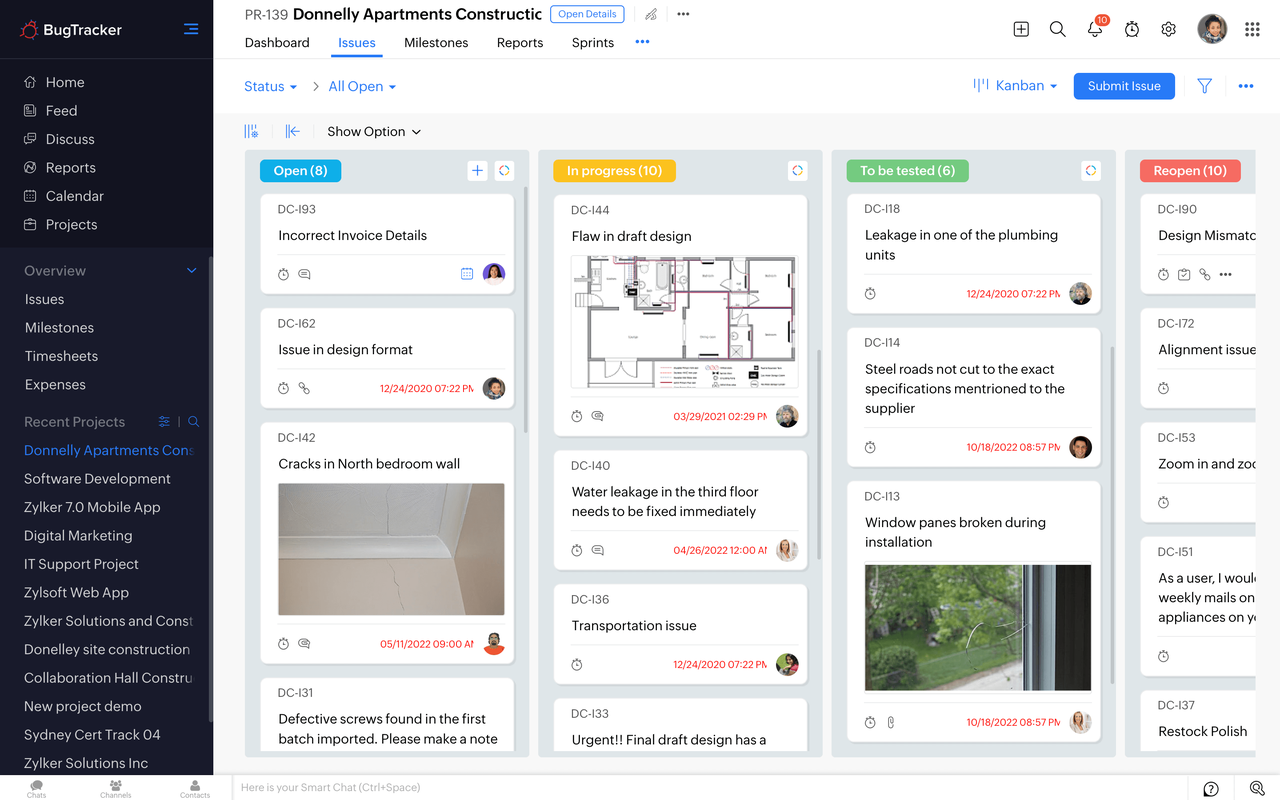
Image source: zoho.com
- Issue reporting and tagging: Bug tracker Zoho offers a detailed reporting form with fields for modules, steps, severity, and tags to keep issues organized. This makes it easier for teams to filter, group, and prioritize bugs as projects grow more complex.
- Custom workflows: With Bug tracker Zoho, teams can to match their internal development cycle. While setup may require admin effort, it ensures bugs follow a consistent path from identification to closure.
- Severity and priority controls: Zoho's bug tracker allows teams to classify issues by severity and priority to highlight the most critical defects. This helps developers and managers and prevent high-impact issues from slipping through.
- File attachments and comments: The Zoho bug tracker supports attaching screenshots, logs, and documents directly to tickets for better context. Users can also add comments for updates and clarifications, keeping all discussions connected to the issue.
Zoho bug tracker's time tracking capabilities
Zoho bug tracker time tracking helps teams measure how long developers spend on fixing defects and performing related tasks. It supports structured logging, which aids accountability, billing, and .
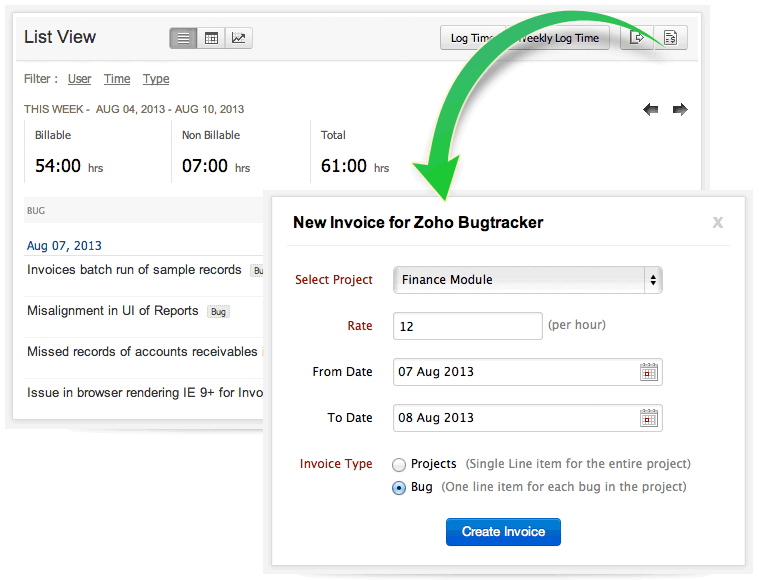
Image source: zoho.com
- Manual and timer-based tracking: Zoho bug tracker time tracking offers both manual entry and a built-in timer to record work duration. This flexibility allows developers to log time in real time or retrospectively, depending on their workflow.
- Billable vs internal work logs: With Zoho bug tracker time tracking, teams can separate billable client work from internal development or QA tasks. This helps project managers create accurate invoices while keeping internal productivity metrics distinct.
- Reporting limitations for sprint analysis: Zoho bug tracker time tracking provides basic reports but lacks deep analytics for . Teams may find it challenging to correlate time spent on bugs with velocity, blockers, or release predictability. Time tracking provides basic reports but lacks deep analytics for sprint-level insights. Teams may find it challenging to correlate time spent on bugs with velocity, blockers, or release predictability.
Zoho bug tracker pricing breakdown
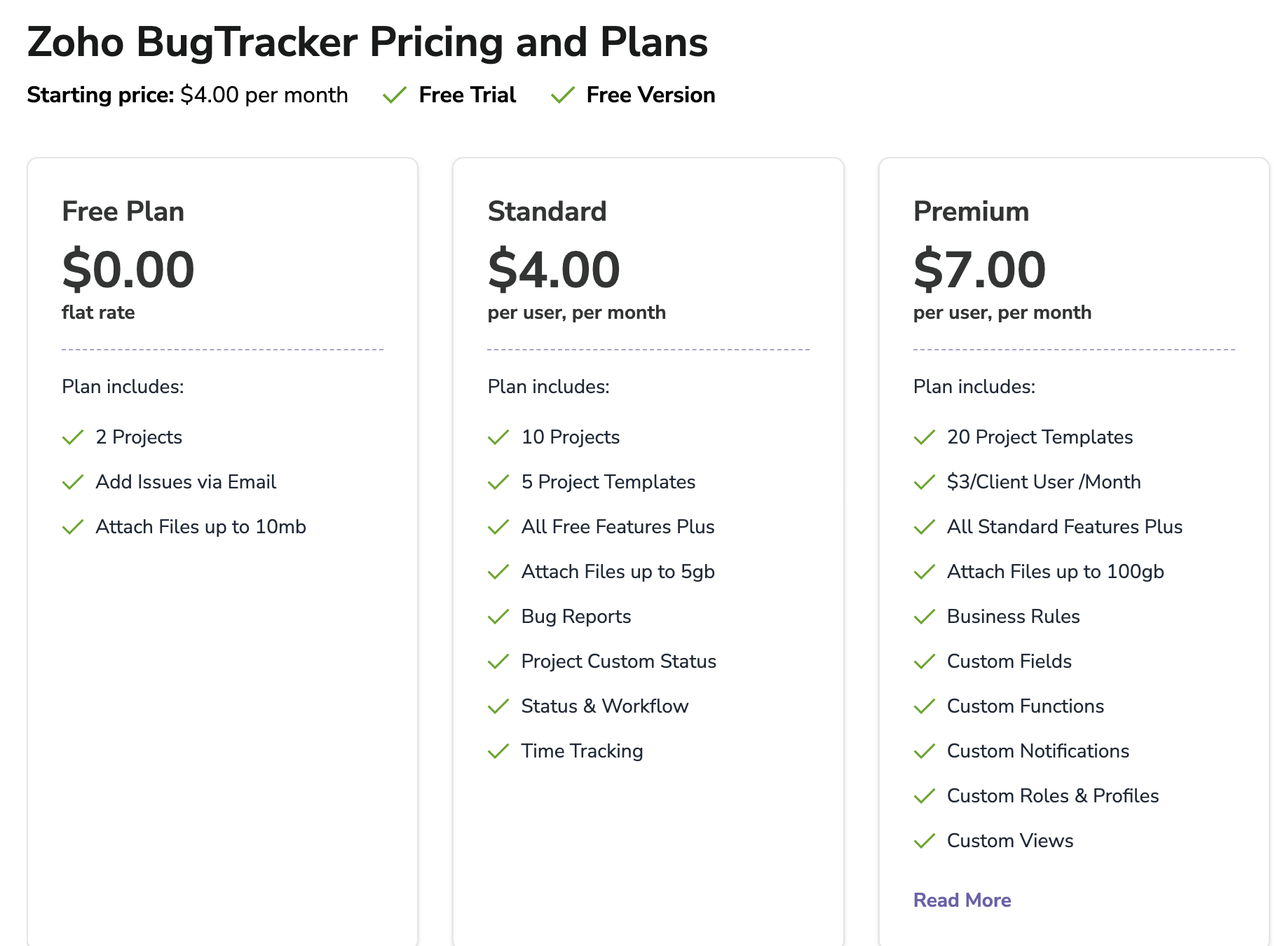
Image source: zoho.com
Update time: 2025-12-03
Note: Pricing and plan details reflect publicly available data as of the update date and may vary based on region, billing cycle, and number of agents.
Free plan: $0.00 (flat rate)
The Free plan offers basic bug-tracking capabilities suitable for tiny teams or early-stage projects. It includes support for up to 2 projects, giving teams enough room to organize simple workflows. Users can also add issues via email, making it easy to capture bugs directly from testers or stakeholders. File attachments up to 10MB ensure essential screenshots or logs can be included. This tier works best for teams exploring Zoho BugTracker before committing to paid features. Standard plan: $4.00 per user/month
The Standard plan expands capacity and functionality for growing development teams. It supports 10 projects and five to speed up setup. Teams gain access to key features, including bug reports, custom project statuses, and workflow controls. The plan allows significantly larger file uploads—up to 5GB—which is valuable for logs, videos, or documentation. Time tracking is also included, giving teams visibility into effort spent on bug resolution.
Premium plan: $7.00 per user/month
The Premium tier introduces and administrative controls for more complex engineering environments. It includes 20 project templates and even supports $3 client user/month pricing for external collaboration. All Standard features are included, along with significant upgrades such as business rules, custom fields, custom functions, and custom notifications. Attachments expand to a maximum of 100GB, supporting heavy documentation and rich media. This plan also offers custom roles, profiles, and views, enabling highly tailored, scalable workflows.
Zoho bug tracker pros and cons for teams
Zoho Bug Tracker provides substantial value for small teams that need structured bug tracking without a significant upfront investment. However, some limitations become noticeable as projects scale or collaboration demands grow.
Pros:
- Low-cost entry point: Zoho offers an affordable pricing model that makes it accessible for startups and small teams. Even the free plan provides enough functionality to begin without financial risk.
- Feature-rich for basic issue tracking: The platform covers essentials such as issue reporting, tagging, priorities, and attachments. These tools create a solid foundation for handling straightforward QA and development workflows.
- Easy adoption for small QA teams: Its interface and are approachable for new or compact QA teams. Basic setups require minimal onboarding, allowing teams to begin logging and managing bugs quickly.
Cons:
- UI complexity impacts daily usage: As teams expand, the interface can feel crowded and navigation-heavy. This creates friction during high-volume bug logging or when switching between modules frequently.
- Siloed communication about bugs: Most conversations happen in ticket comments, often scattering context across platforms. This slows alignment when developers, QA, and managers need .
- Workflow customization requires setup time: Adjusting statuses, fields, or processes usually requires administrative involvement. This slows teams that need to evolve workflows during active development cycles rapidly.
- Limited collaboration beyond commenting: Zoho lacks built-in real-time , pushing teams to external chat or documentation platforms. This separation makes coordination slower and increases the risk of missed information.
Streamline your team's software delivery flow
New option: Try Lark to upgrade tracking bugs with unified approaches
Modern engineering teams need more than just a place to log defects—they need a system that helps them resolve issues faster and with fewer communication gaps. While traditional bug trackers focus on documenting problems, Lark brings , automation, and workflow flexibility directly into the resolution process. This shift turns bug tracking from a passive record-keeping task into an active, . Teams can adapt processes quickly, reduce back-and-forth, and keep all stakeholders aligned throughout the lifecycle of an issue. As a result, bugs move from discovery to resolution far more efficiently than with conventional tools.
Centralized bug workflows within a centralized database
Zoho limitation: The Zoho bug tracker relies on predefined issue workflows, offering limited flexibility. Changing statuses, adding custom fields, or restructuring pipelines typically requires backend configuration and testing. This slows adaptation when development processes change mid-sprint or when new reporting requirements appear.
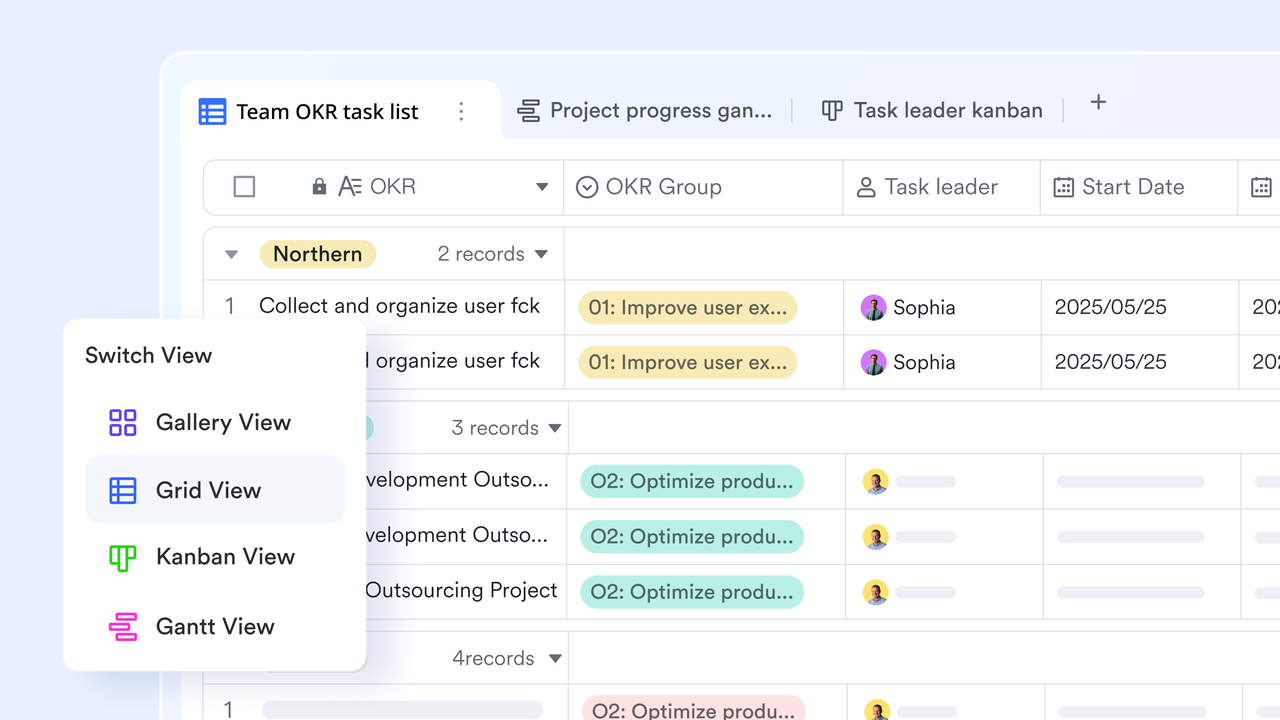
Lark advantage: enables teams to design entirely visual issue pipelines using tables, , filters, and customized views. Status flows can be edited instantly, custom fields can be added on the fly (severity levels, build numbers, impact scope, environment details), and sprint views can be reorganized without any technical setup. Teams can adjust workflows during live projects rather than waiting for admin updates, giving engineering leaders immediate control over evolving QA processes.
Real-time mentoring and bug tracking
Zoho limitation: Zoho falls short in simplicity and ease of setup—its dashboards and analytics often require multiple modules (Projects + BugTracker + Analytics), making configuration more complex. Real-time updates can lag due to scheduled data syncs, and cross-project reporting isn’t seamless without add-ons
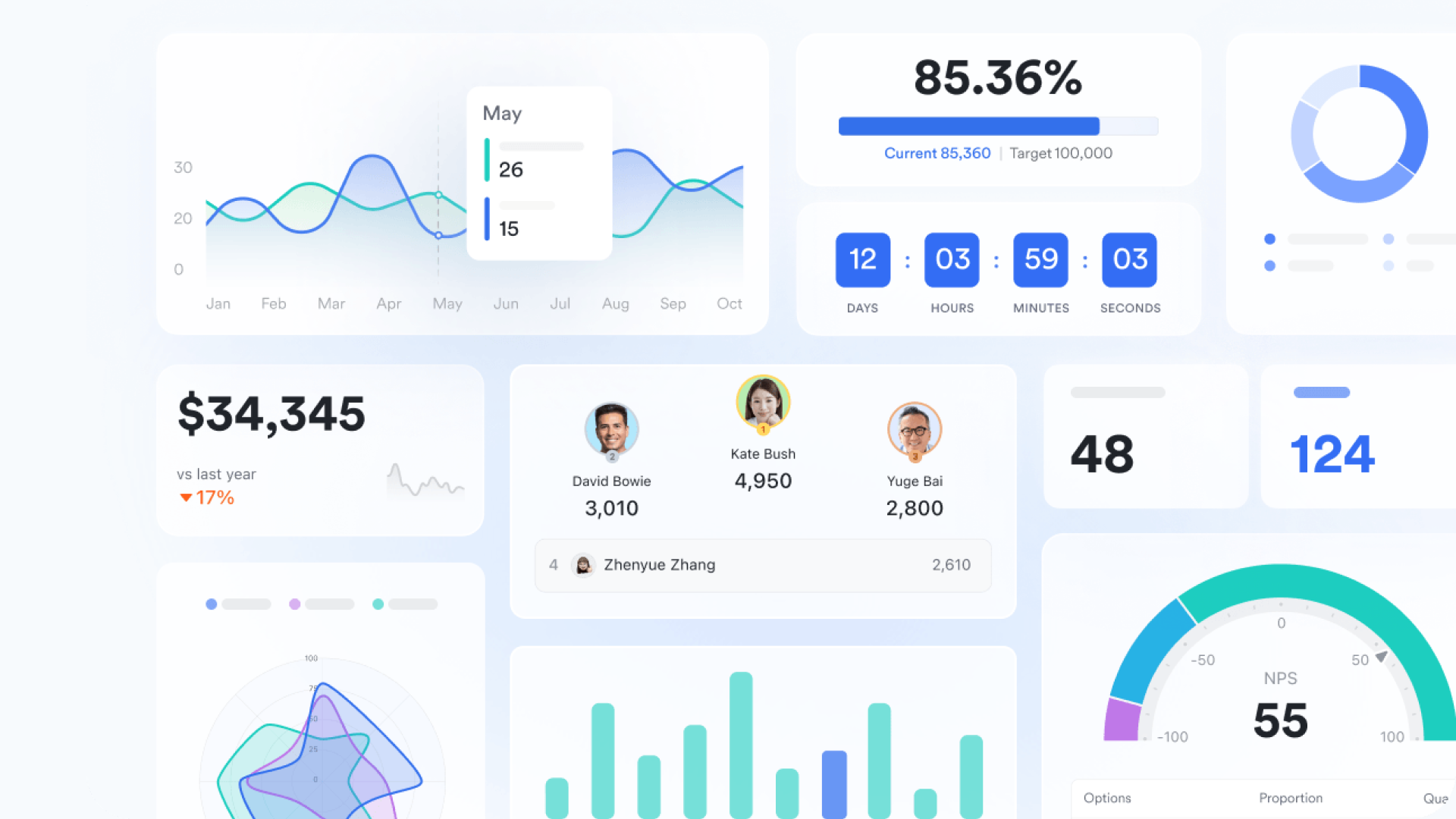
Lark advantage: Lark Base offers for real-time data visualization, allowing you to view and analyze your information using a variety of charts, including column, bar, line, and combo charts. These dashboards can be precisely tailored using filters to display content based on criteria like sprint, owner, module, or milestone, helping you quickly locate key information and visualize trends. You can set them up to effectively monitor overall project progress and track open versus closed items
Automated routing and escalations
Zoho limitation: Bug assignments in Zoho often rely on static project rules or manual routing. Escalations typically require team leads to notice delays and intervene manually—leading to missed SLAs or unresolved high-priority tickets.
Lark advantage: With automated workflow, bugs are routed dynamically based on severity level, affected module, responsible engineer, or escalation time thresholds. Critical defects can instantly notify senior developers, overdue issues can trigger reminder flows, and blockers can automatically escalate to management. These workflows are easy to modify without backend configuration, enabling teams to continuously fine-tune routing logic to prevent bottlenecks and reduce response times. 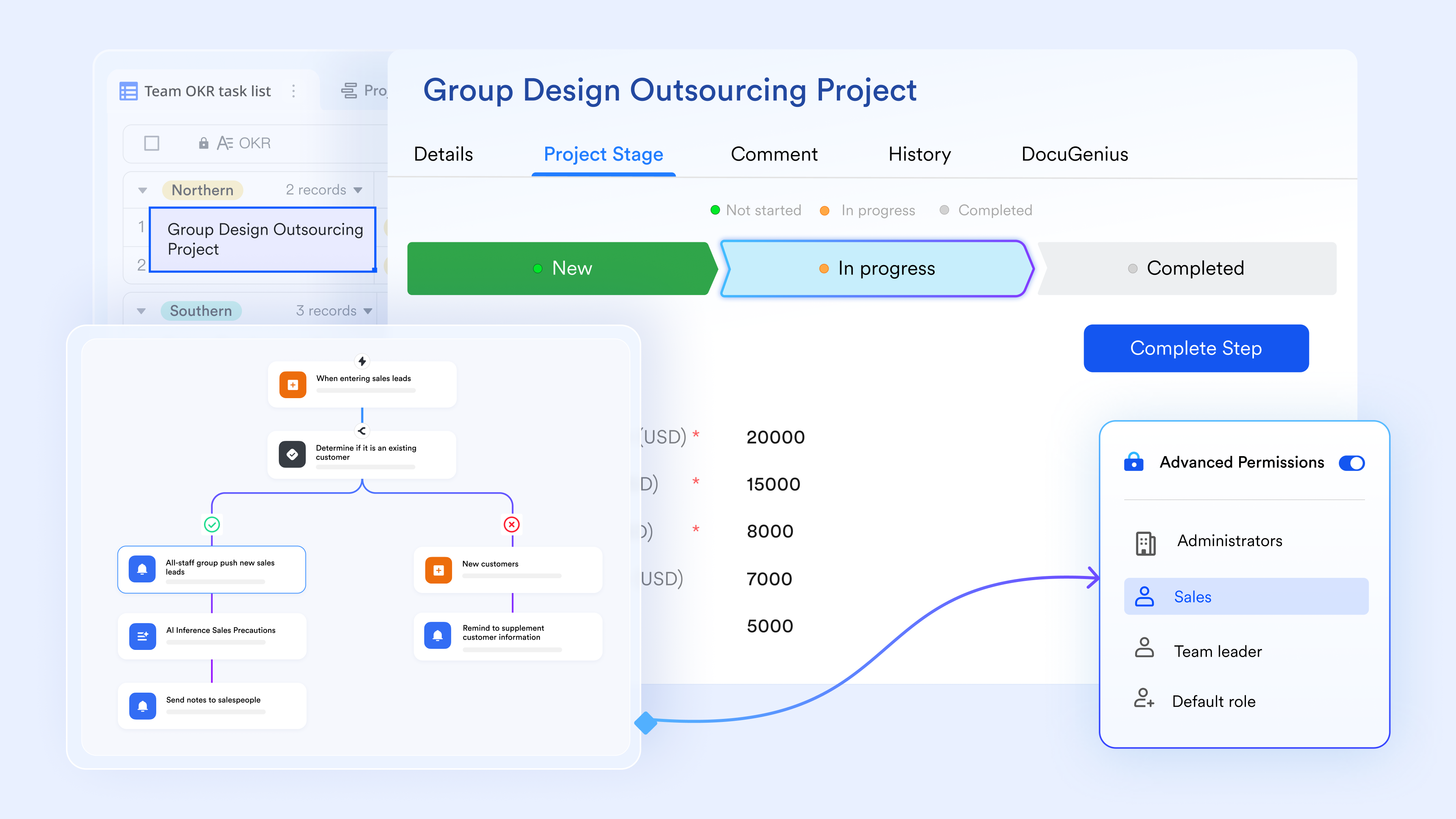
Real-time cross-team collaboration
Zoho limitation: Communication inside Zoho is limited to inherently asynchronous ticket comments and lacks urgency. Discussions often move into external chat tools, disconnecting conversations from issue records and slowing decisions.
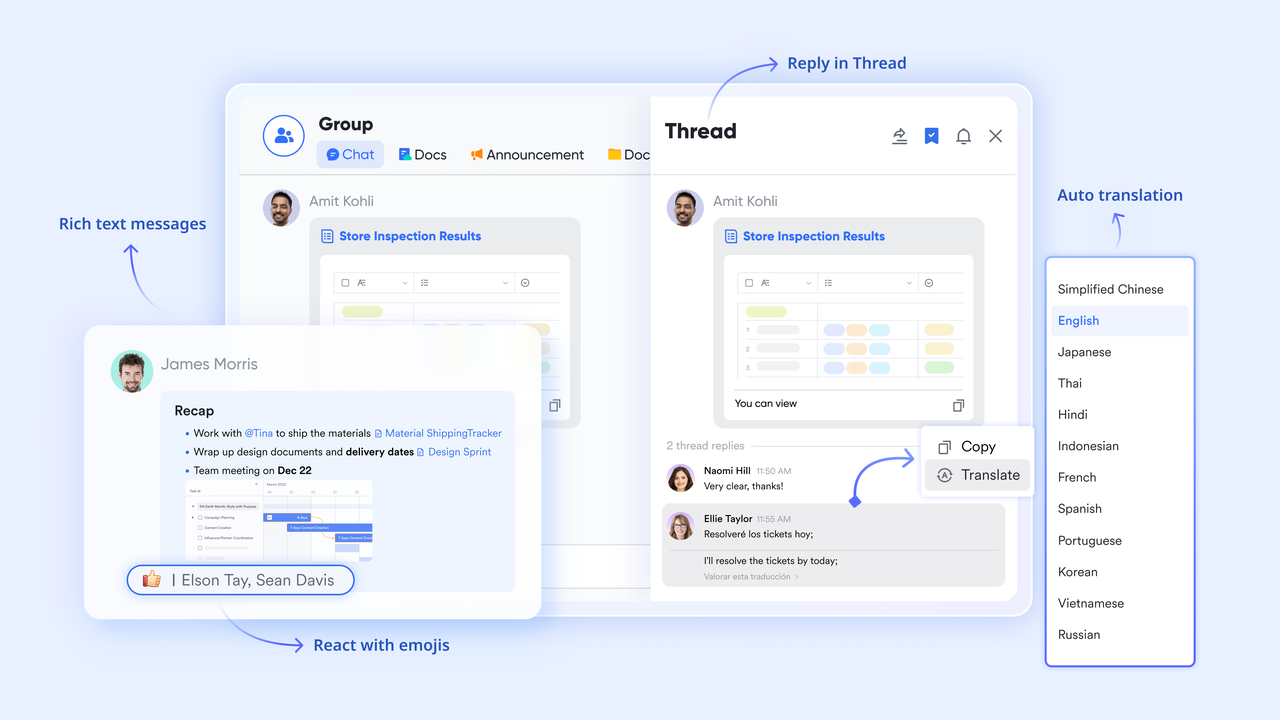
Lark advantage: allows teams to discuss bugs in real time with full context. Developers, testers, product managers, and operations staff can or escalation groups around critical issues instantly—sharing screenshots, logs, or documents without leaving the workflow environment. Conversations remain visible to all stakeholders tied to the problem, ensuring alignment and dramatically shortening clarification cycles.
Engineering accountability and execution
Zoho limitation: In Zoho, task tracking is secondary to ticket logging, leading to missed follow-ups or informal ones. Ownership changes or enforcement of deadlines often require manual coordination.
Lark advantage: Lark Tasks connects accountability directly to issue movement. When bugs change status or reach escalation triggers, tasks are auto-assigned with owners, deadlines, and reminder notifications. Managers gain immediate visibility into blocked tasks or overdue fixes. Engineers always know their responsibilities clearly, eliminating gray areas that slow resolution and ensuring operational accountability throughout the . 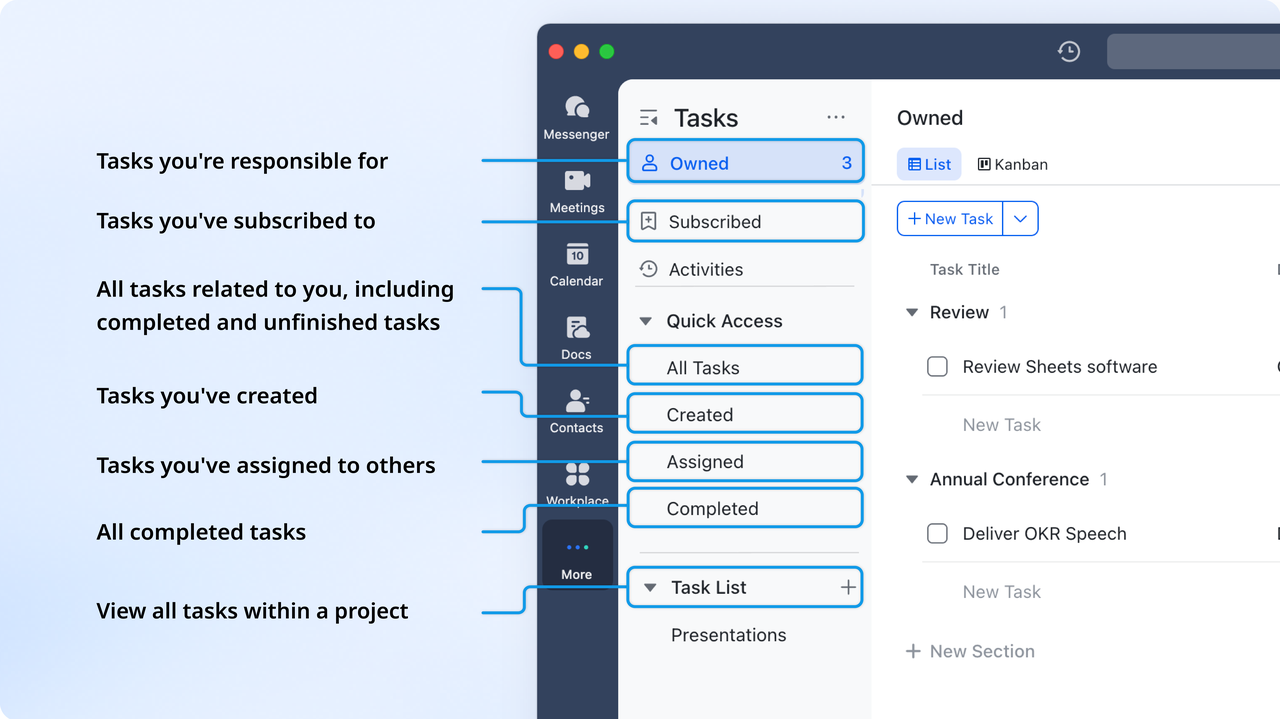
Unified, collaborative documentation
Zoho limitation: Zoho bug tracker does not provide a centralized knowledge hub for QA documentation. Root-cause analyses, reproductions, release notes, and test results typically reside on shared drives, in emails, or on disconnected documentation platforms.
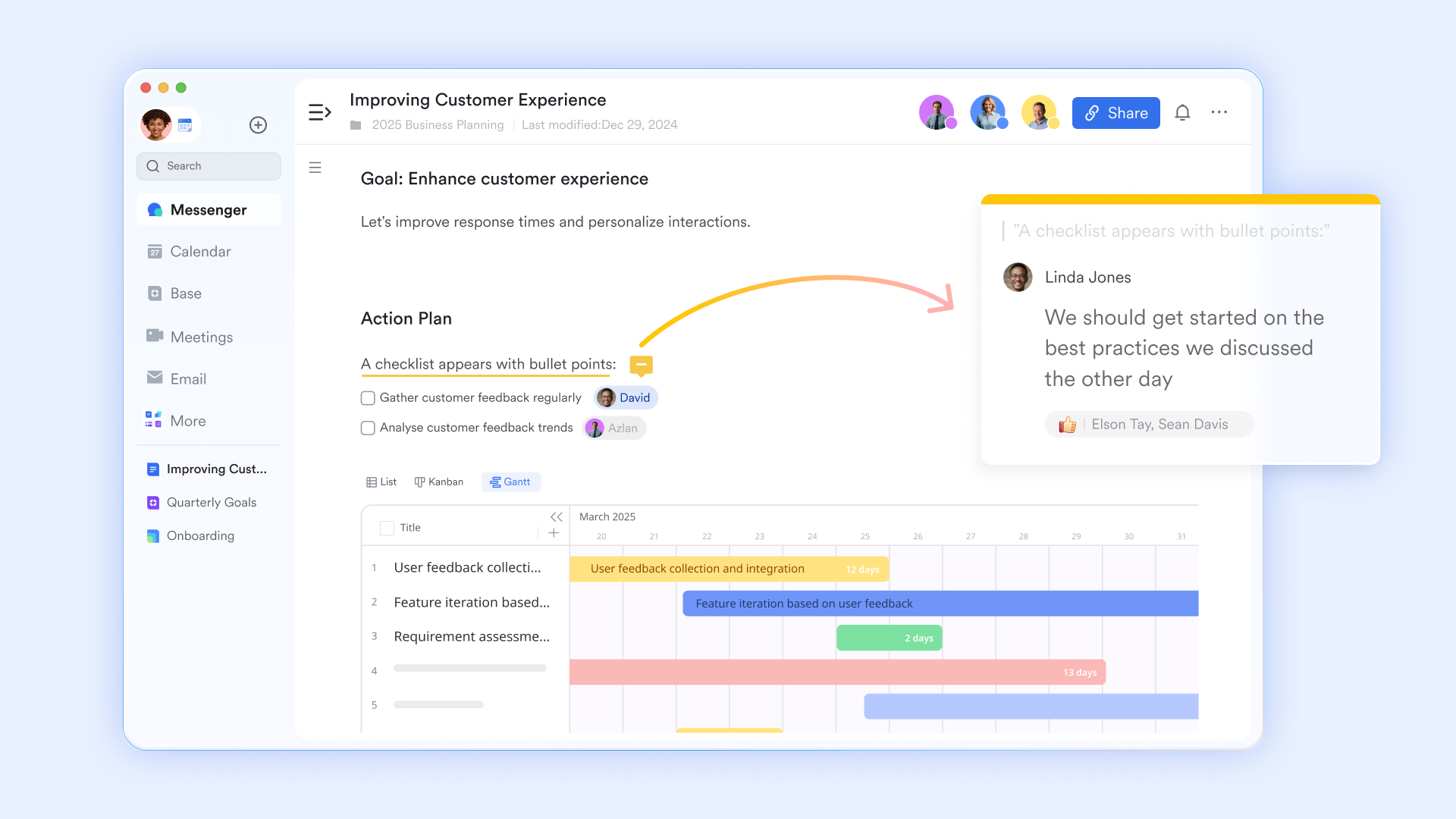
Lark advantage: and consolidate all QA and engineering documentation into a single collaborative workspace. Teams co-author bug reproduction steps, store diagnostic logs, maintain regression checklists, and document release validations together. Docs remain instantly editable and shareable across development and QA teams, ensuring institutional knowledge stays current and searchable without navigating siloed platforms.
:
- Starter plan: Free forever plan that includes 11 powerful tools for up to 20 users. It also comes with 100GB of storage, 1000 automation runs, AI translations, and more.
- Basic plan: $6/user/month (billed annually) for up to 500 users. It includes everything in Starter plus group calling for up to 500 attendees, 5TB of storage, 1000 automation runs, and more. For more details, please .
- Pro plan: $12/user/month (billed annually) for up to 500 users. It includes everything in Basic plus group calling for up to 500 attendees, 15TB of storage, 50,000 automation runs, and more.
- Enterprise plan: for custom pricing. Supports unlimited users and includes even more automation runs and advanced security, compliance, and management features.
For small teams with simple communication needs

18 months message history
1000 Base automation runs/month
2000 rows per table in Base
Most POPULAR
For companies with comprehensive collaboration and management needs
Unlimited message history
500-participant video meetings
50k Base automation runs/month
20k rows per table in Base
For large companies with advanced security and organizational management needs
Get a personalized demo and pricing
Unlimited message history
500-participant video meetings
15 TB storage + 30 GB storage/user
500k Base automation runs/month
50k Base automation runs/month
Most POPULAR
For companies with comprehensive collaboration and management needs
Unlimited message history
500-participant video meetings
50k Base automation runs/month
20k rows per table in Base
Zoho bug tracker vs Lark: feature comparison
In a nutshell, Zoho Bug Tracker is built for structured, formal pipelines, offering robust control but requiring heavy setup and manual routing. Conversely, Lark prioritizes dynamic collaboration and speed, featuring instant visual workflow customization, automated routing, and real-time team chat. Essentially, choose Zoho for stable control and Lark for integrated flexibility and quick communication.
Conclusion
Teams need more than basic bug logging to maintain high-quality releases. Zoho Bug Tracker remains a practical option for structured issue tracking, offering useful features like reporting, prioritization, and time logging at an affordable entry point. However, as projects grow more complex, teams often require deeper workflow flexibility, , and automation that adapts to evolving processes.
This is where Lark provides a more modern approach—combining customizable pipelines, automated routing, instant messaging, task accountability, and unified documentation in a single workspace. By centralizing communication and streamlining every stage of the bug lifecycle, helps teams resolve issues faster and with greater clarity. If you're looking to move beyond traditional bug tracking and adopt a system built for speed, alignment, and scale, exploring Lark's flexible workflow platform is the next logical step. Start transforming how your team handles bugs today.
Start improving project efficiency now
FAQs
Can Zoho bug tracker handle cross-project dependencies?
Zoho Bug Tracker can reference related issues across projects, but its dependency tracking is limited and often requires manual linking. This can slow coordination when managing shared components or multi-team releases. Lark provides more flexible cross-project visibility, helping teams align dependencies in real time.
How does Zoho bug tracker perform in agile multi-sprint environments?
Zoho works for basic sprint planning, but its workflows may feel rigid when priorities shift frequently across sprints. The lack of real-time can also slow backlog grooming or mid-sprint adjustments. Lark supports more fluid sprint workflows with instant updates and adaptable views.
What analytics features matter most in modern bug tracking tools?
Key analytics include cycle time, severity trends, workload distribution, and root-cause insights—features that some bug tracking tools free tiers may not cover deeply. Zoho offers basic reports, but they're limited to advanced diagnosis. Lark enables richer reporting through customizable dashboards, enabling faster decision-making.
Can bug trackers replace general project management platforms?
Bug trackers typically focus on defects rather than broader planning, docs, or task ownership, so they rarely replace project management tools. Even bug tracking tools' free versions can't support end-to-end coordination. Lark bridges this gap by combining bug workflows, tasks, docs, and communication in one system.
How can workflow automation reduce average bug resolution time?
reduces delays by auto-routing issues, triggering escalations, and reminding owners when deadlines slip. This removes much of the manual coordination that slows teams down. Lark further enhances this with customizable, no-code automations designed to optimize how bugs flow through the pipeline.
Related reading






























