














Zoho CRM vs HubSpot: Discover the Game-Changing Alternative

Ryan Tanner
Product Marketing Specialist
Sep 18, 2026
Ryan Tanner
Sep 18, 2026

16 min read


When businesses compare Zoho CRM vs HubSpot, the goal is to find a CRM that simplifies customer management, improves sales performance, and supports long-term growth. Zoho CRM is known for its affordability and customization options, while HubSpot CRM is praised for its intuitive design and powerful marketing features. Both help teams organize contacts, manage pipelines, and boost productivity.
However, as organizations expand, they often need more than a traditional CRM to stay connected and agile. This shift has led many to explore modern, integrated platforms like Lark, which connect collaboration, automation, and client management in one seamless workspace.

Zoho CRM vs HubSpot CRM: Quick comparison table
Before diving deeper, here's a quick side-by-side look at HubSpot CRM vs Zoho CRM, highlighting their usability, automation, and scalability for modern sales and marketing teams.
Here's a quick breakdown comparing their strengths in usability, automation, scalability, and overall fit for modern sales and marketing teams.
Inside Zoho CRM: What works and what falls short
When comparing Zoho CRM vs HubSpot, Zoho stands out for its affordability, flexibility, and deep customization. It appeals to small and mid-sized teams looking for a cost-efficient CRM that adapts to their workflows. However, its user experience and collaboration features often fall behind more modern alternatives.
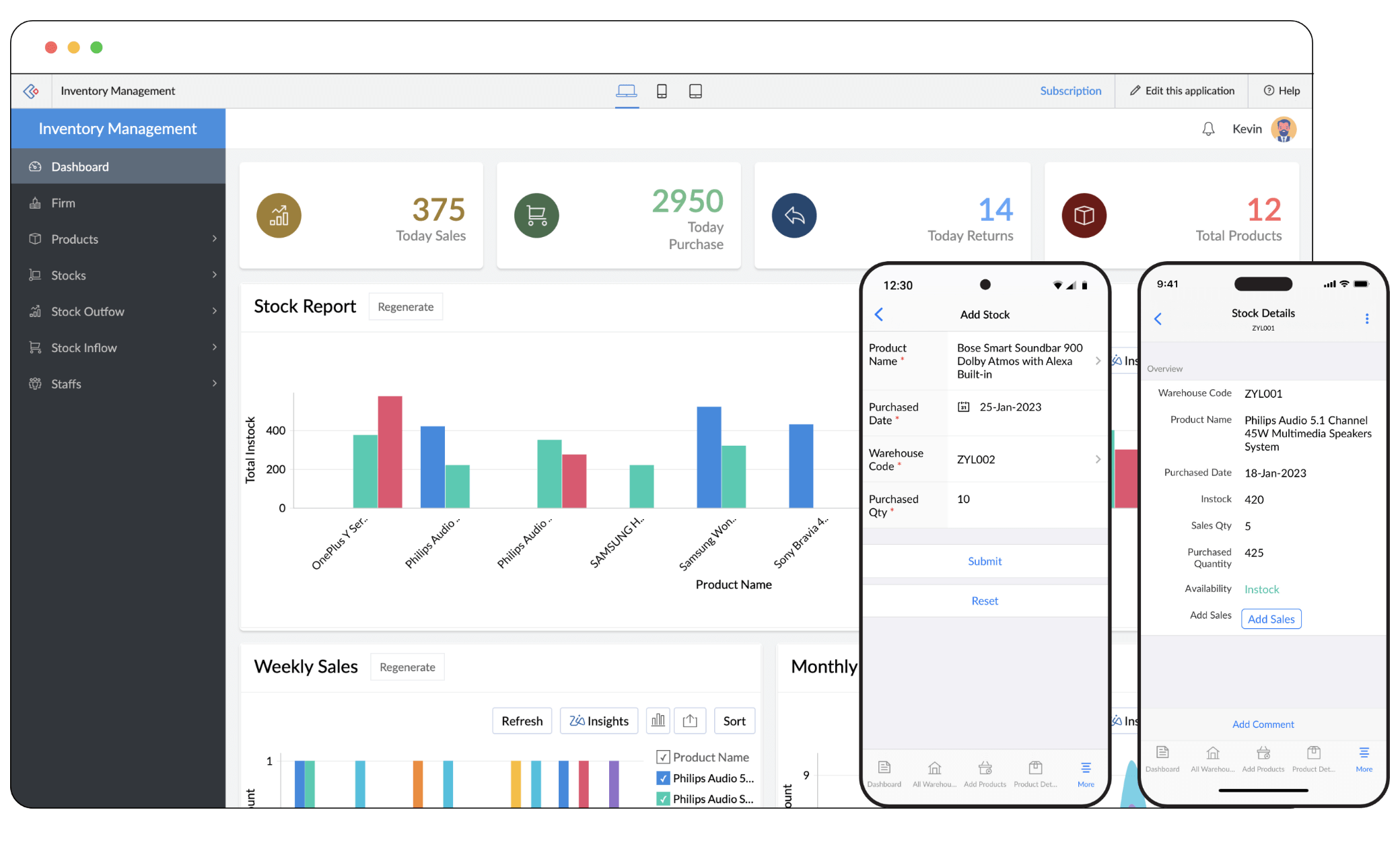
Image source: zoho.com
Key strengths
- Affordable for small to mid-sized teams: Zoho provides a budget-friendly entry point for startups and growing businesses that need essential CRM features.
- Highly customizable workflows: Teams can design modules, layouts, and automation tailored to their processes for better control.
- Strong reporting and analytics: Real-time dashboards help teams monitor sales performance and identify growth opportunities.
Limitations
- Complex and dated interface: The interface can feel overwhelming for new users, leading to longer onboarding times.
- Limited communication tools: Collaboration features are minimal, forcing teams to rely on external apps for messaging or meetings.
- Integration setup required: Connecting tools and maintaining workflows often demands extra time and technical effort.
Security
- Data Encryption: Employs robust encryption protocols to safeguard data both in transit and at rest, ensuring sensitive information remains protected。
- Two-Factor Authentication (2FA): Enhances login security by requiring users to provide a second form of verification, such as a one-time code sent to their mobile device.
- Role-Based Access Control: Allows administrators to define user roles and permissions, ensuring that only authorized personnel have access to specific data and functionalities.
Pricing
- Free Plan: Supports up to 3 users with basic CRM functionalities.
- Standard Plan: Priced at $20 per user/month, offering features like workflow automation, sales forecasting, and email insights.
- Professional Plan: At $35 per user/month, this plan includes inventory management, multiple currencies, and advanced customization options.
- Enterprise Plan: For $50 per user/month, it offers advanced analytics, an AI-powered sales assistant, and enhanced customization capabilities.
- Ultimate Plan: At $65 per user/month, it includes all Enterprise features plus additional storage and advanced analytics tools.
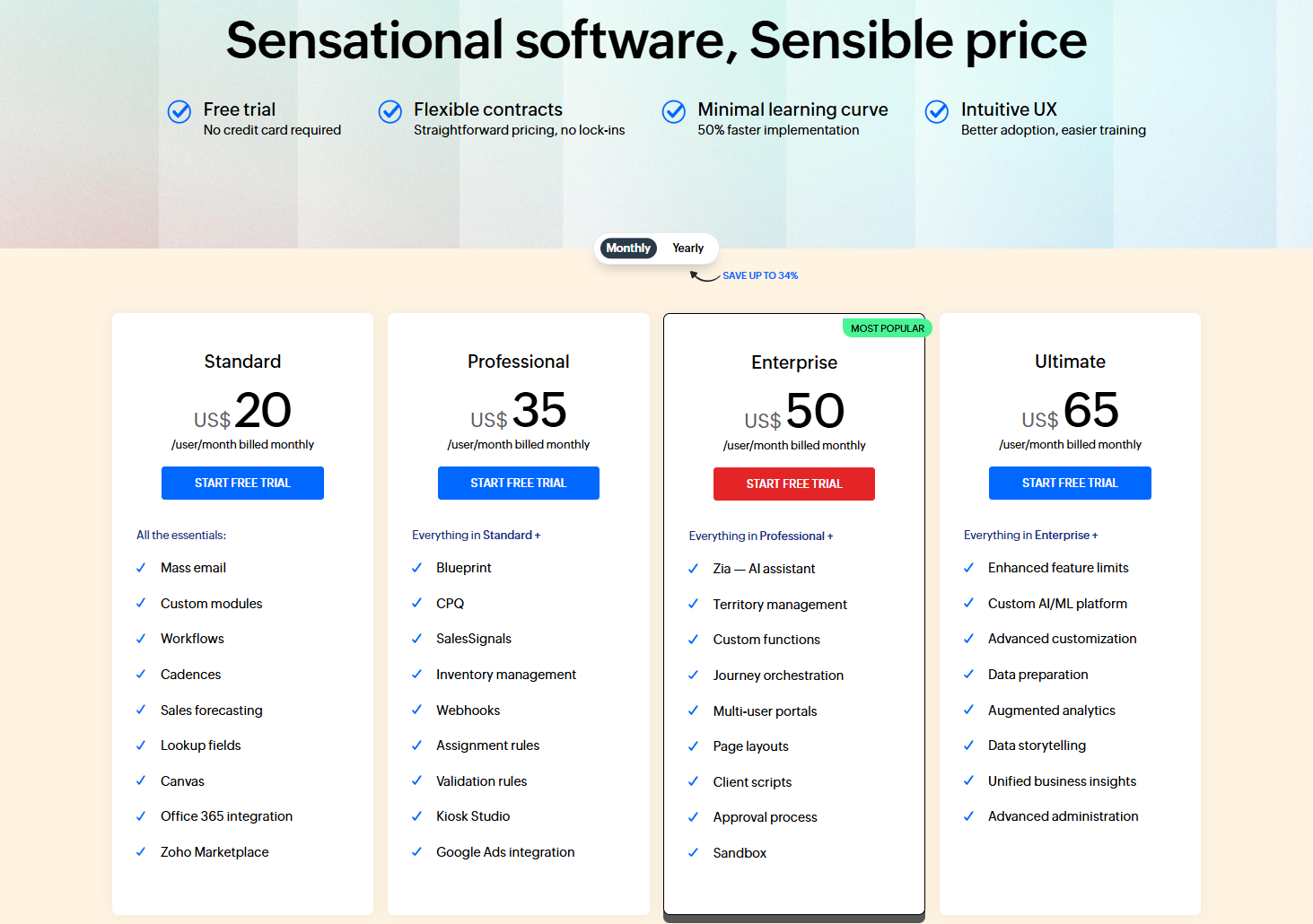
Image source: zoho.com
Inside HubSpot CRM: What shines and what falls short
In the HubSpot CRM vs Zoho CRM comparison, HubSpot stands out for its clean design, intuitive user experience, and advanced marketing automation. It appeals to teams focused on inbound marketing and seamless customer engagement. However, as organizations scale, higher costs and limited built-in collaboration can make HubSpot less practical for long-term use.
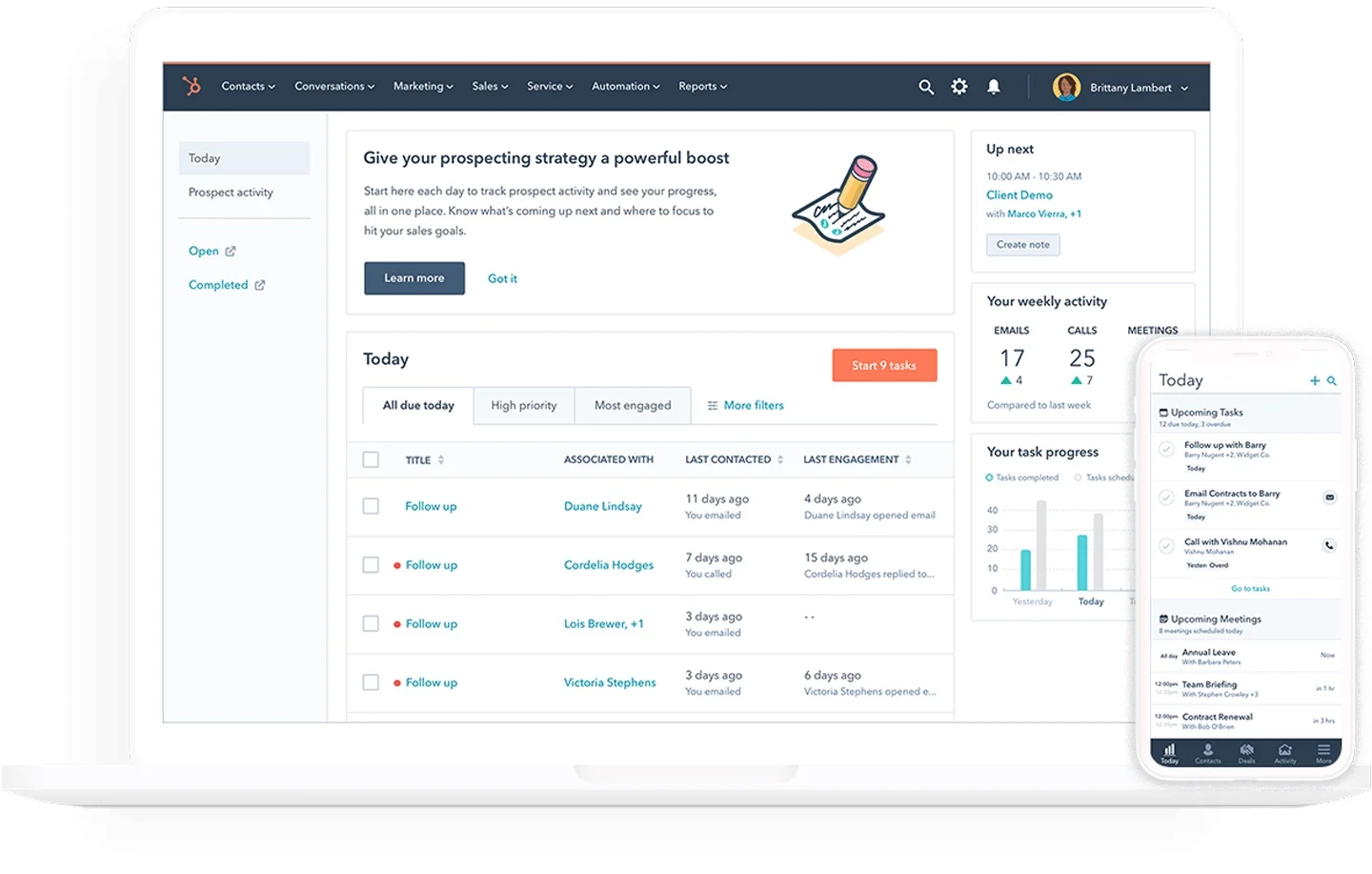
Image source: hubspot.com
Key strengths
- Outstanding UX and onboarding: HubSpot offers an intuitive interface and quick setup that helps teams get started with minimal training.
- Marketing automation excellence: Its workflows, lead scoring, and email campaigns make it a favorite among marketing-driven teams.
- Deep ecosystem integrations: HubSpot connects easily with its marketing, service, and operations hubs for a unified experience.
Limitations
- Rapidly increasing costs: Pricing rises sharply as you scale or require advanced features, making it costly for larger teams.
- Limited flexibility at entry levels: Free and basic plans come with restrictions that often require upgrades.
- Fragmented collaboration: Despite being a strong CRM, communication and teamwork still rely on separate tools outside the platform.
Security
- Data Encryption: Utilizes encryption to protect data both in transit and at rest, ensuring the confidentiality and integrity of customer information.
- Two-Factor Authentication (2FA): Offers two-factor authentication to add an extra layer of security during the login process.
- Single Sign-On (SSO): Supports SSO, allowing users to access HubSpot using their existing credentials from other platforms, streamlining the login process while enhancing security.
Pricing
- Free Plan: Provides core CRM functionalities for unlimited users, including contact management and email tracking.
- Starter Plan: Starts at $15 per user/month, adding features like required fields, permission sets, and multiple currencies.
- Professional Plan: At $50 per user/month, it includes AI-powered customer agent, duplicate management, and custom reporting.
- Enterprise Plan: Pricing varies; this plan offers advanced features like predictive lead scoring, custom reporting, and enhanced automation capabilities
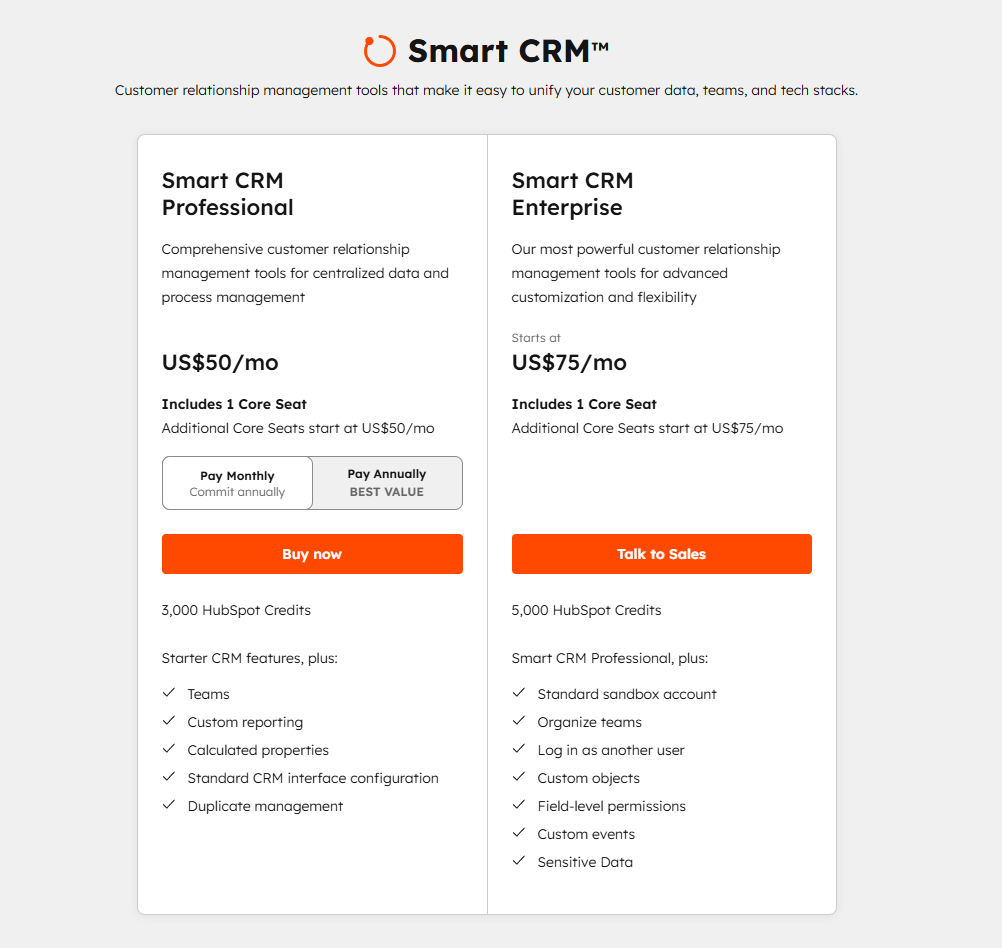
Image source: hubspot.com
Why businesses are looking beyond Zoho and HubSpot
The modern workplace has moved beyond traditional CRMs as teams now need connected workspaces where communication, project tracking, and customer management come together seamlessly. Here are the common reasons:
- High costs at scale: While both platforms offer free or low-cost entry plans, pricing can escalate quickly as teams grow or additional features are needed. Enterprises with large numbers of users or complex automation requirements may find the cost prohibitively high.
- Customization limitations: Some businesses need highly tailored workflows or integrations. Zoho, while flexible, can become complex to configure for advanced custom processes, and HubSpot can be rigid in lower-tier plans.
- Complexity & learning curve: Zoho CRM has a steeper learning curve due to its extensive features and modules, which can slow down onboarding for teams. HubSpot, while user-friendly, can feel overwhelming when scaling beyond marketing automation.
- Integration challenges: Companies with niche or legacy tools may find integration difficult. HubSpot is better for its native ecosystem but may require third-party connectors for specialized tools, while Zoho relies on its ecosystem (Cliq, Projects, Meeting), which may not suit every business.
While Zoho CRM and HubSpot CRM focus mainly on data entry and pipeline tracking, today's businesses expect more with faster collaboration, real-time visibility, and automation that connects every department. This growing need for integration and agility is why many forward-thinking organizations are turning to Lark. This modern alternative combines teamwork, automation, and client management in one unified platform.
Lark: The modern alternative to Zoho & HubSpot
Lark reimagines what a unified workspace can be. Instead of managing communication, client tracking, and project execution across disconnected apps or standalone CRM software, Lark unifies them in one seamless and collaborative platform. It empowers teams to move faster, stay aligned, and maintain complete visibility across every stage of work.
By combining CRM, communication, and project management, Lark eliminates the friction of switching between multiple tools. Messages turn into tasks, meetings link to documents, and data flows effortlessly between teams. This connected ecosystem ensures that everyone works from the same source of truth, improving accountability and accelerating results.
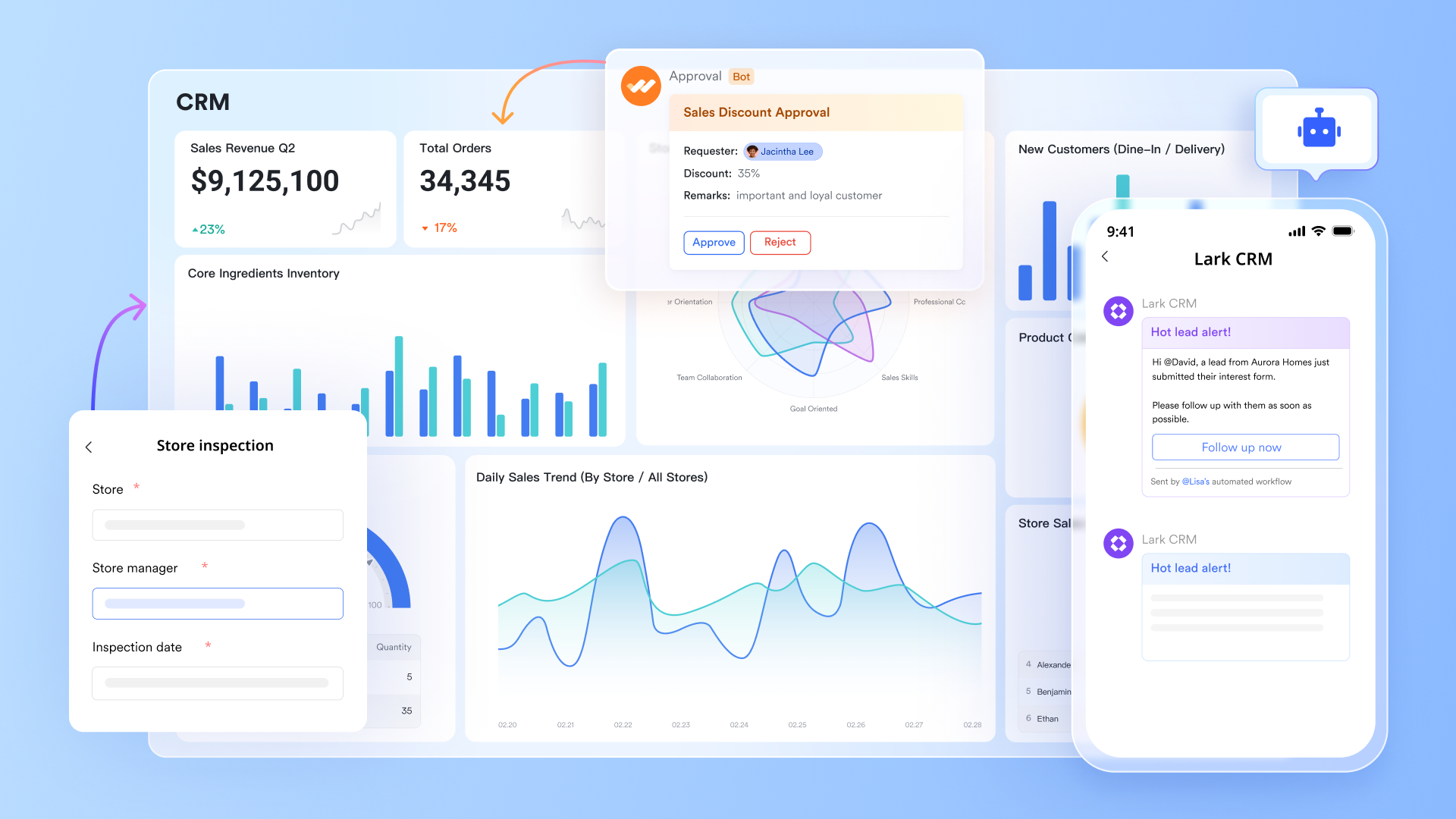
Lark Base: From strategy to execution
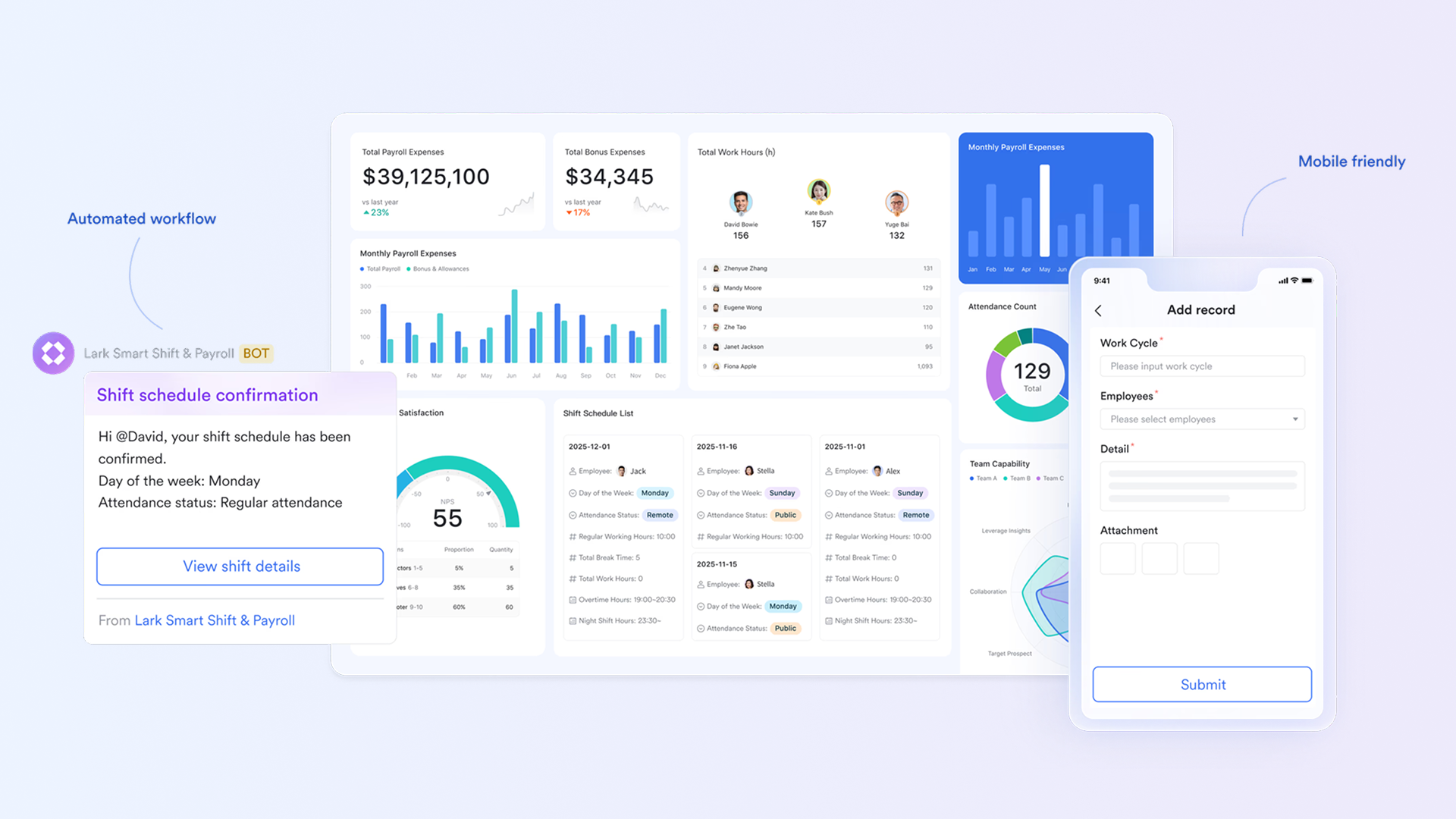
Lark Base serves as the operational heart of your business, connecting strategic planning with day-to-day execution. It helps teams manage data with context, transforming scattered information into actionable insights.
- Track everything in one workspace. Lark Base allows you to organize every part of your business from client details and project tasks to financial KPIs and internal goals in structured, relational tables. Instead of using disconnected spreadsheets or apps, everything you need lives in one centralized, dynamic workspace.
- Connect data and teams seamlessly. Marketing, sales, and operations teams can finally work from the same source of truth. You can link marketing campaign performance directly to active deals or client projects, making it easier to see how top-of-funnel efforts convert into revenue.
- Deliver complete visibility for leadership. Lark Base gives executives a real-time overview of business performance. They can monitor progress across teams, identify roadblocks early, and ensure that goals are being met without waiting for manual reports.
Lark Base empowers teams to act with confidence. Imagine viewing campaign metrics, project milestones, and revenue outcomes all within one workspace . That is how strategy turns into execution without friction.
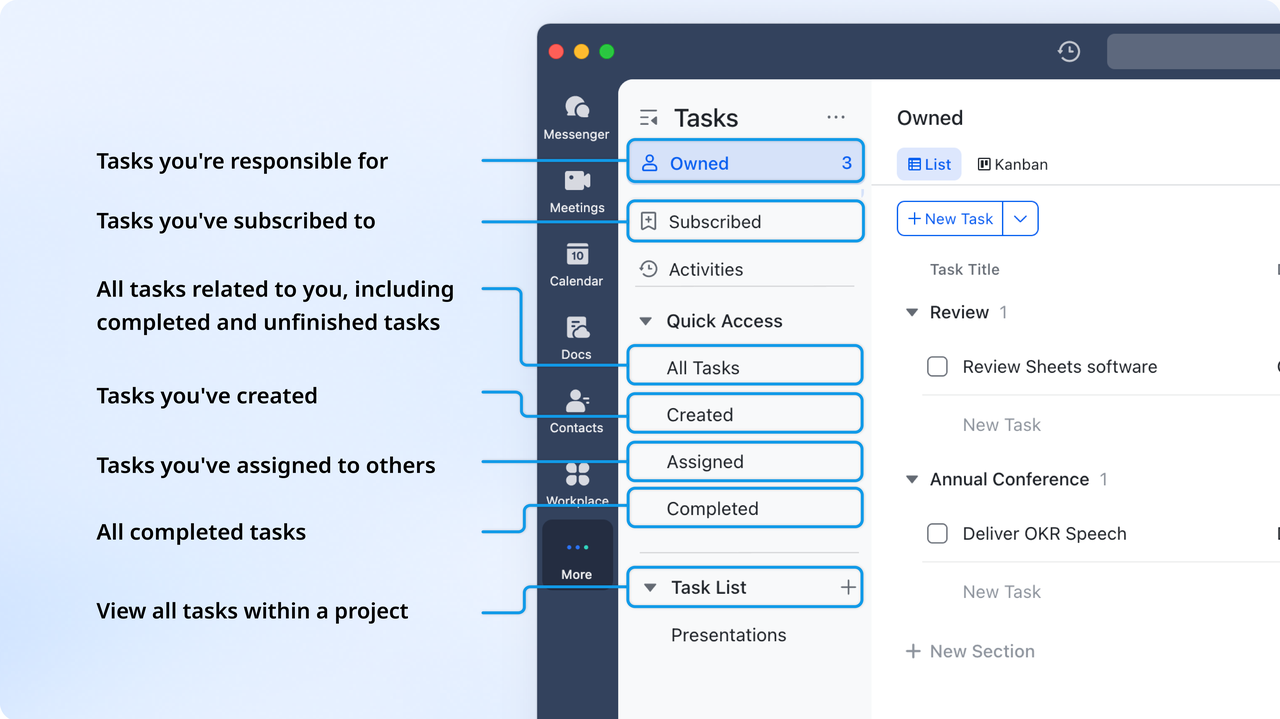
Lark Tasks: Turning relationships into results
Lark Tasks turns client interactions and project discussions into organized, actionable work. It ensures that every conversation leads to measurable progress.
- Assign clear ownership and accountability. Every task is assigned to a specific owner, with set deadlines and progress tracking. This clarity eliminates confusion and ensures every team member knows exactly what they need to deliver.
- Automate repetitive work effortlessly. Lark Tasks can automatically create new action items from chat discussions, emails, or CRM updates. For instance, when a deal stage changes, Lark can trigger related tasks for follow-up calls or proposal preparation —saving teams valuable time.
- Trigger intelligent reminders and follow-ups. Built-in automation ensures that no milestone is forgotten. Whether it is a client check-in or a project deadline, Lark automatically notifies the right person at the right time.
By converting daily communication into structured execution, Lark Tasks ensures teams stay focused, aligned, and proactive —turning every client relationship into a measurable result.
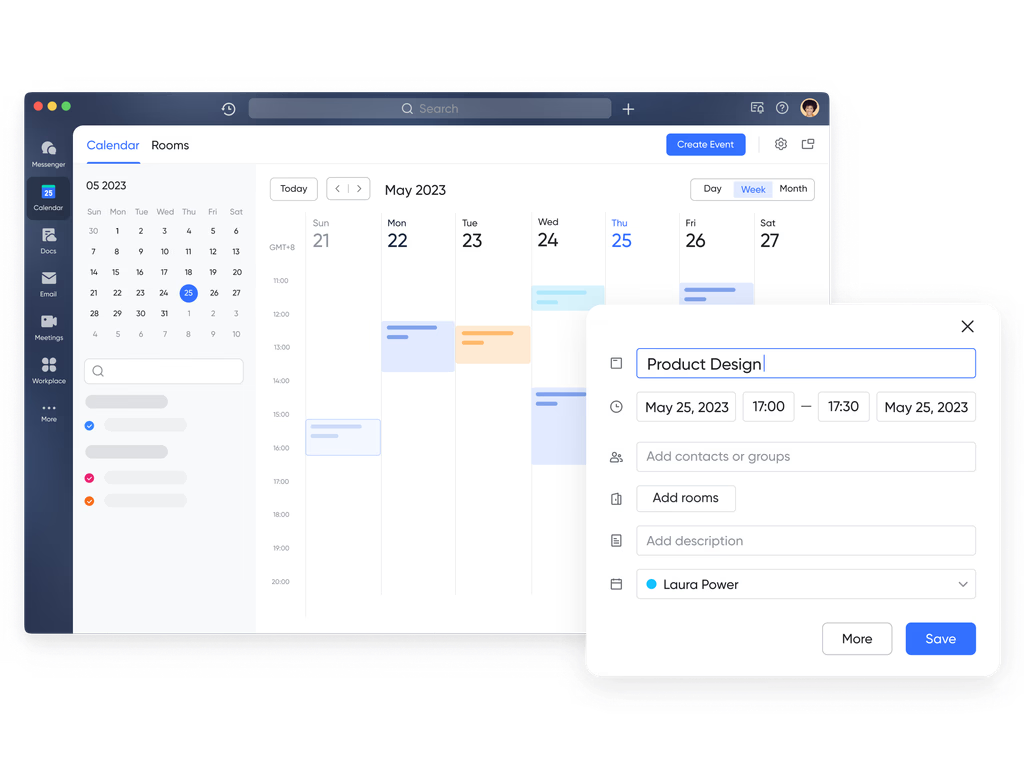
Lark Calendar: Aligning business goals with schedules
Lark Calendar does more than track appointments —it connects time management directly to business strategy. It transforms scheduling into a collaborative, context-rich experience.
- Integrated planning and execution. Every event you schedule, from sales reviews to product demos, can be linked directly to relevant documents, tasks, or messages. This keeps discussions and deliverables aligned with business goals.
- Support goal-based scheduling. Lark Calendar helps you plan your work around strategic milestones. For example, you can align quarterly reviews with OKR timelines or sync project meetings to specific deliverables.
In Lark, the calendar is not just a reminder system. It is a productivity engine that ensures every scheduled activity contributes meaningfully to organizational success.
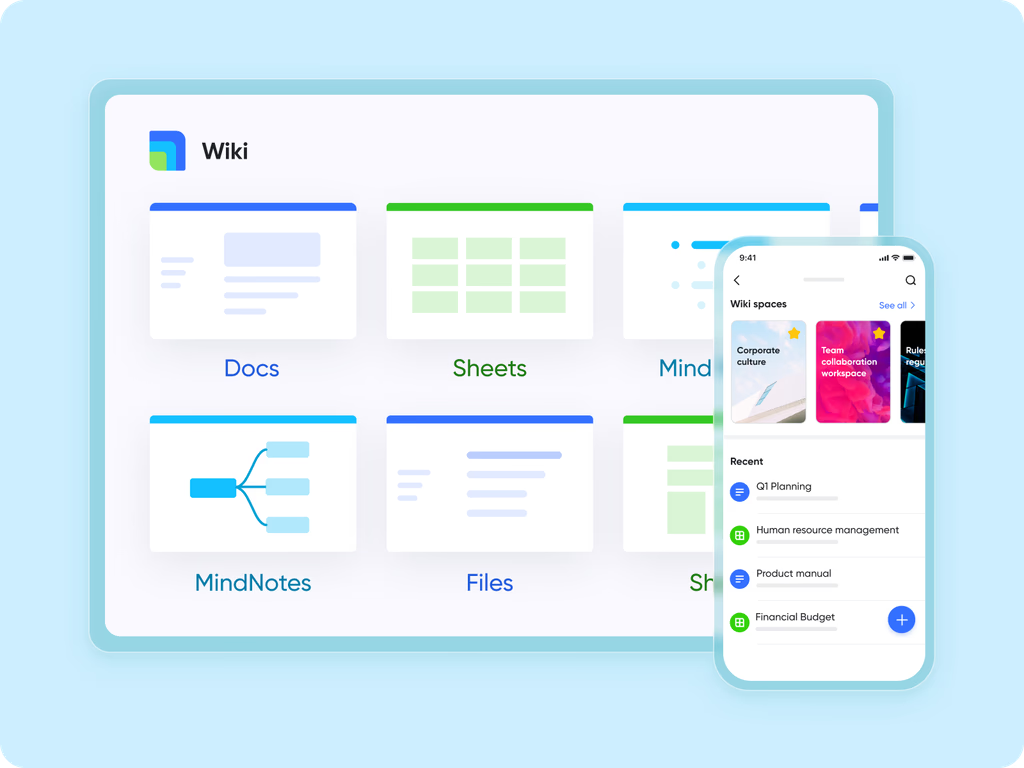
Lark Docs & Lark Wiki: One source of truth
Strong documentation is the foundation of smooth collaboration. Lark Docs and Lark Wiki eliminate confusion by keeping all knowledge current, connected, and accessible.
- Collaborate in real time with confidence. Teams can co-edit documents simultaneously, leave comments, and resolve feedback instantly. Everyone stays on the same page, literally and figuratively.
- Maintain accurate, version-controlled content. Every document has built-in version history, ensuring that updates are tracked and older versions can be restored easily. This reduces confusion and supports better decision-making.
- Create a connected knowledge network. Link key documents directly to deals, projects, or approval flows so that context is never lost. Sales teams can access the latest proposal templates, while onboarding teams can find updated guides instantly.
Lark Docs and Wiki together form a living knowledge base that grows with your organization. No more outdated files or lost attachments, just a reliable, searchable source of truth.
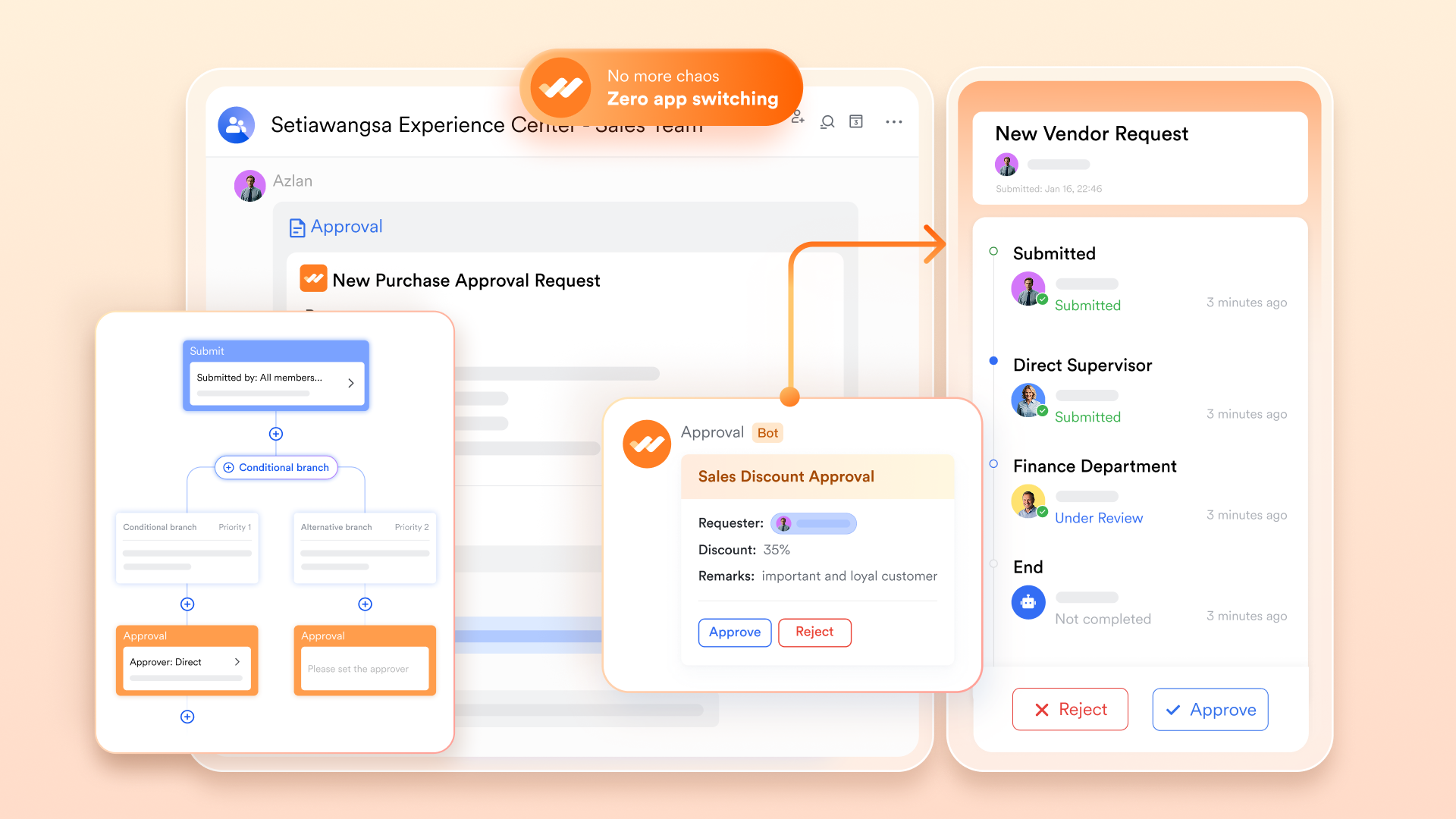
Lark Approval: Streamlined governance
Efficient governance keeps sales operations running smoothly while maintaining accountability. Lark Approval automates every step of the review and approval process.
- Automate multi-level approval workflows. From contract sign-offs to budget clearances, requests automatically flow to the right stakeholders for review and action.
- Ensure compliance and traceability. Every automated approval is logged, timestamped, and easily retrievable for audits, keeping your processes compliant and transparent.
- Accelerate response times. With instant notifications and mobile-friendly approvals, decisions happen faster, ensuring deals and projects never stall.
Lark Approval replaces manual email chains with structured, transparent workflows —allowing teams to move forward confidently while maintaining control.
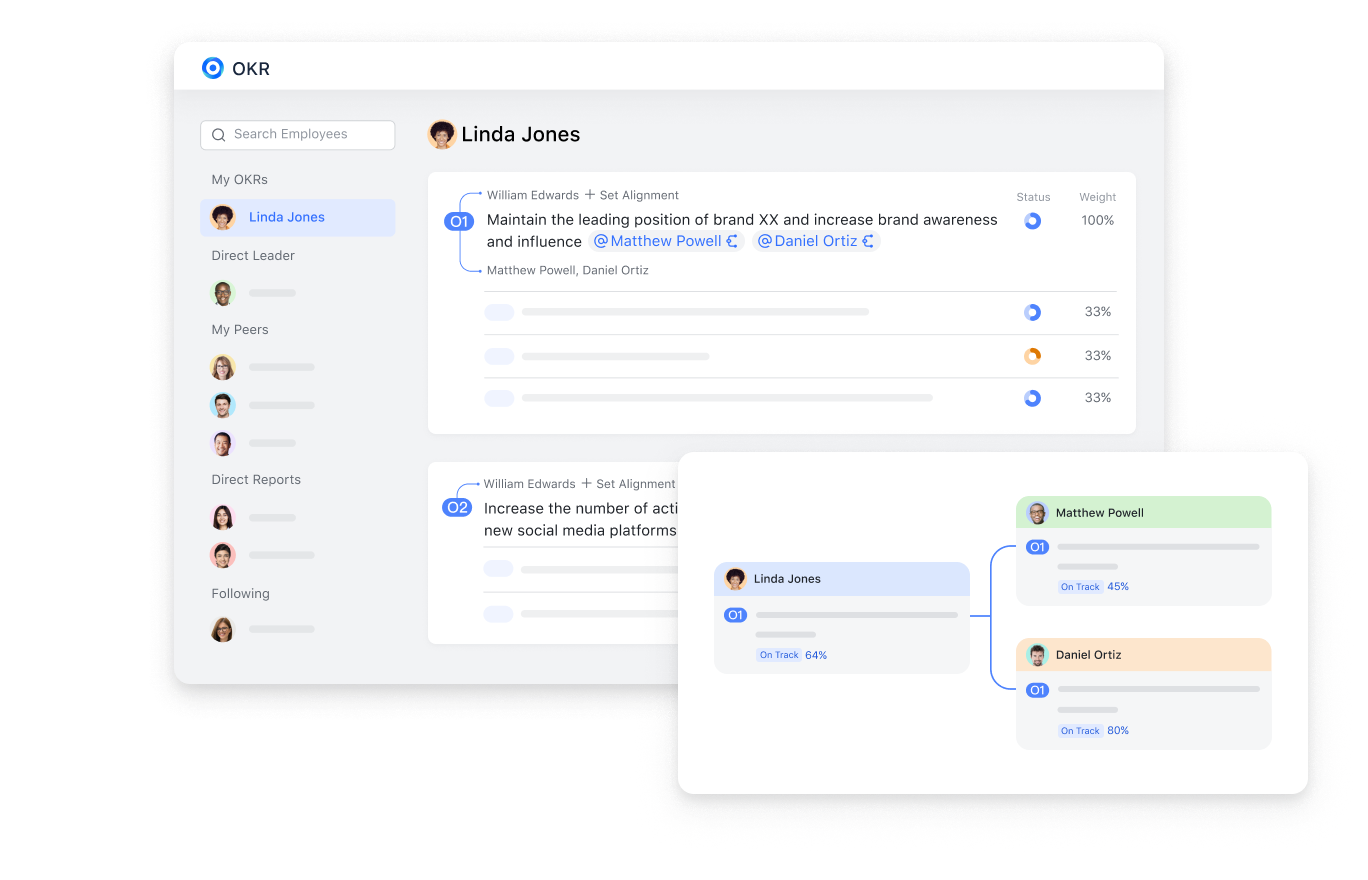
Lark OKR: Aligning sales outcomes with company goals
Lark OKR bridges the gap between what your teams do daily and what your company aims to achieve in the long-term. It keeps everyone aligned and accountable.
- Connect objectives to action. Link sales goals directly to team initiatives and CRM data. Each task or milestone can be tied to a measurable key result.
- Gain visibility into progress. Managers can see at a glance which goals are on track and which need support, enabling timely interventions.
- Create focus and motivation. When employees understand how their work contributes to company goals, engagement and performance naturally improve.
Lark OKR ensures that everyone from leadership to frontline staff works toward the same priorities, creating a culture of transparency and shared success.
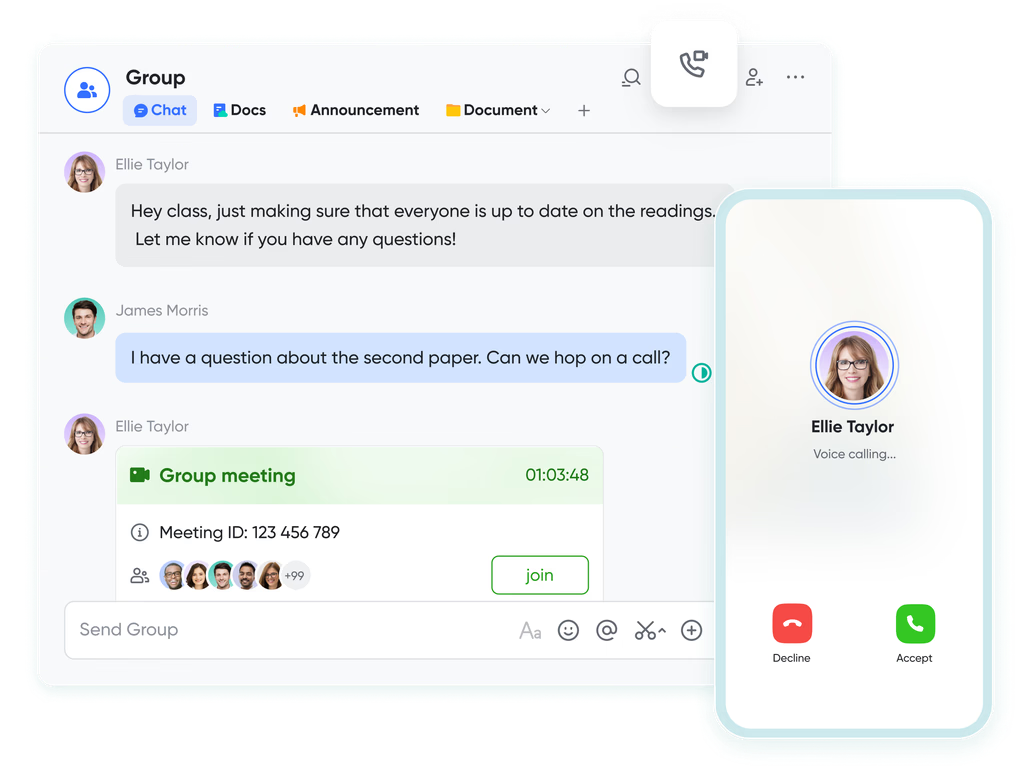
Lark Messenger & Lark Meetings: Real-time collaboration
Communication is the foundation of every successful business. Lark Messenger and Lark Meetings bring conversations and collaboration together, directly within your workspace.
- Turn conversations into outcomes. Chat messages can instantly be converted into tasks, ensuring important discussions turn into action items without delay.
- Sync meeting insights automatically. Notes, recordings, and action items from meetings are automatically stored in Docs and linked to relevant tasks or projects.
- Collaborate without switching tools. Host video calls, share files, and brainstorm ideas in real time, all within the same environment.
Lark Messenger and Meetings eliminate the friction of switching between communication tools and CRMs. Every conversation becomes part of your workflow, driving clarity, speed, and teamwork.
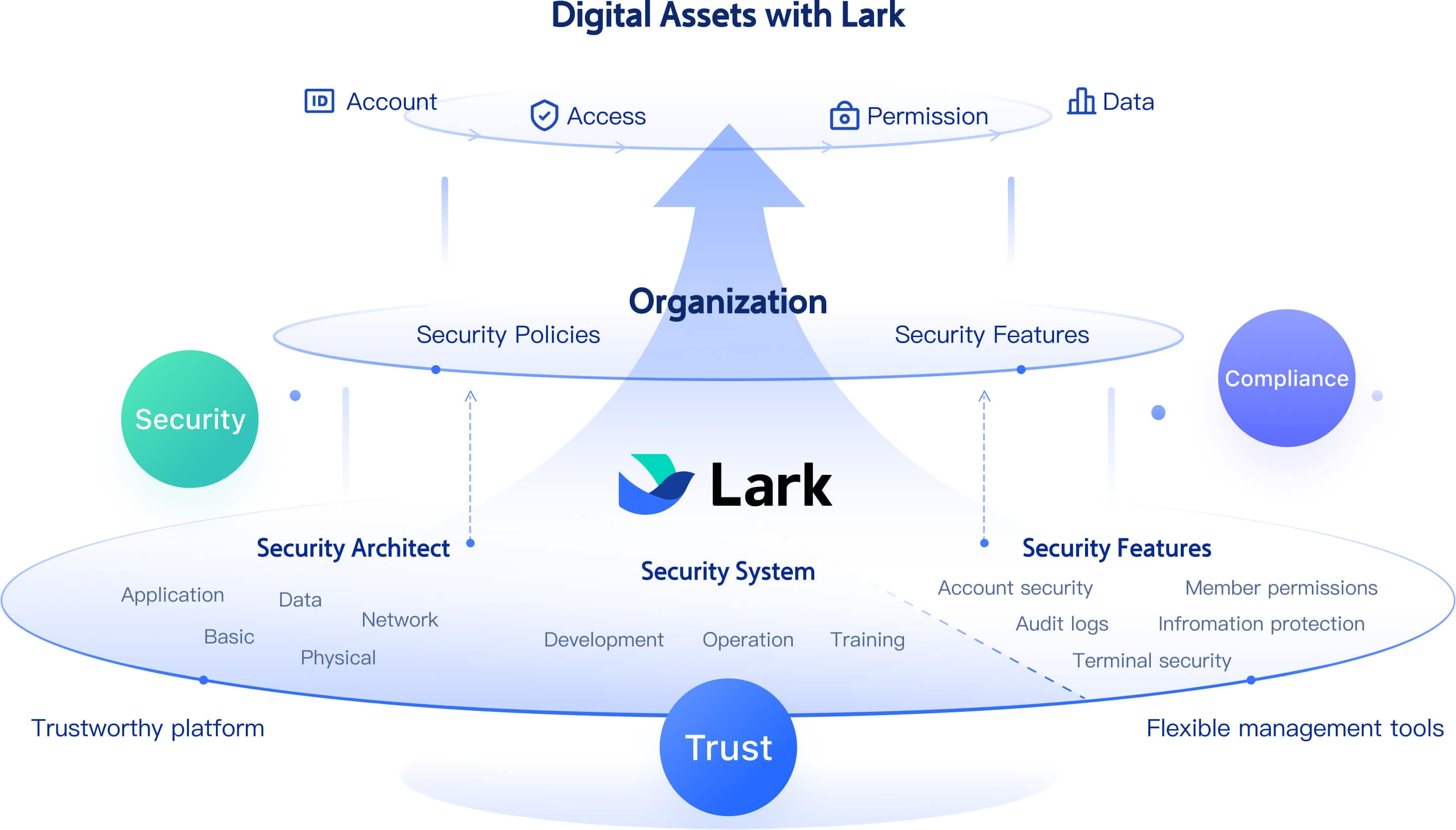
Trustworthy fundamental security architect
Lark Security safeguards your organization's data, users, and infrastructure with enterprise-grade protection and transparency.
- Enforce strong access and account policies. Lark supports SAML 2.0 Single Sign-On (SSO), two-step verification, and centralized account controls to manage who can access specific data.
- Protect data in transit and at rest. All communications are encrypted, and Lark uses advanced firewalls, intrusion detection, and anomaly monitoring to secure your information.
- Maintain rigorous operational security. A dedicated Security Operations Center monitors systems 24/7 to detect threats early and respond proactively.
- Codify and enforce security policy. Administrators can define IT policies such as account permissions, device management, and data access rules to maintain a consistent security posture.
- Uphold compliance and privacy standards. Lark adheres to leading global standards such as SOC 2 Type II, ensuring compliance with international data protection and privacy regulations.
Lark Security ensures that collaboration stays seamless and safe, allowing teams to work confidently while maintaining control, compliance, and trust.
- Starter plan: Free forever plan that includes 11 powerful tools for up to 20 users. It also comes with 100GB of storage, 1000 automation runs, AI translations, and more.
- Pro plan: $12/user/month (billed annually) for up to 500 users. It includes everything in Starter plus group calling for up to 500 attendees, 15TB of storage, 50,000 automation runs, and more.
- Enterprise plan: Contact sales for custom pricing. Supports unlimited users and includes even more automation runs and advanced data security, compliance, and management features.
Conclusion
Both Zoho CRM and HubSpot CRM remain strong contenders in the CRM landscape. Yet as work becomes more integrated and fast-paced, teams need more than just contact management, they need connected tools that unite communication, projects, and customer relationships.
That's exactly what Lark delivers: a unified platform that transforms how teams collaborate, automate, and grow. Instead of juggling tools, your team can finally focus on what matters that building relationships and driving results.
FAQs
Do Zoho CRM and HubSpot offer good automation features?
Yes, both offer solid automation, HubSpot excels in marketing automation, while Zoho provides customizable workflows. Lark, however, integrates automation directly into collaboration, connecting CRM data to real-time actions.
Which CRM is better for small businesses?
Zoho CRM suits small teams due to pricing flexibility, but Lark's free plan offers greater long-term value by combining CRM and productivity tools.
Can Lark replace traditional CRMs like Zoho and HubSpot?
Absolutely. Lark unifies CRM functions with chat, meetings, tasks, and approvals, making it a true all-in-one workspace rather than just a data manager.
How does Lark improve team collaboration compared to Zoho and HubSpot?
Lark embeds collaboration into every step from chat to task creation, document sharing, and approvals ensuring context never gets lost.
Does Lark offer built-in communication tools?
Yes. Lark includes Messenger, Meetings, and Docs for seamless real-time communication and documentation —all connected to your client data.
Related reading
Table of contents
Start using Lark today

Manage all your work in one place
Boost team efficiency by 10x
Save up to 70% on software costs
Table of contents
Start using Lark today
Manage all your work in one place
Boost team efficiency by 10x
Save up to 70% on software costs
Keep reading



Lark recognized in 2023 Gartner® Collaborative Content Workspaces and Meeting Solutions reports
Lark, the global superapp for productivity, is delighted to announce it receives recognition in the Gartner's 2023 Innovation Insight for Collaborative Content Workspaces and Market Guide for Meeting Solutions.





2026 Lark Technologies Pte. Ltd.
Headquartered in Singapore with offices worldwide.






Explore: