Webinars have become a cornerstone of modern business communication—whether for marketing, training, or large-scale virtual events. Among the many tools available, Zoom Webinar stands out as one of the most widely recognized solutions. Its strong brand reputation and ease of use have made it a default choice for organizations worldwide.
However, as webinars evolve beyond simple broadcasting to full event lifecycle management, businesses are increasingly seeking more integrated solutions. This blog provides a detailed review of the Zoom webinar platform, covering its features, pricing, strengths, and limitations, and explores why platforms like Lark are emerging as powerful alternatives.
What is the Zoom webinar platform?
The Zoom webinar platform is a virtual event solution built within Zoom's ecosystem that enables organizations to host large-scale, one-to-many online events. Unlike standard Zoom meetings, webinars are designed for controlled presentations, with hosts and panelists leading the session while attendees primarily watch and interact via features like chat, Q&A, and polls.
It is widely used for , corporate announcements, training sessions, and product demonstrations. The platform supports hundreds to thousands of participants, depending on the plan, making it suitable for both small businesses and large enterprises.
Key capabilities include customizable registration pages, , live broadcasting controls, and post-event analytics. Because it integrates seamlessly with Zoom Meetings and other Zoom services, it offers a familiar interface for users already within the Zoom ecosystem. Overall, the Zoom webinar platform provides a reliable and scalable way to deliver professional virtual events.
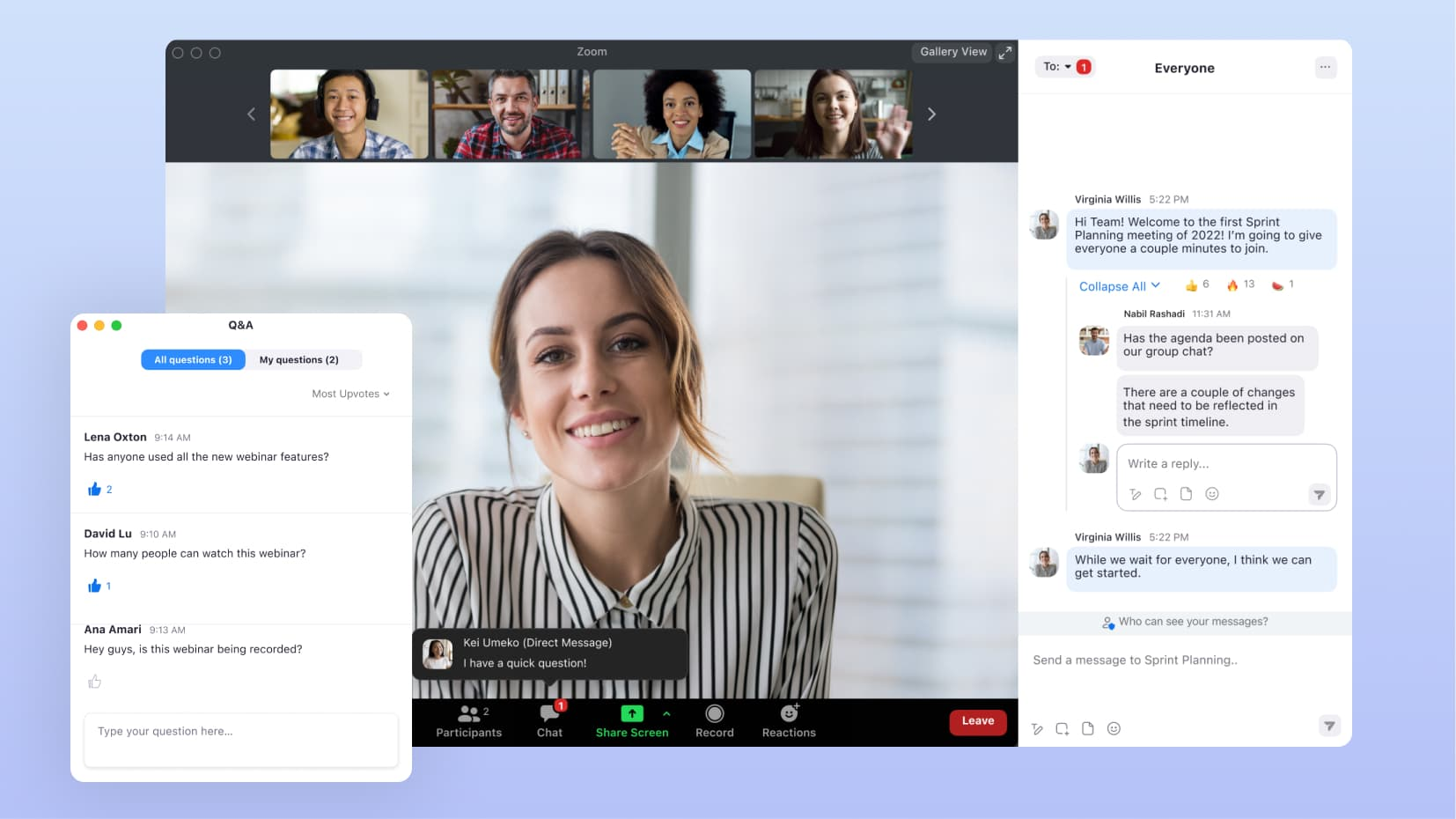
Image source: zoom.com
Key features of the Zoom webinar platform for businesses
The Zoom webinar platform offers a structured and scalable way for businesses to host virtual events with ease. It combines broadcasting capabilities with to support marketing, training, and communication needs. As an online webinar platform, Zoom webinar solutions are widely adopted across industries.
- Large audience capacity: One of the biggest strengths of the Zoom webinar platform is its ability to host large audiences without compromising performance. Businesses can scale events from hundreds to thousands of attendees, depending on their plan. It makes it a reliable webinar platform for Zoom webinars, ideal for global events and high-demand sessions.
- Branding and registration pages: Zoom allows organizers to create customizable registration pages that align with their brand identity. Businesses can add logos, event descriptions, and collect attendee information before the event. It enhances professionalism and positions the tool as a flexible Zoom platform webinar solution for marketing campaigns.
- Interactive tools: To keep audiences engaged, Zoom offers such as live polls, chat, and moderated Q&A sessions. These tools allow hosts to gather feedback and encourage participation during the webinar. As an online webinar platform, Zoom webinars tool supports real-time engagement at scale.
- Integration with the Zoom Meetings ecosystem: Zoom webinars seamlessly integrate with Zoom Meetings, making it easy for teams already using Zoom to adopt the platform. Hosts can switch between meeting and webinar formats as needed. This integration strengthens its position as a comprehensive webinar platform zoom webinars solution for businesses.
Zoom webinar platform pricing and plans
The Zoom webinar platform offers tiered pricing based on audience size and feature requirements. Plans typically start at a base level and increase as businesses scale attendee capacity and advanced functionalities. It is often sold as an add-on to existing Zoom subscriptions, which can impact overall costs. This flexible structure makes it suitable for both small teams and large enterprises hosting virtual events.
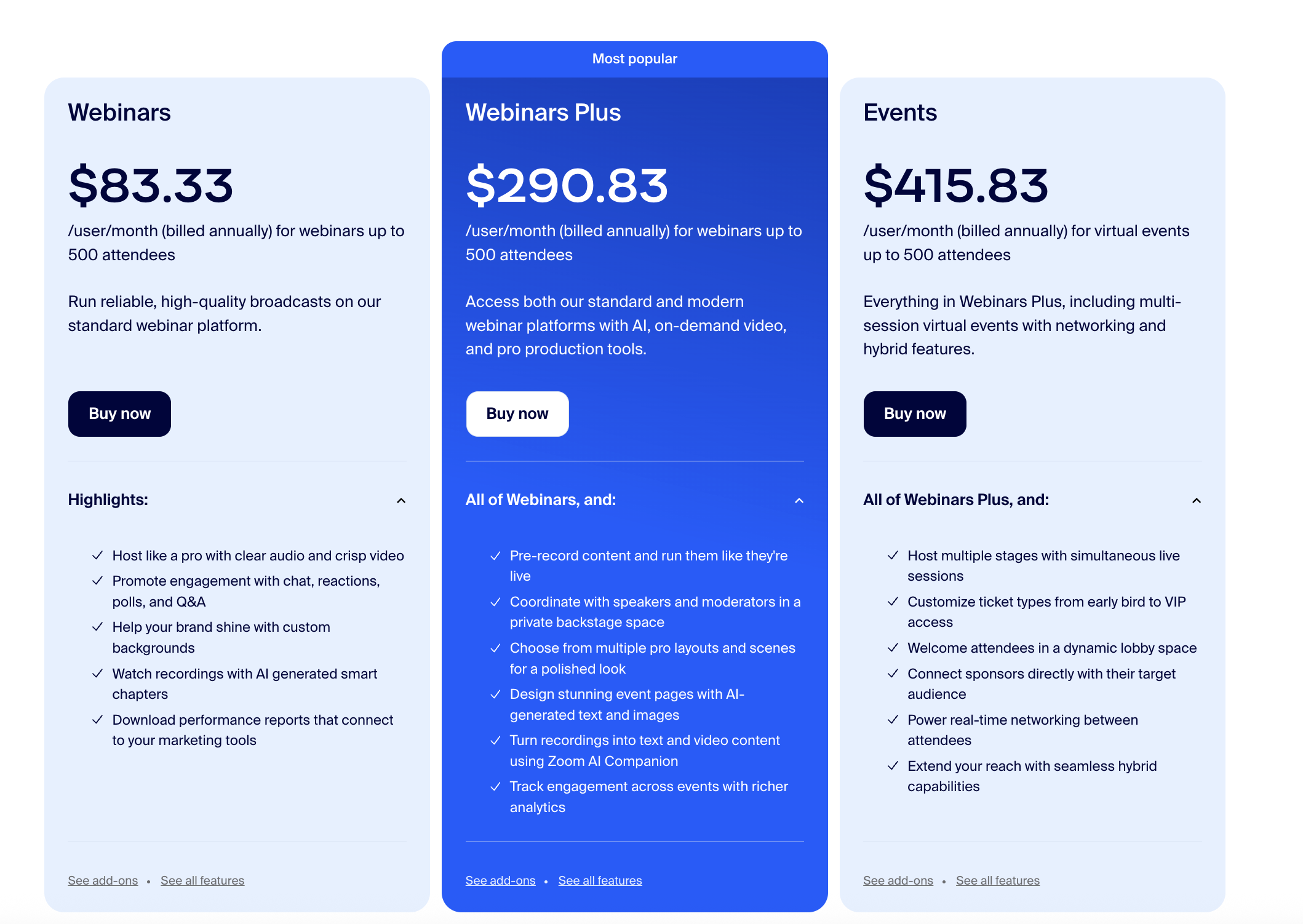
Image source: zoom.com
Information source: zoom.com
Update time: 2026-03-25
Note: Pricing and plan details reflect publicly available data as of the update date and may vary based on region, billing cycle, and number of agents.
Use Lark to manage webinars and team workflows easily
How the Zoom webinar platform works for live and scheduled events
The Zoom webinar platform follows a structured workflow that helps businesses plan, host, and analyze virtual events efficiently. From scheduling sessions to post-event reporting, it supports the entire webinar lifecycle. In any Zoom webinar platform review, its ease of setup and execution is often highlighted.
The Zoom webinar platform follows a structured workflow that helps businesses plan, host, and analyze virtual events efficiently. From scheduling sessions to post-event reporting, it supports the entire webinar lifecycle. In any Zoom webinar platform review, its ease of setup and execution is often highlighted.
- Setting up webinar sessions: Hosts can schedule webinars in advance or start them instantly, depending on their needs. The setup process includes configuring registration forms, branding, and access settings. For businesses exploring a Zoom alternative webinar platform, this simplicity sets a strong baseline expectation.
- Managing presenters and attendees: Zoom allows hosts to assign roles, including panelists, co-hosts, and attendees, with different permissions. It ensures and smooth event flow during large sessions. In a Zoom webinar platform review, role management is a key usability factor.
- Running live interactions: During the webinar, hosts can launch polls, moderate Q&A sessions, and enable chat to engage participants. These features help create a more interactive and dynamic experience for attendees. Many businesses consider these capabilities when evaluating alternatives to Zoom webinar platforms.
- Accessing post-event recordings and reports: After the event, Zoom provides recordings, attendee analytics, and engagement reports. These insights help and improve future webinars. Such reporting features are often compared when selecting a Zoom alternative webinar platform for long-term use.
Strengths of the Zoom webinar platform
The Zoom webinar platform excels at delivering consistent, dependable across industries. Its strengths lie in performance, usability, and scalability, making it a trusted choice for businesses of all sizes. These advantages have contributed to the widespread adoption of professional webinars.
- Reliable video performance: Zoom is known for its stable video and audio quality, even during large-scale events. It minimizes lag, buffering, and connection issues, ensuring smooth delivery. This reliability is critical for maintaining audience trust and engagement during live sessions.
- Easy-to-use interface: The platform offers an intuitive interface that is easy for both hosts and attendees to navigate. Users can quickly access controls, manage sessions, and participate without technical complexity. This reduces the learning curve and allows teams to focus on content rather than setup.
- Strong brand recognition: Zoom has built a globally recognized brand associated with virtual communication and webinars. This familiarity increases attendee confidence and reduces friction in joining events. Businesses benefit from using a platform that audiences already trust.
- Scalable for large audiences: The platform supports events ranging from small sessions to webinars with thousands of participants. Businesses can upgrade plans to accommodate growing audience sizes. This scalability makes it suitable for everything from to global broadcasts.
Limitations of the Zoom webinar platform
While the Zoom webinar platform is strong for hosting live events, it falls short in managing the full event lifecycle. Businesses often need additional tools to handle planning, automation, and follow-ups. These gaps can create inefficiencies, especially for teams running frequent or complex webinars.
- Limited automation for event workflows: Zoom provides basic scheduling and reminders but lacks deeper . Tasks like attendee segmentation, follow-ups, and data syncing often require manual effort. It can slow down operations for teams managing multiple events.
- No built-in project or task management: The platform lacks native tools for assigning tasks or tracking event progress. Teams must rely on external to coordinate planning. This fragmentation can lead to miscommunication and reduced efficiency.
- Weak post-event follow-up capabilities: Although Zoom offers reports and recordings, it has limited tools for automated follow-ups. Businesses often need separate email or CRM tools to nurture leads after events. It adds extra steps to the workflow and delays engagement.
- Requires multiple tools for the full event lifecycle: To manage registration, execution, analytics, and follow-ups, teams typically use several platforms alongside Zoom. It increases costs and creates disconnected workflows. As a result, businesses may struggle to maintain a unified event management process.
As businesses outgrow basic webinar hosting, the need for a more integrated and efficient solution becomes clear. Managing events, collaboration, and follow-ups in separate tools can slow teams down and create execution gaps. That's where Lark stands out, offering an all-in-one platform that seamlessly connects the entire webinar workflow.
Master your webinar strategy on a single platform
Smart alternative: Plan, execute, and host webinars in Lark
As webinar strategies evolve, businesses need more than just a broadcasting tool—they need a unified system to manage the entire event lifecycle. Lark goes beyond traditional webinar platforms by combining communication, collaboration, and automation in one place. It eliminates the need for multiple disconnected tools, , execution, and follow-ups. With built-in databases, workflows, and AI capabilities, Lark enables smarter and faster event management.
Professional stage mode and layout control
For the live broadcast, features Stage Mode, which enables hosts to act as digital directors, ensuring a polished, uniform experience for all attendees. Hosts can curate exactly what the audience sees by pinning specific speakers, choosing background images for the virtual stage, and locking the display layout. This prevents the "grid-view" clutter of standard meetings and creates a that reflects the brand's professional standards. 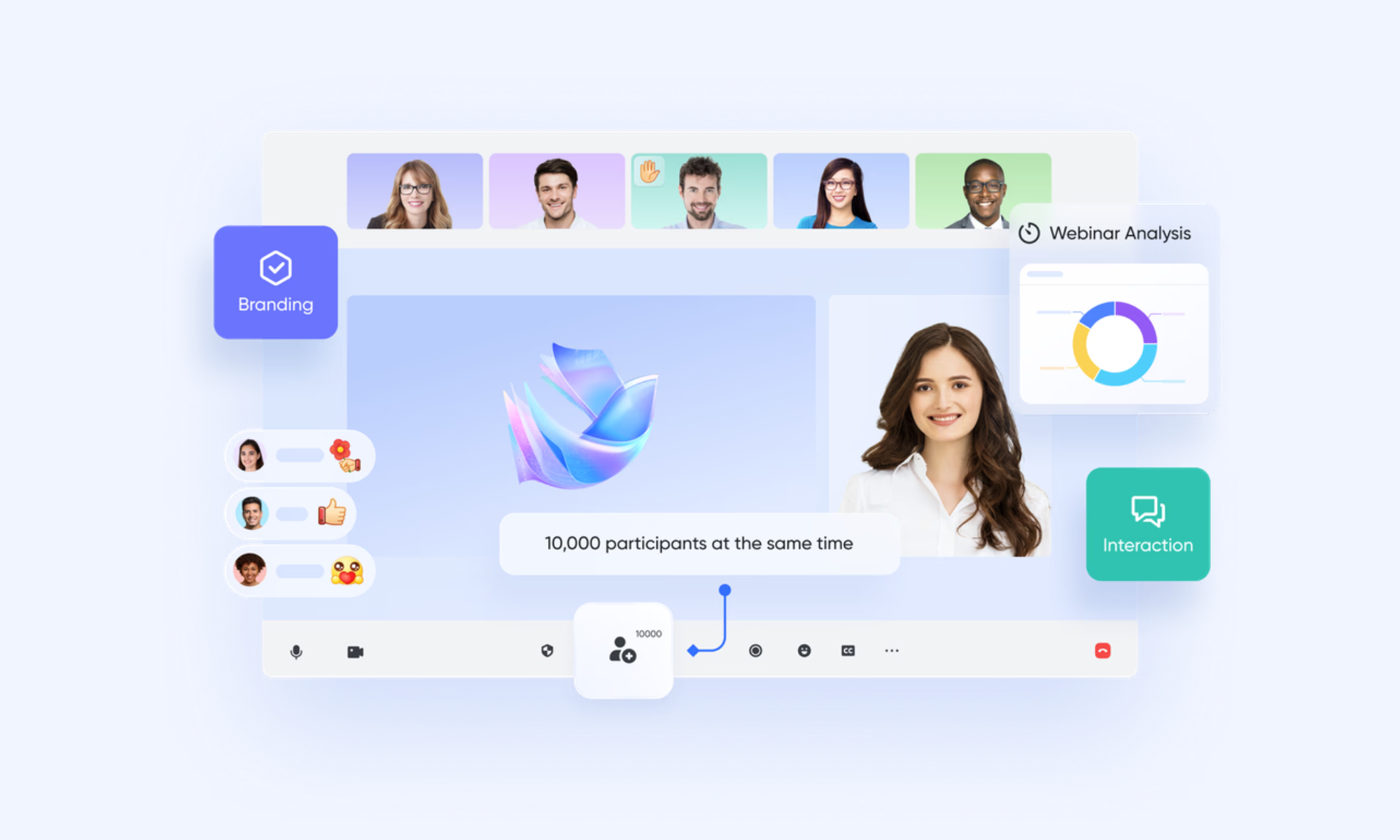
Rehearsal mode (The digital backstage)
To ensure technical perfection, Lark Webinar includes a dedicated Rehearsal Mode that acts as a private backstage area. Before going live to the public, panelists and hosts can enter this secure environment to test audio, verify , and coordinate transitions. Attendees remain in a "waiting room" or lobby and cannot see or hear the preparation, allowing the production team to sync up without audience interference. 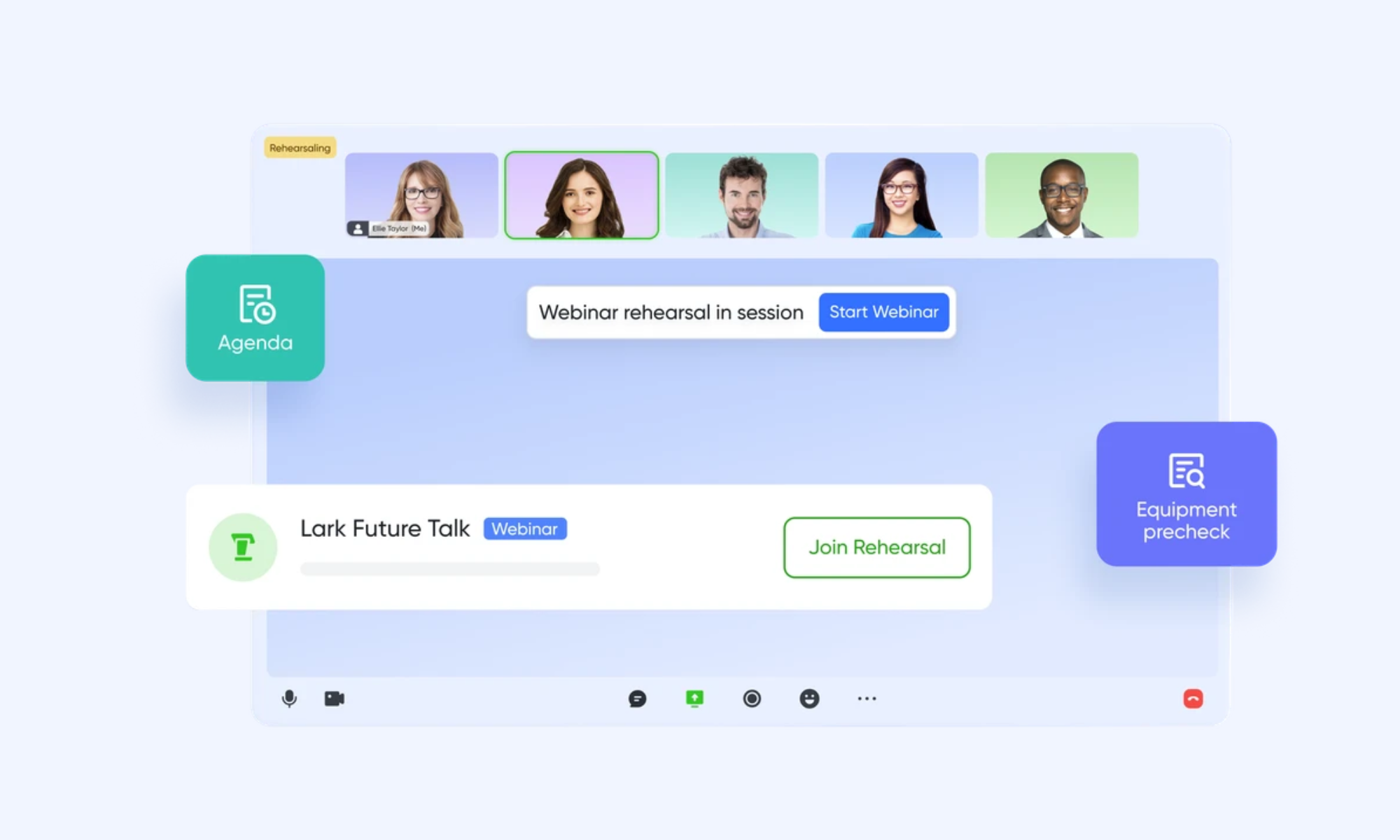
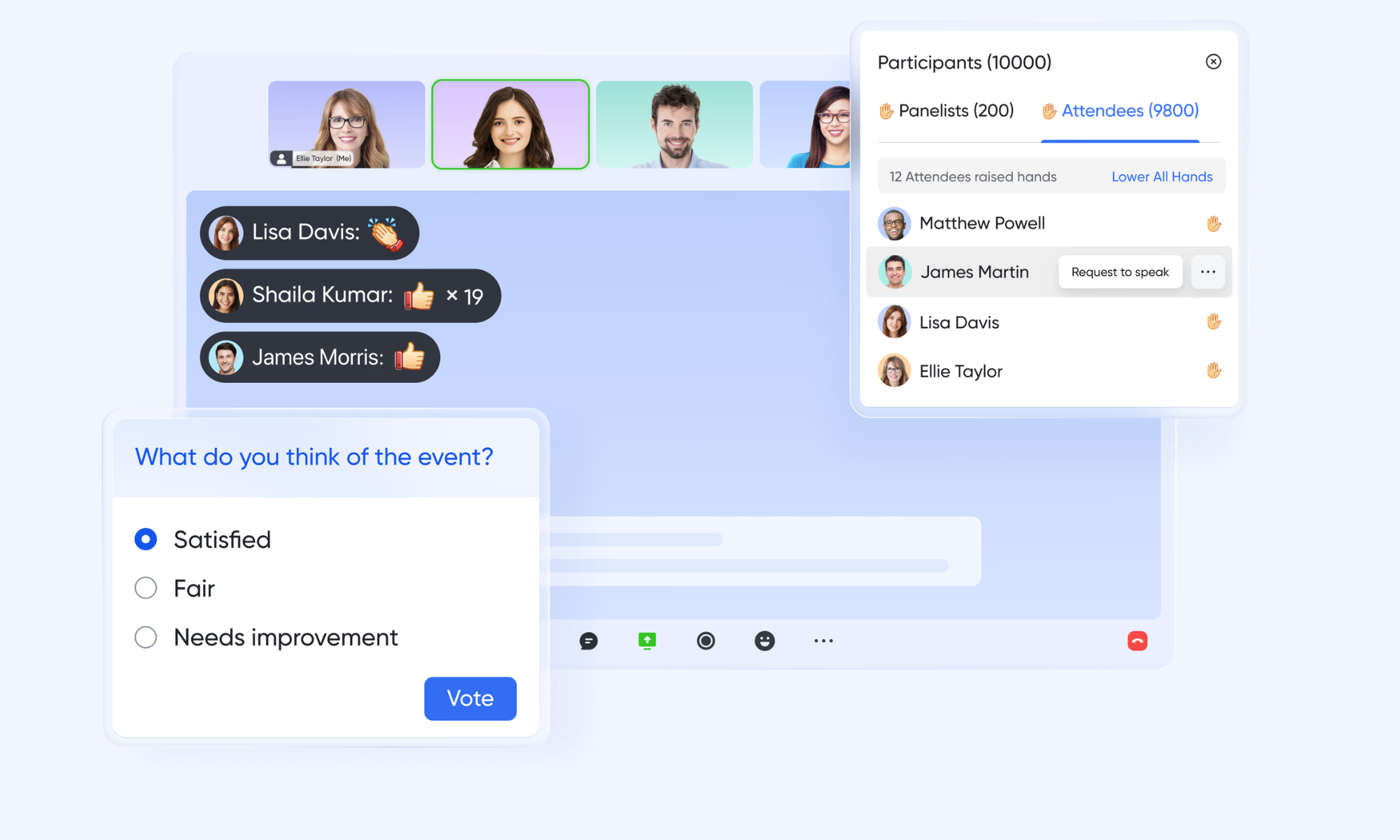
Interactive engagement modules (Polls & Q&A)
Maintaining audience attention during a large-scale event is achieved through integrated engagement tools such as Real-time Polls and Moderated Q&A. In Lark Webinar, Hosts can launch interactive polls to gather instant feedback, with . The Q&A module allows attendees to submit questions that others can upvote, enabling moderators to prioritize the most relevant topics and mark questions as "answered" to keep the session organized.
AI-powered post-event analytics and summaries
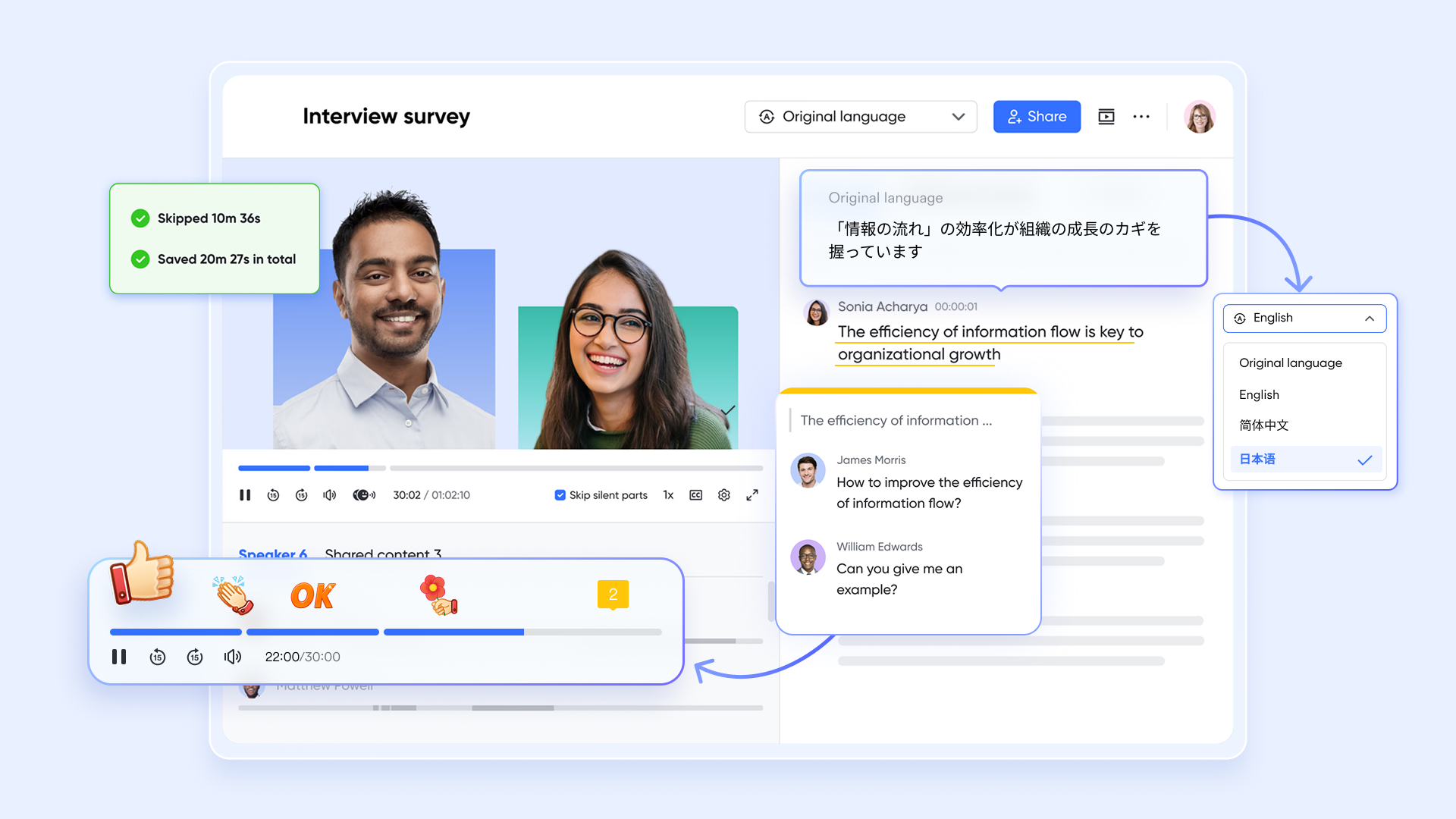
Once the event concludes, Lark automates the tedious task of data analysis and reporting. The Webinar Data Dashboard provides visual charts on participant counts, average view duration, and engagement levels. Simultaneously, generates a searchable, time-stamped transcript of the entire session, while extract key takeaways and action items. This allows organizers to quickly share high-value summaries with attendees who missed the live event.
:
- Starter plan: Free forever plan that includes 11 powerful tools for up to 20 users. It also comes with 100GB of storage, 1000 automation runs, AI translations, and more.
- Pro plan: $12/user/month (billed annually) for up to 500 users. It includes everything in Starter plus group calling for up to 500 attendees, 15TB of storage, 50,000 automation runs, and more.
- Enterprise plan: for custom pricing. Supports unlimited users and includes additional automation runs, as well as advanced security, compliance, and management features.
For small teams with simple communication needs

18 months message history
1000 Base automation runs/month
2000 rows per table in Base
Most POPULAR
For companies with comprehensive collaboration and management needs
Unlimited message history
500-participant video meetings
50k Base automation runs/month
20k rows per table in Base
For large companies with advanced security and organizational management needs
Get a personalized demo and pricing
Unlimited message history
500-participant video meetings
15 TB storage + 30 GB storage/user
500k Base automation runs/month
50k Base automation runs/month
Most POPULAR
For companies with comprehensive collaboration and management needs
Unlimited message history
500-participant video meetings
50k Base automation runs/month
20k rows per table in Base
Zoom Webinar vs Lark: Which is better?
Choosing between Zoom and Lark depends on whether you need a dedicated webinar tool or a complete event workflow solution. Zoom excels at video reliability and simple webinar hosting, while Lark focuses on combining communication, collaboration, and . For businesses scaling events, the difference lies in how well each tool supports the full lifecycle beyond just live sessions.
In summary, Zoom is a strong choice for hosting reliable webinars with minimal setup, especially for teams already using its ecosystem. However, Lark stands out for businesses that want to —from planning to execution to follow-ups—in one place. If your priority is scalability and workflow efficiency, Lark offers a more comprehensive solution beyond traditional webinar platforms.
Conclusion
The Zoom webinar platform remains a strong and reliable choice for hosting virtual events, offering high-quality video performance, ease of use, and scalability for large audiences. However, as businesses increasingly look beyond simple broadcasting, its limitations in automation, , and post-event engagement become more apparent. Managing webinars today requires a more connected approach that brings together planning, execution, collaboration, and follow-ups in one place.
This is where stands out as a powerful alternative. By combining webinar capabilities with built-in collaboration tools, automation, and AI-driven insights, Lark helps teams streamline the entire event lifecycle without relying on multiple platforms. It enables businesses to work smarter, reduce operational complexity, and deliver more impactful events. If you're looking to move beyond traditional webinar tools and build a more efficient workflow, now is the time to explore what Lark can offer.
Drive better webinar results with an all-in-one solution
FAQs
Is there a difference between a Zoom meeting and a Zoom webinar?
Yes, are designed for interactive collaboration where all participants can speak and share. Webinars follow a one-to-many format in which hosts control the session and attendees have limited interaction. Platforms like Lark combine both formats, adding workflow and collaboration features.
Can Zoom do automated webinars?
Zoom supports limited automation, such as scheduling, reminders, and simulated live sessions in higher-tier plans. However, full workflow automation, like follow-ups and data syncing, often requires additional tools. Lark offers deeper built-in automation to manage the entire webinar lifecycle seamlessly.
Can I customize branding in Zoom webinars?
Zoom offers basic branding features such as logos, registration pages, and email customization. While useful, it may not provide fully immersive or highly flexible branding experiences. Lark enhances this by enabling more customizable, combined-event environments.
How many attendees can join a Zoom webinar?
Zoom webinars can host anywhere from 100 to 10,000+ attendees, depending on the selected plan. Businesses can scale capacity as needed by upgrading tiers. Lark also supports large audiences while integrating collaboration and workflow tools into a single platform.
Does Zoom webinar support integrations with CRM or marketing tools?
Yes, Zoom integrates with CRM tools like Salesforce and HubSpot for and follow-ups. However, deeper workflow automation may still require multiple tools. Lark simplifies this by offering built-in collaboration, automation, and data management within a single ecosystem.
Related reading