


Scaling Video Production: The Marketing Workflow Guide

Cecilia Lane
Go-to-Market Associate
Aug 5, 2026
Cecilia Lane
Aug 5, 2026

11 min read


Video as a form of marketing is no longer an option only available to companies with budgets in excess of one hundred thousand dollars for both overhead and actual production time. In 2026, 91% of companies use video as an integral part of their marketing strategy. Of those using video, 93% of marketers report that they see a significant return on investment from their video-centric marketing efforts.
Unfortunately, for small teams, there has been a significant disconnect between the demand for high-quality, professional-level video content and the ability for small teams to create such content due to limited budgets and a lack of personnel.
This will soon change. With the advent of a new generation of artificial intelligence (AI) tools, small teams are able to create video content that meets professional standards for a fraction of the price of previous generations of toolsets used to create this level of content.
The following will highlight how small teams are accomplishing studio-quality results using a combination of AI tools and explain how your team can leverage these same techniques.

Image source: unsplash.com
Why video production breaks down: It’s a project management problem
If you ask most marketing teams why they struggle to maintain a consistent video output, they will rarely blame a lack of creative ideas. Instead, they point to the logistical nightmare that surrounds the creative process. Video production is uniquely vulnerable to operational friction because it involves heavy files, precise timestamps for feedback, and a web of dependencies that spans writers, designers, and approvers. Without a dedicated system, the process collapses into a chaotic game of "hunt the file," where version control is nonexistent and "final_v3_REAL_final.mp4" is buried somewhere in an email thread from last Tuesday.
This fragmentation is the silent killer of marketing momentum. When feedback is scattered across messages, email chains, and hallway conversations, editors spend more time consolidating notes than actually editing.
To solve this, high-performing teams are shifting their perspective. They treat video production not just as an art form, but as a rigid project management challenge that requires a "single source of truth." By centralizing communication and asset storage in a unified platform like Lark, teams can collapse the distance between the brief and the final asset. When the project plan, the script document, the video file, and the approval chat all live in one interconnected ecosystem, the administrative friction evaporates. This clarity allows small teams to punch above their weight, focusing their limited hours on storytelling rather than file management.

Issues with video demand for small teams
With the growth of video consumption online, there has never been a better time for consumers to have high expectations when it comes to video. Video now accounts for over 82% of all internet traffic, while a whopping 84% of consumers state that watching videos from brands has spurred them to make purchases.
Small teams are under increasing amounts of pressure to create a consistent delivery of video content through various means, including social media, email marketing, landing pages, and advertisements.
Where the problem lies: Traditional video production is costly and takes longer than most businesses wish to allocate towards producing the content. The cost associated with a finished marketing video with professional-quality production (including script, filming, editing, and post-production) will range anywhere from $1,000-$20,000.
In fact, almost half of all companies spent under $5,000 last year on total video production, while companies with marketing budgets under $1,000 a month have little to no chance of allocating enough funds to allow for even one quality video to be produced.
Time is also one of the largest barriers to video marketing adoption. According to a recent survey from Wyzowl, almost 19% of marketers surveyed indicated that they believed time was the primary reason for their inability to implement video marketing.
How can you accomplish hours of time working on video editing if you have a team of three or four people who are already performing social media marketing, email marketing, content writing, and reviewing the analytics of their campaign?
AI video tools are changing everything
The AI video generator industry is valued at over $700 million in 2025 and is predicted to be worth $2.5 billion by 2032, increasing at approximately 20% each year. And that rapid expansion won’t be driven by enterprise studios, but rather by small teams and independent creators looking for faster and less expensive options to create professional video content.
Modern AI video tools have removed some of the largest pain points associated with video production. Instead of having to source and hire a videographer/recording studio and spend days going through post-production, teams can now generate fully-produced video content as polished as either a text prompt, such as a blog post or a simple script.
An example of an AI video maker is Opus Pro, where you can input just a brief or blog URL and receive a publish-ready video complete with motion graphics, sourced visuals, and voiceover. In simple terms, no editing timeline and no manual assembly are required.
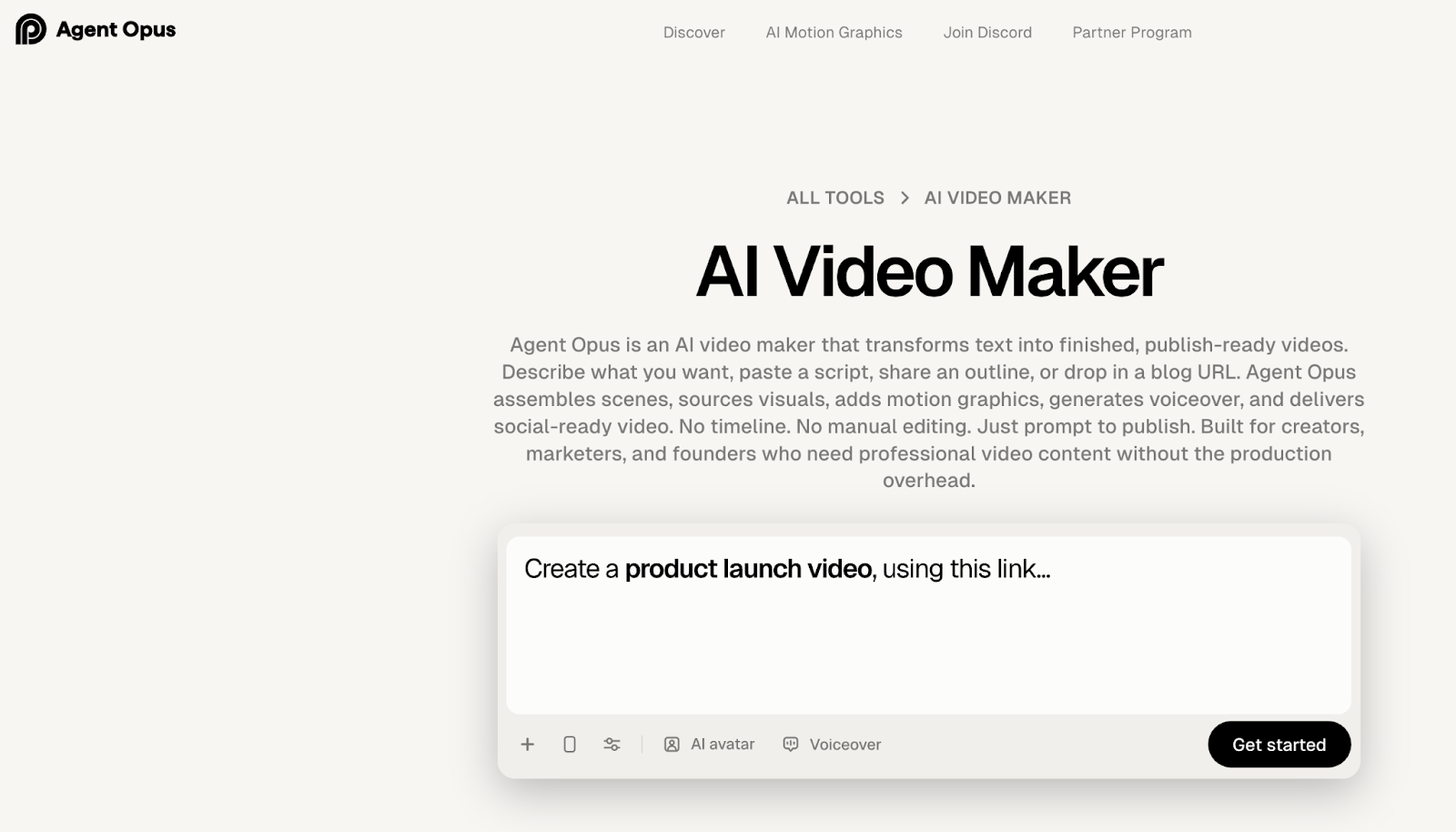
This shift is not all speculative, either. Recent industry statistics show that 63% of video marketers report that they’ve already employed AI tools to create or edit marketing videos, up from 51% last year. The results are impressive: in blind tests, 73% of evaluators were unable to differentiate between high-quality AI-assisted video production and traditional video production methods.
A repeatable workflow from brief to publish
While AI tools accelerate the actual creation phase, they cannot organize the chaos that precedes or follows it. To truly scale production, marketing teams must move away from ad-hoc creation and establish a standardized, repeatable workflow. A reliable pipeline ensures that quality remains consistent even as volume increases, transforming video from a "special project" into a daily operational habit. This workflow typically follows five distinct stages: Briefing, Scripting, Generation, Review, and Distribution.
The "Briefing" and "Scripting" stages are where clarity is most critical. Instead of vague requests in chat, successful teams use structured forms or documents to capture the intent, target audience, and key messages before a single frame is generated. In a collaborative environment like Lark, this can be handled via a standardized "Video Request" template in Lark Docs, which forces the requester to be specific. Once the brief is approved, the scripting phase begins in the same document, allowing for real-time co-editing and comments. This eliminates the version control nightmare of passing Word documents back and forth and ensures that the "final" script is actually the one that gets fed into the AI tool.
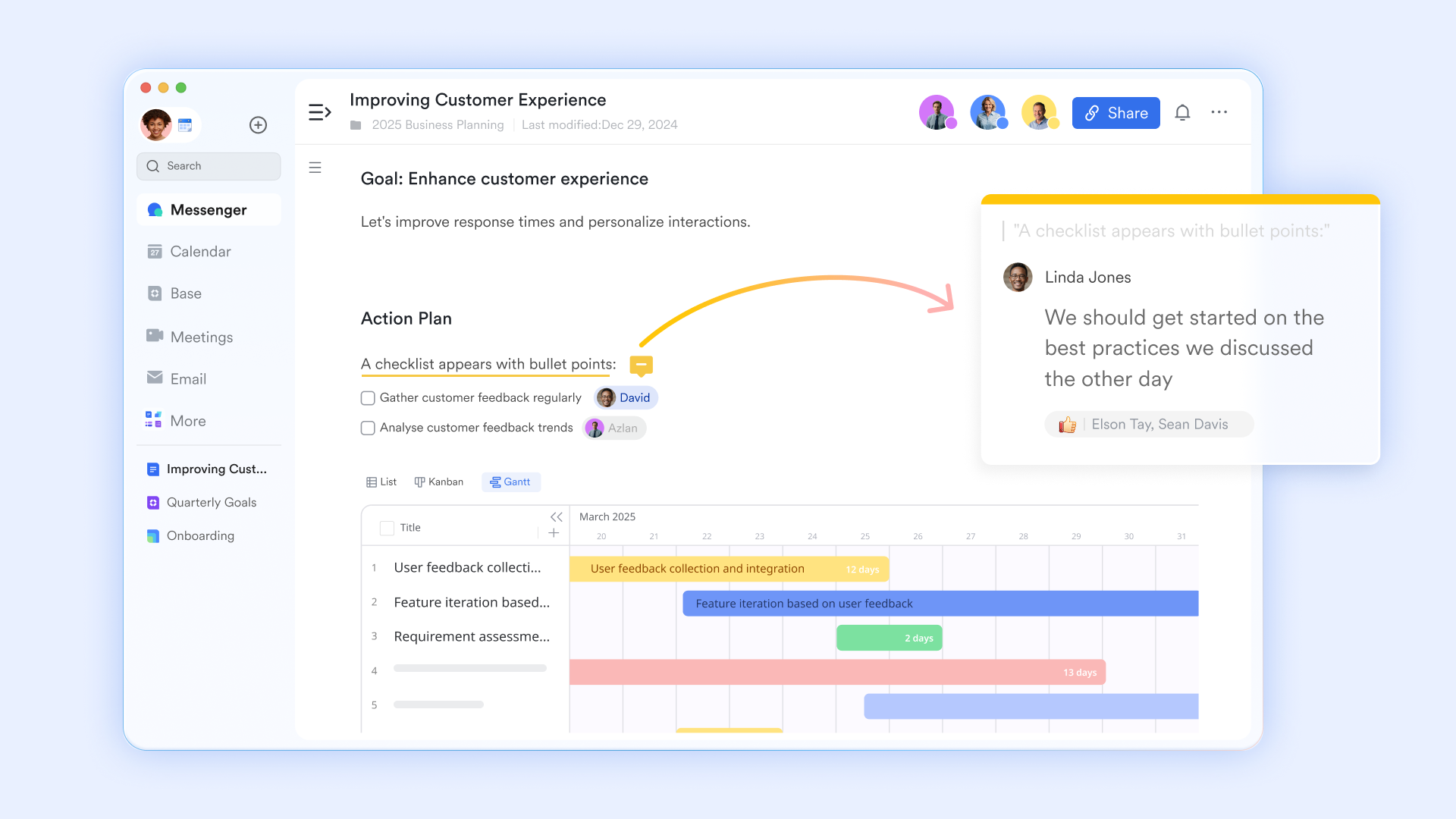
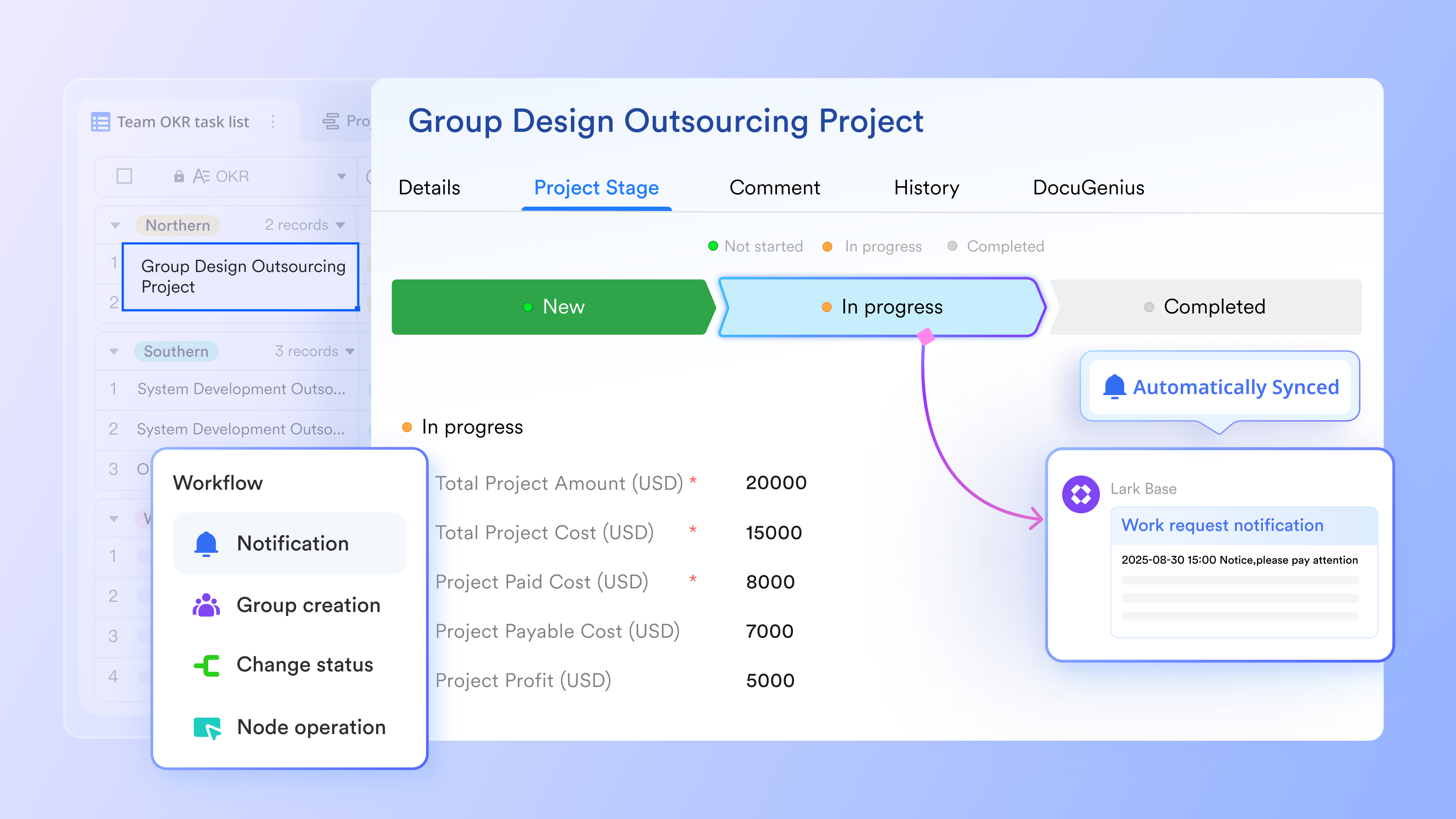
Once the video is generated, the "Review" stage often becomes the bottleneck. To unclog this, teams need a visual management system. Using workflows in Lark Base, producers can track every video asset as a card moving from "In Production" to "In Review" to "Approved." This visual overview provides instant transparency: a marketing manager can glance at the board and see exactly which videos are stuck in review and who is responsible for the next step. By assigning owners to each card and setting automated status alerts, the workflow drives itself forward, ensuring that no great video idea dies in the "To Do" column.
How smaller teams are effectively leveraging video content
Teams that are successfully implementing new workflows with AI are doing so by redesigning the entire process of creating video content rather than solely using AI to replace their previous methods. Below are some examples of how many of today's top-performing smaller teams operate today compared to the past.
Transforming existing written content into short videos
The most innovative strategies that smaller teams use today include leveraging their existing blogs, e-newsletters, or case studies as source material for short video clips.
According to a survey conducted by Content Marketing Institute (CMI), it is estimated that 40% percent of content marketers will use a blog-to-video conversion tool in the near future, as companies want to get as much return on investment (ROI) from previously created assets.
Rather than starting with nothing, smaller teams can put a successful article into an AI-driven video converter and have a social media-optimized video within minutes.
Utilizing this strategy accomplishes two objectives: It increases the number of people who have an opportunity to see/engage with the content that has already been created, while also meeting the continually growing need for new video-based content to be produced on popular platforms such as LinkedIn, Facebook, and TikTok.
Content management: Turn existing assets into a reusable video library
One of the most significant inefficiencies in traditional video marketing is the "single-use" mindset. A team spends hours crafting a script, selecting stock footage, and fine-tuning a voiceover, only to publish the video once and let the source assets disappear into a "Downloads" folder. This is a waste of high-value intellectual property. A scalable content strategy requires a shift toward Digital Asset Management (DAM), where every component of a video is treated as a reusable library item that can be remixed and repurposed for future campaigns.
This approach turns your content archive into a search engine for your creative team. Imagine a scenario where you need to create a new Instagram Reel about "remote work tips." Instead of writing a new script from scratch, you query your internal asset library to find every blog post, previous video script, and interview clip you’ve ever produced on the topic. By maintaining a centralized database—such as a Lark Base linked directly to cloud storage in Lark Wiki—you can tag assets by topic, format, performance data, and usage rights. This allows a new editor to instantly pull up the "remote work" tag and see a wealth of approved copy and footage ready for remixing.
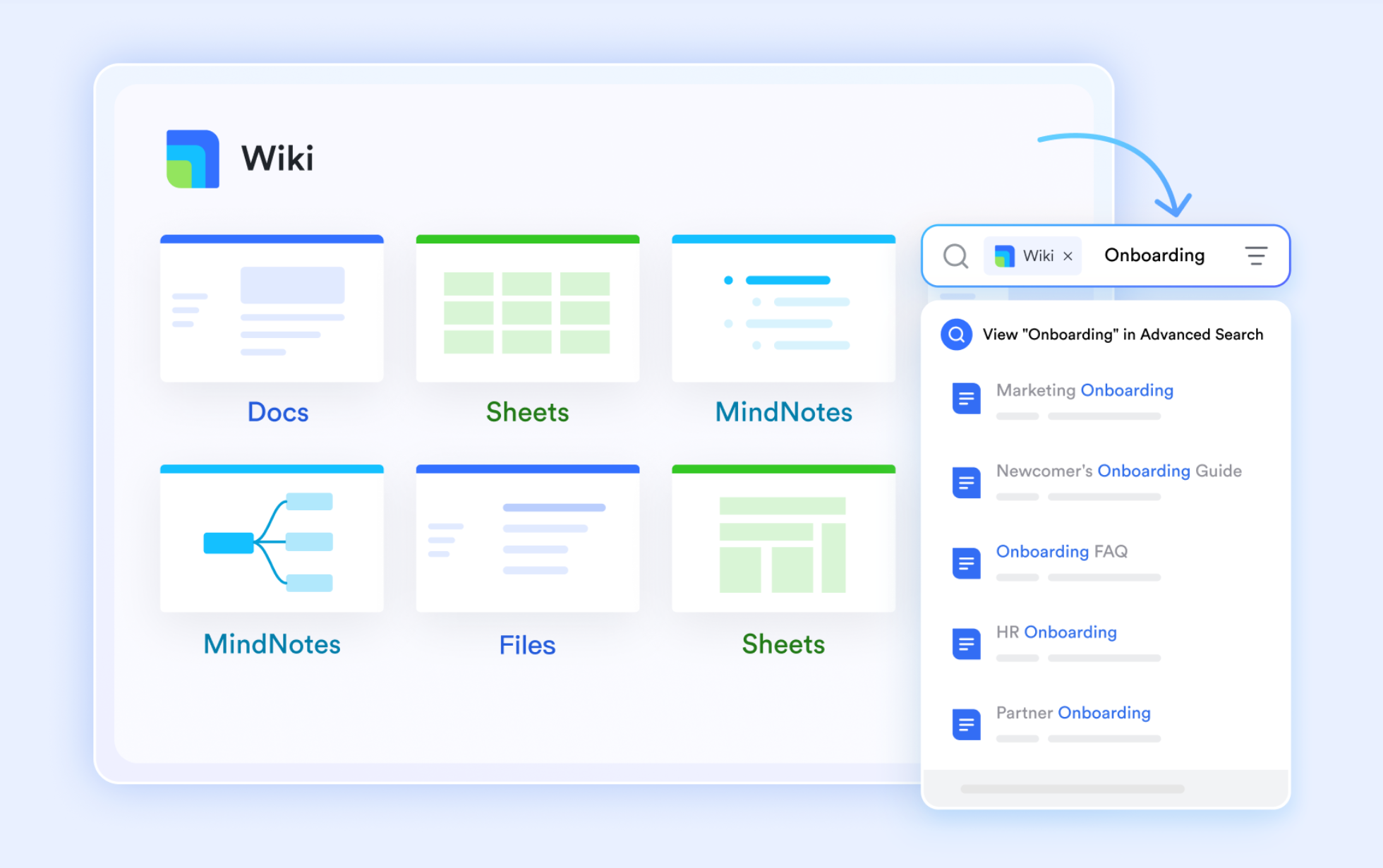
Furthermore, robust content management protects your brand consistency. When all assets live in a governed "Single Source of Truth," you ensure that everyone is using the latest logo files, the correct hex codes, and the most up-to-date product messaging. Permission settings in Lark Wiki play a crucial role here, allowing you to give freelancers access to specific project folders without exposing your entire internal strategy. This balance of accessibility and security transforms your content from a disorganized pile of files into a strategic engine that fuels rapid, consistent production.
Video marketing: Batch creation
Most successful small video marketing teams batch-create their content by setting aside a single, dedicated session to create multiple pieces of content in one hit. This means, instead of creating a single piece of video content at a time, they will produce a whole week or month of video content in one session.
The advent of AI technology has made this possible, as it reduces the time to produce each individual video from hours to minutes. For example, it is not uncommon for a two-person team to produce 10 to 15 pieces of video content during a single afternoon. This would not have been possible previously unless you were part of a dedicated video production crew.
Make batching predictable with calendars and owners
Batch creation is undeniably efficient, but it is also operationally fragile. It relies on a high degree of preparation; if you arrive at your scheduled "batching day" without approved scripts or selected topics, the entire session falls apart. To make batching a reliable engine rather than a stressful scramble, marketing teams need to layer rigorous project management on top of their creative schedule. It is not enough to simply block out time; the pre-production steps leading up to that block must be visualized and assigned.
This is where a shared marketing calendar becomes the team's heartbeat. In Lark Calendar, a "Batch Production Day" isn't just an event—it's the culmination of a series of automated dependencies. You can set the system to work backward from the production date: three days prior, a task is triggered for the copywriter to finalize scripts; two days prior, a task alerts the designer to prep assets. By assigning these pre-requisite tasks to specific owners, you remove the ambiguity that leads to procrastination. Everyone knows exactly what they need to deliver to make the batching session a success.
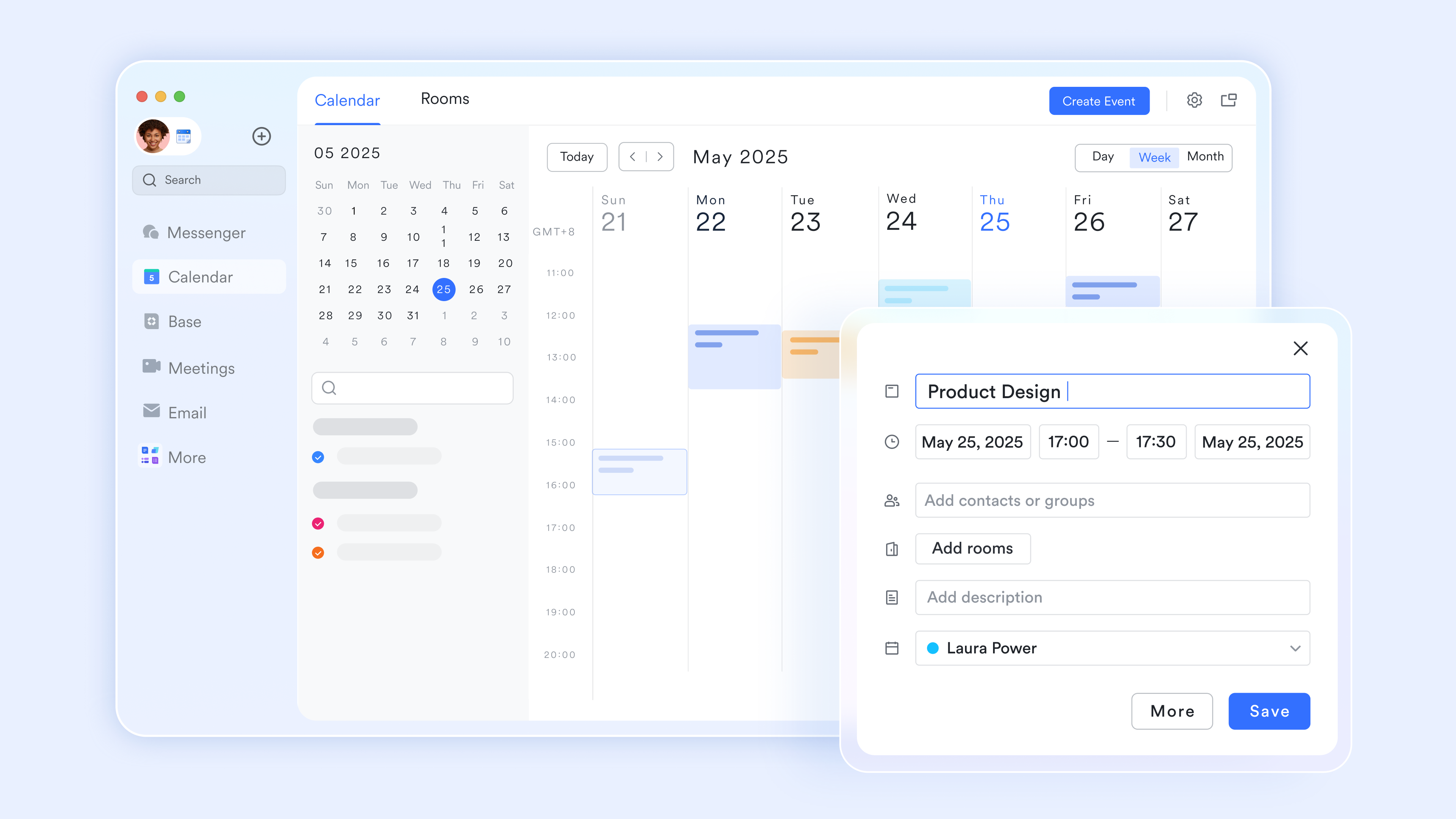
Beyond the preparation, project management tool visibility helps with capacity planning. A common pitfall is over-committing to a batch size that burns out the team. By tracking the time spent on previous batches within your project management view, you can establish a realistic velocity. If data shows that reviewing 15 videos actually takes three days, you can adjust your calendar to ensure the "Review" phase is adequately staffed. This data-driven approach moves the team from a cycle of "crunch time" panic to a sustainable, predictable rhythm that consistently hits publishing deadlines.
Focusing on short-form and social-first formats
The evidence is clear: shorter video content attracts more views and produces way better results compared to longer video content. Over three-quarters of marketers think the right amount of time for producing a video is somewhere between 30 seconds and two minutes.
Small teams are riding the wave of creating bite-sized, socially-oriented content, rather than competing with larger online video producers who have much larger budgets.
Short-form video is a much easier avenue to create, experiment with, and iterate on your video content. Since an average video can be produced in under 60 seconds, small teams can conduct lots of experiments with new video formats, topics, and styles, because they simply don’t have to put in as many hours of work for each new idea and format.
Video production is moving to in-house production
The trend in video production is moving to in-house production faster than anyone else can. About 59% of all businesses now create video content in-house, and nearly 24% of small businesses rely on outside agencies/freelancers for video marketing.
One of the best reasons for producing video in-house is the use of AI tools, which reduce the skill gap between the level of expertise required to create clean, branded video content and other media types. Large organizations can now have any number of employees produce videos with minimal outsourcing.
Producing your own video will enable small teams of individuals to have control over messaging, production timelines, and creative direction, as they do not spend time briefing an external vendor with the results of their production process, but rather can produce and post their video quickly while still being able to be relevant in communicating the material as it is timely.
Choose a stack, not a single tool
As you evaluate the exploding landscape of AI video tools, it is tempting to look for a "magic bullet"—one single piece of software that handles scripting, generation, editing, and project management. However, the reality of the current market is that while specialized tools are incredible at generation, they are often poor at collaboration. A dedicated AI video generator might produce stunning visuals but lack the workflow features to handle team comments, version history, or complex approval chains. Attempting to force a creative tool to double as your project management system often leads to frustration and siloed data.
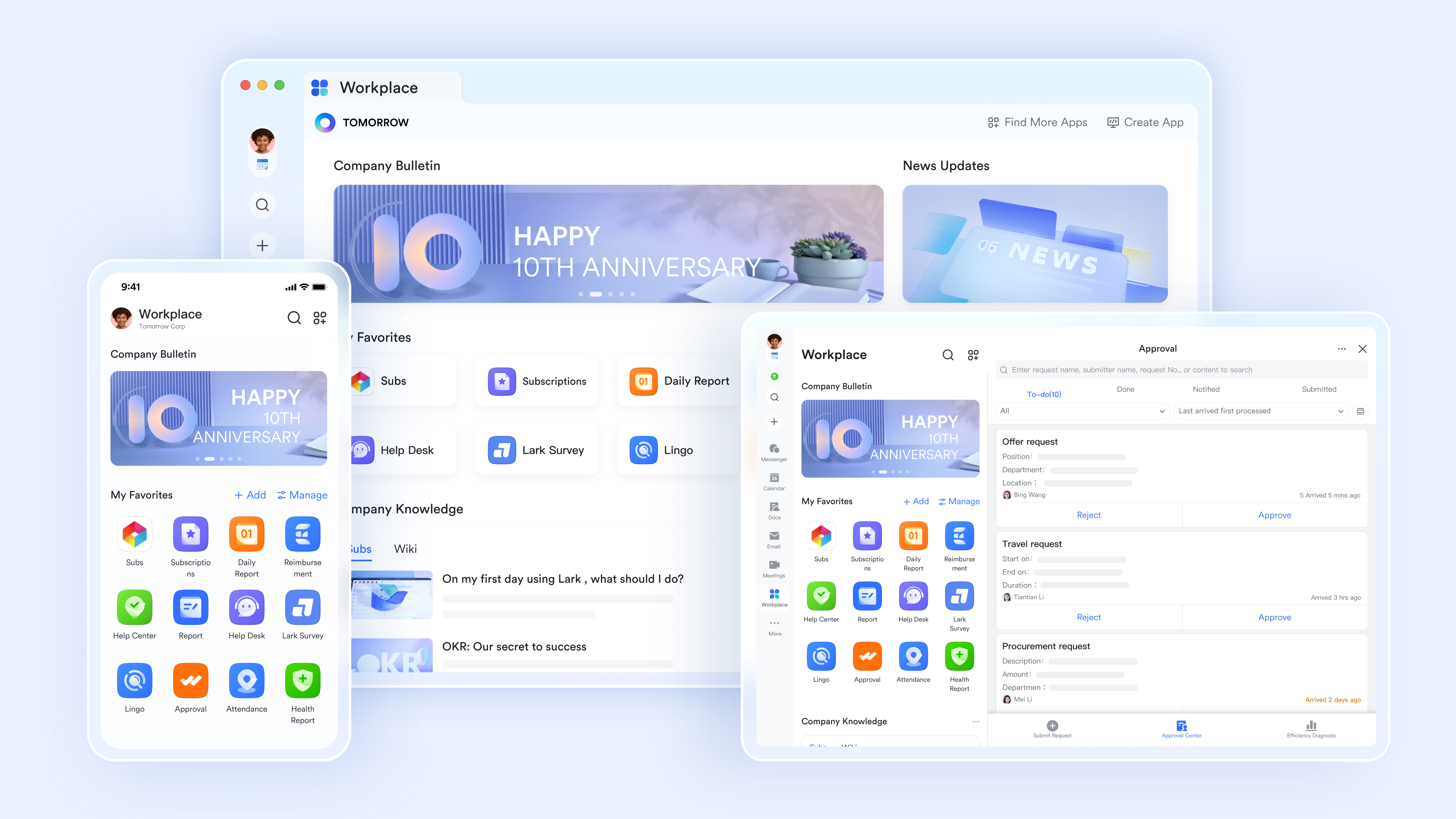
The smarter approach for small teams is to build a modular "stack" where each tool plays to its strength. Let the AI tool handle the heavy lifting of pixel generation, but use a robust collaboration hub like Lark to act as the "operating system" for your team. In this model, the AI tool is simply the factory floor, while Lark is the headquarters where strategy is decided, assets are stored, and final decisions are made. This decoupling gives you a massive strategic advantage: agility. When a better AI video model comes out next month (and it will), you can swap out the generation layer of your stack without disrupting your team's underlying workflow, chat history, or asset library.
Evaluating an AI video platform
AI video platforms aren’t built equally, particularly for small teams. When choosing a tool to use, here are the top things to consider:
- Speed of output - Ideally, you should be able to go from idea to finished video in minutes, not hours. If you spend too much time making adjustments by hand, you lose the benefit of having a tool do it quickly and easily for you.
- Input options - Look for AI video tools that give you a variety of ways to start, including text prompts, scripts, blogs, or outline formats. The more ways to input your content, the more easily you can incorporate these into your current content workflow.
- Branding - Your video content must look and sound like it's from your brand, not someone else's. Top-performing AI video tools let you upload logos and set brand colours to give the same kind of consistent visual identity for all your video content.
- Publish-ready output - Finally, make sure the output from your AI video tool is formatted and optimised for the various publishing platforms where you will be broadcasting your videos. If you have to further resize, re-export, or manually add captions to your videos, the AI tool creates friction rather than resolving it.
A simple starter checklist for small teams
If you are ready to transition your team to this new way of working, you don't need to overhaul your entire operation overnight. Start with a simplified implementation plan that focuses on the core pillars of workflow, content management, and generation. Here is a practical checklist to get your first batch of "studio-quality" videos out the door without chaos:
- Centralize your asset library first: Before generating new content, create a shared folder in Lark Drive for all your brand assets (logos, fonts, intros/outros) and existing raw footage. Ensure everyone on the team has the correct permissions to access these files.
- Define your "Standard Operating Procedure" (SOP): Create a simple Lark Doc that outlines the steps for a video project. Define who writes the brief, who approves the script, and who gives the final sign-off. Clear roles prevent confusion later.
- Select your pilot AI tool: Choose one AI video generator to experiment with for one month. Don't try to learn three tools at once. Focus on the one that integrates best with your existing content inputs (e.g., blog-to-video).
- Schedule your first "Batch Day": Block out a four-hour session on the team calendar. Assign pre-work tasks (scripting, asset selection) to be due 48 hours before the session begins to ensure the time is used for production, not planning.
- Run a retrospective: After the first batch is published, gather the team for a quick 15-minute sync. Ask what part of the workflow felt slow or unclear, and adjust your SOP doc immediately. Improvement should be continuous.
Conclusion
Producing professional-quality video content is no longer restricted to large budgets; smaller teams can now create high-quality videos just as easily as larger teams. The AI video industry is growing at an annual rate of 20%, in large part due to the value these tools provide for teams looking to do more with less.
The teams that begin using these tools will have a large competitive edge in the long term. Video marketing builds on itself over time and contributes to increased brand recognition, trust, and search visibility within a potential audience. The longer you wait, the longer your competitors will continue posting new content.
Begin by using what you already have; identify your highest-performing post and create a video using an AI editing program. You'll be pleasantly surprised by the low cost of getting started and high return on investment.
FAQs
What is the cost of AI video creation?
It is estimated that using AI tools will save 80% to 95% on video creation costs compared to conventional methods. Many providers provide free tiers or low-cost subscriptions, making it feasible for even small teams without large budgets to create high-quality videos.
Can AI videos be comparable to videos created using conventional methods?
Yes. In blind tests, studies have shown that 73% of viewers could not tell the difference between a video created using AI assistance and a video created using conventional production methods.
How many videos could a small team produce using an automated process flow?
An automated process flow combined with AI tools can enable a team of 2 - 3 people to create between 10 and 15 videos per session.
Will I Require Video Editing Skills to Use an AI Video Tool?
No. Most modern AI Platforms are capable of creating complete videos based on a text prompt, script or blog URL without any need for manual timeline editing.
What is the Ideal Length of a Marketing Video?
Approximately 73% of Marketers recommend making marketing videos between 30 seconds and 2 minutes to achieve the highest engagement.
Related reading
Table of contents
Start using Lark today

Manage all your work in one place
Boost team efficiency by 10x
Save up to 70% on software costs
Table of contents
Start using Lark today
Manage all your work in one place
Boost team efficiency by 10x
Save up to 70% on software costs
Keep reading









2026 Lark Technologies Pte. Ltd.
Headquartered in Singapore with offices worldwide.






Explore: