Nowadays, optimizing creative workflows is crucial for teams seeking to maximize productivity and innovation. A well-structured creative workflow not only enhances efficiency but also fosters collaboration across departments, ensuring that innovative projects are executed smoothly from inception to completion. With tools like Lark, teams can streamline their processes, facilitating better communication and reducing bottlenecks. In this article, we will explore what a creative workflow is, break down its key phases, and discuss the tools that can help manage these workflows effectively.
What is a creative workflow?
A creative workflow refers to the series of steps and processes that creative teams follow to produce and deliver , from concept development to final execution. It's significant across various industries, including marketing, design, advertising, and , as it outlines how creativity can be harnessed efficiently.
Identifying the key elements of a creative workflow—such as project phases, objectives, and tools—is essential for structuring the process and ensuring successful creative production.
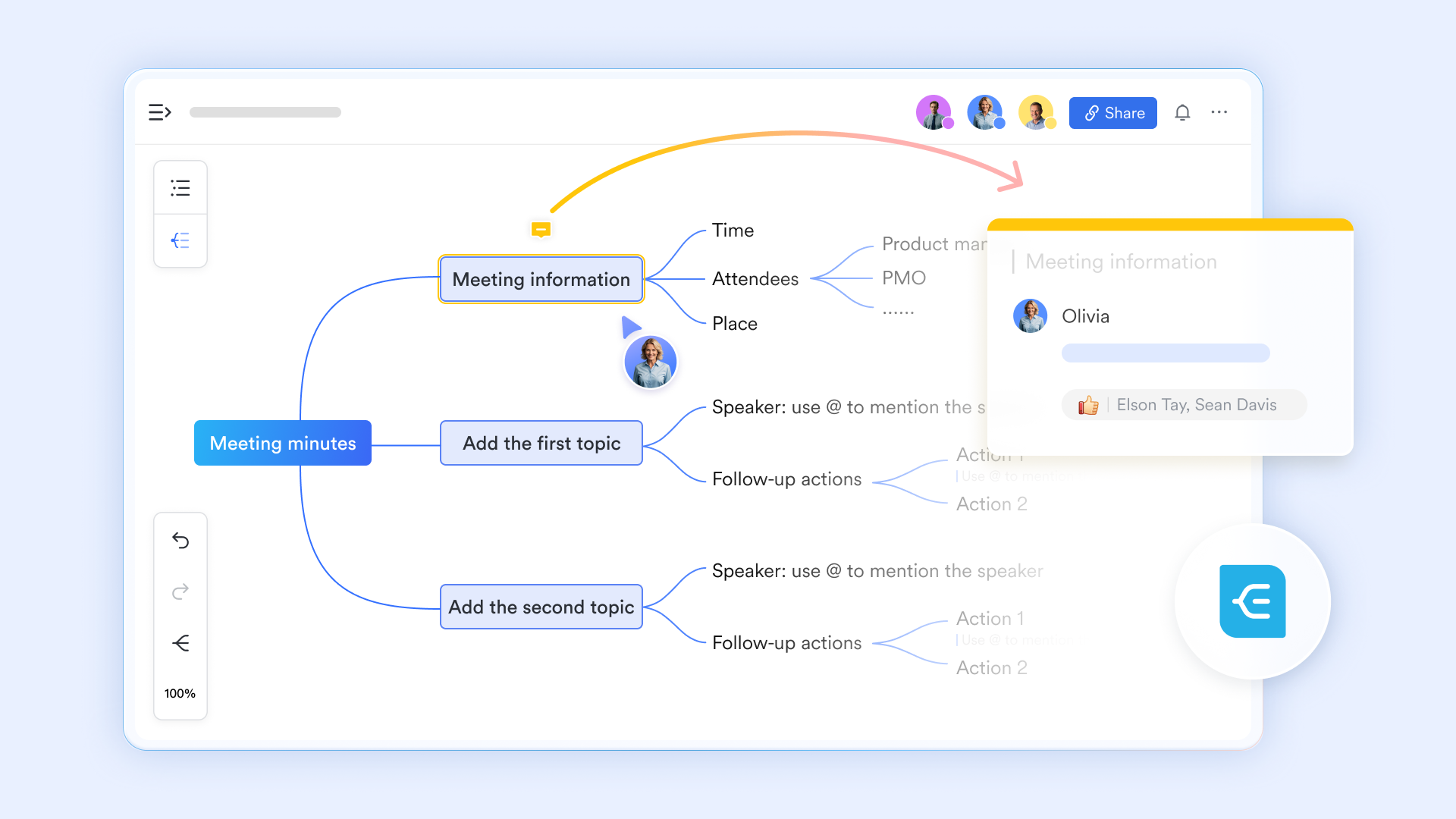
Typically, a creative workflow includes several components:
- : This project phase involves defining project goals, objectives, and scope through a creative brief. Early planning and feedback are crucial to ensure a smooth workflow and to address potential issues before moving forward.
- Planning: The focuses on developing ideas through brainstorming and collaboration. Teams assign roles, set deadlines, and determine required resources.
- Execution (creative production/production phase): This is the main production phase where assets are captured, created, and finalized. Typical activities include asset creation, design, filming, photography, and multimedia development, requiring collaboration and specialized tools.
- Feedback (Review Process): A structured review process is essential for managing feedback, tracking revisions, and obtaining necessary approvals. This ensures the project aligns with initial objectives and incorporates all stakeholder input.
- Finalization: This includes obtaining final approval through formal sign-off, ensuring all feedback has been addressed. It culminates in the project launch and delivery of the finished project to stakeholders or clients.
Clearly defining roles and responsibilities at each project phase helps ensure every team member knows their tasks, deadlines, and points of accountability, supporting a smooth and efficient creative workflow.
Get tips and strategies for optimizing your creative workflow
Key phases of a creative workflow
To effectively manage a creative workflow, it's essential to break down the process into actionable steps. Involving the entire team and the project manager in defining key elements and for each phase ensures clarity, accountability, and smooth coordination. Each phase will guide creative teams in refining their processes, enhancing collaboration, and improving overall productivity.
1. Assess current workflow
The first step is to evaluate your existing workflow. This involves identifying bottlenecks and inefficiencies that may be hindering your team's productivity.
Tip: Conduct team meetings or surveys to gather feedback on pain points in your current processes. Look at specific areas where projects tend to stall—this can be due to unclear communication, excessive revisions, or waiting for . Creating a visual map of your current workflow can help visualize where these bottlenecks occur.
2. Define clear roles and responsibilities
Clearly defined roles and responsibilities are crucial for the creative team's workflow, as they help manage the entire process from project requests to and financial management. When every member understands their specific responsibilities, it minimizes overlap and confusion, leading to a smoother workflow.
Tip: Consider implementing a responsibility assignment matrix to clearly outline who is in charge of what. This matrix should also indicate which tasks require collaboration, ensuring everyone knows when to engage with others. Regular check-ins can help reinforce these roles and address any issues that arise.
3. Choose appropriate tools and technologies
Selecting the right tools is crucial for enhancing your creative workflow. Tools can streamline processes, improve communication, and facilitate .
Tip: Evaluate the needs of your team and the nature of your projects before selecting tools. For example, if your team requires constant communication, tools like Slack can enhance real-time messaging. Additionally, tools like Lark combine several functionalities—communication, document editing, and task management—making them versatile for managing creative workflows.
4. Establish feedback loops
In a creative environment, continuous improvement is necessary for progress. Establishing enables team members to offer and receive constructive criticism throughout the project lifecycle. A structured feedback process is essential, as it ensures feedback is specific, actionable, and easy to track, which is crucial for maintaining project momentum.
Tip: Utilize collaborative tools that allow comments to be made directly on documents or designs, streamlining communication and making it easier to track changes. A well-defined review process helps prevent delays in feedback and approvals, which can create significant challenges in creative workflows.
5. Document processes
Creating clear, documented processes is essential for fostering consistency within your creative workflow. Well-documented processes serve as valuable references for current members and onboarding newcomers.
Tip: Develop where all workflow processes, project guidelines, and best practices are stored. Incorporate project templates for managing project requests and new project requests—these templates help automate the intake process, standardize project briefs, and streamline file organization.
Tools for creative workflow creation and management
Managing a creative workflow effectively requires the right tools to streamline communication, task assignments, , and feedback. Workflow software and project management tools not only help with resource management but also improve team performance by providing structure and clarity. Below is a curated list of ten tools that can significantly enhance your creative workflow management.
1. Lark: A comprehensive tool for creative workflow
is an all-in-one collaboration suite that integrates messaging, video conferencing, document editing, and task management. Designed for teams, Lark facilitates seamless communication and file sharing while providing powerful project management capabilities.
Key features:
Visual workflow management for creative projects
Lark Boards allows creative teams to visualize their work through different types of workflow (including Swimlane, Mind Map, Flowcharts, and so on), either building from scratch or creating from templates. This visual representation helps team members quickly understand project status and identify bottlenecks. With drag-and-drop functionality, tasks can be easily moved through stages, and team members can add comments, attachments, and due dates directly to each card, facilitating seamless collaboration. 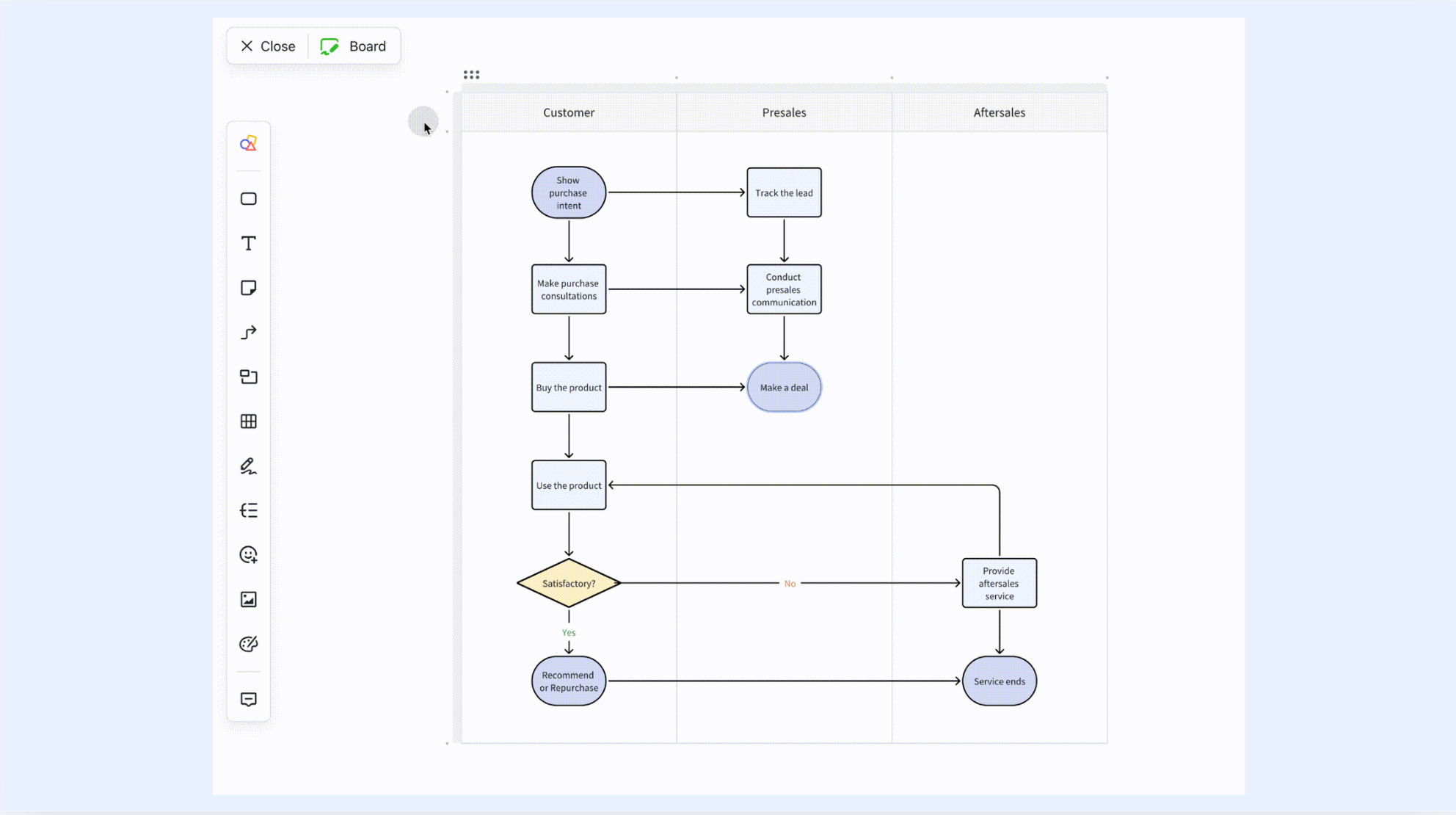
Real-time collaboration: unifies a multitude of tools within a single platform, facilitating seamless communication, planning, execution, monitoring, reviews, meetings, and . This holistic approach allows teams to work efficiently without switching between multiple applications.
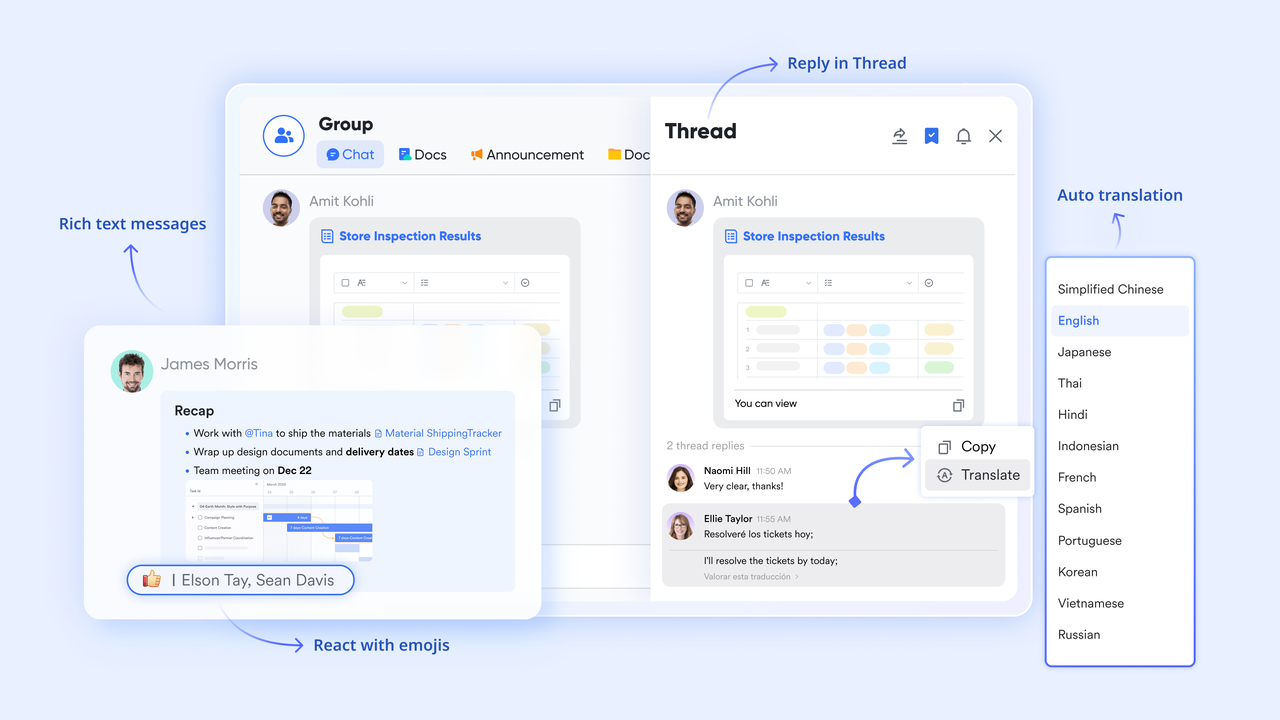
For example, users can easily convert messages from chat or minutes from meetings directly into tasks in Lark Tasks, streamlining the workflow from discussion to action. Additionally, users can forward records from Lark Base into chat, ensuring that vital information flows freely among team members, fostering real-time collaboration. Automated workflows catering to different uses: The automation functionality in empowers users to set up custom workflows that significantly improve efficiency. Lark Base's customizable fields—such as AI-powered fields—can be tailored to meet the unique requirements of various industries and business processes, making it an invaluable asset for creative teams. In addition, provides the flexibility for users to create custom approval workflows tailored to their project's needs. This feature is especially beneficial in creative environments where approvals are a regular part of the process, such as when designs or content need to be reviewed before finalization. By streamlining approval processes, teams can accelerate project timelines and reduce bottlenecks, enhancing overall productivity. 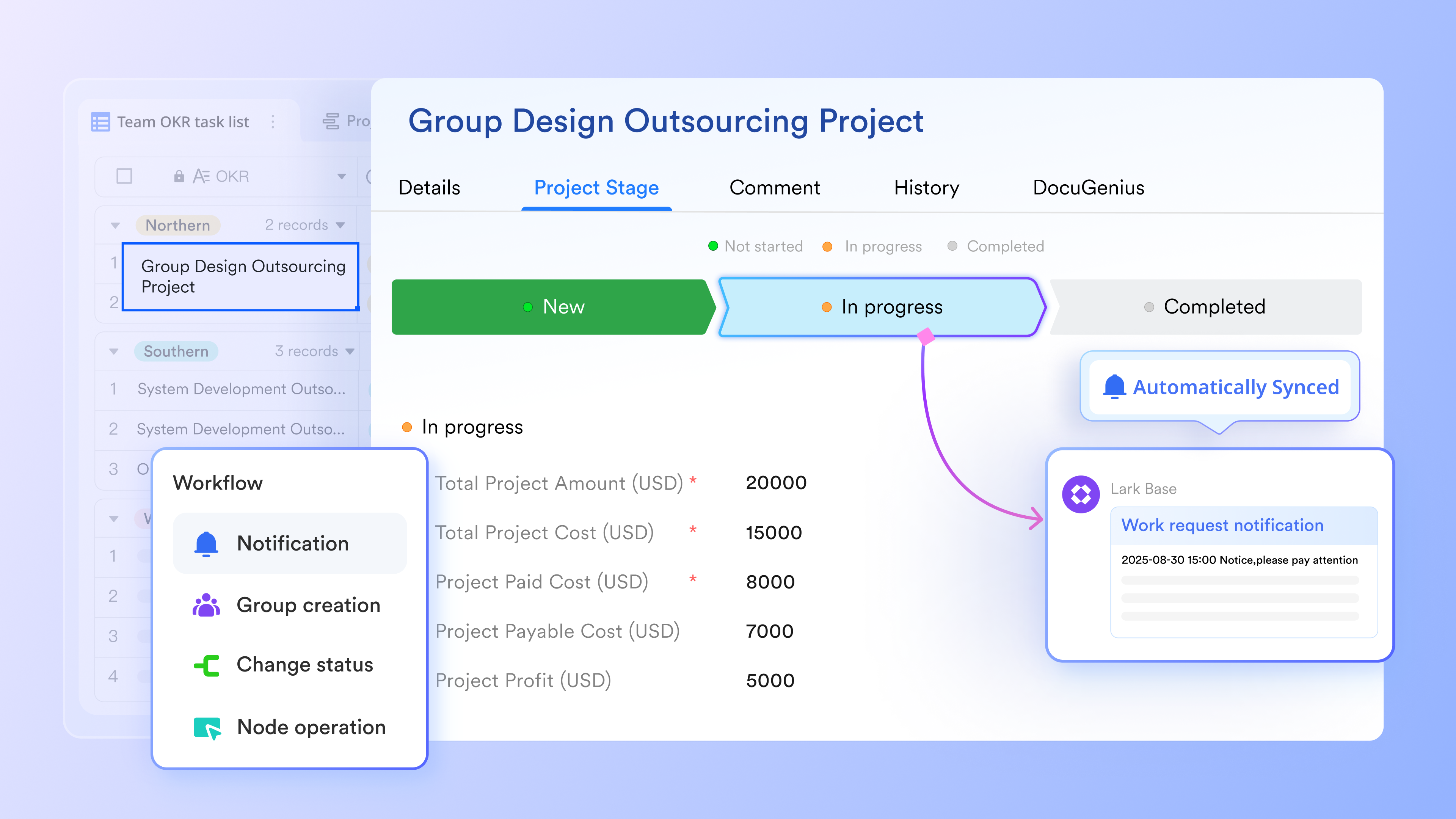
Video conferencing for enhanced communication: Lark's built-in video conferencing tools, , facilitate effective remote communication, ensuring that creative teams can collaborate face-to-face regardless of location. This feature is crucial for brainstorming sessions, project updates, and client meetings, fostering a sense of connection and teamwork even when working remotely.
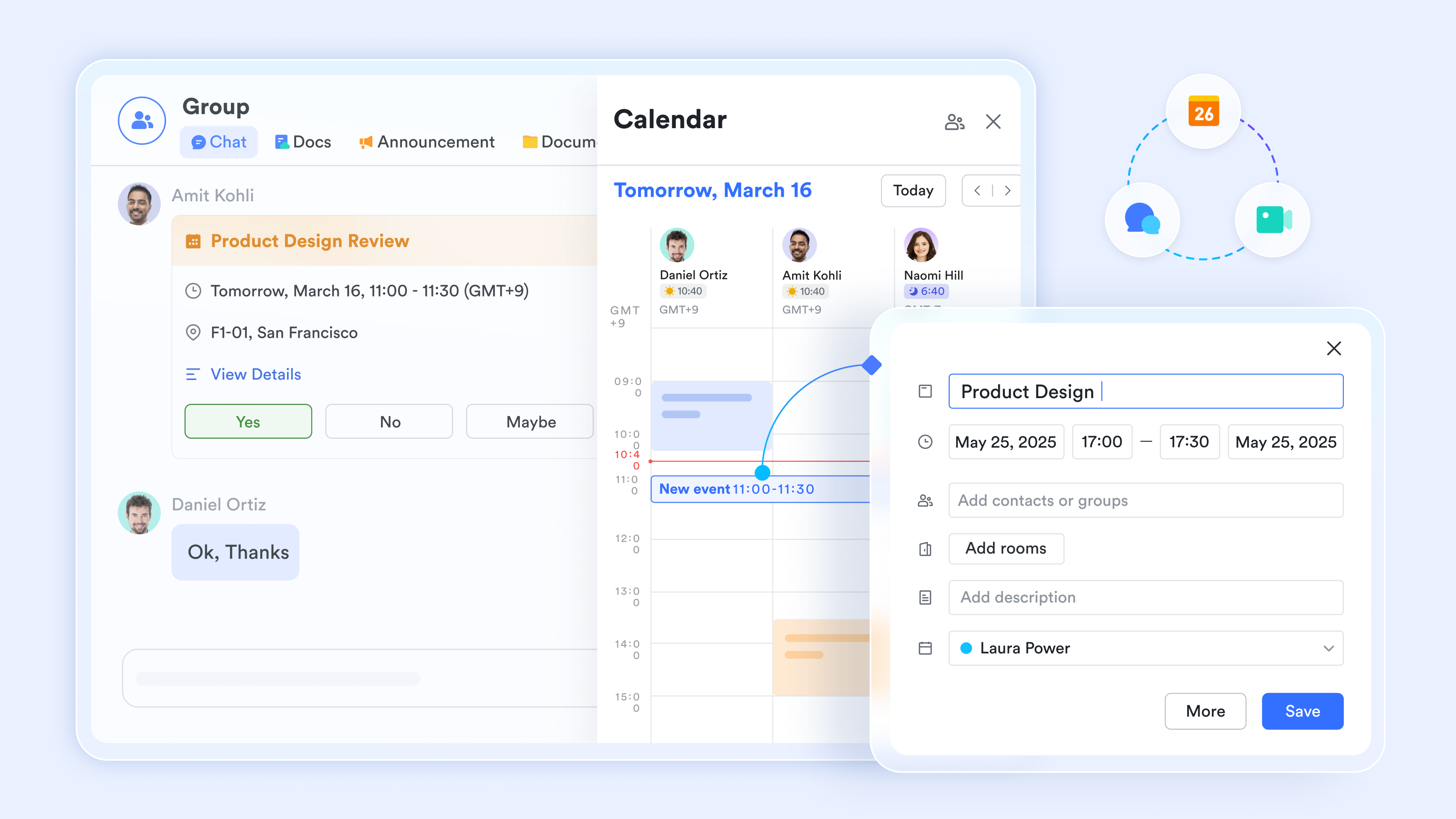
Why I picked Lark: Lark's versatility enables creative teams to manage their entire workflow on a single platform, enhancing productivity and reducing the need for multiple applications. The platform enables the entire team, including the internal team, to collaborate effectively, ensuring everyone is aligned and can contribute throughout the creative workflow.
:
- Starter plan: that includes 11 powerful tools for up to 20 users. It also comes with 100GB of storage space, 1000 automation runs, AI translations, and more. No credit card needed.
- Pro plan: (billed annually) for up to 500 users. It includes everything in Starter plus group calling for up to 500 attendees, 15TB of storage space, 50,000 automation runs, and more.
- Enterprise plan: for custom pricing. Supports unlimited users and includes even more automation runs and advanced security, compliance, and management features.
For small teams with simple communication needs

18 months message history
1000 Base automation runs/month
2000 rows per table in Base
Most POPULAR
For companies with comprehensive collaboration and management needs
Unlimited message history
500-participant video meetings
50k Base automation runs/month
20k rows per table in Base
For large companies with advanced security and organizational management needs
Get a personalized demo and pricing
Unlimited message history
500-participant video meetings
15 TB storage + 30 GB storage/user
500k Base automation runs/month
50k Base automation runs/month
Most POPULAR
For companies with comprehensive collaboration and management needs
Unlimited message history
500-participant video meetings
50k Base automation runs/month
20k rows per table in Base
2. Asana: A robust project management tool
Asana is a well-known project management software that helps teams organize work, set priorities, and track project timelines. It offers intuitive dashboards and task lists, making it easier for teams to stay on top of their projects.

Image source: asana.com
Key features:
- Task assignments to clarify responsibilities.
- Project timelines for visualizing deadlines.
- Project milestones to segment projects into manageable phases and track key markers.
- Project monitoring with visual dashboards and automated alerts to track progress, timelines, and budgets.
- Goal tracking to monitor progress.
- Customizable views such as lists and Kanban boards.
- Integration with various apps for enhanced functionality.
Why I picked Asana: Asana's visual project tracking is particularly useful for creative teams, ensuring that everyone is aligned with project deadlines and responsibilities. It enables project managers to define and track project milestones, as well as monitor overall project progress, making it easier to identify at-risk tasks and keep projects on schedule.
Pricing (billed annually):
- Starter: $10.99/user/month
- Advanced: $24.99/user/month
- Enterprise: Custom pricing
3. Trello: A visual project management tool
Trello uses a card and board system that allows users to organize tasks visually. This flexibility makes it ideal for managing creative projects that require iterative processes and frequent updates.
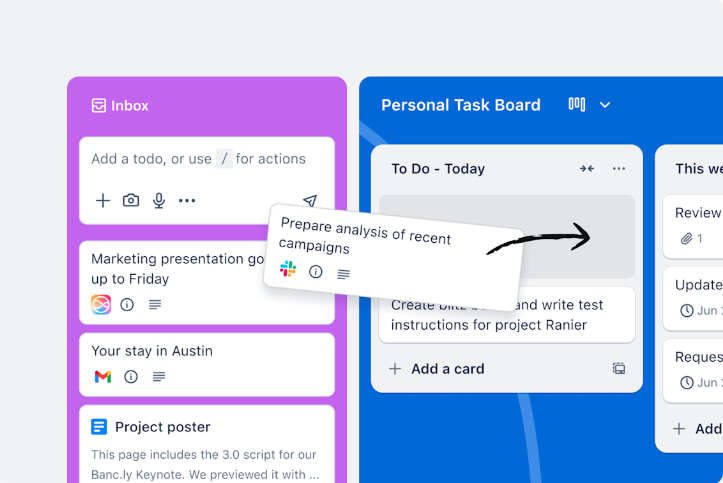
Image source: trello.com
Key features:
- Customizable boards to fit project needs.
- Task cards that can include checklists and deadlines.
- Labels for easy categorization of tasks.
- Drag-and-drop functionality for ease of use.
- Power-ups to add advanced features and integrations.
- Helps streamline repetitive tasks by automating workflows and reducing manual effort.
- Reduces version control issues by keeping all updates and changes in one place, ensuring everyone is working on the latest version.
Why I picked Trello: Its intuitive and user-friendly interface makes Trello a favorite among creative professionals needing a straightforward project management tool. Version control issues can lead to confusion about which version of a project is the latest, resulting in lost work. Trello helps prevent this by centralizing project updates.
Pricing (billed annually):
- Enterprise: $17.5/user/month
4. Wrike: Comprehensive management software
Wrike is designed for teams looking for robust project management capabilities. It offers extensive features tailored for creative teams, including timelines, Gantt charts, document sharing, and tools for managing creative operations across the entire project lifecycle.
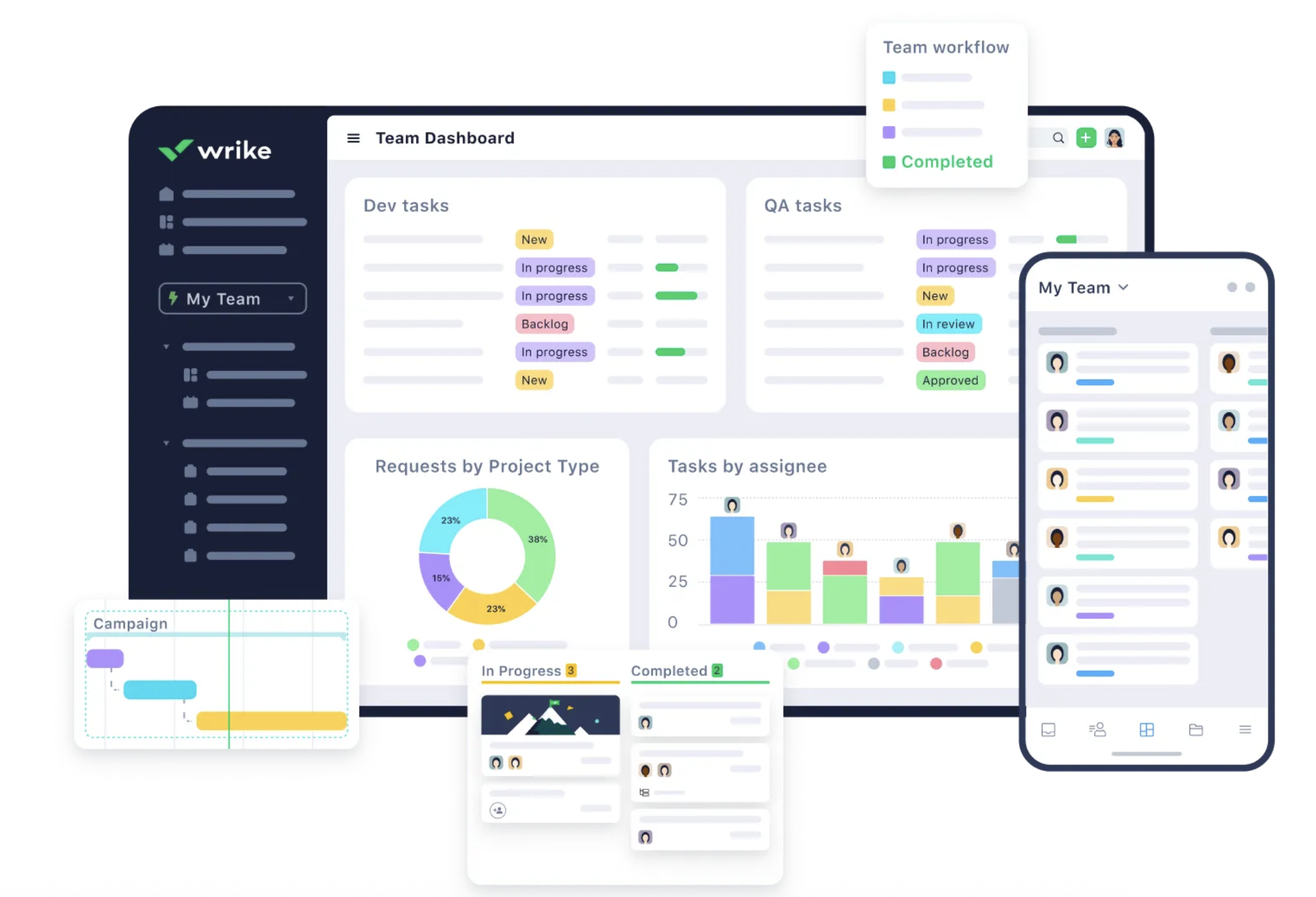
Image source: wrike.com
Key features:
- Custom workflows to fit project requirements.
- Resource management for optimizing team workflows, tracking availability, and balancing workloads.
- Creative production tools for structuring asset creation, coordinating tasks like video filming and photo editing.
- Time tracking for measuring project costs.
- Extensive reporting capabilities for performance insights.
- Interactive Gantt charts for project visualization.
- Collaboration tools for sharing feedback on documents.
Why I picked Wrike: Its powerful reporting features help in measuring creative productivity and project success, essential for creative workflow management. Wrike also supports creative operations by integrating resource management and creative production workflows, ensuring efficient processes and high-quality output.
Pricing (billed annually):
- Free for teams getting started
- Business: $25/user/month
- Enterprise & Pinnacle: Custom
5. Slack: An effective communication platform
Slack is a messaging platform that helps teams communicate and collaborate in real-time. It allows for easy sharing of files and updates, making it a vital tool for creative workflows.
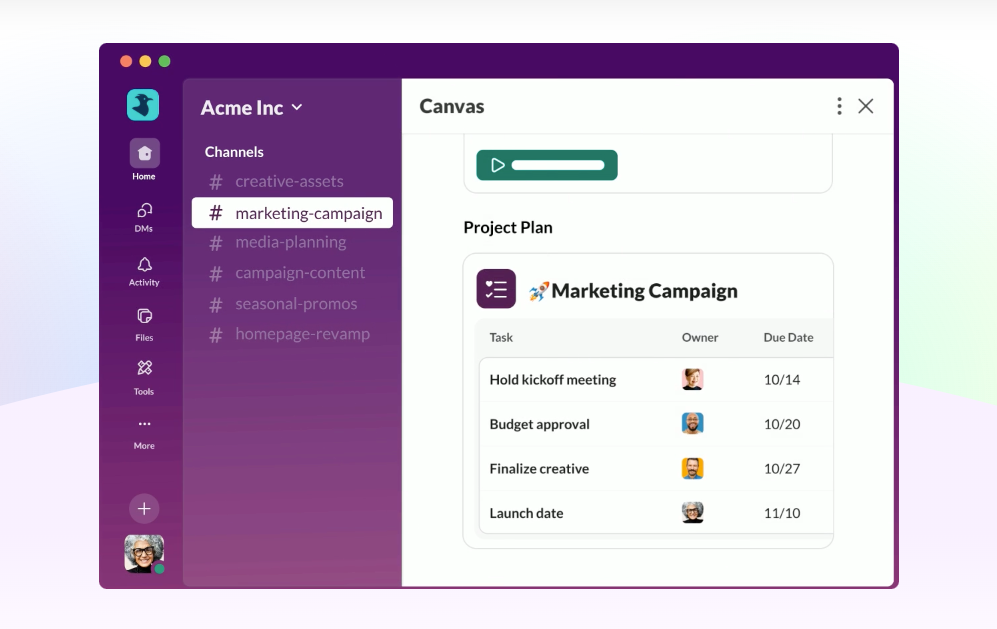
Image source: slack.com
Key features:
- Channels for organized team discussions.
- Direct messaging for private conversations.
- File sharing to collaborate on documents and graphics.
- Integration with other apps for seamless workflows.
- Custom notifications to stay updated on project changes.
Why I picked Slack: Its capability to facilitate real-time communication aligns perfectly with the needs of creative teams, enabling them to iterate and exchange ideas rapidly. Slack helps teams work together efficiently, overcoming geographical barriers that can hinder collaboration—especially when relying on outdated methods of file sharing.
Pricing (billed annually):
- Business+: $18/user/month
6. Monday.com: A visual project management solution
Monday.com is a work operating system that enables teams to build custom workflows. Its easy-to-use interface helps teams visualize project progress at any given time.
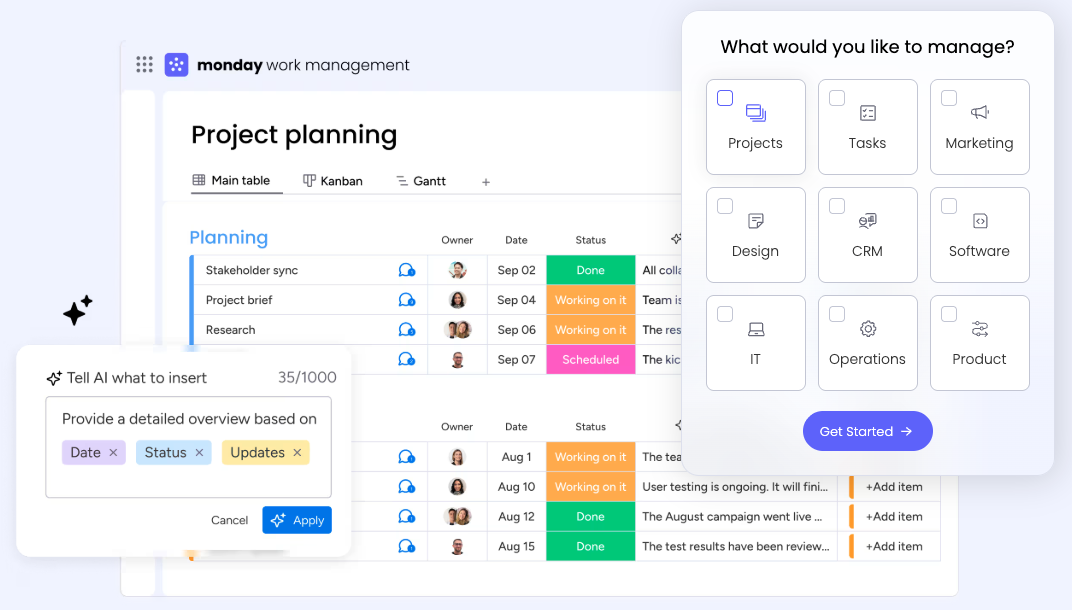
Image source: monday.com
Key features:
- Customizable workflows to match team needs.
- Automation of repetitive and administrative tasks to save time.
- Visual project timelines for tracking progress.
- Several templates to kickstart projects quickly.
- Integrations with various tools to enhance functionality.
Why I pick Monday.com: The customization and visual nature of this platform help maintain clarity and accountability in creative workflows. Using workflow automation tools for administrative tasks allows the team to focus more on high-impact, creative work.
Pricing (billed annually):
- Standard: $12/seat/month
- Enterprise: Custom pricing
7. Adobe Workfront: A comprehensive project management tool for creative teams
Adobe Workfront is a robust project management software designed specifically for creative and marketing teams. It enables organizations to manage projects from ideation through to completion, ensuring that all team members are aligned and working efficiently.
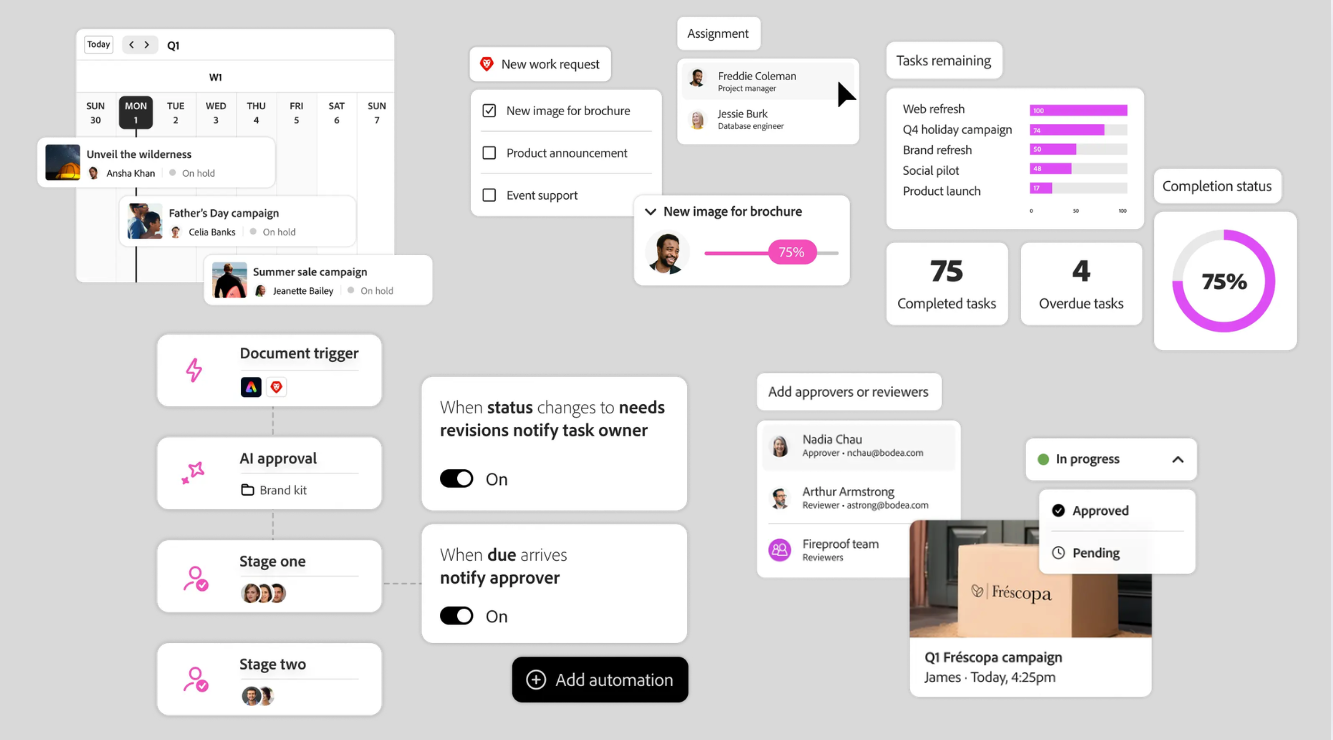
Image source: business.adobe.com
Key features:
- Centralized project visibility for tracking progress and deadlines.
- Customizable workflows that adapt to different project needs.
- Resource management to allocate team members effectively.
- Reporting and analytics tools to measure project performance.
- Integration with other Adobe products and third-party applications.
Why I picked Adobe Workfront: Its features are tailored for creative teams make it particularly useful for managing complex projects, ensuring that teams can collaborate effectively and deliver high-quality results.
Pricing: Adobe Workfront offers customizable pricing plans based on features and team size, with a demo available for potential users.
8. Figma: A collaborative interface design tool
Figma is a cloud-based design tool that allows teams to collaborate in real-time on UI and UX design projects. Its intuitive interface and powerful features make it a go-to platform for designers looking to streamline their workflow and enhance teamwork.
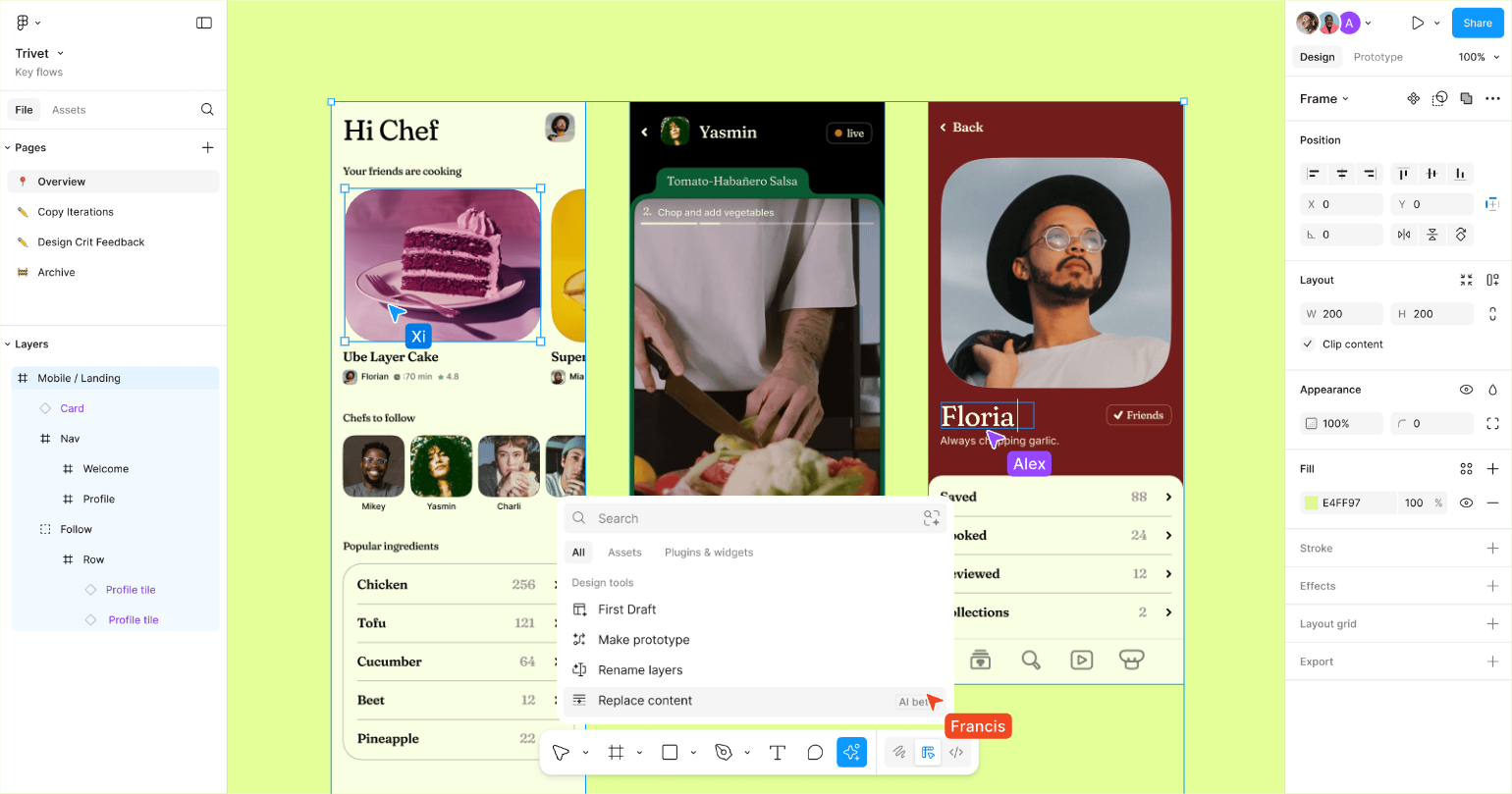
Image source: figma.com
Key features:
- Real-time collaboration that allows multiple users to work on designs simultaneously.
- Design systems to maintain consistency across projects.
- Prototyping tools to create interactive mockups for user testing.
- Commenting features for easy feedback and iteration within the platform.
- Integration with tools like Slack and JIRA for seamless project management.
Why I picked Figma: The platform's collaborative capabilities and user-friendly interface empower design teams to create high-quality user interfaces efficiently and effectively.
Pricing: Figma offers a free version for individuals, with professional plans available for teams starting at a reasonable monthly fee.
9. Smartsheet: A powerful work execution platform for teams
Smartsheet is a work execution platform that combines project management with collaboration tools to enhance team productivity. It enables users to plan, execute, and report on various projects in a centralized workspace, making it particularly valuable for creative teams that require structure and flexibility.
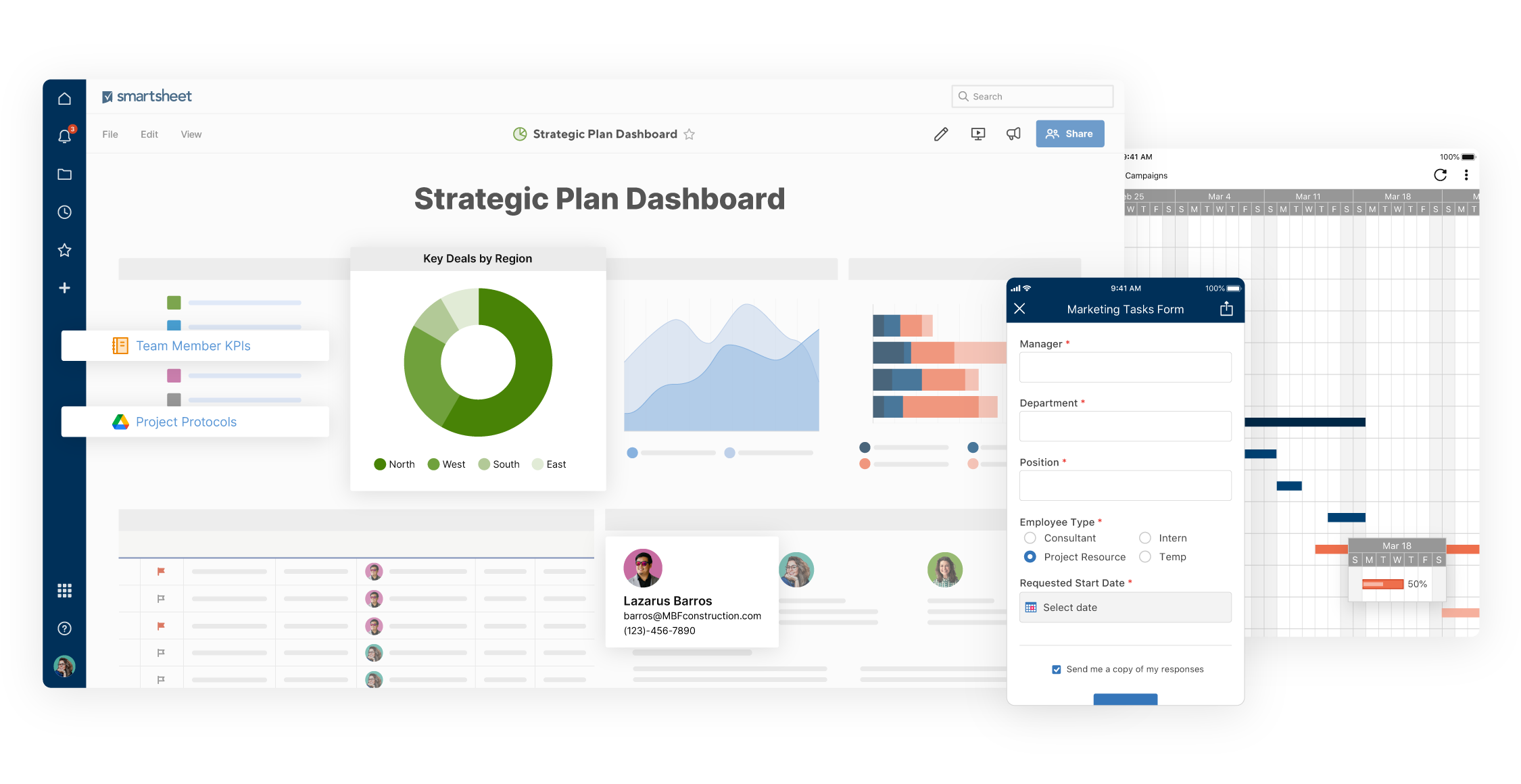
Image source: smartsheet.com
Key features:
- Dynamic project tracking through customizable Gantt charts and grid views, allowing teams to visualize project progress easily.
- Automation features to streamline repetitive tasks, such as automated reminders and status updates, freeing up time for creative work.
- Collaboration tools that enable real-time feedback and communication within the platform, improving teamwork and reducing misalignment on project objectives.
- Comprehensive reporting capabilities for tracking performance metrics, providing insights into progress, resource allocation, and project timelines.
- Integration with various tools and applications, such as Google Workspace, Microsoft Office, and Slack, enhances workflow connectivity across different platforms.
For more Google Workspace's information, you can refer to and .
Why I picked Smartsheet: Its flexibility and powerful project management capabilities make it suitable for creative teams that need to manage multiple projects efficiently while fostering collaboration and transparency.
Pricing (billed annually):
- Business: $19/user/month
- Enterprise & Advanced Work Management: Custom
10. Canva: A user-friendly graphic design platform
Canva is a versatile graphic design tool that allows users to create a wide variety of visual content, including social media graphics, presentations, posters, and more. With its intuitive interface and extensive library of templates, Canva empowers both beginners and professionals to design stunning visuals effortlessly.
Key features:
- Drag-and-drop functionality for easy design creation.
- A vast library of pre-made templates for various design needs.
- Access to millions of images, icons, and illustrations directly within the platform.
- Collaboration tools that enable team members to work together in real-time.
- Export options for multiple formats, including PDF, PNG, and JPG.
Why I picked Canva: Its user-friendly design interface and extensive library make Canva an excellent choice for individuals and teams looking to produce high-quality visual content without needing advanced design skills.
Pricing: Canva offers a free version with many features, while the Pro version, which includes additional functionalities and assets, is available on a monthly or yearly subscription basis.
Explore the best workflow tool tailored for creative teams
Creative workflow templates
Templates are essential for streamlining processes in creative workflows. play a crucial role in managing project requests and new project requests by providing standardized structures for intake forms, proposal approvals, and converting opportunities into active projects. They provide a foundational structure that teams can modify and adapt to their specific projects. Here are a few types of templates beneficial for creative workflows:
Project kickoff template
A project kickoff template helps teams formalize the beginnings of a project. This template typically includes sections for , key stakeholders, timelines, and required resources. It serves as a centralized reference point for discussions and planning sessions, enhancing the initiation process for any creative project.
Feedback and revision template
This template is designed to facilitate constructive feedback during the creative process. It often contains sections for initial ideas, proposed changes, and review comments. By using a feedback and revision template, team members can clearly document their suggestions and concerns, creating a history of revisions made throughout the project.
Content calendar template
A content calendar template is essential for managing timelines for content creation and publication. It typically includes fields for content topics, deadlines, responsible team members, and publication dates. A well-structured content calendar helps teams stay organized and on various projects, ensuring timely deliveries and coordinated marketing efforts. Utilizing a content calendar also allows for strategic planning and better alignment of creative projects with broader business objectives.
Creative brief template
The creative brief template outlines project goals, target audience, key messages, and deliverables. Standardizing processes, such as using templates for project briefs, can save time and avoid confusion. By establishing a creative brief, teams can ensure that all members are aligned with the project vision and . This comprehensive template helps minimize misunderstandings and keeps creative output focused on the desired outcomes.
Post-project review template
A post-project review template is used to evaluate completed projects. It often includes sections for analyzing project successes, challenges faced, lessons learned, and areas for improvement. By conducting post-project reviews using a structured template, creative teams can glean valuable insights that inform future workflows and project planning.
Team roles and responsibilities template
This template outlines the specific roles and responsibilities of each team member within a project. It helps clarify who is accountable for what tasks, reducing the potential for overlap and ensuring smooth collaboration. By maintaining a clear documentation of roles, teams can streamline their workflows and enhance accountability during the creative process.
Each of these templates contributes to a more organized and efficient creative workflow process, allowing teams to focus on delivering high-quality outputs while minimizing miscommunication and confusion. By utilizing templates, teams can ensure they remain agile and responsive to changing project needs.
Benefits of implementing a strong creative workflow
Implementing a strong creative workflow can serve as the backbone of an efficient creative team, providing numerous benefits that enhance productivity and overall output quality. An effective creative workflow process is essential for a successful project, as it streamlines collaboration, automates repetitive tasks, and ensures that teams are focused on delivering high-quality work.
Enhanced quality of creative output
Implementing a solid creative workflow directly correlates with the quality of the final output. During creative production, having a clear and feedback process ensures that all assets are thoroughly evaluated, real-time comments are integrated, and revisions are tracked efficiently, resulting in high-quality output.
Best practices for managing creative workflows
Managing creative workflows effectively requires adopting best practices that promote efficiency, collaboration, and innovation. Following creative workflow best practices, such as starting with a basic plan to clarify , objectives, and stakeholder alignment, is essential for successful project execution. Here are some actionable strategies to consider:
Encouraging a culture of open communication
Establishing an environment where open communication is valued is essential for creative teams. Encourage team members to share their thoughts, ideas, and concerns freely. Regular team meetings can provide a platform for discussing ongoing projects, , and addressing any issues collaboratively. Open communication also helps manage clients by ensuring transparency and keeping them updated, which aligns with what clients expect regarding project progress and outcomes.
Utilizing visual aids
such as storyboards and mood boards, can significantly enhance the creative workflow. These tools help teams visualize their ideas and concepts, aligning everyone's understanding of the project vision. By using visual aids, team members can communicate their ideas more effectively, leading to better alignment and creative output.
Regularly revisiting and refining processes
Creative workflows should be dynamic; regular evaluation and refinement are necessary to keep them efficient and effective. Set aside time after major projects to review what worked and what didn't. Gathering feedback from the team about the itself can reveal areas for improvement. Adjustments made based on this feedback could streamline future projects, ensuring a smoother process and quicker turnaround times. As workflows grow more complex, integrating an can support continuous improvement by automating milestone tracking, triggering next-step tasks, and monitoring workflow bottlenecks. These intelligent agents enhance process visibility while keeping teams aligned across
Implementing these best practices can significantly improve the management of creative workflows. By promoting open communication, utilizing visual aids, refining processes, and balancing structure with flexibility, teams can enhance productivity, collaboration, and overall creative output.
Manage creative workflows & elevate effectiveness
Measuring the success of your creative workflow
To ensure that your creative workflows are effective, it's essential to establish ways to measure their success. Key performance indicators (KPIs) can provide valuable insights into how well your workflow is functioning and where improvements may be necessary. Here are some important KPIs to consider:
Project turnaround time
One is project turnaround time, which measures the duration from project initiation to completion. Monitoring this metric allows teams to assess their efficiency and the impact of their workflows on productivity. A significant reduction in turnaround time can indicate that the workflow modifications are effective.
Team satisfaction and engagement levels
Team satisfaction is another key indicator that reflects the health of your creative workflow. Engaged team members are more likely to be productive and motivated. Regular surveys can help gauge satisfaction levels and provide insights into how team members perceive the workflow. High engagement often correlates with successful collaboration and morale within the team.
Quality of completed projects
The quality of the final output is a direct measure of the effectiveness of a creative workflow. Assessing completed projects against established criteria, such as originality, client feedback, and adherence to , can help determine areas for improvement. Utilizing feedback from stakeholders and clients can provide constructive insights into the quality and effectiveness of creative outputs.
Regularly reviewing and adapting workflows
To maintain an effective workflow, it's important to regularly review and adapt your processes based on these performance metrics. Scheduling periodic evaluations—such as monthly or quarterly reviews—can help teams reflect on their progress and identify areas that require adjustments.
By employing these strategies, teams can continuously enhance their creative workflows, ensuring they remain responsive to project needs and team dynamics, ultimately striving for excellence in their creative pursuits.
Conclusion
In today's creative landscape, a well-structured creative workflow is essential for teams aiming to maximize efficiency and enhance output quality. Key benefits such as increased productivity, improved teamwork, and higher-quality deliverables underscore the necessity of refining workflows continuously. Regularly measuring workflow effectiveness through key performance indicators ensures that teams remain aligned and focused on their goals. As highlighted, employing tools like can significantly enhance your creative workflow, integrating communication, task management, and document collaboration into one platform. By utilizing such a solution, creative teams can further streamline their processes and achieve greater success in their projects.
I encourage you to start implementing the strategies discussed in this article today. By doing so, you can elevate your creative output, foster innovation, and enhance your team's overall performance.
Embrace the power of a structured workflow with Lark
FAQs
What are creative workflows?
Creative workflows are organized processes that guide teams in producing, developing, and delivering creative projects efficiently. They define the sequence of tasks, roles, and responsibilities, helping to streamline collaboration and output quality.
What are the 7 steps of the creative process?
The seven steps of the creative process typically include: 1. Preparation, 2. Incubation, 3. Insight, 4. Evaluation, 5. Elaboration, 6. Execution, and 7. Launch. These steps outline how ideas evolve from initial concepts to final products.
What are the 5 steps in the creative process?
The five steps in the creative process generally consist of: 1. Idea Generation, 2. Idea Validation, 3. Concept Development, 4. Design and Implementation, and 5. Review and Refinement. These steps help teams navigate their creative journey effectively.
What are the 4 creative processes?
The four creative processes often referred to are: 1. Preparation, where ideas are gathered and explored; 2. Incubation, where ideas marinate subconsciously; 3. Illumination, where insights and solutions surface; and 4. Verification, where ideas are evaluated and refined for practical application.
Related reading































