Slack project tracking has become a common starting point for teams that want to move fast without setting up complex systems. Channels, threads, and quick messages make coordination feel effortless in the early days. Many teams treat Slack as a lightweight way to manage work because everything happens in one place. Over time, Slack starts to resemble a project hub rather than just a messaging tool.
However, as projects grow in size and duration, cracks begin to show. Tasks get buried in conversations, ownership becomes unclear, and reporting turns manual. Discussions on Slack project management Reddit often reflect this journey, where teams begin enthusiastically and later search for structure. This blog explores how Slack project tracking works, where it breaks down, and which alternatives teams consider as they scale. Let's dive in.
What is Slack for project tracking?
Slack project tracking abilities refer to managing tasks, updates, and collaboration directly inside Slack channels and messages. Instead of using a dedicated project management system, teams rely on chat threads, reminders, and integrations to keep work moving. This approach is popular among startups and small teams because it requires little setup and fits naturally into .
A typical Slack project management example includes creating channels per project, assigning tasks through messages, and tracking progress via manual check-ins. Some teams use Slack to create list templates or connect Slack with external tools to compensate for missing features. While this method feels flexible, it depends heavily on discipline and memory.
As project complexity increases, Slack project tracking becomes harder to maintain. Important details are buried in conversations, reporting requires manual effort, and scaling introduces hidden costs. This pushes teams to evaluate alternatives that still respect .
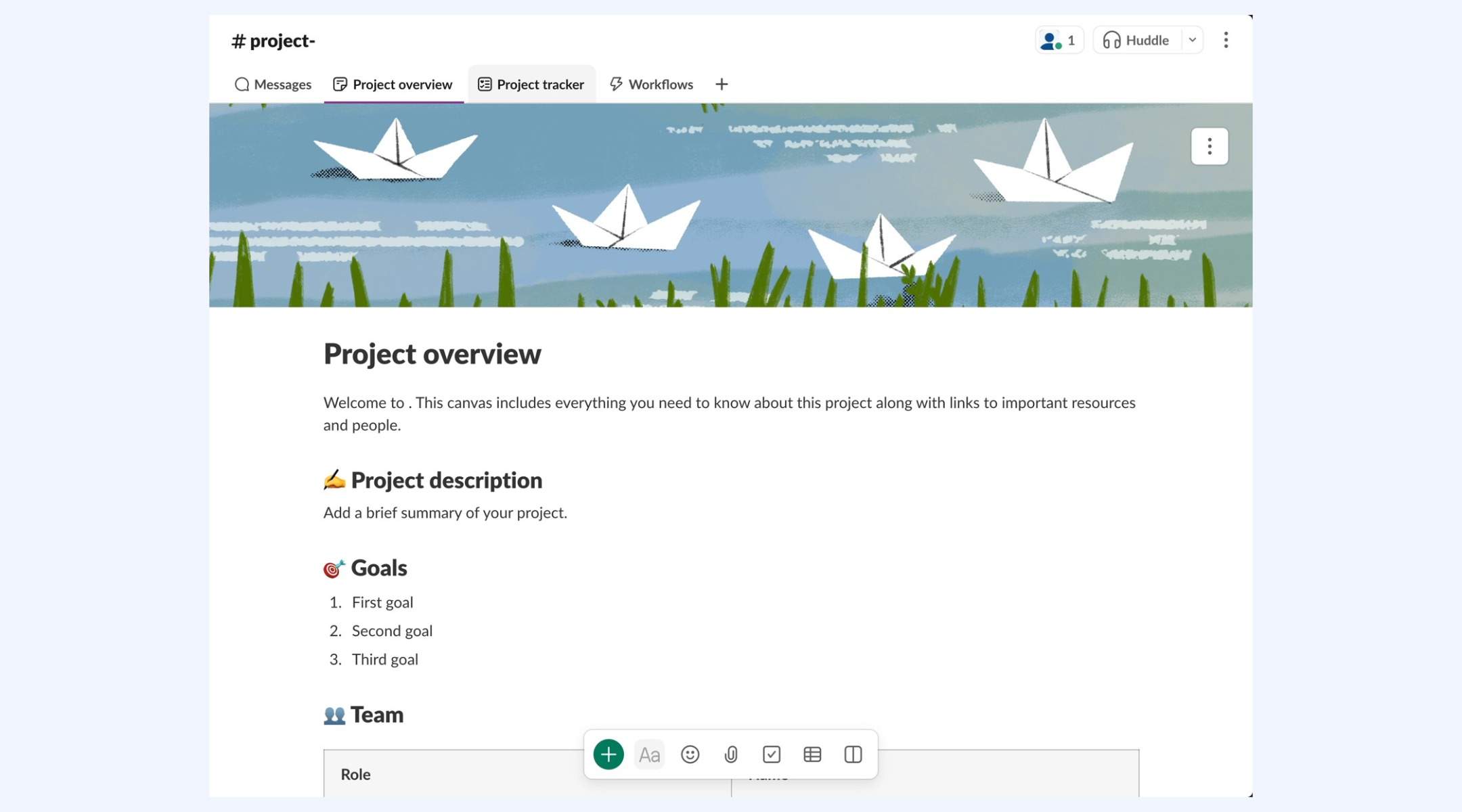
Image source: slack.com
How teams track projects inside Slack today
Slack-based tracking usually evolves organically. Teams assemble workflows using native features and add-ons rather than structured systems.
- Slack to-do list templates: Teams create simple Slack to-do list template messages or pinned checklists on channels. These lists rely on manual updates, and visibility is limited to the channel. As tasks grow, lists become outdated and difficult to audit.
- Manual status updates: Team members post progress updates in threads or standups. While this encourages transparency, updates are inconsistent and hard to summarize. Reporting requires scanning long histories.
- Pinned messages: Important timelines or documents are pinned for visibility. Over time, pins accumulate and lose relevance. New members often struggle to understand priorities.
- Bot reminders: Bots are used to send reminders or collect updates. Many bots require paid plans and still operate outside the real project context.
- Daily standups via chat: Standup messages keep momentum but lack historical structure. Trends, blockers, and workload patterns remain invisible.
How to use Slack for project tracking
Step 1: Create dedicated project channels
Set up separate Slack channels for each project (e.g., #website-redesign). This keeps conversations, files, and updates centralized. Invite only relevant team members to avoid noise and improve focus.
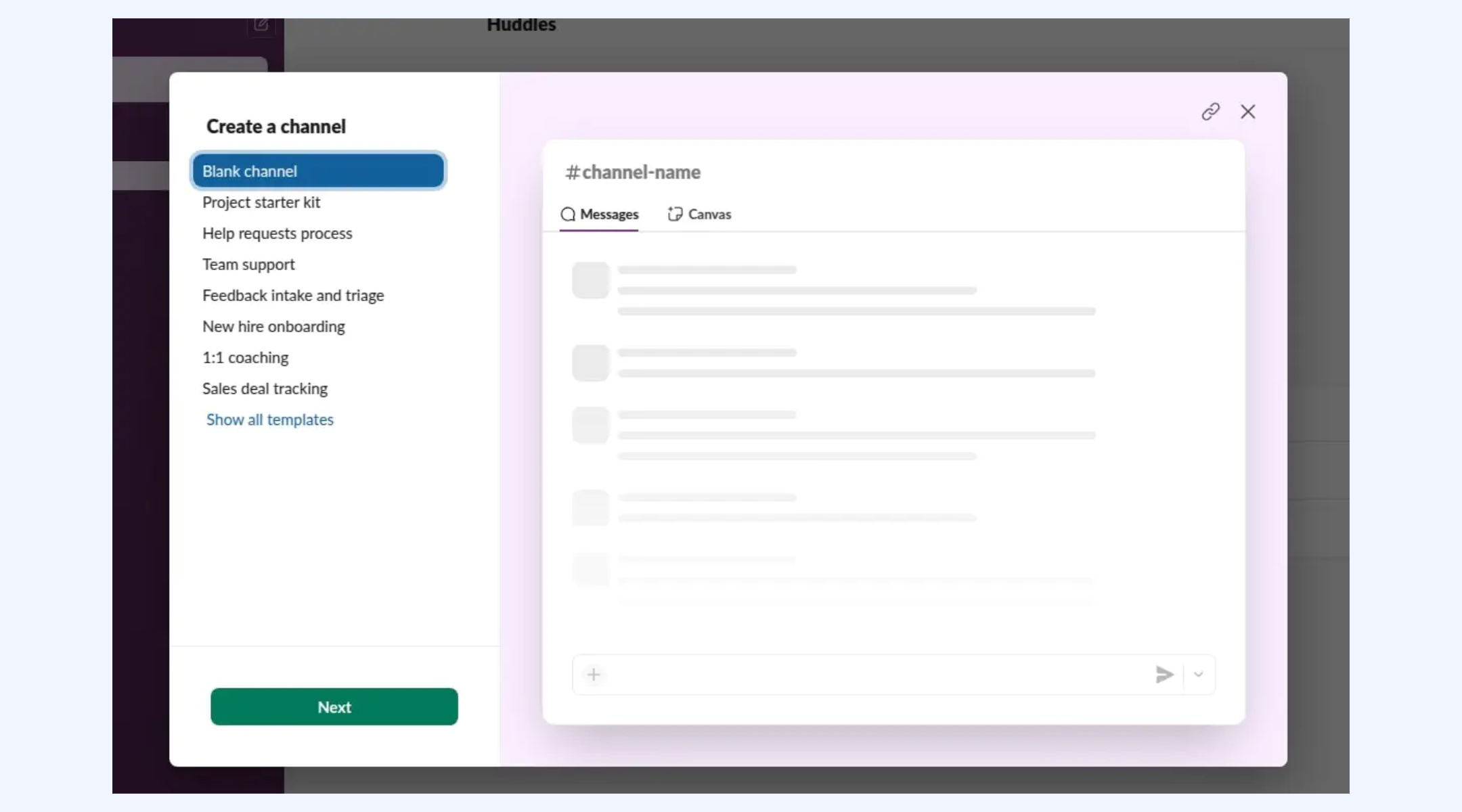
Image source: slack.com
Step 2: Use pinned messages for priorities
Pin key documents, deadlines, and project guidelines on the channel. This ensures important information stays visible and easy to access for everyone.
Step 3: Track tasks with messages and reminders
Post tasks as messages and tag owners using @mentions. Use Slack reminders to follow up on deadlines and deliverables directly from chat.
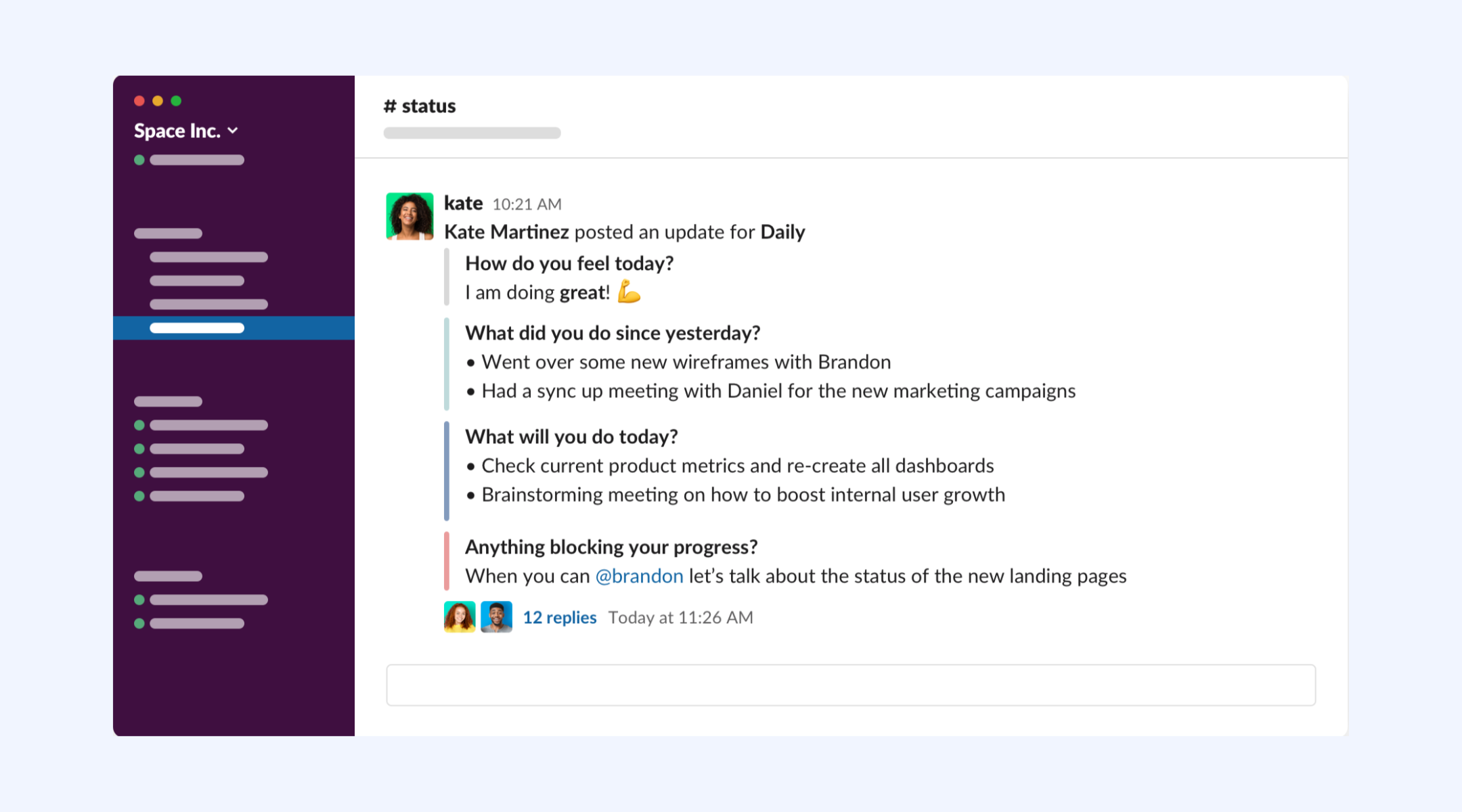
Image source: slack.com
Step 4: Automate updates with bots
Add workflow bots to send deadline reminders, collect daily standups, or notify teams about status changes. This reduces manual follow-ups.
Step 5: Share progress in regular check-ins
Run weekly or daily standups inside the channel. Ask team members to post updates, blockers, and next steps to maintain visibility.
Slack project management templates
Slack project management templates provide ready-made frameworks to help teams organize tasks, track progress, and standardize workflows. Instead of building systems from scratch, teams can use these templates to structure projects, assign responsibilities, and maintain visibility across channels:
Project tracker template
Managing projects across time zones can quickly become chaotic without a clear system. A project tracker template serves as a central hub for organizing tasks, timelines, and ownership. It removes confusion around responsibilities and deadlines. With everything in one place, teams gain visibility and execute projects more efficiently.
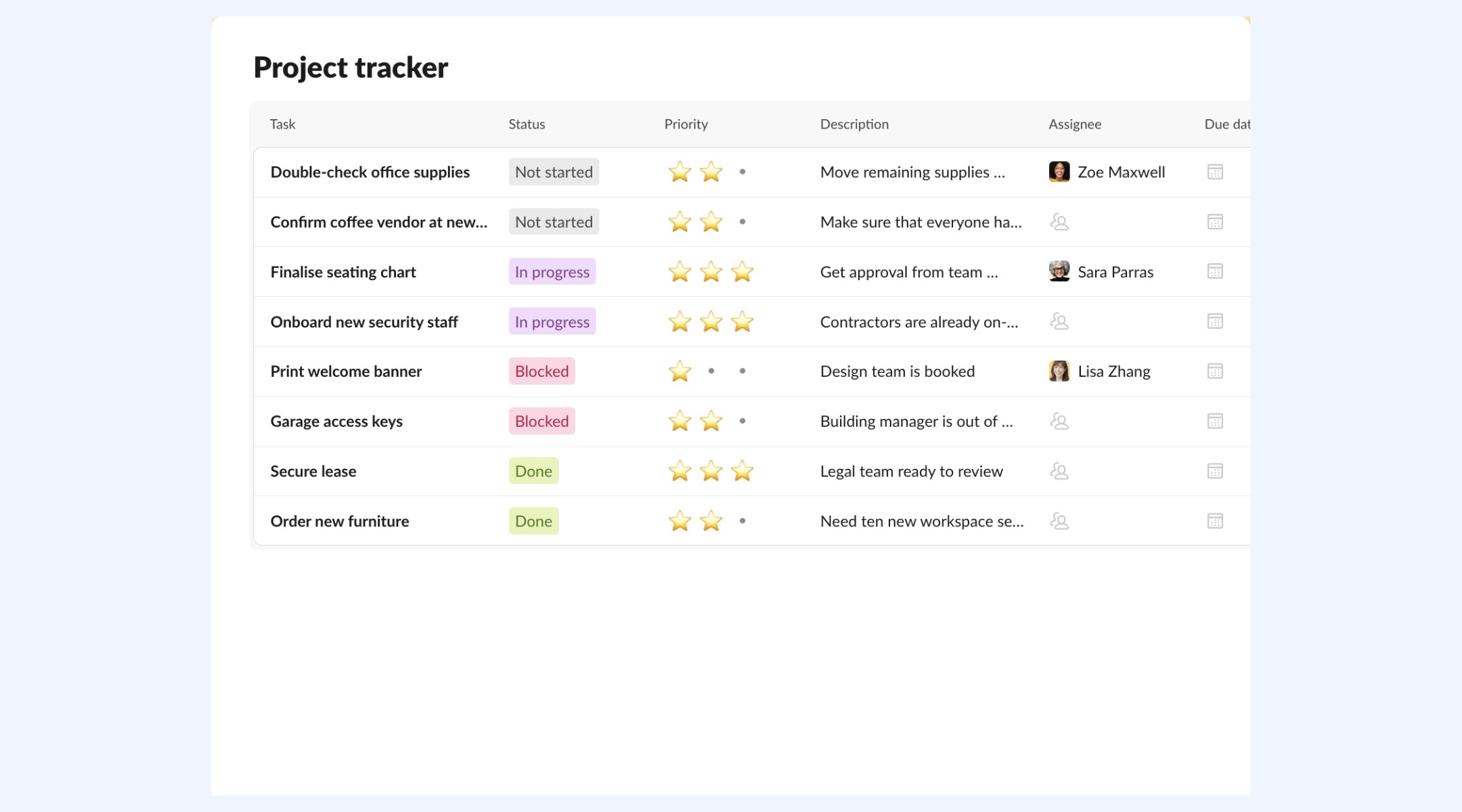
Image source: slack.com
Project brief template
A product brief outlines the vision, goals, and key details of a new product initiative. It aligns teams across engineering, marketing, and design on the product's purpose and direction. The Slack product brief template provides a structured, repeatable format for faster planning. As a living document, it stays collaborative, searchable, and easy to update as plans evolve.
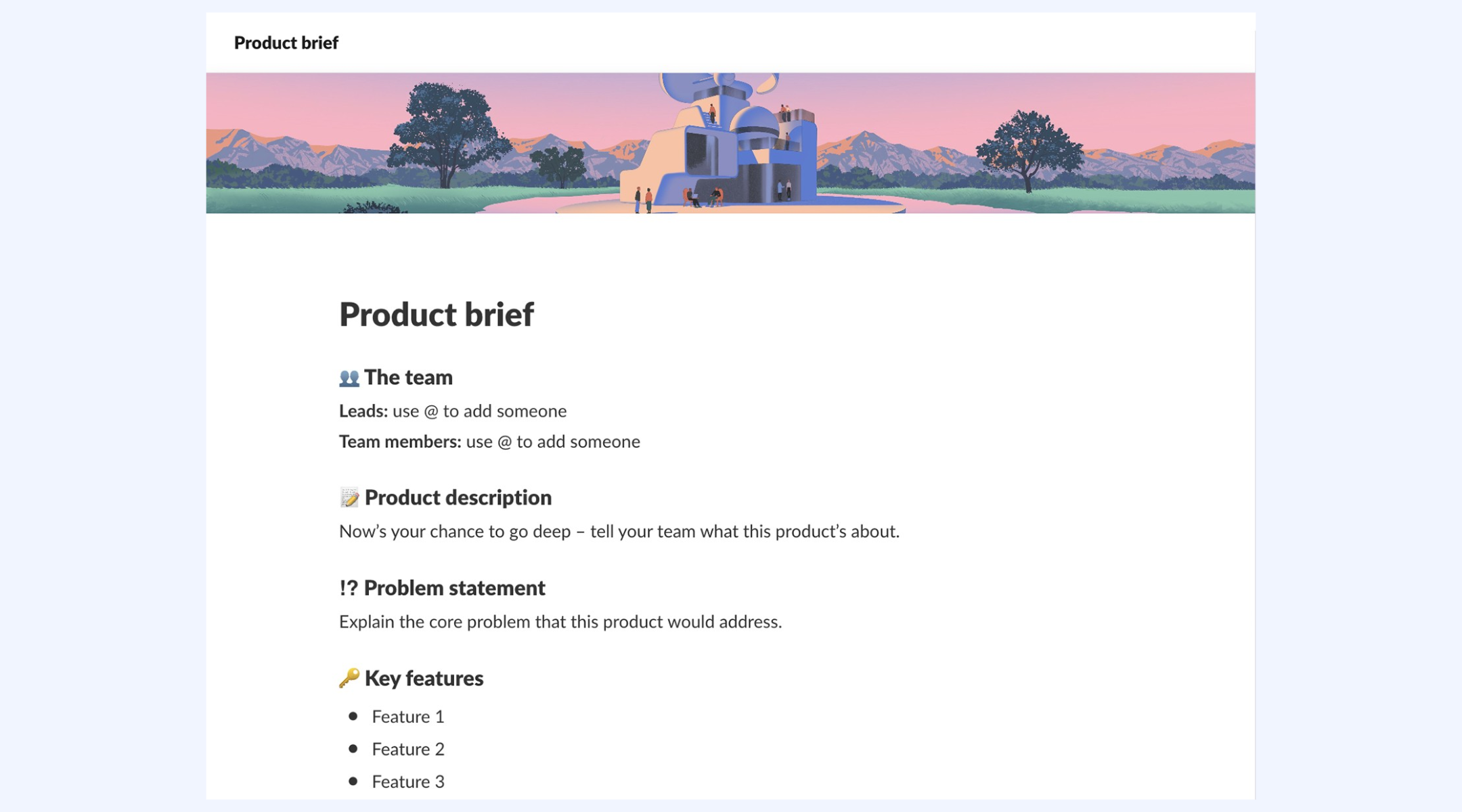
Image source: slack.com
Weekly meeting agenda template
A weekly meeting agenda template is a reusable structure for recurring team meetings. It outlines discussion topics, project updates, and priorities in advance. This consistency improves focus, accountability, and role clarity. Keeping meetings organized, it helps teams stay productive and outcome-driven.
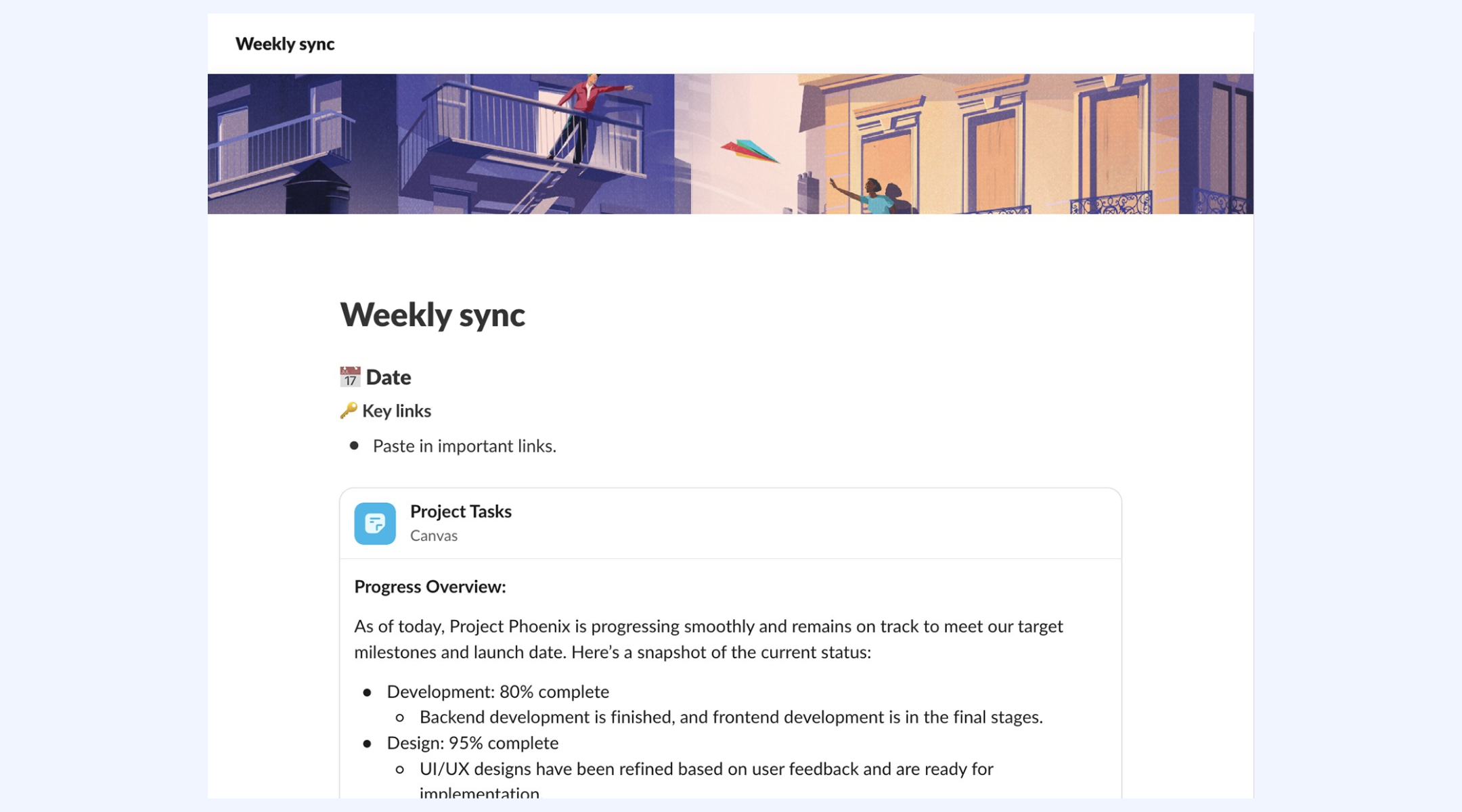
Image source: slack.com
To-do list template
A to-do list template is a reusable framework for organizing and tracking tasks efficiently. It helps individuals and teams stay on schedule by clearly outlining priorities and deadlines. Slack's to-do template lets you label tasks by status, due date, and link related messages. This makes it easier to prioritize work, highlight action items, and monitor progress in one place.
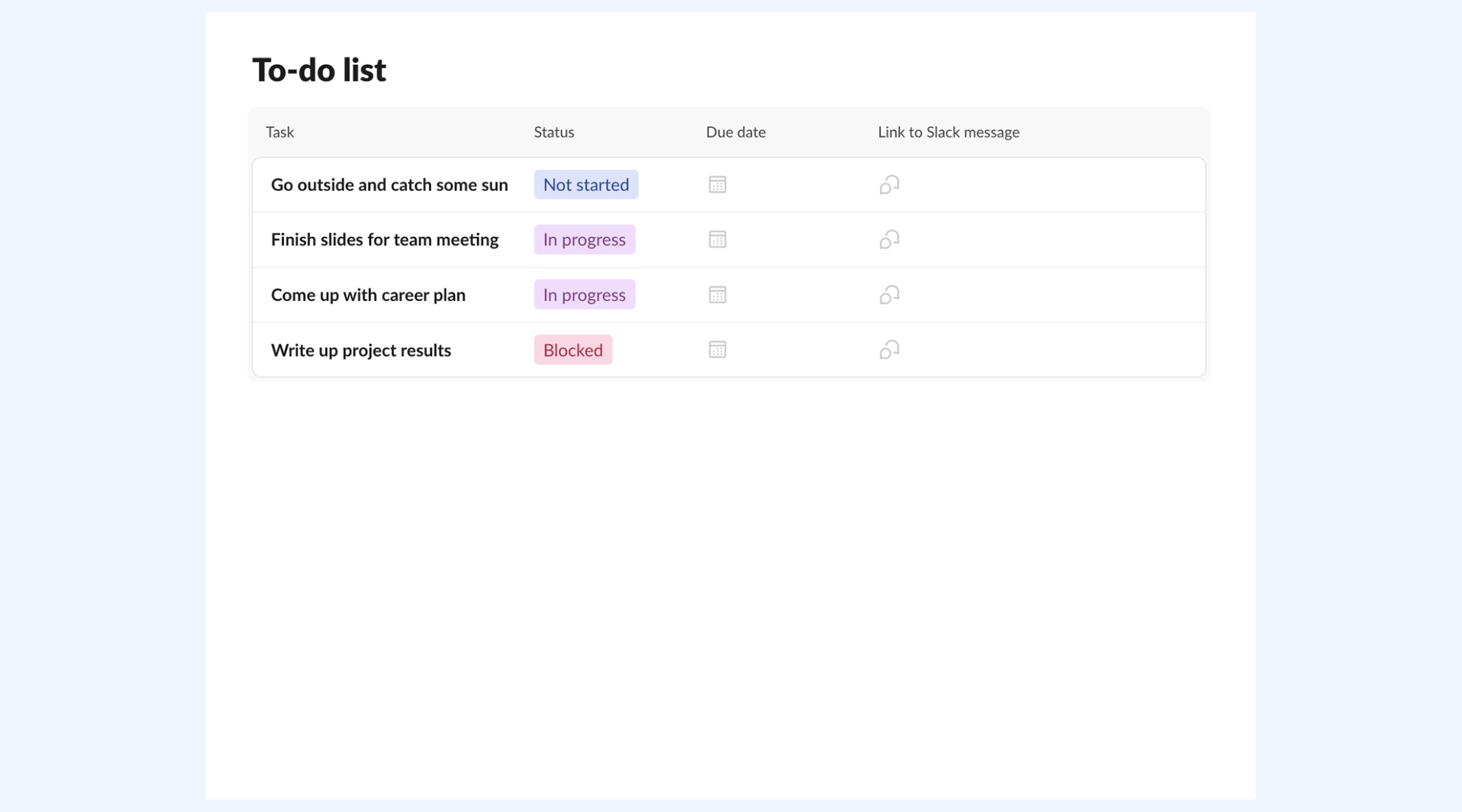
Image source: slack.com
When Slack works well for project tracking
Slack project tracking can still be effective in specific situations where structural needs are limited. Understanding these scenarios helps teams decide when is sufficient. It also prevents over-engineering simple workflows.
- Small teams: In small groups, everyone stays close to work, and decisions remain visible. Informal task mentions are easier to track. Slack provides enough transparency without additional tools.
- Short-term projects: Projects with limited scope and duration require minimal planning. Slack conversations can cover coordination needs. The risk of losing context is low.
- Brainstorming, alignment, and feedback benefit from real-time discussion. Slack supports fast exchanges without a rigid structure. Execution is often secondary.
- Lightweight coordination: When tasks are informal and ownership is flexible, Slack feels natural. Teams value speed over documentation. Formal tracking may add unnecessary friction.
Where Slack project tracking breaks down
As teams and projects grow, Slack project tracking begins to show clear limitations. These issues often appear gradually and worsen over time. Recognizing them early helps teams avoid execution bottlenecks.
- No real task ownership: Tasks mentioned in chat lack enforceable ownership. Follow-ups depend on memory rather than systems. Accountability weakens as conversations move on.
- Lost context in long threads: Important updates disappear as messages accumulate. New contributors struggle to understand decisions. Searching chat history is inefficient for tracking work.
- No timelines or dependencies: Slack cannot . Planning becomes reactive instead of proactive. Delays are identified too late.
- Manual reporting: Status updates must be requested and compiled manually. This slows decision-making and introduces inconsistencies. Reporting becomes a recurring burden.
- Notification overload: Excessive reminders and pings reduce focus. Important updates get buried in noise. Productivity declines as teams manage alerts instead of work.
Pricing of using Slack for project tracking
Slack's pricing appears affordable at first, especially for small teams. However, costs increase quickly as teams scale and require automation, AI features, security controls, and third-party tools. What starts as a simple messaging platform often turns into a growing operational expense. For teams using Slack as a project hub, these hidden costs can outweigh the benefits, making unified platforms a more cost-efficient alternative long term.
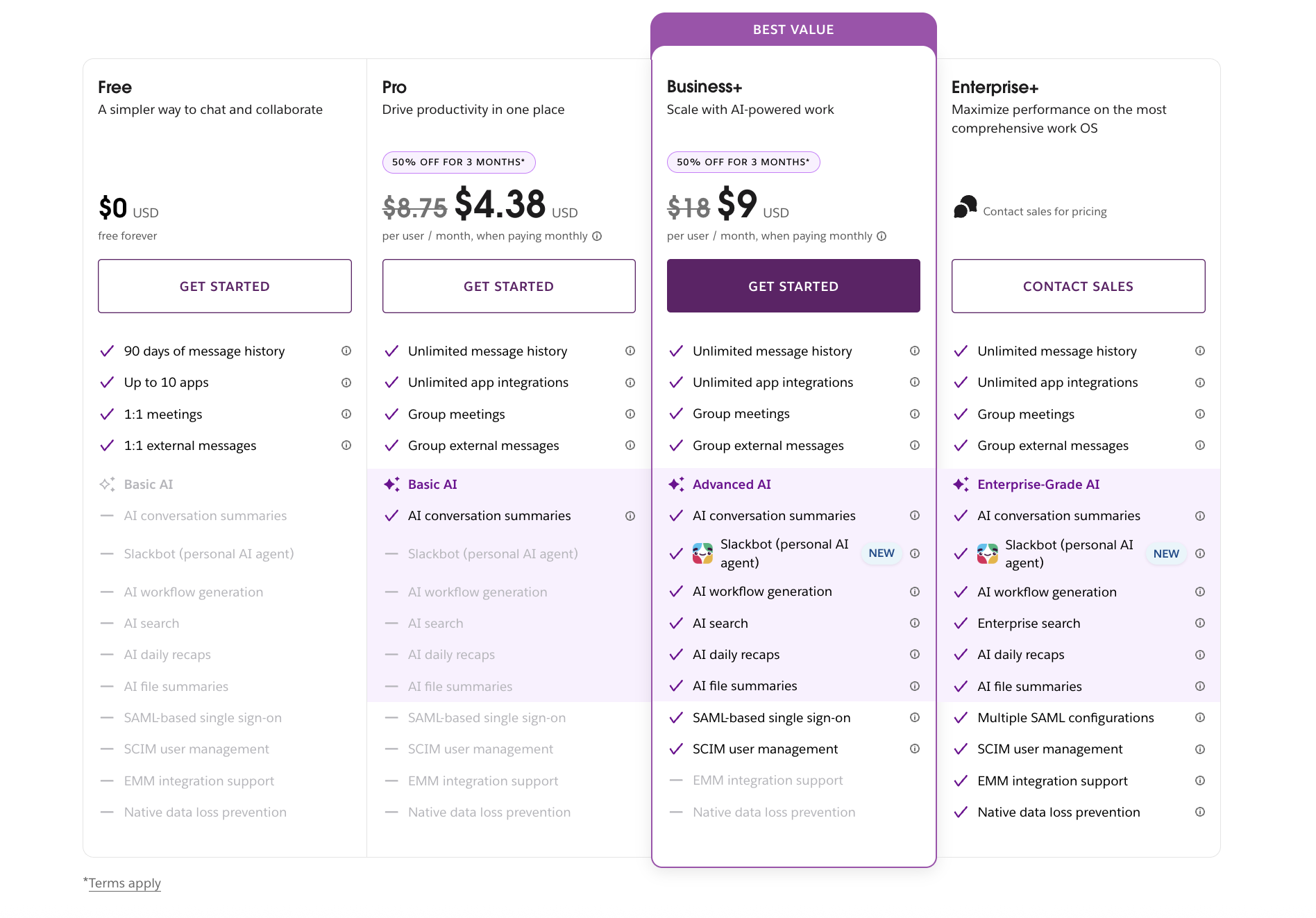
Image source: slack.com
Information source: slack.com
Update time: 2026-01-17
Note: Pricing and plan details reflect publicly available data as of the update date and may vary based on region, billing cycle, and number of agents.
Hidden costs teams often overlook
Slack project tracking may seem cost-effective at first, especially for small teams using basic features. However, expenses increase as teams scale and require more automation, visibility, and control. Many of these costs are not obvious during initial adoption. Over time, they accumulate and affect both budget and operational efficiency.
Many require separate paid plans
Teams often rely on bots to manage reminders, standups, or task updates. While useful, most bots charge per user or per workspace. As adoption grows, these subscriptions add up quickly. What starts as a small add-on can become a recurring cost.
are locked behind higher tiers
Basic plans offer limited AI capabilities, while advanced summaries and workflow suggestions require upgrades. Teams seeking productivity gains must move to higher pricing tiers. This increases per-user costs across the organization. AI becomes an incremental expense rather than a built-in benefit.
Extra costs for premium integrations
Connecting Slack to project tools, reporting systems, or CRMs often requires paid integrations. Each integration introduces another subscription to manage. Over time, this creates a fragmented and costly tool stack. Integration costs are rarely accounted for upfront.
More time spent
As more tools and bots are added, administration becomes more complex. Managing permissions, troubleshooting integrations, and maintaining workflows requires ongoing effort. This hidden labor cost reduces time spent on strategic work. Slack project tracking becomes harder to sustain.
Costs rise quickly as user count grows
Slack pricing scales per user, and premium features apply to the entire workspace. Adding new team members increases costs immediately. For fast-growing teams, expenses escalate faster than expected. Budget planning becomes more difficult over time.
Extended history may require upgrades
Accessing older messages and files often requires higher-tier plans. Teams that need historical context for audits or reporting must upgrade. This turns data access into an ongoing cost. Long-term visibility is no longer included by default.
Streamline project tracking with a robust option
Smart alternative: Using Lark to drive project tracking with data
is often introduced when teams experience the limits of Slack project tracking. It combines chat, tasks, documents, meetings, and databases into a single workspace. Rather than layering tools on top of Slack, it keeps execution and communication connected. This reduces fragmentation as projects scale. Teams transitioning from a Slack often adopt Lark gradually. Over time, it replaces scattered workflows with a unified system.
The unified no-code database
is a built-in database that replaces standalone tools like Airtable. It enables teams to build custom trackers for budgets or sprints using native . Unlike Slack, which lacks a native database and requires paid subscriptions to Asana or Jira for data visualization, this platform keeps project data structured and searchable in one place, eliminating "app-hopping" and expensive unification costs.
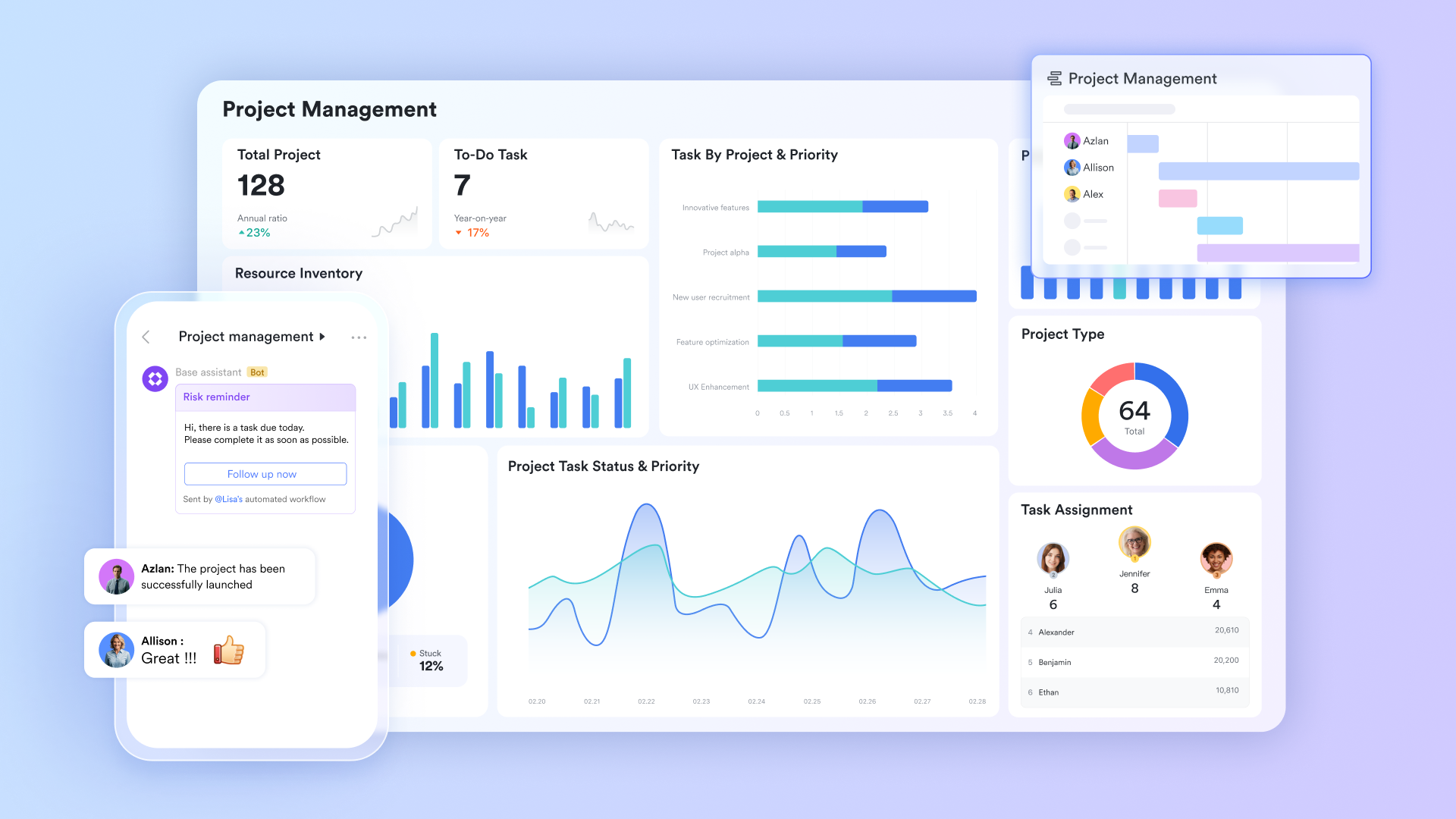
Real-time project dashboards
For data insights, Base dashboards give teams a centralized, visual command center for project tracking. Using drag-and-drop widgets, you can create live charts, progress meters, workload views, and deadline trackers pulled directly from your Base tables. This removes the need for manual status reports or spreadsheet updates. Unlike Slack, where reporting depends on external tools, dashboards update automatically as data changes. Managers can filter views by team, priority, or project phase to spot risks early, monitor delivery pace, and keep stakeholders aligned with real-time insights. 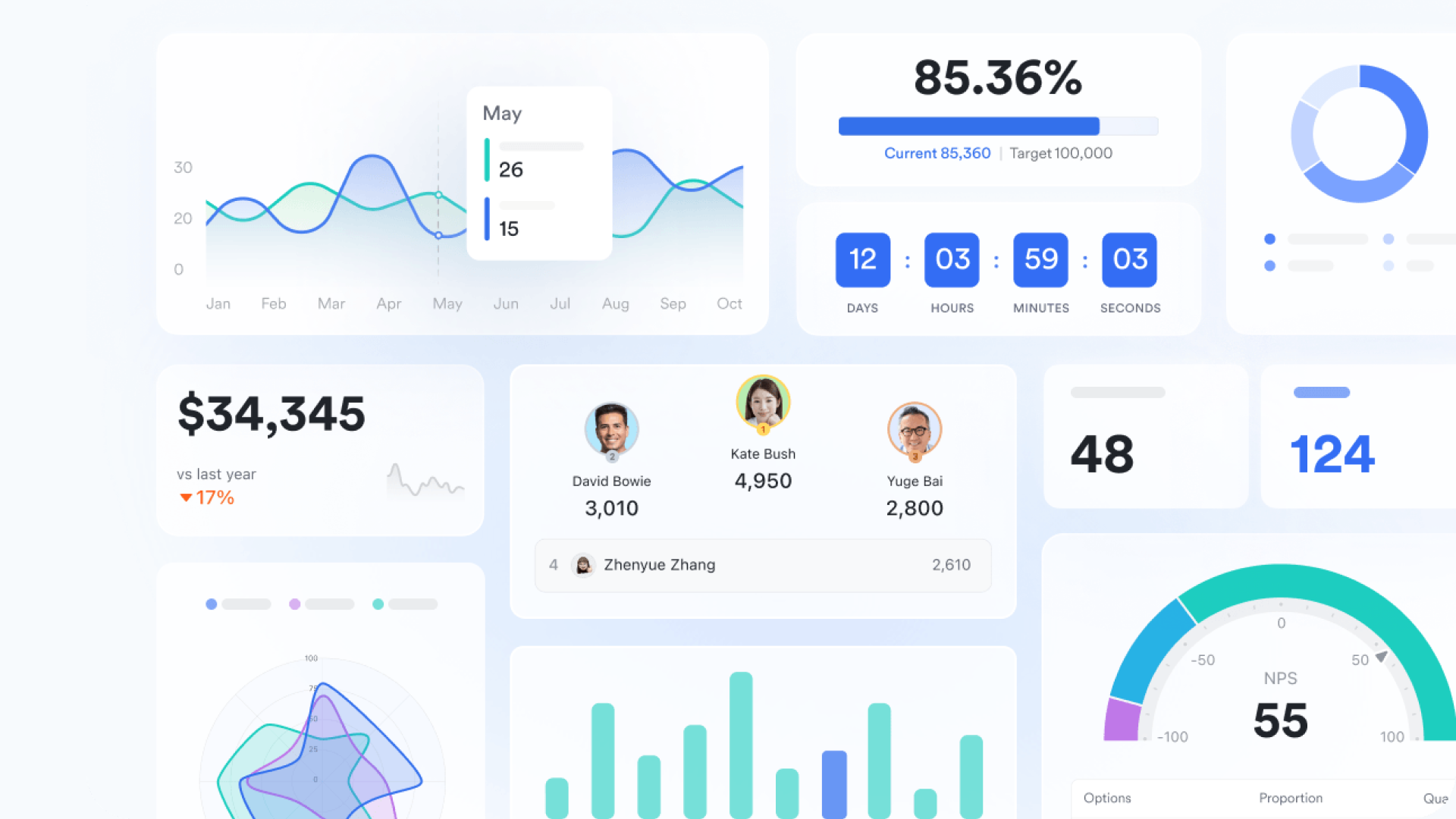
Zero-friction task delegation
If you are still struggling to find the to-dos in your chat channel, there is no more worry in Lark. It allows you to hover over any message in and click "Add Task" to instantly create an action item in Lark Tasks. It automatically captures the chat context, deadline, and assignee without leaving the thread. While Slack requires manual data entry into third-party apps like Todoist or results in buried details, Lark keeps the "why" linked to the task, ensuring immediate accountability and preventing ideas from being lost. 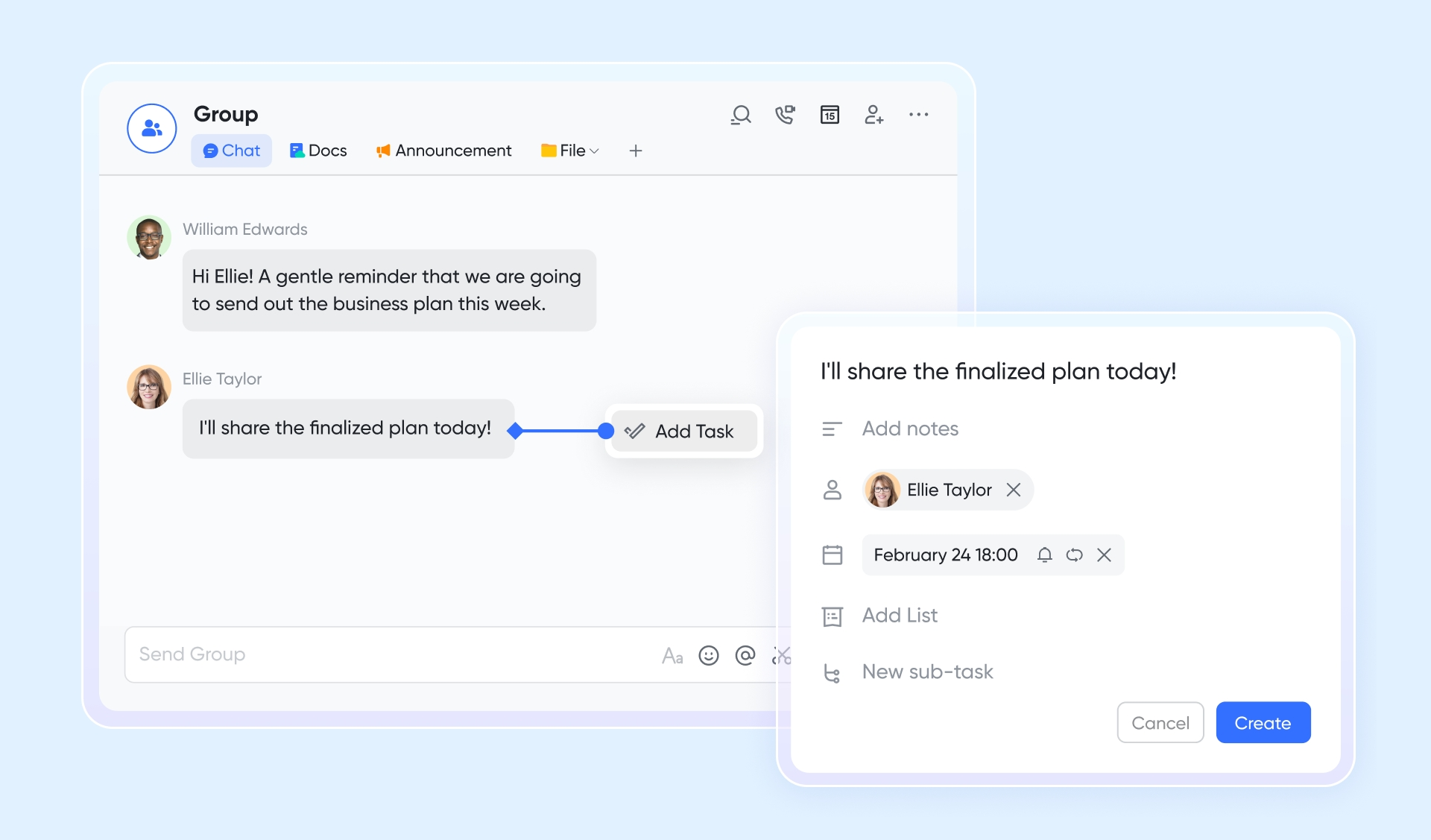
Logic-driven project automation
Lark Base automation uses a "Visual canvas" to build sophisticated, data-aware workflows. Unlike Slack's workflow builder, which is limited to simple channel triggers, Lark supports complex If/Else and Switch logic tied to project data. It can automatically route approval requests when budgets hit thresholds or move tasks between boards, acting as a digital project manager that handles repetitive chores autonomously. 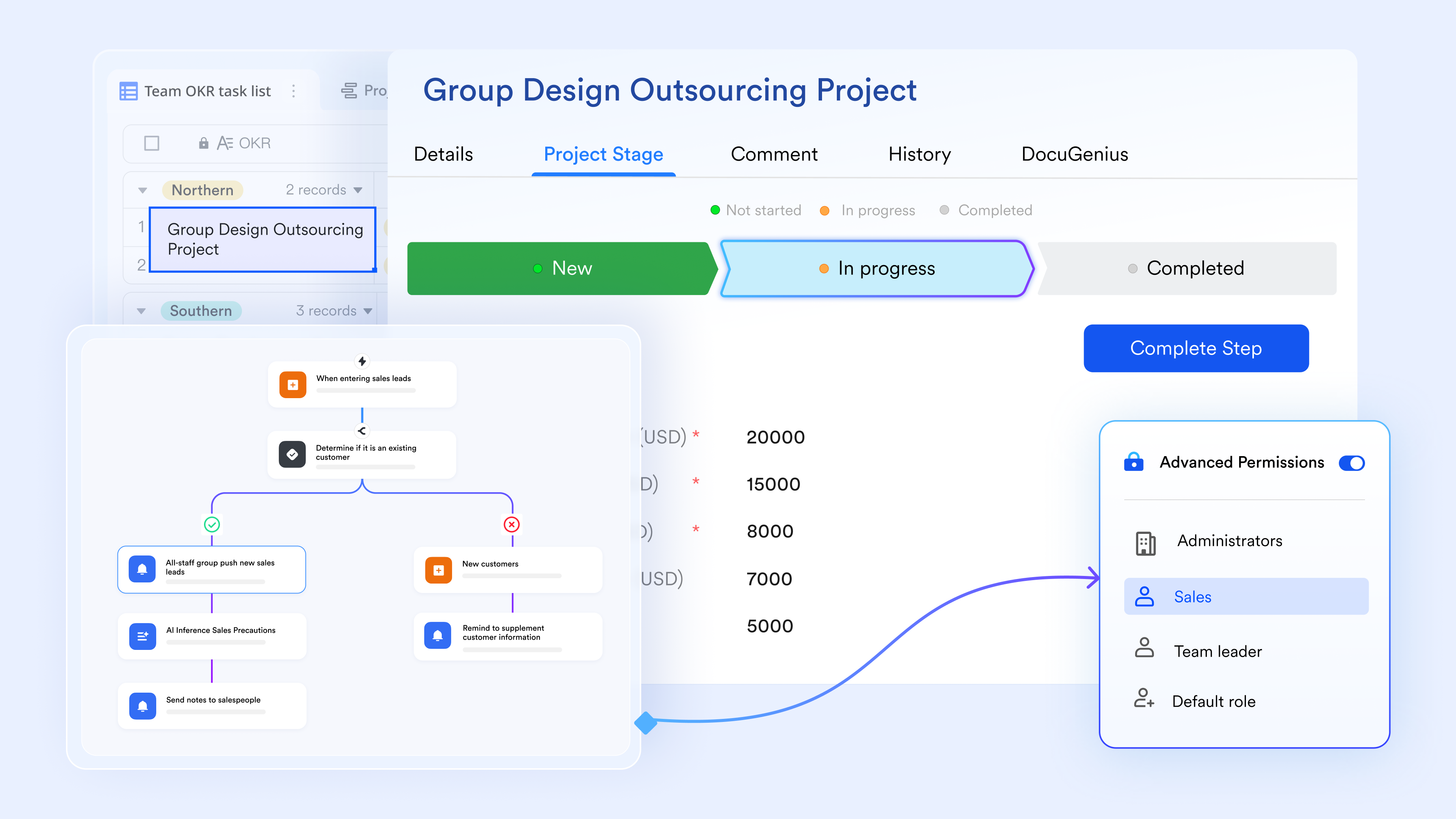
Synchronous collaborative review
Magic Share within transforms passive video calls into active co-working sessions. Presenters share a document or base table that participants can scroll and edit independently within the meeting window. Unlike Slack Huddles or Zoom, which are limited to "view-only" screen sharing, Magic Share ensures updates are captured live by the entire team, leading to immediate documented progress rather than just verbal updates. 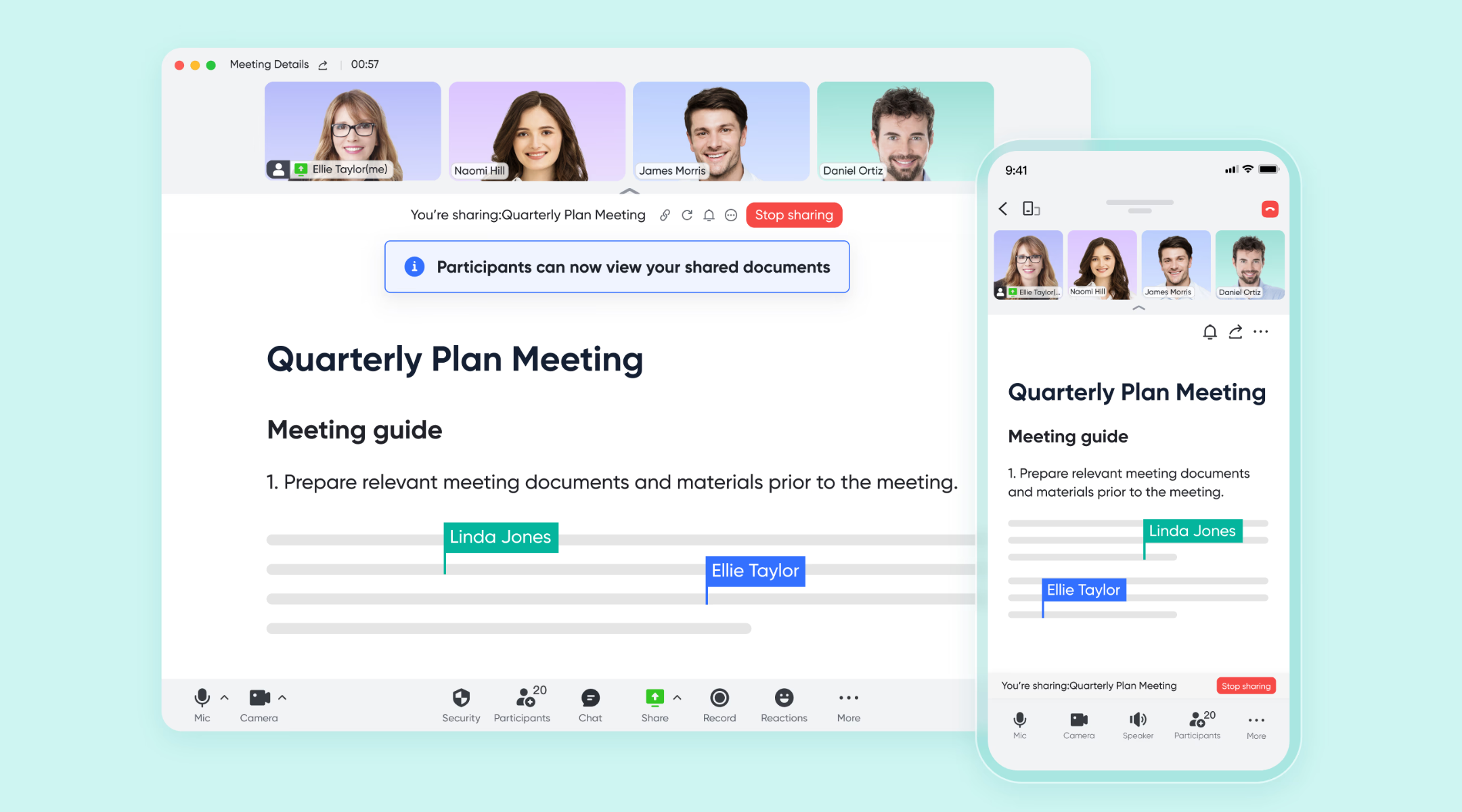
:
- Starter plan: Free forever plan that includes 11 powerful tools for up to 20 users. It also comes with 100GB of storage, 1000 automation runs, AI translations, and more.
- Basic plan: $6/user/month (billed annually) for up to 500 users. It includes everything in Starter plus group calling for up to 500 attendees, 5TB of storage, 1000 automation runs, and more. For more details, please .
- Pro plan: $12/user/month (billed annually) for up to 500 users. It includes everything in Basic plus group calling for up to 500 attendees, 15TB of storage, 50,000 automation runs, and more.
- Enterprise plan: for custom pricing. Supports unlimited users and includes even more automation runs and advanced security, compliance, and management features.
For small teams with simple communication needs

18 months message history
1000 Base automation runs/month
2000 rows per table in Base
Most POPULAR
For companies with comprehensive collaboration and management needs
Unlimited message history
500-participant video meetings
50k Base automation runs/month
20k rows per table in Base
For large companies with advanced security and organizational management needs
Get a personalized demo and pricing
Unlimited message history
500-participant video meetings
15 TB storage + 30 GB storage/user
500k Base automation runs/month
50k Base automation runs/month
Most POPULAR
For companies with comprehensive collaboration and management needs
Unlimited message history
500-participant video meetings
50k Base automation runs/month
20k rows per table in Base
Lark vs Slack: Project tracking comparison
Final verdict: Lark and Slack serve different needs. Slack focuses on fast communication, making it useful for lightweight coordination. Lark goes further by combining chat with built-in tasks, databases, automation, and dashboards. This allows teams to track work, monitor progress, and automate workflows without relying on multiple tools. For growing teams that need both structure and collaboration, Lark offers a more comprehensive project-tracking environment.
Conclusion
Slack project tracking remains popular because it feels natural and fast. For small teams and short-term initiatives, chat-based coordination can be enough. However, as projects scale, Slack's limitations become harder to ignore. Manual updates, lost context, and rising integration costs slow teams down.
Modern teams increasingly look for systems that preserve communication while adding structure. Platforms like are often introduced gradually, first for, then for automation and reporting. Over time, teams discover that unifying chat, data, and execution reduces friction and improves visibility. The shift is not about replacing Slack overnight but about building a sustainable foundation for project delivery at scale.
Start structured project tracking with Lark today
FAQs
Can Slack be used to monitor employees?
Slack can show basic activity signals such as message frequency or presence status, but it is not designed for structured . Tracking work purely through chat lacks clarity around outcomes and ownership. As teams mature, they often look for systems that focus on task completion rather than activity. Platforms like Lark support this shift by making responsibilities, deadlines, and progress visible without relying on surveillance-style tracking.
Is there a free Slack project tracking tool?
Slack offers free plans, and its project management features, like templates, can work initially. These approaches work for small teams but depend heavily on discipline and manual updates. As projects grow, limitations around visibility and history become noticeable. Many teams gradually explore tools like Lark that provide structured tracking with a generous free tier.
What's better than Slack for remote project tracking?
Slack works well for communication, but remote project tracking requires clear ownership, timelines, and visibility. Chat alone makes it difficult to understand progress across time zones and teams. Dedicated project platforms address these gaps while still supporting collaboration. Lark is often considered because it combines messaging with built-in task tracking and real-time project views in one workspace.
Can AI extract tasks from Slack messages?
Some Slack integrations attempt to extract tasks using AI, but accuracy depends on context and usually requires paid add-ons. Extracted tasks often lose the original discussion that explains why the work matters. Teams increasingly prefer systems that let them create tasks directly from conversations. Lark supports this approach by linking tasks to chat context instead of relying solely on AI interpretation.
Related reading





























