QA teams face immense pressure to ship faster without sacrificing software quality. Implementing AI in test automation changes how we handle this persistent bottleneck. By 2027, an estimated 80% of enterprises are expected to adopt AI-driven testing tools, a massive leap from just 15% in 2023. This guide breaks down how AI in test automation moves teams beyond brittle scripts into resilient, autonomous workflows. We will explore current capabilities, expose the limits of self-healing features, and show you how to connect these intelligent tools with your human management processes.
What is AI in test automation and why does it matter now?
If your engineering team spends more time updating broken test locators than building new features, you already understand the core problem of traditional automation. What is AI in test automation? It is the application of machine learning, natural language processing, and computer vision to author, execute, and maintain software tests.
Instead of writing rigid instructions that fail the moment a developer shifts a button three pixels to the left, AI allows tests to adapt contextually.
The shift from traditional scripts to AI-driven workflows
We are moving away from manual test scripting toward intelligent systems. Previously, QA engineers spent countless hours writing specific commands—like finding an element by its exact CSS class or Xpath. When the UI changed, the test broke, halting the continuous deployment pipeline until a human stepped in to fix the code. Now, AI models recognize elements visually or via contextual DOM analysis, drastically reducing false positives and maintenance fatigue.
Defining the third wave of AI testing tools
The industry has entered what experts classify as the "third wave" of test automation. The first wave brought basic record-and-playback systems. The second gave us robust, open-source code frameworks like Selenium. This third wave brings context-aware intelligence. We see tools categorized into three primary functions: visual validation, autonomous test generation, and self-healing execution. The focus has shifted from merely running tests faster to building tests that are inherently smarter.
Real-world applications: How to use AI in test automation
Understanding the theory is helpful, but engineering directors need to know how to use AI in test automation practically. The goal is to where humans guide the overall quality strategy, and AI handles the repetitive execution.
Generative AI for plain-English test creation
One of the highest-friction areas in QA is writing the initial test case. Generative AI in test automation allows product managers, business analysts, or manual QA testers to create automated tests using everyday language, simplifying processes such as .
Mini-scenario: Imagine a product manager wants to verify a new checkout flow. Instead of submitting a ticket to an automation engineer and waiting three days, they type a command into an AI testing tool: Navigate to the pricing page, select the Pro plan, enter valid payment details, and verify the confirmation modal appears. The AI converts this natural language prompt into executable test steps in the background. This AI-assisted creation acts as a massive time-saver and lowers the barrier to entry for test automation.
Visual validation and finding UI anomalies
Computer vision models excel at spotting visual regressions that DOM-based tests consistently miss. If a marketing banner accidentally overlaps a login button due to a CSS error, a standard automated test might still pass because the button technically exists in the HTML structure. A visual AI tool acts like a human eye; it compares the new screenshot against a known baseline and flags the anomaly immediately, ensuring the application actually looks right to the end user.
Defect prediction before production deployment
Machine learning models analyze historical test runs, code commits, and bug trackers to predict where defects are most likely to occur. By examining patterns in your CI/CD pipeline, AI can highlight risky code changes. This precisely where it matters most, reducing the chances of a critical bug slipping into production.
Coordinate bug triage instantly using Lark
The myth and reality of self-healing execution
When , the feature that usually grabs the most attention is self-healing execution. The promise sounds perfect: you write a test once, and the machine keeps it running forever. However, relying blindly on this promise can lead to a false sense of security. We need to separate the marketing hype from the actual utility of self-healing mechanics.
How self-healing mechanics actually work
In standard automation frameworks, a test interacts with an application using a specific locator, such as an element ID or an Xpath. If a developer tweaks the code and changes that ID, the test fails. Self-healing tools approach this differently. Instead of locking onto a single identifier, the AI captures dozens of attributes for every element—such as its relative position on the screen, its text label, its size, and its surrounding HTML context.
If the primary ID changes during a routine update, the AI evaluates the remaining attributes and dynamically updates the locator to find the closest match. The test continues running, and the tool alerts the QA team about the adjustment.
Where the AI hype falls short
Here is the reality check: AI is not a magic fix for everything. While self-healing is incredibly effective at handling minor UI changes—like a renamed CSS class or a slightly moved button—it completely breaks down when facing significant functionality shifts.
If your engineering team completely redesigns the user flow for a shopping cart, an AI tool cannot guess the new business logic. It does not understand the purpose of the test, only the previous pattern. Relying on AI to automatically fix massive structural changes will result in false passes or chaotic test failures. Human oversight remains entirely necessary for major application updates.
Elevating QA teams over replacing them
Because of these limitations, the fear that AI will replace QA engineers is largely unfounded. Instead, self-healing execution removes the tedious busywork of locator maintenance. By automating the minor fixes, QA professionals can redirect their energy toward higher-level tasks, such as designing comprehensive test strategies, exploring edge cases, and analyzing performance metrics.
Agentic workflows: The future of autonomous testing
As we move beyond basic self-healing scripts, the industry is shifting toward a more sophisticated concept: . For enterprise leaders aiming to optimize their development pipelines, understanding this shift is critical.
What makes a workflow "agentic"?
Standard AI tools wait for a human to trigger a command. An agentic system, on the other hand, operates with a degree of autonomy. It does not just execute a predefined list of steps; it continuously monitors the software environment, investigates failures on its own, and attempts auto-recovery without requiring a manual push.
Moving from reactive fixes to proactive quality
This shift transforms QA from a reactive bottleneck into a proactive quality engine. Instead of waiting for a nightly test run to fail and then assigning a ticket to a developer the next morning, an agentic testing platform acts immediately.
Mini-scenario: Consider a continuous deployment pipeline where a new code commit inadvertently slows down a critical API endpoint. An agentic testing workflow detects the latency spike during a routine background check. Without human intervention, the agent spins up a localized, targeted test suite to isolate the exact cause of the slowdown. It identifies the problematic code commit, gathers the relevant error logs, and drafts a detailed defect report. By the time the , the issue is already diagnosed and ready for a developer to fix.
Automate agentic QA alerts directly in Lark
Evaluating the best AI tools for test automation in BFSI and large enterprises
Selecting the right tool for a small startup is vastly different from choosing a platform for a global enterprise, especially in highly regulated sectors like Banking, Financial Services, and Insurance (BFSI). The stakes are higher, and the evaluation criteria must be stricter.
Security and scale in regulated industries
When dealing with financial data, customer privacy, and strict regulatory frameworks, you cannot compromise on security. The best AI tools for test automation in BFSI must offer enterprise-grade data protection. This often means looking for platforms that support secure cloud environments, provide detailed audit trails for every test executed, and strictly protect the data used to train their machine learning models. A tool might have excellent generative AI features, but if it exposes sensitive staging data to public LLMs, it is a non-starter for a bank.
The rise of low-code solutions
For large organizations, testing should not rest solely on the shoulders of a few specialized automation engineers. The best low-code test automation tools in AI empower a broader range of staff to contribute. Business analysts, product owners, and manual testers can use visual interfaces or natural language prompts to build complex test scenarios. For teams validating applications across different regions or network environments, a can also help simulate varied connection conditions during testing without adding unnecessary infrastructure complexity. This democratization of QA ensures that the people who understand the business logic best are the ones designing the quality checks.
A framework for tool selection
When evaluating the saturated market of AI testing platforms, avoid getting distracted by broad marketing claims. Build your evaluation around your specific team constraints:
- Identify the primary bottleneck: Are your releases delayed because writing tests takes too long, or because maintaining them is a nightmare?
- Match the tool to the pain point: If creation is the issue, prioritize tools with strong generative AI and low-code features. If maintenance is dragging you down, focus on platforms with robust self-healing and visual validation capabilities.
- Run a proof of concept (POC) on complex flows: Never evaluate a tool on a simple login page. Test its limits on your most convoluted, dynamic user flow to see how its AI actually behaves under pressure.
Connecting AI testing with human QA management using Lark
Even the most advanced AI testing platforms require human oversight. The challenge for enterprise managers is bringing the output of these tools into the daily communication flow of the engineering team. An all-in-one unified workspace like helps bridge this gap by combining messaging, cloud-native documents, and workflow automation into a single platform.
Centralizing QA tracking with Lark Base
Instead of forcing QA managers to jump between different testing dashboards, teams can pipe test run data and defect predictions directly into . This creates a single source of truth. Managers can view real-time metrics on test coverage and failure rates alongside developer workloads, making sprint planning highly data-driven and visible to the entire department.
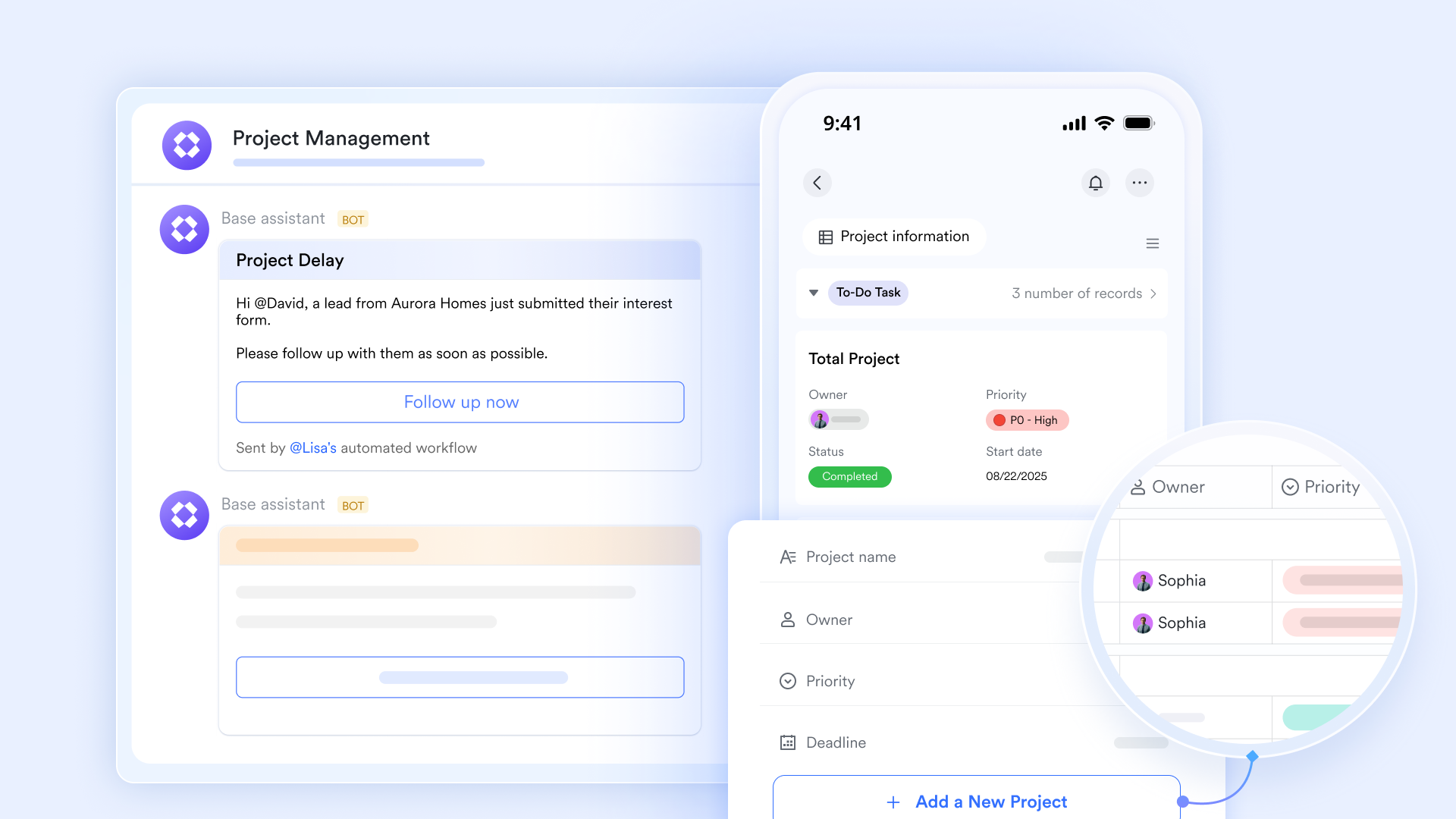
Automated triage alerts in chat
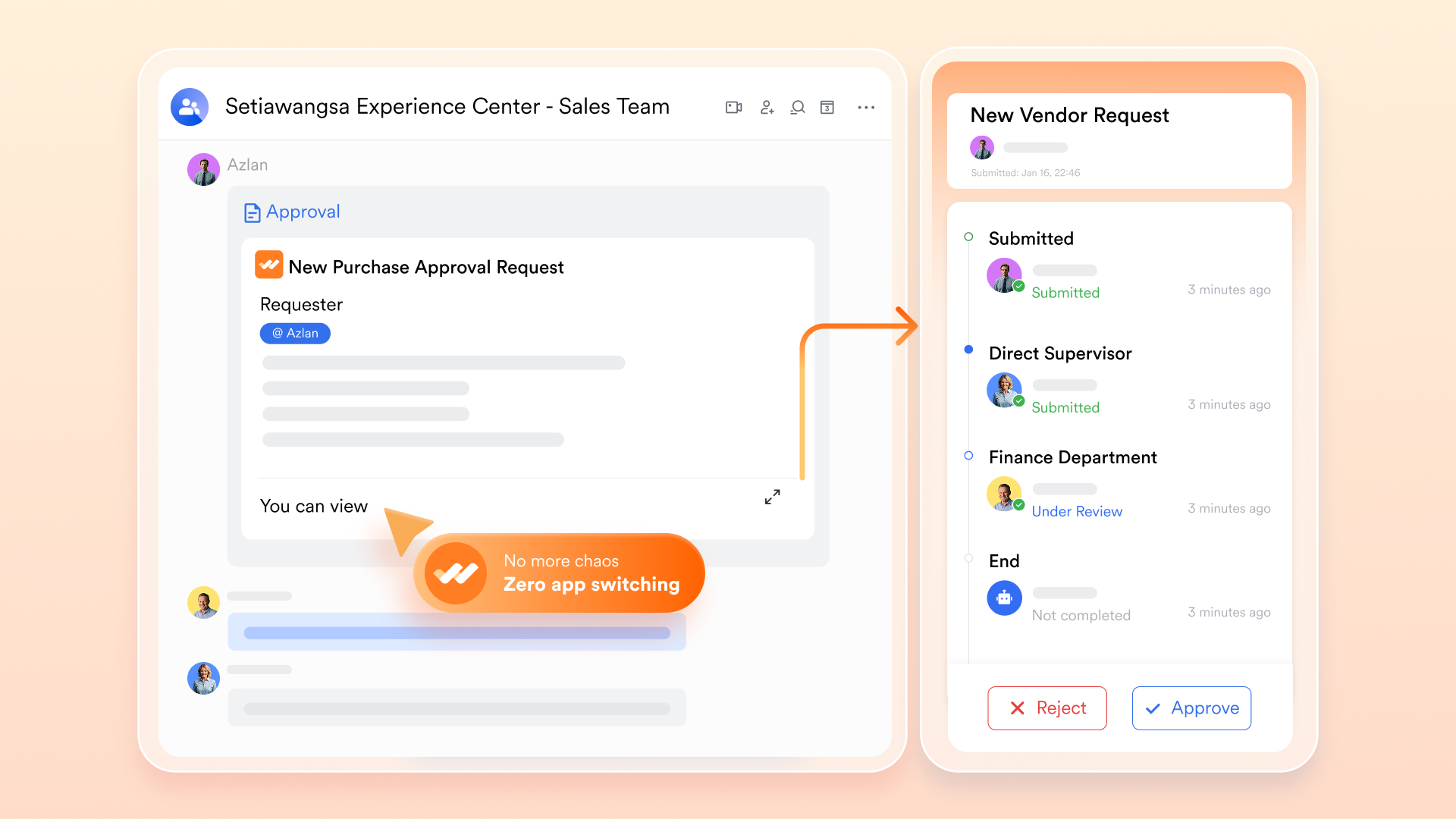
helps teams manage critical testing and release decisions through structured workflows. Instead of relying on fragmented follow-up, teams can use approval processes to route high-severity defects to the right stakeholders, define responsibilities clearly, and keep decision records visible and traceable. This is especially useful when QA findings have a direct impact on release timing, risk control, and cross-functional alignment.
Intelligent AI agent node for autonomous task planning
At the heart of 's advanced automation lies the AI agent node, which enables intelligent, autonomous task planning and execution through large language models. This node features built-in memory, allowing it to parse previous chat history and understand context for more effective decision-making. IT teams can equip these agents with various tools (e.g., data extraction, message sending), and the agent will autonomously determine which ones to call based on instructions, automating complex IT tasks with intelligent foresight. 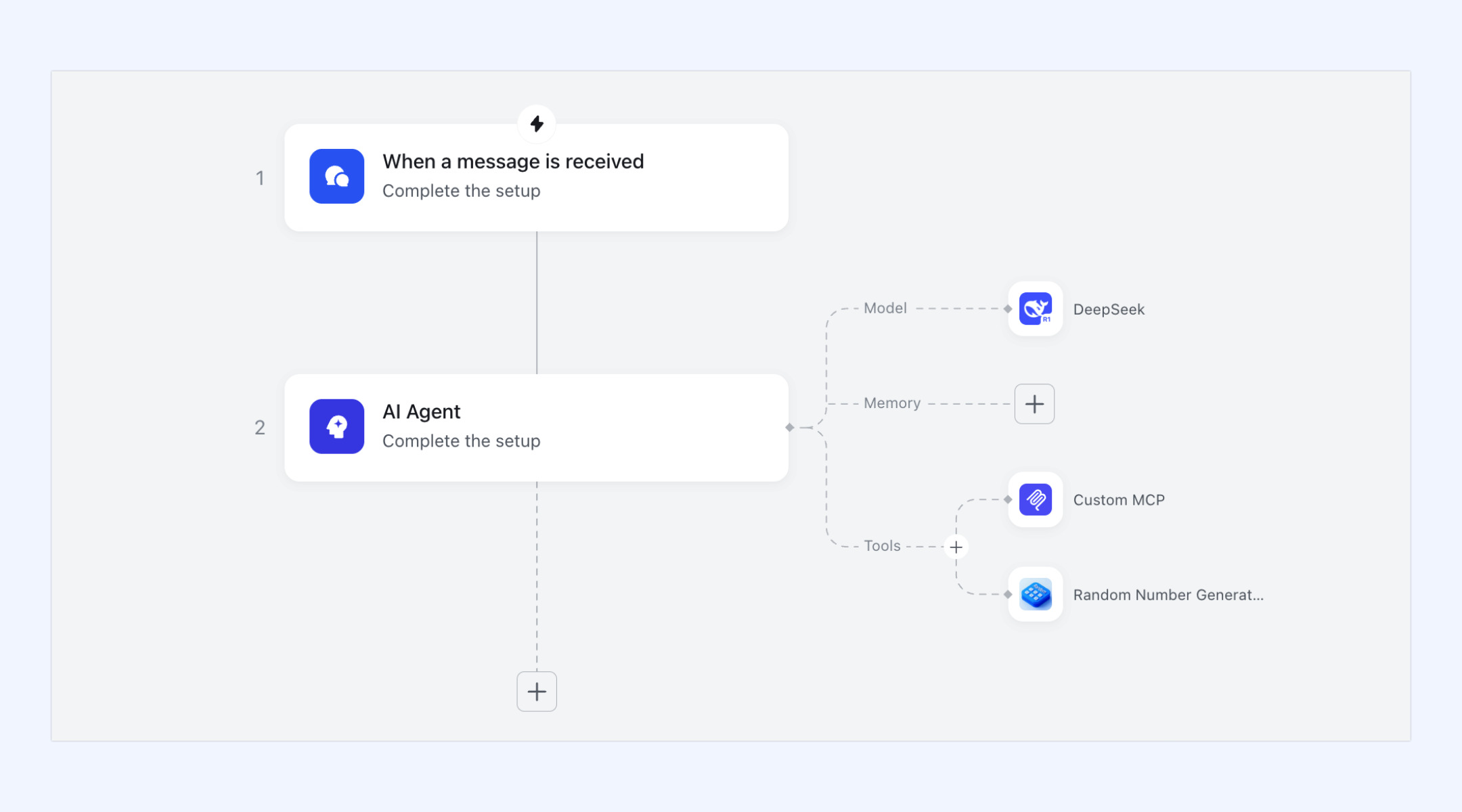
Collaborative test strategy and documentation
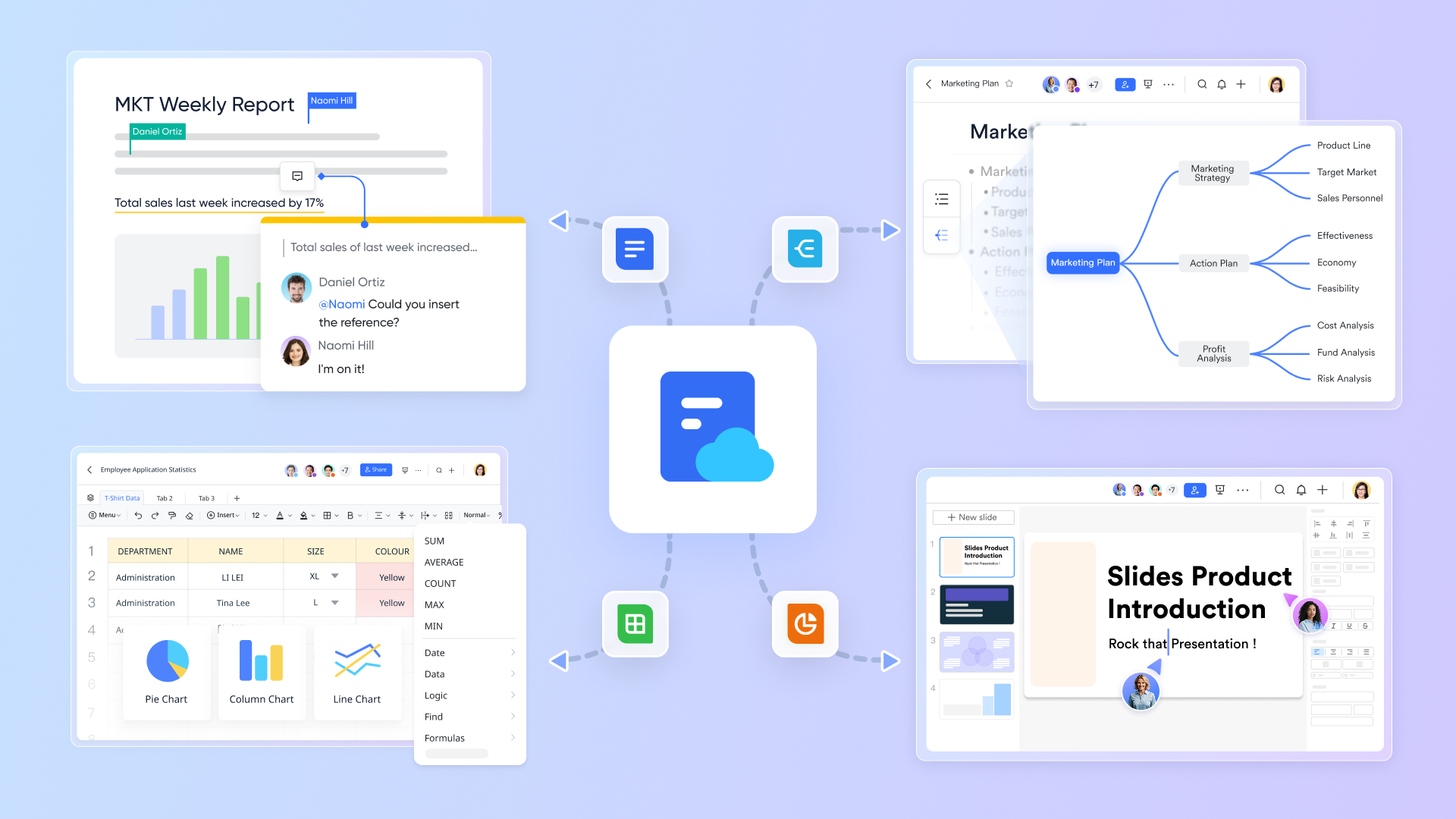
AI tools handle execution, but humans define the strategy. Distributed QA teams can use cloud-native to collaboratively draft testing protocols, document known AI limitations, and review goal/OKR tracking. Because supports real-time co-editing, embedded task lists, and @mentions, keeping your QA documentation aligned across time zones becomes a straightforward process.
:
- Starter plan: that includes 11 powerful tools for up to 20 users. It also comes with 100GB of storage space, 1000 automation runs, AI translations, and more. No credit card needed.
- Pro plan: (billed annually) for up to 500 users. It includes everything in Starter plus group calling for up to 500 attendees, 15TB of storage space, 50,000 automation runs, and more.
- Enterprise plan: for custom pricing. Supports unlimited users and includes even more automation runs and advanced security, compliance, and management features.
For small teams with simple communication needs

18 months message history
1000 Base automation runs/month
2000 rows per table in Base
Most POPULAR
For companies with comprehensive collaboration and management needs
Unlimited message history
500-participant video meetings
50k Base automation runs/month
20k rows per table in Base
For large companies with advanced security and organizational management needs
Get a personalized demo and pricing
Unlimited message history
500-participant video meetings
15 TB storage + 30 GB storage/user
500k Base automation runs/month
50k Base automation runs/month
Most POPULAR
For companies with comprehensive collaboration and management needs
Unlimited message history
500-participant video meetings
50k Base automation runs/month
20k rows per table in Base
Bridge the gap between automated insights and human action
Integrating artificial intelligence into your quality assurance pipeline is only half the battle. The true measure of engineering velocity is how quickly your development team can react when an automated test identifies a critical defect. Without a cohesive space to connect these AI-driven insights with human decision-makers, bug reports get lost in translation, release cycles stall, and communication silos widen between QA engineers and developers.
By centralizing automated triage alerts, structured approval workflows, and collaborative test documentation into a single operational hub, you remove the friction that traditionally slows down software delivery. Your engineering team gains the ability to transition seamlessly from automated detection to collaborative resolution. This unified approach ensures that AI agents and human intelligence work in perfect harmony, safeguarding software quality while maintaining a rapid release cadence.
Conclusion
The shift toward AI in test automation is no longer optional for enterprise QA teams. By adopting generative test creation, visual validation, and agentic workflows, organizations can drastically reduce maintenance burdens and catch defects before production. However, AI cannot manage your team. Pairing intelligent testing tools with a robust collaboration platform ensures that when an automated test fails, the right human steps in immediately. If your team struggles with fragmented communication during bug triage, explore 's unified workspace to bring your QA strategy and developer communication together.
Connect your automated testing tools to Lark today
FAQs
Can AI be used for automated testing?
Yes. AI can be used in automated testing to help generate test cases, improve locator resilience, detect visual regressions, prioritize risk, and support faster failure analysis. Its value is highest when it reduces maintenance effort and helps teams respond to issues faster, rather than simply producing more scripts.
Which AI tool is best for QA testing?
There is no single best AI tool for QA testing for every team. The right choice depends on your main bottleneck. If your biggest issue is test creation, generative AI and low-code tools may help most. If maintenance is the problem, self-healing and visual testing tools may be a better fit. Enterprise teams should evaluate tools based on maintenance burden, test stability, root-cause support, security, and workflow integration.
Will AI replace automation testers?
No. AI can reduce repetitive work such as generating draft tests, updating broken locators, and grouping failures, but it cannot replace human judgment. Automation testers are still needed to define strategy, validate business logic, review AI outputs, and manage quality in complex or high-risk scenarios.
How to use AI in QA testing?
The best way to use AI in QA testing is to start with a specific pain point. Teams usually begin with one of four areas: generating tests from requirements, reducing maintenance through self-healing, improving visual validation, or accelerating failure triage. Start with one critical workflow, test the tool in a real scenario, and keep human review in place from the beginning.
Will AI replace QA engineers?
No. AI is designed to handle repetitive tasks like updating broken locators and executing routine checks. Human QA engineers are still essential for designing complex test strategies, evaluating business logic, and making final calls on major structural changes that AI cannot reliably parse.
What is agentic AI testing?
Agentic testing refers to autonomous workflows where the AI does more than just run a manual script. It continuously monitors the software environment, investigates the root cause of test failures, and attempts to auto-recover or generate localized test suites without waiting for a manual prompt from a human user.
How does AI help with test script maintenance?
AI drastically reduces maintenance through self-healing execution. When minor UI changes occur—such as a renamed CSS class or a slightly shifted element—the AI dynamically evaluates other attributes like the element's relative position or text label. It then updates the locator automatically so the test continues to run successfully.
Related reading






























