Finding the right candidates can feel like searching for a needle in a digital haystack—especially as applicant volume grows and recruiters spend hours triaging resumes, following up in email threads, and chasing feedback from busy hiring managers.
That’s why AI recruitment software has become a core part of modern hiring stacks: it can help teams screen faster, match candidates more accurately, and automate high-friction steps like outreach, scheduling, and interview documentation.
In this guide, we’ll do two things:
1. Compare the 10+ best AI recruiting software solutions in 2026.
2. After you’ve seen the landscape, we’ll address the real execution problem teams run into: many AI recruiting tools are point solutions. Used together, they often create workflow fragmentation, duplicated data entry, and slower collaboration. We’ll explain that challenge—and why an all-in-one collaborative workspace can be the most practical way to scale hiring without stacking more logins.
What to look for in AI-powered recruitment software
With dozens of specialized platforms on the market, choosing the right AI recruitment software requires a clear evaluation framework. When reading or testing demos, look beyond marketing buzzwords and evaluate how these tools handle everyday operational needs.
1. Transparent and explainable matching algorithms
Many legacy platforms offer recruitment software with ai matching that scores candidates behind a closed "black box." If an algorithm auto-rejects or ranks a profile, your recruiters must be able to understand why. Look for ai based recruitment software that provides transparent matching criteria based on verified skills and experience, rather than opaque keyword-matching patterns that might overlook non-traditional, highly qualified candidates.
2. Sourcing speed versus outbound personalization
Outbound sourcing tools, such as goperfect, can find passive candidates on professional networks in seconds. However, the true test of an outbound tool is how it initiates contact. Avoid tools that send generic, robotic outreach. The right platform should generate highly personalized messages that reflect the candidate's actual work history, which dramatically improves reply rates.
3. Integrated, mobile-friendly screening options
For high-volume hiring scenarios, early screening needs to be fast and accessible. Solutions utilizing voice AI recruitment software or conversational text chatbots can engage candidates 24/7 on channels they actually use, like SMS or WhatsApp. Ensure these screening tools are mobile-first, allowing frontline or hourly workers to complete initial assessments on the go without downloading external apps.
4. Direct, native collaboration hubs
An AI recruitment software for HR is only as fast as the team using it. If your recruiting software is isolated from your daily communication hub, the hiring process will slow down the moment a manager's review is required. Look for ai enabled recruitment software that integrates candidate tracking with team messaging, shared docs, and interactive calendars, making real-time panel feedback easy to gather. When sending candidate profiles to external clients or hiring managers, using a simple tool to keeps all your resumes organized in one accessible link.
5. Open integration and setup agility
Avoid systems that require months of technical implementation or custom development. Your should either integrate with your primary systems out of the box or allow you to without writing complex code. This agility is especially critical for scaling teams that need to update their pipelines as their organizational needs change.
Consolidate your recruitment tools with Lark today.
10+ best AI recruitment software solutions compared
With dozens of options in the market, identifying the right system for your organization requires evaluating their core workflows, pricing, and structural limitations. The following is a detailed review of the ten best recruitment ai software options available, categorized by how they address operational bottlenecks.
1. Lark: Best for scaling / hybrid teams
is best for scaling companies and remote/hybrid teams who want to build a highly collaborative, custom recruitment database without paying for expensive, disconnected ATS seats. It stands out because it acts as the central execution hub for AI-driven hiring, bringing candidate tracking, multi-department communication, and task automation into a single workspace.
provides a unified hiring command center where , , , , , , , , and a run on the same engine. Instead of forcing your team to jump between separate tabs and log into single-purpose HR tools, Lark native-ly integrates every stage of the recruitment lifecycle:
Interactive Chat-Based Approvals
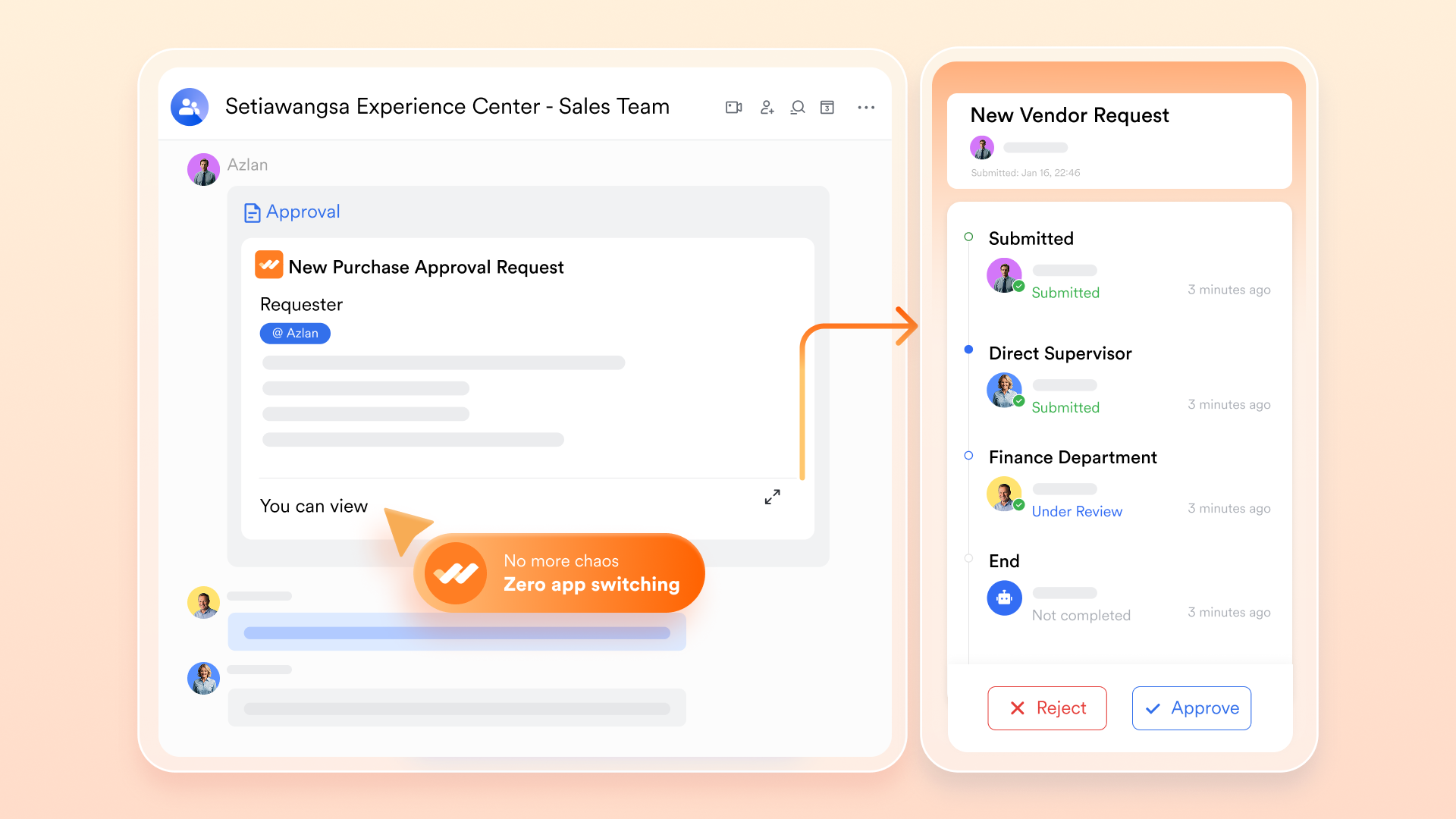
Stop chasing hiring managers via email. The moment a candidate advances to the review stage, automatically pushes an interactive, rich-media candidate card directly into the manager's daily chat. They can preview the resume and with a single click—right inside the chat window.
No-Code Visual Pipeline
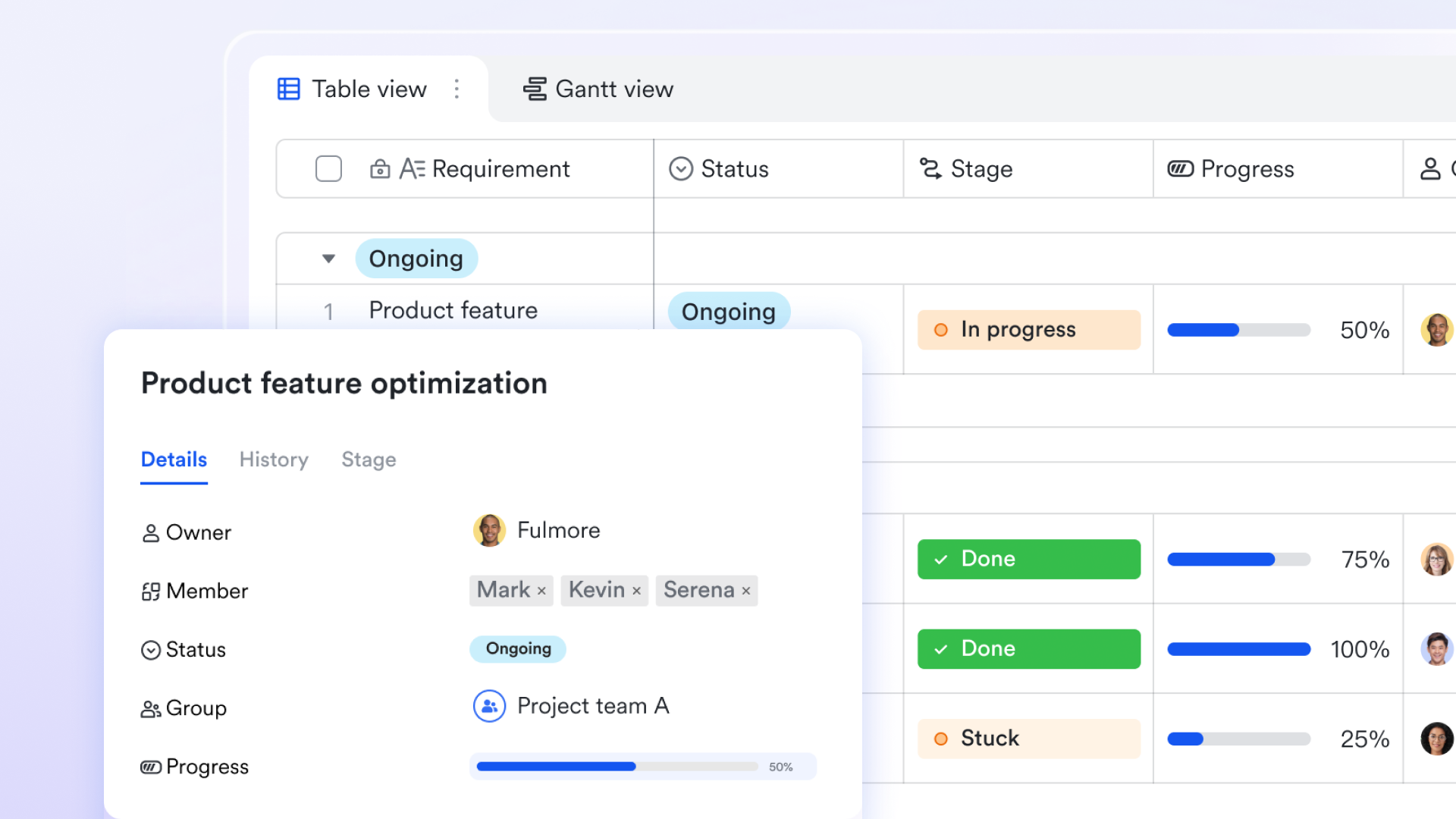
Replace rigid, legacy grids with a highly customizable candidate tracker. You can via drag-and-drop dashboard, upload resume attachments, and trigger automated background actions without writing any code.
Live Collaborative Scorecards
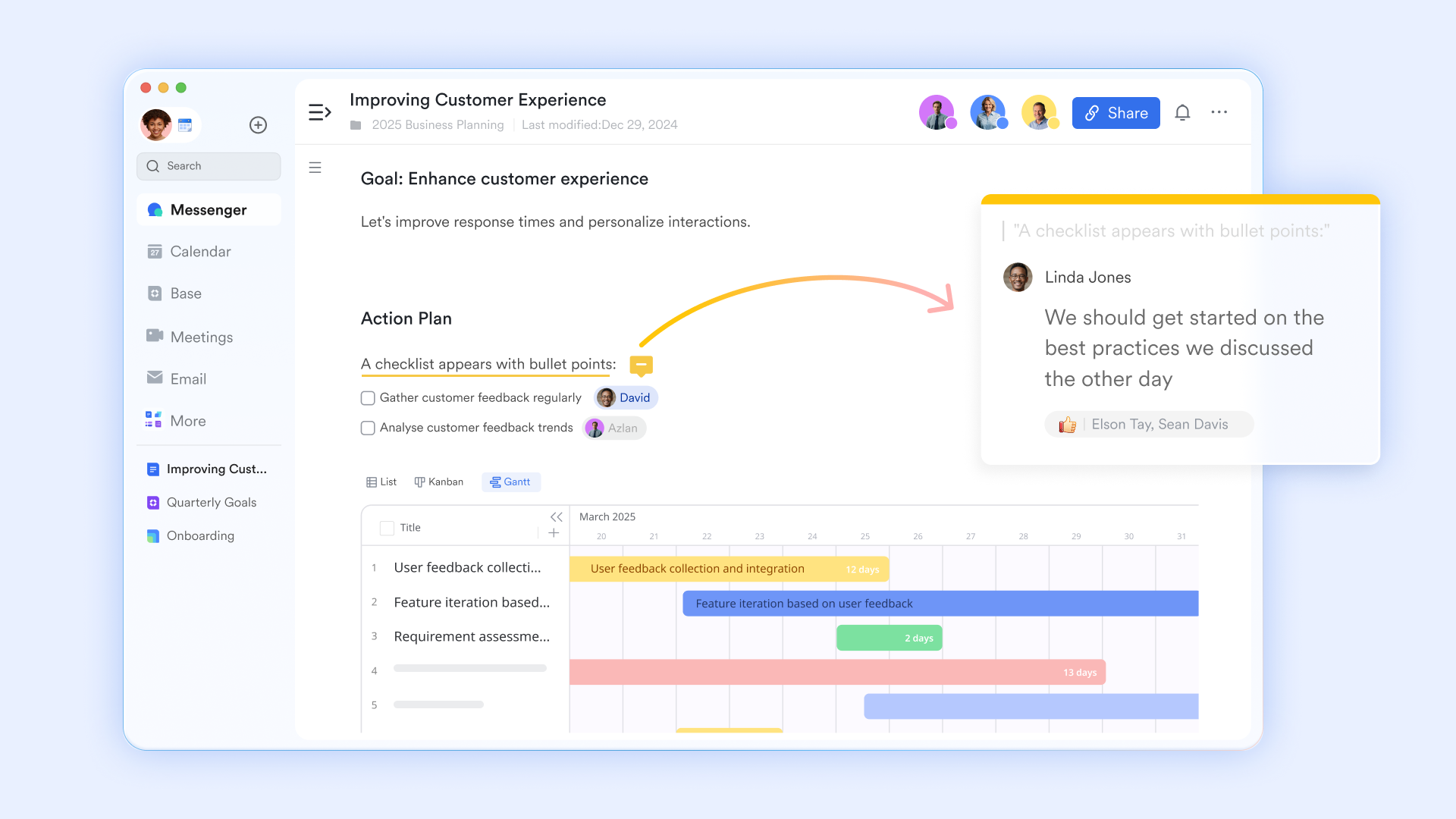
Standardize your evaluation process using dynamic documents. During interviews, panel members can side-by-side on the screen, tag colleagues with @mentions to discuss concerns, and log structured feedback in real time.
Native Real-Time Translation
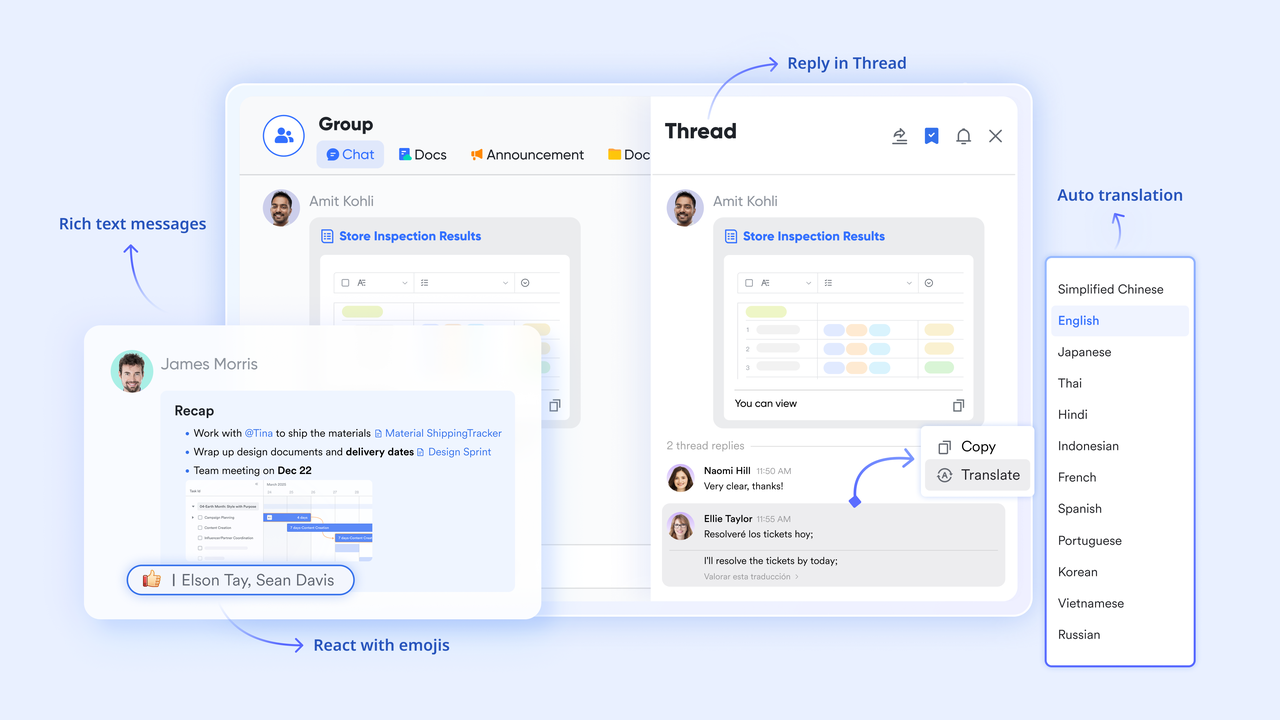
Break down collaboration barriers for global talent acquisition. International interviewers can write scorecards and chat notes in their native languages, allowing other team members to .
Timezone-Smart Calendar Scheduling
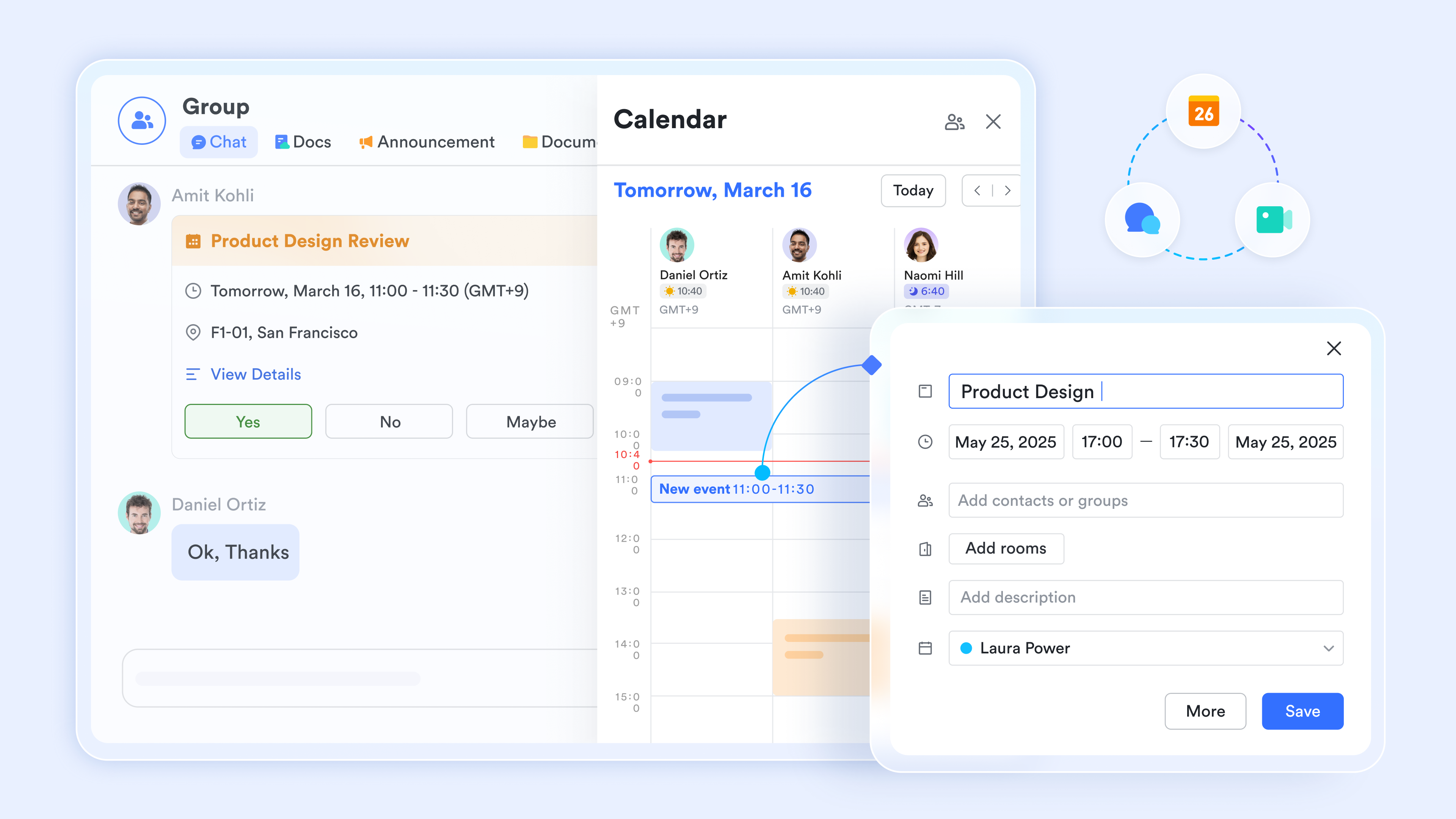
Say goodbye to scheduling friction. automatically surfaces overlapping availability across global team members, schedules complex panel interviews, and auto-generates video meeting links natively.
Open API Integration Hub
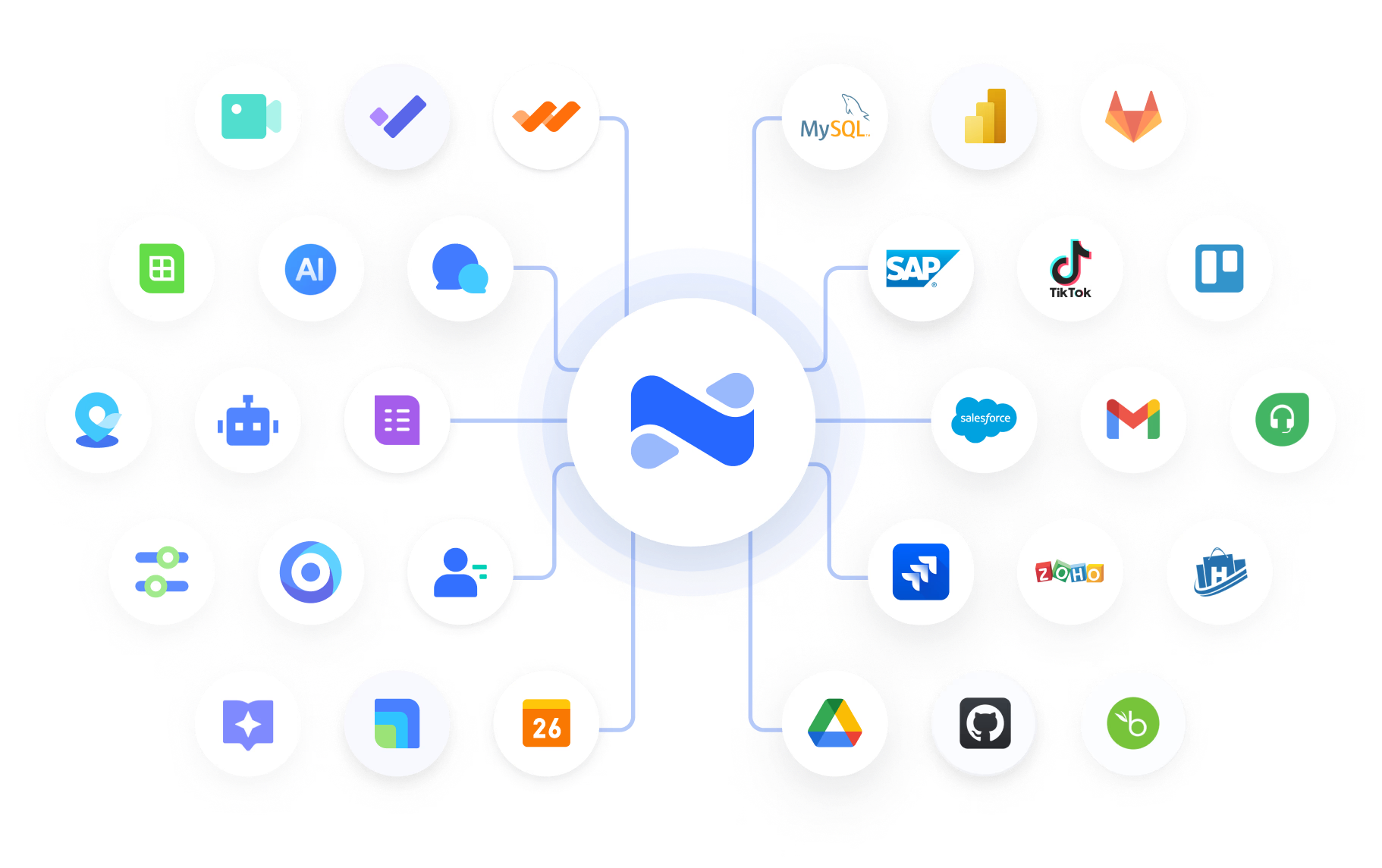
Connect your preferred standalone AI tools directly to your . Candidate data and transcripts flow automatically into your team's communication hub, eliminating manual copy-pasting.
Pros & Cons:
Pros:
- Zero Feature Silos: Consolidates databases, video meetings, chat, calendars, and document collaboration, saving thousands of dollars in disconnected SaaS subscriptions.
- Real-time Push Alerts: delivers highly customizable, automated alerts to chat channels, slashing the time-to-hire from weeks to days.
- Native Translation & AI-ready Workspace: Perfect for international or remote recruitment, ensuring global teams collaborate on candidates seamlessly.
Cons:
Because is a comprehensive digital workspace, teams may need a few days to explore its full customization capabilities compared to rigid, single-purpose ATS platforms.
- Starter plan: Free forever plan with 11 powerful tools for up to 20 users, 100GB storage, 1,000 automation runs, AI translations, and more. No credit card needed.
- Basic plan: $6/user/month (billed annually) for up to 500 users. Includes everything in Starter plus unlimited message history, 5TB storage, 1,000 automation runs, and more. Some users may need to to purchase.
- Pro plan: $12/user/month (billed annually) for up to 500 users. Includes everything in Basic plus group calling for up to 500 attendees, 15TB storage, 50,000 automation runs, and more.
- Enterprise plan: for custom pricing. Supports unlimited users and includes advanced automation, security, compliance, and management features.
For small teams with simple communication needs

18 months message history
1000 Base automation runs/month
2000 rows per table in Base
Most POPULAR
For companies with comprehensive collaboration and management needs
Unlimited message history
500-participant video meetings
50k Base automation runs/month
20k rows per table in Base
For large companies with advanced security and organizational management needs
Get a personalized demo and pricing
Unlimited message history
500-participant video meetings
15 TB storage + 30 GB storage/user
500k Base automation runs/month
50k Base automation runs/month
Most POPULAR
For companies with comprehensive collaboration and management needs
Unlimited message history
500-participant video meetings
50k Base automation runs/month
20k rows per table in Base
2. Workable: Best for mid-sized HR teams
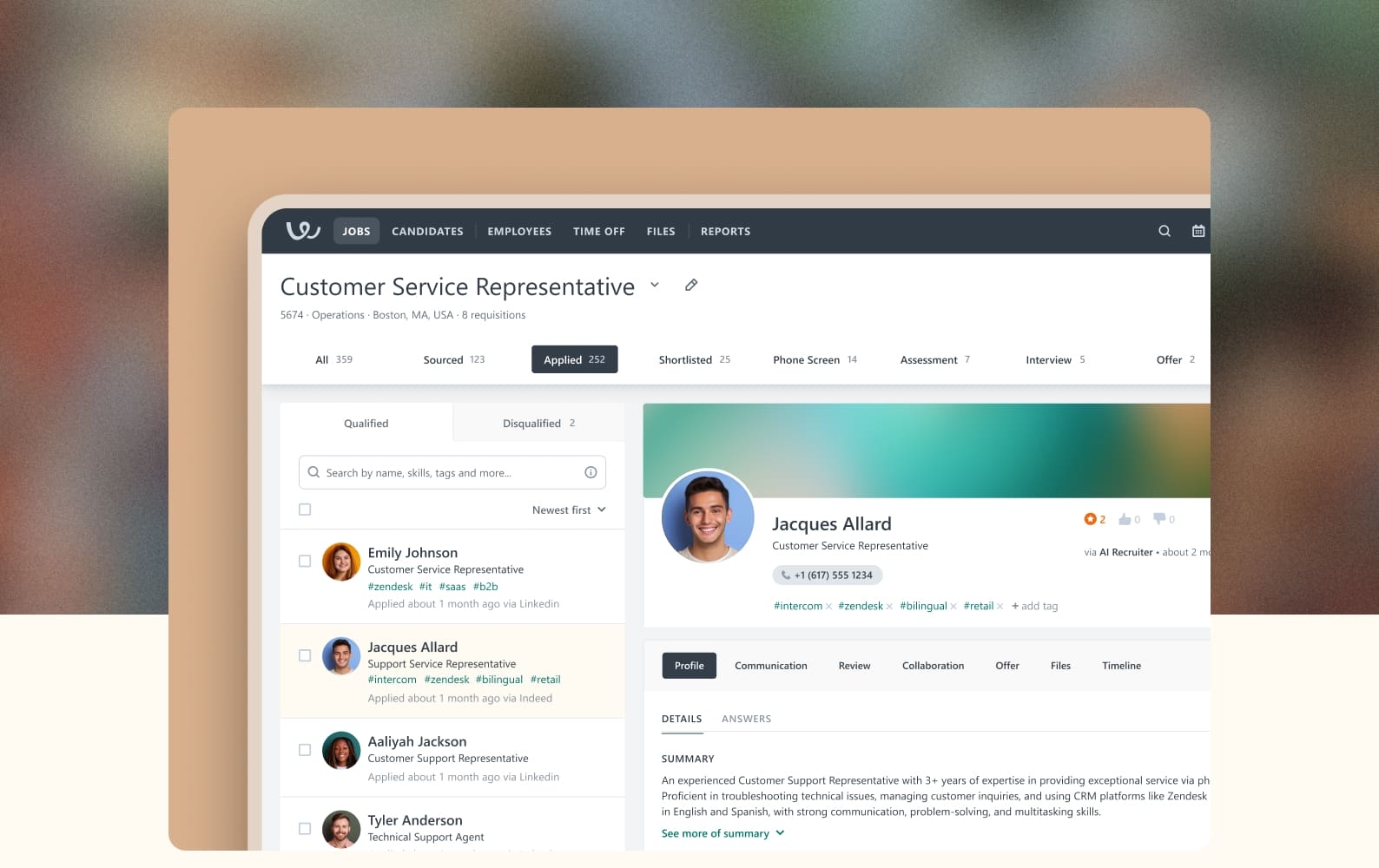
Image source: workable.com
Workable is best for in-house HR teams at mid-sized organizations seeking a comprehensive ATS with built-in video screening capabilities. It simplifies end-to-end recruitment by automating the transition from job posting to candidate evaluation.
Workable acts as an all-in-one applicant tracking system, notable for its advanced AI job postings and native video interviewing tools. It helps teams quickly post to hundreds of job boards while leveraging automated screening profiles to filter candidates. It manages the recruitment funnel from sourcing through initial evaluation in a structured platform, ensuring compliance and standardizing candidate reviews.
During daily operations, Workable acts as a centralized database where recruiters can triaging candidate pipelines. The system is designed to support high-volume inbound applications, featuring an "AI Screening Assistant" that scores profiles and compiles structured match summaries based on job requirements. It also offers a "Salary Estimator" to help teams stay competitive with U.S. and UK market trends directly from the creation wizard.
Pros & Cons:
Pros:
- Highly customizable AI-powered job description tool with built-in tone adjustment and version control.
- Integrated in-house video interviewing tool that eliminates the need for separate video screening subscriptions.
- Extensive integration marketplace boasting over 290 connections and robust API support.
Cons:
- Premium modules like text messaging, video interviews, and transcription require extra monthly add-on fees.
- The system lacks a native conversational recruitment chatbot for passive applicant pre-screening.
Pricing:
Workable does not offer a free-forever plan. Paid options start at around 299/month (billed annually).
3. Recruiterflow: Best for fast-growing hiring teams
is best for executive search firms and recruiting firms that want an AI-native platform with enterprise-grade depth. It combines CRM, ATS, automation, sourcing, outreach, and client management in a single system — without the administrative overhead of stitching point tools together. Recruiterflow particularly well-suited for firms that want to scale business operations with AI.
Built specifically for retained, contingent, and executive search firms, Recruiterflow brings every stage of the search into one platform — from sourcing and outreach to pipeline management, client collaboration, and reporting.
At the heart of Recruiterflow is AIRA. It is the intelligence layer that runs through every workflow ensuring consultants spend their time only on conversations and placements, not admin. Used by 2,100+ recruitment and executive search firms (rated 4.8/5 on G2 and Capterra), it scales from boutique agencies to global operations and ships new capabilities continuously rather than in multi-year cycles — helping firms stay ahead without adopting a stack of disconnected tools.
Pros & Cons:
Pros:
- Purpose-built for recruiting and executive search firms rather than general HR teams.
- Unifies ATS, CRM, automation, sourcing, outreach, and client management in a single platform.
- AIRA-powered intelligence across the workflow — automation, candidate matching, and AI recruiting assistance.
- Scales from boutique agencies to large recruiting organizations.
Cons:
- Designed for agency and executive search workflows rather than internal corporate recruiting teams.
Pricing: Recruiterflow offers customized pricing based on business needs and team size. Interested firms can request a personalized demo and pricing consultation.
4. Zoho Recruit: Best for growing SMEs
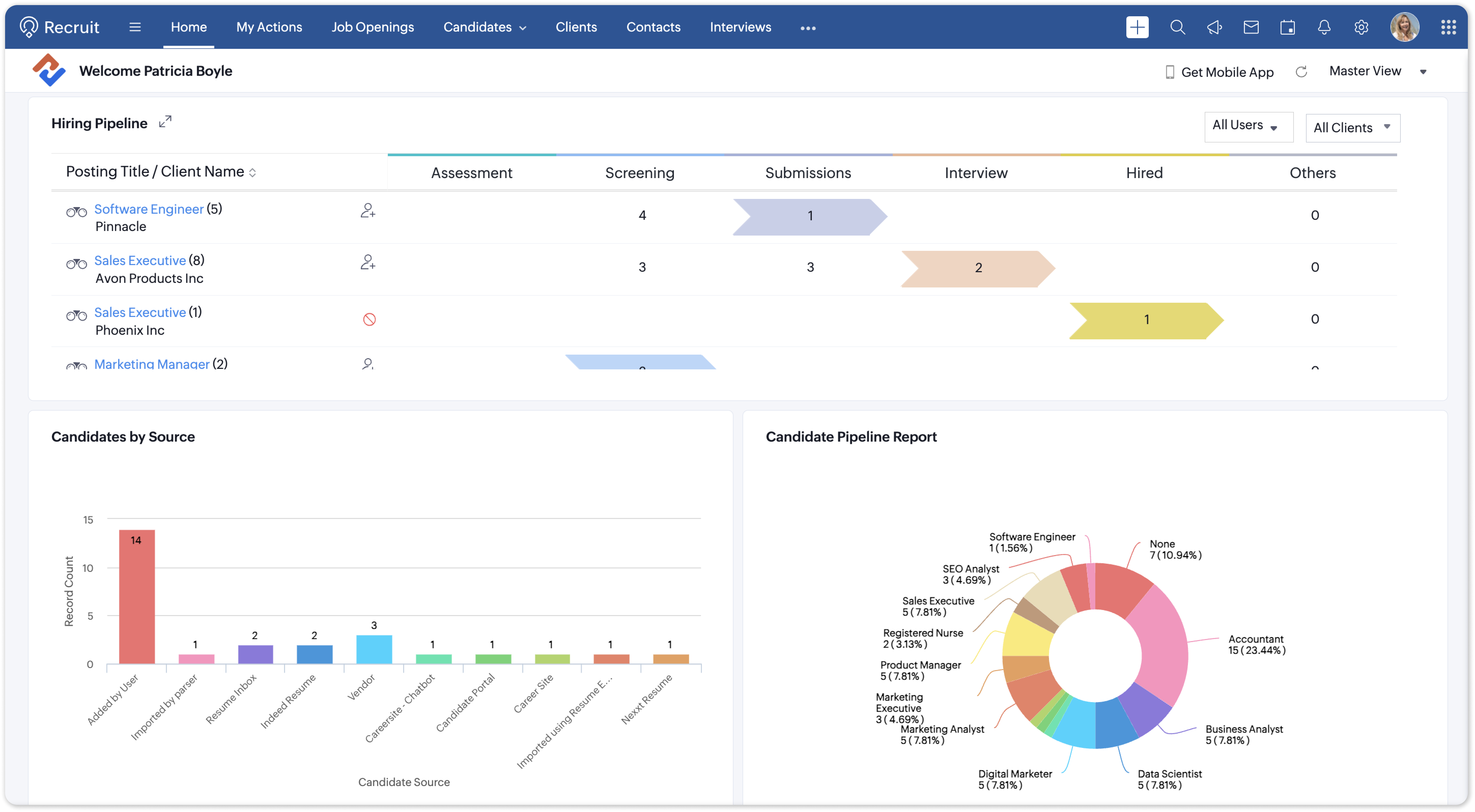
Image source: help.zoho.com
Zoho Recruit is best for growing SMEs seeking an affordable, customizable ATS integrated with proprietary AI matching features. It serves as an accessible entry point for teams looking to automate candidate scoring.
Zoho Recruit provides structured pipeline management that blends resume processing with workflow automation. Powered by Zia, Zoho's proprietary AI assistant, the platform processes incoming resumes, extracts candidate details, and structures them into organized records. Zia Matches then evaluates candidate qualifications against your job openings to provide an objective compatibility score.
The platform is built with flexibility in mind, offering customizable candidate layouts and an integrated mobile app for on-the-go talent acquisition teams. It allows recruiters to publish openings across 75+ job boards, parse dozens of resumes simultaneously, and generate candidate summaries. This helps smaller human resources teams manage candidate screening workflows without investing in complex enterprise setups.
Pros & Cons:
Pros:
- Extremely budget-friendly pricing tiers that make it accessible for small-scale recruitment teams.
- Tight, native integration with the extensive Zoho ecosystem (including Zoho CRM and Zoho One).
- Zia AI matching algorithm automates resume ranking, saving hours of manual review.
Cons:
- The visual interface and overall user experience can feel dated compared to modern collaborative workspaces.
- Advanced workflow configuration and automated trigger setups have a steeper initial learning curve.
Pricing:
Zoho Recruit offers a Free Plan with basic candidate tracking features. Paid plans start at around $25/user/month (billed annually).
5. GoPerfect: Best for tech/sourcing agencies
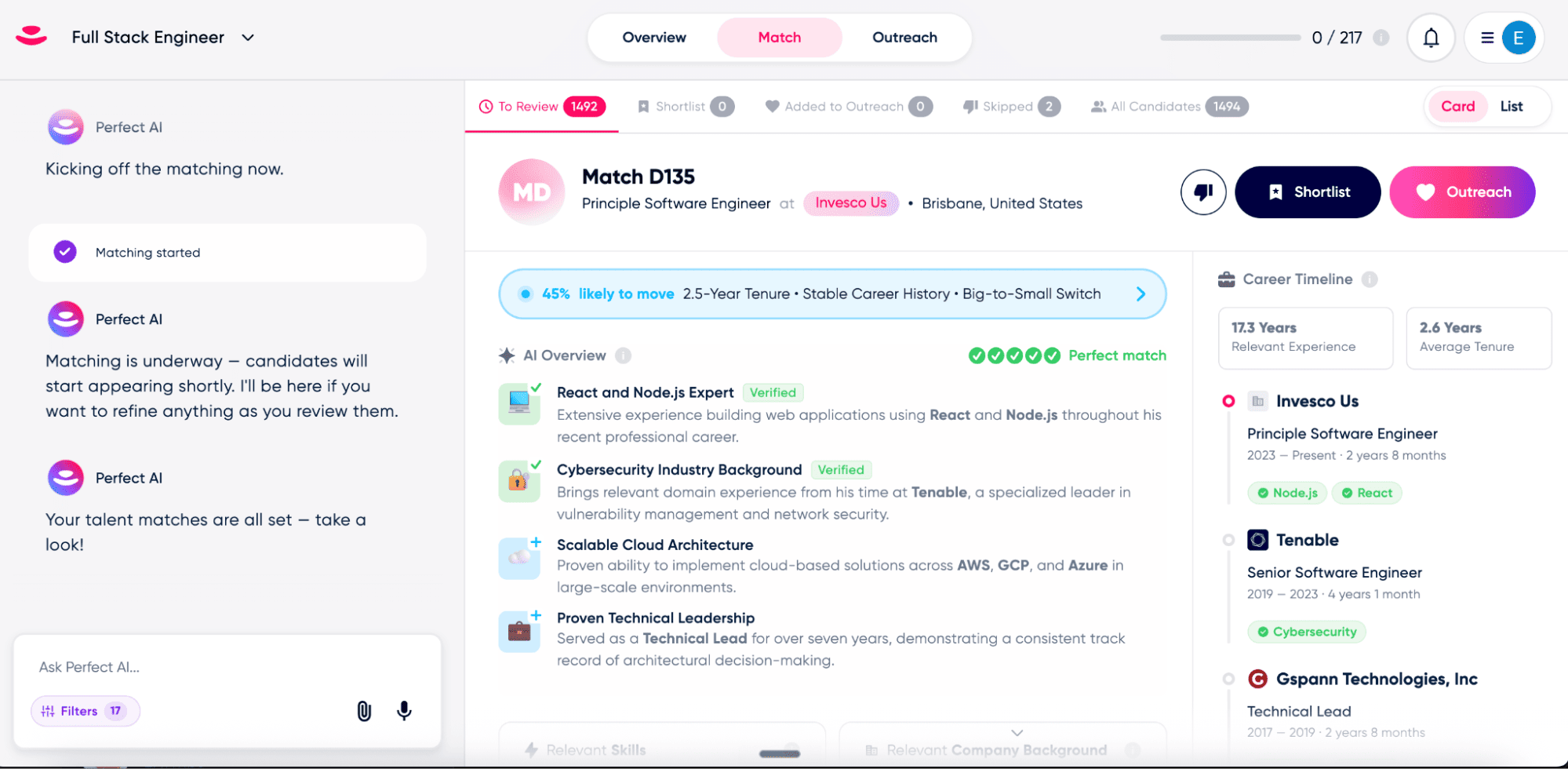
Image source: taalent.ai
GoPerfect is best for sourcing agencies and scaling tech companies that want to run automated outbound candidate sourcing on autopilot. It is built to consistently feed high-quality passive candidates into your pipeline.
GoPerfect operates as an autonomous sourcing agent, identifying qualified candidates, performing bias-free initial screenings, and executing personalized email outreach campaigns. The platform’s core strength is its personalized outbound messaging, which is designed to feel handwritten to maximize candidate reply rates. It functions as an outbound development engine that continuously searches for talent based on specified role profiles.
Once configured, GoPerfect runs candidate discovery autonomously. It searches external databases to locate talent matching your criteria, filters out unqualified matches, and begins outbound outreach. It targets the initial stages of candidate acquisition, allowing your recruitment team to focus purely on engaged candidates who have already expressed interest.
Pros & Cons:
Pros:
- Fully automated outbound engine that identifies and contacts passive candidates with minimal manual sourcing.
- Outreach templates use hyper-personalization algorithms to improve candidate response rates.
- Unlimited seat licensing lets entire teams collaborate on sourcing campaigns without extra per-user costs.
Cons:
- Lacks post-outreach recruitment workflows, requiring teams to manually move interested candidates to an ATS or communication tool.
- The matching logic depends heavily on structured public profiles, making it less effective for niche or blue-collar roles.
Pricing:
GoPerfect does not offer a public pricing sheet or a free-forever plan. Teams must book a product demonstration to receive a customized quote based on their sourcing volume.
6. Fetcher: Best for tech startups
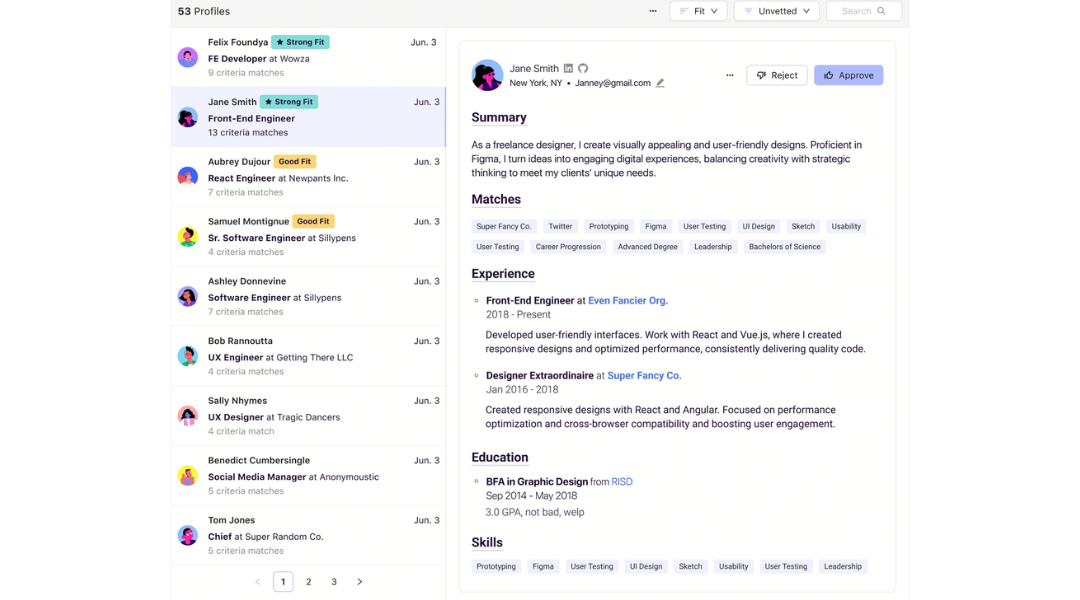
Image source: fetcher.ai
Fetcher is best for high-growth startups looking for an easy-to-use, outbound-focused AI sourcing tool to fill technical and specialized roles. It focuses on minimizing the time recruiters spend hunting for profiles.
Fetcher is an ai-powered recruitment software solution focused entirely on top-of-the-funnel sourcing and outreach automation. It uses a combination of machine-learning models and human calibration to find candidate profiles across the open web. This ensures that the sourced candidates align with your expectations before outreach campaigns begin.
Recruiters use Fetcher to build persona-based search criteria, which the system uses to discover passive candidates. The software generates customized automated email sequences, allowing you to launch personalized email campaigns that run in the background. It also includes an analytics dashboard to track response rates, campaign metrics, and pipeline diversity over time.
Pros & Cons:
Pros:
- Saves hours of manual prospecting by delivering curated, vetted candidate profiles directly to your inbox.
- Customizable drip campaigns automate candidate follow-ups, maintaining a high response rate.
- Clean, user-friendly interface that lets recruiters deploy new sourcing campaigns quickly.
Cons:
- Focuses exclusively on top-of-funnel sourcing, meaning it lacks deep applicant tracking, interview scheduling, or document collaboration features.
- Occasional discrepancies in retrieved candidate email addresses require manual verification.
Pricing:
Fetcher does not offer a free-forever tier. Paid options start at around $115/month (billed annually).
7. Truffle: Best for high-volume TA teams
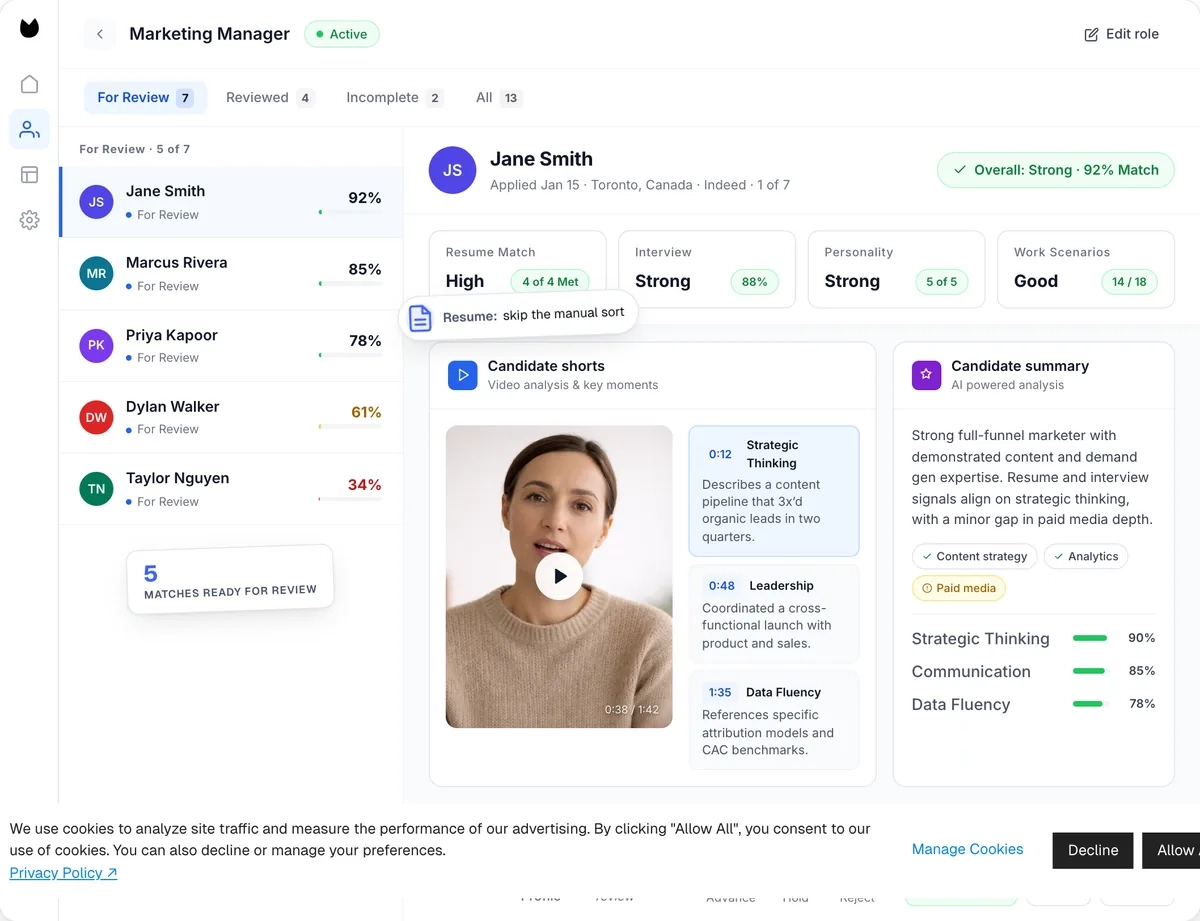
Image source: hiretruffle.com
Truffle is best for talent acquisition teams needing transparent, highly customizable AI screening and candidate matching workflows that integrate with their existing ATS. It helps recruiters verify candidate scores objectively.
Truffle is a dedicated screening and evaluation platform designed to help recruiting teams manage high application volumes. It blends resume parsing with transparent match scoring and one-way video assessments, allowing teams to filter through candidates quickly. Truffle is built to work alongside your existing ATS rather than replacing it, acting as an evaluation layer that prioritizes candidate transparency.
The platform's standout feature is its transparent match scoring. This allows recruiters to see exactly why a candidate received their ranking, avoiding the "black box" decisions common in other tools. It also features "Candidate Shorts"—which are 30-second AI-generated video highlight reels—and an "AI Check" system that flags responses showing patterns of AI assistance, giving recruiters helpful context during review.
Pros & Cons:
Pros:
- Excellent transparency with explainable match scores, allowing recruiters to review and verify candidate rankings.
- Candidate Shorts compress hours of recorded video screening into quickly scanable highlight clips.
- AI Check identifies potential ChatGPT-generated responses, helping recruiters spot overly rehearsed answers.
Cons:
- It is not an all-in-one ATS; teams must pair it with a separate database or communication workspace to manage full hiring processes.
- The accuracy of the initial match scoring relies heavily on detailed input criteria during the job setup phase.
Pricing:
Truffle offers a 7-day free trial with no credit card required. Paid plans start at 99/month(billed annually), which includes custom match scoring, assessments, and video interviews.
8. Skima AI - Best for Staffing and Recruitment Agencies

Image source: skima.ai
is best for recruiting teams already using ATS systems like Workday, BambooHR, or Lever, adding an intelligence layer without requiring migration. It transforms existing ATS data into an active hiring engine. Its resume parser extracts over 200 data points across 40+ formats.
Moreover, the "Rediscover in ATS" feature highlights qualified candidates already in your database, often speeding up hiring without new sourcing. Each candidate receives an evidence-based match score, accompanied by analytics dashboards tracking pipeline progress, time-to-fill, and email engagement in real time.
Recruiters simply open a role, and Skima AI ranks applicants, including past candidates. AI campaigns automate outreach, and knockout filters enforce hard requirements, providing documented reasons for disqualifications. Recruiters review and move candidates forward, with AI handling screening, ranking, and hiring compliance.
Pros & Cons:
Pros:
- Rediscovery feature resurfaces qualified past candidates already in the ATS, often cutting time-to-fill without new sourcing spend.
- Evidence-based scoring and analytics dashboards give recruiters and hiring managers a transparent, auditable view of every decision.
- Layers directly onto 130+ existing ATS/HRIS platforms, so teams keep current workflows instead of migrating data.
- Built-in bias auditing and compliance alignment with EEOC, GDPR, and NYC Local Law 144 standards reduce legal exposure around automated hiring decisions.
- Cross-references resumes against LinkedIn and certifications to flag inflated or false skill claims before they reach a hiring manager.
Cons:
- Newer to the market than some established players, so its long-term track record is still being built.
- Full platform value depends on integration depth, so teams with unusual or legacy ATS setups may need extra setup time.
Pricing:
Skima AI does not publish public pricing. Teams book a demo directly for a quote based on hiring volume and integration needs.
9. Humanly: Best for high-volume hourly
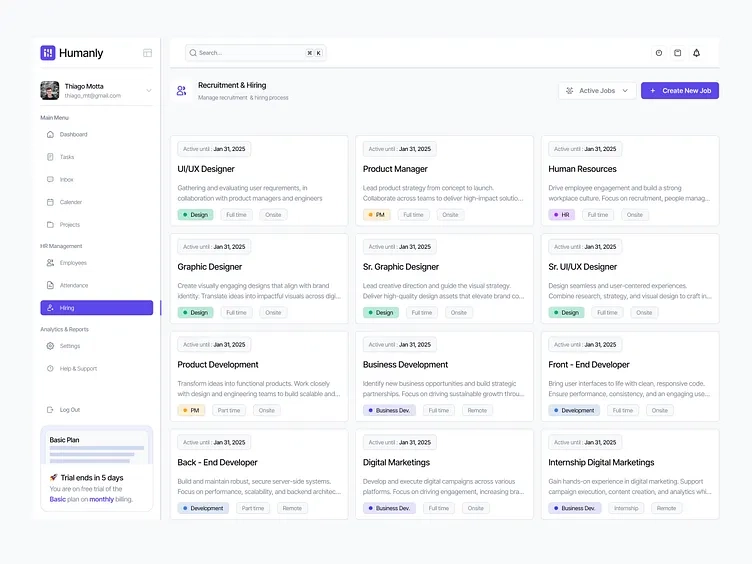
Image source: dribbble.com
Humanly is best for high-volume, hourly frontline recruitment (e.g., hospitality, logistics) where rapid engagement is key to filling roles. It focuses on speed to secure candidates before competitors do.
Humanly is built to streamline candidate interactions through conversational AI, making it highly effective for high-volume, hourly, and early-career hiring. The platform uses a conversational SMS and web chatbot that acts as an "AI co-pilot." This chatbot engages applicants instantly, screens them based on customizable criteria, and coordinates interview scheduling without recruiter intervention.
In addition to screening, Humanly features "Interview Intelligence." The AI co-pilot can join live video interviews to generate accurate transcripts, take notes, and extract candidate details (such as salary requirements and start dates). This keeps candidate data unified, automatically syncing these interaction records with your primary ATS to eliminate manual entry.
Pros & Cons:
Pros:
- Excellent candidate engagement with high completion rates on mobile devices through chat-based screening.
- Interview Note-Taking AI automates post-interview documentation, saving recruiters hours of manual write-ups.
- Integrates with popular ATS platforms like Greenhouse and Bullhorn to keep candidate records updated.
Cons:
- Does not offer candidate self-rescheduling options within the automated booking interface.
- Lacks automated interview reminder notifications for candidates and internal interviewers.
Pricing:
Humanly does not offer a free-forever tier or a standard trial. Pricing is undisclosed and custom-quoted based on company size and conversational hiring volume.
10. Ribbon: Best for enterprise blue-collar
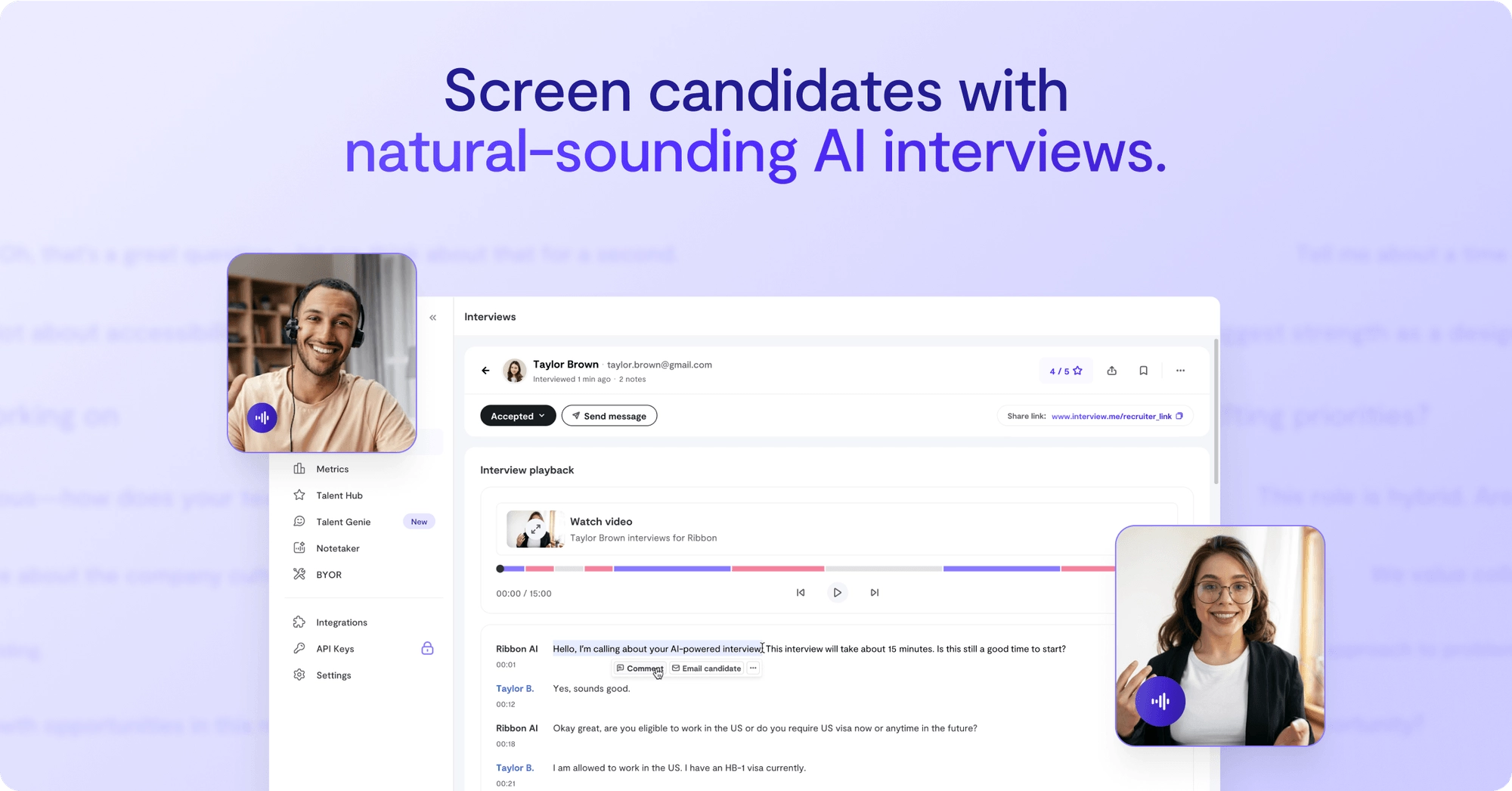
Image source: radical.vc
Ribbon is best for enterprises hiring for high-volume roles (like warehouse or retail associates) who want to automate screening interviews via mobile messaging. It provides structured evaluations around the clock.
Ribbon is a mobile-first recruitment ai software designed to automate candidate interviews 24/7 for high-volume, blue-collar roles. By utilizing SMS, WhatsApp, and email, Ribbon contacts applicants immediately after they apply, conducting automated text-based interviews to screen candidates against pre-defined rubrics.
The platform scores candidate responses to provide unbiased comparisons, helping talent acquisition teams quickly identify qualified applicants. It includes automated candidate follow-ups to keep applicants engaged and moving through the hiring funnel. Ribbon also integrates with over 60 ATS systems, ensuring candidate records remain synchronized.
Pros & Cons:
Pros:
- High candidate completion rates due to accessible, mobile-first screening over SMS and WhatsApp.
- Automated, rubric-based candidate scoring ensures fair, standardized evaluations.
- Strong security standards that align with and SOC2 compliance protocols.
Cons:
- Lacks the flexibility to handle unstructured, highly technical assessments that require dynamic follow-up questions.
- The platform is hyper-focused on early-stage screening, requiring other systems to handle post-interview collaboration.
Pricing:
Ribbon offers a 7-day free trial. Paid plans start at $499/month.
11. GoodTime: Best for mid-to-large enterprise
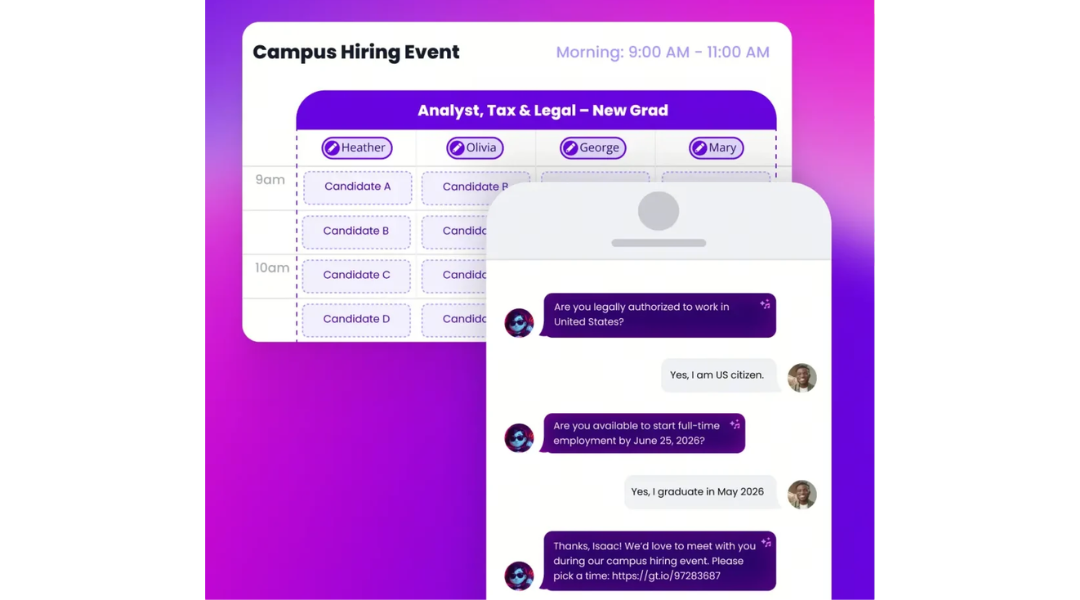
Image source: goodtime.io
GoodTime is best for mid-market to enterprise companies looking to solve complex, multi-stage panel interview scheduling challenges. It minimizes calendar management issues for busy internal teams.
GoodTime is a dedicated orchestration platform designed to automate interview logistics and schedule coordination. It addresses the administrative work of finding interview times across multiple team calendars. Using its "Orchestra" AI assistant, the platform balances interviewer availability, manages panel assignments, and automates multi-stage schedules.
The platform allows candidates to select times that work for them, automatically matching their choices with available internal interviewers. GoodTime also includes interviewer training workflows to help teams expand their panel pool, and features post-interview sentiment analysis to monitor candidate satisfaction throughout the hiring process.
Pros & Cons:
Pros:
Eliminates manual interview scheduling by coordinating complex panel calendars automatically.
Interviewer load balancing prevents team burnout by distributing interviews evenly.
Integrates with leading enterprise systems like Greenhouse, Workday, and iCIMS.
Cons:
The platform is strictly focused on scheduling and communication, meaning you still need separate tools for candidate sourcing and evaluation.
The initial setup and integration configurations can be complex for teams with non-standard hiring processes.
Pricing:
GoodTime does not offer a public pricing sheet. Teams must contact sales to receive a customized quote based on their sourcing volume.
12. Metaview: Best for high-volume interviewers
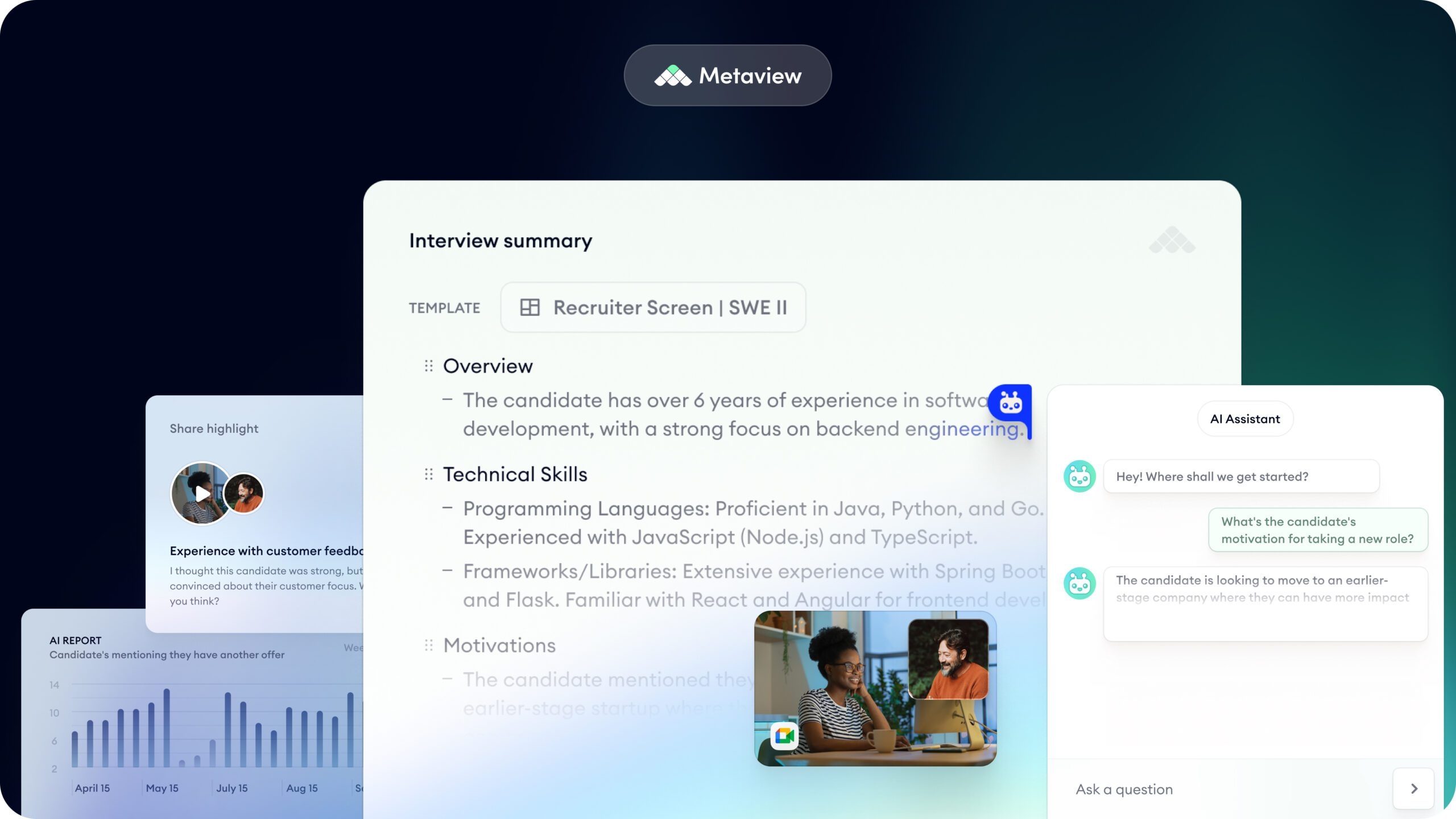
Image source: therecruitmentnetwork.com
Metaview is best for recruiters and agency owners who want to automate interview note-taking and transcribe phone screenings with high accuracy. It helps you focus entirely on the candidate conversation.
Metaview is an AI-powered assistant built to automate candidate interview note-taking. The platform integrates with your video conferencing tools and dialers, working silently in the background to record and transcribe recruiter screens, hiring manager interviews, and panel discussions.
Instead of forcing recruiters to multi-task between taking notes and engaging the candidate, Metaview generates structured summaries automatically. The AI extracts critical details—such as candidate motivation, professional history, and salary expectations—and formats them into organized recaps, allowing teams to quickly copy candidate notes into their central database.
Pros & Cons:
Pros:
- Highly accurate transcription that correctly recognizes complex technical terms and industry jargon.
- Saves up to 20-30 minutes per candidate interview by delivering structured recruiter notes in seconds.
- Integrates directly with common communication tools and top-tier ATS platforms.
Cons:
- Requires obtaining candidate consent before recording, which can occasionally introduce friction to early-stage screening calls.
- The system does not offer candidate sourcing, outreach sequencing, or database management features.
Pricing:
Metaview offers a free plan, and paid plans start at around $100/month.
The Great Divide: Standalone AI Software vs. A Unified Workspace
Having reviewed the top 10 platforms, a clear structural pattern emerges. The market is fundamentally split into two different approaches:
1. Standalone AI Point Solutions (Tools 2-10): The vast majority of tools on the market—including highly specialized tools like Fetcher, GoodTime, and Metaview—are standalone software. They are brilliant at automating one specific micro-task (like only sourcing, only scheduling, or only transcribing).
2. Unified Collaborative Workspaces (): Lark is not a point tool. It is an all-in-one digital ecosystem that integrates your database (Base), communication (Chat), feedback (Docs), and scheduling (Calendar) into a single, unified execution layer.
Understanding this divide is crucial. When scaling teams try to solve their hiring bottlenecks by stacking multiple standalone AI tools together, they inadvertently create the very chaos they were trying to avoid.
This brings us to the operational reality of modern hiring.
The core challenge of AI in recruitment software: The point-tool fatigue
If you manage hiring for a growing company, your browser tab bar probably looks like a chaotic timeline of fragmented software.
Consider Sarah, a talent acquisition lead who starts her day with 12 open tabs: sourcing platform, video screening tool, calendar scheduling, skills assessments, legacy ATS, and company chat. This is the reality of point-tool fatigue. While specialized AI recruitment software sounds strategic, piling on single-purpose applications creates operational silos.
The hidden integration tax
Every new disconnected AI tool introduces an "integration tax"—measured in hours recruiters spend copy-pasting candidate data between systems. When your sourcing tool doesn't sync with communication channels or evaluation databases, workflows stall and recruiters become data entry clerks instead of talent matchmakers.
How fragmented tools damage the candidate experience
Operational friction directly impacts how candidates perceive your company:
- The black hole effect: Sourced candidates are engaged via email, but unanswered follow-ups go unaddressed for days.
- Repetitive onboarding: Candidates create accounts on multiple portals just to screen, record video, and schedule interviews.
- Scheduling friction: Passive candidates drop out when panel scheduling requires five back-and-forth emails.
The collaborative workspace alternative
To build an efficient hiring system, you need a centralized workspace—not more isolated algorithms.
Modern platforms like Workable or Zoho Recruit claim to be "all-in-one," but they're siloed within HR. Engineering leads and decision-makers rarely log in. This creates the "ATS Desert" effect: recruiters send emails that managers ignore, forcing teams to copy-paste candidate links into Slack to collaborate.
A true unified workspace brings , team communication, and evaluation documents into one place. When recruiters and hiring managers share a single screen and source of truth, decisions happen in minutes, not days.
How to choose the right AI recruiting platform for your team
Selecting the best AI recruitment software requires more than comparing checklists on . The right platform must align with your specific hiring volume, technical capability, and long-term budget. If you select a tool that does not fit your operational model, you risk adding complexity to the exact workflows you are trying to simplify.
To avoid falling back into the trap of point-tool fatigue, we recommend evaluating your options across four critical pillars, with a focus on how a unified workspace can replace or centralize fragmented workflows.
1. Match your hiring volume and target roles to a unified platform strategy
Different recruiting profiles present unique operational challenges. However, instead of purchasing multiple single-purpose applications to handle them, you should evaluate how a centralized, collaborative platform manages these diverse scenarios:
- High-Volume, Hourly Frontline Hiring: If you operate in retail, hospitality, or logistics, your biggest risk is candidate drop-off due to slow response times. Instead of forcing hourly workers to create accounts across various third-party screening portals, look for a platform that simplifies intake. With a collaborative workspace like , you can deploy mobile-friendly intake forms that feed candidate data directly into your central database (), instantly triggering automated mobile alerts to recruiters to review and approve applicants on the go.
- Specialized, Technical, and Executive Sourcing: Sourcing passive talent requires close alignment between recruiters and hiring managers. If candidate profiles are locked inside a niche outbound point-tool, hiring managers rarely log in to review them. A unified workspace allows your recruiting team to gather sourced candidate profiles into interactive collaborative documents, use real-time @mentions to get immediate feedback from department heads, and run coordinated outreach campaigns from a single source of truth.
- Collaborative, Mid-to-High Growth Hiring: When your hiring relies on cross-functional panel interviews and multi-department reviews, communication gaps can stall your pipeline. Rather than paying for separate scheduling apps, chat channels, and evaluation tools, utilizing an all-in-one workspace keeps your tracking database, messaging, and calendar scheduling in one cohesive place.
2. Calculate the true total cost of ownership (TCO)
When calculating software costs, look beyond the upfront sticker price of a single subscription. Many point-solution tools appear affordable initially but carry high hidden costs:
- Seat Licensing Fees: Many premium Applicant Tracking Systems (ATS) charge per-seat fees. When you try to bring hiring managers or external agency partners into the evaluation loop, your monthly costs can spike unexpectedly.
- The Add-On Tax: Some full-suite options charge extra for essential features like automated SMS texting, video screen recording, or AI transcription.
- Integration and Administrative Overhead: If you purchase four different micro-tools (one for sourcing, one for screening, one for scheduling, and one for tracking), you have to pay to integrate them, and your team wastes hours manually moving candidate profiles between them.
A unified platform reduces this subscription overhead. By consolidating your candidate tracking database, team communications, document feedback, and video meeting tools into one workspace, you eliminate duplicate software spend and reclaim lost administrative hours.
3. Evaluate compliance, security, and algorithmic transparency
Handling personal candidate data requires strict adherence to . Any ai based recruitment software you adopt must provide robust compliance frameworks, including GDPR and .
Equally important is algorithmic transparency. Avoid platforms that offer "black box" candidate scoring without explaining how they rank profiles. Your recruiters must be able to verify that the recruitment software with ai matching evaluates candidates purely on professional skills, experience, and certifications, preventing unfair bias or compliance risks.
4. Assess setup speed and platform agility
Traditional enterprise recruitment software often takes months to configure and deploy. By the time your IT department finishes setting up custom fields and user permissions, your hiring goals may have changed.
For growing businesses, look for agile, flexible platforms that you can customize in days. Opting for a workspace that allows you to build and modify automated workflows without writing code ensures your recruiting system can scale alongside your team.
From Strategy to Execution: Putting Unified Hiring into Practice
Understanding these evaluation pillars is only the first step. The true test of any software strategy is how easily your daily recruiting team can adopt it. You shouldn't have to wait through months of custom development or pay thousands of dollars in consulting fees just to see if a consolidated workflow works for your business.
To show you exactly how these theoretical pillars—collaboration, cost-efficiency, transparency, and agility—translate into an active, high-speed pipeline, we have mapped out a concrete, step-by-step operational blueprint.
By leveraging a flexible digital workspace, you can build a customized, automated candidate tracker tailored to your exact team structure in less than an hour.
Workflow blueprint: Designing a collaborative candidate tracker inside Lark Base
Many growing organizations believe they have to pay for a rigid, expensive ATS to manage their hiring pipelines. However, you can build a highly customized, automated, and collaborative candidate tracker directly inside —without writing a single line of code.
By centralizing your hiring pipeline inside your primary communication hub, you eliminate tool silos, speed up candidate evaluations, and keep your entire recruiting team aligned in real time.
Here is our step-by-step blueprint for building a customizable, collaborative candidate tracker inside .
Step 1: Structuring the master candidate database in Lark Base
functions as a flexible relational database that lets you visualize candidate data in multiple ways, including Kanban boards, Gantt charts, and structured grid tables.
To build your tracker, create a new Base table and add the following custom fields:
1. Candidate Name: The applicant's full name.
2. Job Application: A drop-down menu of open roles (e.g., "Senior Software Engineer", "Product Marketing Manager").
3. Resume Attachment: A file-upload field where your team can view PDF or Word resumes directly inside the database window.
4. Pipeline Stage: Set up custom pipeline steps: Applied ➔ Recruiter Screen ➔ Hiring Manager Review ➔ Panel Interview ➔ Offer Stage ➔ Hired / Rejected.
5. Assigned Recruiter: Tags the internal recruiter managing the candidate's journey.
6. Hiring Manager: Tags the specific department lead responsible for the final hiring decision.
Step 2: Automating cross-functional notifications via Lark Messenger
In most hiring processes, candidate profiles stall because busy hiring managers forget to check their ATS. Lark solves this by connecting your database directly to your daily communication channels.
You can set up a simple, no-code automation rule within to notify managers the moment action is needed:
1. Define the Trigger: Set the automation trigger to run when a candidate’s Pipeline Stage changes to Hiring Manager Review.
2. Configure the Action: Select "Send a message via Lark bot."
3. Format the Notification: Customize the automated chat alert to tag the assigned Hiring Manager directly in their Lark Messenger chat.
For example, you can configure the automated alert to look like this:
"Hi @Hiring Manager, a new applicant (Candidate Name) has advanced to your review stage for the Job Application role. You can review their resume and update their status here: [Lark Base Record Link]"
By delivering resume links and candidate details directly to the manager's primary chat window, you eliminate email delays and help your team review applicants within hours instead of days.
Step 3: Centralizing collaborative feedback with Lark Docs
To ensure objective evaluations, avoid leaving interview notes scattered across emails, private chats, or paper notebooks. Instead, link a standardized evaluation document directly to each candidate's record.
Here is how to structure this collaborative step:
1. Create an Interview Template: Design a clean, structured scorecard template in , featuring sections for technical skills, cultural alignment, and specific interview questions.
2. Link to the Base Record: Generate a unique Doc for each candidate and paste the link into the Scorecard Link field in .
3. Real-Time Collaborative Editing: During live panel interviews conducted over Lark Meetings, your team can open the shared right inside the video window. Interviewers can type their notes simultaneously, tag colleagues using @mentions to highlight specific points, and finalize hiring recommendations together.
4. Global Collaboration with Instant Translation: For international or remote teams, interviewers can use Lark's built-in translation tools to view feedback in their preferred language instantly, keeping global decision-makers aligned.
Create your custom candidate tracker on Lark
Ethical guardrails: Unpacking bias mitigation and algorithmic scoring
While incorporating ai-powered recruitment software into your workflow can save hundreds of administrative hours, it introduces serious ethical considerations. Machine learning algorithms are trained on historical data; if your industry's past hiring trends favored specific demographics, uncalibrated AI models can replicate those exact biases. If left unmonitored, your automated matching system might exclude excellent candidates who possess non-traditional backgrounds or unique career paths.
To prevent this, organizations must establish clear ethical guardrails when utilizing ai in recruitment software:
1. Maintain human-in-the-loop oversight
Automated candidate matching should assist recruiters, not replace them. The final decision to advance, reject, or extend an offer to a candidate must always remain with a human professional. Treat AI rankings as initial recommendations rather than absolute hiring decisions, aligning with .
2. Demand algorithmic transparency
Avoid "black box" platforms that rank candidates without explaining their internal logic. Look for an AI software for recruitment that provides clear, explainable matching criteria. If a system assigns a candidate an 85% match score, recruiters should be able to see exactly which skills, years of experience, or certifications contributed to that rating. This transparency allows your team to verify that the assessment is fair and compliant, supporting the goals of .
3. Implement blind screening strategies
One of the most effective ways to reduce early-stage bias is to hide demographic markers during initial reviews. Some screening tools allow you to mask candidate names, locations, graduation years, and gender indicators. This ensures your hiring managers focus purely on the candidate's core qualifications, work history, and structured assessment scores.
By combining objective screening capabilities with transparent data tracking and collaborative human reviews, you build a hiring process that is both highly efficient and fundamentally fair.
Conclusion
The most efficient hiring pipelines are not built by simply stacking disconnected AI engines. Instead, they rely on strong internal alignment and minimal communication friction. By choosing an integrated, collaborative workspace over isolated point solutions, you bridge the gap between candidate sourcing and final team selection. This approach keeps your pipeline moving quickly while preserving a human-centered evaluation process. If you want to streamline your hiring workflows without paying for expensive, siloed ATS seats, start building your custom candidate tracker on today.
Streamline your hiring process today
Frequently asked questions (FAQs)
How does AI recruitment software work?
Most ai-powered recruitment software for scaling teams operates by automating top-of-the-funnel workflows. These platforms use techniques like natural language processing (NLP) and resume parsing to read unformatted CV documents and extract structured information, such as skills, employers, and job titles. They then use semantic search to evaluate how closely an applicant’s qualifications align with your job description, providing a compatibility score to help recruiters prioritize profile reviews.
Are AI recruiting tools biased against certain candidates?
They can be if they are trained on biased data or configured as "black boxes." Because machine learning models learn from historical datasets, they may replicate existing human and industry imbalances. To minimize this risk, organizations should pair automated systems with strict human oversight, opt for software vendors that explain their matching algorithms, and use blind screening tools to strip demographic markers from initial profiles.
What is the difference between an AI recruiting tool and a legacy ATS?
A legacy applicant tracking system (ATS) acts primarily as a static database of record—a digital filing cabinet where you store resumes, track basic pipeline steps, and manage compliance. In contrast, modern AI recruitment software serves as an active assistant. It helps automate manual tasks like drafting personalized outbound emails, running interactive chat screens, scheduling panels across multiple team calendars, and transcribing interviews in real time.
Can small teams use AI software for recruitment cost-effectively?
Yes. While enterprise-grade, single-purpose ATS platforms can be expensive, small teams can avoid these high costs by utilizing customizable workspaces. For example, Lark’s Free Starter plan provides up to 20 users with customizable databases (), chat integrations, and built-in automation. This allows small businesses to build their own custom, automated candidate trackers and manage their pipeline without paying for expensive, disconnected software seats.
Related reading