Building your own CRM no longer has to mean writing code from scratch, hiring a development team, or waiting months for a finished system. In 2026, most teams can build a custom CRM system on a flexible no-code platform, then adapt it as their sales process, customer data, and collaboration needs evolve.
This guide explains how to build your own CRM step by step, from defining your pipeline and CRM database to setting up automations, dashboards, permissions, and team workflows. You'll also learn when building a CRM from scratch makes sense, when a customizable CRM platform is faster, and how Lark can help teams create a CRM that fits the way they actually work.
What is a custom CRM?
A custom CRM is a designed around your team's specific sales process, customer lifecycle, data structure, and reporting needs. Instead of forcing every team into the same pipeline or contact record, a custom CRM lets you decide what information to track, how deals move forward, who can access each record, and which actions should be automated.
A custom CRM can be built in different ways. Some companies build their own custom CRM software from scratch with engineers. Others customize an existing CRM. Many modern teams now use no-code platforms to create a flexible CRM database, connect it with collaboration tools, and iterate quickly as their business changes.
Before you build your own CRM system, it helps to compare the main options.
If your team only needs basic contact management, a simple CRM template may be enough. If you need complex proprietary logic, building a CRM from scratch may be justified. But if your main goal is to create your own CRM system around your pipeline, customer data, approvals, and collaboration workflows, a is often the most practical path. The goal is not to create more software for its own sake. The goal is to create CRM workflows that help teams capture better customer data, reduce manual updates, improve sales visibility, and make follow-up easier.
Benefits of a custom CRM
A custom CRM aligns the system with the way work actually happens. Objects, fields, and stages mirror real conversations and milestones. and reduces missed follow-ups. Reporting focuses on decisions that matter instead of vanity charts. A build your own CRM path makes these gains possible without committing to features that add complexity but not value.
- Process fit and adoption: Stages, exit criteria, and fields reflect the language and steps used in daily work. Records are easier to update because the system guides the same actions performed in calls, emails, and meetings. Better fit reduces side spreadsheets and scattered notes, which improves data quality and trust in dashboards.
- Data control and compliance readiness: Control over schema, retention, and permissions protects sensitive information and supports privacy obligations. Field-level controls, audit trails, and transparent data flows create a foundation for security reviews and incident response. Clean exports and documented mappings keep portability intact if the stack changes later.
- Integration and automation on clear rules: Connections to email, calendar, chat, billing, support, and product analytics follow explicit ownership and sync rules. Idempotent writes, retries, and conflict handling protect data integrity. Automation turns playbooks into , reminders, dedup checks, and hygiene routines that keep momentum high.
- Cost alignment and long-term efficiency: Investment focuses on essential capabilities first, then expands where impact is proven. configuration covers most needs, while targeted engineering solves the few hard parts that create advantage. This balance reduces shelfware, limits maintenance creep, and keeps total cost of ownership under control.
Core building blocks of a CRM system
Every CRM system, whether simple or advanced, is made from a few core building blocks.
If you are learning how to build a CRM database, start with the minimum records your team needs. Most teams can begin with leads, contacts, companies, deals, activities, and tasks. You can add more objects later, such as renewals, onboarding projects, invoices, or support tickets.
How to build your own CRM system in 7 steps
Building a winning custom CRM doesn't require a massive upfront effort—success lies in starting narrow, delivering value quickly, and iterating in short cycles. This step-by-step guide balances clarity, data quality, and safe change, working equally well for low-code stacks and customizable platforms. Best of all, it helps you avoid premature complexity. It's a practical blueprint for how to build your own CRM, and when to extend toward a full build your own CRM platform as needs expand.
1. Define scope and governance
Kick things off by locking in your Minimum Viable Product (MVP) scope—no need to build everything at once. Typical core outcomes include inbound lead capture, a simple pipeline, automatic activity logging, and a manager dashboard that answers your team's most critical questions.
Define clear success metrics, non-goals, and . Assign named roles (product owner, admin, security contact) to eliminate decision bottlenecks, and use weekly check-ins plus a shared backlog to keep choices transparent. A lightweight communication plan—think update notes, a pilot feedback channel, and office hours—builds confidence and shortens feedback loops to build your own CRM with predictable cadence.
2. Design the data model and permissions
You don't need a complex data model to start strong. Begin with four core objects—accounts, contacts, deals, and activities—to lay a reliable foundation. Use plain-language field names, standardize picklist values, and leverage formulas for derived data (like weighted amounts or renewal windows). Think of this as the start of your build your own CRM database, designed to scale cleanly rather than accrete one-off fields.
Map relationships with a simple diagram to eliminate ambiguity around data ownership and visibility. Use the principle of least privilege: assign access based on roles, add field-level protection for sensitive data, and create role-specific default views. This keeps data secure while cutting down on noise for users. Wrap it up with a short data dictionary that clarifies each field's purpose and acceptable values.
3. Map the pipeline and service expectations
Pipeline stages work best when grounded in concrete evidence, not gut feelings. For each stage, write a one-sentence purpose, clear exit criteria, and the specific actions or artifacts needed to move forward.
Set service expectations to define response times for new leads and follow-ups—add timers to flag stuck tasks before they linger. Create standardized codes for lost-deal and stall reasons to turn setbacks into learnings (no blame required!) and target coaching where friction actually happens. Share a short "stage definitions" sheet with your pilot team to align understanding and keep data updates consistent.
4. Implement core automation and data hygiene
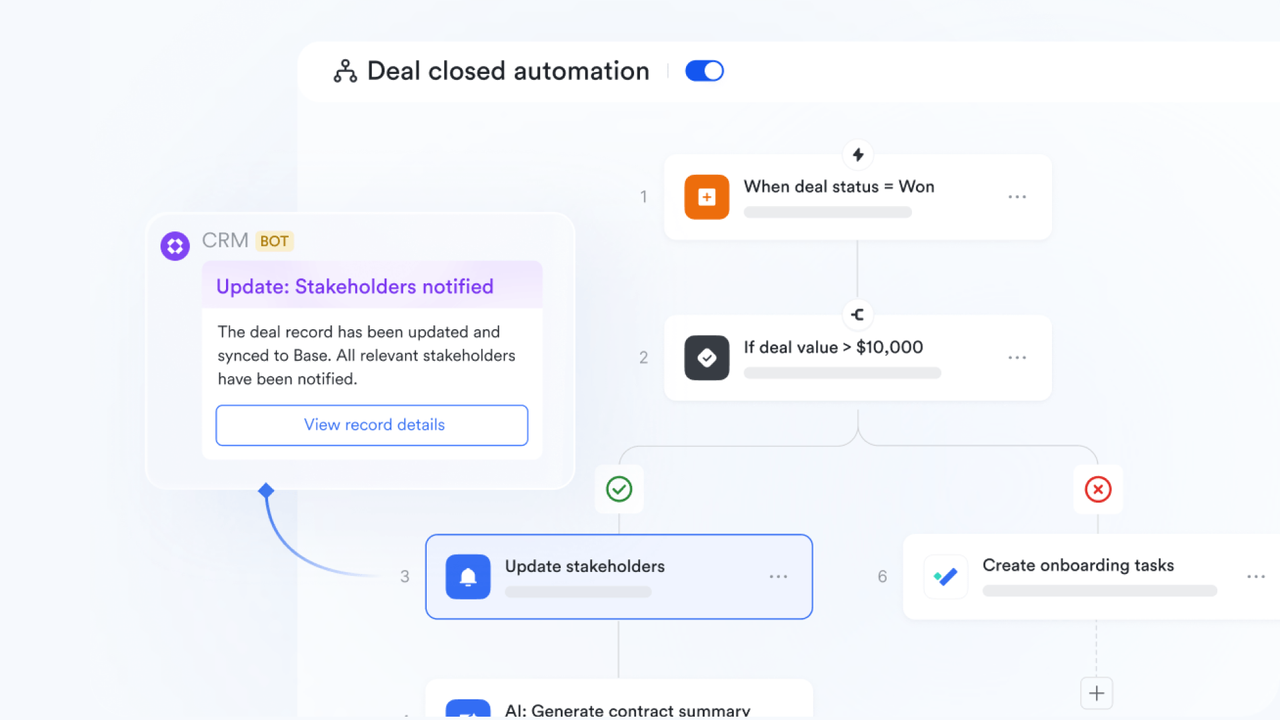
Automation turns your team's playbooks into repeatable, error-free workflows. Set up lead routing to assign ownership by territory or round-robin. Trigger checklists, tasks, and reminders when deals move stages—so momentum doesn't depend on someone's memory.
Add data hygiene rules to catch missing fields, inconsistent picklist values, and duplicates (use email, domain, or fuzzy matching). Write flows for readability, test them with sample records, and label each rule with a description, owner, and expected outcome. Simple logs or run histories will help you trace failures and fix issues fast.
5. Integrate essentials and define sync rules
Focus early integrations on high-impact tools: email, calendar, and chat—all the tools your team uses daily to . Add other systems (billing, support, product analytics) in phases, and create a mapping document for every shared field. Even if you try to build your own CRM free on free tiers at first, set explicit ownership, idempotent writes, and retries so that later scaling doesn't break data integrity.
For each data point, choose a single source of truth, define update rules, and use idempotent writes to prevent duplicates. Add retry logic for temporary errors, and set up alerts to notify a small team channel if syncs fail. Test everything in a sandbox or test environment first to avoid surprises when you go live.
6. Build decision-ready dashboards and test with a pilot
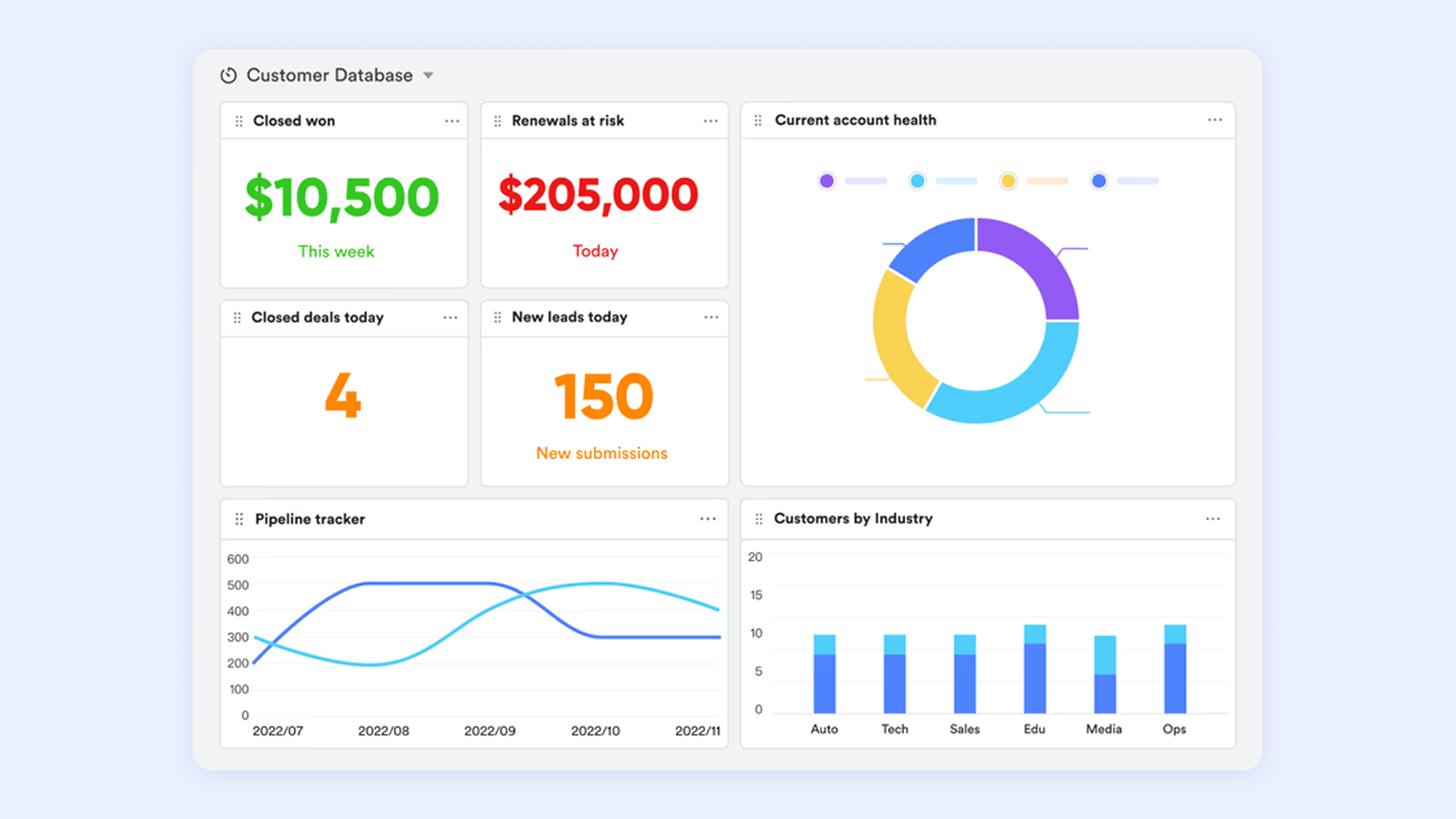
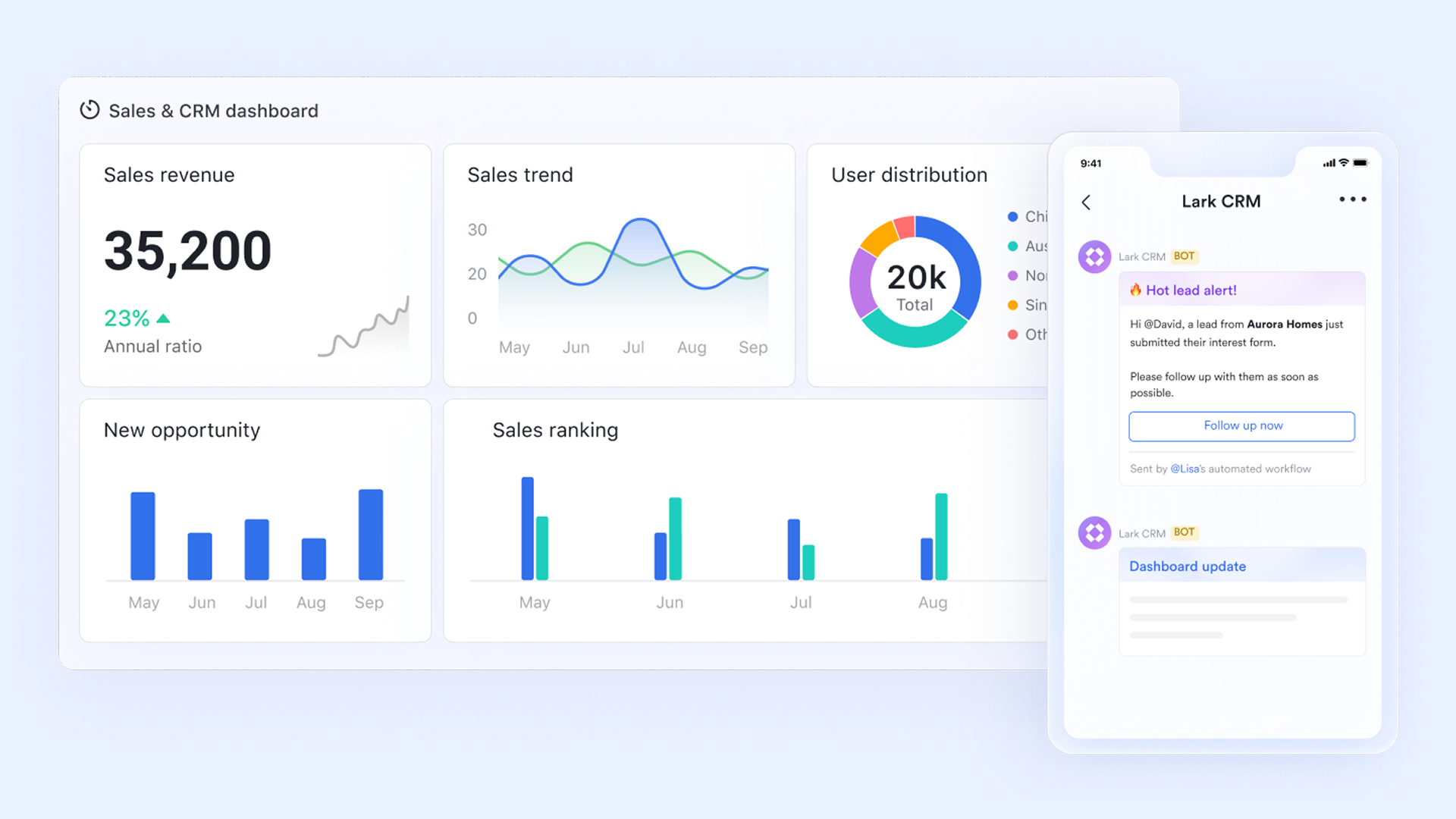
your team needs to make. Give reps a homepage that highlights tasks, meetings, and deals missing next steps. Managers need views of pipeline by stage, forecast confidence, deal velocity, and activity coverage. Executives get a high-level view of trends and risk signals.
Keep the experience simple: use consistent data definitions, let users drill down to raw records, and save common filters. Test with a small pilot group during their daily work—have them stress-test permissions, flows, and reports. Collect feedback in one place, and bundle changes into short release cycles to avoid disrupting users.
7. Migrate, launch, and operate with discipline
Start data migration by cleaning and profiling your source data. Do a small test import to validate counts and relationships—then consider a short parallel run (using both old and new systems) to build trust before full cutover.
Keep launch materials simple: quick-start guides, brief training, and a dedicated support window. After launch, run weekly checks on adoption, data quality, and integration health; document releases; and iterate based on observed patterns. Some teams prototype how to build your own CRM in Excel or conduct a limited build your own CRM in access trial for smaller datasets—useful for learning, but long-term reliability and permissions typically call for a production-grade platform.
Metrics to evaluate your CRM
Measurement turns a CRM into a continuous improvement system. The goal is to confirm adoption, spot friction early, and link daily activity to revenue outcomes. A compact, consistent metric set works best. Reviews on a steady cadence keep action aligned with findings and prevent dashboard sprawl.
- Adoption and data quality: Active usage by role and fill rates for key fields show whether the system fits daily work. Duplicate rates, validation errors, and hygiene task closure reveal the state of data trust. Strong adoption with clean records enables every other metric to mean something.
- : Conversion between stages, average age per stage, and overall cycle time highlight bottlenecks. These signals guide coaching, stage definitions, and checklist updates. Better movement with lower stall rates usually follows clear exit criteria and simple next step prompts.
- : Variance between forecast and actual outcomes, along with coverage against targets, indicates whether leaders can rely on the numbers. Improvements here often come from cleaner stage definitions, consistent probability rules, and timely updates to next steps and risk flags.
- Operational reliability: Automation success rates, integration error trends, and time to recover reflect system health. Logging, alerts, and simple run histories reduce blind spots. Stable operations prevent hidden data drift and ensure that dashboards reflect reality.
- Cost and efficiency: Time to first value, routine admin effort, and spend per seat or per integration track whether investment matches outcomes. Clear views on cost drivers support decisions about where to simplify, where to automate, and where targeted engineering will yield lasting efficiency.
Challenges of building your own custom CRM
Building your own CRM also comes with real risks. The most common problems are not technical features, but unclear ownership and weak adoption.
Watch for these issues:
- Overbuilding too early: Teams add too many fields, views, and automations before validating the core workflow.
- Poor data hygiene: Duplicate contacts, missing owners, and inconsistent deal stages reduce trust in the CRM.
- Unclear permissions: Sensitive customer data should not be visible or editable by everyone.
- Disconnected workflows: If the CRM is separate from daily communication, people may stop updating it.
- No long-term owner: A CRM needs someone responsible for fields, rules, training, and improvements.
To avoid these problems, start with a minimum viable CRM, assign a clear owner, and review usage data regularly. A practical CRM should make customer work easier, not create another system people have to maintain.
Security, permissions, and data ownership
Customer data is one of the most valuable assets in your business, so security and governance should be part of your CRM plan from the beginning.
Before you build your own CRM database, decide:
- Who can create, edit, export, or delete records?
- Which teams should see sensitive customer information?
- How should approvals work for discounts, contracts, or renewals?
- What data must be retained for reporting or compliance?
- How will you prevent duplicate or outdated records?
A good CRM system should make data easier to use without making it harder to control. Role-based permissions, clear ownership, and consistent data rules help teams scale their CRM without losing trust in the information.
How much does it cost to build your own CRM?
The cost of building a CRM depends on the approach you choose.
A spreadsheet can help you start quickly, but it often becomes difficult to manage permissions, automations, reporting, and collaboration. Building a CRM from scratch gives you maximum control, but it also creates long-term responsibility for hosting, security, maintenance, bug fixes, and future development.
A no-code platform like gives teams a more balanced path. You can create CRM workflows, dashboards, and automations quickly, while still keeping enough flexibility to adapt the system over time.
Your CRM doesn't have to break the budget
Build a custom CRM vs. use a customizable CRM
Choosing between building a custom CRM and adopting a configurable one is a pivotal decision for any team. It comes down to a tradeoff: full control and tailored precision, with the burden of ownership, versus speed, reliability, and lower overhead, with guardrails for consistency. Below, we break down each path, how to compare them, and why starting with a configurable base often makes more sense. If you do choose to build from scratch, plan for clear scope, strong governance, and a path from prototype to production.
What building a custom CRM involves
Building a custom CRM centers on control. The team defines the schema, designs views, writes automations, and assembles integrations. This path enables precise process fit and specialized objects, but it also introduces steady ownership duties: monitoring, refactoring, access reviews, and performance tuning. Success depends on tight scope, strong admin discipline, and so the system remains understandable as it evolves, especially if your goal is to build your own CRM platform over time.
What a customizable CRM offers
A customizable CRM provides mature primitives—objects, pipelines, permissions, and reporting—along with visual builders and an ecosystem of integrations. Guardrails for access control, auditing, and uptime are available from day one, which shortens time to value and reduces risk during early scaling. Configuration becomes the main lever, while targeted extensions handle edge cases. This approach favors reliability and predictable maintenance over full freedom.
How to compare paths
The choice turns on process uniqueness, timeline, risk tolerance, and available skills. Highly differentiated workflows or strict data residency needs can justify a deeper build, especially when engineering support is on hand. For many teams, the immediate priority is dependable execution, clean data, and fast iteration on common motions. In that context, a platform with strong guardrails and proven connectors often delivers results faster and with less operational burden.
Why customizable CRM software is often the better starting point
If your team needs complete control over infrastructure, proprietary logic, or deep technical integrations, building a CRM from scratch may be the right choice. But for many business teams, the bigger need is not custom code. It is a CRM that can match how the team already sells, collaborates, approves, reports, and serves customers.
That is where a collaboration platform like can help you build a customizable CRM solution — often more practical than building one from scratch.
With a customizable CRM solution, you can:
- Build your own CRM database without starting from a blank codebase
- Create pipeline views for different teams
- Automate reminders, approvals, and handoffs
- Connect CRM work with meetings, tasks, documents, and chat
- Adjust fields and workflows as your process changes
- Launch faster and reduce long-term maintenance work
In other words, you still create your own CRM system, but you do it with flexible building blocks instead of building and maintaining every component yourself. Teams across industries are already doing exactly that with Lark. Here's what they have to say.
"Lark transformed our business. We were able to replace over 8 different collaboration tools with just one app. The best part is how customizable it is: we've built our own personalized dashboards, workplace structure, and automation tools, to specifically cater to our business needs. Our team management has never been this easy, fast, and productive than now."

Alexei Dela Cuesta
CEO at Surgo Media
Build your perfect CRM with Lark
How Lark helps teams build a no-code CRM
, as a highly customizable collaboration platform, helps you build a by seamlessly integrating multiple functional modules. It's a practical way to build your own CRM on a governed foundation — avoiding fragile prototypes while keeping the flexibility to extend.
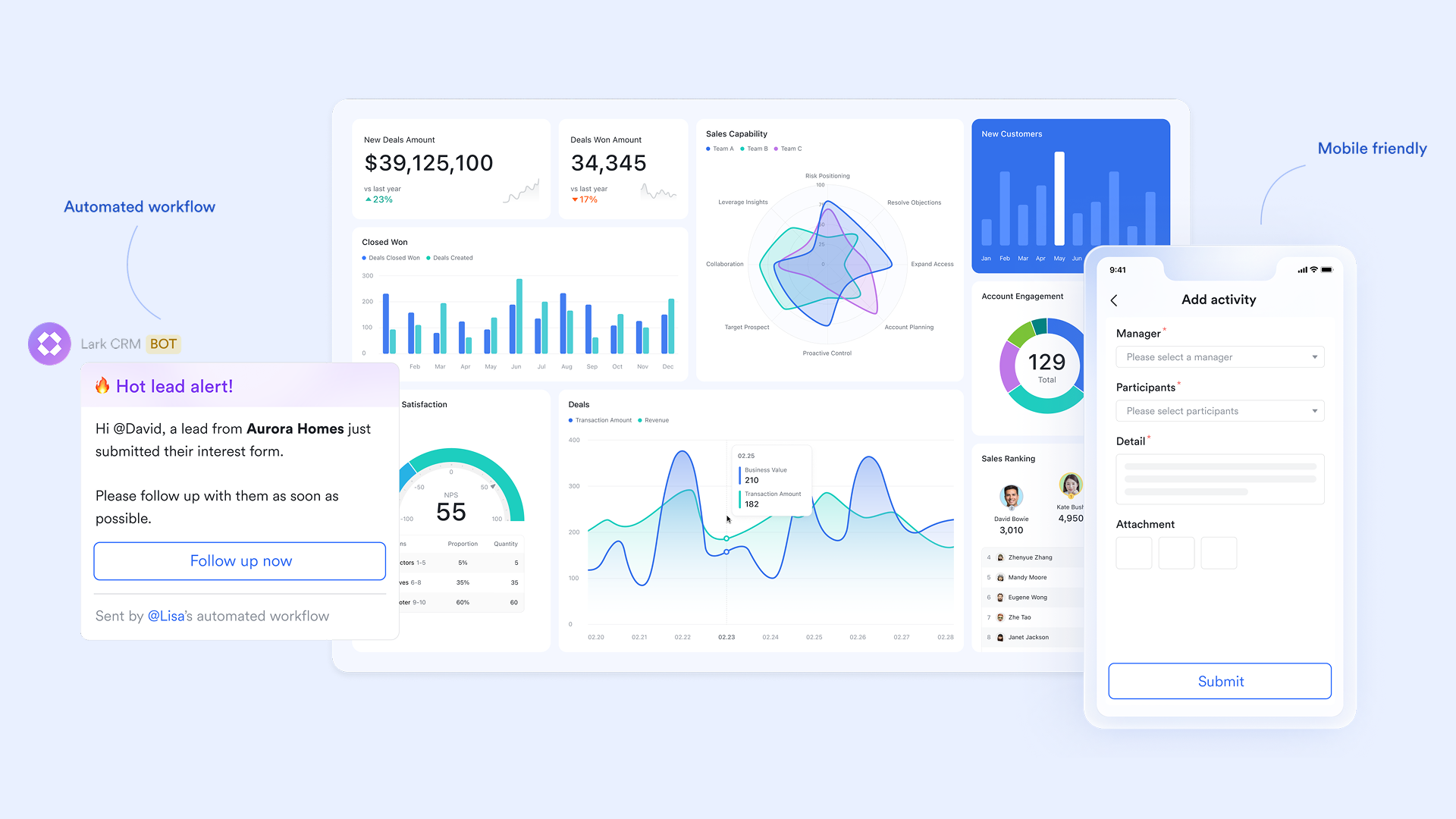
Build a flexible customer data hub
Traditional CRM software often comes with fixed data fields and processes. The core value of Lark Base is that it allows businesses to tailor-make their according to their unique workflows. Without any coding, you can create a database with various tables like "Contacts," "Opportunities," and "Contracts," defining custom fields for each—such as a client's industry, project stage, or personalized tags.
More importantly, supports multiple views for the same set of data. The sales team can use the Kanban view to visually drag and drop opportunity cards, managing the sales pipeline. Management can use the view to track key project milestones and progress. Meanwhile, the service team can use the Calendar view to get an overview of all customer appointments and follow-ups. This flexibility ensures every department accesses and understands customer information in the most efficient way.
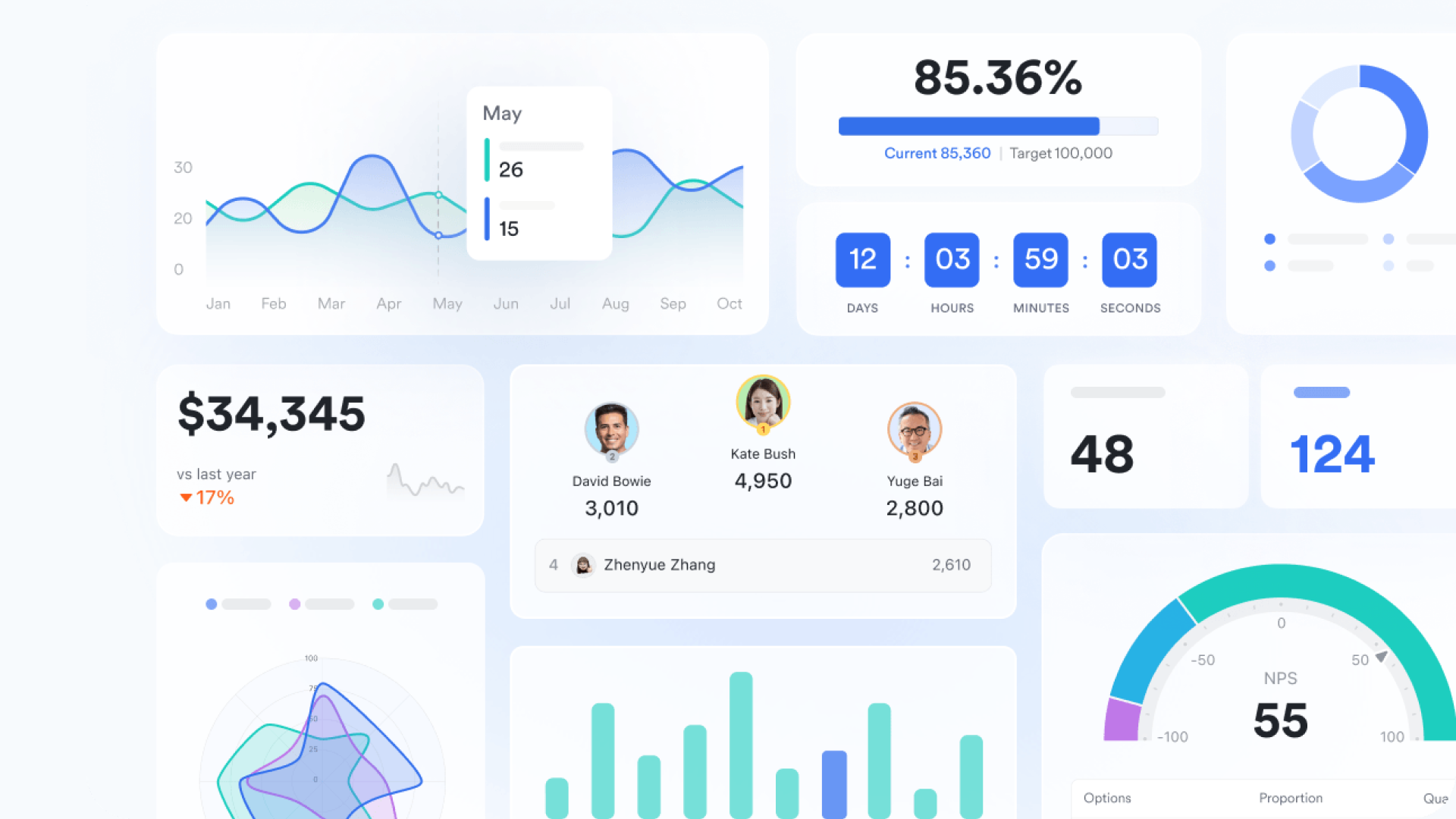
Place customer communication at the heart of workflows
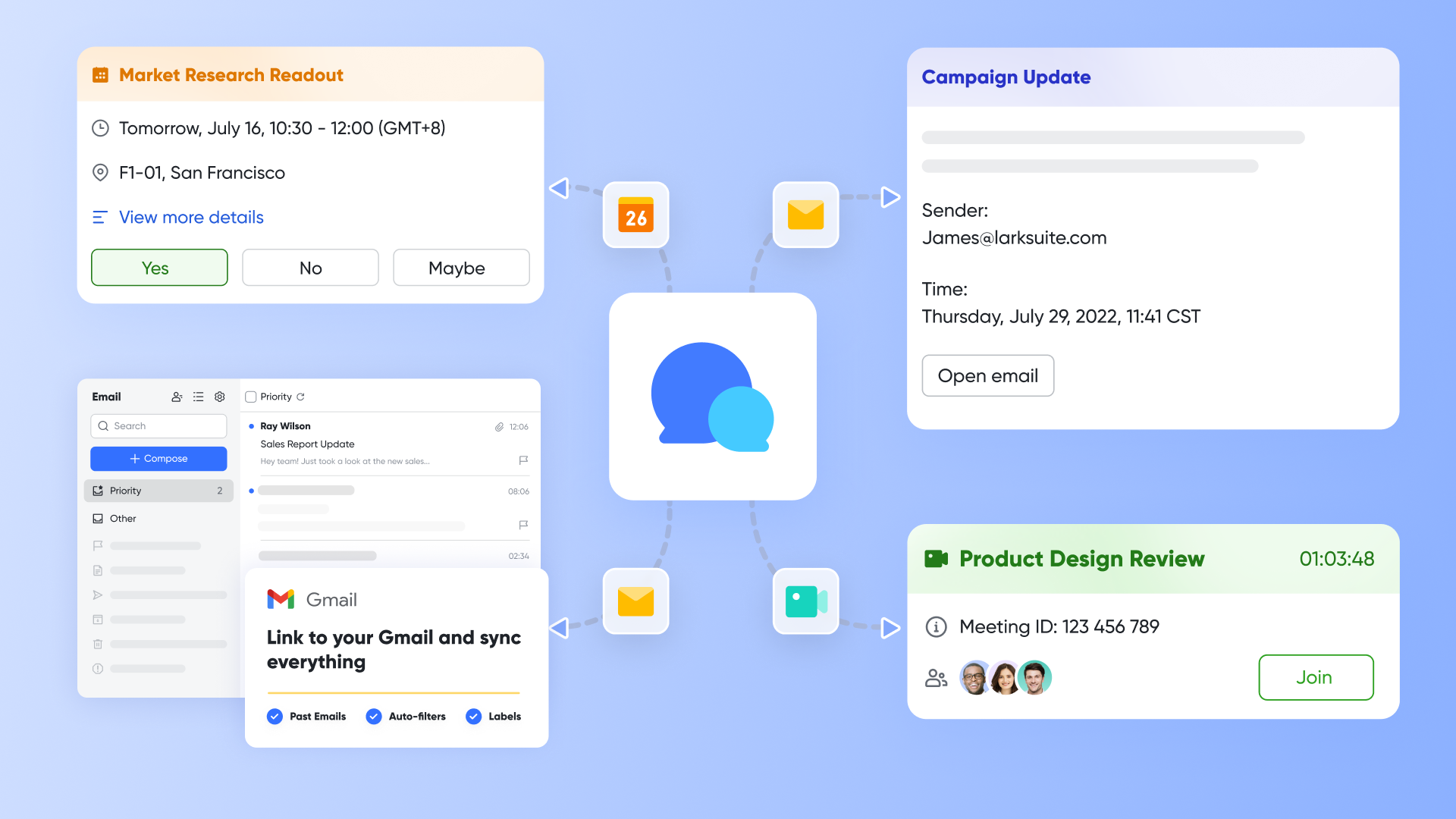
Within the Lark ecosystem, customer communication is no longer an isolated activity. With , you can create dedicated group chats for important customers or projects. Sales, support, and technical staff can discuss matters centrally, with all relevant files and chat histories automatically saved and linked, ensuring information integrity and traceability.
When a conversation needs to become a formal meeting, provides a seamless experience. You can launch high-definition video calls directly from a chat for product demos or solution discussions. After the meeting, automatically generates meeting summaries and action items. These key insights can be added with one click to the corresponding customer record in Base, forming a complete interaction history. Furthermore, serves as a stable communication channel, and important email threads can also be linked to customer profiles, building a unified view of all customer correspondence.
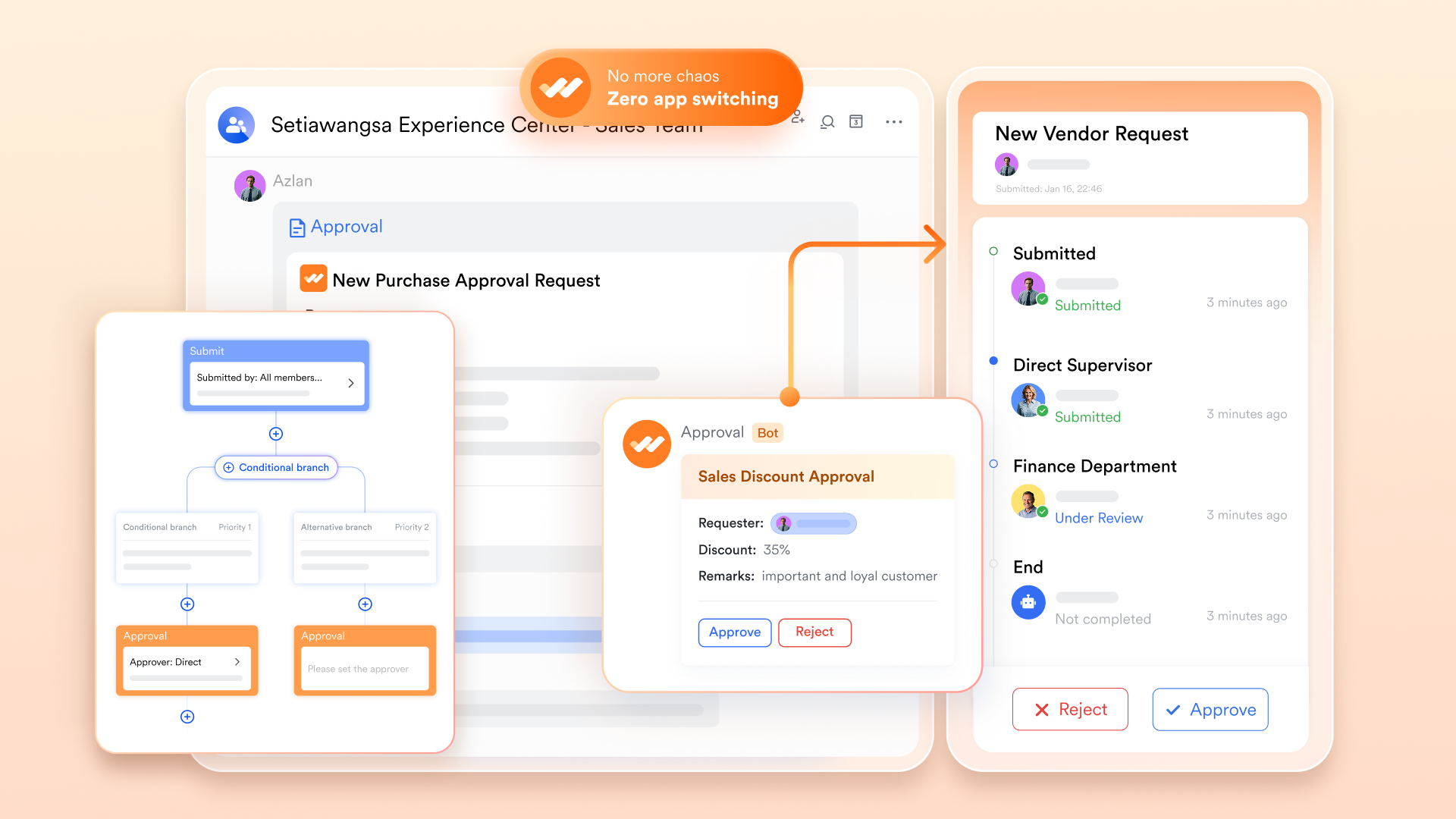
Drive automated sales processes and efficient collaboration
Lark frees teams from repetitive tasks through automation. Using , you can pre-set workflows for sales discounts, contract approvals, and more. When a salesperson submits a request in the CRM, the system automatically routes the approval to the right person based on predefined rules and tracks progress in real-time, significantly speeding up decision-making.
Lark Tasks ensures no step in the sales process is missed. When an opportunity reaches a specific stage, you can set a follow-up task for yourself, and Lark Tasks will send you a reminder before the deadline. Additionally, documents like sales proposals and contract templates created in support real-time collaborative editing by team members. They can be shared with clients via a link, ensuring information consistency and delivery efficiency. 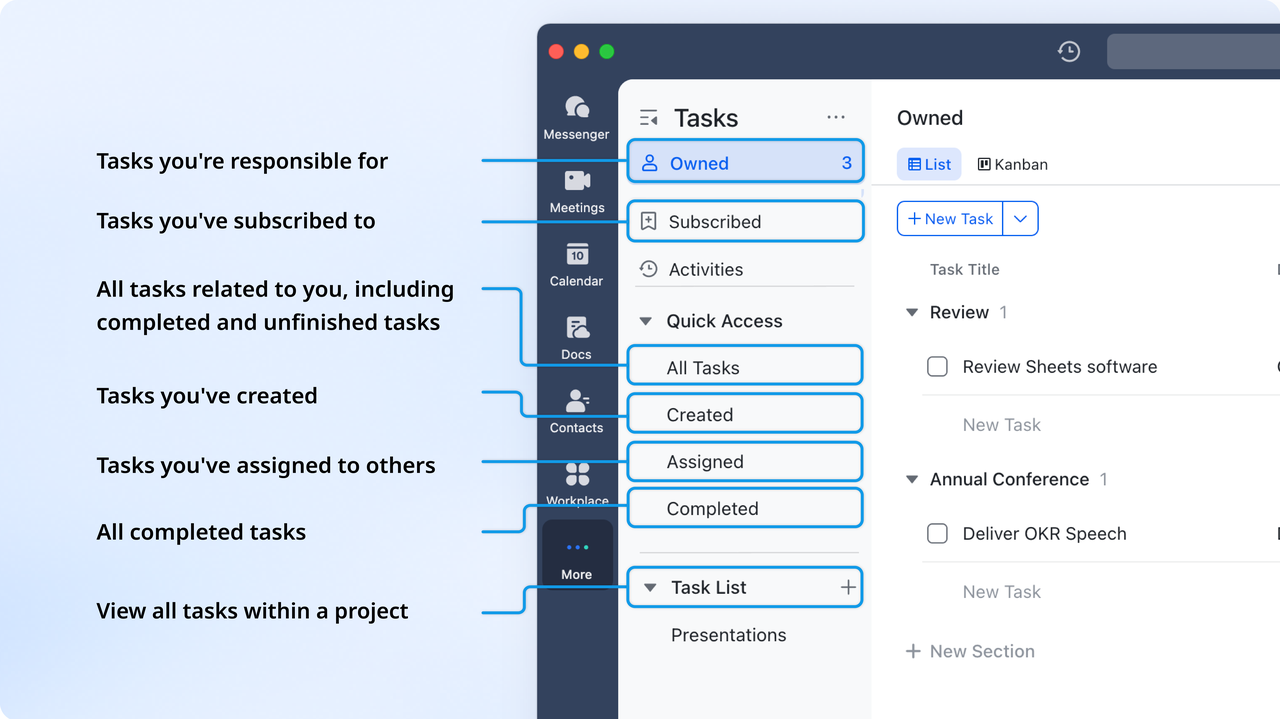
Centralize knowledge assets and align team goals
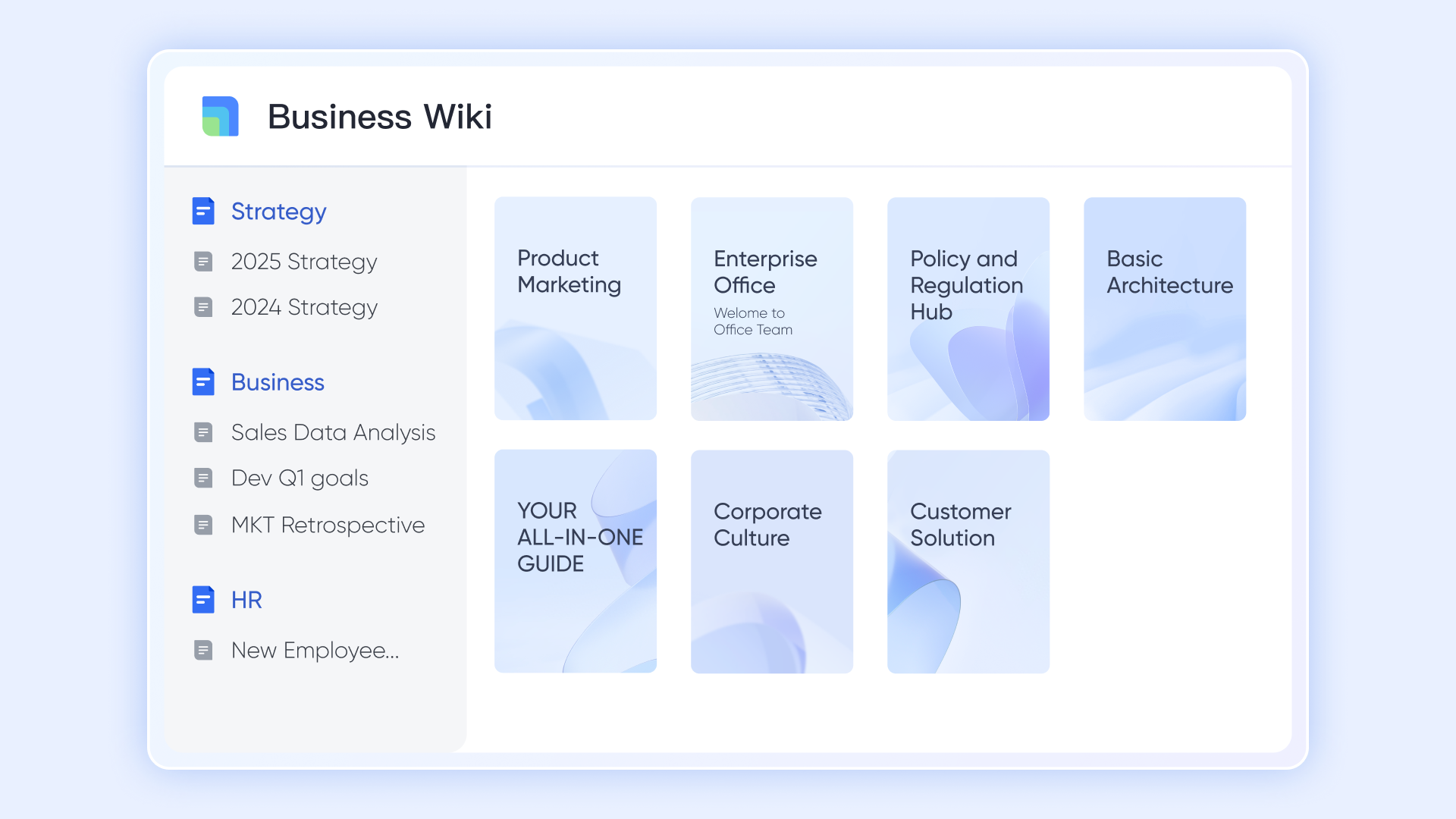
acts as your company's central knowledge base, a place to accumulate product information, standard scripts, competitor analyses, and service manuals. This ensures that everyone, from new hires to cross-departmental colleagues, can quickly access accurate, consistent information when interacting with customers, enhancing service professionalism and response speed.
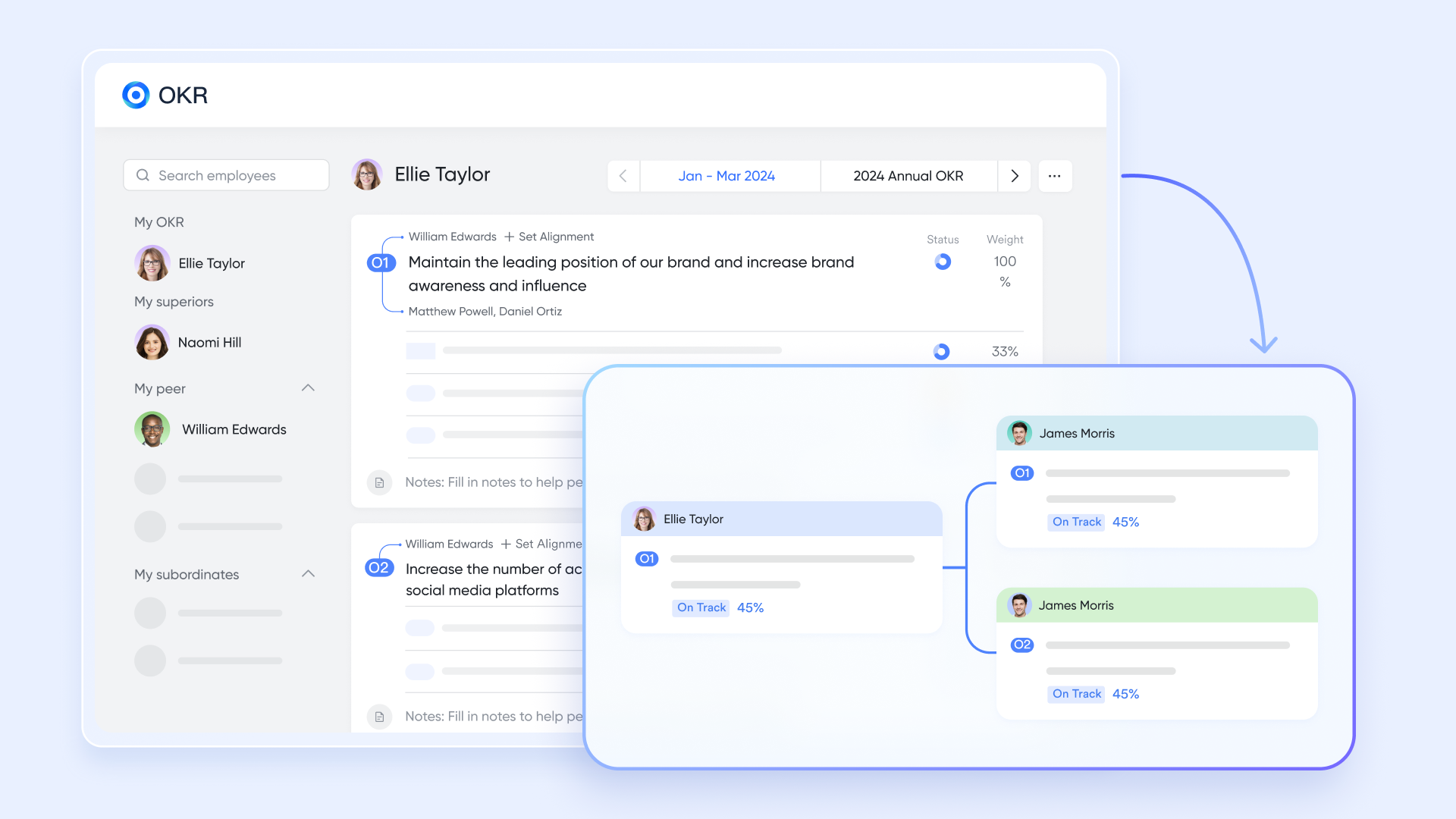
On a strategic level, the feature helps teams align customer relationship management goals with the company's overall direction. For instance, you can set an Objective like "Increase customer satisfaction by 10% this quarter" with Key Results such as "Complete 200 customer check-ins." This makes it clear how each team member's efforts contribute to shared customer success metrics.
:
- Starter plan: that includes 11 powerful tools for up to 20 users. It also comes with 100GB of storage space, 1,000 automation runs, AI translations, and more. No credit card needed.
- Basic plan: (billed annually) for up to 500 users. It includes everything in Starter and unlimited message history, 5TB of storage space, 1,000 automation runs, and more. Some users may need to to purchase this plan.
- Pro plan: (billed annually) for up to 500 users. It includes everything in Basic plus group calling for up to 500 attendees, 15TB of storage space, 50,000 automation runs, and more.
- Enterprise plan: for custom pricing. Supports unlimited users and includes even more automation runs and advanced security, compliance, and management features.
For small teams with simple communication needs

18 months message history
1000 Base automation runs/month
2000 rows per table in Base
Most POPULAR
For companies with comprehensive collaboration and management needs
Unlimited message history
500-participant video meetings
50k Base automation runs/month
20k rows per table in Base
For large companies with advanced security and organizational management needs
Get a personalized demo and pricing
Unlimited message history
500-participant video meetings
15 TB storage + 30 GB storage/user
500k Base automation runs/month
50k Base automation runs/month
Most POPULAR
For companies with comprehensive collaboration and management needs
Unlimited message history
500-participant video meetings
50k Base automation runs/month
20k rows per table in Base
Conclusion
Constructing a custom CRM represents a fundamental shift from adapting to outdated software to designing a system that actively supports business growth. transforms this vision into practical reality by integrating powerful tools like Base, Messenger, and Calendar into a single, adaptable workspace. This approach eliminates common friction points between data, communication, and execution—creating a CRM that evolves alongside your business. Experience how Lark's customizable platform can transform your customer management—explore our software today to begin building your ideal CRM solution.
Begin your customizable CRM journey today
FAQs
Can ChatGPT make a CRM?
No, ChatGPT cannot build a full functioning CRM system by itself. However, it can be a powerful assistant in the process. It can help generate code snippets, design database schemas, create user interface mockups, and draft documentation. The actual development and integration still require human oversight and specialized software tools.
What are the 7 C's of CRM?
The 7 C's provide a framework for a successful CRM strategy: Customer (centric data), Culture (company-wide adoption), Process (optimized workflows), Content (relevant communications), Consistency (unified experience), Communication (personalized engagement), and Compliance (adhering to data regulations). This holistic approach ensures the technology serves both business and customer needs effectively.
Can I create my own CRM with Excel?
Yes, you can create a basic CRM using Excel or Google Sheets. It's a low-cost solution for tracking contacts, deals, and activities through customized columns and filters. However, this method lacks automation, robust reporting, and scalability, quickly becoming error-prone and inefficient as your business and team grow.
What are the 4 types of CRM?
The four primary types are Operational (automating sales, marketing, and service processes), Analytical (analyzing customer data for insights), Collaborative (sharing customer information across departments), and Strategic (focusing on long-term customer lifecycle management). Many modern platforms blend these types to provide a comprehensive 360-degree customer view.
How to build a CRM?
To build a CRM, start by defining your customer process, then create a database for leads, contacts, companies, deals, and activities. Next, add pipeline views, permissions, automations, dashboards, and integrations. Many teams now use no-code platforms to build a CRM faster without writing custom software from scratch.
How to make a CRM without coding?
You can make a CRM without coding by using a no-code platform such as Lark. Create tables for customer records, add fields for deal stages and owners, build views for different teams, and use automations to trigger reminders, approvals, and follow-up tasks.
How to build a CRM system?
To build a CRM system, combine a customer database, sales pipeline, activity tracking, workflow automation, reporting dashboards, and access permissions. The system should support your actual sales and customer management process rather than forcing your team into a generic workflow.
How to build a CRM database?
To build a CRM database, list the records your team needs to manage, such as leads, contacts, companies, deals, tasks, and renewals. Then define the fields for each record, connect related tables, set permissions, and create views for sales reps, managers, marketing, and customer success teams.
Is building a CRM from scratch worth it?
Building a CRM from scratch can be worth it for large organizations with unique technical requirements, dedicated engineering resources, and long-term maintenance capacity. For most teams, a customizable no-code CRM platform like Lark is faster, easier to maintain, and more cost-effective.
Can I create CRM workflows in Lark for free?
Teams can start creating lightweight CRM workflows with Lark's free or entry-level tools, depending on their usage needs. As the CRM grows, teams can upgrade for more advanced collaboration, automation, storage, permission, and administration capabilities.
Related reading
































